driving mode VOLKSWAGEN T-ROC 2021 Owner´s Manual
[x] Cancel search | Manufacturer: VOLKSWAGEN, Model Year: 2021, Model line: T-ROC, Model: VOLKSWAGEN T-ROC 2021Pages: 502, PDF Size: 9.42 MB
Page 179 of 502

WARNING
After driving through water, mud, slush etc., the brakes may react slowly and the braking distance
will be increased as the brake discs and pads will be wet, or possibly iced up in winter.
Dry and de-ice the brakes using careful braking manoeuvres. Make sure that you do not endanger
any other road users or violate any legal regulations when doing so.
Avoid abrupt and sudden braking manoeuvres directly after driving through water.
NOTICE
If you drive through water, parts of the vehicle, such as the engine, gearbox, running gear and
vehicle electrics, could sustain severe damage.
Never drive through salt water as salt can cause corrosion. Immediately rinse all components that
have been exposed to salt water with fresh water.
Running in the engine
A new engine has to be run in during the first 1,500 kilometres. This enables all the moving parts to
bed in together. During the first few operating hours, the engine has higher internal friction than it
does later.
Do not depress the accelerator fully.
Do not drive the vehicle at more than 2/3 of the maximum engine speed.
Gradually increase speed and engine speed.
The style of driving during the first 1,500 kilometres will also affect the engine quality. Even after this
time – and especially with a cold engine – drive the vehicle at moderate engine speeds in order to
reduce engine wear and to increase the mileage that the engine can cover.
Do not drive at engine speeds which are too low. Always shift down gear if the engine is not running
smoothly.
New tyres ⇒ Wheels and tyres and brake pads ⇒ Notes on driving must be run in carefully.
If the engine is run in gently, its life will be increased and its oil consumption reduced.
Using the vehicle in other countries and continents
The vehicle is produced at the factory specifically for a certain country and complies with this
country's registration regulations valid at the time of vehicle production.
Page 190 of 502
Start/stop system
Fig. 102 In the upper part of the centre console: button for the start/stop system.
The start/stop system automatically switches the engine off when the vehicle is coming to a stop
and when stationary. When required, the engine restarts automatically.
Switching on the start/stop system
The function is automatically activated every time the ignition is switched on. The instrument cluster
display will show information about the current status.
Further information on start/stop mode can be accessed in the Infotainment system using the
button or function button and the Vehicle, Selection, Vehicle status function buttons. This
information also applies to coasting.
Always switch off the start/stop system manually when driving through water.
Indicator lamps
If the indicator lamp lights up, the start/stop system is available and automatic engine stop is
active.
If the indicator lamp lights up, the start/stop system is not available or the start/stop system has
started the engine automatically ⇒ Conditions for an automatic restart .
The display on the instrument cluster may show the status of the start/stop system.
In addition, start/stop information on the current status of the start/stop system can be displayed as
required in Infotainment systems with a navigation function. Touch the i in the start/stop
information to obtain further information on the status.
Vehicles with a manual gearbox
Disengage the gear and release the clutch pedal when the vehicle is coming to a stop, or when it is
stationary. The engine is stopped.
Depress the clutch pedal to restart the engine.
Important preconditions for automatic engine switch-off
The driver is wearing their seat belt.
The driver door is closed.
Page 192 of 502

The instrument cluster shows the status of the start/stop system each time the button is pressed.
If the start/stop system has switched the engine off, it will start again as soon as the system is
deactivated manually with the button.
Always deactivate the start/stop system manually when driving through water.
Start/stop mode when Adaptive Cruise Control (ACC) is active
The engine will be switched off after the Adaptive Cruise Control (ACC) has brought the vehicle to a
standstill via an active braking intervention ⇒ Adaptive Cruise Control (ACC) .
The engine will be switched off after the Adaptive Cruise Control (ACC) has brought the vehicle to a
standstill via an active braking intervention ⇒ Adaptive Cruise Control (ACC) .
Vehicles with dual clutch gearbox DSG: when adaptive cruise control (ACC) is activated, the
dual clutch gearbox DSG® can switch to coasting mode.
Vehicles with dual clutch gearbox DSG: when adaptive cruise control (ACC) is activated, the
dual clutch gearbox DSG® can switch to coasting mode.
In the following instances, the engine will restart when the Adaptive Cruise Control (ACC) is active:
If the accelerator is depressed.
When the Adaptive Cruise Control (ACC) has resumed speed and distance control.
If the vehicle ahead has moved on.
WARNING
Never switch off the engine or the ignition while the vehicle is in motion. This can lead to a loss of
vehicle control, accidents and serious injuries.
The airbags and belt tensioners will not work if the ignition is switched off.
The brake servo will not work when the engine is switched off. That is why more pressure on the
brake pedal is needed to brake the vehicle when the engine is switched off.
The power steering will not work when the engine is not running. More power is needed to steer the
vehicle when the engine is switched off.
When the ignition is switched off, the steering lock may activate and you will no longer be able to
steer the vehicle.
The start/stop system must be deactivated if work is to be carried out in the engine compartment.
NOTICE
Page 200 of 502
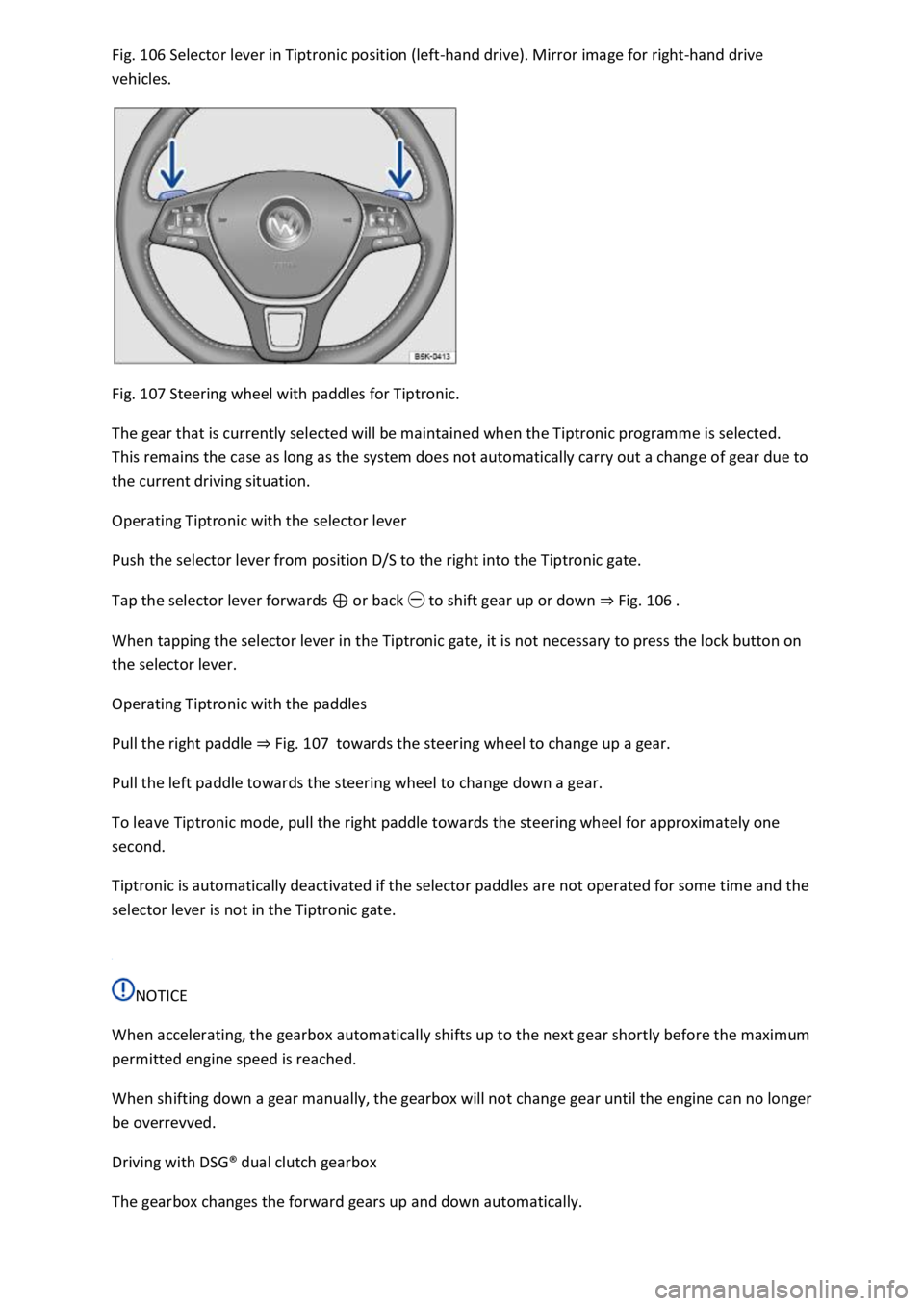
Fig. 106 Selector lever in Tiptronic position (left-hand drive). Mirror image for right-hand drive
vehicles.
Fig. 107 Steering wheel with paddles for Tiptronic.
The gear that is currently selected will be maintained when the Tiptronic programme is selected.
This remains the case as long as the system does not automatically carry out a change of gear due to
the current driving situation.
Operating Tiptronic with the selector lever
Push the selector lever from position D/S to the right into the Tiptronic gate.
Tap the selector lever forwards ⊕ or back ㊀ to shift gear up or down ⇒ Fig. 106 .
When tapping the selector lever in the Tiptronic gate, it is not necessary to press the lock button on
the selector lever.
Operating Tiptronic with the paddles
Pull the right paddle ⇒ Fig. 107 towards the steering wheel to change up a gear.
Pull the left paddle towards the steering wheel to change down a gear.
To leave Tiptronic mode, pull the right paddle towards the steering wheel for approximately one
second.
Tiptronic is automatically deactivated if the selector paddles are not operated for some time and the
selector lever is not in the Tiptronic gate.
NOTICE
When accelerating, the gearbox automatically shifts up to the next gear shortly before the maximum
permitted engine speed is reached.
When shifting down a gear manually, the gearbox will not change gear until the engine can no longer
be overrevved.
Driving with DSG® dual clutch gearbox
The gearbox changes the forward gears up and down automatically.
Page 201 of 502

Driving down hills
The steeper the gradient, the lower the gear you will need. Lower gears increase the braking effect
of the engine. Never allow the vehicle to roll down mountains or hills in the neutral position N.
Reduce your speed.
Push the selector lever from position D/S to the right into the Tiptronic gate ⇒ Changing gear using
Tiptronic .
Tap the selector lever to the rear to change down gear.
OR: shift down a gear using the paddles on the steering wheel ⇒ Changing gear using Tiptronic .
Stopping and pulling away on an uphill gradient
The steeper the uphill gradient, the lower the gear you will need.
If you wish to stop the vehicle or pull away when driving uphill, you should use the Auto Hold
function ⇒ Electronic parking brake .
When you stop the vehicle on an uphill gradient with a selected position, the vehicle must always be
prevented from rolling by depressing the brake pedal or by applying the electronic parking brake. Do
not release the brake pedal or switch off the electronic parking brake until you are about to pull
away.
Coasting with DSG® dual clutch gearbox
In coasting mode, the momentum of the vehicle can be used to save fuel in conjunction with an
anticipatory driving style. The engine no longer brakes the vehicle – the vehicle can roll for a longer
distance. The function is available only in the selector lever position D and at speeds of
approximately 40 – 130 km/h (25 mph – 80 mph).
Initiating coasting
Select the Eco driving profile in the driving profile selection menu ⇒ Driving profile selection and
4MOTION Active Control .
Take your foot off the accelerator. The engine will be disengaged and run at idling speed. The vehicle
rolls without the braking effect of the engine.
If the speed falls below 130 km/h (80 mph).
Depress the accelerator briefly.
Cancelling coasting mode
Depress the brake pedal forcefully.
OR: depress the accelerator or brake pedal briefly.
OR: pull a paddle towards the steering wheel.
OR: press the selector lever to the Tiptronic position.
OR: change the driving profile from Eco.
Page 206 of 502

If the text message and signal tone are repeated approximately every 10 seconds, park the vehicle
safely as soon as possible and switch the engine off. Allow the gearbox to cool down.
Do not drive on until the signal tone stops in order to avoid damage to the gearbox. You should not
pull away or drive the vehicle at very low speeds while the gearbox is overheated.
Downhill speed control
The downhill speed control system helps when braking and travelling downhill in vehicles with a
DSG® dual clutch gearbox ⇒ . The downhill speed control uses the braking power of the engine.
The DSG® dual clutch gearbox selects the best gear depending on the steepness of the gradient and
the current speed. The selector lever must be in position D/S. The downhill speed control is not
active in Tiptronic mode.
As the downhill speed control can shift down only as far as third gear, it may be necessary to activate
the Tiptronic mode when driving down particularly steep inclines. When in Tiptronic mode, select
second or first gear manually in order to make use of the braking effect of the engine and to relieve
the load on the brakes.
The start/stop system is automatically deactivated as long as downhill speed control is active.
Activating downhill speed control automatically:
If the downhill gradient is greater than approximately 6%.
AND: if the selector lever is in position D/S.
In addition, if the cruise control system or Adaptive Cruise Control (ACC) is switched off: if the
vehicle speed is less than approximately 80 km/h (50 mph) or the brake pedal is depressed.
In addition, if the cruise control system or Adaptive Cruise Control (ACC) is active: if the stored speed
is exceeded.
Deactivating downhill speed control automatically:
If the downhill gradient becomes less steep.
OR: if the gearbox shifts up a gear because the engine speed is higher than approximately 4,500 rpm.
Or additionally if the cruise control system or Adaptive Cruise Control (ACC) is active: if the stored
speed can be maintained.
WARNING
The intelligent downhill speed control technology cannot overcome the laws of physics, and
functions only within the limits of the system. Never let the extra convenience afforded by pull-away
assist systems tempt you into taking any safety risks when driving.
Unintentional vehicle movements can cause serious injury.
The downhill speed control cannot replace the full concentration of the driver.
Always adapt your speed and driving style to suit visibility, weather, road and traffic conditions.
Page 211 of 502
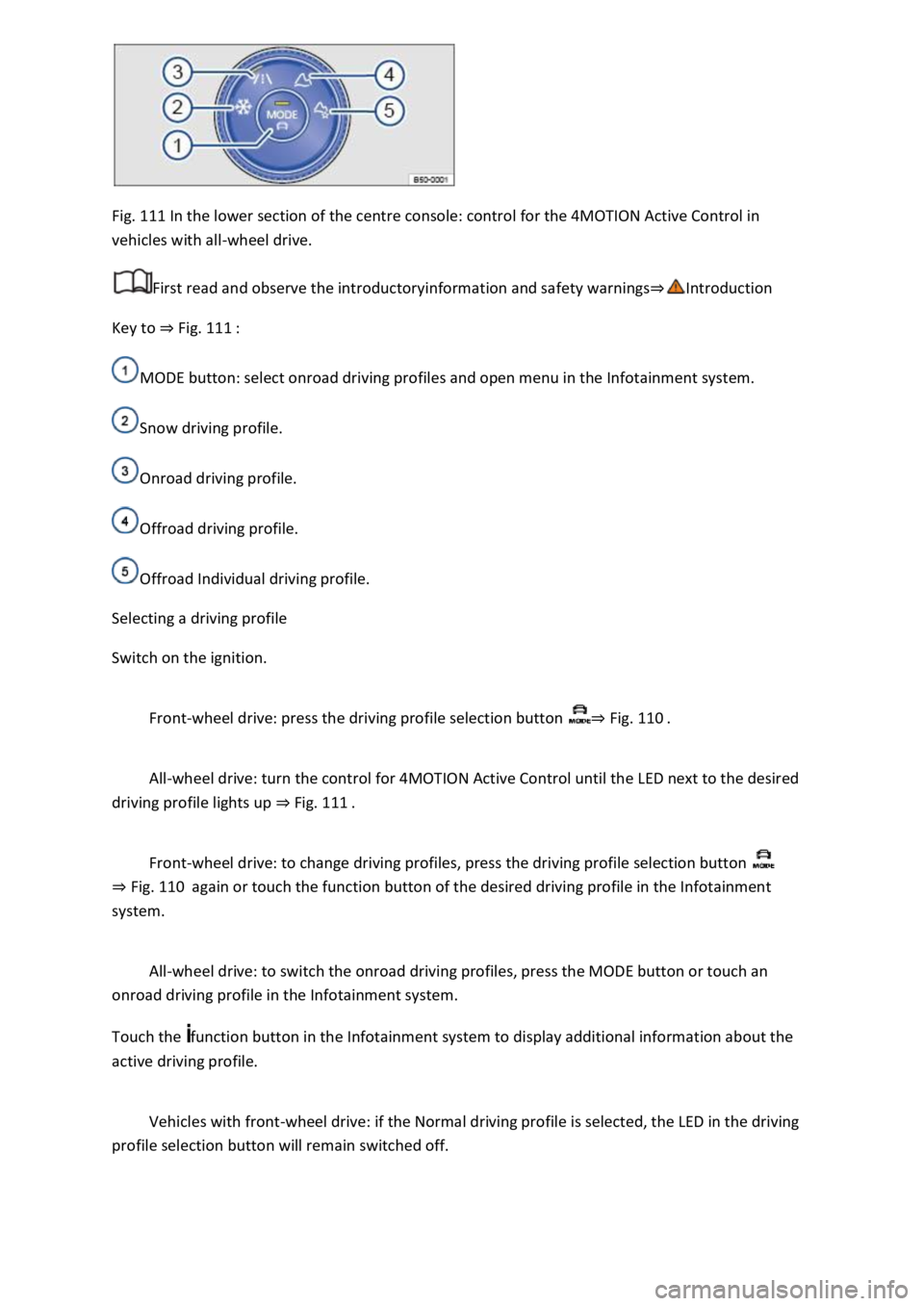
Fig. 111 In the lower section of the centre console: control for the 4MOTION Active Control in
vehicles with all-wheel drive.
First read and observe the introductoryinformation and safety warnings⇒Introduction
Key to ⇒ Fig. 111 :
MODE button: select onroad driving profiles and open menu in the Infotainment system.
Snow driving profile.
Onroad driving profile.
Offroad driving profile.
Offroad Individual driving profile.
Selecting a driving profile
Switch on the ignition.
Front-wheel drive: press the driving profile selection button ⇒ Fig. 110 .
All-wheel drive: turn the control for 4MOTION Active Control until the LED next to the desired
driving profile lights up ⇒ Fig. 111 .
Front-wheel drive: to change driving profiles, press the driving profile selection button
⇒ Fig. 110 again or touch the function button of the desired driving profile in the Infotainment
system.
All-wheel drive: to switch the onroad driving profiles, press the MODE button or touch an
onroad driving profile in the Infotainment system.
Touch the function button in the Infotainment system to display additional information about the
active driving profile.
Vehicles with front-wheel drive: if the Normal driving profile is selected, the LED in the driving
profile selection button will remain switched off.
Page 212 of 502

When the ignition is switched off, the set driving profile and the individual settings will remain
selected.
Vehicles with all-wheel drive: if the Snow, Offroad or Offroad Individual driving profile was
selected last, the onroad driving profile that was last active will be activated after the ignition has
been switched off for a long period.
Vehicles without starter button: as soon as the vehicle key is removed from the ignition lock.
Vehicles with starter button: as soon as the driver door is opened when the ignition is switched
off.
Sport functions: select Sport driving profile again.
OR: tap the selector lever of the DSG® dual clutch gearbox backwards to the position S⇒ DSG® dual
clutch gearbox .
Eco functions: select Eco driving profile again.
Characteristics of the driving profiles
Snow: the Snow driving profile makes it easier to control the throttle on icy or snowy roads. It is not
possible to select the S position in the Snow driving profile.
Onroad: under Onroad, you can choose between Eco, Comfort, Normal, Sport and Individual driving
profiles.
Offroad: the Offroad driving profile makes it easier to control the throttle when driving offroad. The
engine brake is always available and gearshifts can be prevented in critical situations. Hill Start Assist
and Hill Descent Control are active in the Offroad driving profile. It is not possible to select the S
position in the Offroad driving profile. When the driving profile is active, the instrument cluster
displays the symbol .
Offroad Individual: enhanced version of the offroad driving profile that can be adapted to the
driver's needs ⇒ Individually adapting a driving profile . When the driving profile is active, the
instrument cluster displays the symbol .
Eco: switches the vehicle into economical mode and helps the driver to drive the vehicle in a fuel-
efficient manner. Depending on the vehicle equipment level, coasting mode is available in the Eco
driving profile.
Comfort: the driving profile creates a comfort-oriented vehicle setup and is suited to poor roads or
long motorway journeys, for example.
Normal: the driving profile has a balanced setup, e.g. for everyday use.
Sport: this setting gives the driver a sporty driving feeling.
Page 213 of 502

Individual: individual vehicle systems can be adjusted to suit personal requirements ⇒ Individually
adapting a driving profile .
WARNING
The vehicle handling may change as a result of the different driving profiles. Never allow driving
profile selection to tempt you into taking any risks when driving.
Always adapt your speed and driving style to the current visibility, weather and road or traffic
conditions.
In vehicles with a DSG® dual clutch gearbox, the system automatically changes to gear position S
when the Sport driving profile is selected. The system automatically change to gear position D when
the Eco driving profile is selected. Since coasting is active in the Eco driving profile, the gearbox
programme E is additionally displayed on the instrument cluster display.
Individually adapting a driving profile
First read and observe the introductoryinformation and safety warnings⇒Introduction
Selecting the Individual driving profile
Switch on the ignition.
Switch on the Infotainment system.
Press the driving profile selection button or turn the control for 4MOTION Active Control until
the LED next to the Onroad driving profile ⇒ Fig. 111 ③ lights up.
Touch the Adjust function button to open the Individual menu.
Selecting the Offroad Individual driving profile
Switch on the ignition.
Switch on the Infotainment system.
Turn the control for the 4MOTION Active Control until the LED next to the Offroad Individual driving
profile ⇒ Fig. 111 ⑤ lights up.
If the Offroad Individual driving profile is already selected, press the MODE button on the
control ⇒ Fig. 111 .
Touch the Adjust function button to open the Individual menu.
Troubleshooting
First read and observe the introductoryinformation and safety warnings⇒Introduction
Fault in the adaptive chassis control (DCC)
Page 250 of 502

Temporarily switching off the lane keeping system
Switch off the lane keeping system in the following situations:
Very sporty driving.
In poor weather conditions and when driving on poor roads.
In roadworks and before crests in the road.
Driver intervention prompt
In the absence of any steering input, the system prompts the driver with acoustic warnings and a
display on the instrument cluster display to take over active steering.
If the driver does not respond, the system will give another warning by initiating a quick jolt of the
brake before switching to passive mode or activating Emergency Assist (with some equipment
levels).
Steering wheel vibration
The following situations can lead to vibration of the steering wheel:
If the corrective steering intervention is not sufficient to keep the vehicle in its lane.
If the system can no longer detect a lane during a significant steering intervention.
If there is a system fault, the lane keeping system can deactivate itself automatically.
Troubleshooting
First read and observe the introductoryinformation and safety warnings⇒Introduction
No camera visibility, error message, system switches itself off
Clean the windscreen ⇒ Caring for and cleaning the vehicle exterior .
Check whether any damage is visible on the windscreen in the camera's field of view.
The system is not responding as expected
Regularly clean the camera's field of view, and keep it free from snow and ice.
Do not cover the camera's field of view.
Check the area of the windscreen that is in the camera's field of view for damage.
Do not fit any objects to the steering wheel.
Traffic Jam Assist
Traffic Jam Assist helps the driver to keep in lane, and also provides assistance when following other
vehicles in congestion or slow-moving traffic.