light VOLKSWAGEN T-ROC 2021 Owner´s Manual
[x] Cancel search | Manufacturer: VOLKSWAGEN, Model Year: 2021, Model line: T-ROC, Model: VOLKSWAGEN T-ROC 2021Pages: 502, PDF Size: 9.42 MB
Page 1 of 502
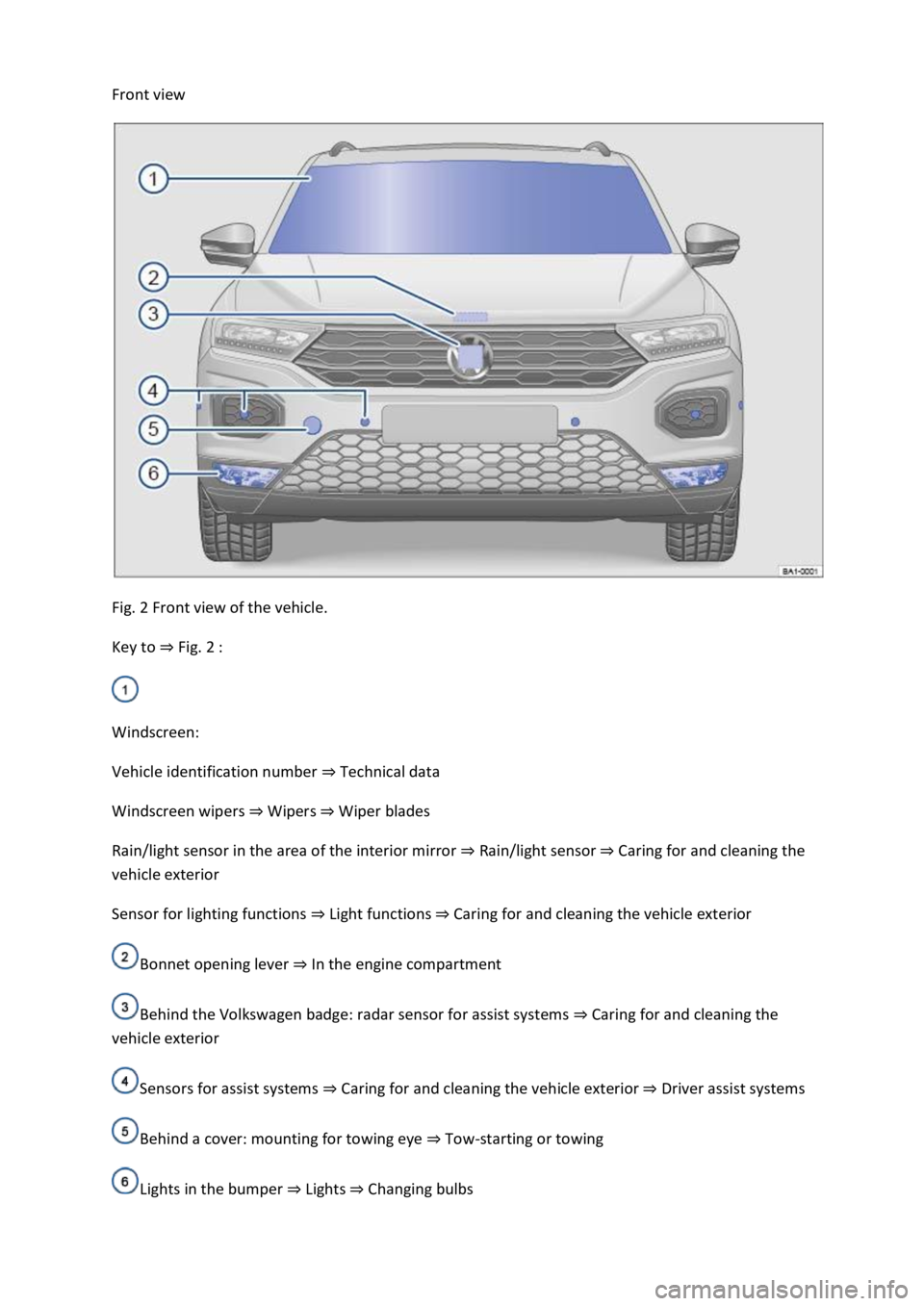
Front view
Fig. 2 Front view of the vehicle.
Key to ⇒ Fig. 2 :
Windscreen:
Vehicle identification number ⇒ Technical data
Windscreen wipers ⇒ Wipers ⇒ Wiper blades
Rain/light sensor in the area of the interior mirror ⇒ Rain/light sensor ⇒ Caring for and cleaning the
vehicle exterior
Sensor for lighting functions ⇒ Light functions ⇒ Caring for and cleaning the vehicle exterior
Bonnet opening lever ⇒ In the engine compartment
Behind the Volkswagen badge: radar sensor for assist systems ⇒ Caring for and cleaning the
vehicle exterior
Sensors for assist systems ⇒ Caring for and cleaning the vehicle exterior ⇒ Driver assist systems
Behind a cover: mounting for towing eye ⇒ Tow-starting or towing
Lights in the bumper ⇒ Lights ⇒ Changing bulbs
Page 2 of 502
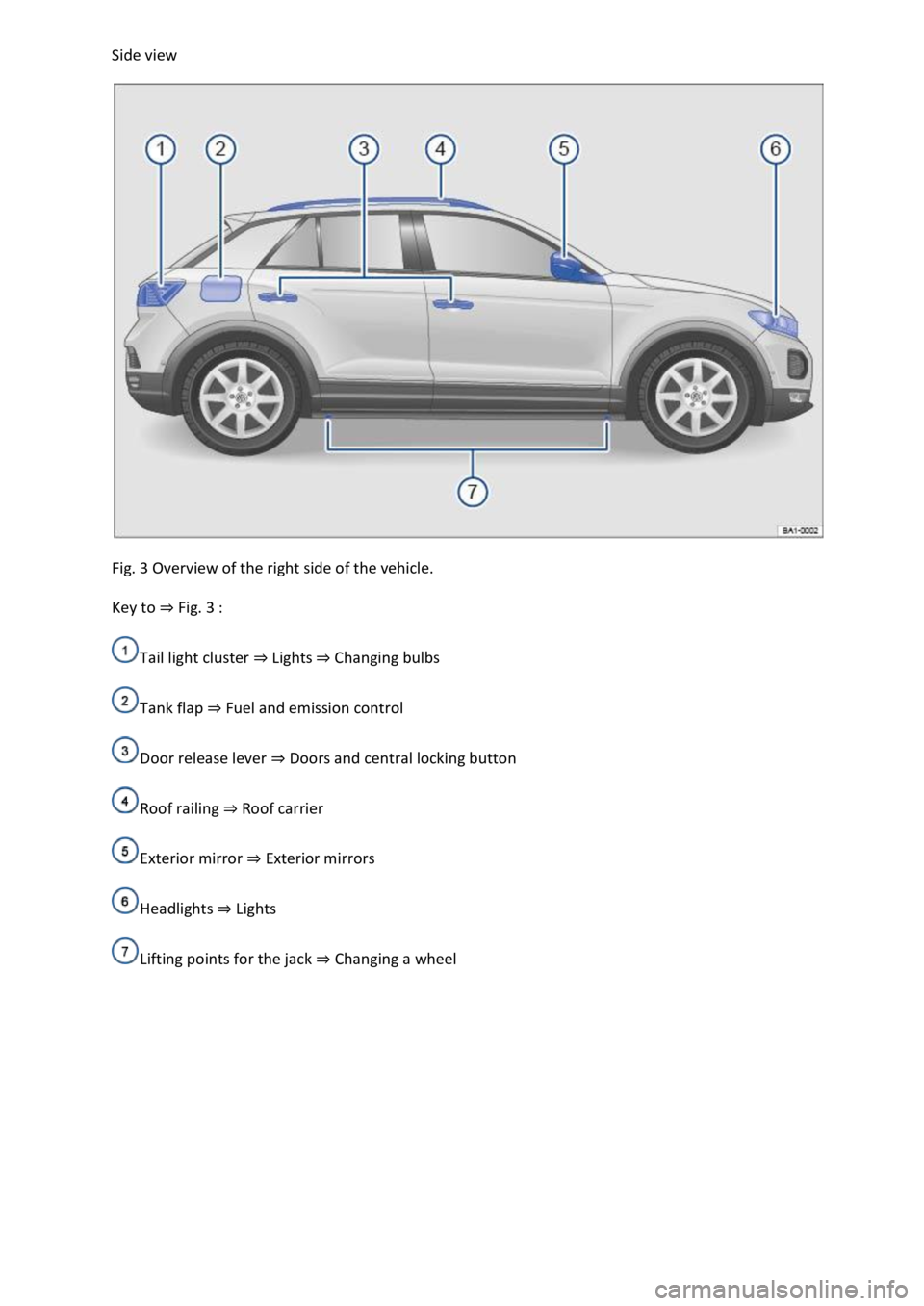
Side view
Fig. 3 Overview of the right side of the vehicle.
Key to ⇒ Fig. 3 :
Tail light cluster ⇒ Lights ⇒ Changing bulbs
Tank flap ⇒ Fuel and emission control
Door release lever ⇒ Doors and central locking button
Roof railing ⇒ Roof carrier
Exterior mirror ⇒ Exterior mirrors
Headlights ⇒ Lights
Lifting points for the jack ⇒ Changing a wheel
Page 3 of 502
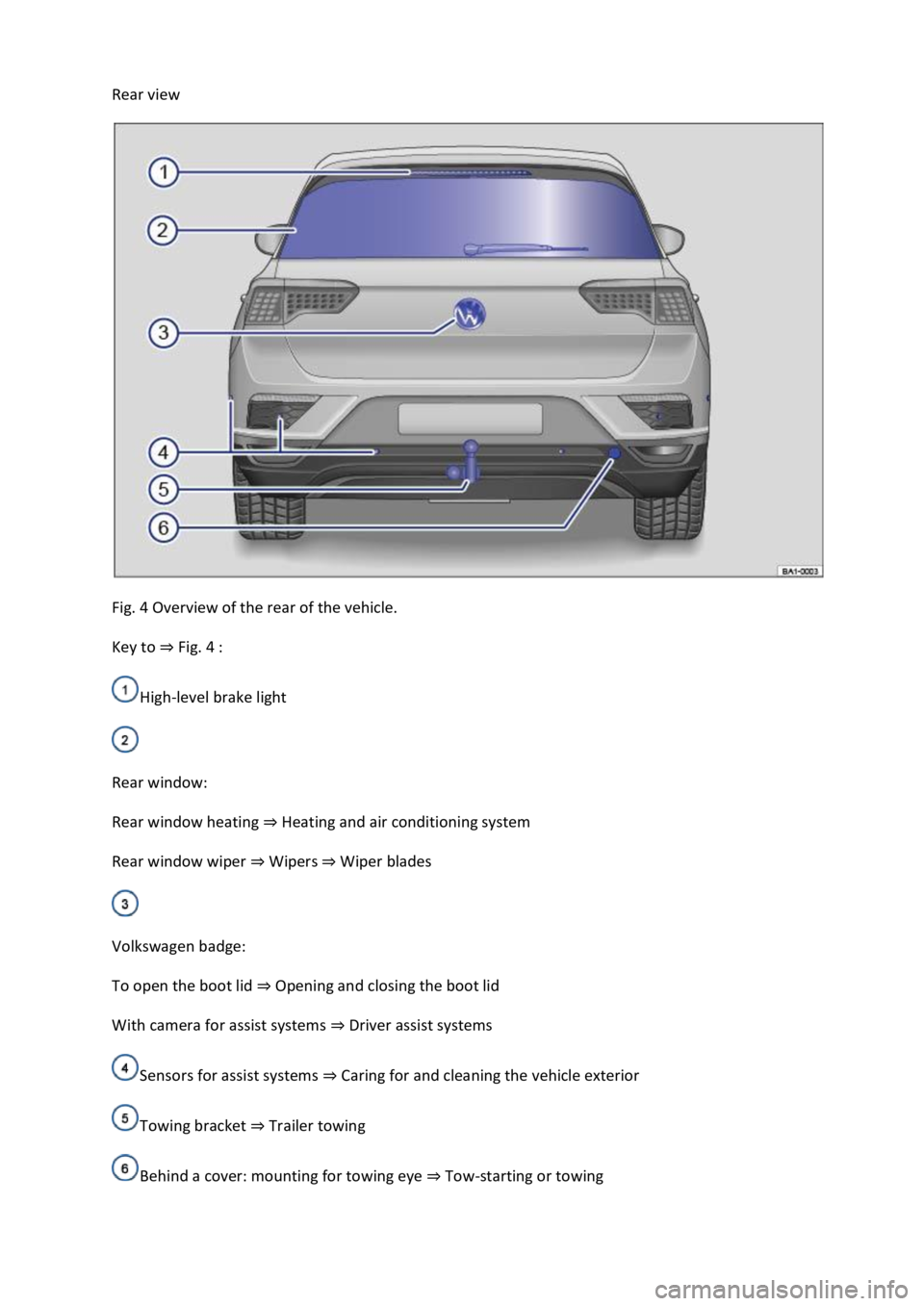
Rear view
Fig. 4 Overview of the rear of the vehicle.
Key to ⇒ Fig. 4 :
High-level brake light
Rear window:
Rear window heating ⇒ Heating and air conditioning system
Rear window wiper ⇒ Wipers ⇒ Wiper blades
Volkswagen badge:
To open the boot lid ⇒ Opening and closing the boot lid
With camera for assist systems ⇒ Driver assist systems
Sensors for assist systems ⇒ Caring for and cleaning the vehicle exterior
Towing bracket ⇒ Trailer towing
Behind a cover: mounting for towing eye ⇒ Tow-starting or towing
Page 6 of 502

Bonnet release lever ⇒ In the engine compartment
Fuse box cover ⇒ Changing fuses
Lever for adjusting the steering column position ⇒ Steering wheel
Light switch ⇒ Vehicle lighting
Turn signal and main beam lever ⇒ Vehicle lighting
With switches and buttons for the driver assist systems ⇒ Button for driver assist systems ⇒ Driver
assist systems
Vents ⇒ Heating and air conditioning system
Instrument cluster ⇒ Instrument cluster
With warning and indicator lamps ⇒ Symbols in instrument cluster
Lever for wipers and washers ⇒ Wipers
With buttons for operating the menus ⇒ Instrument cluster
Controls on the multifunction steering wheel:
Operating driver assist systems ⇒ Operating using the multifunction steering wheel ⇒ Driver assist
systems
Audio, navigation
Opening the telephone menu or accepting telephone calls
Volume adjustment
Activating voice control (no function in some models)
Horn
Location of the driver front airbag ⇒ Airbag system
Ignition lock ⇒ Starting and stopping the engine
Pedals ⇒ Pedals
Page 8 of 502

Hazard warning lights ⇒ In an emergency
Indicator lamp for the front passenger front airbag switch-off function ⇒ Airbag system
Driver assist systems ⇒ Driver assist systems
Controls for the air conditioning system, heating and fresh air system ⇒ Heating, ventilating,
cooling
Controls for the air conditioning system, heating and fresh air system ⇒ Heating, ventilating,
cooling
Key to ⇒ Fig. 9 :
Lever:
DSG® dual clutch gearbox ⇒ DSG® dual clutch gearbox
Manual gearbox ⇒ Manual gearbox: selecting a gear
Multimedia connections ⇒BookletInfotainment system,.
Cigarette lighter or 12-volt socket ⇒ Ashtray and cigarette lighter ⇒ Electrical sockets
Control for the 4MOTION Active Control ⇒ Driving profile selection and 4MOTION Active
Control
Stowage compartment with drink holder ⇒ Stowage areas
Buttons:
Electronic parking brake ⇒ Electronic parking brake
Auto Hold function ⇒ Auto Hold function
Page 9 of 502
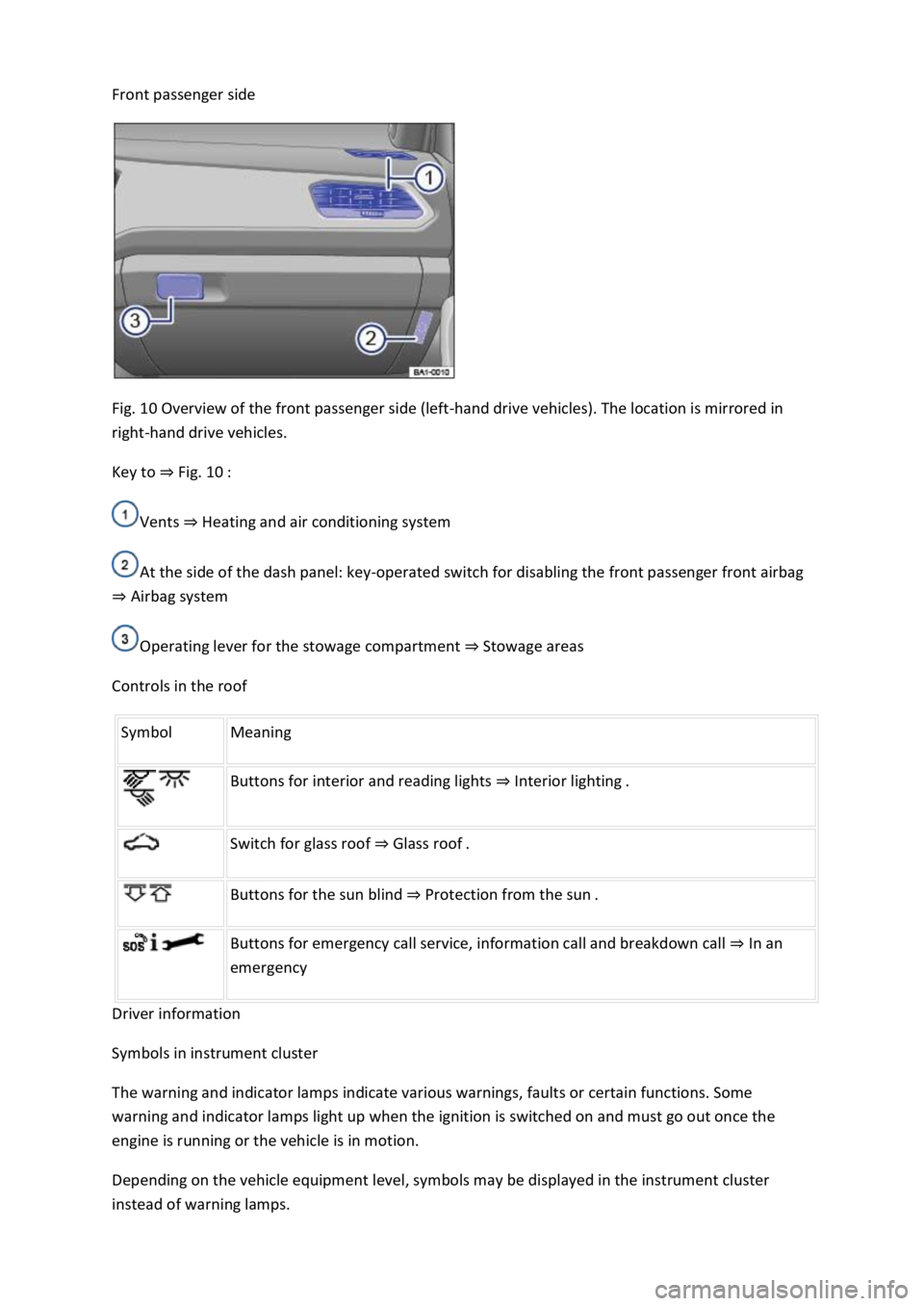
Front passenger side
Fig. 10 Overview of the front passenger side (left-hand drive vehicles). The location is mirrored in
right-hand drive vehicles.
Key to ⇒ Fig. 10 :
Vents ⇒ Heating and air conditioning system
At the side of the dash panel: key-operated switch for disabling the front passenger front airbag
⇒ Airbag system
Operating lever for the stowage compartment ⇒ Stowage areas
Controls in the roof
Symbol Meaning
Buttons for interior and reading lights ⇒ Interior lighting .
Switch for glass roof ⇒ Glass roof .
Buttons for the sun blind ⇒ Protection from the sun .
Buttons for emergency call service, information call and breakdown call ⇒ In an
emergency
Driver information
Symbols in instrument cluster
The warning and indicator lamps indicate various warnings, faults or certain functions. Some
warning and indicator lamps light up when the ignition is switched on and must go out once the
engine is running or the vehicle is in motion.
Depending on the vehicle equipment level, symbols may be displayed in the instrument cluster
instead of warning lamps.
Page 10 of 502
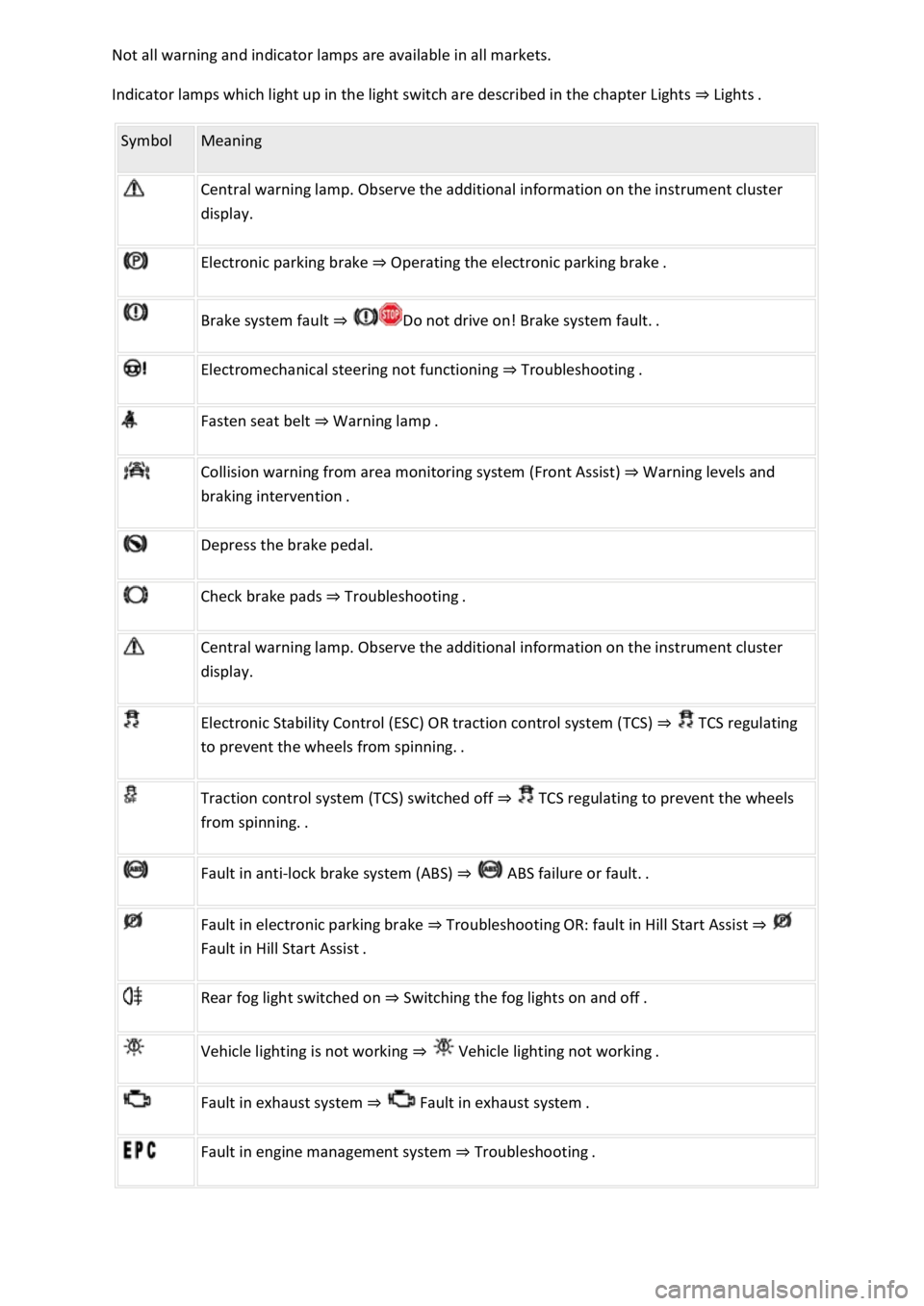
Not all warning and indicator lamps are available in all markets.
Indicator lamps which light up in the light switch are described in the chapter Lights ⇒ Lights .
Symbol Meaning
Central warning lamp. Observe the additional information on the instrument cluster
display.
Electronic parking brake ⇒ Operating the electronic parking brake .
Brake system fault ⇒ Do not drive on! Brake system fault. .
Electromechanical steering not functioning ⇒ Troubleshooting .
Fasten seat belt ⇒ Warning lamp .
Collision warning from area monitoring system (Front Assist) ⇒ Warning levels and
braking intervention .
Depress the brake pedal.
Check brake pads ⇒ Troubleshooting .
Central warning lamp. Observe the additional information on the instrument cluster
display.
Electronic Stability Control (ESC) OR traction control system (TCS) ⇒ TCS regulating
to prevent the wheels from spinning. .
Traction control system (TCS) switched off ⇒ TCS regulating to prevent the wheels
from spinning. .
Fault in anti-lock brake system (ABS) ⇒ ABS failure or fault. .
Fault in electronic parking brake ⇒ Troubleshooting OR: fault in Hill Start Assist ⇒
Fault in Hill Start Assist .
Rear fog light switched on ⇒ Switching the fog lights on and off .
Vehicle lighting is not working ⇒ Vehicle lighting not working .
Fault in exhaust system ⇒ Fault in exhaust system .
Fault in engine management system ⇒ Troubleshooting .
Page 11 of 502
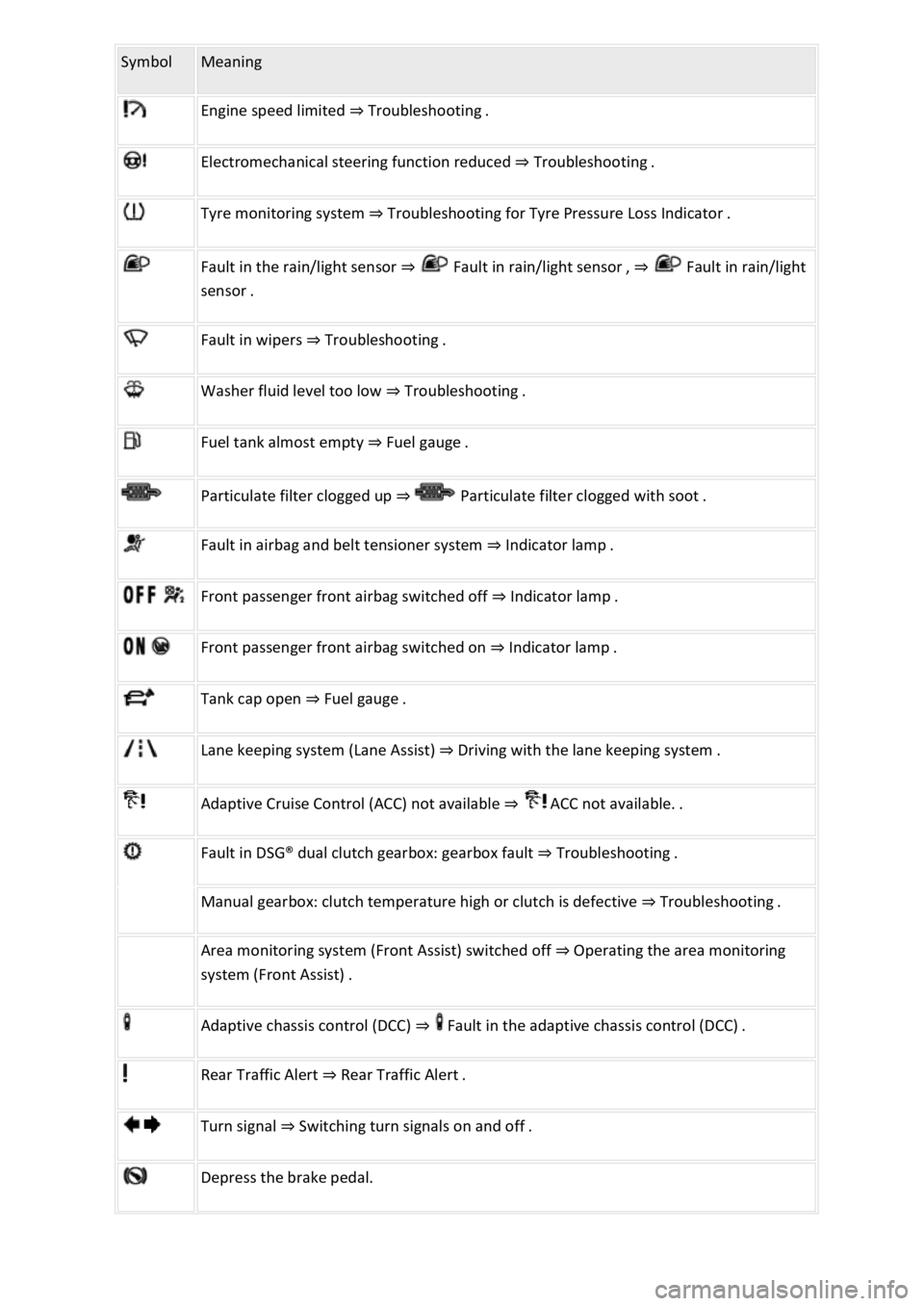
Symbol Meaning
Engine speed limited ⇒ Troubleshooting .
Electromechanical steering function reduced ⇒ Troubleshooting .
Tyre monitoring system ⇒ Troubleshooting for Tyre Pressure Loss Indicator .
Fault in the rain/light sensor ⇒ Fault in rain/light sensor , ⇒ Fault in rain/light
sensor .
Fault in wipers ⇒ Troubleshooting .
Washer fluid level too low ⇒ Troubleshooting .
Fuel tank almost empty ⇒ Fuel gauge .
Particulate filter clogged up ⇒ Particulate filter clogged with soot .
Fault in airbag and belt tensioner system ⇒ Indicator lamp .
Front passenger front airbag switched off ⇒ Indicator lamp .
Front passenger front airbag switched on ⇒ Indicator lamp .
Tank cap open ⇒ Fuel gauge .
Lane keeping system (Lane Assist) ⇒ Driving with the lane keeping system .
Adaptive Cruise Control (ACC) not available ⇒ ACC not available. .
Fault in DSG® dual clutch gearbox: gearbox fault ⇒ Troubleshooting .
Manual gearbox: clutch temperature high or clutch is defective ⇒ Troubleshooting .
Area monitoring system (Front Assist) switched off ⇒ Operating the area monitoring
system (Front Assist) .
Adaptive chassis control (DCC) ⇒ Fault in the adaptive chassis control (DCC) .
Rear Traffic Alert ⇒ Rear Traffic Alert .
Turn signal ⇒ Switching turn signals on and off .
Depress the brake pedal.
Page 12 of 502
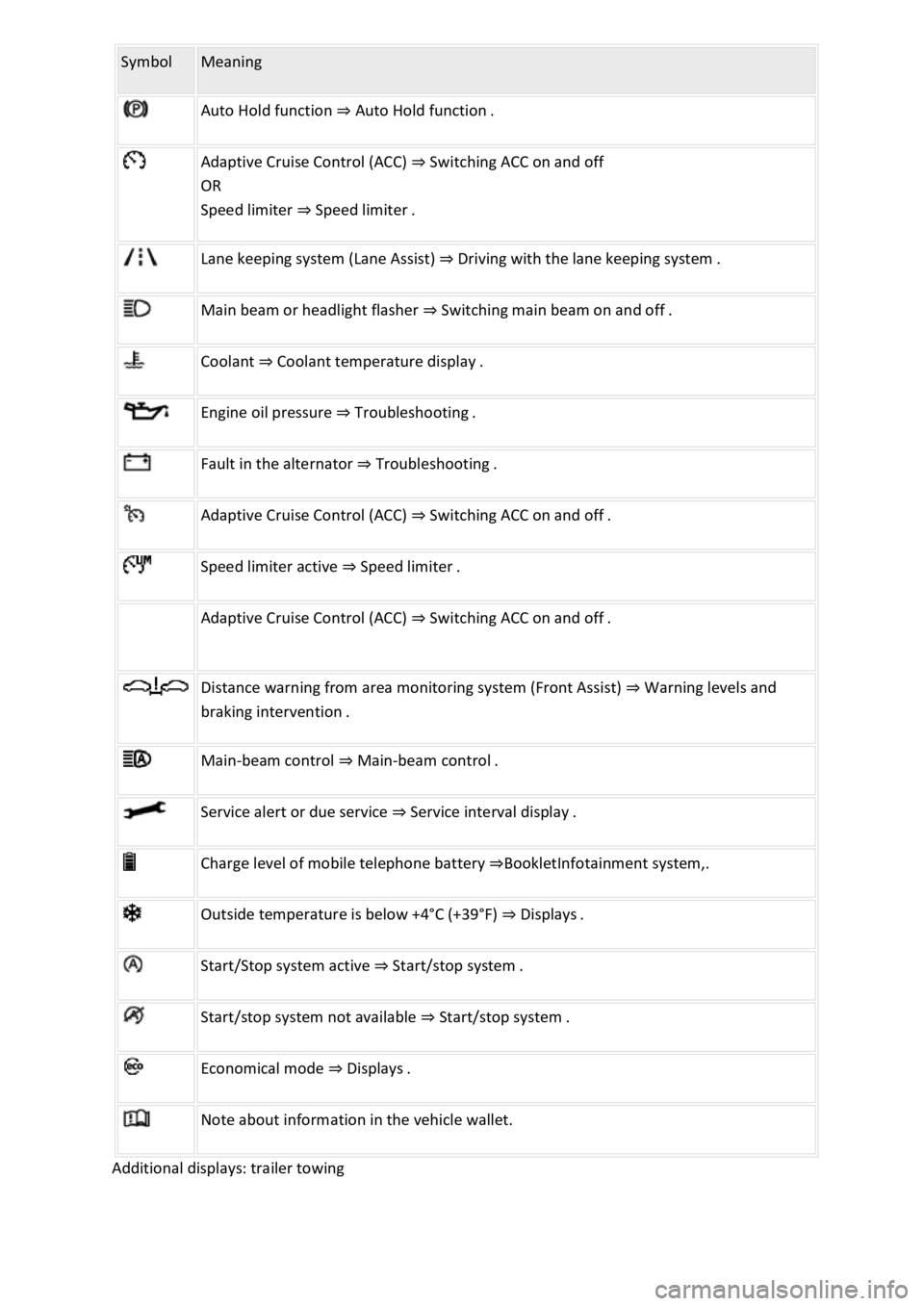
Symbol Meaning
Auto Hold function ⇒ Auto Hold function .
Adaptive Cruise Control (ACC) ⇒ Switching ACC on and off
OR
Speed limiter ⇒ Speed limiter .
Lane keeping system (Lane Assist) ⇒ Driving with the lane keeping system .
Main beam or headlight flasher ⇒ Switching main beam on and off .
Coolant ⇒ Coolant temperature display .
Engine oil pressure ⇒ Troubleshooting .
Fault in the alternator ⇒ Troubleshooting .
Adaptive Cruise Control (ACC) ⇒ Switching ACC on and off .
Speed limiter active ⇒ Speed limiter .
Adaptive Cruise Control (ACC) ⇒ Switching ACC on and off .
Distance warning from area monitoring system (Front Assist) ⇒ Warning levels and
braking intervention .
Main-beam control ⇒ Main-beam control .
Service alert or due service ⇒ Service interval display .
Charge level of mobile telephone battery ⇒BookletInfotainment system,.
Outside temperature is below +4°C (+39°F) ⇒ Displays .
Start/Stop system active ⇒ Start/stop system .
Start/stop system not available ⇒ Start/stop system .
Economical mode ⇒ Displays .
Note about information in the vehicle wallet.
Additional displays: trailer towing
Page 19 of 502

Personalisation: welcome and user selection ⇒ Personalisation .
Open doors, bonnet and boot lid
The instrument cluster display indicates if any doors, the engine compartment or boot lid are open
once the vehicle has been unlocked, and while the vehicle is in motion. In some cases, a signal tone
is also given. Different instrument cluster designs may have different displays.
Selector lever positions (DSG® dual clutch gearbox)
The gear selected is displayed on the side of the selector lever and on the display in the instrument
cluster. The instrument cluster display may show which gear has been selected if the selector lever is
in D/S position or in Tiptronic mode ⇒ DSG® dual clutch gearbox .
Outside temperature display
If the outside temperature falls below approximately +4°C (+39°F), the temperature display also
shows a snowflake symbol . This symbol remains lit up until the outside temperature rises
above +6°C (+43°F) ⇒ .
Heat radiated from the engine may cause the temperature display to show a slightly higher value
than the actual outside temperature if the vehicle is stationary, the auxiliary heater ⇒ Auxiliary
heater and ventilation is switched on or the vehicle is travelling at a very low vehicle speed.
The measured range is -45°C (-49°F) to +76°C (+169°F).
Gear-change indicator
While the vehicle is in motion, the instrument cluster may show which gear should be selected to
reduce fuel consumption ⇒ Gear-change indicator .
Mileage displays
The odometer registers the total distance travelled by the vehicle.
The trip recorder (trip) shows the distance travelled since the trip recorder was last reset.
Vehicles with analogue instrument cluster: press the button in the instrument cluster
briefly to reset the trip recorder to 0 ⇒ Analogue instrument cluster .
Vehicles with digital instrument cluster: reset the trip recorder via the Infotainment system or
via the multifunction display ⇒ Infotainment system controls and displays or ⇒ Driving data display
(multifunction display) .
Speed warning for winter tyres
A display in the instrument cluster indicates when the set maximum speed has been exceeded
⇒ Instrument cluster menus .
Speed warning settings can be made in the vehicle settings in the Infotainment system ⇒ Vehicle
settings menu .
Compass display