Infotainment system VOLKSWAGEN T-ROC 2022 Workshop Manual
[x] Cancel search | Manufacturer: VOLKSWAGEN, Model Year: 2022, Model line: T-ROC, Model: VOLKSWAGEN T-ROC 2022Pages: 502, PDF Size: 8.58 MB
Page 180 of 502

instructions should be followed Safety
If the vehicle is going to be sold in another country or used in another country for an extended
period, the legal requirements applicable in that country must be observed.
In some cases, certain equipment will have to be fitted or removed and functions deactivated. The
scope of services and service types could also be affected. This is particularly important if the vehicle
is driven in another climate region for a long period of time.
Because different frequency bands are used in different countries, the factory-fitted Infotainment
system may not work in other countries.
NOTICE
Volkswagen is not responsible for any vehicle damage caused by low-quality fuel, inadequate
servicing work or non-availability of Genuine Parts.
Volkswagen cannot be held responsible if the vehicle does not comply with or only partly complies
with the relevant legal requirements in other countries and continents.
Troubleshooting
Unusual braking behaviour
The warning lamp lights up red.
A text message may also be displayed.
The vehicle does not brake in the usual way or the braking distance is longer than normal.
There is a malfunction in the brake system.
Go to the nearest qualified workshop without delay.
Drive at low speed and be prepared for longer braking distances and the need to apply increased
pedal pressure.
Brake pad wear indicator
The indicator lamp lights up yellow.
Front brake pads are worn.
Go to a qualified workshop immediately.
All brake pads should be checked and renewed as necessary.
Page 190 of 502

Fig. 102 In the upper part of the centre console: button for the start/stop system.
The start/stop system automatically switches the engine off when the vehicle is coming to a stop
and when stationary. When required, the engine restarts automatically.
Switching on the start/stop system
The function is automatically activated every time the ignition is switched on. The instrument cluster
display will show information about the current status.
Further information on start/stop mode can be accessed in the Infotainment system using the
button or function button and the Vehicle, Selection, Vehicle status function buttons. This
information also applies to coasting.
Always switch off the start/stop system manually when driving through water.
Indicator lamps
If the indicator lamp lights up, the start/stop system is available and automatic engine stop is
active.
If the indicator lamp lights up, the start/stop system is not available or the start/stop system has
started the engine automatically Conditions for an automatic restart
The display on the instrument cluster may show the status of the start/stop system.
In addition, start/stop information on the current status of the start/stop system can be displayed as
required in Infotainment systems with a navigation function. Touch the i in the start/stop
information to obtain further information on the status.
Vehicles with a manual gearbox
Disengage the gear and release the clutch pedal when the vehicle is coming to a stop, or when it is
stationary. The engine is stopped.
Depress the clutch pedal to restart the engine.
Important preconditions for automatic engine switch-off
The driver is wearing their seat belt.
The driver door is closed.
Page 211 of 502
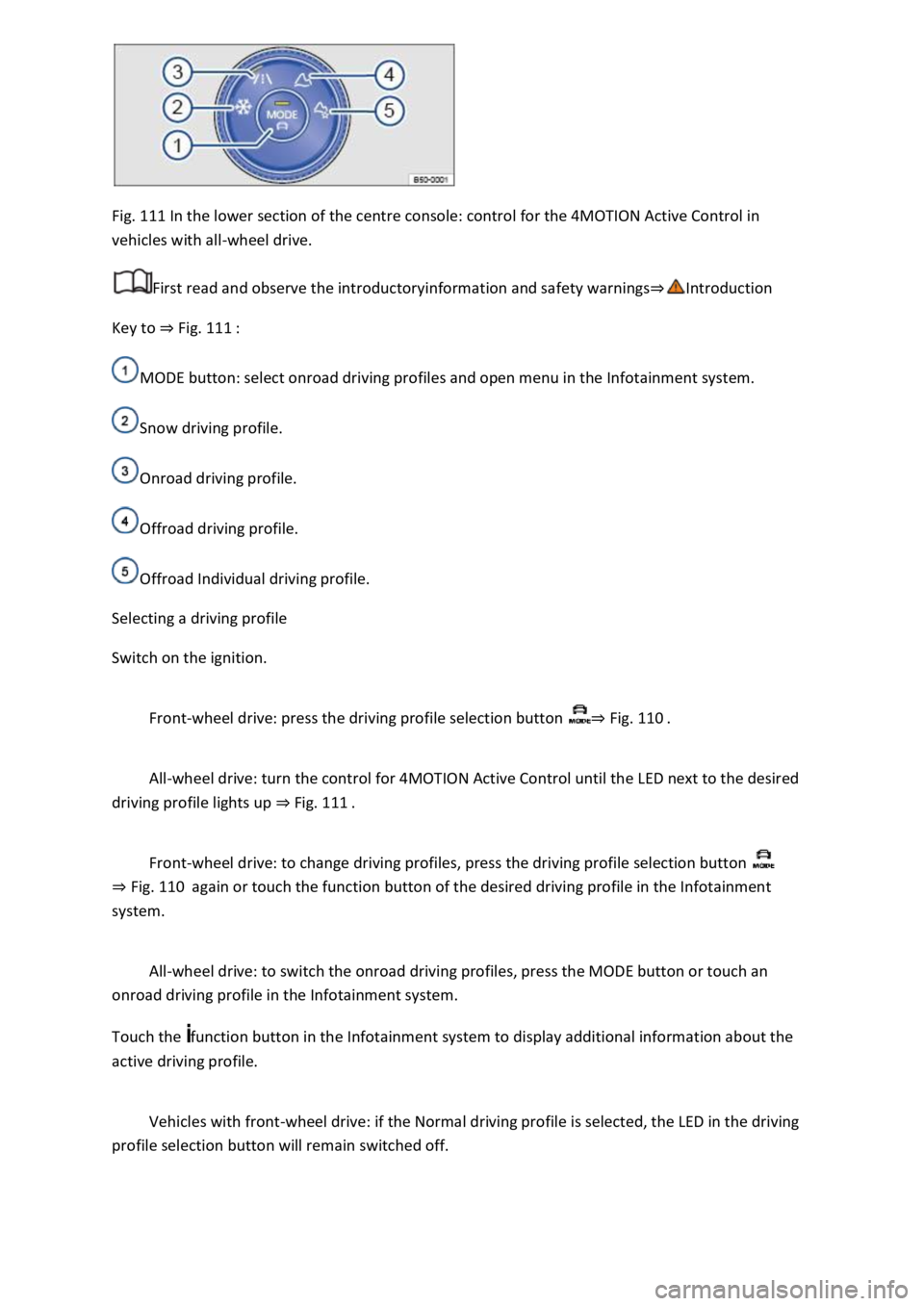
Fig. 111 In the lower section of the centre console: control for the 4MOTION Active Control in
vehicles with all-wheel drive.
First read and observe the introductoryinformation and safety warnings
Key to Fig. 111
MODE button: select onroad driving profiles and open menu in the Infotainment system.
Snow driving profile.
Onroad driving profile.
Offroad driving profile.
Offroad Individual driving profile.
Selecting a driving profile
Switch on the ignition.
Front-wheel drive: press the driving profile selection button Fig. 110
All-wheel drive: turn the control for 4MOTION Active Control until the LED next to the desired
driving profile lights up Fig. 111
Front-wheel drive: to change driving profiles, press the driving profile selection button
Fig. 110again or touch the function button of the desired driving profile in the Infotainment
system.
All-wheel drive: to switch the onroad driving profiles, press the MODE button or touch an
onroad driving profile in the Infotainment system.
Touch the function button in the Infotainment system to display additional information about the
active driving profile.
Vehicles with front-wheel drive: if the Normal driving profile is selected, the LED in the driving
profile selection button will remain switched off.
Page 214 of 502
Go to a qualified workshop and have the system checked.
Fault in Hill Start Assist
Go to a qualified workshop and have the system checked.
Offroad display
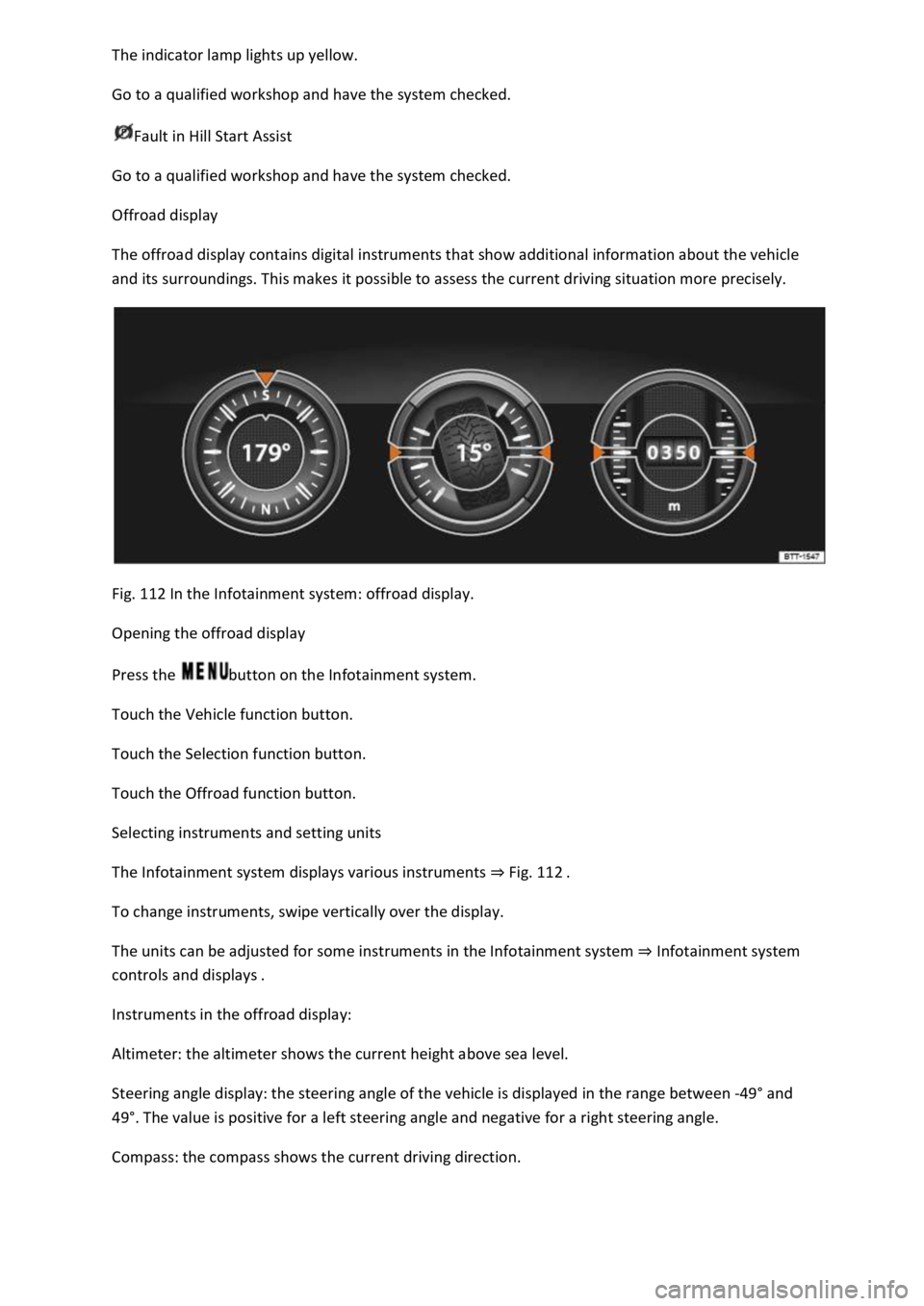
The offroad display contains digital instruments that show additional information about the vehicle
and its surroundings. This makes it possible to assess the current driving situation more precisely.
Fig. 112 In the Infotainment system: offroad display.
Opening the offroad display
Press the button on the Infotainment system.
Touch the Vehicle function button.
Touch the Selection function button.
Touch the Offroad function button.
Selecting instruments and setting units
The Infotainment system displays various instruments Fig. 112
To change instruments, swipe vertically over the display.
The units can be adjusted for some instruments in the Infotainment system Infotainment system
controls and displays
Instruments in the offroad display:
Altimeter: the altimeter shows the current height above sea level.
Steering angle display: the steering angle of the vehicle is displayed in the range between -49
Page 234 of 502

daptive Cruise Control (ACC)
Press the button.
The speed limiter is switched off.
Troubleshooting
First read and observe the introductoryinformation and safety warnings
Control is automatically interrupted.
Malfunction. Switch off the speed limiter and go to a qualified workshop.
For safety reasons, the speed limiter does not fully deactivate itself until you release the accelerator
once or switch the system off manually.
Adaptive Cruise Control (ACC)
Introduction
This chapter contains information on the followingsubjects:
Special driving situations
Limits of ACC
Switching ACC on and off
Setting ACC
Troubleshooting
The Adaptive Cruise Control (ACC) maintains a speed selected by the driver. If the vehicle
approaches a vehicle in front, the ACC automatically adapts the speed so that a distance you have
selected is maintained.
Speed range
ACC controls the vehicle in the speed range between 30 km/h (20 mph) and 160 km/h (100 mph)
or 210 km/h (130 mph). This speed range may differ in certain markets.
Driving with ACC
You can override the ACC at any time. Control will be interrupted when you brake. If you accelerate,
control will be interrupted for the duration of the acceleration process and will then continue again.
Control by ACC is less dynamic when towing a trailer
if the trailer's brake lights are faulty.
Does the vehicle have ACC?
The vehicle is equipped with ACC if you can make settings for ACC in the vehicle settings of the
Infotainment system Vehicle settings menu
Brake request
Page 240 of 502
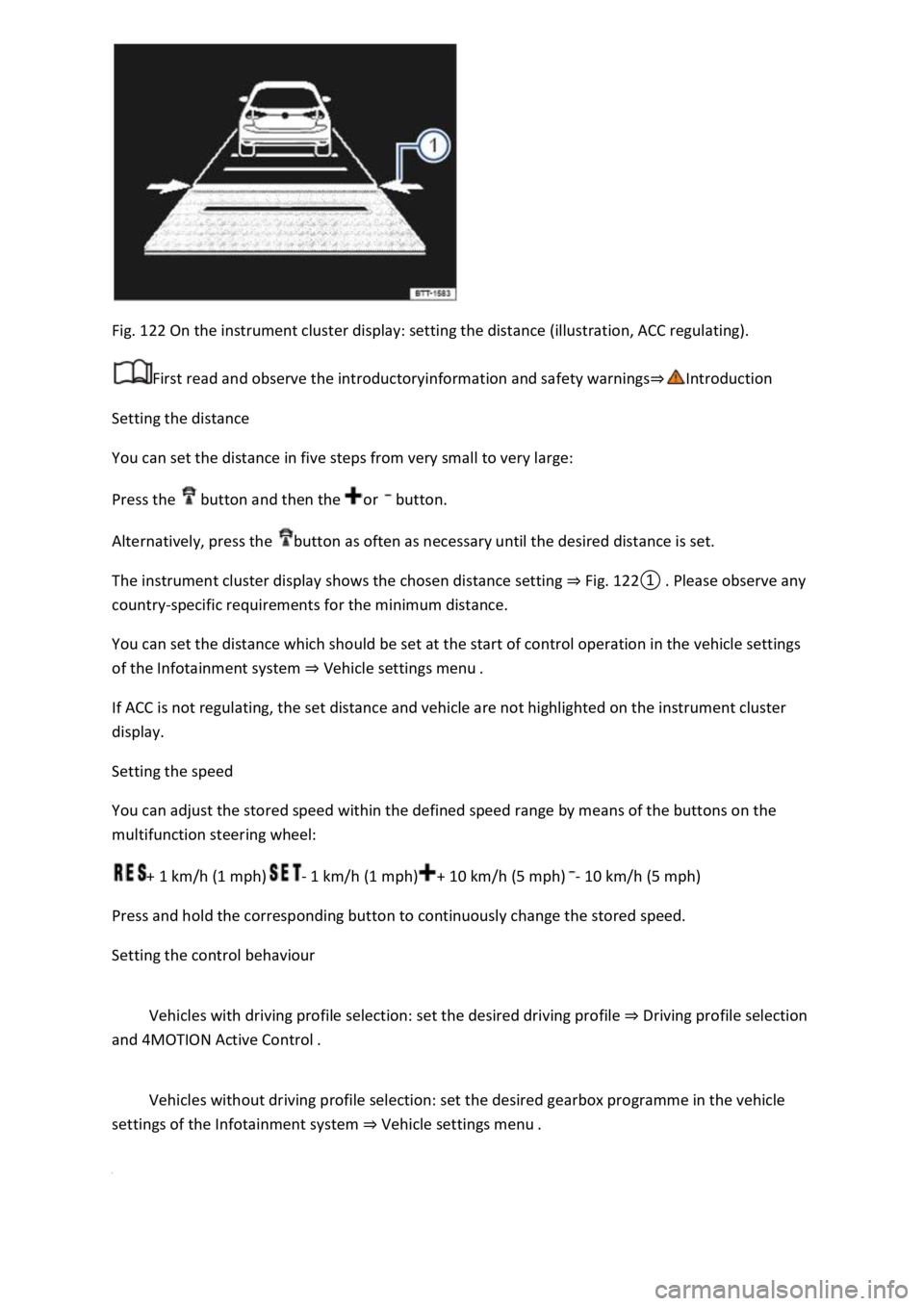
Fig. 122 On the instrument cluster display: setting the distance (illustration, ACC regulating).
First read and observe the introductoryinformation and safety warnings
Setting the distance
You can set the distance in five steps from very small to very large:
Press the button and then the or button.
Alternatively, press the button as often as necessary until the desired distance is set.
The instrument cluster display shows the chosen distance setting Fig.
0lease observe any
country-specific requirements for the minimum distance.
You can set the distance which should be set at the start of control operation in the vehicle settings
of the Infotainment system Vehicle settings menu
If ACC is not regulating, the set distance and vehicle are not highlighted on the instrument cluster
display.
Setting the speed
You can adjust the stored speed within the defined speed range by means of the buttons on the
multifunction steering wheel:
+ 1 km/h (1 mph)- 1 km/h (1 mph)+ 10 km/h (5 mph)- 10 km/h (5 mph)
Press and hold the corresponding button to continuously change the stored speed.
Setting the control behaviour
Vehicles with driving profile selection: set the desired driving profile Driving profile selection
and 4MOTION Active Control
Vehicles without driving profile selection: set the desired gearbox programme in the vehicle
settings of the Infotainment system Vehicle settings menu
Page 247 of 502

on at all times. Exceptions Limits of Front Assist
Switching on and off
Switch Front Assist on and off in the vehicle settings of the Infotainment system Vehicle settings
menu
Or: switch Front Assist on and off in the instrument cluster menus Instrument cluster menus
If you switch off Front Assist, the advance warning and distance warning will also be switched off.
The yellow indicator lamp lights up in the instrument cluster display. .
Setting the distance and advance warnings
Switch on Front Assist.
Switch the desired function on and off in the vehicle settings of the Infotainment system Vehicle
settings menu
Depending on the vehicle equipment, you can also set the warning time for the advance warning.
Some settings can be stored in the user accounts of the personalisation function and therefore
change automatically when the user account changes Personalisation
Troubleshooting
First read and observe the introductoryinformation and safety warnings
Front Assist is not available, the radar sensor does not have sufficient visibility.
The radar sensor is dirty. Clean the radar sensor Vehicle care
The visibility of the radar sensor is impaired due to the weather conditions, e.g. snow, or due to
detergent deposits or coatings. Clean the radar sensor Vehicle care
The visibility of the radar sensor is impaired by add-on parts, the trim frames of number plate
holders or stickers. Keep the area around the radar sensor free.
The radar sensor has been displaced or damaged, e.g. due to damage to the front of the vehicle.
Check whether damage is visible Repairs and technical modifications
Structural modifications have been made to the front of the vehicle.
The genuine Volkswagen badge is not used.
If the problem persists, switch off Front Assist and go to a qualified workshop.
Front Assist does not function as expected or is triggered unnecessarily several times.
The radar sensor is dirty. Clean the radar sensor Vehicle care
The system limits are not met Limits of Front Assist
Page 248 of 502

Lane keeping system (Lane Assist)
Introduction
This chapter contains information on the followingsubjects:
Driving with the lane keeping system
Troubleshooting
The lane keeping system (Lane Assist) helps the driver stay in lane.
Using a camera in the windscreen, the lane departure warning system detects lane markings on the
road. If your vehicle moves too close to a recognised lane marking, the system will warn the driver
with a corrective steering intervention. The corrective steering intervention can be overridden by
the driver at any time.
Adaptive lane guidance (depending on vehicle equipment)
The adaptive lane guidance system detects the preferred position in a lane and keeps the vehicle in
this position.
Adaptive lane guidance is switched on and off in the Driver assistance menu in the Infotainment
system Vehicle settings menu
System limits
Use the lane keeping system only on motorways and good main roads.
The system is not active under the following conditions:
The lane keeping system has not detected any lane markings.
WARNING
The intelligent technology used in the lane keeping system cannot overcome the laws of physics, and
functions only within the limits of the system. Always take care when using the lane departure
warning system otherwise you could cause accidents or injuries. The system is not a substitute for
the full concentration of the driver.
Adapt your speed and distance from the vehicles ahead to suit visibility, weather, road and traffic
conditions.
Your hands should always be on the steering wheel so that you can steer at any time. The driver is
always responsible for staying in lane.
The lane keeping system cannot recognise all lane markings. Poor road surfaces, road structures or
objects could be recognised incorrectly as lane markings by the lane keeping system. The lane
keeping system should be switched off immediately in these situations.
Follow the information on the instrument cluster display and respond according to the commands.
Page 249 of 502
If the camera's field of view is dirty, covered or damaged, the function of the lane keeping system
may be impaired.
Some settings can be saved in the user accounts of the personalisation function and can therefore
change automatically when the user account is changed Personalisation
Driving with the lane keeping system
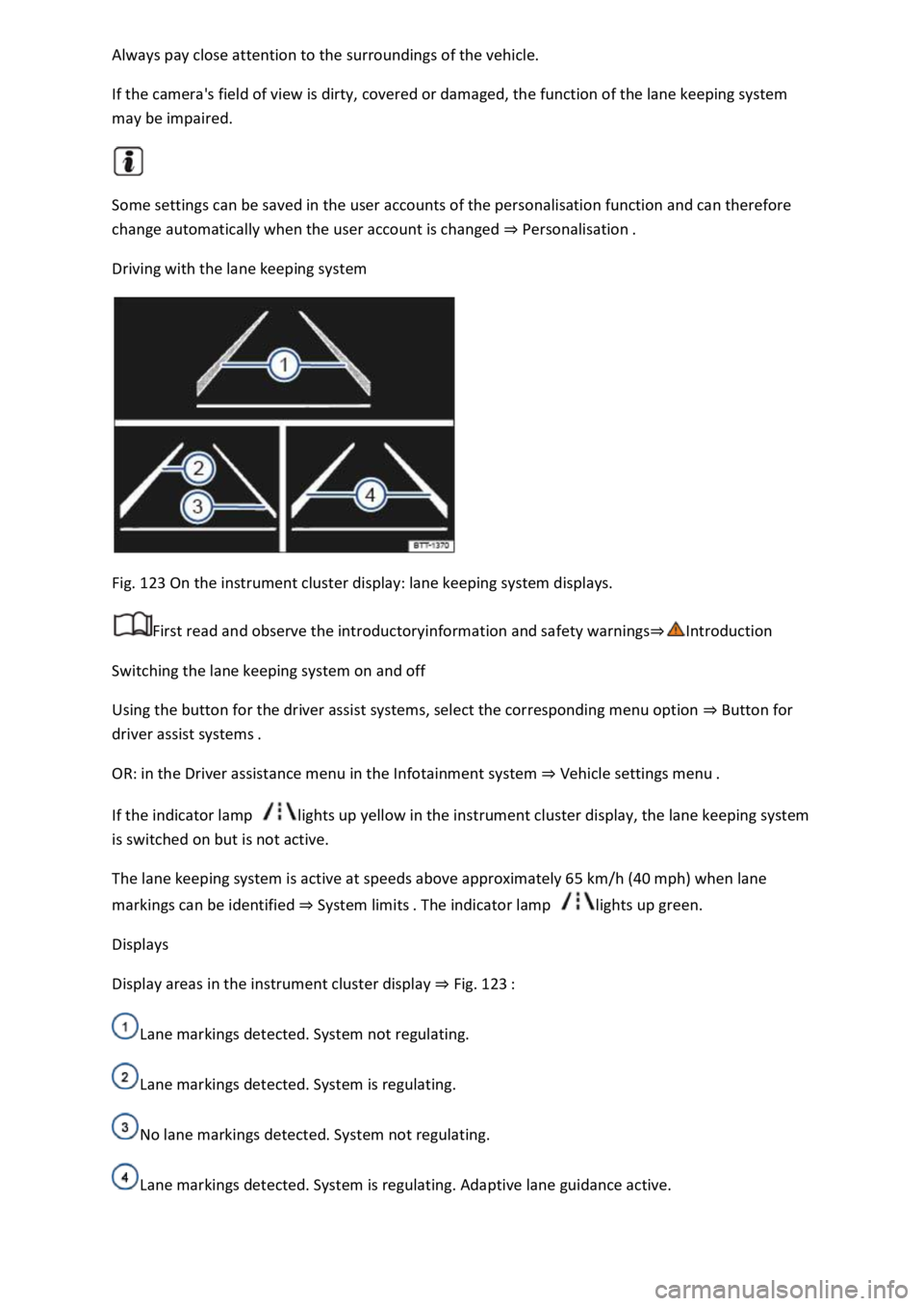
Fig. 123 On the instrument cluster display: lane keeping system displays.
First read and observe the introductoryinformation and safety warnings
Switching the lane keeping system on and off
Using the button for the driver assist systems, select the corresponding menu option Button for
driver assist systems
OR: in the Driver assistance menu in the Infotainment system Vehicle sett
If the indicator lamp lights up yellow in the instrument cluster display, the lane keeping system
is switched on but is not active.
The lane keeping system is active at speeds above approximately 65 km/h (40 mph) when lane
markings can be identified System limits lights up green.
Displays
Display areas in the instrument cluster display Fig. 123
Lane markings detected. System not regulating.
Lane markings detected. System is regulating.
No lane markings detected. System not regulating.
Lane markings detected. System is regulating. Adaptive lane guidance active.
Page 255 of 502
the Blind Spot Monitor can cause accidents and serious injuries. The system is not a substitute for
the full concentration of the driver.
Adapt your speed and distance from the vehicles ahead to suit visibility, weather, road and traffic
conditions.
Your hands should always be on the steering wheel so that you can steer at any time.
Pay attention to the indicator lamps in the exterior mirrors and in the instrument cluster display and
respond according to the commands.
Always pay close attention to the surroundings of the vehicle.
Never use the Blind Spot Monitor if the radar sensors are dirty, covered or damaged. These
conditions can impair the proper functioning of the system.
It may be hard to see the indicator lamp in the exterior mirror in direct sunlight.
Some settings can be saved in the user accounts of the personalisation function and can therefore
change automatically when the user account is changed Personalisation
Driving with the Blind Spot Monitor
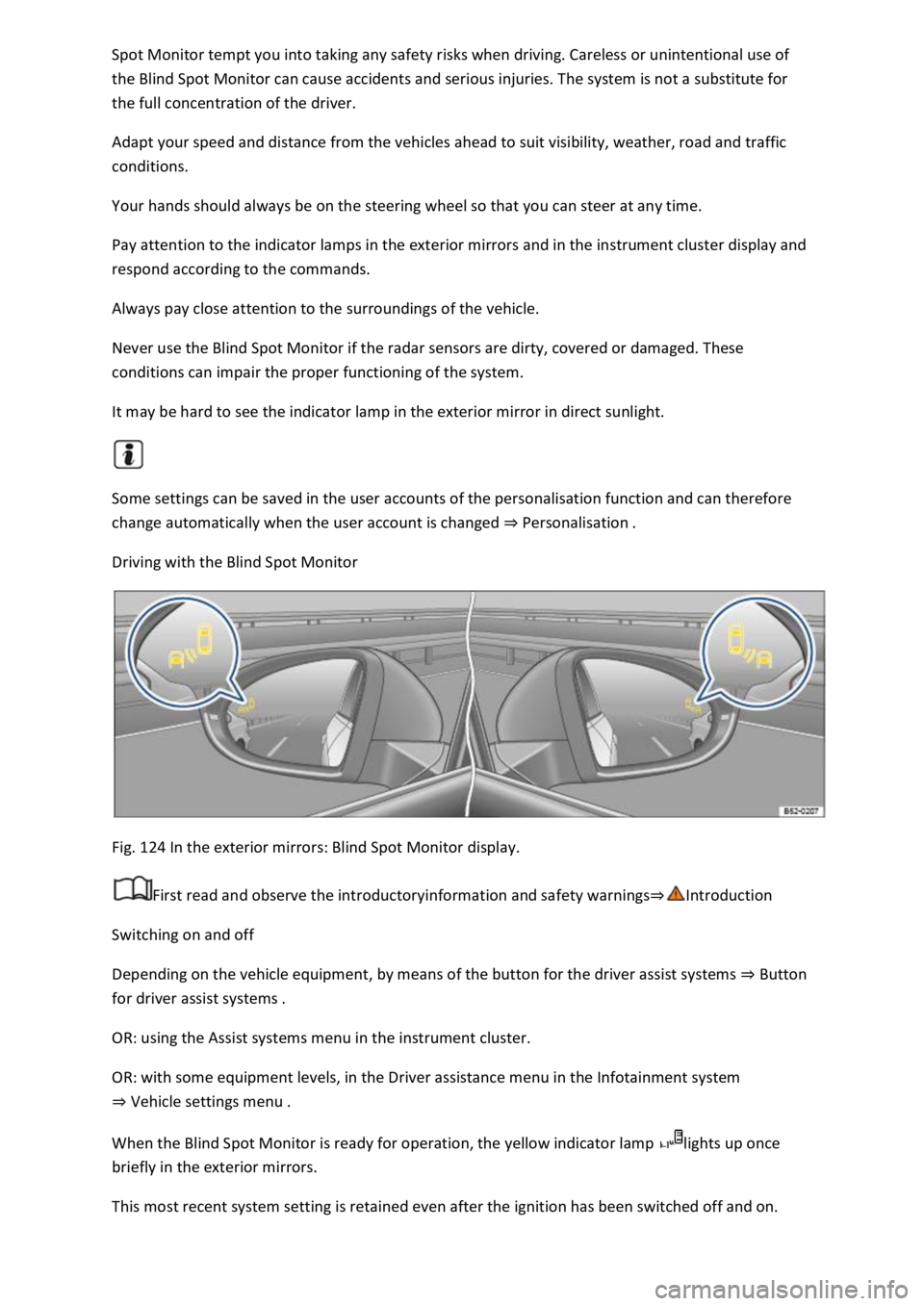
Fig. 124 In the exterior mirrors: Blind Spot Monitor display.
First read and observe the introductoryinformation and safety warnings
Switching on and off
Depending on the vehicle equipment, by means of the button for the driver assist systems Button
for driver assist systems
OR: using the Assist systems menu in the instrument cluster.
OR: with some equipment levels, in the Driver assistance menu in the Infotainment system
Vehicle settings menu
When the Blind Spot Monitor is ready for operation, the yellow indicator lamp lights up once
briefly in the exterior mirrors.
This most recent system setting is retained even after the ignition has been switched off and on.