lane VOLKSWAGEN T-ROC 2022 Owners Manual
[x] Cancel search | Manufacturer: VOLKSWAGEN, Model Year: 2022, Model line: T-ROC, Model: VOLKSWAGEN T-ROC 2022Pages: 502, PDF Size: 8.58 MB
Page 21 of 502

system.
If several warnings are present, the symbols will appear for several seconds, one after another. The
symbols will continue to appear until the faults are rectified.
If warning messages about malfunctions are displayed when the ignition is switched on, it may not
be possible to adjust some settings as described, or the information display may appear differently.
If this is the case, take the vehicle to a qualified workshop to have the malfunctions rectified.
Instrument cluster menus
First read and observe the introductoryinformation and safety warnings
The content and layout of the menus and displays depend on the vehicle electronics and the level of
vehicle equipment.
A qualified workshop can program and modify other functions depending on the vehicle equipment
level. Volkswagen recommends using a Volkswagen dealership for this purpose.
Some menu options can be accessed only when the vehicle is stationary.
Driving dataDriving data di
Assist systems.
Lane Assist on/off Lane keeping system (Lane Assist)
Front Assist on/off Area monitoring system (Front Assist)
Blind Spot Monitor on/off Blind Spot Monitor
ACC (display only) Adaptive Cruise Control (ACC)
Views1)Digital instrument cluster (Active Info Display)
Navigation Infotainment system,.
Audio Infotainment system,.
Telephone Infotainment system,.
Vehicle statusWarning and information messa
Lap timerLap timer
Personalisation (user selection)Personalisation
1) Only in vehicles with an Active Info Display.
Service menu
Page 46 of 502

User management and settings
When the ignition is switched on, you can use the Personalisation menu in the Infotainment system
for user management and to make settings. The menu can be accessed via the vehicle settings in the
Infotainment system.
Changing the user account
You can select the user account either via the Personalisation menu or via the Vehicle status menu.
Manually assigning vehicle keys to user accounts
You can assign a vehicle key to the currently active user account. For this purpose, select Manual key
assignment.
Automatically assigning vehicle keys to user accounts
If you have selected Automatic key assignment, the following vehicle key is assigned to the user
account upon changing the user account:
Vehicles without Keyless Access: vehicle key used to unlock the vehicle.
Vehicles with Keyless Access: vehicle key that is identified first by the personalisation function
when you open the driver door.
Personalised vehicle settings
Opening and closing (single door unlocking, window convenience opening etc.)
Light and vision (daytime running lights, cornering light, lane change flash etc.)
Settings for air conditioning system
Active driver assist systems
Driving profile selection
Multifunction display and instrument cluster (selection of displays)
Infotainment system (display brightness and station sorting)
A new vehicle key will be assigned to the current user account. To assign the vehicle key to a
different user account, select the required user account and manually assign it to the vehicle key.
Safety
Page 85 of 502

indicate a change in direction or lane change by operating the turn signal. The hazard warning lights
will be interrupted temporarily.
Switch on the hazard warning lights, e.g. in the following situations:
When traffic ahead suddenly starts moving more slowly or you reach the tail end of a traffic jam to
warn vehicles behind you.
There is an emergency situation.
The vehicle has broken down.
When tow-starting or towing.
Always follow local regulations on the use of the hazard warning lights.
If the hazard warning lights are not working, you must use an alternative method of drawing
attention to the broken-down vehicle. This method must comply with traffic legislation.
WARNING
Any broken-down vehicle poses a high accident risk for the vehicle occupants and for other road
users.
Stop the vehicle as soon as possible and when safe to do so.
Park the vehicle at a safe distance from moving traffic.
Switch on the hazard warning lights.
Never leave other persons alone in the vehicle, particularly children or people requiring assistance.
This applies in particular when the doors are locked. People locked in the vehicle may be subjected
to very high or very low temperatures.
WARNING
Ignoring any of the items on this important safety checklist can lead to accidents and severe injuries.
Always follow the instructions in the checklist and observe the general safety procedures.
WARNING
The components of the exhaust system become very hot. This can cause fires and serious injuries.
Park the vehicle so that no part of the exhaust system can come into contact with any inflammable
material underneath the vehicle, e.g. dry grass, fuel.
Page 130 of 502
WARNING
Incorrect use of turn signals, a failure to use turn signals, or forgetting to switch off a turn signal can
confuse other road users. This could lead to accidents and serious injuries.
Always activate the turn signal in good time when changing lanes and performing overtaking or
turning manoeuvres.
Always switch off the turn signal once the lane change or overtaking or turning manoeuvre has been
completed.
The hazard warning lights also work when the ignition is switched off In an emergency
Some settings can be stored in the user accounts of the personalisation function and therefore
change when the user account changes Personalisation
Vehicle lighting
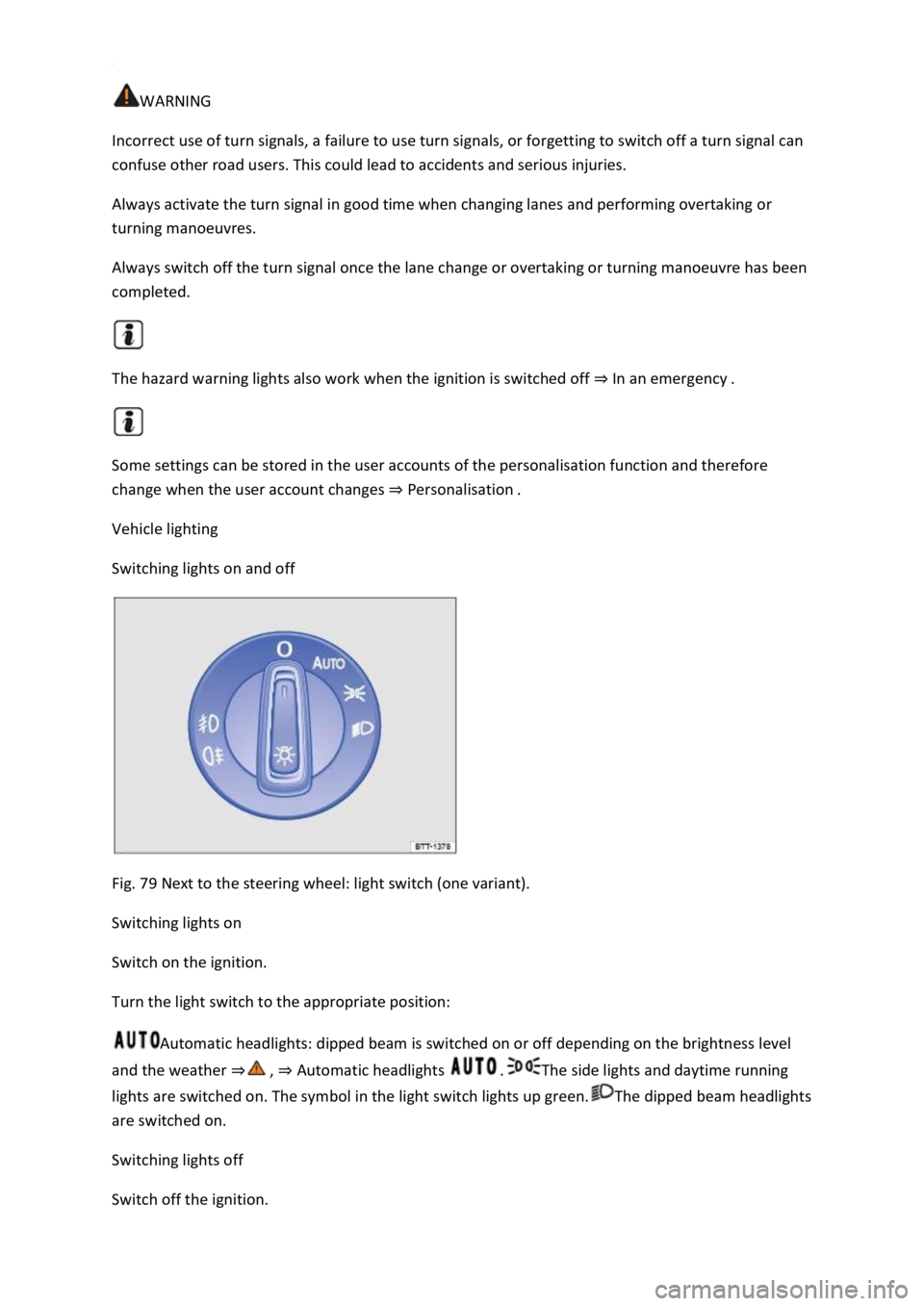
Switching lights on and off
Fig. 79 Next to the steering wheel: light switch (one variant).
Switching lights on
Switch on the ignition.
Turn the light switch to the appropriate position:
Automatic headlights: dipped beam is switched on or off depending on the brightness level
and the weather Automatic headlights The side lights and daytime running
lights are switched on. The symbol in the light switch lights up green.The dipped beam headlights
are switched on.
Switching lights off
Switch off the ignition.
Page 146 of 502
ant that the driver positions the exterior and interior mirrors correctly
before starting a journey
Looking in the exterior mirrors and the interior mirror does not allow the driver to see the entire
side and rear area around the vehicle. The area that cannot be seen is known as the blind spot.
There may be objects and other road users in the blind spot.
WARNING
Adjusting the exterior and interior mirrors while the vehicle is moving may cause the driver to
become distracted. This could lead to accidents and serious injuries.
Exterior and interior mirrors should be adjusted only when the vehicle is at a standstill.
When parking, changing lane, or performing an overtaking or turning manoeuvre, always pay careful
attention to the area around the vehicle as objects and other road users may be located in the blind
spot.
Always ensure that the mirrors are positioned correctly and that the rear view is not restricted by
ice, snow, condensation or any other objects.
WARNING
If you estimate the distance from traffic behind you incorrectly, you can cause accidents and serious
injuries.
Curved mirrors (convex or aspheric) enlarge the field of vision and can make objects in the mirror
seem smaller and further away than they actually are.
Using curved mirrors to estimate the distance from other vehicles behind you when changing lanes
can provide inaccurate results and can lead to accidents and serious injuries.
Whenever possible, use the interior mirror to check the exact distance between your vehicle and
following traffic or other objects.
Ensure that you have a good view to the rear of the vehicle.
WARNING
Automatic anti-dazzle mirrors contain an electrolyte fluid which could leak if the mirror is broken.
The leaking electrolyte fluid can cause irritation to the skin, eyes and respiratory organs, especially in
people who suffer from asthma or similar illnesses. Immediately ensure that there is a sufficient
supply of fresh air and get out of the vehicle. If this is not possible, open all of the windows and
doors.
If the electrolyte fluid gets into the eyes or onto the skin, immediately wash the area with plenty of
water for at least 15 minutes and consult a doctor.
Page 235 of 502
corresponding message on the instrument cluster. In addition, the red warning lamp lights up
and an acoustic warning is given. Brake immediately!
Radar sensor
ACC detects driving situations by means of the radar sensor at the front of the vehicle Front view
The radar sensor has a range of up to approximately 120 m.
WARNING
The intelligent technology used in the ACC cannot overcome the laws of physics, and functions only
within the limits of the system. Never let the extra convenience tempt you into taking safety risks
when driving. Careless or unintentional use of the Adaptive Cruise Control (ACC) can cause accidents
and lead to serious injury. The system is not a substitute for the full concentration of the driver.
Adapt your speed and distance from the vehicles ahead to suit visibility, weather, road and traffic
conditions.
Never use the ACC in poor visibility, on steep or winding roads, or on slippery road surfaces e.g. due
to snow, ice, wet roads, loose chippings, or on flooded roads.
Never use the ACC offroad or on non-surfaced roads. The ACC is designed for use on surfaced roads
only.
The ACC will not react to stationary vehicles.
The ACC will not react to persons, animals or vehicles crossing or approaching in the same lane.
Brake immediately if speed reduction by ACC is not sufficient.
Brake immediately if a request to brake appears on the instrument cluster display.
Brake if the vehicle starts rolling unintentionally after a request to brake.
Be prepared to control the speed yourself at all times.
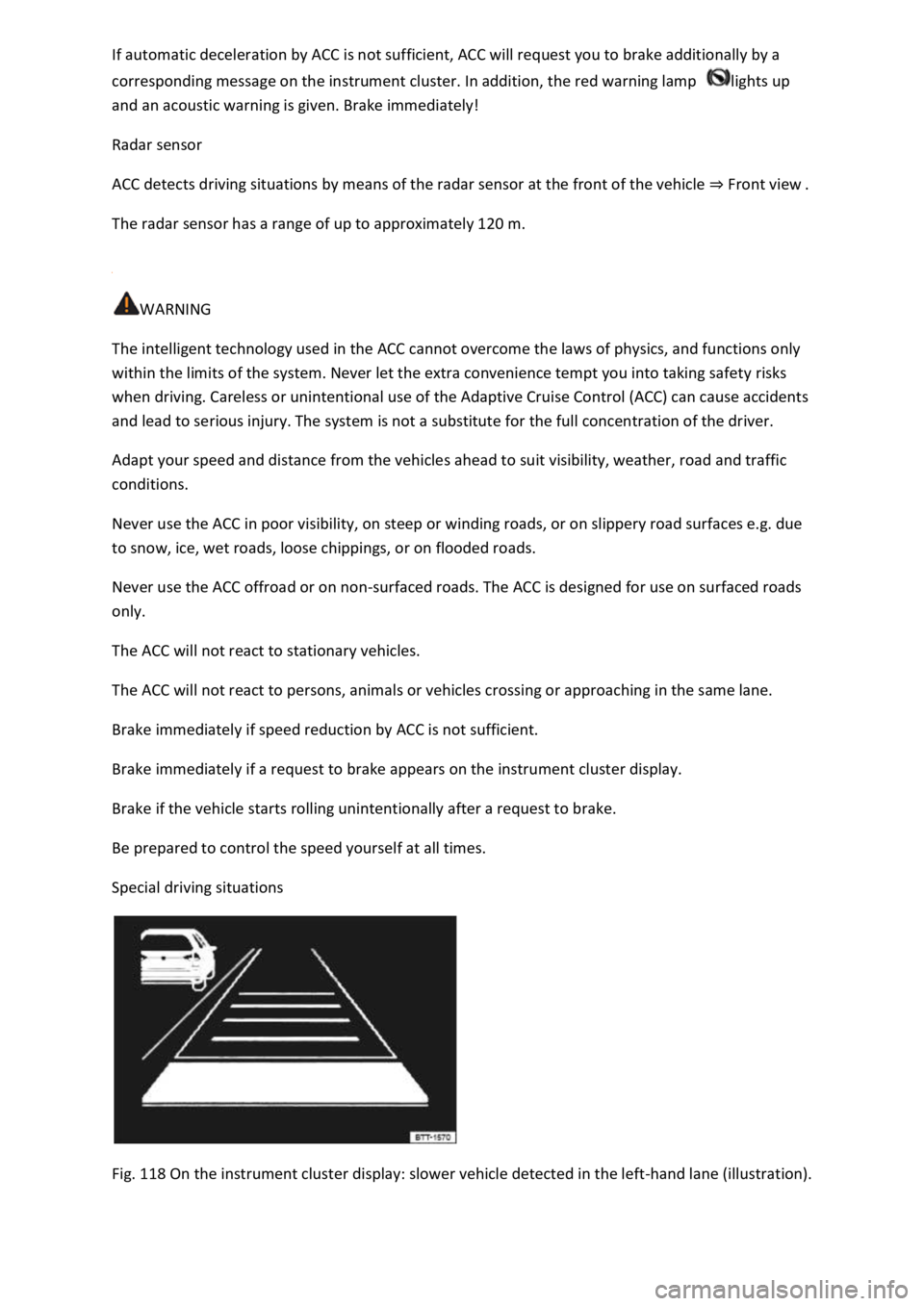
Special driving situations
Fig. 118 On the instrument cluster display: slower vehicle detected in the left-hand lane (illustration).
Page 236 of 502
Overtaking
If you indicate left (left-hand traffic: indicate right) to overtake, ACC will accelerate the vehicle and
reduce the distance from the vehicle in front. Your set speed will not be exceeded.
If ACC does not detect any vehicle in front after you have changed lane, ACC will accelerate the
vehicle up to the set speed.
Stop-and-go traffic
ACC can brake vehicles with DSG
Page 237 of 502
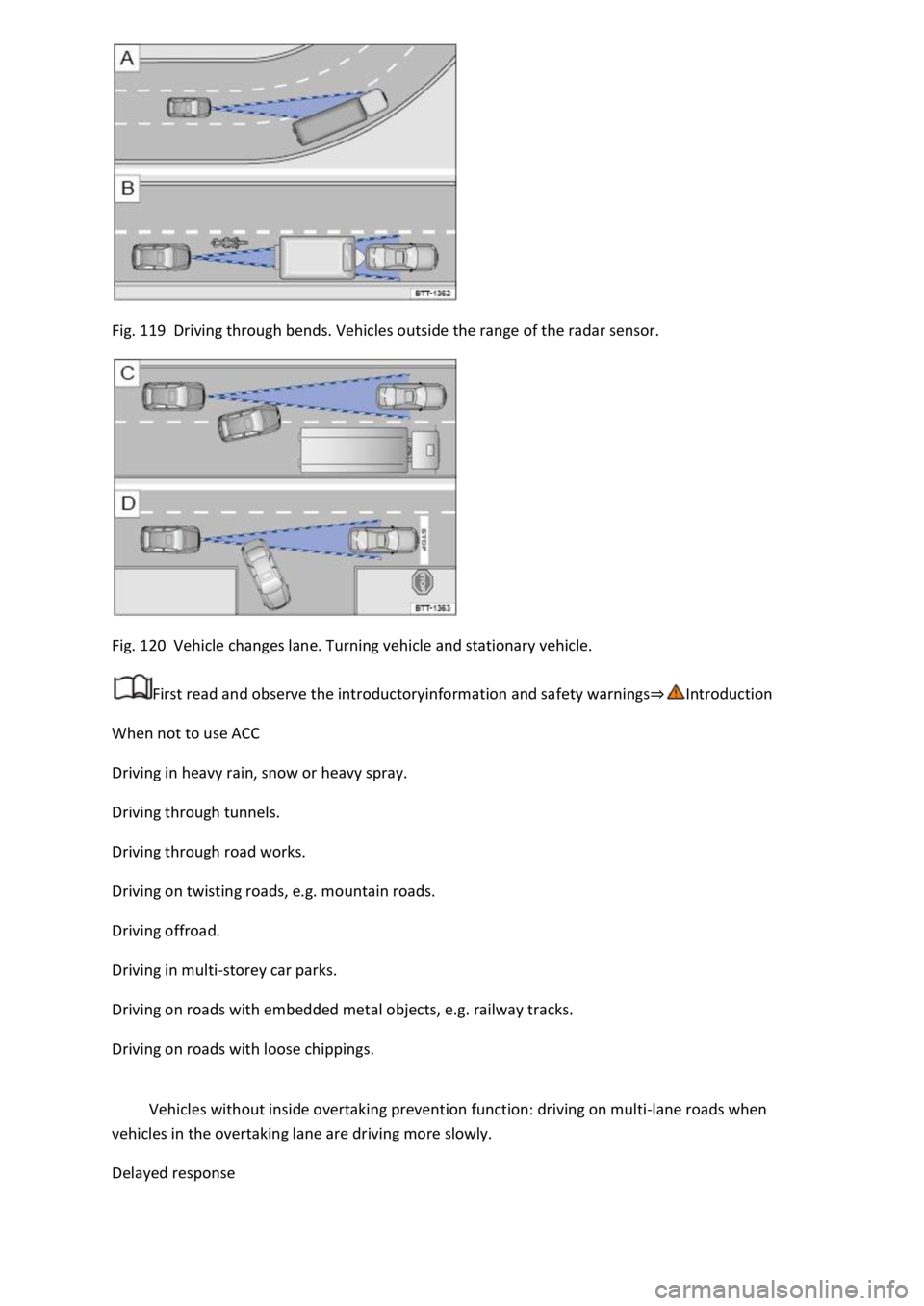
Fig. 119 Driving through bends. Vehicles outside the range of the radar sensor.
Fig. 120 Vehicle changes lane. Turning vehicle and stationary vehicle.
First read and observe the introductoryinformation and safety warnings
When not to use ACC
Driving in heavy rain, snow or heavy spray.
Driving through tunnels.
Driving through road works.
Driving on twisting roads, e.g. mountain roads.
Driving offroad.
Driving in multi-storey car parks.
Driving on roads with embedded metal objects, e.g. railway tracks.
Driving on roads with loose chippings.
Vehicles without inside overtaking prevention function: driving on multi-lane roads when
vehicles in the overtaking lane are driving more slowly.
Delayed response
Page 238 of 502
adar sensor is exposed to environmental conditions that impair sensor functioning, the
system may detect this only after a certain time. For this reason, possible functional restrictions may
be displayed only after a delay at the start of the journey and when driving
Objects that cannot be detected
Persons.
Animals.
Stationary vehicles.
Crossing or oncoming vehicles.
Other stationary obstacles.
If a stationary vehicle is hidden behind a vehicle that has been detected by the adaptive cruise
control and this vehicle turns off the road or changes lane, the ACC will not react to the stationary
vehicle Fig. 120.
Bends
The radar sensor always measures straight ahead. For this reason, vehicles may be incorrectly
detected or vehicles driving ahead not detected in tight bends Fig. 119.
Vehicles outside the sensor range
Vehicles that are driving outside the sensor range in close proximity to your vehicle, e.g. motorbikes
Fig. 119.
Vehicles that change into your lane directly in front of your vehicle Fig. 120.
Vehicles with bodies or attachments that project beyond the vehicle.
WARNING
If you use ACC in the above situations, this can result in accidents and serious injuries as well as
violation of legal regulations.
Switching ACC on and off
Page 243 of 502

Radar sensor
Front Assist detects driving situations by means of the radar sensor at the front of the vehicle
Front view m.
Functions included in the system
The City Emergency Braking System and Pedestrian Monitoring (depending on vehicle equipment)
are part of Front Assist and are automatically active when Front Assist is switched on.
WARNING
The intelligent technology used in Front Assist cannot overcome the laws of physics, and functions
only within the limits of the system. Never let the extra convenience afforded by Front Assist tempt
you into taking safety risks when driving. The driver is always responsible for braking in time.
If Front Assist issues a warning, brake your vehicle immediately depending on the traffic situation or
avoid the obstacle.
Adapt your speed and distance from the vehicles ahead to suit visibility, weather, road and traffic
conditions.
Front Assist cannot prevent accidents and serious injuries on its own.
Front Assist can issue unnecessary warnings and carry out unwanted braking interventions in certain
complex driving situations, e.g. at traffic islands.
Front Assist can issue unnecessary warnings and carry out unwanted braking interventions when its
function is impaired, e.g. if the radar sensor is dirty or its position has been changed.
Front Assist without Pedestrian Monitoring does not react to persons. In addition, the system does
not react to animals or to vehicles that are crossing or approaching in the same lane.
If you are unsure whether your vehicle possesses Pedestrian Monitoring, please enquire about this
at a qualified workshop before starting your journey.
Be prepared to take over control of the vehicle yourself at all times.
Warning levels and braking intervention
First read and observe the introductoryinformation and safety warnings
Distance warning
The system detects when safety is endangered by driving too close to the vehicle in front. The
warning lamp lights up. Increase the distance.
Speed range: around 65 km/h (40 mph) to 250 km/h (155 mph).
Advance warning