park VOLKSWAGEN T-ROC 2022 Owners Manual
[x] Cancel search | Manufacturer: VOLKSWAGEN, Model Year: 2022, Model line: T-ROC, Model: VOLKSWAGEN T-ROC 2022Pages: 502, PDF Size: 8.58 MB
Page 10 of 502
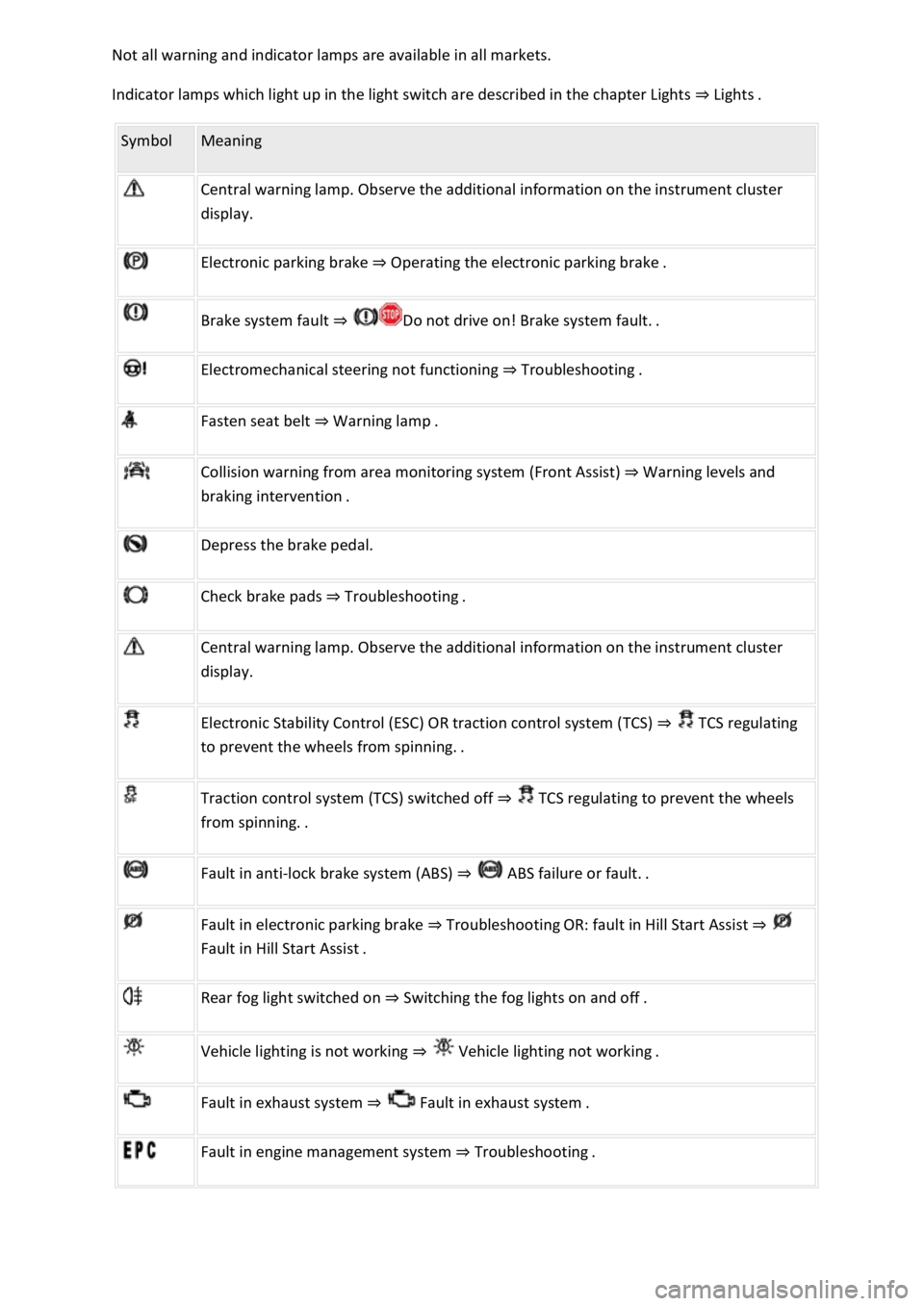
Indicator lamps which light up in the light switch are described in the chapter Lights Lig
Symbol Meaning
Central warning lamp. Observe the additional information on the instrument cluster
display.
Electronic parking brake Operating the electronic parking brake.
Brake system fault
Electromechanical steering not functioning Troubleshooting.
Fasten seat belt Warning lamp.
Collision warning from area monitoring system (Front Assist) Warning levels and
Depress the brake pedal.
Check brake pads Troubleshooting.
Central warning lamp. Observe the additional information on the instrument cluster
display.
Electronic Stability Control (ESC) OR traction control system (TCS) TCS regulating
to
Traction control system (TCS) switched off TCS regulating to prevent the wheels
Fault in anti-lock brake system (ABS)
Fault in electronic parking brake TroubleshootingOR: fault in Hill Start Assist
Rear fog light switched on Switching the fog lights on and off.
Vehicle lighting is not working
Fault in exhaust system Fault
Fault in engine management system Troubleshooting.
Page 84 of 502

and push it down until it audible locks
into place.
In an emergency
Making you and your vehicle safe
Observe any legislation concerning the safety of a broken-down vehicle. For example, many
countries stipulate that you have to switch on the hazard warning lights and wear a high-visibility
waistcoat Equipment for an emergency
Checklist
To ensure your own safety and that of your passengers, carry out the following actions in the
specified order
Stop the vehicle at a safe distance away from moving traffic and on a suitable surface .
Switch on the hazard warning lights using the button Centre console.
Switch on the electronic parking brake Electronic parking brake.
Select the neutral position Manual gearbox: selecting a gear or move the selector lever to P position
DSG
Page 85 of 502

indicate a change in direction or lane change by operating the turn signal. The hazard warning lights
will be interrupted temporarily.
Switch on the hazard warning lights, e.g. in the following situations:
When traffic ahead suddenly starts moving more slowly or you reach the tail end of a traffic jam to
warn vehicles behind you.
There is an emergency situation.
The vehicle has broken down.
When tow-starting or towing.
Always follow local regulations on the use of the hazard warning lights.
If the hazard warning lights are not working, you must use an alternative method of drawing
attention to the broken-down vehicle. This method must comply with traffic legislation.
WARNING
Any broken-down vehicle poses a high accident risk for the vehicle occupants and for other road
users.
Stop the vehicle as soon as possible and when safe to do so.
Park the vehicle at a safe distance from moving traffic.
Switch on the hazard warning lights.
Never leave other persons alone in the vehicle, particularly children or people requiring assistance.
This applies in particular when the doors are locked. People locked in the vehicle may be subjected
to very high or very low temperatures.
WARNING
Ignoring any of the items on this important safety checklist can lead to accidents and severe injuries.
Always follow the instructions in the checklist and observe the general safety procedures.
WARNING
The components of the exhaust system become very hot. This can cause fires and serious injuries.
Park the vehicle so that no part of the exhaust system can come into contact with any inflammable
material underneath the vehicle, e.g. dry grass, fuel.
Page 104 of 502
switch on the ignition using a valid vehicle key. A short alarm lasting around one second may
sound.
On vehicles with Keyless Access: grip the door handle Unlocking or locking the vehicle with
The anti-theft alarm will not function correctly if the 12-volt vehicle battery is weak or discharged.
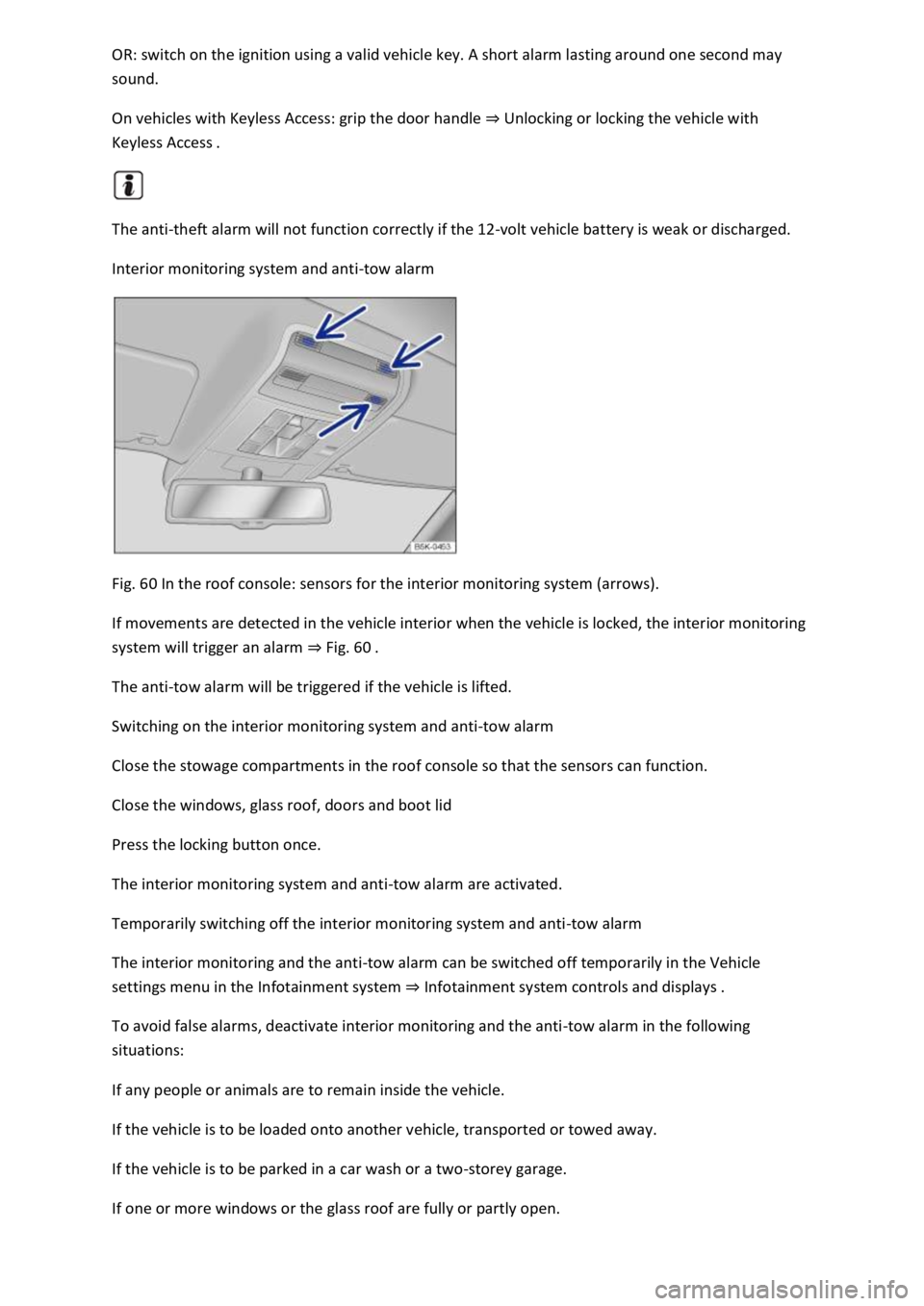
Interior monitoring system and anti-tow alarm
Fig. 60 In the roof console: sensors for the interior monitoring system (arrows).
If movements are detected in the vehicle interior when the vehicle is locked, the interior monitoring
system will trigger an alarm Fig.
The anti-tow alarm will be triggered if the vehicle is lifted.
Switching on the interior monitoring system and anti-tow alarm
Close the stowage compartments in the roof console so that the sensors can function.
Close the windows, glass roof, doors and boot lid
Press the locking button once.
The interior monitoring system and anti-tow alarm are activated.
Temporarily switching off the interior monitoring system and anti-tow alarm
The interior monitoring and the anti-tow alarm can be switched off temporarily in the Vehicle
settings menu in the Infotainment system Infotainment system controls and displays
To avoid false alarms, deactivate interior monitoring and the anti-tow alarm in the following
situations:
If any people or animals are to remain inside the vehicle.
If the vehicle is to be loaded onto another vehicle, transported or towed away.
If the vehicle is to be parked in a car wash or a two-storey garage.
If one or more windows or the glass roof are fully or partly open.
Page 131 of 502
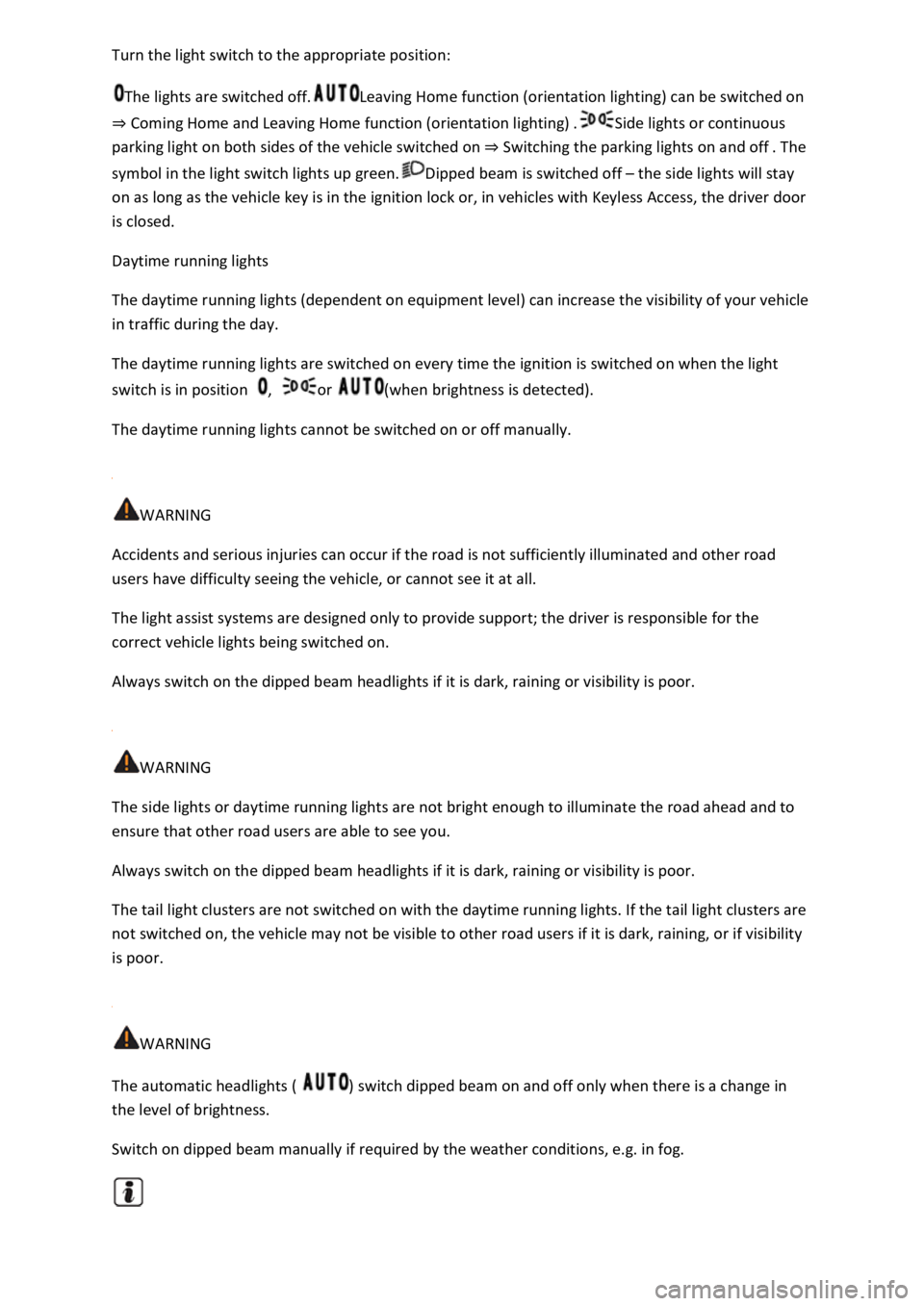
tion:
The lights are switched off.Leaving Home function (orientation lighting) can be switched on
Coming Home and Leaving Home function (orientation lighting)Side lights or continuous
parking light on both sides of the vehicle switched on Switching the parking lights on and off
symbol in the light switch lights up green.Dipped beam is switched off the side lights will stay
on as long as the vehicle key is in the ignition lock or, in vehicles with Keyless Access, the driver door
is closed.
Daytime running lights
The daytime running lights (dependent on equipment level) can increase the visibility of your vehicle
in traffic during the day.
The daytime running lights are switched on every time the ignition is switched on when the light
switch is in position , or (when brightness is detected).
The daytime running lights cannot be switched on or off manually.
WARNING
Accidents and serious injuries can occur if the road is not sufficiently illuminated and other road
users have difficulty seeing the vehicle, or cannot see it at all.
The light assist systems are designed only to provide support; the driver is responsible for the
correct vehicle lights being switched on.
Always switch on the dipped beam headlights if it is dark, raining or visibility is poor.
WARNING
The side lights or daytime running lights are not bright enough to illuminate the road ahead and to
ensure that other road users are able to see you.
Always switch on the dipped beam headlights if it is dark, raining or visibility is poor.
The tail light clusters are not switched on with the daytime running lights. If the tail light clusters are
not switched on, the vehicle may not be visible to other road users if it is dark, raining, or if visibility
is poor.
WARNING
The automatic headlights ( ) switch dipped beam on and off only when there is a change in
the level of brightness.
Switch on dipped beam manually if required by the weather conditions, e.g. in fog.
Page 132 of 502
both sides of the vehicle switches on to
provide better illumination of the surrounding area when manoeuvring.
Switching the fog lights on and off
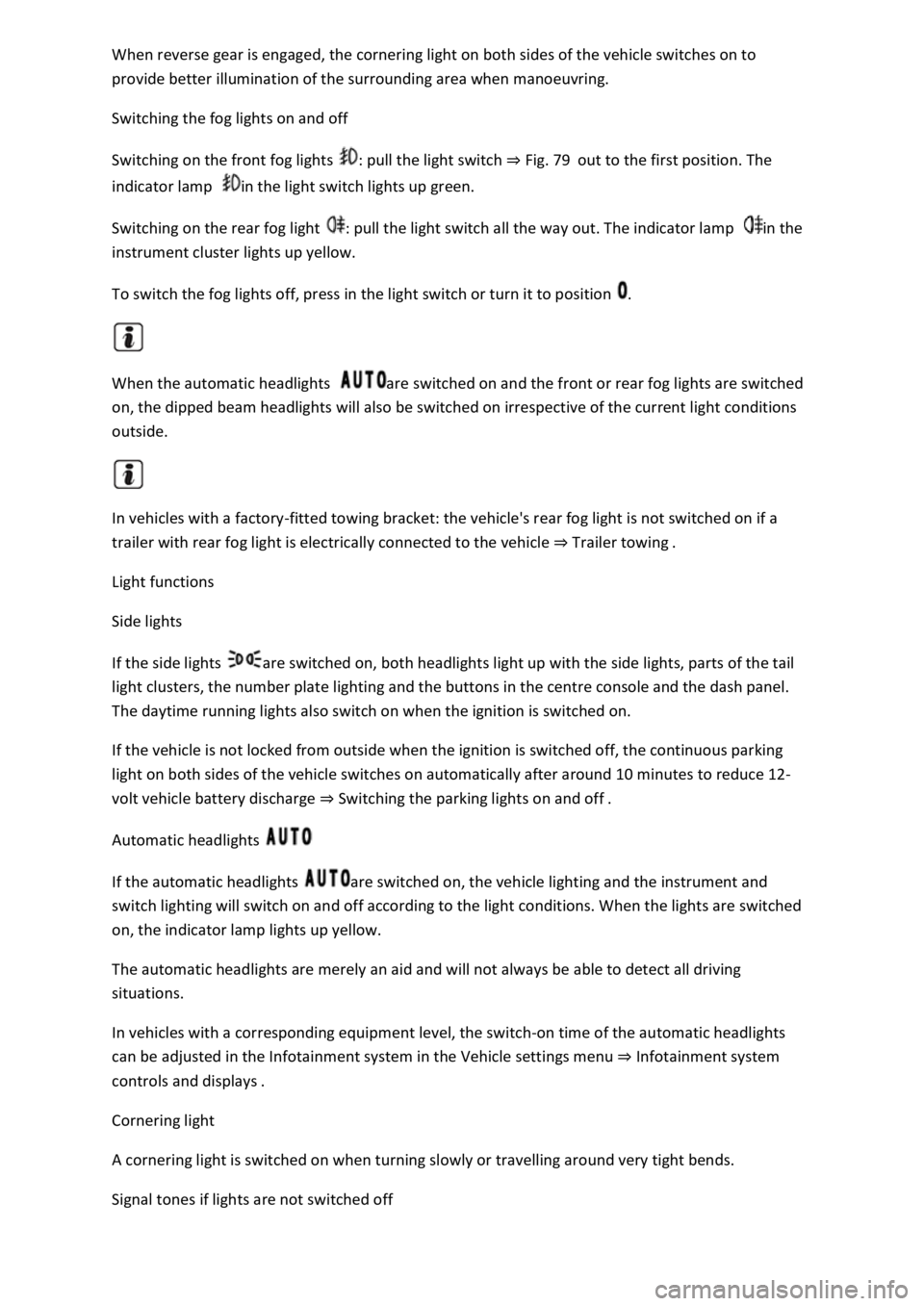
Switching on the front fog lights : pull the light switch Fig. 79out to the first position. The
indicator lamp in the light switch lights up green.
Switching on the rear fog light : pull the light switch all the way out. The indicator lamp in the
instrument cluster lights up yellow.
To switch the fog lights off, press in the light switch or turn it to position .
When the automatic headlights are switched on and the front or rear fog lights are switched
on, the dipped beam headlights will also be switched on irrespective of the current light conditions
outside.
In vehicles with a factory-fitted towing bracket: the vehicle's rear fog light is not switched on if a
trailer with rear fog light is electrically connected to the vehicle Trailer towing
Light functions
Side lights
If the side lights are switched on, both headlights light up with the side lights, parts of the tail
light clusters, the number plate lighting and the buttons in the centre console and the dash panel.
The daytime running lights also switch on when the ignition is switched on.
If the vehicle is not locked from outside when the ignition is switched off, the continuous parking
light on both sides of the vehicle switches on automatically after around 10 minutes to reduce 12-
volt vehicle battery discharge Switching the parking lights on and off
Automatic headlights
If the automatic headlights are switched on, the vehicle lighting and the instrument and
switch lighting will switch on and off according to the light conditions. When the lights are switched
on, the indicator lamp lights up yellow.
The automatic headlights are merely an aid and will not always be able to detect all driving
situations.
In vehicles with a corresponding equipment level, the switch-on time of the automatic headlights
can be adjusted in the Infotainment system in the Vehicle settings menu Infotainment system
controls an
Cornering light
A cornering light is switched on when turning slowly or travelling around very tight bends.
Signal tones if lights are not switched off
Page 133 of 502

and the driver door opened, acoustic
warnings sound under the following conditions:
If the parking light is switched on.
If the side lights are switched on or the rear fog light is switched on .
When the Coming Home function is switched on, no signal tone will be given as a reminder that a
light is still switched on when leaving the vehicle.
Some settings can be stored in the user accounts of the personalisation function and therefore
change when the user account changes Personalisation
Troubleshooting
Turn signal indicator lamp
If a turn signal on the vehicle has failed, the indicator lamp will start flashing twice as fast.
The indicator lamp flashes green.
Check the lighting and change the appropriate bulb as required Changing bulbs
If the problem persists, go to a qualified workshop.
Does not apply in China and Japan: trailer turn signals indicator lamp
The indicator lamp goes out if a trailer turn signal or all trailer lights stop working.
The indicator lamp flashes green.
Check the lighting and change the appropriate bulb as required Changing bulbs
If the problem persists, go to a qualified workshop.
Vehicle lighting not working
Vehicle lighting has failed either completely or partially.
The indicator lamp lights up yellow.
Check the lighting and change the appropriate bulb as required Changing bulbs
If the problem persists, go to a qualified workshop.
Fault in rain/light sensor
In the light switch position , the vehicle lighting is not switched on or off automatically.
The indicator lamp lights up yellow.
Switch the ignition off and on.
If the problem persists, go to a qualified workshop.
Page 136 of 502
NOTICE
Please observe the following points in order to avoid impairing the proper function of the system:
Regularly clean the camera's field of view, and keep it free from snow and ice.
Do not cover the camera's field of view.
Regularly check the area of the windscreen that is in the camera's field of view for damage.
Light-emitting objects in the camera's field of operation, e.g. mobile navigation devices, can impair
the functions of the main-beam control system.
Parking light
Switching the parking lights on and off
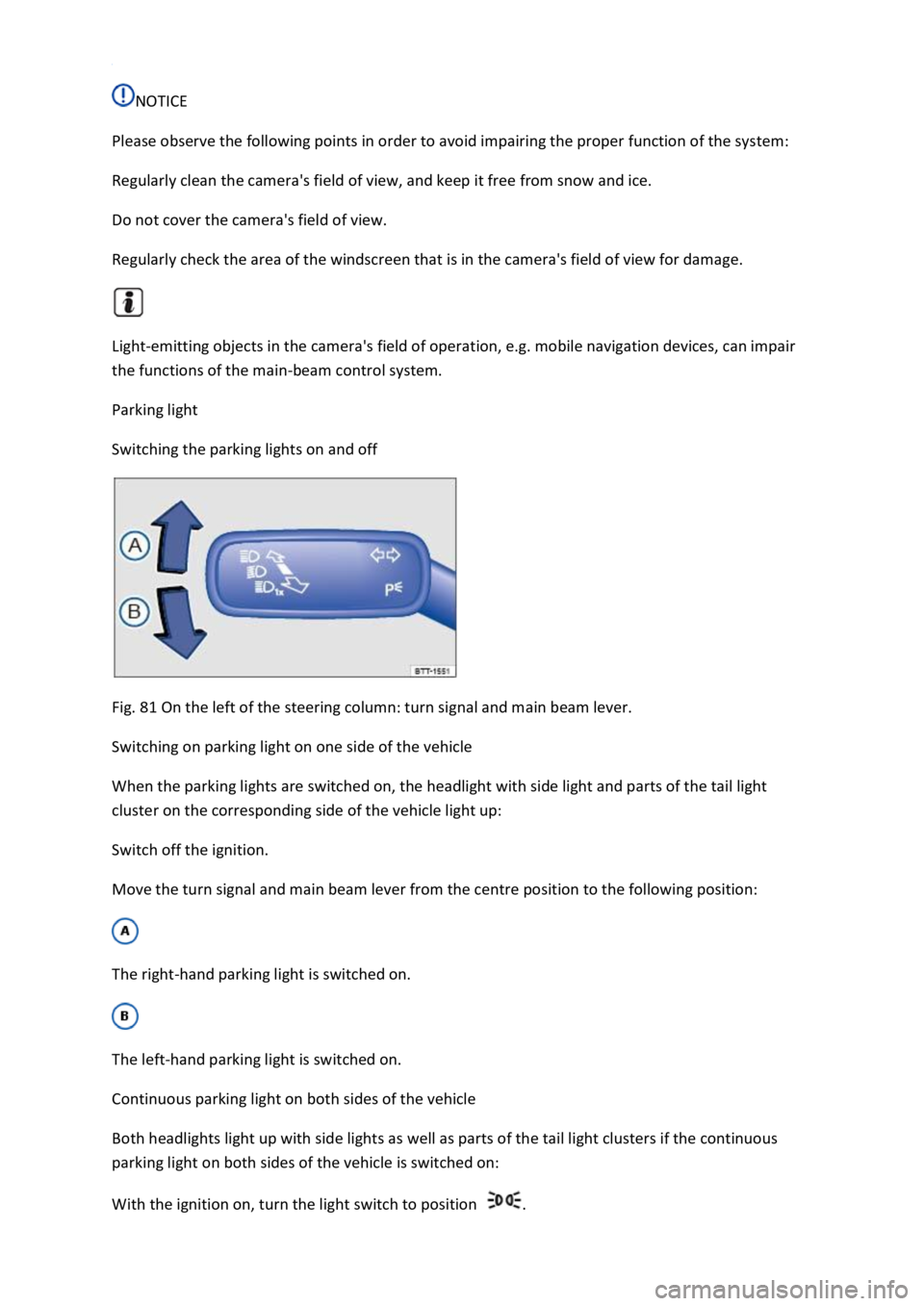
Fig. 81 On the left of the steering column: turn signal and main beam lever.
Switching on parking light on one side of the vehicle
When the parking lights are switched on, the headlight with side light and parts of the tail light
cluster on the corresponding side of the vehicle light up:
Switch off the ignition.
Move the turn signal and main beam lever from the centre position to the following position:
The right-hand parking light is switched on.
The left-hand parking light is switched on.
Continuous parking light on both sides of the vehicle
Both headlights light up with side lights as well as parts of the tail light clusters if the continuous
parking light on both sides of the vehicle is switched on:
With the ignition on, turn the light switch to position .
Page 137 of 502

Lock the vehicle from the outside.
Automatic switch-off of side lights and parking lights
If the battery capacity is not sufficient for the side lights or parking light to remain switched on for
two hours, the 12-volt vehicle battery can be discharged to such an extent that it is no longer
possible to start the engine
In the case of standing times of more than two hours, the vehicle will detect a weak 12-volt vehicle
battery and switch off the side lights or parking light so that the engine can still be started.
WARNING
Accidents and serious injuries can occur if the vehicle is parked without sufficient illumination, as
other road users might have difficulty seeing the vehicle, or may not see it at all.
Always park the vehicle safely and with sufficient lighting. Observe any applicable local regulations.
If the vehicle lighting is required for several hours, switch on the right or left parking light if possible.
The illumination time of the parking light on one side is generally twice as long as for continuous
parking light on both sides of the vehicle.
Coming Home and Leaving Home function (orientation lighting)
The Coming Home and Leaving Home function lights up the area immediately surrounding the
vehicle when you get in or out of the vehicle in darkness.
Not in China: the Coming Home function is switched on manually. In contrast, the Leaving
Home function is controlled automatically by a rain/light sensor.
Only in China: the Coming Home and Leaving Home function is controlled automatically by a
rain/light sensor.
The switch-off delay can be adjusted and the function activated or deactivated in the Vehicle
settings menu in the Infotainment system Infotainment system controls and displays
Activating the Coming Home function
Not in China
Switch off the ignition.
Operate the headlight flasher for approximately one second.
The Coming Home lighting is switched on when the driver door is opened. The switch-off delay starts
when the last vehicle door or the boot lid has been closed.
Activating the Coming Home function
Page 143 of 502
to the windscreen, the wiper blades and the wiper motor:
The wiper lever is located in the basic position.
Snow and ice have been removed from the wiper blades and door windows.
Wiper blades that have become frozen onto the glass have been carefully loosened. Volkswagen
recommends using a de-icer spray for this.
NOTICE
Do not switch on the wipers when the window is dry. Using the wipers when the window is dry can
damage the glass.
When switched on, the wipers will temporarily be switched to the next setting down when the
vehicle is stationary.
When parking the vehicle in cold weather, it may be helpful to leave the front windscreen wipers in
the service position to make it easier to loosen the wiper blades Wiper blades
Wiper function
Automatic activation of the rear window wiper
The rear window wiper is switched on automatically if the windscreen wipers are switched on and
reverse gear is engaged. Automatic switch-on when reverse gear is selected can be activated and
deactivated in the Infotainment system in the Vehicle settings menu Infotainment system controls
and displays
Heated washer jets
The heating defrosts frozen washer jets. The heating output is automatically regulated depending on
the ambient temperature when the ignition is switched on. Only the jets are heated, not the hoses
that the washer fluid flows through.
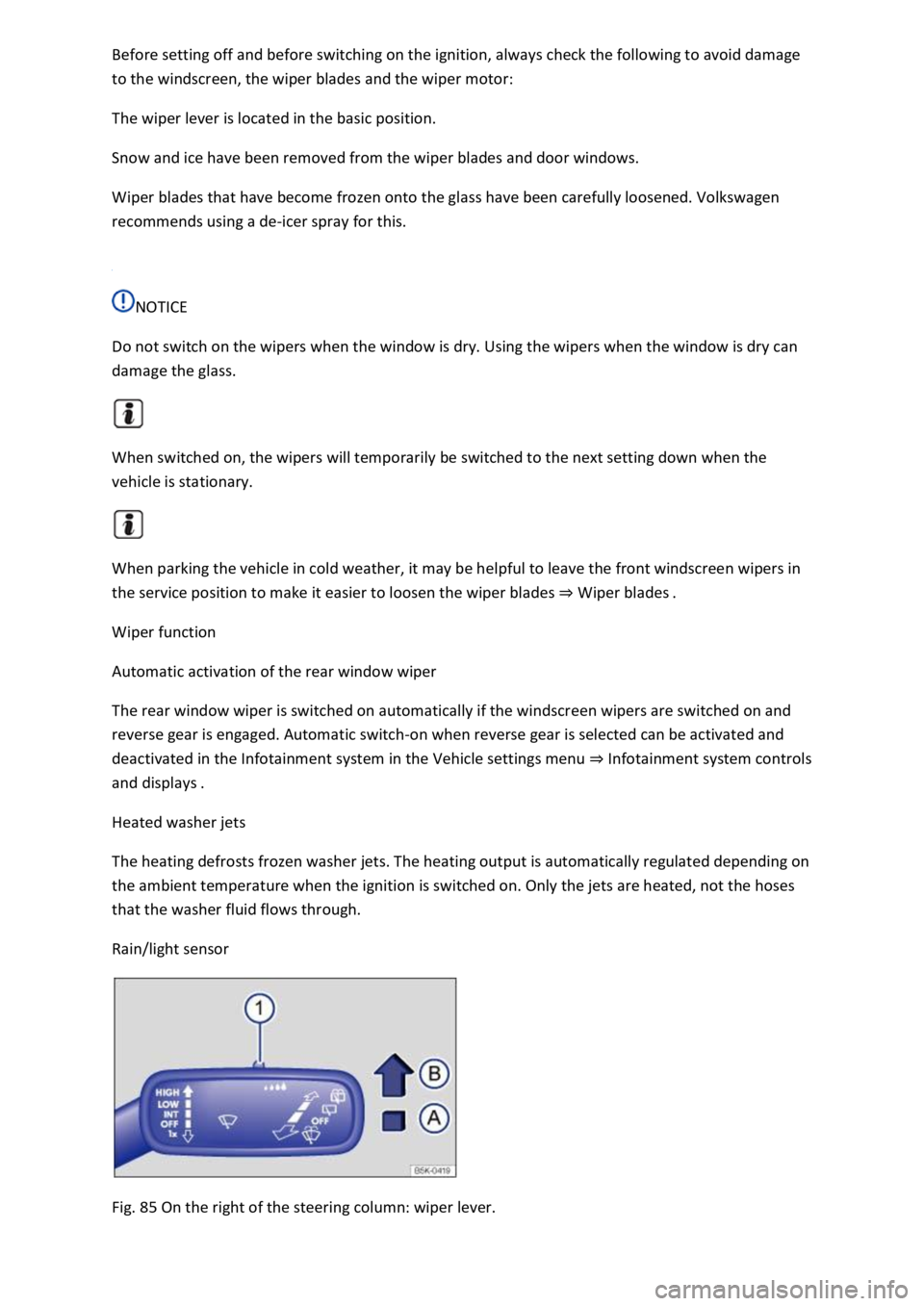
Rain/light sensor
Fig. 85 On the right of the steering column: wiper lever.