navigation VOLKSWAGEN TIGUAN 2017 Owner´s Manual
[x] Cancel search | Manufacturer: VOLKSWAGEN, Model Year: 2017, Model line: TIGUAN, Model: VOLKSWAGEN TIGUAN 2017Pages: 341, PDF Size: 9.14 MB
Page 113 of 341
Manual anti-dazzle interior mirror
•Basic position: the lever on the lower part of the mirror is pointing towards the windscreen.
•Pull the lever to the back to select the anti-dazzle function ⇒ Fig. 105.
Exterior mirrors
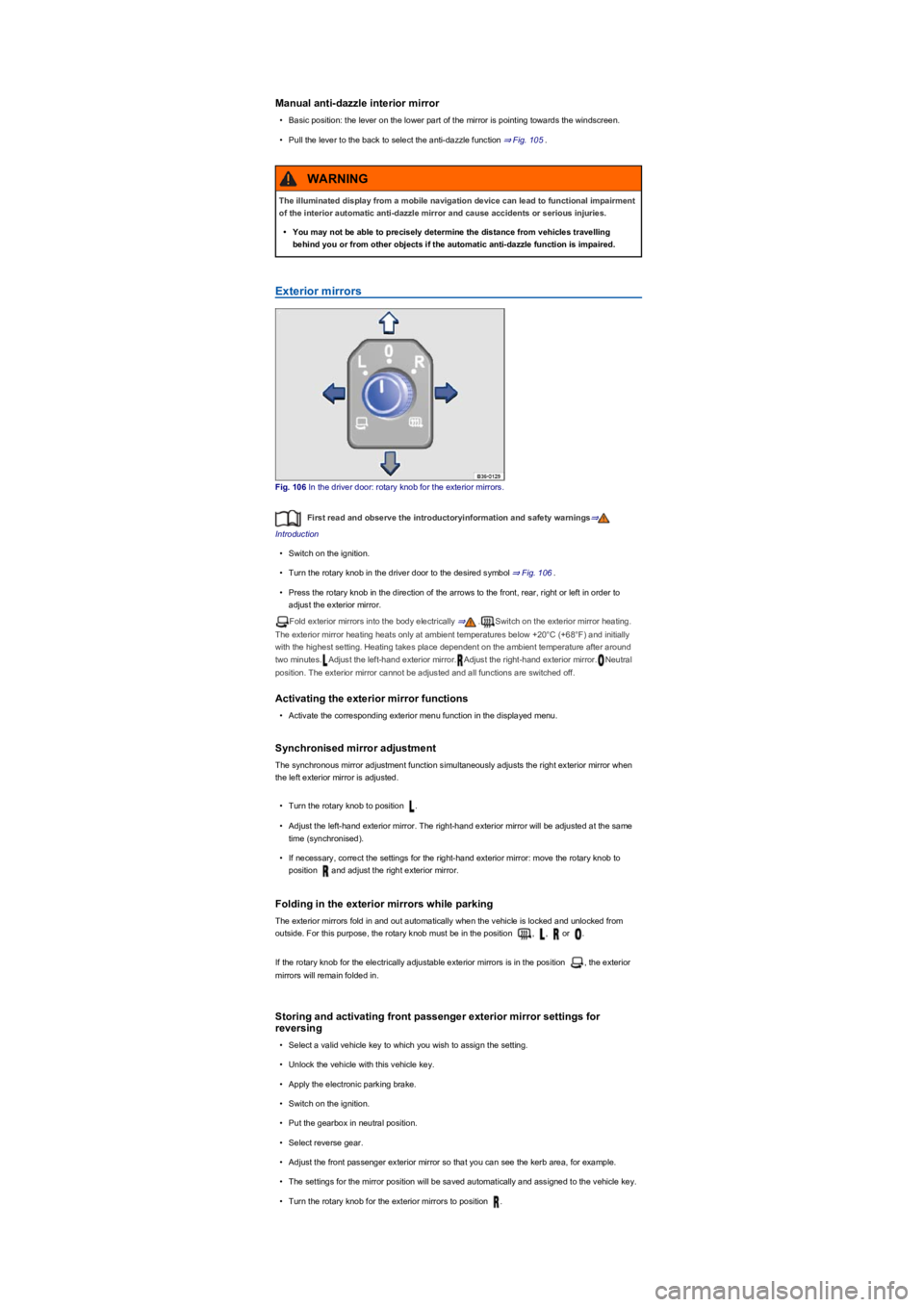
Fig. 106 In the driver door: rotary knob for the exterior mirrors.
First read and observe the introductoryinformation and safety warnings⇒
Introduction
•Switch on the ignition.
•Turn the rotary knob in the driver door to the desired symbol ⇒ Fig. 106.
•Press the rotary knob in the direction of the arrows to the front, rear, right or left in order to
adjust the exterior mirror.
Fold exterior mirrors into the body electrically ⇒.Switch on the exterior mirror heating.
The exterior mirror heating heats only at ambient temperatures below +20°C (+68°F) and initially
with the highest setting. Heating takes place dependent on the ambient temperature after around
two minutes.Adjust the left-hand exterior mirror.Adjust the right-hand exterior mirror.Neutral
position. The exterior mirror cannot be adjusted and all functions are switched off.
Activating the exterior mirror functions
•Activate the corresponding exterior menu function in the displayed menu.
Synchronised mirror adjustment
The synchronous mirror adjustment function simultaneously adjusts the right exterior mirror when
the left exterior mirror is adjusted.
•Turn the rotary knob to position .
•Adjust the left-hand exterior mirror. The right-hand exterior mirror will be adjusted at the same
time (synchronised).
•If necessary, correct the settings for the right-hand exterior mirror: move the rotary knob to
position and adjust the right exterior mirror.
Folding in the exterior mirrors while parking
The exterior mirrors fold in and out automatically when the vehicle is locked and unlocked from
outside. For this purpose, the rotary knob must be in the position , , or .
If the rotary knob for the electrically adjustable exterior mirrors is in the position , the exterior
mirrors will remain folded in.
Storing and activating front passenger exterior mirror settings for
reversing
•Select a valid vehicle key to which you wish to assign the setting.
•Unlock the vehicle with this vehicle key.
•Apply the electronic parking brake.
•Switch on the ignition.
•Put the gearbox in neutral position.
•Select reverse gear.
•Adjust the front passenger exterior mirror so that you can see the kerb area, for example.
•The settings for the mirror position will be saved automatically and assigned to the vehicle key.
•Turn the rotary knob for the exterior mirrors to position .
The illuminated display from a mobile navigation device can lead to functional impairment
of the interior automatic anti-dazzle mirror and cause accidents or serious injuries.
•You may not be able to precisely determine the distance from vehicles travelling
behind you or from other objects if the automatic anti-dazzle function is impaired.
WARNING
Page 142 of 341
Switching on start/stop
The function is automatically activated every time the ignition is switched on. The instrument cluster
display will show information about the current status.
Vehicles with DSG dual clutch gearbox may be equipped with a start/stop system with engine-off
coasting function. The engine-off coasting function is deactivated and activated together with the
start/stop system.
Further information regarding start/stop mode is available in the Infotainment system ⇒ Operation
and display in the Infotainment system. This information also applies to coasting.
Indicator lamps
If the indicator lamp is lit, the start/stop system is available and automatic engine stop is active.
If the indicator lamp is lit, the start/stop system is not available or the start/stop system has
started the engine automatically. Check whether all technical requirements have been fulfilled. If
not, ensure that all technical requirements are met ⇒ Important preconditions for automatic engine
switch-off.
The display on the instrument cluster may show the status of the start/stop system.
In addition, start/stop information on the current status of the start/stop system can be displayed as
required in Infotainment systems with a navigation function. Touch the i in the start/stop
information to obtain further information on the status.
Vehicles with a manual gearbox
•Disengage the gear and release the clutch pedal when the vehicle is coming to a stop, or when
it is stationary. The engine is stopped.
•Depress the clutch pedal to restart the engine.
Vehicles with DSG dual clutch gearbox
•To stop, press and hold the brake pedal. The engine switches off shortly before the vehicle
reaches a complete standstill or when the vehicle is stationary.
•Take your foot off the brake pedal, or depress the accelerator, to restart the engine.
Important preconditions for automatic engine switch-off
•The driver is wearing their seat belt.
•The driver door is closed.
•The bonnet is closed.
•A minimum engine temperature has been reached.
•m/k/a995MKVehicles with Climatronic: the temperature of the vehicle interior is within
the preset temperature range, and the humidity level is not too high.
•The defrost function of the air conditioning system is not switched on.
•The charge level of the 12-volt vehicle battery is sufficient.
•The temperature of the 12-volt vehicle battery is not too low or too high.
•The vehicle is not on a steep incline.
•The windscreen heating is not switched on.
•m/k/a995MKVehicles with DSG dual clutch gearbox: the steering wheel is not turned
too sharply.
•Reverse gear is not engaged.
•The Park Assist system is not active.
•The Off-road or Off-road Individual driving profile is activated.
When the conditions for automatic engine switch-off are only fulfilled when the vehicle is stationary,
the engine can also switch off subsequently, e.g. by switching off the defrost function.
Conditions for an automatic restart
The engine can start automatically under the following conditions:
•If the temperature inside the vehicle substantially increases or decreases.
•If the vehicle rolls on.
•If the electric voltage of the 12-volt vehicle battery drops.
•If the steering wheel is moved.
As a general rule, the engine always starts again automatically when required by the detected
situation and the vehicle.
®
®
Page 329 of 341
Special equipment, access to the legally prescribed diagnostic interface (on-board diagnostics) and
switched-on ignition are required in order to read data out of the event data recorder.
Volkswagen will not access, read out or process data from the event data recorder unless the
vehicle owner (or lessee in the case of leasing) grants their permission. Exceptions to this are
contractual or legal provisions.
Due to its legal product monitoring obligations, Volkswagen is entitled to use the data for field
monitoring and also for research purposes and quality improvements. For research purposes,
Volkswagen makes the data available to third parties in anonymous form, in other words without
any reference to the individual vehicle, vehicle owner or lessee.
Reprogramming control units
All data for the control of components are stored in the control units. Some convenience functions,
such as lane change flash, single door unlocking and displays, can be reprogrammed using special
workshop equipment. If the convenience functions are reprogrammed, the descriptions in your
vehicle wallet will no longer match the original functions. Volkswagen recommends having any
reprogramming entered into the digital service schedule by a Volkswagen dealership or qualified
workshop.
Information about possible reprogramming can be obtained from the Volkswagen dealership.
Convenience and Infotainment functions
Depending on the equipment selected, you can store your own data in the vehicle's Infotainment
functions. This includes, for example:
•Media files for playing music, films or photos in the Infotainment system.
•Address book data for use with a hands-free system or navigation system.
•Entered navigation destinations.
•Data on the use of online services.
These data can be stored locally in the vehicle or located on a device that you have connected to
the vehicle, e.g. mobile device, USB stick or MP3 player. If these data are stored in the vehicle, you
can delete them at any time. These data are transmitted to third parties only at your request, in
particular in relation to the use of online services and in accordance with your personal settings.
You can store convenience settings (personalisation) in the vehicle and change them at any time.
Depending on the equipment in the vehicle, this includes, for example:
•Seat position settings.
•Running gear and air conditioning system settings.
•Personalised settings such as mirror adjustment or background lighting.
Integration of mobile devices
If your vehicle contains the necessary equipment, you can connect your mobile device or any other
mobile end device to your vehicle so that you can control this device via the controls integrated in
the vehicle when the corresponding functions are available. For example, images and sounds from
the mobile device can be output through the Infotainment system. At the same time, certain
information is sent to your mobile device. This includes location data and further general vehicle
information, depending on the type of integration. For more details, refer to the information about
display of apps in the Infotainment system ⇒ Mobile online services.
This enables selected apps on the mobile device to be used in the vehicle, e.g. navigation or music
player. The mobile device and vehicle do not interact in any other ways than those described here,
in particular the device does not actively access vehicle data. The type of further data processing
depends on the app provider. The settings that you can make here depend on the app in question
and the operating system on your mobile device.
Third party providers
If your vehicle is equipped with a connection to a mobile network, your vehicle will be able to
exchange data with other systems. The vehicle can be connected to a mobile network using a
transmitter and receiver unit in the vehicle or using your own mobile device. This mobile network
connection enables you to use online functions. This includes online services and apps provided by
Volkswagen or other third-party providers.
Manufacturer services
In the case of online services provided by Volkswagen, the respective functions are described by
Volkswagen in a suitable location, e.g. in a separate service description or on a website ⇒ Mobile
online services along with the relevant data protection policies. Personal data may be required to
provide online services. For this, data are exchanged over a secure connection, e.g. using the
designated IT systems of the manufacturer. Any collection, processing and use of personal data
that goes beyond the provision of the service takes place exclusively according to legal regulations,
contractual agreements or the necessary permission.
You can activate and deactivate the services and functions, some of which are subject to a fee, and
in some cases also disable the vehicle's entire data connection. This does not apply to any
functions and services required by law, e.g. emergency call systems.