heating VOLKSWAGEN TIGUAN 2017 Owner´s Manual
[x] Cancel search | Manufacturer: VOLKSWAGEN, Model Year: 2017, Model line: TIGUAN, Model: VOLKSWAGEN TIGUAN 2017Pages: 341, PDF Size: 9.14 MB
Page 3 of 341
Texts with this symbol contain additional information on the protection of the environment.
Texts with this symbol contain additional information.
Vehicle overviews
Front view
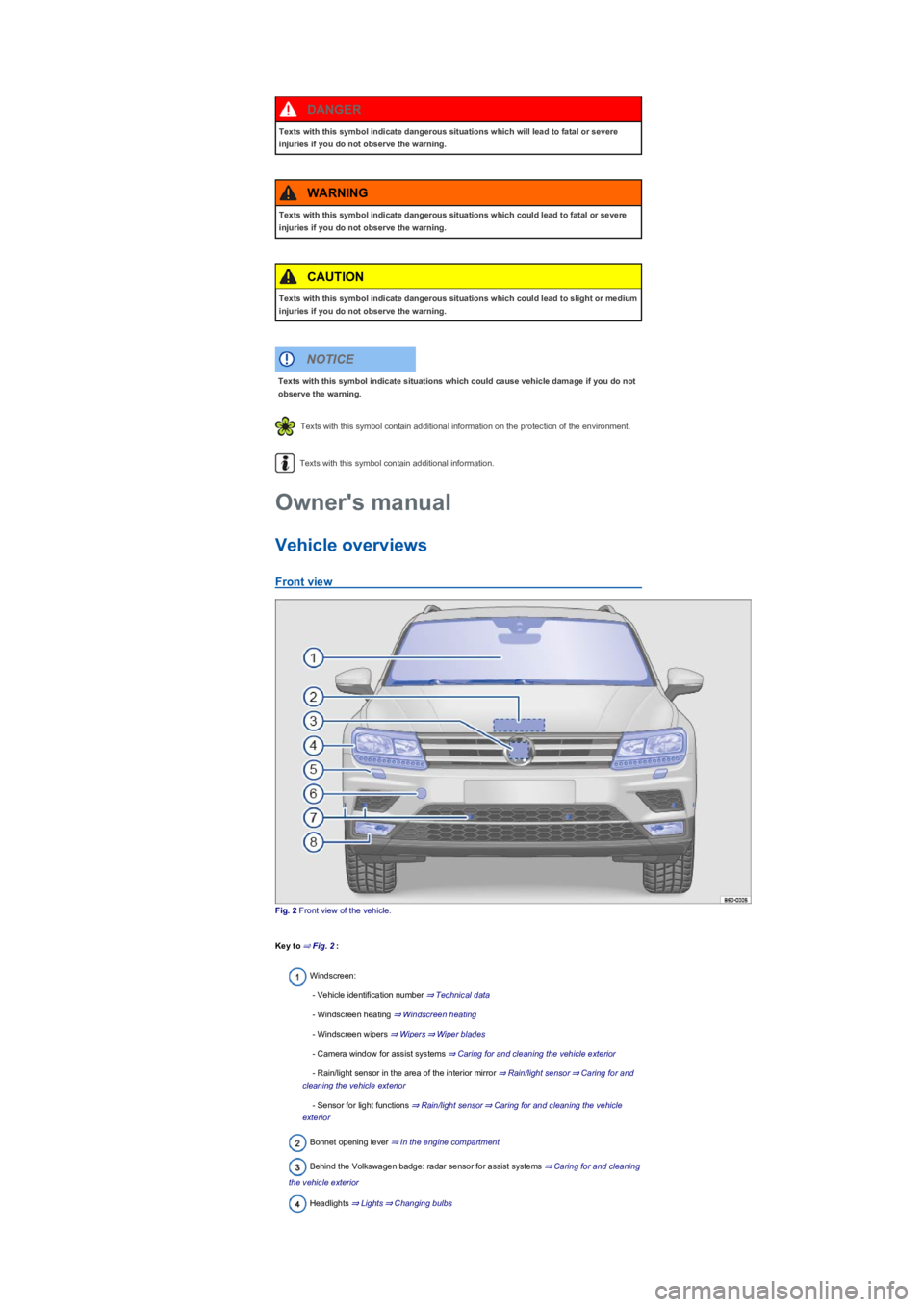
Fig. 2 Front view of the vehicle.
Key to ⇒ Fig. 2:
Windscreen:
- Vehicle identification number ⇒ Technical data
- Windscreen heating ⇒ Windscreen heating
- Windscreen wipers ⇒ Wipers⇒ Wiper blades
- Camera window for assist systems ⇒ Caring for and cleaning the vehicle exterior
- Rain/light sensor in the area of the interior mirror ⇒ Rain/light sensor⇒ Caring for and
cleaning the vehicle exterior
- Sensor for light functions ⇒ Rain/light sensor⇒ Caring for and cleaning the vehicle
exterior
Bonnet opening lever ⇒ In the engine compartment
Behind the Volkswagen badge: radar sensor for assist systems ⇒ Caring for and cleaning
the vehicle exterior
Headlights ⇒ Lights⇒ Changing bulbs
Texts with this symbol indicate dangerous situations which will lead to fatal or severe
injuries if you do not observe the warning.
DANGER
Texts with this symbol indicate dangerous situations which could lead to fatal or severe
injuries if you do not observe the warning.
WARNING
Texts with this symbol indicate dangerous situations which could lead to slight or medium
injuries if you do not observe the warning.
CAUTION
Texts with this symbol indicate situations which could cause vehicle damage if you do not
observe the warning.
NOTICE
Owner's manual
Page 5 of 341
Rear window:
- Rear window heating ⇒ Heating and air conditioning system
- Rear wiper ⇒ Wipers⇒ Wiper blades
- Window aerial ⇒ Radio reception and aerials
Tail light clusters ⇒ Lights⇒ Changing bulbs
Area for:
- Number plate lights ⇒ Changing bulbs
- Rear view camera system ⇒ Rear view camera system (Rear View)
- Boot lid release button ⇒ Opening and closing the boot lid
Tail light clusters ⇒ Lights⇒ Changing bulbs
Behind the bumper: radar sensor for assist systems ⇒ Caring for and cleaning the vehicle
exterior
Sensors for assist systems ⇒ Caring for and cleaning the vehicle exterior
Towing bracket ⇒ Trailer towing
Behind a cover: mounting for towing eye ⇒ Tow-starting or towing
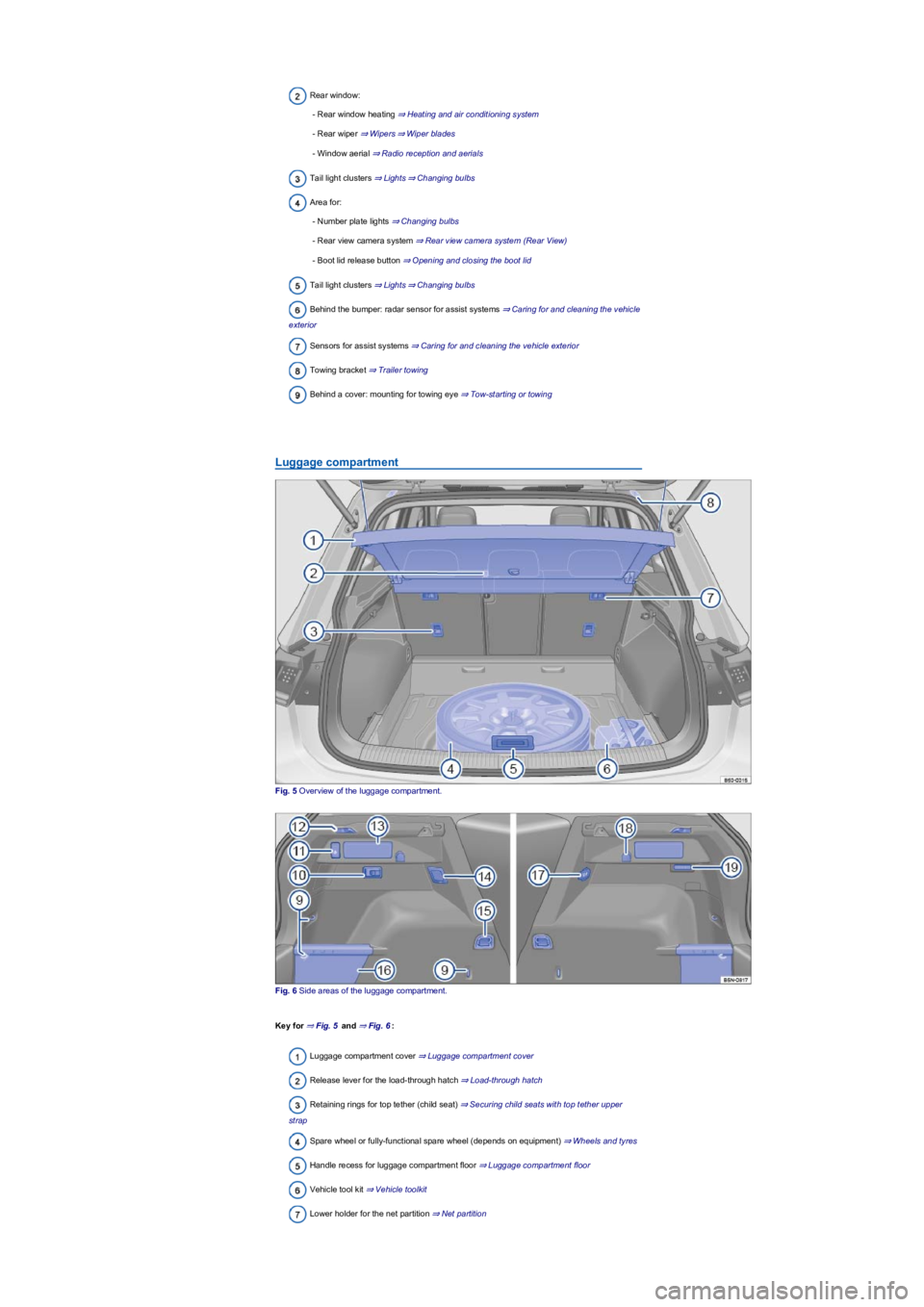
Luggage compartment
Fig. 5 Overview of the luggage compartment.
Fig. 6 Side areas of the luggage compartment.
Key for ⇒ Fig. 5 and ⇒ Fig. 6:
Luggage compartment cover ⇒ Luggage compartment cover
Release lever for the load-through hatch ⇒ Load-through hatch
Retaining rings for top tether (child seat) ⇒ Securing child seats with top tether upper
strap
Spare wheel or fully-functional spare wheel (depends on equipment) ⇒ Wheels and tyres
Handle recess for luggage compartment floor ⇒ Luggage compartment floor
Vehicle tool kit ⇒ Vehicle toolkit
Lower holder for the net partition ⇒ Net partition
Page 7 of 341
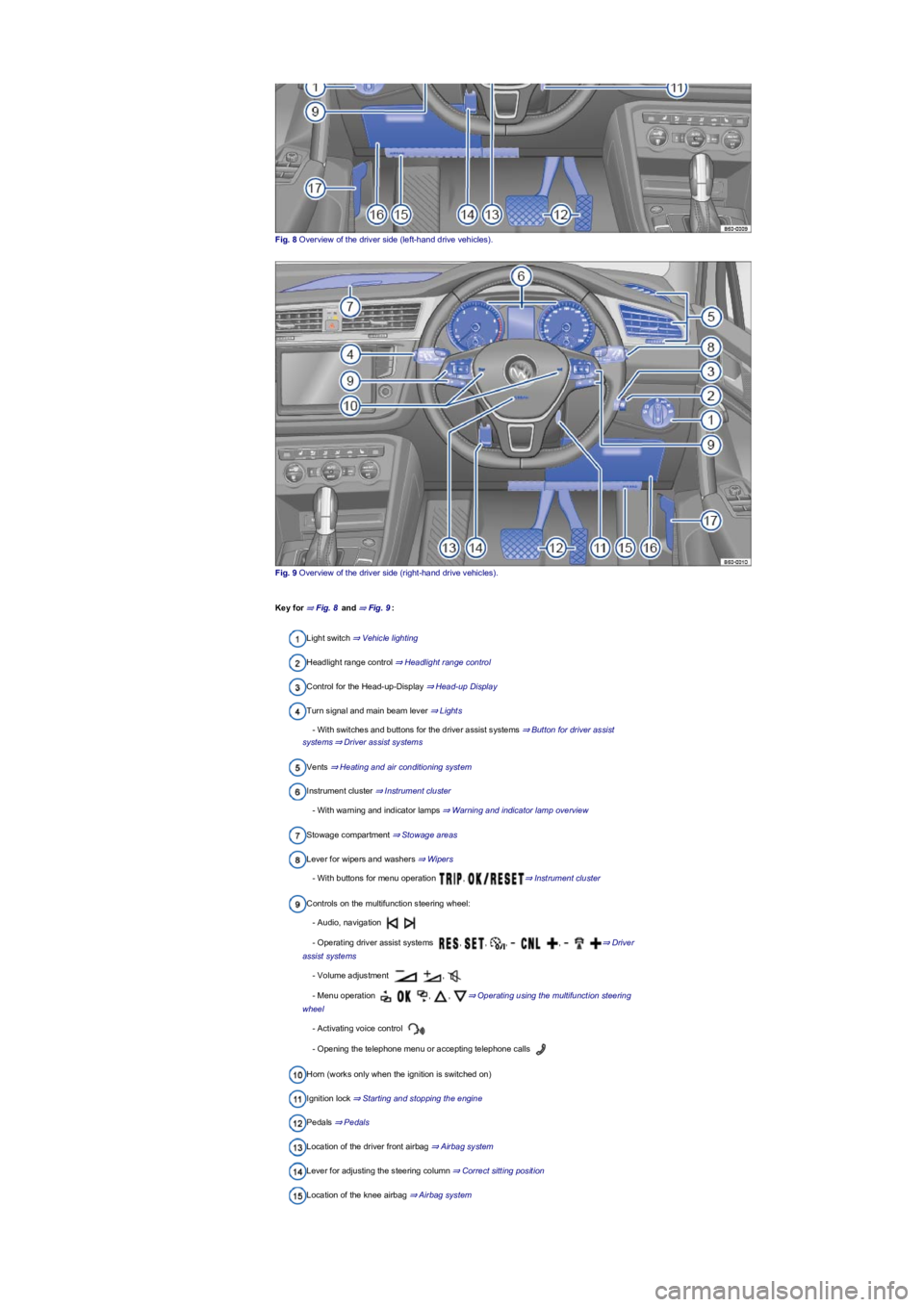
Fig. 8 Overview of the driver side (left-hand drive vehicles).
Fig. 9 Overview of the driver side (right-hand drive vehicles).
Key for ⇒ Fig. 8 and ⇒ Fig. 9:
Light switch ⇒ Vehicle lighting
Headlight range control ⇒ Headlight range control
Control for the Head-up-Display ⇒ Head-up Display
Turn signal and main beam lever ⇒ Lights
- With switches and buttons for the driver assist systems ⇒ Button for driver assist
systems⇒ Driver assist systems
Vents ⇒ Heating and air conditioning system
Instrument cluster ⇒ Instrument cluster
- With warning and indicator lamps ⇒ Warning and indicator lamp overview
Stowage compartment ⇒ Stowage areas
Lever for wipers and washers ⇒ Wipers
- With buttons for menu operation , ⇒ Instrument cluster
Controls on the multifunction steering wheel:
- Audio, navigation
- Operating driver assist systems , , , , ⇒ Driver
assist systems
- Volume adjustment ,
- Menu operation , , ⇒ Operating using the multifunction steering
wheel
- Activating voice control
- Opening the telephone menu or accepting telephone calls
Horn (works only when the ignition is switched on)
Ignition lock ⇒ Starting and stopping the engine
Pedals ⇒ Pedals
Location of the driver front airbag ⇒ Airbag system
Lever for adjusting the steering column ⇒ Correct sitting position
Location of the knee airbag ⇒ Airbag system
Page 8 of 341
Stowage compartment ⇒ Stowage areas
Release lever for the bonnet ⇒ In the engine compartment
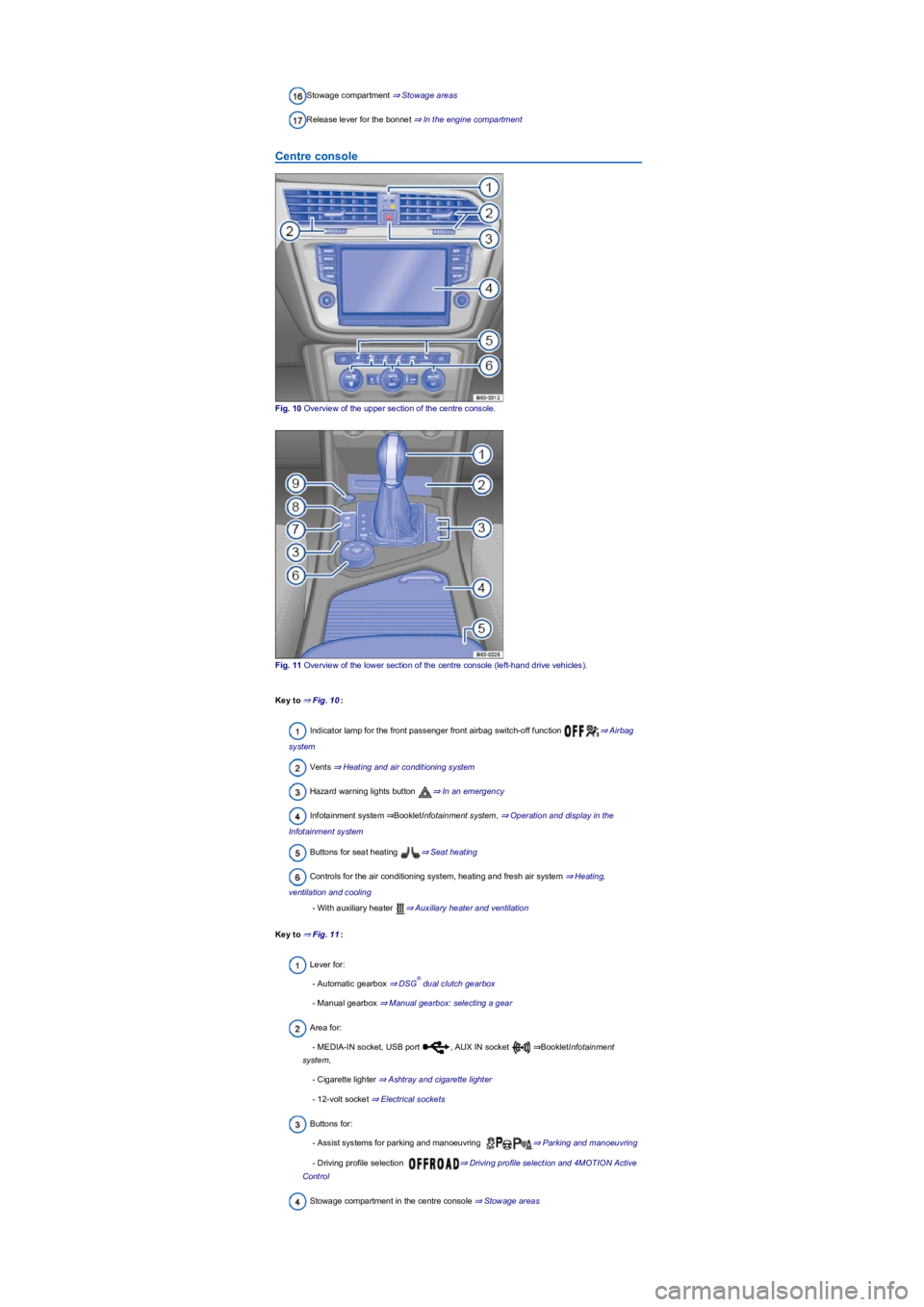
Centre console
Fig. 10 Overview of the upper section of the centre console.
Fig. 11 Overview of the lower section of the centre console (left-hand drive vehicles).
Key to ⇒ Fig. 10:
Indicator lamp for the front passenger front airbag switch-off function ⇒ Airbag
system
Vents ⇒ Heating and air conditioning system
Hazard warning lights button ⇒ In an emergency
Infotainment system ⇒BookletInfotainment system, ⇒ Operation and display in the
Infotainment system
Buttons for seat heating ⇒ Seat heating
Controls for the air conditioning system, heating and fresh air system ⇒ Heating,
ventilation and cooling
- With auxiliary heater ⇒ Auxiliary heater and ventilation
Key to ⇒ Fig. 11:
Lever for:
- Automatic gearbox ⇒ DSG dual clutch gearbox
- Manual gearbox ⇒ Manual gearbox: selecting a gear
Area for:
- MEDIA-IN socket, USB port , AUX IN socket ⇒BookletInfotainment
system,
- Cigarette lighter ⇒ Ashtray and cigarette lighter
- 12-volt socket ⇒ Electrical sockets
Buttons for:
- Assist systems for parking and manoeuvring ⇒ Parking and manoeuvring
- Driving profile selection ⇒ Driving profile selection and 4MOTION Active
Control
Stowage compartment in the centre console ⇒ Stowage areas
®
Page 9 of 341
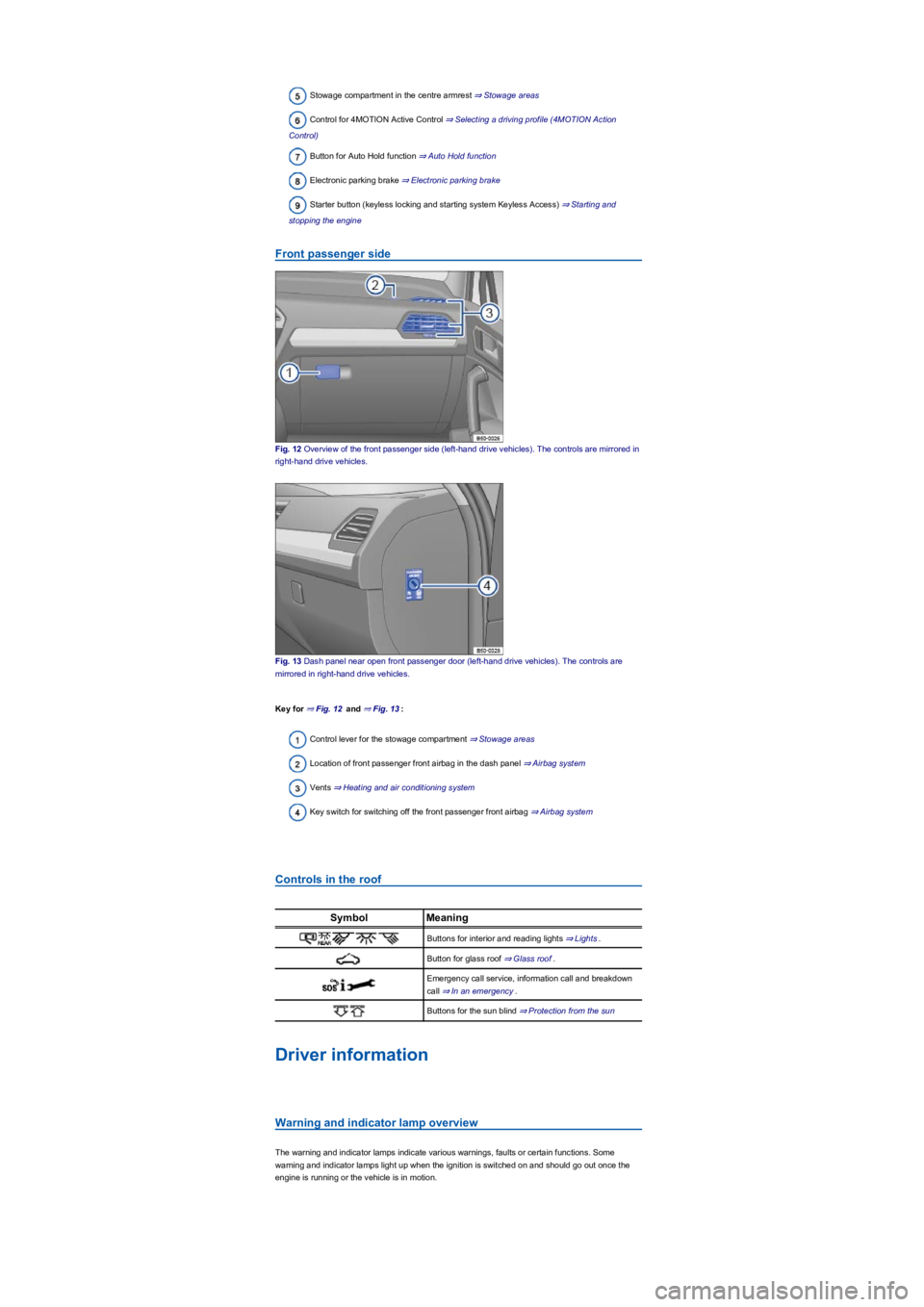
Stowage compartment in the centre armrest ⇒ Stowage areas
Control for 4MOTION Active Control ⇒ Selecting a driving profile (4MOTION Action
Control)
Button for Auto Hold function ⇒ Auto Hold function
Electronic parking brake ⇒ Electronic parking brake
Starter button (keyless locking and starting system Keyless Access) ⇒ Starting and
stopping the engine
Front passenger side
Fig. 12 Overview of the front passenger side (left-hand drive vehicles). The controls are mirrored in
right-hand drive vehicles.
Fig. 13 Dash panel near open front passenger door (left-hand drive vehicles). The controls are
mirrored in right-hand drive vehicles.
Key for ⇒ Fig. 12 and ⇒ Fig. 13:
Control lever for the stowage compartment ⇒ Stowage areas
Location of front passenger front airbag in the dash panel ⇒ Airbag system
Vents ⇒ Heating and air conditioning system
Key switch for switching off the front passenger front airbag ⇒ Airbag system
Controls in the roof
SymbolMeaning
Buttons for interior and reading lights ⇒ Lights.
Button for glass roof ⇒ Glass roof.
Emergency call service, information call and breakdown
call ⇒ In an emergency.
Buttons for the sun blind ⇒ Protection from the sun
Driver information
Warning and indicator lamp overview
The warning and indicator lamps indicate various warnings, faults or certain functions. Some
warning and indicator lamps light up when the ignition is switched on and should go out once the
engine is running or the vehicle is in motion.
Page 10 of 341
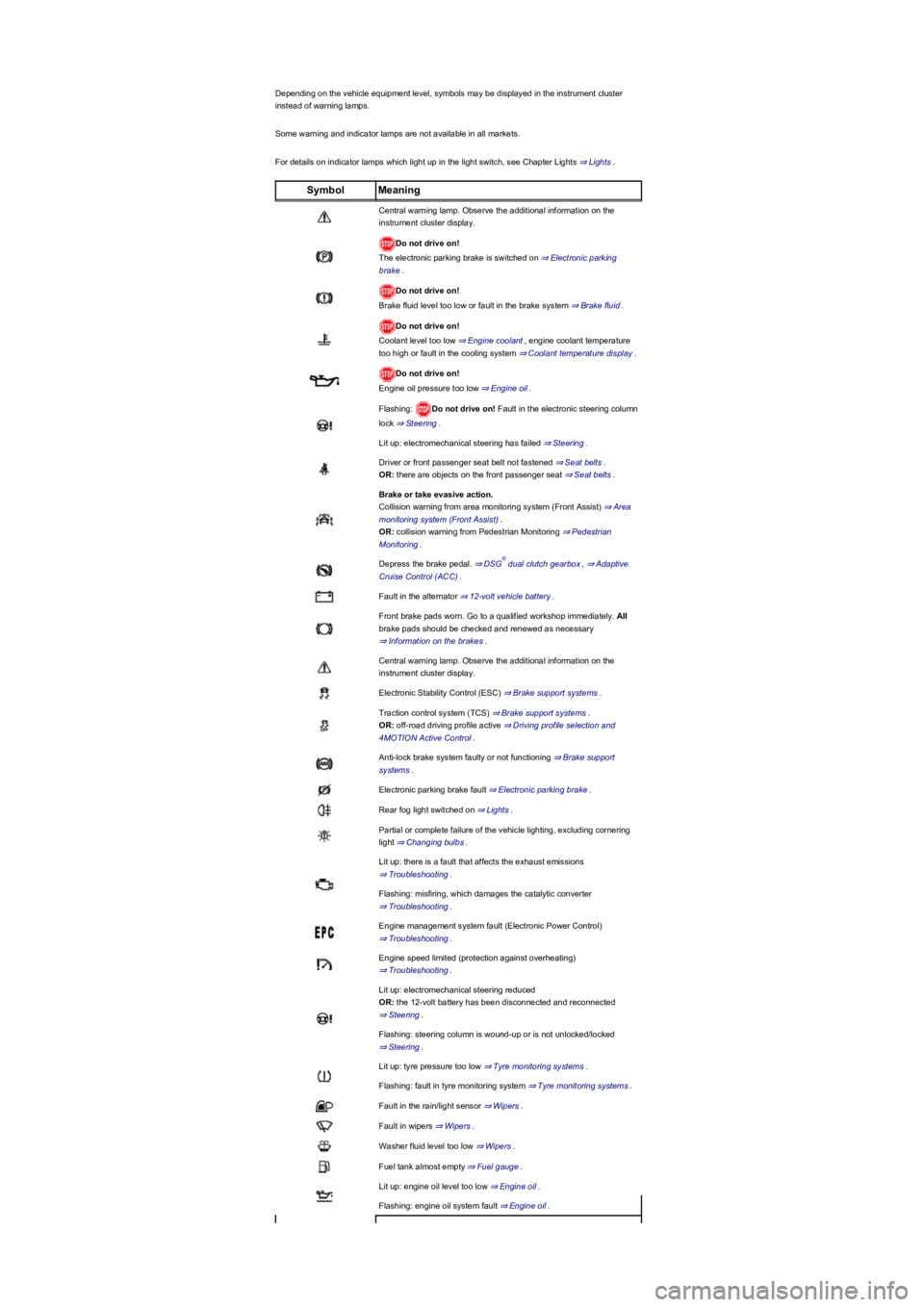
Depending on the vehicle equipment level, symbols may be displayed in the instrument cluster
instead of warning lamps.
Some warning and indicator lamps are not available in all markets.
For details on indicator lamps which light up in the light switch, see Chapter Lights ⇒ Lights.
SymbolMeaning
Central warning lamp. Observe the additional information on the
instrument cluster display.
Do not drive on!
The electronic parking brake is switched on ⇒ Electronic parking
brake.
Do not drive on!
Brake fluid level too low or fault in the brake system ⇒ Brake fluid.
Do not drive on!
Coolant level too low ⇒ Engine coolant, engine coolant temperature
too high or fault in the cooling system ⇒ Coolant temperature display.
Do not drive on!
Engine oil pressure too low ⇒ Engine oil.
Flashing: Do not drive on! Fault in the electronic steering column
lock ⇒ Steering.
Lit up: electromechanical steering has failed ⇒ Steering.
Driver or front passenger seat belt not fastened ⇒ Seat belts.
OR: there are objects on the front passenger seat ⇒ Seat belts.
Brake or take evasive action.
Collision warning from area monitoring system (Front Assist) ⇒ Area
monitoring system (Front Assist).
OR: collision warning from Pedestrian Monitoring ⇒ Pedestrian
Monitoring.
Depress the brake pedal. ⇒ DSG dual clutch gearbox, ⇒ Adaptive
Cruise Control (ACC).
Fault in the alternator ⇒ 12-volt vehicle battery.
Front brake pads worn. Go to a qualified workshop immediately. All
brake pads should be checked and renewed as necessary
⇒ Information on the brakes.
Central warning lamp. Observe the additional information on the
instrument cluster display.
Electronic Stability Control (ESC) ⇒ Brake support systems.
Traction control system (TCS) ⇒ Brake support systems.
OR: off-road driving profile active ⇒ Driving profile selection and
4MOTION Active Control.
Anti-lock brake system faulty or not functioning ⇒ Brake support
systems.
Electronic parking brake fault ⇒ Electronic parking brake.
Rear fog light switched on ⇒ Lights.
Partial or complete failure of the vehicle lighting, excluding cornering
light ⇒ Changing bulbs.
Lit up: there is a fault that affects the exhaust emissions
⇒ Troubleshooting.
Flashing: misfiring, which damages the catalytic converter
⇒ Troubleshooting.
Engine management system fault (Electronic Power Control)
⇒ Troubleshooting.
Engine speed limited (protection against overheating)
⇒ Troubleshooting.
Lit up: electromechanical steering reduced
OR: the 12-volt battery has been disconnected and reconnected
⇒ Steering.
Flashing: steering column is wound-up or is not unlocked/locked
⇒ Steering.
Lit up: tyre pressure too low ⇒ Tyre monitoring systems.
Flashing: fault in tyre monitoring system ⇒ Tyre monitoring systems.
Fault in the rain/light sensor ⇒ Wipers.
Fault in wipers ⇒ Wipers.
Washer fluid level too low ⇒ Wipers.
Fuel tank almost empty ⇒ Fuel gauge.
Lit up: engine oil level too low ⇒ Engine oil.
Flashing: engine oil system fault ⇒ Engine oil.
®
Page 12 of 341
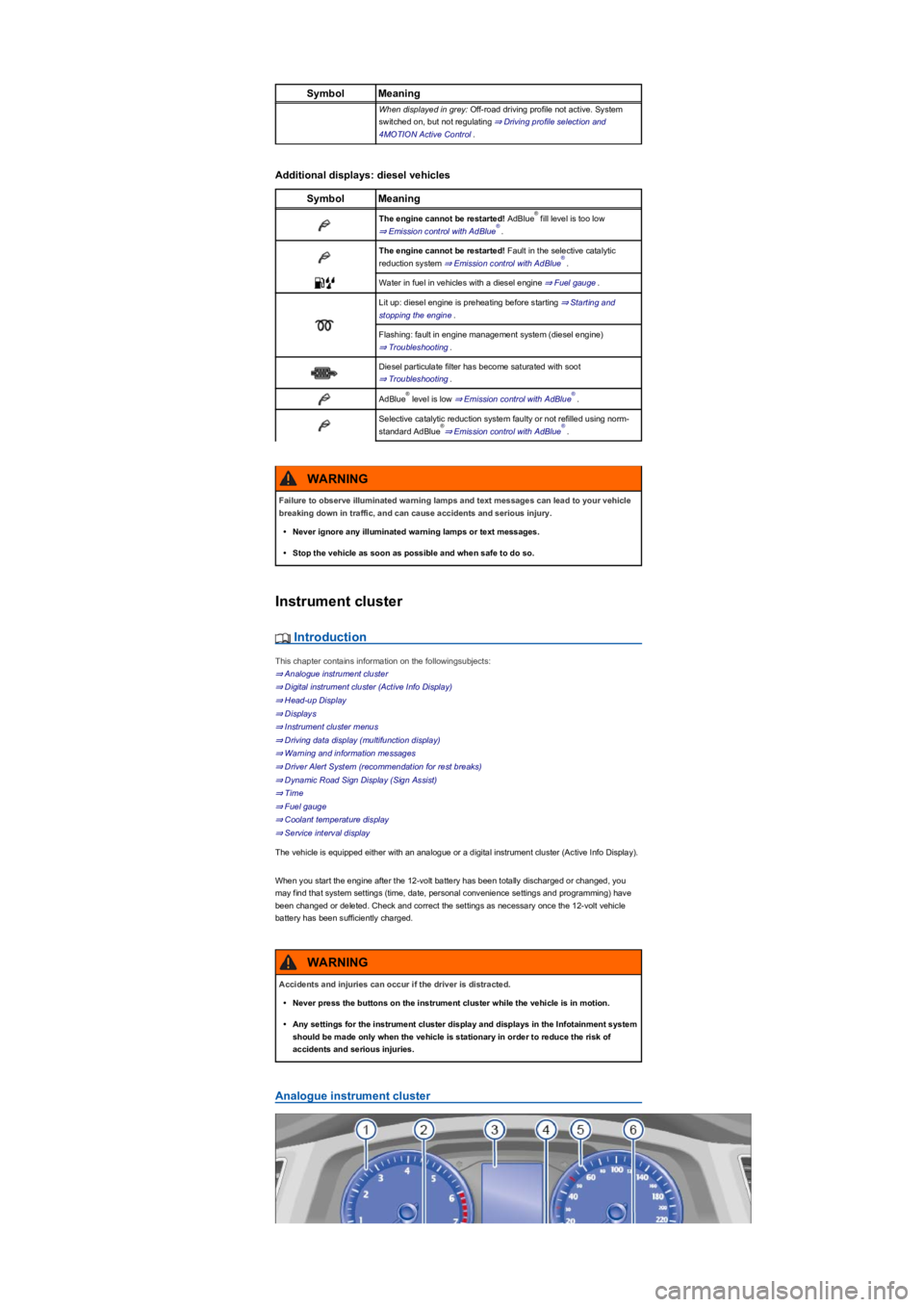
SymbolMeaning
When displayed in grey: Off-road driving profile not active. System
switched on, but not regulating ⇒ Driving profile selection and
4MOTION Active Control.
Additional displays: diesel vehicles
SymbolMeaning
The engine cannot be restarted! AdBlue fill level is too low
⇒ Emission control with AdBlue.
The engine cannot be restarted! Fault in the selective catalytic
reduction system ⇒ Emission control with AdBlue.
Water in fuel in vehicles with a diesel engine ⇒ Fuel gauge.
Lit up: diesel engine is preheating before starting ⇒ Starting and
stopping the engine.
Flashing: fault in engine management system (diesel engine)
⇒ Troubleshooting.
Diesel particulate filter has become saturated with soot
⇒ Troubleshooting.
AdBlue level is low ⇒ Emission control with AdBlue.
Selective catalytic reduction system faulty or not refilled using norm-
standard AdBlue⇒ Emission control with AdBlue.
Instrument cluster
Introduction
This chapter contains information on the followingsubjects:
⇒ Analogue instrument cluster
⇒ Digital instrument cluster (Active Info Display)
⇒ Head-up Display
⇒ Displays
⇒ Instrument cluster menus
⇒ Driving data display (multifunction display)
⇒ Warning and information messages
⇒ Driver Alert System (recommendation for rest breaks)
⇒ Dynamic Road Sign Display (Sign Assist)
⇒ Time
⇒ Fuel gauge
⇒ Coolant temperature display
⇒ Service interval display
The vehicle is equipped either with an analogue or a digital instrument cluster (Active Info Display).
When you start the engine after the 12-volt battery has been totally discharged or changed, you
may find that system settings (time, date, personal convenience settings and programming) have
been changed or deleted. Check and correct the settings as necessary once the 12-volt vehicle
battery has been sufficiently charged.
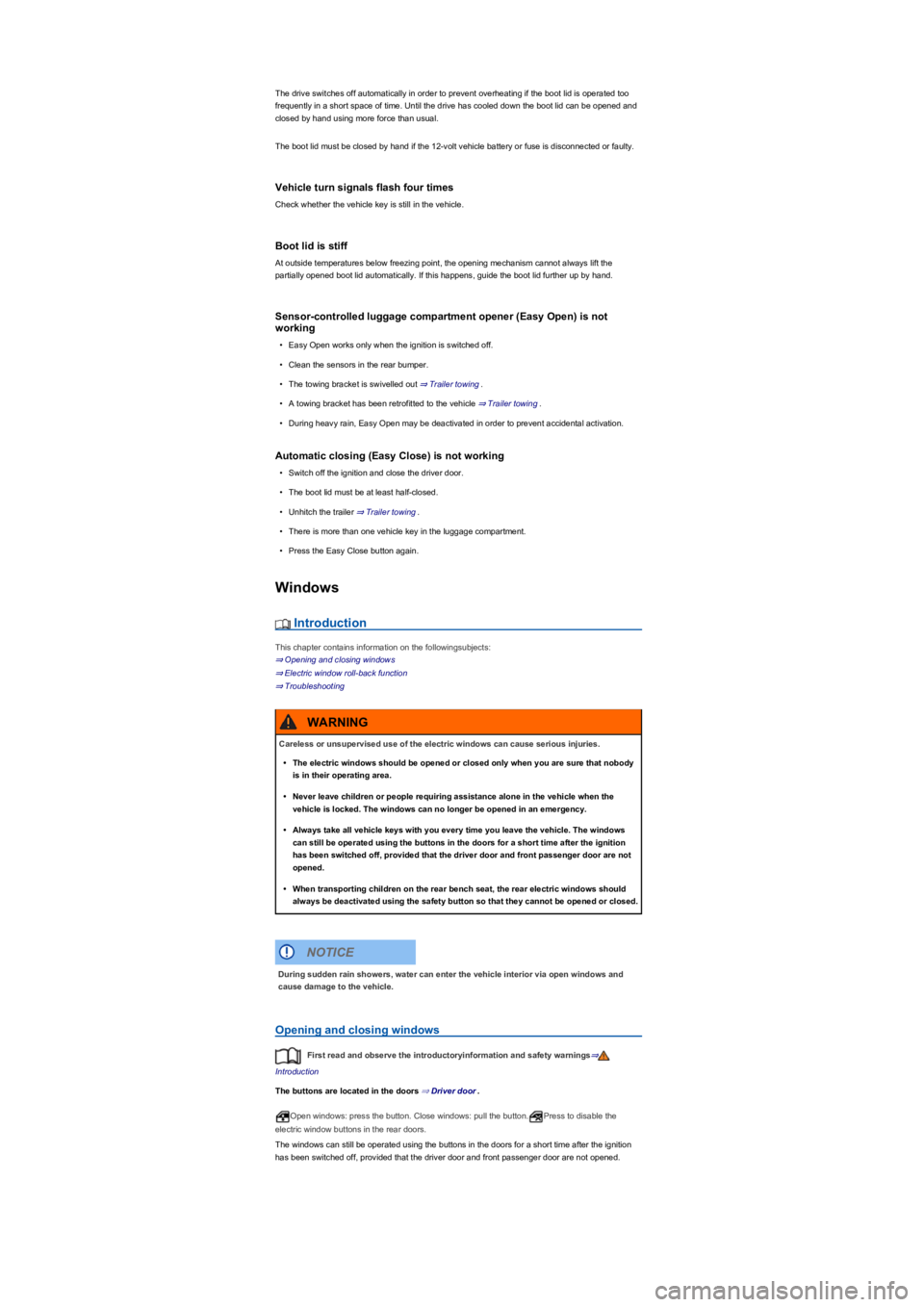
Analogue instrument cluster
®
®
®
®®
®®
Failure to observe illuminated warning lamps and text messages can lead to your vehicle
breaking down in traffic, and can cause accidents and serious injury.
•Never ignore any illuminated warning lamps or text messages.
•Stop the vehicle as soon as possible and when safe to do so.
WARNING
Accidents and injuries can occur if the driver is distracted.
•Never press the buttons on the instrument cluster while the vehicle is in motion.
•Any settings for the instrument cluster display and displays in the Infotainment system
should be made only when the vehicle is stationary in order to reduce the risk of
accidents and serious injuries.
WARNING
Page 83 of 341
The drive switches off automatically in order to prevent overheating if the boot lid is operated too
frequently in a short space of time. Until the drive has cooled down the boot lid can be opened and
closed by hand using more force than usual.
The boot lid must be closed by hand if the 12-volt vehicle battery or fuse is disconnected or faulty.
Vehicle turn signals flash four times
Check whether the vehicle key is still in the vehicle.
Boot lid is stiff
At outside temperatures below freezing point, the opening mechanism cannot always lift the
partially opened boot lid automatically. If this happens, guide the boot lid further up by hand.
Sensor-controlled luggage compartment opener (Easy Open) is not
working
•Easy Open works only when the ignition is switched off.
•Clean the sensors in the rear bumper.
•The towing bracket is swivelled out ⇒ Trailer towing.
•A towing bracket has been retrofitted to the vehicle ⇒ Trailer towing.
•During heavy rain, Easy Open may be deactivated in order to prevent accidental activation.
Automatic closing (Easy Close) is not working
•Switch off the ignition and close the driver door.
•The boot lid must be at least half-closed.
•Unhitch the trailer ⇒ Trailer towing.
•There is more than one vehicle key in the luggage compartment.
•Press the Easy Close button again.
Windows
Introduction
This chapter contains information on the followingsubjects:
⇒ Opening and closing windows
⇒ Electric window roll-back function
⇒ Troubleshooting
Opening and closing windows
First read and observe the introductoryinformation and safety warnings⇒
Introduction
The buttons are located in the doors ⇒ Driver door.
Open windows: press the button. Close windows: pull the button.Press to disable the
electric window buttons in the rear doors.
The windows can still be operated using the buttons in the doors for a short time after the ignition
has been switched off, provided that the driver door and front passenger door are not opened.
Careless or unsupervised use of the electric windows can cause serious injuries.
•The electric windows should be opened or closed only when you are sure that nobody
is in their operating area.
•Never leave children or people requiring assistance alone in the vehicle when the
vehicle is locked. The windows can no longer be opened in an emergency.
•Always take all vehicle keys with you every time you leave the vehicle. The windows
can still be operated using the buttons in the doors for a short time after the ignition
has been switched off, provided that the driver door and front passenger door are not
opened.
•When transporting children on the rear bench seat, the rear electric windows should
always be deactivated using the safety button so that they cannot be opened or closed.
WARNING
During sudden rain showers, water can enter the vehicle interior via open windows and
cause damage to the vehicle.
NOTICE
Page 109 of 341
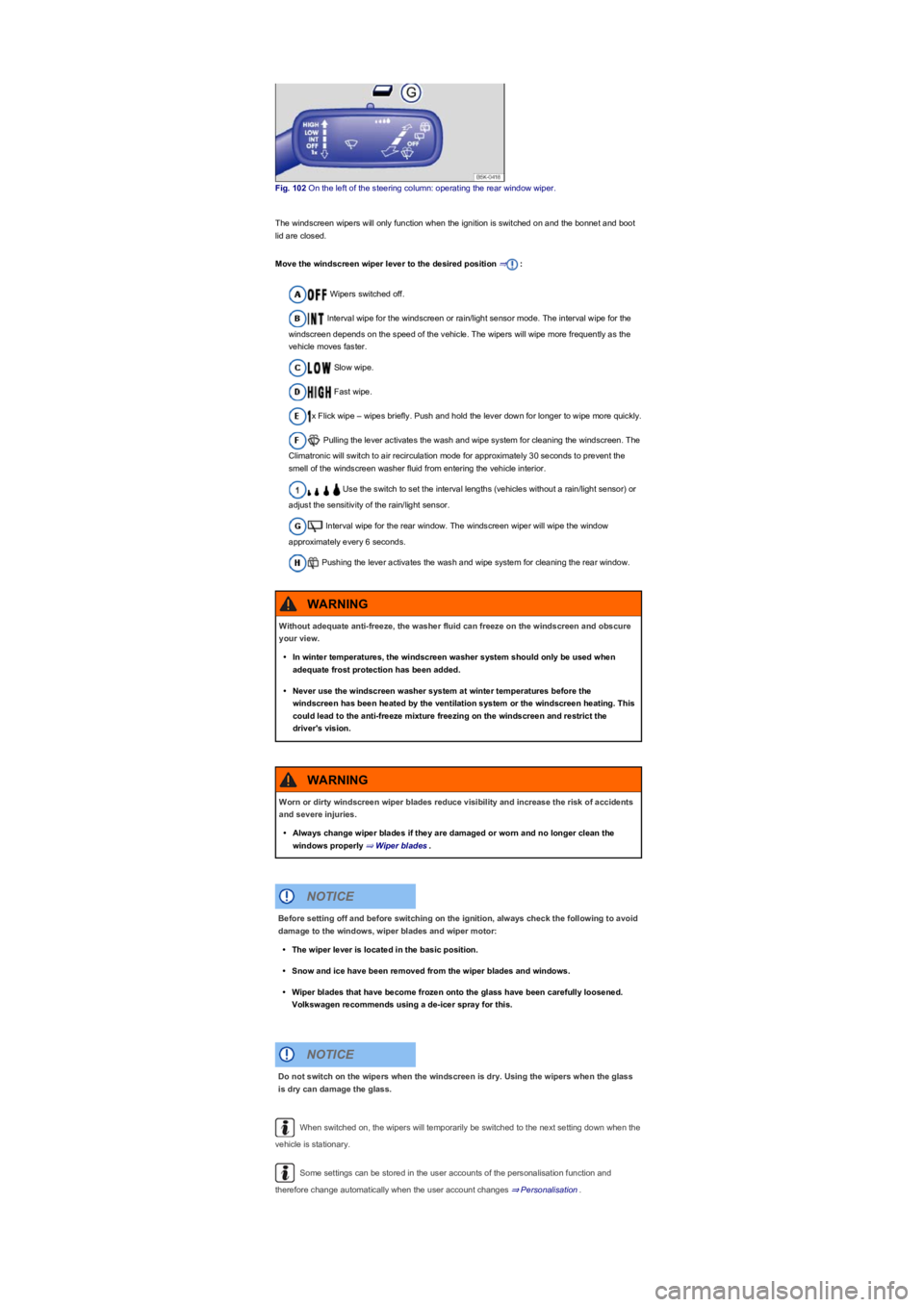
Fig. 102 On the left of the steering column: operating the rear window wiper.
The windscreen wipers will only function when the ignition is switched on and the bonnet and boot
lid are closed.
Move the windscreen wiper lever to the desired position ⇒:
Wipers switched off.
Interval wipe for the windscreen or rain/light sensor mode. The interval wipe for the
windscreen depends on the speed of the vehicle. The wipers will wipe more frequently as the
vehicle moves faster.
Slow wipe.
Fast wipe.
x Flick wipe – wipes briefly. Push and hold the lever down for longer to wipe more quickly.
Pulling the lever activates the wash and wipe system for cleaning the windscreen. The
Climatronic will switch to air recirculation mode for approximately 30 seconds to prevent the
smell of the windscreen washer fluid from entering the vehicle interior.
Use the switch to set the interval lengths (vehicles without a rain/light sensor) or
adjust the sensitivity of the rain/light sensor.
Interval wipe for the rear window. The windscreen wiper will wipe the window
approximately every 6 seconds.
Pushing the lever activates the wash and wipe system for cleaning the rear window.
When switched on, the wipers will temporarily be switched to the next setting down when the
vehicle is stationary.
Some settings can be stored in the user accounts of the personalisation function and
therefore change automatically when the user account changes ⇒ Personalisation.
Without adequate anti-freeze, the washer fluid can freeze on the windscreen and obscure
your view.
•In winter temperatures, the windscreen washer system should only be used when
adequate frost protection has been added.
•Never use the windscreen washer system at winter temperatures before the
windscreen has been heated by the ventilation system or the windscreen heating. This
could lead to the anti-freeze mixture freezing on the windscreen and restrict the
driver's vision.
WARNING
Worn or dirty windscreen wiper blades reduce visibility and increase the risk of accidents
and severe injuries.
•Always change wiper blades if they are damaged or worn and no longer clean the
windows properly ⇒ Wiper blades.
WARNING
Before setting off and before switching on the ignition, always check the following to avoid
damage to the windows, wiper blades and wiper motor:
•The wiper lever is located in the basic position.
•Snow and ice have been removed from the wiper blades and windows.
•Wiper blades that have become frozen onto the glass have been carefully loosened.
Volkswagen recommends using a de-icer spray for this.
NOTICE
Do not switch on the wipers when the windscreen is dry. Using the wipers when the glass
is dry can damage the glass.
NOTICE
Page 110 of 341
When parking the vehicle in cold weather, it may be helpful to leave the windscreen wipers in
the service position to make it easier to loosen the wiper blades ⇒ Wiper blades.
Wiper functions
Automatic activation of the rear window wiper
The rear window wiper is switched on automatically if the front windscreen wipers are switched on
and reverse gear is engaged. The automatic wipe function can be activated and deactivated in the
Infotainment system in the Vehicle settings menu ⇒ Operation and display in the
Infotainment system:
Heated washer jets
The heating defrosts frozen washer jets. The heating output is regulated automatically when the
ignition is switched on depending on the ambient temperature. Only the jets are heated and not the
hoses carrying the washer fluid.
Headlight washer system
The headlight washer system cleans the headlight lenses and only works when the vehicle lighting
is switched on.
Once the ignition has been switched on, the headlights will also be washed the first time the wash
and wipe system for the windscreen is used, and every tenth time thereafter. Hardened dirt, such
as insect remains, should be removed from the headlight lens at regular intervals.
In winter, you should remove any snow from the headlight washer system covers in the bumper
prior to use to keep the system in working order. Remove any ice with a de-icer spray.
Rain/light sensor
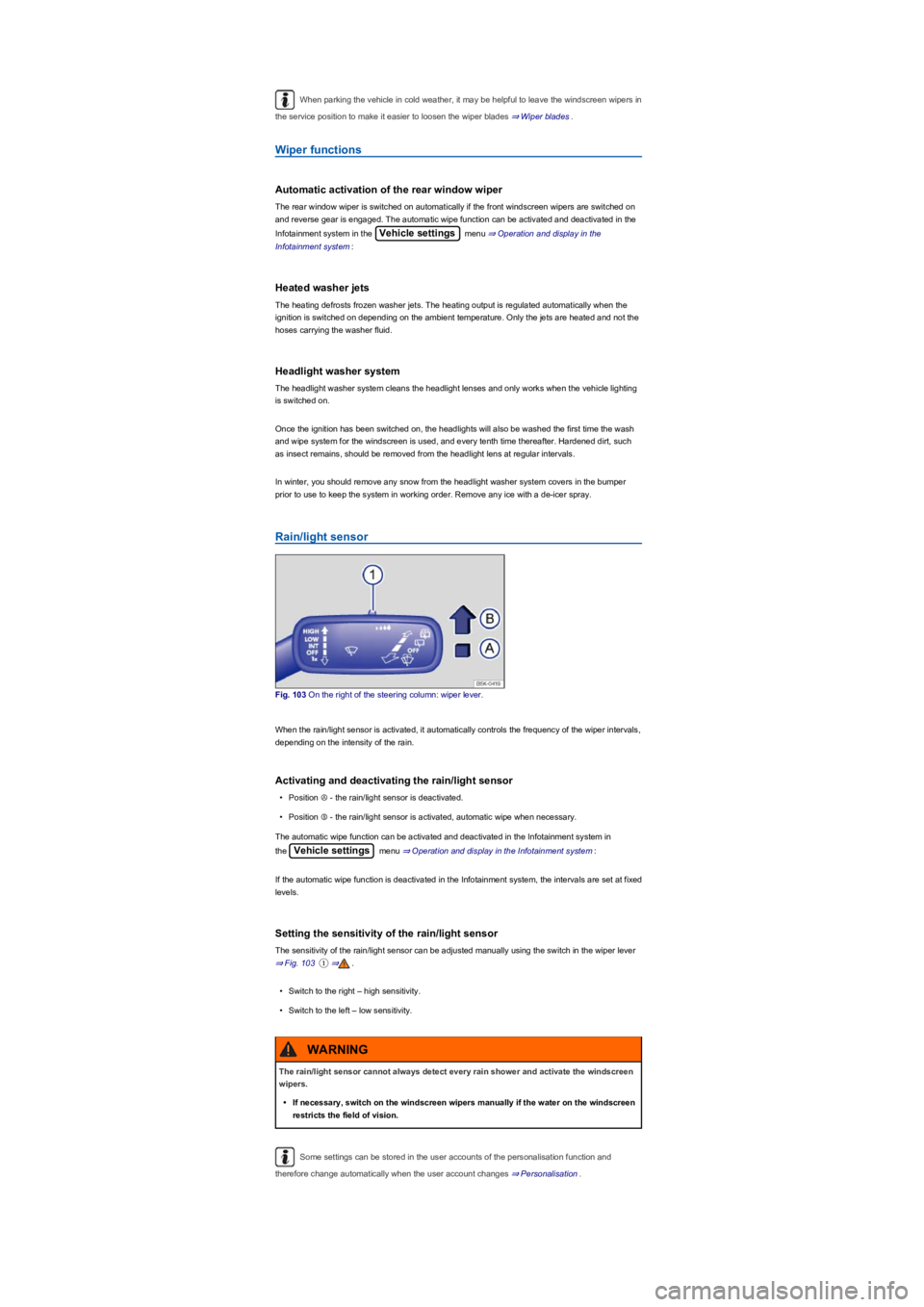
Fig. 103 On the right of the steering column: wiper lever.
When the rain/light sensor is activated, it automatically controls the frequency of the wiper intervals,
depending on the intensity of the rain.
Activating and deactivating the rain/light sensor
•Position Ⓐ - the rain/light sensor is deactivated.
•Position Ⓑ - the rain/light sensor is activated, automatic wipe when necessary.
The automatic wipe function can be activated and deactivated in the Infotainment system in
the Vehicle settings menu ⇒ Operation and display in the Infotainment system:
If the automatic wipe function is deactivated in the Infotainment system, the intervals are set at fixed
levels.
Setting the sensitivity of the rain/light sensor
The sensitivity of the rain/light sensor can be adjusted manually using the switch in the wiper lever
⇒ Fig. 103①⇒.
•Switch to the right – high sensitivity.
•Switch to the left – low sensitivity.
Some settings can be stored in the user accounts of the personalisation function and
therefore change automatically when the user account changes ⇒ Personalisation.
The rain/light sensor cannot always detect every rain shower and activate the windscreen
wipers.
•If necessary, switch on the windscreen wipers manually if the water on the windscreen
restricts the field of vision.
WARNING