warning VOLKSWAGEN TIGUAN 2017 Owner´s Manual
[x] Cancel search | Manufacturer: VOLKSWAGEN, Model Year: 2017, Model line: TIGUAN, Model: VOLKSWAGEN TIGUAN 2017Pages: 341, PDF Size: 9.14 MB
Page 218 of 341
First read and observe the introductoryinformation and safety warnings⇒
Introduction
To use: fold the centre armrest down.
Fold the centre armrest back up again when the drink holder is no longer in use.
Ashtray and cigarette lighter
Introduction
This chapter contains information on the followingsubjects:
⇒ Removable ashtray in the drink holder
⇒ Cigarette lighter
Removable ashtray in the drink holder
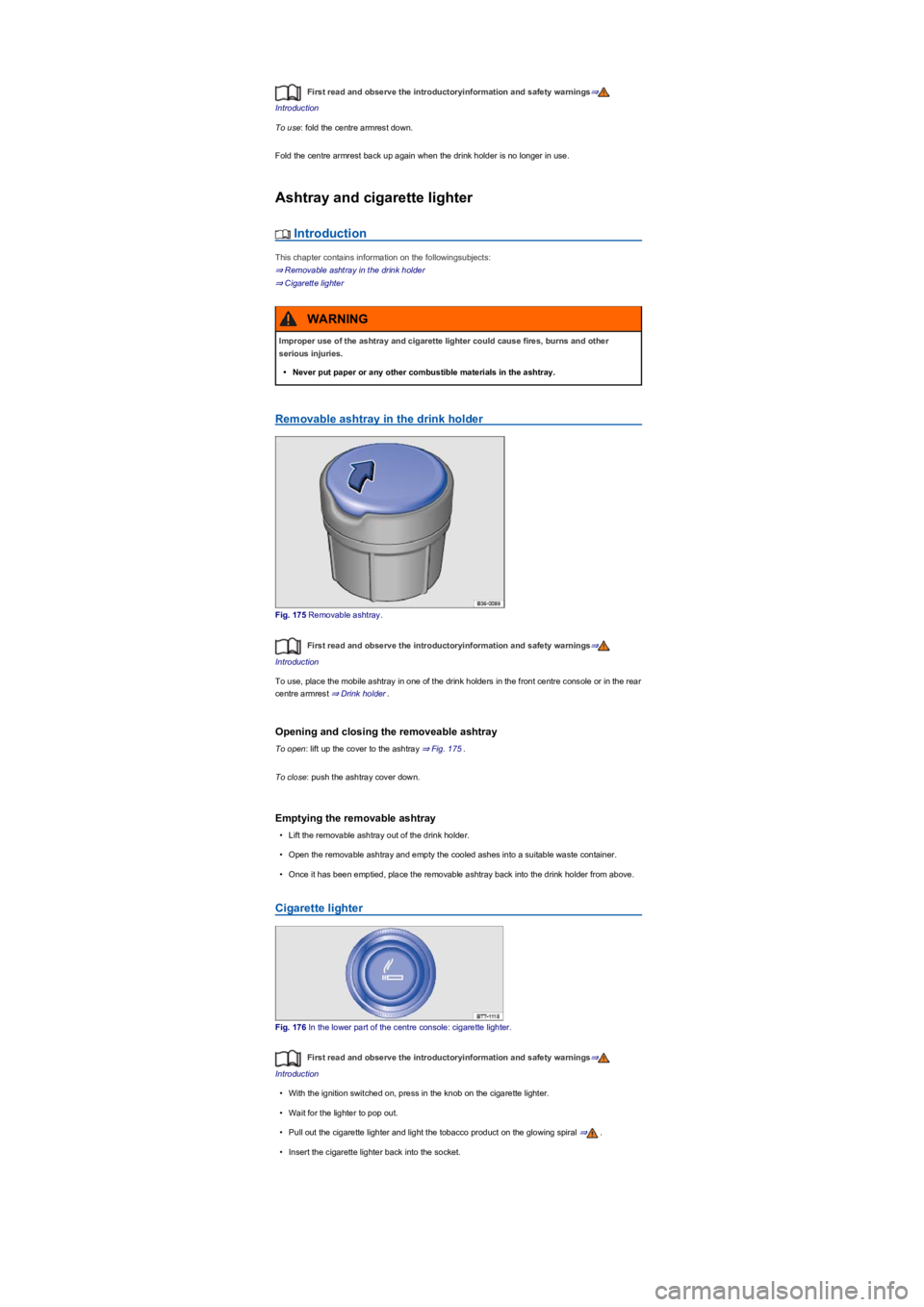
Fig. 175 Removable ashtray.
First read and observe the introductoryinformation and safety warnings⇒
Introduction
To use, place the mobile ashtray in one of the drink holders in the front centre console or in the rear
centre armrest ⇒ Drink holder.
Opening and closing the removeable ashtray
To open: lift up the cover to the ashtray ⇒ Fig. 175.
To close: push the ashtray cover down.
Emptying the removable ashtray
•Lift the removable ashtray out of the drink holder.
•Open the removable ashtray and empty the cooled ashes into a suitable waste container.
•Once it has been emptied, place the removable ashtray back into the drink holder from above.
Cigarette lighter
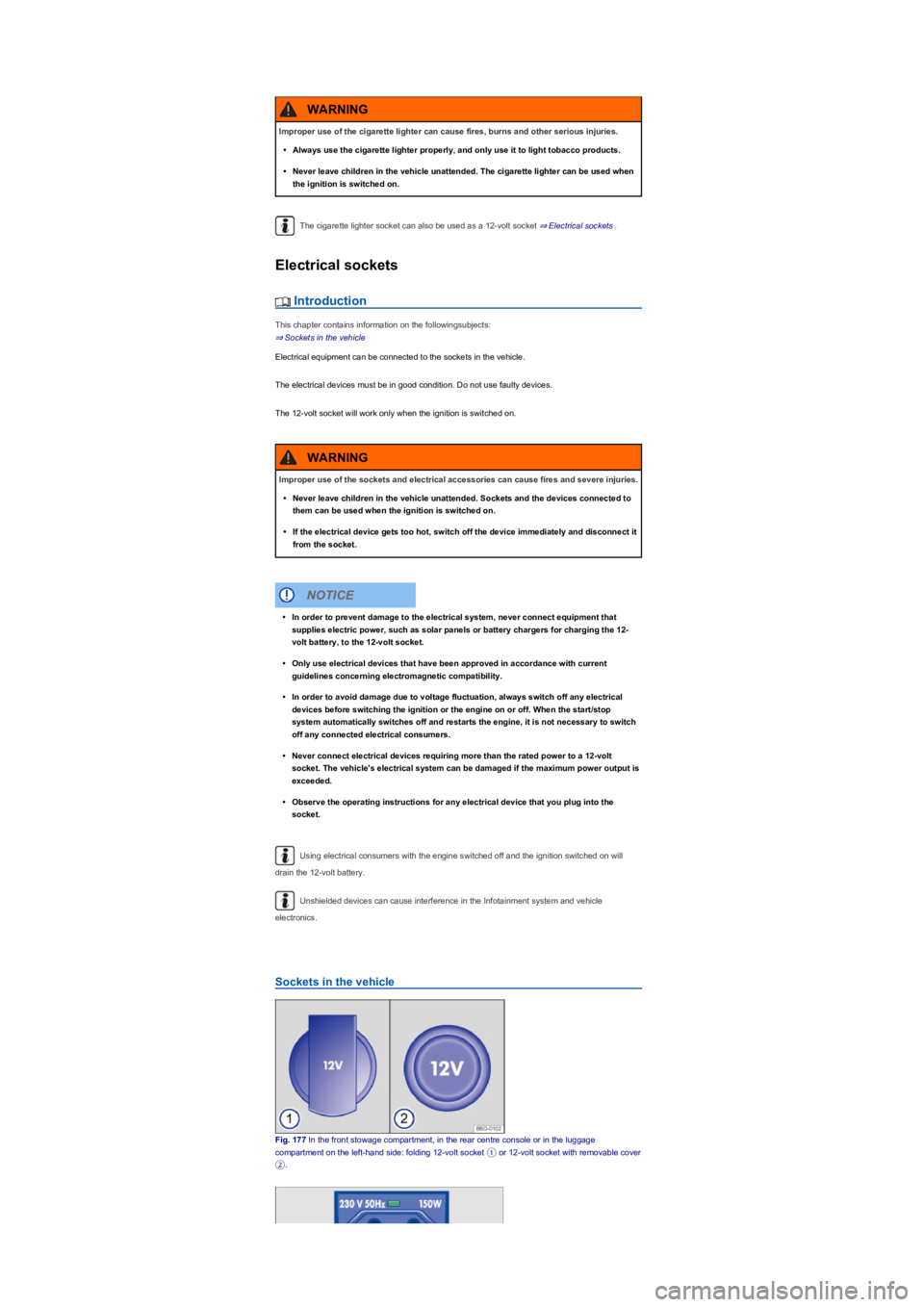
Fig. 176 In the lower part of the centre console: cigarette lighter.
First read and observe the introductoryinformation and safety warnings⇒
Introduction
•With the ignition switched on, press in the knob on the cigarette lighter.
•Wait for the lighter to pop out.
•Pull out the cigarette lighter and light the tobacco product on the glowing spiral ⇒.
•Insert the cigarette lighter back into the socket.
Improper use of the ashtray and cigarette lighter could cause fires, burns and other
serious injuries.
•Never put paper or any other combustible materials in the ashtray.
WARNING
Page 219 of 341
The cigarette lighter socket can also be used as a 12-volt socket ⇒ Electrical sockets.
Electrical sockets
Introduction
This chapter contains information on the followingsubjects:
⇒ Sockets in the vehicle
Electrical equipment can be connected to the sockets in the vehicle.
The electrical devices must be in good condition. Do not use faulty devices.
The 12-volt socket will work only when the ignition is switched on.
Using electrical consumers with the engine switched off and the ignition switched on will
drain the 12-volt battery.
Unshielded devices can cause interference in the Infotainment system and vehicle
electronics.
Sockets in the vehicle
Fig. 177 In the front stowage compartment, in the rear centre console or in the luggage
compartment on the left-hand side: folding 12-volt socket ① or 12-volt socket with removable cover
②.
Improper use of the cigarette lighter can cause fires, burns and other serious injuries.
•Always use the cigarette lighter properly, and only use it to light tobacco products.
•Never leave children in the vehicle unattended. The cigarette lighter can be used when
the ignition is switched on.
WARNING
Improper use of the sockets and electrical accessories can cause fires and severe injuries.
•Never leave children in the vehicle unattended. Sockets and the devices connected to
them can be used when the ignition is switched on.
•If the electrical device gets too hot, switch off the device immediately and disconnect it
from the socket.
WARNING
•In order to prevent damage to the electrical system, never connect equipment that
supplies electric power, such as solar panels or battery chargers for charging the 12-
volt battery, to the 12-volt socket.
•Only use electrical devices that have been approved in accordance with current
guidelines concerning electromagnetic compatibility.
•In order to avoid damage due to voltage fluctuation, always switch off any electrical
devices before switching the ignition or the engine on or off. When the start/stop
system automatically switches off and restarts the engine, it is not necessary to switch
off any connected electrical consumers.
•Never connect electrical devices requiring more than the rated power to a 12-volt
socket. The vehicle's electrical system can be damaged if the maximum power output is
exceeded.
•Observe the operating instructions for any electrical device that you plug into the
socket.
NOTICE
Page 220 of 341
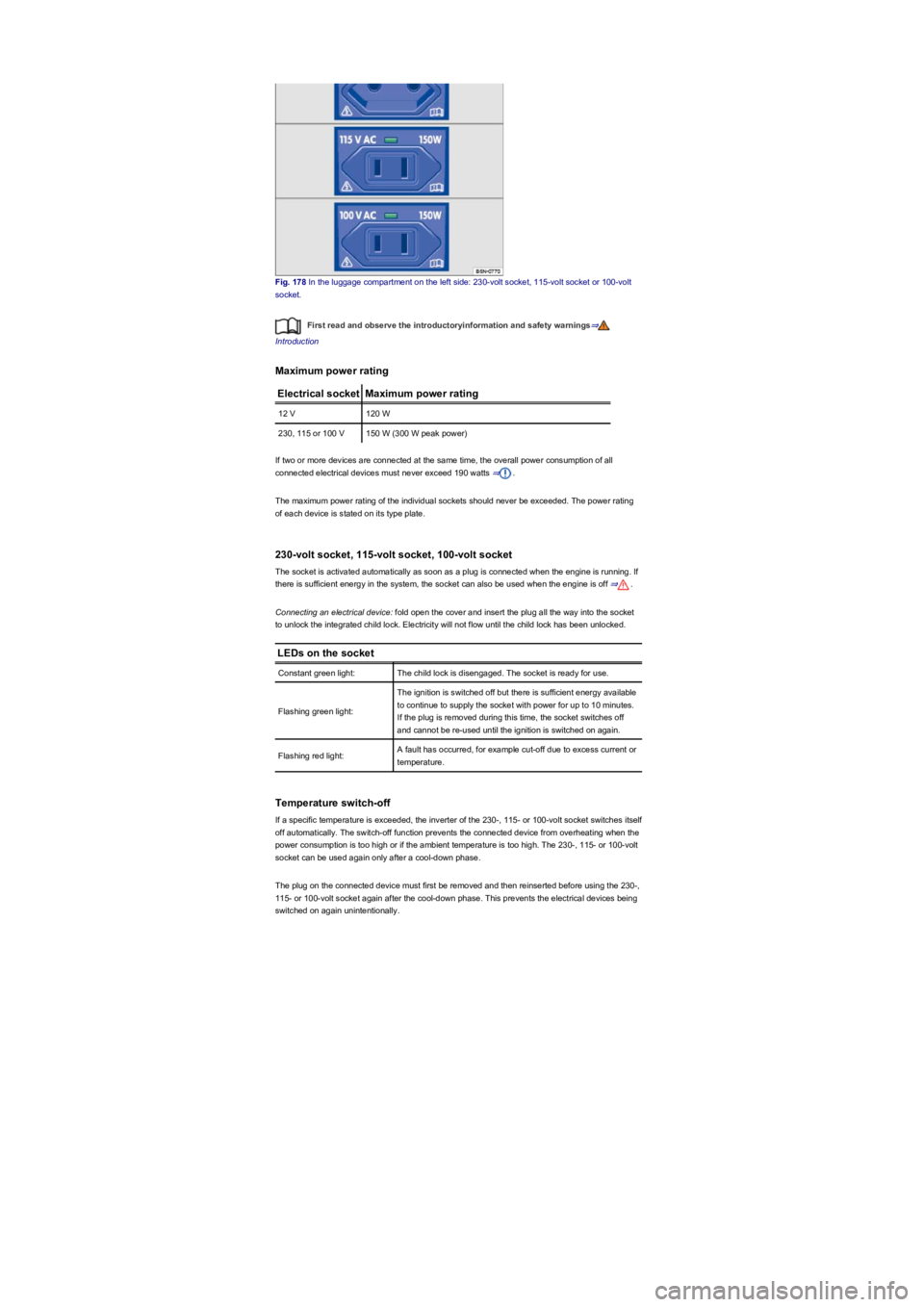
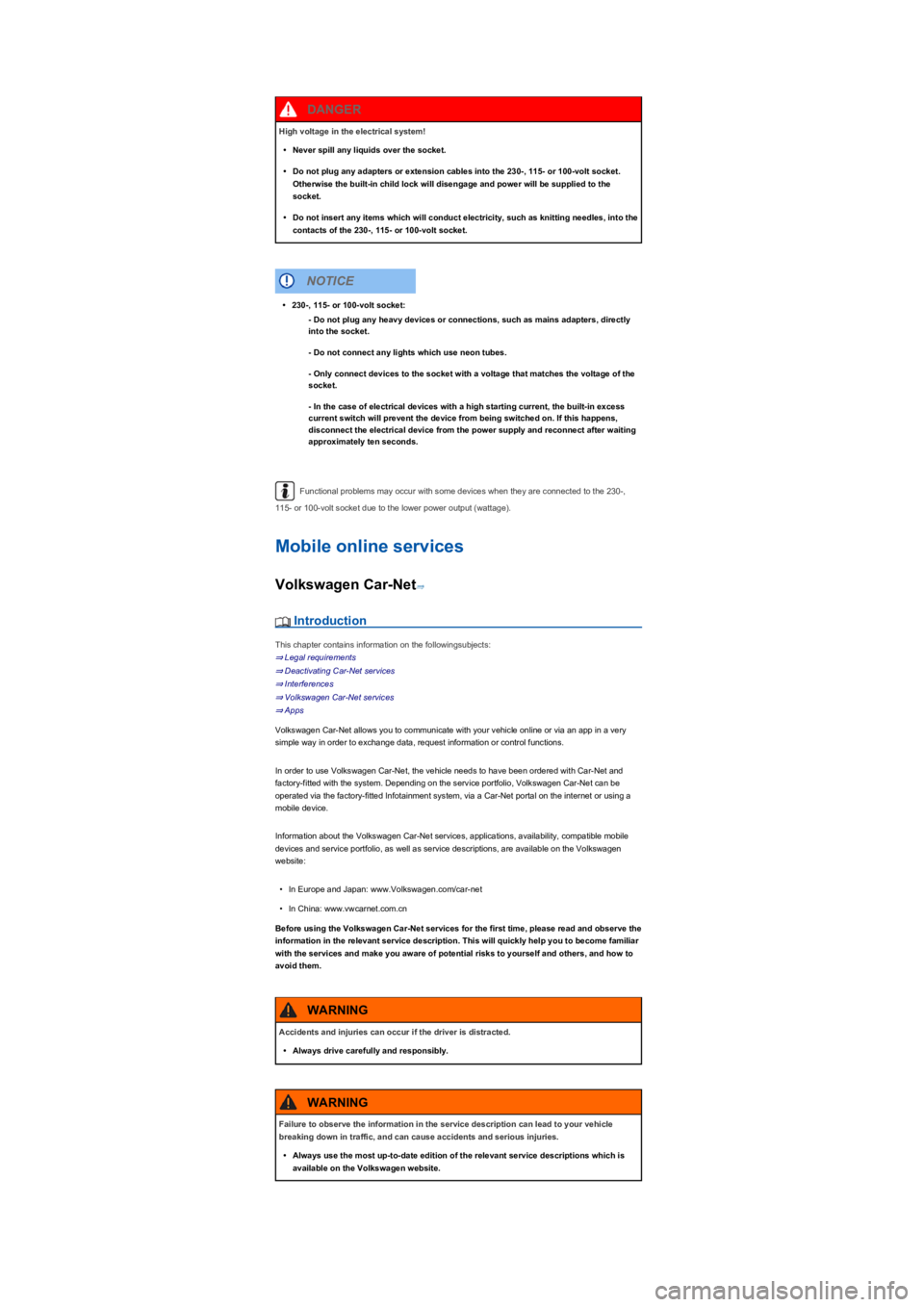
Fig. 178 In the luggage compartment on the left side: 230-volt socket, 115-volt socket or 100-volt
socket.
First read and observe the introductoryinformation and safety warnings⇒
Introduction
Maximum power rating
Electrical socketMaximum power rating
12 V120 W
230, 115 or 100 V150 W (300 W peak power)
If two or more devices are connected at the same time, the overall power consumption of all
connected electrical devices must never exceed 190 watts ⇒.
The maximum power rating of the individual sockets should never be exceeded. The power rating
of each device is stated on its type plate.
230-volt socket, 115-volt socket, 100-volt socket
The socket is activated automatically as soon as a plug is connected when the engine is running. If
there is sufficient energy in the system, the socket can also be used when the engine is off ⇒.
Connecting an electrical device: fold open the cover and insert the plug all the way into the socket
to unlock the integrated child lock. Electricity will not flow until the child lock has been unlocked.
LEDs on the socket
Constant green light:The child lock is disengaged. The socket is ready for use.
Flashing green light:
The ignition is switched off but there is sufficient energy available
to continue to supply the socket with power for up to 10 minutes.
If the plug is removed during this time, the socket switches off
and cannot be re-used until the ignition is switched on again.
Flashing red light:A fault has occurred, for example cut-off due to excess current or
temperature.
Temperature switch-off
If a specific temperature is exceeded, the inverter of the 230-, 115- or 100-volt socket switches itself
off automatically. The switch-off function prevents the connected device from overheating when the
power consumption is too high or if the ambient temperature is too high. The 230-, 115- or 100-volt
socket can be used again only after a cool-down phase.
The plug on the connected device must first be removed and then reinserted before using the 230-,
115- or 100-volt socket again after the cool-down phase. This prevents the electrical devices being
switched on again unintentionally.
Page 221 of 341
Functional problems may occur with some devices when they are connected to the 230-,
115- or 100-volt socket due to the lower power output (wattage).
Mobile online services
Volkswagen Car-Net⇒
Introduction
This chapter contains information on the followingsubjects:
⇒ Legal requirements
⇒ Deactivating Car-Net services
⇒ Interferences
⇒ Volkswagen Car-Net services
⇒ Apps
Volkswagen Car-Net allows you to communicate with your vehicle online or via an app in a very
simple way in order to exchange data, request information or control functions.
In order to use Volkswagen Car-Net, the vehicle needs to have been ordered with Car-Net and
factory-fitted with the system. Depending on the service portfolio, Volkswagen Car-Net can be
operated via the factory-fitted Infotainment system, via a Car-Net portal on the internet or using a
mobile device.
Information about the Volkswagen Car-Net services, applications, availability, compatible mobile
devices and service portfolio, as well as service descriptions, are available on the Volkswagen
website:
•In Europe and Japan: www.Volkswagen.com/car-net
•In China: www.vwcarnet.com.cn
Before using the Volkswagen Car-Net services for the first time, please read and observe the
information in the relevant service description. This will quickly help you to become familiar
with the services and make you aware of potential risks to yourself and others, and how to
avoid them.
High voltage in the electrical system!
•Never spill any liquids over the socket.
•Do not plug any adapters or extension cables into the 230-, 115- or 100-volt socket.
Otherwise the built-in child lock will disengage and power will be supplied to the
socket.
•Do not insert any items which will conduct electricity, such as knitting needles, into the
contacts of the 230-, 115- or 100-volt socket.
DANGER
•230-, 115- or 100-volt socket:
- Do not plug any heavy devices or connections, such as mains adapters, directly
into the socket.
- Do not connect any lights which use neon tubes.
- Only connect devices to the socket with a voltage that matches the voltage of the
socket.
- In the case of electrical devices with a high starting current, the built-in excess
current switch will prevent the device from being switched on. If this happens,
disconnect the electrical device from the power supply and reconnect after waiting
approximately ten seconds.
NOTICE
Accidents and injuries can occur if the driver is distracted.
•Always drive carefully and responsibly.
WARNING
Failure to observe the information in the service description can lead to your vehicle
breaking down in traffic, and can cause accidents and serious injuries.
•Always use the most up-to-date edition of the relevant service descriptions which is
available on the Volkswagen website.
WARNING
Page 222 of 341
Legal requirements
Fig. 179 Symbol for vehicles that send tracking information
First read and observe the introductoryinformation and safety warnings⇒
Introduction
By concluding a Volkswagen Car-Net contract for your Car-Net-enabled vehicle, you as the
contracting party undertake within the meaning of data protection law to inform each driver that the
vehicle can transmit and receive data online. This also applies if you sell or lend your vehicle.
Failure to observe this obligation to inform can infringe certain rights of vehicle occupants.
GPS tracking: check with all occupants
Some Volkswagen Car-Net services require vehicle data to determine whether the vehicle is
complying with set speed limits, where the vehicle is parked, or whether the vehicle is located within
a selected area. This information can be displayed in the Car-Net portal and in the Volkswagen
Car-Net app.
Therefore, before driving, ask all vehicle occupants if they agree to use of the activated services. If
an occupant does not agree, deactivate the service (if possible) or exclude the occupant from use
of the vehicle. If you do not observe this, you may violate certain rights of the occupant.
GPS tracking: symbol
If a factory-fitted control unit is used to detect the vehicle's current location and speed, this symbol
⇒ Fig. 179 will be located in the vehicle (e.g. on the roof console). However, if this symbol
⇒ Fig. 179 is not present in the vehicle, this does not mean that the control unit is not tracking the
current position or speed of the vehicle.
Personal data
Volkswagen collects, processes and uses the user's personal data in accordance with statutory
requirements. You can access the current data protection policy on the Volkswagen homepage.
The following conditions can make it impossible to make a telephone call, run a
Volkswagen Car-Net service or transfer data:
•If your current location is in an area with no or insufficient mobile communications and
GPS reception. This can also include tunnels, streets with tall buildings, garages,
multi-storey car parks, underpasses, mountains and valleys.
•If you are in an area with sufficient mobile communications and GPS reception but the
telecommunications provider's mobile network is overloaded, out of order or
unavailable.
•If the components in the vehicle required for the services and data transmission are
damaged, not working or do not have sufficient electrical power.
•The battery for the mobile device is empty, does not have a sufficient charge level or
has no more call credit.
WARNING
Using computers and mobile devices in public or non-secured LAN and WLAN networks
can lead to a loss of control over your Volkswagen Car-Net services.
•In addition to the usual precautionary measures to be taken when using the Internet,
you should protect your computer and mobile device with suitable anti-virus software
and regularly update its signatures.
•Protect your login data for the Car-Net portal, your computer and mobile device against
misuse.
WARNING
Applications and Volkswagen Car-Net services which are unsuitable or faulty or that are
used incorrectly can cause damage to the vehicle, accidents or serious injury.
•Never make changes to applications or Volkswagen Car-Net services.
WARNING
Volkswagen is not responsible for damage to the vehicle caused by poor quality or faulty
applications, insufficient programming of applications, insufficient network strength, loss
of data during transmission or by misuse of your computers, tablets or mobile devices.
NOTICE
Page 223 of 341
Deactivating Car-Net services
Fig. 180 Retrofitted sticker in the vehicle if Volkswagen Car-Net services have been permanently
deactivated.
First read and observe the introductoryinformation and safety warnings⇒
Introduction
If you sell the vehicle or lend it for a longer period, inform the user about the deactivated services or
deactivated control unit.
If your vehicle is already equipped with the legally required emergency call function eCall, this
function will not be affected by the deactivation.
Temporary deactivation
If your vehicle is in a workshop, you may find that the service technicians have deactivated
individual or all services for the duration of the workshop visit. The services will be available again
once the work is complete. Please contact your workshop if necessary. Individual Volkswagen Car-
Net services can be deactivated manually via the Infotainment system. The services can then be
run again when the deactivation is cancelled in the Infotainment system. Deactivated services are
marked in the Car-Net portal on the start page with a corresponding indication.
Permanent deactivation
In order to permanently deactivate Car-Net functions in vehicles with the Security & Service or
e-Remote packages, the online connectivity unit must be deactivated by a qualified workshop at
your request.
Once the on-board connectivity unit has been deactivated, the workshop will attach a sticker
⇒ Fig. 180 to your vehicle (e.g. on the roof console). The sticker shows that neither the
Volkswagen emergency call service nor the automatic accident notification will work. All other
e-Remote and Security & Service services will also be deactivated.
Interferences
First read and observe the introductoryinformation and safety warnings⇒
Introduction
Even when the above-mentioned requirements for using the services are met, the functionality of
the Car-Net services can be impaired or interrupted due to factors that lie outside the control of
Volkswagen AG. Such factors include in particular:
•Maintenance, repairs, software updates and technical changes to your service provider’s
telecommunication systems, satellites, servers and databases.
•The telecommunications provider has changed the mobile telecommunication standard for
transferring mobile data, e.g. from UMTS to EDGE or GPRS
•An existing mobile telecommunications standard has been shut down by the
telecommunications provider.
•Impairment or interruption to mobile and GPS reception, e.g. due to high speeds, weather,
landscape, interfering devices or intensive use of the mobile network in the relevant cells.
•The availability, completeness or correctness of information provided by third parties, e.g.
maps.
•Countries where Volkswagen Car-Net services are not available.
Volkswagen Car-Net services
First read and observe the introductoryinformation and safety warnings⇒
Introduction
Data transmission
The data for using the Volkswagen Car-Net Guide & Inform services are transferred via your mobile
device with data option or a SIM card with data option. For some services, your mobile device or
your SIM card needs to support a specific data connection type, e.g. rSAP.
Data transmission for running the Volkswagen Car-Net e-Remote and Security & Service services
is performed using a factory-fitted control unit with an integrated SIM card with data option.
Availability
Volkswagen Car-Net services can be subject to a limited period or changed, set, deactivated,
reactivated and expanded without prior notice.
Some Volkswagen Car-Net services contain external information that originates from third parties
(e.g. maps). Volkswagen AG is not responsible for external information being correct, up-to-date
and complete, or for any infringement of third-party rights.
1)
Page 224 of 341
Volkswagen Car-Net services can be subject to regional restrictions. Availability also depends on
the mobile network coverage in each country.
Exchanging your system
If the factory-fitted Infotainment system or control unit is damaged or must be exchanged in a
vehicle with Volkswagen Car-Net services installed, go to a qualified workshop. This may require
registering or activating again.
Registration for user account on Car-Net portal
If you wish to use the Volkswagen Car-Net e-Remote, Guide & Inform or Security & Service
services in a Car-Net-compatible vehicle, you must create a user account at
www.volkswagen.com/car-net and activate Volkswagen Car-Net.
Service description
The portfolios for the e-Remote, Guide & Inform and Security & Service services are all explained in
a separate service description. This service descriptions and additional important information about
all services and Car-Net-capable vehicles are available online at www.volkswagen.com/car-net and
on the Car-Net portal once a user account has been set up.
All service descriptions are updated at irregular intervals and are available on the Car-Net portal.
Always use the latest edition of the relevant service description.
Volkswagen Car-Net services is a system based on a mobile network. If a fault arises
despite the fact that all requirements have been fulfilled, please try using the services again at a
later time.
The use of Volkswagen Car-Net and the necessary mobile network connection may be
subject to a fee. Due to the potentially high volume of data in use, Volkswagen recommends using
a mobile phone tariff which includes a data flat rate. For more information contact your mobile
telephone provider.
Data transfer via the factory-fitted SIM card reader (if possible).
Apps
First read and observe the introductoryinformation and safety warnings⇒
Introduction
•The Volkswagen Car-Net app that executes Volkswagen Car-Net services in the vehicle and
that can provide information.
•Volkswagen App-Connect allows content from Volkswagen apps and third party apps on mobile
devices to be shown on the Infotainment system screen.
There may be problems with compatibility with third party apps.
Applications, their use and the necessary mobile network connection may be subject to charges.
A wide range of applications may be available and they can be vehicle-specific and country-specific
⇒. Content, range and provider of applications can vary. Some applications also depend on
availability of services offered by third parties.
We are unable to guarantee that the available apps can be run on all mobile devices and all
operating systems.
Applications offered by Volkswagen can be changed, set, deactivated, reactivated and expanded
without prior notice.
Transporting
Stowing luggage and loads
Cargo and luggage can be transported in the vehicle, on a trailer ⇒ Technical requirements and on
the roof ⇒ Roof carrier. Always observe the legal regulations.
Stowing luggage safely in the vehicle
•Always distribute any loads in the vehicle as evenly as possible.
•Always stow luggage and heavy objects in the luggage compartment ⇒.
•Place heavy objects as far forward in the luggage compartment as possible.
•Observe gross axle weight ratings and the gross vehicle weight rating ⇒ Information on
technical data.
•Secure luggage in the luggage compartment to the fastening rings using suitable fixing and
securing straps ⇒ Luggage compartment equipment.
•Also stow small objects safely.
1)
Page 225 of 341
•If necessary, fold back the rear seat backrest and allow it to engage securely.
•If necessary, adjust the headlight range ⇒ Headlights.
•Adjust the tyre pressure according to the vehicle load. Observe the tyre pressure sticker ⇒ Tyre
pressure.
•In vehicles with a tyre monitoring system, set the new vehicle load level as necessary ⇒ Tyre
monitoring systems.
Do not cover the ventilation openings in the area around the rear window as this prevents
stale air escaping from the vehicle.
Luggage compartment cover
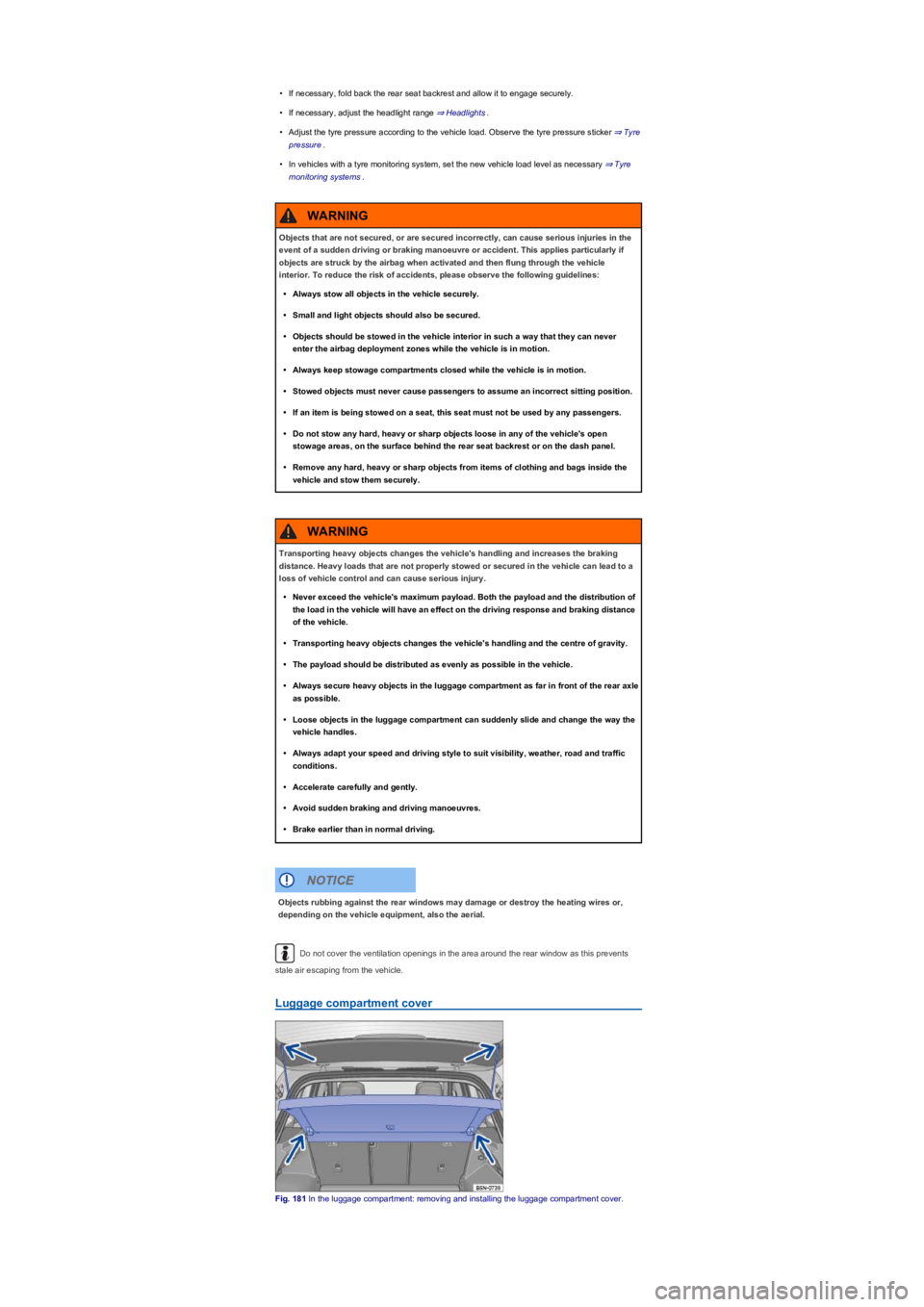
Fig. 181 In the luggage compartment: removing and installing the luggage compartment cover.
Objects that are not secured, or are secured incorrectly, can cause serious injuries in the
event of a sudden driving or braking manoeuvre or accident. This applies particularly if
objects are struck by the airbag when activated and then flung through the vehicle
interior. To reduce the risk of accidents, please observe the following guidelines:
•Always stow all objects in the vehicle securely.
•Small and light objects should also be secured.
•Objects should be stowed in the vehicle interior in such a way that they can never
enter the airbag deployment zones while the vehicle is in motion.
•Always keep stowage compartments closed while the vehicle is in motion.
•Stowed objects must never cause passengers to assume an incorrect sitting position.
•If an item is being stowed on a seat, this seat must not be used by any passengers.
•Do not stow any hard, heavy or sharp objects loose in any of the vehicle's open
stowage areas, on the surface behind the rear seat backrest or on the dash panel.
•Remove any hard, heavy or sharp objects from items of clothing and bags inside the
vehicle and stow them securely.
WARNING
Transporting heavy objects changes the vehicle's handling and increases the braking
distance. Heavy loads that are not properly stowed or secured in the vehicle can lead to a
loss of vehicle control and can cause serious injury.
•Never exceed the vehicle's maximum payload. Both the payload and the distribution of
the load in the vehicle will have an effect on the driving response and braking distance
of the vehicle.
•Transporting heavy objects changes the vehicle's handling and the centre of gravity.
•The payload should be distributed as evenly as possible in the vehicle.
•Always secure heavy objects in the luggage compartment as far in front of the rear axle
as possible.
•Loose objects in the luggage compartment can suddenly slide and change the way the
vehicle handles.
•Always adapt your speed and driving style to suit visibility, weather, road and traffic
conditions.
•Accelerate carefully and gently.
•Avoid sudden braking and driving manoeuvres.
•Brake earlier than in normal driving.
WARNING
Objects rubbing against the rear windows may damage or destroy the heating wires or,
depending on the vehicle equipment, also the aerial.
NOTICE
Page 226 of 341
When the boot lid ⇒ Boot lid is opened and closed, the luggage compartment cover is also raised
and lowered if the straps are attached.
Light items of clothing can be placed on the luggage compartment cover. Please ensure that the
view to the rear of the vehicle is not obstructed.
Removing the luggage compartment cover
•Unhook the retaining straps from the boot lid ⇒ Fig. 181 (upper arrows).
•Pull the luggage compartment cover out of the side retainers ⇒ Fig. 181 (lower arrows).
Fitting the luggage compartment cover
•Push the luggage compartment cover into the side retainers ⇒ Fig. 181 (lower arrows).
•Hook the retaining straps to the boot lid ⇒ Fig. 181 (upper arrows).
Stowing the luggage compartment cover
•Depending on the equipment level, the removed luggage compartment cover can be stowed
under the variable luggage compartment floor ⇒ Luggage compartment floor.
Luggage compartment floor
Variable luggage compartment floor
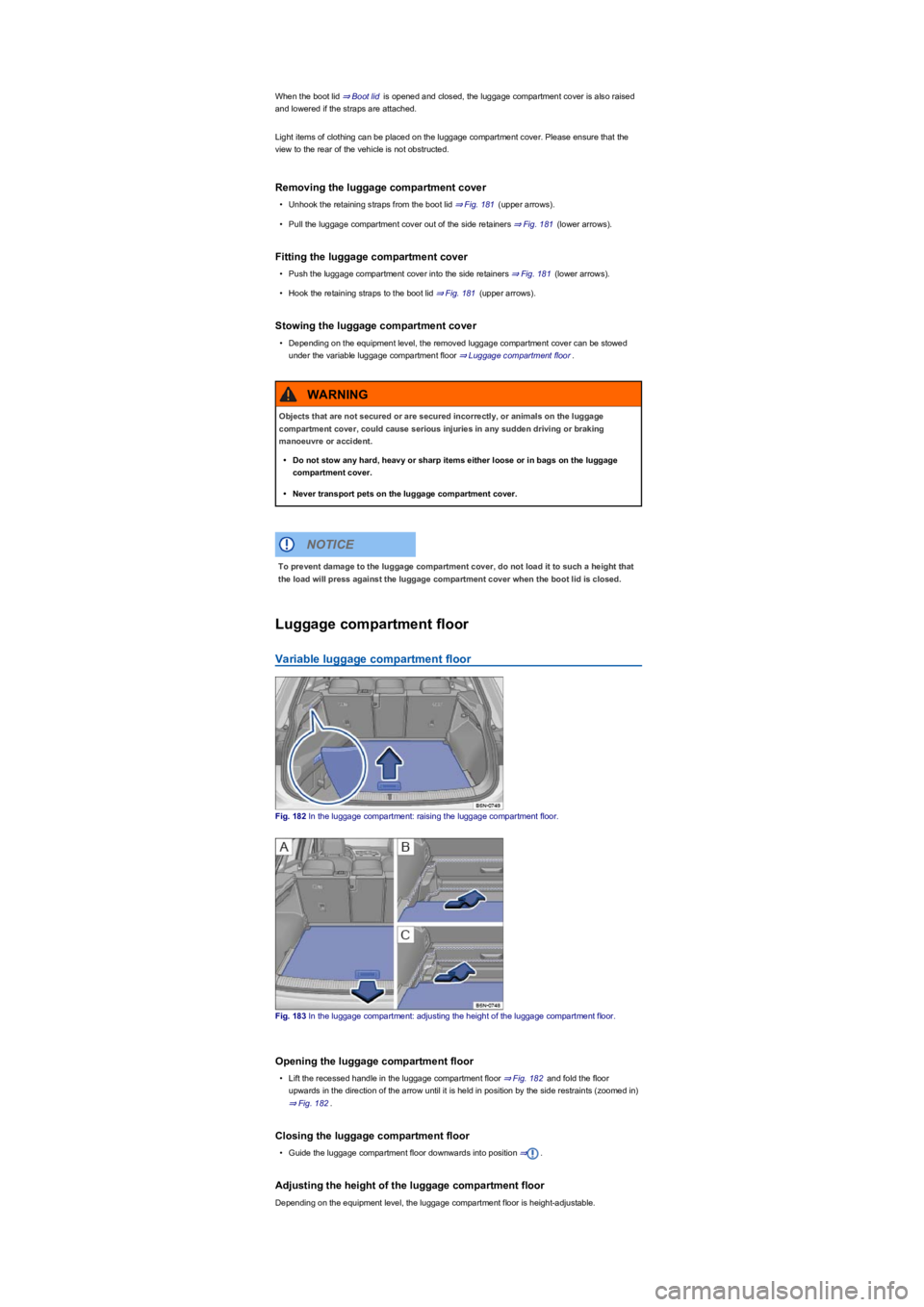
Fig. 182 In the luggage compartment: raising the luggage compartment floor.
Fig. 183 In the luggage compartment: adjusting the height of the luggage compartment floor.
Opening the luggage compartment floor
•Lift the recessed handle in the luggage compartment floor ⇒ Fig. 182 and fold the floor
upwards in the direction of the arrow until it is held in position by the side restraints (zoomed in)
⇒ Fig. 182.
Closing the luggage compartment floor
•Guide the luggage compartment floor downwards into position ⇒.
Adjusting the height of the luggage compartment floor
Depending on the equipment level, the luggage compartment floor is height-adjustable.
Objects that are not secured or are secured incorrectly, or animals on the luggage
compartment cover, could cause serious injuries in any sudden driving or braking
manoeuvre or accident.
•Do not stow any hard, heavy or sharp items either loose or in bags on the luggage
compartment cover.
•Never transport pets on the luggage compartment cover.
WARNING
To prevent damage to the luggage compartment cover, do not load it to such a height that
the load will press against the luggage compartment cover when the boot lid is closed.
NOTICE
Page 228 of 341
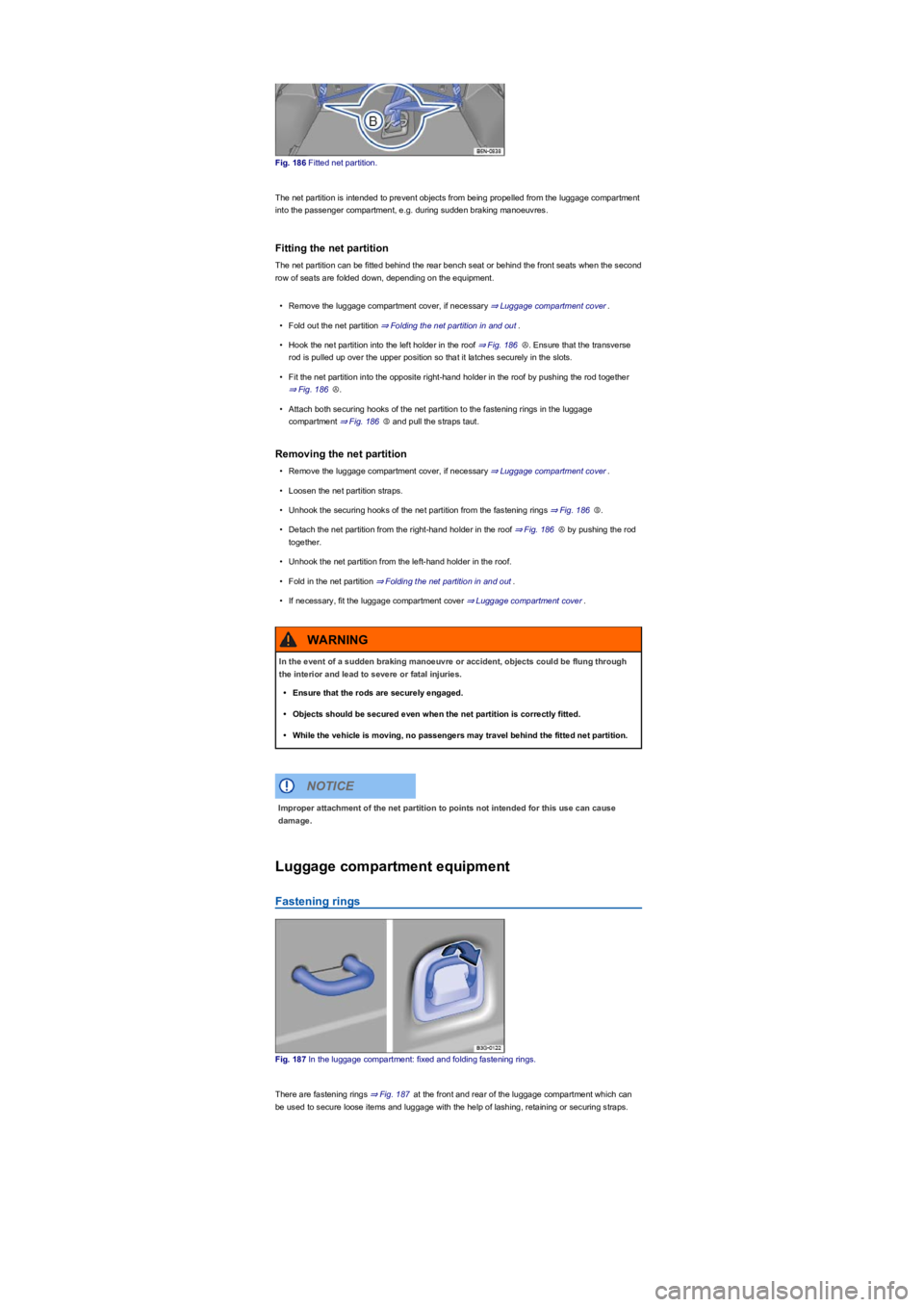
Fig. 186 Fitted net partition.
The net partition is intended to prevent objects from being propelled from the luggage compartment
into the passenger compartment, e.g. during sudden braking manoeuvres.
Fitting the net partition
The net partition can be fitted behind the rear bench seat or behind the front seats when the second
row of seats are folded down, depending on the equipment.
•Remove the luggage compartment cover, if necessary ⇒ Luggage compartment cover.
•Fold out the net partition ⇒ Folding the net partition in and out.
•Hook the net partition into the left holder in the roof ⇒ Fig. 186Ⓐ. Ensure that the transverse
rod is pulled up over the upper position so that it latches securely in the slots.
•Fit the net partition into the opposite right-hand holder in the roof by pushing the rod together
⇒ Fig. 186Ⓐ.
•Attach both securing hooks of the net partition to the fastening rings in the luggage
compartment ⇒ Fig. 186Ⓑ and pull the straps taut.
Removing the net partition
•Remove the luggage compartment cover, if necessary ⇒ Luggage compartment cover.
•Loosen the net partition straps.
•Unhook the securing hooks of the net partition from the fastening rings ⇒ Fig. 186Ⓑ.
•Detach the net partition from the right-hand holder in the roof ⇒ Fig. 186Ⓐ by pushing the rod
together.
•Unhook the net partition from the left-hand holder in the roof.
•Fold in the net partition ⇒ Folding the net partition in and out.
•If necessary, fit the luggage compartment cover ⇒ Luggage compartment cover.
Luggage compartment equipment
Fastening rings
Fig. 187 In the luggage compartment: fixed and folding fastening rings.
There are fastening rings ⇒ Fig. 187 at the front and rear of the luggage compartment which can
be used to secure loose items and luggage with the help of lashing, retaining or securing straps.
In the event of a sudden braking manoeuvre or accident, objects could be flung through
the interior and lead to severe or fatal injuries.
•Ensure that the rods are securely engaged.
•Objects should be secured even when the net partition is correctly fitted.
•While the vehicle is moving, no passengers may travel behind the fitted net partition.
WARNING
Improper attachment of the net partition to points not intended for this use can cause
damage.
NOTICE