STARTING VOLKSWAGEN TIGUAN 2017 Owner´s Manual
[x] Cancel search | Manufacturer: VOLKSWAGEN, Model Year: 2017, Model line: TIGUAN, Model: VOLKSWAGEN TIGUAN 2017Pages: 341, PDF Size: 9.14 MB
Page 136 of 341
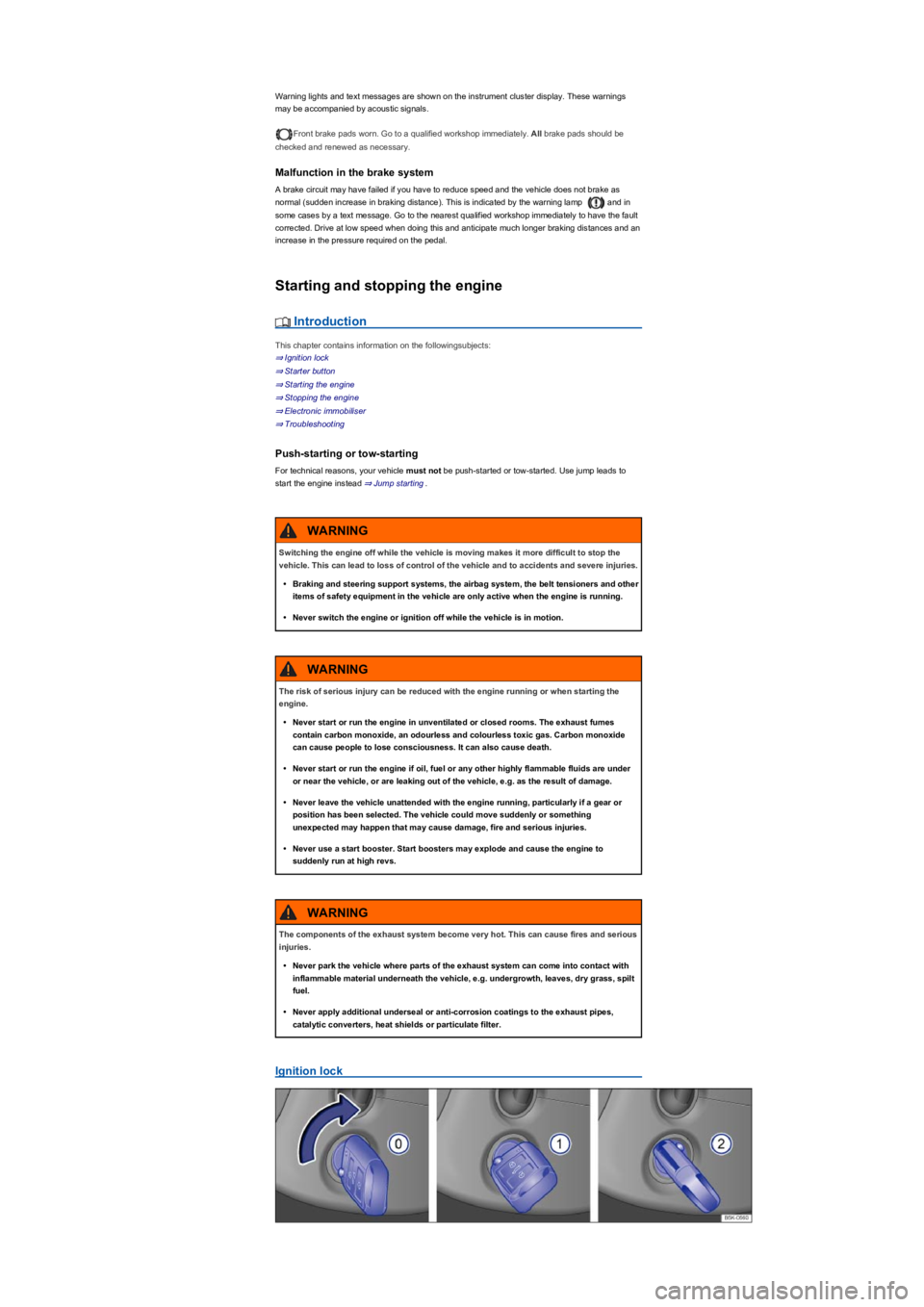
Warning lights and text messages are shown on the instrument cluster display. These warnings
may be accompanied by acoustic signals.
Front brake pads worn. Go to a qualified workshop immediately. All brake pads should be
checked and renewed as necessary.
Malfunction in the brake system
A brake circuit may have failed if you have to reduce speed and the vehicle does not brake as
normal (sudden increase in braking distance). This is indicated by the warning lamp and in
some cases by a text message. Go to the nearest qualified workshop immediately to have the fault
corrected. Drive at low speed when doing this and anticipate much longer braking distances and an
increase in the pressure required on the pedal.
Starting and stopping the engine
Introduction
This chapter contains information on the followingsubjects:
⇒ Ignition lock
⇒ Starter button
⇒ Starting the engine
⇒ Stopping the engine
⇒ Electronic immobiliser
⇒ Troubleshooting
Push-starting or tow-starting
For technical reasons, your vehicle must not be push-started or tow-started. Use jump leads to
start the engine instead ⇒ Jump starting.
Ignition lock
Switching the engine off while the vehicle is moving makes it more difficult to stop the
vehicle. This can lead to loss of control of the vehicle and to accidents and severe injuries.
•Braking and steering support systems, the airbag system, the belt tensioners and other
items of safety equipment in the vehicle are only active when the engine is running.
•Never switch the engine or ignition off while the vehicle is in motion.
WARNING
The risk of serious injury can be reduced with the engine running or when starting the
engine.
•Never start or run the engine in unventilated or closed rooms. The exhaust fumes
contain carbon monoxide, an odourless and colourless toxic gas. Carbon monoxide
can cause people to lose consciousness. It can also cause death.
•Never start or run the engine if oil, fuel or any other highly flammable fluids are under
or near the vehicle, or are leaking out of the vehicle, e.g. as the result of damage.
•Never leave the vehicle unattended with the engine running, particularly if a gear or
position has been selected. The vehicle could move suddenly or something
unexpected may happen that may cause damage, fire and serious injuries.
•Never use a start booster. Start boosters may explode and cause the engine to
suddenly run at high revs.
WARNING
The components of the exhaust system become very hot. This can cause fires and serious
injuries.
•Never park the vehicle where parts of the exhaust system can come into contact with
inflammable material underneath the vehicle, e.g. undergrowth, leaves, dry grass, spilt
fuel.
•Never apply additional underseal or anti-corrosion coatings to the exhaust pipes,
catalytic converters, heat shields or particulate filter.
WARNING
Page 137 of 341
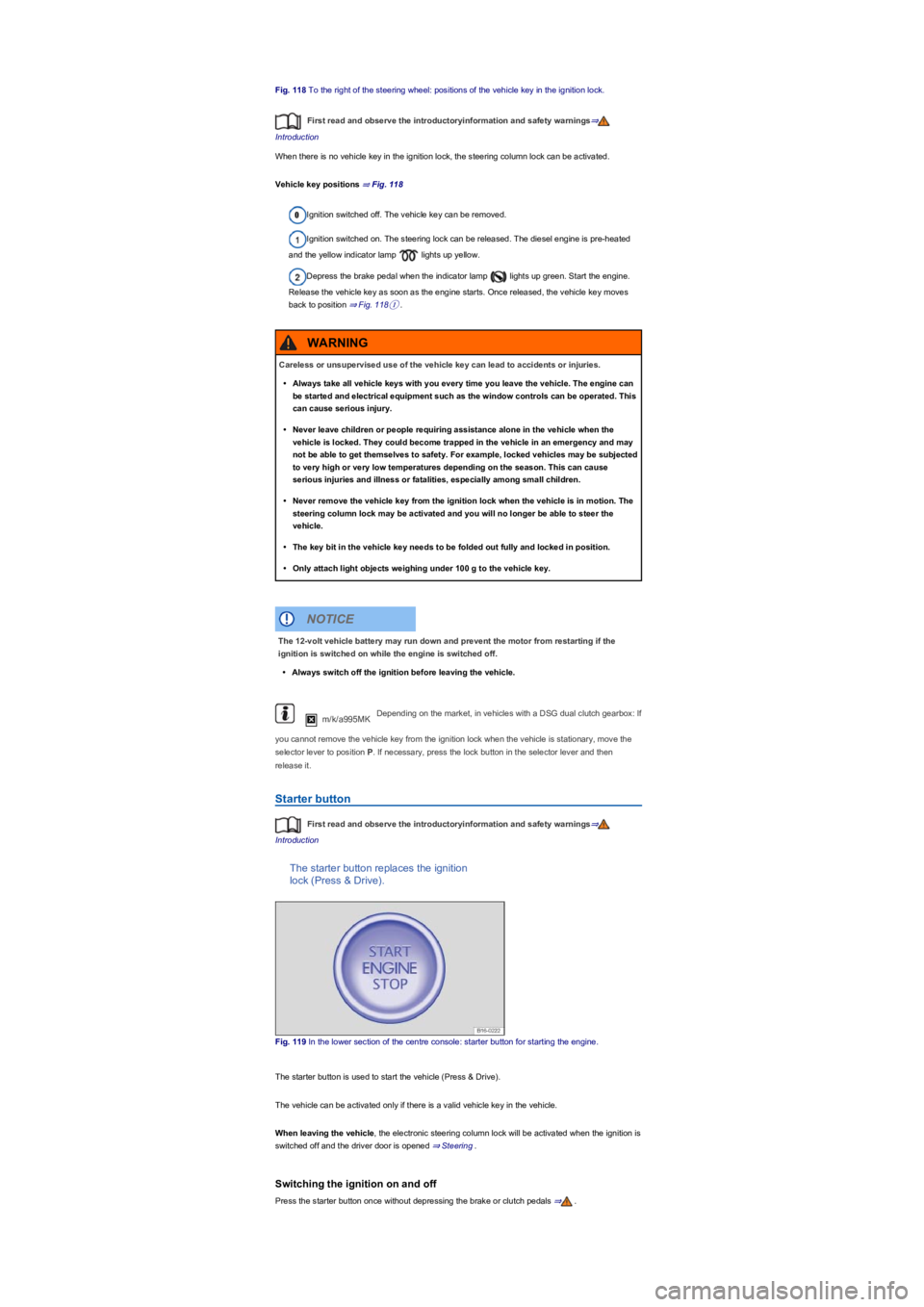
Fig. 118 To the right of the steering wheel: positions of the vehicle key in the ignition lock.
First read and observe the introductoryinformation and safety warnings⇒
Introduction
When there is no vehicle key in the ignition lock, the steering column lock can be activated.
Vehicle key positions ⇒ Fig. 118
Ignition switched off. The vehicle key can be removed.
Ignition switched on. The steering lock can be released. The diesel engine is pre-heated
and the yellow indicator lamp lights up yellow.
Depress the brake pedal when the indicator lamp lights up green. Start the engine.
Release the vehicle key as soon as the engine starts. Once released, the vehicle key moves
back to position ⇒ Fig. 118①.
m/k/a995MKDepending on the market, in vehicles with a DSG dual clutch gearbox: If
you cannot remove the vehicle key from the ignition lock when the vehicle is stationary, move the
selector lever to position P. If necessary, press the lock button in the selector lever and then
release it.
Starter button
First read and observe the introductoryinformation and safety warnings⇒
Introduction
The starter button replaces the ignition
lock (Press & Drive).
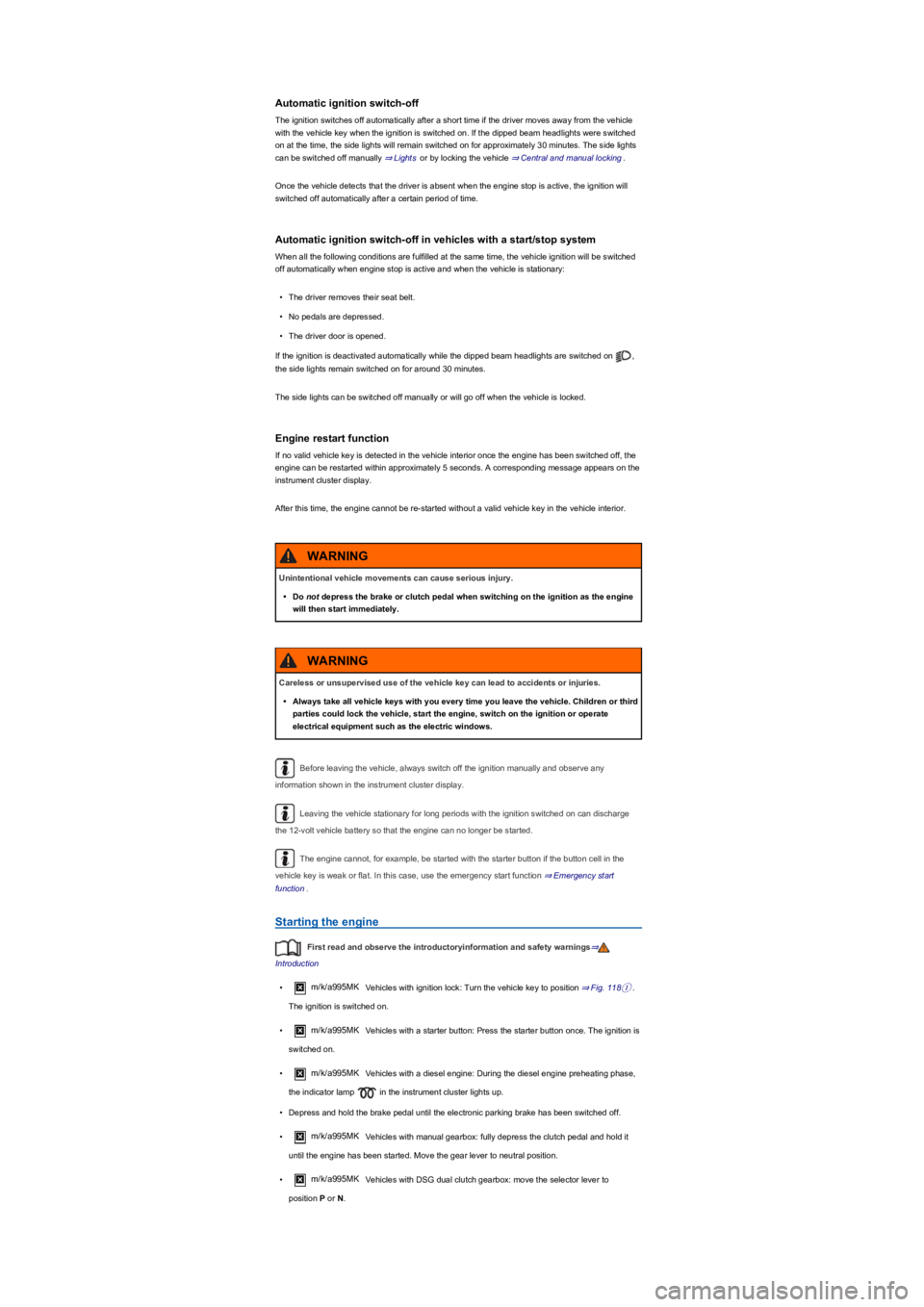
Fig. 119 In the lower section of the centre console: starter button for starting the engine.
The starter button is used to start the vehicle (Press & Drive).
The vehicle can be activated only if there is a valid vehicle key in the vehicle.
When leaving the vehicle, the electronic steering column lock will be activated when the ignition is
switched off and the driver door is opened ⇒ Steering.
Switching the ignition on and off
Press the starter button once without depressing the brake or clutch pedals ⇒.
Careless or unsupervised use of the vehicle key can lead to accidents or injuries.
•Always take all vehicle keys with you every time you leave the vehicle. The engine can
be started and electrical equipment such as the window controls can be operated. This
can cause serious injury.
•Never leave children or people requiring assistance alone in the vehicle when the
vehicle is locked. They could become trapped in the vehicle in an emergency and may
not be able to get themselves to safety. For example, locked vehicles may be subjected
to very high or very low temperatures depending on the season. This can cause
serious injuries and illness or fatalities, especially among small children.
•Never remove the vehicle key from the ignition lock when the vehicle is in motion. The
steering column lock may be activated and you will no longer be able to steer the
vehicle.
•The key bit in the vehicle key needs to be folded out fully and locked in position.
•Only attach light objects weighing under 100 g to the vehicle key.
WARNING
The 12-volt vehicle battery may run down and prevent the motor from restarting if the
ignition is switched on while the engine is switched off.
•Always switch off the ignition before leaving the vehicle.
NOTICE
Page 138 of 341
Automatic ignition switch-off
The ignition switches off automatically after a short time if the driver moves away from the vehicle
with the vehicle key when the ignition is switched on. If the dipped beam headlights were switched
on at the time, the side lights will remain switched on for approximately 30 minutes. The side lights
can be switched off manually ⇒ Lights or by locking the vehicle ⇒ Central and manual locking.
Once the vehicle detects that the driver is absent when the engine stop is active, the ignition will
switched off automatically after a certain period of time.
Automatic ignition switch-off in vehicles with a start/stop system
When all the following conditions are fulfilled at the same time, the vehicle ignition will be switched
off automatically when engine stop is active and when the vehicle is stationary:
•The driver removes their seat belt.
•No pedals are depressed.
•The driver door is opened.
If the ignition is deactivated automatically while the dipped beam headlights are switched on ,
the side lights remain switched on for around 30 minutes.
The side lights can be switched off manually or will go off when the vehicle is locked.
Engine restart function
If no valid vehicle key is detected in the vehicle interior once the engine has been switched off, the
engine can be restarted within approximately 5 seconds. A corresponding message appears on the
instrument cluster display.
After this time, the engine cannot be re-started without a valid vehicle key in the vehicle interior.
Before leaving the vehicle, always switch off the ignition manually and observe any
information shown in the instrument cluster display.
Leaving the vehicle stationary for long periods with the ignition switched on can discharge
the 12-volt vehicle battery so that the engine can no longer be started.
The engine cannot, for example, be started with the starter button if the button cell in the
vehicle key is weak or flat. In this case, use the emergency start function ⇒ Emergency start
function.
Starting the engine
First read and observe the introductoryinformation and safety warnings⇒
Introduction
•m/k/a995MKVehicles with ignition lock: Turn the vehicle key to position ⇒ Fig. 118①.
The ignition is switched on.
•m/k/a995MKVehicles with a starter button: Press the starter button once. The ignition is
switched on.
•m/k/a995MK Vehicles with a diesel engine: During the diesel engine preheating phase,
the indicator lamp in the instrument cluster lights up.
•Depress and hold the brake pedal until the electronic parking brake has been switched off.
•m/k/a995MKVehicles with manual gearbox: fully depress the clutch pedal and hold it
until the engine has been started. Move the gear lever to neutral position.
•m/k/a995MKVehicles with DSG dual clutch gearbox: move the selector lever to
position P or N.
Unintentional vehicle movements can cause serious injury.
•Do not depress the brake or clutch pedal when switching on the ignition as the engine
will then start immediately.
WARNING
Careless or unsupervised use of the vehicle key can lead to accidents or injuries.
•Always take all vehicle keys with you every time you leave the vehicle. Children or third
parties could lock the vehicle, start the engine, switch on the ignition or operate
electrical equipment such as the electric windows.
WARNING
Page 139 of 341
•m/k/a995MKVehicles with ignition lock: Turn the vehicle key to position ⇒ Fig. 118② –
do not depress the accelerator. Release the vehicle key once the engine has started.
•m/k/a995MKVehicles with a starter button: Press the starter button once ⇒ Starter
button – do not depress the accelerator. There must be a valid vehicle key in the vehicle before
the engine can be started. Release the starter button once the engine has started.
•If the engine does not start, stop the start procedure and repeat it after approximately one
minute.
•m/k/a995MK Vehicles with starter button: Jump start the vehicle if necessary
⇒ Emergency start function.
•Switch off the electronic parking brake if you wish to pull away.
Do not warm up the engine by running it while the vehicle is stationary. Instead, pull off as
soon as there is good visibility through the windows. This helps the engine to reach operating
temperature more quickly and reduces emissions.
Components with a high power consumption are switched off temporarily when the engine is
started.
The engine cannot, for example, be started with the starter button if the cell battery in the
vehicle key is weak or flat. In this case, use the emergency start function ⇒ Emergency start
function.
When starting from cold, the engine may be a little noisy for the first few seconds. This is
quite normal, and no cause for concern.
At outside temperatures of less than +5°C (+41°F), fumes may be detected under a vehicle
with a diesel engine if the fuel-powered supplementary heater is switched on.
Stopping the engine
First read and observe the introductoryinformation and safety warnings⇒
Introduction
•Bring the vehicle to a standstill ⇒.
•Park the vehicle ⇒ Parking.
•m/k/a995MKVehicles with ignition lock: Turn the vehicle key to position ⇒ Fig. 118⓪ in
the ignition lock.
Never leave the engine running if you leave the vehicle unattended, particularly not if a
gear or position has been selected. The vehicle could move suddenly or something
unexpected may happen that may cause damage, fire or serious injuries.
WARNING
Start boosters may explode or suddenly cause the engine to run at high revs.
•Never use a start booster.
WARNING
•The starter and the engine can be damaged if you attempt to start the engine while the
vehicle is in motion or if the engine is started again immediately after it has been
switched off.
•When the engine is cold, avoid high engine speeds, driving at full throttle and
overloading the engine.
•Do not push-start or tow-start the vehicle. Unburnt fuel can damage the catalytic
converter.
NOTICE
If the engine does not start, never use the starter with a gear selected and the vehicle key
in the ignition lock in position ⇒ Fig. 118② for driving or tow-starting, e.g. when the fuel
tank is empty. This could cause damage to the starter.
•Fill up fuel if necessary ⇒ Fuel types and refuelling or jump start the vehicle ⇒ Jump
starting.
•If the engine does not start, seek expert assistance.
NOTICE
Page 140 of 341
•m/k/a995MKVehicles with a starter button: Press the starter button briefly ⇒ Fig. 119. If
the engine cannot be switched off, carry out the emergency switch-off procedure ⇒ Emergency
deactivation.
•Observe the instructions in the instrument cluster ⇒ Instrument cluster.
Warning before leaving the vehicle
In order to indicate an active ignition when leaving the vehicle, an acoustic warning signal sounds
when opening the driver door and corresponding warning messages appear on the display of the
instrument cluster. The ignition also switches off automatically after a certain period in order to
prevent unintentional discharge of the 12-volt vehicle battery.
m/k/a995MK Vehicles with DSG dual clutch gearbox: if the selector lever is not in position P,
an acoustic warning signal will sound when the driver door is opened and the warning
message Please move selector lever to position P. will be shown on the instrument cluster
display. In this way, a warning is given that the vehicle could potentially roll away. The electronic
parking brake is also activated.
After the engine is switched off, the radiator fan in the engine compartment may run on for
some minutes, even if the ignition is switched off or the vehicle key has been removed. The radiator
fan will switch itself off automatically.
Electronic immobiliser
First read and observe the introductoryinformation and safety warnings⇒
Introduction
The immobiliser helps to prevent the engine from being started and driven with an unauthorised
vehicle key.
There is a chip in the key. This is used to automatically deactivate the immobiliser when a valid
vehicle key is inserted into the ignition lock.
The electronic immobiliser is automatically activated when the vehicle key is removed from the
ignition lock. In vehicles with keyless locking and starting system Keyless Access, the vehicle key
must be outside the vehicle ⇒ Central and manual locking.
The engine can only be started using a genuine Volkswagen vehicle key with the correct code.
Coded vehicle keys are available from a Volkswagen dealership ⇒ Vehicle key set.
The vehicle cannot be operated properly if you do not have a genuine Volkswagen key.
Troubleshooting
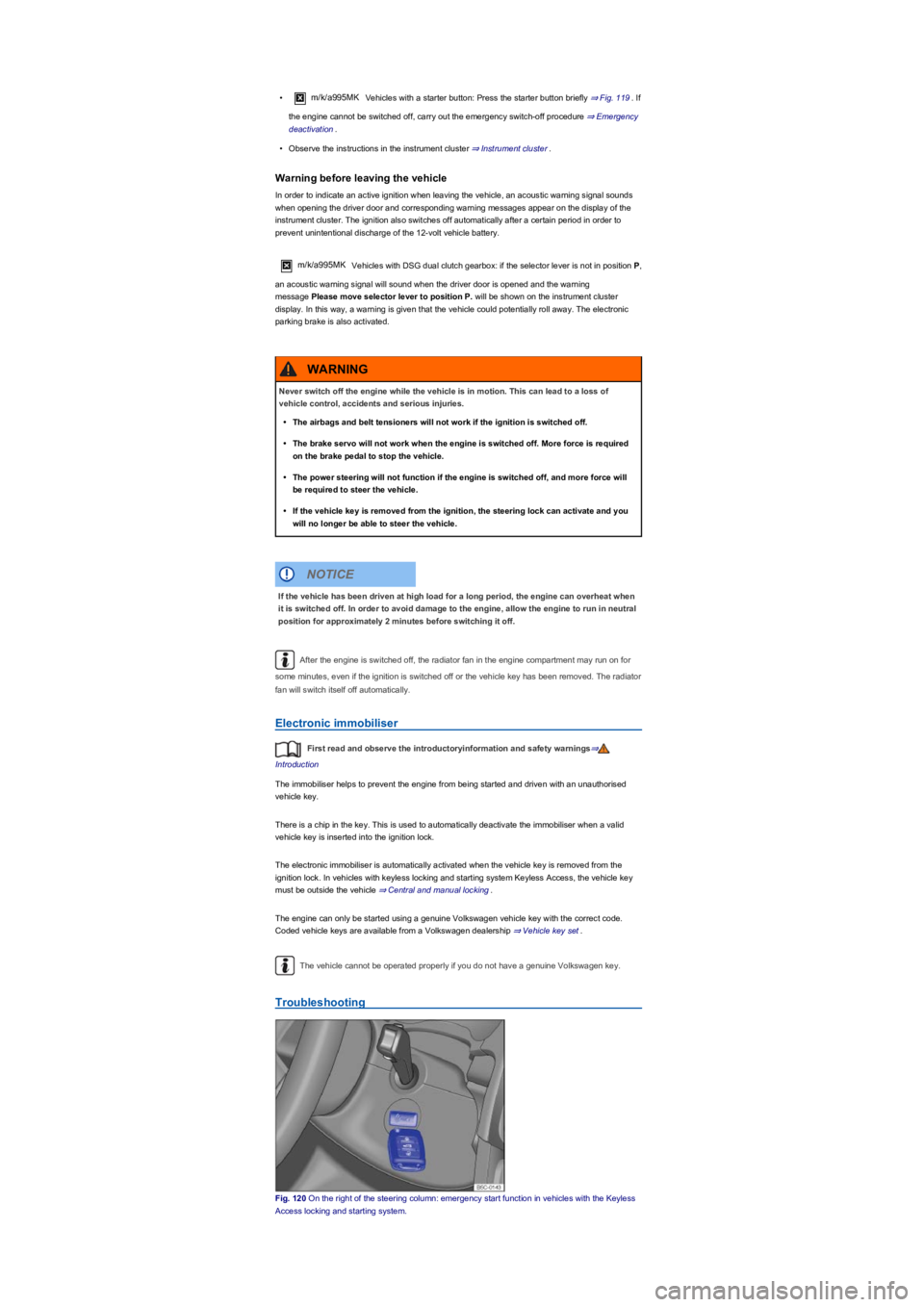
Fig. 120 On the right of the steering column: emergency start function in vehicles with the Keyless
Access locking and starting system.
Never switch off the engine while the vehicle is in motion. This can lead to a loss of
vehicle control, accidents and serious injuries.
•The airbags and belt tensioners will not work if the ignition is switched off.
•The brake servo will not work when the engine is switched off. More force is required
on the brake pedal to stop the vehicle.
•The power steering will not function if the engine is switched off, and more force will
be required to steer the vehicle.
•If the vehicle key is removed from the ignition, the steering lock can activate and you
will no longer be able to steer the vehicle.
WARNING
If the vehicle has been driven at high load for a long period, the engine can overheat when
it is switched off. In order to avoid damage to the engine, allow the engine to run in neutral
position for approximately 2 minutes before switching it off.
NOTICE
Page 148 of 341
•Gently push the selector lever forwards ⊕ or back ㊀ to shift gear up or down ⇒ Fig. 124.
When moving the selector lever in the Tiptronic gate, do not press the lock button on the selector
lever.
Operating Tiptronic with the paddles
•Pull the right paddle ⇒ Fig. 125 towards the steering wheel to change up a gear.
•Pull the left paddle towards the steering wheel to change down a gear.
•To leave Tiptronic mode, pull the right paddle towards the steering wheel for approximately one
second.
Tiptronic is automatically deactivated if the selector paddles are not operated for some time and the
selector lever is not in the Tiptronic gate.
Driving with DSG dual clutch gearbox
The gearbox changes the forward gears up and down automatically.
Driving down hills
The steeper the gradient, the lower the gear you will need. Lower gears increase the braking effect
of the engine. Never allow the vehicle to roll down mountains or hills in the neutral position N.
•Reduce your speed.
•Push the selector lever from position D/S to the right into the Tiptronic gate ⇒ Changing gear
using Tiptronic.
•Gently push the selector lever to the rear to change down gear.
•OR: shift down using the paddles on the steering wheel ⇒ Changing gear using Tiptronic.
Stopping and pulling away on an uphill gradient
The steeper the uphill gradient, the lower the gear you will need.
If you wish to stop the vehicle or pull away when driving uphill you should use the Auto Hold
function ⇒ Electronic parking brake.
When you stop the vehicle on an incline and the vehicle remains in gear, the vehicle must always
be prevented from rolling by depressing the brake pedal or by applying the electronic parking brake.
The brake pedal or the electronic parking brake should not be released until you pull away ⇒.
Coasting with DSG dual clutch gearbox
In coasting mode, the momentum of the vehicle can be used to save fuel in conjunction with a
foresighted driving style. With the engine-off coasting function, the engine is not just disengaged,
but is also switched off. The engine no longer brakes the vehicle – the vehicle can roll for a longer
distance. The function is available only in the selector lever position D/S and at speeds of
approximately 30 – 130 km/h (18 mph – 80 mph).
An automatic engine start may take place in order to ensure reliable engine restarting and to
guarantee the power supply of the vehicle electrical system.
Triggering coasting
•Select the Eco driving profile from the driving profile selection menu ⇒ Driving profile selection
and 4MOTION Active Control.
•Remove your foot from accelerator pedal. The engine is disengaged and runs in coasting mode.
The vehicle rolls without the braking effect of the engine. The engine is automatically switched
off on vehicles with engine-off coasting function.
Cancelling coasting mode
•Depress the brake pedal briefly.
•OR: depress the accelerator or brake pedal briefly.
•OR: pull a paddle towards the steering wheel.
•OR: press the selector lever to the Tiptronic position.
Kickdown
The kick down function enables maximum acceleration in the selector lever position D/S or in the
Tiptronic position.
•When accelerating, the gearbox automatically shifts up to the next gear shortly before
the maximum permitted engine speed is reached.
•When shifting down a gear manually, the gearbox will not change gear until the engine
can no longer be overrevved.
NOTICE
®
®
Page 169 of 341
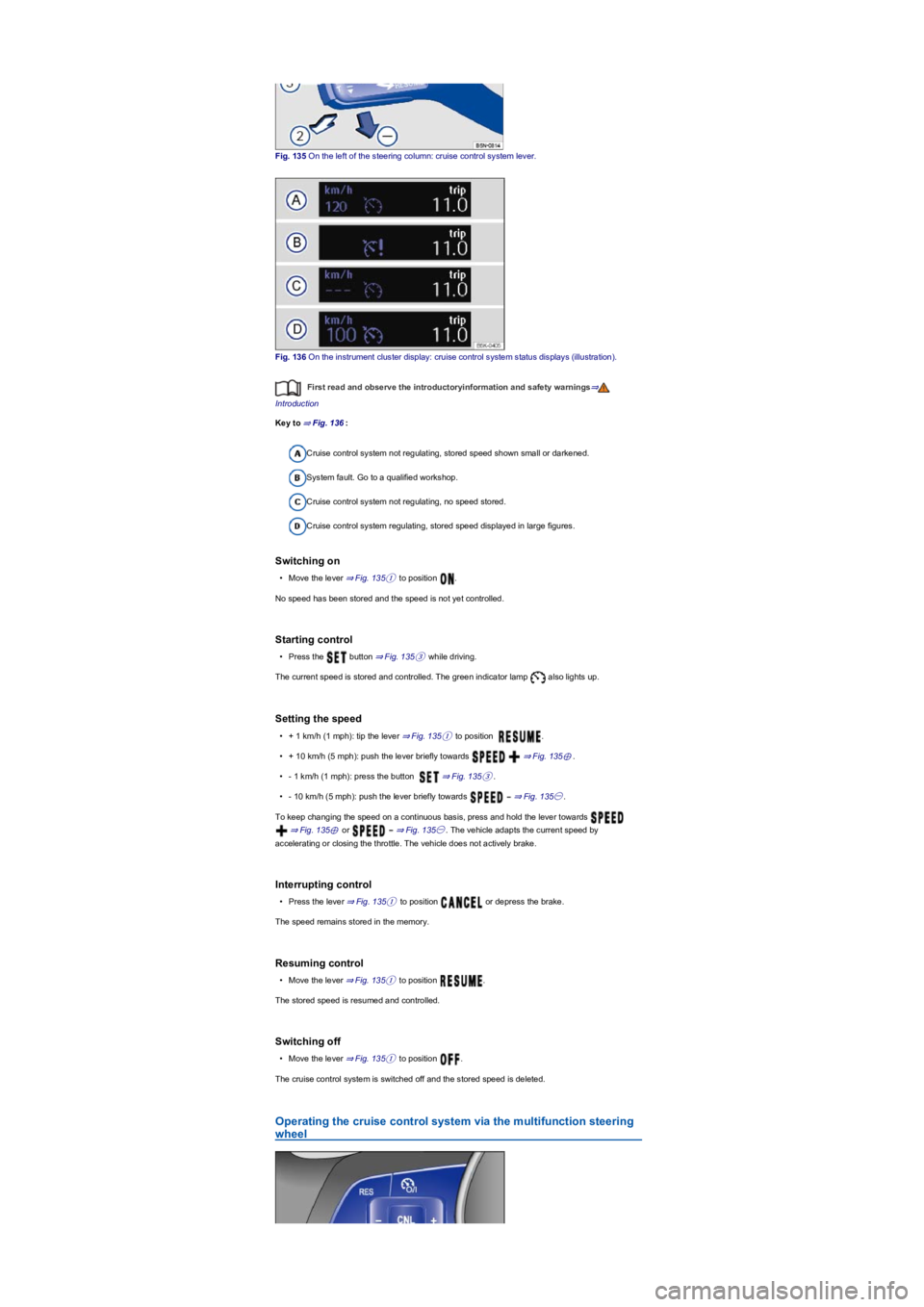
Fig. 135 On the left of the steering column: cruise control system lever.
Fig. 136 On the instrument cluster display: cruise control system status displays (illustration).
First read and observe the introductoryinformation and safety warnings⇒
Introduction
Key to ⇒ Fig. 136:
Cruise control system not regulating, stored speed shown small or darkened.
System fault. Go to a qualified workshop.
Cruise control system not regulating, no speed stored.
Cruise control system regulating, stored speed displayed in large figures.
Switching on
•Move the lever ⇒ Fig. 135① to position .
No speed has been stored and the speed is not yet controlled.
Starting control
•Press the button ⇒ Fig. 135③ while driving.
The current speed is stored and controlled. The green indicator lamp also lights up.
Setting the speed
•+ 1 km/h (1 mph): tip the lever ⇒ Fig. 135① to position .
•+ 10 km/h (5 mph): push the lever briefly towards ⇒ Fig. 135⊕.
•- 1 km/h (1 mph): press the button ⇒ Fig. 135③.
•- 10 km/h (5 mph): push the lever briefly towards ⇒ Fig. 135㊀.
To keep changing the speed on a continuous basis, press and hold the lever towards
⇒ Fig. 135⊕ or ⇒ Fig. 135㊀. The vehicle adapts the current speed by
accelerating or closing the throttle. The vehicle does not actively brake.
Interrupting control
•Press the lever ⇒ Fig. 135① to position or depress the brake.
The speed remains stored in the memory.
Resuming control
•Move the lever ⇒ Fig. 135① to position .
The stored speed is resumed and controlled.
Switching off
•Move the lever ⇒ Fig. 135① to position .
The cruise control system is switched off and the stored speed is deleted.
Operating the cruise control system via the multifunction steering
wheel
Page 170 of 341
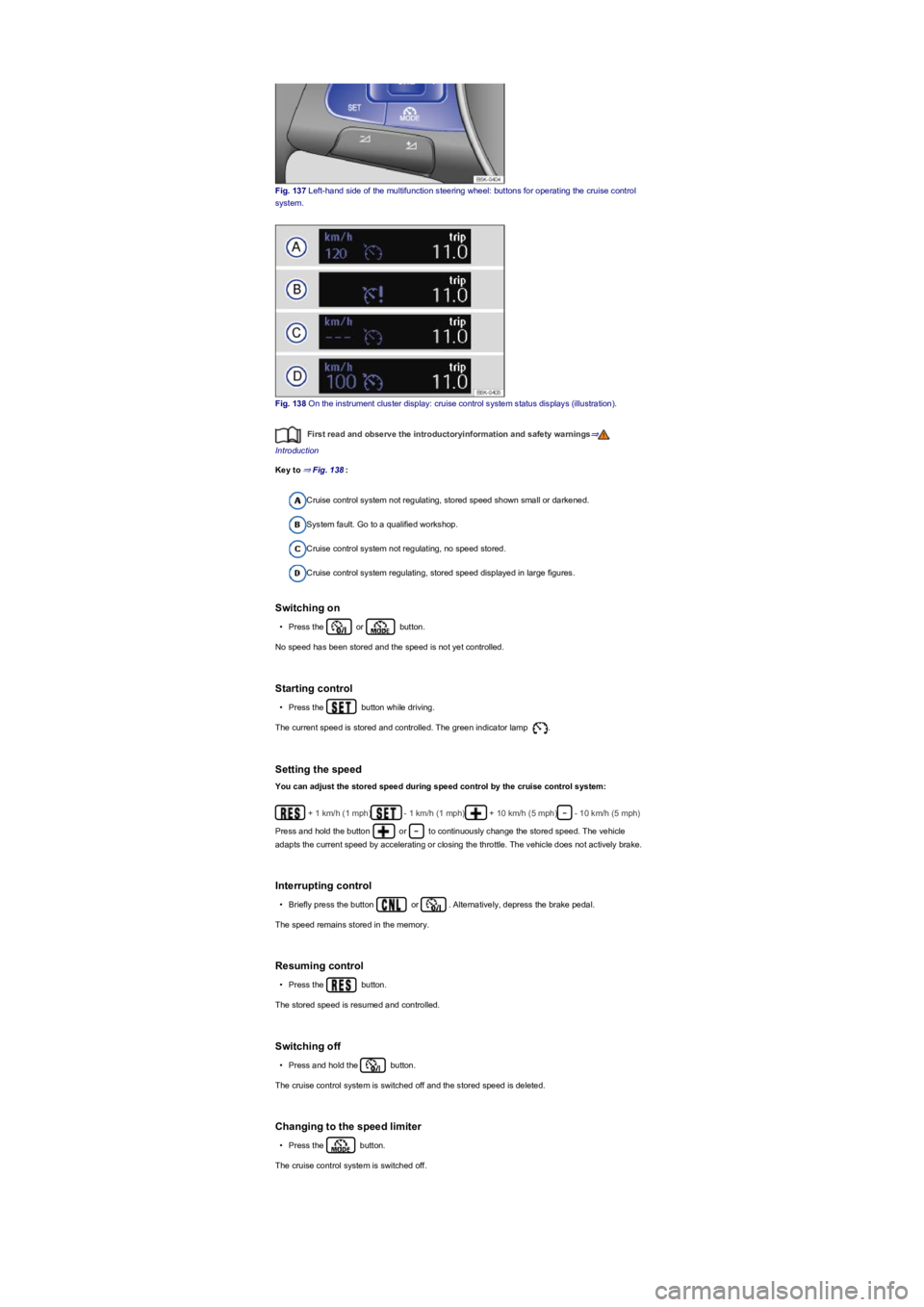
Fig. 137 Left-hand side of the multifunction steering wheel: buttons for operating the cruise control
system.
Fig. 138 On the instrument cluster display: cruise control system status displays (illustration).
First read and observe the introductoryinformation and safety warnings⇒
Introduction
Key to ⇒ Fig. 138:
Cruise control system not regulating, stored speed shown small or darkened.
System fault. Go to a qualified workshop.
Cruise control system not regulating, no speed stored.
Cruise control system regulating, stored speed displayed in large figures.
Switching on
•Press the or button.
No speed has been stored and the speed is not yet controlled.
Starting control
•Press the button while driving.
The current speed is stored and controlled. The green indicator lamp .
Setting the speed
You can adjust the stored speed during speed control by the cruise control system:
+ 1 km/h (1 mph)- 1 km/h (1 mph)+ 10 km/h (5 mph)- 10 km/h (5 mph)
Press and hold the button or to continuously change the stored speed. The vehicle
adapts the current speed by accelerating or closing the throttle. The vehicle does not actively brake.
Interrupting control
•Briefly press the button or . Alternatively, depress the brake pedal.
The speed remains stored in the memory.
Resuming control
•Press the button.
The stored speed is resumed and controlled.
Switching off
•Press and hold the button.
The cruise control system is switched off and the stored speed is deleted.
Changing to the speed limiter
•Press the button.
The cruise control system is switched off.
Page 172 of 341
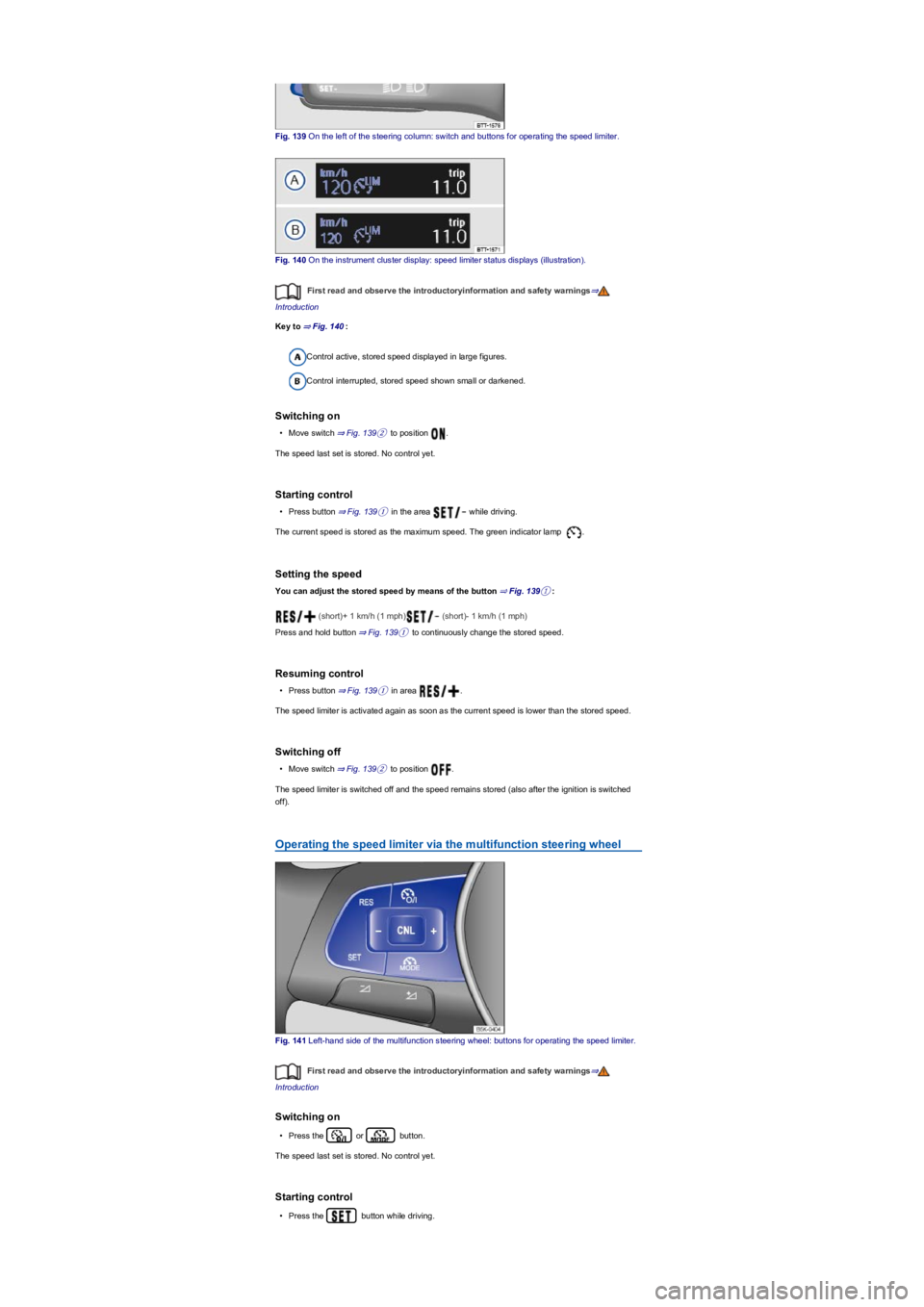
Fig. 139 On the left of the steering column: switch and buttons for operating the speed limiter.
Fig. 140 On the instrument cluster display: speed limiter status displays (illustration).
First read and observe the introductoryinformation and safety warnings⇒
Introduction
Key to ⇒ Fig. 140:
Control active, stored speed displayed in large figures.
Control interrupted, stored speed shown small or darkened.
Switching on
•Move switch ⇒ Fig. 139② to position .
The speed last set is stored. No control yet.
Starting control
•Press button ⇒ Fig. 139① in the area while driving.
The current speed is stored as the maximum speed. The green indicator lamp .
Setting the speed
You can adjust the stored speed by means of the button ⇒ Fig. 139①:
(short)+ 1 km/h (1 mph) (short)- 1 km/h (1 mph)
Press and hold button ⇒ Fig. 139① to continuously change the stored speed.
Resuming control
•Press button ⇒ Fig. 139① in area .
The speed limiter is activated again as soon as the current speed is lower than the stored speed.
Switching off
•Move switch ⇒ Fig. 139② to position .
The speed limiter is switched off and the speed remains stored (also after the ignition is switched
off).
Operating the speed limiter via the multifunction steering wheel
Fig. 141 Left-hand side of the multifunction steering wheel: buttons for operating the speed limiter.
First read and observe the introductoryinformation and safety warnings⇒
Introduction
Switching on
•Press the or button.
The speed last set is stored. No control yet.
Starting control
•Press the button while driving.
Page 176 of 341
If a stationary vehicle is hidden behind a vehicle that has been detected by the adaptive cruise
control and this vehicle turns off the road or changes lane, the ACC will not react to the stationary
vehicle ⇒ Fig. 144.
Bends
The radar sensor always measures straight ahead. For this reason, vehicles may be incorrectly
detected or vehicles driving ahead not detected in tight bends ⇒ Fig. 143.
Vehicles outside the sensor range
•Vehicles that are driving outside the sensor range in close proximity to your vehicle, e.g.
motorbikes ⇒ Fig. 143.
•Vehicles that change into your lane directly in front of your vehicle ⇒ Fig. 144.
•Vehicles with bodies or attachments that project beyond the vehicle.
Switching ACC on and off
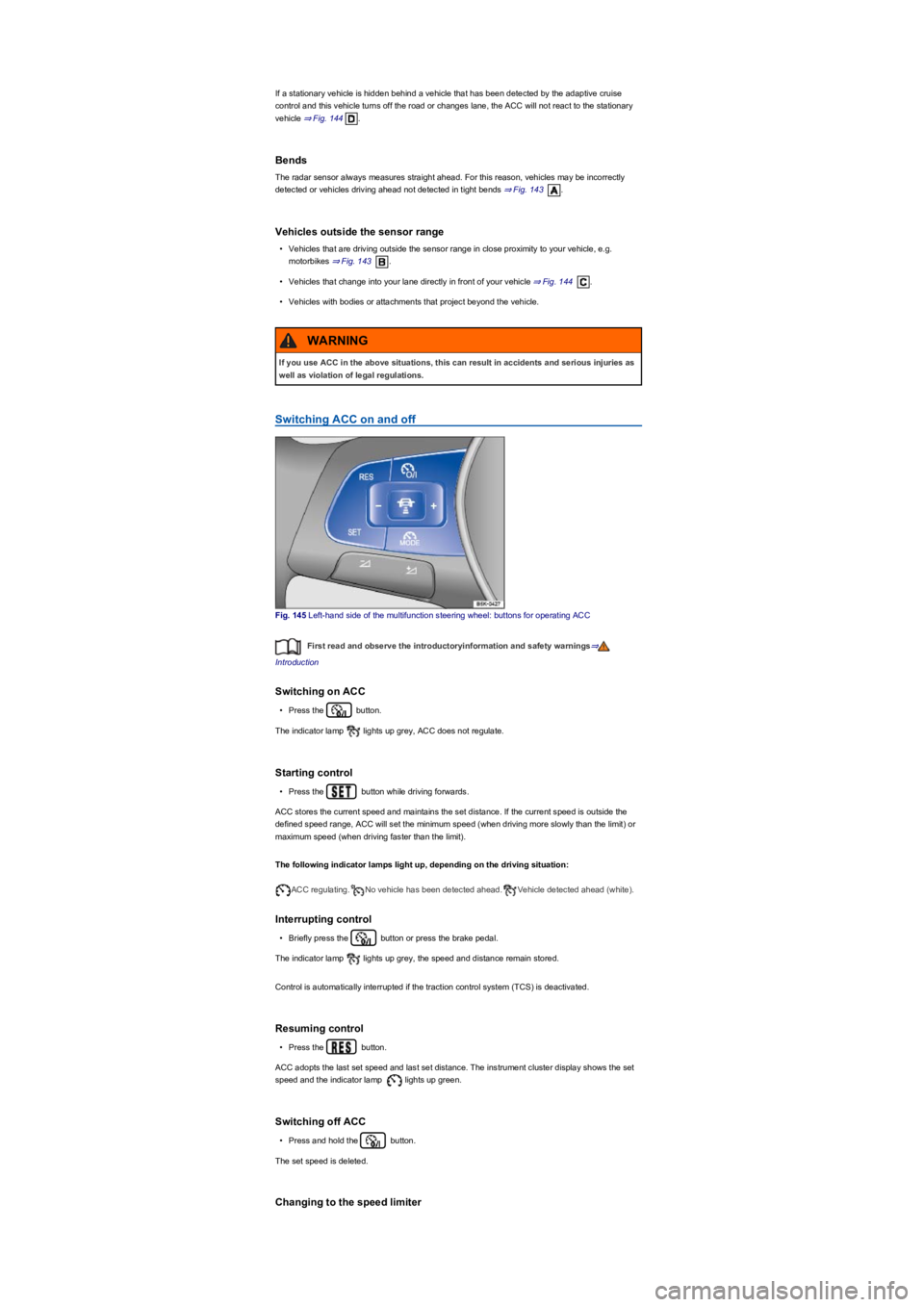
Fig. 145 Left-hand side of the multifunction steering wheel: buttons for operating ACC
First read and observe the introductoryinformation and safety warnings⇒
Introduction
Switching on ACC
•Press the button.
The indicator lamp lights up grey, ACC does not regulate.
Starting control
•Press the button while driving forwards.
ACC stores the current speed and maintains the set distance. If the current speed is outside the
defined speed range, ACC will set the minimum speed (when driving more slowly than the limit) or
maximum speed (when driving faster than the limit).
The following indicator lamps light up, depending on the driving situation:
ACC regulating.No vehicle has been detected ahead.Vehicle detected ahead (white).
Interrupting control
•Briefly press the button or press the brake pedal.
The indicator lamp lights up grey, the speed and distance remain stored.
Control is automatically interrupted if the traction control system (TCS) is deactivated.
Resuming control
•Press the button.
ACC adopts the last set speed and last set distance. The instrument cluster display shows the set
speed and the indicator lamp lights up green.
Switching off ACC
•Press and hold the button.
The set speed is deleted.
Changing to the speed limiter
If you use ACC in the above situations, this can result in accidents and serious injuries as
well as violation of legal regulations.
WARNING