clutch VOLKSWAGEN TIGUAN 2017 Owner´s Manual
[x] Cancel search | Manufacturer: VOLKSWAGEN, Model Year: 2017, Model line: TIGUAN, Model: VOLKSWAGEN TIGUAN 2017Pages: 341, PDF Size: 9.14 MB
Page 145 of 341
DSG dual clutch gearbox
Function of the DSG dual clutch gearbox
Description
The vehicle is equipped with a DSG dual clutch gearbox.
The DSG dual clutch gearbox is a gearbox which uses dual-clutch technology to change gear
automatically. It uses a dual clutch and two gear train halves to enable very fast gear changes with
no loss of torque. The DSG dual clutch gearbox thus combines the performance and economy of a
manual gearbox with the comfort and convenience of a conventional automatic transmission.
Function
When driving, engine power is transferred to the drive axle via the gearbox. In order to change
gears, the power transmission between the engine and the gearbox has to be interrupted. This is
what the clutch is for.
With the DSG dual clutch system with its two gear train halves, the engine power is always
connected to one gear train half when driving. Before a gear change, the next higher or lower gear
is already preselected in the load-free second gear train half. The clutch on the non-driven gear is
closed and the other is opened at the same time. This is what makes very fast gear changes
possible.
Thanks to its design, the DSG dual clutch gearbox is more efficient than an automatic gearbox.
Whereas in an automatic gearbox the torque converter is constantly in use, in the DSG dual clutch
system the clutch can be opened at idling speed, thus saving fuel. Thanks to its efficiency, low
weight and intelligent control system, the DSG dual clutch system usually enables fuel
consumption equal to or lower than a manual gearbox.
However, just like the manual gearbox, the clutch in the DSG dual clutch gearbox is subject to
wear. Regular maintenance is necessary depending on the type of dual clutch gearbox DSG;
further information ⇒ Scope of service. In the event of a fault in one gear train half, the DSG dual
clutch gearbox also allows one gear train half to be deactivated and the journey to be continued
using the other gear train half ⇒ Troubleshooting. If this happens, have the system checked as
soon as possible by a qualified workshop.
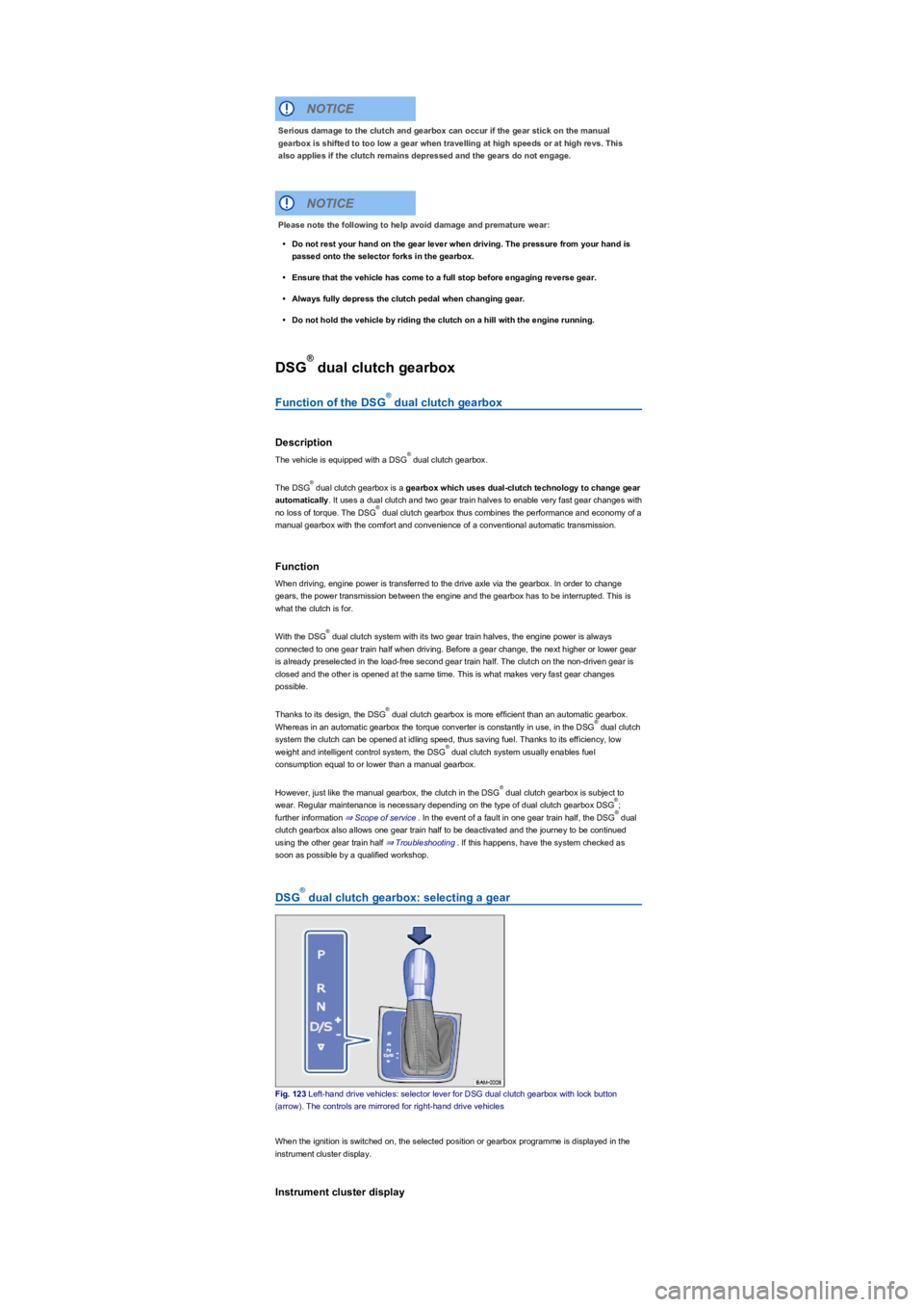
DSG dual clutch gearbox: selecting a gear
Fig. 123 Left-hand drive vehicles: selector lever for DSG dual clutch gearbox with lock button
(arrow). The controls are mirrored for right-hand drive vehicles
When the ignition is switched on, the selected position or gearbox programme is displayed in the
instrument cluster display.
Instrument cluster display
Serious damage to the clutch and gearbox can occur if the gear stick on the manual
gearbox is shifted to too low a gear when travelling at high speeds or at high revs. This
also applies if the clutch remains depressed and the gears do not engage.
NOTICE
Please note the following to help avoid damage and premature wear:
•Do not rest your hand on the gear lever when driving. The pressure from your hand is
passed onto the selector forks in the gearbox.
•Ensure that the vehicle has come to a full stop before engaging reverse gear.
•Always fully depress the clutch pedal when changing gear.
•Do not hold the vehicle by riding the clutch on a hill with the engine running.
NOTICE
®
®
®
®
®
®
®
®
®
®
®
®
®
Page 147 of 341
If the selector lever is moved accidentally to N when driving, take your foot off the
accelerator. Wait for the engine revs in the neutral position before selecting a position again.
Changing gear using Tiptronic
Tiptronic allows the gears to be shifted
up and down manually with a DSG
dual clutch gearbox.
Fig. 124 Selector lever in Tiptronic position (left-hand drive). The controls are mirrored for right-
hand drive vehicles.
Fig. 125 Steering wheel with paddles for Tiptronic.
The gear that is currently selected will be maintained when the Tiptronic programme is selected.
This remains the case as long as the system does not automatically carry out a change of gear due
to the current driving situation.
Operating Tiptronic with the selector lever
•Push the selector lever from position D/S to the right into the Tiptronic gate.
Selecting the wrong position can cause you to lose control of the vehicle, which can lead
to accidents and serious injuries.
•Never depress the accelerator pedal when selecting a position.
•When the engine is running, the vehicle starts moving as soon as a selector lever
position is engaged and the brake pedal is released.
•Never switch to reverse or selector lever position P while the vehicle is moving.
WARNING
Unintentional vehicle movements can cause serious injury.
•The driver must never leave the driver seat when the engine is running and a position
has been selected. If you have to leave the vehicle while the engine is running, always
switch on the electronic parking brake and move the selector lever to position P.
•If the engine is running and the selector lever is in position D/S or R, the vehicle must
be held on the foot brake. The vehicle will creep forward even when the engine is
idling, as power transmission is even then not fully interrupted.
•Never select reverse gear or selector lever position P when the vehicle is in motion.
•Never leave the vehicle in selector lever position N. The vehicle will roll downhill
irrespective of whether or not the engine is running.
WARNING
If the electronic parking brake is not switched on when the vehicle is stationary and the
brake pedal is released when the selector lever is in position P, the vehicle may move a
few centimetres forwards or backwards.
NOTICE
®
Page 148 of 341
•Gently push the selector lever forwards ⊕ or back ㊀ to shift gear up or down ⇒ Fig. 124.
When moving the selector lever in the Tiptronic gate, do not press the lock button on the selector
lever.
Operating Tiptronic with the paddles
•Pull the right paddle ⇒ Fig. 125 towards the steering wheel to change up a gear.
•Pull the left paddle towards the steering wheel to change down a gear.
•To leave Tiptronic mode, pull the right paddle towards the steering wheel for approximately one
second.
Tiptronic is automatically deactivated if the selector paddles are not operated for some time and the
selector lever is not in the Tiptronic gate.
Driving with DSG dual clutch gearbox
The gearbox changes the forward gears up and down automatically.
Driving down hills
The steeper the gradient, the lower the gear you will need. Lower gears increase the braking effect
of the engine. Never allow the vehicle to roll down mountains or hills in the neutral position N.
•Reduce your speed.
•Push the selector lever from position D/S to the right into the Tiptronic gate ⇒ Changing gear
using Tiptronic.
•Gently push the selector lever to the rear to change down gear.
•OR: shift down using the paddles on the steering wheel ⇒ Changing gear using Tiptronic.
Stopping and pulling away on an uphill gradient
The steeper the uphill gradient, the lower the gear you will need.
If you wish to stop the vehicle or pull away when driving uphill you should use the Auto Hold
function ⇒ Electronic parking brake.
When you stop the vehicle on an incline and the vehicle remains in gear, the vehicle must always
be prevented from rolling by depressing the brake pedal or by applying the electronic parking brake.
The brake pedal or the electronic parking brake should not be released until you pull away ⇒.
Coasting with DSG dual clutch gearbox
In coasting mode, the momentum of the vehicle can be used to save fuel in conjunction with a
foresighted driving style. With the engine-off coasting function, the engine is not just disengaged,
but is also switched off. The engine no longer brakes the vehicle – the vehicle can roll for a longer
distance. The function is available only in the selector lever position D/S and at speeds of
approximately 30 – 130 km/h (18 mph – 80 mph).
An automatic engine start may take place in order to ensure reliable engine restarting and to
guarantee the power supply of the vehicle electrical system.
Triggering coasting
•Select the Eco driving profile from the driving profile selection menu ⇒ Driving profile selection
and 4MOTION Active Control.
•Remove your foot from accelerator pedal. The engine is disengaged and runs in coasting mode.
The vehicle rolls without the braking effect of the engine. The engine is automatically switched
off on vehicles with engine-off coasting function.
Cancelling coasting mode
•Depress the brake pedal briefly.
•OR: depress the accelerator or brake pedal briefly.
•OR: pull a paddle towards the steering wheel.
•OR: press the selector lever to the Tiptronic position.
Kickdown
The kick down function enables maximum acceleration in the selector lever position D/S or in the
Tiptronic position.
•When accelerating, the gearbox automatically shifts up to the next gear shortly before
the maximum permitted engine speed is reached.
•When shifting down a gear manually, the gearbox will not change gear until the engine
can no longer be overrevved.
NOTICE
®
®
Page 149 of 341
If the accelerator pedal is depressed fully, the gearbox will automatically shift to a lower gear,
depending on the speed and engine revs. This will make use of the full vehicle acceleration.
The gearbox does not shift up to the next gear until the engine reaches the maximum engine speed
for the gear.
When the Eco driving profile is selected in vehicles with driving profile selection ⇒ Driving profile
selection and 4MOTION Active Control and the accelerator is depressed fully beyond the pressure
point, the engine output is automatically regulated to ensure maximum vehicle acceleration.
Launch Control Programme
The Launch Control programme gives the vehicle maximum acceleration from a standing start in
vehicles with a DSG dual clutch gearbox.
•Switch off TCS ⇒ Brake support systems.
•Depress and hold the brake pedal with your left foot.
•In selector lever position D/S, select position S. Alternatively, select the Tiptronic position or in
vehicles with driving profile selection select the Sport driving profile ⇒ Driving profile selection
and 4MOTION Active Control.
•With your right foot, depress the accelerator until the engines speed reaches approximately
3,200 rpm.
•Take your left foot off the brake ⇒. The vehicle will start with maximum acceleration.
•Switch the TCS back on after acceleration.
Troubleshooting
®
Rapid acceleration can cause loss of traction and skidding, particularly on slippery roads.
This can cause you to lose control of the vehicle, which can lead to accidents and serious
injuries.
•Always adjust your driving style in accordance with the flow of traffic.
•Only use kickdown or fast acceleration if visibility, weather, road and traffic conditions
permit, and other road users are not put at risk due to the acceleration and the driving
style.
•Please note that the driven wheels could start to spin and the vehicle could skid if the
traction control system (TCS) is switched off, especially if the road is slippery.
•Switch the traction control system (TCS) back on after acceleration.
•Only use the launch control programme, if the road and traffic conditions allow for it.
•You should never endanger other road users through the acceleration of your vehicle
or through your driving style.
WARNING
Never ride the brake pedal. Do not overuse the brake pedal. Constant braking will cause
the brakes to overheat. This can considerably reduce the brake effect, increase the
braking distance and, in certain circumstances, cause the brake system to fail completely.
WARNING
•If you stop the vehicle on an incline, do not attempt to stop it from rolling back by
depressing the accelerator while a position is still selected. The dual clutch gearbox
DSG could overheat and be damaged.
•Never allow the vehicle to roll in position N, particularly if the ignition is switched off.
The DSG dual clutch gearbox will not be lubricated and could be damaged.
•m/k/a995MK Vehicles with Launch Control Programme: accelerating with the
Launch Control programme places heavy strain on all vehicle components. This can
lead to higher rates of wear.
NOTICE
®
®
•Never let the brakes rub by applying light pressure to the brake when it is not
necessary to brake. This will increase levels of wear.
•Before driving down a long, steep gradient, reduce your speed and select a suitable
recuperation level. This will make use of the electric drive braking effect and relieve the
load on the brakes. The brakes could otherwise overheat and possibly fail. The brakes
should only be used to slow or stop the vehicle.
NOTICE
Page 150 of 341
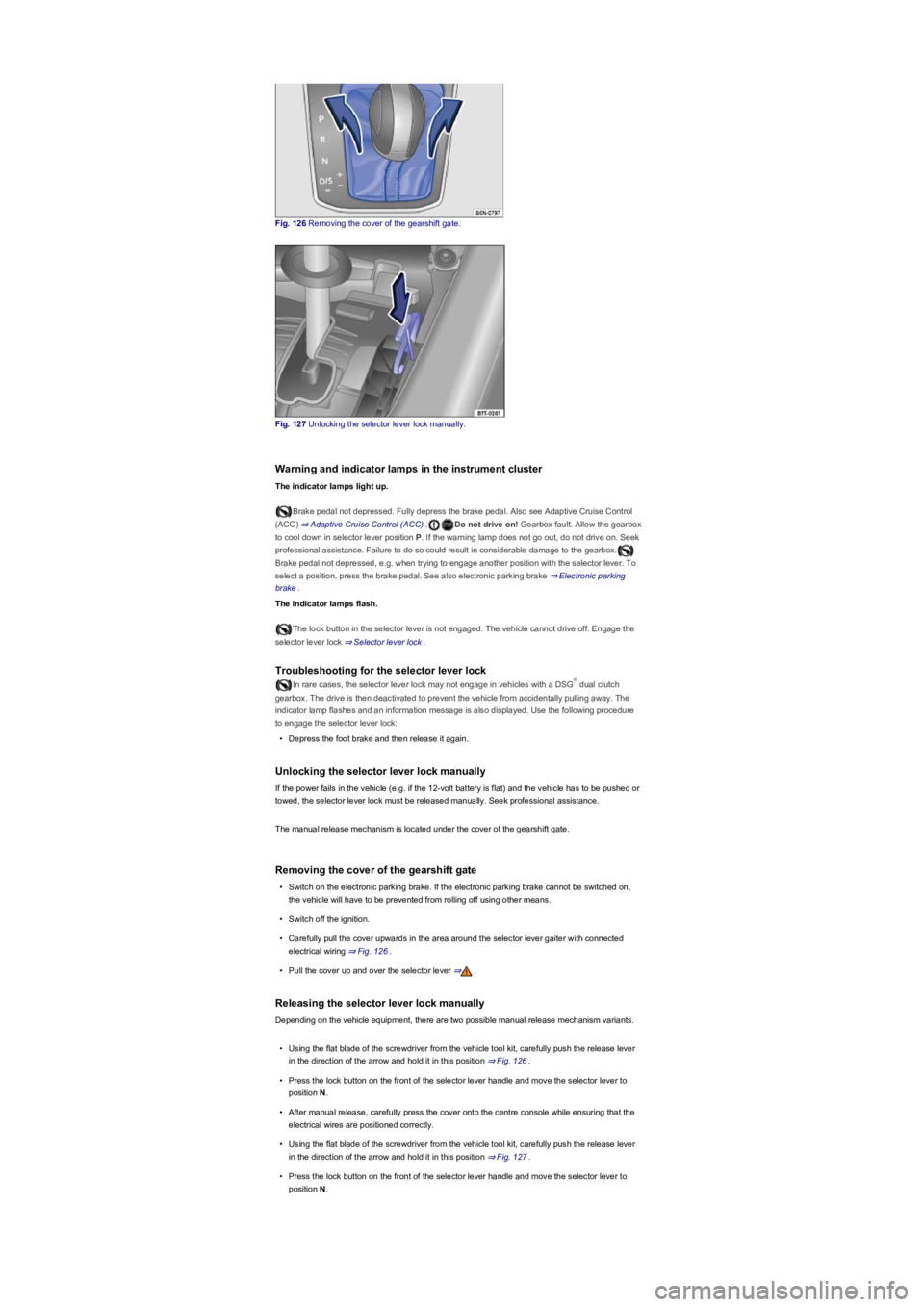
Fig. 126 Removing the cover of the gearshift gate.
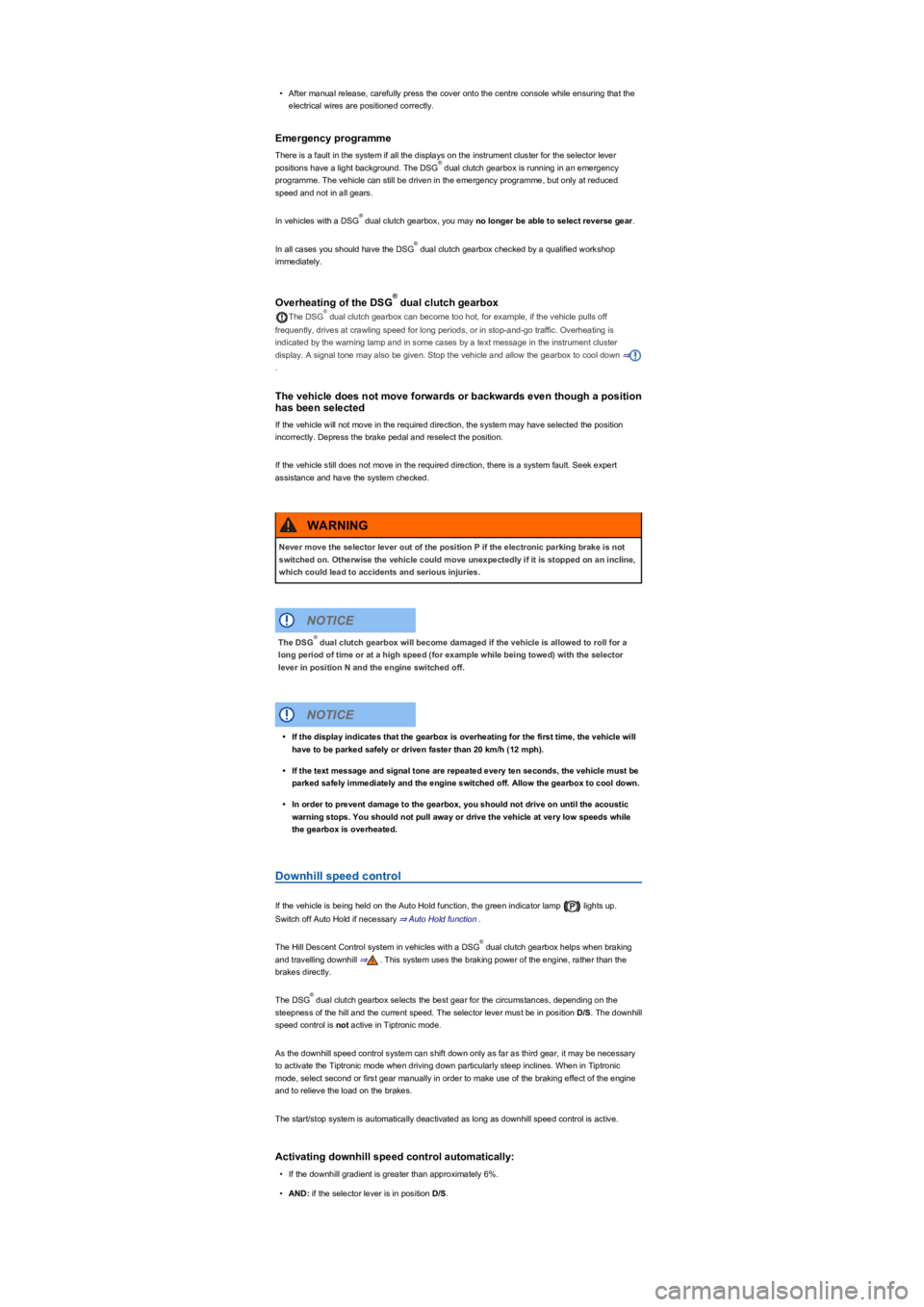
Fig. 127 Unlocking the selector lever lock manually.
Warning and indicator lamps in the instrument cluster
The indicator lamps light up.
Brake pedal not depressed. Fully depress the brake pedal. Also see Adaptive Cruise Control
(ACC) ⇒ Adaptive Cruise Control (ACC).Do not drive on! Gearbox fault. Allow the gearbox
to cool down in selector lever position P. If the warning lamp does not go out, do not drive on. Seek
professional assistance. Failure to do so could result in considerable damage to the gearbox.
Brake pedal not depressed, e.g. when trying to engage another position with the selector lever. To
select a position, press the brake pedal. See also electronic parking brake ⇒ Electronic parking
brake.
The indicator lamps flash.
The lock button in the selector lever is not engaged. The vehicle cannot drive off. Engage the
selector lever lock ⇒ Selector lever lock.
Troubleshooting for the selector lever lock
In rare cases, the selector lever lock may not engage in vehicles with a DSG dual clutch
gearbox. The drive is then deactivated to prevent the vehicle from accidentally pulling away. The
indicator lamp flashes and an information message is also displayed. Use the following procedure
to engage the selector lever lock:
•Depress the foot brake and then release it again.
Unlocking the selector lever lock manually
If the power fails in the vehicle (e.g. if the 12-volt battery is flat) and the vehicle has to be pushed or
towed, the selector lever lock must be released manually. Seek professional assistance.
The manual release mechanism is located under the cover of the gearshift gate.
Removing the cover of the gearshift gate
•Switch on the electronic parking brake. If the electronic parking brake cannot be switched on,
the vehicle will have to be prevented from rolling off using other means.
•Switch off the ignition.
•Carefully pull the cover upwards in the area around the selector lever gaiter with connected
electrical wiring ⇒ Fig. 126.
•Pull the cover up and over the selector lever ⇒.
Releasing the selector lever lock manually
Depending on the vehicle equipment, there are two possible manual release mechanism variants.
•Using the flat blade of the screwdriver from the vehicle tool kit, carefully push the release lever
in the direction of the arrow and hold it in this position ⇒ Fig. 126.
•Press the lock button on the front of the selector lever handle and move the selector lever to
position N.
•After manual release, carefully press the cover onto the centre console while ensuring that the
electrical wires are positioned correctly.
•Using the flat blade of the screwdriver from the vehicle tool kit, carefully push the release lever
in the direction of the arrow and hold it in this position ⇒ Fig. 127.
•Press the lock button on the front of the selector lever handle and move the selector lever to
position N.
®
Page 151 of 341
•After manual release, carefully press the cover onto the centre console while ensuring that the
electrical wires are positioned correctly.
Emergency programme
There is a fault in the system if all the displays on the instrument cluster for the selector lever
positions have a light background. The DSG dual clutch gearbox is running in an emergency
programme. The vehicle can still be driven in the emergency programme, but only at reduced
speed and not in all gears.
In vehicles with a DSG dual clutch gearbox, you may no longer be able to select reverse gear.
In all cases you should have the DSG dual clutch gearbox checked by a qualified workshop
immediately.
Overheating of the DSG dual clutch gearbox
The DSG dual clutch gearbox can become too hot, for example, if the vehicle pulls off
frequently, drives at crawling speed for long periods, or in stop-and-go traffic. Overheating is
indicated by the warning lamp and in some cases by a text message in the instrument cluster
display. A signal tone may also be given. Stop the vehicle and allow the gearbox to cool down ⇒
.
The vehicle does not move forwards or backwards even though a position
has been selected
If the vehicle will not move in the required direction, the system may have selected the position
incorrectly. Depress the brake pedal and reselect the position.
If the vehicle still does not move in the required direction, there is a system fault. Seek expert
assistance and have the system checked.
Downhill speed control
If the vehicle is being held on the Auto Hold function, the green indicator lamp lights up.
Switch off Auto Hold if necessary ⇒ Auto Hold function.
The Hill Descent Control system in vehicles with a DSG dual clutch gearbox helps when braking
and travelling downhill ⇒. This system uses the braking power of the engine, rather than the
brakes directly.
The DSG dual clutch gearbox selects the best gear for the circumstances, depending on the
steepness of the hill and the current speed. The selector lever must be in position D/S. The downhill
speed control is not active in Tiptronic mode.
As the downhill speed control system can shift down only as far as third gear, it may be necessary
to activate the Tiptronic mode when driving down particularly steep inclines. When in Tiptronic
mode, select second or first gear manually in order to make use of the braking effect of the engine
and to relieve the load on the brakes.
The start/stop system is automatically deactivated as long as downhill speed control is active.
Activating downhill speed control automatically:
•If the downhill gradient is greater than approximately 6%.
•AND: if the selector lever is in position D/S.
®
®
®
®
®
Never move the selector lever out of the position P if the electronic parking brake is not
switched on. Otherwise the vehicle could move unexpectedly if it is stopped on an incline,
which could lead to accidents and serious injuries.
WARNING
The DSG dual clutch gearbox will become damaged if the vehicle is allowed to roll for a
long period of time or at a high speed (for example while being towed) with the selector
lever in position N and the engine switched off.
NOTICE
®
•If the display indicates that the gearbox is overheating for the first time, the vehicle will
have to be parked safely or driven faster than 20 km/h (12 mph).
•If the text message and signal tone are repeated every ten seconds, the vehicle must be
parked safely immediately and the engine switched off. Allow the gearbox to cool down.
•In order to prevent damage to the gearbox, you should not drive on until the acoustic
warning stops. You should not pull away or drive the vehicle at very low speeds while
the gearbox is overheated.
NOTICE
®
®
Page 155 of 341
drive come with additional OFFROAD driving profiles ⇒ Selecting a driving profile (4MOTION
Action Control).
The driving profile can be changed when the vehicle is stationary or while driving ⇒. After
selecting a driving profile, the vehicle settings (excluding engine settings) are switched to the new
profile mode immediately. When traffic conditions allow, briefly take your foot off the accelerator to
activate the newly selected driving profile for the engine.
Some settings can be stored in the user accounts of the personalisation function and
therefore change when the user account changes ⇒ Personalisation.
Selecting a driving profile (ONROAD)
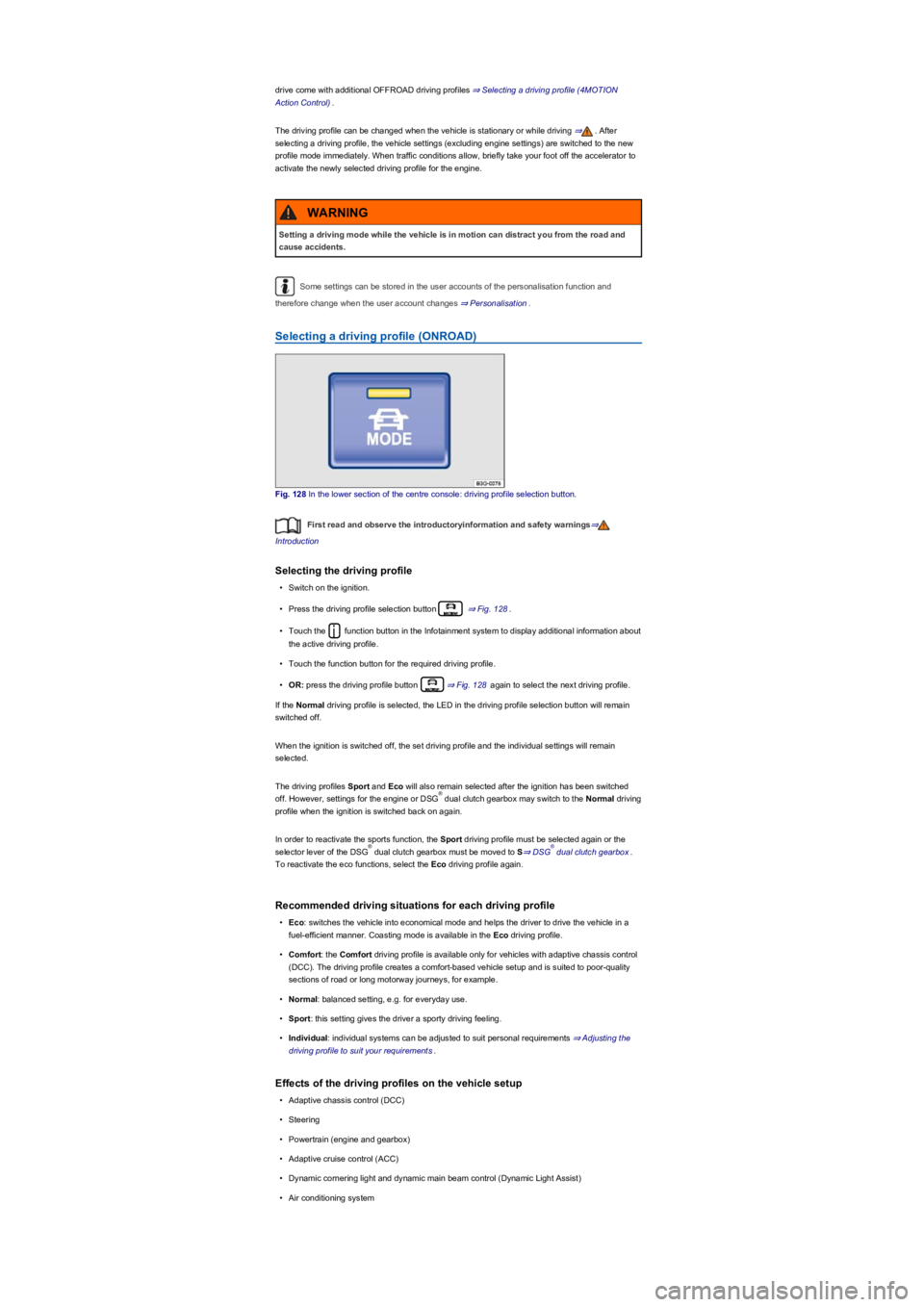
Fig. 128 In the lower section of the centre console: driving profile selection button.
First read and observe the introductoryinformation and safety warnings⇒
Introduction
Selecting the driving profile
•Switch on the ignition.
•Press the driving profile selection button ⇒ Fig. 128.
•Touch the function button in the Infotainment system to display additional information about
the active driving profile.
•Touch the function button for the required driving profile.
•OR: press the driving profile button ⇒ Fig. 128 again to select the next driving profile.
If the Normal driving profile is selected, the LED in the driving profile selection button will remain
switched off.
When the ignition is switched off, the set driving profile and the individual settings will remain
selected.
The driving profiles Sport and Eco will also remain selected after the ignition has been switched
off. However, settings for the engine or DSG dual clutch gearbox may switch to the Normal driving
profile when the ignition is switched back on again.
In order to reactivate the sports function, the Sport driving profile must be selected again or the
selector lever of the DSG dual clutch gearbox must be moved to S⇒ DSG dual clutch gearbox.
To reactivate the eco functions, select the Eco driving profile again.
Recommended driving situations for each driving profile
•Eco: switches the vehicle into economical mode and helps the driver to drive the vehicle in a
fuel-efficient manner. Coasting mode is available in the Eco driving profile.
•Comfort: the Comfort driving profile is available only for vehicles with adaptive chassis control
(DCC). The driving profile creates a comfort-based vehicle setup and is suited to poor-quality
sections of road or long motorway journeys, for example.
•Normal: balanced setting, e.g. for everyday use.
•Sport: this setting gives the driver a sporty driving feeling.
•Individual: individual systems can be adjusted to suit personal requirements ⇒ Adjusting the
driving profile to suit your requirements.
Effects of the driving profiles on the vehicle setup
•Adaptive chassis control (DCC)
•Steering
•Powertrain (engine and gearbox)
•Adaptive cruise control (ACC)
•Dynamic cornering light and dynamic main beam control (Dynamic Light Assist)
•Air conditioning system
Setting a driving mode while the vehicle is in motion can distract you from the road and
cause accidents.
WARNING
®
®®
Page 156 of 341
•Proactive occupant protection system
In vehicles with a DSG dual clutch gearbox, the system automatically changes to gear
position S when the Sport driving profile is selected. The system automatically switches to gear
position D when the Eco driving profile is selected. Since coasting is active in the Eco driving
profile, the gearbox programme E is additionally displayed on the instrument cluster display.
The driver can adjust certain vehicle functions irrespective of the selected driving profile. For
example, the driver can switch to gear position S when the Eco driving profile is selected.
Selecting a driving profile (4MOTION Action Control)
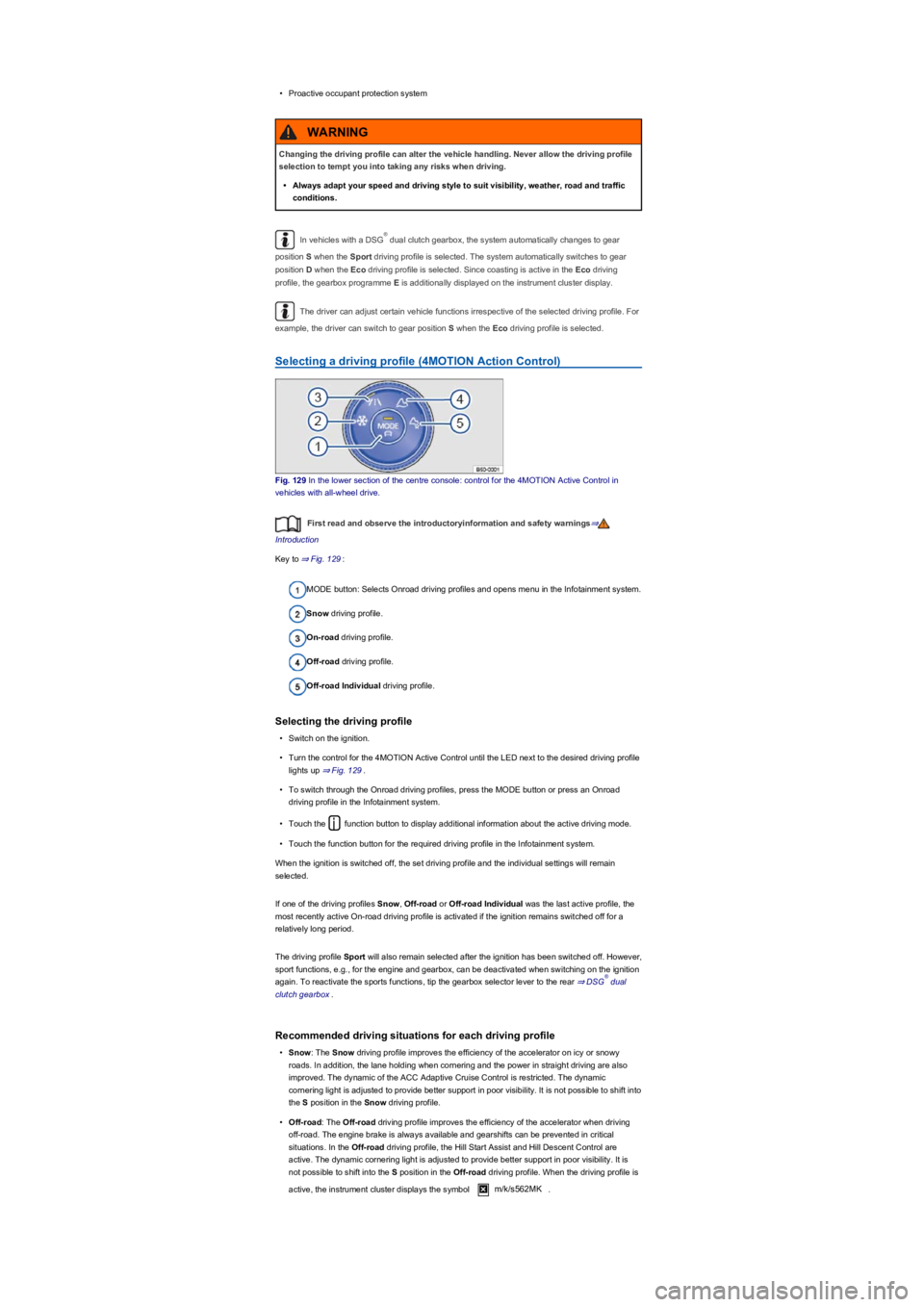
Fig. 129 In the lower section of the centre console: control for the 4MOTION Active Control in
vehicles with all-wheel drive.
First read and observe the introductoryinformation and safety warnings⇒
Introduction
Key to ⇒ Fig. 129:
MODE button: Selects Onroad driving profiles and opens menu in the Infotainment system.
Snow driving profile.
On-road driving profile.
Off-road driving profile.
Off-road Individual driving profile.
Selecting the driving profile
•Switch on the ignition.
•Turn the control for the 4MOTION Active Control until the LED next to the desired driving profile
lights up ⇒ Fig. 129.
•To switch through the Onroad driving profiles, press the MODE button or press an Onroad
driving profile in the Infotainment system.
•Touch the function button to display additional information about the active driving mode.
•Touch the function button for the required driving profile in the Infotainment system.
When the ignition is switched off, the set driving profile and the individual settings will remain
selected.
If one of the driving profiles Snow, Off-road or Off-road Individual was the last active profile, the
most recently active On-road driving profile is activated if the ignition remains switched off for a
relatively long period.
The driving profile Sport will also remain selected after the ignition has been switched off. However,
sport functions, e.g., for the engine and gearbox, can be deactivated when switching on the ignition
again. To reactivate the sports functions, tip the gearbox selector lever to the rear ⇒ DSG dual
clutch gearbox.
Recommended driving situations for each driving profile
•Snow: The Snow driving profile improves the efficiency of the accelerator on icy or snowy
roads. In addition, the lane holding when cornering and the power in straight driving are also
improved. The dynamic of the ACC Adaptive Cruise Control is restricted. The dynamic
cornering light is adjusted to provide better support in poor visibility. It is not possible to shift into
the S position in the Snow driving profile.
•Off-road: The Off-road driving profile improves the efficiency of the accelerator when driving
off-road. The engine brake is always available and gearshifts can be prevented in critical
situations. In the Off-road driving profile, the Hill Start Assist and Hill Descent Control are
active. The dynamic cornering light is adjusted to provide better support in poor visibility. It is
not possible to shift into the S position in the Off-road driving profile. When the driving profile is
active, the instrument cluster displays the symbol m/k/s562MK.
Changing the driving profile can alter the vehicle handling. Never allow the driving profile
selection to tempt you into taking any risks when driving.
•Always adapt your speed and driving style to suit visibility, weather, road and traffic
conditions.
WARNING
®
®
Page 162 of 341
Water, compass, maps and torch with spare batteries.
Winch, tow bar or rope with sufficient strength.
Mobile telephone, shovel, blankets and rubber boots.
Electric air compressor for connection to the 12-volt sockets in the vehicle to inflate the
tyres.
A wooden board approx. 4 cm thick and approx. 1 metre long or an aluminium frame of
similar size: this will help to free a vehicle stuck in the mud and provide a platform for a
vehicle jack.
Snow chains, additional spare wheels, a breakdown set, jack and box spanner.
•Give way to drivers coming uphill or who are overtaking.
Driving tips
Special rules apply when driving off-road:
•Never drive off-road alone. Always drive off-road in a team of at least two other off-road
vehicles. Unexpected situations can always occur. We recommend that you carry equipment
you can use for calling for help.
•Stop your vehicle when you reach difficult sections, and walk along the path ahead to
reconnoitre it.
•Drive slowly over the brows of hills so the vehicle does not lose contact with the ground as this
could cause damage, leaving you unable to manoeuvre.
•Drive slowly when the route is difficult. Shift up a gear when on slippery ground and always
keep the vehicle in motion.
•Always look for flat and firm surfaces. The ground is predominantly soft when driving off-road
meaning the tyres could sink into the ground. This will reduce ground clearance and the wading
depth.
•Even when driving at low speeds, always keep your distance from other vehicles. If the first
vehicle suddenly gets stuck, the following vehicle can stop without getting stuck.
Useful accessories for off-road driving
First read and observe the introductoryinformation and safety warnings⇒
Introduction
The checklist contains just a few items of equipment that can be very useful for off-road driving. If
you have an instruction manual or fitting instructions for these accessories you should always take
them with you and consult them as necessary when driving off-road.
Checklist
Useful items when driving off-road:
Changing gear
First read and observe the introductoryinformation and safety warnings⇒
Introduction
The choice of gear depends on the terrain off-road.
Before attempting to drive through difficult terrain it can be helpful to stop and consider which gear
you should select. After some time driving off-road, you will learn which gear to select in conjunction
with the low range and the differential lock for different types of terrain.
Basic points
•With the correct gear selected, the vehicle will normally not have to be braked so much using
the foot brake when driving downhill as the engine braking effect will normally be sufficient.
•You should only depress the accelerator as much as is required. If you accelerate too hard, the
wheels could lose traction and you could lose control of the vehicle.
DSG dual clutch gearbox
•Select position D when driving in normal, flat off-road terrain.
•Adjust your speed when driving on soft or slippery ground, and select the highest suitable
position for the Tiptronic.
•If driving through mud, sand, water or hilly terrain, select the Tiptronic in the positions 3 or
2⇒ DSG dual clutch gearbox.
•Always ensure that there is enough ground clearance underneath the vehicle. Serious
damage to the underbody could occur if the vehicle is scraped. This damage could
cause the vehicle to break down and thus make it impossible to drive on.
•Do not slip the clutch or rest your foot on the clutch when driving off-road. When
travelling over uneven ground, you could press the clutch by mistake, and lose control
of the vehicle. A slipped clutch also prevents power being transferred from the engine
to the gearbox. Driving with the clutch partially engaged causes premature wear to the
clutch lining.
NOTICE
®
®
Page 165 of 341
•Accelerate only to the speed you need to climb the slope. Too much acceleration can cause the
wheels to spin and lead to a loss of control of the vehicle. Too little acceleration increases the
probability of stalling the engine.
•Never attempt to stop or turn on a slope.
•Avoid allowing the engine to stall.
•Do not change gear or engage the clutch when climbing a slope.
•Use the Off-road display ⇒ Off-road display.
If you cannot continue to drive up a hill
•Never turn the vehicle around on an incline.
•If the engine has stalled, depress the footbrake and start the engine again.
•Select the reverse gear and reverse back in a straight line slowly.
•Use the foot brake to keep a constant speed until you have reached a safe place.
Driving downhill
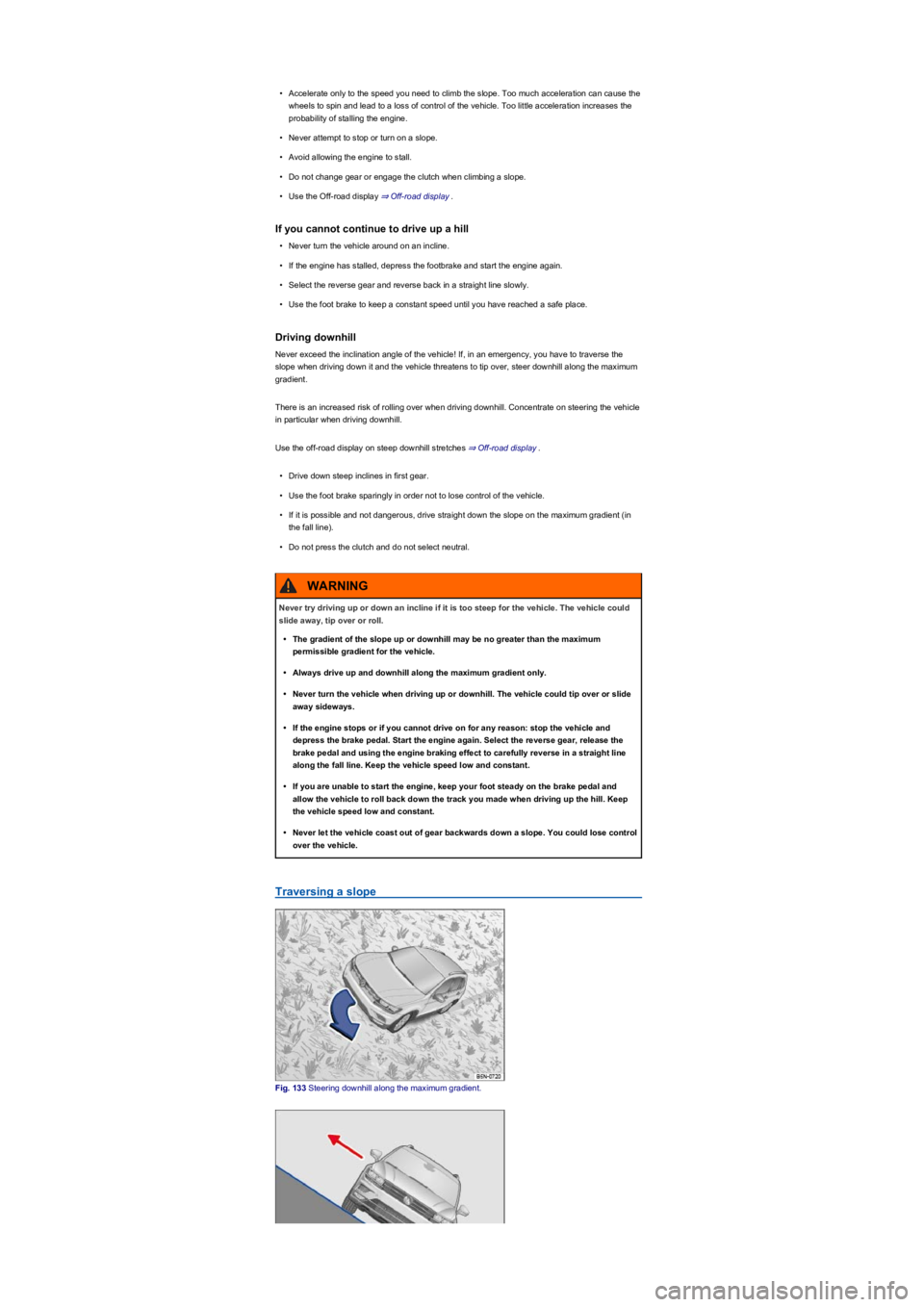
Never exceed the inclination angle of the vehicle! If, in an emergency, you have to traverse the
slope when driving down it and the vehicle threatens to tip over, steer downhill along the maximum
gradient.
There is an increased risk of rolling over when driving downhill. Concentrate on steering the vehicle
in particular when driving downhill.
Use the off-road display on steep downhill stretches ⇒ Off-road display.
•Drive down steep inclines in first gear.
•Use the foot brake sparingly in order not to lose control of the vehicle.
•If it is possible and not dangerous, drive straight down the slope on the maximum gradient (in
the fall line).
•Do not press the clutch and do not select neutral.
Traversing a slope
Fig. 133 Steering downhill along the maximum gradient.
Never try driving up or down an incline if it is too steep for the vehicle. The vehicle could
slide away, tip over or roll.
•The gradient of the slope up or downhill may be no greater than the maximum
permissible gradient for the vehicle.
•Always drive up and downhill along the maximum gradient only.
•Never turn the vehicle when driving up or downhill. The vehicle could tip over or slide
away sideways.
•If the engine stops or if you cannot drive on for any reason: stop the vehicle and
depress the brake pedal. Start the engine again. Select the reverse gear, release the
brake pedal and using the engine braking effect to carefully reverse in a straight line
along the fall line. Keep the vehicle speed low and constant.
•If you are unable to start the engine, keep your foot steady on the brake pedal and
allow the vehicle to roll back down the track you made when driving up the hill. Keep
the vehicle speed low and constant.
•Never let the vehicle coast out of gear backwards down a slope. You could lose control
over the vehicle.
WARNING