audio VOLKSWAGEN TIGUAN 2017 Owner´s Manual
[x] Cancel search | Manufacturer: VOLKSWAGEN, Model Year: 2017, Model line: TIGUAN, Model: VOLKSWAGEN TIGUAN 2017Pages: 341, PDF Size: 9.14 MB
Page 7 of 341
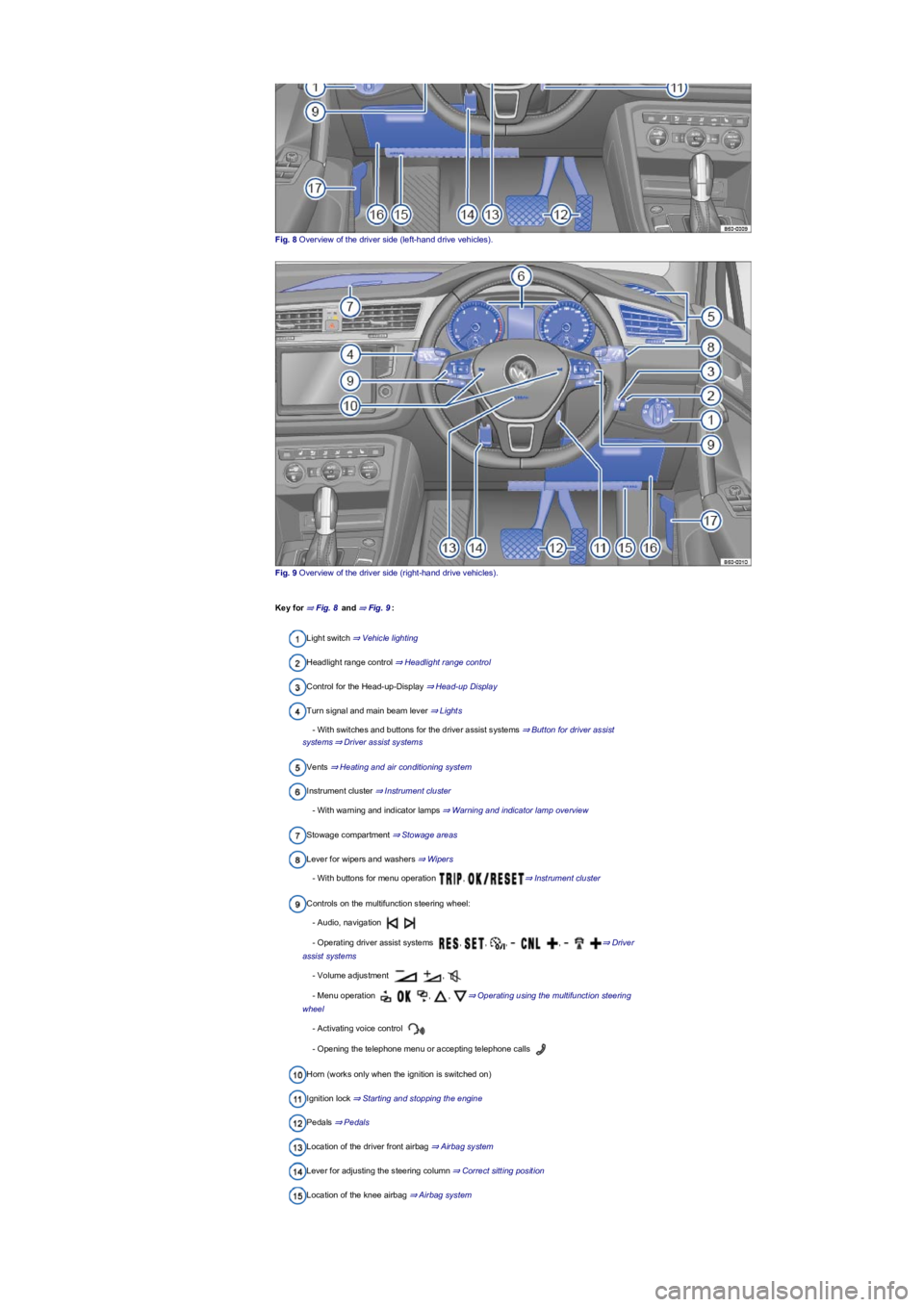
Fig. 8 Overview of the driver side (left-hand drive vehicles).
Fig. 9 Overview of the driver side (right-hand drive vehicles).
Key for ⇒ Fig. 8 and ⇒ Fig. 9:
Light switch ⇒ Vehicle lighting
Headlight range control ⇒ Headlight range control
Control for the Head-up-Display ⇒ Head-up Display
Turn signal and main beam lever ⇒ Lights
- With switches and buttons for the driver assist systems ⇒ Button for driver assist
systems⇒ Driver assist systems
Vents ⇒ Heating and air conditioning system
Instrument cluster ⇒ Instrument cluster
- With warning and indicator lamps ⇒ Warning and indicator lamp overview
Stowage compartment ⇒ Stowage areas
Lever for wipers and washers ⇒ Wipers
- With buttons for menu operation , ⇒ Instrument cluster
Controls on the multifunction steering wheel:
- Audio, navigation
- Operating driver assist systems , , , , ⇒ Driver
assist systems
- Volume adjustment ,
- Menu operation , , ⇒ Operating using the multifunction steering
wheel
- Activating voice control
- Opening the telephone menu or accepting telephone calls
Horn (works only when the ignition is switched on)
Ignition lock ⇒ Starting and stopping the engine
Pedals ⇒ Pedals
Location of the driver front airbag ⇒ Airbag system
Lever for adjusting the steering column ⇒ Correct sitting position
Location of the knee airbag ⇒ Airbag system
Page 17 of 341
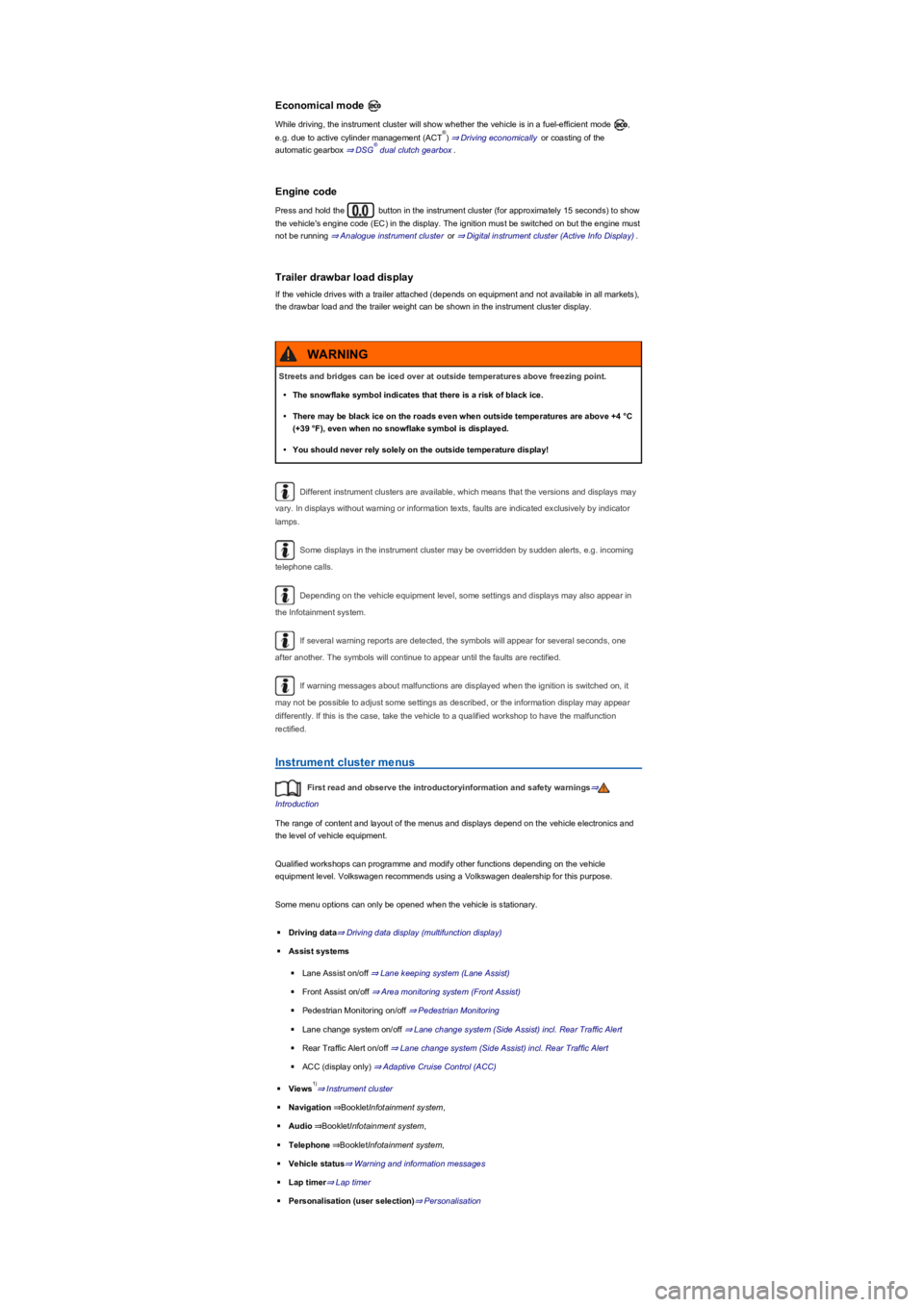
Economical mode
While driving, the instrument cluster will show whether the vehicle is in a fuel-efficient mode ,
e.g. due to active cylinder management (ACT) ⇒ Driving economically or coasting of the
automatic gearbox ⇒ DSG dual clutch gearbox.
Engine code
Press and hold the button in the instrument cluster (for approximately 15 seconds) to show
the vehicle's engine code (EC) in the display. The ignition must be switched on but the engine must
not be running ⇒ Analogue instrument cluster or ⇒ Digital instrument cluster (Active Info Display).
Trailer drawbar load display
If the vehicle drives with a trailer attached (depends on equipment and not available in all markets),
the drawbar load and the trailer weight can be shown in the instrument cluster display.
Different instrument clusters are available, which means that the versions and displays may
vary. In displays without warning or information texts, faults are indicated exclusively by indicator
lamps.
Some displays in the instrument cluster may be overridden by sudden alerts, e.g. incoming
telephone calls.
Depending on the vehicle equipment level, some settings and displays may also appear in
the Infotainment system.
If several warning reports are detected, the symbols will appear for several seconds, one
after another. The symbols will continue to appear until the faults are rectified.
If warning messages about malfunctions are displayed when the ignition is switched on, it
may not be possible to adjust some settings as described, or the information display may appear
differently. If this is the case, take the vehicle to a qualified workshop to have the malfunction
rectified.
Instrument cluster menus
First read and observe the introductoryinformation and safety warnings⇒
Introduction
The range of content and layout of the menus and displays depend on the vehicle electronics and
the level of vehicle equipment.
Qualified workshops can programme and modify other functions depending on the vehicle
equipment level. Volkswagen recommends using a Volkswagen dealership for this purpose.
Some menu options can only be opened when the vehicle is stationary.
◾Driving data⇒ Driving data display (multifunction display)
◾Assist systems
◾Lane Assist on/off ⇒ Lane keeping system (Lane Assist)
◾Front Assist on/off ⇒ Area monitoring system (Front Assist)
◾Pedestrian Monitoring on/off ⇒ Pedestrian Monitoring
◾Lane change system on/off ⇒ Lane change system (Side Assist) incl. Rear Traffic Alert
◾Rear Traffic Alert on/off ⇒ Lane change system (Side Assist) incl. Rear Traffic Alert
◾ACC (display only) ⇒ Adaptive Cruise Control (ACC)
◾Views⇒ Instrument cluster
◾Navigation⇒BookletInfotainment system,
◾Audio⇒BookletInfotainment system,
◾Telephone⇒BookletInfotainment system,
◾Vehicle status⇒ Warning and information messages
◾Lap timer⇒ Lap timer
◾Personalisation (user selection)⇒ Personalisation
®
®
Streets and bridges can be iced over at outside temperatures above freezing point.
•The snowflake symbol indicates that there is a risk of black ice.
•There may be black ice on the roads even when outside temperatures are above +4 °C
(+39 °F), even when no snowflake symbol is displayed.
•You should never rely solely on the outside temperature display!
WARNING
1)
Page 328 of 341
Data storage and services
Your vehicle is fitted with electronic control units. Some of these are required to make sure your
vehicle remains safe while others provide support while driving (driver assist systems).
Furthermore, your vehicle is equipped with convenience and Infotainment functions, which are also
made possible using electronic control units.
Electronic control units contain data memories that can store information regarding the vehicle
status, component load levels, maintenance requirements, technical events and faults on a
temporary or permanent basis. This information generally documents the status of a component, a
module, a system or the environment, e.g.:
•Operating states of system components, e.g. filling levels, tyre pressure, battery status.
•Status messages from the vehicle or its individual components, e.g. wheel revolutions or speed,
deceleration, lateral acceleration, display of fastened seat belts.
•Faults or malfunctions in important system components, e.g. lights, brakes.
•Information on events which damaged the vehicle.
•System reactions to specific driving situations, triggering of an airbag, intervention the stability
control systems.
•Ambient conditions, e.g. temperature, rain.
As well as performing the actual control unit functions, these data are also used to detect and
rectify faults and help Volkswagen to improve vehicle functions. The majority of these data are
temporary are processed only within the vehicle itself. Only a very small amount of data is stored in
the event memories or possibly on the vehicle key.
Reading out the vehicle's event memory
There is a diagnostic interface in the vehicle interior for reading out the event memories (on-board
diagnostic system) ⇒.
If you have service work performed on your vehicle, the technical data can be read out of the
vehicle together with the vehicle identification number by service employees, e.g. workshops, or
third parties such as breakdown services. Service work includes, for example, repairs,
maintenance, warranty work or quality assurance measures. The service workshop or third party
collects, processes and uses the data. The data document the vehicle's technical status, help in
troubleshooting and in improving quality and may be sent to Volkswagen in some cases.
Furthermore, the manufacturer is subject to legal product safety requirements. To make sure it
complies with these requirements, the manufacturer requires technical data from the vehicles.
Event memories in the vehicle can be reset by a service workshop as part of repair or service work.
The event memory should only be read and reset by a qualified workshop. Additional information on
the stored data is available from qualified workshops.
After a fault has been rectified, the information in the memory pertaining to the fault is deleted.
Other memory content is overwritten on an ongoing basis.
Event data recorder
This vehicle is equipped with an event data recorder. The main task of an event data recorder is to
record data in particular accident scenarios or accident-like situations, e.g. in the event of airbags
being triggered or a collision with an obstacle on the road. These data help in analysis of how a
vehicle system behaved in these situations. The event data recorder records data relating to driving
dynamics and the restraint system for a short period of 10 s or less. This information includes, for
example:
•how various systems in your vehicle have functioned.
•whether the seat belts of the driver and front passenger were fastened.
•the extent to which the driver pressed the brake or accelerator pedal.
•how fast the vehicle was travelling.
These data help to obtain a better understanding of the circumstances in the situations where
accidents and injuries have occurred.
Data from driver assist systems are also recorded. In addition to information about whether the
systems were switched on or off, available only to a restricted extent or inactive, it is also possible
to determine whether these functions steered, accelerated or braked the vehicle in the above-
described situations. Depending on the vehicle equipment, these systems include the following:
•Adaptive Cruise Control (ACC).
•Lane keeping system (Lane Assist).
•Park Assist.
•Park Distance Control.
•Emergency braking functions (Front Assist).
The data of the event data recorder are recorded only if a particular accident-like situation occurs.
No recordings occur under normal driving conditions. Audio or video data from the vehicle interior
or vehicle surroundings are not stored. Personal data such as name, gender age or accident
location are also not recorded at any time. However, third parties such as law enforcement
agencies can use corresponding means to link the content of the event data recorder with other
sources of data and thus establish a reference to persons as part of an accident investigation.
Page 340 of 341
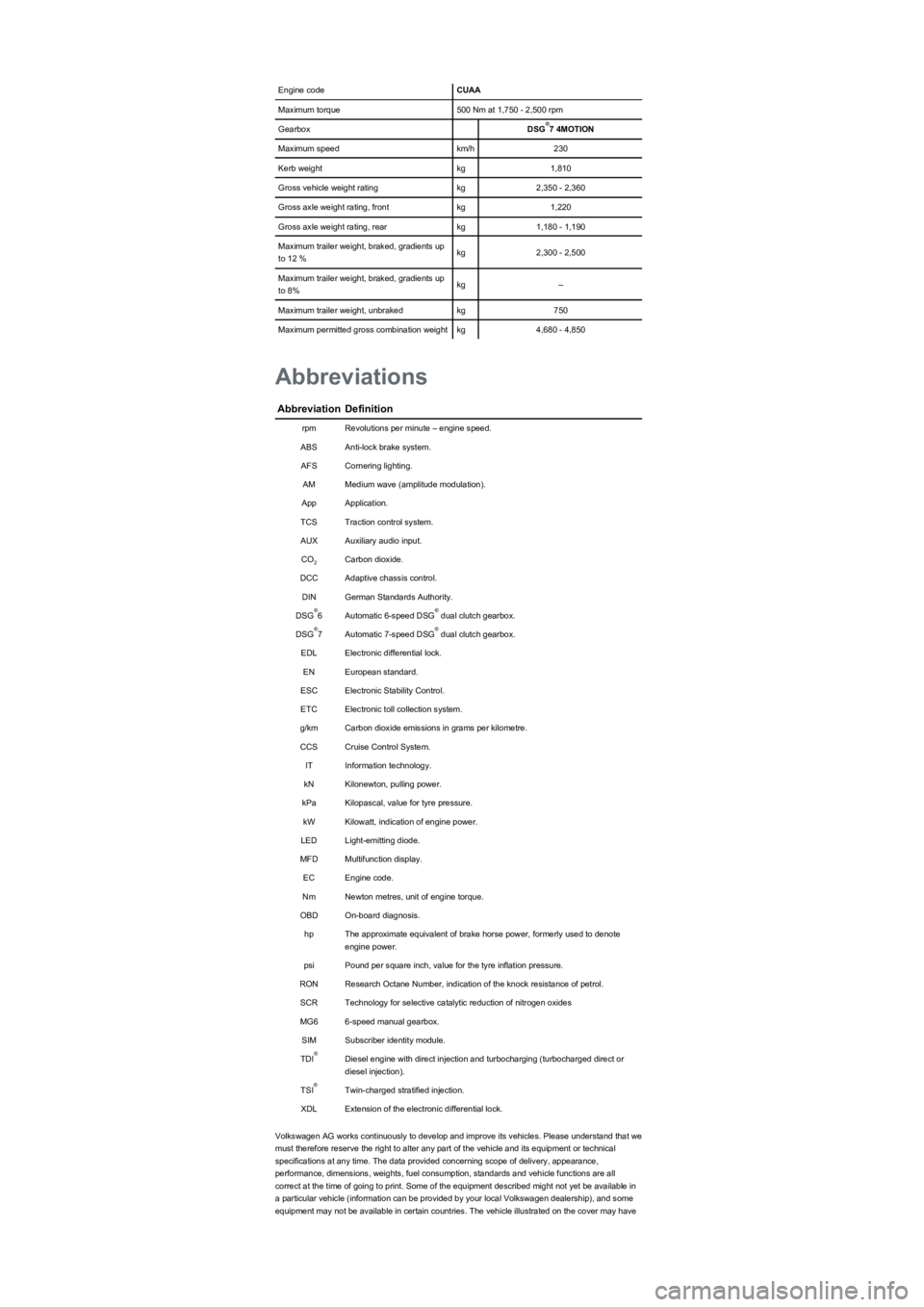
Engine codeCUAA
Maximum torque500 Nm at 1,750 - 2,500 rpm
GearboxDSG7 4MOTION
Maximum speedkm/h230
Kerb weightkg1,810
Gross vehicle weight ratingkg2,350 - 2,360
Gross axle weight rating, frontkg1,220
Gross axle weight rating, rearkg1,180 - 1,190
Maximum trailer weight, braked, gradients up
to 12 %kg2,300 - 2,500
Maximum trailer weight, braked, gradients up
to 8%kg–
Maximum trailer weight, unbrakedkg750
Maximum permitted gross combination weightkg4,680 - 4,850
AbbreviationDefinition
rpmRevolutions per minute – engine speed.
ABSAnti-lock brake system.
AFSCornering lighting.
AMMedium wave (amplitude modulation).
AppApplication.
TCSTraction control system.
AUXAuxiliary audio input.
COCarbon dioxide.
DCCAdaptive chassis control.
DINGerman Standards Authority.
DSG6Automatic 6-speed DSG dual clutch gearbox.
DSG7Automatic 7-speed DSG dual clutch gearbox.
EDLElectronic differential lock.
ENEuropean standard.
ESCElectronic Stability Control.
ETCElectronic toll collection system.
g/kmCarbon dioxide emissions in grams per kilometre.
CCSCruise Control System.
ITInformation technology.
kNKilonewton, pulling power.
kPaKilopascal, value for tyre pressure.
kWKilowatt, indication of engine power.
LEDLight-emitting diode.
MFDMultifunction display.
ECEngine code.
NmNewton metres, unit of engine torque.
OBDOn-board diagnosis.
hpThe approximate equivalent of brake horse power, formerly used to denote
engine power.
psiPound per square inch, value for the tyre inflation pressure.
RONResearch Octane Number, indication of the knock resistance of petrol.
SCRTechnology for selective catalytic reduction of nitrogen oxides
MG66-speed manual gearbox.
SIMSubscriber identity module.
TDIDiesel engine with direct injection and turbocharging (turbocharged direct or
diesel injection).
TSITwin-charged stratified injection.
XDLExtension of the electronic differential lock.
Volkswagen AG works continuously to develop and improve its vehicles. Please understand that we
must therefore reserve the right to alter any part of the vehicle and its equipment or technical
specifications at any time. The data provided concerning scope of delivery, appearance,
performance, dimensions, weights, fuel consumption, standards and vehicle functions are all
correct at the time of going to print. Some of the equipment described might not yet be available in
a particular vehicle (information can be provided by your local Volkswagen dealership), and some
equipment may not be available in certain countries. The vehicle illustrated on the cover may have
®
Abbreviations
2
®®
®®
®
®