buttons VOLKSWAGEN TIGUAN 2017 Owner´s Manual
[x] Cancel search | Manufacturer: VOLKSWAGEN, Model Year: 2017, Model line: TIGUAN, Model: VOLKSWAGEN TIGUAN 2017Pages: 341, PDF Size: 9.14 MB
Page 119 of 341
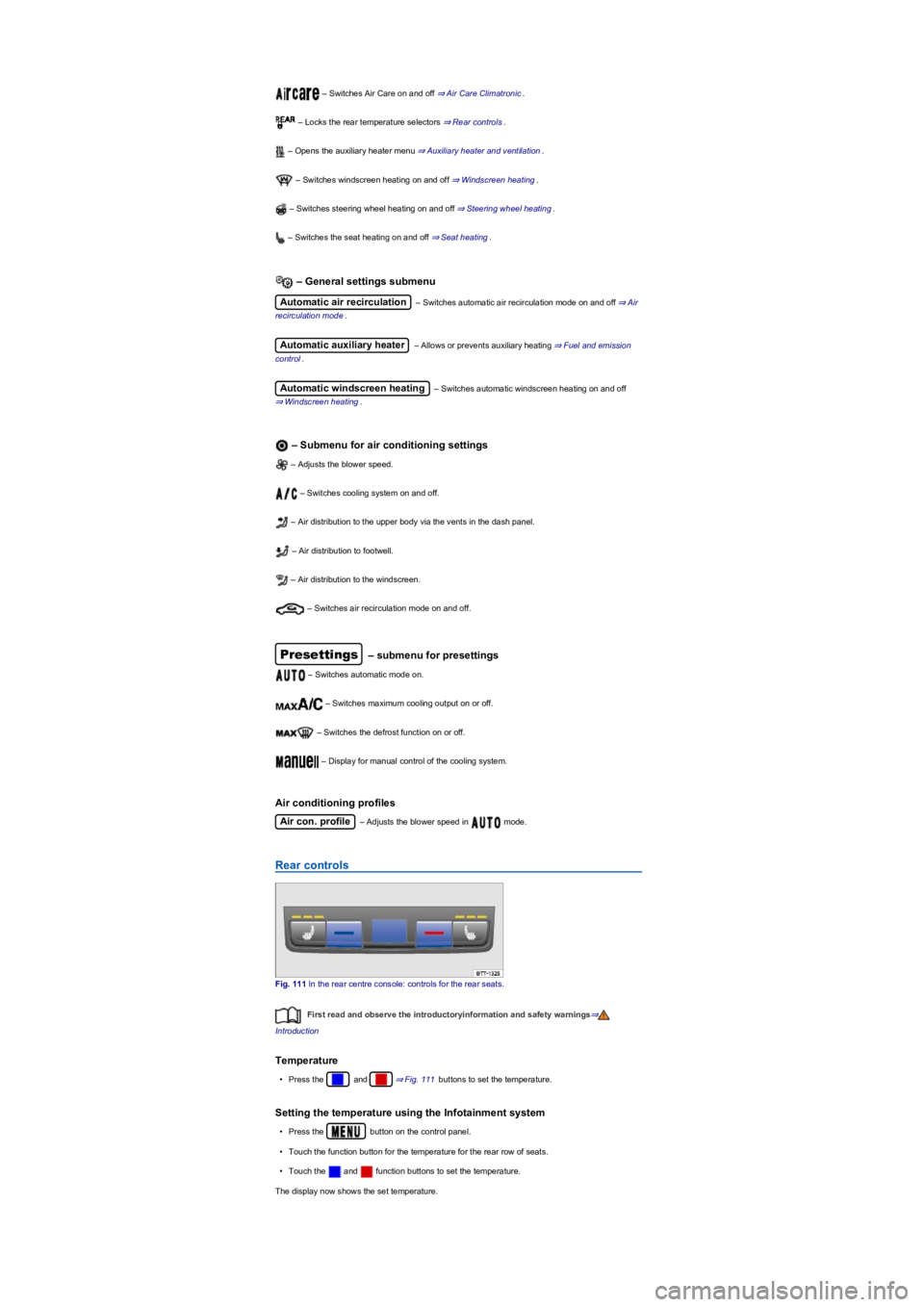
– Switches Air Care on and off ⇒ Air Care Climatronic.
– Locks the rear temperature selectors ⇒ Rear controls.
– Opens the auxiliary heater menu ⇒ Auxiliary heater and ventilation.
– Switches windscreen heating on and off ⇒ Windscreen heating.
– Switches steering wheel heating on and off ⇒ Steering wheel heating.
– Switches the seat heating on and off ⇒ Seat heating.
– General settings submenu
Automatic air recirculation – Switches automatic air recirculation mode on and off ⇒ Air
recirculation mode.
Automatic auxiliary heater – Allows or prevents auxiliary heating ⇒ Fuel and emission
control.
Automatic windscreen heating – Switches automatic windscreen heating on and off
⇒ Windscreen heating.
– Submenu for air conditioning settings
– Adjusts the blower speed.
– Switches cooling system on and off.
– Air distribution to the upper body via the vents in the dash panel.
– Air distribution to footwell.
– Air distribution to the windscreen.
– Switches air recirculation mode on and off.
Presettings – submenu for presettings
– Switches automatic mode on.
– Switches maximum cooling output on or off.
– Switches the defrost function on or off.
– Display for manual control of the cooling system.
Air conditioning profiles
Air con. profile – Adjusts the blower speed in mode.
Rear controls
Fig. 111 In the rear centre console: controls for the rear seats.
First read and observe the introductoryinformation and safety warnings⇒
Introduction
Temperature
•Press the and ⇒ Fig. 111 buttons to set the temperature.
Setting the temperature using the Infotainment system
•Press the button on the control panel.
•Touch the function button for the temperature for the rear row of seats.
•Touch the and function buttons to set the temperature.
The display now shows the set temperature.
Page 120 of 341
– Seat heating
Press the buttons or to switch the seat heating on and off ⇒ Seat heating.
If the function button is activated in the Infotainment system, it is not possible to
operate the rear controls.
Air recirculation mode
First read and observe the introductoryinformation and safety warnings⇒
Introduction
In air recirculation mode, no outside air enters the vehicle interior.
Manual air recirculation mode
•Press the button on the control panel to switch manual air recirculation mode on
and off.
Automatic air recirculation mode (Climatronic)
In automatic air recirculation mode, fresh air will enter the vehicle interior. The air recirculation
mode will switch on automatically if the system detects an increase in the concentration of noxious
substances in the outside air. The air recirculation mode will switch off as soon as the level of
noxious substances has returned to normal. The system cannot detect unpleasant odours.
•Press the button on the control panel.
•Touch function button .
•Touch the Automatic air recirculation function button.
Air recirculation mode with Air Care Climatronic
The vehicle is fitted with an allergen filter. When Air Care is activated ⇒ Air Care Climatronic, the
air recirculation mode of the air conditioning system is maximised as far as is permitted by the risk
of window fogging depending on the interior humidity and outside temperature. The air recirculation
mode is automatically regulated and features continuous adjustment in order to prevent fatigue of
the vehicle occupants.
When is the air recirculation mode deactivated?
Air recirculation mode is deactivated in the following situations ⇒:
•If the button on the Climatronic control panel is pressed.
•If the air distribution regulator of the manual air conditioning system is turned to position.
•If the sensor detects that the vehicle's windows might mist up.
When reversing the vehicle or when the wash and wipe system is being used, the air
recirculation mode will switch on to prevent odours from entering the vehicle interior.
•m/k/a999MK Climatronic
If the outside temperature is very high, brief activation of manual air recirculation mode helps
to cool the vehicle interior more quickly.
Seat heating
First read and observe the introductoryinformation and safety warnings⇒
Introduction
Stale air can quickly make the driver tired and affect their concentration, which in turn can
cause collisions, accidents and serious injuries.
•Never use the air recirculation mode for an extended period as no fresh air will enter
the vehicle interior.
•If the cooling system is switched off, the windows can mist up very quickly in air
recirculation mode and reduce visibility considerably.
•Switch off the air recirculation mode when it is no longer required.
WARNING
In vehicles with an air conditioning system, do not smoke when the air recirculation mode
is switched on. The smoke can leave a residue on the evaporator and the dust and pollen
filter with pollution filter insert, producing a lasting unpleasant odour.
NOTICE
Page 121 of 341
The seat cushions and backrests can be heated electrically when the ignition is switched on.
Operating the seat heating
•Press the button or in the control panel in order to switch the seat heating to
the highest setting.
•Press the or button until the desired setting is reached.
•To switch the seat heating off, press the button or repeatedly until the LEDs go
out.
If the ignition is turned on again within around 10 minutes, the most recent driver seat temperature
setting is automatically activated.
When is it not advisable to switch on the seat heating?
Do not switch on the seat heating if one of the following conditions applies:
•The seat is not occupied.
•The seat is fitted with a protective cover.
•A child seat is installed on the seat.
•The seat cushion is damp or wet.
•The temperature in the vehicle interior or the outside temperature is above +25°C (77°F).
To save fuel, only switch on the seat heating for as long as necessary.
Steering wheel heating
First read and observe the introductoryinformation and safety warnings⇒
Introduction
The steering wheel heating works when the engine is running.
Switching steering wheel heating on and off automatically via the
Infotainment system
•m/k/a995MKManual air conditioning system: press the button on the
Infotainment system and touch the Vehicle and function buttons.
•m/k/a995MKClimatronic: press the button on the control panel.
•Touch the function button to switch the steering wheel heating on and off.
Switching the steering wheel heating on or off together with the seat
heating (only in vehicles with Climatronic)
•Press the button on the control panel.
Anyone experiencing reduced sensitivity to pain or temperature due to medication,
paralysis or chronic illness (e.g. diabetes) could sustain burns on the back, buttocks and
legs when using the seat heating. These burns may take a long time to heal or may never
heal fully. Please consult a doctor if you have questions about your own state of health.
•Anyone experiencing reduced sensitivity to pain or temperature should never use the
seat heating.
WARNING
Wet upholstery can cause a fault in the seat heating and increase the risk of burns.
•Ensure that the seat cushion is dry before the seat heating is used.
•Do not sit on the seat when wearing damp or wet clothing.
•Do not set any damp or wet objects or items of clothing on the seat.
•Do not spill any liquids on the seat.
WARNING
•To avoid damaging the heating elements, do not kneel on the seat or apply sharp
pressure at a single point on the seat cushion and backrest.
•Liquids, sharp objects and insulating materials, such as a protective cover or child
seat, may damage the seat heating.
•If the system starts to produce an odour, switch off the seat heating immediately and
have it checked by a qualified workshop.
NOTICE
Page 122 of 341
•Touch the function button.
•Touch the Steering wheel & seat heating linked function button to pair the steering
wheel heating with the seat heating.
•Press the button to switch the steering wheel heating on or off with the seat heating.
Selecting a temperature setting (only in vehicles with Climatronic)
•Press the button on the control panel.
•Touch the function button.
•Touch the Setting function button to select a temperature setting.
Three temperature settings are available. The selected setting is saved when the ignition is
switched off. The temperature setting for the steering wheel heating is unrelated to the temperature
setting for the seat heating.
Switch-off conditions
The steering wheel heating will be switched off automatically if one of the following conditions is
met:
•Seat heating for the driver's seat switched off (if
Steering wheel & seat heating linked is active).
•Power consumption too high.
•Fault in steering wheel heating system.
Windscreen heating
First read and observe the introductoryinformation and safety warnings⇒
Introduction
The windscreen heating works when the engine is running.
Manual windscreen heating
•m/k/a995MKManual air conditioning system: press the button on the
Infotainment system and touch the Vehicle and Settings function buttons.
•m/k/a995MKClimatronic: press the button on the control panel.
•Touch the function button to switch windscreen heating on or off.
The windscreen heating switches itself off depending on the outside temperature or after 8 minutes
at the latest.
Automatic windscreen heating
The windscreen heating switches on automatically if there is a risk of condensation building up on
the windscreen or windows.
•Press the button on the control panel.
•Touch the function button in the Infotainment system.
•Touch the Automatic windscreen heating function button to switch automatic
windscreen heating on or off.
The automatic windscreen heating is also active when the air conditioning system is switched off.
Windscreen heating using the defrost function
The windscreen heating will be switched on when the defrost function is switched on and a sensor
detects that the windscreen may mist up.
Switch-off conditions
The windscreen heating switches itself off if one of the following conditions is met:
•Power consumption too high.
•Fault in air conditioning system.
•Specified time has elapsed.
Tips and usage notes
First read and observe the introductoryinformation and safety warnings⇒
Introduction
The following tips and operating information will help you use the system correctly.
Page 125 of 341
The auxiliary heater runs on for a short time after it is switched off manually or automatically so that
the remaining fuel in the system can be burnt off.
When the vehicle is at a standstill, the auxiliary heater can be activated up to three times in
succession for the maximum operating duration.
Operating noises can be heard if the auxiliary heater is switched on.
The 12-volt battery will discharge if the auxiliary heater or ventilation is run several times
over an extended period. Drive the vehicle for an appropriate distance in order to recharge the 12-
volt vehicle battery.
When parked on an incline, the fuel gauge indication (just above the reserve quantity) may
be inaccurate and lead to functional restrictions of the auxiliary heater.
The auxiliary heater may switch on automatically as a supplementary heating measure when
the engine is started at temperatures below +5°C (+41°F). The supplementary heating function is
switched off again automatically after a short time.
Programming the auxiliary heater and auxiliary ventilation
First read and observe the introductoryinformation and safety warnings⇒
Introduction
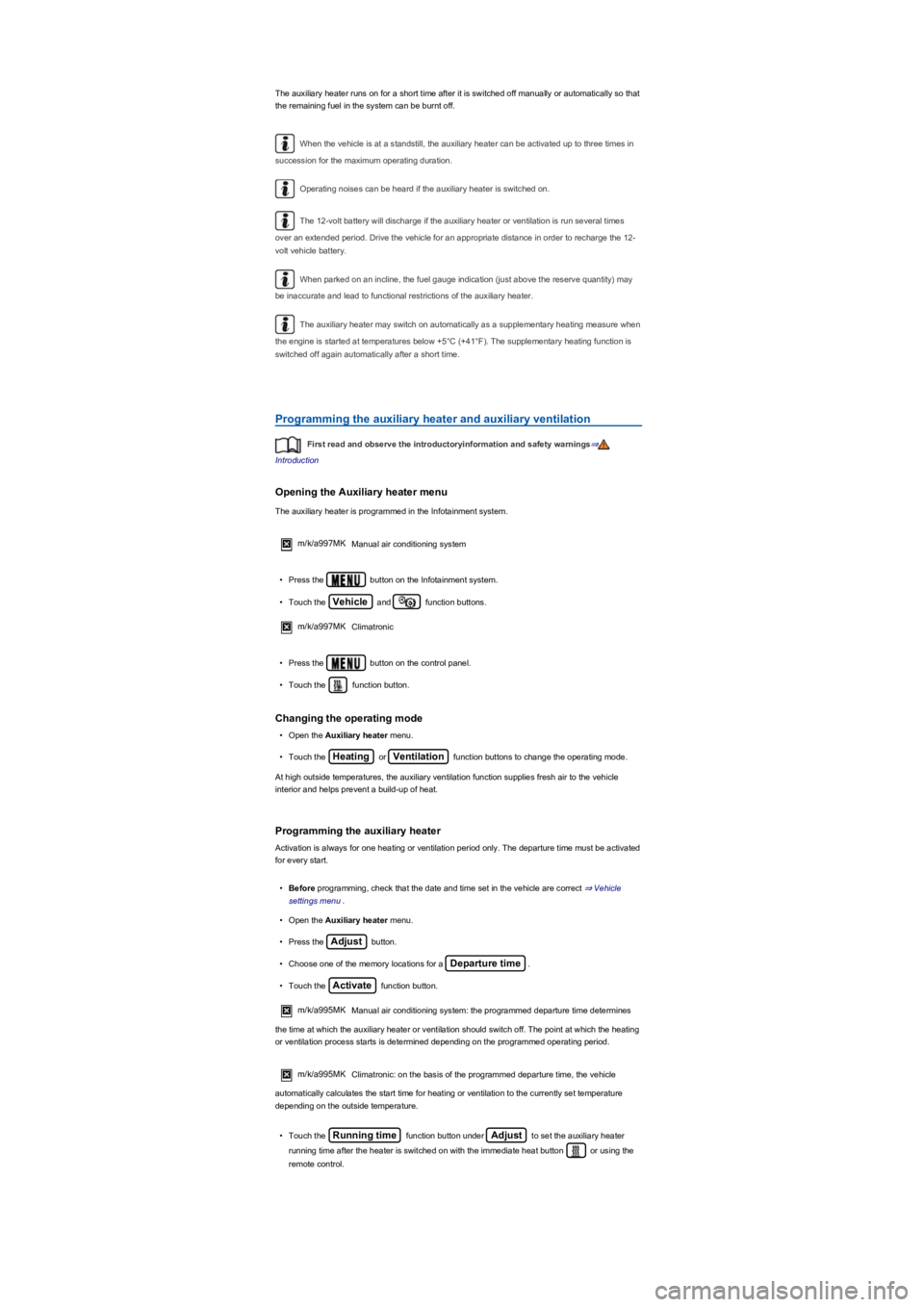
Opening the Auxiliary heater menu
The auxiliary heater is programmed in the Infotainment system.
m/k/a997MK Manual air conditioning system
•Press the button on the Infotainment system.
•Touch the Vehicle and function buttons.
m/k/a997MK Climatronic
•Press the button on the control panel.
•Touch the function button.
Changing the operating mode
•Open the Auxiliary heater menu.
•Touch the Heating or Ventilation function buttons to change the operating mode.
At high outside temperatures, the auxiliary ventilation function supplies fresh air to the vehicle
interior and helps prevent a build-up of heat.
Programming the auxiliary heater
Activation is always for one heating or ventilation period only. The departure time must be activated
for every start.
•Before programming, check that the date and time set in the vehicle are correct ⇒ Vehicle
settings menu.
•Open the Auxiliary heater menu.
•Press the Adjust button.
•Choose one of the memory locations for a Departure time.
•Touch the Activate function button.
m/k/a995MKManual air conditioning system: the programmed departure time determines
the time at which the auxiliary heater or ventilation should switch off. The point at which the heating
or ventilation process starts is determined depending on the programmed operating period.
m/k/a995MK Climatronic: on the basis of the programmed departure time, the vehicle
automatically calculates the start time for heating or ventilation to the currently set temperature
depending on the outside temperature.
•Touch the Running time function button under Adjust to set the auxiliary heater
running time after the heater is switched on with the immediate heat button or using the
remote control.
Page 170 of 341
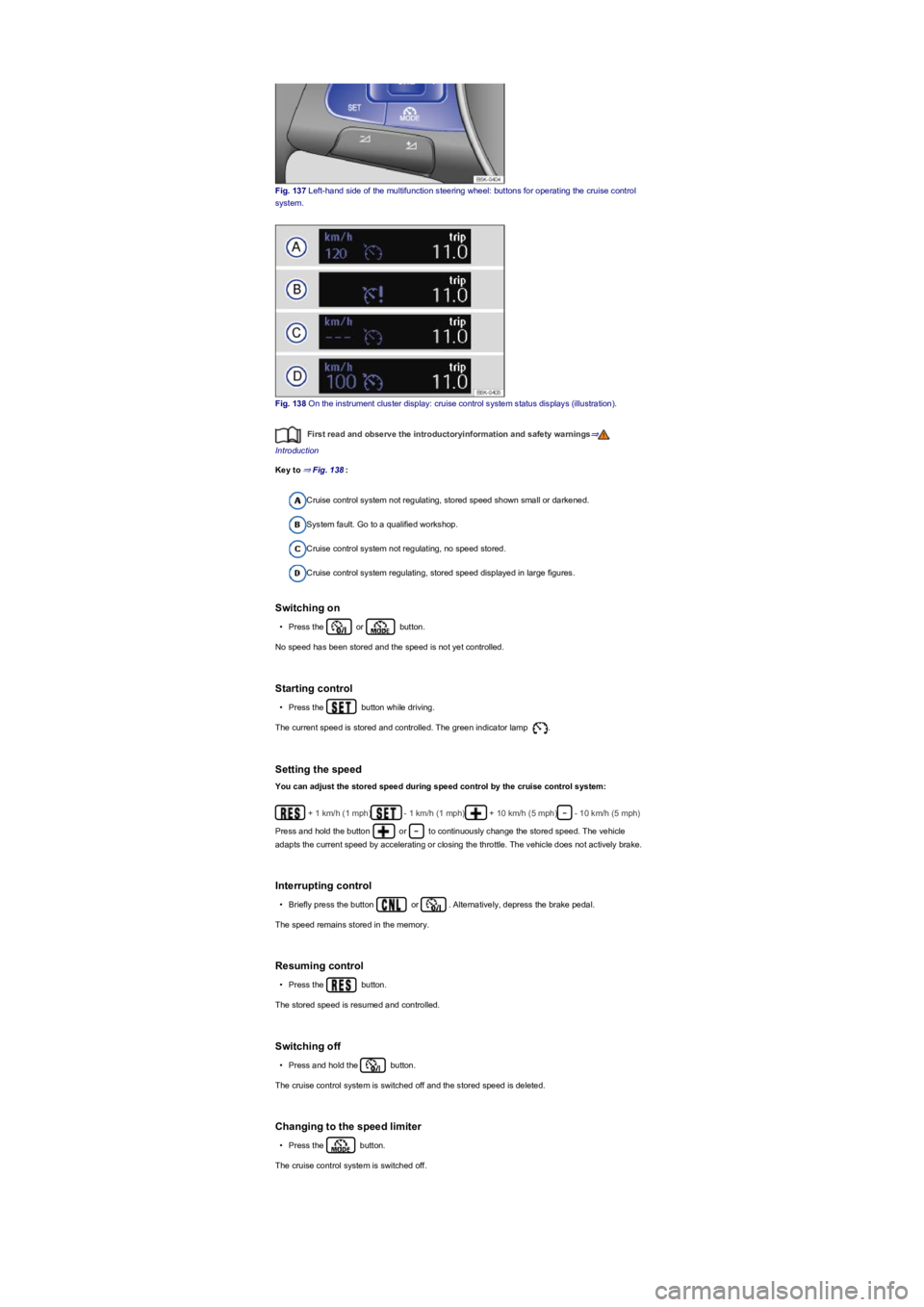
Fig. 137 Left-hand side of the multifunction steering wheel: buttons for operating the cruise control
system.
Fig. 138 On the instrument cluster display: cruise control system status displays (illustration).
First read and observe the introductoryinformation and safety warnings⇒
Introduction
Key to ⇒ Fig. 138:
Cruise control system not regulating, stored speed shown small or darkened.
System fault. Go to a qualified workshop.
Cruise control system not regulating, no speed stored.
Cruise control system regulating, stored speed displayed in large figures.
Switching on
•Press the or button.
No speed has been stored and the speed is not yet controlled.
Starting control
•Press the button while driving.
The current speed is stored and controlled. The green indicator lamp .
Setting the speed
You can adjust the stored speed during speed control by the cruise control system:
+ 1 km/h (1 mph)- 1 km/h (1 mph)+ 10 km/h (5 mph)- 10 km/h (5 mph)
Press and hold the button or to continuously change the stored speed. The vehicle
adapts the current speed by accelerating or closing the throttle. The vehicle does not actively brake.
Interrupting control
•Briefly press the button or . Alternatively, depress the brake pedal.
The speed remains stored in the memory.
Resuming control
•Press the button.
The stored speed is resumed and controlled.
Switching off
•Press and hold the button.
The cruise control system is switched off and the stored speed is deleted.
Changing to the speed limiter
•Press the button.
The cruise control system is switched off.
Page 172 of 341
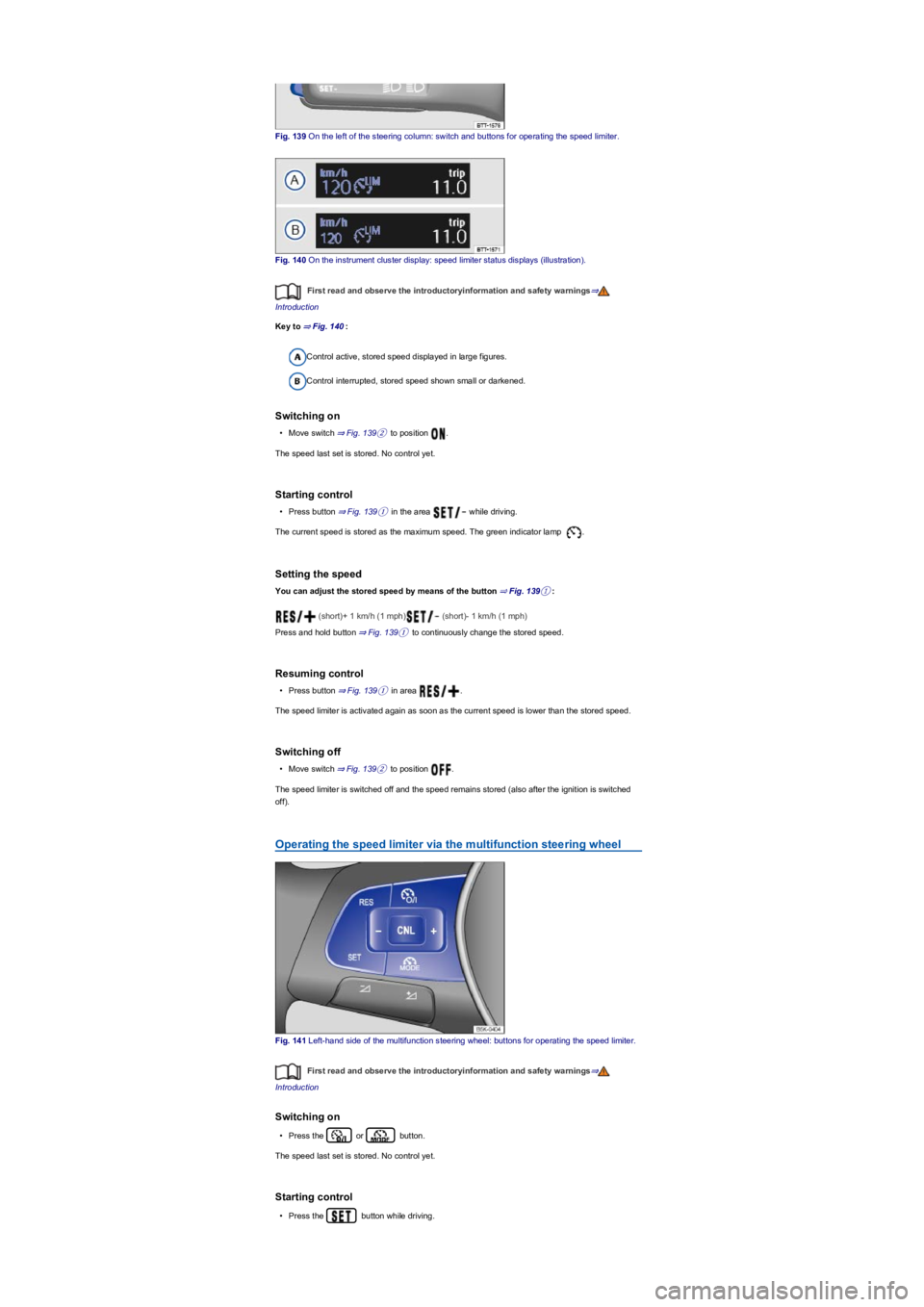
Fig. 139 On the left of the steering column: switch and buttons for operating the speed limiter.
Fig. 140 On the instrument cluster display: speed limiter status displays (illustration).
First read and observe the introductoryinformation and safety warnings⇒
Introduction
Key to ⇒ Fig. 140:
Control active, stored speed displayed in large figures.
Control interrupted, stored speed shown small or darkened.
Switching on
•Move switch ⇒ Fig. 139② to position .
The speed last set is stored. No control yet.
Starting control
•Press button ⇒ Fig. 139① in the area while driving.
The current speed is stored as the maximum speed. The green indicator lamp .
Setting the speed
You can adjust the stored speed by means of the button ⇒ Fig. 139①:
(short)+ 1 km/h (1 mph) (short)- 1 km/h (1 mph)
Press and hold button ⇒ Fig. 139① to continuously change the stored speed.
Resuming control
•Press button ⇒ Fig. 139① in area .
The speed limiter is activated again as soon as the current speed is lower than the stored speed.
Switching off
•Move switch ⇒ Fig. 139② to position .
The speed limiter is switched off and the speed remains stored (also after the ignition is switched
off).
Operating the speed limiter via the multifunction steering wheel
Fig. 141 Left-hand side of the multifunction steering wheel: buttons for operating the speed limiter.
First read and observe the introductoryinformation and safety warnings⇒
Introduction
Switching on
•Press the or button.
The speed last set is stored. No control yet.
Starting control
•Press the button while driving.
Page 176 of 341
If a stationary vehicle is hidden behind a vehicle that has been detected by the adaptive cruise
control and this vehicle turns off the road or changes lane, the ACC will not react to the stationary
vehicle ⇒ Fig. 144.
Bends
The radar sensor always measures straight ahead. For this reason, vehicles may be incorrectly
detected or vehicles driving ahead not detected in tight bends ⇒ Fig. 143.
Vehicles outside the sensor range
•Vehicles that are driving outside the sensor range in close proximity to your vehicle, e.g.
motorbikes ⇒ Fig. 143.
•Vehicles that change into your lane directly in front of your vehicle ⇒ Fig. 144.
•Vehicles with bodies or attachments that project beyond the vehicle.
Switching ACC on and off
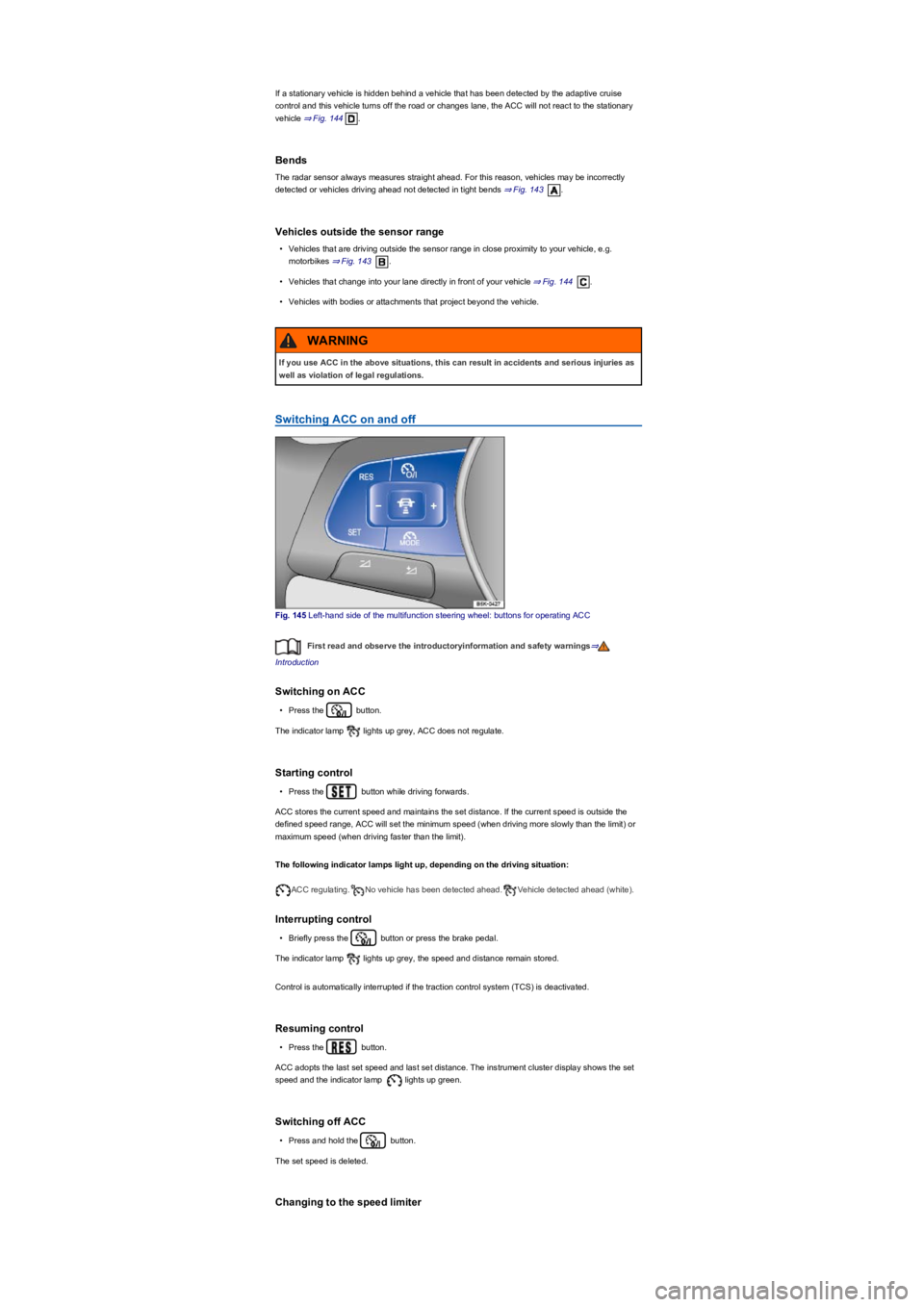
Fig. 145 Left-hand side of the multifunction steering wheel: buttons for operating ACC
First read and observe the introductoryinformation and safety warnings⇒
Introduction
Switching on ACC
•Press the button.
The indicator lamp lights up grey, ACC does not regulate.
Starting control
•Press the button while driving forwards.
ACC stores the current speed and maintains the set distance. If the current speed is outside the
defined speed range, ACC will set the minimum speed (when driving more slowly than the limit) or
maximum speed (when driving faster than the limit).
The following indicator lamps light up, depending on the driving situation:
ACC regulating.No vehicle has been detected ahead.Vehicle detected ahead (white).
Interrupting control
•Briefly press the button or press the brake pedal.
The indicator lamp lights up grey, the speed and distance remain stored.
Control is automatically interrupted if the traction control system (TCS) is deactivated.
Resuming control
•Press the button.
ACC adopts the last set speed and last set distance. The instrument cluster display shows the set
speed and the indicator lamp lights up green.
Switching off ACC
•Press and hold the button.
The set speed is deleted.
Changing to the speed limiter
If you use ACC in the above situations, this can result in accidents and serious injuries as
well as violation of legal regulations.
WARNING
Page 177 of 341
•Press the button.
ACC is switched off.
Setting ACC
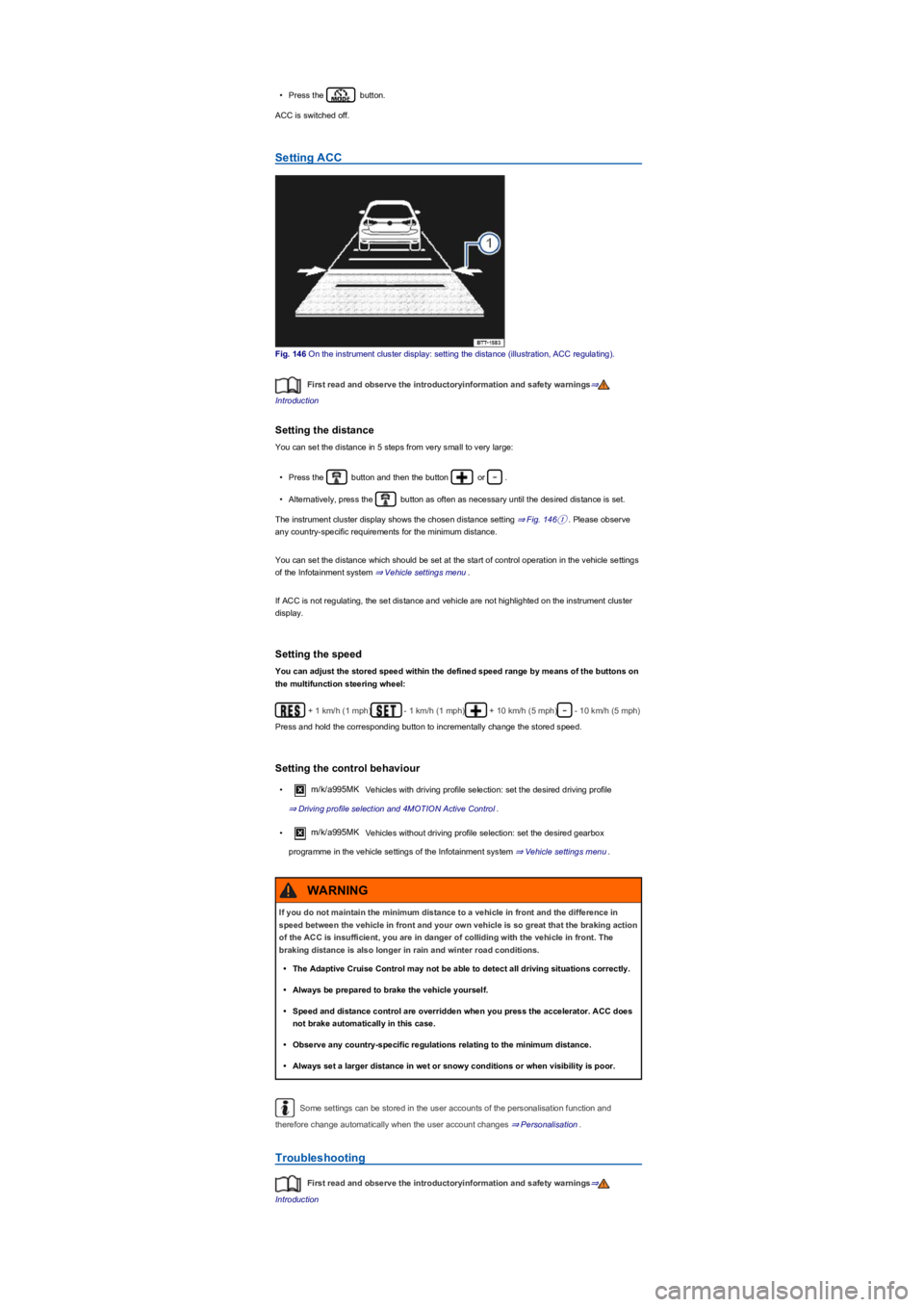
Fig. 146 On the instrument cluster display: setting the distance (illustration, ACC regulating).
First read and observe the introductoryinformation and safety warnings⇒
Introduction
Setting the distance
You can set the distance in 5 steps from very small to very large:
•Press the button and then the button or .
•Alternatively, press the button as often as necessary until the desired distance is set.
The instrument cluster display shows the chosen distance setting ⇒ Fig. 146①. Please observe
any country-specific requirements for the minimum distance.
You can set the distance which should be set at the start of control operation in the vehicle settings
of the Infotainment system ⇒ Vehicle settings menu.
If ACC is not regulating, the set distance and vehicle are not highlighted on the instrument cluster
display.
Setting the speed
You can adjust the stored speed within the defined speed range by means of the buttons on
the multifunction steering wheel:
+ 1 km/h (1 mph)- 1 km/h (1 mph)+ 10 km/h (5 mph)- 10 km/h (5 mph)
Press and hold the corresponding button to incrementally change the stored speed.
Setting the control behaviour
•m/k/a995MK Vehicles with driving profile selection: set the desired driving profile
⇒ Driving profile selection and 4MOTION Active Control.
•m/k/a995MK Vehicles without driving profile selection: set the desired gearbox
programme in the vehicle settings of the Infotainment system ⇒ Vehicle settings menu.
Some settings can be stored in the user accounts of the personalisation function and
therefore change automatically when the user account changes ⇒ Personalisation.
Troubleshooting
First read and observe the introductoryinformation and safety warnings⇒
Introduction
If you do not maintain the minimum distance to a vehicle in front and the difference in
speed between the vehicle in front and your own vehicle is so great that the braking action
of the ACC is insufficient, you are in danger of colliding with the vehicle in front. The
braking distance is also longer in rain and winter road conditions.
•The Adaptive Cruise Control may not be able to detect all driving situations correctly.
•Always be prepared to brake the vehicle yourself.
•Speed and distance control are overridden when you press the accelerator. ACC does
not brake automatically in this case.
•Observe any country-specific regulations relating to the minimum distance.
•Always set a larger distance in wet or snowy conditions or when visibility is poor.
WARNING
Page 196 of 341
Settings
First read and observe the introductoryinformation and safety warnings⇒
Introduction
Depending on the vehicle equipment, settings for Park Distance Control can be made in the
Infotainment system ⇒ Operation and display in the Infotainment system.
You can save some settings in the user accounts of the personalisation function. The settings
change automatically when the user account is changed ⇒ Personalisation.
Troubleshooting
First read and observe the introductoryinformation and safety warnings⇒
Introduction
No sensor visibility, error message, system switches itself off
The sensor area is switched off permanently if a sensor fails.
Any malfunctions in the Park Distance Control system will be indicated by a text message and a
warning tone when first switched on, and by the indicator lamp flashing in the or
buttons. If the sensors are dirty or covered, the affected sensor cluster will be displayed on the Park
Distance Control screen. A cleaning message (depending on equipment) will also be displayed.
•Clean the sensors or remove stickers or accessories from the sensors and cameras ⇒ Caring
for and cleaning the vehicle exterior.
•Check whether any damage is visible.
The system is not responding as expected
•The sensors are dirty ⇒ Caring for and cleaning the vehicle exterior. The sensor visibility may
be impaired by dirt and snow or also residue from cleaning agents or coatings.
•The system requirements must be met ⇒ System limits.
•The sensors are covered by water.
•The factory-fitted towing bracket is electrically connected with the trailer ⇒ Trailer towing.
•The vehicle is damaged in the area of the sensors, e.g. caused by parking collisions.
•The detection ranges of the sensors are blocked by add-on parts, e.g. bicycle carriers.
•Changes have been made to the paintwork in the area of the sensors or structural modifications
have been made, e.g. on the vehicle front end or the running gear.
•The ultrasound signal is subject to interference from external noise sources, e.g. rough tarmac
surface or cobblestones.
Response to all circumstances
•Switch off the system temporarily.
•Check whether any of the causes described below apply.
•You can switch the system back on again once you have rectified the cause of the problem.
•If the system still fails to respond as expected, have the system checked by a qualified
workshop.
Rear view camera system (Rear View)
Introduction
This chapter contains information on the followingsubjects:
⇒ Switching on and off
⇒ Display representation
⇒ Prerequisites
⇒ Parking perpendicular to the road (mode 1)
⇒ Parking parallel to the road (mode 2)
⇒ Troubleshooting
The rear view camera system in the
rear of the vehicle makes it easier for
the driver to see behind the vehicle and
provides support for parking
manoeuvres.
The rear view camera system shows the area behind the vehicle on the Infotainment system
screen. Depending on the operating mode, orientation lines support the view to the rear.
Modes for the rear view camera system
Depending on the vehicle equipment, the following operating modes are available: