buttons VOLKSWAGEN TIGUAN 2017 Owner´s Manual
[x] Cancel search | Manufacturer: VOLKSWAGEN, Model Year: 2017, Model line: TIGUAN, Model: VOLKSWAGEN TIGUAN 2017Pages: 341, PDF Size: 9.14 MB
Page 25 of 341
taken into account. The service reminder is displayed 30 days before the service is due. The
distance is rounded to the nearest 100 km; the remaining time is rounded to full days.
Service alert
If a service or inspection is due soon, a service alert will appear when the ignition is switched on.
The number of kilometres or amount of time shown correspond to the maximum number of
kilometres or maximum time that can still be driven before the next service.
Service event
For a scheduled service or a scheduled inspection, a signal tone will be given when the ignition
is switched on and the spanner symbol will be displayed for several seconds on the
instrument cluster display. One of the following displays will also appear ⇒ Fig. 22:
Inspection now!
Oil service now!
Oil service and inspection now!
Viewing service appointments
You can access the current service schedule when the ignition is switched on, the engine is not
running, and the vehicle is stationary:
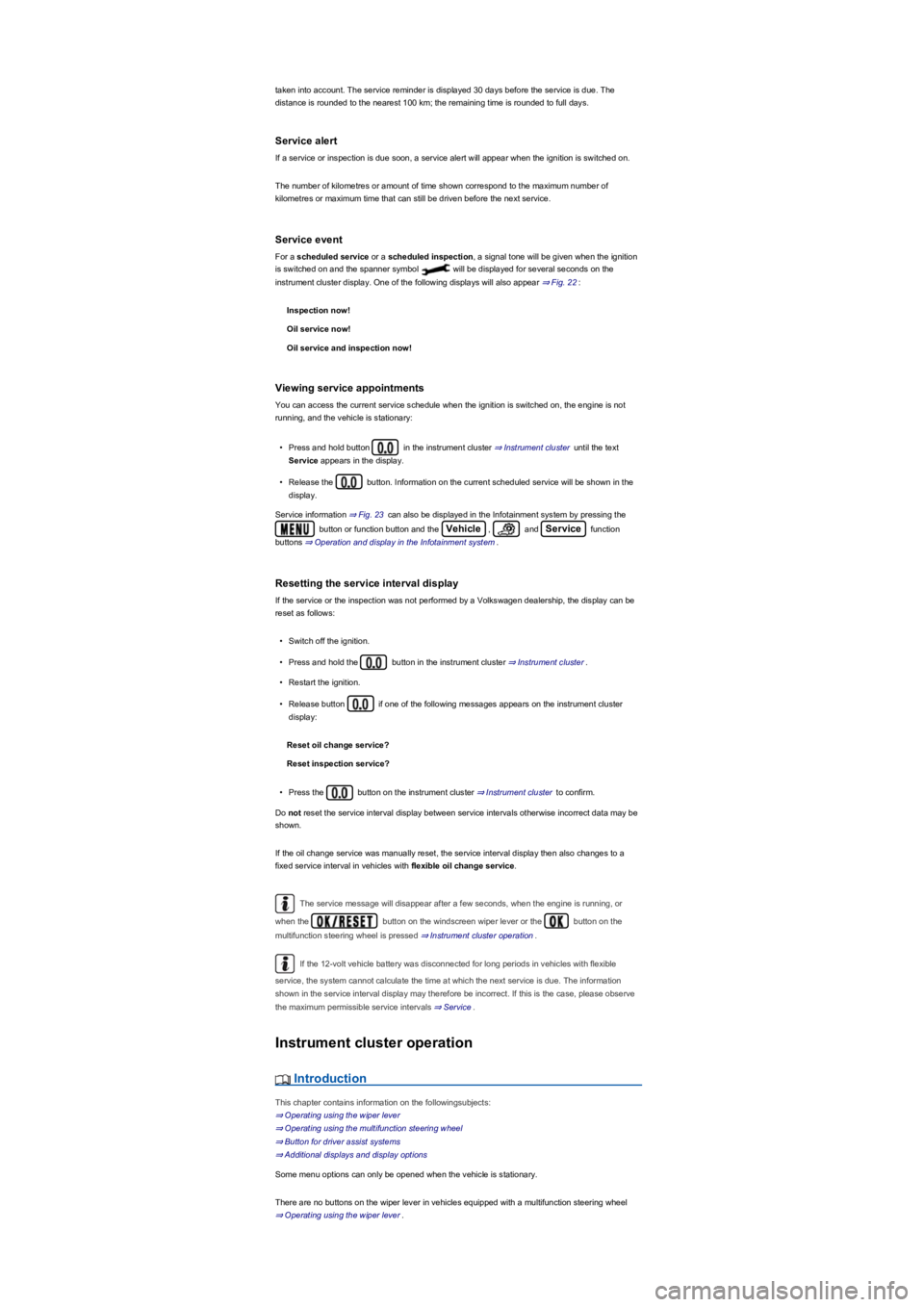
•Press and hold button in the instrument cluster ⇒ Instrument cluster until the text
Service appears in the display.
•Release the button. Information on the current scheduled service will be shown in the
display.
Service information ⇒ Fig. 23 can also be displayed in the Infotainment system by pressing the
button or function button and the Vehicle, and Service function
buttons ⇒ Operation and display in the Infotainment system.
Resetting the service interval display
If the service or the inspection was not performed by a Volkswagen dealership, the display can be
reset as follows:
•Switch off the ignition.
•Press and hold the button in the instrument cluster ⇒ Instrument cluster.
•Restart the ignition.
•Release button if one of the following messages appears on the instrument cluster
display:
Reset oil change service?
Reset inspection service?
•Press the button on the instrument cluster ⇒ Instrument cluster to confirm.
Do not reset the service interval display between service intervals otherwise incorrect data may be
shown.
If the oil change service was manually reset, the service interval display then also changes to a
fixed service interval in vehicles with flexible oil change service.
The service message will disappear after a few seconds, when the engine is running, or
when the button on the windscreen wiper lever or the button on the
multifunction steering wheel is pressed ⇒ Instrument cluster operation.
If the 12-volt vehicle battery was disconnected for long periods in vehicles with flexible
service, the system cannot calculate the time at which the next service is due. The information
shown in the service interval display may therefore be incorrect. If this is the case, please observe
the maximum permissible service intervals ⇒ Service.
Instrument cluster operation
Introduction
This chapter contains information on the followingsubjects:
⇒ Operating using the wiper lever
⇒ Operating using the multifunction steering wheel
⇒ Button for driver assist systems
⇒ Additional displays and display options
Some menu options can only be opened when the vehicle is stationary.
There are no buttons on the wiper lever in vehicles equipped with a multifunction steering wheel
⇒ Operating using the wiper lever.
Page 26 of 341
Check the system settings after charging or replacing the 12-volt vehicle battery. System
settings may be adjusted or deleted if the power supply is interrupted.
Operating using the wiper lever
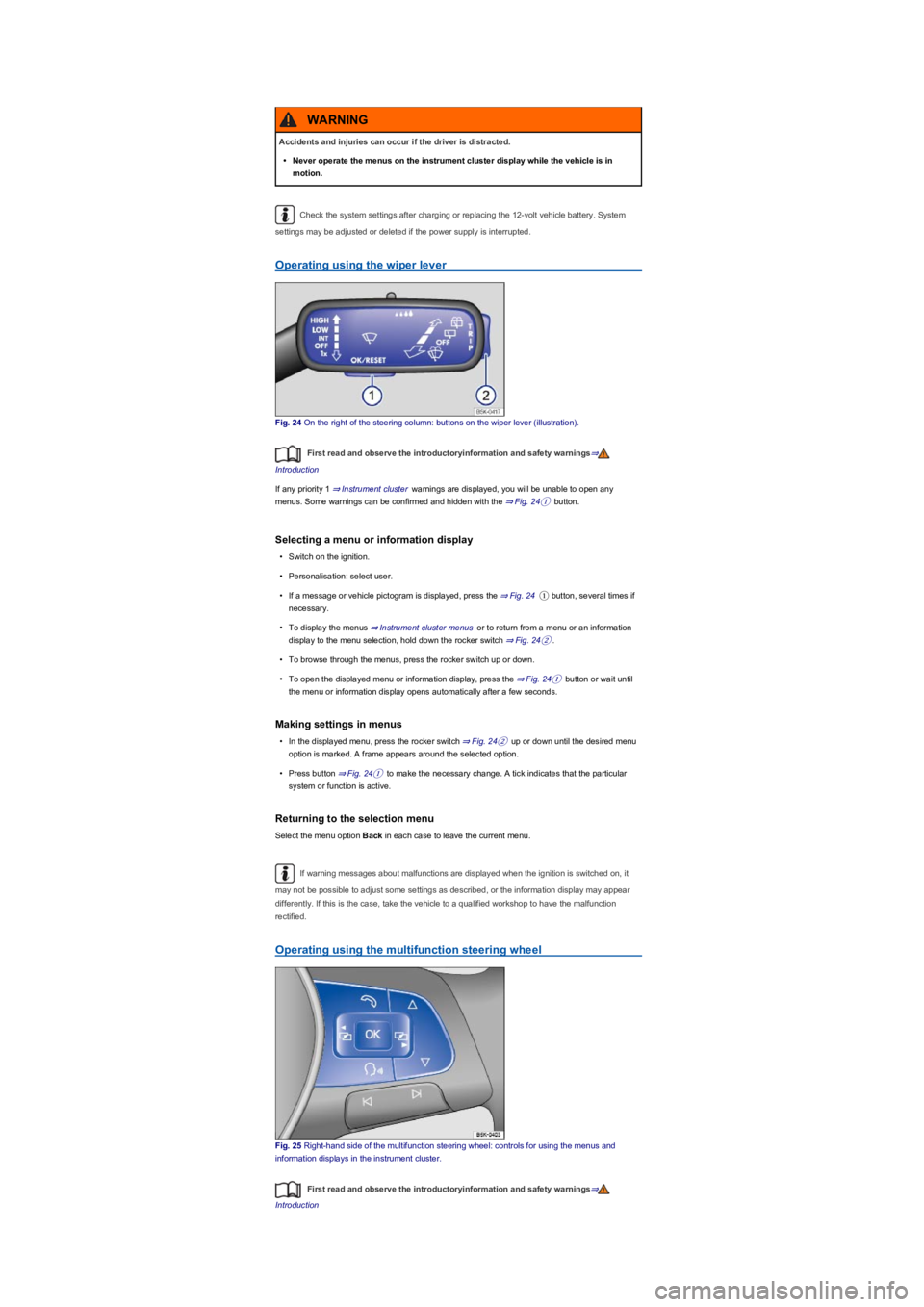
Fig. 24 On the right of the steering column: buttons on the wiper lever (illustration).
First read and observe the introductoryinformation and safety warnings⇒
Introduction
If any priority 1 ⇒ Instrument cluster warnings are displayed, you will be unable to open any
menus. Some warnings can be confirmed and hidden with the ⇒ Fig. 24① button.
Selecting a menu or information display
•Switch on the ignition.
•Personalisation: select user.
•If a message or vehicle pictogram is displayed, press the ⇒ Fig. 24① button, several times if
necessary.
•To display the menus ⇒ Instrument cluster menus or to return from a menu or an information
display to the menu selection, hold down the rocker switch ⇒ Fig. 24②.
•To browse through the menus, press the rocker switch up or down.
•To open the displayed menu or information display, press the ⇒ Fig. 24① button or wait until
the menu or information display opens automatically after a few seconds.
Making settings in menus
•In the displayed menu, press the rocker switch ⇒ Fig. 24② up or down until the desired menu
option is marked. A frame appears around the selected option.
•Press button ⇒ Fig. 24① to make the necessary change. A tick indicates that the particular
system or function is active.
Returning to the selection menu
Select the menu option Back in each case to leave the current menu.
If warning messages about malfunctions are displayed when the ignition is switched on, it
may not be possible to adjust some settings as described, or the information display may appear
differently. If this is the case, take the vehicle to a qualified workshop to have the malfunction
rectified.
Operating using the multifunction steering wheel
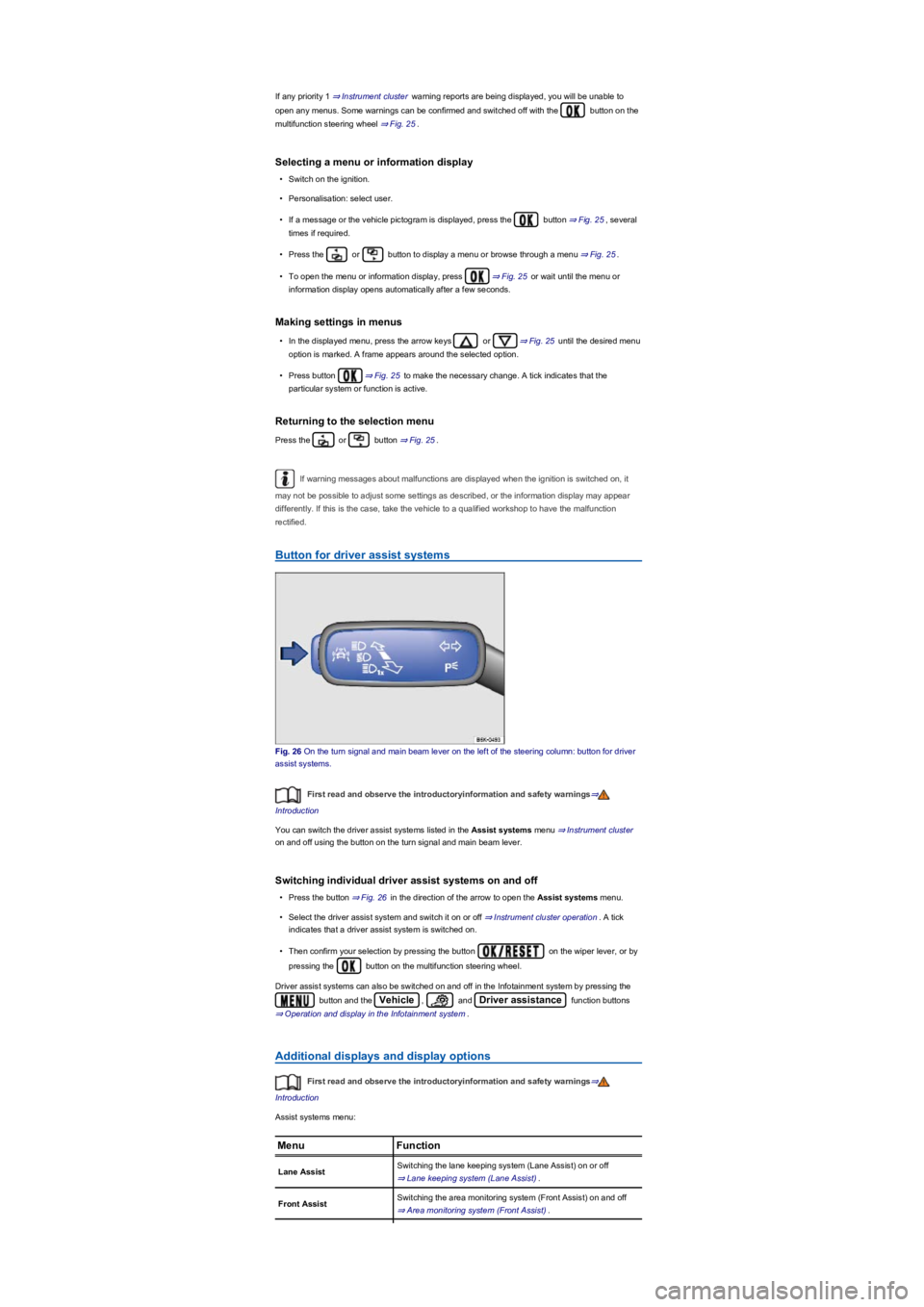
Fig. 25 Right-hand side of the multifunction steering wheel: controls for using the menus and
information displays in the instrument cluster.
First read and observe the introductoryinformation and safety warnings⇒
Introduction
Accidents and injuries can occur if the driver is distracted.
•Never operate the menus on the instrument cluster display while the vehicle is in
motion.
WARNING
Page 27 of 341
If any priority 1 ⇒ Instrument cluster warning reports are being displayed, you will be unable to
open any menus. Some warnings can be confirmed and switched off with the button on the
multifunction steering wheel ⇒ Fig. 25.
Selecting a menu or information display
•Switch on the ignition.
•Personalisation: select user.
•If a message or the vehicle pictogram is displayed, press the button ⇒ Fig. 25, several
times if required.
•Press the or button to display a menu or browse through a menu ⇒ Fig. 25.
•To open the menu or information display, press ⇒ Fig. 25 or wait until the menu or
information display opens automatically after a few seconds.
Making settings in menus
•In the displayed menu, press the arrow keys or ⇒ Fig. 25 until the desired menu
option is marked. A frame appears around the selected option.
•Press button ⇒ Fig. 25 to make the necessary change. A tick indicates that the
particular system or function is active.
Returning to the selection menu
Press the or button ⇒ Fig. 25.
If warning messages about malfunctions are displayed when the ignition is switched on, it
may not be possible to adjust some settings as described, or the information display may appear
differently. If this is the case, take the vehicle to a qualified workshop to have the malfunction
rectified.
Button for driver assist systems
Fig. 26 On the turn signal and main beam lever on the left of the steering column: button for driver
assist systems.
First read and observe the introductoryinformation and safety warnings⇒
Introduction
You can switch the driver assist systems listed in the Assist systems menu ⇒ Instrument cluster
on and off using the button on the turn signal and main beam lever.
Switching individual driver assist systems on and off
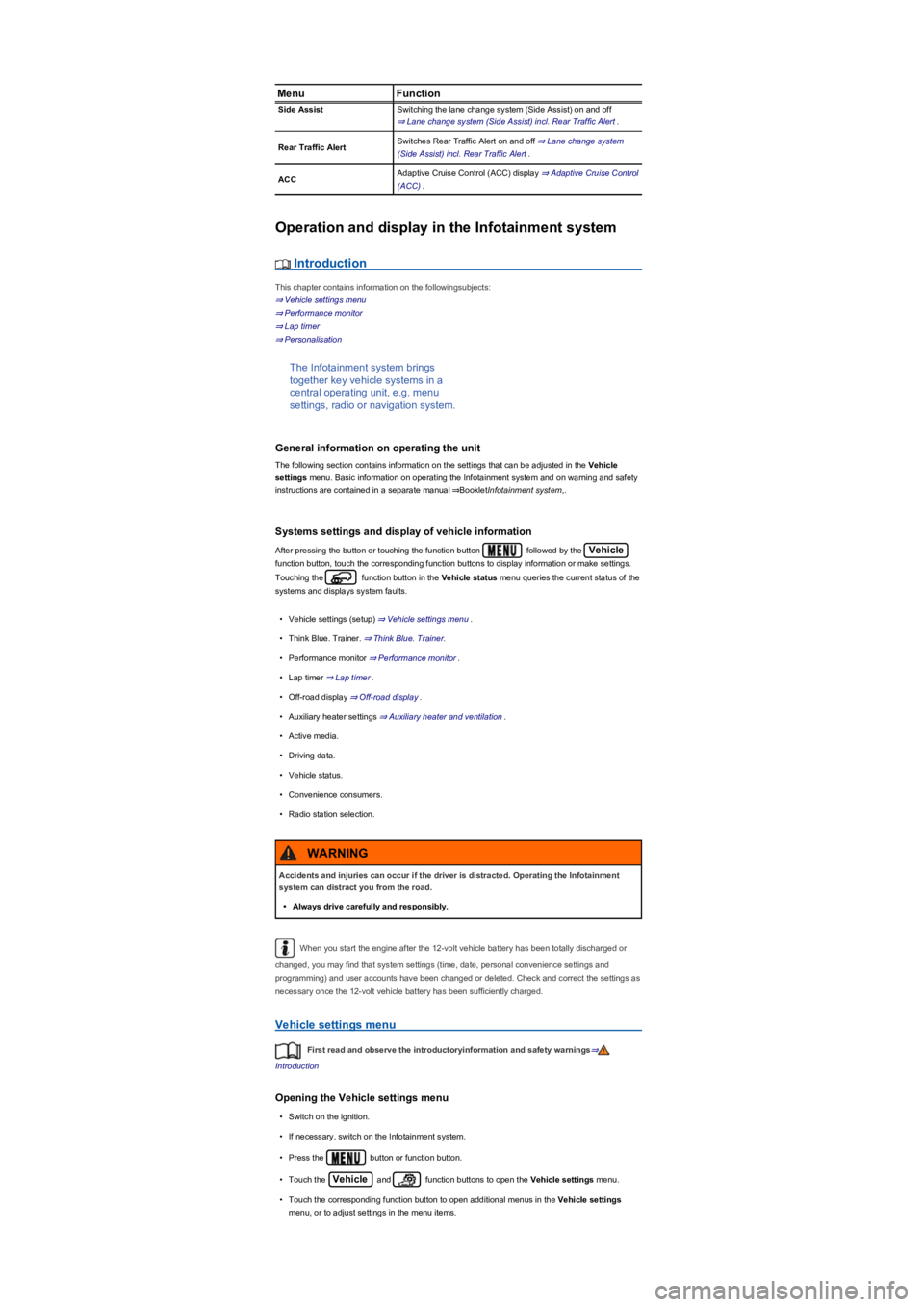
•Press the button ⇒ Fig. 26 in the direction of the arrow to open the Assist systems menu.
•Select the driver assist system and switch it on or off ⇒ Instrument cluster operation. A tick
indicates that a driver assist system is switched on.
•Then confirm your selection by pressing the button on the wiper lever, or by
pressing the button on the multifunction steering wheel.
Driver assist systems can also be switched on and off in the Infotainment system by pressing the
button and the Vehicle, and Driver assistance function buttons
⇒ Operation and display in the Infotainment system.
Additional displays and display options
First read and observe the introductoryinformation and safety warnings⇒
Introduction
Assist systems menu:
MenuFunction
Lane AssistSwitching the lane keeping system (Lane Assist) on or off
⇒ Lane keeping system (Lane Assist).
Front AssistSwitching the area monitoring system (Front Assist) on and off
⇒ Area monitoring system (Front Assist).
Page 28 of 341
MenuFunction
Side AssistSwitching the lane change system (Side Assist) on and off
⇒ Lane change system (Side Assist) incl. Rear Traffic Alert.
Rear Traffic AlertSwitches Rear Traffic Alert on and off ⇒ Lane change system
(Side Assist) incl. Rear Traffic Alert.
ACCAdaptive Cruise Control (ACC) display ⇒ Adaptive Cruise Control
(ACC).
Operation and display in the Infotainment system
Introduction
This chapter contains information on the followingsubjects:
⇒ Vehicle settings menu
⇒ Performance monitor
⇒ Lap timer
⇒ Personalisation
The Infotainment system brings
together key vehicle systems in a
central operating unit, e.g. menu
settings, radio or navigation system.
General information on operating the unit
The following section contains information on the settings that can be adjusted in the Vehicle
settings menu. Basic information on operating the Infotainment system and on warning and safety
instructions are contained in a separate manual ⇒BookletInfotainment system,.
Systems settings and display of vehicle information
After pressing the button or touching the function button followed by the Vehicle
function button, touch the corresponding function buttons to display information or make settings.
Touching the function button in the Vehicle status menu queries the current status of the
systems and displays system faults.
•Vehicle settings (setup) ⇒ Vehicle settings menu.
•Think Blue. Trainer. ⇒ Think Blue. Trainer.
•Performance monitor ⇒ Performance monitor.
•Lap timer ⇒ Lap timer.
•Off-road display ⇒ Off-road display.
•Auxiliary heater settings ⇒ Auxiliary heater and ventilation.
•Active media.
•Driving data.
•Vehicle status.
•Convenience consumers.
•Radio station selection.
When you start the engine after the 12-volt vehicle battery has been totally discharged or
changed, you may find that system settings (time, date, personal convenience settings and
programming) and user accounts have been changed or deleted. Check and correct the settings as
necessary once the 12-volt vehicle battery has been sufficiently charged.
Vehicle settings menu
First read and observe the introductoryinformation and safety warnings⇒
Introduction
Opening the Vehicle settings menu
•Switch on the ignition.
•If necessary, switch on the Infotainment system.
•Press the button or function button.
•Touch the Vehicle and function buttons to open the Vehicle settings menu.
•Touch the corresponding function button to open additional menus in the Vehicle settings
menu, or to adjust settings in the menu items.
Accidents and injuries can occur if the driver is distracted. Operating the Infotainment
system can distract you from the road.
•Always drive carefully and responsibly.
WARNING
Page 31 of 341
Performance monitor
First read and observe the introductoryinformation and safety warnings⇒
Introduction
The performance monitor is a display
for sporty driving. The digital
instruments display real-time values for
engine power, temperature and
acceleration that are determined by
sensors on the vehicle. This provides
the driver with an overview of driving
dynamics.
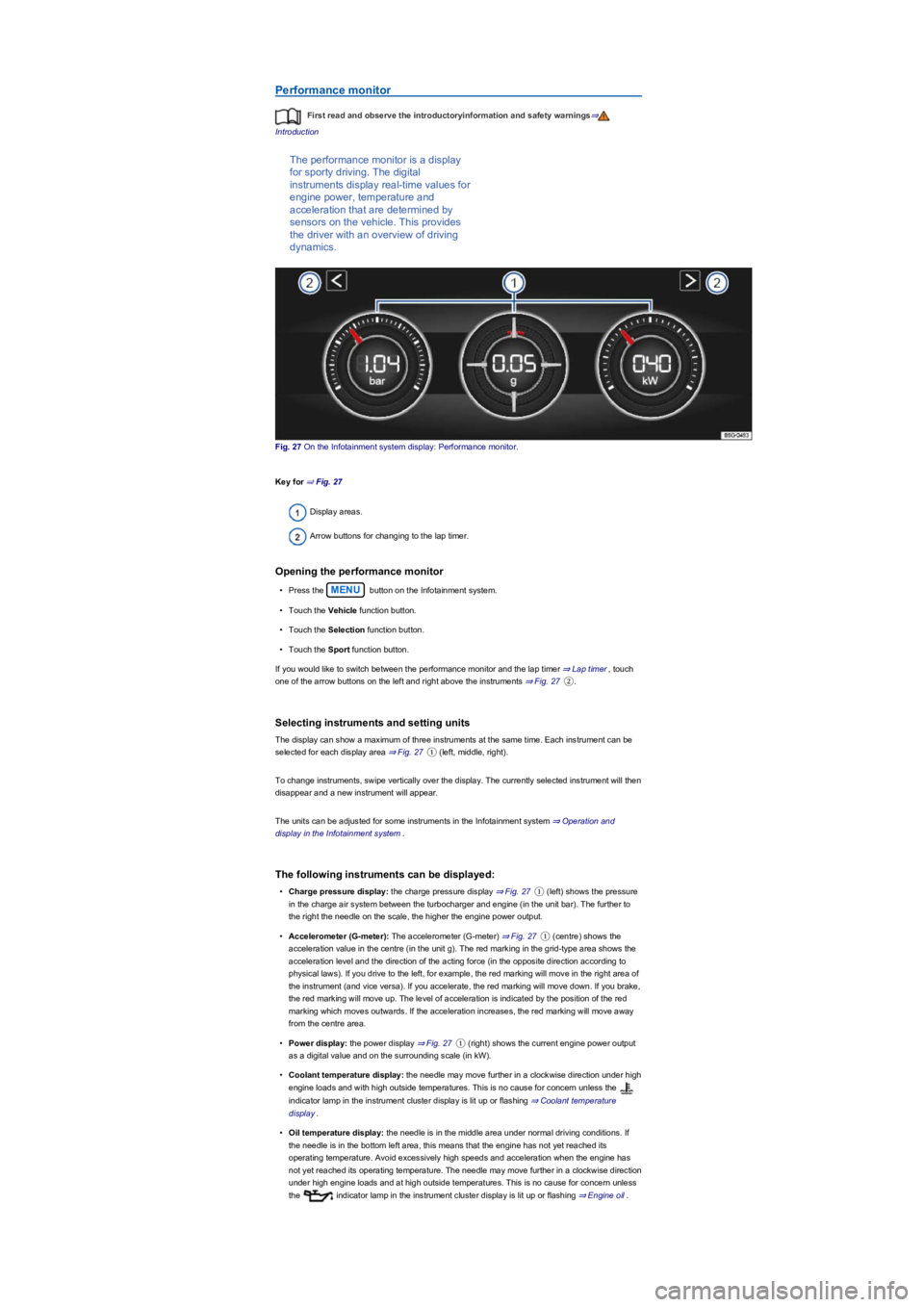
Fig. 27 On the Infotainment system display: Performance monitor.
Key for ⇒ Fig. 27
Display areas.
Arrow buttons for changing to the lap timer.
Opening the performance monitor
•Press the MENU button on the Infotainment system.
•Touch the Vehicle function button.
•Touch the Selection function button.
•Touch the Sport function button.
If you would like to switch between the performance monitor and the lap timer ⇒ Lap timer, touch
one of the arrow buttons on the left and right above the instruments ⇒ Fig. 27②.
Selecting instruments and setting units
The display can show a maximum of three instruments at the same time. Each instrument can be
selected for each display area ⇒ Fig. 27① (left, middle, right).
To change instruments, swipe vertically over the display. The currently selected instrument will then
disappear and a new instrument will appear.
The units can be adjusted for some instruments in the Infotainment system ⇒ Operation and
display in the Infotainment system.
The following instruments can be displayed:
•Charge pressure display: the charge pressure display ⇒ Fig. 27① (left) shows the pressure
in the charge air system between the turbocharger and engine (in the unit bar). The further to
the right the needle on the scale, the higher the engine power output.
•Accelerometer (G-meter): The accelerometer (G-meter) ⇒ Fig. 27① (centre) shows the
acceleration value in the centre (in the unit g). The red marking in the grid-type area shows the
acceleration level and the direction of the acting force (in the opposite direction according to
physical laws). If you drive to the left, for example, the red marking will move in the right area of
the instrument (and vice versa). If you accelerate, the red marking will move down. If you brake,
the red marking will move up. The level of acceleration is indicated by the position of the red
marking which moves outwards. If the acceleration increases, the red marking will move away
from the centre area.
•Power display: the power display ⇒ Fig. 27① (right) shows the current engine power output
as a digital value and on the surrounding scale (in kW).
•Coolant temperature display: the needle may move further in a clockwise direction under high
engine loads and with high outside temperatures. This is no cause for concern unless the
indicator lamp in the instrument cluster display is lit up or flashing ⇒ Coolant temperature
display.
•Oil temperature display: the needle is in the middle area under normal driving conditions. If
the needle is in the bottom left area, this means that the engine has not yet reached its
operating temperature. Avoid excessively high speeds and acceleration when the engine has
not yet reached its operating temperature. The needle may move further in a clockwise direction
under high engine loads and at high outside temperatures. This is no cause for concern unless
the indicator lamp in the instrument cluster display is lit up or flashing ⇒ Engine oil.
Page 33 of 341
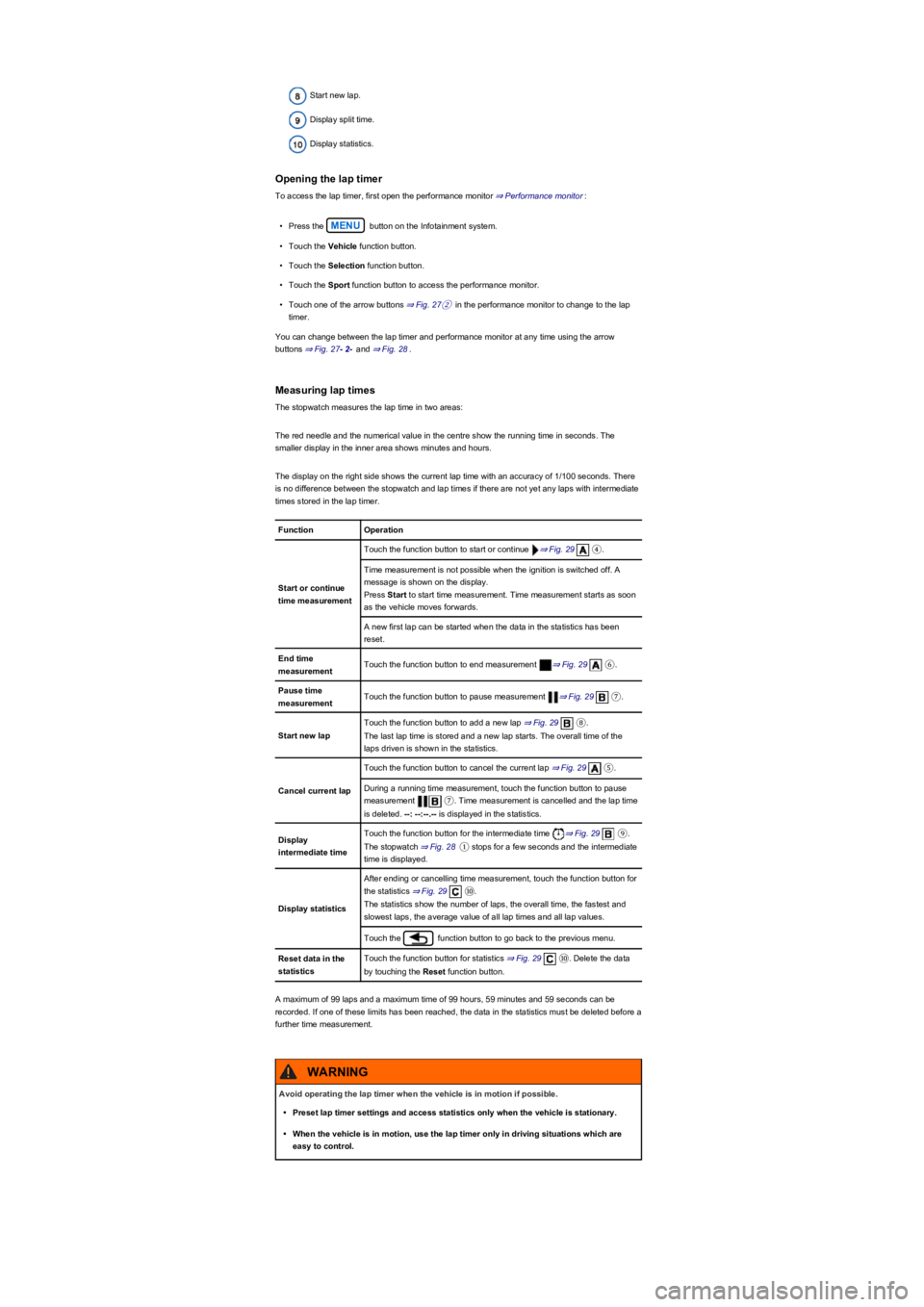
Start new lap.
Display split time.
Display statistics.
Opening the lap timer
To access the lap timer, first open the performance monitor ⇒ Performance monitor:
•Press the MENU button on the Infotainment system.
•Touch the Vehicle function button.
•Touch the Selection function button.
•Touch the Sport function button to access the performance monitor.
•Touch one of the arrow buttons ⇒ Fig. 27② in the performance monitor to change to the lap
timer.
You can change between the lap timer and performance monitor at any time using the arrow
buttons ⇒ Fig. 27- 2- and ⇒ Fig. 28.
Measuring lap times
The stopwatch measures the lap time in two areas:
The red needle and the numerical value in the centre show the running time in seconds. The
smaller display in the inner area shows minutes and hours.
The display on the right side shows the current lap time with an accuracy of 1/100 seconds. There
is no difference between the stopwatch and lap times if there are not yet any laps with intermediate
times stored in the lap timer.
FunctionOperation
Start or continue
time measurement
Touch the function button to start or continue ⇒ Fig. 29④.
Time measurement is not possible when the ignition is switched off. A
message is shown on the display.
Press Start to start time measurement. Time measurement starts as soon
as the vehicle moves forwards.
A new first lap can be started when the data in the statistics has been
reset.
End time
measurementTouch the function button to end measurement ⇒ Fig. 29⑥.
Pause time
measurementTouch the function button to pause measurement ⇒ Fig. 29⑦.
Start new lap
Touch the function button to add a new lap ⇒ Fig. 29⑧.
The last lap time is stored and a new lap starts. The overall time of the
laps driven is shown in the statistics.
Cancel current lap
Touch the function button to cancel the current lap ⇒ Fig. 29⑤.
During a running time measurement, touch the function button to pause
measurement ⑦. Time measurement is cancelled and the lap time
is deleted. --: --:--.-- is displayed in the statistics.
Display
intermediate time
Touch the function button for the intermediate time ⇒ Fig. 29⑨.
The stopwatch ⇒ Fig. 28① stops for a few seconds and the intermediate
time is displayed.
Display statistics
After ending or cancelling time measurement, touch the function button for
the statistics ⇒ Fig. 29⑩.
The statistics show the number of laps, the overall time, the fastest and
slowest laps, the average value of all lap times and all lap values.
Touch the function button to go back to the previous menu.
Reset data in the
statistics
Touch the function button for statistics ⇒ Fig. 29⑩. Delete the data
by touching the Reset function button.
A maximum of 99 laps and a maximum time of 99 hours, 59 minutes and 59 seconds can be
recorded. If one of these limits has been reached, the data in the statistics must be deleted before a
further time measurement.
Avoid operating the lap timer when the vehicle is in motion if possible.
•Preset lap timer settings and access statistics only when the vehicle is stationary.
•When the vehicle is in motion, use the lap timer only in driving situations which are
easy to control.
WARNING
Page 34 of 341
Personalisation
First read and observe the introductoryinformation and safety warnings⇒
Introduction
The personalisation function allows personalised vehicle settings, such as air conditioning system,
instrument cluster or lighting settings, to be saved in a user account. You have four user accounts
available. Users are identified using the vehicle key upon unlocking the vehicle. One user account
is assigned to each vehicle key.
Changes to the setup will be assigned to the active user account and saved upon locking the
vehicle or changing the user account.
Welcome and user account selection
When personalisation is activated, the name of the current user account appears on the instrument
cluster display for approximately ten seconds after you switch on the ignition.
During this time, you can select a user account using the buttons on the wiper lever or multifunction
steering wheel ⇒ Operation and display in the Infotainment system.
When you select a user account, the saved vehicle settings are activated.
User management and setup
When the ignition is switched on you can use the Personalisation menu in the Infotainment system
for user management and setup. Please proceed as follows to access the menu:
•Press the button or function button.
•Touch the Vehicle, function buttons and select Personalisation.
If the checkbox in the function button is ticked , the respective function is switched on.
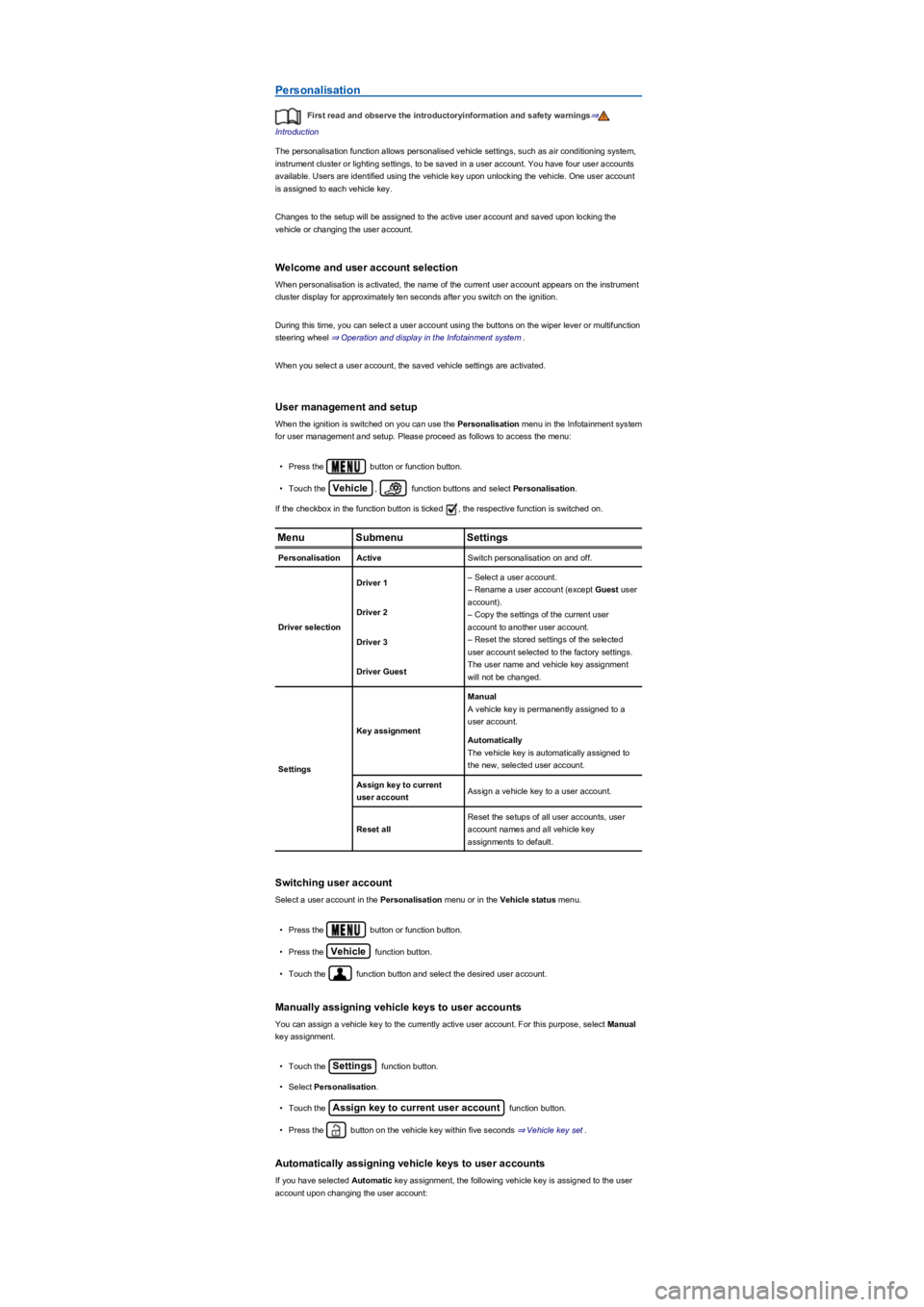
MenuSubmenuSettings
PersonalisationActiveSwitch personalisation on and off.
Driver selection
Driver 1– Select a user account.
– Rename a user account (except Guest user
account).
– Copy the settings of the current user
account to another user account.
– Reset the stored settings of the selected
user account selected to the factory settings.
The user name and vehicle key assignment
will not be changed.
Driver 2
Driver 3
Driver Guest
Settings
Key assignment
Manual
A vehicle key is permanently assigned to a
user account.
Automatically
The vehicle key is automatically assigned to
the new, selected user account.
Assign key to current
user accountAssign a vehicle key to a user account.
Reset all
Reset the setups of all user accounts, user
account names and all vehicle key
assignments to default.
Switching user account
Select a user account in the Personalisation menu or in the Vehicle status menu.
•Press the button or function button.
•Press the Vehicle function button.
•Touch the function button and select the desired user account.
Manually assigning vehicle keys to user accounts
You can assign a vehicle key to the currently active user account. For this purpose, select Manual
key assignment.
•Touch the Settings function button.
•Select Personalisation.
•Touch the Assign key to current user account function button.
•Press the button on the vehicle key within five seconds ⇒ Vehicle key set.
Automatically assigning vehicle keys to user accounts
If you have selected Automatic key assignment, the following vehicle key is assigned to the user
account upon changing the user account:
Page 65 of 341
The symbol can differ depending on the version of the instrument cluster.
Information call, breakdown call and Emergency Call Service
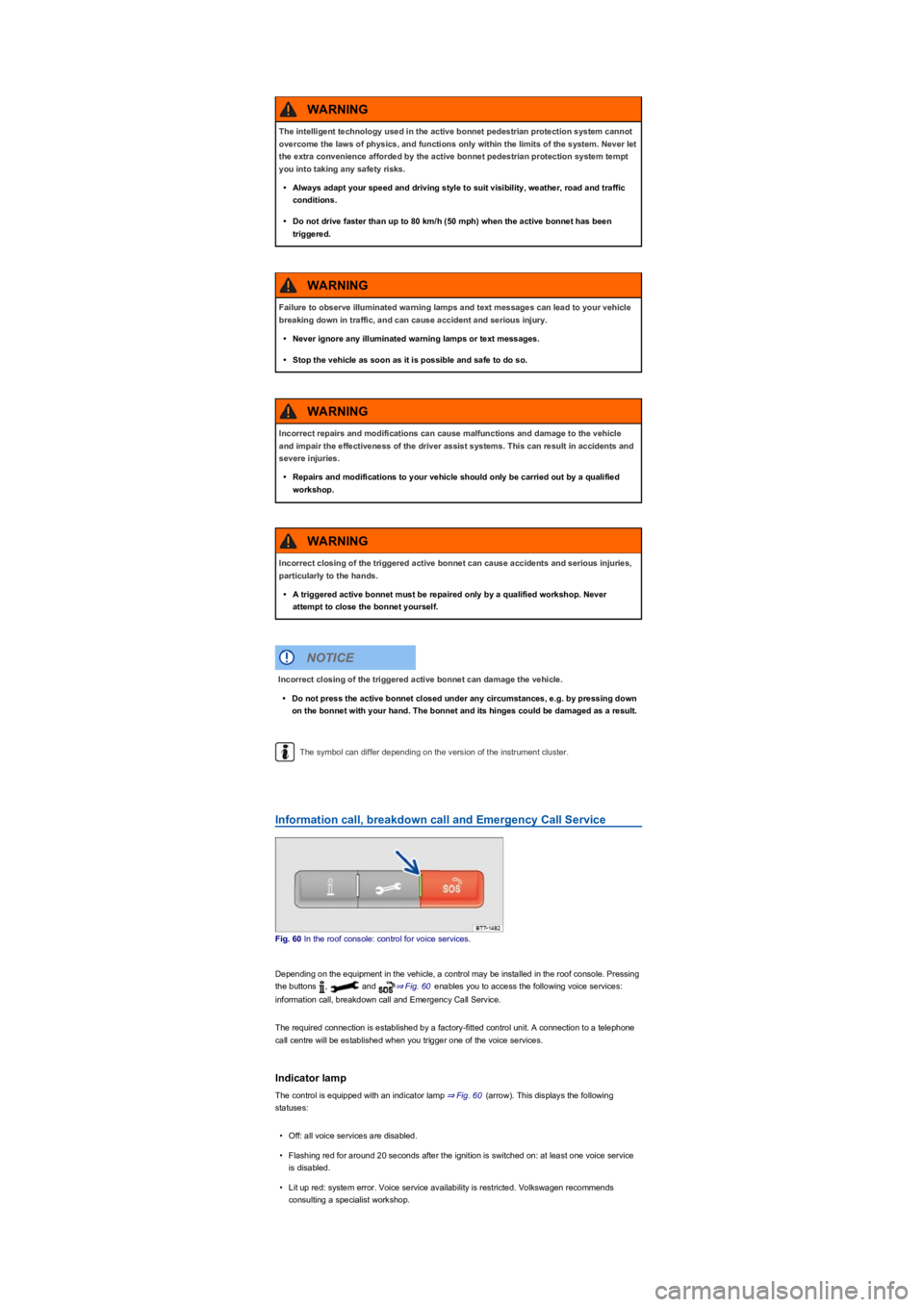
Fig. 60 In the roof console: control for voice services.
Depending on the equipment in the vehicle, a control may be installed in the roof console. Pressing
the buttons , and ⇒ Fig. 60 enables you to access the following voice services:
information call, breakdown call and Emergency Call Service.
The required connection is established by a factory-fitted control unit. A connection to a telephone
call centre will be established when you trigger one of the voice services.
Indicator lamp
The control is equipped with an indicator lamp ⇒ Fig. 60 (arrow). This displays the following
statuses:
•Off: all voice services are disabled.
•Flashing red for around 20 seconds after the ignition is switched on: at least one voice service
is disabled.
•Lit up red: system error. Voice service availability is restricted. Volkswagen recommends
consulting a specialist workshop.
The intelligent technology used in the active bonnet pedestrian protection system cannot
overcome the laws of physics, and functions only within the limits of the system. Never let
the extra convenience afforded by the active bonnet pedestrian protection system tempt
you into taking any safety risks.
•Always adapt your speed and driving style to suit visibility, weather, road and traffic
conditions.
•Do not drive faster than up to 80 km/h (50 mph) when the active bonnet has been
triggered.
WARNING
Failure to observe illuminated warning lamps and text messages can lead to your vehicle
breaking down in traffic, and can cause accident and serious injury.
•Never ignore any illuminated warning lamps or text messages.
•Stop the vehicle as soon as it is possible and safe to do so.
WARNING
Incorrect repairs and modifications can cause malfunctions and damage to the vehicle
and impair the effectiveness of the driver assist systems. This can result in accidents and
severe injuries.
•Repairs and modifications to your vehicle should only be carried out by a qualified
workshop.
WARNING
Incorrect closing of the triggered active bonnet can cause accidents and serious injuries,
particularly to the hands.
•A triggered active bonnet must be repaired only by a qualified workshop. Never
attempt to close the bonnet yourself.
WARNING
Incorrect closing of the triggered active bonnet can damage the vehicle.
•Do not press the active bonnet closed under any circumstances, e.g. by pressing down
on the bonnet with your hand. The bonnet and its hinges could be damaged as a result.
NOTICE
Page 67 of 341
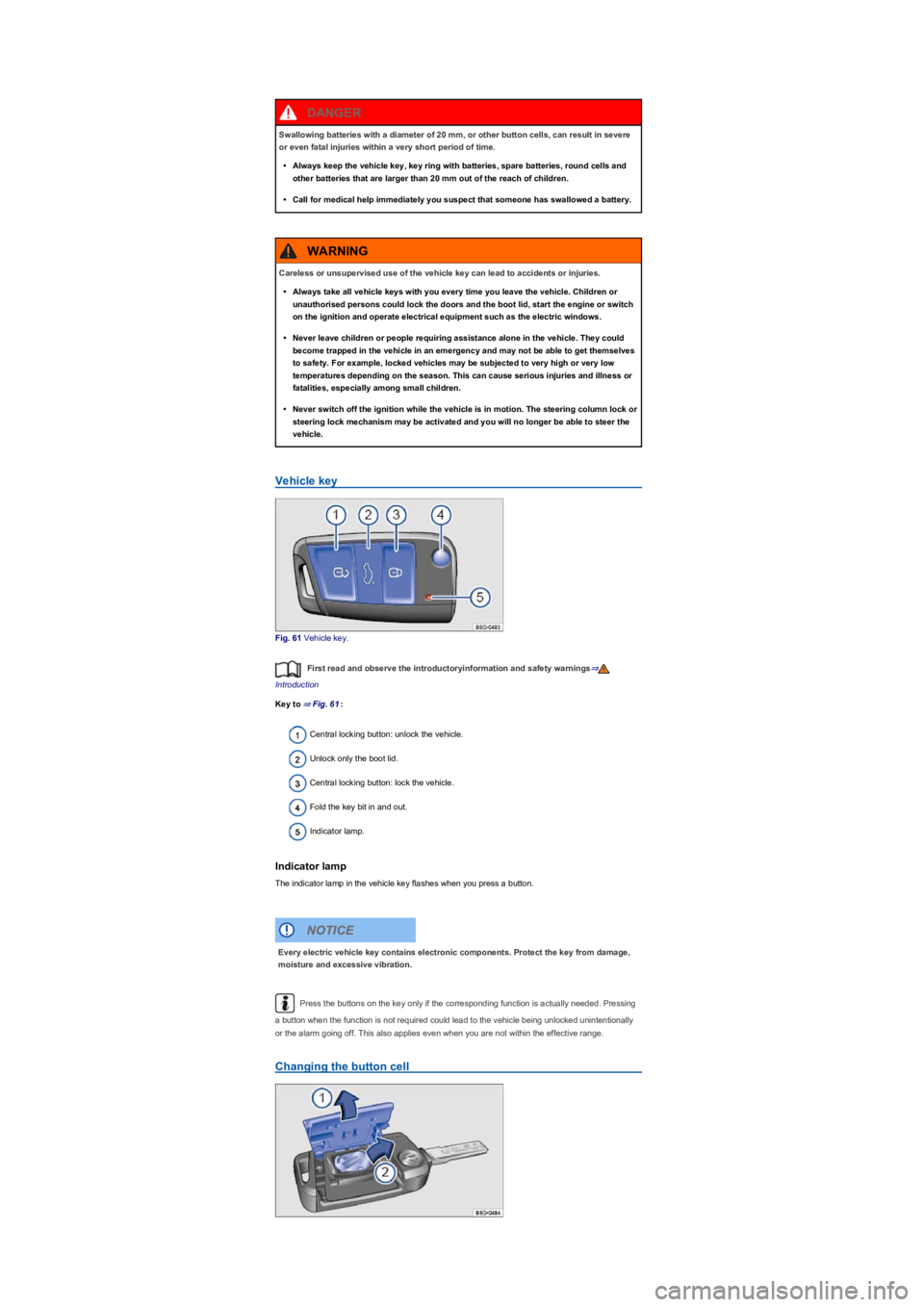
Vehicle key
Fig. 61 Vehicle key.
First read and observe the introductoryinformation and safety warnings⇒
Introduction
Key to ⇒ Fig. 61:
Central locking button: unlock the vehicle.
Unlock only the boot lid.
Central locking button: lock the vehicle.
Fold the key bit in and out.
Indicator lamp.
Indicator lamp
The indicator lamp in the vehicle key flashes when you press a button.
Press the buttons on the key only if the corresponding function is actually needed. Pressing
a button when the function is not required could lead to the vehicle being unlocked unintentionally
or the alarm going off. This also applies even when you are not within the effective range.
Changing the button cell
Swallowing batteries with a diameter of 20 mm, or other button cells, can result in severe
or even fatal injuries within a very short period of time.
•Always keep the vehicle key, key ring with batteries, spare batteries, round cells and
other batteries that are larger than 20 mm out of the reach of children.
•Call for medical help immediately you suspect that someone has swallowed a battery.
DANGER
Careless or unsupervised use of the vehicle key can lead to accidents or injuries.
•Always take all vehicle keys with you every time you leave the vehicle. Children or
unauthorised persons could lock the doors and the boot lid, start the engine or switch
on the ignition and operate electrical equipment such as the electric windows.
•Never leave children or people requiring assistance alone in the vehicle. They could
become trapped in the vehicle in an emergency and may not be able to get themselves
to safety. For example, locked vehicles may be subjected to very high or very low
temperatures depending on the season. This can cause serious injuries and illness or
fatalities, especially among small children.
•Never switch off the ignition while the vehicle is in motion. The steering column lock or
steering lock mechanism may be activated and you will no longer be able to steer the
vehicle.
WARNING
Every electric vehicle key contains electronic components. Protect the key from damage,
moisture and excessive vibration.
NOTICE
Page 68 of 341
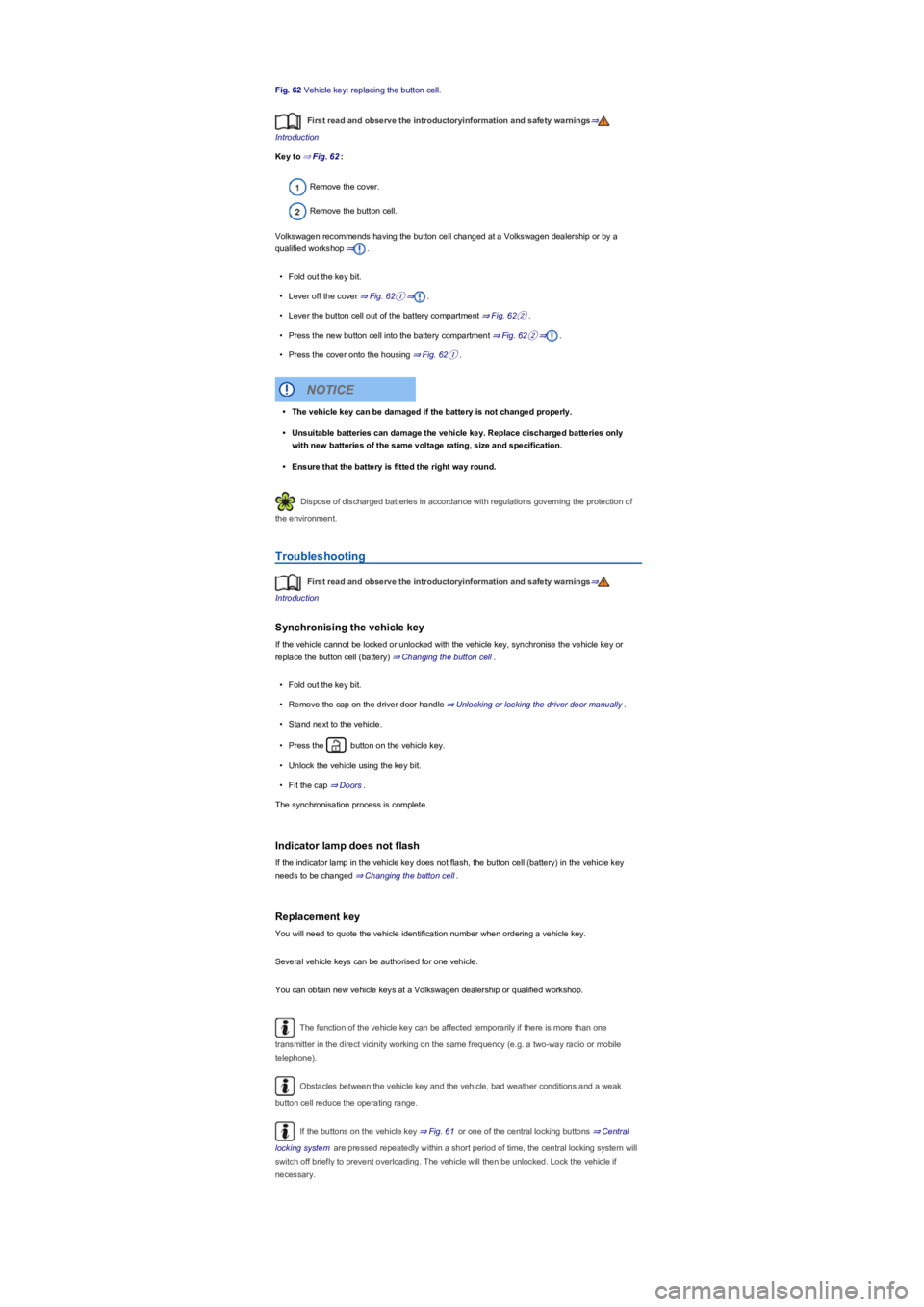
Fig. 62 Vehicle key: replacing the button cell.
First read and observe the introductoryinformation and safety warnings⇒
Introduction
Key to ⇒ Fig. 62:
Remove the cover.
Remove the button cell.
Volkswagen recommends having the button cell changed at a Volkswagen dealership or by a
qualified workshop ⇒.
•Fold out the key bit.
•Lever off the cover ⇒ Fig. 62①⇒.
•Lever the button cell out of the battery compartment ⇒ Fig. 62②.
•Press the new button cell into the battery compartment ⇒ Fig. 62②⇒.
•Press the cover onto the housing ⇒ Fig. 62①.
Dispose of discharged batteries in accordance with regulations governing the protection of
the environment.
Troubleshooting
First read and observe the introductoryinformation and safety warnings⇒
Introduction
Synchronising the vehicle key
If the vehicle cannot be locked or unlocked with the vehicle key, synchronise the vehicle key or
replace the button cell (battery) ⇒ Changing the button cell.
•Fold out the key bit.
•Remove the cap on the driver door handle ⇒ Unlocking or locking the driver door manually.
•Stand next to the vehicle.
•Press the button on the vehicle key.
•Unlock the vehicle using the key bit.
•Fit the cap ⇒ Doors.
The synchronisation process is complete.
Indicator lamp does not flash
If the indicator lamp in the vehicle key does not flash, the button cell (battery) in the vehicle key
needs to be changed ⇒ Changing the button cell.
Replacement key
You will need to quote the vehicle identification number when ordering a vehicle key.
Several vehicle keys can be authorised for one vehicle.
You can obtain new vehicle keys at a Volkswagen dealership or qualified workshop.
The function of the vehicle key can be affected temporarily if there is more than one
transmitter in the direct vicinity working on the same frequency (e.g. a two-way radio or mobile
telephone).
Obstacles between the vehicle key and the vehicle, bad weather conditions and a weak
button cell reduce the operating range.
If the buttons on the vehicle key ⇒ Fig. 61 or one of the central locking buttons ⇒ Central
locking system are pressed repeatedly within a short period of time, the central locking system will
switch off briefly to prevent overloading. The vehicle will then be unlocked. Lock the vehicle if
necessary.
•The vehicle key can be damaged if the battery is not changed properly.
•Unsuitable batteries can damage the vehicle key. Replace discharged batteries only
with new batteries of the same voltage rating, size and specification.
•Ensure that the battery is fitted the right way round.
NOTICE