key VOLKSWAGEN TIGUAN 2017 Owner´s Manual
[x] Cancel search | Manufacturer: VOLKSWAGEN, Model Year: 2017, Model line: TIGUAN, Model: VOLKSWAGEN TIGUAN 2017Pages: 341, PDF Size: 9.14 MB
Page 172 of 341
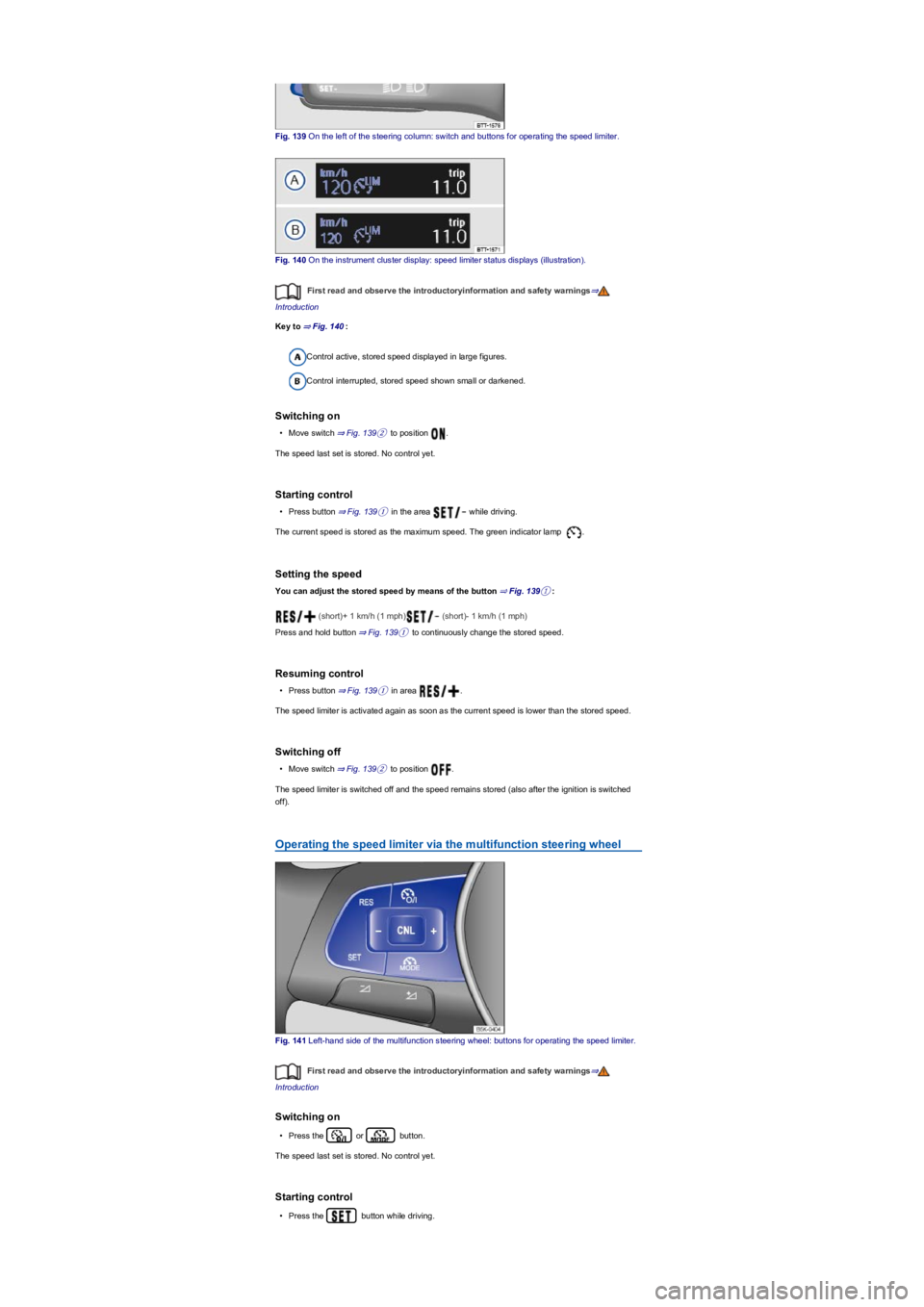
Fig. 139 On the left of the steering column: switch and buttons for operating the speed limiter.
Fig. 140 On the instrument cluster display: speed limiter status displays (illustration).
First read and observe the introductoryinformation and safety warnings⇒
Introduction
Key to ⇒ Fig. 140:
Control active, stored speed displayed in large figures.
Control interrupted, stored speed shown small or darkened.
Switching on
•Move switch ⇒ Fig. 139② to position .
The speed last set is stored. No control yet.
Starting control
•Press button ⇒ Fig. 139① in the area while driving.
The current speed is stored as the maximum speed. The green indicator lamp .
Setting the speed
You can adjust the stored speed by means of the button ⇒ Fig. 139①:
(short)+ 1 km/h (1 mph) (short)- 1 km/h (1 mph)
Press and hold button ⇒ Fig. 139① to continuously change the stored speed.
Resuming control
•Press button ⇒ Fig. 139① in area .
The speed limiter is activated again as soon as the current speed is lower than the stored speed.
Switching off
•Move switch ⇒ Fig. 139② to position .
The speed limiter is switched off and the speed remains stored (also after the ignition is switched
off).
Operating the speed limiter via the multifunction steering wheel
Fig. 141 Left-hand side of the multifunction steering wheel: buttons for operating the speed limiter.
First read and observe the introductoryinformation and safety warnings⇒
Introduction
Switching on
•Press the or button.
The speed last set is stored. No control yet.
Starting control
•Press the button while driving.
Page 189 of 341
•OR: depending on the vehicle equipment, by means of the button for the driver assist systems
⇒ Button for driver assist systems.
•OR: depending on the vehicle equipment, in the Driver assistance menu in the Infotainment
system ⇒ Operation and display in the Infotainment system.
Function
Rear Traffic Alert monitors the traffic crossing behind the vehicle when reversing out of a parking
space or manoeuvring. Rear Traffic Alert functions using radar sensors in the rear bumper.
Key to ⇒ Fig. 150:
Critical situation. Do not drive on!Possible critical situation.
Detection of a critical situation can also take place acoustically:
•A warning signal will sound and a text message will be displayed in the instrument cluster for
vehicles without Park Distance Control.
•A warning signal will sound with the continuous Park Distance Control tone if Park Distance
Control is installed in the vehicle. If the Park Distance Control is deactivated, no warning can be
given to the driver and the Rear Traffic Alert system will also be switched off temporarily.
If there is a fault in the system's scanned area, the yellow indicator lamp lights up .
Automatic braking intervention to minimise damage
If Rear Traffic Alert detects an approaching road user and the driver has not pressed the brake, the
system can brake automatically.
The Rear Traffic Alert helps the driver to prevent damage by initiating an automatic braking
intervention. Automatic braking intervention takes place when reversing at speeds of between
1-12 km/h (1-7 mph). The vehicle is held stationary for up to two seconds after vehicle standstill has
been detected.
After automatic braking intervention is activated to prevent damage to the vehicle, the system
requires approximately ten seconds before it can activate another automatic braking intervention.
The automatic braking intervention can be interrupted by pressing the accelerator or brake pedal
sharply and taking control of the vehicle.
Troubleshooting
First read and observe the introductoryinformation and safety warnings⇒
Introduction
No sensor visibility, error message, system switches itself off
•Clean the radar sensors or remove stickers or accessories from the radar sensors ⇒ Caring for
and cleaning the vehicle exterior.
•Check whether any damage is visible.
The system is not responding as expected
•The radar sensors are dirty ⇒ Caring for and cleaning the vehicle exterior. The sensor visibility
may be impaired by dirt and snow or also residue from cleaning agents or coatings.
•The prerequisites for system operation must be met ⇒ System limits.
•The radar sensors are covered by water.
•The vehicle is damaged in the area of the radar sensors, e.g. caused by parking collisions.
•The detection ranges of the radar sensors are blocked by add-on parts, e.g. bicycle carriers.
•Changes have been made to the paintwork in the area of the radar sensors or structural
modifications have been made, e.g. on the vehicle front end or the running gear.
•Tinting foils have been retrofitted on the side windows.
The intelligent technology of the lane change system including Rear Traffic Alert cannot
overcome the laws of physics, and functions only within the limits of the system. Do not
let the auxiliary function of the Rear Traffic Alert tempt you to take any risks while driving
– this can cause accidents. The system is not a substitute for the full concentration of the
driver.
•Never use the system with impaired vision or in unpredictable traffic situations, e.g. on
extremely busy roads or across several lanes.
•Always pay attention to the area around the vehicle – cyclists and pedestrians are
often not clearly detected.
•The Rear Traffic Alert will not always independently bring the vehicle to a complete
stop.
WARNING
Page 190 of 341
Parking and manoeuvring
Parking
Stopping the vehicle
Always park the vehicle in the specified order.
Always stop the vehicle on a suitable surface ⇒.
•Bring the vehicle to a stop. On vehicles with a manual gearbox, fully depress the clutch.
•Press and hold the brake pedal.
•With a DSG dual clutch gearbox, move the selector lever to position P.
•Switch on the electronic parking brake ⇒ Electronic parking brake.
•Stop the engine and switch off the ignition ⇒ Starting and stopping the engine. The indicator
lamp in the instrument cluster display must light up red.
•With a manual gearbox, select first gear for flat ground and uphill inclines, or reverse gear for
downhill inclines, and then release the clutch.
•Locking the steering column ⇒ Steering
•Take your left foot off the brake.
•Make sure that all vehicle occupants leave the vehicle.
•Get out of the vehicle. Take all vehicle keys with you.
•Lock the vehicle.
Parking on uphill and downhill gradients
Turn the steering wheel so that the front wheels will roll against the kerb if the parked vehicle starts
to move.
Please adhere to relevant legislation when stopping and parking your vehicle.
®
The components of the exhaust system become very hot. This can cause fires and serious
injuries.
•Never park the vehicle where parts of the exhaust system can come into contact with
inflammable material underneath the vehicle, e.g. undergrowth, leaves, dry grass, spilt
fuel, oil etc.
WARNING
The vehicle may roll away if you leave and park the vehicle incorrectly. This can cause
accidents and serious injuries.
•Before leaving the vehicle, make sure that the electronic parking brake is switched on
and that the indicator light lights up red on the instrument cluster display when
the ignition is switched off.
•Never remove the vehicle key from the ignition lock when the vehicle is in motion. The
steering lock may be activated and you will no longer be able to steer or control the
vehicle.
•Never leave children or people requiring assistance alone in the vehicle. They could
switch off the electronic parking brake, or move the selector lever or gearshift lever,
and thus set the vehicle in motion.
•Always take all vehicle keys with you every time you leave the vehicle. The engine can
be started and electrical equipment such as the window controls can be operated. This
can cause serious injury.
•Never leave children or people requiring assistance alone in the vehicle. They could
become trapped in the vehicle in an emergency and may not be able to get themselves
to safety. For example, locked vehicles may be subjected to very high or very low
temperatures depending on the season. This can cause serious injuries and illness or
fatalities, especially among small children.
WARNING
•Always take care when driving in car parks with protruding kerbstones or bollards.
Objects that protrude from the ground can damage the bumper and other components
when parking the vehicle or driving out of a parking space. Stop before the wheels
touch the fixed boundaries or kerbs.
•Drive carefully through dips in the road, over driveways, ramps, kerbstones and other
objects. Low-lying vehicle components such as the bumper, spoiler and parts of the
running gear, engine or exhaust system could be damaged.
NOTICE
Page 198 of 341
Red and green frames: vehicle outline (mode 2).
Trailer support (mode 3)
In vehicles with a factory-fitted towing bracket, the trailer support function can be used when
approaching a trailer drawbar. The powerful zoom level used in this mode means that obstacles
behind the vehicle appear very late.
Auxiliary lines are shown on the Infotainment system.
Red line: position of the towing bracket.
Green lines: distance to towing bracket. The distance intervals are around 0.1 m in each case.
Orange line: predicted path of the towing bracket, depending on the steering angle.
Crossing traffic (mode 4)
This display representation helps the driver to monitor traffic behind the vehicle and can be used in
situations such as driving out of a garage or narrow exits, for example.
Prerequisites
First read and observe the introductoryinformation and safety warnings⇒
Introduction
The following prerequisites must be met for detection of a parking space:
•Do not exceed a speed of approximately 15 km/h (9 mph).
•Width of the parking space: vehicle width + 0.2 m.
•Distance: position the vehicle approximately one metre from the parking space (mode 2 only).
•Length of the parking space: approx. 8 m (mode 2 only).
The following conditions must be met in order to display a correct image:
•The boot lid is closed.
•The surrounding area has a flat surface.
•Vehicle does not have a heavy load at the rear.
Parking perpendicular to the road (mode 1)
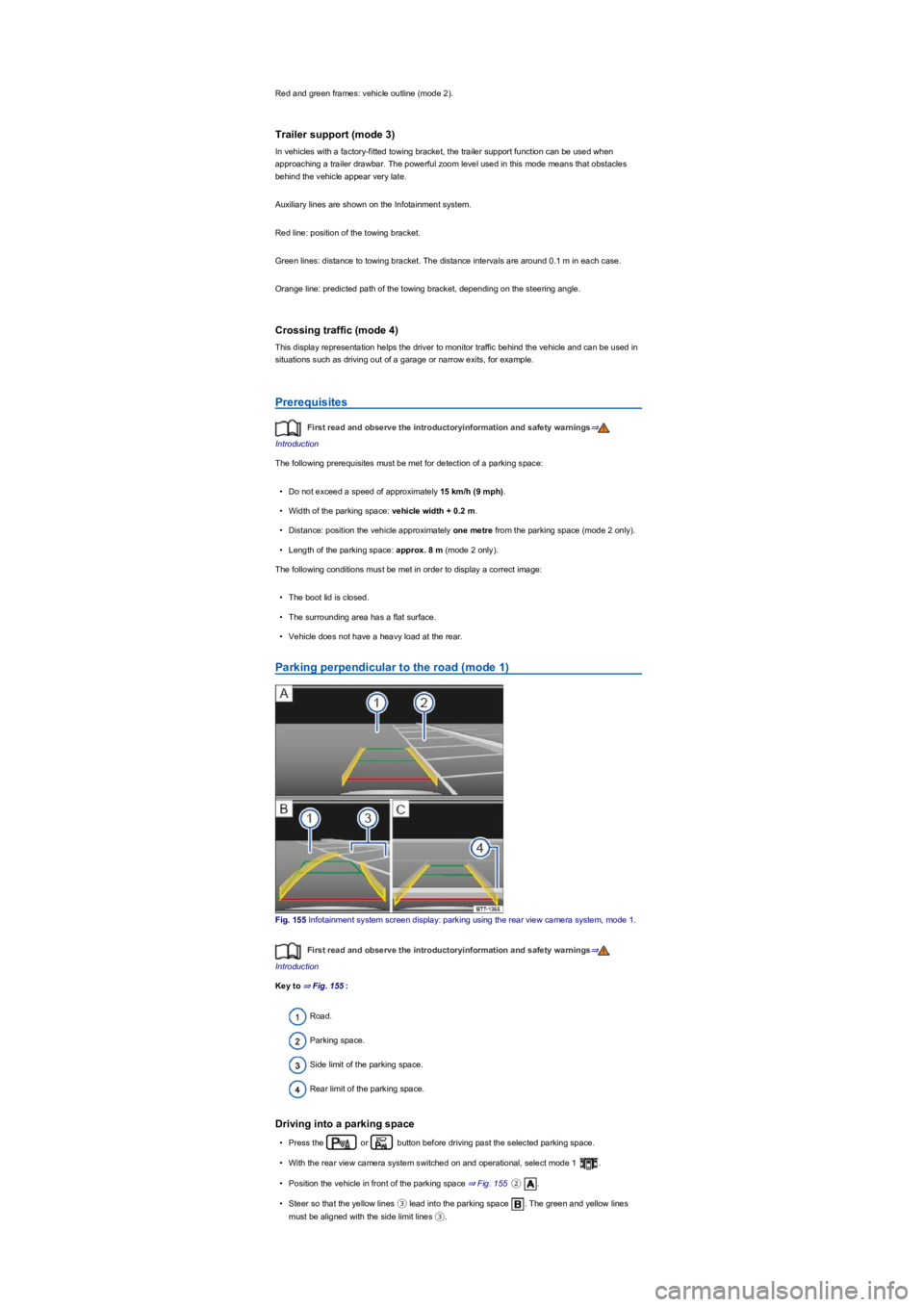
Fig. 155 Infotainment system screen display: parking using the rear view camera system, mode 1.
First read and observe the introductoryinformation and safety warnings⇒
Introduction
Key to ⇒ Fig. 155:
Road.
Parking space.
Side limit of the parking space.
Rear limit of the parking space.
Driving into a parking space
•Press the or button before driving past the selected parking space.
•With the rear view camera system switched on and operational, select mode 1 .
•Position the vehicle in front of the parking space ⇒ Fig. 155②.
•Steer so that the yellow lines ③ lead into the parking space . The green and yellow lines
must be aligned with the side limit lines ③.
Page 199 of 341
•Stop when the red line reaches the rear limit ④.
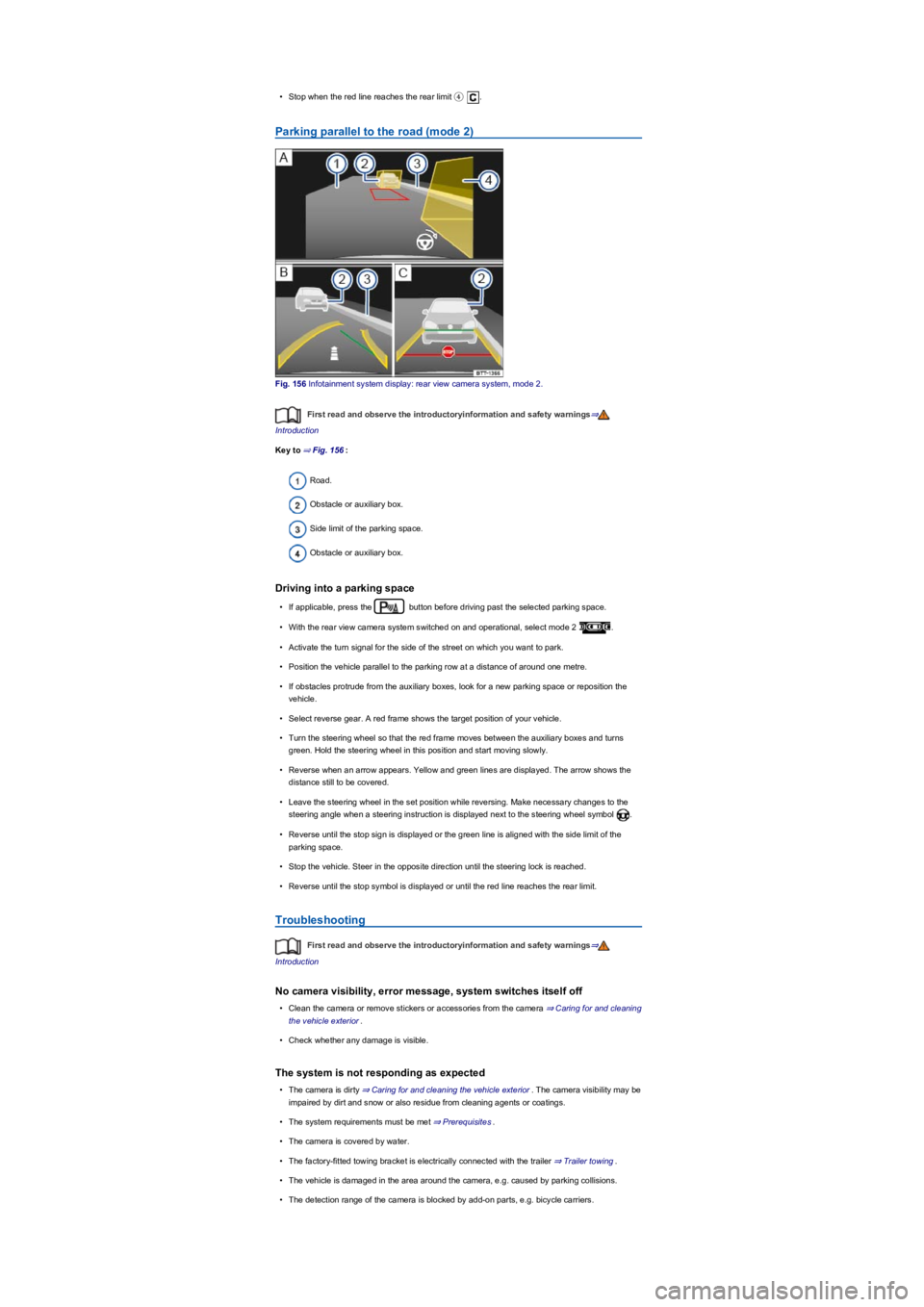
Parking parallel to the road (mode 2)
Fig. 156 Infotainment system display: rear view camera system, mode 2.
First read and observe the introductoryinformation and safety warnings⇒
Introduction
Key to ⇒ Fig. 156:
Road.
Obstacle or auxiliary box.
Side limit of the parking space.
Obstacle or auxiliary box.
Driving into a parking space
•If applicable, press the button before driving past the selected parking space.
•With the rear view camera system switched on and operational, select mode 2 .
•Activate the turn signal for the side of the street on which you want to park.
•Position the vehicle parallel to the parking row at a distance of around one metre.
•If obstacles protrude from the auxiliary boxes, look for a new parking space or reposition the
vehicle.
•Select reverse gear. A red frame shows the target position of your vehicle.
•Turn the steering wheel so that the red frame moves between the auxiliary boxes and turns
green. Hold the steering wheel in this position and start moving slowly.
•Reverse when an arrow appears. Yellow and green lines are displayed. The arrow shows the
distance still to be covered.
•Leave the steering wheel in the set position while reversing. Make necessary changes to the
steering angle when a steering instruction is displayed next to the steering wheel symbol .
•Reverse until the stop sign is displayed or the green line is aligned with the side limit of the
parking space.
•Stop the vehicle. Steer in the opposite direction until the steering lock is reached.
•Reverse until the stop symbol is displayed or until the red line reaches the rear limit.
Troubleshooting
First read and observe the introductoryinformation and safety warnings⇒
Introduction
No camera visibility, error message, system switches itself off
•Clean the camera or remove stickers or accessories from the camera ⇒ Caring for and cleaning
the vehicle exterior.
•Check whether any damage is visible.
The system is not responding as expected
•The camera is dirty ⇒ Caring for and cleaning the vehicle exterior. The camera visibility may be
impaired by dirt and snow or also residue from cleaning agents or coatings.
•The system requirements must be met ⇒ Prerequisites.
•The camera is covered by water.
•The factory-fitted towing bracket is electrically connected with the trailer ⇒ Trailer towing.
•The vehicle is damaged in the area around the camera, e.g. caused by parking collisions.
•The detection range of the camera is blocked by add-on parts, e.g. bicycle carriers.
Page 202 of 341
Park Assist can be activated retroactively. If a suitable parking space was driven past before,
it is displayed.
Driving into a parking space
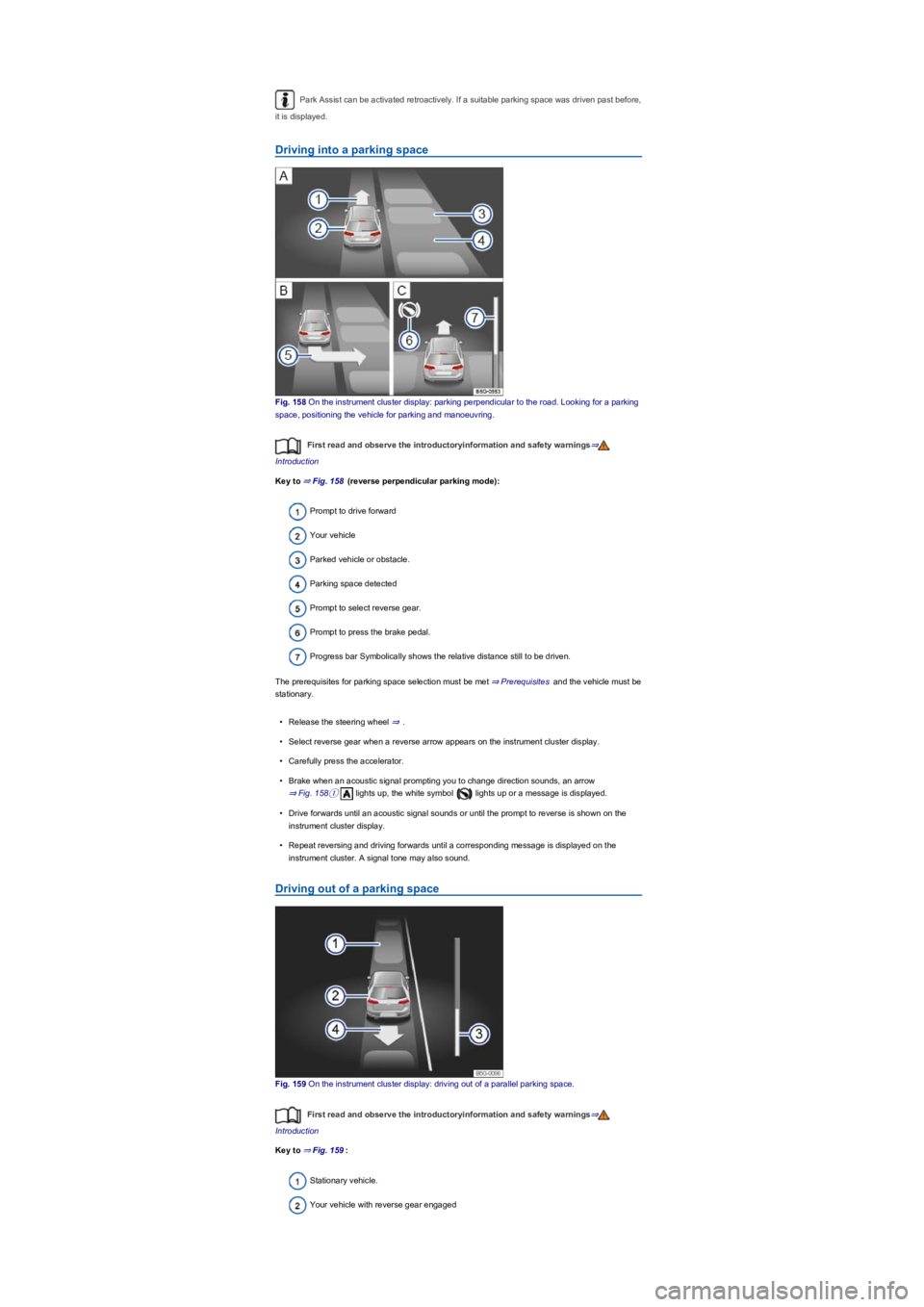
Fig. 158 On the instrument cluster display: parking perpendicular to the road. Looking for a parking
space, positioning the vehicle for parking and manoeuvring.
First read and observe the introductoryinformation and safety warnings⇒
Introduction
Key to ⇒ Fig. 158 (reverse perpendicular parking mode):
Prompt to drive forward
Your vehicle
Parked vehicle or obstacle.
Parking space detected
Prompt to select reverse gear.
Prompt to press the brake pedal.
Progress bar Symbolically shows the relative distance still to be driven.
The prerequisites for parking space selection must be met ⇒ Prerequisites and the vehicle must be
stationary.
•Release the steering wheel ⇒.
•Select reverse gear when a reverse arrow appears on the instrument cluster display.
•Carefully press the accelerator.
•Brake when an acoustic signal prompting you to change direction sounds, an arrow
⇒ Fig. 158① lights up, the white symbol lights up or a message is displayed.
•Drive forwards until an acoustic signal sounds or until the prompt to reverse is shown on the
instrument cluster display.
•Repeat reversing and driving forwards until a corresponding message is displayed on the
instrument cluster. A signal tone may also sound.
Driving out of a parking space
Fig. 159 On the instrument cluster display: driving out of a parallel parking space.
First read and observe the introductoryinformation and safety warnings⇒
Introduction
Key to ⇒ Fig. 159:
Stationary vehicle.
Your vehicle with reverse gear engaged
Page 207 of 341
Operation
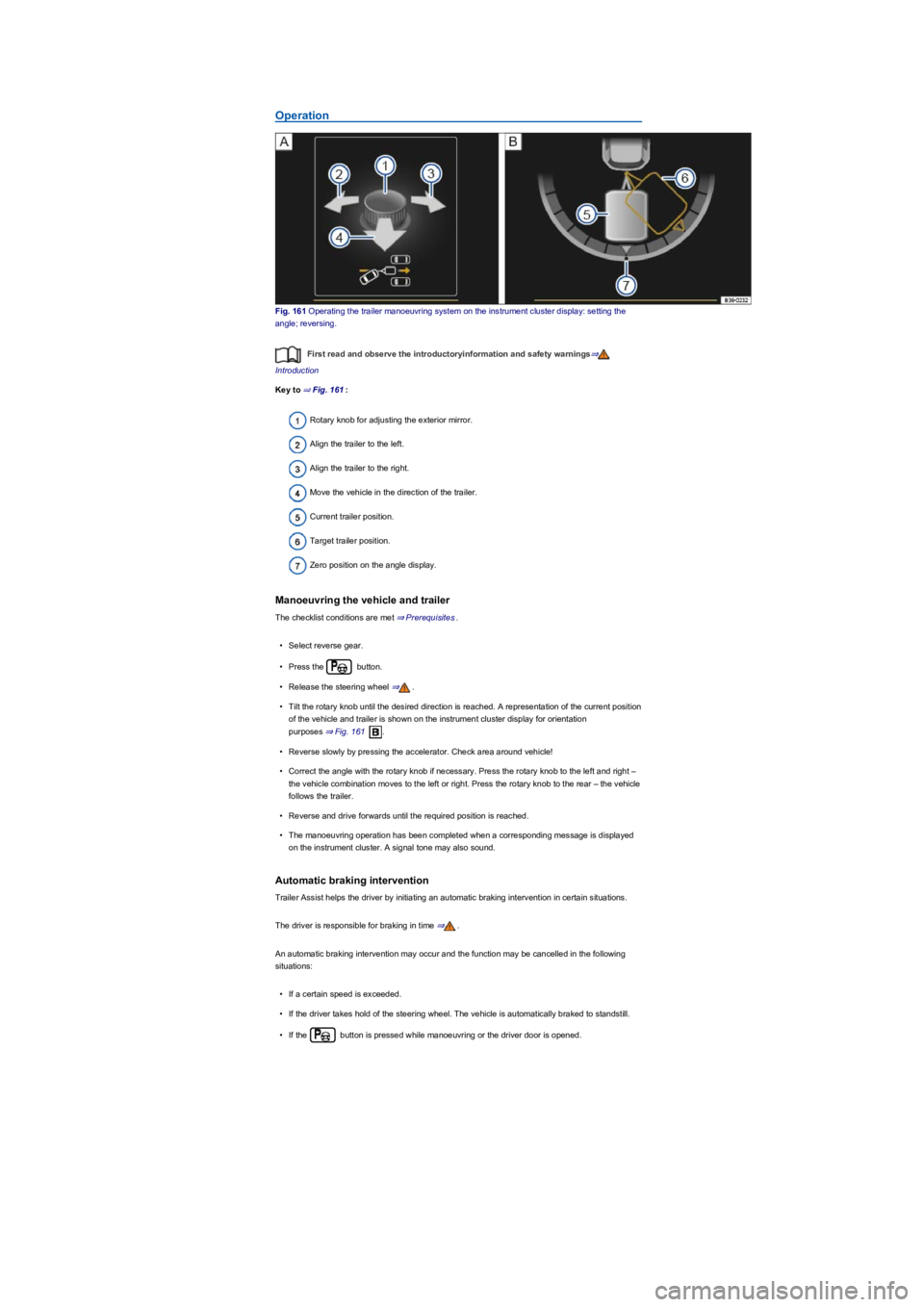
Fig. 161 Operating the trailer manoeuvring system on the instrument cluster display: setting the
angle; reversing.
First read and observe the introductoryinformation and safety warnings⇒
Introduction
Key to ⇒ Fig. 161:
Rotary knob for adjusting the exterior mirror.
Align the trailer to the left.
Align the trailer to the right.
Move the vehicle in the direction of the trailer.
Current trailer position.
Target trailer position.
Zero position on the angle display.
Manoeuvring the vehicle and trailer
The checklist conditions are met ⇒ Prerequisites.
•Select reverse gear.
•Press the button.
•Release the steering wheel ⇒.
•Tilt the rotary knob until the desired direction is reached. A representation of the current position
of the vehicle and trailer is shown on the instrument cluster display for orientation
purposes ⇒ Fig. 161.
•Reverse slowly by pressing the accelerator. Check area around vehicle!
•Correct the angle with the rotary knob if necessary. Press the rotary knob to the left and right –
the vehicle combination moves to the left or right. Press the rotary knob to the rear – the vehicle
follows the trailer.
•Reverse and drive forwards until the required position is reached.
•The manoeuvring operation has been completed when a corresponding message is displayed
on the instrument cluster. A signal tone may also sound.
Automatic braking intervention
Trailer Assist helps the driver by initiating an automatic braking intervention in certain situations.
The driver is responsible for braking in time ⇒.
An automatic braking intervention may occur and the function may be cancelled in the following
situations:
•If a certain speed is exceeded.
•If the driver takes hold of the steering wheel. The vehicle is automatically braked to standstill.
•If the button is pressed while manoeuvring or the driver door is opened.
Page 213 of 341
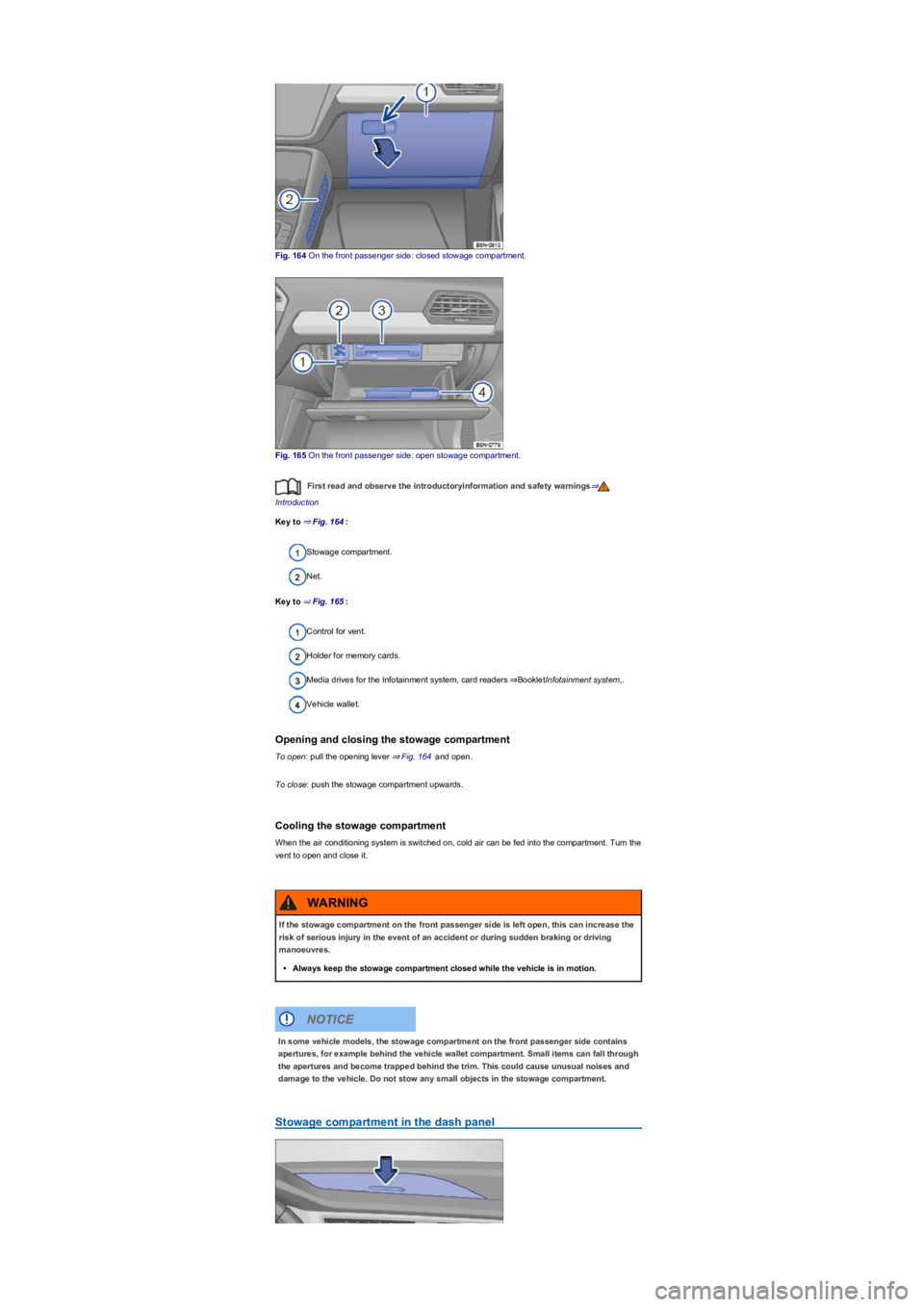
Fig. 164 On the front passenger side: closed stowage compartment.
Fig. 165 On the front passenger side: open stowage compartment.
First read and observe the introductoryinformation and safety warnings⇒
Introduction
Key to ⇒ Fig. 164:
Stowage compartment.
Net.
Key to ⇒ Fig. 165:
Control for vent.
Holder for memory cards.
Media drives for the Infotainment system, card readers ⇒BookletInfotainment system,.
Vehicle wallet.
Opening and closing the stowage compartment
To open: pull the opening lever ⇒ Fig. 164 and open.
To close: push the stowage compartment upwards.
Cooling the stowage compartment
When the air conditioning system is switched on, cold air can be fed into the compartment. Turn the
vent to open and close it.
Stowage compartment in the dash panel
If the stowage compartment on the front passenger side is left open, this can increase the
risk of serious injury in the event of an accident or during sudden braking or driving
manoeuvres.
•Always keep the stowage compartment closed while the vehicle is in motion.
WARNING
In some vehicle models, the stowage compartment on the front passenger side contains
apertures, for example behind the vehicle wallet compartment. Small items can fall through
the apertures and become trapped behind the trim. This could cause unusual noises and
damage to the vehicle. Do not stow any small objects in the stowage compartment.
NOTICE
Page 238 of 341
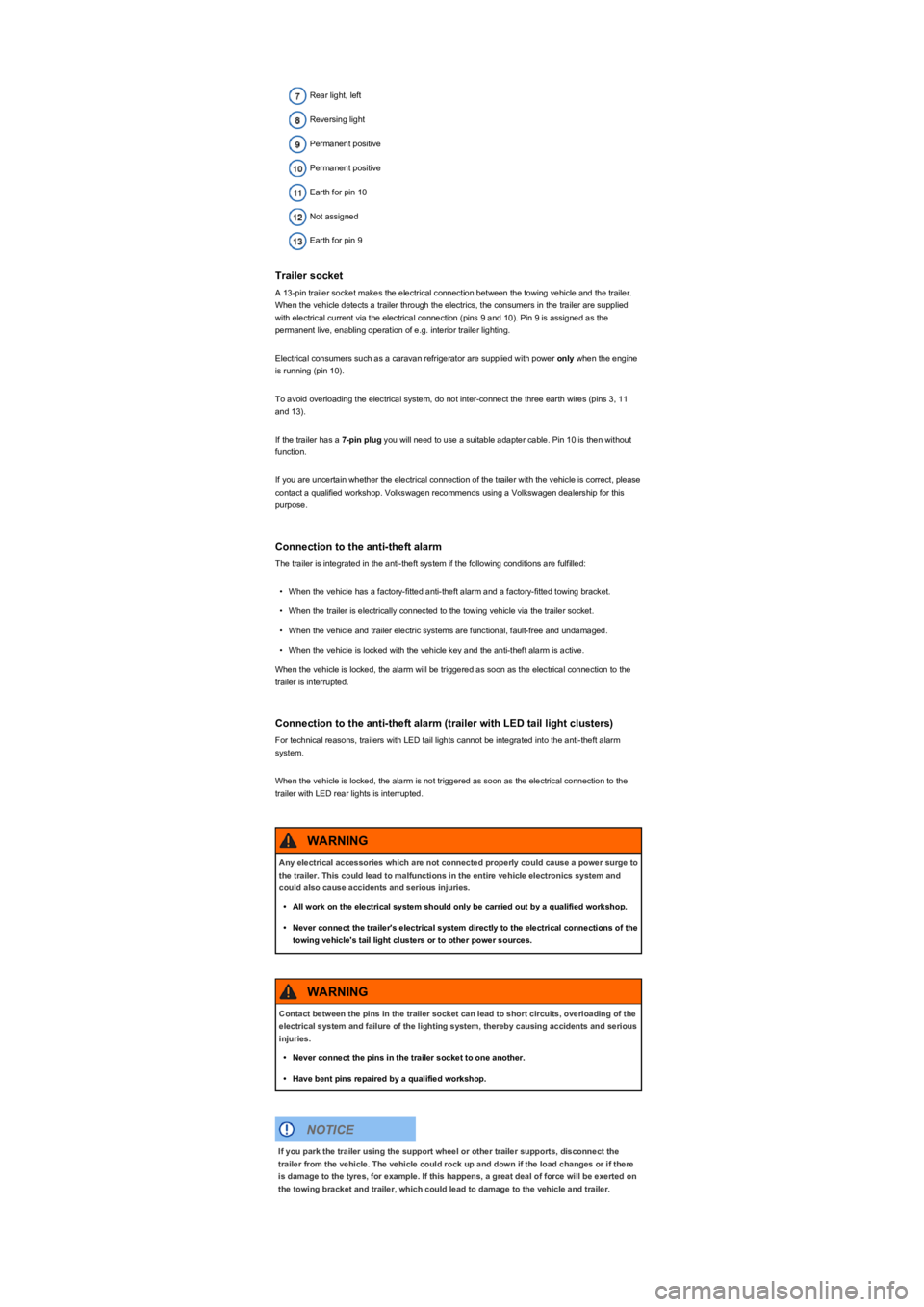
Rear light, left
Reversing light
Permanent positive
Permanent positive
Earth for pin 10
Not assigned
Earth for pin 9
Trailer socket
A 13-pin trailer socket makes the electrical connection between the towing vehicle and the trailer.
When the vehicle detects a trailer through the electrics, the consumers in the trailer are supplied
with electrical current via the electrical connection (pins 9 and 10). Pin 9 is assigned as the
permanent live, enabling operation of e.g. interior trailer lighting.
Electrical consumers such as a caravan refrigerator are supplied with power only when the engine
is running (pin 10).
To avoid overloading the electrical system, do not inter-connect the three earth wires (pins 3, 11
and 13).
If the trailer has a 7-pin plug you will need to use a suitable adapter cable. Pin 10 is then without
function.
If you are uncertain whether the electrical connection of the trailer with the vehicle is correct, please
contact a qualified workshop. Volkswagen recommends using a Volkswagen dealership for this
purpose.
Connection to the anti-theft alarm
The trailer is integrated in the anti-theft system if the following conditions are fulfilled:
•When the vehicle has a factory-fitted anti-theft alarm and a factory-fitted towing bracket.
•When the trailer is electrically connected to the towing vehicle via the trailer socket.
•When the vehicle and trailer electric systems are functional, fault-free and undamaged.
•When the vehicle is locked with the vehicle key and the anti-theft alarm is active.
When the vehicle is locked, the alarm will be triggered as soon as the electrical connection to the
trailer is interrupted.
Connection to the anti-theft alarm (trailer with LED tail light clusters)
For technical reasons, trailers with LED tail lights cannot be integrated into the anti-theft alarm
system.
When the vehicle is locked, the alarm is not triggered as soon as the electrical connection to the
trailer with LED rear lights is interrupted.
Any electrical accessories which are not connected properly could cause a power surge to
the trailer. This could lead to malfunctions in the entire vehicle electronics system and
could also cause accidents and serious injuries.
•All work on the electrical system should only be carried out by a qualified workshop.
•Never connect the trailer's electrical system directly to the electrical connections of the
towing vehicle's tail light clusters or to other power sources.
WARNING
Contact between the pins in the trailer socket can lead to short circuits, overloading of the
electrical system and failure of the lighting system, thereby causing accidents and serious
injuries.
•Never connect the pins in the trailer socket to one another.
•Have bent pins repaired by a qualified workshop.
WARNING
If you park the trailer using the support wheel or other trailer supports, disconnect the
trailer from the vehicle. The vehicle could rock up and down if the load changes or if there
is damage to the tyres, for example. If this happens, a great deal of force will be exerted on
the towing bracket and trailer, which could lead to damage to the vehicle and trailer.
NOTICE
Page 245 of 341
Refuelling process
•Unlock the tank flap with the vehicle key or the button in the driver door.
•Open the tank flap.
•Unscrew the tank cap and place it in the holder on the tank flap.
•The fuel tank is full when the properly operated automatic filler nozzle clicks off for the first time
⇒.
•Screw the tank cap onto the filler neck.
•Close the tank flap.
Misfuelling prevention device
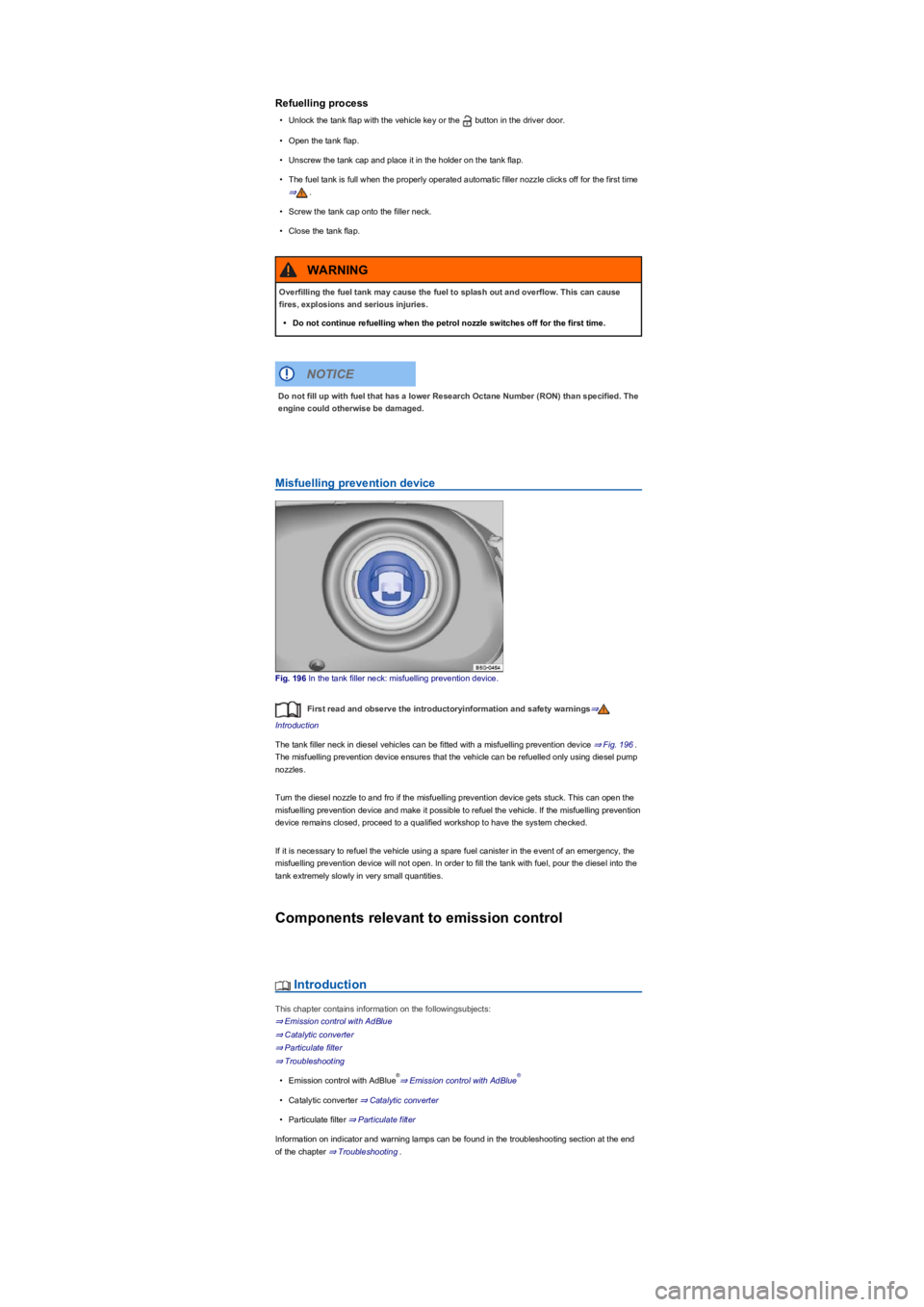
Fig. 196 In the tank filler neck: misfuelling prevention device.
First read and observe the introductoryinformation and safety warnings⇒
Introduction
The tank filler neck in diesel vehicles can be fitted with a misfuelling prevention device ⇒ Fig. 196.
The misfuelling prevention device ensures that the vehicle can be refuelled only using diesel pump
nozzles.
Turn the diesel nozzle to and fro if the misfuelling prevention device gets stuck. This can open the
misfuelling prevention device and make it possible to refuel the vehicle. If the misfuelling prevention
device remains closed, proceed to a qualified workshop to have the system checked.
If it is necessary to refuel the vehicle using a spare fuel canister in the event of an emergency, the
misfuelling prevention device will not open. In order to fill the tank with fuel, pour the diesel into the
tank extremely slowly in very small quantities.
Components relevant to emission control
Introduction
This chapter contains information on the followingsubjects:
⇒ Emission control with AdBlue
⇒ Catalytic converter
⇒ Particulate filter
⇒ Troubleshooting
•Emission control with AdBlue⇒ Emission control with AdBlue
•Catalytic converter ⇒ Catalytic converter
•Particulate filter ⇒ Particulate filter
Information on indicator and warning lamps can be found in the troubleshooting section at the end
of the chapter ⇒ Troubleshooting.
Overfilling the fuel tank may cause the fuel to splash out and overflow. This can cause
fires, explosions and serious injuries.
•Do not continue refuelling when the petrol nozzle switches off for the first time.
WARNING
Do not fill up with fuel that has a lower Research Octane Number (RON) than specified. The
engine could otherwise be damaged.
NOTICE
®®