Front assist VOLKSWAGEN TIGUAN 2017 Owner´s Manual
[x] Cancel search | Manufacturer: VOLKSWAGEN, Model Year: 2017, Model line: TIGUAN, Model: VOLKSWAGEN TIGUAN 2017Pages: 341, PDF Size: 9.14 MB
Page 3 of 341
Texts with this symbol contain additional information on the protection of the environment.
Texts with this symbol contain additional information.
Vehicle overviews
Front view
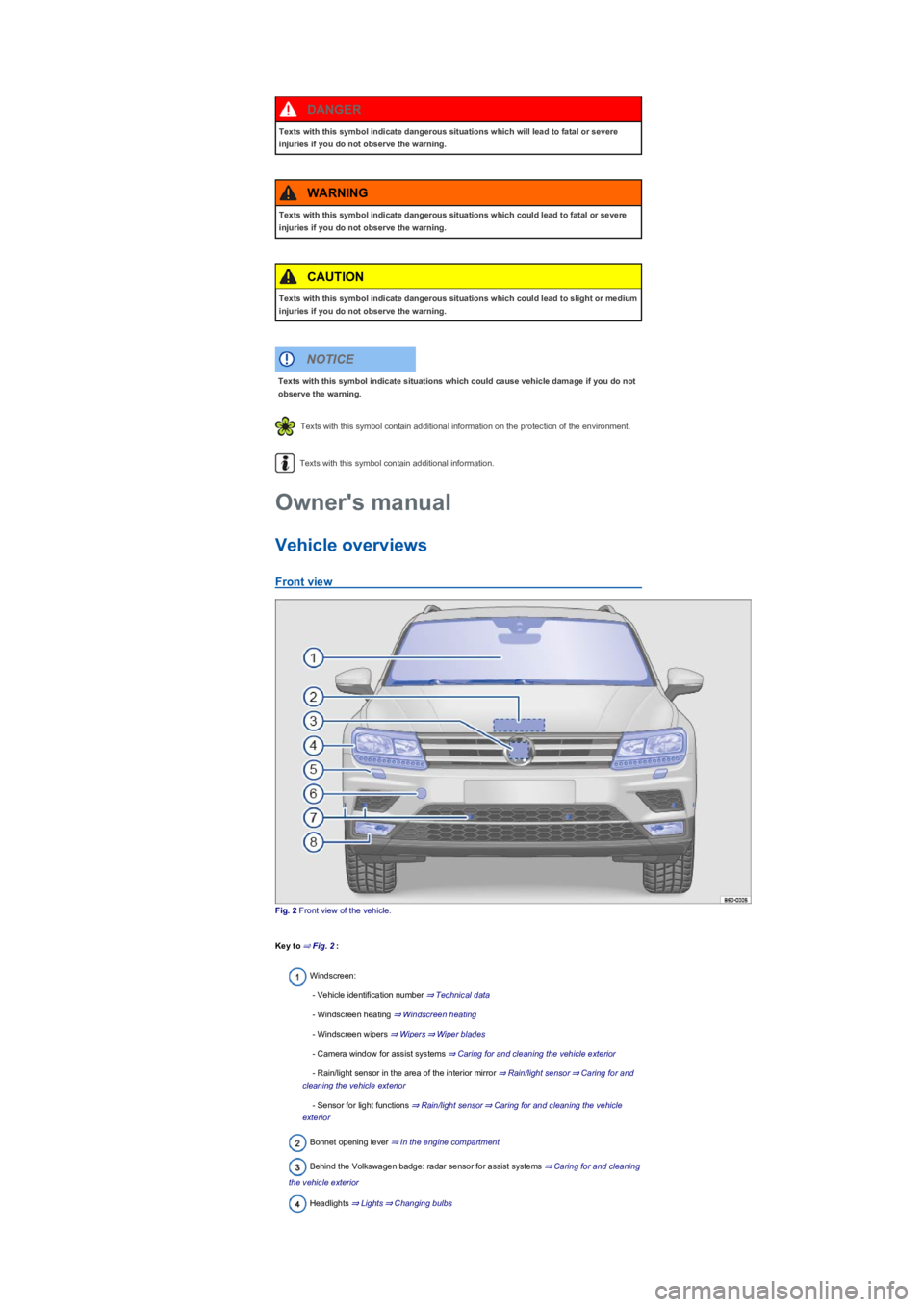
Fig. 2 Front view of the vehicle.
Key to ⇒ Fig. 2:
Windscreen:
- Vehicle identification number ⇒ Technical data
- Windscreen heating ⇒ Windscreen heating
- Windscreen wipers ⇒ Wipers⇒ Wiper blades
- Camera window for assist systems ⇒ Caring for and cleaning the vehicle exterior
- Rain/light sensor in the area of the interior mirror ⇒ Rain/light sensor⇒ Caring for and
cleaning the vehicle exterior
- Sensor for light functions ⇒ Rain/light sensor⇒ Caring for and cleaning the vehicle
exterior
Bonnet opening lever ⇒ In the engine compartment
Behind the Volkswagen badge: radar sensor for assist systems ⇒ Caring for and cleaning
the vehicle exterior
Headlights ⇒ Lights⇒ Changing bulbs
Texts with this symbol indicate dangerous situations which will lead to fatal or severe
injuries if you do not observe the warning.
DANGER
Texts with this symbol indicate dangerous situations which could lead to fatal or severe
injuries if you do not observe the warning.
WARNING
Texts with this symbol indicate dangerous situations which could lead to slight or medium
injuries if you do not observe the warning.
CAUTION
Texts with this symbol indicate situations which could cause vehicle damage if you do not
observe the warning.
NOTICE
Owner's manual
Page 7 of 341
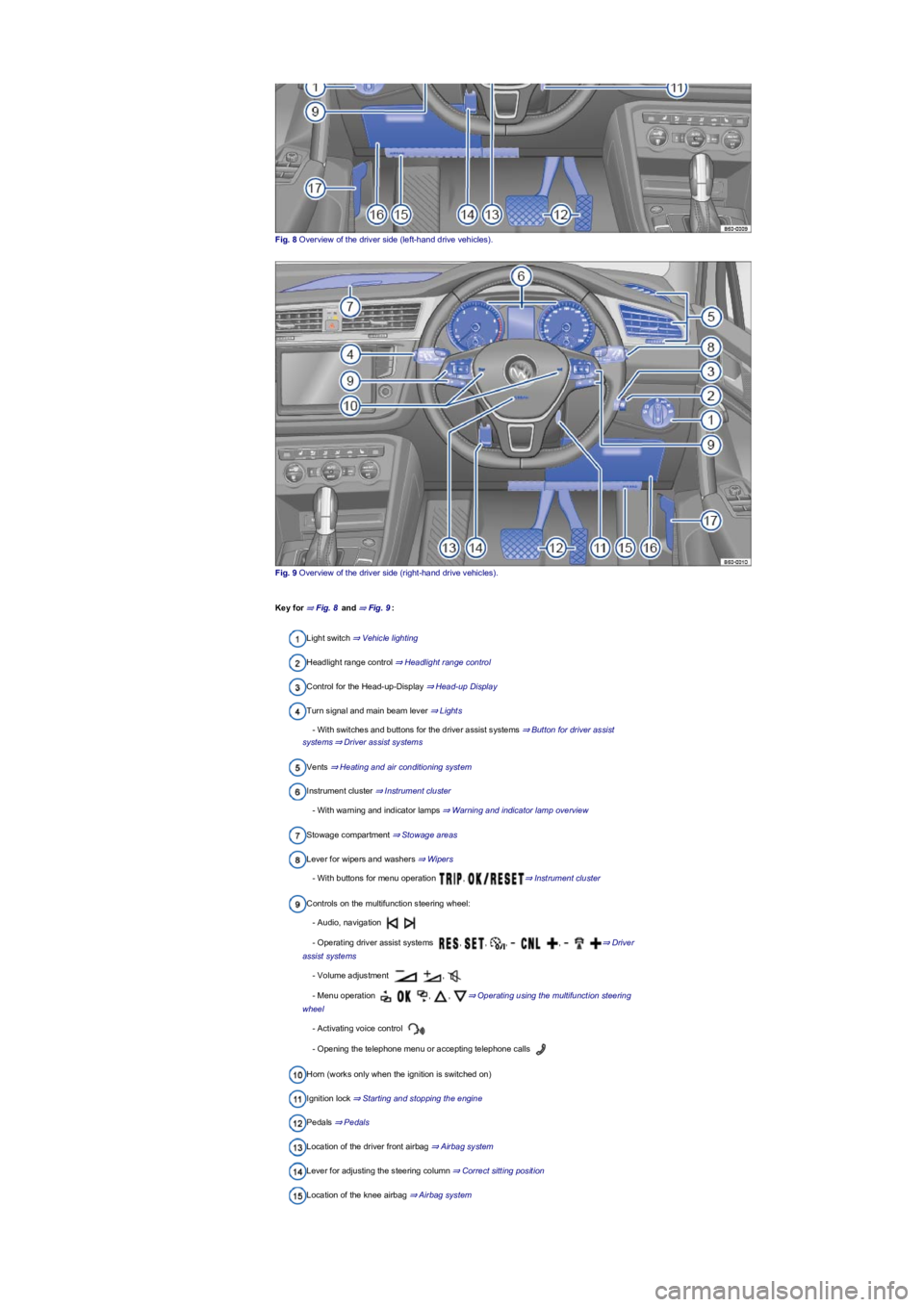
Fig. 8 Overview of the driver side (left-hand drive vehicles).
Fig. 9 Overview of the driver side (right-hand drive vehicles).
Key for ⇒ Fig. 8 and ⇒ Fig. 9:
Light switch ⇒ Vehicle lighting
Headlight range control ⇒ Headlight range control
Control for the Head-up-Display ⇒ Head-up Display
Turn signal and main beam lever ⇒ Lights
- With switches and buttons for the driver assist systems ⇒ Button for driver assist
systems⇒ Driver assist systems
Vents ⇒ Heating and air conditioning system
Instrument cluster ⇒ Instrument cluster
- With warning and indicator lamps ⇒ Warning and indicator lamp overview
Stowage compartment ⇒ Stowage areas
Lever for wipers and washers ⇒ Wipers
- With buttons for menu operation , ⇒ Instrument cluster
Controls on the multifunction steering wheel:
- Audio, navigation
- Operating driver assist systems , , , , ⇒ Driver
assist systems
- Volume adjustment ,
- Menu operation , , ⇒ Operating using the multifunction steering
wheel
- Activating voice control
- Opening the telephone menu or accepting telephone calls
Horn (works only when the ignition is switched on)
Ignition lock ⇒ Starting and stopping the engine
Pedals ⇒ Pedals
Location of the driver front airbag ⇒ Airbag system
Lever for adjusting the steering column ⇒ Correct sitting position
Location of the knee airbag ⇒ Airbag system
Page 8 of 341
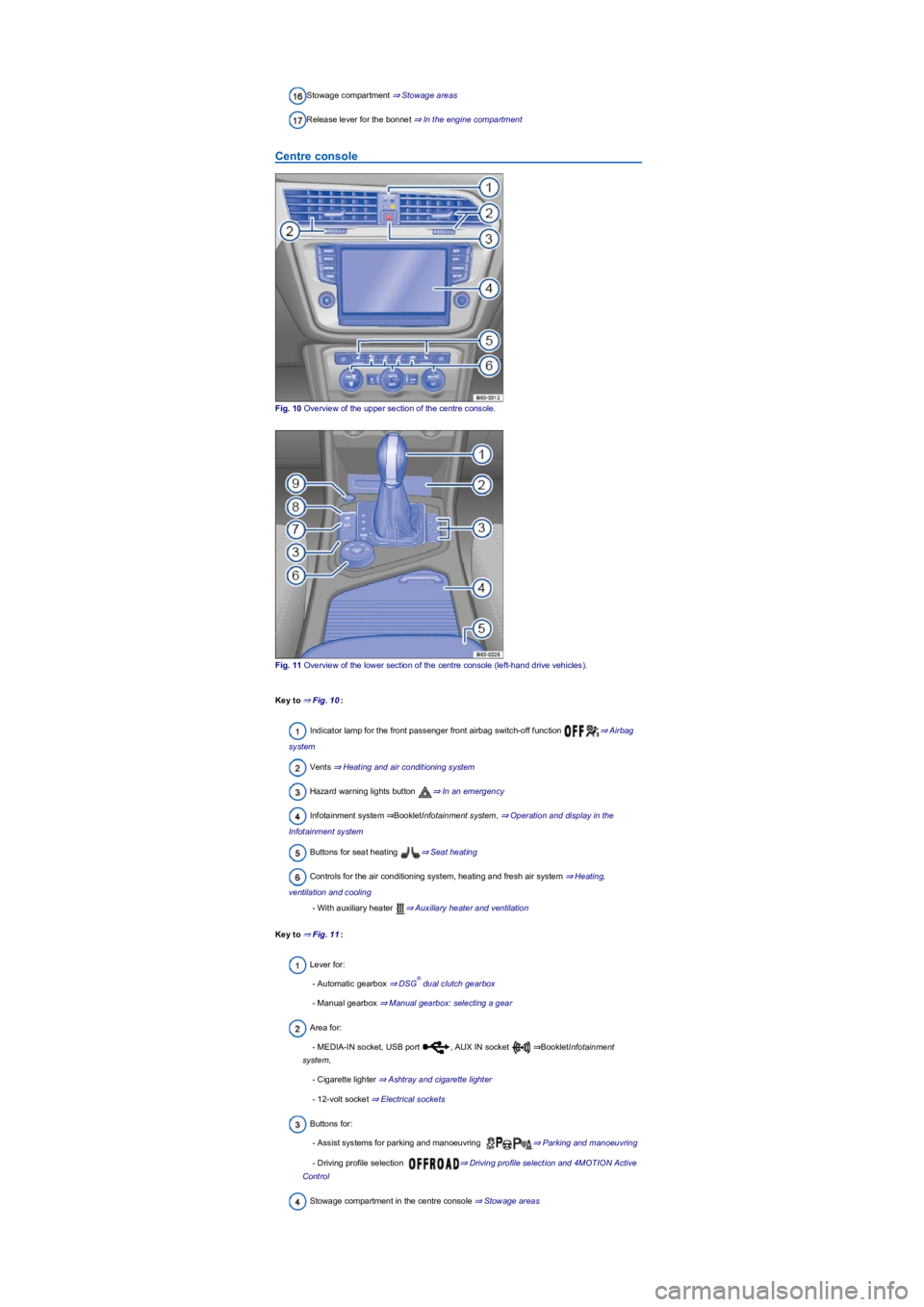
Stowage compartment ⇒ Stowage areas
Release lever for the bonnet ⇒ In the engine compartment
Centre console
Fig. 10 Overview of the upper section of the centre console.
Fig. 11 Overview of the lower section of the centre console (left-hand drive vehicles).
Key to ⇒ Fig. 10:
Indicator lamp for the front passenger front airbag switch-off function ⇒ Airbag
system
Vents ⇒ Heating and air conditioning system
Hazard warning lights button ⇒ In an emergency
Infotainment system ⇒BookletInfotainment system, ⇒ Operation and display in the
Infotainment system
Buttons for seat heating ⇒ Seat heating
Controls for the air conditioning system, heating and fresh air system ⇒ Heating,
ventilation and cooling
- With auxiliary heater ⇒ Auxiliary heater and ventilation
Key to ⇒ Fig. 11:
Lever for:
- Automatic gearbox ⇒ DSG dual clutch gearbox
- Manual gearbox ⇒ Manual gearbox: selecting a gear
Area for:
- MEDIA-IN socket, USB port , AUX IN socket ⇒BookletInfotainment
system,
- Cigarette lighter ⇒ Ashtray and cigarette lighter
- 12-volt socket ⇒ Electrical sockets
Buttons for:
- Assist systems for parking and manoeuvring ⇒ Parking and manoeuvring
- Driving profile selection ⇒ Driving profile selection and 4MOTION Active
Control
Stowage compartment in the centre console ⇒ Stowage areas
®
Page 10 of 341
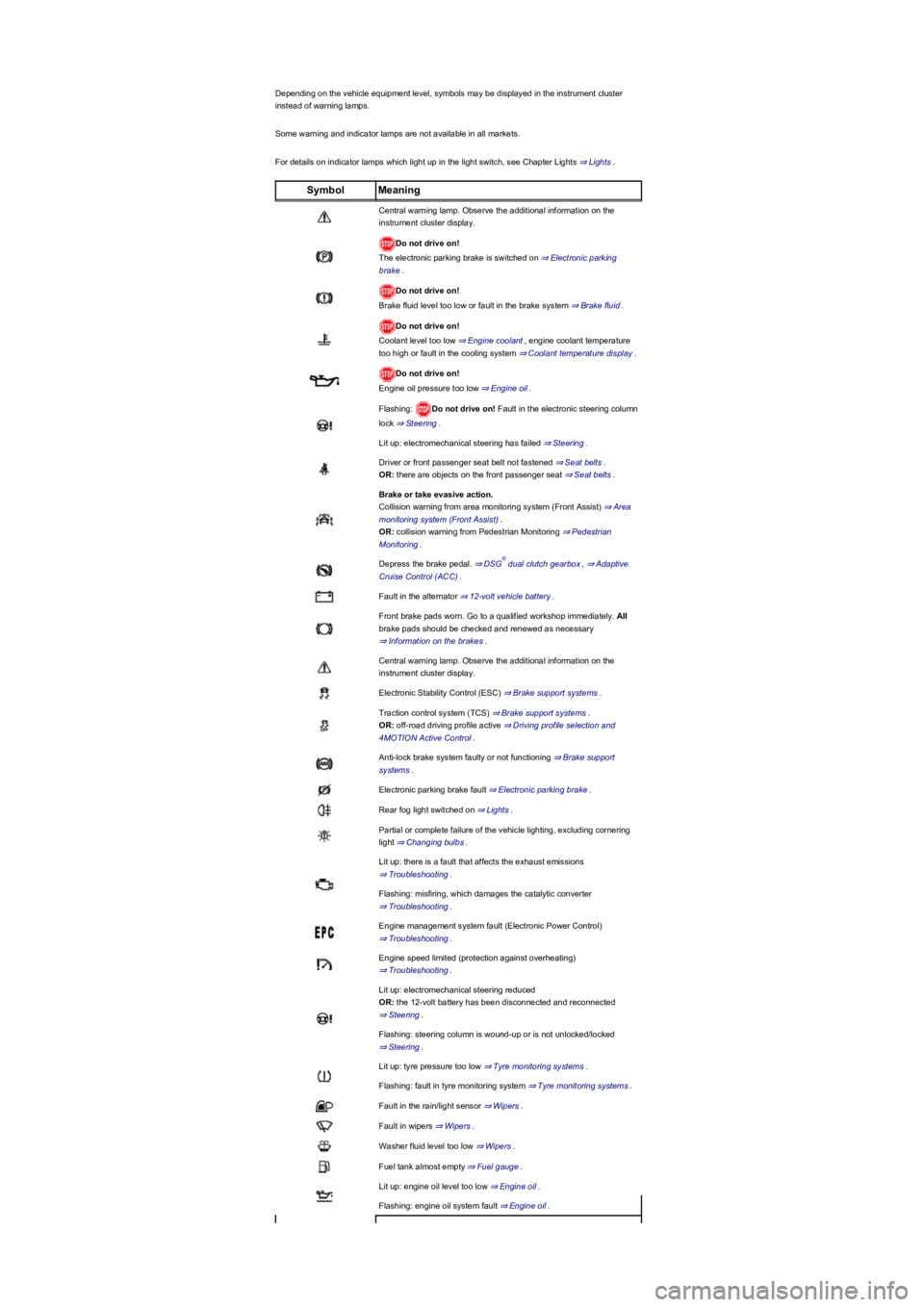
Depending on the vehicle equipment level, symbols may be displayed in the instrument cluster
instead of warning lamps.
Some warning and indicator lamps are not available in all markets.
For details on indicator lamps which light up in the light switch, see Chapter Lights ⇒ Lights.
SymbolMeaning
Central warning lamp. Observe the additional information on the
instrument cluster display.
Do not drive on!
The electronic parking brake is switched on ⇒ Electronic parking
brake.
Do not drive on!
Brake fluid level too low or fault in the brake system ⇒ Brake fluid.
Do not drive on!
Coolant level too low ⇒ Engine coolant, engine coolant temperature
too high or fault in the cooling system ⇒ Coolant temperature display.
Do not drive on!
Engine oil pressure too low ⇒ Engine oil.
Flashing: Do not drive on! Fault in the electronic steering column
lock ⇒ Steering.
Lit up: electromechanical steering has failed ⇒ Steering.
Driver or front passenger seat belt not fastened ⇒ Seat belts.
OR: there are objects on the front passenger seat ⇒ Seat belts.
Brake or take evasive action.
Collision warning from area monitoring system (Front Assist) ⇒ Area
monitoring system (Front Assist).
OR: collision warning from Pedestrian Monitoring ⇒ Pedestrian
Monitoring.
Depress the brake pedal. ⇒ DSG dual clutch gearbox, ⇒ Adaptive
Cruise Control (ACC).
Fault in the alternator ⇒ 12-volt vehicle battery.
Front brake pads worn. Go to a qualified workshop immediately. All
brake pads should be checked and renewed as necessary
⇒ Information on the brakes.
Central warning lamp. Observe the additional information on the
instrument cluster display.
Electronic Stability Control (ESC) ⇒ Brake support systems.
Traction control system (TCS) ⇒ Brake support systems.
OR: off-road driving profile active ⇒ Driving profile selection and
4MOTION Active Control.
Anti-lock brake system faulty or not functioning ⇒ Brake support
systems.
Electronic parking brake fault ⇒ Electronic parking brake.
Rear fog light switched on ⇒ Lights.
Partial or complete failure of the vehicle lighting, excluding cornering
light ⇒ Changing bulbs.
Lit up: there is a fault that affects the exhaust emissions
⇒ Troubleshooting.
Flashing: misfiring, which damages the catalytic converter
⇒ Troubleshooting.
Engine management system fault (Electronic Power Control)
⇒ Troubleshooting.
Engine speed limited (protection against overheating)
⇒ Troubleshooting.
Lit up: electromechanical steering reduced
OR: the 12-volt battery has been disconnected and reconnected
⇒ Steering.
Flashing: steering column is wound-up or is not unlocked/locked
⇒ Steering.
Lit up: tyre pressure too low ⇒ Tyre monitoring systems.
Flashing: fault in tyre monitoring system ⇒ Tyre monitoring systems.
Fault in the rain/light sensor ⇒ Wipers.
Fault in wipers ⇒ Wipers.
Washer fluid level too low ⇒ Wipers.
Fuel tank almost empty ⇒ Fuel gauge.
Lit up: engine oil level too low ⇒ Engine oil.
Flashing: engine oil system fault ⇒ Engine oil.
®
Page 11 of 341
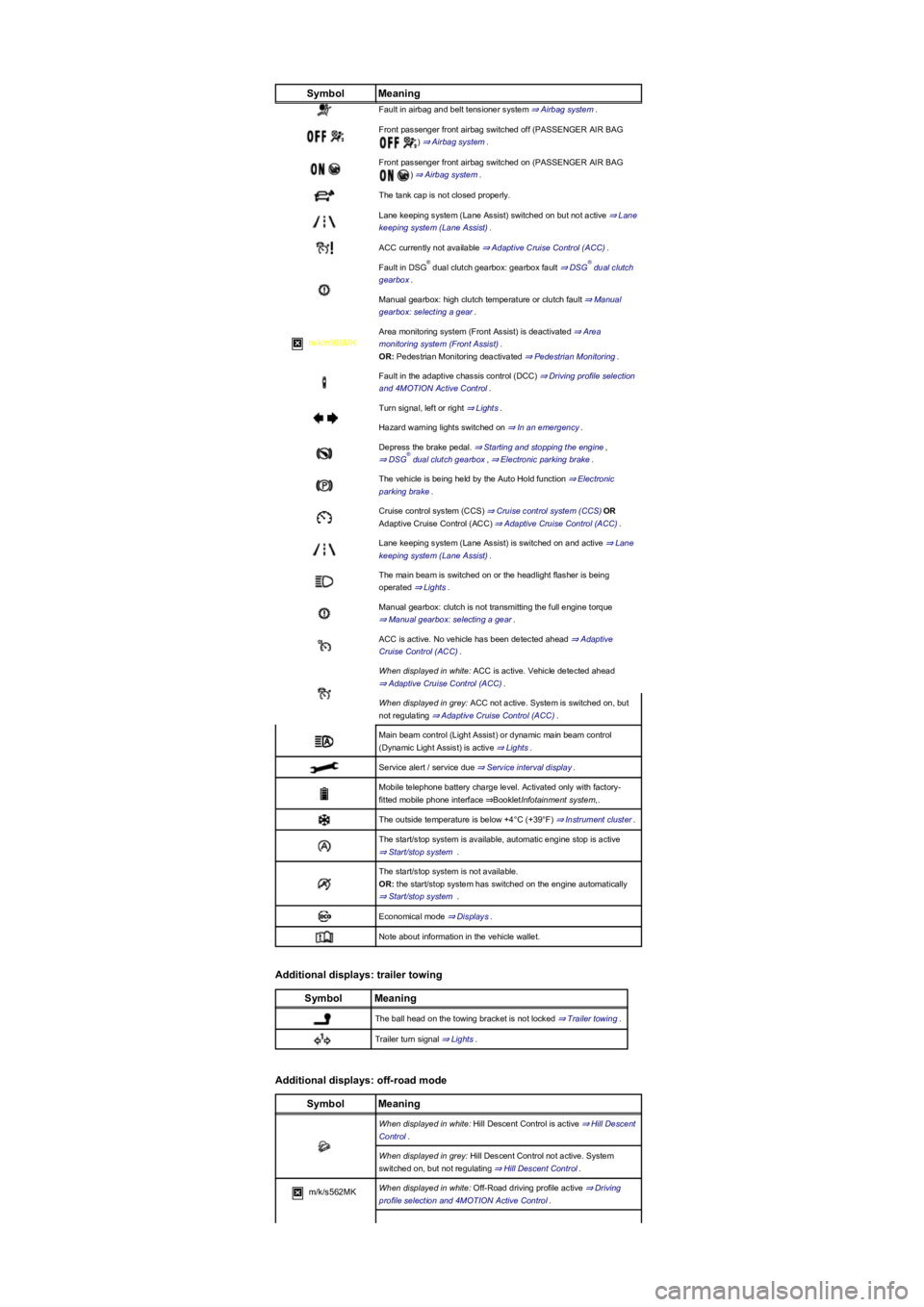
SymbolMeaning
Fault in airbag and belt tensioner system ⇒ Airbag system.
Front passenger front airbag switched off (PASSENGER AIR BAG
) ⇒ Airbag system.
Front passenger front airbag switched on (PASSENGER AIR BAG
) ⇒ Airbag system.
The tank cap is not closed properly.
Lane keeping system (Lane Assist) switched on but not active ⇒ Lane
keeping system (Lane Assist).
ACC currently not available ⇒ Adaptive Cruise Control (ACC).
Fault in DSG dual clutch gearbox: gearbox fault ⇒ DSG dual clutch
gearbox.
Manual gearbox: high clutch temperature or clutch fault ⇒ Manual
gearbox: selecting a gear.
m/k/n998MK
Area monitoring system (Front Assist) is deactivated ⇒ Area
monitoring system (Front Assist).
OR: Pedestrian Monitoring deactivated ⇒ Pedestrian Monitoring.
Fault in the adaptive chassis control (DCC) ⇒ Driving profile selection
and 4MOTION Active Control.
Turn signal, left or right ⇒ Lights.
Hazard warning lights switched on ⇒ In an emergency.
Depress the brake pedal. ⇒ Starting and stopping the engine,
⇒ DSG dual clutch gearbox, ⇒ Electronic parking brake.
The vehicle is being held by the Auto Hold function ⇒ Electronic
parking brake.
Cruise control system (CCS) ⇒ Cruise control system (CCS)OR
Adaptive Cruise Control (ACC) ⇒ Adaptive Cruise Control (ACC).
Lane keeping system (Lane Assist) is switched on and active ⇒ Lane
keeping system (Lane Assist).
The main beam is switched on or the headlight flasher is being
operated ⇒ Lights.
Manual gearbox: clutch is not transmitting the full engine torque
⇒ Manual gearbox: selecting a gear.
ACC is active. No vehicle has been detected ahead ⇒ Adaptive
Cruise Control (ACC).
When displayed in white: ACC is active. Vehicle detected ahead
⇒ Adaptive Cruise Control (ACC).
When displayed in grey: ACC not active. System is switched on, but
not regulating ⇒ Adaptive Cruise Control (ACC).
Main beam control (Light Assist) or dynamic main beam control
(Dynamic Light Assist) is active ⇒ Lights.
Service alert / service due ⇒ Service interval display.
Mobile telephone battery charge level. Activated only with factory-
fitted mobile phone interface ⇒BookletInfotainment system,.
The outside temperature is below +4°C (+39°F) ⇒ Instrument cluster.
The start/stop system is available, automatic engine stop is active
⇒ Start/stop system .
The start/stop system is not available.
OR: the start/stop system has switched on the engine automatically
⇒ Start/stop system .
Economical mode ⇒ Displays.
Note about information in the vehicle wallet.
Additional displays: trailer towing
SymbolMeaning
The ball head on the towing bracket is not locked ⇒ Trailer towing.
Trailer turn signal ⇒ Lights.
Additional displays: off-road mode
SymbolMeaning
When displayed in white: Hill Descent Control is active ⇒ Hill Descent
Control.
When displayed in grey: Hill Descent Control not active. System
switched on, but not regulating ⇒ Hill Descent Control.
m/k/s562MKWhen displayed in white: Off-Road driving profile active ⇒ Driving
profile selection and 4MOTION Active Control.
®®
®
Page 17 of 341
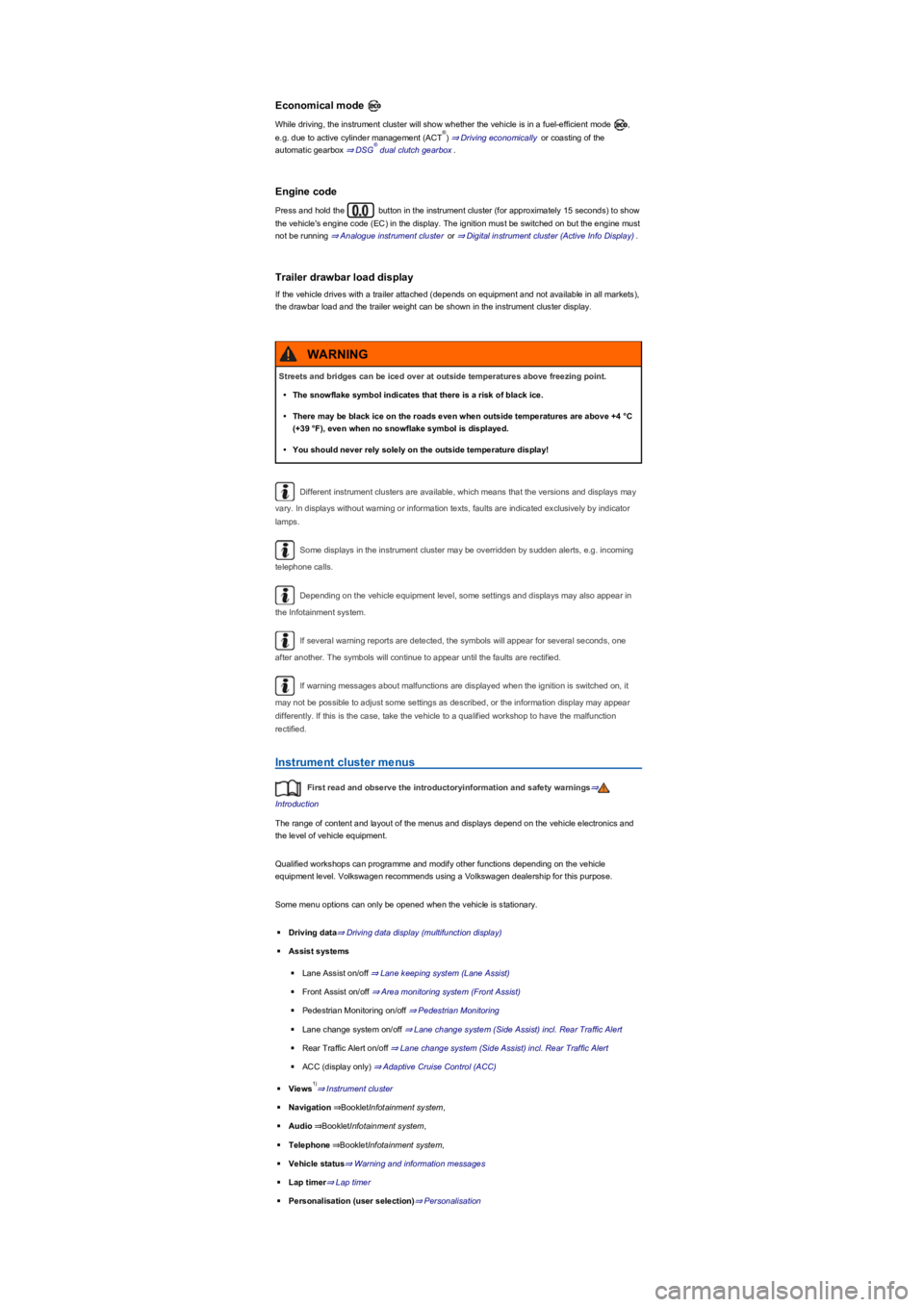
Economical mode
While driving, the instrument cluster will show whether the vehicle is in a fuel-efficient mode ,
e.g. due to active cylinder management (ACT) ⇒ Driving economically or coasting of the
automatic gearbox ⇒ DSG dual clutch gearbox.
Engine code
Press and hold the button in the instrument cluster (for approximately 15 seconds) to show
the vehicle's engine code (EC) in the display. The ignition must be switched on but the engine must
not be running ⇒ Analogue instrument cluster or ⇒ Digital instrument cluster (Active Info Display).
Trailer drawbar load display
If the vehicle drives with a trailer attached (depends on equipment and not available in all markets),
the drawbar load and the trailer weight can be shown in the instrument cluster display.
Different instrument clusters are available, which means that the versions and displays may
vary. In displays without warning or information texts, faults are indicated exclusively by indicator
lamps.
Some displays in the instrument cluster may be overridden by sudden alerts, e.g. incoming
telephone calls.
Depending on the vehicle equipment level, some settings and displays may also appear in
the Infotainment system.
If several warning reports are detected, the symbols will appear for several seconds, one
after another. The symbols will continue to appear until the faults are rectified.
If warning messages about malfunctions are displayed when the ignition is switched on, it
may not be possible to adjust some settings as described, or the information display may appear
differently. If this is the case, take the vehicle to a qualified workshop to have the malfunction
rectified.
Instrument cluster menus
First read and observe the introductoryinformation and safety warnings⇒
Introduction
The range of content and layout of the menus and displays depend on the vehicle electronics and
the level of vehicle equipment.
Qualified workshops can programme and modify other functions depending on the vehicle
equipment level. Volkswagen recommends using a Volkswagen dealership for this purpose.
Some menu options can only be opened when the vehicle is stationary.
◾Driving data⇒ Driving data display (multifunction display)
◾Assist systems
◾Lane Assist on/off ⇒ Lane keeping system (Lane Assist)
◾Front Assist on/off ⇒ Area monitoring system (Front Assist)
◾Pedestrian Monitoring on/off ⇒ Pedestrian Monitoring
◾Lane change system on/off ⇒ Lane change system (Side Assist) incl. Rear Traffic Alert
◾Rear Traffic Alert on/off ⇒ Lane change system (Side Assist) incl. Rear Traffic Alert
◾ACC (display only) ⇒ Adaptive Cruise Control (ACC)
◾Views⇒ Instrument cluster
◾Navigation⇒BookletInfotainment system,
◾Audio⇒BookletInfotainment system,
◾Telephone⇒BookletInfotainment system,
◾Vehicle status⇒ Warning and information messages
◾Lap timer⇒ Lap timer
◾Personalisation (user selection)⇒ Personalisation
®
®
Streets and bridges can be iced over at outside temperatures above freezing point.
•The snowflake symbol indicates that there is a risk of black ice.
•There may be black ice on the roads even when outside temperatures are above +4 °C
(+39 °F), even when no snowflake symbol is displayed.
•You should never rely solely on the outside temperature display!
WARNING
1)
Page 20 of 341
Switching on and off
The Driver Alert System can be activated or deactivated using the button or function
button and the Vehicle, and Driver assistance function buttons in the
Infotainment system ⇒ Vehicle settings menu.
Function limitations
The Driver Alert System has system-related limitations. The following conditions can limit the
function of the Driver Alert System, or prevent it from working altogether:
•Speeds less than 60 km/h (37 mph).
•Speeds of more than 200 km/h (125 mph).
•Roads with bends.
•Poor roads.
•Adverse weather conditions.
•Sporty driving style.
•Towing a heavy/long trailer.
•The driver is distracted.
The Driver Alert System is reset in the following situations:
•The ignition is switched off.
•The driver seat belt is unfastened and the driver door is open.
•The vehicle has been stationary for longer than 15 minutes.
The Driver Alert System is automatically reset in case of long slow drives (speed less than 60 km/h
(37 mph)). If the speed is increased, the system evaluates the driving behaviour again.
The Driver Alert System has been developed for use only while driving on highways and
good roads.
If there is a system fault, proceed to a qualified workshop immediately to have the system
checked.
Dynamic Road Sign Display (Sign Assist)
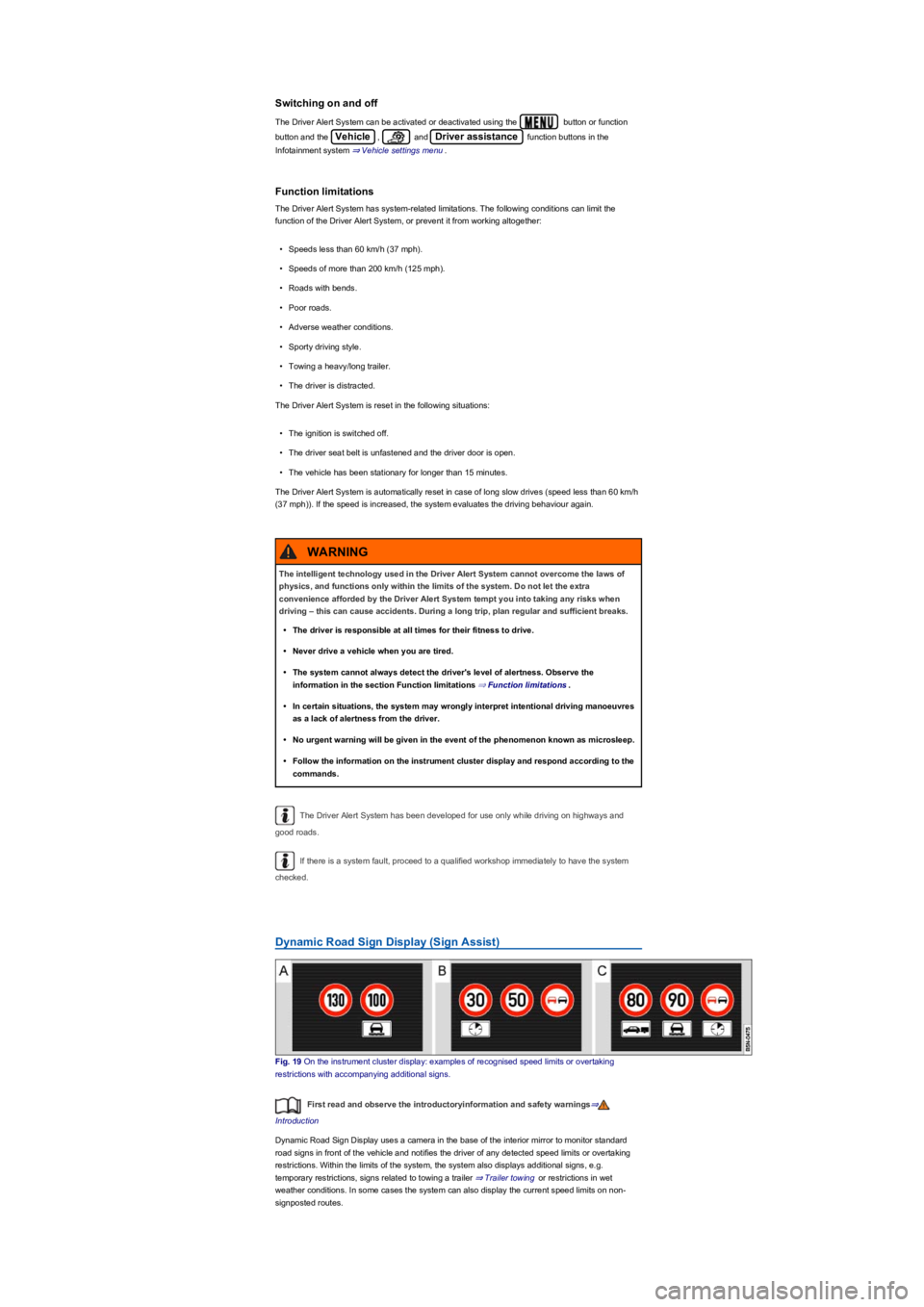
Fig. 19 On the instrument cluster display: examples of recognised speed limits or overtaking
restrictions with accompanying additional signs.
First read and observe the introductoryinformation and safety warnings⇒
Introduction
Dynamic Road Sign Display uses a camera in the base of the interior mirror to monitor standard
road signs in front of the vehicle and notifies the driver of any detected speed limits or overtaking
restrictions. Within the limits of the system, the system also displays additional signs, e.g.
temporary restrictions, signs related to towing a trailer ⇒ Trailer towing or restrictions in wet
weather conditions. In some cases the system can also display the current speed limits on non-
signposted routes.
The intelligent technology used in the Driver Alert System cannot overcome the laws of
physics, and functions only within the limits of the system. Do not let the extra
convenience afforded by the Driver Alert System tempt you into taking any risks when
driving – this can cause accidents. During a long trip, plan regular and sufficient breaks.
•The driver is responsible at all times for their fitness to drive.
•Never drive a vehicle when you are tired.
•The system cannot always detect the driver's level of alertness. Observe the
information in the section Function limitations ⇒ Function limitations.
•In certain situations, the system may wrongly interpret intentional driving manoeuvres
as a lack of alertness from the driver.
•No urgent warning will be given in the event of the phenomenon known as microsleep.
•Follow the information on the instrument cluster display and respond according to the
commands.
WARNING
Page 27 of 341
If any priority 1 ⇒ Instrument cluster warning reports are being displayed, you will be unable to
open any menus. Some warnings can be confirmed and switched off with the button on the
multifunction steering wheel ⇒ Fig. 25.
Selecting a menu or information display
•Switch on the ignition.
•Personalisation: select user.
•If a message or the vehicle pictogram is displayed, press the button ⇒ Fig. 25, several
times if required.
•Press the or button to display a menu or browse through a menu ⇒ Fig. 25.
•To open the menu or information display, press ⇒ Fig. 25 or wait until the menu or
information display opens automatically after a few seconds.
Making settings in menus
•In the displayed menu, press the arrow keys or ⇒ Fig. 25 until the desired menu
option is marked. A frame appears around the selected option.
•Press button ⇒ Fig. 25 to make the necessary change. A tick indicates that the
particular system or function is active.
Returning to the selection menu
Press the or button ⇒ Fig. 25.
If warning messages about malfunctions are displayed when the ignition is switched on, it
may not be possible to adjust some settings as described, or the information display may appear
differently. If this is the case, take the vehicle to a qualified workshop to have the malfunction
rectified.
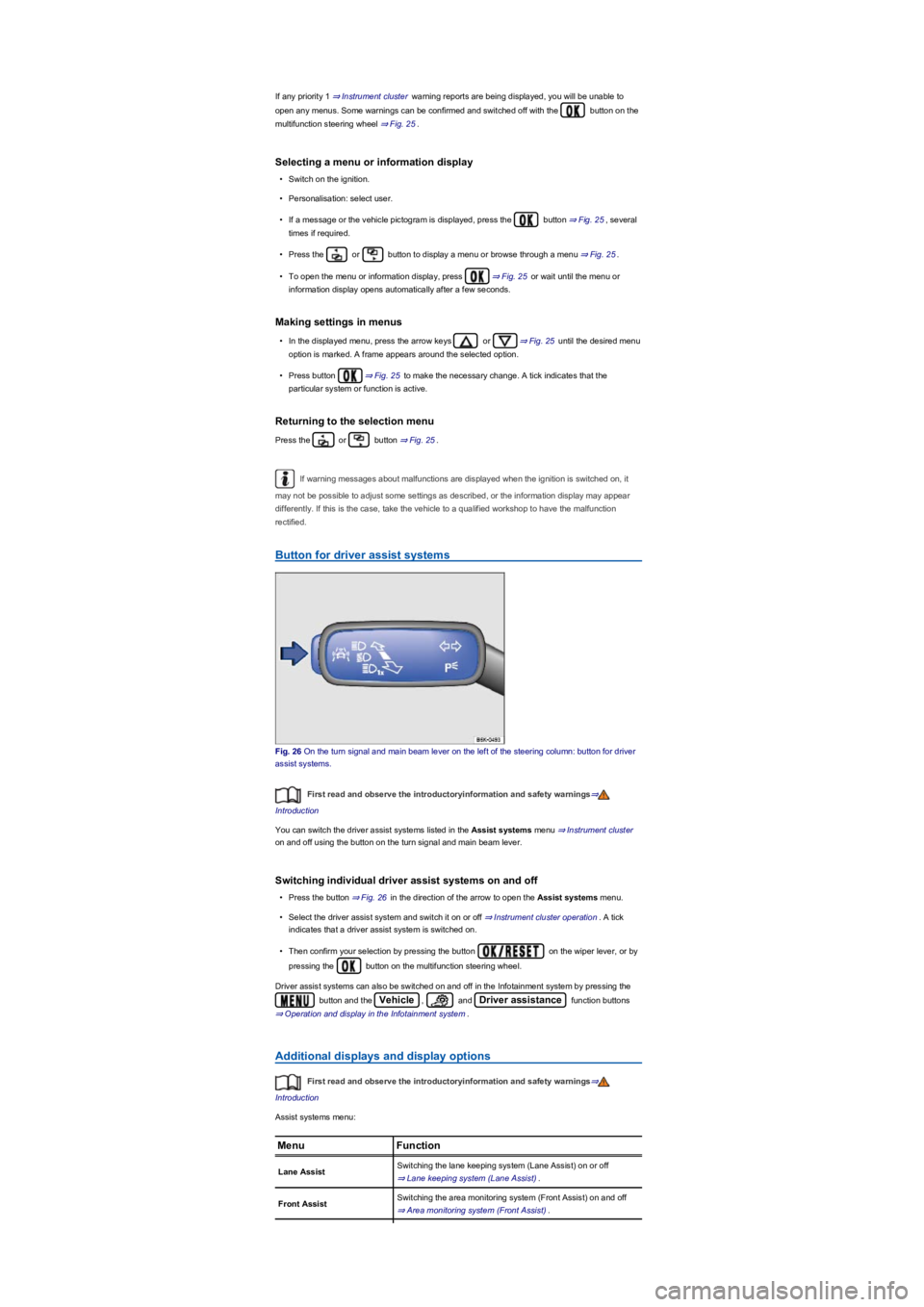
Button for driver assist systems
Fig. 26 On the turn signal and main beam lever on the left of the steering column: button for driver
assist systems.
First read and observe the introductoryinformation and safety warnings⇒
Introduction
You can switch the driver assist systems listed in the Assist systems menu ⇒ Instrument cluster
on and off using the button on the turn signal and main beam lever.
Switching individual driver assist systems on and off
•Press the button ⇒ Fig. 26 in the direction of the arrow to open the Assist systems menu.
•Select the driver assist system and switch it on or off ⇒ Instrument cluster operation. A tick
indicates that a driver assist system is switched on.
•Then confirm your selection by pressing the button on the wiper lever, or by
pressing the button on the multifunction steering wheel.
Driver assist systems can also be switched on and off in the Infotainment system by pressing the
button and the Vehicle, and Driver assistance function buttons
⇒ Operation and display in the Infotainment system.
Additional displays and display options
First read and observe the introductoryinformation and safety warnings⇒
Introduction
Assist systems menu:
MenuFunction
Lane AssistSwitching the lane keeping system (Lane Assist) on or off
⇒ Lane keeping system (Lane Assist).
Front AssistSwitching the area monitoring system (Front Assist) on and off
⇒ Area monitoring system (Front Assist).
Page 29 of 341
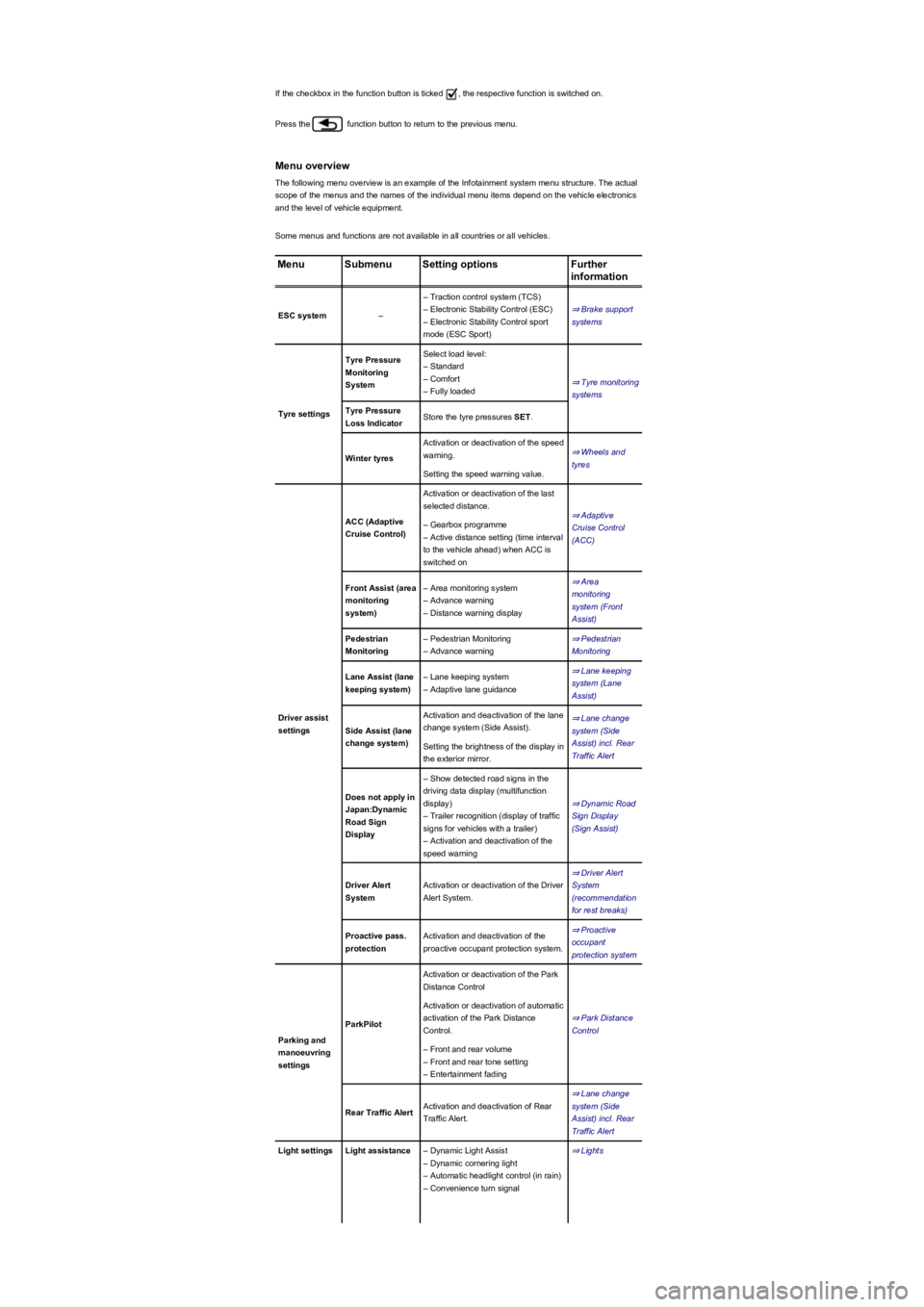
If the checkbox in the function button is ticked , the respective function is switched on.
Press the function button to return to the previous menu.
Menu overview
The following menu overview is an example of the Infotainment system menu structure. The actual
scope of the menus and the names of the individual menu items depend on the vehicle electronics
and the level of vehicle equipment.
Some menus and functions are not available in all countries or all vehicles.
MenuSubmenuSetting optionsFurther
information
ESC system–
– Traction control system (TCS)
– Electronic Stability Control (ESC)
– Electronic Stability Control sport
mode (ESC Sport)
⇒ Brake support
systems
Tyre settings
Tyre Pressure
Monitoring
System
Select load level:
– Standard
– Comfort
– Fully loaded
⇒ Tyre monitoring
systems
Tyre Pressure
Loss IndicatorStore the tyre pressures SET.
Winter tyres
Activation or deactivation of the speed
warning.⇒ Wheels and
tyres
Setting the speed warning value.
Driver assist
settings
ACC (Adaptive
Cruise Control)
Activation or deactivation of the last
selected distance.
⇒ Adaptive
Cruise Control
(ACC)
– Gearbox programme
– Active distance setting (time interval
to the vehicle ahead) when ACC is
switched on
Front Assist (area
monitoring
system)
– Area monitoring system
– Advance warning
– Distance warning display
⇒ Area
monitoring
system (Front
Assist)
Pedestrian
Monitoring
– Pedestrian Monitoring
– Advance warning
⇒ Pedestrian
Monitoring
Lane Assist (lane
keeping system)
– Lane keeping system
– Adaptive lane guidance
⇒ Lane keeping
system (Lane
Assist)
Side Assist (lane
change system)
Activation and deactivation of the lane
change system (Side Assist).
⇒ Lane change
system (Side
Assist) incl. Rear
Traffic Alert
Setting the brightness of the display in
the exterior mirror.
Does not apply in
Japan:Dynamic
Road Sign
Display
– Show detected road signs in the
driving data display (multifunction
display)
– Trailer recognition (display of traffic
signs for vehicles with a trailer)
– Activation and deactivation of the
speed warning
⇒ Dynamic Road
Sign Display
(Sign Assist)
Driver Alert
System
Activation or deactivation of the Driver
Alert System.
⇒ Driver Alert
System
(recommendation
for rest breaks)
Proactive pass.
protection
Activation and deactivation of the
proactive occupant protection system.
⇒ Proactive
occupant
protection system
Parking and
manoeuvring
settings
ParkPilot
Activation or deactivation of the Park
Distance Control
⇒ Park Distance
Control
Activation or deactivation of automatic
activation of the Park Distance
Control.
– Front and rear volume
– Front and rear tone setting
– Entertainment fading
Rear Traffic AlertActivation and deactivation of Rear
Traffic Alert.
⇒ Lane change
system (Side
Assist) incl. Rear
Traffic Alert
Light settingsLight assistance– Dynamic Light Assist
– Dynamic cornering light
– Automatic headlight control (in rain)
– Convenience turn signal
⇒ Lights
Page 30 of 341
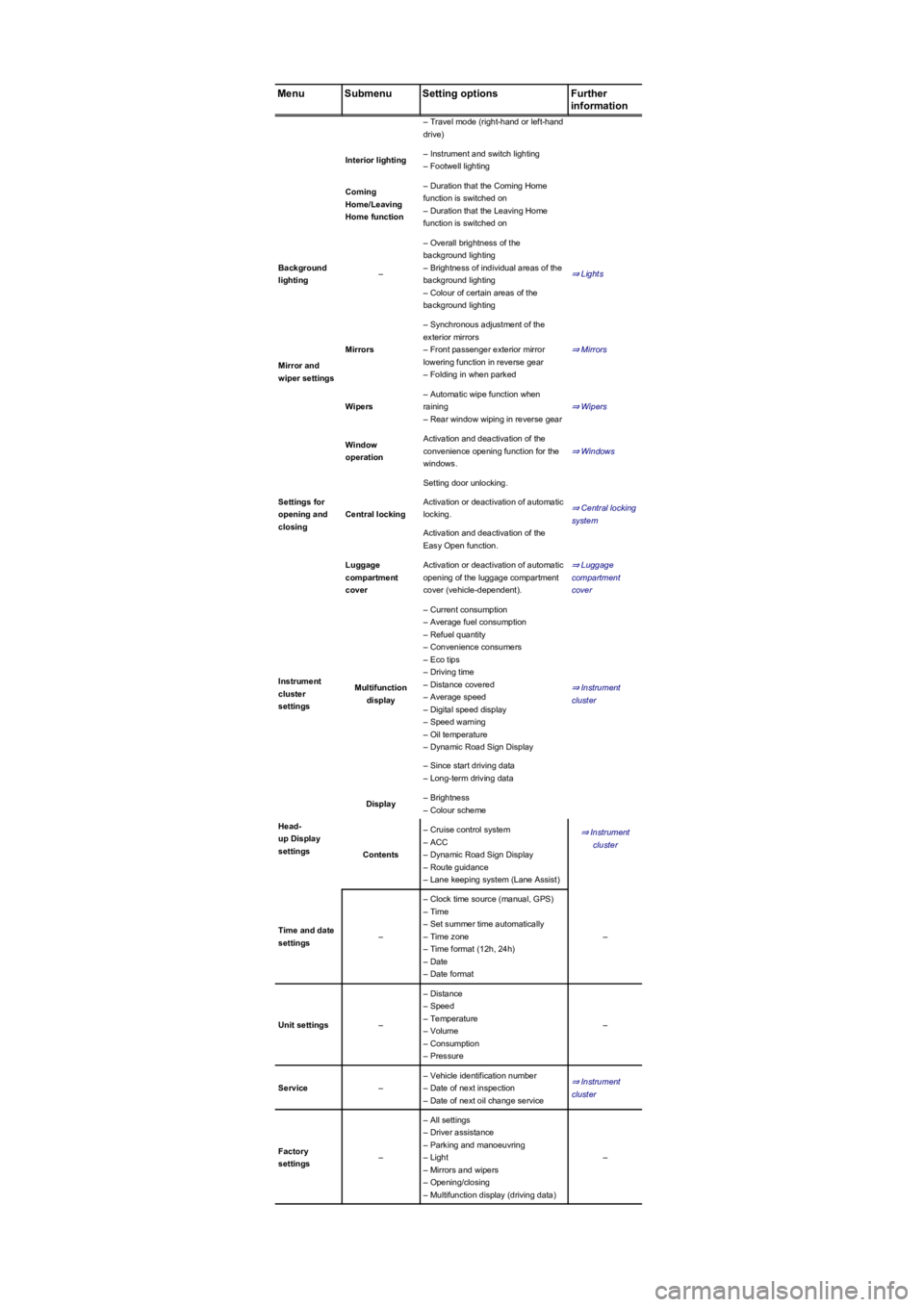
MenuSubmenuSetting optionsFurther
information
– Travel mode (right-hand or left-hand
drive)
Interior lighting– Instrument and switch lighting
– Footwell lighting
Coming
Home/Leaving
Home function
– Duration that the Coming Home
function is switched on
– Duration that the Leaving Home
function is switched on
Background
lighting–
– Overall brightness of the
background lighting
– Brightness of individual areas of the
background lighting
– Colour of certain areas of the
background lighting
⇒ Lights
Mirror and
wiper settings
Mirrors
– Synchronous adjustment of the
exterior mirrors
– Front passenger exterior mirror
lowering function in reverse gear
– Folding in when parked
⇒ Mirrors
Wipers
– Automatic wipe function when
raining
– Rear window wiping in reverse gear
⇒ Wipers
Settings for
opening and
closing
Window
operation
Activation and deactivation of the
convenience opening function for the
windows.
⇒ Windows
Central locking
Setting door unlocking.
⇒ Central locking
system
Activation or deactivation of automatic
locking.
Activation and deactivation of the
Easy Open function.
Luggage
compartment
cover
Activation or deactivation of automatic
opening of the luggage compartment
cover (vehicle-dependent).
⇒ Luggage
compartment
cover
Instrument
cluster
settings
Multifunction
display
– Current consumption
– Average fuel consumption
– Refuel quantity
– Convenience consumers
– Eco tips
– Driving time
– Distance covered
– Average speed
– Digital speed display
– Speed warning
– Oil temperature
– Dynamic Road Sign Display
⇒ Instrument
cluster
– Since start driving data
– Long-term driving data
Head-
up Display
settings
Display– Brightness
– Colour scheme
⇒ Instrument
cluster
Contents
– Cruise control system
– ACC
– Dynamic Road Sign Display
– Route guidance
– Lane keeping system (Lane Assist)
Time and date
settings–
– Clock time source (manual, GPS)
– Time
– Set summer time automatically
– Time zone
– Time format (12h, 24h)
– Date
– Date format
–
Unit settings–
– Distance
– Speed
– Temperature
– Volume
– Consumption
– Pressure
–
Service–
– Vehicle identification number
– Date of next inspection
– Date of next oil change service
⇒ Instrument
cluster
Factory
settings–
– All settings
– Driver assistance
– Parking and manoeuvring
– Light
– Mirrors and wipers
– Opening/closing
– Multifunction display (driving data)
–