boot VOLKSWAGEN TIGUAN 2017 Owner´s Manual
[x] Cancel search | Manufacturer: VOLKSWAGEN, Model Year: 2017, Model line: TIGUAN, Model: VOLKSWAGEN TIGUAN 2017Pages: 341, PDF Size: 9.14 MB
Page 5 of 341
Rear window:
- Rear window heating ⇒ Heating and air conditioning system
- Rear wiper ⇒ Wipers⇒ Wiper blades
- Window aerial ⇒ Radio reception and aerials
Tail light clusters ⇒ Lights⇒ Changing bulbs
Area for:
- Number plate lights ⇒ Changing bulbs
- Rear view camera system ⇒ Rear view camera system (Rear View)
- Boot lid release button ⇒ Opening and closing the boot lid
Tail light clusters ⇒ Lights⇒ Changing bulbs
Behind the bumper: radar sensor for assist systems ⇒ Caring for and cleaning the vehicle
exterior
Sensors for assist systems ⇒ Caring for and cleaning the vehicle exterior
Towing bracket ⇒ Trailer towing
Behind a cover: mounting for towing eye ⇒ Tow-starting or towing
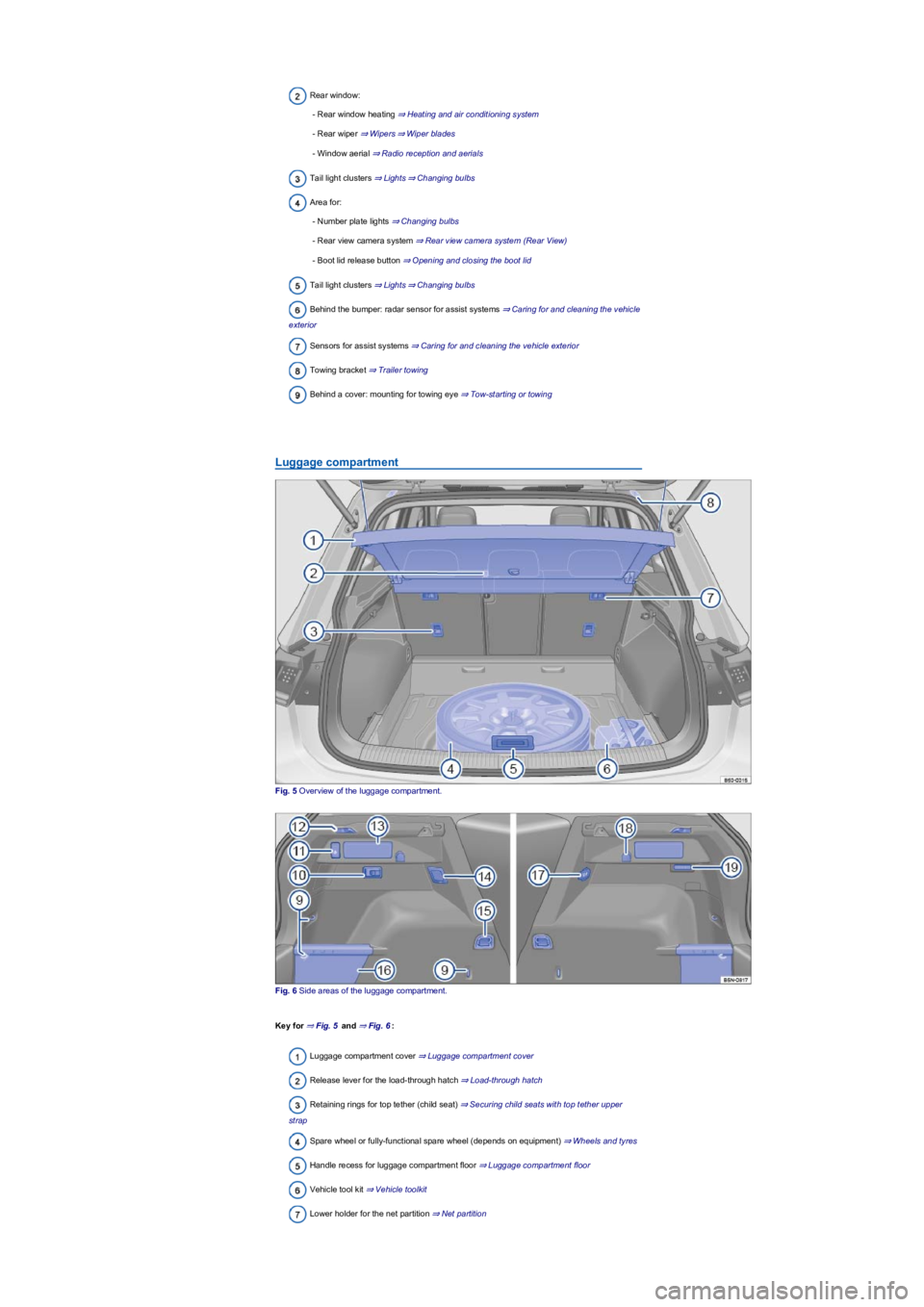
Luggage compartment
Fig. 5 Overview of the luggage compartment.
Fig. 6 Side areas of the luggage compartment.
Key for ⇒ Fig. 5 and ⇒ Fig. 6:
Luggage compartment cover ⇒ Luggage compartment cover
Release lever for the load-through hatch ⇒ Load-through hatch
Retaining rings for top tether (child seat) ⇒ Securing child seats with top tether upper
strap
Spare wheel or fully-functional spare wheel (depends on equipment) ⇒ Wheels and tyres
Handle recess for luggage compartment floor ⇒ Luggage compartment floor
Vehicle tool kit ⇒ Vehicle toolkit
Lower holder for the net partition ⇒ Net partition
Page 6 of 341
Upper holder for the net partition ⇒ Net partition
Rigid fastening rings ⇒ Fastening rings
Removable light ⇒ Removeable lights
Button for unlocking the ball head ⇒ Trailer towing
Bracket for the luggage compartment floor ⇒ Luggage compartment floor
Backrest remote release mechanism ⇒ Folding the backrests on the rear bench seat
forwards and backwards
230-volt socket ⇒ Electrical sockets
Foldable fastening rings ⇒ Fastening rings
Stowage area behind trim
12-volt socket ⇒ Electrical sockets
Bag hook ⇒ Bag hook
Luggage compartment light
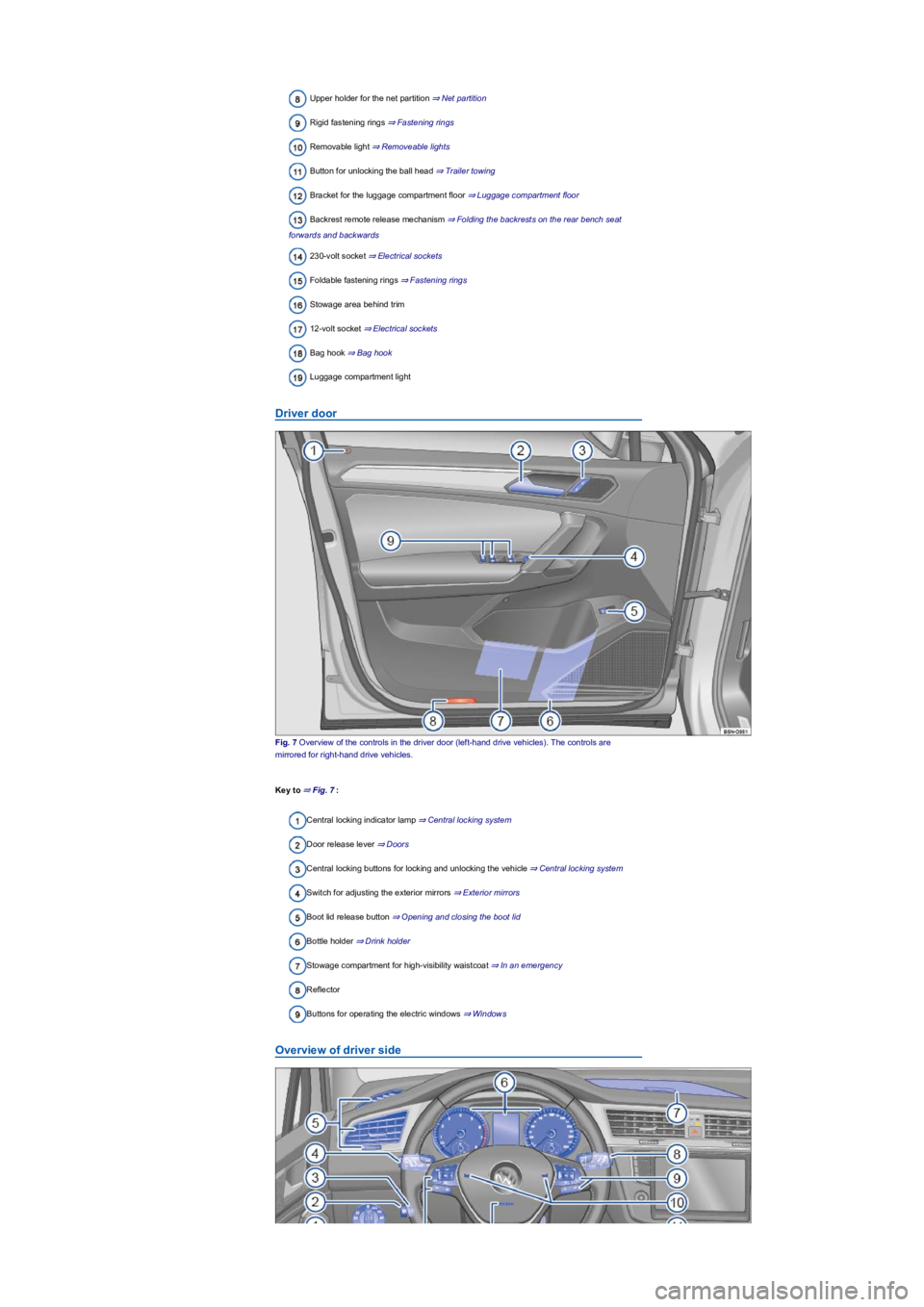
Driver door
Fig. 7 Overview of the controls in the driver door (left-hand drive vehicles). The controls are
mirrored for right-hand drive vehicles.
Key to ⇒ Fig. 7:
Central locking indicator lamp ⇒ Central locking system
Door release lever ⇒ Doors
Central locking buttons for locking and unlocking the vehicle ⇒ Central locking system
Switch for adjusting the exterior mirrors ⇒ Exterior mirrors
Boot lid release button ⇒ Opening and closing the boot lid
Bottle holder ⇒ Drink holder
Stowage compartment for high-visibility waistcoat ⇒ In an emergency
Reflector
Buttons for operating the electric windows ⇒ Windows
Overview of driver side
Page 15 of 341
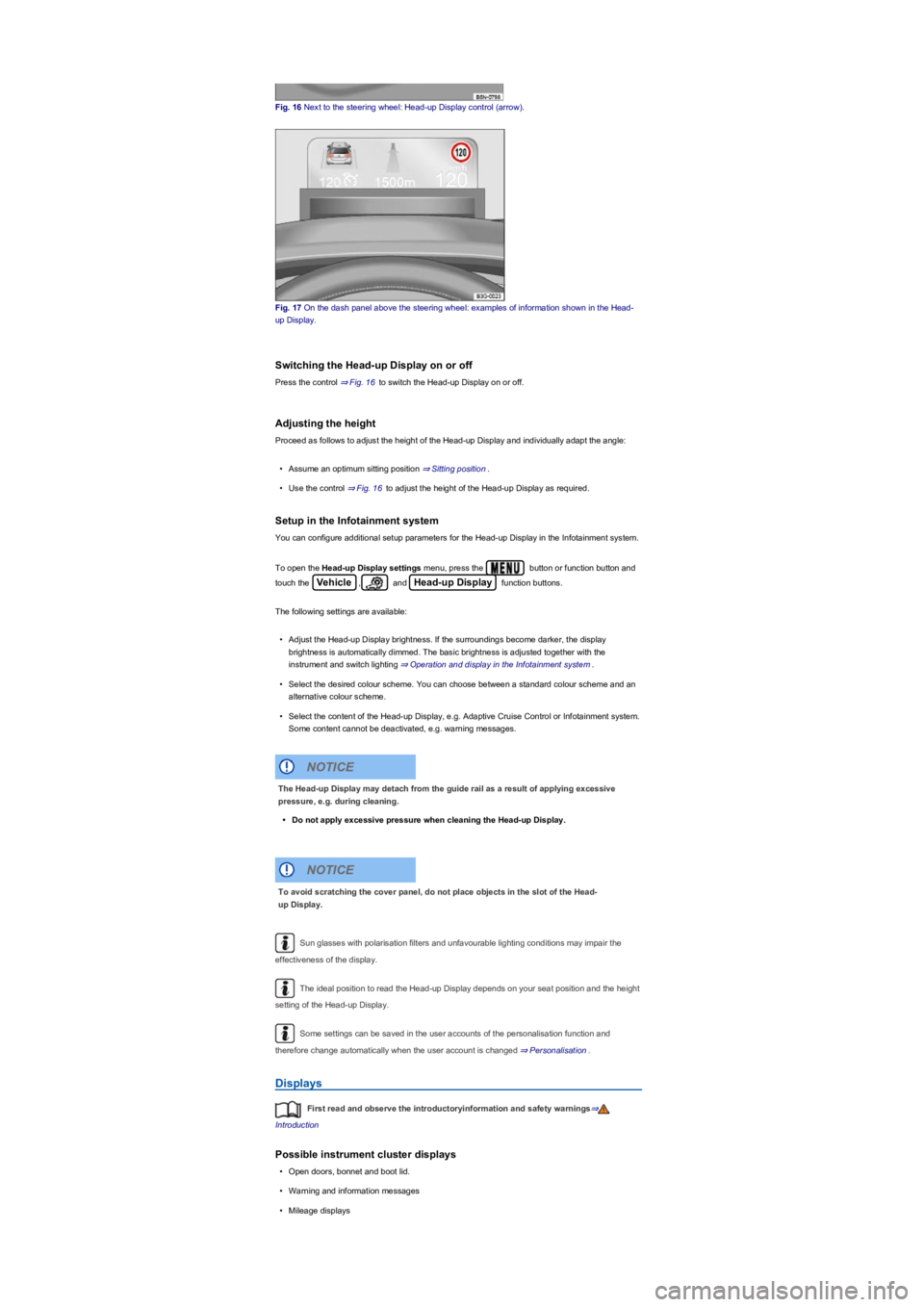
Fig. 16 Next to the steering wheel: Head-up Display control (arrow).
Fig. 17 On the dash panel above the steering wheel: examples of information shown in the Head-
up Display.
Switching the Head-up Display on or off
Press the control ⇒ Fig. 16 to switch the Head-up Display on or off.
Adjusting the height
Proceed as follows to adjust the height of the Head-up Display and individually adapt the angle:
•Assume an optimum sitting position ⇒ Sitting position.
•Use the control ⇒ Fig. 16 to adjust the height of the Head-up Display as required.
Setup in the Infotainment system
You can configure additional setup parameters for the Head-up Display in the Infotainment system.
To open the Head-up Display settings menu, press the button or function button and
touch the Vehicle, and Head-up Display function buttons.
The following settings are available:
•Adjust the Head-up Display brightness. If the surroundings become darker, the display
brightness is automatically dimmed. The basic brightness is adjusted together with the
instrument and switch lighting ⇒ Operation and display in the Infotainment system.
•Select the desired colour scheme. You can choose between a standard colour scheme and an
alternative colour scheme.
•Select the content of the Head-up Display, e.g. Adaptive Cruise Control or Infotainment system.
Some content cannot be deactivated, e.g. warning messages.
Sun glasses with polarisation filters and unfavourable lighting conditions may impair the
effectiveness of the display.
The ideal position to read the Head-up Display depends on your seat position and the height
setting of the Head-up Display.
Some settings can be saved in the user accounts of the personalisation function and
therefore change automatically when the user account is changed ⇒ Personalisation.
Displays
First read and observe the introductoryinformation and safety warnings⇒
Introduction
Possible instrument cluster displays
•Open doors, bonnet and boot lid.
•Warning and information messages
•Mileage displays
The Head-up Display may detach from the guide rail as a result of applying excessive
pressure, e.g. during cleaning.
•Do not apply excessive pressure when cleaning the Head-up Display.
NOTICE
To avoid scratching the cover panel, do not place objects in the slot of the Head-
up Display.
NOTICE
Page 16 of 341
•Time ⇒ Time.
•Radio and navigation information ⇒BookletInfotainment system,.
•Telephone information ⇒BookletInfotainment system,.
•Outside temperature
•Compass display
•Selector lever positions
•Gear-change indicator ⇒ Gear-change indicator.
•Driving data display (multifunction display) and menus for various settings ⇒ Instrument cluster
menus.
•Service interval display ⇒ Service interval display.
•Speed warning function ⇒ Instrument cluster menus.
•Speed warning for winter tyres.
•Start/stop system status display ⇒ Start/stop system .
•Status display for Active Cylinder Management (ACT) ⇒ Driving economically.
•Economical mode .
•Engine code (EC)
•Personalisation: welcome and user selection.
•Road signs detected by the Dynamic Road Sign Display system ⇒ Dynamic Road Sign Display
(Sign Assist).
Open doors, bonnet and boot lid
The instrument cluster display indicates if any doors, the bonnet or boot lid are open once the
vehicle has been unlocked, and while the vehicle is in motion. In some cases, a signal tone is also
given. Different instrument cluster designs will have different displays.
Selector lever positions (DSG dual clutch gearbox)
The gear selected is displayed on the side of the selector lever and on the display in the instrument
cluster. The instrument cluster display may show which gear has been selected if the selector lever
is in D/S position or in Tiptronic mode ⇒ DSG dual clutch gearbox.
Outside temperature display
If the outside temperature falls below approximately +4°C (+39°F), the temperature display also
shows a snowflake symbol . This symbol remains lit up until the outside temperature rises
above +6°C (+43°F) ⇒.
Heat radiated from the engine may cause the temperature display to show a slightly higher value
than the actual outside temperature if the vehicle is stationary, the auxiliary heater ⇒ Auxiliary
heater and ventilation is switched on or the vehicle is travelling at a very low vehicle speed.
The measuring range lies between -45°C (-49°F) and +76°C (+169°F).
Gear-change indicator
When driving in Tiptronic mode, the instrument cluster display may recommend a gear to save fuel
⇒ Gear-change indicator.
Mileage displays
The odometer registers the total distance travelled by the car.
The trip recorder (trip) shows the distance travelled since the trip recorder was last reset.
•To reset the trip recorder to 0, briefly press the button in the instrument cluster
⇒ Analogue instrument cluster or ⇒ Digital instrument cluster (Active Info Display).
Speed warning for winter tyres
A display in the instrument cluster indicates when the set maximum speed has been exceeded
⇒ Instrument cluster menus.
You can adjust the settings for the speed warning in the Infotainment system ⇒ Vehicle settings
menu.
Compass display
If the ignition is switched on, depending on the equipment level, the instrument cluster display
shows the current direction of travel in the form of an abbreviation, e.g. NW for north west.
The graphic compass display is also shown when the Infotainment system is switched on and route
guidance is not active.
®
®
®
Page 63 of 341
The 12-volt vehicle battery will discharge if the hazard warning lights are left on over a long
period of time – even when the ignition is switched off.
Depending on the vehicle equipment, the brake lights flash rapidly if you brake sharply or
initiate full braking at a speed of more than 80 km/h (50 mph). This is a particularly effective way of
attracting the attention of vehicles behind you. If you then continue to brake, the hazard warning
lights will be switched on automatically at speeds under approximately 10 km/h (6 mph). Once the
vehicle starts to accelerate, the hazard warning lights will switch off again.
Equipment for an emergency
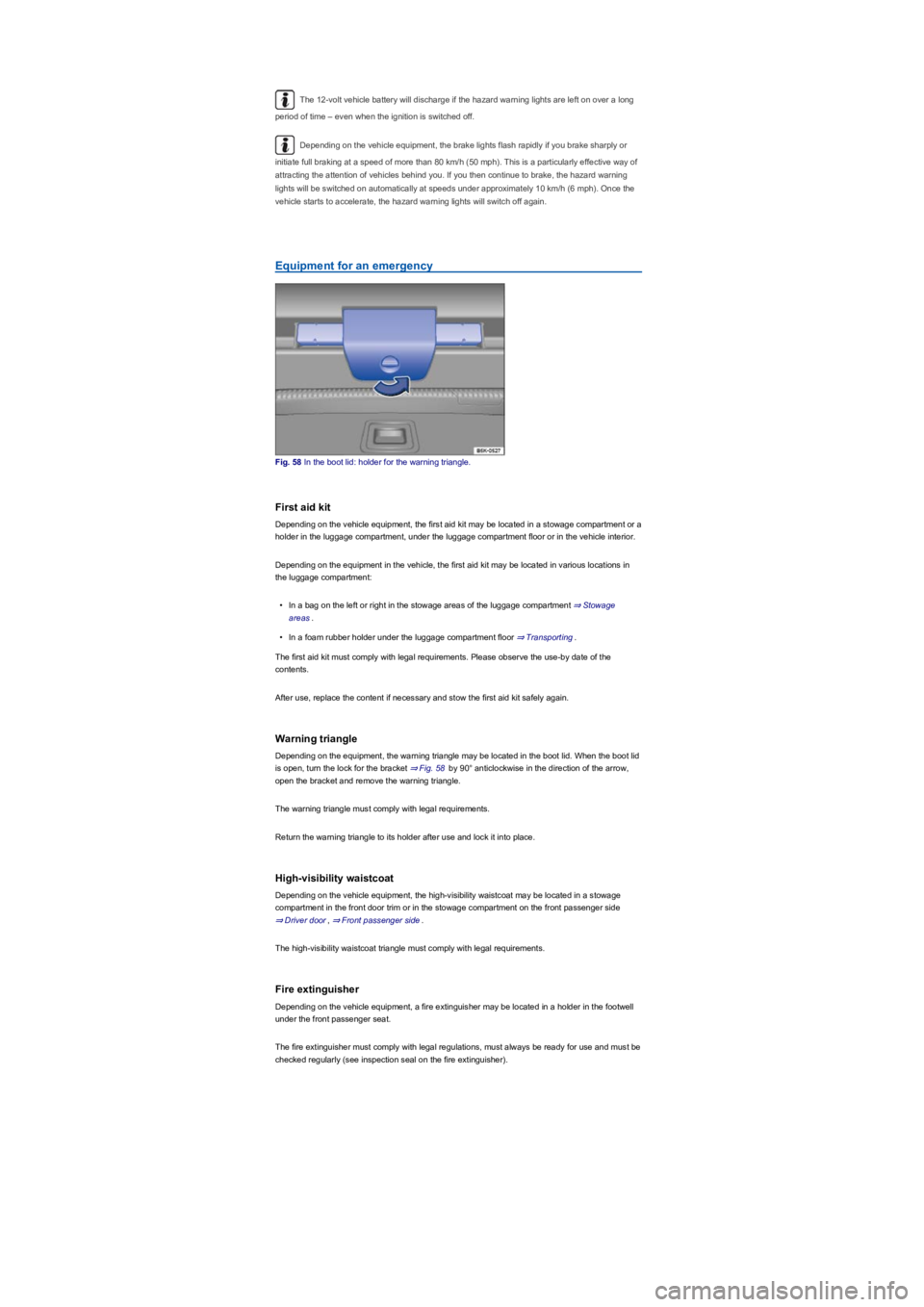
Fig. 58 In the boot lid: holder for the warning triangle.
First aid kit
Depending on the vehicle equipment, the first aid kit may be located in a stowage compartment or a
holder in the luggage compartment, under the luggage compartment floor or in the vehicle interior.
Depending on the equipment in the vehicle, the first aid kit may be located in various locations in
the luggage compartment:
•In a bag on the left or right in the stowage areas of the luggage compartment ⇒ Stowage
areas.
•In a foam rubber holder under the luggage compartment floor ⇒ Transporting.
The first aid kit must comply with legal requirements. Please observe the use-by date of the
contents.
After use, replace the content if necessary and stow the first aid kit safely again.
Warning triangle
Depending on the equipment, the warning triangle may be located in the boot lid. When the boot lid
is open, turn the lock for the bracket ⇒ Fig. 58 by 90° anticlockwise in the direction of the arrow,
open the bracket and remove the warning triangle.
The warning triangle must comply with legal requirements.
Return the warning triangle to its holder after use and lock it into place.
High-visibility waistcoat
Depending on the vehicle equipment, the high-visibility waistcoat may be located in a stowage
compartment in the front door trim or in the stowage compartment on the front passenger side
⇒ Driver door, ⇒ Front passenger side.
The high-visibility waistcoat triangle must comply with legal requirements.
Fire extinguisher
Depending on the vehicle equipment, a fire extinguisher may be located in a holder in the footwell
under the front passenger seat.
The fire extinguisher must comply with legal regulations, must always be ready for use and must be
checked regularly (see inspection seal on the fire extinguisher).
Page 67 of 341
Vehicle key
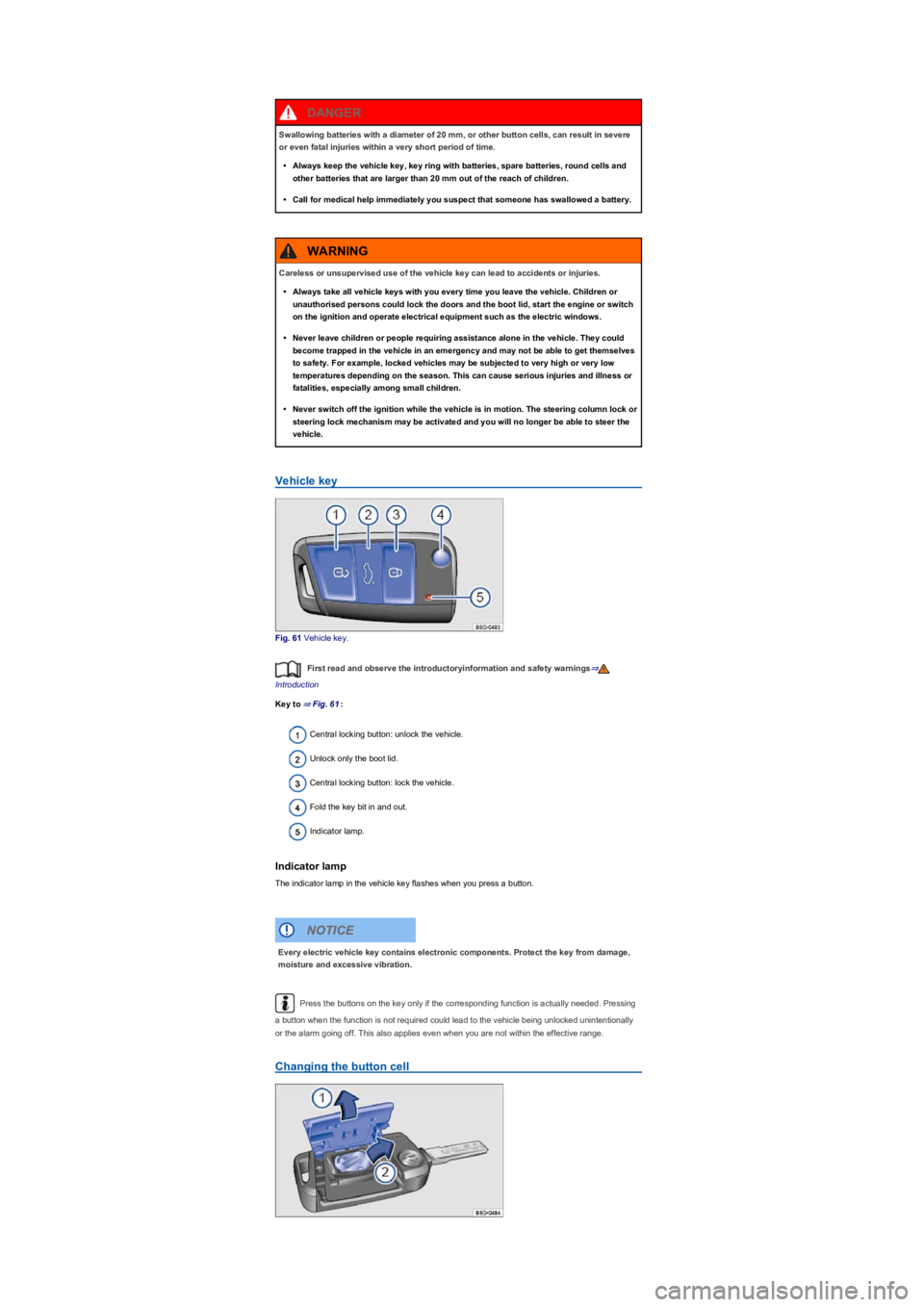
Fig. 61 Vehicle key.
First read and observe the introductoryinformation and safety warnings⇒
Introduction
Key to ⇒ Fig. 61:
Central locking button: unlock the vehicle.
Unlock only the boot lid.
Central locking button: lock the vehicle.
Fold the key bit in and out.
Indicator lamp.
Indicator lamp
The indicator lamp in the vehicle key flashes when you press a button.
Press the buttons on the key only if the corresponding function is actually needed. Pressing
a button when the function is not required could lead to the vehicle being unlocked unintentionally
or the alarm going off. This also applies even when you are not within the effective range.
Changing the button cell
Swallowing batteries with a diameter of 20 mm, or other button cells, can result in severe
or even fatal injuries within a very short period of time.
•Always keep the vehicle key, key ring with batteries, spare batteries, round cells and
other batteries that are larger than 20 mm out of the reach of children.
•Call for medical help immediately you suspect that someone has swallowed a battery.
DANGER
Careless or unsupervised use of the vehicle key can lead to accidents or injuries.
•Always take all vehicle keys with you every time you leave the vehicle. Children or
unauthorised persons could lock the doors and the boot lid, start the engine or switch
on the ignition and operate electrical equipment such as the electric windows.
•Never leave children or people requiring assistance alone in the vehicle. They could
become trapped in the vehicle in an emergency and may not be able to get themselves
to safety. For example, locked vehicles may be subjected to very high or very low
temperatures depending on the season. This can cause serious injuries and illness or
fatalities, especially among small children.
•Never switch off the ignition while the vehicle is in motion. The steering column lock or
steering lock mechanism may be activated and you will no longer be able to steer the
vehicle.
WARNING
Every electric vehicle key contains electronic components. Protect the key from damage,
moisture and excessive vibration.
NOTICE
Page 69 of 341
Central and manual locking
Introduction
This chapter contains information on the followingsubjects:
⇒ Indicator lamp
⇒ Central locking system
⇒ Locking and unlocking the vehicle from the outside
⇒ Locking and unlocking the vehicle from the inside
⇒ Locking and unlocking the vehicle with
⇒ SAFELOCK
⇒ Anti-theft alarm
⇒ Interior monitoring system and anti-tow alarm
⇒ Locking the vehicle after the airbag has been triggered
⇒ Troubleshooting
The central locking system locks all doors and the boot lid of the vehicle. The vehicle cannot be
locked if the driver door is open.
The vehicle can only be locked if the ignition has been switched off or the driver has switched off
the engine before leaving the vehicle.
Automatic locking (anti-theft protection)
The vehicle will lock itself again automatically after around 45 seconds if one of the following
conditions applies:
•The vehicle was unlocked but not opened.
•The ignition was not switched on.
•The boot lid was not opened.
•The vehicle has been unlocked using the lock cylinder.
•The vehicle was locked with the central locking button in the vehicle interior.
Indicator lamp
First read and observe the introductoryinformation and safety warnings⇒
Introduction
The central locking indicator lamp is located in the driver door ⇒ Driver door.
Vehicle locked: red LED flashes at short intervals for approximately two seconds, and then more
slowly. The indicator lamp does not flash if the vehicle was locked with the central locking button in
the driver door ⇒ Locking and unlocking the vehicle from the inside.
Central locking system
First read and observe the introductoryinformation and safety warnings⇒
Introduction
The central locking system enables you to lock or unlock all the doors, the boot lid and the tank flap
from one point.
Settings for the central locking system can be adjusted in the Infotainment system ⇒ Operation and
display in the Infotainment system.
Automatic locking (Auto Lock)
The vehicle may lock itself automatically at speeds of approximately 15 km/h (9 mph) and above
⇒ Operation and display in the Infotainment system. The indicator lamp in the central locking
button will light up yellow when the vehicle is locked.
Improper use of the central locking system could lead to serious injury.
•The central locking system locks all doors. Locking the vehicle from the inside can
prevent accidental opening of the doors and unauthorised persons from entering the
vehicle. However, locked doors can delay assistance to passengers inside the vehicle
in the event of an accident or emergency.
•Never leave children or people requiring assistance alone in the vehicle. All doors can
be locked from the inside using the central locking button. This may mean that people
lock themselves in the vehicle. People locked in the vehicle may be subjected to very
high or very low temperatures.
•Temperatures inside a locked vehicle may reach extremes of heat or cold, according to
season. This can cause serious injuries and illness or fatalities, especially to small
children.
•Never leave anyone inside a locked vehicle. People in the vehicle could become
trapped in an emergency and may not be able to get themselves to safety.
•Doors and the boot lid should therefore be opened or closed only when you are sure
that nobody is in their path.
WARNING
Page 70 of 341
Automatic unlocking (Auto Unlock)
All doors and the boot lid are automatically unlocked if one of the following conditions applies:
•The vehicle is at a standstill and the vehicle key has been removed.
•m/k/a995MKIn vehicles with a DSG dual clutch gearbox: the selector lever is in
position P and the ignition has been switched off.
•OR: the vehicle is stationary and the button has been pressed.
•OR: the door release lever has been operated.
•OR: In an accident where the airbags have been triggered ⇒ Locking the vehicle after the
airbag has been triggered.
Automatic unlocking provides access to the vehicle if assistance is required.
Even if single door unlocking has already taken place, the entire vehicle will be unlocked
when the sensors are touched twice. The entire vehicle must be locked.
Locking and unlocking the vehicle from the outside
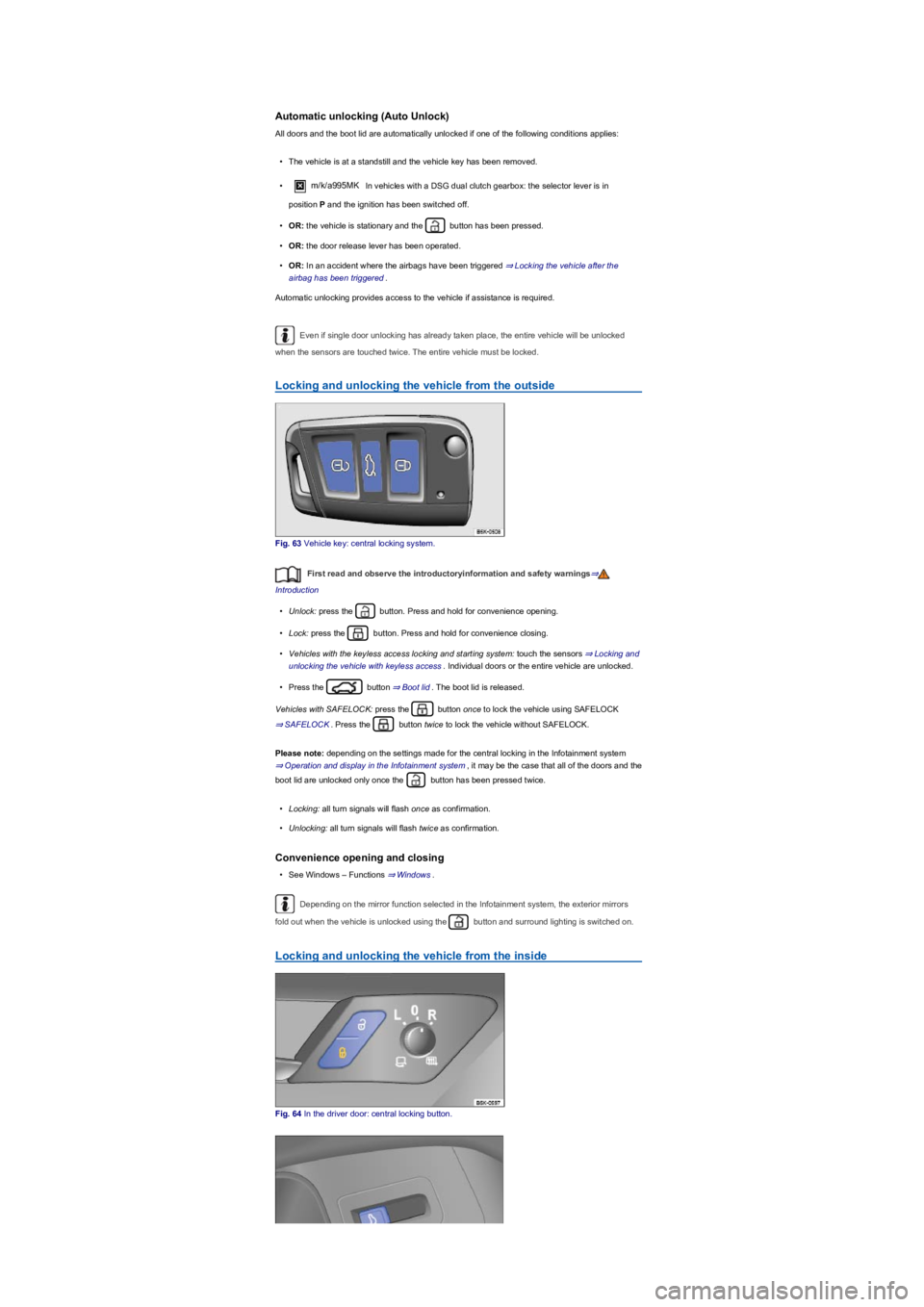
Fig. 63 Vehicle key: central locking system.
First read and observe the introductoryinformation and safety warnings⇒
Introduction
•Unlock: press the button. Press and hold for convenience opening.
•Lock: press the button. Press and hold for convenience closing.
•Vehicles with the keyless access locking and starting system: touch the sensors ⇒ Locking and
unlocking the vehicle with keyless access. Individual doors or the entire vehicle are unlocked.
•Press the button ⇒ Boot lid. The boot lid is released.
Vehicles with SAFELOCK: press the button once to lock the vehicle using SAFELOCK
⇒ SAFELOCK. Press the button twice to lock the vehicle without SAFELOCK.
Please note: depending on the settings made for the central locking in the Infotainment system
⇒ Operation and display in the Infotainment system, it may be the case that all of the doors and the
boot lid are unlocked only once the button has been pressed twice.
•Locking: all turn signals will flash once as confirmation.
•Unlocking: all turn signals will flash twice as confirmation.
Convenience opening and closing
•See Windows – Functions ⇒ Windows.
Depending on the mirror function selected in the Infotainment system, the exterior mirrors
fold out when the vehicle is unlocked using the button and surround lighting is switched on.
Locking and unlocking the vehicle from the inside
Fig. 64 In the driver door: central locking button.
Page 71 of 341
Fig. 65 In the driver door: release for the boot lid.
First read and observe the introductoryinformation and safety warnings⇒
Introduction
Key for ⇒ Fig. 64 and ⇒ Fig. 65:
Unlocks the vehicle.
Locks the vehicle.
Unlock the boot lid.
If the button in the driver door is pressed, only the boot lid opens. All doors remain
locked.
The central locking button will function only if all doors are closed.
If the vehicle has been locked with the vehicle key, the central locking buttons do not work.
Please note the following if the central locking button was used to lock the vehicle from inside:
•The indicator lamp in the button lights up yellow when all doors are closed and locked.
•The anti-theft alarm will not be activated.
•It is not possible to open the doors and the boot lid from the outside.
The doors can be opened from the inside by pulling the door release handle. The indicator lamp
in the button goes out. The unopened doors and boot lid remain locked and cannot be opened from
the outside.
If the driver door is open, it will not be locked.
In vehicles with SAFELOCK: the SAFELOCK mechanism is not activated ⇒ SAFELOCK.
The vehicle automatically unlocks all doors and the boot lid if one of the following conditions applies
⇒ Operation and display in the Infotainment system :
•The button was pressed.
•The vehicle is at a standstill and the vehicle key has been removed.
•A door was opened. Depending on the central locking settings in the Infotainment system
⇒ Operation and display in the Infotainment system.
Locking and unlocking the vehicle with keyless access
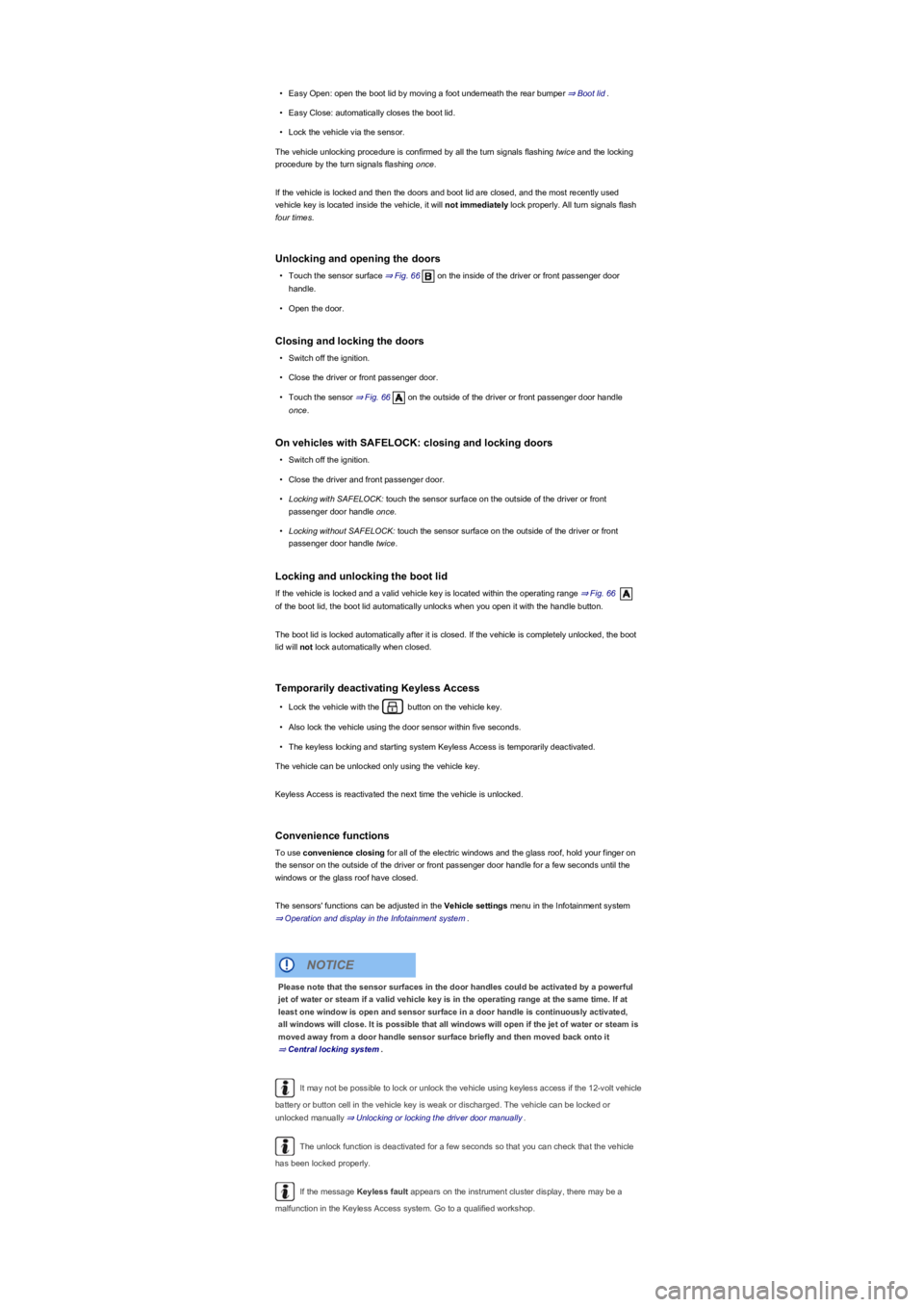
Fig. 66 Keyless Access locking and starting system: operating range. Sensor surfaces of the
central locking system.
First read and observe the introductoryinformation and safety warnings⇒
Introduction
The keyless locking and starting system Keyless Access enables the vehicle to be locked and
unlocked without active use of the key. For this purpose, a valid vehicle key must be within the
vehicle's range ⇒ Fig. 66. The vehicle or boot lid is unlocked or locked by touching the sensor
surfaces on the front door handles or pressing the button in the boot lid ⇒ Boot lid⇒.
General notes
•Unlocking the vehicle using the sensor on the driver or front passenger door or the button on
the boot lid.
•Lock the vehicle by means of the sensor surface on the driver or front passenger door.
•Keyless comfort start function: press the starter button to start the engine ⇒ Starting and
stopping the engine. A valid vehicle key must be located in the vehicle interior.
Page 72 of 341
•Easy Open: open the boot lid by moving a foot underneath the rear bumper ⇒ Boot lid.
•Easy Close: automatically closes the boot lid.
•Lock the vehicle via the sensor.
The vehicle unlocking procedure is confirmed by all the turn signals flashing twice and the locking
procedure by the turn signals flashing once.
If the vehicle is locked and then the doors and boot lid are closed, and the most recently used
vehicle key is located inside the vehicle, it will not immediately lock properly. All turn signals flash
four times.
Unlocking and opening the doors
•Touch the sensor surface ⇒ Fig. 66 on the inside of the driver or front passenger door
handle.
•Open the door.
Closing and locking the doors
•Switch off the ignition.
•Close the driver or front passenger door.
•Touch the sensor ⇒ Fig. 66 on the outside of the driver or front passenger door handle
once.
On vehicles with SAFELOCK: closing and locking doors
•Switch off the ignition.
•Close the driver and front passenger door.
•Locking with SAFELOCK: touch the sensor surface on the outside of the driver or front
passenger door handle once.
•Locking without SAFELOCK: touch the sensor surface on the outside of the driver or front
passenger door handle twice.
Locking and unlocking the boot lid
If the vehicle is locked and a valid vehicle key is located within the operating range ⇒ Fig. 66
of the boot lid, the boot lid automatically unlocks when you open it with the handle button.
The boot lid is locked automatically after it is closed. If the vehicle is completely unlocked, the boot
lid will not lock automatically when closed.
Temporarily deactivating Keyless Access
•Lock the vehicle with the button on the vehicle key.
•Also lock the vehicle using the door sensor within five seconds.
•The keyless locking and starting system Keyless Access is temporarily deactivated.
The vehicle can be unlocked only using the vehicle key.
Keyless Access is reactivated the next time the vehicle is unlocked.
Convenience functions
To use convenience closing for all of the electric windows and the glass roof, hold your finger on
the sensor on the outside of the driver or front passenger door handle for a few seconds until the
windows or the glass roof have closed.
The sensors' functions can be adjusted in the Vehicle settings menu in the Infotainment system
⇒ Operation and display in the Infotainment system.
It may not be possible to lock or unlock the vehicle using keyless access if the 12-volt vehicle
battery or button cell in the vehicle key is weak or discharged. The vehicle can be locked or
unlocked manually ⇒ Unlocking or locking the driver door manually.
The unlock function is deactivated for a few seconds so that you can check that the vehicle
has been locked properly.
If the message Keyless fault appears on the instrument cluster display, there may be a
malfunction in the Keyless Access system. Go to a qualified workshop.
Please note that the sensor surfaces in the door handles could be activated by a powerful
jet of water or steam if a valid vehicle key is in the operating range at the same time. If at
least one window is open and sensor surface in a door handle is continuously activated,
all windows will close. It is possible that all windows will open if the jet of water or steam is
moved away from a door handle sensor surface briefly and then moved back onto it
⇒ Central locking system.
NOTICE