lock VOLKSWAGEN TIGUAN 2017 Owner´s Manual
[x] Cancel search | Manufacturer: VOLKSWAGEN, Model Year: 2017, Model line: TIGUAN, Model: VOLKSWAGEN TIGUAN 2017Pages: 341, PDF Size: 9.14 MB
Page 6 of 341
Upper holder for the net partition ⇒ Net partition
Rigid fastening rings ⇒ Fastening rings
Removable light ⇒ Removeable lights
Button for unlocking the ball head ⇒ Trailer towing
Bracket for the luggage compartment floor ⇒ Luggage compartment floor
Backrest remote release mechanism ⇒ Folding the backrests on the rear bench seat
forwards and backwards
230-volt socket ⇒ Electrical sockets
Foldable fastening rings ⇒ Fastening rings
Stowage area behind trim
12-volt socket ⇒ Electrical sockets
Bag hook ⇒ Bag hook
Luggage compartment light
Driver door
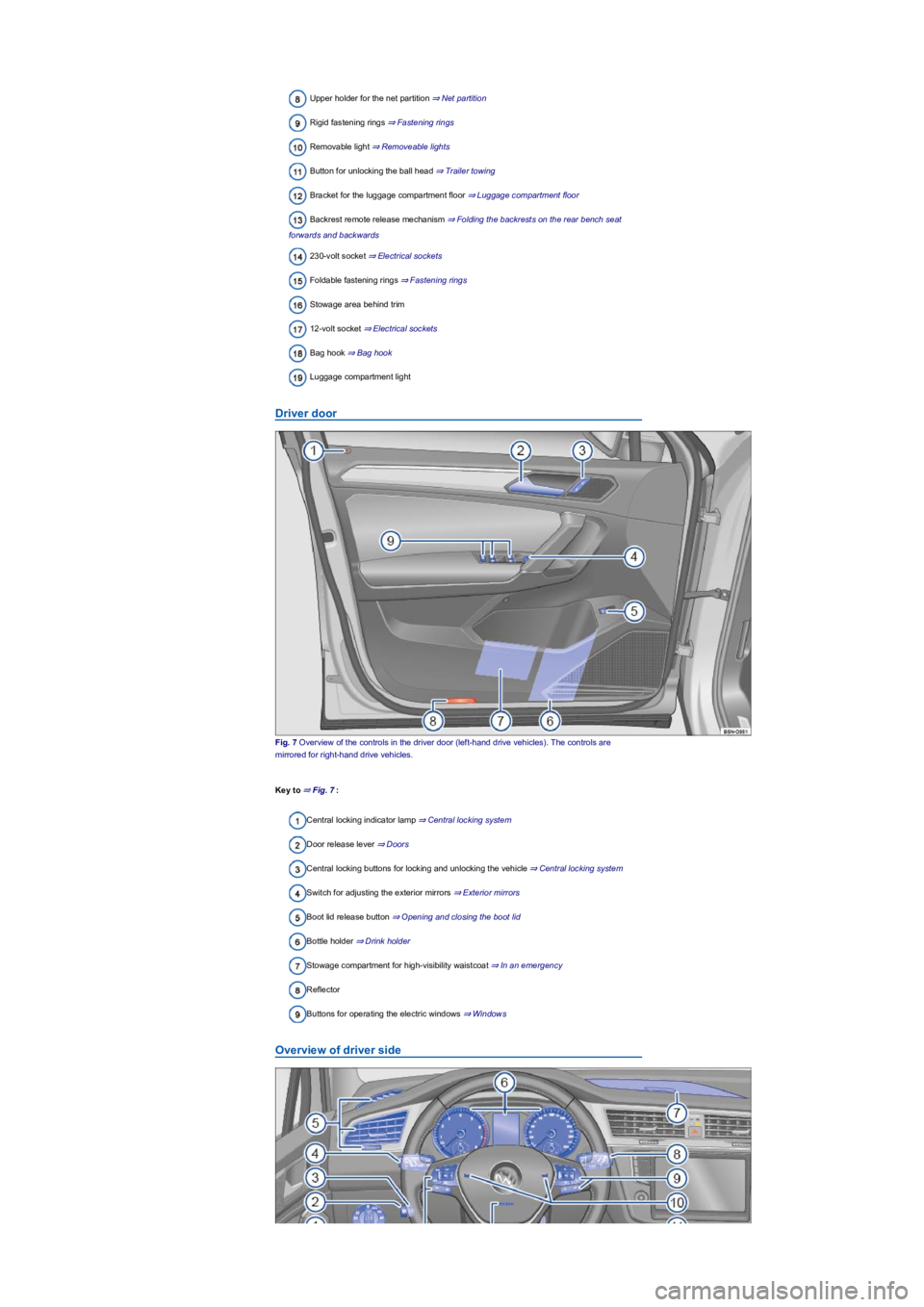
Fig. 7 Overview of the controls in the driver door (left-hand drive vehicles). The controls are
mirrored for right-hand drive vehicles.
Key to ⇒ Fig. 7:
Central locking indicator lamp ⇒ Central locking system
Door release lever ⇒ Doors
Central locking buttons for locking and unlocking the vehicle ⇒ Central locking system
Switch for adjusting the exterior mirrors ⇒ Exterior mirrors
Boot lid release button ⇒ Opening and closing the boot lid
Bottle holder ⇒ Drink holder
Stowage compartment for high-visibility waistcoat ⇒ In an emergency
Reflector
Buttons for operating the electric windows ⇒ Windows
Overview of driver side
Page 7 of 341
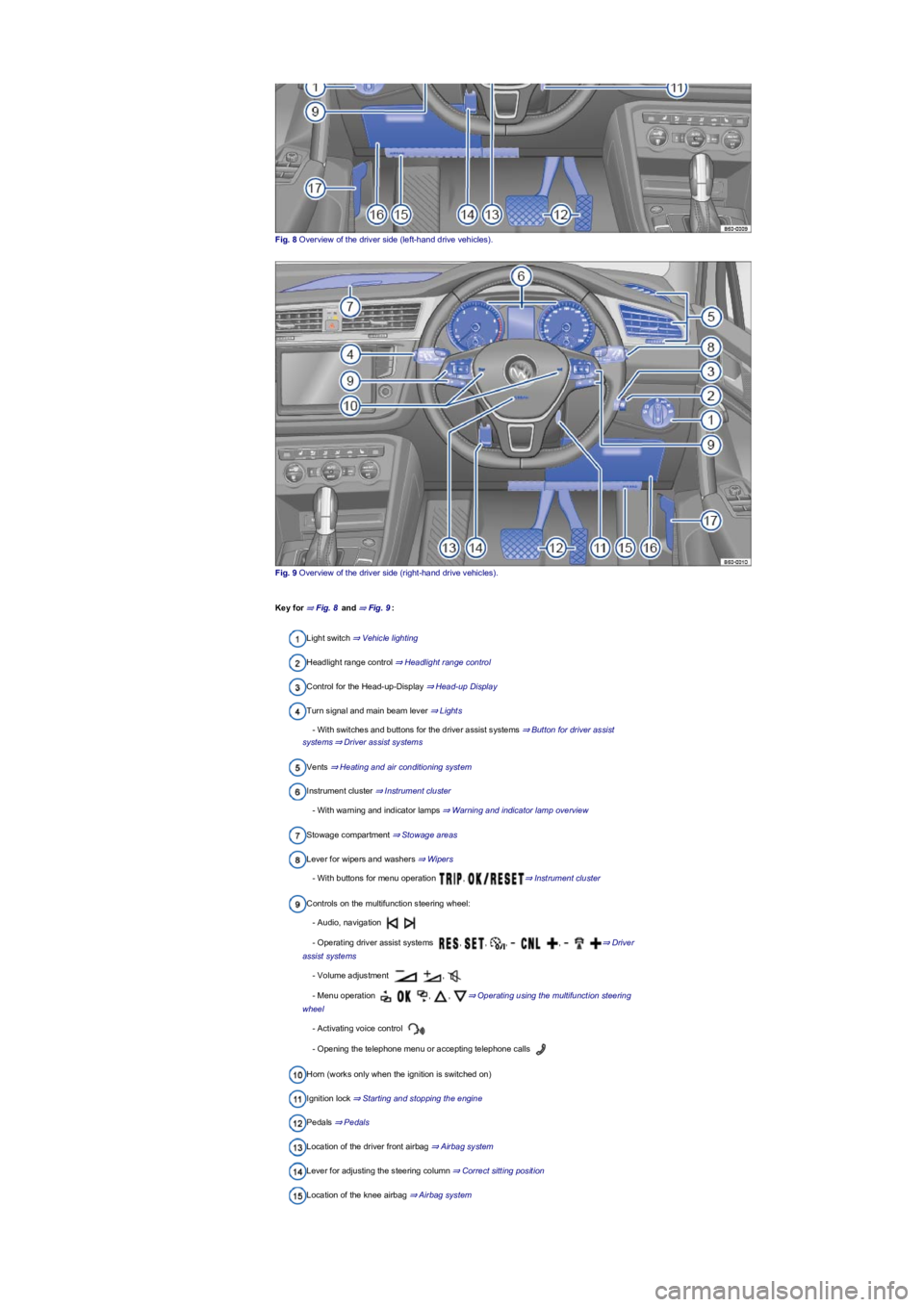
Fig. 8 Overview of the driver side (left-hand drive vehicles).
Fig. 9 Overview of the driver side (right-hand drive vehicles).
Key for ⇒ Fig. 8 and ⇒ Fig. 9:
Light switch ⇒ Vehicle lighting
Headlight range control ⇒ Headlight range control
Control for the Head-up-Display ⇒ Head-up Display
Turn signal and main beam lever ⇒ Lights
- With switches and buttons for the driver assist systems ⇒ Button for driver assist
systems⇒ Driver assist systems
Vents ⇒ Heating and air conditioning system
Instrument cluster ⇒ Instrument cluster
- With warning and indicator lamps ⇒ Warning and indicator lamp overview
Stowage compartment ⇒ Stowage areas
Lever for wipers and washers ⇒ Wipers
- With buttons for menu operation , ⇒ Instrument cluster
Controls on the multifunction steering wheel:
- Audio, navigation
- Operating driver assist systems , , , , ⇒ Driver
assist systems
- Volume adjustment ,
- Menu operation , , ⇒ Operating using the multifunction steering
wheel
- Activating voice control
- Opening the telephone menu or accepting telephone calls
Horn (works only when the ignition is switched on)
Ignition lock ⇒ Starting and stopping the engine
Pedals ⇒ Pedals
Location of the driver front airbag ⇒ Airbag system
Lever for adjusting the steering column ⇒ Correct sitting position
Location of the knee airbag ⇒ Airbag system
Page 9 of 341
Stowage compartment in the centre armrest ⇒ Stowage areas
Control for 4MOTION Active Control ⇒ Selecting a driving profile (4MOTION Action
Control)
Button for Auto Hold function ⇒ Auto Hold function
Electronic parking brake ⇒ Electronic parking brake
Starter button (keyless locking and starting system Keyless Access) ⇒ Starting and
stopping the engine
Front passenger side
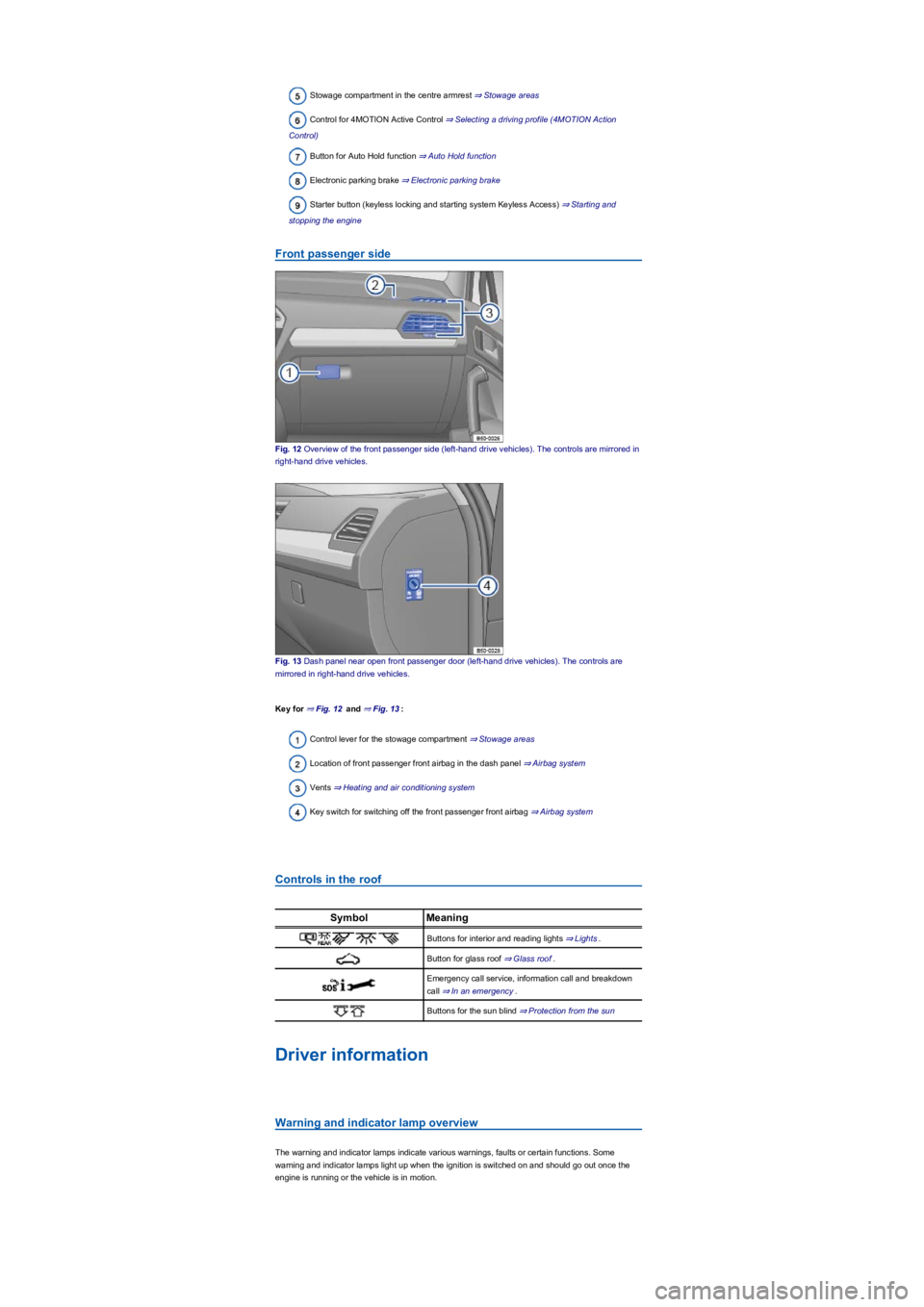
Fig. 12 Overview of the front passenger side (left-hand drive vehicles). The controls are mirrored in
right-hand drive vehicles.
Fig. 13 Dash panel near open front passenger door (left-hand drive vehicles). The controls are
mirrored in right-hand drive vehicles.
Key for ⇒ Fig. 12 and ⇒ Fig. 13:
Control lever for the stowage compartment ⇒ Stowage areas
Location of front passenger front airbag in the dash panel ⇒ Airbag system
Vents ⇒ Heating and air conditioning system
Key switch for switching off the front passenger front airbag ⇒ Airbag system
Controls in the roof
SymbolMeaning
Buttons for interior and reading lights ⇒ Lights.
Button for glass roof ⇒ Glass roof.
Emergency call service, information call and breakdown
call ⇒ In an emergency.
Buttons for the sun blind ⇒ Protection from the sun
Driver information
Warning and indicator lamp overview
The warning and indicator lamps indicate various warnings, faults or certain functions. Some
warning and indicator lamps light up when the ignition is switched on and should go out once the
engine is running or the vehicle is in motion.
Page 10 of 341
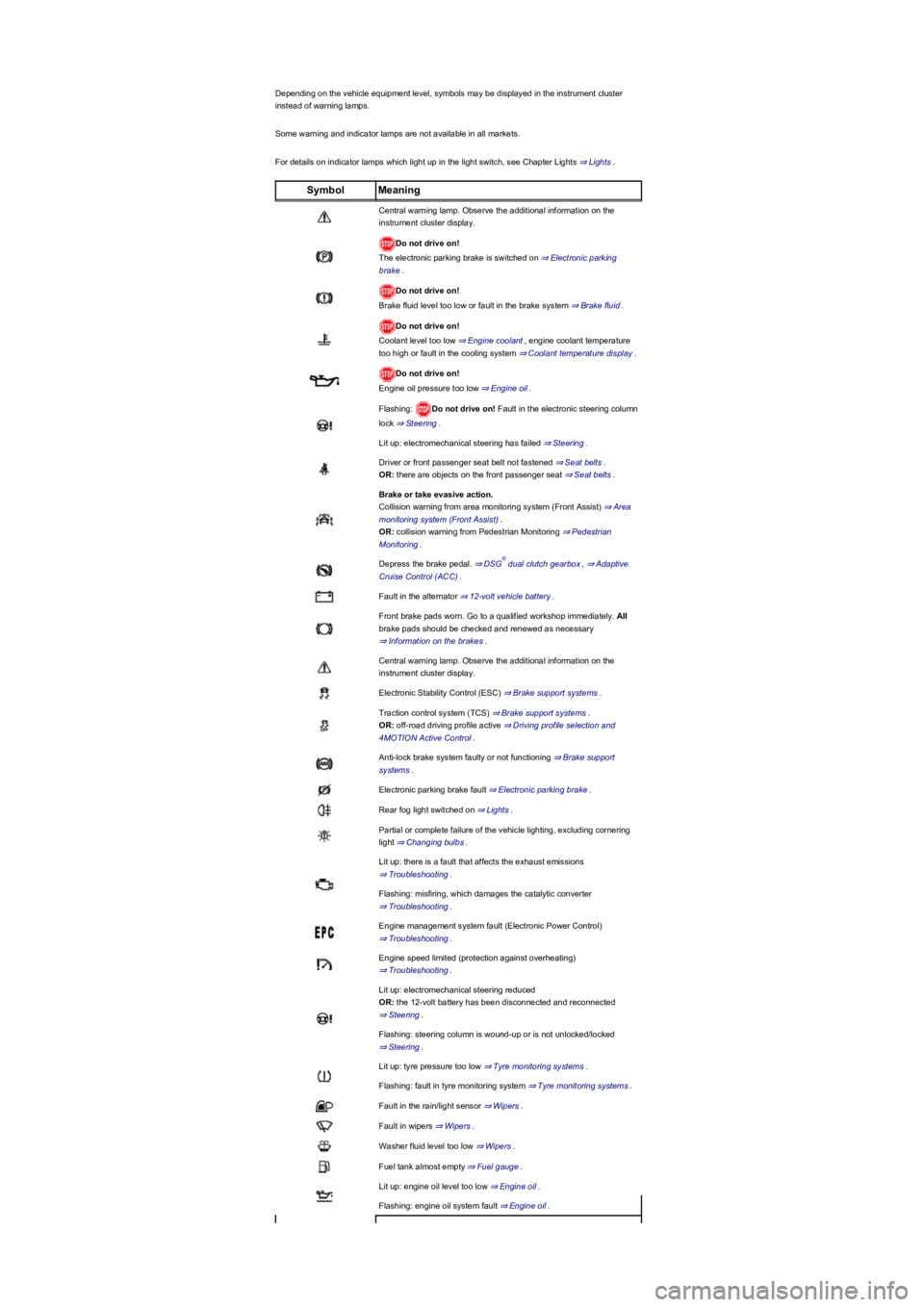
Depending on the vehicle equipment level, symbols may be displayed in the instrument cluster
instead of warning lamps.
Some warning and indicator lamps are not available in all markets.
For details on indicator lamps which light up in the light switch, see Chapter Lights ⇒ Lights.
SymbolMeaning
Central warning lamp. Observe the additional information on the
instrument cluster display.
Do not drive on!
The electronic parking brake is switched on ⇒ Electronic parking
brake.
Do not drive on!
Brake fluid level too low or fault in the brake system ⇒ Brake fluid.
Do not drive on!
Coolant level too low ⇒ Engine coolant, engine coolant temperature
too high or fault in the cooling system ⇒ Coolant temperature display.
Do not drive on!
Engine oil pressure too low ⇒ Engine oil.
Flashing: Do not drive on! Fault in the electronic steering column
lock ⇒ Steering.
Lit up: electromechanical steering has failed ⇒ Steering.
Driver or front passenger seat belt not fastened ⇒ Seat belts.
OR: there are objects on the front passenger seat ⇒ Seat belts.
Brake or take evasive action.
Collision warning from area monitoring system (Front Assist) ⇒ Area
monitoring system (Front Assist).
OR: collision warning from Pedestrian Monitoring ⇒ Pedestrian
Monitoring.
Depress the brake pedal. ⇒ DSG dual clutch gearbox, ⇒ Adaptive
Cruise Control (ACC).
Fault in the alternator ⇒ 12-volt vehicle battery.
Front brake pads worn. Go to a qualified workshop immediately. All
brake pads should be checked and renewed as necessary
⇒ Information on the brakes.
Central warning lamp. Observe the additional information on the
instrument cluster display.
Electronic Stability Control (ESC) ⇒ Brake support systems.
Traction control system (TCS) ⇒ Brake support systems.
OR: off-road driving profile active ⇒ Driving profile selection and
4MOTION Active Control.
Anti-lock brake system faulty or not functioning ⇒ Brake support
systems.
Electronic parking brake fault ⇒ Electronic parking brake.
Rear fog light switched on ⇒ Lights.
Partial or complete failure of the vehicle lighting, excluding cornering
light ⇒ Changing bulbs.
Lit up: there is a fault that affects the exhaust emissions
⇒ Troubleshooting.
Flashing: misfiring, which damages the catalytic converter
⇒ Troubleshooting.
Engine management system fault (Electronic Power Control)
⇒ Troubleshooting.
Engine speed limited (protection against overheating)
⇒ Troubleshooting.
Lit up: electromechanical steering reduced
OR: the 12-volt battery has been disconnected and reconnected
⇒ Steering.
Flashing: steering column is wound-up or is not unlocked/locked
⇒ Steering.
Lit up: tyre pressure too low ⇒ Tyre monitoring systems.
Flashing: fault in tyre monitoring system ⇒ Tyre monitoring systems.
Fault in the rain/light sensor ⇒ Wipers.
Fault in wipers ⇒ Wipers.
Washer fluid level too low ⇒ Wipers.
Fuel tank almost empty ⇒ Fuel gauge.
Lit up: engine oil level too low ⇒ Engine oil.
Flashing: engine oil system fault ⇒ Engine oil.
®
Page 11 of 341
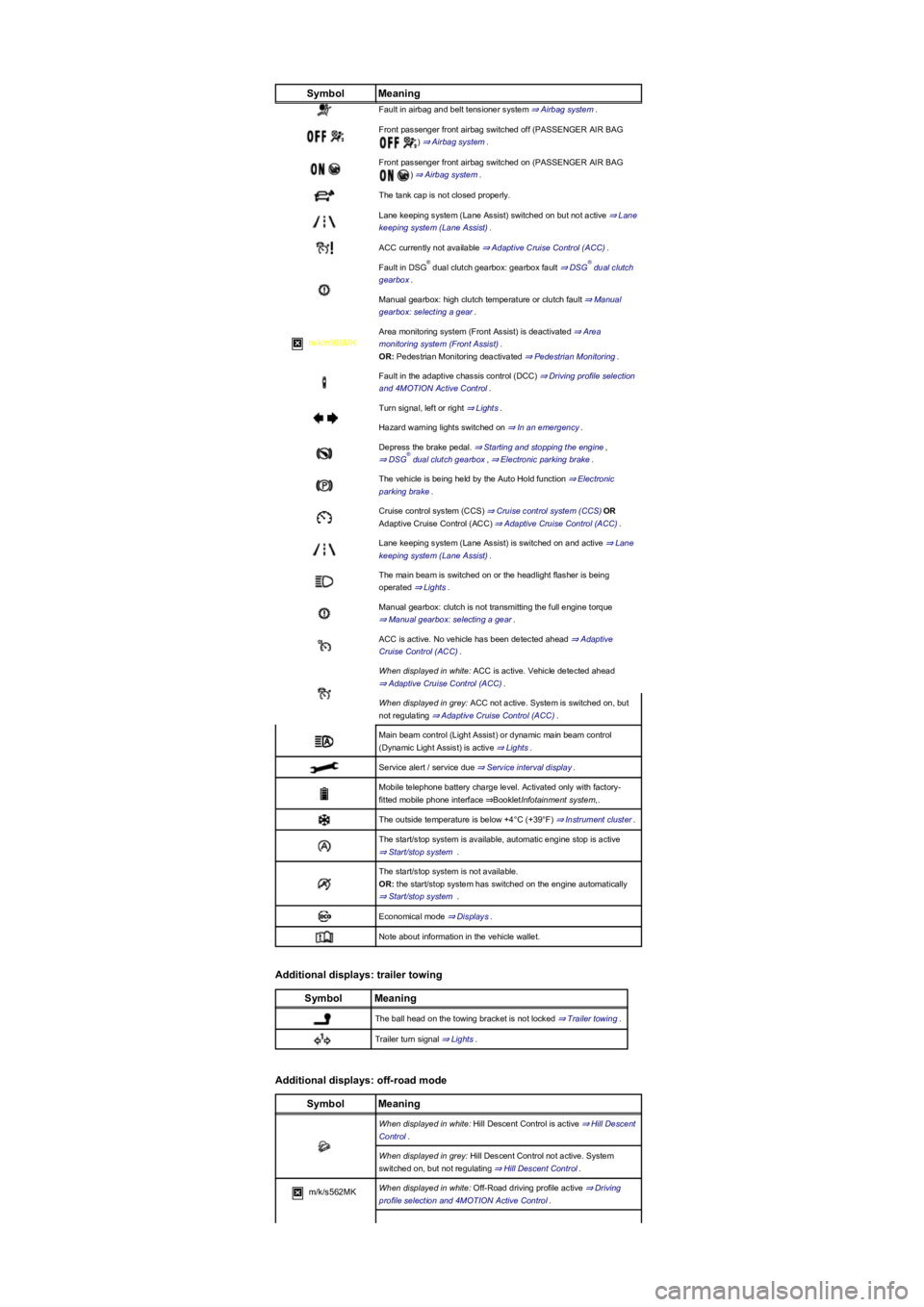
SymbolMeaning
Fault in airbag and belt tensioner system ⇒ Airbag system.
Front passenger front airbag switched off (PASSENGER AIR BAG
) ⇒ Airbag system.
Front passenger front airbag switched on (PASSENGER AIR BAG
) ⇒ Airbag system.
The tank cap is not closed properly.
Lane keeping system (Lane Assist) switched on but not active ⇒ Lane
keeping system (Lane Assist).
ACC currently not available ⇒ Adaptive Cruise Control (ACC).
Fault in DSG dual clutch gearbox: gearbox fault ⇒ DSG dual clutch
gearbox.
Manual gearbox: high clutch temperature or clutch fault ⇒ Manual
gearbox: selecting a gear.
m/k/n998MK
Area monitoring system (Front Assist) is deactivated ⇒ Area
monitoring system (Front Assist).
OR: Pedestrian Monitoring deactivated ⇒ Pedestrian Monitoring.
Fault in the adaptive chassis control (DCC) ⇒ Driving profile selection
and 4MOTION Active Control.
Turn signal, left or right ⇒ Lights.
Hazard warning lights switched on ⇒ In an emergency.
Depress the brake pedal. ⇒ Starting and stopping the engine,
⇒ DSG dual clutch gearbox, ⇒ Electronic parking brake.
The vehicle is being held by the Auto Hold function ⇒ Electronic
parking brake.
Cruise control system (CCS) ⇒ Cruise control system (CCS)OR
Adaptive Cruise Control (ACC) ⇒ Adaptive Cruise Control (ACC).
Lane keeping system (Lane Assist) is switched on and active ⇒ Lane
keeping system (Lane Assist).
The main beam is switched on or the headlight flasher is being
operated ⇒ Lights.
Manual gearbox: clutch is not transmitting the full engine torque
⇒ Manual gearbox: selecting a gear.
ACC is active. No vehicle has been detected ahead ⇒ Adaptive
Cruise Control (ACC).
When displayed in white: ACC is active. Vehicle detected ahead
⇒ Adaptive Cruise Control (ACC).
When displayed in grey: ACC not active. System is switched on, but
not regulating ⇒ Adaptive Cruise Control (ACC).
Main beam control (Light Assist) or dynamic main beam control
(Dynamic Light Assist) is active ⇒ Lights.
Service alert / service due ⇒ Service interval display.
Mobile telephone battery charge level. Activated only with factory-
fitted mobile phone interface ⇒BookletInfotainment system,.
The outside temperature is below +4°C (+39°F) ⇒ Instrument cluster.
The start/stop system is available, automatic engine stop is active
⇒ Start/stop system .
The start/stop system is not available.
OR: the start/stop system has switched on the engine automatically
⇒ Start/stop system .
Economical mode ⇒ Displays.
Note about information in the vehicle wallet.
Additional displays: trailer towing
SymbolMeaning
The ball head on the towing bracket is not locked ⇒ Trailer towing.
Trailer turn signal ⇒ Lights.
Additional displays: off-road mode
SymbolMeaning
When displayed in white: Hill Descent Control is active ⇒ Hill Descent
Control.
When displayed in grey: Hill Descent Control not active. System
switched on, but not regulating ⇒ Hill Descent Control.
m/k/s562MKWhen displayed in white: Off-Road driving profile active ⇒ Driving
profile selection and 4MOTION Active Control.
®®
®
Page 16 of 341
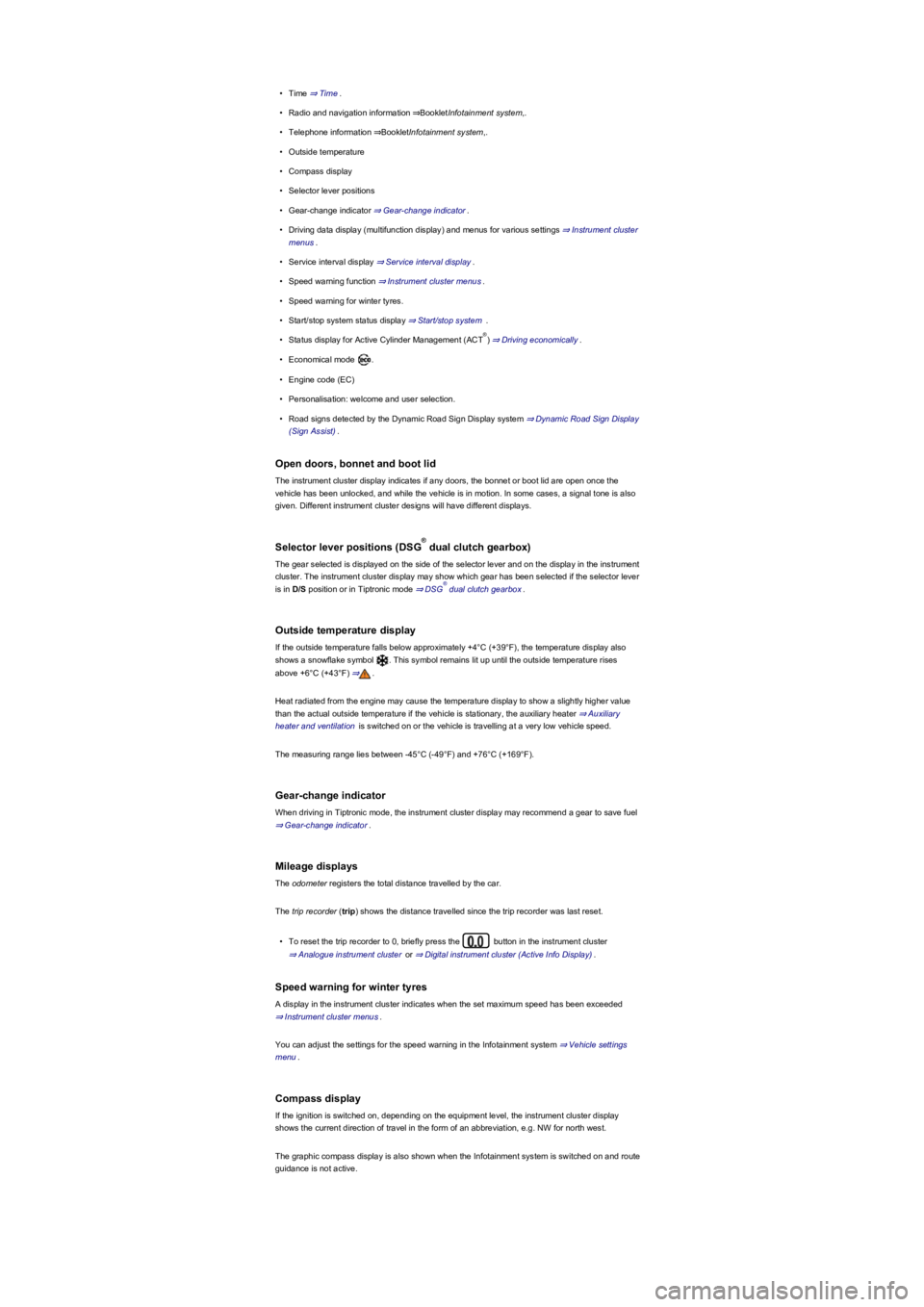
•Time ⇒ Time.
•Radio and navigation information ⇒BookletInfotainment system,.
•Telephone information ⇒BookletInfotainment system,.
•Outside temperature
•Compass display
•Selector lever positions
•Gear-change indicator ⇒ Gear-change indicator.
•Driving data display (multifunction display) and menus for various settings ⇒ Instrument cluster
menus.
•Service interval display ⇒ Service interval display.
•Speed warning function ⇒ Instrument cluster menus.
•Speed warning for winter tyres.
•Start/stop system status display ⇒ Start/stop system .
•Status display for Active Cylinder Management (ACT) ⇒ Driving economically.
•Economical mode .
•Engine code (EC)
•Personalisation: welcome and user selection.
•Road signs detected by the Dynamic Road Sign Display system ⇒ Dynamic Road Sign Display
(Sign Assist).
Open doors, bonnet and boot lid
The instrument cluster display indicates if any doors, the bonnet or boot lid are open once the
vehicle has been unlocked, and while the vehicle is in motion. In some cases, a signal tone is also
given. Different instrument cluster designs will have different displays.
Selector lever positions (DSG dual clutch gearbox)
The gear selected is displayed on the side of the selector lever and on the display in the instrument
cluster. The instrument cluster display may show which gear has been selected if the selector lever
is in D/S position or in Tiptronic mode ⇒ DSG dual clutch gearbox.
Outside temperature display
If the outside temperature falls below approximately +4°C (+39°F), the temperature display also
shows a snowflake symbol . This symbol remains lit up until the outside temperature rises
above +6°C (+43°F) ⇒.
Heat radiated from the engine may cause the temperature display to show a slightly higher value
than the actual outside temperature if the vehicle is stationary, the auxiliary heater ⇒ Auxiliary
heater and ventilation is switched on or the vehicle is travelling at a very low vehicle speed.
The measuring range lies between -45°C (-49°F) and +76°C (+169°F).
Gear-change indicator
When driving in Tiptronic mode, the instrument cluster display may recommend a gear to save fuel
⇒ Gear-change indicator.
Mileage displays
The odometer registers the total distance travelled by the car.
The trip recorder (trip) shows the distance travelled since the trip recorder was last reset.
•To reset the trip recorder to 0, briefly press the button in the instrument cluster
⇒ Analogue instrument cluster or ⇒ Digital instrument cluster (Active Info Display).
Speed warning for winter tyres
A display in the instrument cluster indicates when the set maximum speed has been exceeded
⇒ Instrument cluster menus.
You can adjust the settings for the speed warning in the Infotainment system ⇒ Vehicle settings
menu.
Compass display
If the ignition is switched on, depending on the equipment level, the instrument cluster display
shows the current direction of travel in the form of an abbreviation, e.g. NW for north west.
The graphic compass display is also shown when the Infotainment system is switched on and route
guidance is not active.
®
®
®
Page 22 of 341
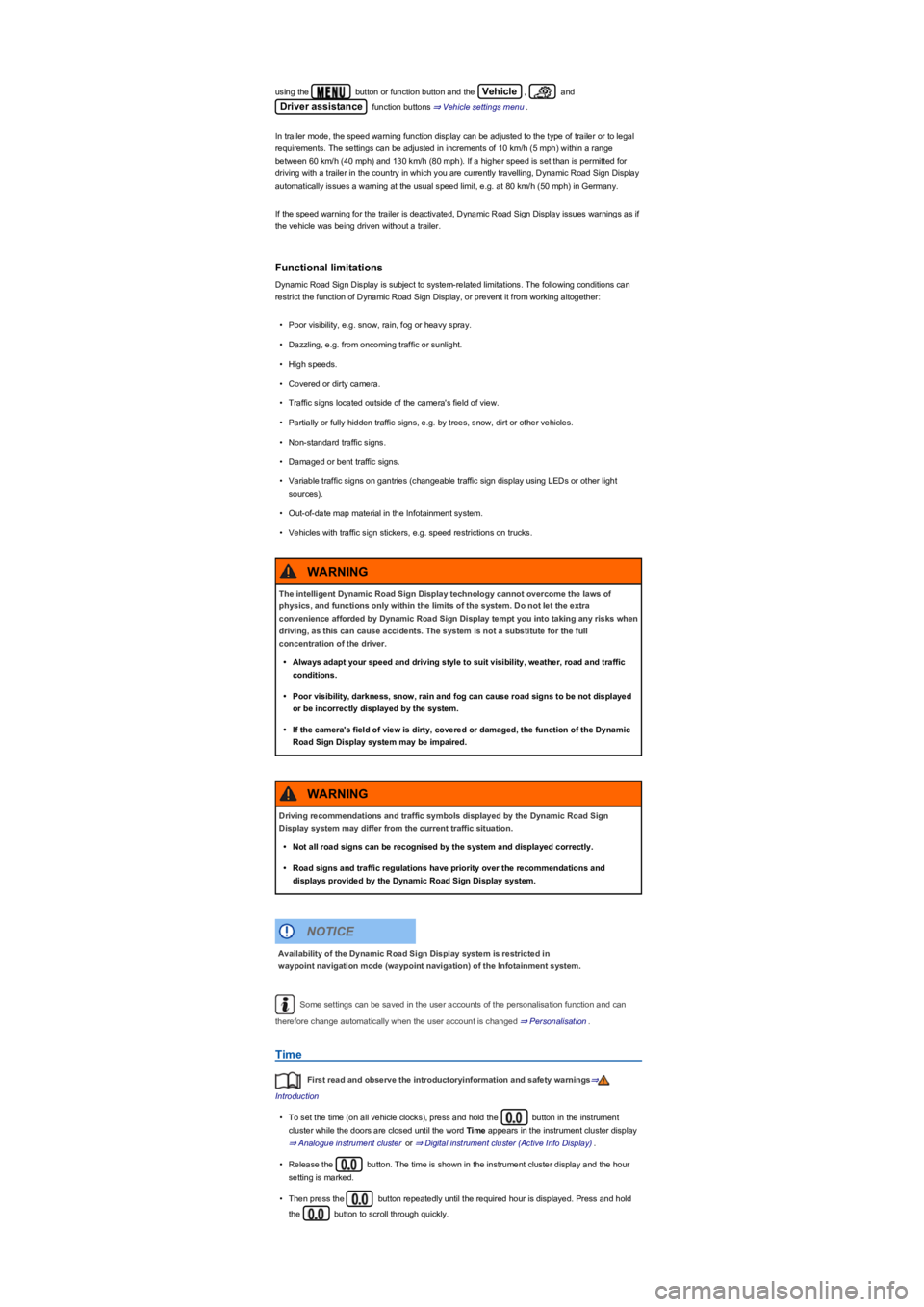
using the button or function button and the Vehicle, and
Driver assistance function buttons ⇒ Vehicle settings menu.
In trailer mode, the speed warning function display can be adjusted to the type of trailer or to legal
requirements. The settings can be adjusted in increments of 10 km/h (5 mph) within a range
between 60 km/h (40 mph) and 130 km/h (80 mph). If a higher speed is set than is permitted for
driving with a trailer in the country in which you are currently travelling, Dynamic Road Sign Display
automatically issues a warning at the usual speed limit, e.g. at 80 km/h (50 mph) in Germany.
If the speed warning for the trailer is deactivated, Dynamic Road Sign Display issues warnings as if
the vehicle was being driven without a trailer.
Functional limitations
Dynamic Road Sign Display is subject to system-related limitations. The following conditions can
restrict the function of Dynamic Road Sign Display, or prevent it from working altogether:
•Poor visibility, e.g. snow, rain, fog or heavy spray.
•Dazzling, e.g. from oncoming traffic or sunlight.
•High speeds.
•Covered or dirty camera.
•Traffic signs located outside of the camera's field of view.
•Partially or fully hidden traffic signs, e.g. by trees, snow, dirt or other vehicles.
•Non-standard traffic signs.
•Damaged or bent traffic signs.
•Variable traffic signs on gantries (changeable traffic sign display using LEDs or other light
sources).
•Out-of-date map material in the Infotainment system.
•Vehicles with traffic sign stickers, e.g. speed restrictions on trucks.
Some settings can be saved in the user accounts of the personalisation function and can
therefore change automatically when the user account is changed ⇒ Personalisation.
Time
First read and observe the introductoryinformation and safety warnings⇒
Introduction
•To set the time (on all vehicle clocks), press and hold the button in the instrument
cluster while the doors are closed until the word Time appears in the instrument cluster display
⇒ Analogue instrument cluster or ⇒ Digital instrument cluster (Active Info Display).
•Release the button. The time is shown in the instrument cluster display and the hour
setting is marked.
•Then press the button repeatedly until the required hour is displayed. Press and hold
the button to scroll through quickly.
The intelligent Dynamic Road Sign Display technology cannot overcome the laws of
physics, and functions only within the limits of the system. Do not let the extra
convenience afforded by Dynamic Road Sign Display tempt you into taking any risks when
driving, as this can cause accidents. The system is not a substitute for the full
concentration of the driver.
•Always adapt your speed and driving style to suit visibility, weather, road and traffic
conditions.
•Poor visibility, darkness, snow, rain and fog can cause road signs to be not displayed
or be incorrectly displayed by the system.
•If the camera's field of view is dirty, covered or damaged, the function of the Dynamic
Road Sign Display system may be impaired.
WARNING
Driving recommendations and traffic symbols displayed by the Dynamic Road Sign
Display system may differ from the current traffic situation.
•Not all road signs can be recognised by the system and displayed correctly.
•Road signs and traffic regulations have priority over the recommendations and
displays provided by the Dynamic Road Sign Display system.
WARNING
Availability of the Dynamic Road Sign Display system is restricted in
waypoint navigation mode (waypoint navigation) of the Infotainment system.
NOTICE
Page 23 of 341
•Once you have set the hour, wait until the minutes display in the instrument cluster is marked.
•Then press the button repeatedly until the required minute is displayed. Press and hold
the button to scroll through quickly.
•Release the button to finish setting the clock.
The analogue clock adjusts itself a few seconds after ignition is switched on.
You can also use the Infotainment system to adjust the time ⇒ Vehicle settings menu.
Fuel gauge
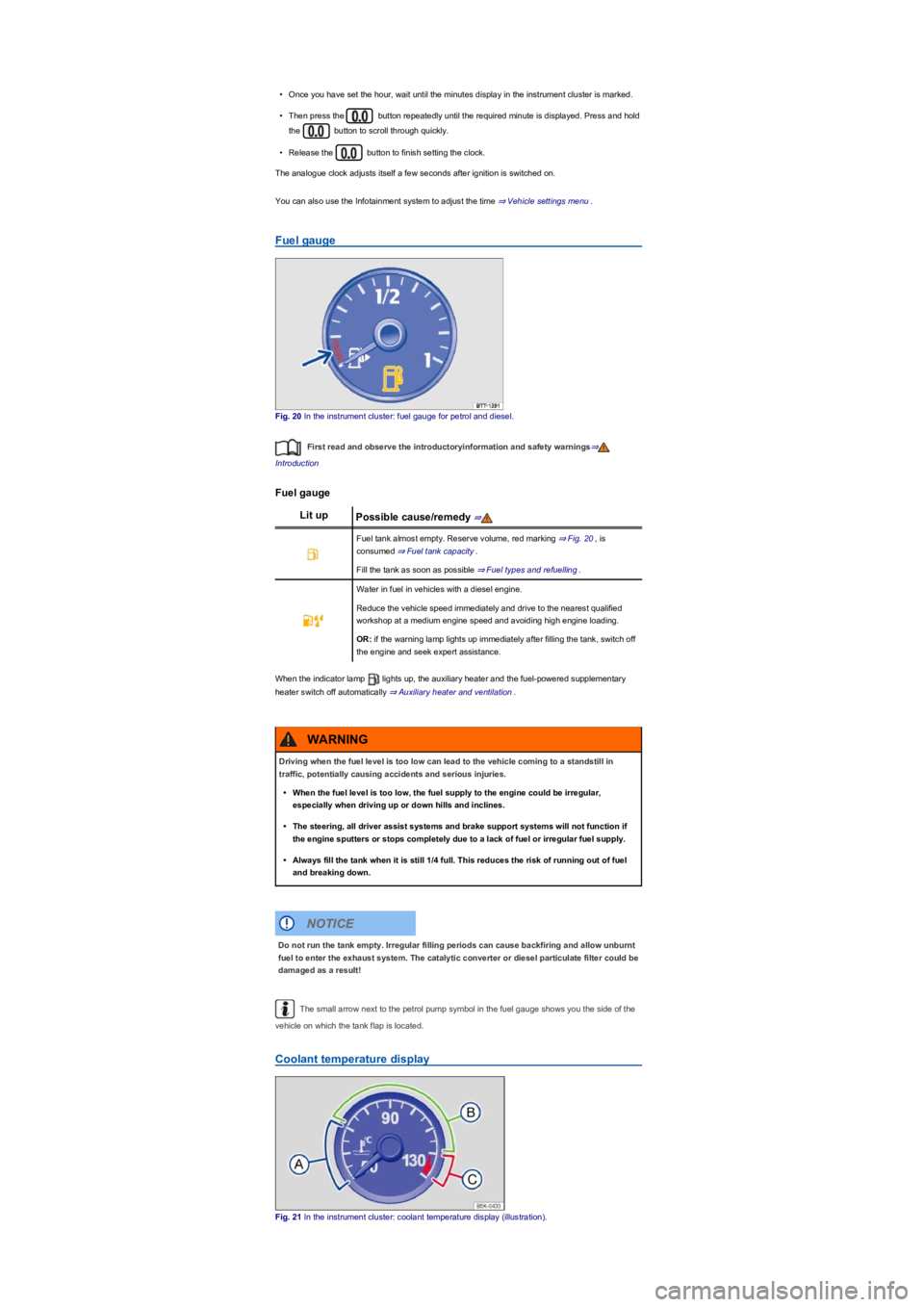
Fig. 20 In the instrument cluster: fuel gauge for petrol and diesel.
First read and observe the introductoryinformation and safety warnings⇒
Introduction
Fuel gauge
Lit upPossible cause/remedy ⇒
Fuel tank almost empty. Reserve volume, red marking ⇒ Fig. 20, is
consumed ⇒ Fuel tank capacity.
Fill the tank as soon as possible ⇒ Fuel types and refuelling.
Water in fuel in vehicles with a diesel engine.
Reduce the vehicle speed immediately and drive to the nearest qualified
workshop at a medium engine speed and avoiding high engine loading.
OR: if the warning lamp lights up immediately after filling the tank, switch off
the engine and seek expert assistance.
When the indicator lamp lights up, the auxiliary heater and the fuel-powered supplementary
heater switch off automatically ⇒ Auxiliary heater and ventilation.
The small arrow next to the petrol pump symbol in the fuel gauge shows you the side of the
vehicle on which the tank flap is located.
Coolant temperature display
Fig. 21 In the instrument cluster: coolant temperature display (illustration).
Driving when the fuel level is too low can lead to the vehicle coming to a standstill in
traffic, potentially causing accidents and serious injuries.
•When the fuel level is too low, the fuel supply to the engine could be irregular,
especially when driving up or down hills and inclines.
•The steering, all driver assist systems and brake support systems will not function if
the engine sputters or stops completely due to a lack of fuel or irregular fuel supply.
•Always fill the tank when it is still 1/4 full. This reduces the risk of running out of fuel
and breaking down.
WARNING
Do not run the tank empty. Irregular filling periods can cause backfiring and allow unburnt
fuel to enter the exhaust system. The catalytic converter or diesel particulate filter could be
damaged as a result!
NOTICE
Page 30 of 341
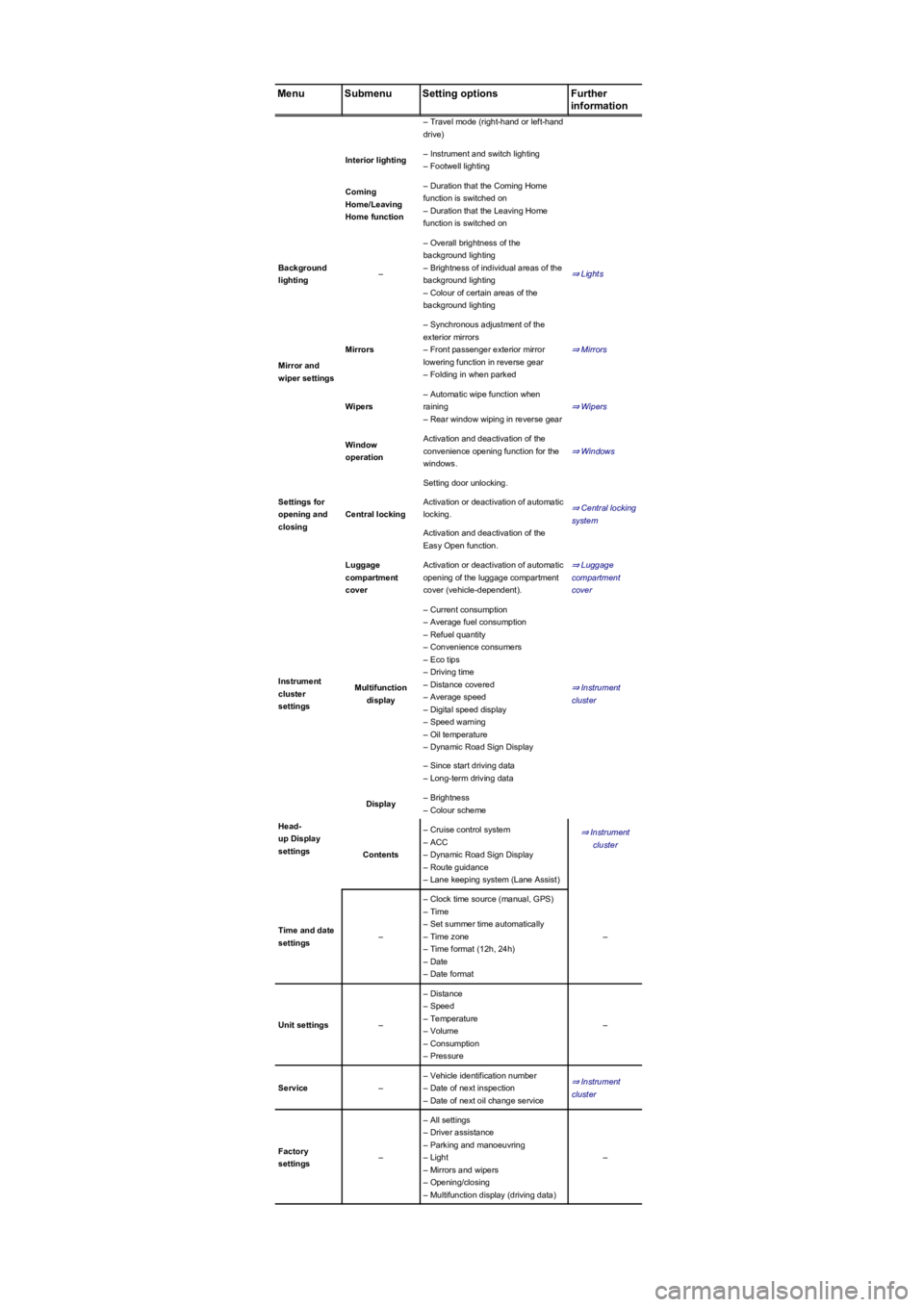
MenuSubmenuSetting optionsFurther
information
– Travel mode (right-hand or left-hand
drive)
Interior lighting– Instrument and switch lighting
– Footwell lighting
Coming
Home/Leaving
Home function
– Duration that the Coming Home
function is switched on
– Duration that the Leaving Home
function is switched on
Background
lighting–
– Overall brightness of the
background lighting
– Brightness of individual areas of the
background lighting
– Colour of certain areas of the
background lighting
⇒ Lights
Mirror and
wiper settings
Mirrors
– Synchronous adjustment of the
exterior mirrors
– Front passenger exterior mirror
lowering function in reverse gear
– Folding in when parked
⇒ Mirrors
Wipers
– Automatic wipe function when
raining
– Rear window wiping in reverse gear
⇒ Wipers
Settings for
opening and
closing
Window
operation
Activation and deactivation of the
convenience opening function for the
windows.
⇒ Windows
Central locking
Setting door unlocking.
⇒ Central locking
system
Activation or deactivation of automatic
locking.
Activation and deactivation of the
Easy Open function.
Luggage
compartment
cover
Activation or deactivation of automatic
opening of the luggage compartment
cover (vehicle-dependent).
⇒ Luggage
compartment
cover
Instrument
cluster
settings
Multifunction
display
– Current consumption
– Average fuel consumption
– Refuel quantity
– Convenience consumers
– Eco tips
– Driving time
– Distance covered
– Average speed
– Digital speed display
– Speed warning
– Oil temperature
– Dynamic Road Sign Display
⇒ Instrument
cluster
– Since start driving data
– Long-term driving data
Head-
up Display
settings
Display– Brightness
– Colour scheme
⇒ Instrument
cluster
Contents
– Cruise control system
– ACC
– Dynamic Road Sign Display
– Route guidance
– Lane keeping system (Lane Assist)
Time and date
settings–
– Clock time source (manual, GPS)
– Time
– Set summer time automatically
– Time zone
– Time format (12h, 24h)
– Date
– Date format
–
Unit settings–
– Distance
– Speed
– Temperature
– Volume
– Consumption
– Pressure
–
Service–
– Vehicle identification number
– Date of next inspection
– Date of next oil change service
⇒ Instrument
cluster
Factory
settings–
– All settings
– Driver assistance
– Parking and manoeuvring
– Light
– Mirrors and wipers
– Opening/closing
– Multifunction display (driving data)
–
Page 31 of 341
Performance monitor
First read and observe the introductoryinformation and safety warnings⇒
Introduction
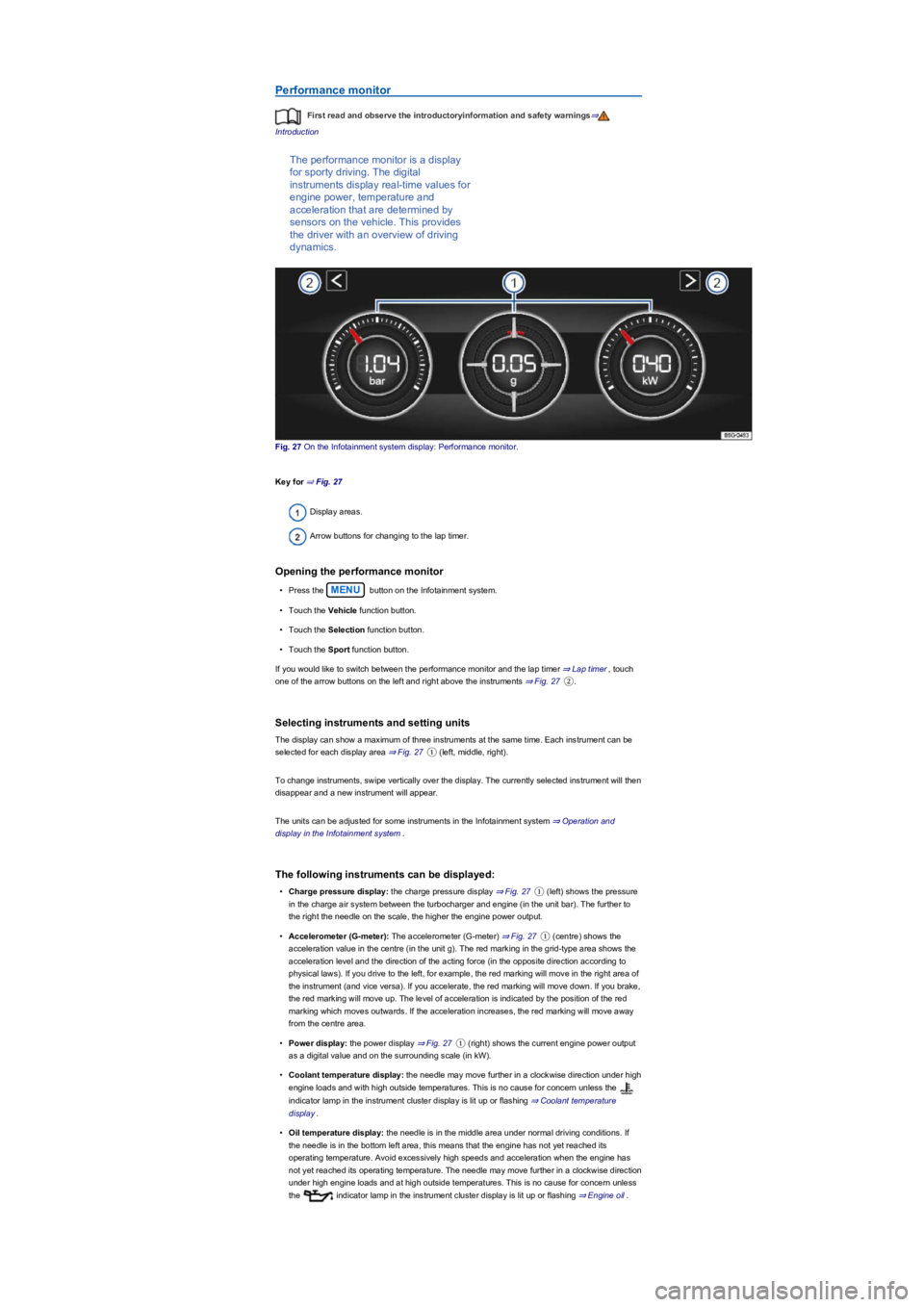
The performance monitor is a display
for sporty driving. The digital
instruments display real-time values for
engine power, temperature and
acceleration that are determined by
sensors on the vehicle. This provides
the driver with an overview of driving
dynamics.
Fig. 27 On the Infotainment system display: Performance monitor.
Key for ⇒ Fig. 27
Display areas.
Arrow buttons for changing to the lap timer.
Opening the performance monitor
•Press the MENU button on the Infotainment system.
•Touch the Vehicle function button.
•Touch the Selection function button.
•Touch the Sport function button.
If you would like to switch between the performance monitor and the lap timer ⇒ Lap timer, touch
one of the arrow buttons on the left and right above the instruments ⇒ Fig. 27②.
Selecting instruments and setting units
The display can show a maximum of three instruments at the same time. Each instrument can be
selected for each display area ⇒ Fig. 27① (left, middle, right).
To change instruments, swipe vertically over the display. The currently selected instrument will then
disappear and a new instrument will appear.
The units can be adjusted for some instruments in the Infotainment system ⇒ Operation and
display in the Infotainment system.
The following instruments can be displayed:
•Charge pressure display: the charge pressure display ⇒ Fig. 27① (left) shows the pressure
in the charge air system between the turbocharger and engine (in the unit bar). The further to
the right the needle on the scale, the higher the engine power output.
•Accelerometer (G-meter): The accelerometer (G-meter) ⇒ Fig. 27① (centre) shows the
acceleration value in the centre (in the unit g). The red marking in the grid-type area shows the
acceleration level and the direction of the acting force (in the opposite direction according to
physical laws). If you drive to the left, for example, the red marking will move in the right area of
the instrument (and vice versa). If you accelerate, the red marking will move down. If you brake,
the red marking will move up. The level of acceleration is indicated by the position of the red
marking which moves outwards. If the acceleration increases, the red marking will move away
from the centre area.
•Power display: the power display ⇒ Fig. 27① (right) shows the current engine power output
as a digital value and on the surrounding scale (in kW).
•Coolant temperature display: the needle may move further in a clockwise direction under high
engine loads and with high outside temperatures. This is no cause for concern unless the
indicator lamp in the instrument cluster display is lit up or flashing ⇒ Coolant temperature
display.
•Oil temperature display: the needle is in the middle area under normal driving conditions. If
the needle is in the bottom left area, this means that the engine has not yet reached its
operating temperature. Avoid excessively high speeds and acceleration when the engine has
not yet reached its operating temperature. The needle may move further in a clockwise direction
under high engine loads and at high outside temperatures. This is no cause for concern unless
the indicator lamp in the instrument cluster display is lit up or flashing ⇒ Engine oil.