reverse mirror VOLKSWAGEN TIGUAN 2017 Owner´s Manual
[x] Cancel search | Manufacturer: VOLKSWAGEN, Model Year: 2017, Model line: TIGUAN, Model: VOLKSWAGEN TIGUAN 2017Pages: 341, PDF Size: 9.14 MB
Page 30 of 341
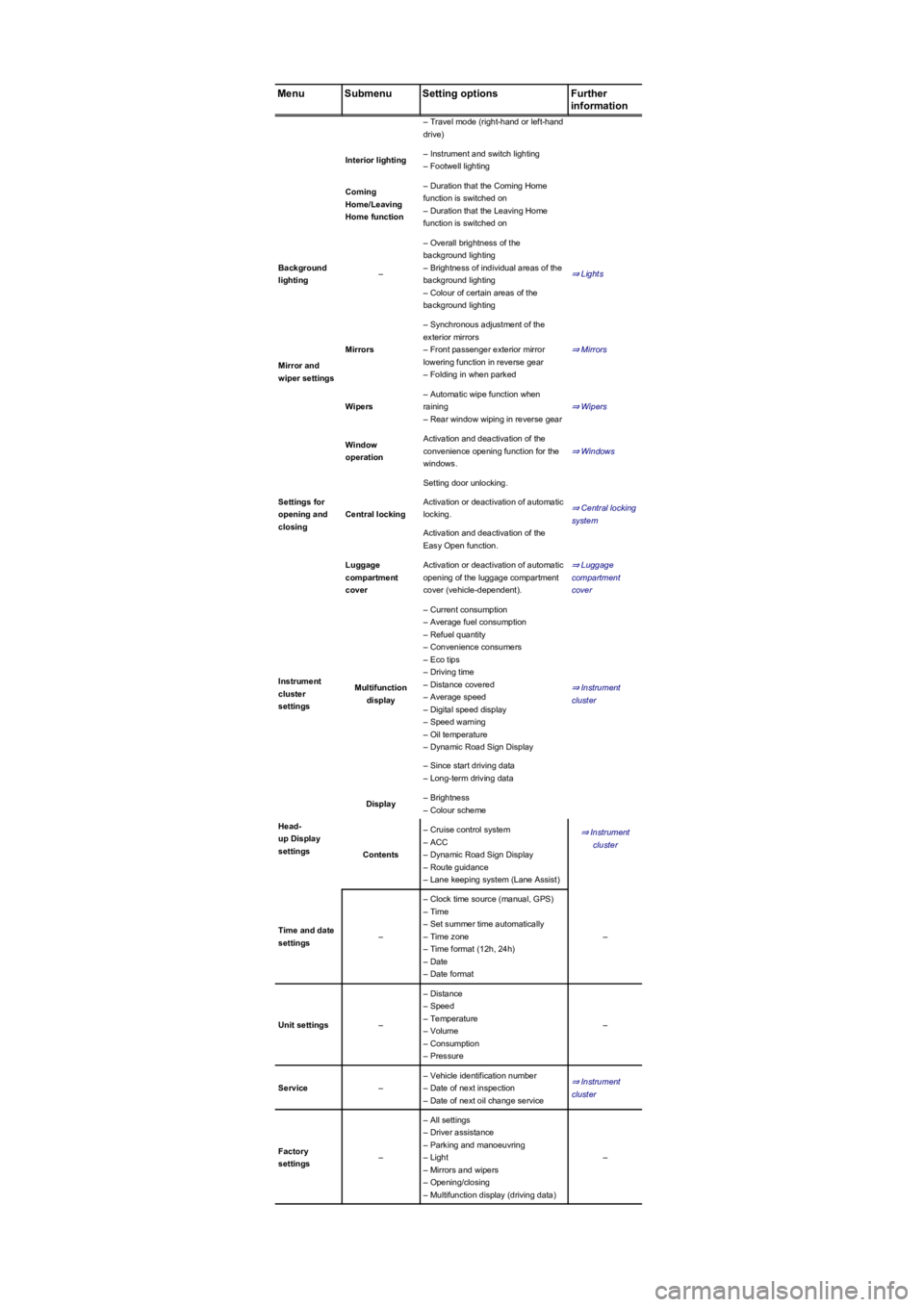
MenuSubmenuSetting optionsFurther
information
– Travel mode (right-hand or left-hand
drive)
Interior lighting– Instrument and switch lighting
– Footwell lighting
Coming
Home/Leaving
Home function
– Duration that the Coming Home
function is switched on
– Duration that the Leaving Home
function is switched on
Background
lighting–
– Overall brightness of the
background lighting
– Brightness of individual areas of the
background lighting
– Colour of certain areas of the
background lighting
⇒ Lights
Mirror and
wiper settings
Mirrors
– Synchronous adjustment of the
exterior mirrors
– Front passenger exterior mirror
lowering function in reverse gear
– Folding in when parked
⇒ Mirrors
Wipers
– Automatic wipe function when
raining
– Rear window wiping in reverse gear
⇒ Wipers
Settings for
opening and
closing
Window
operation
Activation and deactivation of the
convenience opening function for the
windows.
⇒ Windows
Central locking
Setting door unlocking.
⇒ Central locking
system
Activation or deactivation of automatic
locking.
Activation and deactivation of the
Easy Open function.
Luggage
compartment
cover
Activation or deactivation of automatic
opening of the luggage compartment
cover (vehicle-dependent).
⇒ Luggage
compartment
cover
Instrument
cluster
settings
Multifunction
display
– Current consumption
– Average fuel consumption
– Refuel quantity
– Convenience consumers
– Eco tips
– Driving time
– Distance covered
– Average speed
– Digital speed display
– Speed warning
– Oil temperature
– Dynamic Road Sign Display
⇒ Instrument
cluster
– Since start driving data
– Long-term driving data
Head-
up Display
settings
Display– Brightness
– Colour scheme
⇒ Instrument
cluster
Contents
– Cruise control system
– ACC
– Dynamic Road Sign Display
– Route guidance
– Lane keeping system (Lane Assist)
Time and date
settings–
– Clock time source (manual, GPS)
– Time
– Set summer time automatically
– Time zone
– Time format (12h, 24h)
– Date
– Date format
–
Unit settings–
– Distance
– Speed
– Temperature
– Volume
– Consumption
– Pressure
–
Service–
– Vehicle identification number
– Date of next inspection
– Date of next oil change service
⇒ Instrument
cluster
Factory
settings–
– All settings
– Driver assistance
– Parking and manoeuvring
– Light
– Mirrors and wipers
– Opening/closing
– Multifunction display (driving data)
–
Page 98 of 341
Memory function
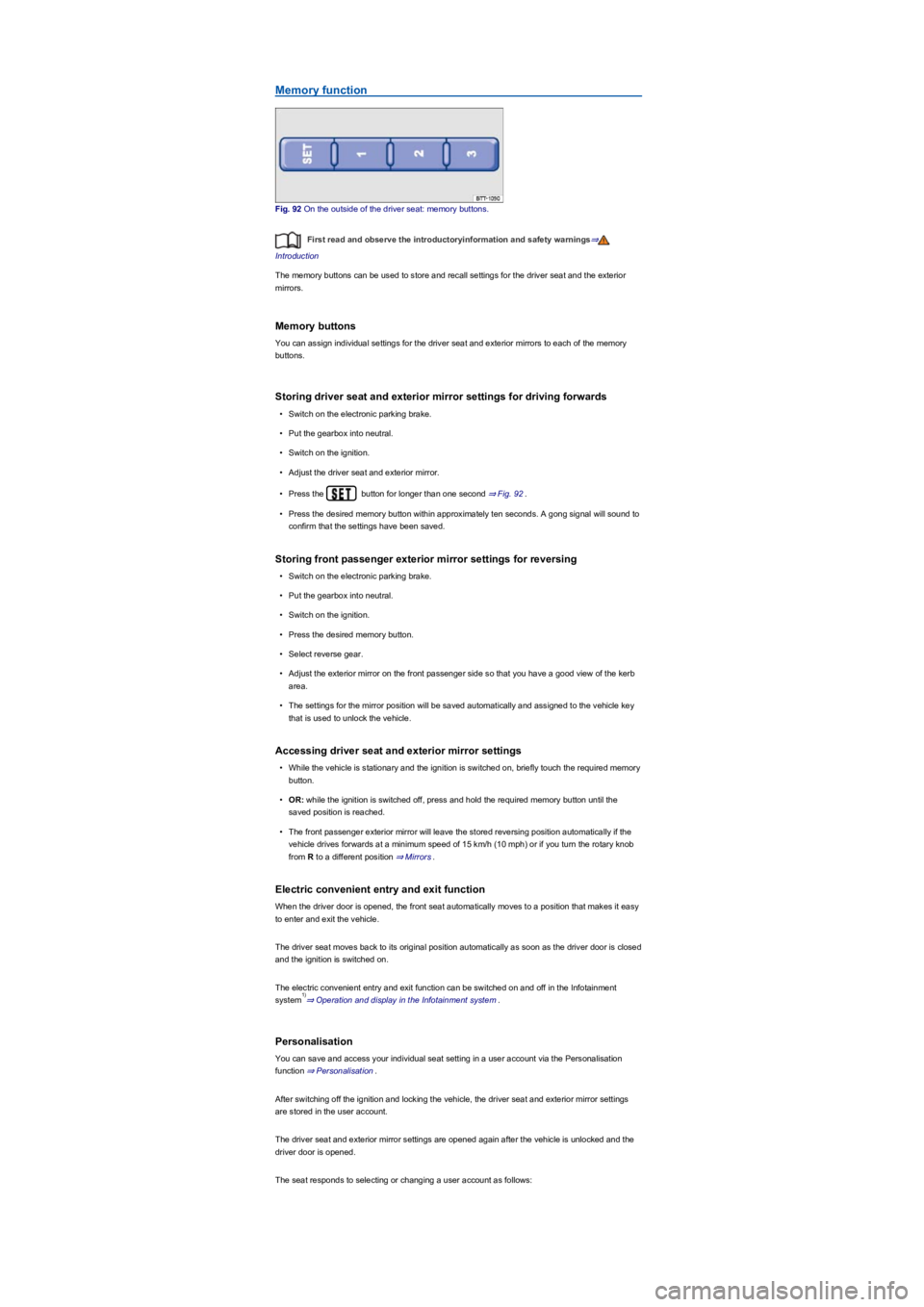
Fig. 92 On the outside of the driver seat: memory buttons.
First read and observe the introductoryinformation and safety warnings⇒
Introduction
The memory buttons can be used to store and recall settings for the driver seat and the exterior
mirrors.
Memory buttons
You can assign individual settings for the driver seat and exterior mirrors to each of the memory
buttons.
Storing driver seat and exterior mirror settings for driving forwards
•Switch on the electronic parking brake.
•Put the gearbox into neutral.
•Switch on the ignition.
•Adjust the driver seat and exterior mirror.
•Press the button for longer than one second ⇒ Fig. 92.
•Press the desired memory button within approximately ten seconds. A gong signal will sound to
confirm that the settings have been saved.
Storing front passenger exterior mirror settings for reversing
•Switch on the electronic parking brake.
•Put the gearbox into neutral.
•Switch on the ignition.
•Press the desired memory button.
•Select reverse gear.
•Adjust the exterior mirror on the front passenger side so that you have a good view of the kerb
area.
•The settings for the mirror position will be saved automatically and assigned to the vehicle key
that is used to unlock the vehicle.
Accessing driver seat and exterior mirror settings
•While the vehicle is stationary and the ignition is switched on, briefly touch the required memory
button.
•OR: while the ignition is switched off, press and hold the required memory button until the
saved position is reached.
•The front passenger exterior mirror will leave the stored reversing position automatically if the
vehicle drives forwards at a minimum speed of 15 km/h (10 mph) or if you turn the rotary knob
from R to a different position ⇒ Mirrors.
Electric convenient entry and exit function
When the driver door is opened, the front seat automatically moves to a position that makes it easy
to enter and exit the vehicle.
The driver seat moves back to its original position automatically as soon as the driver door is closed
and the ignition is switched on.
The electric convenient entry and exit function can be switched on and off in the Infotainment
system⇒ Operation and display in the Infotainment system.
Personalisation
You can save and access your individual seat setting in a user account via the Personalisation
function ⇒ Personalisation.
After switching off the ignition and locking the vehicle, the driver seat and exterior mirror settings
are stored in the user account.
The driver seat and exterior mirror settings are opened again after the vehicle is unlocked and the
driver door is opened.
The seat responds to selecting or changing a user account as follows:
1)
Page 112 of 341
Interior mirror
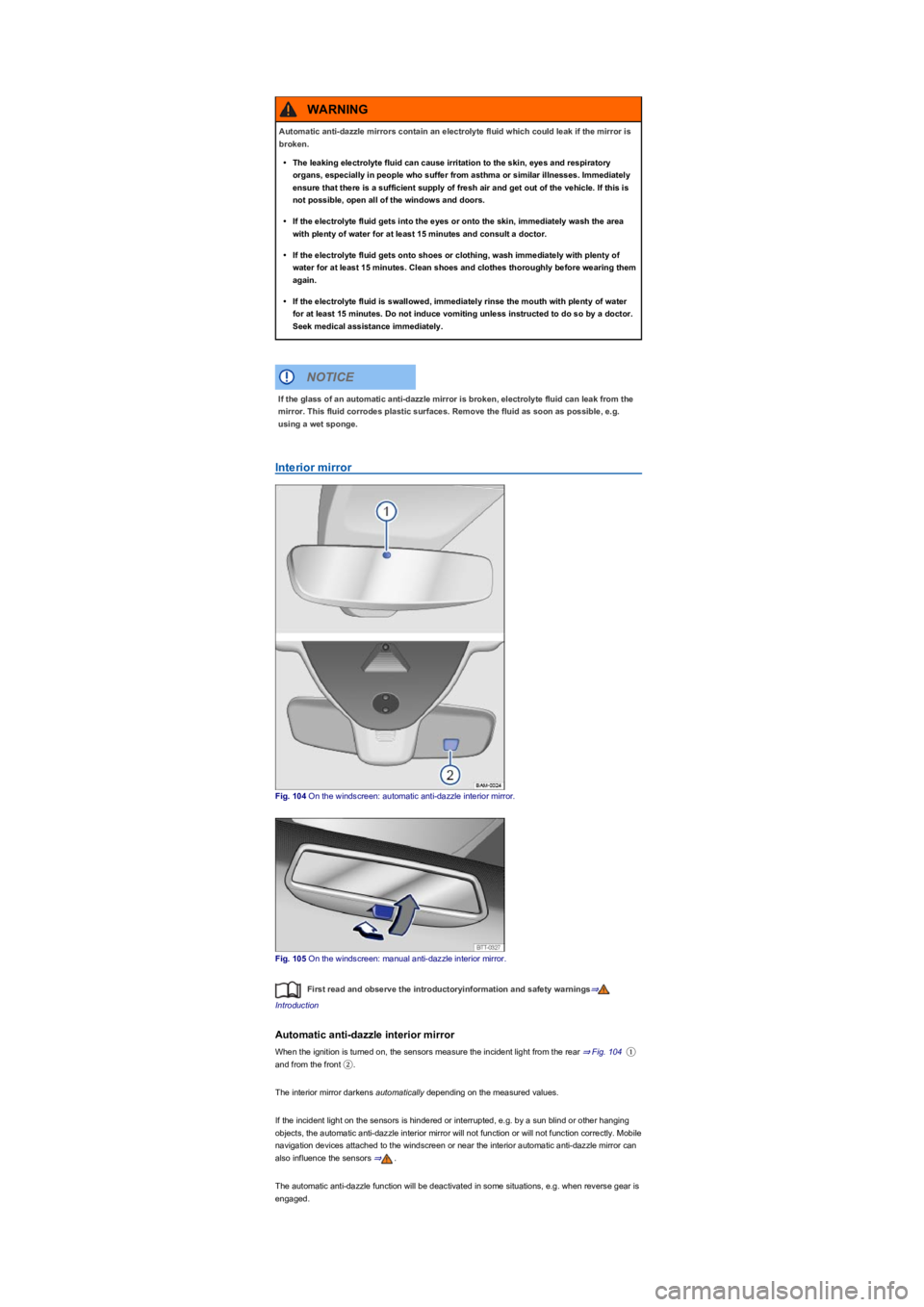
Fig. 104 On the windscreen: automatic anti-dazzle interior mirror.
Fig. 105 On the windscreen: manual anti-dazzle interior mirror.
First read and observe the introductoryinformation and safety warnings⇒
Introduction
Automatic anti-dazzle interior mirror
When the ignition is turned on, the sensors measure the incident light from the rear ⇒ Fig. 104①
and from the front ②.
The interior mirror darkens automatically depending on the measured values.
If the incident light on the sensors is hindered or interrupted, e.g. by a sun blind or other hanging
objects, the automatic anti-dazzle interior mirror will not function or will not function correctly. Mobile
navigation devices attached to the windscreen or near the interior automatic anti-dazzle mirror can
also influence the sensors ⇒.
The automatic anti-dazzle function will be deactivated in some situations, e.g. when reverse gear is
engaged.
Automatic anti-dazzle mirrors contain an electrolyte fluid which could leak if the mirror is
broken.
•The leaking electrolyte fluid can cause irritation to the skin, eyes and respiratory
organs, especially in people who suffer from asthma or similar illnesses. Immediately
ensure that there is a sufficient supply of fresh air and get out of the vehicle. If this is
not possible, open all of the windows and doors.
•If the electrolyte fluid gets into the eyes or onto the skin, immediately wash the area
with plenty of water for at least 15 minutes and consult a doctor.
•If the electrolyte fluid gets onto shoes or clothing, wash immediately with plenty of
water for at least 15 minutes. Clean shoes and clothes thoroughly before wearing them
again.
•If the electrolyte fluid is swallowed, immediately rinse the mouth with plenty of water
for at least 15 minutes. Do not induce vomiting unless instructed to do so by a doctor.
Seek medical assistance immediately.
WARNING
If the glass of an automatic anti-dazzle mirror is broken, electrolyte fluid can leak from the
mirror. This fluid corrodes plastic surfaces. Remove the fluid as soon as possible, e.g.
using a wet sponge.
NOTICE
Page 113 of 341
Manual anti-dazzle interior mirror
•Basic position: the lever on the lower part of the mirror is pointing towards the windscreen.
•Pull the lever to the back to select the anti-dazzle function ⇒ Fig. 105.
Exterior mirrors
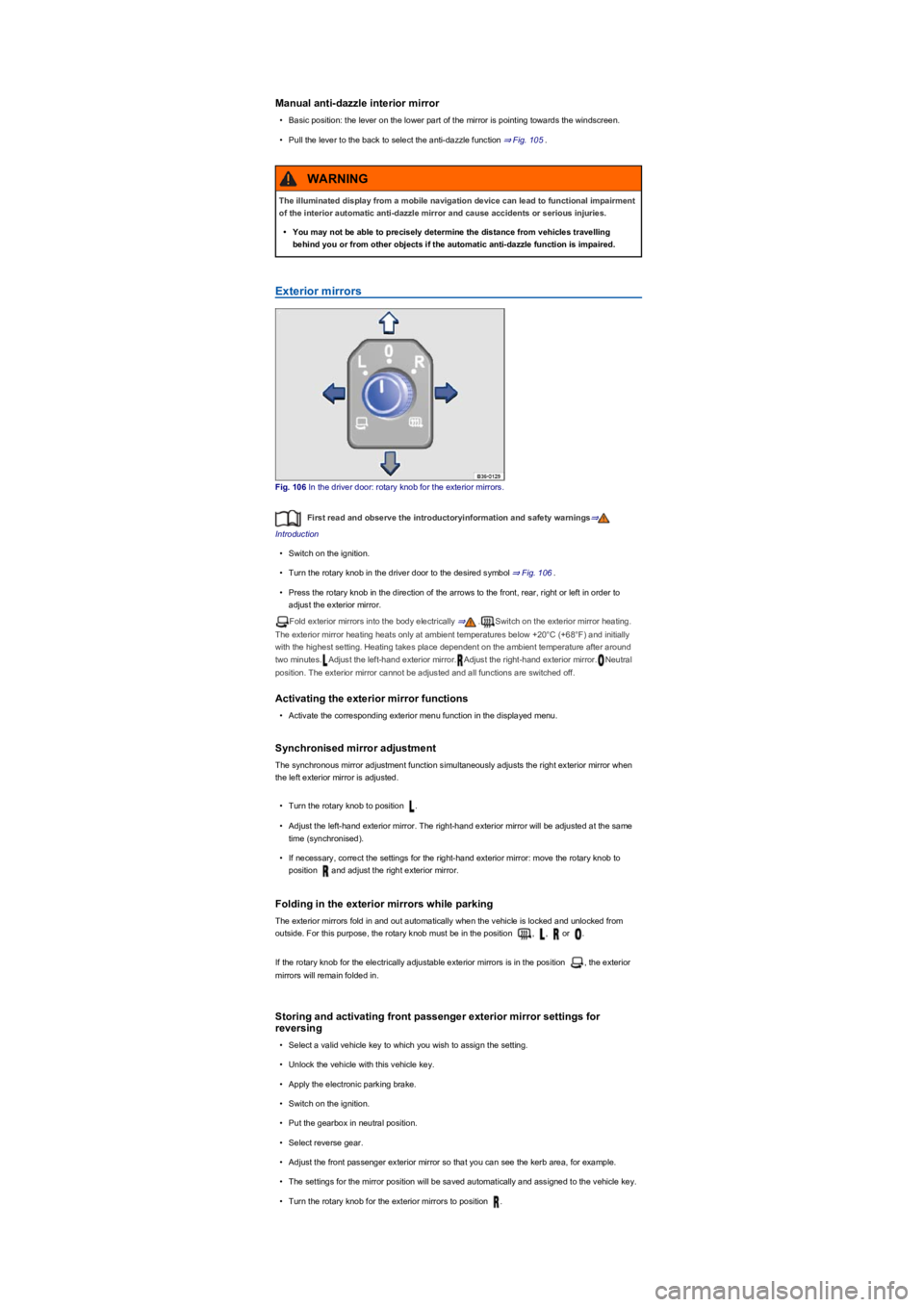
Fig. 106 In the driver door: rotary knob for the exterior mirrors.
First read and observe the introductoryinformation and safety warnings⇒
Introduction
•Switch on the ignition.
•Turn the rotary knob in the driver door to the desired symbol ⇒ Fig. 106.
•Press the rotary knob in the direction of the arrows to the front, rear, right or left in order to
adjust the exterior mirror.
Fold exterior mirrors into the body electrically ⇒.Switch on the exterior mirror heating.
The exterior mirror heating heats only at ambient temperatures below +20°C (+68°F) and initially
with the highest setting. Heating takes place dependent on the ambient temperature after around
two minutes.Adjust the left-hand exterior mirror.Adjust the right-hand exterior mirror.Neutral
position. The exterior mirror cannot be adjusted and all functions are switched off.
Activating the exterior mirror functions
•Activate the corresponding exterior menu function in the displayed menu.
Synchronised mirror adjustment
The synchronous mirror adjustment function simultaneously adjusts the right exterior mirror when
the left exterior mirror is adjusted.
•Turn the rotary knob to position .
•Adjust the left-hand exterior mirror. The right-hand exterior mirror will be adjusted at the same
time (synchronised).
•If necessary, correct the settings for the right-hand exterior mirror: move the rotary knob to
position and adjust the right exterior mirror.
Folding in the exterior mirrors while parking
The exterior mirrors fold in and out automatically when the vehicle is locked and unlocked from
outside. For this purpose, the rotary knob must be in the position , , or .
If the rotary knob for the electrically adjustable exterior mirrors is in the position , the exterior
mirrors will remain folded in.
Storing and activating front passenger exterior mirror settings for
reversing
•Select a valid vehicle key to which you wish to assign the setting.
•Unlock the vehicle with this vehicle key.
•Apply the electronic parking brake.
•Switch on the ignition.
•Put the gearbox in neutral position.
•Select reverse gear.
•Adjust the front passenger exterior mirror so that you can see the kerb area, for example.
•The settings for the mirror position will be saved automatically and assigned to the vehicle key.
•Turn the rotary knob for the exterior mirrors to position .
The illuminated display from a mobile navigation device can lead to functional impairment
of the interior automatic anti-dazzle mirror and cause accidents or serious injuries.
•You may not be able to precisely determine the distance from vehicles travelling
behind you or from other objects if the automatic anti-dazzle function is impaired.
WARNING
Page 114 of 341
•Select reverse gear while the ignition is switched on. The right exterior mirror will now adjust
itself to the stored position.
The front passenger exterior mirror will move out of the position saved for reversing when the
vehicle is driven forwards faster than approximately 15 km/h (9 mph) or when the rotary knob is
moved out of position into another position.
The exterior mirror heating should be switched off when it is no longer needed. Fuel is
otherwise wasted.
In the event of a fault, the electric exterior mirrors can be adjusted by hand by pressing on
the outer edge of the mirror.
Some settings can be stored in the user accounts of the personalisation function and
therefore change automatically when the user account changes ⇒ Personalisation.
Protection from the sun
Sun visors
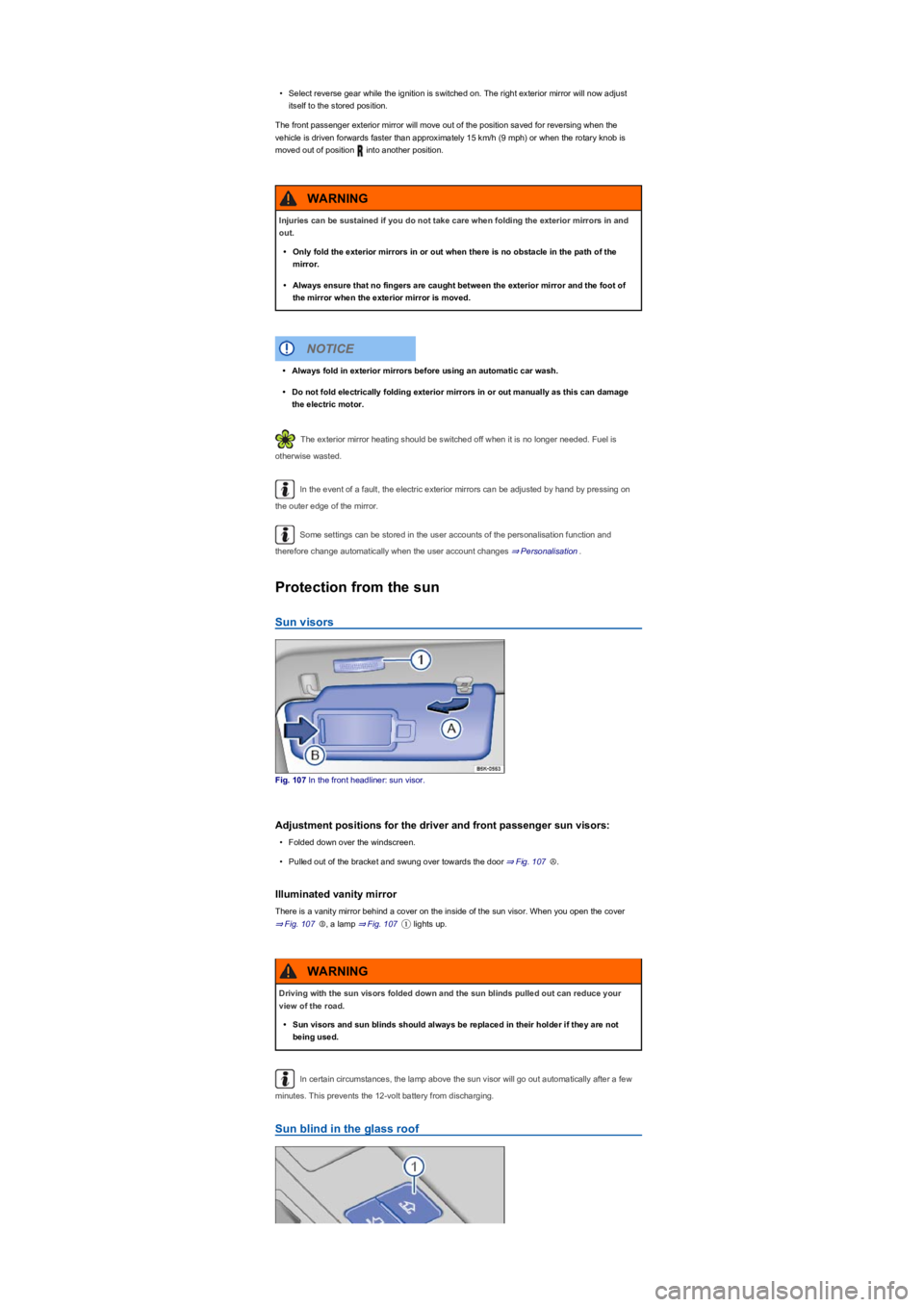
Fig. 107 In the front headliner: sun visor.
Adjustment positions for the driver and front passenger sun visors:
•Folded down over the windscreen.
•Pulled out of the bracket and swung over towards the door ⇒ Fig. 107Ⓐ.
Illuminated vanity mirror
There is a vanity mirror behind a cover on the inside of the sun visor. When you open the cover
⇒ Fig. 107Ⓑ, a lamp ⇒ Fig. 107① lights up.
In certain circumstances, the lamp above the sun visor will go out automatically after a few
minutes. This prevents the 12-volt battery from discharging.
Sun blind in the glass roof
Injuries can be sustained if you do not take care when folding the exterior mirrors in and
out.
•Only fold the exterior mirrors in or out when there is no obstacle in the path of the
mirror.
•Always ensure that no fingers are caught between the exterior mirror and the foot of
the mirror when the exterior mirror is moved.
WARNING
•Always fold in exterior mirrors before using an automatic car wash.
•Do not fold electrically folding exterior mirrors in or out manually as this can damage
the electric motor.
NOTICE
Driving with the sun visors folded down and the sun blinds pulled out can reduce your
view of the road.
•Sun visors and sun blinds should always be replaced in their holder if they are not
being used.
WARNING
Page 145 of 341
DSG dual clutch gearbox
Function of the DSG dual clutch gearbox
Description
The vehicle is equipped with a DSG dual clutch gearbox.
The DSG dual clutch gearbox is a gearbox which uses dual-clutch technology to change gear
automatically. It uses a dual clutch and two gear train halves to enable very fast gear changes with
no loss of torque. The DSG dual clutch gearbox thus combines the performance and economy of a
manual gearbox with the comfort and convenience of a conventional automatic transmission.
Function
When driving, engine power is transferred to the drive axle via the gearbox. In order to change
gears, the power transmission between the engine and the gearbox has to be interrupted. This is
what the clutch is for.
With the DSG dual clutch system with its two gear train halves, the engine power is always
connected to one gear train half when driving. Before a gear change, the next higher or lower gear
is already preselected in the load-free second gear train half. The clutch on the non-driven gear is
closed and the other is opened at the same time. This is what makes very fast gear changes
possible.
Thanks to its design, the DSG dual clutch gearbox is more efficient than an automatic gearbox.
Whereas in an automatic gearbox the torque converter is constantly in use, in the DSG dual clutch
system the clutch can be opened at idling speed, thus saving fuel. Thanks to its efficiency, low
weight and intelligent control system, the DSG dual clutch system usually enables fuel
consumption equal to or lower than a manual gearbox.
However, just like the manual gearbox, the clutch in the DSG dual clutch gearbox is subject to
wear. Regular maintenance is necessary depending on the type of dual clutch gearbox DSG;
further information ⇒ Scope of service. In the event of a fault in one gear train half, the DSG dual
clutch gearbox also allows one gear train half to be deactivated and the journey to be continued
using the other gear train half ⇒ Troubleshooting. If this happens, have the system checked as
soon as possible by a qualified workshop.
DSG dual clutch gearbox: selecting a gear
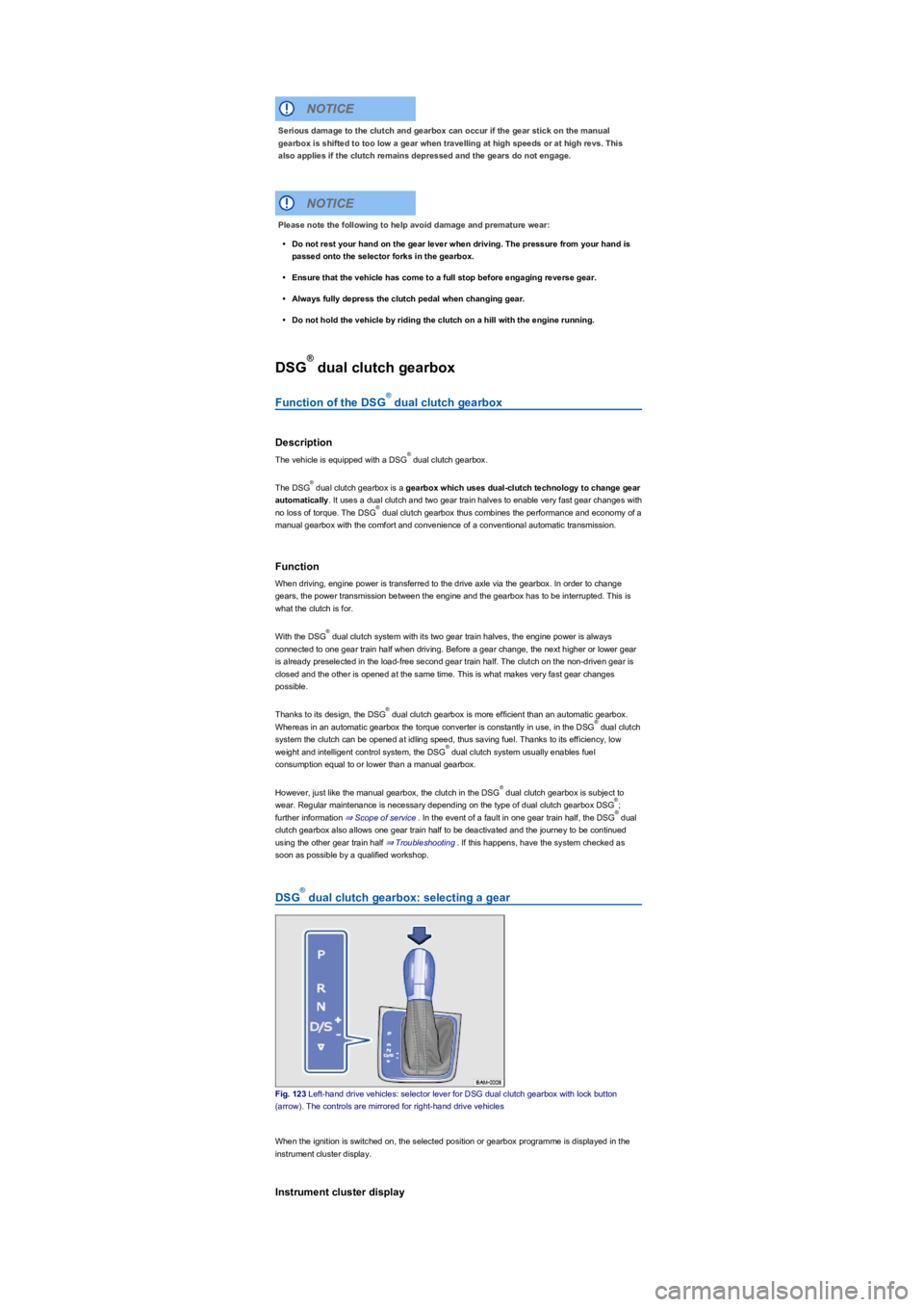
Fig. 123 Left-hand drive vehicles: selector lever for DSG dual clutch gearbox with lock button
(arrow). The controls are mirrored for right-hand drive vehicles
When the ignition is switched on, the selected position or gearbox programme is displayed in the
instrument cluster display.
Instrument cluster display
Serious damage to the clutch and gearbox can occur if the gear stick on the manual
gearbox is shifted to too low a gear when travelling at high speeds or at high revs. This
also applies if the clutch remains depressed and the gears do not engage.
NOTICE
Please note the following to help avoid damage and premature wear:
•Do not rest your hand on the gear lever when driving. The pressure from your hand is
passed onto the selector forks in the gearbox.
•Ensure that the vehicle has come to a full stop before engaging reverse gear.
•Always fully depress the clutch pedal when changing gear.
•Do not hold the vehicle by riding the clutch on a hill with the engine running.
NOTICE
®
®
®
®
®
®
®
®
®
®
®
®
®
Page 147 of 341
If the selector lever is moved accidentally to N when driving, take your foot off the
accelerator. Wait for the engine revs in the neutral position before selecting a position again.
Changing gear using Tiptronic
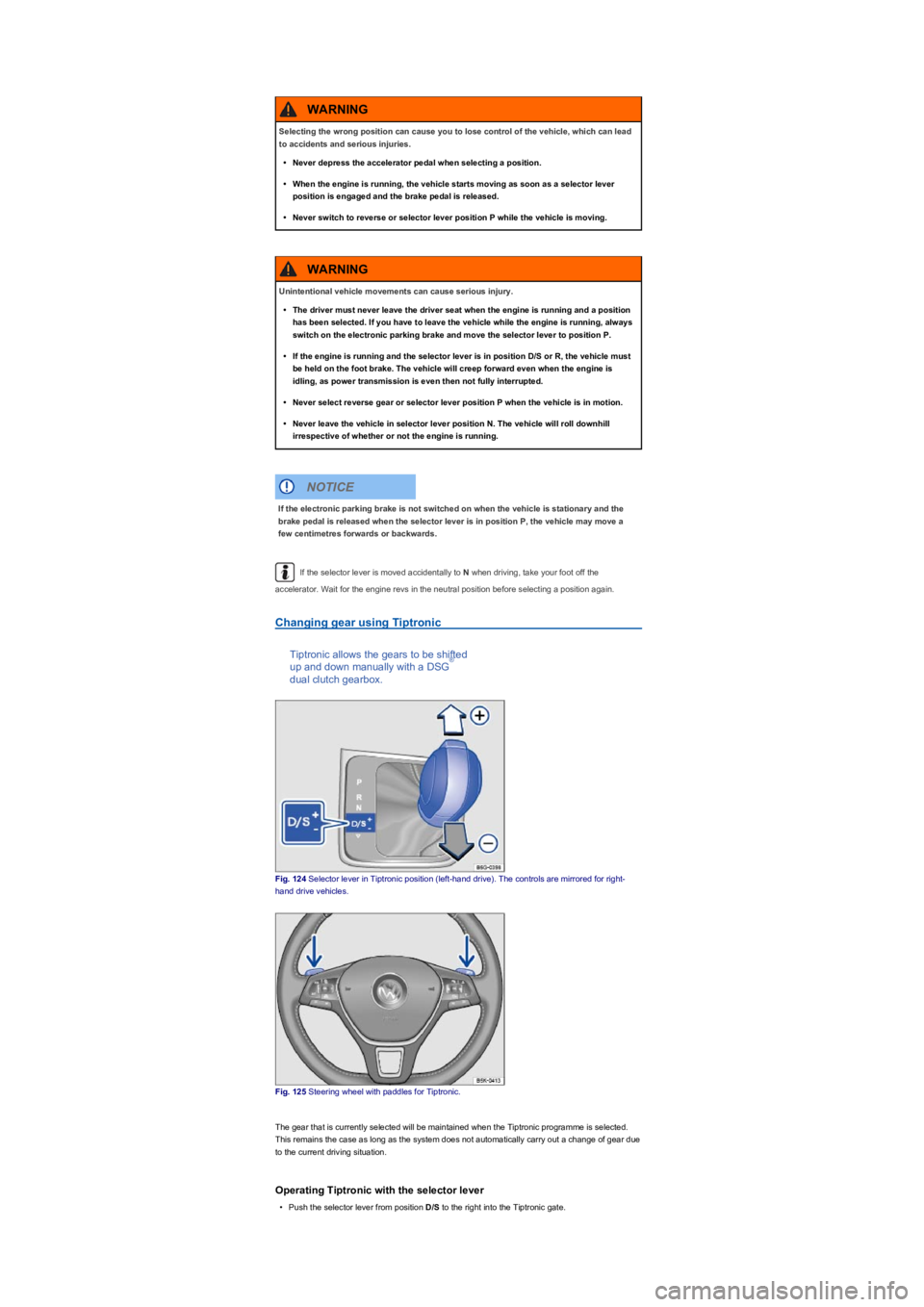
Tiptronic allows the gears to be shifted
up and down manually with a DSG
dual clutch gearbox.
Fig. 124 Selector lever in Tiptronic position (left-hand drive). The controls are mirrored for right-
hand drive vehicles.
Fig. 125 Steering wheel with paddles for Tiptronic.
The gear that is currently selected will be maintained when the Tiptronic programme is selected.
This remains the case as long as the system does not automatically carry out a change of gear due
to the current driving situation.
Operating Tiptronic with the selector lever
•Push the selector lever from position D/S to the right into the Tiptronic gate.
Selecting the wrong position can cause you to lose control of the vehicle, which can lead
to accidents and serious injuries.
•Never depress the accelerator pedal when selecting a position.
•When the engine is running, the vehicle starts moving as soon as a selector lever
position is engaged and the brake pedal is released.
•Never switch to reverse or selector lever position P while the vehicle is moving.
WARNING
Unintentional vehicle movements can cause serious injury.
•The driver must never leave the driver seat when the engine is running and a position
has been selected. If you have to leave the vehicle while the engine is running, always
switch on the electronic parking brake and move the selector lever to position P.
•If the engine is running and the selector lever is in position D/S or R, the vehicle must
be held on the foot brake. The vehicle will creep forward even when the engine is
idling, as power transmission is even then not fully interrupted.
•Never select reverse gear or selector lever position P when the vehicle is in motion.
•Never leave the vehicle in selector lever position N. The vehicle will roll downhill
irrespective of whether or not the engine is running.
WARNING
If the electronic parking brake is not switched on when the vehicle is stationary and the
brake pedal is released when the selector lever is in position P, the vehicle may move a
few centimetres forwards or backwards.
NOTICE
®
Page 207 of 341
Operation
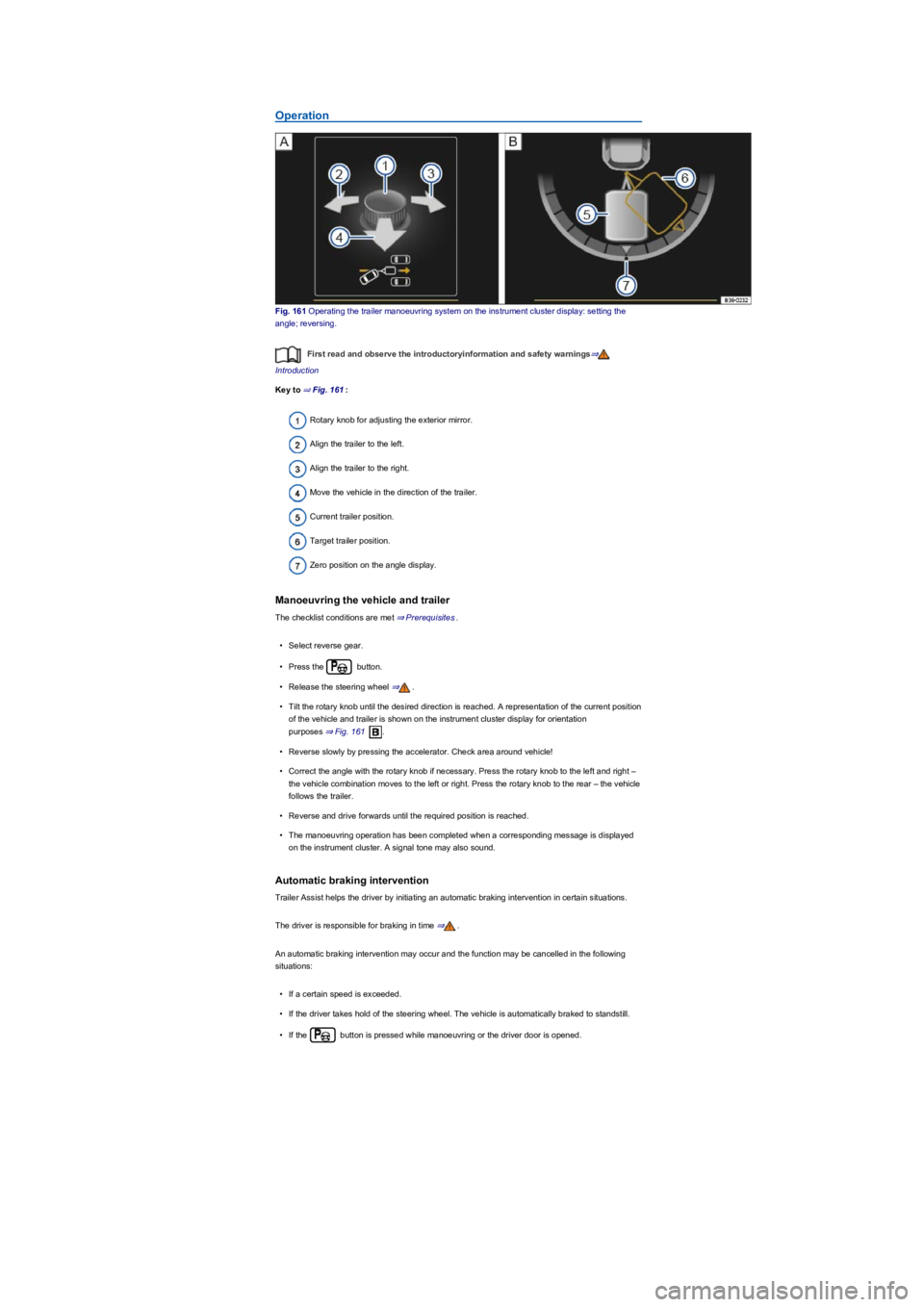
Fig. 161 Operating the trailer manoeuvring system on the instrument cluster display: setting the
angle; reversing.
First read and observe the introductoryinformation and safety warnings⇒
Introduction
Key to ⇒ Fig. 161:
Rotary knob for adjusting the exterior mirror.
Align the trailer to the left.
Align the trailer to the right.
Move the vehicle in the direction of the trailer.
Current trailer position.
Target trailer position.
Zero position on the angle display.
Manoeuvring the vehicle and trailer
The checklist conditions are met ⇒ Prerequisites.
•Select reverse gear.
•Press the button.
•Release the steering wheel ⇒.
•Tilt the rotary knob until the desired direction is reached. A representation of the current position
of the vehicle and trailer is shown on the instrument cluster display for orientation
purposes ⇒ Fig. 161.
•Reverse slowly by pressing the accelerator. Check area around vehicle!
•Correct the angle with the rotary knob if necessary. Press the rotary knob to the left and right –
the vehicle combination moves to the left or right. Press the rotary knob to the rear – the vehicle
follows the trailer.
•Reverse and drive forwards until the required position is reached.
•The manoeuvring operation has been completed when a corresponding message is displayed
on the instrument cluster. A signal tone may also sound.
Automatic braking intervention
Trailer Assist helps the driver by initiating an automatic braking intervention in certain situations.
The driver is responsible for braking in time ⇒.
An automatic braking intervention may occur and the function may be cancelled in the following
situations:
•If a certain speed is exceeded.
•If the driver takes hold of the steering wheel. The vehicle is automatically braked to standstill.
•If the button is pressed while manoeuvring or the driver door is opened.