navigation VOLKSWAGEN TRANSPORTER 2012 Owner's Manual
[x] Cancel search | Manufacturer: VOLKSWAGEN, Model Year: 2012, Model line: TRANSPORTER, Model: VOLKSWAGEN TRANSPORTER 2012Pages: 486, PDF Size: 69.28 MB
Page 244 of 486

-Only connect devices to the socket with a voltage that matches the voltage of the socket.
-With electrical devices that require a high level of current in the start phase, the built-in excess current switch will prevent the de-vice from being switched on. If this hap-pens, disconnect the device from the power supply and reconnect after waiting approxi-mately 10 seconds.
12-volt socket
·-·
"' -
fi7E.O'i1Q
Fig. 207 There is a 12-volt socket CD on the side of the kitchen unit.
l"'"'l'l1 First read and observe the Introductory L-lc.U information and safety warnings & on page 242.
There is a 12-voit socket at each of the following locations:
• On the side of the kitchen unit '*Fig. 207 (D.
• Near the lower portion of the sliding door, next to the bench seaVbed.
2441 Before the journey
Do not leave the engine running when the ve-f!JS hide is stationary.
m Using electrical appliances with the engine W switched off and the ignition switched on will drain the battery.
m Unshielded devices can cause interference W with radio/navigation system reception and vehicle electronics.
m Functional problems may occur with some W devices when they are connected to the 230-volt Euro socket due to the lower power output (wattage).
• In the front, either in the stowage compartment or in the ashtray (depending on equipment op-tions), and in the rear in the luggage compartment.
• In the roof frame of the pop-up roof.
Electrical equipment can be connected to the 12-volt sockets in the vehicle.
The maximum power rating is 120 watts. Do not exceed the maximum power rating. This also ap-plies to the total power consumption of all connec-ted devices if you connect several devices at the same time *
Page 287 of 486
ParkPilot
o:n Introduction
This chapter contains information on the following subjects:
ParkPilot only at rear . . 288 ParkPilot front and rear . . . 289
ParkPilot signal tones and displays . 290
The Park Pilot assists the driver when
parking and manoeuvring.
The ultrasound sensors in the bumpers transmit and receive ultrasound waves. The electronic sys-tem uses the ultrasound waves (i.e. transmission, reflection from the obstacle and reception) to cal-culate the distance between the bumper and the obstacle.
Additional information and warnings:
• Exterior views =:o page 5
• Braking, stopping and parking =:o page 269
• Reversing camera (Rear Assist) =:o page 291
• Cleaning and caring for the vehicle exterior =:.page 380
• Accessories, modifications, repairs and renewal of parts =:o page 394
• Radio or navigation system =:o Booklet Radio, provision for mobile telephone, infotainment sys-tem, navigation system
A WARNING
ParkPilot technology cannot overcome sys-tem-related vehicle limitations. The ParkPilot cannot replace the full concentration of the driver.
• Unintentional vehicle movements can cause serious injury.
• Always adapt your speed and driving style to suit visibility, weather, road and traffic con-ditions.
• Ultrasound sensors have blind spots in which obstacles and people cannot be detec-ted.
• Always check the area around the vehicle as the ultrasound sensors will not always de-tect infants, animals and objects.
A WARNING (Continued)
• Certain surfaces of objects and clothes cannot reflect the signals from the ultrasound sensors. The system is unable to detect these objects or people wearing this type of clothing, or they may be detected incorrectly.
• External sources of sound can affect the signals of the ultrasound sensors. This may prevent the system from recognising people or objects.
CD
Various factors can negatively Impact the Park-Pilot functions or lead to damage to the vehicle and objects in the area surrounding the vehi-cle.
• The ultrasound sensors may not always be able to detect objects such as trailer drawbars, thin rails, fences, posts, trees and open or opening boot lids. This can result in damage to your vehicle.
• If the ParkPilot has detected an obstacle and issued a warning, the obstacle may move out of the detection range of the ultrasound sensors as the vehicle approaches it, particu-larly if the object is very high or very low. These objects are no longer registered.
• The vehicle can sustain considerable dam-age if the warning given by the ParkPiiot is ig-nored.
• Ultrasound sensors can be displaced or damaged through Impacts, e.g. when parking.
• The ultrasound sensors must be kept clean and free of ice and snow, and must not be cov-ered up by stickers or other objects, as this will prevent the system from working properly.
• Repainting the ultrasound sensors can im-pair the function of the Park Pilot.
• The ultrasound sensors should only be sprayed briefly when cleaning with pressure hoses and steam cleaners. The steam/hose nozzle must always be kept more than 10 cm away from the ultrasound sensors.
• Sources of noise can lead to errors in the ParkPilot system, e.g. rough asphalt, cobble-stones, induction loops, building equipment, or interference from other vehicles.
Driver assist systems 287
Page 288 of 486
CD
• In some cases water and ice on the ultra-sound sensors could be registered as an ob-struction.
• Any equipment that has been retrofitted to the vehicle, e.g. bicycle carriers or number plate holders, can prevent the ParkPIIot from fu nctlonlng properly.
m Volkswagen Commercial Vehicles recom-L!J mends that drivers practise using the ParkPi-lot in a traffic-calmed area or car park to allow them to familiarise themselves with the system and its functions.
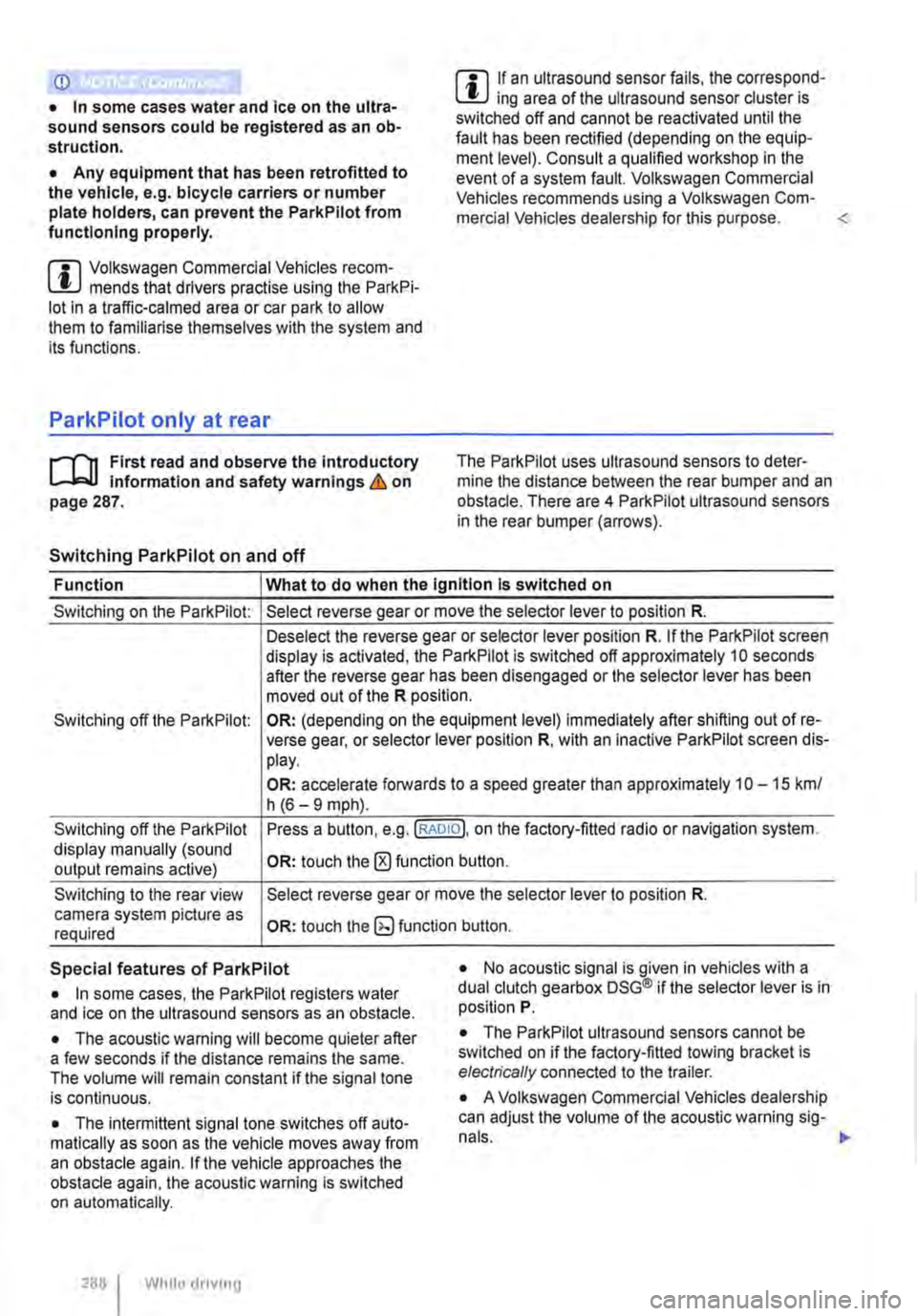
ParkPilot only at rear
,....-m First read and observe the introductory L-J.:.I.I Information and safety warnings & on page 287.
Switching ParkPilot on and off
m If an ultrasound sensor fails, the correspond-L!J ing area of the ultrasound sensor cluster is switched off and cannot be reactivated until the fault has been rectified (depending on the equip-ment level). Consult a qualified workshop in the event of a system fault. Volkswagen Commercial Vehicles recommends using a Volkswagen Com-mercial Vehicles dealership for this purpose.
Function What to do when the Ignition Is switched on
Switching on the ParkPilot:
Switching off the ParkPilot:
Switching off the ParkPilot display manually (sound output remains active)
Switching to the rear view camera system picture as required
Select reverse gear or move the selector lever to position R.
Deselect the reverse gear or selector lever position R. If the ParkPilot screen display is activated, the ParkPilot is switched off approximately 10 seconds after the reverse gear has been disengaged or the selector lever has been moved out of the R position.
OR: (depending on the equipment level) immediately after shifting out of re-verse gear, or selector lever position R, with an inactive ParkPilot screen dis-play.
OR: accelerate forwards to a speed greater than approximately 1 0-15 km/ h (6-9 mph).
Press a button, e.g.(RADIOl. on the factory-fitted radio or navigation system.
OR: touch the 0 function button.
Select reverse gear or move the selector lever to position R.
OR: touch the button.
Special features of ParkPilot • No acoustic signal is given in vehicles with a dual clutch gearbox DSG® if the selector lever is in position P. • In some cases, the ParkPilot registers water and ice on the ultrasound sensors as an obstacle.
• The acoustic warning will become quieter after a few seconds if the distance remains the same. The volume will remain constant if the signal tone is continuous.
• The intermittent signal tone switches off auto-matically as soon as the vehicle moves away from an obstacle again. If the vehicle approaches the obstacle again, the acoustic warning is switched on automatically.
288 I While driving
• The ParkPilot ultrasound sensors cannot be switched on if the factory-fitted towing bracket is electrically connected to the trailer.
• A Volkswagen Commercial Vehicles dealership can adjust the volume of the acoustic warning sig-
Page 289 of 486
m If there is a function fault in the ParkPilot, an W acoustic warning is emitted for approximately 3 seconds when switched on for the first time. The ParkPilot should be checked by a qualified work-shop immediately.
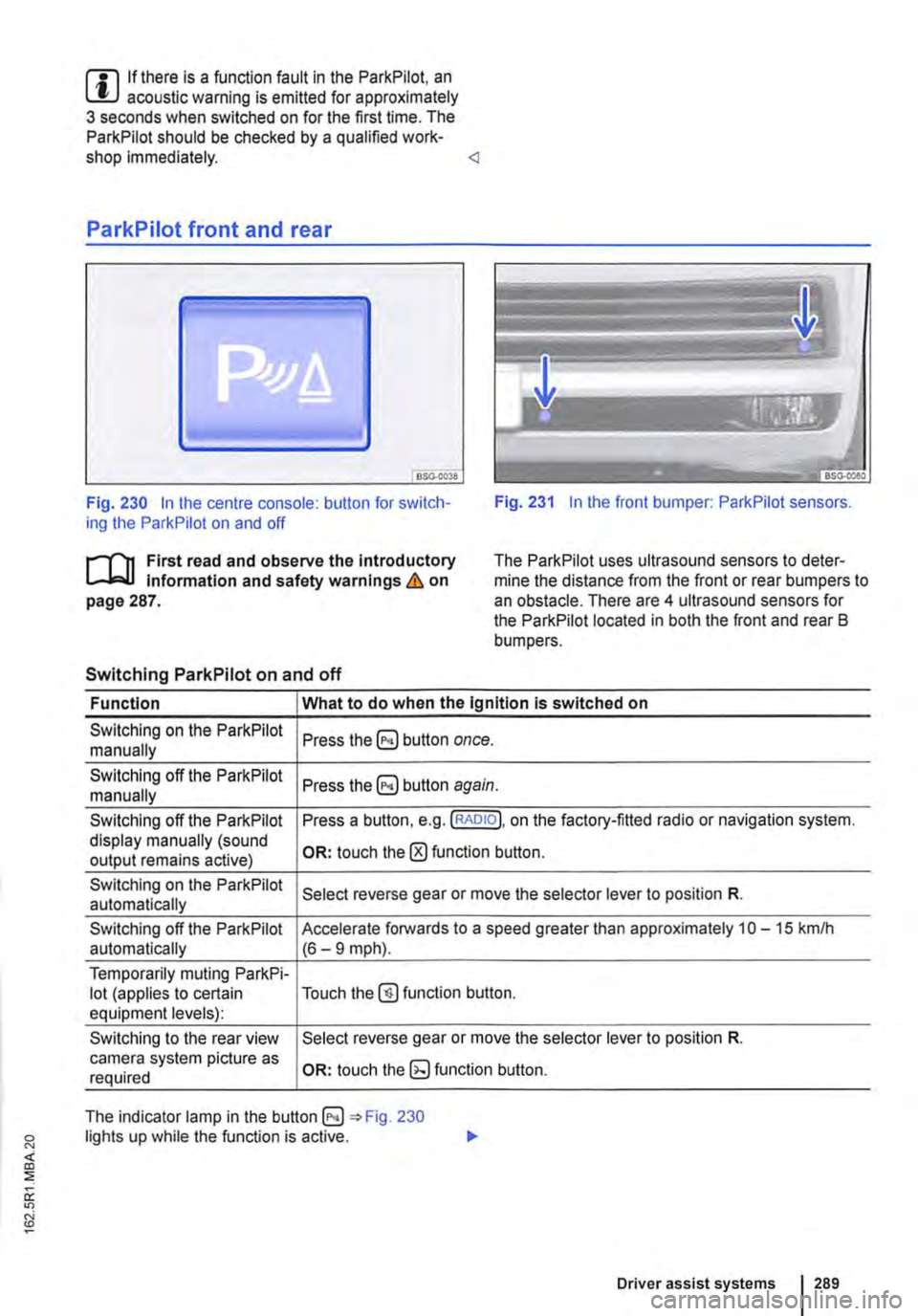
Fig. 230 In the centre console: button for switch-ing the ParkPilot on and off Fig. 231 In the front bumper: ParkPilot sensors.
r'l'11 First read and observe the Introductory Information and safety warnings & on page 287.
The Park Pilot uses ultrasound sensors to deter-mine the distance from the front or rear bumpers to an obstacle. There are 4 ultrasound sensors for the ParkPilot located in both the front and rear B bumpers.
Switching ParkPilot on and off
Function What to do when the Ignition is switched on
Switching on the ParkPilot Press button once. manually
Switching off the ParkPilot Press button again. manually
Switching off the ParkPilot Press a button, e.g. (RADIO!, on the factory-fitted radio or navigation system. display manually (sound OR: touch the 0 function button. output remains active)
Switching on the ParkPilot Select reverse gear or move the selector lever to position R. automatically
Switching off the ParkPilot Accelerate forwards to a speed greater than approximately 10-15 kmlh automatically (6-9 mph).
Temporarily muting ParkPi-lot (applies to certain Touch the@) function button. equipment levels):
Switching to the rear view Select reverse gear or move the selector lever to position R. camera system picture as OR: touch function button. required
The indicator lamp in the =:o Fig. 230 lights up while the function is active.
Driver assist systems 1289
Page 290 of 486
Special features of ParkPilot
• In some cases, the ParkPilot registers water and ice on the ultrasound sensors as an obstacle.
• The acoustic warning will become quieter after a few seconds if the distance remains the same. The volume will remain constant if the signal tone is continuous.
• The intermittent signal tone switches off auto-matically as soon as the vehicle moves away from an obstacle again. If the vehicle approaches the obstade again, the acoustic warning is switched on automatically.
• No acoustic signal is given in vehicles with a dual clutch gearbox DSG® if the selector lever is in position P.
ParkPilot signal tones and displays
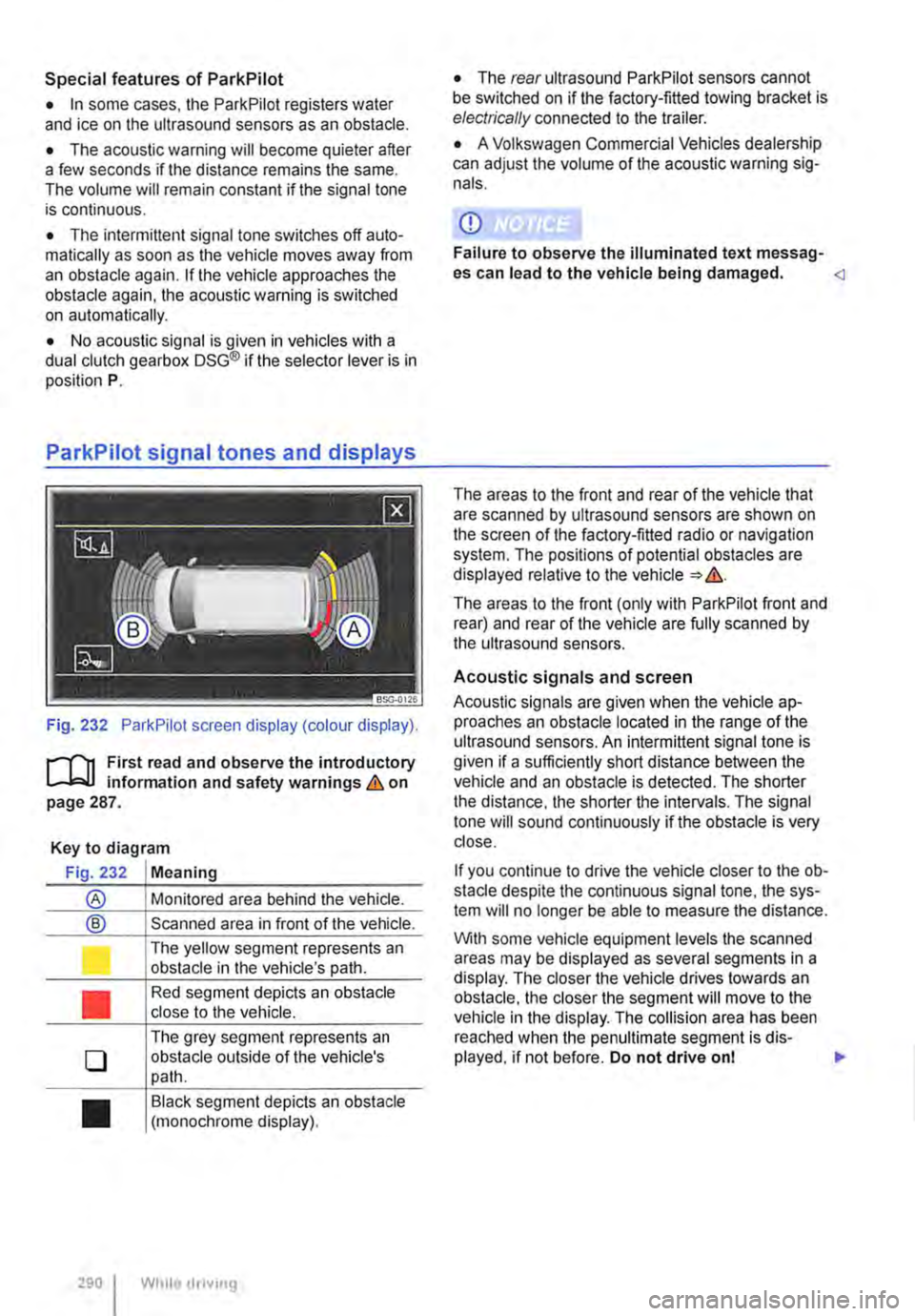
Fig. 232 ParkPilot screen display (colour display).
r--f"'n First read and observe the introductory L-.I=.U Information and safety warnings & on page 287.
Key to diagram
Fig. 232 Meaning
® Monitored area behind the vehide.
® Scanned area in front of the vehicle.
l J
•
0
•
290 I
The yellow segment represents an obstacle in the vehicle's path.
Red segment depicts an obstacle close to the vehicle.
The grey segment represents an obstacle outside of the vehicle's path.
Black segment depicts an obstacle (monochrome display).
While droving
• The rear ultrasound ParkPilot sensors cannot be switched on if the factory-fitted towing bracket is electrically connected to the trailer.
• A Volkswagen Commercial Vehicles dealership can adjust the volume of the acoustic warning sig-nals.
CD
Failure to observe the illuminated text messag-es can lead to the vehicle being damaged.
The areas to the front (only with ParkPilot front and rear) and rear of the vehicle are fully scanned by the ultrasound sensors.
Acoustic signals and screen
Acoustic signals are given when the vehicle ap-proaches an obstacle located in the range of the ultrasound sensors. An intermittent signal tone is given if a sufficiently short distance between the vehicle and an obstacle is detected. The shorter the distance, the shorter the intervals. The signal tone will sound continuously if the obstacle is very close.
If you continue to drive the vehide closer to the ob-sta de despite the continuous signal tone, the sys-tem will no longer be able to measure the distance.
With some vehicle equipment levels the scanned areas may be displayed as several segments in a display. The closer the vehicle drives lowards an obstacle, the closer the segment will move to the vehicle in the display. The collision area has been reached when the penultimate segment is dis-played, if not before. Do not drive onl .,..
Page 291 of 486
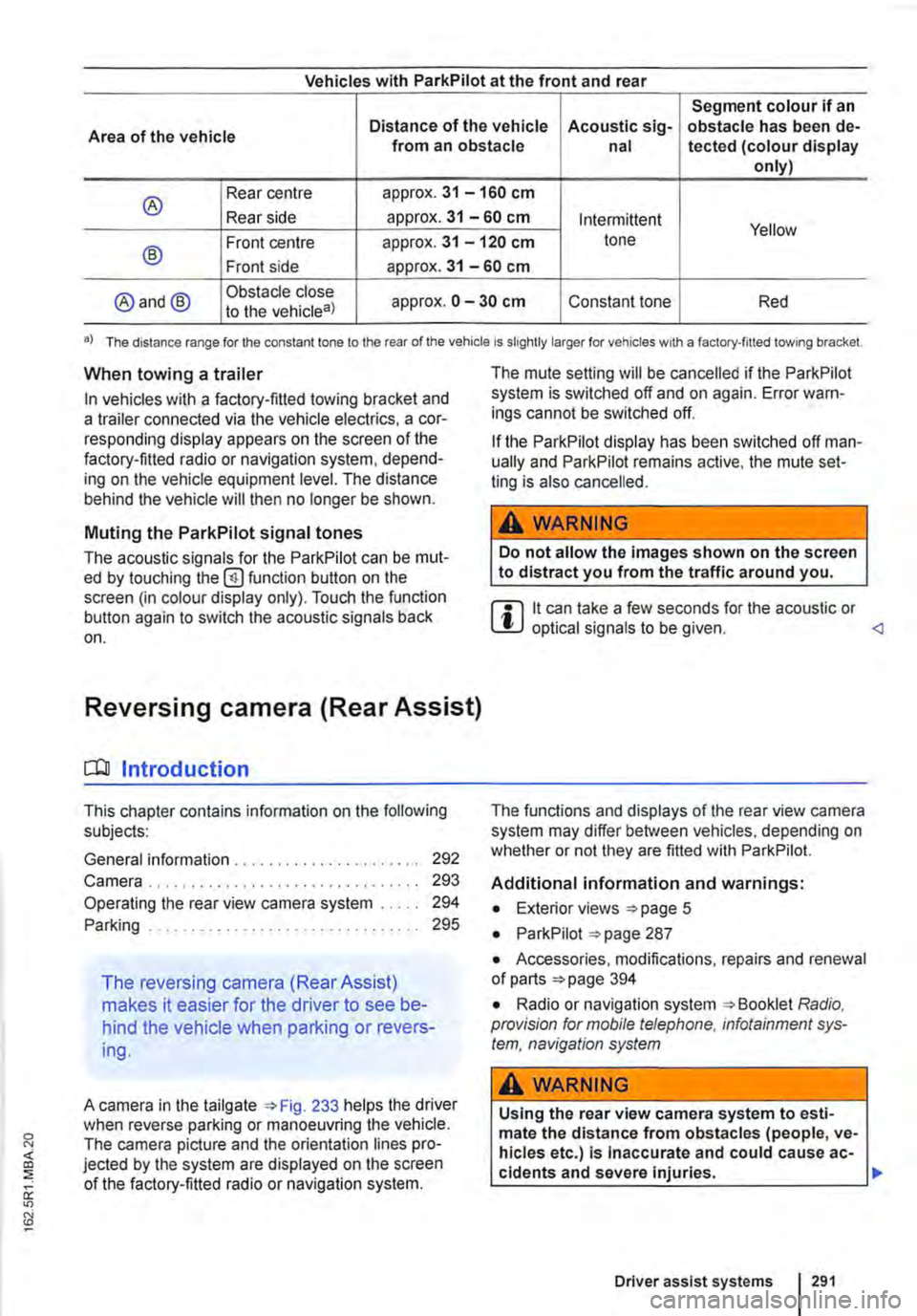
Vehicles with ParkPilot at the front and rear
Segment colour if an
Area of the vehicle Distance of the vehicle Acoustic sig-obstacle has been de-from an obstacle nal tected (colour display only)
® Rear centre approx. 31 -160 cm
Rear side approx. 31 -60 cm Intermittent Yellow
® Front centre approx. 31 -120 cm tone
Front side approx. 31 -60 cm
@and@ Obstacle close approx. 0 -30 cm Constant tone Red to the vehicle8)
•) The distance range for the constant lone to the rear of the vehicle is slightly larger for vehicles w1th a factory-filled towing bracket.
When towing a trailer
In vehicles with a factory-fitted towing bracket and a trailer connected via the vehicle electrics, a cor-responding display appears on the screen of the factory-fitted radio or navigation system, depend-ing on the vehicle equipment level. The distance behind the vehicle will then no longer be shown.
Muting the ParkPilot signal tones
The acoustic signals for the ParkPilot can be mut-ed by touching the @function button on the screen (in colour display only). Touch the function button again to switch the acoustic signals back on.
Reversing camera (Rear Assist)
o:n Introduction
This chapter contains information on the following subjects:
General information ..................... . Camera.
292 293
Operating the rear view camera system . . . . . 294
....................... 2%
The reversing camera (Rear Assist)
makes it easier for the driver to see be-
hind the vehicle when parking or revers-
ing.
A camera in the tailgate 233 helps the driver when reverse parking or manoeuvring the vehicle. The camera picture and the orientation lines pro-jected by the system are displayed on the screen of the factory-fitted radio or navigation system.
The mute setting will be cancelled if the ParkPilot system is switched off and on again. Error warn-ings cannot be switched off.
If the ParkPilot display has been switched off man-ually and ParkPilot remains active, the mute set-ting is also cancelled.
A WARNING
Do not allow the Images shown on the screen to distract you from the traffic around you.
m it can take a few seconds for the acoustic or W optical signals to be given.
Additional information and warnings:
• Exterior views =>page 5
• ParkPilot 287
• Accessories, modifications, repairs and renewal of parts 394
• Radio or navigation system Radio, provision for mobile telephone, infotainment sys-tem, navigation system
A WARNING
Using the rear view camera system to esti-mate the distance from obstacles (people, ve-hicles etc.) Is Inaccurate and could cause ac-cidents and severe injuries. 11>
Driver assist systems I 291
Page 293 of 486
• Switch on radio/navigation system, if not al-ready on.
• Select reverse gear or move the selector lever to position R.
Camera
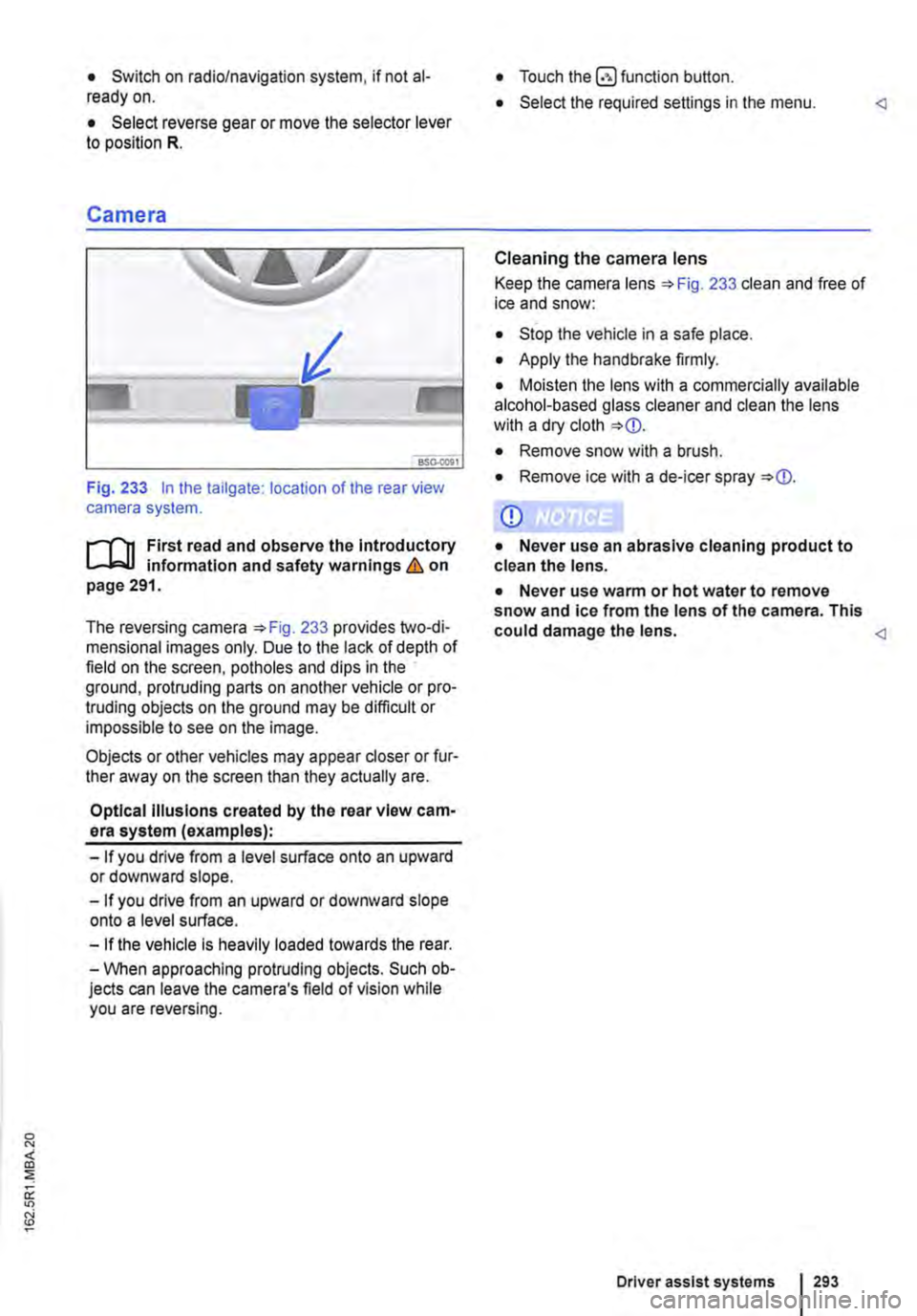
Fig. 233 In the tailgate: location of the rear view camera system.
....--r'n First read and observe the Introductory L.-J,:.U information and safety warnings & on page 291.
The reversing camera 233 provides two-di-mensional images only. Due to the lack of depth of field on the screen, potholes and dips in the ground, protruding parts on another vehicle or pro-truding objects on the ground may be difficult or impossible to see on the image.
Objects or other vehicles may appear closer or fur-ther away on the screen than they actually are.
Optical Illusions created by the rear view cam-era system (examples):
-If you drive from a level surface onto an upward or downward slope.
-If you drive from an upward or downward slope onto a level surface.
-If the vehicle Is heavily loaded towards the rear.
-When approaching protruding objects. Such ob-jects can leave the camera's field of vision while you are reversing.
• Touch the button.
• Select the required settings in the menu.
Cleaning the camera lens
Keep the camera lens 233 clean and free of ice and snow:
• Stop the vehicle in a safe place.
• Apply the handbrake firmly.
• Moisten the lens with a commercially available alcohol-based glass cleaner and clean the lens with a dry cloth
• Remove snow with a brush.
• Remove ice with a de-icer spray
CD
• Never use an abrasive cleaning product to clean the lens.
• Never use warm or hot water to remove snow and ice from the lens of the camera. This could damage the lens.
Driver assist systems 293
Page 322 of 486
Air conditioning system
Heating, ventilating, cooling
o:n Introduction
This chapter contains information on the following subjects:
Controls for Climatic . . . . . . . . . . . . . . . . . . . . 323
Controls for Climatronic . . . . . . . . . . . . . . . . . 325
Controls for the heating and fresh air system . 327
Information on the air conditioning system . . . 328
..................... m
Air recirculation mode . . . . . . . • . . . . . . . . . . . . 330
Windscreen heating . . . . . . . . . . . . . . . . . . . . . 331
Roof ventilator . . . . . . . . . . . . . . . . . . . . . . . . . . 331
Displays for the Climatronic information
Depending on the vehicle equipment level, infor-mation on the Climatronic is displayed briefly on the screen of the factory-fitted radio or navigation system.
The dust and pollen filter
The dust and pollen filter with activated charcoal reduces the level of impurities in the outside air en-tering the vehicle.
The dust and pollen filler must be changed regular-ly to avoid impairing the performance of the air conditioning system.
The dust and pollen filter must be changed more frequently than stated in the service schedule if the efficiency of the filter declines prematurely due to the vehicle being used in areas with high levels of air pollution.
Additional information and warnings:
• Exterior views 5
• Wipers/washer 116
• Supplementary heaters (auxiliary air heater or auxiliary coolant heater) 332
• Cleaning and caring for the vehicle exterior 380
A WARNING
Poor visibility through all windows increases the risk of collisions and accidents, which can cause serious injuries.
• Always ensure that all windows are free of ice, snow and mist to ensure good visibility.
3221 While driving
A WARNING (Continued)
• Maximum heat output, which Is needed to defrost the windows as quickly as possible, is only available when the engine has reached Its operating temperature. Do not start your journey until you have good visibil-Ity.
• Always ensure that the heating and fresh air system or the air conditioning system and the rear window heating are used correctly so that you have good visibility.
• Never use the air reclrculatlon mode for an extended period. If the cooling system Is switched off, the windows can mist up very quickly In air reclrculatlon mode and reduce visibility considerably.
• Always switch off the air reclrculatlon mode when it Is not required.
A WARNING
Stale air can quickly make the driver tired and affect their concentration, which In turn can cause collisions, accidents and serious Inju-ries.
• Never switch off the blowers or switch on the air recirculatlon mode for an extended pe· riod as this prevents fresh air from entering the vehicle interior.
• Repairs to the air conditioning system re-quire specialist knowledge and special tools. Volkswagen Commercial Vehicles recommends using a Volkswagen Commercial Vehicles deal-ership for this purpose.
Page 394 of 486
Accessories, modifications, repairs and renewal of parts
o::n Introduction
This chapter contains information on the following subjects:
Running-in 394
Accessories and replacement parts 395 Service fluids and consumables . . . . . . . . . . . 395
Repairs and technical modifications . . . . . . . . 396
Repairs and faults in the airbag system . . . . . 397
Retrofitting two-way radios . . . . . . . . . . . . . . . . 398
Information stored in the control units . . . . . . . 398 Using a mobile telephone in the vehicle without a connection to the external aerial . . 399
Vehicle lifting points 401
Additional information and warnings:
• Seat belts '*page 79
• Airbag system '*page 87
• Towing a trailer 139
• Ashtray and cigarette lighter 161
• Electrical sockets 163
• Braking, stopping and parking '*page 269
• Pull-away assist systems 282
• ParkPilot 287
• Reversing camera (Rear Assist) '*page 291
• Cruise control system (CCS) 295
• Driver Alert System 315
• Tyre monitoring system 318
• Preparation for working in the engine compart-ment page 350
• Engine oil 353
• Engine coolant '*page 358
• Battery 362
Running-in
r--('n First read and observe the introductory L-J.:.lJ information and safety warnings & on page 394.
Please follow the regulations concerning running-in new parts.
394 I Cleaning and maintenance
• Cleaning and caring for the vehicle exterior 380
• Cleaning and caring for the interior 388
• Consumer information 404
• Radio, provision for mobile tele-phone, infotainment system, navigation system
A WARNING
Unsuitable spare parts and accessories, In-correctly carried out work, modifications and repairs can lead to damage to the vehicle and cause accidents and serious Injuries.
• Volkswagen Commercial Vehicles strongly recommends you use only approved Volks-wagen accessories and Volkswagen Genuine Parts®. These parts and accessories have been specially tested by Volkswagen Com-mercial Vehicles for suitability, reliability and safety.
• Repairs and modifications to your vehicle should only be carried out by a qualified workshop. Qualified workshops have the nec-essary tools, diagnostic equipment, repair In-formation and qualified personnel.
• Never fit parts to your vehicle that are In any way different from the factory-fitted parts.
• Never secure or mount objects such as drink holders or telephone holders on or next to the airbag covers or within the deployment zone of the airbag.
• Only use rim/tyre combinations which have been approved by Volkswagen Commer-cial Vehicles for your vehicle type.
Any new engine has to be run in during the first 1 ,500 kilometres. During its first few hours of run-ning, the internal friction in the engine is greater than later on when all the moving parts have bed-ded down.
The style of driving during the first 1 ,500 kilometres will also affect the engine quality. Even after this time-and especially with a cold engine-drive the .,.
Page 400 of 486
ensure that the mobile telephone is securely at-tached to the dash panel and always within reach of the driver. Depending on which hands-free sys-tem is installed, the connection between the mobile telephone and the external aerial is established ei-ther via the telephone holder or via an existing Bluetooth® connection between the mobile tele-phone and the vehicle.
Connecting the mobile telephone is to a telephone aerial integrated in the vehicle or to an external tel-ephone aerial reduces the electromagnetic radia-tion generated by the telephone which could affect the human body. Using an aerial also improves the quality of the signal.
If a mobile telephone is used in the vehicle interior without this hands-free system, it is not safely se-cured in the vehicle and also not connected to the vehicle's external telephone aerial. Furthermore, the mobile telephone is not being charged in the telephone holder. lt is also likely that the telephone connection will be disrupted and the signal strength will be poor.
No mobile telephone should be used in the vehicle unless it is connected to a hands-free unit. Volks-wagen Commercial Vehicles recommends the use of an external aerial when a mobile telephone is used in the vehicle.
Bluetooth® is a registered trademark of Blue-tooth® SIG, Inc.
A WARNING
Any mobile telephone that Is not secured or is incorrectly secured In the vehicle could be flung though the Interior during a sudden driving or braking manoeuvre, or In the event of an accident. This could cause Injuries.
• Mobile telephones, other devices and tele-phone accessories such as telephone hold-ers, notepads and portable navigation devi-ces must always be secured properly outside of the alrbag deployment zones or be stowed In a safe place whilst the vehicle Is In motion.
400 I Cleaning and maintenance
A WARNING
If mobile telephones or two-way radios that are not connected to an external aerial are used, electromagnetic radiation In the vehicle could exceed limit values and thus be a health hazard for drivers and other vehicle occupants. This also applies to external aer-ials which have not been correctly Installed.
• Keep mobile telephone aerials at least 20 cm away from pacemakers, as the telephones may affect their functioning.
• Do not carry a mobile telephone in your breast pocket above a pacemaker when the telephone Is switched on or In standby mode.
• Switch off the mobile telephone Immedi-ately If you suspect it may be Interfering with a pacemaker.