steering VOLKSWAGEN TRANSPORTER 2012 Owner's Guide
[x] Cancel search | Manufacturer: VOLKSWAGEN, Model Year: 2012, Model line: TRANSPORTER, Model: VOLKSWAGEN TRANSPORTER 2012Pages: 486, PDF Size: 69.28 MB
Page 274 of 486
A WARNING (Continued)
• If the brake servo does not function or the vehicle is being towed, the brake pedal will have to be depressed more forcefully as the braking distance will be Increased due to the lack of assistance for the brake system.
CD
• Never let the brakes "rub" by applying light pressure to the brake when it is not necessary to brake. Continual pressure on the brake pedal will overheat the brakes. This can considerably reduce the brake effect, increase the braking distance and, In certain circumstances, cause the brake system to fail completely.
Brake support systems
r-f'n First read and observe the Introductory l..-Wl information and safety warnings&. on page 269.
The brake support systems ESC, ABS, BAS, TCS and EDL only function when the engine is running. They make a considerable contribution to active driving safety.
Electronic stability control (ESC)
The ESC helps to reduce the risk of skidding and to improve driving stability by braking individual wheels in certain driving situations. The ESC de-tects critical driving situations such as oversteer, understeer and wheelspin. The system helps to stabilise the vehicle through targeted application of the brakes or by reducing engine torque.
ESC has its limitations. lt is important to realise that ESC cannot overcome the laws of physics. ESC will not be able to assist in every situation faced by a driver. For example, ESC will not be able to assist every time that there is a sudden change in the road surface quality. If a section of dry road is suddenly covered with water, mud or snow, ESC will not be able to assist in the same manner as on a dry road. If the vehicle aquaplanes (drives on a layer of water rather than on the road surface), ESC will not be able to assist in steering the vehicle as the contact to the road surface has been interrupted and it is therefore no longer pos-sible to steer or brake the vehicle. When driving at speed through bends, particularly on stretches of road with many bends, the ESC will not always be able to process complicated driving situations as
2741 While dnvang
m If the front brake pads are tested, the rear L!..J brake pads should be tested at the same time. Regularly check the thickness of the brake pads through the openings in the rims or from the underside of the vehicle. If necessary, remove the wheels to carry out a comprehensive check. Volks-wagen Commercial Vehicles recommends using a Volkswagen Commercial Vehicles dealership for this purpose.
Always adapt your speed and driving style to suit visibility, weather, road and traffic conditions. ESC cannot defy the laws of motion, improve the availa-ble power output, or keep the vehicle on the road if insufficient care and attention on the part of the driver causes the vehicle to leave the road. In-stead, the ESC improves the chances of keeping the vehicle under control and, in extreme on-road driving situations, exploits the driver's steering in-put to keep the vehicle travelling in the desired di-rection. If the vehicle is driving at a speed that leads it to leave the road before the ESC can pro-vide any kind of support, the ESC will be unable to provide any assistance.
The ASS, BAS, TCS and EDL systems are integra-ted into the ESC. The ESC is always on. If the trac-tion achieved in certain situations is not sufficient, TCS can be switched off by pressing the ASR (TCS) button =>Fig. 224. Always ensure that ASR (TCS) is switched back on again once traction is sufficient.
Automatic Post-Collision Braking System
In the event of an accident, the Automatic Post-Collision Braking System can help the driver to re-duce the risk of skidding, and the danger of secon-dary collisions, through automatic braking.
Page 275 of 486
The Automatic Post-Collision Braking System only functions in frontal, side and rear collisions if the airbag control unit registers the corresponding trig-gering threshold during the accident, and the acci-dent occurs at a speed greater than 10 km/h (6 m ph).
The ESC brakes the vehicle automatically, provi-ded that the hydraulic braking system, the ESC and the electrical system are undamaged in the accident and remain functional.
The following actions override automatic braking in the event of an accident:
• When the driver depresses the accelerator. No automatic braking occurs.
• When the brake pressure transmitted through the depressed brake pedal is greater than the brake pressure provided by the system. The vehi-cle is braked manually.
Anti-lock brake system (ABS)
The ABS prevents the wheels from locking when the brakes are applied up until the point where the vehicle is nearly stationary and assists the driver in steering the vehicle and keeping it under control. This means that the vehicle is less likely to spin, even when the brakes are depressed fully:
• Depress and hold the brake pedal with force. Do not take your foot off the brake pedal or reduce the force on the brake pedal.
• Do not pump the brake pedal or reduce the pressure on the brake pedal.
• Steer the vehicle while the brake pedal is fully depressed.
• The ABS will switch off when the brake pedal is released or if the pressure on the brake pedal is reduced.
If the ABS is taking corrective action, there is a pulsing movement in the brake pedal and some noise. However, ABS will not necessarily guaran-tee shorter braking distances in a// conditions. The braking distance could even be longer when brak-ing on gravel or on fresh snow covering an icy or slippery surface.
Brake Assist system (BAS)
The Brake Assist system can help to reduce the braking distance. The Brake Assist system reinfor-ces brake pressure when the driver depresses the brake pedal quickly in an emergency situation. As a result, full braking power is made accessible very quickly, braking power is reinforced and the brak-ing distance reduced. This means that the ABS is activated more quickly and more effectively.
Do not reduce the pressure on the brake pedal. The Brake Assist system will switch off the brake servo automatically when the brake pedal is re-leased or if the pressure on the brake pedal is re-duced.
Traction control system (TCS)
The TCS reduces the engine output if wheels pin occurs and adapts the output to suit road surface conditions. TCS helps the car to start moving, ac-celerate and climb gradients in unfavourable road conditions.
The TCS can be switched on and off manually 276.
Electronic differential lock (EDL)
The EDL is available for normal driving on straight roads. EDL brakes the wheel that has lost traction and distributes the driving force to the other drive wheels. To prevent the disc brake of the braked wheel from overheating, the EDL cuts out automat-ically if subjected to excessive loads. The EDL will switch on again automatically when the brake has cooled down.
A WARNING
Driving fast on icy, slippery or wet roads can lead to a loss of control of the vehicle and could cause serious injury to the driver and passengers.
• Always adapt your speed and driving style to suit visibility, weather, road and traffic con-ditions. Do not Jet the extra safety afforded by the brake support systems ABS, BAS, EDL, TCS and ESC tempt you into taking any risks when driving.
• The Intelligent technology of the brake support systems cannot overcome the Jaws of physics or system-related vehicle limita-tions. Slippery and wet roads will remain dan-gerous, even when the ESC and other sys-tems are active.
• Driving too fast on wet roads can cause the wheels to Jose contact with the road sur-face and aquaplane. The vehicle cannot be braked, steered or controlled once it has lost contact with the road surface.
• Brake support systems cannot prevent an accident if, for example, you are driving too close to the vehicle in front or are driving too fast for the individual situation. .,.
Starting the engine, changing gear and parking 275
Page 281 of 486
Steering
CJ:n Introduction
This chapter contains information on the following subjects:
Information on steering . . . . . . . . . . . . . . . . . . . 281
Additional information and warnings:
• Starting and stopping the engine 257
• Battery 362
• Tow-starting and towing 446
Information on steering
r--f"n First read and observe the introductory L-la.LI infonmation and safety warnings & on page 281.
Locking the steering wheel
• When the vehicle key has been removed, turn the steering wheel slightly until you hear the lock-ing pin engage.
The steering should be locked every time you leave the vehicle to make il more difficult for the vehicle to be stolen.
Unlocking the steering wheel
• Turn the steering wheel slightly to lake the load off the steering lock mechanism. Hold the steering wheel in this position and tu m the vehicle key clockwise out of position 217 @.
A WARNING
If the power steering is not working, the steering wheel is difficult to turn, which makes it difficult to steer the vehicle.
• The power steering only functions when the engine Is running.
• Never allow the vehicle to roll if the engine is switched off.
• Never remove the vehicle key from the ig-nition lock when the vehicle is in motion. The steering lock may be activated and you will no longer be able to steer the vehicle.
With power steering, the steering assistance is au-tomatically matched to vehicle speed, the steering wheel torque and the steering wheel angle. The power steering will only function when the engine is running.
You will need considerably more strength than nor-mal to steer the vehicle if lhe power steering is re-duced or has failed completely.
Page 283 of 486
A WARNING
Failure to observe illuminated warning lamps and text messages can lead to your vehicle breaking down in traffic, and can cause acci-dent and serious injury.
• Never ignore any illuminated warning lamps or text messages.
Start/stop system
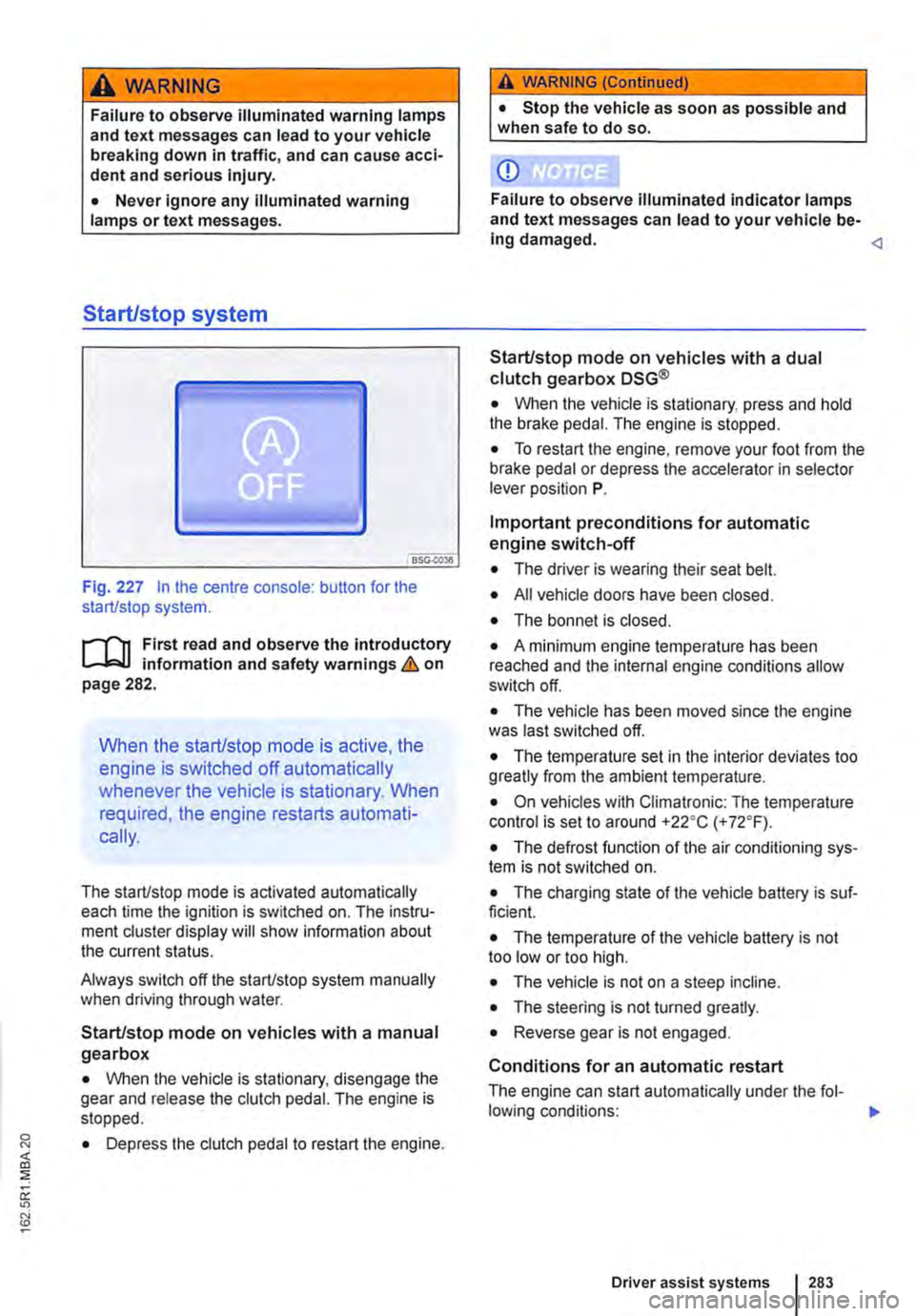
Fig. 227 In the centre console: button for the start/stop system.
r--flt First read and observe the introductory l-J,::JJ information and safety warnings & on page 282.
When the start/stop mode is active, the
engine is switched off automatically
whenever the vehicle is stationary. When
required, the engine restarts automati-
cally.
The start/stop mode is activated automatically each time the ignition is switched on. The instru-ment cluster display will show information about the current status.
Always switch off the start/stop system manually when driving through water.
Start/stop mode on vehicles with a manual gearbox
• When the vehicle is stationary, disengage the gear and release the clutch pedal. The engine is stopped.
• Depress the clutch pedal to restart the engine.
A WARNING (Continued)
• Stop the vehicle as soon as possible and when safe to do so.
CD
Failure to observe illuminated indicator lamps and text messages can lead to your vehicle be-ing damaged.
• When the vehicle is stationary, press and hold the brake pedal. The engine is stopped.
• To restart the engine, remove your foot from the brake pedal or depress the accelerator in selector lever position P.
Important preconditions for automatic engine switch-off
• The driver is wearing their seat belt.
• All vehicle doors have been closed.
• The bonnet is closed.
• A minimum engine temperature has been reached and the internal engine conditions allow switch off.
• The vehicle has been moved since the engine was last switched off.
• The temperature set in the interior deviates too greatly from the ambient temperature.
• On vehicles with Climatronic: The temperature control is set to around +22oC (+ 72°F).
• The defrost function of the air conditioning sys-tem is not switched on.
• The charging state of the vehicle battery is suf-ficient.
• The temperature of the vehicle battery is not too low or too high.
• The vehicle is not on a steep incline.
• The steering is not turned greatly.
• Reverse gear is not engaged.
Conditions for an automatic restart
The engine can start automatically under the fol-lowing conditions: IIJ>
Driver assist systems 283
Page 284 of 486
• On vehicles with Climatronic: if the temperature inside the vehicle substantially increases or de-creases.
• When the vehicle starts rolling or brake support is required.
• If the voltage of the vehicle battery falls.
Conditions that necessitate a manual key start
The engine has to be started manually with the ve-hicle key in the following conditions:
• If the driver unfastens their seat belt.
• If a vehicle door is opened.
• If the bonnet is opened.
Switching the start/stop system on and off manually
• Press the @ button in the centre console 227.
• If the start/stop system has been deactivated, the indicator lamp in the button lights up.
The engine will start immediately if the vehicle Is In stop mode when the system is switched off man-ually with the @ button.
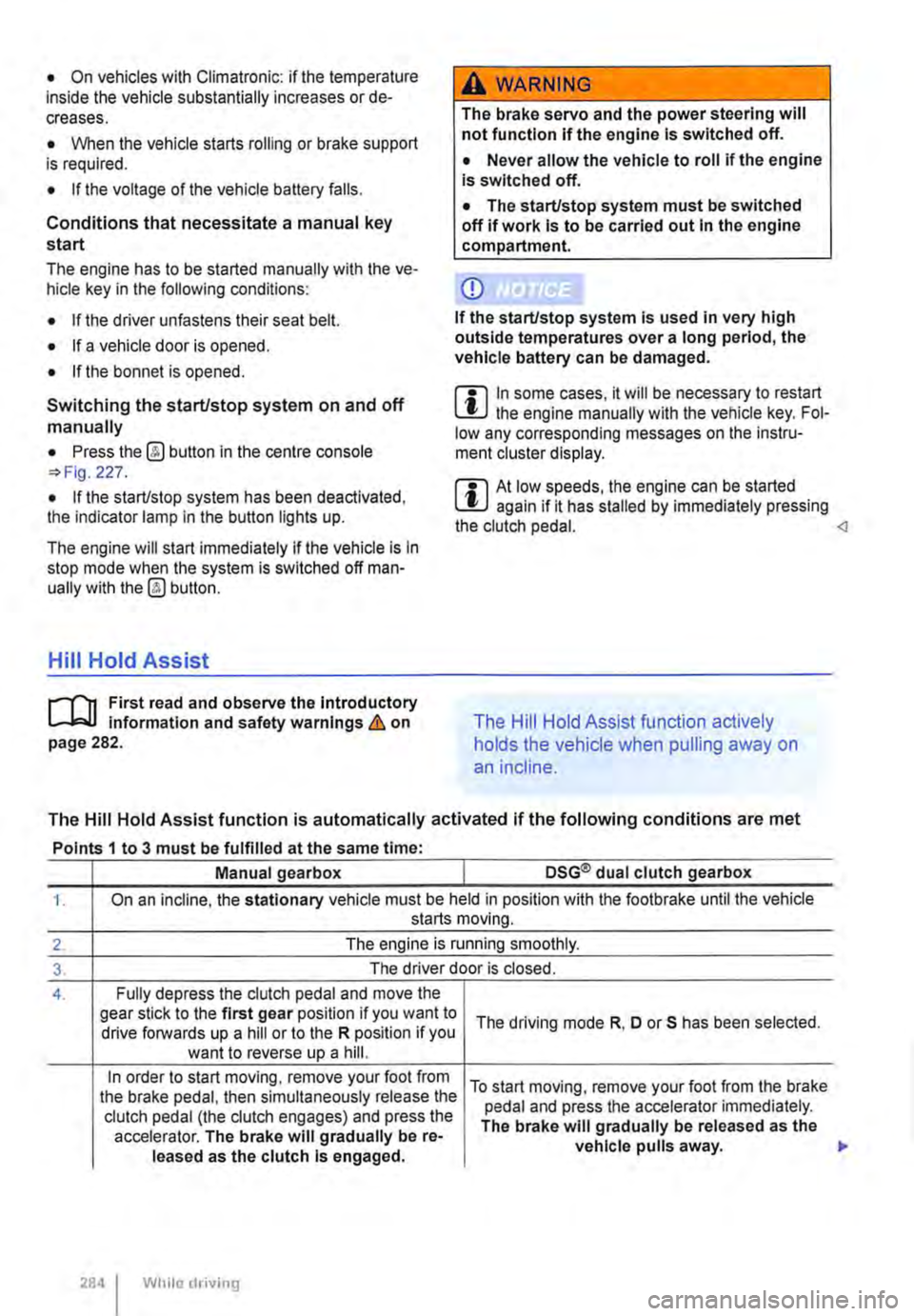
Hill Hold Assist
r--T'n First read and observe the Introductory L-I=JJ information and safety warnings & on page 282.
A WARNING
The brake servo and the power steering will not function If the engine Is switched off.
• Never allow the vehicle to roll if the engine is switched off.
• The start/stop system must be switched off if work Is to be carried out In the engine compartment.
CD
If the start/stop system Is used in very high outside temperatures over a long period, the vehicle battery can be damaged.
m In some cases. it will be necessary to restart L!J the engine manually with the vehicle key. Fol-low any corresponding messages on the instru-ment cluster display.
m At low speeds, the engine can be started L!J again if it has stalled by immediately pressing the clutch pedal.
holds the vehicle when pulling away on
an incline.
The Hill Hold Assist function is automatically activated if the following conditions are met
Points 1 to 3 must be fulfilled at the same time·
Manual gearbox DSG® dual clutch gearbox
1. On an incline, the stationary vehicle must be held in position with the footbrake until the vehicle starts moving.
2. The engine is running smoothly.
3. The driver door is closed.
4. Fully depress the clutch pedal and move the gear stick to the first gear position if you want to The driving mode R, D or S has been selected. drive forwards up a hill or to the R position if you want to reverse up a hill.
In order to start moving, remove your foot from To start moving, remove your foot from the brake the brake pedal, then simultaneously release the pedal and press the accelerator immediately. clutch pedal (the clutch engages) and press the The brake will gradually be released as the accelerator. The brake will gradually be re-vehicle pulls away. leased as the clutch Is engaged.
284 I While driving
Page 286 of 486
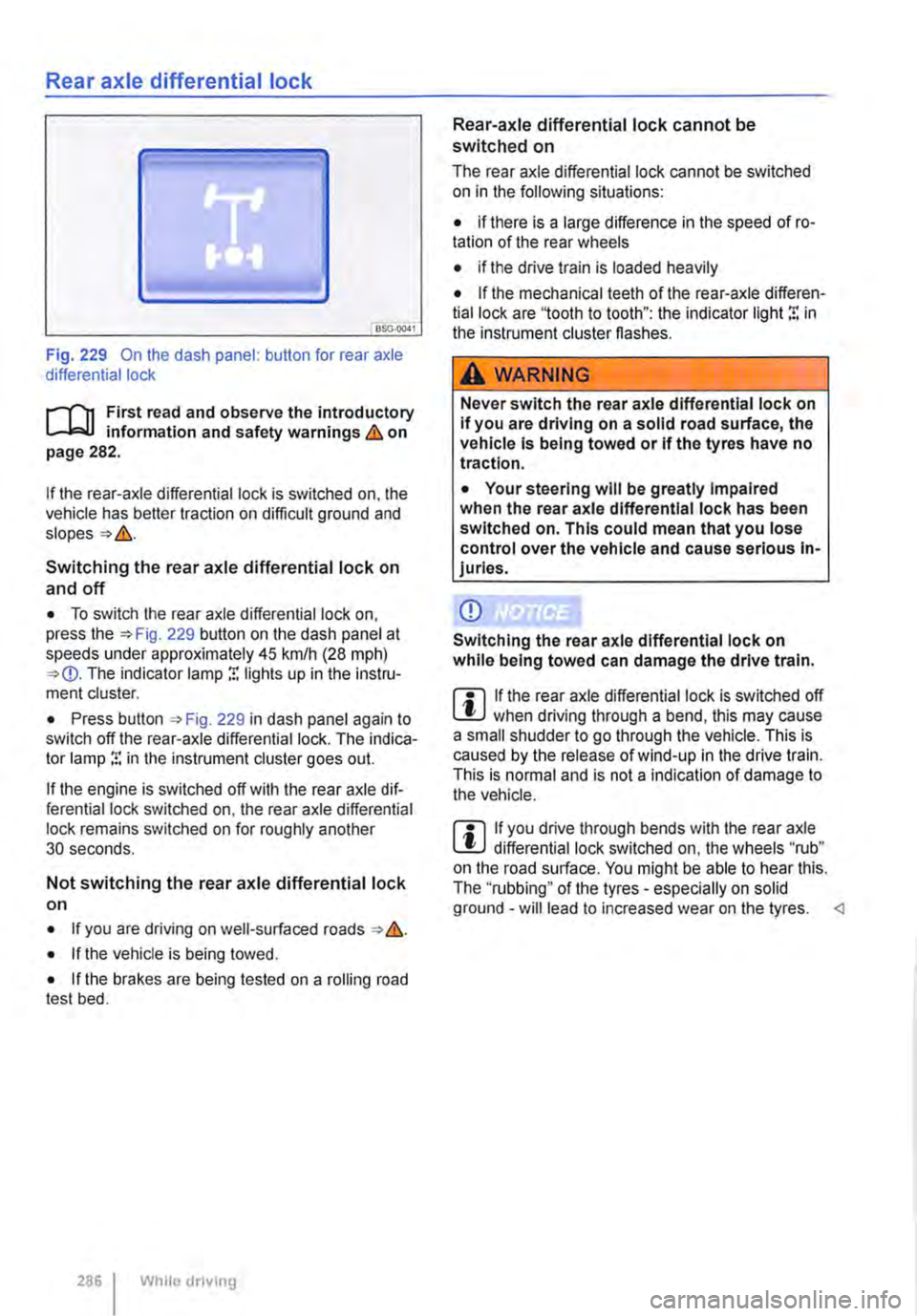
Rear axle differential lock
OSG-0041
Fig. 229 On the dash panel: button for rear axle differential lock
i""('n First read and observe the introductory information and safety warnings & on page 282.
If the rear-axle differential lock is switched on, the vehicle has better traction on difficult ground and
Switching the rear axle differential lock on
and off
• To switch the rear axle differential lock on, press the 229 button on the dash panel at speeds under approximately 45 krnlh (28 mph) The indicator lamp r. lights up in the instru-ment cluster.
• Press button , Fig. 229 in dash panel again to switch off the rear-axle differential lock. The indica-tor lamp r. in the instrument cluster goes out.
If the engine is switched off with the rear axle dif-ferential lock switched on, the rear axle differential lock remains switched on for roughly another 30 seconds.
Not switching the rear axle differential lock on
• If you are driving on well-surfaced roads &.
• If the vehicle is being towed.
• If the brakes are being tested on a rolling road test bed.
286 I While dnving
Rear-axle differential lock cannot be switched on
The rear axle differential lock cannot be switched on in the following situations:
• if there is a large difference in the speed of ro-tation of the rear wheels
• if the drive train is loaded heavily
• If the mechanical teeth of the rear-axle differen-tial lock are '1ooth to tooth": the indicator light r. in the instrument cluster flashes.
A WARNING
Never switch the rear axle differential lock on If you are driving on a solid road surface, the vehicle is being towed or if the tyres have no traction.
• Your steering will be greatly Impaired when the rear axle differential lock has been switched on. This could mean that you lose control over the vehicle and cause serious In-juries.
CD
Switching the rear axle differential lock on while being towed can damage the drive train.
m If the rear axle differential lock is switched off W when driving through a bend, this may cause a small shudder to go through the vehicle. This is caused by the release of wind-up in the drive train. This is normal and is not a indication of damage to the vehicle.
m If you drive through bends with the rear axle W differential lock switched on, the wheels "rub" on the road surface. You might be able to hear this. The ''rubbing" of the tyres -especially on solid ground -will lead to increased wear on the tyres.
Page 297 of 486
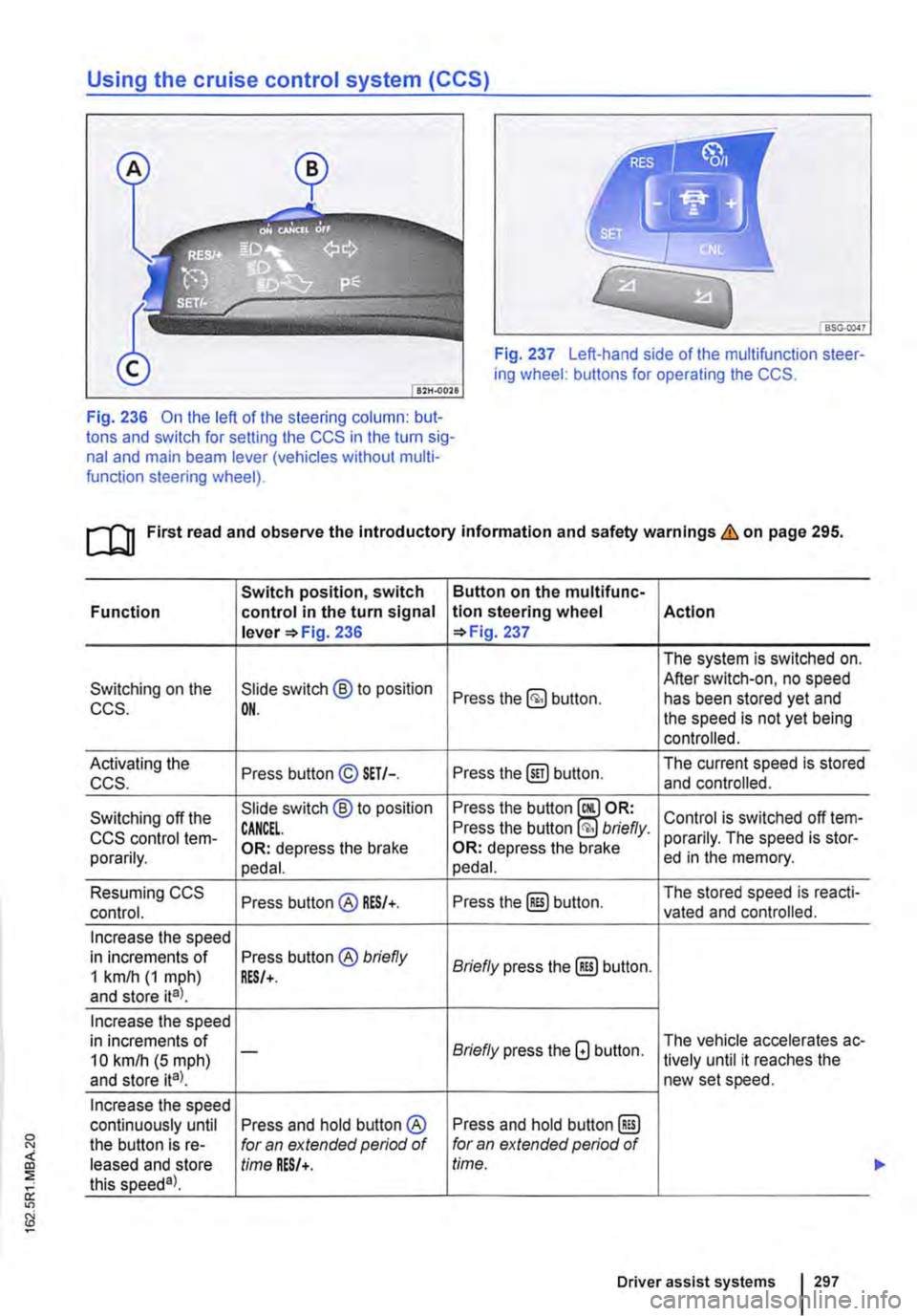
Using the cruise control system (CCS)
Fig. 237 Left-hand side of the multifunction steer-ing wheel: buttons for operating the CCS.
Fig. 236 On the left of the steering column: but-tons and switch for setting the CCS in the turn sig-nal and main beam lever (vehicles without multi-function steering wheel).
ro First read and observe the introductory information and safety warnings & on page 295.
Switch position, switch Button on the multifunc-Function control in the turn signal tlon steering wheel Action lever =>Fig. 236 =>Fig. 237
The system is switched on.
Switching on the Slide switch @ to position After switch-on, no speed Press the button. has been stored yet and CCS. OH. the speed is not yet being controlled.
Activating the Press button© SET/-. Press the@) button. The current speed is stored ccs. and controlled.
Switching off the Slide switch @ to position Press the button Control is switched off !em-CCS control !em-CANCEL. Press the button briefly. porarily. The speed is stor-porarily. OR: depress the brake OR: depress the brake ed in the memory. pedal. pedal.
Resuming CCS Press button@ RES/+. Press the@) button. The stored speed is reacti-control. vated and controlled.
Increase the speed in increments of Press button® briefly Briefly press the@) button. 1 km/h (1 mph) RES/+. and store ita).
Increase the speed in increments of Briefly press the G button. The vehicle accelerates ac-10 kmlh (5 mph) -lively until it reaches the and store ita). new set speed.
Increase the speed continuously until Press and hold button ® Press and hold button @) the button is re-for an extended period of for an extended period of leased and store time RES/+. time. this speeda).
Driver assist systems 297
...
Page 298 of 486
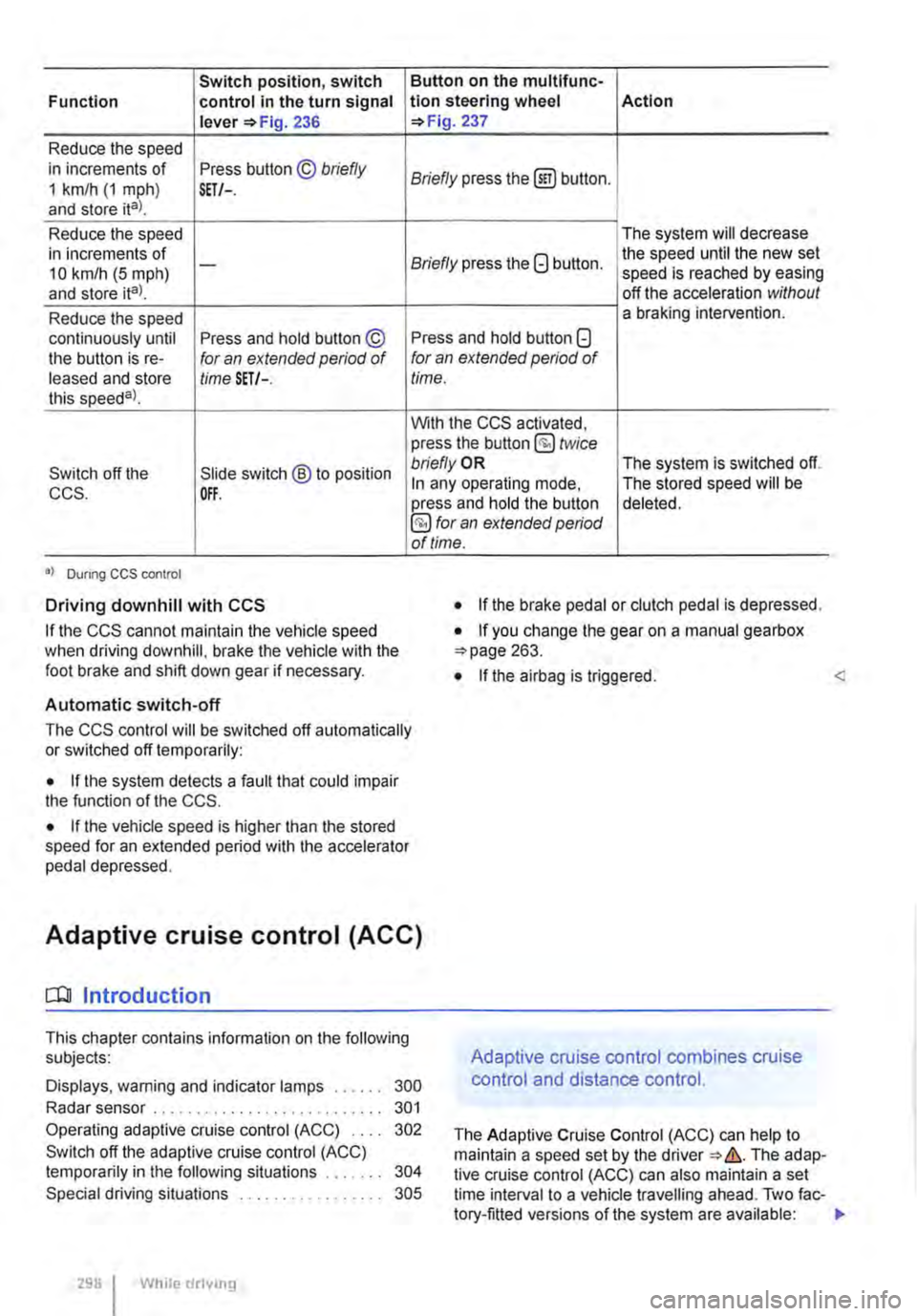
Switch position, switch Function control in the turn signal lever 236
Reduce the speed in increments of Press button © briefly 1 km/h (1 mph) and store ital. SET/-.
Reduce the speed in increments of 10 km/h (5 mph) -
and store ita).
Reduce the speed continuously until Press and hold button © the button is re-for an extended period of leased and store time SET/-. this speeda)_
Switch off the Slide switch ® to position CCS. OFF.
•I Dunng CCS control
Driving downhill with CCS
If the CCS cannot maintain the vehicle speed when driving downhill, brake the vehicle with the foot brake and shift down gear if necessary.
Automatic switch-off
Button on the multlfunc-tion steering wheel Action 237
Briefly press the (ili) button.
The system will decrease
Briefly press the G button. the speed until the new set speed is reached by easing off the acceleration without a braking intervention.
Press and hold button G for an extended period of time.
With the CCS activated, press the button @ twice bn'eflyOR The system is switched off. In any operating mode, The stored speed will be press and hold the button deleted. §) for an extended period of time.
• If the brake pedal or clutch pedal is depressed.
• If you change the gear on a manual gearbox 263.
• If the airbag is triggered. <
The CCS control will be switched off automatically or switched off temporarily:
• If the system detects a fault that could impair the function of the CCS.
• If the vehicle speed is higher than the stored speed for an extended period with the accelerator pedal depressed.
Adaptive cruise control (ACC)
dJ Introduction
This chapter contains information on the following subjects:
Displays, warning and indicator lamps . . . . . . 300
Radar sensor . . . . . . . . . . . . . . . . . . . . . . . . . . . 301
Operating adaptive cruise control (ACC) 302
Switch off the adaptive cruise control (ACC) temporarily in the following situations . . . . . 304
Special driving situations . . . . . . . . . . . . 305
298 I While drivmg
Adaptive cruise control combines cruise
control and distance control.
The Adaptive Cruise Control (ACC) can help to maintain a speed set by the The adap-tive cruise control (ACC) can also maintain a set time interval to a vehicle travelling ahead. Two fac-tory-fitted versions of the system are available: .,
Page 302 of 486
CD CD
• Remove snow with a brush, and remove Ice • Repair work on the radar sensor will require special knowledge and tools. Volkswagen rec-ommends using a Volkswagen dealership for this purpose.
preferably with a solvent-free de-leer spray.
SSG-0047
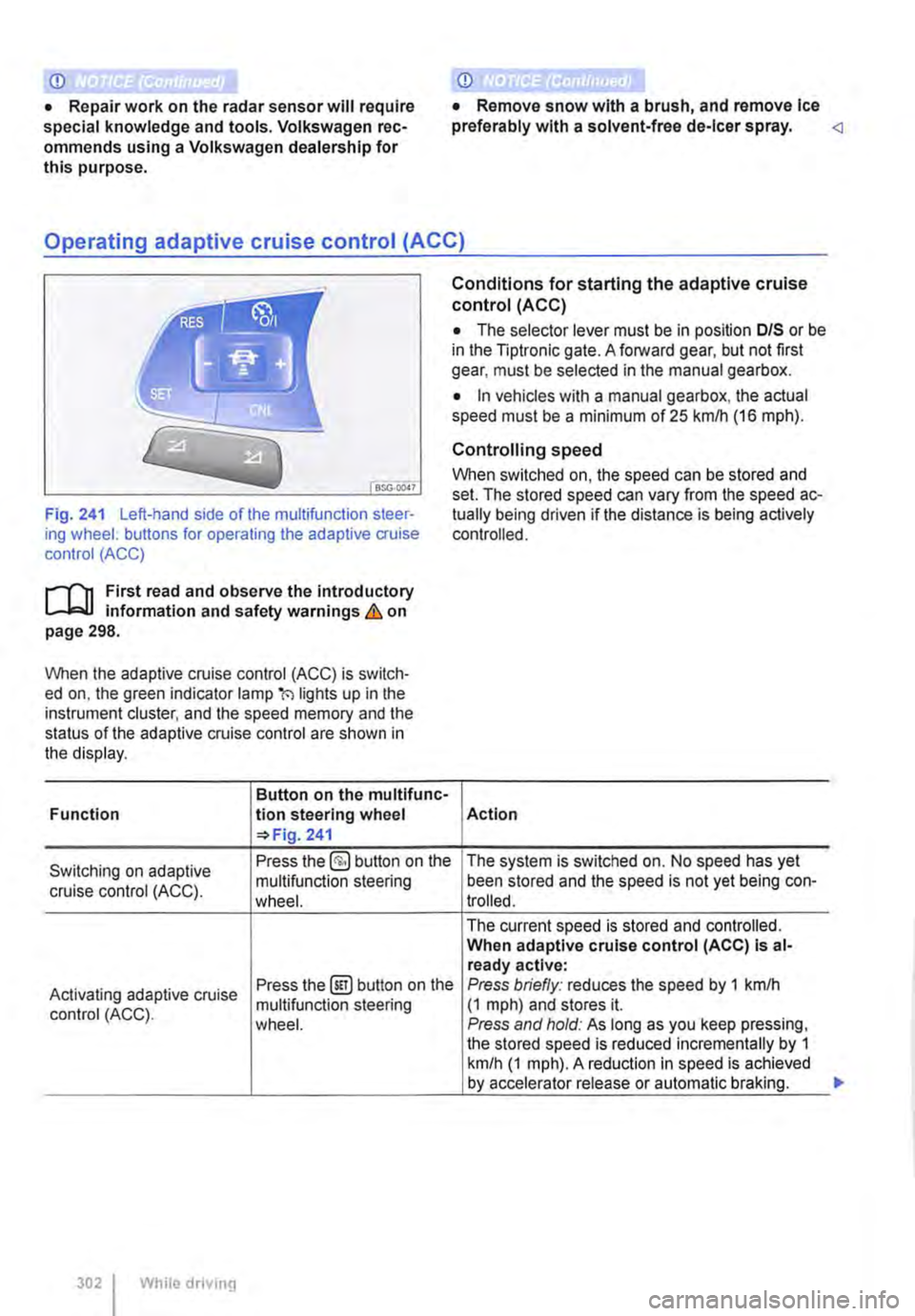
Fig. 241 Left-hand side of the multifunction steer-ing wheel: buttons for operating the adaptive cruise control (ACC)
1"1'11 First read and observe the introductory L-I=J.I information and safety warnings Lb. on page 298.
When the adaptive cruise control (ACC) is switch-ed on, the green indicator lamp(') lights up in the instrument cluster, and the speed memory and the status of the adaptive cruise control are shown in the display.
Button on the multifunc-Function lion steering wheel 241
Conditions for starting the adaptive cruise control (ACC)
• The selector lever must be in position D/S or be in the Tiptronic gate. A forward gear, but not first gear, must be selected in the manual gearbox.
• In vehicles with a manual gearbox, the actual speed must be a minimum of 25 kmlh (16 m ph).
Controlling speed
When switched on, the speed can be stored and set. The stored speed can vary from the speed ac-tually being driven if the distance is being actively controlled.
Action
Switching on adaptive Press the §) button on the The system is switched on. No speed has yet
cruise control (ACC). multifunction steering been stored and the speed is not yet being con-wheel. trolled.
The current speed is stored and controlled. When adaptive cruise control (ACC) Is al-ready active:
Activating adaptive cruise Press the@!) button on the Press briefly: reduces the speed by 1 kmlh
control (ACC). multifunction steering (1 mph) and stores it. wheel. Press and hold: As long as you keep pressing, the stored speed is reduced incrementally by 1 km/h (1 mph). A reduction in speed is achieved by accelerator release or automatic braking.
302 While driving
...
Page 303 of 486
![VOLKSWAGEN TRANSPORTER 2012 Owners Guide Button on the multifunc-
!Action Function tlon steering wheel 241
Briefly press the §] button on the multifunction steer-ing wheel.
Switching off adaptive OR: depress the brake
cruise control (ACC](/img/18/55785/w960_55785-302.png "VOLKSWAGEN TRANSPORTER 2012 Owners Guide Button on the multifunc-
!Action Function tlon steering wheel 241
Briefly press the §] button on the multifunction steer-ing wheel.
Switching off adaptive OR: depress the brake
cruise control (ACC")
Button on the multifunc-
!Action Function tlon steering wheel 241
Briefly press the §] button on the multifunction steer-ing wheel.
Switching off adaptive OR: depress the brake
cruise control (ACC) tern-pedal. Control is switched off temporarily. The speed is
porarily. OR: depress the clutch for stored in the memory. longer than 30 seconds. OR: press the @Eg button on the multifunction steer-ing wheel.
The stored speed is reactivated and controlled. If no speed has yet been stored, the adaptive cruise control (ACC) adopts and regulates the current speed at which the vehicle is travelling.
Resuming adaptive cruise Press the @) button on the When adaptive cruise control (ACC) is at-multifunction steering ready active: control (ACC). wheel. Press briefly: increases the speed by 1 km/h (1 mph) and stores it. Press and hold: As long as you keep pressing, the stored speed is increased incrementally by 1 km/h (1 mph).
Accelerating (while adap-Press the 8 button on the Press briefly: increases the speed by 10 km/h (5 mph) and stores it. live cruise control (ACC) is multifunction steering Press and hold: As long as you keep pressing, active). wheel. the stored speed is increased incrementally by 10 km/h (5 mph).
Press briefly: reduces the speed by 10 kmlh
Decelerating (while adap-Press the G button on the (5 mph) and stores it.
live cruise control (ACC) is multifunction steering Press and hold: As long as you keep pressing, the stored speed is reduced incrementally by 10 active). wheel. km/h (5 mph}. A reduction in speed is achieved by accelerator release or automatic braking.
Press and hold the§] but-ton on the muMunction steering wheel. Briefly Switching off adaptive press the §] button on the The system is switched off. The stored speed cruise control (ACC). multifunction steering will be deleted. wheel if the adaptive cruise control (ACC) is temporari-ly switched off.
The mph figures given in brackets in the table re-late exclusively to instrument clusters with mile readings.
Setting the distance level
The speed-dependent distance from the vehicle travelling ahead can be set to one of 5 levels.
In wet road conditions, you should always set a larger distance than when driving in dry road con-ditions.
The following distances can be pre-setected:
• Very small
• Small
• Medium
• Large
• Very large
The distance level to the vehicle ahead is set using the(!) button on the multifunction steering wheel 241. The adaptive cruise control (ACC) dis-play appears when the button is pressed 300. To set the distance level, press the(!] button. .,..
Driver assist systems 303