page VOLKSWAGEN TRANSPORTER 2013 Owners Manual
[x] Cancel search | Manufacturer: VOLKSWAGEN, Model Year: 2013, Model line: TRANSPORTER, Model: VOLKSWAGEN TRANSPORTER 2013Pages: 486, PDF Size: 69.28 MB
Page 162 of 486
Ashtray
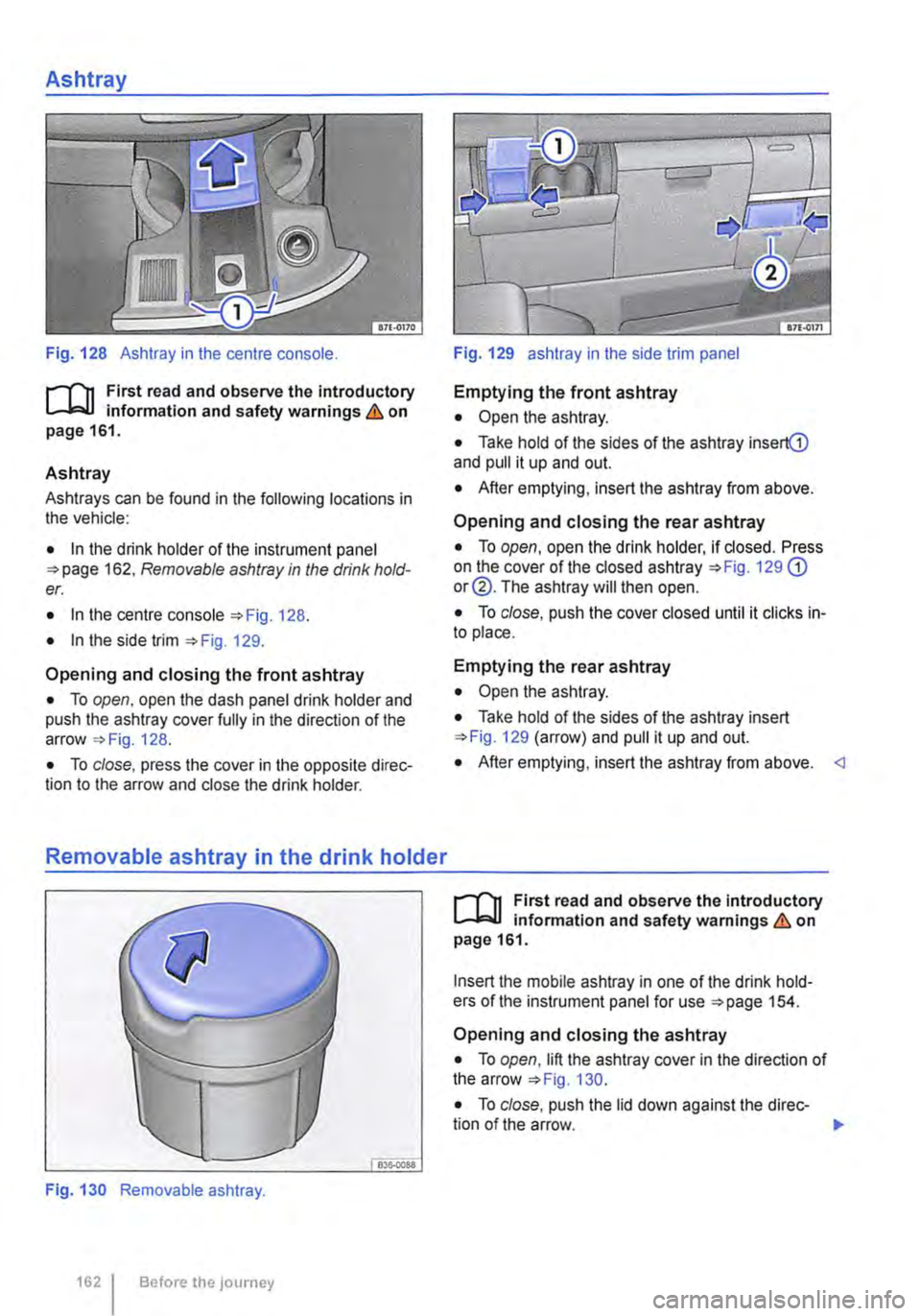
Fig. 128 Ashtray in the centre console.
r--f'n First read and observe the introductory L-W! information and safety warnings.& on page 161.
Ashtray
Ashtrays can be found in the following locations in the vehicle:
• In the drink holder of the instrument panel 162. Removable ashtray in the drink hold-er.
• In the centre console 128.
• In the side trim 129.
Opening and closing the front ashtray
• To open, open the dash panel drink holder and push the ashtray cover fully in the direction of the arrow 128.
• To close, press the cover in the opposite direc-tion to the arrow and close the drink holder.
Removable ashtray in the drink holder
Fig. 130 Removable ashtray.
1621 Before the JOurney
Fig. 129 ashtray in the side trim panel
Emptying the front ashtray
• Open the ashtray.
• Take hold of the sides of the ashtray insertG) and pull it up and out.
• After emptying, insert the ashtray from above.
Opening and closing the rear ashtray
• To open, open the drink holder, if closed. Press on the cover of the closed ashtray 129 G) or@. The ashtray will then open.
• To close, push the cover closed until it clicks in-to place.
Emptying the rear ashtray
• Open the ashtray.
• Take hold of the sides of the ashtray insert 129 (arrow) and pull it up and out.
• After emptying, insert the ashtray from above.
Insert the mobile ashtray in one of the drink hold-ers of the instrument panel for use 154.
Opening and closing the ashtray
• To open, lift the ashtray cover in the direction of the arrow 130.
• To close, push the lid down against the direc-tion of the arrow. 1>
Page 163 of 486
Emptying the removable ashtray
• Lift the removable ashtray out of the drink hold-er.
• Open the removable ashtray and empty the cooled ashes into a suitable waste container.
• Once it has been emptied, place the removable ashtray back into the drink holder from above.
r-1'11 First read and observe the introductory L-J.::.IJ information and safety warnings & on page 161.
Depending on the vehicle equipment, a cigarette lighter may be fitted in the drink holder or in the stowage compartment in the dash panel.
• With the ignition switched on, press in the knob on the cigarette lighter.
• Wait for the lighter to pop out.
• Pull out the cigarette lighter and light the tobac-co product on the glowing
• Insert the cigarette lighter back into the socket.
Electrical sockets
c:r:n Introduction
This chapter contains information on the following subjects:
Sockets in the vehicle .......... . 164
Electrical equipment can be connected to the sock-ets in the vehicle.
The connected devices must be in good condition. Do not use faulty devices.
Additional information and warnings:
• Cigarette lighter 161
• Accessories, modifications, repairs and renewal of parts 394
• Consumer information 404
A WARNING
Improper use of the sockets and electrical ac-cessories can cause fires and severe injuries.
A WARNING
Improper use of the cigarette lighter can cause fires, burns and other serious injuries.
• Always use the cigarette lighter properly, and only use it to light tobacco products.
• Never leave children in the vehicle unat-tended. The cigarette lighter can be used when the ignition is switched on.
m The cigarette lighter can also be used as a L!..J 12-volt socket 163.
• Never leave children in the vehicle unat-tended. Sockets and the devices connected to them can be used when the ignition is switched on.
• If the electrical device gets too hot, switch off the device immediately and disconnect it from the socket.
CD
• In order to prevent damage to the electrical system, never connect equipment that gener-ates electricity, such as solar panels or battery chargers for charging the vehicle battery, to the 12-voit socket.
• Only use accessories that have been ap-proved in accordance with current guidelines concerning electromagnetic compatibility. .,..
Practical equipment 163
Page 164 of 486
CD
• In order to avoid damage due to voltage fluctuation, always switch any electrical con-sumers connected to the 12-volt sockets off be-fore switching the ignition or the engine on or off. When the start/stop system automatically switches off and restarts the engine, it Is not necessary to switch off any connected electri-cal consumers.
• Never connect electrical devices requiring more electrical power to a 12-volt socket. The vehicle's electrical system can be damaged If the maximum power output Is exceeded.
• Never feed electricity Into the socket.
Sockets in the vehicle
rT'n First read and observe the Introductory L-lo:J.I information and safety warnings&. on page 163.
There are two separate power circuits in the vehi-cle depending on the equipment:
• 12-volt DC circuit
• 230-volt AC circuit
Maximum power rating
Electrical Maximum power rating socket
12-volt 120 watts
230-volt 2500 watts
Do not exceed the maximum power rating. This al-so applies to the total power consumption of all connected devices if you connect several devices at the same time Introduction on page 163. The power rating of each device is stated on its type plate.
12-volt socket
Electrical equipment can be connected to the 12-volt sockets in the vehicle.
Using electrical appliances with the engine switch-ed off and the ignition switched on will drain the battery. Electrical consumers should therefore only be plugged into the sockets when the engine is running.
To prevent damage due to voltage fluctuation, switch off any connected devices before switching the ignition or engine on or off.
In the vehicle, there are 12-volt sockets in the fol-lowing locations, among others:
164 I Before the journey
Do not leave the engine running when the ve-l?1S hicle is stationary.
m Using electrical appliances with the engine L!..J switched off and the ignition switched on will drain the battery.
m Unshielded devices can cause interference L!..J with radio reception and vehicle electronics.
m Functional problems may occur with some L!..J devices when they are connected to the 230-volt socket due to the lower power output (wat-tage).
• In the stowage compartment on the dash panel under a small cover.
• In the stowage compartment in the dash panel.
• In the side trim panels in the passenger com-partment
• In the luggage compartment.
• In the roof frame of the pop-up roof.
230-volt grounded safety socket
The 230-volt grounded safety socket is supplied via electrical feed from the external socket 192.
The following electrical consumers are supplied from the 230-volt power supply via the external socket:
• Battery charger
• Depending on the vehicle equipment, the 230-volt grounded safety socket is located in the side trim panel behind the left front seat or on the side of the kitchen unit 192.
230-volt Euro socket
The 230-volt Euro socket is supplied via additional batteries or via an inverter and is located in the side trim panel behind the left front seat 192.
A DANGER !
High voltage In the electrical system!
• Never pour any liquid over the socket.
• Do not Insert any Items which will conduct electricity, such as knitting needles, Into the contacts of the 230-volt socket. .,.
Page 166 of 486
A WARNING
LCD screens contain liquid crystal, which can escape if the screen is broken. The fluid could cause irritation to the skin, eyes and respiratory organs.
• The escaping fluid could cause irritation to the skin, eyes and respiratory organs, es-pecially in people who suffer from asthma or similar illnesses. Immediately ensure that there is a sufficient supply of fresh air and get out of the vehicle. If this is not possible, open all of the windows and doors.
• If fluid gets Into your eyes or onto your skin, Immediately wash the affected area with lots of water for at least 15 minutes and con-suit a doctor.
• If fluid gets onto shoes or clothing, wash immediately with lots of water for at least 15 minutes. Clean shoes and clothes thoroughly before wearing them again.
• If fluid is swallowed, Immediately rinse the mouth out with lots of water for at least 15 minutes. Do not Induce vomiting unless In· structed to do so by a doctor. Seek medical assistance immediately.
A WARNING
Opening a DVD player's housing can lead to injuries from invisible laser radiation.
Components
,...-('n First read and observe the introductory L-Wl Information and safety warnings & on page 165.
The rear seat entertainment system is made up of the following components:
1661 Before the journey
A WARNING (Continued)
• DVD players should only be repaired by a qualified workshop.
CD
The LCD screen can be damaged If it is not handled properly.
• Always fold the LCD screen completely open or shut.
• The LCD screen Is not a "touchscreen". Do not touch or press the surface of the LCD screen.
• Do not expose the LCD screen to direct sun-light or intensive ultraviolet light for long peri-ods. This could damage the screen.
CD
Cleaning agents containing solvents can dam-age the LCD screen.
• Use cleaning agents that do not contain sol-vents such as petrol or turpentine to clean the LCD screen.
r:(jh The LCD screen contains mercury. Dispose I!!S of the LCD screen in accordance with legal requirements.
m The rear seat entertainment system only W works if the temperature inside the vehicle is between -1s•c (+S.F) and +so•c (+140.F). At temperatures outside this range, you will not be able to switch the rear seat entertainment system on. If switched on, it will switch off automatically.
• Infrared remote control unit '*page 169.
m Two sets of infrared headphones are deliv-l!J ered with the rear seat entertainment system.
Page 167 of 486
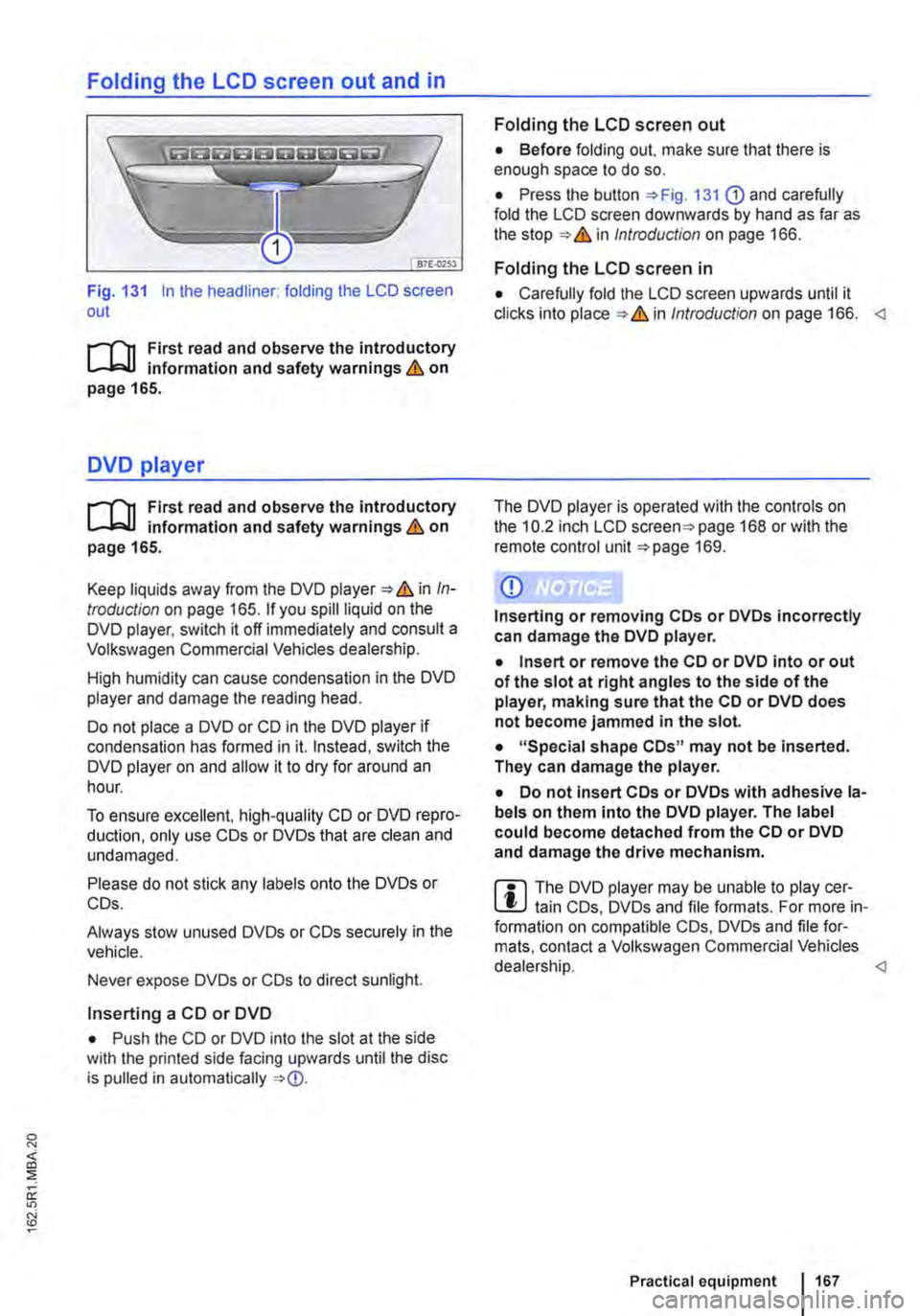
Folding the LCD screen out and in
Fig. 131 In the headliner: folding the LCD screen out
r-111 First read and observe the introductory L-b.U information and safety warnings & on page 165.
DVD player
r-111 First read and observe the introductory L-b.U information and safety warnings & on page 165.
Keep liquids away from the DVD player & in In-troduction on page 165. If you spill liquid on the DVD player, switch it off immediately and consult a Volkswagen Commercial Vehicles dealership.
High humidity can cause condensation in the DVD player and damage the reading head.
Do not place a DVD or CD in the DVD player if condensation has formed in it. Instead, switch the DVD player on and allow it to dry for around an hour.
To ensure excellent, high-quality CD or DVD repro-duction, only use COs or DVDs that are clean and undamaged.
Please do not stick any labels onto the DVDs or COs.
Always stow unused DVDs or COs securely in the vehicle.
Never expose DVDs or COs to direct sunlight.
Inserting a CD or DVD
• Push the CD or DVD into the slot at the side with the printed side facing upwards until the disc is pulled in automatically
Folding the LCD screen out
• Before folding out. make sure that there is enough space to do so.
• Press the button 131 G) and carefully fold the LCD screen downwards by hand as far as the in Introduction on page 166.
Folding the LCD screen in
• Carefully fold the LCD screen upwards until it clicks into in Introduction on page 166.
CD
Inserting or removing COs or DVDs incorrectly can damage the DVD player.
• Insert or remove the CD or DVD into or out of the slot at right angles to the side of the player, making sure that the CD or DVD does not become jammed in the slot.
• "Special shape COs" may not be inserted. They can damage the player.
• Do not insert COs or DVDs with adhesive la-bels on them Into the DVD player. The label could become detached from the CD or DVD and damage the drive mechanism.
m The DVD player may be unable to play cer-L!J tain COs, DVDs and file formats. For more in-formation on compatible COs, DVDs and file for-mats, contact a Volkswagen Commercial Vehicles dealership.
Page 168 of 486
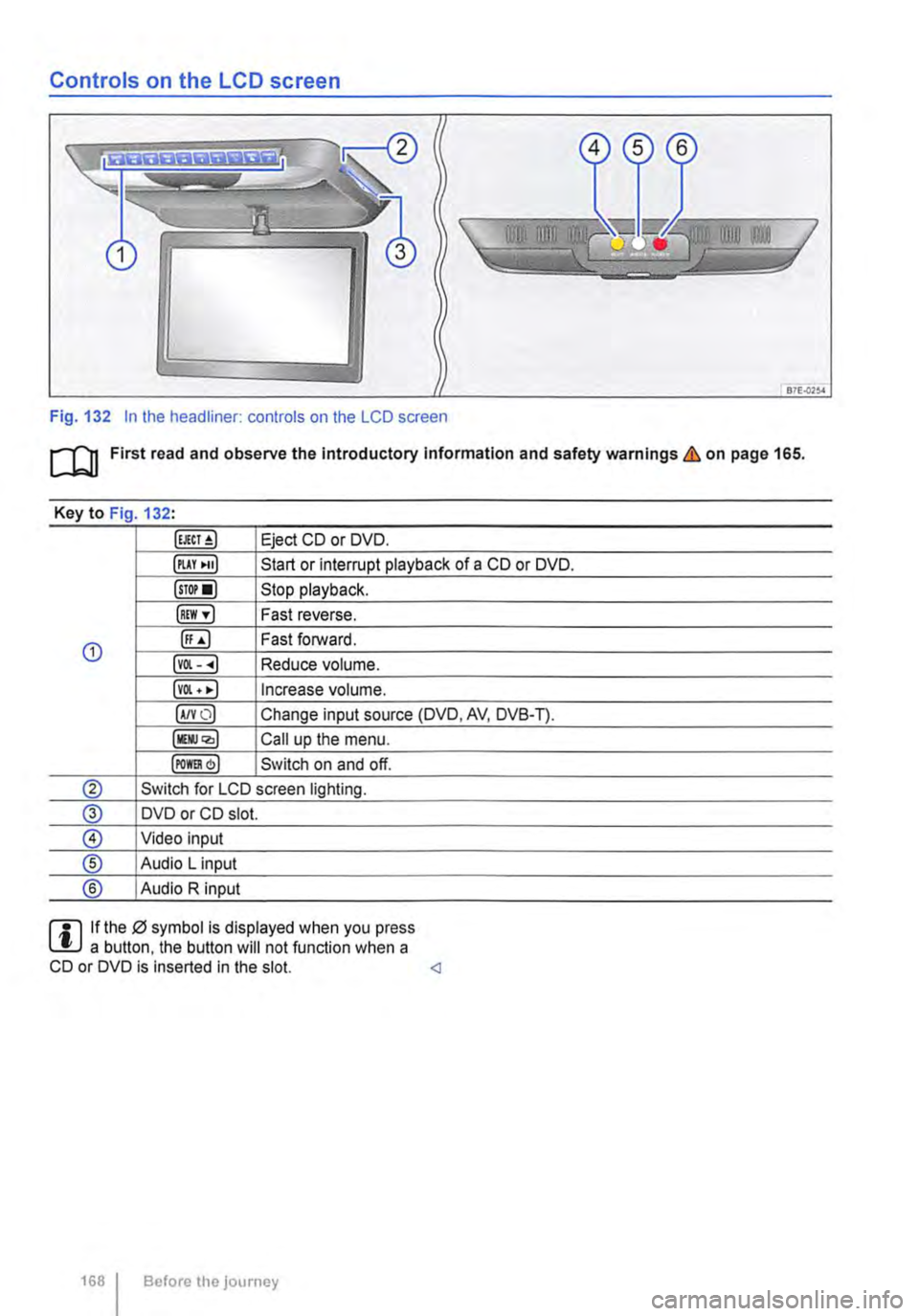
Controls on the LCD screen
Fig. 132 In the headliner: controls on the LCD screen
m First read and observe the Introductory Information and safety warnings & on page 165.
Key to Fig 132·
Eject CD or DVD.
illAY •uJ Start or interrupt playback of a CD or DVD.
lsTor•l Stop playback.
IREW ,.] Fast reverse.
G) ([;) Fast forward.
lvOl--.) Reduce volume.
lvOl • •I Increase volume.
IA/YO) Change input source (DVD, AV, DVB-T).
lllli.JQ,) Call up the menu.
IPOm) Switch on and off.
® Switch for LCD screen lighting.
@ DVD or CD slot.
® Video input
® Audio L input
® Audio R input
rll If the 0 symbol is displayed when you press L!.J a button. the button will not function when a CD or DVD is inserted in the slot.
Page 169 of 486
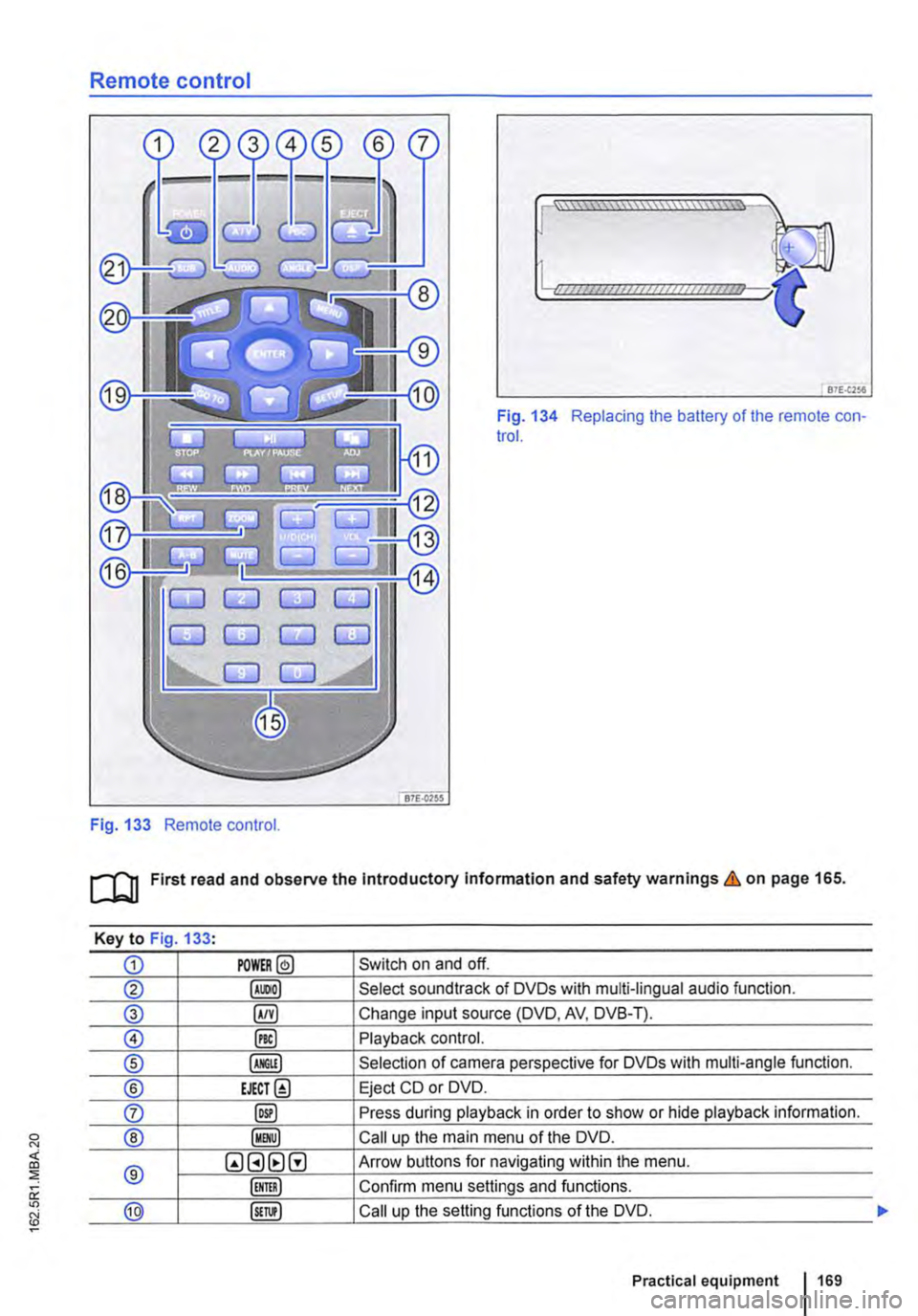
Remote control
Fig. 133 Remote control.
[::::::::::::::::::::::vm
81£.(256
Fig. 134 Replacing the battery of the remote con-trol.
[QJ First read and observe the Introductory Information and safety warnings & on page 165.
Key to Fig 133·
CD POWER@ Switch on and off.
@ Select soundtrack of DVDs with multi-lingual audio function.
® §) Change input source (DVD, AV, DVB-T).
0 @) Playback control.
® Selection of camera perspective for DVDs with multi-angle function.
® EJECT@ Eject CD or DVD.
0 @) Press during playback in order to show or hide playback information.
® Call up the main menu of the DVD.
® QGHtlG Arrow buttons for navigating within the menu.
Confirm menu settings and functions.
@ Call up the setting functions of the DVD.
Practical equipment 169
Page 170 of 486
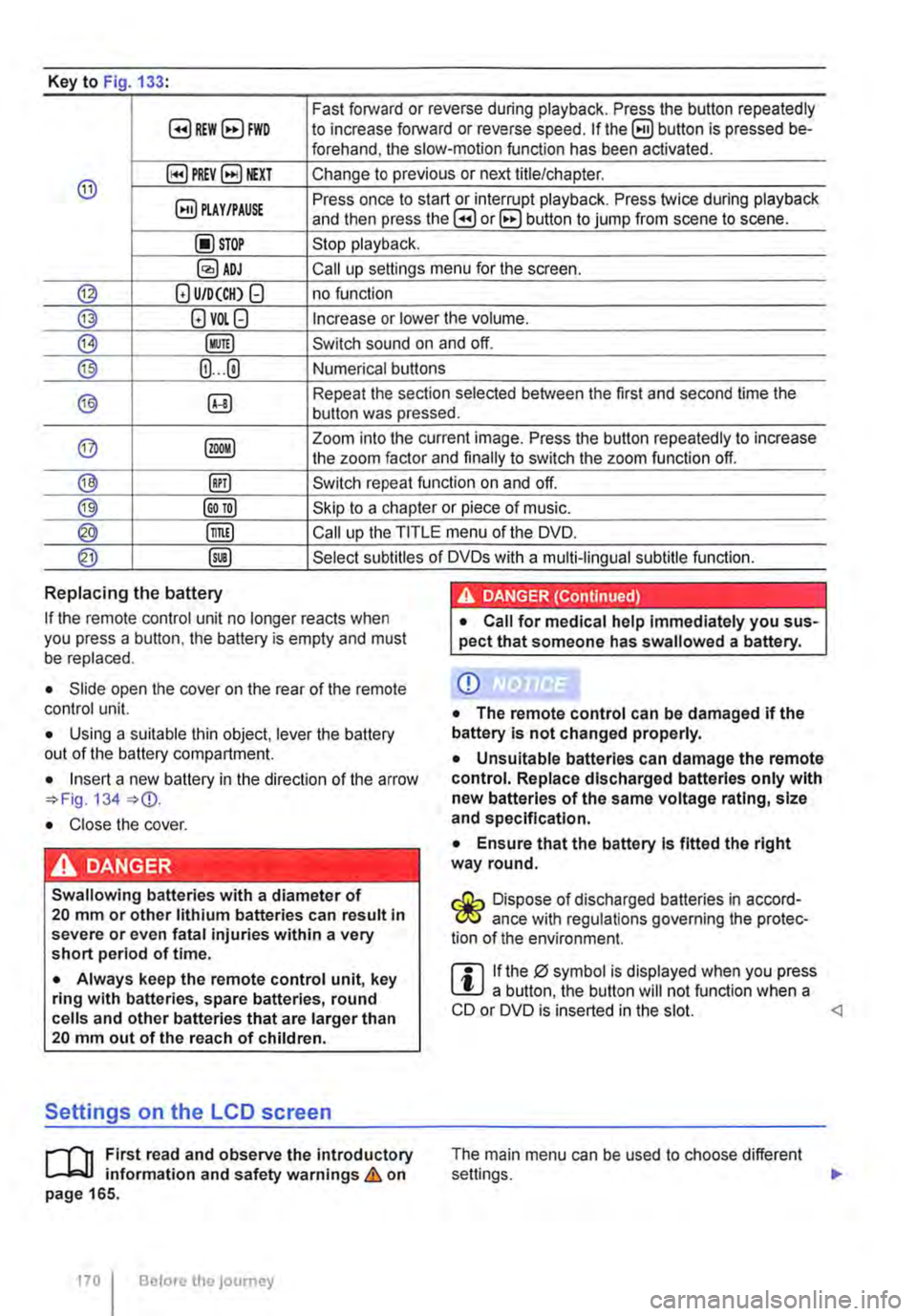
Key to Fig 133·
8REW8FWD Fast forward or reverse during playback. Press the button repeatedly to increase forward or reverse speed. If the§) button is pressed be-forehand, the slow-motion function has been activated.
@ §)PREY 81£XT Change to previous or next title/chapter.
§) PLAY /PAUSE Press once to start or interrupt playback. Press twice during playback and then press the B or 8 button to jump from scene to scene.
@STOP Stop playback.
Call up settings menu for the screen.
© (!) U/D(CH) Q no function
@ (!)VO!.Q Increase or lower the volume.
®l Switch sound on and off.
@ (ij ... (i) Numerical buttons
® @ Repeat the section selected between the first and second time the button was pressed.
@ Zoom into the current image. Press the button repeatedly to increase the zoom factor and finally to switch the zoom function off.
@ @) Switch repeat function on and off.
@ Skip to a chapter or piece of music.
@ §D Call up the TITLE menu of the DVD.
@ @ Select subtitles of DVDs with a multi-lingual subtitle function.
Replacing the battery
If the remote control unit no longer reacts when you press a button. the battery is empty and must be replaced.
• Slide open the cover on the rear of the remote control unit.
• Using a suitable thin object, lever the battery out of the battery compartment.
• Insert a new battery in the direction of the arrow 134
• Close the cover.
Swallowing batteries with a diameter of 20 mm or other lithium batteries can result in severe or even fatal injuries within a very short period of time.
• Always keep the remote control unit, key ring with batteries, spare batteries, round cells and other batteries that are larger than 20 mm out of the reach of children.
Settings on the LCD screen
rl'11 First read and observe the introductory L-W.f information and safety warnings & on page 165.
170 I Before the journey
• Call for medical help immediately you sus-pect that someone has swallowed a battery.
CD
• The remote control can be damaged if the battery is not changed properly.
• Unsuitable batteries can damage the remote control. Replace discharged batteries only with new batteries of the same voltage rating, size and specification.
• Ensure that the battery Is fitted the right way round.
Dispose of discharged batteries in accord-W ance with regulations governing the protec-tion of the environment.
r::l If the 0 symbol is displayed when you press l!J a button, the button will not function when a CD or DVD is inserted in the slot.
Page 171 of 486
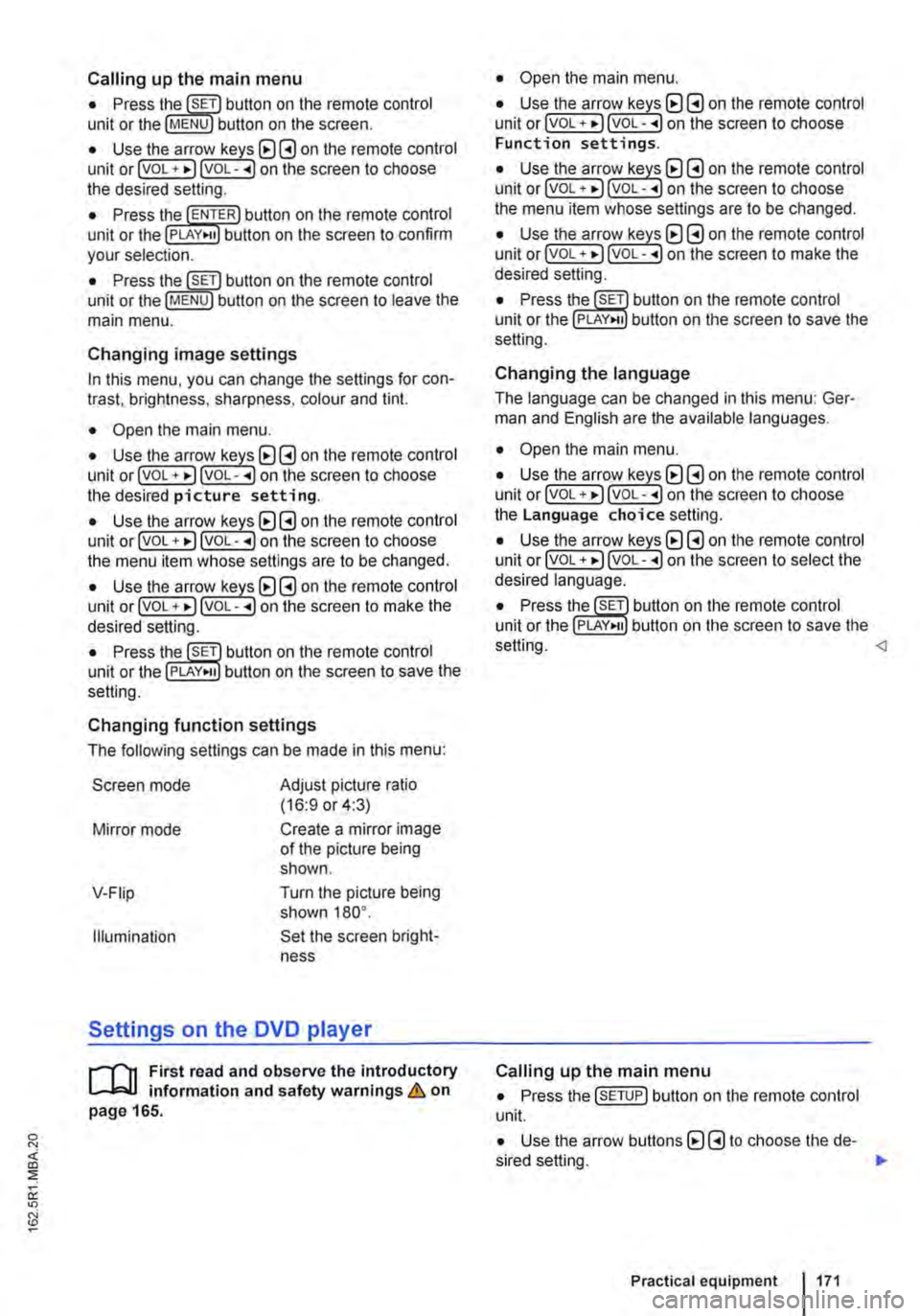
Calling up the main menu
• Press button on the remote control unit or the MENU button on the screen.
• Use the arr(w keyJ (8 G on the remote control unit or lvoL + ... ) VOL-.. on the screen to choose the desired setting.
unit or the PLAY>tl button on the screen to confirm your selection.
• Press the @m button on the remote control unit or the jMENUJ button on the screen to leave the main menu.
Changing image settings
In this menu, you can change the settings for con-trast, brightness, sharpness, colour and tint.
• Open the main menu.
• Use the arr(w keys) (8 G on the remote control unit or jvoL + ... ) VOL-.. on the screen to choose the desired picture setting.
• Use the arr(w keys) (8 G on the remote control unit or lvoL + ... ) voL-.. on the screen to choose the menu item whose settings are to be changed.
• Use the arr(w keys) (8 G on the remote control unit or lvOL + ... ) VOL-.. on the screen to make the desired setting.
unit or the PLAY•u button on the screen to save the setting.
Changing function settings
The following settings can be made in this menu:
Screen mode
Mirror mode
V-Fiip
Illumination
Adjust picture ratio (16:9 or 4:3)
Create a mirror image of the picture being shown.
Turn the picture being shown 180°.
Set the screen bright-ness
Settings on the DVD player
r--("'n First read and observe the introductory L.-J.:.I.I information and safety warnings & on page 165.
• Open the main menu.
• Use the arr(w keys) (8 G on the remote control unit or lvoL + ... ) VOL-.. on the screen to choose Function settings.
• Use the arr(w keyJ (8 G on the remote control unit or lvoL + ... ) VOL-.. on the screen to choose the menu item whose settings are to be changed.
• Use the arr(w keys) (8 G on the remote control unit or lvoL + ... ] VOL-.. on the screen to make the desired setting.
unit or the PLAY>tl button on the screen to save the setting.
Changing the language
The language can be changed in this menu: Ger-man and English are the available languages.
• Open the main menu.
• Use the arr(w keys) (8 G on the remote control unit or lvoL + ... ) voL-.. on the screen to choose the Language choice setting.
• Use the arr(w keys) (8 G on the remote control unit or lvoL + ... ) VOL-.. on the screen to select the desired language.
• Press the SET button on the remote control unit or the setting.
Calling up the main menu
• Press the !SETUP) button on the remote control unit.
• Use the arrow buttons (8 G to choose the de-sired setting. .,.
Practical equipment 1171
Page 172 of 486
• Press the [ENTER! button to confirm your selec-tion.
• Press the [SETUP! button again to leave the main menu.
The following settings can be made in the subme-nus:
• Picture format.
• Camera perspective.
• Language.
• Subtitles.
• Screen saver.
• Saving the last item played.
Tachograph
o::D Introduction
This chapter contains information on the following subjects:
Notes on the tachograph . . . . . . . . . . . . . . . . . 172
The function and operation of the factory-fitted ta-chograph can be found in an additional operating manual delivered with the vehicle.
If you retro-fit a tachograph to the vehicle, ensure it complies with relevant legislation.
Additional information and warnings:
• Towing a trailer 139
• Accessories. modifications, repairs and renewal of parts 394
Notes on the tachograph
I""'""'J'n First read and observe the Introductory L-lo:.l.l Information given on page 172.
Location
Depending on the model, the factory-fitted tacho-graph could be located in the middle of the dash panel or in a console on the dash panel.
Time
For the time settings, refer to the additional operat-ing instructions for the tachograph.
Please note that in digital tachographs, the time must be displayed in local time. The time on the printouts is always given in UTC (Coordinated Uni-versal Time).
1721 Before the journey
• Various audio settings.
• Colour system.
• Playback control for video COs
• Parental lock 172.
• Reset to default settings.
• Password protection.
Childproof locks
This function is only available in the case of DVDs with restricted access for young people and chil-dren. This menu is used to specify whether a DVD with access restrictions is to be played or whether a password has to be entered first.
m Manipulation of the tachograph and its signal, l.!J and misuse of the tachograph discs can re-sult in prosecution.
The digital tachograph has a buffer battery to pre-vent data loss. The buffer battery can supply power for approx. one year without an external power supply. This function is used if, for example, the digital tachograph is removed from the vehicle and stored or if left in a vehicle with a battery fault or a flat battery.
Legal requirements
By law. the tachograph must be used in: