ice warning VOLKSWAGEN TRANSPORTER 2014 Owner's Manual
[x] Cancel search | Manufacturer: VOLKSWAGEN, Model Year: 2014, Model line: TRANSPORTER, Model: VOLKSWAGEN TRANSPORTER 2014Pages: 486, PDF Size: 69.28 MB
Page 93 of 486
A DANGE;R (Continued) --
• No other people, animals or objects may be carried between the occupants of the front seats and the alrbag deployment zone. Make sure that children and passengers also keep to this rule.
• Do not attach any objects, e.g. mobile nav-igation devices, to the windscreen above the front alrbag on the front passenger side.
• Do not cover or stick anything on the steering wheel hub or the soft plastic surface of the alrbag unit In the dash panel on the front passenger side, and do not modify them In any way.
A WARNING
The front alrbags are deployed In front of the steering wheel "*Fig. 71 and dash panel '*Fig. 72.
• When driving, always hold the steering wheel with both hands on the outside of the ring at the 9 o'clock and 3 o'clock positions.
• Adjust the driver seat so that there is at least 25 cm between your breastbone and the hub of the steering wheel. Contact a qualified workshop if your physical build makes this Impracticable.
• Adjust the front passenger seat so that the distance between the passenger and the
__ ____
Switching the front passenger front airbag on and off manually using the
key-operated switch
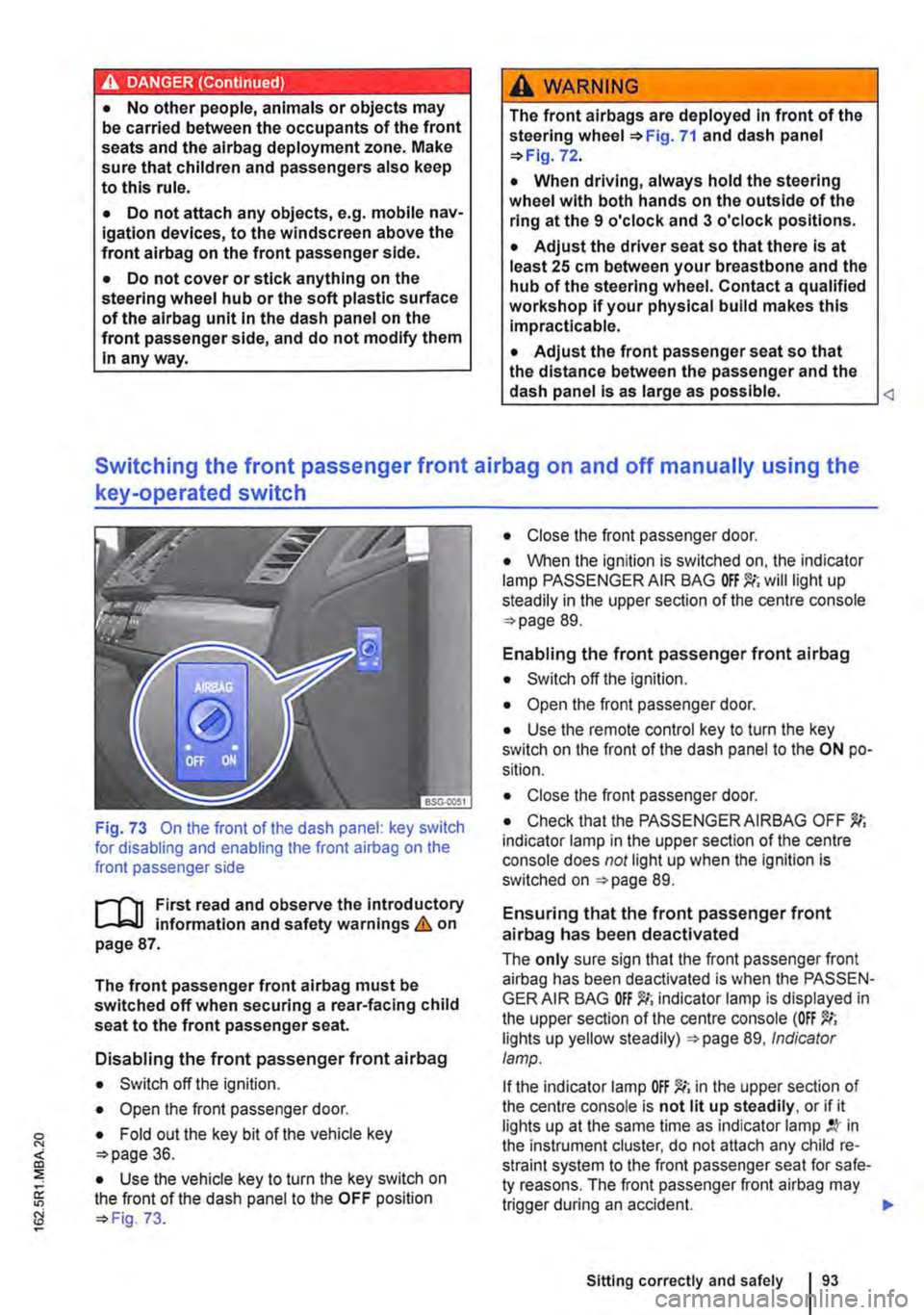
Fig. 73 On the front of the dash panel: key switch for disabling and enabling the front airbag on the front passenger side
l""'rn First read and observe the introductory L-J,::.U information and safety warnings&. on page 87.
The front passenger front airbag must be switched off when securing a rear-facing child seat to the front passenger seat.
Disabling the front passenger front airbag
• Switch off the ignition.
• Open the front passenger door.
• Fold out the key bit of the vehicle key o>page 36.
• Use the vehicle key to turn the key switch on the front of the dash panel to the OFF position o> Fig. 73.
• Close the front passenger door.
• When the ignition is switched on, the indicator lamp PASSENGER AIR BAG will light up steadily in the upper section of the centre console o> page 89.
Enabling the front passenger front airbag
• Switch off the ignition.
• Open the front passenger door.
• Use the remote control key to turn the key switch on the front of the dash panel to the ON po-sition.
• Close the front passenger door.
• Check that the PASSENGER AIRBAG OFF indicator lamp in the upper section of the centre console does not light up when the Ignition is switched on =>page 89.
Ensuring that the front passenger front airbag has been deactivated
The only sure sign that the front passenger front airbag has been deactivated is when the PASSEN-GER AIR BAG indicator lamp is displayed in the upper section of the centre console (OFF lights up yellow steadily) =>page 89, Indicator lamp.
If the indicator lamp OFF )!(; in the upper section of the centre console is not lit up steadily, or if it lights up at the same time as indicator lamp in the instrument cluster, do not attach any child re-straint system to the front passenger seat for safe-ty reasons. The front passenger front airbag may trigger during an accident.
Sitting correctly and safely
Page 99 of 486
Not every child will fit in the child seat specified for their weight group. Likewise, not every seat will fit in every vehicle. Therefore it is vital to check that the child fits properly in their child seat and that the child seat can be securely fastened in the vehicle.
Child seat approval categories
Child seats can be classified as universal, semi-universal or vehicle-specific (all in accordance with regulation ECE-R 44), or as i-Size (in accordance with regulation ECE-R 129).
• Universal: child seats with universal approval are approved for use in all vehicles. No type list is required. ISOFIX child seats with universal appro-val must also be securing using a strap over the top of the vehicle seat (top tether).
• Semi-universal: semi-universal approval re-quires other safety devices for attaching the seat (that require additional testing) in addition to the
Securing systems
1""111 First read and observe the introductory L-J,::.U information and safety warnings & on page 96.
Different countries use different securing systems for safely fitting child seats in the vehicle.
Key terms for securing systems
• ISO FIX: ISOFIX is a standardised securing sys-tem for fitting child seats in the vehicle quickly and safely. The SOFIX attachment system creates a rigid connection between the child seat and the car body.
Any compatible child seat has two rigid attachment arms that click into ISOFIX attachment points at the bottom of the backrest. The ISOFIX securing system as described here is specific to the EU =:o page 100. An upper strap (top tether) and/or support leg may sometimes have to be used in ad-dition to the ISO FIX anchor points described above.
• Three-point automatic seat belt. lt is better to secure child seats using the ISOFIX system, if available, rather than with a three-point automatic seat belt =>page 102.
standard requirements for universal approval. Child seats with semi-universal approval come with a type list. The seats should only be used in vehi-cles that are included on this list.
• Vehicle-specific: child seats with vehicle spe-cific approval must have undergone dynamic test-ing in each model of vehicle for which it is ap-proved. These child seats also come with a type list.
• i-Size: child seats classified as must conform to the installation and safety requirements prescribed in regulation ECE-R 129. Contact the child seat manufacturer to find out which child seats are ap-proved for this vehicle in accordance with i-Size. <1
Additional securing points:
• Top tether: this strap at the top of the child seat is routed over the vehicle seat backrest and hooked to an anchor ring on the seat backs =:.page 101.
• Support leg: some child seats are propped up with a support leg resting on the floor of the vehi-cle. This support leg helps to prevent the child seat from tipping forward in a crash =:.&.
Recommended child seat securing systems
Volkswagen Commercial Vehicles recommends that child seats are secured as follows:
• Infant carrier or rear-facing child seat: ISO-FIX and support leg.
• Front-facing child seat: ISOFIX and top tether and possibly support leg also.
A WARNING
Incorrect use of the support leg can cause severe or fatal injuries.
• Make sure that the support leg is always correctly and safely Installed.
Sitting correctly and safely 99
Page 106 of 486
Lights and vision
Lights
0::0 Introduction
This chapter contains information on the following subjects:
Indicator lamps . . . . . . . . . . . . . . . . . 106
Turn signal and main beam lever . . 107 Switching lights on and off . . . . . . . . 108
Lights and vision -functions . . . . . . . . . . . . . . 109
Main beam assist ....................... 110
Masking or switching over headlights for driving abroad . . . . . . . . . 111
Coming Home and Leaving Home functions (orientation lighting).............. 112
Headlight range control, instrument and switch lighting . . . . . 113 Interior and reading lights . . . . . . . . . 114
Observe any country-specific regulations when us-ing vehicle lighting.
The driver is responsible for the correct headlight position and the correct headlight setting.
Additional information and warnings:
• Exterior views ""page 5
• Volkswagen information system =oo page 24
• Changing bulbs =oo page 432
Indicator lamps
A WARNING
Accidents and serious injuries can occur if roads are not sufficiently Illuminated and oth-er road users have difficulty seeing the vehi-cle, or cannot see it at all.
• Always switch the dipped beam head-lights on if it is dark, raining or visibility is poor.
A WARNING
Setting headlights too high, and the incorrect use of the main beam, could distract and daz-zle other road users. This can lead to acci-dents and serious injuries.
• Always ensure that the headlights are ad-j usted correctly.
• Never use the main beam or the headlight flasher if other road users could be dazzled.
[Qj First read and observe the introductory information and safety warnings & on page 106.
Indicator lamps in the instrument cluster
Lit up Possible cause Solution
Vehicle lighting not working partially or corn-Change the appropriate bulb 432. If all of the bulbs are in working order. go to a pletely. qualified workshop.
' Rear fog light switched on. J", =oopage 109.
,( The fog light is switched on.
Turn signal, left or right.
r The indicator lamp will flash twice as fast if If necessary, check the vehicle lights and the one of the turn signals on the vehicle or trailer trailer lights. is not working.
'111 Trailer turn signals in operation. 139.
106 Before the journey
Page 108 of 486
@ Main beam headlights switched on &. The indicator lamp m in the instrument cluster lights up.
Pull the lever briefly in the direction of the ar-row @to switch off the main beam headlights.
@ Operate headlight flasher. The headlight flash-er comes on for as long as the lever is pulled. The indicator lamp ID lights up.
Lane change flash
To operate the lane change flash, push the lever up or down to the point where you incur resistance and then release the lever. The turn signal flashes three times.
This lane change flash function can be deactivated at a qualified workshop.
A WARNING
Incorrect use of turn signals, a failure to use turn signals, or forgetting to switch off a turn signal can confuse other road users. This can lead to accidents and serious Injuries.
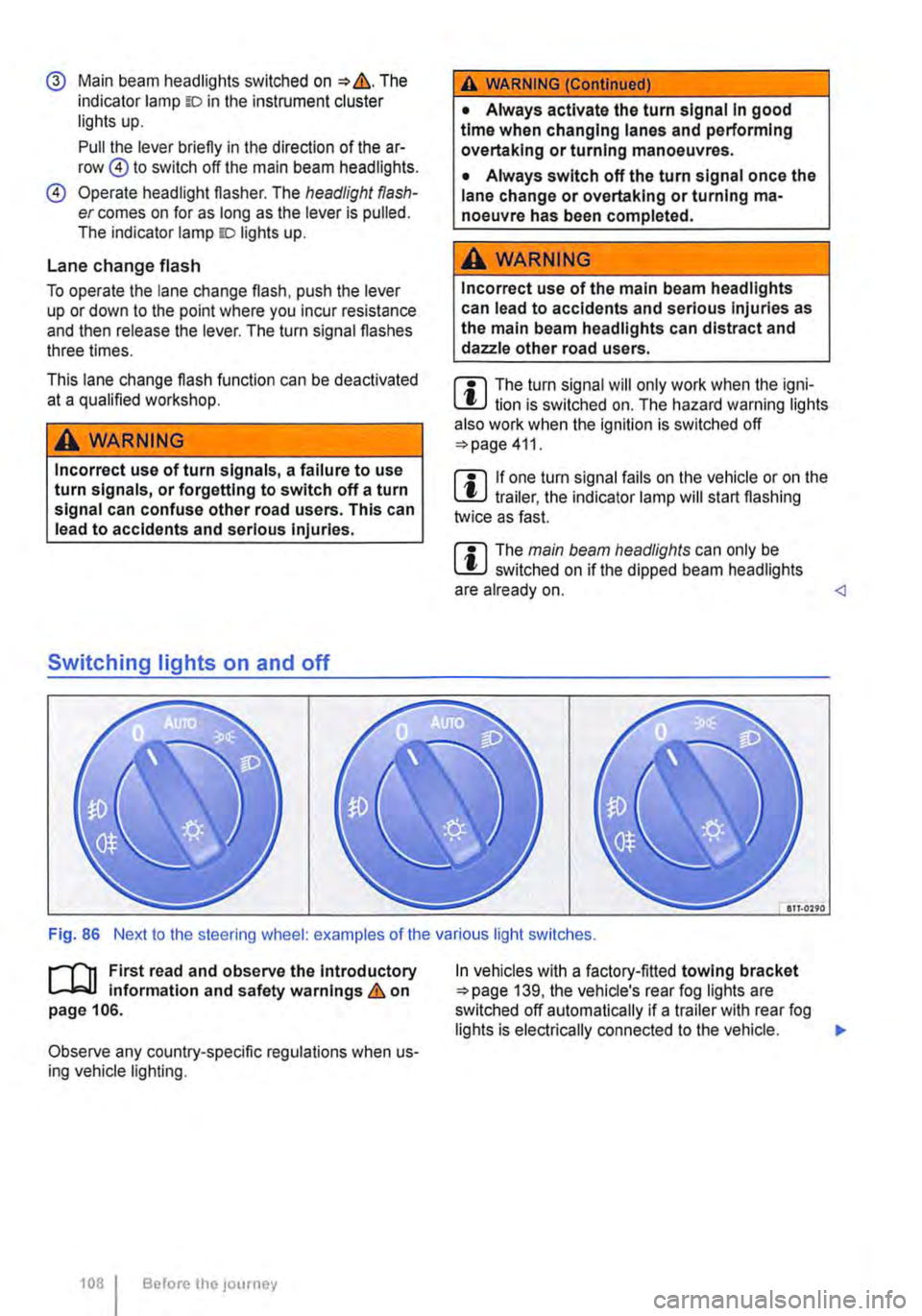
Switching lights on and off
A WARNING (Continued)
• Always activate the turn signal In good time when changing lanes and performing overtaking or turning manoeuvres.
• Always switch off the turn signal once the lane change or overtaking or turning ma-noeuvre has been completed.
A WARNING
Incorrect use of the main beam headlights can lead to accidents and serious Injuries as the main beam headlights can distract and dazzle other road users.
m The turn signal will only work when the igni-m lion is switched on. The hazard warning lights also work when the ignition is switched off 411.
m If one turn signal fails on the vehicle or on the m trailer, the indicator lamp will start flashing twice as fast.
m The main beam headlights can only be m switched on if the dipped beam headlights are already on.
l"'""'rT1 First read and observe the Introductory L--J,::.,U information and safety warnings & on page 106.
Observe any country-specific regulations when us-ing vehicle lighting.
1081 Before the; journey
In vehicles with a factory-fitted towing bracket 139, the vehicle's rear fog lights are switched off automatically if a trailer with rear fog lights is electrically connected to the vehicle. .,.
Page 110 of 486
Automatic headlight control AUTO
The automatic headlight control is merely an aid and will not always be able to detect all driving sit-uations.
If the light switch is in position AUTO, the vehicle lights and the lighting in instruments and switches will switch on and off automatically in the following situations => .&.:
Automatically switched on
• When the rain sensor detects darkness, e.g. when driving through tunnels.
• When the rain sensor detects that it is raining and switches the wipers on.
Automatically switched off
• When the rain sensor detects that there is enough light.
• When the wipers have not been used for a few minutes.
Static cornering light
When cornering slowly or travelling around very tight bends, a static cornering light is switched on automatically to illuminate the inside of the bend.
The static cornering light is integrated into the fog lights and only lights up at speeds below approxi-mately 40 km/h (25 mph).
When reverse gear is engaged, the static corner-ing light on both sides of the vehicle may switch on to provide better illumination of the area when ma-noeuvring.
Main beam assist
r-("'n First read and observe the introductory 1..-JcJl Information and safety warnings.&. on page 106.
Main beam assist can help to prevent other road users from being dazzled.
Main beam assist (Light Assist)
Within the limits of the system, the main beam as-sist automatically switches the main beam on at speeds of over approximately 60 kmlh (37 m ph),
110 I Before the journey
A WARNING
Accidents can occur if roads are not suffi-ciently Illuminated and other road users have difficulty seeing the vehicle, or cannot see it at all.
• The automatic headlight control (AUTO) only switches on the dipped beam headlights when there is a change In the level of bright-ness and not, for example, if it Is foggy.
• Never drive with daytime running lights if the street Is not sufficiently lit due to weather and lighting conditions. The daytime running lights are not bright enough to Illuminate the road ahead and to ensure that other road users are able to see you.
• The rear lights will not be switched on with the daytime running lights. If the rear lights are not switched on, the vehicle may not be visible to other road users If it Is dark, raining, or If visibility Is poor.
m In cool or damp weather, the interior of the l..!J headlights, rear lights and turn signals may mist up briefly. This is normal and does not affect the service life of the lighting system of your vehi-cle.
Main beam assist normally recognises illuminated areas such as towns and deactivates the main beam while driving through them. .,.
Page 111 of 486
Switching main beam assist on and off manually
Function Action
Switching on -Switch on the ignition and turn the light switch to position AUTO. -Push the turn signal and main beam lever forwards from its initial position =:-page 107.
When the main beam assist is switched on, the indicator lamp w lights up in the instru-ment cluster display.
-Switch off the ignition. -OR: turn the light switch to a position other than AUTO =>page 108.
Switching off -OR: with the main beam switched on, pull the turn signal and main beam lever back-wards. -OR: push the turn signal and main beam lever forwards to switch on the manual main beam. The main beam assist is then switched off.
Fault
it may not be possible to switch off the main beam quickly enough or at all using main beam assist due to the following:
• In poorly lit streets where there are highly-re-flective signs.
• When encountering other road users with insuf-ficient lighting, such as pedestrians or cydists.
• In tight bends, brows of hills or depressions in the land or half-hidden oncoming traffic.
• With oncoming traffic on streets with a central barrier where the driver can see clearly over the central barrier e. . truck drivers. g
• If the camera is broken or the power supply is interrupted.
• In fog, snow or heavy rain.
• In dusty or sandy areas.
• Damage to the windscreen in the camera's vi-sion field.
• If the viewing field of the camera is misted up, dirty, covered by a sticker, snow or ice.
A WARNING
Do not let the extra convenience afforded by main beam control tempt you into taking any risks when driving-this can cause acci-dents. The system is not a substitute for the full concentration of the driver.
A WARNING (Continued)
• Always check the lights yourself and ad-just them to the prevailing conditions for lights, vision and road traffic.
• The main beam control may not be able to recognise all driving situations correctly and may not work properly in certain situations.
• If the camera's field of view is dirty, cov-ered or damaged, the function of the main beam assist may be impaired. This also ap-plies If changes are made to the vehicle's lighting system, for example if additional headlights are fitted.
CD
Please observe the following points in order to avoid impairing the proper function of the sys-tem:
• Regularly clean the camera's field of view, and keep it free from snow and ice.
• Do not cover the camera's field of view.
• Check the area of the windscreen that Is in the camera's field of view for damage.
m The headlight flasher and the main beam can W be switched on and off manually at any time with the turn signal and main beam lever =>page 107.
m Light-emitting objects in the camera's field of W operation, e.g. mobile navigation devices, could impair the functions of the main beam assist system (Light Assist).
1"1'11 First read and observe the introductory L-lo:J.J Information and safety warnings & on page 106.
Lights and vision 1111
Page 112 of 486
If you have to drive a right-hand drive vehicle in a left-hand drive country, or vice versa, the asymmet-ric dipped beam halogen headlights may dazzle oncoming traffic. Therefore, the headlights must be masked over if you are driving abroad.
Therefore you must apply stickers to certain parts of the headlighllenses if you are driving abroad. A qualified workshop can provide you with further in-formation. Volkswagen Commercial Vehicles rec-ommends using a Volkswagen Commercial Vehi-cles dealership for this purpose.
m The use of the stickers on the headlights is L!J only permissible if the period of use is limited. Please contact a qualified workshop for a perma-nent alteration. Volkswagen Commercial Vehicles recommends using a Volkswagen Commercial Ve-hicles dealership for this purpose.
,.....-.(')1 First read and observe the introductory l....-.lo:.l.l Information and safety warnings & on page 106.
The Coming Home function is switched on manual-ly. However, the "Leaving Home" function is con-trolled automatically by a rain sensor.
"Coming Home"
Switching on
Switching off
"Leaving Home"
Switching on
Switching off
!Action
-Switch off the ignition. -Activate the headlight flasher for approximately one second 107. The Coming Home lighting is switched on when the driver door is opened. The switch-off delay starts when the last vehicle door or the tailgate has been closed.
-Automatically after the set switch-off delay has elapsed. -Automatically if a door or the tailgate is opened approximately 30 seconds after switch on. -Turn light switch to position 0. -Switch on the ignition.
Action
-Unlock vehicle when light switch is in position AUTO and rain sensor has detected that it is dark.
-Automatically after the switch-off delay. -Lock the vehicle. -Turn light switch to position 0. -Switch on the ignition.
m When the Coming Home function is switched L!J on, no signal tone will be given as a reminder that a light is still switched on when the driver door is opened.
Page 116 of 486
Windscreens made of heat-insulating glass
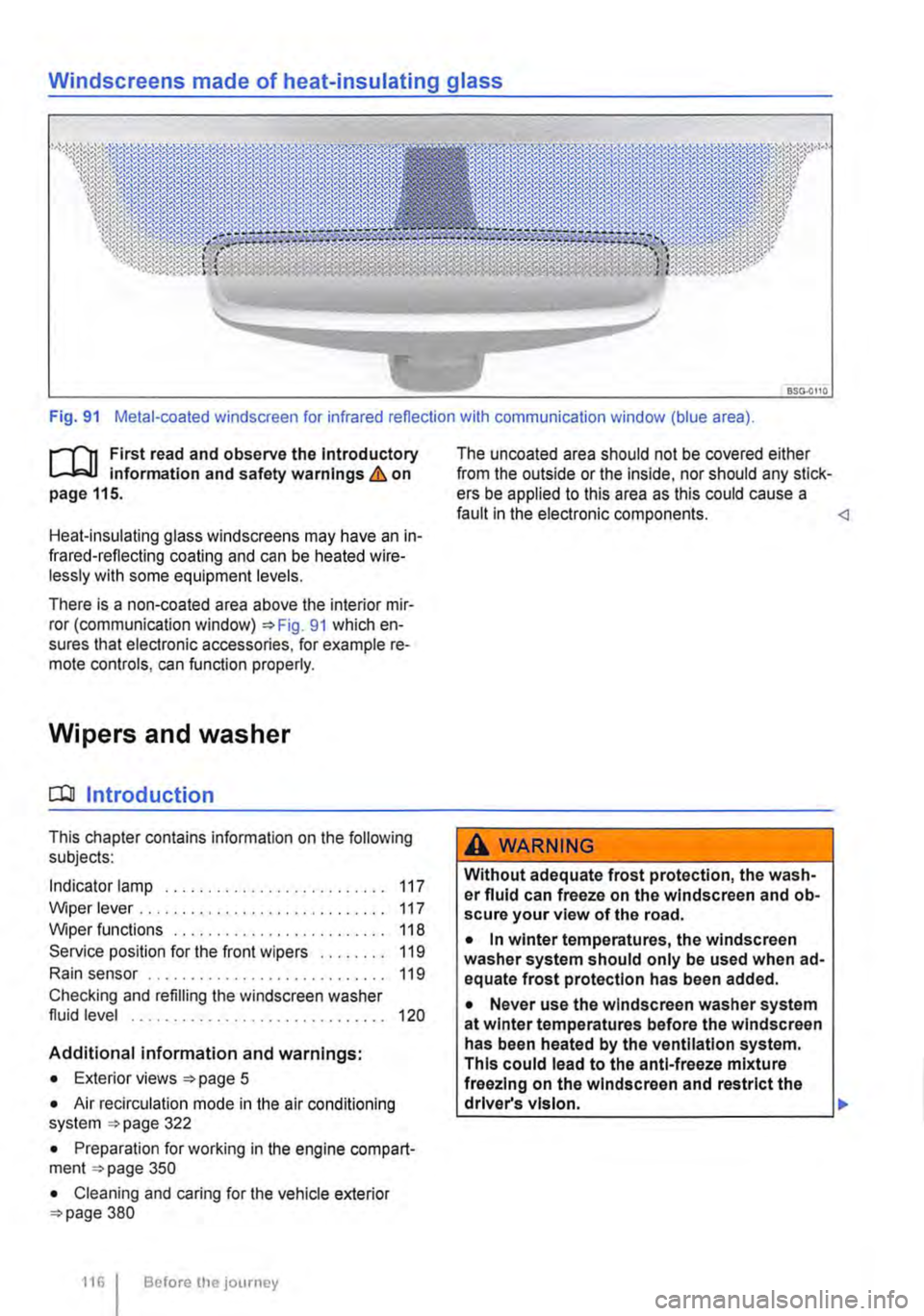
Fig. 91 Metal-coated windscreen for infrared reflection with communication window (blue area).
r-111 First read and observe the Introductory L-W.! Information and safety warnings & on page 115.
Heat-insulating glass windscreens may have an in-frared-reflecting coating and can be heated wire-lessly with some equipment levels.
There is a non-coated area above the interior mir-ror (communication window) 91 which en-sures that electronic accessories, for example re-mote controls, can function properly.
Wipers and washer
CQJ Introduction
This chapter contains information on the following subjects:
Indicator lamp . . . . . . . . . . . . . . . . . . . . . . . 117
Wiper lever . . . . . . . . . . . . . . . . . . . . . . . . . . . . . 117 Wiper functions . . . . . . . . . . 118 Service position for the front wipers . . . . . . . . 119
Rain sensor . . . . . . . . . . . . . . . . . . . . 119
Checking and refilling the windscreen washer fluid level . . . . . . . . . . . . . . . . . . . . . . . . . . . . . . 120
Additional information and warnings:
• Exterior views page 5
• Air recirculation mode in the air conditioning system 322
• Preparation for working in the engine compart-ment page 350
• Cleaning and caring for the vehicle exterior 380
116 I Before the journey
The uncoated area should not be covered either from the outside or the inside, nor should any stick-ers be applied to this area as this could cause a fault in the electronic components.
Without adequate frost protection, the wash-er fluid can freeze on the windscreen and ob-scure your view of the road.
• In winter temperatures, the windscreen washer system should only be used when ad-equate frost protection has been added.
• Never use the windscreen washer system at winter temperatures before the windscreen has been heated by the ventilation system. This could lead to the anti-freeze mixture freezing on the windscreen and restrict the driver's vision. .,.
Page 117 of 486
A WARNING
Worn or dirty wiper blades reduce visibility and increase the risk of accidents and severe injuries.
• Wiper blades should therefore always be changed if they are damaged or worn and no longer clean the windscreen properly.
Indicator lamp
Q)
In icy conditions, always check that the wiper blades are not frozen to the glass before using the wipers. When parking the vehicle in cold weather, it may be helpful to leave the front windscreen wipers in the service position 119.
Lit up Possible cause
Windscreen washer fluid level too low.
Several warning and indicator lamps will light up briefly as a functional check when the ignition is switched on. They will go out after a few seconds.
Wiper lever
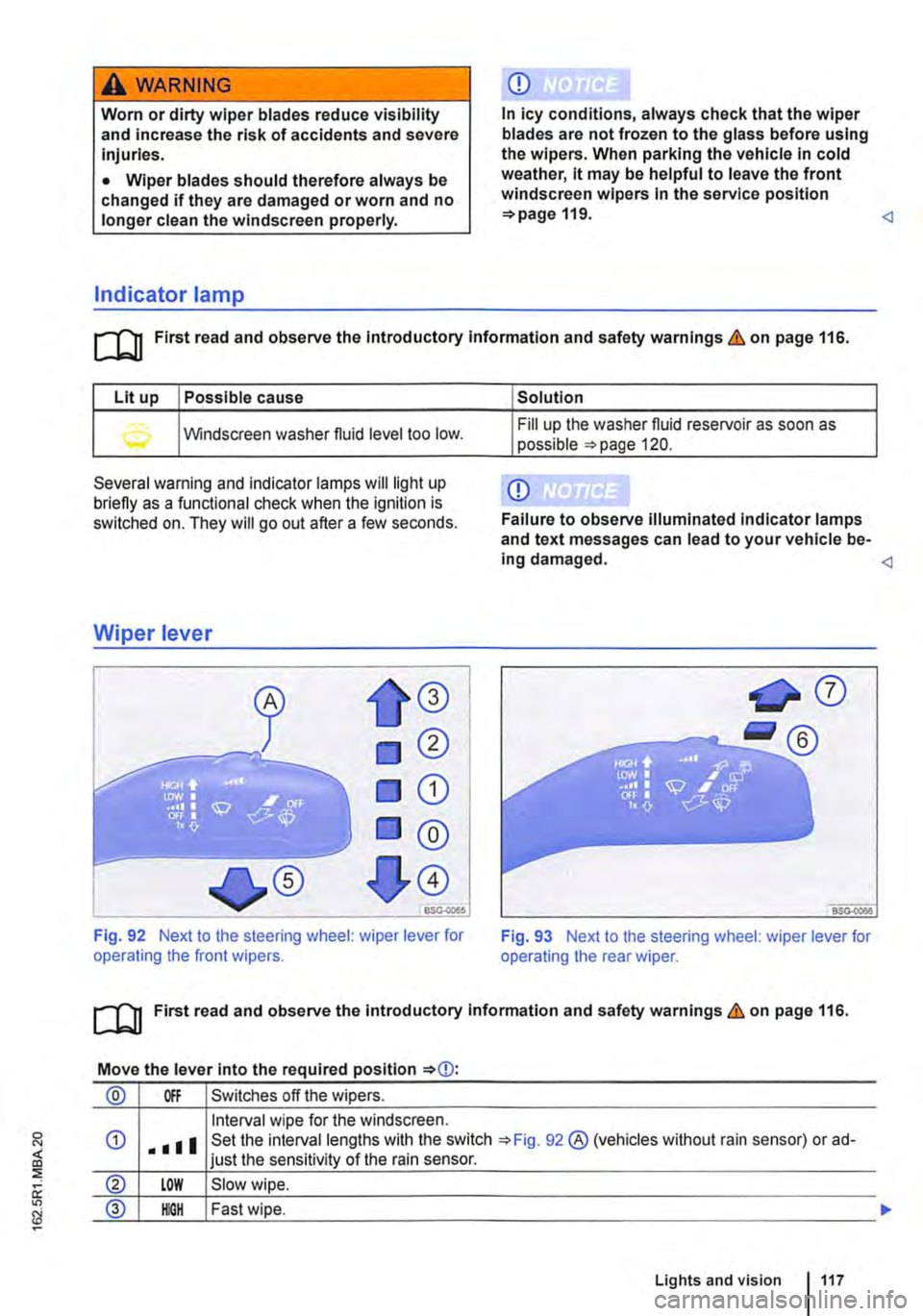
Fig. 92 Next to the steering wheel: wiper lever for operating the front wipers.
Solution
Fill up the washer fluid reservoir as soon as possible =>page 120.
Q)
Failure to observe illuminated indicator lamps and text messages can lead to your vehicle be-ing damaged.
[QJ First read and observe the introductory information and safety warnings & on page 116.
Move the lever into the required position
® Off Switches off the wipers.
Interval wipe for the windscreen.
® LOW Slow wipe.
@ IOOH Fast wipe.
Lights and vision 117
Page 118 of 486
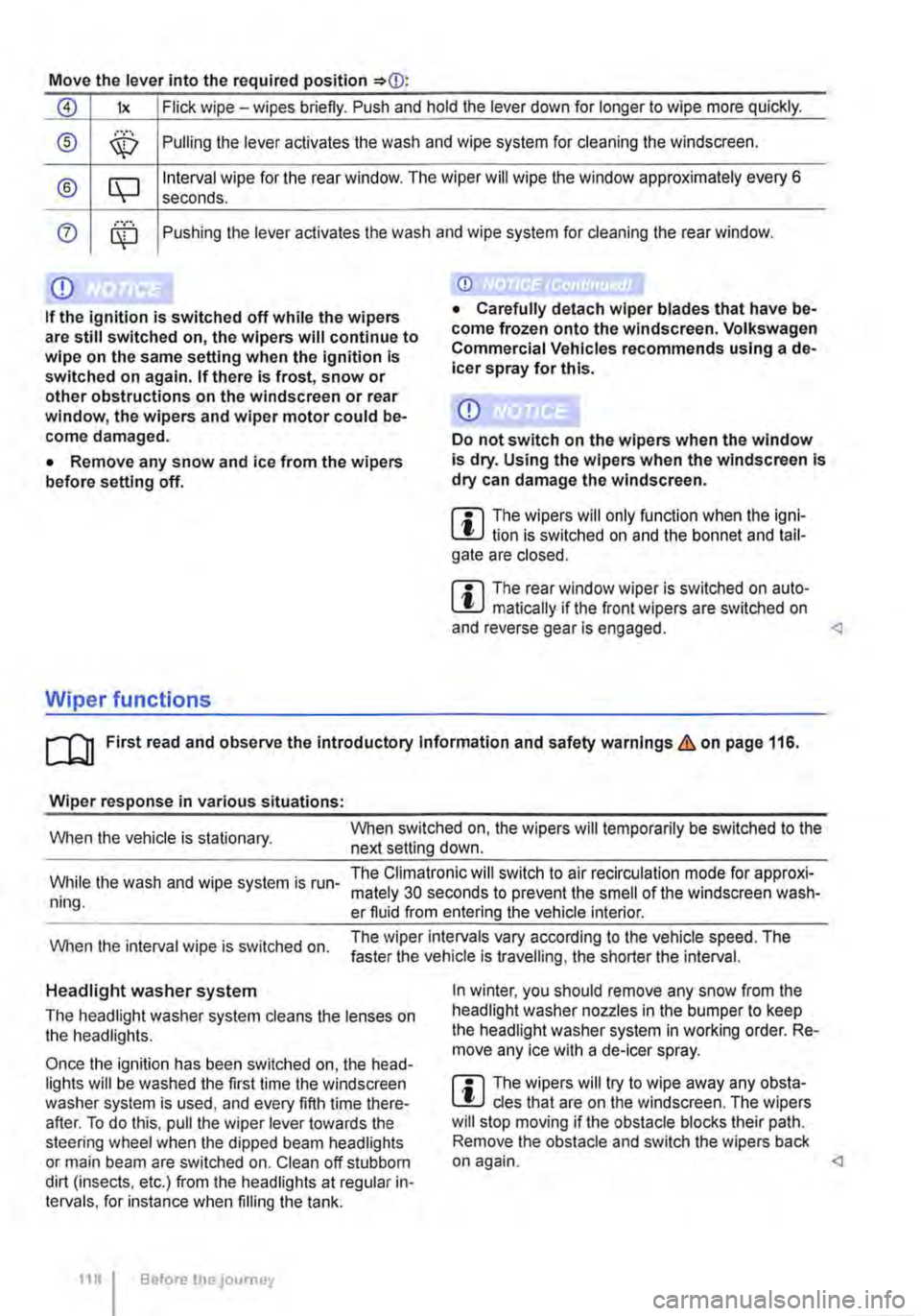
Move the lever into the required position
0 lx Flick wipe -wipes briefly. Push and hold the lever down for longer to wipe more quickly.
® ,··.··· \X:) Pulling the lever aclivates the wash and wipe system for cleaning the windscreen.
® CQ Interval wipe for the rear window. The wiper will wipe the window approximately every 6 seconds .
0 ........ Pushing the lever activates the wash and wipe system for cleaning the rear window.
Q)
If the ignition is switched off while the wipers are still switched on, the wipers will continue to wipe on the same setting when the ignition Is switched on again. If there Is frost, snow or other obstructions on the windscreen or rear window, the wipers and wiper motor could be-come damaged.
• Remove any snow and ice from the wipers before setting off.
Wiper functions
Q)
Do not switch on the wipers when the window is dry. Using the wipers when the windscreen Is dry can damage the windscreen.
m The wipers will only function when the igni-W lion is switched on and the bonnet and tail-gate are closed.
m The rear window wiper is switched on auto-W matically if the front wipers are switched on and reverse gear is engaged.
Wiper response in various situations:
When the vehicle is stationary. When switched on, the wipers will temporarily be switched to the next setting down.
While the wash and wipe system is run-ning.
The Climatronic will switch to air recirculation mode for approxi-mately 30 seconds to prevent the smell of the windscreen wash-er fluid from entering the vehicle interior.
When the interval wipe is switched on. The wiper intervals vary according to the vehicle speed. The faster the vehicle is travelling, the shorter the interval.
Headlight washer system
The headlight washer system cleans the lenses on the headlights.
Once the ignition has been switched on, the head-lights will be washed the first time the windscreen washer system is used, and every fifth time there-after. To do this, pull the wiper lever towards the steering wheel when the dipped beam headlights or main beam are switched on. Clean off stubborn dirt (insects, etc.) from the headlights at regular in-tervals, for instance when filling the tank.
118 Before the journey
In winter, you should remove any snow from the headlight washer nozzles in the bumper to keep the headlight washer system in working order. Re-move any ice with a de-icer spray.
m The wipers will try to wipe away any obsta-W cles that are on the windscreen. The wipers will stop moving if the obstacle blocks their path. Remove the obstacle and switch the wipers back on again.