ice warning VOLKSWAGEN TRANSPORTER 2014 Manual PDF
[x] Cancel search | Manufacturer: VOLKSWAGEN, Model Year: 2014, Model line: TRANSPORTER, Model: VOLKSWAGEN TRANSPORTER 2014Pages: 486, PDF Size: 69.28 MB
Page 296 of 486
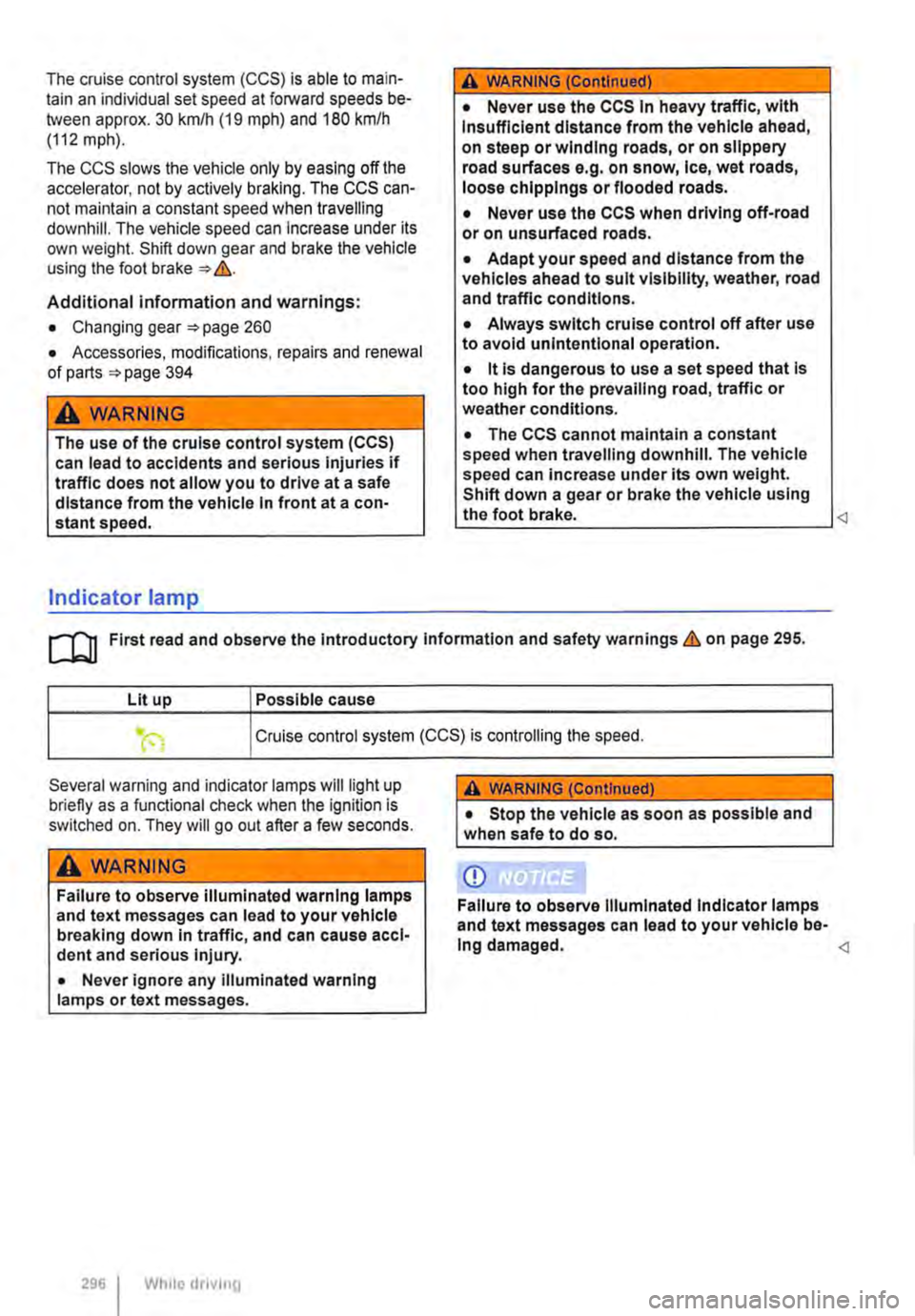
The cruise control system (CCS) is able to main-tain an individual set speed at forward speeds be-tween approx. 30 km/h (19 mph) and 180 km/h (112 mph).
The CCS slows the vehicle only by easing off the accelerator, not by actively braking. The CCS can-not maintain a constant speed when travelling downhill. The vehicle speed can Increase under its own weight. Shift down gear and brake the vehicle using the foot brake &.
Additional information and warnings:
• Changing gear 260
• Accessories, modifications, repairs and renewal of parts '*page 394
A WARNING
The use of the cruise control system (CCS) can lead to accidents and serious Injuries if traffic does not allow you to drive at a safe distance from the vehicle In front at a con-stant speed.
Indicator lamp
A WARNING (Continued)
• Never use the CCS In heavy traffic, with Insufficient distance from the vehicle ahead, on steep or winding roads, or on slippery road surfaces e.g. on snow, Ice, wet roads, loose chlpplngs or flooded roads.
• Never use the CCS when driving off-road or on unsurfaced roads.
• Adapt your speed and distance from the vehicles ahead to suit visibility, weather, road and traffic conditions.
• Always switch cruise control off after use to avoid unintentional operation.
• it Is dangerous to use a set speed that is too high for the prevailing road, traffic or weather conditions.
• The CCS cannot maintain a constant speed when travelling downhill. The vehicle speed can Increase under its own weight. Shift down a gear or brake the vehicle using the foot brake.
Lit up Possible cause
Cruise control system (CCS) is controlling the speed.
Several warning and indicator lamps will light up briefly as a functional check when the ignition is switched on. They will go out after a few seconds.
A WARNING
Failure to observe illuminated warning lamps and text messages can lead to your vehicle breaking down in traffic, and can cause acci-dent and serious injury.
• Never ignore any illuminated warning lamps or text messages.
296 I While drivrng
A WARNING (Continued)
• Stop the vehicle as soon as possible and when safe to do so.
CD
Failure to observe Illuminated Indicator lamps and text messages can lead to your vehicle be-Ing damaged.
Page 298 of 486
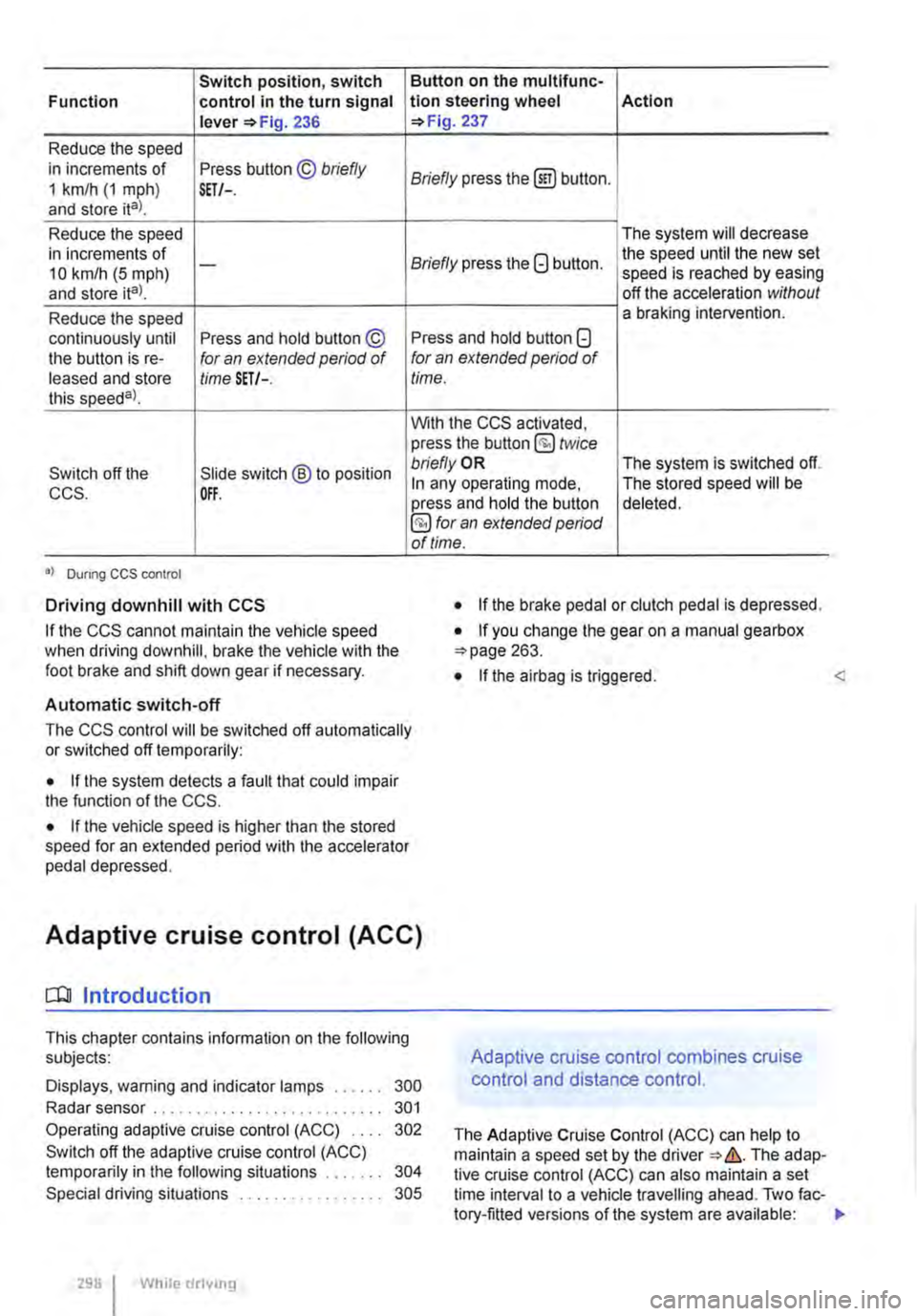
Switch position, switch Function control in the turn signal lever 236
Reduce the speed in increments of Press button © briefly 1 km/h (1 mph) and store ital. SET/-.
Reduce the speed in increments of 10 km/h (5 mph) -
and store ita).
Reduce the speed continuously until Press and hold button © the button is re-for an extended period of leased and store time SET/-. this speeda)_
Switch off the Slide switch ® to position CCS. OFF.
•I Dunng CCS control
Driving downhill with CCS
If the CCS cannot maintain the vehicle speed when driving downhill, brake the vehicle with the foot brake and shift down gear if necessary.
Automatic switch-off
Button on the multlfunc-tion steering wheel Action 237
Briefly press the (ili) button.
The system will decrease
Briefly press the G button. the speed until the new set speed is reached by easing off the acceleration without a braking intervention.
Press and hold button G for an extended period of time.
With the CCS activated, press the button @ twice bn'eflyOR The system is switched off. In any operating mode, The stored speed will be press and hold the button deleted. §) for an extended period of time.
• If the brake pedal or clutch pedal is depressed.
• If you change the gear on a manual gearbox 263.
• If the airbag is triggered. <
The CCS control will be switched off automatically or switched off temporarily:
• If the system detects a fault that could impair the function of the CCS.
• If the vehicle speed is higher than the stored speed for an extended period with the accelerator pedal depressed.
Adaptive cruise control (ACC)
dJ Introduction
This chapter contains information on the following subjects:
Displays, warning and indicator lamps . . . . . . 300
Radar sensor . . . . . . . . . . . . . . . . . . . . . . . . . . . 301
Operating adaptive cruise control (ACC) 302
Switch off the adaptive cruise control (ACC) temporarily in the following situations . . . . . 304
Special driving situations . . . . . . . . . . . . 305
298 I While drivmg
Adaptive cruise control combines cruise
control and distance control.
The Adaptive Cruise Control (ACC) can help to maintain a speed set by the The adap-tive cruise control (ACC) can also maintain a set time interval to a vehicle travelling ahead. Two fac-tory-fitted versions of the system are available: .,
Page 299 of 486
• System version 1 functions at speeds of 30-160 km/h (20 mph -100 mph).
• System version 2 functions at speeds of 30-210 km/h (20 m ph-130 m ph).
In vehicles with a dual clutch gearbox DSG®, the adaptive cruise control (ACC) can brake the vehi-cle until it comes to a complete standstill behind a vehicle in front that is stopping.
Driver prompt to take over control
There are system-specific limits on the adaptive cruise control (ACC) when driving. This means that the driver may have to control the speed and dis-tance between the vehicle and other vehicles in certain circumstances.
The driver is told to take control of the vehicle via a message on the instrument cluster display prompts a braking intervention, and a signal tone =<>page 300.
Additional information and warnings:
• Exterior views =<>page 5
• Volkswagen information system =<>page 24
• Cruise control system (CCS) =<>page 295
• Area monitoring system (Front Assist) =<>page 307
• Accessories, modifications, repairs and renewal of parts =<>page 394
A WARNING
The intelligent technology used in the adap-tive cruise control (ACC) cannot overcome the laws of physics, and functions only within the limits of the system. Careless or uninten-tional use of the adaptive cruise control (ACC) can cause accidents and lead to seri-ous injury. The system Is not a substitute for the full concentration of the driver.
• Adapt your speed and distance from the vehicles ahead to suit visibility, weather, road and traffic conditions.
• Do not use the adaptive cruise control (ACC) in poor visibility, on steep or winding roads, or on slippery road surfaces e.g. on snow, ice, wet roads, loose chippings or floo-ded roads.
A WARNING (Continued)
• Never use the adaptive cruise control (ACC) off-road or on unsurfaced roads. The adaptive cruise control (ACC) is designed for use on surfaced roads only.
• The adaptive cruise control (ACC) does not react to stationary obstacles, e.g. the tail end of a traffic jam, a vehicle that has broken down, or vehicles waiting at traffic lights.
• The adaptive cruise control (ACC) does not react to persons, animals or vehicles crossing or approaching in the same lane.
• If the adaptive cruise control (ACC) speed reduction is insufficient, you should brake the vehicle by depressing the foot brake.
• Brake the vehicle by depressing the brake if the vehicle rolls inadvertently on after the driver has been prompted to take control of the vehicle.
• If the instrument cluster display indicates that the driver should take control of the vehi-cle, you have to regulate the distance your-self.
• The driver must be prepared to take con-trol of the vehicle (by accelerating or braking) at all times.
CD
Switch off the adaptive cruise control (ACC) if you suspect that the radar sensor has been damaged. This can help to prevent secondary damage. Have the radar sensor realigned.
• Repair work on the radar sensor will require special knowledge and tools. Volkswagen rec-ommends using a Volkswagen dealership for this purpose.
m If the adaptive cruise control (ACC) does not L!J function as described in this chapter, do not use it, and have the system checked by a qualified workshop. Volkswagen recommends using a Voikswagen dealership for this purpose.
m The maximum vehicle speed when the adap-L!J live cruise control (ACC) is active is limited to either 160 km/h (1 00 m ph) or 210 km/h (130 m ph). depending on the system version.
m If the adaptive cruise control (ACC) is active, L!J unfamiliar noises may be heard during the automatic braking procedure. These are caused by the braking system.
Page 300 of 486
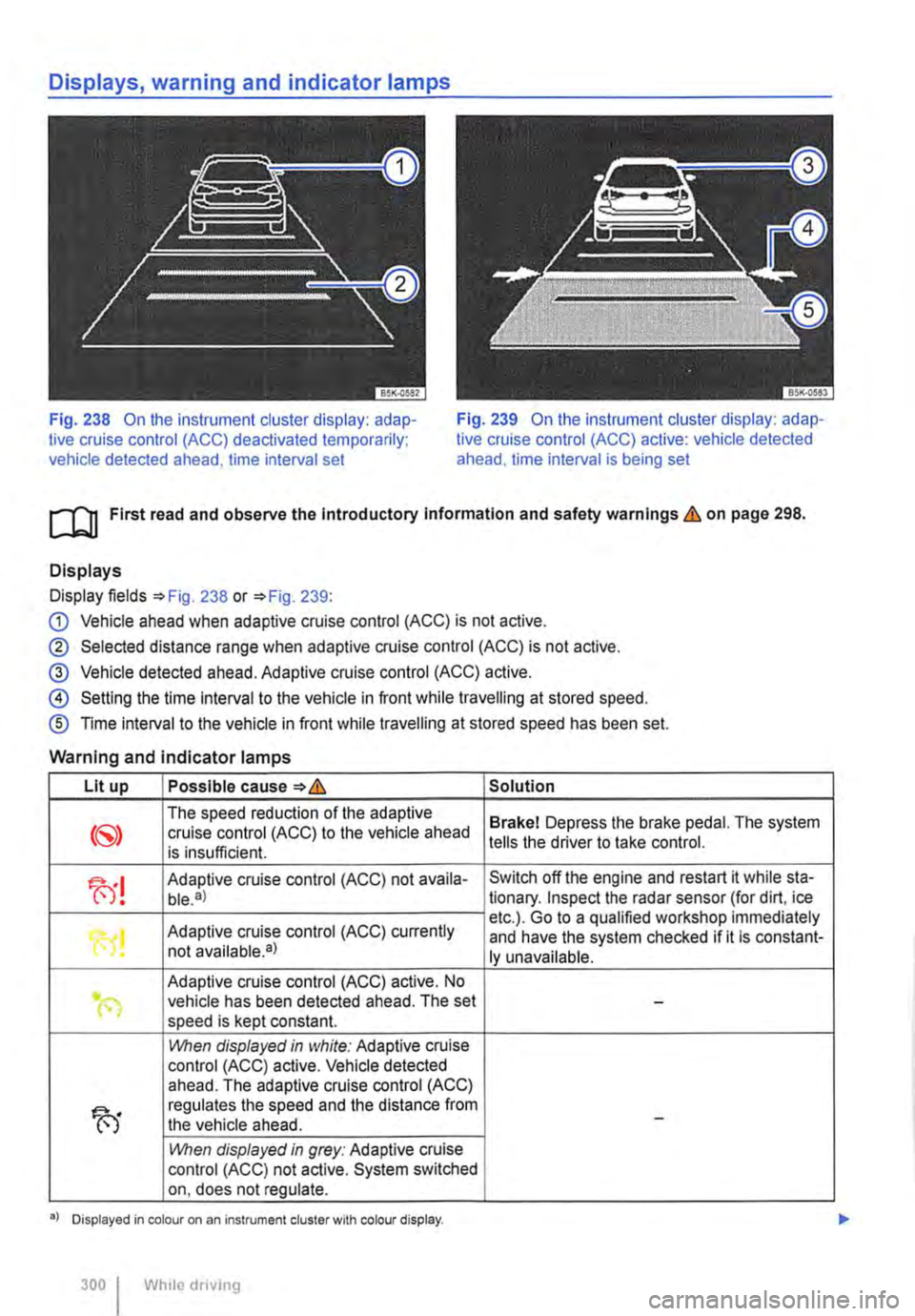
Fig. 238 On the instrument cluster display: adap-tive cruise control (ACC) deactivated temporarily; vehicle detected ahead, time interval set
Fig. 239 On the instrument cluster display: adap-tive cruise control (ACC) active: vehicle detected ahead. time interval is being set
ro First read and observe the Introductory Information and safety warnings & on page 298.
Displays
Display fields =>Fig. 238 or =>Fig. 239:
G) Vehicle ahead when adaptive cruise control (ACC) is not active.
® Selected distance range when adaptive cruise control (ACC) is not active.
@ Vehicle detected ahead. Adaptive cruise control (ACC) active.
@ Setting the time interval to the vehicle in front while travelling at stored speed.
® Time interval to the vehicle in front while travelling at stored speed has been set.
Warning and indicator lamps
Lit up Possible cause=>& Solution
The speed reduction of the adaptive Brakel Depress the brake pedal. The system cruise control (ACC) to the vehicle ahead is insufficient. tells the driver to take control.
fu! Adaptive cruise control (ACC) not availa-Switch off the engine and restart it while sta-ble.a) tionary. Inspect the radar sensor (for dirt, ice
Adaptive cruise control (ACC) currently etc.). Go to a qualified workshop immediately
"0! and have the system checked if it is constant-not available•) ly unavailable.
Adaptive cruise control (ACC) active. No .. (") vehicle has been detected ahead. The set -speed is kept constant.
1!\/hen displayed in white: Adaptive cruise control (ACC) active. Vehicle detected ahead. The adaptive cruise control (ACC)
fu
regulates the speed and the distance from the vehicle ahead. -
1!\/hen displayed in grey: Adaptive cruise control (ACC) not active. System switched on, does not regulate.
•> Displayed in colour on an instrument cluster with colour display.
300 I Whlio drivmg
Page 302 of 486
CD CD
• Remove snow with a brush, and remove Ice • Repair work on the radar sensor will require special knowledge and tools. Volkswagen rec-ommends using a Volkswagen dealership for this purpose.
preferably with a solvent-free de-leer spray.
SSG-0047
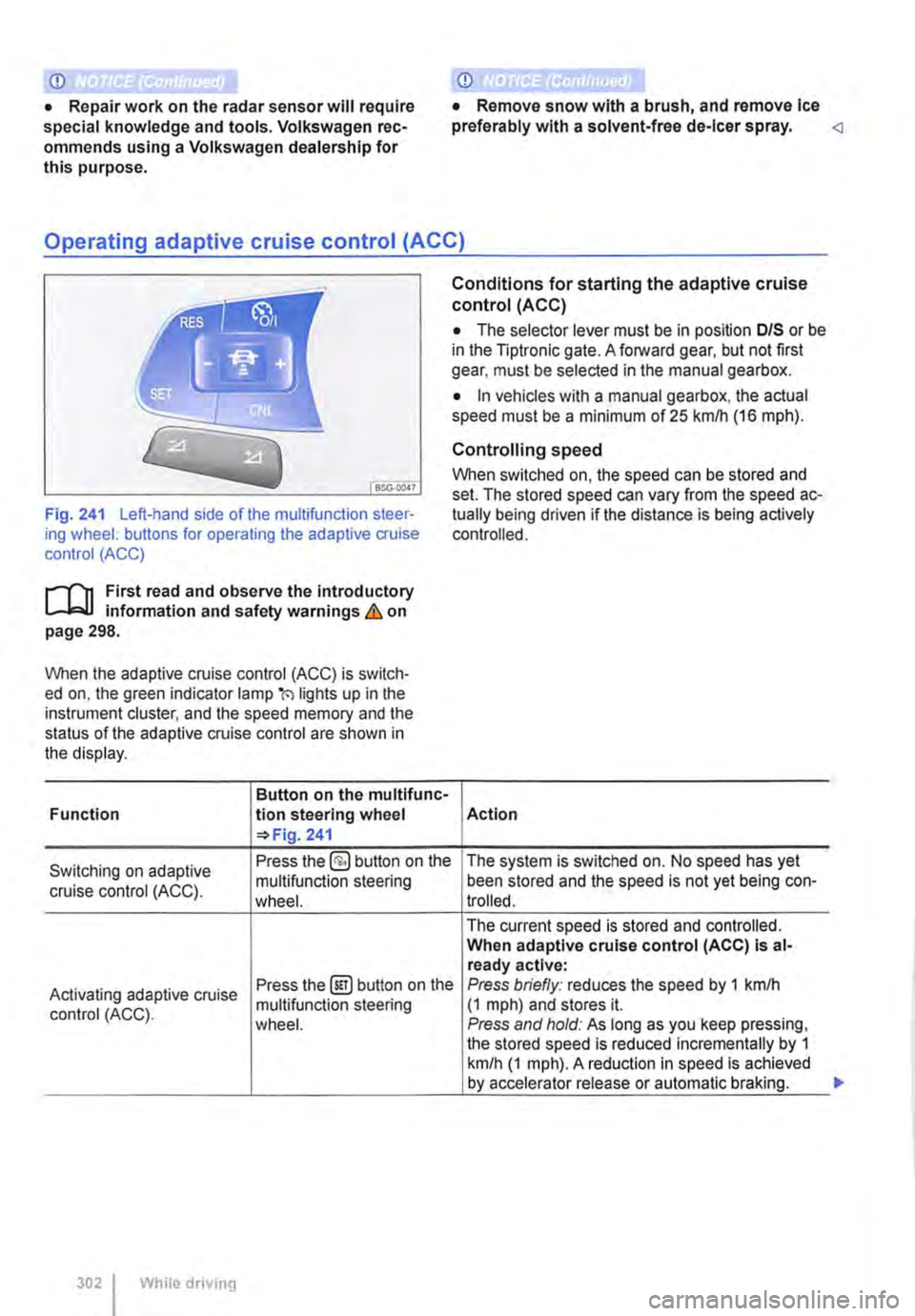
Fig. 241 Left-hand side of the multifunction steer-ing wheel: buttons for operating the adaptive cruise control (ACC)
1"1'11 First read and observe the introductory L-I=J.I information and safety warnings Lb. on page 298.
When the adaptive cruise control (ACC) is switch-ed on, the green indicator lamp(') lights up in the instrument cluster, and the speed memory and the status of the adaptive cruise control are shown in the display.
Button on the multifunc-Function lion steering wheel 241
Conditions for starting the adaptive cruise control (ACC)
• The selector lever must be in position D/S or be in the Tiptronic gate. A forward gear, but not first gear, must be selected in the manual gearbox.
• In vehicles with a manual gearbox, the actual speed must be a minimum of 25 kmlh (16 m ph).
Controlling speed
When switched on, the speed can be stored and set. The stored speed can vary from the speed ac-tually being driven if the distance is being actively controlled.
Action
Switching on adaptive Press the §) button on the The system is switched on. No speed has yet
cruise control (ACC). multifunction steering been stored and the speed is not yet being con-wheel. trolled.
The current speed is stored and controlled. When adaptive cruise control (ACC) Is al-ready active:
Activating adaptive cruise Press the@!) button on the Press briefly: reduces the speed by 1 kmlh
control (ACC). multifunction steering (1 mph) and stores it. wheel. Press and hold: As long as you keep pressing, the stored speed is reduced incrementally by 1 km/h (1 mph). A reduction in speed is achieved by accelerator release or automatic braking.
302 While driving
...
Page 309 of 486
m When Front Assist is switched on, the display L!J in the instrument cluster can be overwritten by displays related to other functions, e.g. an in-coming telephone call.
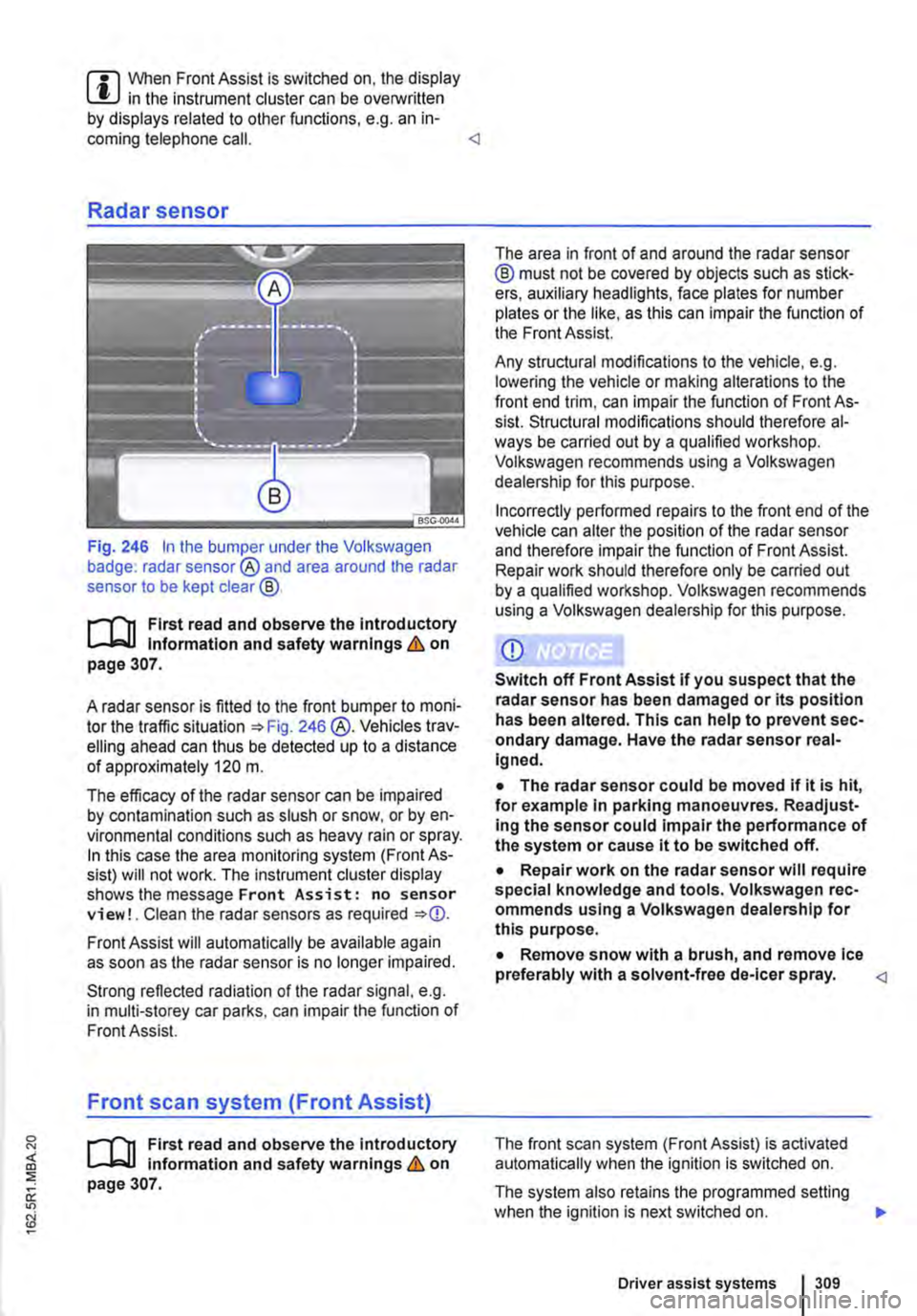
Fig. 246 In the bumper under the Volkswagen badge: radar sensor® and area around the radar sensor to be kept clear@.
r-f"'n First read and observe the Introductory l.-lo:-1.1 Information and safety warnings & on page 307.
A radar sensor is fitted to the front bumper to moni-tor the traffic situation =>Fig. 246 @.Vehicles trav-elling ahead can thus be detected up to a distance of approximately 120 m.
The efficacy of the radar sensor can be impaired by contamination such as slush or snow, or by en-vironmental conditions such as heavy rain or spray. In this case the area monitoring system (Front As-sist) will not work. The instrument cluster display shows the message Front Assist: no sensor view!. Clean the radar sensors as required =>
Strong reflected radiation of the radar signal, e.g. in multi-storey car parks, can impair the function of Front Assist.
Front scan system (Front Assist)
r-f"'n First read and observe the introductory l.-lo:-1.1 information and safety warnings & on page 307.
The area in front of and around the radar sensor @ must not be covered by objects such as stick-ers, auxiliary headlights, face plates for number plates or the like, as this can impair the function of the Front Assist.
Any structural modifications to the vehicle, e.g. lowering the vehicle or making alterations to the front end trim, can impair the function of Front As-sist. Structural modifications should therefore al-ways be carried out by a qualified workshop. Volkswagen recommends using a Volkswagen dealership for this purpose.
Incorrectly performed repairs to the front end of the vehicle can alter the position of the radar sensor and therefore impair the function of Front Assist. Repair work should therefore only be carried out by a qualified workshop. Volkswagen recommends using a Volkswagen dealership for this purpose.
• The radar sensor could be moved if it is hit, for example In parking manoeuvres. Readjust-Ing the sensor could impair the performance of the system or cause it to be switched off.
• Repair work on the radar sensor will require special knowledge and tools. Volkswagen rec-ommends using a Volkswagen dealership for this purpose.
• Remove snow with a brush, and remove Ice preferably with a solvent-free de-leer spray.
The system also retains the programmed setting when the ignition is next switched on. 1>
Driver assist systems 309
Page 313 of 486
A WARNING (Continued)
• Never use the lane change assist system on unsurfaced roads. The lane change assist system has been designed exclusively for use on surfaced roads.
• Always pay close attention to what Is hap-pening around the vehicle.
• Never use the lane change assist system, If the radar sensors are dirty, covered or dam-aged. These circumstances can Impair the proper functioning of the system.
• lt may be hard to see the display In the ex-terior mirror In direct sunlight.
Indicator lamp
.---T'n First read and observe the introductory L-J,:..IJ Information and safety warnings & on page 312.
Lights up or Possible cause flashes
The lane change assist system is cur-rently not available.
Several warning and indicator lamps will light up briefly as a functional check when the ignition is switched on. They will go out after a few seconds.
m Only Volkswagen-approved vehicle paints L!..J may be used on the rear bumper. Other vehi-cle paints could limit or even distort the function of the lane change assist system.
m If the lane change assist system does not L!..J function as described in this chapter, or after a collision with another vehicle, do not use the sys-tem. Go to a qualified workshop.
m Go to a qualified workshop and have the sys-L!..J tern checked ifthere is a fault in the system or after an accident.
Failure to observe illuminated warning lamps and text messages can lead to your vehicle breaking down in traffic, and can cause acci-dent and serious Injury.
• Never ignore any illuminated warning lamps or text messages.
• Stop the vehicle as soon as possible and when safe to do so.
Page 322 of 486
Air conditioning system
Heating, ventilating, cooling
o:n Introduction
This chapter contains information on the following subjects:
Controls for Climatic . . . . . . . . . . . . . . . . . . . . 323
Controls for Climatronic . . . . . . . . . . . . . . . . . 325
Controls for the heating and fresh air system . 327
Information on the air conditioning system . . . 328
..................... m
Air recirculation mode . . . . . . . • . . . . . . . . . . . . 330
Windscreen heating . . . . . . . . . . . . . . . . . . . . . 331
Roof ventilator . . . . . . . . . . . . . . . . . . . . . . . . . . 331
Displays for the Climatronic information
Depending on the vehicle equipment level, infor-mation on the Climatronic is displayed briefly on the screen of the factory-fitted radio or navigation system.
The dust and pollen filter
The dust and pollen filter with activated charcoal reduces the level of impurities in the outside air en-tering the vehicle.
The dust and pollen filler must be changed regular-ly to avoid impairing the performance of the air conditioning system.
The dust and pollen filter must be changed more frequently than stated in the service schedule if the efficiency of the filter declines prematurely due to the vehicle being used in areas with high levels of air pollution.
Additional information and warnings:
• Exterior views 5
• Wipers/washer 116
• Supplementary heaters (auxiliary air heater or auxiliary coolant heater) 332
• Cleaning and caring for the vehicle exterior 380
A WARNING
Poor visibility through all windows increases the risk of collisions and accidents, which can cause serious injuries.
• Always ensure that all windows are free of ice, snow and mist to ensure good visibility.
3221 While driving
A WARNING (Continued)
• Maximum heat output, which Is needed to defrost the windows as quickly as possible, is only available when the engine has reached Its operating temperature. Do not start your journey until you have good visibil-Ity.
• Always ensure that the heating and fresh air system or the air conditioning system and the rear window heating are used correctly so that you have good visibility.
• Never use the air reclrculatlon mode for an extended period. If the cooling system Is switched off, the windows can mist up very quickly In air reclrculatlon mode and reduce visibility considerably.
• Always switch off the air reclrculatlon mode when it Is not required.
A WARNING
Stale air can quickly make the driver tired and affect their concentration, which In turn can cause collisions, accidents and serious Inju-ries.
• Never switch off the blowers or switch on the air recirculatlon mode for an extended pe· riod as this prevents fresh air from entering the vehicle interior.
• Repairs to the air conditioning system re-quire specialist knowledge and special tools. Volkswagen Commercial Vehicles recommends using a Volkswagen Commercial Vehicles deal-ership for this purpose.
Page 323 of 486
m If the cooling system is switched off. the out-W side air that is drawn into the vehicle is not dehumidified. To prevent the windows misting over, Volkswagen Commercial Vehicles recommends that you leave the air conditioning (air conditioning co'!!E.'"essor) switched on. To do this, press the @ button. The indicator lamp in the button must light up.
m Maximum heat output, which is needed to de-W frost the windows as quickly as possible, is only available when the engine has reached its op-erating temperature.
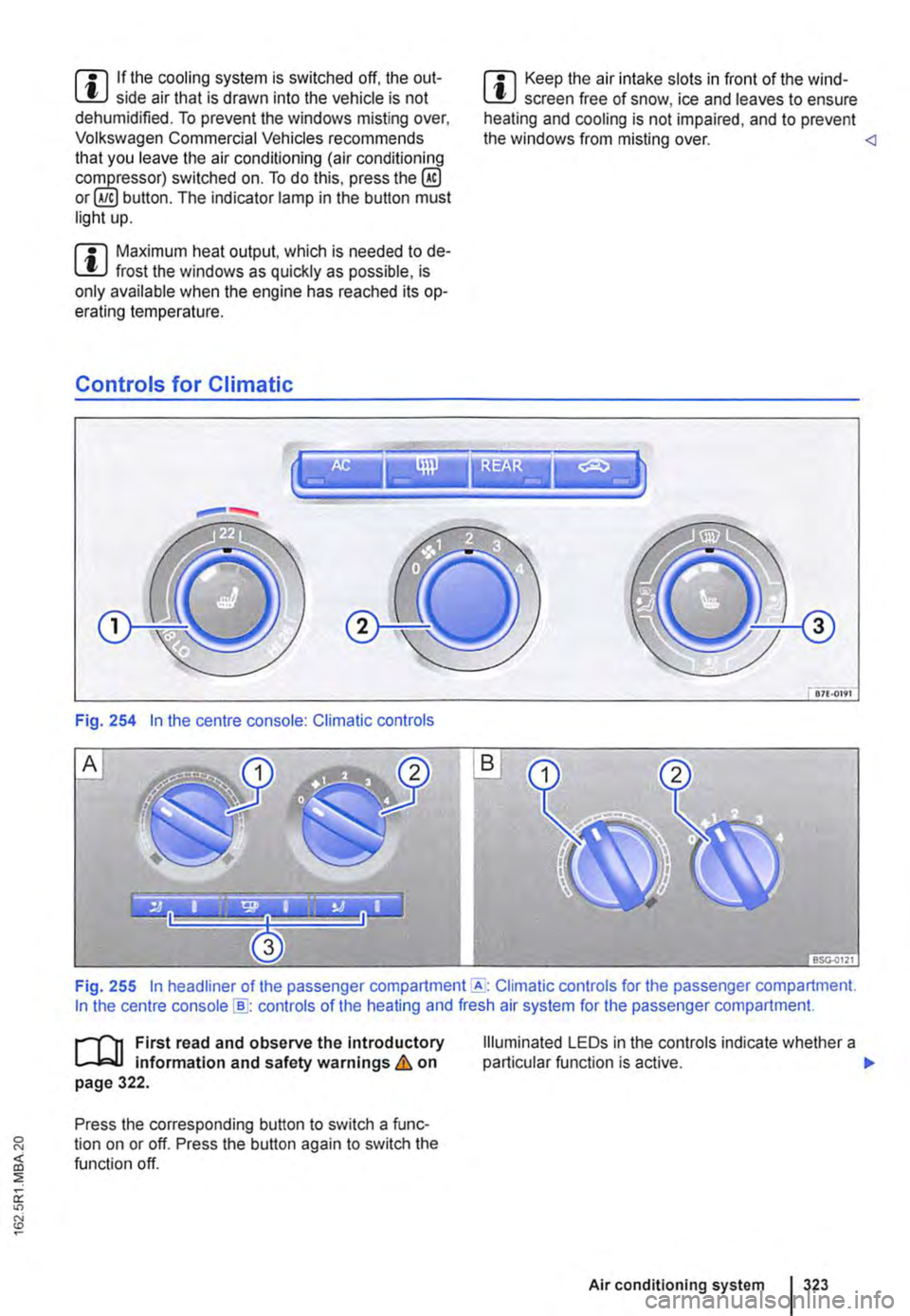
Controls for Climatic
Fig. 254 In the centre console: Climatic controls
m Keep the air intake slots in front of the wind-W screen free of snow, ice and leaves to ensure heating and cooling is not impaired, and to prevent the windows from misting over.
Fig. 255 In headliner of the passenger Climatic controls for the passenger compartment. In the centre console [ID: controls of the heating and fresh air system for the passenger compartment.
ill1 First read and observe the Introductory l..-Wl information and safety warnings & on page 322.
Press the corresponding button to switch a func-tion on or off. Press the button again to switch the function off.
Illuminated LE Os in the controls indicate whether a particular function is active. .,.
Air conditioning system I 323
Page 331 of 486
Windscreen heating
1111 First read and observe the introductory L.-J,::.U information and safety warnings & on page 322.
Windscreen heating helps to de-ice the
windscreen and only works when the en-
gine is running.
Switching on and off
Press the button ®in the centre console or the Climatronic to switch the windscreen heating on and off.
Roof ventilator
BS0-000<
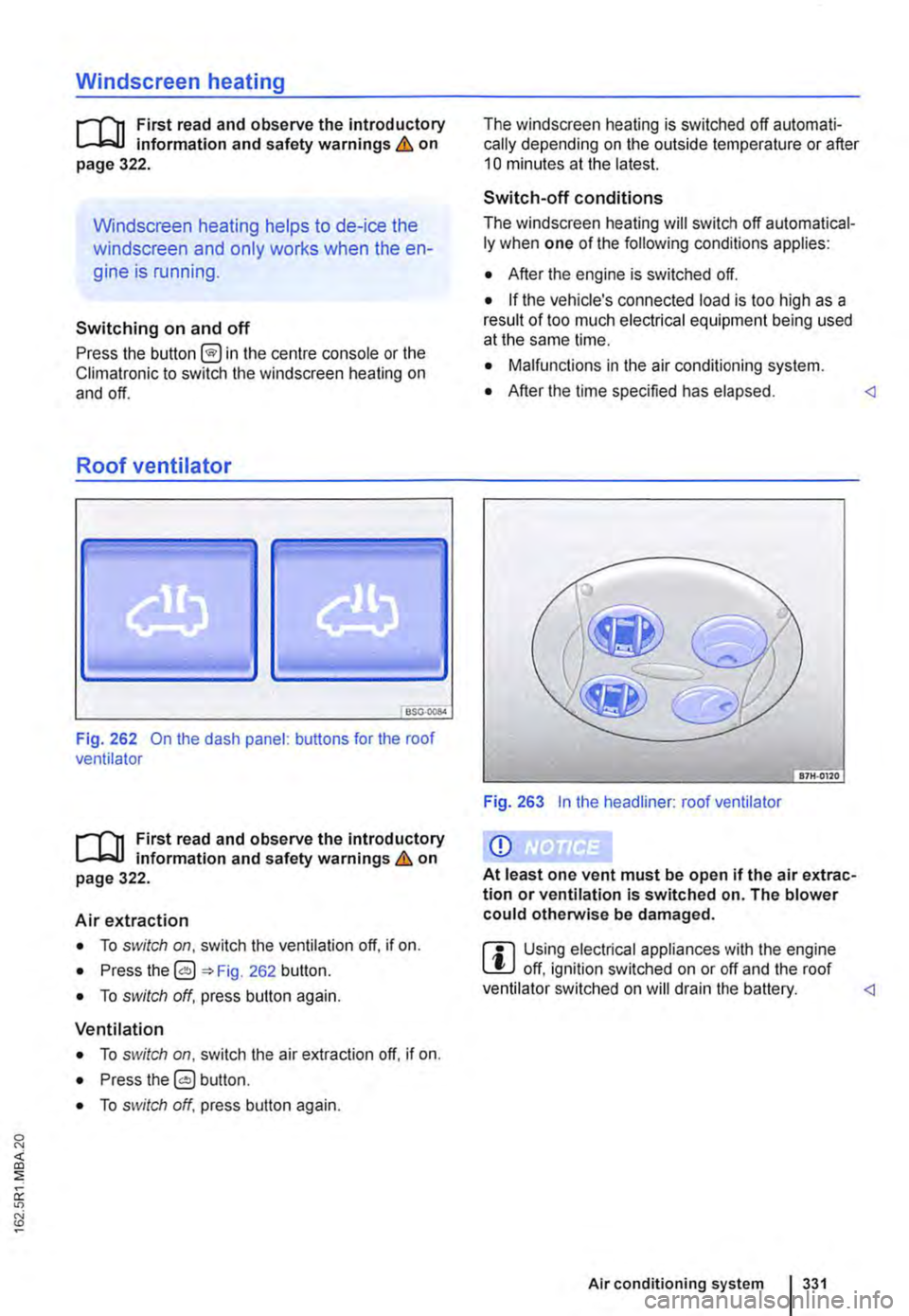
Fig. 262 On the dash panel: buttons for the roof ventilator
1111 First read and observe the introductory L.-J,::.U Information and safety warnings & on page 322.
Air extraction
• To switch on, switch the ventilation off, if on.
• Press the 0 262 button.
• To switch off, press button again.
Ventilation
• To switch on, switch the air extraction off. if on.
• Press the 0 button.
• To switch off, press button again.
The windscreen heating is switched off automati-cally depending on the outside temperature or after 10 minutes at the latest.
Switch-off conditions
The windscreen heating will switch off automatical-ly when one of the following conditions applies:
• After the engine is switched off.
• If the vehicle's connected load is too high as a result of too much electrical equipment being used at the same lime.
• Malfunctions in the air conditioning system.
• After the time specified has elapsed.
Q)
At least one vent must be open if the air extrac-tion or ventilation Is switched on. The blower could otherwise be damaged.
ffi Using electrical appliances with the engine L!J off, ignition switched on or off and the roof ventilator switched on will drain the battery.