ice VOLKSWAGEN TRANSPORTER 2014 Owners Manual
[x] Cancel search | Manufacturer: VOLKSWAGEN, Model Year: 2014, Model line: TRANSPORTER, Model: VOLKSWAGEN TRANSPORTER 2014Pages: 486, PDF Size: 69.28 MB
Page 2 of 486
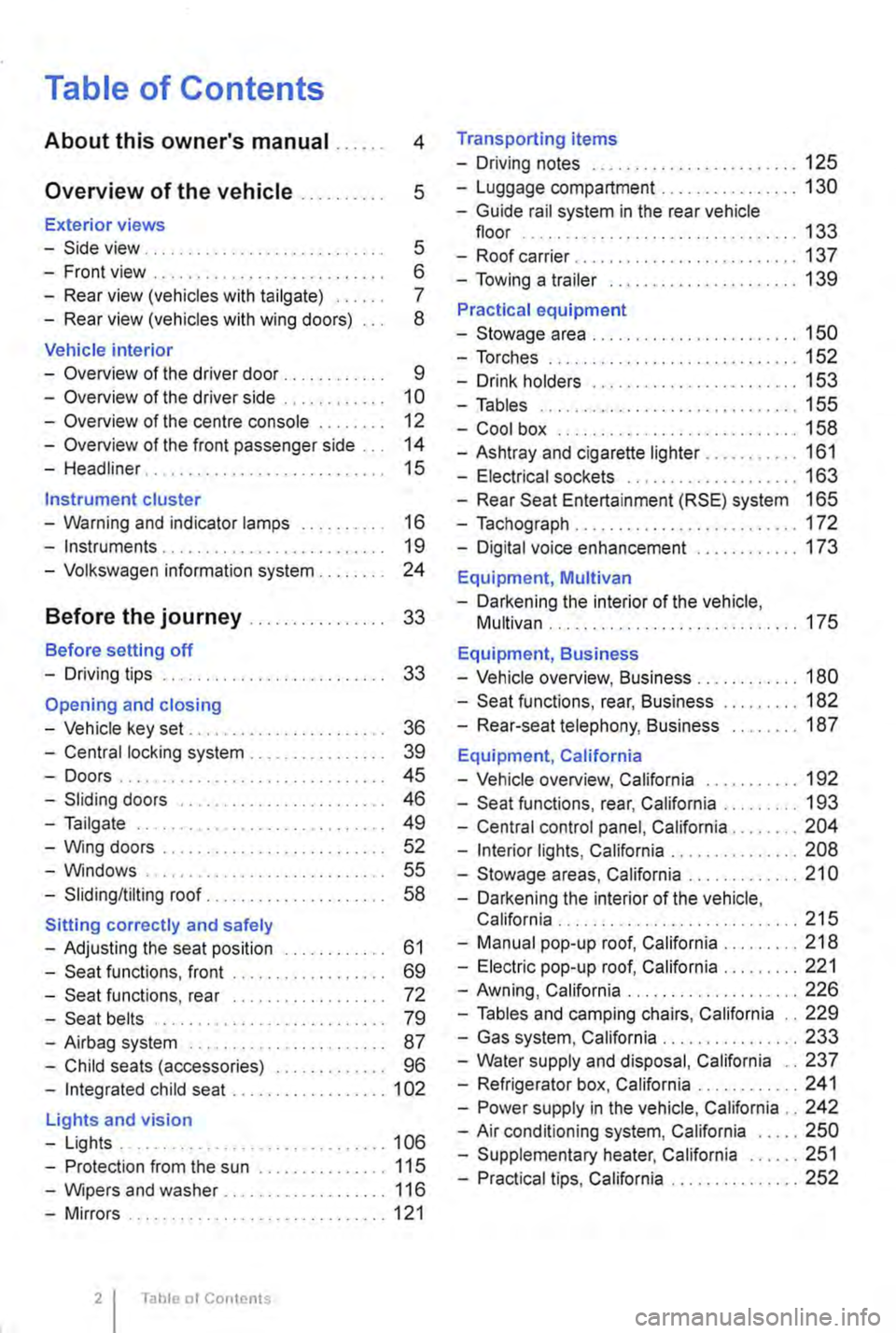
Table of Contents
About this owner's manual . . . . . . 4
Overview of the vehicle . . . . . . . . . . 5
Exterior views
-Side view . . . . . . . . . . . . . . . . . . . . . . . . . . . . 5
-Front view . . . . . . . . . . . . . . . . . . . . . . . . . . . 6
-Rear view (vehicles with tailgate) . . . . . 7
-Rear view (vehicles with wing doors) 8
Vehicle interior
-Overview of the driver door . . . . . . . . . . . 9
-Overview of the driver side . . . . . . . . . . . 10
-Overview of the centre console . . 12
-Overview of the front passenger side . . . 14
-Headliner . . . . . . . . . . . . . . . . . . . . 15
Instrument cluster
-Warning and indicator lamps . . . . . . . . . . 16
-Instruments . . . . . . . . . . . . . . . . . . . . . . . . . . 19
-Volkswagen information system . . . . . . . . 24
Before the journey . . . . . . . . . . . . . . . . 33
Before setting off
-Driving tips . . . . . . . . . . . . . . . . . . . . . . . . . . 33
Opening and closing
-Vehicle key set . . . . . . . . . . . . . . . . . . . . . . . 36
-Central locking system . . . . . . . . . . . . . . . . 39
-Doors.... . . . . . . . . . . . . . . . . . . . . . . . . . 45
-Sliding doors . . . . . . . . . . . . . . . . . . . . . . . . 46
-Tailgate . . . . . . . . . . . . . . . . . . . . . . . . . . . . 49
-Wing doors . . . . . . . . . . . . . . . . . . . . . . . . . 52
-Windows . . . . . . . . . . . . . . . . . . . . . . . . . 55
-Sliding/tilting roof. . . . . . . . . . . . . . . . 58
Sitting correctly and safely
-Adjusting the seat position . . . . . . . . . . . . 61
-Seat functions, front . . . . . . . . . . . . . . . . . . 69
-Seat functions, rear . . . . . . . . . . . . . . . . . . 72
-Seat belts . . . . . . . . . . . . . . . . . . . . . . . . . . 79
-Airbag system . . . . . . . . . . . . . . . . . . . . . . . 87
-Child seats (accessories) . . . . . . . . . . . . . 96
-Integrated child seat .................. 1 02
Lights and vision
-Lights ............................... 106
-Protection from the sun ............... 115
-Wipers and washer . . . . . . . . . . . . . 116
-Mirrors .............................. 121
Table ot Contents
Transporting items
-Driving notes ........................ 125
-Luggage compartment ................ 130
-Guide rail system in the rear vehicle floor ................................ 133
-Roof carrier ........ , ................. 137
-Towing a trailer ...................... 139
Practical equipment
-Stowage area ........................ 150
-Torches ............................. 152
-Drink holders . . . • . . . . . . . . . . . . . . . . . . 153
-Tables .............................. 155
-Cool box ............................ 158
-Ashtray and cigarette lighter ........... 161
-Electrical sockets . . . . . . . . . . . . . . . . . . . . 163
-Rear Seat Entertainment (RSE) system 165
-Tachograph . . . . . . . . . . . . . . . . . . . . . . . . . . 172
-Digital voice enhancement ............ 173
Equipment, Multivan
-Darkening the interior of the vehicle, Multivan ............................. 175
Equipment, Business
-Vehicle overview, Business . . . . . . . . . . . . 180
-Seat functions, rear, Business ......... 182
-Rear-seat telephony, Business ........ 187
Equipment, California
-Vehicle overview, California . . . . . . . . . . . 192
-Seat functions, rear, California ......... 193
-Central control panel, California ........ 204
-Interior lights, California ............... 208
-Stowage areas, California ............. 21 0
-Darkening the interior of the vehicle, California . . . . . . . . ................... 215
-Manual pop-up roof, California ......... 218
-Electric pop-up roof, California ......... 221
-Awning, California .................... 226
-Tables and camping chairs, California .. 229
-Gas system, California ................ 233
-Water supply and disposal, California .. 237
-Refrigerator box, California ............ 241
-Power supply in the vehicle, California .. 242
-Air conditioning system, California ..... 250
-Supplementary heater, California ...... 251
-Practical tips, California ............... 252
Page 3 of 486
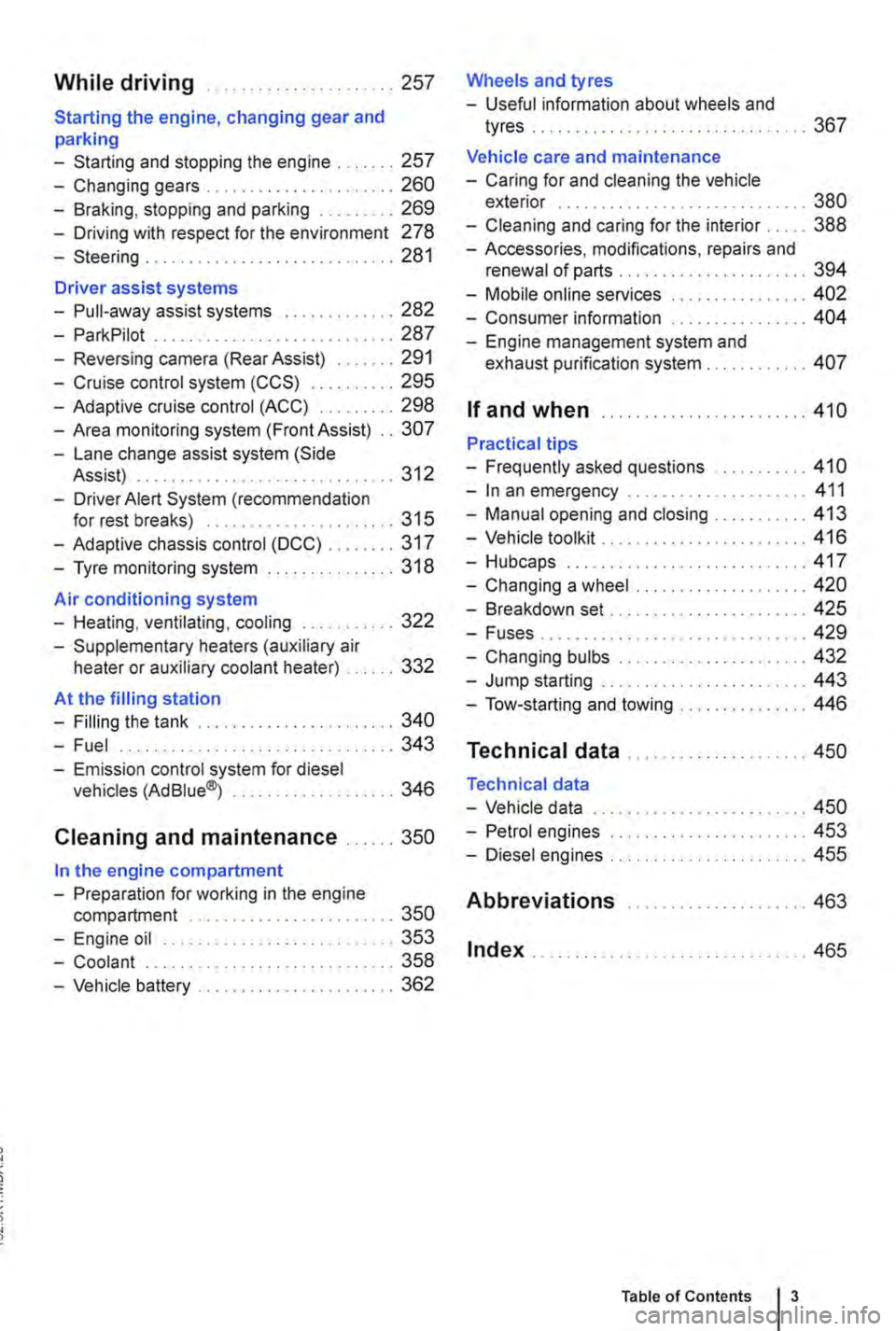
While driving .. ...... 257
Starting the engine, changing gear and parking
-Starting and stopping the engine .. 257
-Changing gears . . . . . . . . . .......... 260
-Braking, stopping and parking ......... 269
-Driving with respect for the environment 278
-Steering ........... 281
Driver assist systems
-Pull-away assist systems .... 282
-ParkPilot ............................ 287
-Reversing camera (Rear Assist) ....... 291
-Cruise control system (CCS) . . . . . ... 295
-Adaptive cruise control (ACC) ......... 298
-Area monitoring system (Front Assist) .. 307
-Lane change assist system (Side Assist) . .. . . .. .. . . . . . . . . .......... 312
-Driver Alert System (recommendation for rest breaks) . . . . . . . . . . ......... 315
-Adaptive chassis control (DCC) ........ 317
-Tyre monitoring system . . . . . . . ....... 318
Air conditioning system
-Heating, ventilating, cooling ........... 322
-Supplementary heaters (auxiliary air heater or auxiliary coolant heater) .... 332
At the filling station
-Filling the tank ....................... 340
-Fuel . . . . . . . . . . . . . . . . ........ 343
-Emission control system for diesel vehicles (AdBiue®j ................... 346
Cleaning and maintenance ...... 350
In the engine compartment
-Preparation for working in the engine compartment . . . . . . . . . . . . . . . . 350
-Engine oil ........................... 353
-Coolant ..................... 358
-Vehicle battery ....................... 362
Wheels and tyres
-Useful information about wheels and
tyres . . . . . . . . . . . . . . ..... 367
Vehicle care and maintenance
-Caring for and cleaning the vehicle exterior . . . . . . . . . . . . . . . . . . . ... 380
-Cleaning and caring for the interior ..... 388
-Accessories, modifications, repairs and renewal of parts . . . . . . . .... 394
-Mobile online services .. 402
-Consumer information 404
-Engine management system and exhaust purification system . . . .. 407
If and when ........................ 410
Practical tips
-Frequently asked questions ........... 410
-In an emergency ..................... 411
-Manual opening and closing . . . . . . . . . 413
-Vehicle toolkit . . ............... 416
-Hubcaps.. . .................... 417
-Changing a wheel .................... 420
-Breakdown set ....................... 425
-Fuses................ . . 429
-Changing bulbs . . . . . . . . .....•.... 432
-Jump starting . . . . . . .......... 443
-Tow-starting and towing . . . 446
Technical data ...
Technical data
-Vehicle data
-Petrol engines
-Diesel engines ..
Abbreviations
Index .......... .
... 450
... 450
......... 453
455
..... " ... 463
.. 465
Table of Contents 3
Page 4 of 486
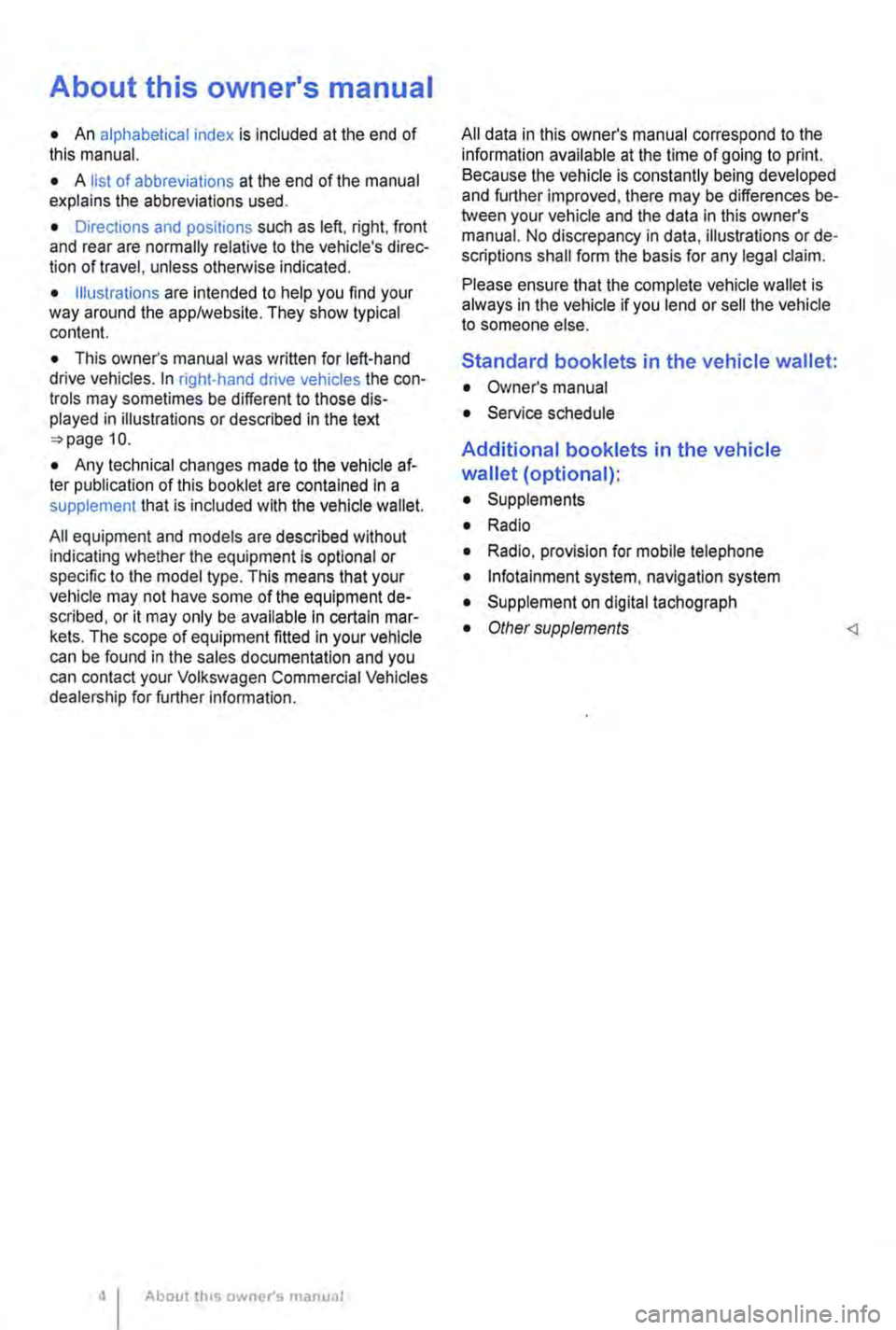
About this owner's manual
• An alphabetical index is included at the end of this manual.
• A list of abbreviations at the end of the manual explains the abbreviations used.
• Directions and positions such as left, right, front and rear are normally relative to the vehicle's direc-tion of travel, unless otherwise indicated.
• Illustrations are intended to help you find your way around the applwebsite. They show typical content.
• This owner's manual was written for left-hand drive vehicles. In right-hand drive vehicles the con-trols may sometimes be different to those dis-played in illustrations or described in the text 10.
• Any technical changes made to the vehicle af-ter publication of this booklet are contained In a supplement that is included with the vehicle wallet.
All equipment and models are described without indicating whether the equipment is optional or specific to the model type. This means that your vehicle may not have some of the equipment de-scribed, or it may only be available in certain mar-kets. The scope of equipment fitted in your vehicle can be found in the sales documentation and you can contact your Volkswagen Commercial Vehicles dealership for further information.
About th1s owner's manual
All data in this owner's manual correspond to the information available at the time of going to print. Because the vehicle is constantly being developed and further improved, there may be differences be-tween your vehicle and the data in this owner's manual. No discrepancy in data, illustrations or de-scriptions shall form the basis for any legal claim.
Please ensure that the complete vehicle wallet is always in the vehicle if you lend or sell the vehicle to someone else.
Standard booklets in the vehicle wallet:
• Owner's manual
• Service schedule
Additional booklets in the vehicle
wallet (optional):
• Supplements
• Radio
• Radio, provision for mobile telephone
• lnfotalnment system, navigation system
• Supplement on digital tachograph
• Other supplements
Page 11 of 486
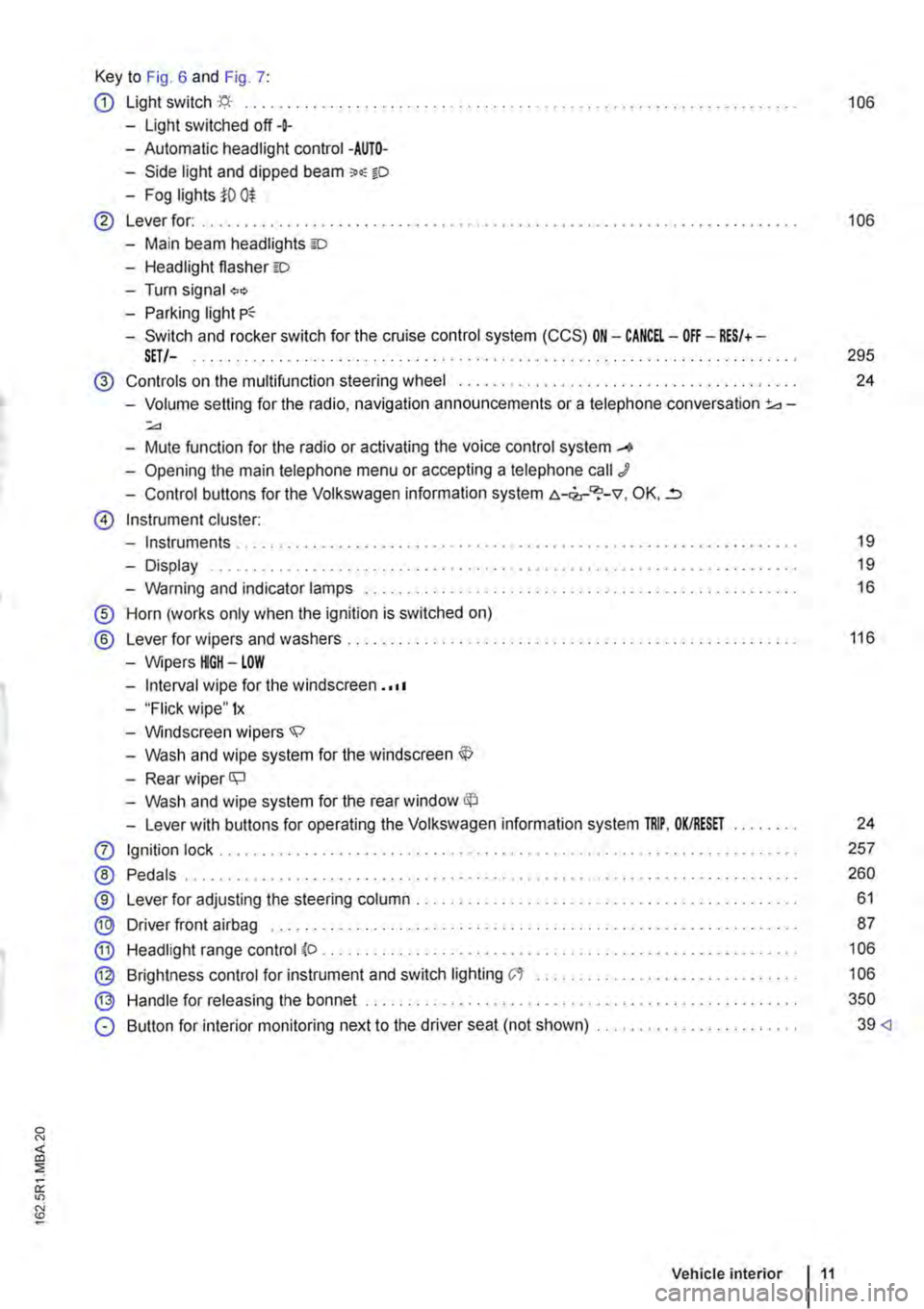
Key to Fig. 6 and Fig. 7:
CD Light switch ·'f;i.· ... 106
-Light switched off+
-Automatic headlight control -AUTO-
-Side light and dipped beam o.-o
-Fog lights i'O 0$
@ Lever for: .......... . 106
-Main beam headlights ID
-Headlight flasher =:o
-Turn signal "'" -Parking light
-Switch and rocker switch for the cruise control system (CCS) ON-CANCEL-OFF-RES/+-SET/-. . . . . . . . . . . . . . . . . . . . . . . . . . . . . . . . . . . . . . . . . . . . . . . . . . . . 295
@ Controls on the multifunction steering wheel ....... .
-Volume setting for the radio, navigation announcements or a telephone conversation 3d-:;.,
-Mute function for the radio or activating the voice control system _...
-Opening the main telephone menu or accepting a telephone call J
-Control buttons for the Volkswagen information system c.-<2,-"?-v, OK, ..=,
@ Instrument cluster:
-Instruments ..
-Display
-Warning and indicator lamps ..... .
® Horn (works only when the ignition is switched on)
® Lever for wipers and washers . . . . . .....................................•
-Wipers HGH-LOW
-Interval wipe for the windscreen . ·••
-"Flick wipe" 1x
-Windscreen wipers.;;:>
-Wash and wipe system for the windscreen
-Rear wiper ll;J
-Wash and wipe system for the rear window
-Lever with buttons for operating the Volkswagen information system TRIP, OK/RESET
0 Ignition lock .......... .
® Pedals .................. .
®
® @
Lever for adjusting the steering column ..................•.....
Driver front airbag ........ .
Headlight range control (o .
Brightness control for instrument and switch lighting C't ...••.•...
Handle for releasing the bonnet ...
@
®
0 Button for interior monitoring next to the driver seat (not shown) ....................... .
Vehicle interior 11
24
19
19
16
116
24
257
260
61
87
106
106
350
39
Page 17 of 486
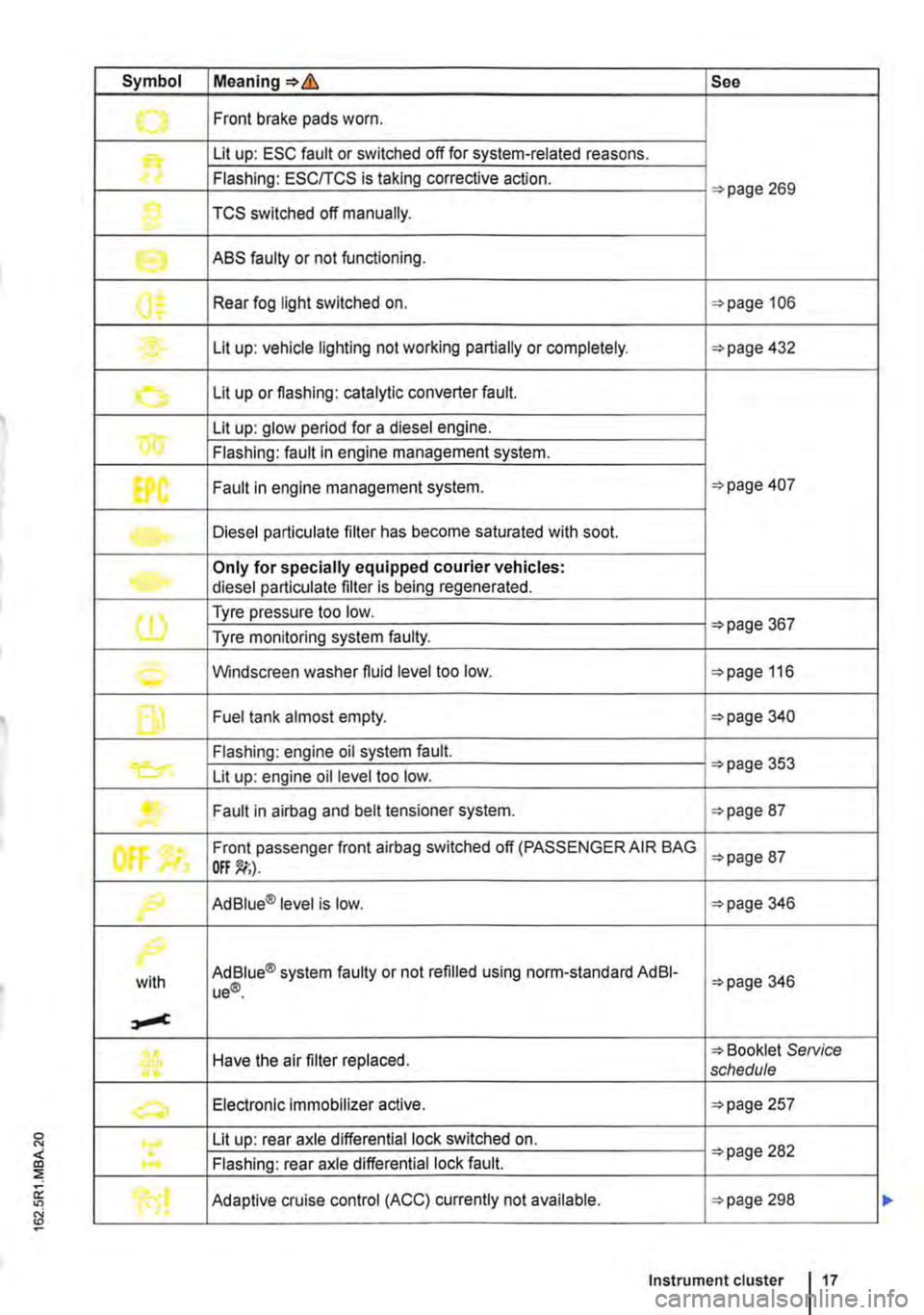
Symbol Meaning=>& See
.......,. Front brake pads worn .
Lit up: ESC fault or switched off for system-related reasons.
Flashing: ESC/TCS is taking corrective action. =>page 269
1} TCS switched off manually.
e ABS faulty or not functioning.
0$ Rear fog light switched on. =>page 106
Lit up: vehicle lighting not working partially or completely. =>page 432
0 Lit up or flashing: catalytic converter fault.
w Lit up: glow period for a diesel engine.
Flashing: fault in engine management system.
EPC Fault in engine management system. =>page 407
Diesel particulate filter has become saturated with soot.
Only for specially equipped courier vehicles: diesel particulate filter is being regenerated.
(1) Tyre pressure too low. =>page 367 Tyre monitoring system faulty.
0 Windscreen washer fluid level too low. =>page 116
f] Fuel tank almost empty. =>page 340
Flashing: engine oil system fault.
Lit up: engine oil level too low. =>page 353
....... Fault in airbag and belt tensioner system. =>page 87
tf'
Front passenger front airbag switched off (PASSENGER AIR BAG =>page 87
f9 Ad Blue® level is low. =>page 346
/>.
with Ad Blue® system faulty or not refilled using norm-standard AdBI-ue®. =>page 346
Have the air filter replaced. => Booklet SeNice schedule
a, Electronic Immobilizer active. =>page 257
Lit up: rear axle differential lock switched on. =>page 282 .... Flashing: rear axle differential lock fault.
Adaptive cruise control (ACC) currently not available. =>page 298
Instrument cluster 17
Page 18 of 486
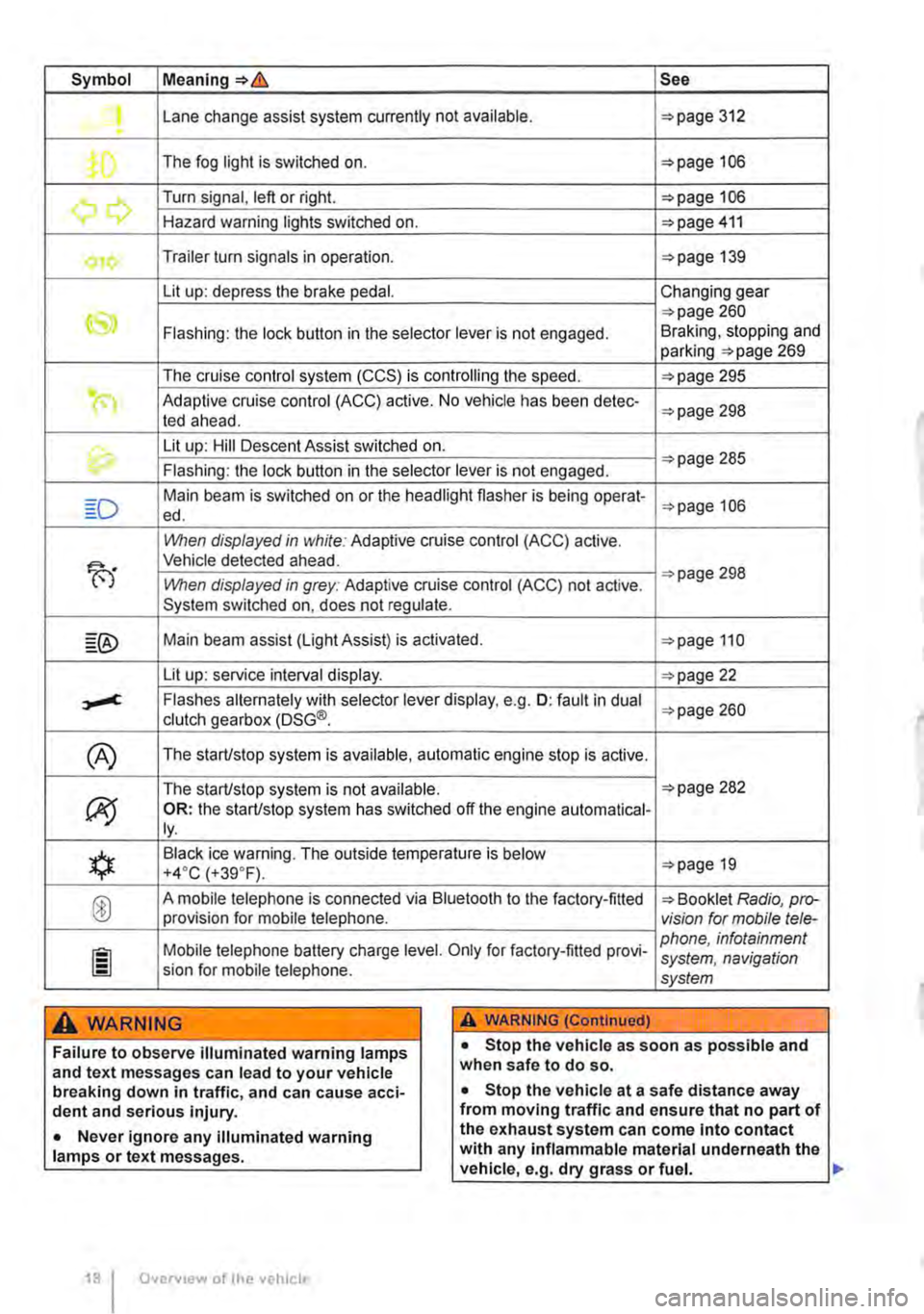
Symbol Meaning=>& See
Lane change assist system currently not available. =>page 312 .
The fog light is switched on. =>page 106
.......,,...., Turn signal, left or right. =>page 106 r., Hazard warning lights switched on. =>page 411
Trailer turn signals in operation. =>page 139
Lit up: depress the brake pedal. Changing gear
CS» =>page 260 Flashing: the lock button in the selector lever is not engaged. Braking, stopping and parking =>page 269
The cruise control system (CCS) is controlling the speed. =>page 295
(") Adaptive cruise control (ACC) active. No vehicle has been detec-ted ahead. =>page 298
th. Lit up: Hill Descent Assist switched on. =>page 285 Flashing: the lock button in the selector lever is not engaged.
Main beam is switched on or the headlight flasher is being opera!-=>page 106 ed.
When displayed in white: Adaptive cruise control (ACC) active.
B'
Vehicle detected ahead.
When displayed in grey: Adaptive cruise control (ACC) not active. =>page 298
System switched on, does not regulate.
Main beam assist (Light Assist) is activated. =>page 110
Lit up: service interval display. =>page 22
,....c. Flashes alternately with selector lever display, e.g. 0: fault in dual clutch gearbox (DSG®. =>page 260
(A) The starUstop system is available, automatic engine stop is active.
The starUstop system is not available. =>page 282
(J9 OR: the starUstop system has switched off the engine automatical-ly.
*
Black ice warning. The outside temperature is below =>page 19 +4·c (+39.F).
® A mobile telephone is connected via Bluetooth to the factory-fitted => Booklet Radio, pro-provision for mobile telephone. vision for mobile tele-
Mobile telephone battery charge level. Only for factory-fitted provi-phone, infotainment system, navigation sion for mobile telephone. system
A WARNING A WARNING (Continued)
Failure to observe illuminated warning lamps and text messages can lead to your vehicle breaking down in traffic, and can cause acci-dent and serious injury.
• Never ignore any illuminated warning lamps or text messages.
Overv1ew of the vehicle
• Stop the vehicle as soon as possible and when safe to do so.
• Stop the vehicle at a safe distance away from moving traffic and ensure that no part of the exhaust system can come Into contact with any inflammable material underneath the vehicle, e.g. dry grass or fuel. ll>
Page 19 of 486
A WARNING (Continued)
• Any broken-down vehicle poses an in-creased accident risk both for you and for other road users. If the situation requires, switch on the hazard warning lights and set up the warning triangle as a warning to other road users.
• Before opening the bonnet, switch off the engine and allow it to cool down sufficiently.
Instruments
o::n Introduction
This chapter contains information on the following subjects:
Instrument overview ......... .
Displays . . . . . . . ........ . Service interval display ..
Additional information and warnings:
• Warning and indicator lamps =>page 16
• Volkswagen information system =>page 24
20 21
22
• Display of current gear (DSG® dual clutch gear-box) =>page 260
• Information on service intervals =>Booklet Serv-ice schedule
A WARNING (Continued)
• The engine compartment of any motor ve-hicle Is a dangerous area. Serious injuries can be sustained here =>page 350.
CD
Failure to observe illuminated indicator lamps and text messages can lead to your vehicle be-Ing damaged.
Accidents and injuries can occur if the driver is distracted.
• Never press the buttons on the instrument cluster while the vehicle is in motion.
Page 21 of 486
Displays
r-T'n First read and observe the introductory L-J,:.,U information and safety warnings & on page 19.
The types of information displayed in the instru-ment cluster=:. Fig. 14@ vary according to the ve-hicle's equipment level:
• Warning and information messages
• Mileage displays
• Time
• Outside temperature
• Compass display
• Selector lever positions =:.page 260
• Gear-change indicator =>page 260
• Multifunction display (MFD) and menus for vari-ous settings =>page 24
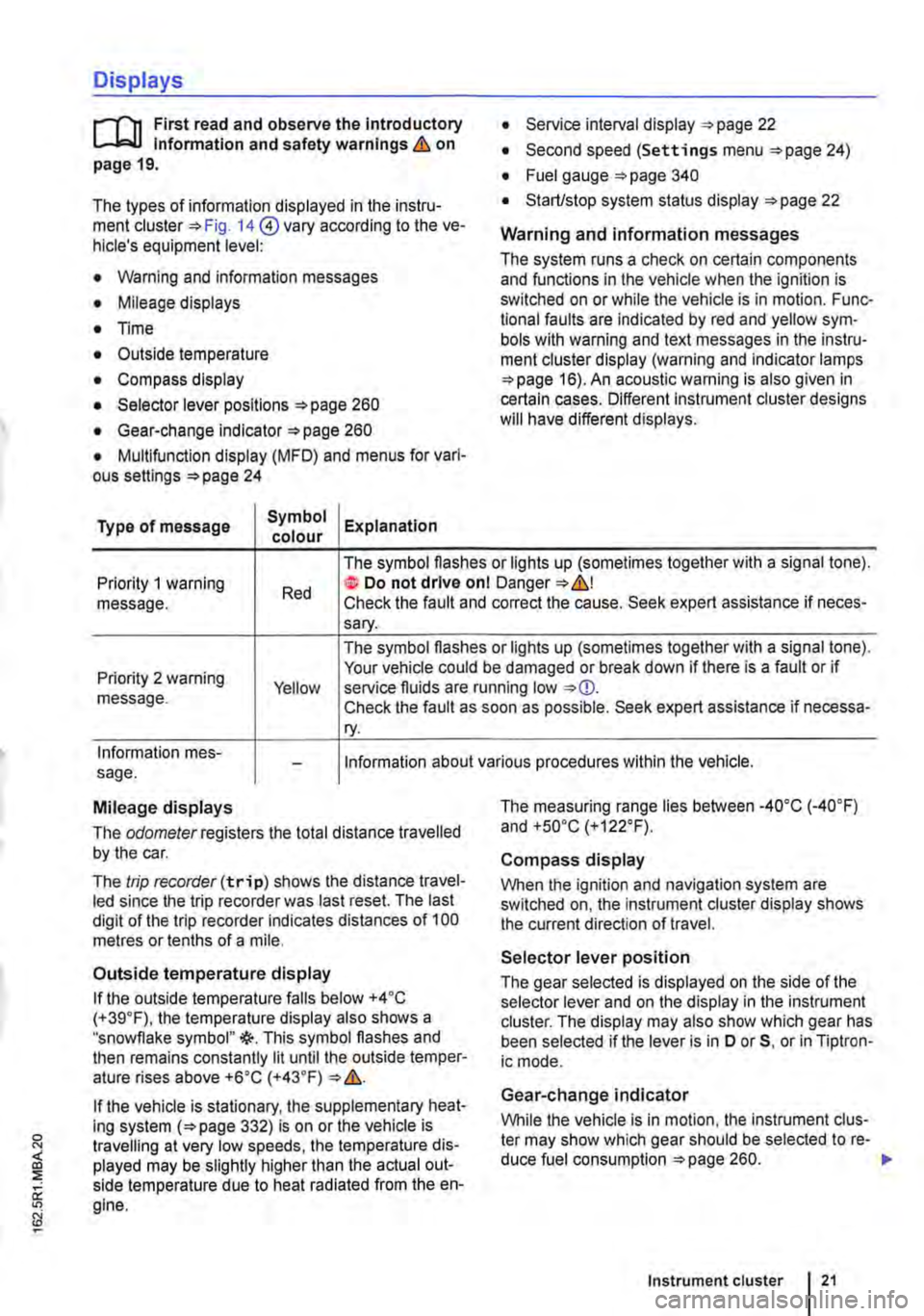
Type of message Symbol Explanation colour
• Service interval display =:.page 22
• Second speed (Settings menu =>page 24)
• Fuel gauge =:.page 340
• Start/stop system status display =:.page 22
Warning and information messages
The system runs a check on certain components and functions in the vehicle when the ignition is switched on or while the vehicle is in motion. Func-tional faults are indicated by red and yellow sym· bols with warning and text messages in the instru-ment cluster display (warning and indicator lamps =>page 16). An acoustic warning is also given in certain cases. Different instrument cluster designs will have different displays.
Priority 1 warning message. Red
The symbol flashes or lights up (sometimes together with a signal tone). te Do not drive onl Danger=:.&,! Check the fault and correct the cause. Seek expert assistance if neces-sary.
Priority 2 warning message. Yellow
The symbol flashes or lights up (sometimes together with a signal tone). Your vehicle could be damaged or break down if there is a fault or if service fluids are running low Check the fault as soon as possible. Seek expert assistance if necessa-ry.
Information mes-sage. Information about various procedures within the vehicle.
Mileage displays
The odomelerregisters the total distance travelled by the car.
The trip recorder(trip) shows the distance travel-led since the trip recorder was last reset. The last digit of the trip recorder indicates distances of 100 metres or tenths of a mile.
Outside temperature display
If the outside temperature falls below +4 ·c (+39.F), the temperature display also shows a "snowflake symbol"{(-. This symbol flashes and then remains constantly lit until the outside temper-ature rises above +6•c (+43.F)
If the vehicle is stationary, the supplementary heat-ing system (=>page 332) is on or the vehicle is travelling at very low speeds, the temperature dis-played may be slightly higher than the actual out-side temperature due to heat radiated from the en-gine.
The measuring range lies between -4o•c (·40.F) and +so•c (+122°F).
Compass display
When the ignition and navigation system are switched on, the instrument cluster display shows the current direction of travel.
Selector lever position
The gear selected is displayed on the side of the selector lever and on the display in the instrument cluster. The display may also show which gear has been selected if the lever is in D or 5, or in Tiptron-ic mode.
Gear-change indicator
While the vehicle is in motion, the instrument clus-ter may show which gear should be selected to re-duce fuel consumption =>page 260. .-
Instrument cluster 21
Page 22 of 486
Second speed display (m ph or km/h)
In addition to the tachometer display, the speed can also be displayed in another unit of measure-ment (m ph or km/h) in the instrument cluster dis-play while you are driving. To do this select the menu option A 1 t. speed di s. in the Settings menu =>page 24.
Vehicles without menu display on the instrument cluster:
• Start the engine.
• Press the Ice: 1 e)j button three times. The odom-eter in the instrument cluster display flashes.
• Press the button !o.o 1 SErl once. The vehicle speed in "km/h" or "mph" is shown briefly in the dis-play instead of the odometer.
• This activates the second speed display. lt can be deactivated in the same manner.
lt is not possible to switch off the second speedom-eter display in those countries where the law stipu-lates that the display cannot be deactivated.
StarUstop system status display
The instrument cluster display shows information about the current status =>page 282.
A wARNING
Failure to observe illuminated warning lamps and text messages can lead to your vehicle breaking down In traffic, and can cause acci-dent and serious injury.
• Never Ignore any illuminated warning lamps or text messages.
• Stop the vehicle as soon as possible and when safe to do so.
Service interval display
)'"""'"('n First read and observe the introductory L-W.I information and safety warnings & on page 19.
The service display is shown on the instrument cluster=> Fig. 14 @.
Service schedules at Volkswagen Commercial Ve-hicles are divided into two categories, oil change service and inspections. The service interval dis-play provides information on the next service which
Overview of the vehicle
A WARNING (Continued)
• Any broken-down vehicle poses an In-creased accident risk both for you and for other road users. If the situation requires, switch on the hazard warning lights and set up the warning triangle as a warning to other road users.
• Stop the vehicle at a safe distance away from moving traffic and ensure that no part of the exhaust system can come Into contact with any inflammable material underneath the vehicle, e.g. dry grass or fuel.
A WARNING
Streets and bridges can also be iced over at outside temperatures above freezing.
• The snowflake symbol indicates that there is a risk of black Ice.
• There may be black Ice on the roads even when outside temperatures are above +4•c (+39°F), even when no snowflake symbol is displayed.
• You should never rely solely on the out-side temperature display I
CD
Failure to observe illuminated indicator lamps and text messages can lead to your vehicle be-ing damaged.
m Differenl instrument clusters are available, L!J which means that the versions and displays may vary. In displays without warning or informa-tion texts, faults are indicated exclusively by the in-dicator lamps.
m If several warning reports are detected, the L!J symbols will appear for several seconds, one after another. The symbols will continue to appear until the faults are rectified.
The service appointment currently displayed can be found at Vehicles without text messages on the top right of the instrument cluster display:
• 1: inspection.
• 2: oil change service. ..
Page 23 of 486
In vehicles with fixed oil change service, services take place at predefined intervals.
The service intervals are calculated on an Individu-al basis in vehicles with flexible oil change serv-Ice. Advances in technology have brought about a considerable reduction in servicing requirements. The flexible oil change is a new service offered by Volkswagen to ensure that the oil is only changed when necessary. The length between the oil change services (maximum of 2 years) is also de-termined by the conditions under which the vehicle is used and personal driving style. The service re-minder is displayed 20 days before the service is due. The distance is rounded to the nearest 100 km; the remaining time is rounded to full days. The current service information cannot be opened until you have driven 500 km since the last service. Until this point the display only shows lines.
Service reminder
If the vehicle is due to be serviced, a service re-minder will appear on the display when the ignition is switched on.
In vehicles without text messages a spanner sym-bol will appear on the instrument cluster along with a display in km and a clock symbol e> showing the time left before the next service appointment is due in days. The number of kilometres shown cor-responds to the maximum number of kilometres that can still be driven until the service appoint-ment is due. In addition, a symbol in the top right corner of the display specifies which service ap-pointment the reminder is for (1 for inspection, 2 for oil change service).
If the service reminder is displayed for both service appointments (1 and 2 in the top right corner of the instrument cluster display), the distance and the display in days for the next service appointment applies in vehicle without text messages.
In vehicles with text messages, Oi 1 change or Inspection in---km or ---days appears in the instrument cluster display.
Service event
If a service Is due, a signal will sound and the spanner symbol will appear for a few seconds when the ignition is switched on. In vehicles with text messages, Oil change now! or Inspec-tion now! appears In the instrument cluster dis-play.
Accessing a service message
You can access the current service messages whenever the ignition is switched on, the engine is not running and the vehicle is stationary.
• Press the button in the instrument cluster as often as possible until the spanner symbol and 1 in the top right corner of the display appears. The values shown apply to the oil change service.
• Press the lCCJie>J button on the instrument cluster again. The spanner symbol appear and the number 2 will appear on the top right hand corner of the display. The values shown apply to the in-spection.
• OR: select the Settings menu.
• Select the menu option Info in the Service submenu.
If a service Is overdue, this is indicated by a mi-nus sign in front of the mileage or trip reading.
Resetting oil change service
If the oil change service was not performed by a Volkswagen Commercial Vehicles workshop, it can be reset as follows:
Vehicles with text messages:
Switch off the ignition.
Press and hold down the lo.o/SETJ button in the in-strument cluster.
Restart the ignition.
Release the lo.o/sn) button.
Confirm the selection on the instrument cluster by pressing the laKJRESET) button on the wiper lever or the I!) button on the multifunction steering wheel.
Vehicles without text messages:
Switch off the ignition.
Press and hold down the lo.o1sn) button in the in-strument cluster.
Restart the ignition.
Release the lo.o/SETJ button and press the li:Q'e>J but-ton within approximately 20 seconds.
Do not reset the display between service intervals. This can lead to Incorrect information being dis-played.
If you manually reset the service interval display while flexible oil change service is valid, "fixed oil change service" will be activated. The service inter-val will no longer be calculated on an Individual ba-sis =*Booklet Service schedule.
Resetting Inspection
If the inspection was not performed by a Volkswa-gen Commercial Vehicles workshop. it can be reset asfollows:
Instrument cluster