display VOLKSWAGEN TRANSPORTER 2015 Owner´s Manual
[x] Cancel search | Manufacturer: VOLKSWAGEN, Model Year: 2015, Model line: TRANSPORTER, Model: VOLKSWAGEN TRANSPORTER 2015Pages: 486, PDF Size: 72.17 MB
Page 25 of 486
A WARNING
Accidents and injuries can occur if the driver is distracted.
• Never open the menus on the instrument cluster display while the vehicle is in motion.
r::l After starting the engine with a discharged l!..J vehicle battery, or after the battery has been changed, system settings (time, date, personal
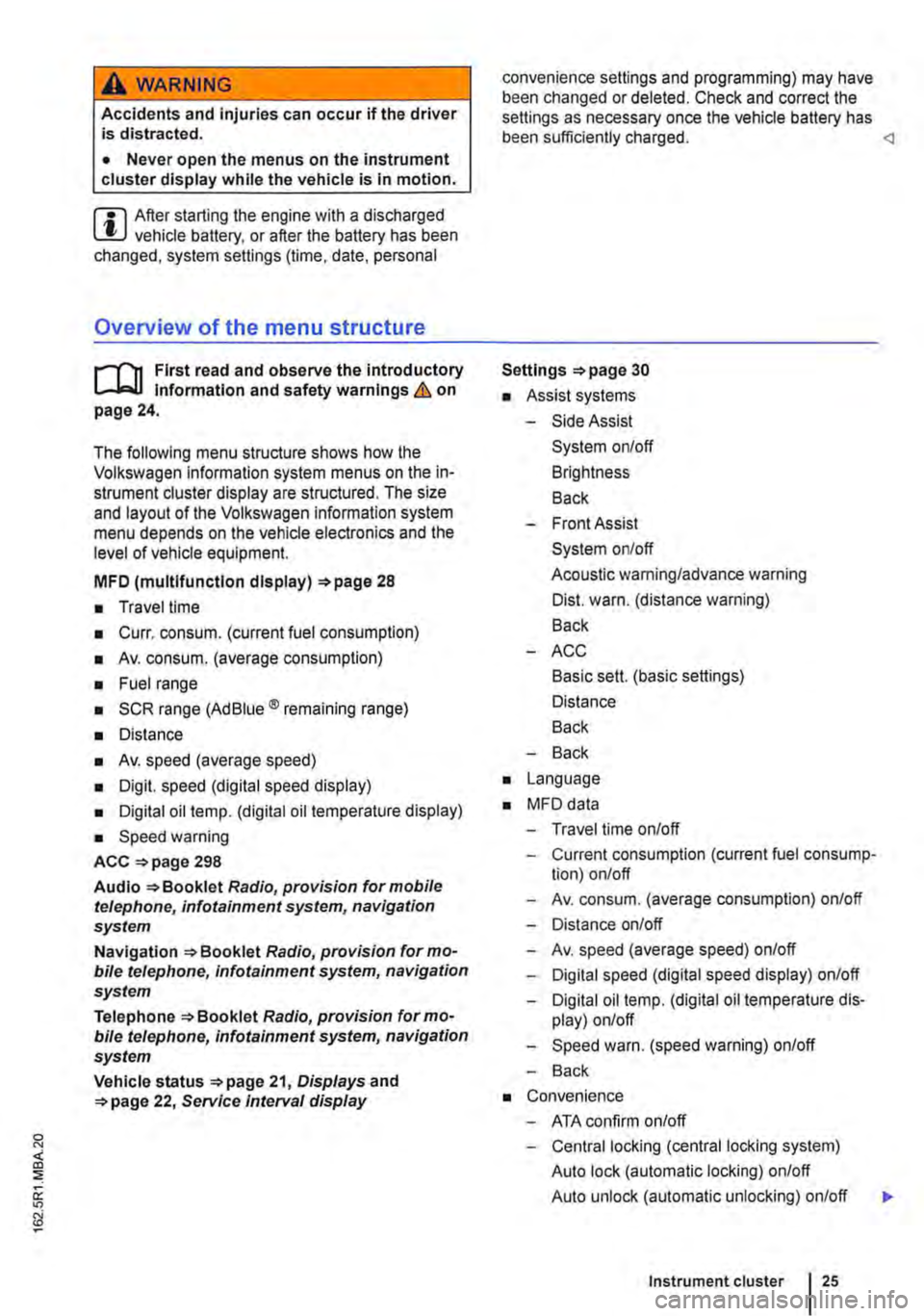
Overview of the menu structure
nl1 First read and observe the introductory 1-J,::.JJ Information and safety warnings & on page 24.
The following menu structure shows how the Volkswagen information system menus on the in-strument cluster display are structured. The size and layout of the Volkswagen information system menu depends on the vehicle electronics and the level of vehicle equipment.
MFD (multlfunctlon display) 28
• Travel time
• Curr. consum. (current fuel consumption)
• Av. consum. (average consumption)
• Fuel range
• SCR range (Ad Blue® remaining range)
• Distance
• Av. speed (average speed)
• Digit. speed (digital speed display)
• Digital oil temp. (digital oil temperature display)
• Speed warning
ACC =>page 298
Audio Radio, provision for mobile telephone, infotainment system, navigation system
Navigation Radio, provision for mo-bile telephone, infotainment system, navigation system
Telephone Radio, provision for mo-bile telephone, infotainment system, navigation system
Vehicle status 21, Displays and 22, Service Interval display
convenience settings and programming) may have been changed or deleted. Check and correct the settings as necessary once the vehicle battery has been sufficiently charged.
• Assist systems
-Side Assist
System on/off
Brightness
Back
-Front Assist
System on/off
Acoustic warning/advance warning
Dist. warn. (distance warning)
Back
-ACC
Basic sett. (basic settings)
Distance
Back
-Back
• Language
• MFD data
-Travel time on/off
-Current consumption (current fuel consump-tion) on/off
-Av. consum. (average consumption) on/off
-Distance on/off
-Av. speed (average speed) on/off
-Digital speed (digital speed display) on/off
-Digital oil temp. (digital oil temperature dis-play) on/off
-Speed warn. (speed warning) on/off
-Back
• Convenience
-ATA confirm on/off
-Central locking (central locking system)
Auto lock (automatic locking) on/off
Auto unlock (automatic unlocking) on/off
Instrument cluster 25
...
Page 26 of 486
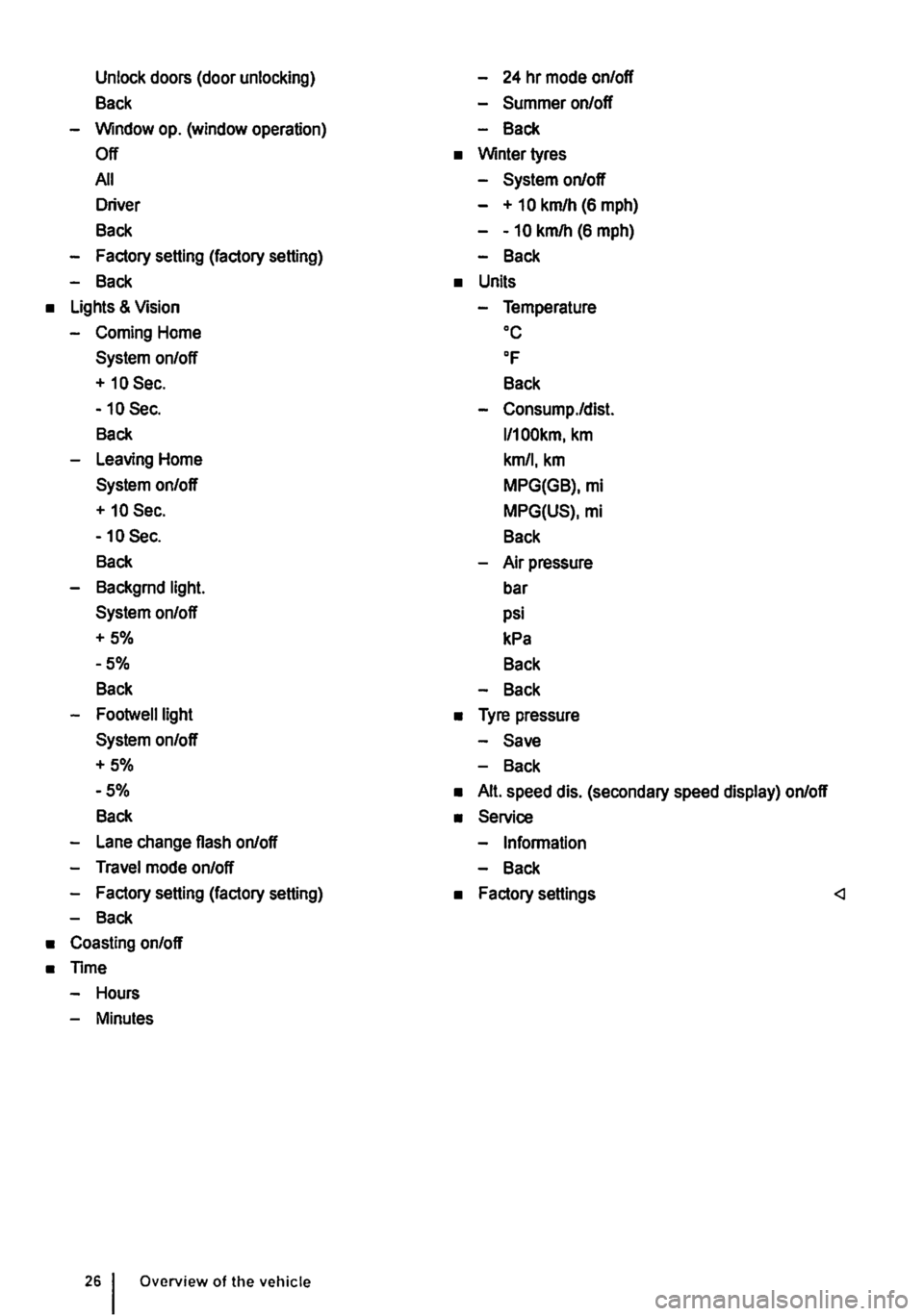
Unlock doors (door unlocking)
Back
-Window op. (window operation)
Off
All
Driver
Back
-Factory setting (factory setting)
-Back
• Lights & Vision
-Coming Home
System on/off
+ 10 Sec.
-10 Sec.
Back
-Leaving Home
System on/off
+ 10 Sec.
-10 Sec.
Back
-Backgrnd light.
System on/off
+5%
-5%
Back
-Footwelllight
System on/off
+5%
-5%
Back
-Lane change flash on/off
-Travel mode on/off
-Factory setting (factory setting)
-Back
• Coasting on/off
• Time
-Hours
-Minutes
Overview of the vehicle
-24 hr mode on/off
-Summer on/off
-Back
• Winter tyres
-System on/off
- + 10 km/h (6 mph)
--10 km/h (6 mph)
-Back
• Units
-Temperature oc
OF
Back
-Consump./dist.
l/100km, km
km/1, km
MPG(GB), mi
MPG(US), mi
Back
-Air pressure
bar
psi
kPa
Back
-Back
• Tyre pressure
-Save
-Back
• Alt. speed dis. (secondary speed display) on/off
• Service
-Information
-Back
• Factory settings
Page 27 of 486
Using the menus in the instrument cluster
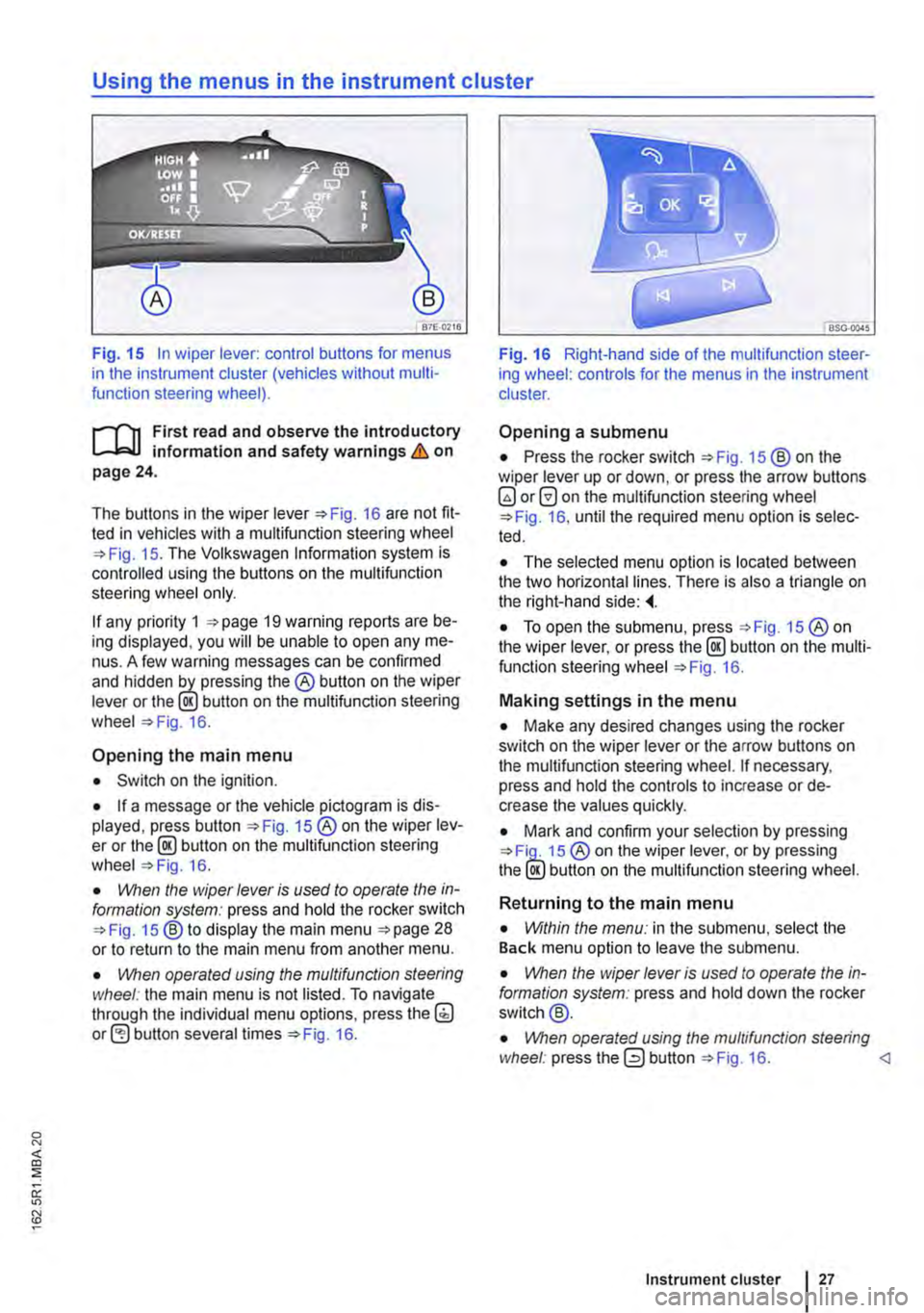
Fig. 15 In wiper lever: control buttons for menus in the instrument cluster (vehicles without multi-function steering wheel).
r--f"n First read and observe the introductory L-J,:.lJ information and safety warnings & on page 24.
The buttons in the wiper Fig. 16 are not fit-ted in vehicles with a multifunction steering wheel 15. The Volkswagen Information system is controlled using the buttons on the multifunction steering wheel only.
If any priority 1 19 warning reports are be-ing displayed, you will be unable to open any me-nus. A few warning messages can be confirmed and hidden the® button on the wiper lever or the lE!.) button on the multifunction steering wheel 16.
Opening the main menu
• Switch on the ignition.
• If a message or the vehicle pictogram is dis-played, press button 15 ®on the wiper lev-er or the@ button on the multifunction steering wheel 16.
• VVhen the wiper lever is vsed to operate the in-formation system: press and hold the rocker switch 15 ®to display the main menu 28 or to return to the main menu from another menu.
• \!Vhen operated vsing the mvltifvnction steering wheel: the main menu is not listed. To navigate through the individual menu options, press the(;) button several times 16.
Fig. 16 Right-hand side of the multifunction steer-ing wheel: controls for the menus in the instrument cluster.
Opening a submenu
• Press the rocker switch 15 ®on the wiper lever up or down, or press the arrow buttons 0 on the multifunction steering wheel 16, until the required menu option is selec-ted.
• The selected menu option is located between the two horizontal lines. There is also a triangle on the right-hand side:
• To open the submenu, press 15 ®on the wiper lever, or press the @ button on the multi-function steering wheel 16.
Making settings in the menu
• Make any desired changes using the rocker switch on the wiper lever or the arrow buttons on the multifunction steering wheel. If necessary, press and hold the controls to increase or de-crease the values quickly.
• Mark and confirm your selection by pressing 15 ® on the wiper lever, or by pressing the lE!.) button on the multifunction steering wheel.
Returning to the main menu
• Within the menv: in the submenu, select the Back menu option to leave the submenu.
• \!Vhen the wiper lever is vsed to operate the in-formation system: press and hold down the rocker switch@.
• \!Vhen operated vsing the mvltifvnc/ion steering wheel: press the 0 button 16.
Page 28 of 486
Main menu
m First read and observe the introductory Information and safety warnings & on page 24.
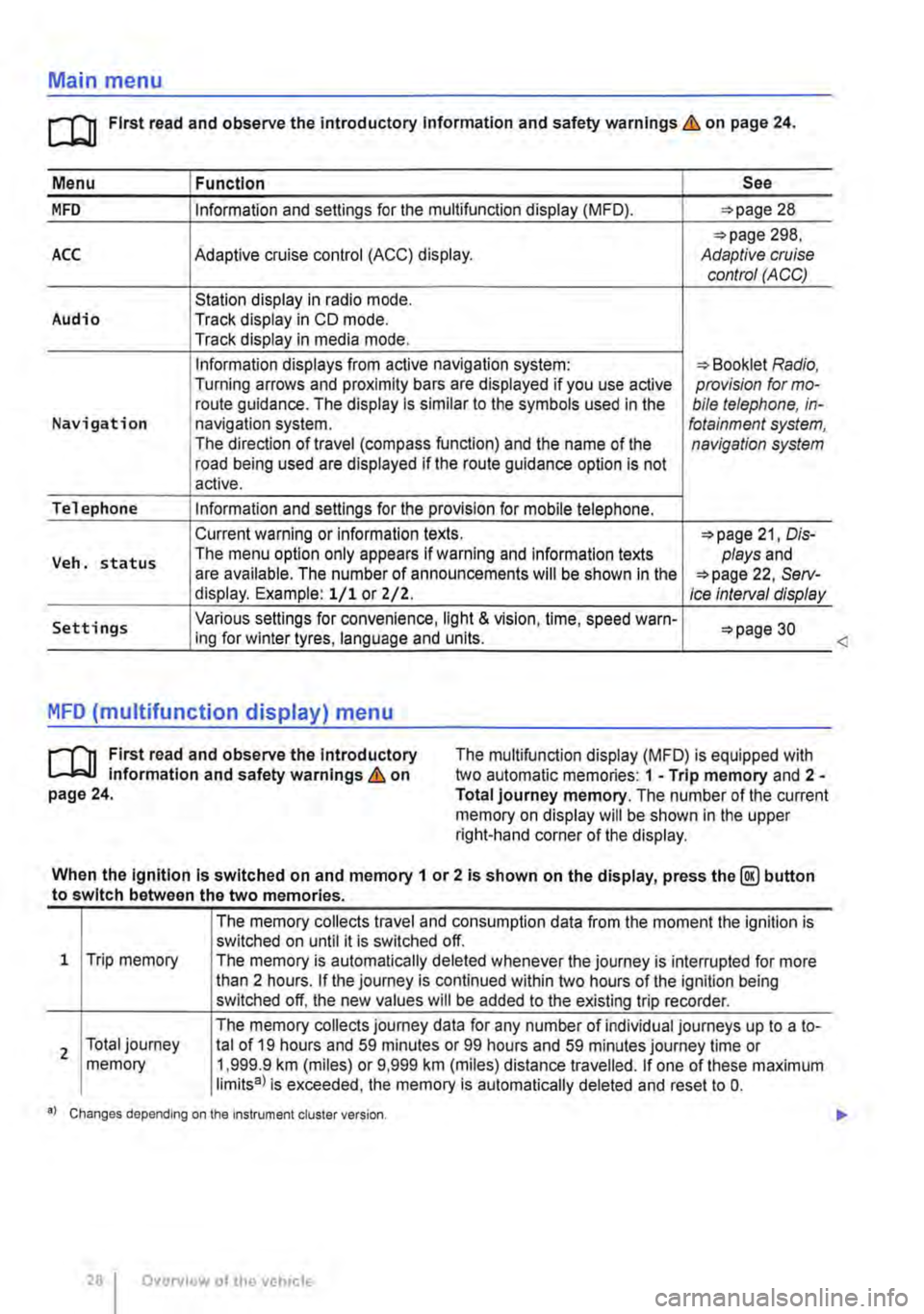
Menu I Function See
MFD Information and settings for the multifunction display (MFD). 28
298, ACC Adaptive cruise control (ACC) display. Adaptive cruise control (ACC)
Station display in radio mode. Audio Track display in CD mode. Track display in media mode.
Information displays from active navigation system: Booklet Radio, Turning arrows and proximity bars are displayed if you use active provision for mo-route guidance. The display is similar to the symbols used in the bile telephone, in-Navigation navigation system. fotainment system, The direction of travel (compass function) and the name of the navigation system road being used are displayed if the route guidance option is not active.
Telephone Information and settings for the provision for mobile telephone.
Current warning or information texts. 21, Dis-
Veh. status The menu option only appears If warning and information texts plays and are available. The number of announcements will be shown In the 22, Serv-display. Example: 1/1 or Z/2. Ice Interval display
Settings Various settings for convenience, light & vision, time, speed warn-30 ing for winter tyres, language and units.
MFD (multifunction display) menu
rl'l1 First read and observe the Introductory L-J,.:.U Information and safety warnings & on page 24.
The multifunction display (MFD) is equipped with two automatic memories: 1 -Trip memory and 2 -Total journey memory. The number of the current memory on display will be shown in the upper right-hand corner of the display.
When the Ignition Is switched on and memory 1 or 2 is shown on the display, press the@ button to switch between the two memories.
1 Trip memory
2 Total journey memory
The memory collects travel and consumption data from the moment the ignition is switched on until it is switched off. The memory is automatically deleted whenever the journey is interrupted for more than 2 hours. If the journey is continued within two hours of the ignition being switched off, the new values will be added to the existing trip recorder.
The memory collects journey data for any number of individual journeys up to a to-tal of 19 hours and 59 minutes or 99 hours and 59 minutes journey time or 1,999.9 km (miles) or 9,999 km (miles) distance travelled. If one of these maximum limits8l is exceeded, the memory is automatically deleted and reset to 0.
•l Changes depending on the Instrument cluster version.
28 I Overview of the vehicle
<
Page 29 of 486
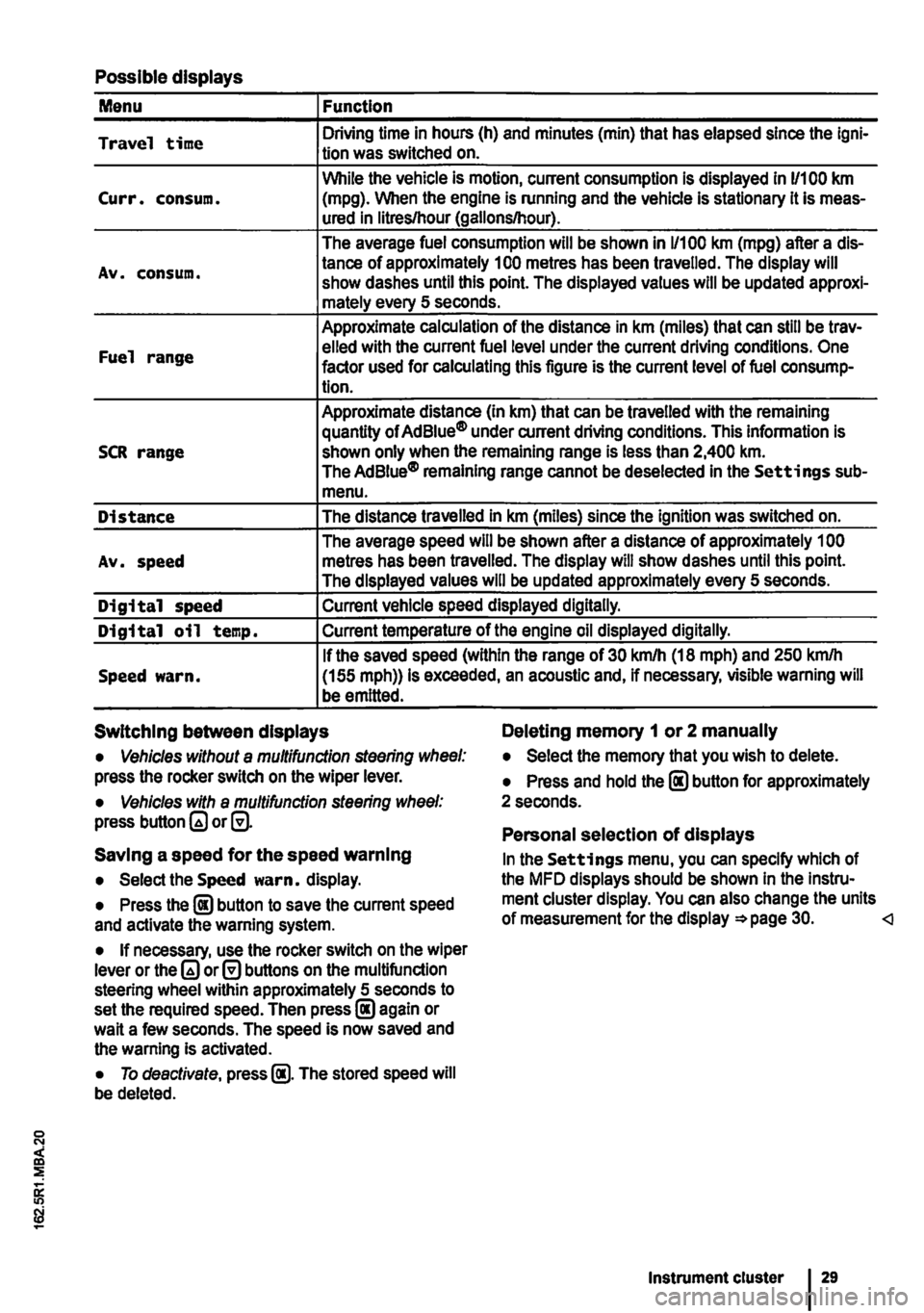
Possible displays
Menu Function
Travel time Driving time in hours (h) and minutes (min) that has elapsed since the lgni-tion was switched on.
While the vehicle is motion, current consumption is displayed in 11100 km Curr. consum. (mpg). When the engine is running and the vehicle is stationary it is meas-ured in litres/hour (gallons/hour).
The average fuel consumption will be shown in 1/100 km (mpg) after a dis-
Av. consum. tance of approximately 100 metres has been travelled. The display will show dashes until this point. The displayed values will be updated approxi-mately every 5 seconds.
Approximate calculation of the distance in km (miles) that can still be trav-
Fuel range elled with the current fuel level under the current driving conditions. One factor used for calculating this figure is the current level of fuel consump-tion.
Approximate distance (In km) that can be travelled with the remaining quantity of Ad Blue® under current driving conditions. This information is SCR range shown only when the remaining range is less than 2,400 km. The AdBiue® remaining range cannot be deselected in the Settings sub-menu.
Distance The distance travelled in km (miles) since the ignition was switched on.
The average speed will be shown after a distance of approximately 1 00 Av. speed metres has been travelled. The display will show dashes until this point. The displayed values will be updated approximately every 5 seconds.
Digital speed Current vehicle speed displayed digitally.
Digital oil temp. Current temperature of the engine oil displayed digitally.
If the saved speed (within the range of 30 km/h (18 mph) and 250 kmlh Speed warn. (155 mph)) is exceeded, an acoustic and, if necessary, visible warning will be emitted.
Switching between displays Deleting memory 1 or 2 manually
• Vehicles without a multifunction steering wheel: press the rocker switch on the wiper lever.
• Vehicles with a multifunction steering wheel: press button or@.
Saving a speed for the speed warning
• Select the Speed warn. display.
• Press the @ button to save the current speed and activate the warning system.
• If necessary, use the rocker switch on the wiper lever or the or@ buttons on the multifunction steering wheel within approximately 5 seconds to set the required speed. Then press@ again or wait a few seconds. The speed is now saved and the warning Is activated.
• To deactivate, press @. The stored speed will be deleted.
• Select the memory that you wish to delete.
• Press and hold the @ button for approximately 2 seconds.
Personal selection of displays
In the Settings menu, you can specify which of the MFD displays should be shown In the Instru-ment cluster display. You can also change the units of measurement for the display =*page 30.
Page 30 of 486
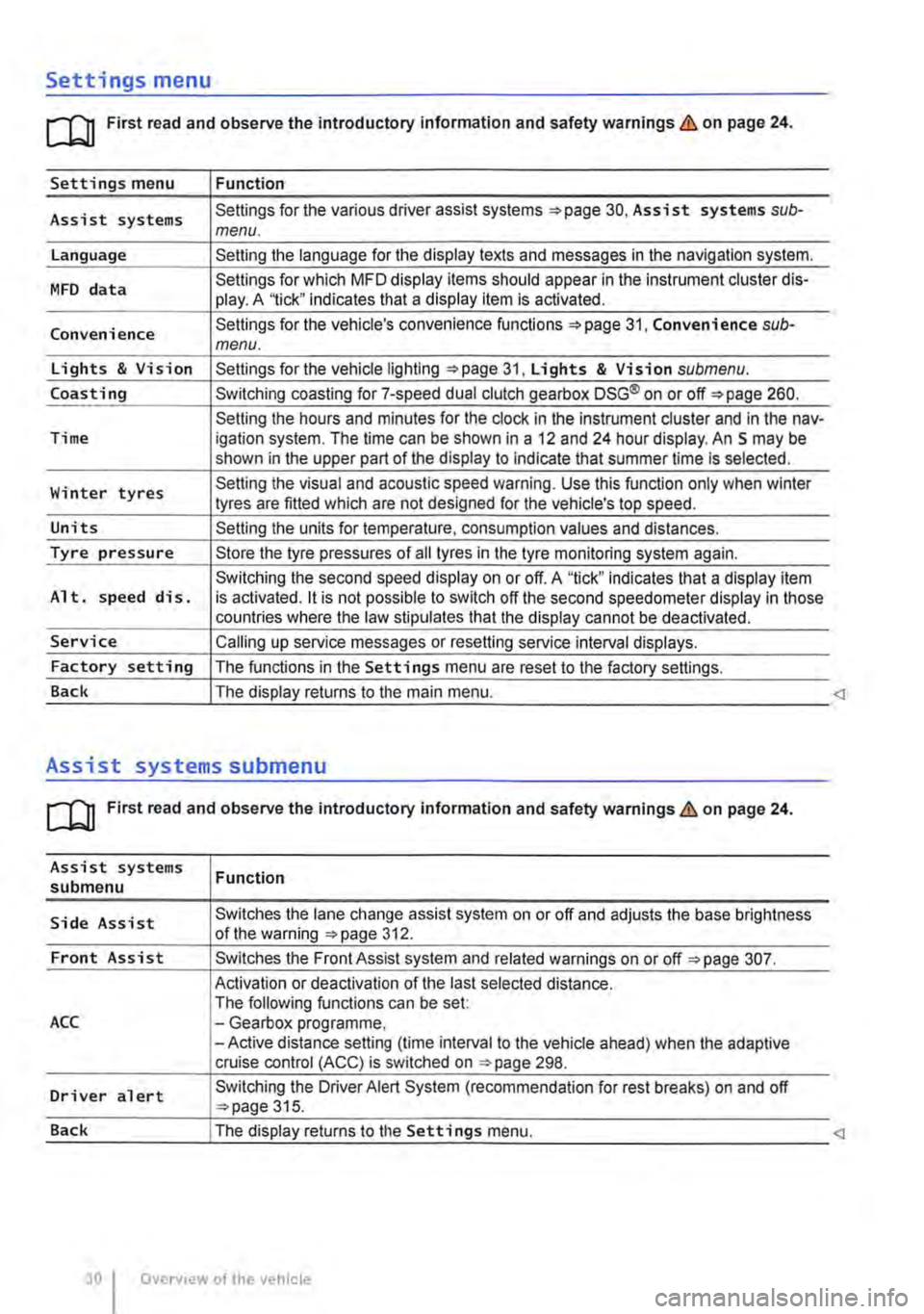
Settings menu
rn First read and observe the introductory information and safety warnings & on page 24.
Settings menu Function
Assist systems Settings for the various driver assist systems =:.page 30, Assist systems sub-menu.
Language Setting the language for the display texts and messages in the navigation system.
MFD data Settings for which MFD display items should appear in the instrument cluster dis-play. A '1ick" indicates that a display item is activated.
Convenience Settings for the vehicle's convenience functions 31, Convenience sub-menu.
Lights & Vision Settings for the vehicle lighting =:.page 31, Lights & Vision submenu.
Coasting Switching coasting for 7-speed dual clutch gearbox DSG® on or off=:. page 260.
Setting the hours and minutes for the clock in the instrument cluster and in the nav-Time igation system. The time can be shown in a 12 and 24 hour display. An S may be shown in the upper part of the display to indicate that summer time Is selected.
Winter tyres Setting the visual and acoustic speed warning. Use this function only when winter tyres are fitted which are not designed for the vehicle's top speed.
Units Setting the units for temperature, consumption values and distances.
Tyre pressure Store the tyre pressures of all tyres in the tyre monitoring system again.
Switching the second speed display on or off. A "tick" indicates that a display item Alt. speed dis. is activated. it is not possible to switch off the second speedometer display in those countries where the law stipulates that the display cannot be deactivated.
Service Calling up service messages or resetting service interval displays.
Factory setting The functions in the Settings menu are reset to the factory settings.
Back The display returns to the main menu.
Assist systems submenu
rn First read and observe the introductory information and safety warnings & on page 24.
Assist systems submenu
Side Assist
Front Assist
ACC
Driver alert
Function
Switches the lane change assist system on or off and adjusts the base brightness of the warning =:.page 312.
Switches the Front Assist system and related warnings on or off =:.page 307.
Activation or deactivation of the last selected distance. The following functions can be set: -Gearbox programme, -Active distance setting (time interval to the vehicle ahead) when the adaptive cruise control (ACC) is switched on ::.page 298.
Switching the Driver Alert System (recommendation for rest breaks) on and off ::.page 315.
Page 31 of 486
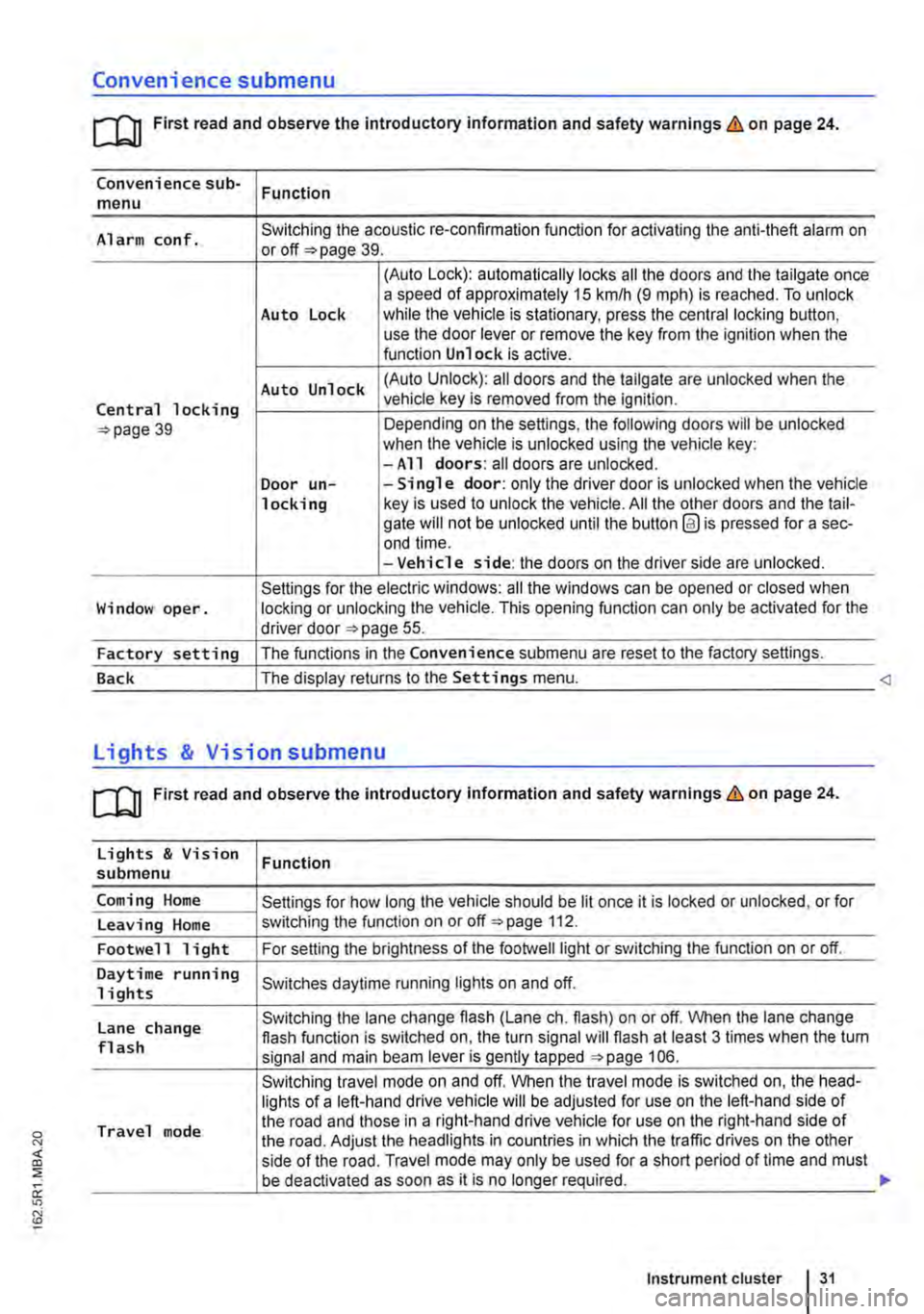
Convenience submenu
m First read and observe the introductory information and safety warnings & on page 24.
Convenience sub-menu Function
Alarm conf. Switching the acoustic re-confirmation function for activating the anti-theft alarm on or page 39.
(Auto Lock): automatically locks all the doors and the tailgate once a speed of approximately 15 km/h (9 m ph) is reached. To unlock Auto Lock while the vehicle is stationary, press the central locking button, use the door lever or remove the key from the ignition when the function Unlock is active.
Auto Unlock (Auto Unlock): all doors and the tailgate are unlocked when the
Central locking vehicle key is removed from the ignition.
39 Depending on the settings, the following doors will be unlocked when the vehicle is unlocked using the vehicle key: -All doors: all doors are unlocked. Door un--Single door: only the driver door is unlocked when the vehicle locking key is used to unlock the vehicle. All the other doors and the tail-gate will not be unlocked until the button @ is pressed for a sec-end time. -Vehicle side: the doors on the driver side are unlocked.
Settings for the electric windows: all the windows can be opened or closed when Window oper. locking or unlocking the vehicle. This opening function can only be activated for the driver door 55.
Factory setting The functions in the Convenience submenu are reset to the factory settings.
Back The display returns to the Settings menu.
[QJ First read and observe the introductory information and safety warnings & on page 24.
Lights & Vision Function submenu
Coming Home Settings for how long the vehicle should be lit once it is locked or unlocked, or for
Leaving Home switching the function on or off 112.
Footwell light For setting the brightness of the footwelllight or switching the function on or off.
Daytime running Switches daytime running lights on and off. 1 i ghts
Lane change Switching the lane change flash (Lane eh. flash) on or off. When the lane change flash function is switched on, the turn signal will flash at least 3 times when the tum flash signal and main beam lever is gently tapped 106.
Switching travel mode on and off. When the travel mode is switched on, the head-lights of a left-hand drive vehicle will be adjusted for use on the left-hand side of
Travel mode the road and those in a right-hand drive vehicle for use on the right-hand side of the road. Adjust the headlights in countries in which the traffic drives on the other side of the road. Travel mode may only be used for a short period of time and must be deactivated as soon as it is no longer required.
Instrument cluster 31
Page 32 of 486
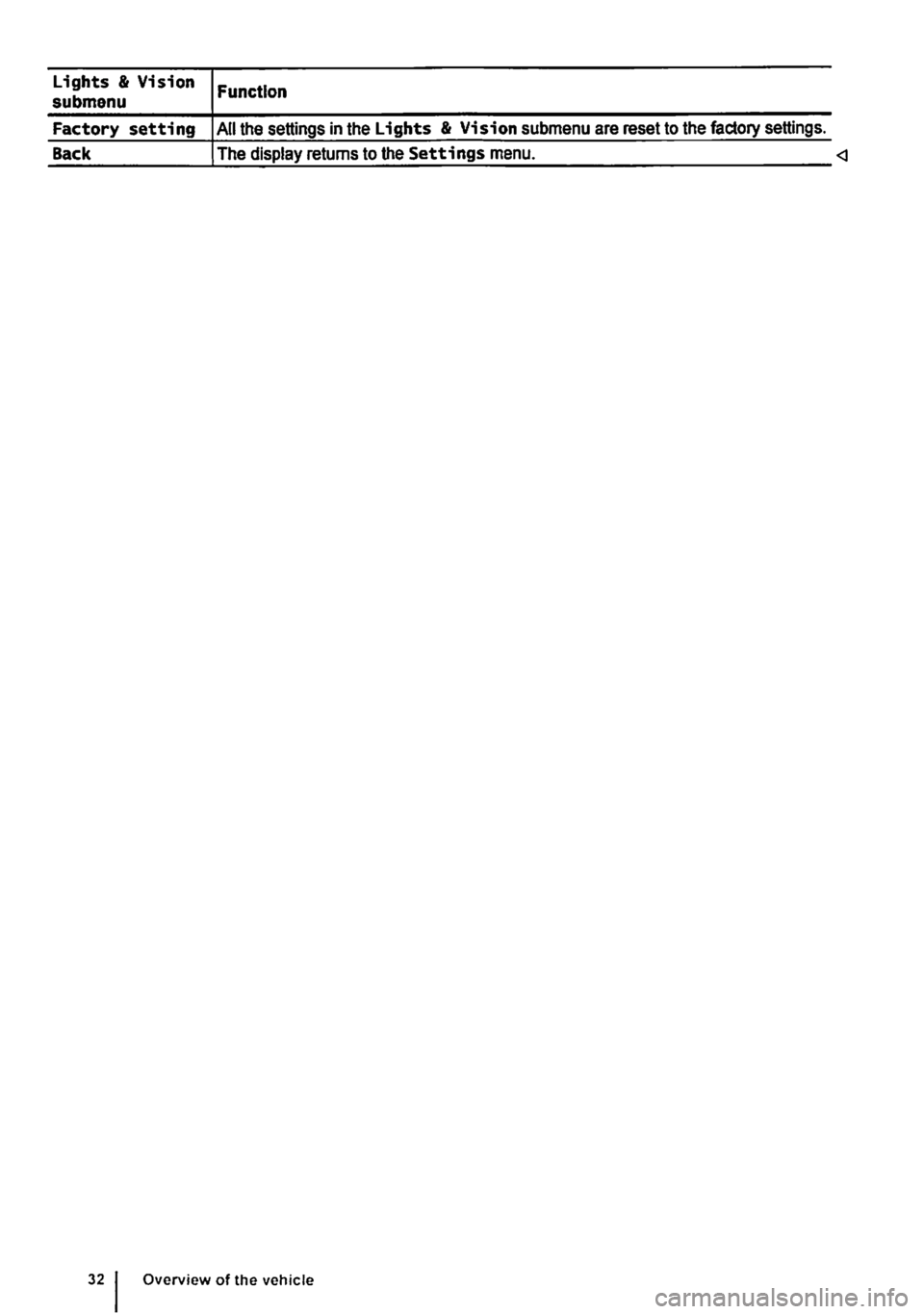
Lights & Vision submenu
Factory setting
Back
Function
All the settings in the Lights & Vision submenu are reset to the factory settings.
The display returns to the Settings menu.
Page 42 of 486
Locking and unlocking the vehicle from inside
c
1 PSG-0030
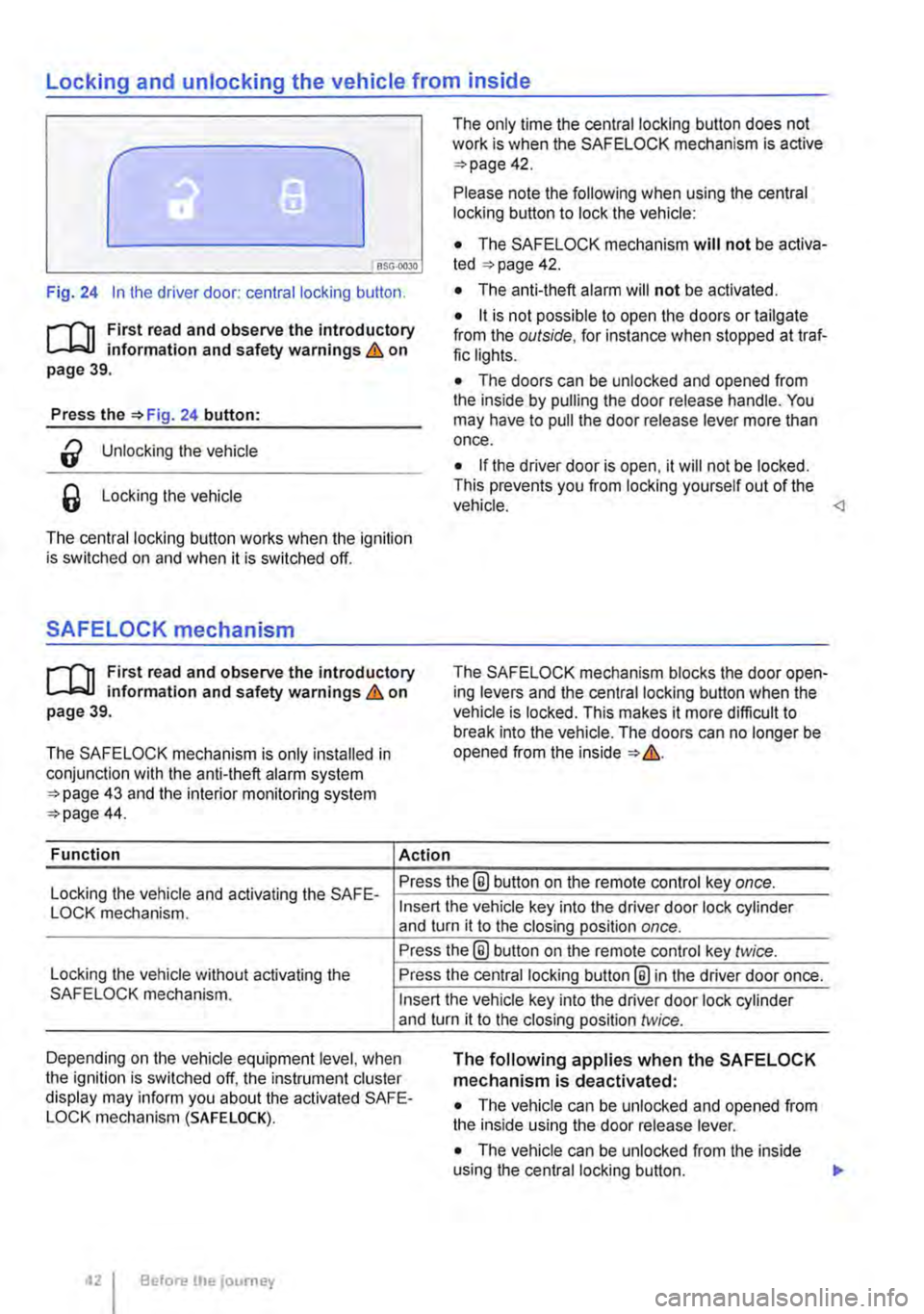
Fig. 24 In the driver door: central locking button.
rf'n First read and observe the introductory L.-J=.I.I information and safety warnings & on page 39.
Press the =>Fig. 24 button:
a Unlocking the vehicle
6 Locking the vehicle
The central locking button works when the ignition is switched on and when it is switched off.
SAFELOCK mechanism
rf'n First read and observe the introductory L.-J=.I.I information and safety warnings & on page 39.
The SAFELOCK mechanism is only installed in conjunction with the anti-theft alarm system =>page 43 and the interior monitoring system =>page 44.
Function Action
The only time the central locking button does not work is when the SAFE LOCK mechanism is active =>page 42.
Please note the following when using the central locking button to lock the vehicle:
• The SAFELOCK mechanism will not be activa-ted =:>page 42.
• The anti-theft alarm will not be activated.
• it is not possible to open the doors or tailgate from the outside, for instance when stopped at traf-fic lights.
• The doors can be unlocked and opened from the inside by pulling the door release handle. You may have to pull the door release lever more than once.
• If the driver door is open, it will not be locked. This prevents you from locking yourself out of the vehicle.
Locking the vehicle and activating the SAFE-Press the® button on the remote control key once.
LOCK mechanism.
Locking the vehicle without activating the SAFELOCK mechanism.
Insert the vehicle key into the driver door lock cylinder and turn it to the closing position once.
Press the@ button on the remote control key twice.
Press the central locking button@ in the driver door once.
Insert the vehicle key into the driver door lock cylinder and turn it to the closing position twice.
Depending on the vehicle equipment level, when the ignition is switched off, the instrument cluster display may inform you about the activated SAFE-LOCK mechanism (SAFE LOCK).
The following applies when the SAFELOCK mechanism is deactivated:
• The vehicle can be unlocked and opened from the inside using the door release lever.
• The vehicle can be unlocked from the inside using the central locking button. .,.
Before the journey
Page 45 of 486
• If the vehicle is being transported (e.g. on a fer-ry).
• If the vehicle is in a car wash.
Doors
CO Introduction
This chapter contains information on the following subjects:
Warning lamp . . . . . . . . . . . . . . . . . . . . . . . . . . . 45
Additional information and warnings:
• Exterior views page 5
• Vehicle key set 36
• Central locking system 39
• Manual opening and closing 413
A WARNING
Any door that Is not properly closed could open suddenly while the vehicle Is In motion. This could lead to severe Injuries.
Warning lamp
m If doors or the tailgate are still open when the W anti-theft alarm is activated, only the anti-theft alarm is activated. Interior monitoring and the anti-tow alarm are not activated until all doors and the tailgate are closed. <1
A WARNING (ConUnued)
• Stop as soon as possible and close the door.
• Make sure that the door Is closed properly and that the lock has engaged. The closed door must be flush with the surrounding body panels.
• Doors should only be opened or closed when you are sure there Is no-one in their path.
A WARNING
Any door being held open by the door arrest-er could close unexpectedly In strong winds or if the vehicle Is on a slope. This could lead to Injuries.
• Always keep a good grip on the handle when opening and closing doors.
m First read and observe the Introductory information and safety warnings&,. on page 45.
Lit up Possible cause
At least one vehicle door is opened or not properly closed.
Several warning and indicator lamps will light up briefly as a functional check when the ignition is switched on. They will go out after a few seconds.
A warning lamp q;o appears in the instrument clus-ter display if a door is open or not properly closed.
Symbols may be displayed in the Instrument clus-ter instead of warning lamps, depending on the ve-hicle's equipment level. These symbols are also
Solution
t Do not drive on I Open the relevant vehicle door and then close it again.
visible when the ignition is switched off. The dis-play will go out approximately 15 seconds after the vehicle has been locked.
m The symbol can differ depending on the ver-W sion of the instrument cluster. <1
Opening and closing 45