display VOLKSWAGEN TRANSPORTER 2015 Owner´s Manual
[x] Cancel search | Manufacturer: VOLKSWAGEN, Model Year: 2015, Model line: TRANSPORTER, Model: VOLKSWAGEN TRANSPORTER 2015Pages: 486, PDF Size: 72.17 MB
Page 50 of 486
CD
Before opening the tailgate, please check that there is enough space to open and close the tailgate, e.g. when towing a trailer or when in a garage.
Warning lamp
CD
Never use the gas-filled strut on the tallgate to fix or hold a load. This could lead to damage and make it Impossible to close the tallgate.
Lit up Possible cause
c:5 The taiigate is open or not properly closed.
Several warning and indicator lamps will light up briefly as a functional check when the ignition is switched on. They will go out after a few seconds.
A warning lamp c:s appears in the instrument clus-ter display if the taiigate is open or not property closed.
Symbols may be displayed in the instrument clus-ter instead of warning lamps, depending on the ve-hicle's equipment level. These symbols are also visible when the ignition is switched off. The dis-play will go out approximately 15 seconds after the vehicle has been locked.
Solution
e Do not drive on I Open the tailgate and close it again.
A WARNING
If the tail gate is not properly closed it could open suddenly while the vehicle is in motion. This could lead to severe injuries.
• Stop as soon as possible and close the tailgate.
• After closing the tailgate, always check that it is properly secured.
m The symbol can differ depending on the ver-L!J sion of the instrument cluster.
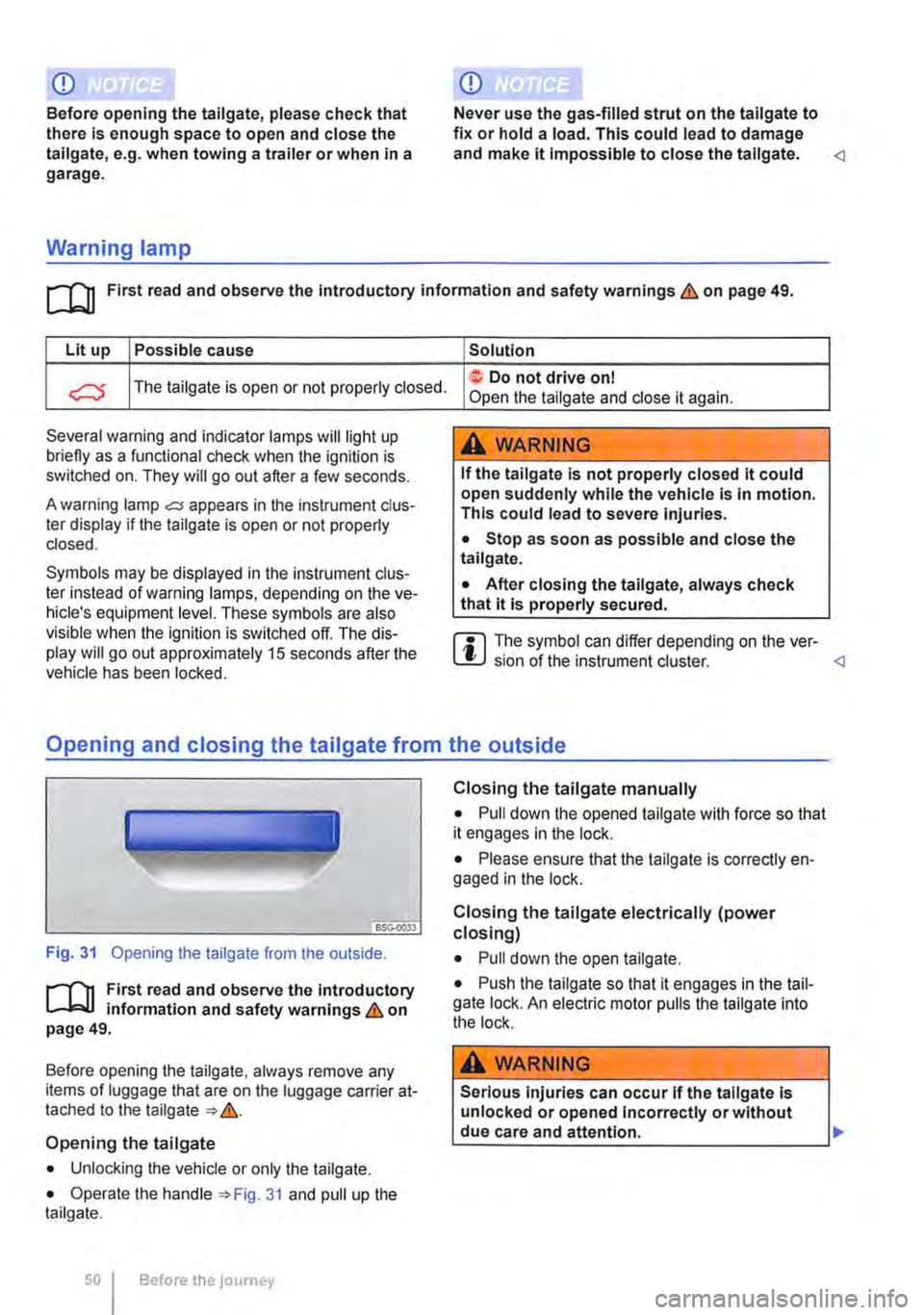
Fig. 31 Opening the tailgate from the outside.
r-Ill First read and observe the introductory L-Wl information and safety warnings & on page 49.
Before opening the taiigate, always remove any items of luggage that are on the luggage carrier at-tached to the tailgate &.
Opening the tailgate
• Unlocking the vehicle or only the tailgate.
• Operate the handle 31 and pull up the tailgate.
Before the journey
Closing the tailgate manually
• Pull down the opened tailgate with force so that it engages in the lock.
• Please ensure that the taiigate is correctly en-gaged in the lock.
Closing the tailgate electrically (power closing)
• Pull down the open tailgate.
• Push the taiigate so that it engages in the tail-gate lock. An electric motor pulls the tailgate into the lock.
A WARNING
Serious injuries can occur if the tallgate is unlocked or opened Incorrectly or without
________________
Page 53 of 486
A WARNING (Continued)
• Always keep the wing doors closed while the vehicle is moving so that no poisonous exhaust fumes can enter the vehicle Interior.
• Close and lock the wing doors and all ve-hicle doors when the vehicle is not in use. Make sure there Is no-one left In the vehicle.
• Never leave children playing unattended In or around the vehicle, especially when the wing doors are open. Children could climb In-to the luggage compartment and shut the wing doors, thereby trapping themselves In-side. Temperatures Inside a locked vehicle may reach extremes of heat or cold, accord-Ing to season. This can cause serious Inju-ries and Illness or fatalities, especially to small children.
• Never leave children or people requiring assistance alone In the vehicle when the doors are locked. This may mean that these people lock themselves In the vehicle. They could become trapped In the vehicle In an emergency and may not be able to get them-
Warning lamp
A WARNING (Continued)
selves to safety. People locked In the vehicle may be subjected to very high or very low temperatures.
A WARNING
A wing door which Is being held open by the door arrester may close In strong winds or if the vehicle is on a slope. This could lead to Injuries.
• Always keep a good grip on the handle when opening and closing the wing doors.
CD
Before opening the wing doors, please check that there Is enough space to open and close the wing doors, e.g. when towing a trailer or when In a garage.
Lit up Possible cause
The wing doors are open or not property C) closed.
Several warning and indicator lamps will light up briefly as a functional check when the ignition is switched on. They will go out after a few seconds.
A warning lamp oC;j appears in the instrument clus· ter display if the wing doors are open or not prop-erly closed.
Symbols may be displayed in the instrument dus-ter instead of warning lamps, depending on the ve-hicle's equipment level. These symbols are also visible when the ignition is switched off. The dis· play will go out approximately 15 seconds after the vehicle has been locked.
Opening the wing doors
r'l""n First read and observe the introductory L-Jc.LI information and safety warnings & on page 52.
Solution
not drive on I Open and then close the wing doors.
A WARNING
Wing doors which are not closed properly could open suddenly while the vehicle Is In motion. This could lead to severe Injuries.
• Stop as soon as possible and close the wing doors.
• After closing the wing doors, always
Lc.:..h.:..e.:..c.:..k_t.:..h_a_t _it_is_.!.,p_ro_:p_e_r..!.ly.:..s_e_c_u_r_ed_. ____ __j
Opening and closing
Page 93 of 486
A DANGE;R (Continued) --
• No other people, animals or objects may be carried between the occupants of the front seats and the alrbag deployment zone. Make sure that children and passengers also keep to this rule.
• Do not attach any objects, e.g. mobile nav-igation devices, to the windscreen above the front alrbag on the front passenger side.
• Do not cover or stick anything on the steering wheel hub or the soft plastic surface of the alrbag unit In the dash panel on the front passenger side, and do not modify them In any way.
A WARNING
The front alrbags are deployed In front of the steering wheel "*Fig. 71 and dash panel '*Fig. 72.
• When driving, always hold the steering wheel with both hands on the outside of the ring at the 9 o'clock and 3 o'clock positions.
• Adjust the driver seat so that there is at least 25 cm between your breastbone and the hub of the steering wheel. Contact a qualified workshop if your physical build makes this Impracticable.
• Adjust the front passenger seat so that the distance between the passenger and the
__ ____
Switching the front passenger front airbag on and off manually using the
key-operated switch
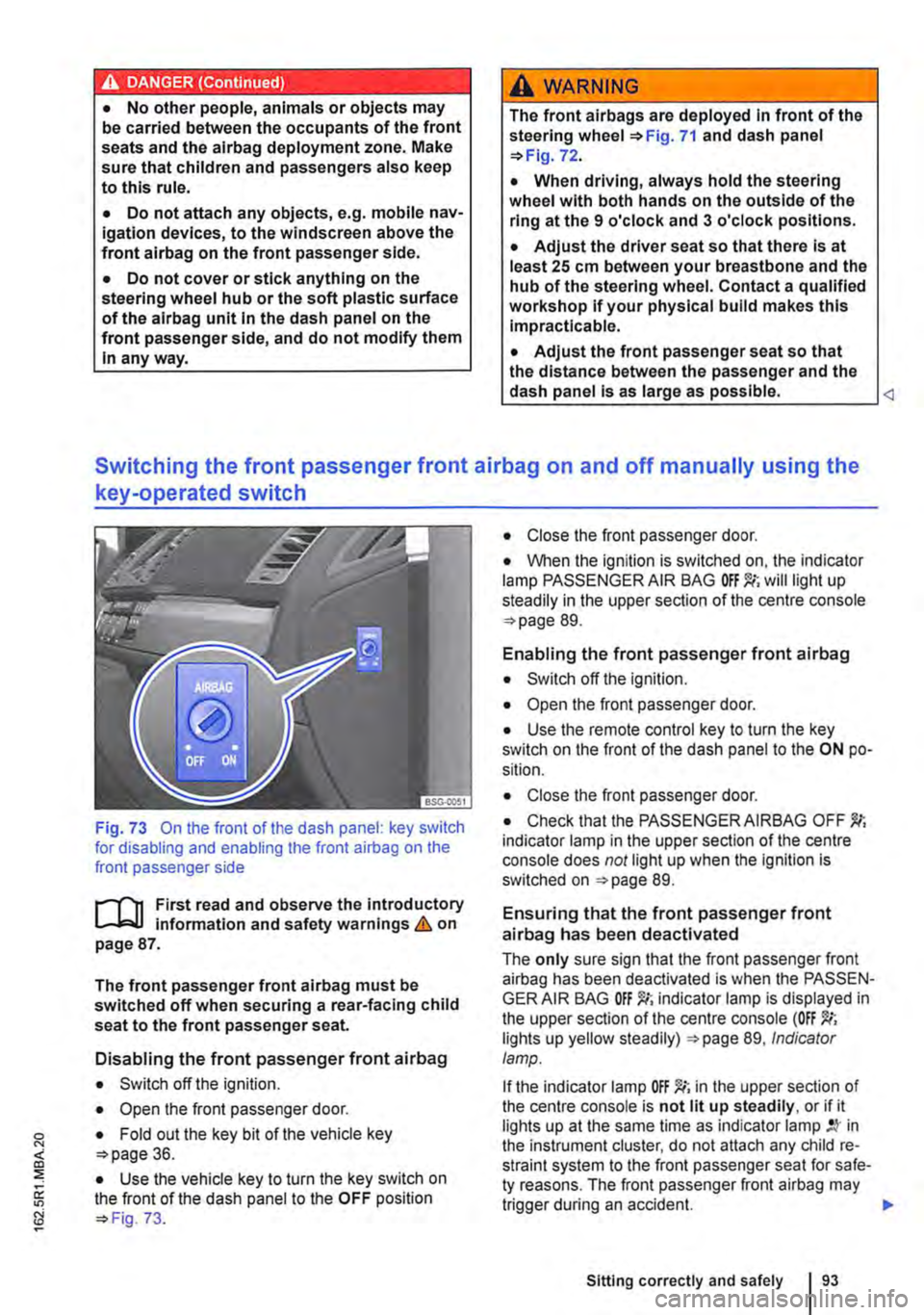
Fig. 73 On the front of the dash panel: key switch for disabling and enabling the front airbag on the front passenger side
l""'rn First read and observe the introductory L-J,::.U information and safety warnings&. on page 87.
The front passenger front airbag must be switched off when securing a rear-facing child seat to the front passenger seat.
Disabling the front passenger front airbag
• Switch off the ignition.
• Open the front passenger door.
• Fold out the key bit of the vehicle key o>page 36.
• Use the vehicle key to turn the key switch on the front of the dash panel to the OFF position o> Fig. 73.
• Close the front passenger door.
• When the ignition is switched on, the indicator lamp PASSENGER AIR BAG will light up steadily in the upper section of the centre console o> page 89.
Enabling the front passenger front airbag
• Switch off the ignition.
• Open the front passenger door.
• Use the remote control key to turn the key switch on the front of the dash panel to the ON po-sition.
• Close the front passenger door.
• Check that the PASSENGER AIRBAG OFF indicator lamp in the upper section of the centre console does not light up when the Ignition is switched on =>page 89.
Ensuring that the front passenger front airbag has been deactivated
The only sure sign that the front passenger front airbag has been deactivated is when the PASSEN-GER AIR BAG indicator lamp is displayed in the upper section of the centre console (OFF lights up yellow steadily) =>page 89, Indicator lamp.
If the indicator lamp OFF )!(; in the upper section of the centre console is not lit up steadily, or if it lights up at the same time as indicator lamp in the instrument cluster, do not attach any child re-straint system to the front passenger seat for safe-ty reasons. The front passenger front airbag may trigger during an accident.
Sitting correctly and safely
Page 111 of 486
Switching main beam assist on and off manually
Function Action
Switching on -Switch on the ignition and turn the light switch to position AUTO. -Push the turn signal and main beam lever forwards from its initial position =:-page 107.
When the main beam assist is switched on, the indicator lamp w lights up in the instru-ment cluster display.
-Switch off the ignition. -OR: turn the light switch to a position other than AUTO =>page 108.
Switching off -OR: with the main beam switched on, pull the turn signal and main beam lever back-wards. -OR: push the turn signal and main beam lever forwards to switch on the manual main beam. The main beam assist is then switched off.
Fault
it may not be possible to switch off the main beam quickly enough or at all using main beam assist due to the following:
• In poorly lit streets where there are highly-re-flective signs.
• When encountering other road users with insuf-ficient lighting, such as pedestrians or cydists.
• In tight bends, brows of hills or depressions in the land or half-hidden oncoming traffic.
• With oncoming traffic on streets with a central barrier where the driver can see clearly over the central barrier e. . truck drivers. g
• If the camera is broken or the power supply is interrupted.
• In fog, snow or heavy rain.
• In dusty or sandy areas.
• Damage to the windscreen in the camera's vi-sion field.
• If the viewing field of the camera is misted up, dirty, covered by a sticker, snow or ice.
A WARNING
Do not let the extra convenience afforded by main beam control tempt you into taking any risks when driving-this can cause acci-dents. The system is not a substitute for the full concentration of the driver.
A WARNING (Continued)
• Always check the lights yourself and ad-just them to the prevailing conditions for lights, vision and road traffic.
• The main beam control may not be able to recognise all driving situations correctly and may not work properly in certain situations.
• If the camera's field of view is dirty, cov-ered or damaged, the function of the main beam assist may be impaired. This also ap-plies If changes are made to the vehicle's lighting system, for example if additional headlights are fitted.
CD
Please observe the following points in order to avoid impairing the proper function of the sys-tem:
• Regularly clean the camera's field of view, and keep it free from snow and ice.
• Do not cover the camera's field of view.
• Check the area of the windscreen that Is in the camera's field of view for damage.
m The headlight flasher and the main beam can W be switched on and off manually at any time with the turn signal and main beam lever =>page 107.
m Light-emitting objects in the camera's field of W operation, e.g. mobile navigation devices, could impair the functions of the main beam assist system (Light Assist).
1"1'11 First read and observe the introductory L-lo:J.J Information and safety warnings & on page 106.
Lights and vision 1111
Page 123 of 486
Do not attach external navigation devices to the windscreen or near interior automatic anti-dazzle
Manual anti-dazzle interior mirror
• Basic position: the lever on the lower part of the mirror is pointing towards the windscreen.
• Pull the lever to the back to select the anti-daz-zle function 99.
Exterior mirrors
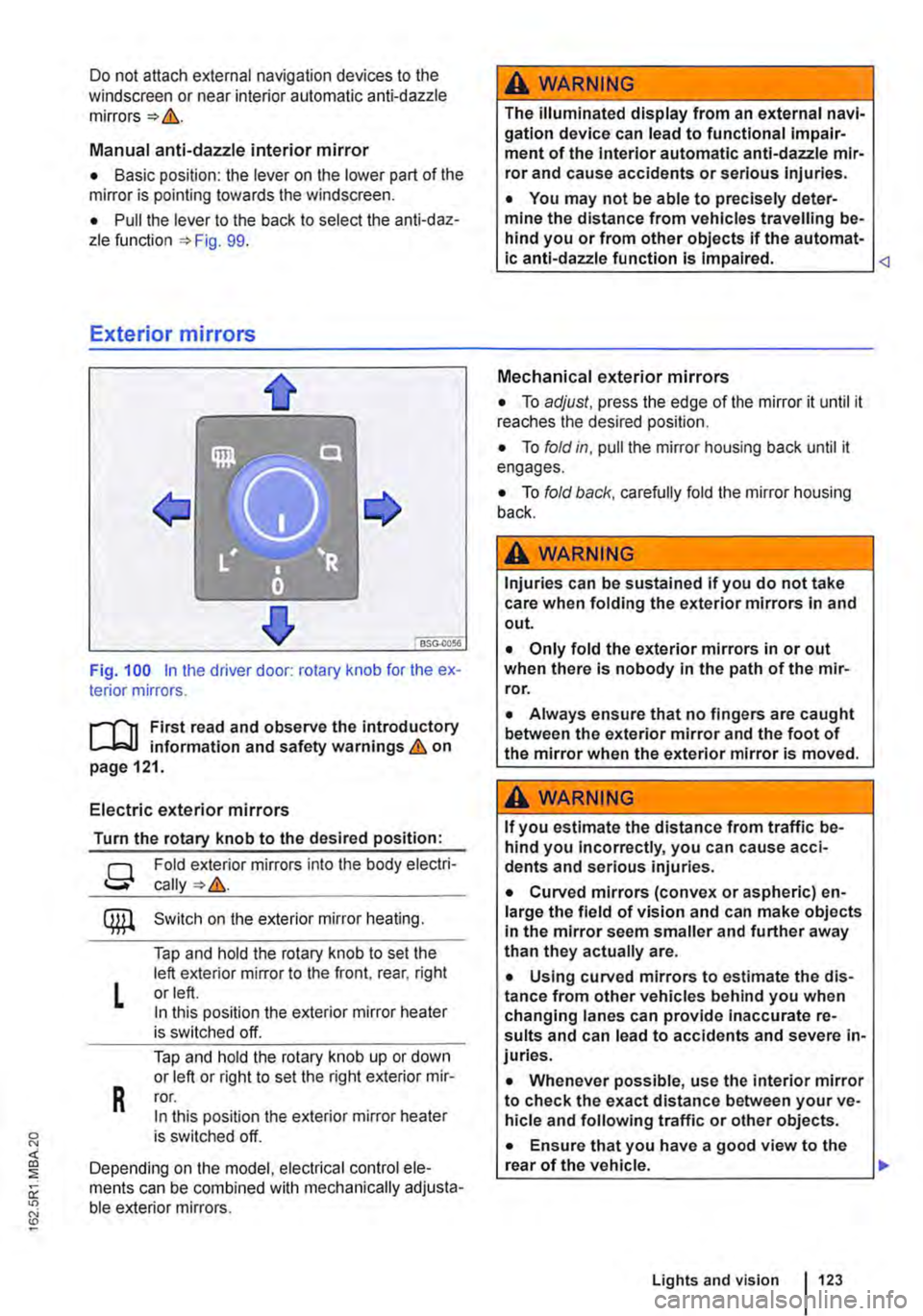
Fig. 100 in the driver door: rotary knob for the ex-terior mirrors.
First read and observe the introductory L..-Jr:.U information and safety warnings & on page 121.
Electric exterior mirrors
Turn the rotary knob to the desired position:
g
L
R
Fold exterior mirrors into the body electri-
Switch on the exterior mirror heating.
Tap and hold the rotary knob to set the left exterior mirror to the front, rear, right or left. In this position the exterior mirror heater is switched off.
Tap and hold the rotary knob up or down or left or right to set the right exterior mir-ror. In this position the exterior mirror heater is switched off.
Depending on the model, electrical control ele-ments can be combined with mechanically adjusta-ble exterior mirrors.
A WARNING
The illuminated display from an external navi-gation device can lead to functional impair-ment of the Interior automatic anti-dazzle mir-ror and cause accidents or serious injuries.
• You may not be able to precisely deter-mine the distance from vehicles travelling be-hind you or from other objects if the automat-ic anti-dazzle function is Impaired.
• To adjust, press the edge of the mirror it until it reaches the desired position.
• To fold in, pull the mirror housing back until it engages.
• To fold back, carefully fold the mirror housing back.
A WARNING
Injuries can be sustained if you do not take care when folding the exterior mirrors in and out.
• Only fold the exterior mirrors in or out when there is nobody in the path of the mir-ror.
• Always ensure that no fingers are caught between the exterior mirror and the foot of the mirror when the exterior mirror is moved.
A WARNING
If you estimate the distance from traffic be-hind you Incorrectly, you can cause acci-dents and serious injuries.
• Curved mirrors (convex or aspheric) en-large the field of vision and can make objects in the mirror seem smaller and further away than they actually are.
• Using curved mirrors to estimate the dis-tance from other vehicles behind you when changing lanes can provide inaccurate re-sults and can lead to accidents and severe in-juries.
• Whenever possible, use the interior mirror to check the exact distance between your ve-hicle and following traffic or other objects.
• Ensure that you have a good view to the rear of the vehicle. .,..
Lights and vision 123
Page 168 of 486
Controls on the LCD screen
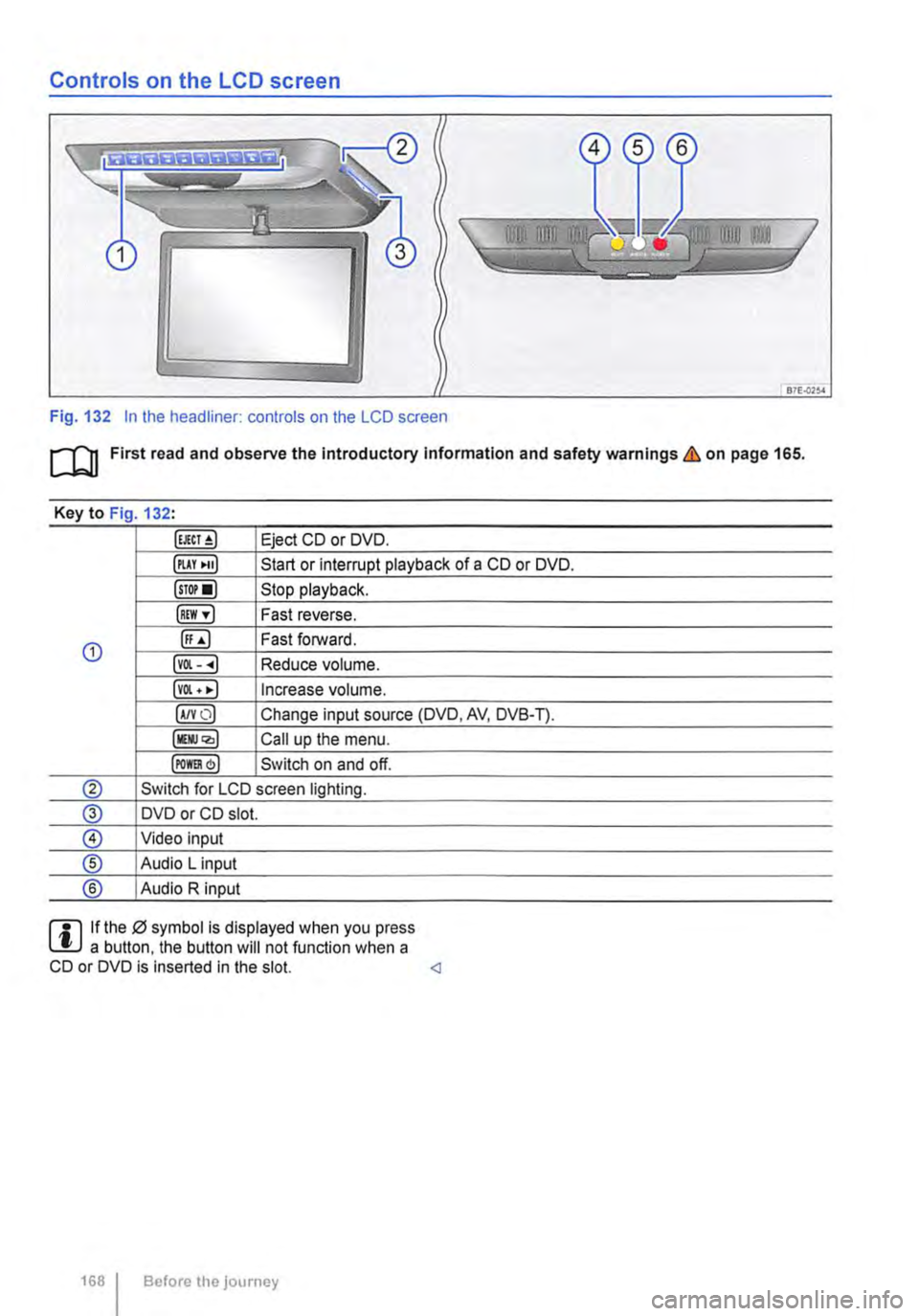
Fig. 132 In the headliner: controls on the LCD screen
m First read and observe the Introductory Information and safety warnings & on page 165.
Key to Fig 132·
Eject CD or DVD.
illAY •uJ Start or interrupt playback of a CD or DVD.
lsTor•l Stop playback.
IREW ,.] Fast reverse.
G) ([;) Fast forward.
lvOl--.) Reduce volume.
lvOl • •I Increase volume.
IA/YO) Change input source (DVD, AV, DVB-T).
lllli.JQ,) Call up the menu.
IPOm) Switch on and off.
® Switch for LCD screen lighting.
@ DVD or CD slot.
® Video input
® Audio L input
® Audio R input
rll If the 0 symbol is displayed when you press L!.J a button. the button will not function when a CD or DVD is inserted in the slot.
Page 170 of 486
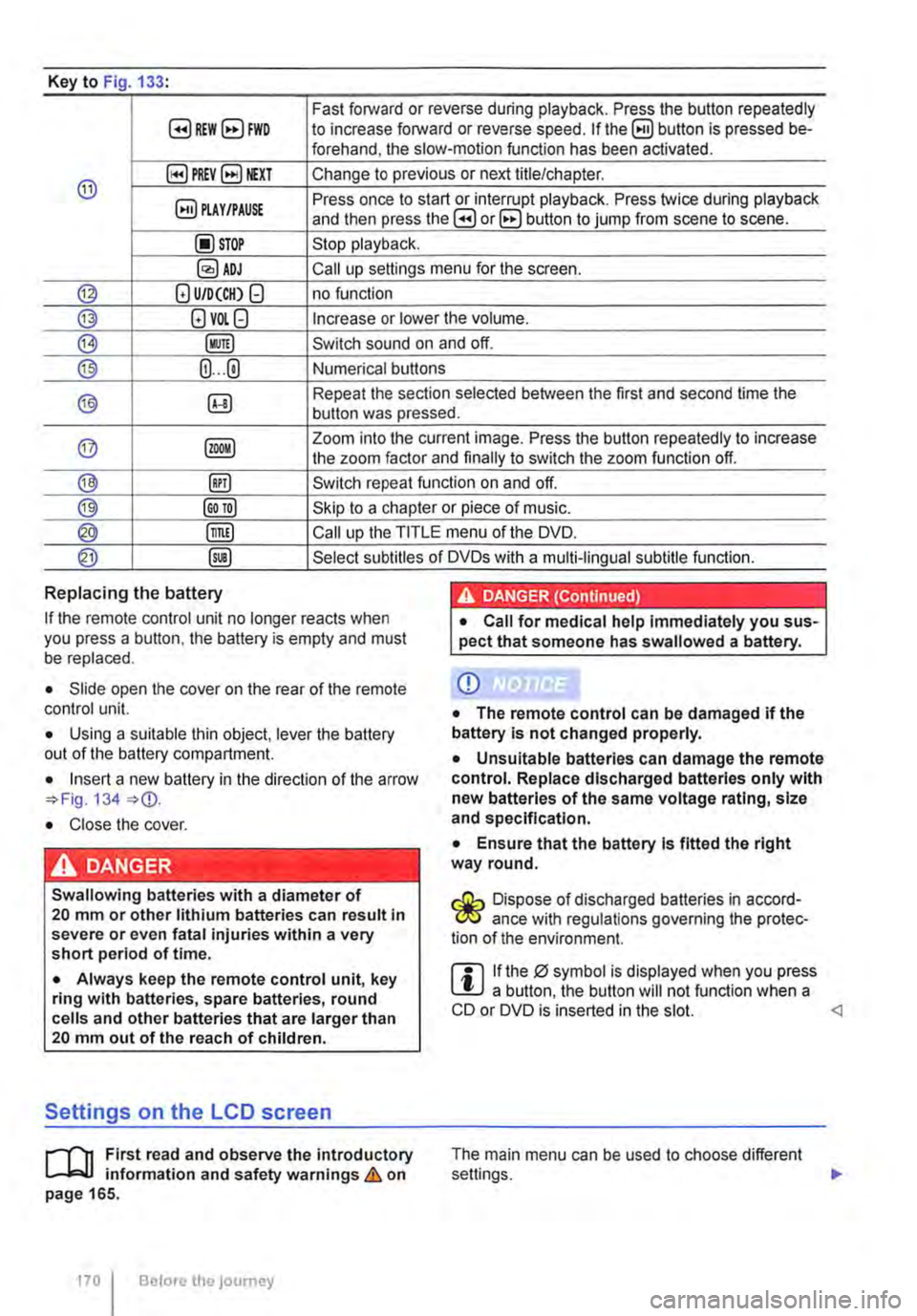
Key to Fig 133·
8REW8FWD Fast forward or reverse during playback. Press the button repeatedly to increase forward or reverse speed. If the§) button is pressed be-forehand, the slow-motion function has been activated.
@ §)PREY 81£XT Change to previous or next title/chapter.
§) PLAY /PAUSE Press once to start or interrupt playback. Press twice during playback and then press the B or 8 button to jump from scene to scene.
@STOP Stop playback.
Call up settings menu for the screen.
© (!) U/D(CH) Q no function
@ (!)VO!.Q Increase or lower the volume.
®l Switch sound on and off.
@ (ij ... (i) Numerical buttons
® @ Repeat the section selected between the first and second time the button was pressed.
@ Zoom into the current image. Press the button repeatedly to increase the zoom factor and finally to switch the zoom function off.
@ @) Switch repeat function on and off.
@ Skip to a chapter or piece of music.
@ §D Call up the TITLE menu of the DVD.
@ @ Select subtitles of DVDs with a multi-lingual subtitle function.
Replacing the battery
If the remote control unit no longer reacts when you press a button. the battery is empty and must be replaced.
• Slide open the cover on the rear of the remote control unit.
• Using a suitable thin object, lever the battery out of the battery compartment.
• Insert a new battery in the direction of the arrow 134
• Close the cover.
Swallowing batteries with a diameter of 20 mm or other lithium batteries can result in severe or even fatal injuries within a very short period of time.
• Always keep the remote control unit, key ring with batteries, spare batteries, round cells and other batteries that are larger than 20 mm out of the reach of children.
Settings on the LCD screen
rl'11 First read and observe the introductory L-W.f information and safety warnings & on page 165.
170 I Before the journey
• Call for medical help immediately you sus-pect that someone has swallowed a battery.
CD
• The remote control can be damaged if the battery is not changed properly.
• Unsuitable batteries can damage the remote control. Replace discharged batteries only with new batteries of the same voltage rating, size and specification.
• Ensure that the battery Is fitted the right way round.
Dispose of discharged batteries in accord-W ance with regulations governing the protec-tion of the environment.
r::l If the 0 symbol is displayed when you press l!J a button, the button will not function when a CD or DVD is inserted in the slot.
Page 172 of 486
• Press the [ENTER! button to confirm your selec-tion.
• Press the [SETUP! button again to leave the main menu.
The following settings can be made in the subme-nus:
• Picture format.
• Camera perspective.
• Language.
• Subtitles.
• Screen saver.
• Saving the last item played.
Tachograph
o::D Introduction
This chapter contains information on the following subjects:
Notes on the tachograph . . . . . . . . . . . . . . . . . 172
The function and operation of the factory-fitted ta-chograph can be found in an additional operating manual delivered with the vehicle.
If you retro-fit a tachograph to the vehicle, ensure it complies with relevant legislation.
Additional information and warnings:
• Towing a trailer 139
• Accessories. modifications, repairs and renewal of parts 394
Notes on the tachograph
I""'""'J'n First read and observe the Introductory L-lo:.l.l Information given on page 172.
Location
Depending on the model, the factory-fitted tacho-graph could be located in the middle of the dash panel or in a console on the dash panel.
Time
For the time settings, refer to the additional operat-ing instructions for the tachograph.
Please note that in digital tachographs, the time must be displayed in local time. The time on the printouts is always given in UTC (Coordinated Uni-versal Time).
1721 Before the journey
• Various audio settings.
• Colour system.
• Playback control for video COs
• Parental lock 172.
• Reset to default settings.
• Password protection.
Childproof locks
This function is only available in the case of DVDs with restricted access for young people and chil-dren. This menu is used to specify whether a DVD with access restrictions is to be played or whether a password has to be entered first.
m Manipulation of the tachograph and its signal, l.!J and misuse of the tachograph discs can re-sult in prosecution.
The digital tachograph has a buffer battery to pre-vent data loss. The buffer battery can supply power for approx. one year without an external power supply. This function is used if, for example, the digital tachograph is removed from the vehicle and stored or if left in a vehicle with a battery fault or a flat battery.
Legal requirements
By law. the tachograph must be used in:
Page 173 of 486
• Vehicles whose gross vehicle weight rating, in-cluding trailer exceeds 3,500 kg, if the vehicle is used commercially to transport goods. This is irre-spective of whether the vehicle or the trailer or both are used for commercial transportation of goods.
• Vehicles which are built and fitted for the pur-pose of carrying more than 9 persons, including the driver.
Checking the tachograph
The tachograph must be checked by the manufac-turer or an authorised workshop if any of the fol-lowing occurs, either in isolation or as a combina-tion:
Digital voice enhancement
ClJJ Introduction
This chapter contains information on the following subjects:
Using the digital voice enhancement . . . . . . . . 173
The digital voice enhancement (DVE) enables all vehicle occupants to hear each other clearly, even at high speeds. The driver can communicate with the occupants in the passenger compartment with out having to turn around or speak loudly.
The voice signals from the driver are recorded via a microphone in the headliner. Then, the signals are amplified and mixed with the radio or media
Using the digital voice enhancement
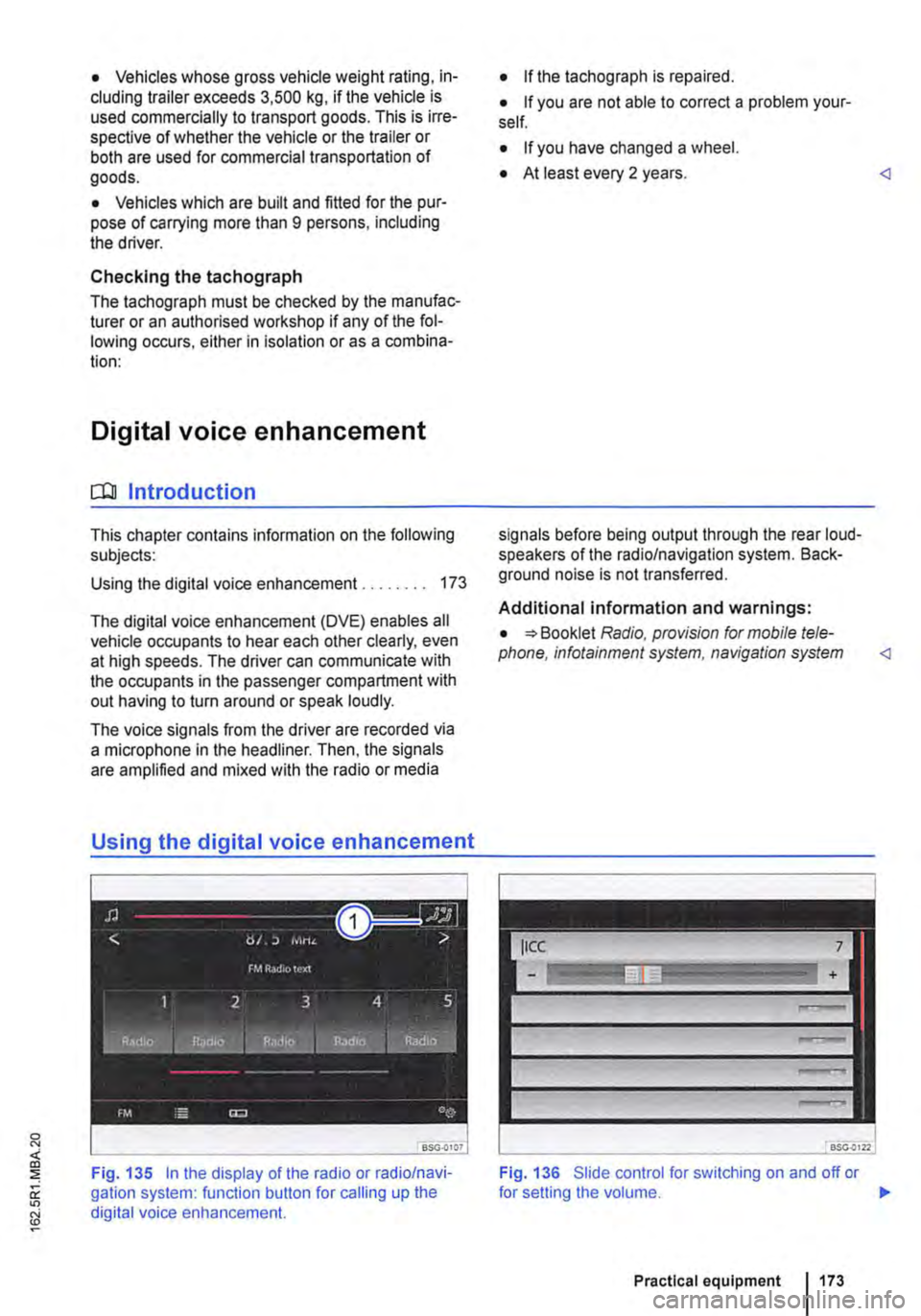
Fig. 135 In the display of the radio or radio/navi-gation system: function button for calling up the digital voice enhancement.
• If the tachograph is repaired.
• If you are not able to correct a problem your-self.
• If you have changed a wheel.
• At least every 2 years.
Additional information and warnings:
• Booklet Radio, provision for mobile tele-phone, infotainment system, navigation system
Fig. 136 Slide control for switching on and off or
Practical equipment 1173
Page 190 of 486
Key to Fig. 151:
G) Make the rear-seat telephony system visible to Bluetooth devices.
@ Increase call volume.
@ Press briefly: call volume is lowered. Press and hold down for approx. 10 seconds: the list of all devices is deleted from the rear-seat tel-ephony system.
il""'n First read and observe the introductory L--i=J.I information and safety warnings & on page 187.
Each mobile telephone must be paired with the rear-seat telephony system via Bluetooth once.
The pairing process takes a few minutes.
For pairing, you do not need to place the mobile telephone in the charging base (telephone holder).
Step 1: Preparations on the mobile telephone
• Read the operating manual for the mobile telephone.
• Switch on the mobile telephone.
• Deactivate the keypad lock.
• Switch off the screen saver.
• Deactivate the warning and service tones, e.g. key tones.
• Close all active Bluetooth connections on the mobile telephone.
Step 2: Making the rear-seat telephony system visible for Bluetooth
• With the ignition switched on, press the 151 G) button.
Step 3: Pairing the mobile telephone
• Activate the Bluetooth function on the mobile telephone.
• Start the Bluetooth device search on the mobile telephone. it will display a list of the devices found.
Functional description
il""'n First read and observe the introductory L--i=J.I information and safety warnings & on page 187.
190 I Before the journey
• Select CC9045 ... device.
• Confirm the selection on the mobile telephone to set up a Bluetooth connection.
• A message on the mobile telephone prompts you to enter a password for authorisation.
• Enter the password 1234. If an incorrect pass-word is entered, the pairing process will be abor-ted. Start again from step 2.
• If you would like this Bluetooth connection to be made in future without password entry, select Yes if offered this option by the mobile telephone.
• An acoustic signal will be emitted to confirm that the pairing process has been successful.
m Up to six devices can be stored as known in L!.J the rear-seat telephony system. If an addi-tional device is then paired with the rear-seat tel-ephony system, the authentication for the device that has remained unused for the longest time will be deleted automatically.
m Mobile telephones and other Bluetooth devi-L!.J ces can be set in such a way that they auto-matically connect themselves to the rear-seat tel-ephony system. Volkswagen Commercial Vehicles recommends that automatic pairing be deactiva-ted, especially in case an additional provision for mobile telephone in the vehicle is used at another time.