lock VOLKSWAGEN TRANSPORTER 2015 Owner´s Manual
[x] Cancel search | Manufacturer: VOLKSWAGEN, Model Year: 2015, Model line: TRANSPORTER, Model: VOLKSWAGEN TRANSPORTER 2015Pages: 486, PDF Size: 72.17 MB
Page 23 of 486
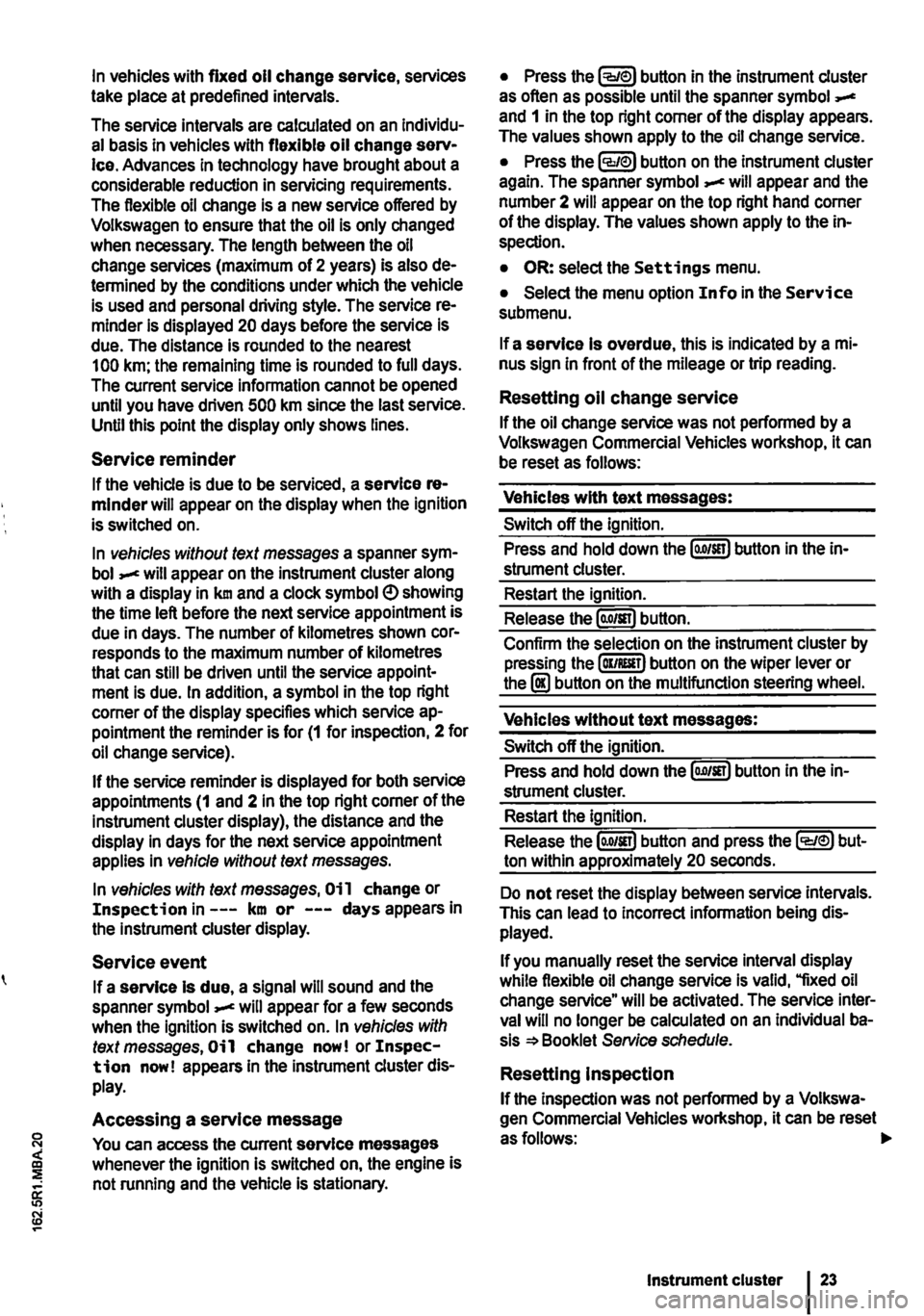
In vehicles with fixed oil change service, services take place at predefined intervals.
The service intervals are calculated on an Individu-al basis in vehicles with flexible oil change serv-Ice. Advances in technology have brought about a considerable reduction in servicing requirements. The flexible oil change is a new service offered by Volkswagen to ensure that the oil is only changed when necessary. The length between the oil change services (maximum of 2 years) is also de-termined by the conditions under which the vehicle is used and personal driving style. The service re-minder is displayed 20 days before the service is due. The distance is rounded to the nearest 100 km; the remaining time is rounded to full days. The current service information cannot be opened until you have driven 500 km since the last service. Until this point the display only shows lines.
Service reminder
If the vehicle is due to be serviced, a service re-minder will appear on the display when the ignition is switched on.
In vehicles without text messages a spanner sym-bol will appear on the instrument cluster along with a display in km and a clock symbol e> showing the time left before the next service appointment is due in days. The number of kilometres shown cor-responds to the maximum number of kilometres that can still be driven until the service appoint-ment is due. In addition, a symbol in the top right corner of the display specifies which service ap-pointment the reminder is for (1 for inspection, 2 for oil change service).
If the service reminder is displayed for both service appointments (1 and 2 in the top right corner of the instrument cluster display), the distance and the display in days for the next service appointment applies in vehicle without text messages.
In vehicles with text messages, Oi 1 change or Inspection in---km or ---days appears in the instrument cluster display.
Service event
If a service Is due, a signal will sound and the spanner symbol will appear for a few seconds when the ignition is switched on. In vehicles with text messages, Oil change now! or Inspec-tion now! appears In the instrument cluster dis-play.
Accessing a service message
You can access the current service messages whenever the ignition is switched on, the engine is not running and the vehicle is stationary.
• Press the button in the instrument cluster as often as possible until the spanner symbol and 1 in the top right corner of the display appears. The values shown apply to the oil change service.
• Press the lCCJie>J button on the instrument cluster again. The spanner symbol appear and the number 2 will appear on the top right hand corner of the display. The values shown apply to the in-spection.
• OR: select the Settings menu.
• Select the menu option Info in the Service submenu.
If a service Is overdue, this is indicated by a mi-nus sign in front of the mileage or trip reading.
Resetting oil change service
If the oil change service was not performed by a Volkswagen Commercial Vehicles workshop, it can be reset as follows:
Vehicles with text messages:
Switch off the ignition.
Press and hold down the lo.o/SETJ button in the in-strument cluster.
Restart the ignition.
Release the lo.o/sn) button.
Confirm the selection on the instrument cluster by pressing the laKJRESET) button on the wiper lever or the I!) button on the multifunction steering wheel.
Vehicles without text messages:
Switch off the ignition.
Press and hold down the lo.o1sn) button in the in-strument cluster.
Restart the ignition.
Release the lo.o/SETJ button and press the li:Q'e>J but-ton within approximately 20 seconds.
Do not reset the display between service intervals. This can lead to Incorrect information being dis-played.
If you manually reset the service interval display while flexible oil change service is valid, "fixed oil change service" will be activated. The service inter-val will no longer be calculated on an Individual ba-sis =*Booklet Service schedule.
Resetting Inspection
If the inspection was not performed by a Volkswa-gen Commercial Vehicles workshop. it can be reset asfollows:
Instrument cluster
Page 25 of 486
A WARNING
Accidents and injuries can occur if the driver is distracted.
• Never open the menus on the instrument cluster display while the vehicle is in motion.
r::l After starting the engine with a discharged l!..J vehicle battery, or after the battery has been changed, system settings (time, date, personal
Overview of the menu structure
nl1 First read and observe the introductory 1-J,::.JJ Information and safety warnings & on page 24.
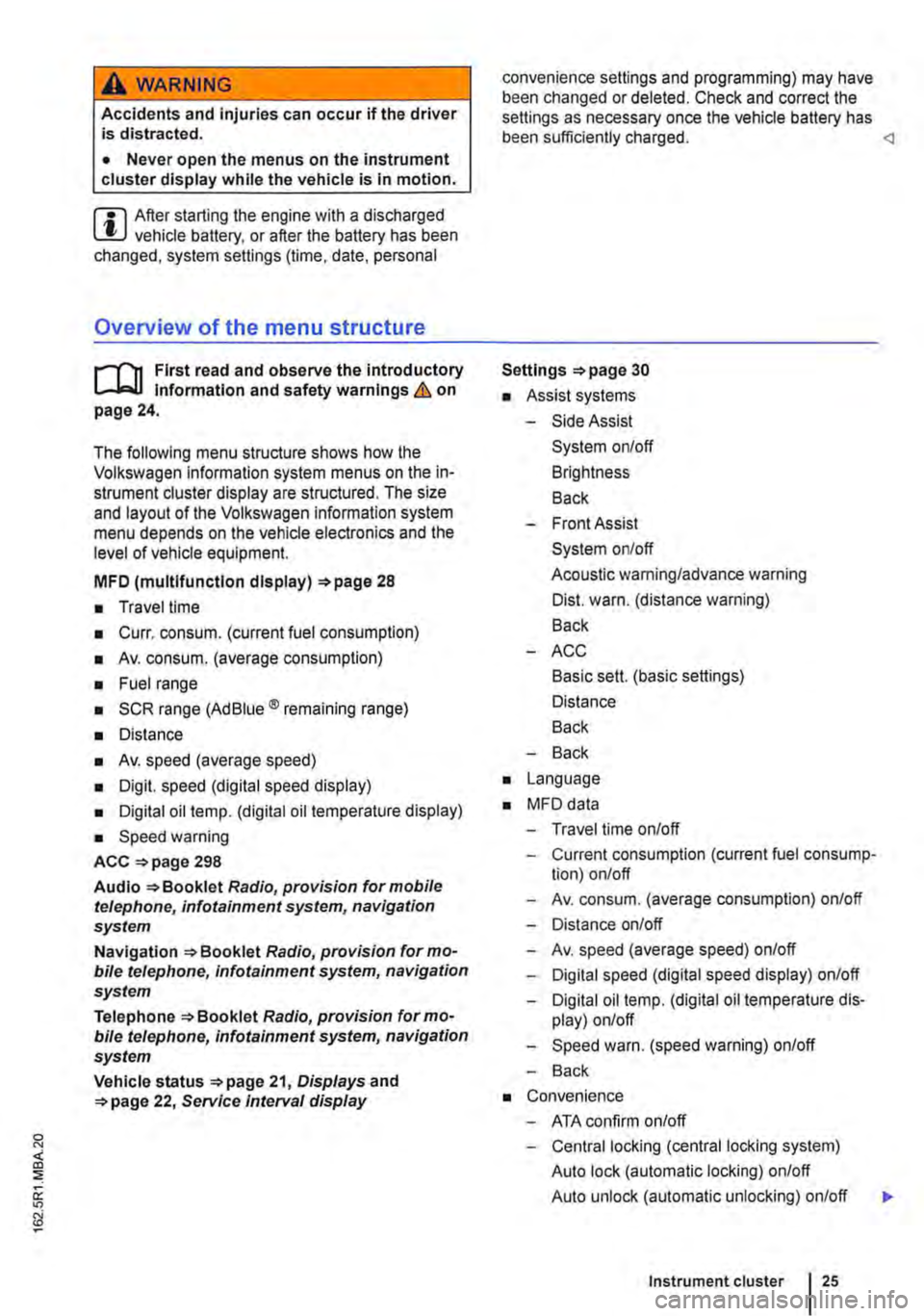
The following menu structure shows how the Volkswagen information system menus on the in-strument cluster display are structured. The size and layout of the Volkswagen information system menu depends on the vehicle electronics and the level of vehicle equipment.
MFD (multlfunctlon display) 28
• Travel time
• Curr. consum. (current fuel consumption)
• Av. consum. (average consumption)
• Fuel range
• SCR range (Ad Blue® remaining range)
• Distance
• Av. speed (average speed)
• Digit. speed (digital speed display)
• Digital oil temp. (digital oil temperature display)
• Speed warning
ACC =>page 298
Audio Radio, provision for mobile telephone, infotainment system, navigation system
Navigation Radio, provision for mo-bile telephone, infotainment system, navigation system
Telephone Radio, provision for mo-bile telephone, infotainment system, navigation system
Vehicle status 21, Displays and 22, Service Interval display
convenience settings and programming) may have been changed or deleted. Check and correct the settings as necessary once the vehicle battery has been sufficiently charged.
• Assist systems
-Side Assist
System on/off
Brightness
Back
-Front Assist
System on/off
Acoustic warning/advance warning
Dist. warn. (distance warning)
Back
-ACC
Basic sett. (basic settings)
Distance
Back
-Back
• Language
• MFD data
-Travel time on/off
-Current consumption (current fuel consump-tion) on/off
-Av. consum. (average consumption) on/off
-Distance on/off
-Av. speed (average speed) on/off
-Digital speed (digital speed display) on/off
-Digital oil temp. (digital oil temperature dis-play) on/off
-Speed warn. (speed warning) on/off
-Back
• Convenience
-ATA confirm on/off
-Central locking (central locking system)
Auto lock (automatic locking) on/off
Auto unlock (automatic unlocking) on/off
Instrument cluster 25
...
Page 26 of 486
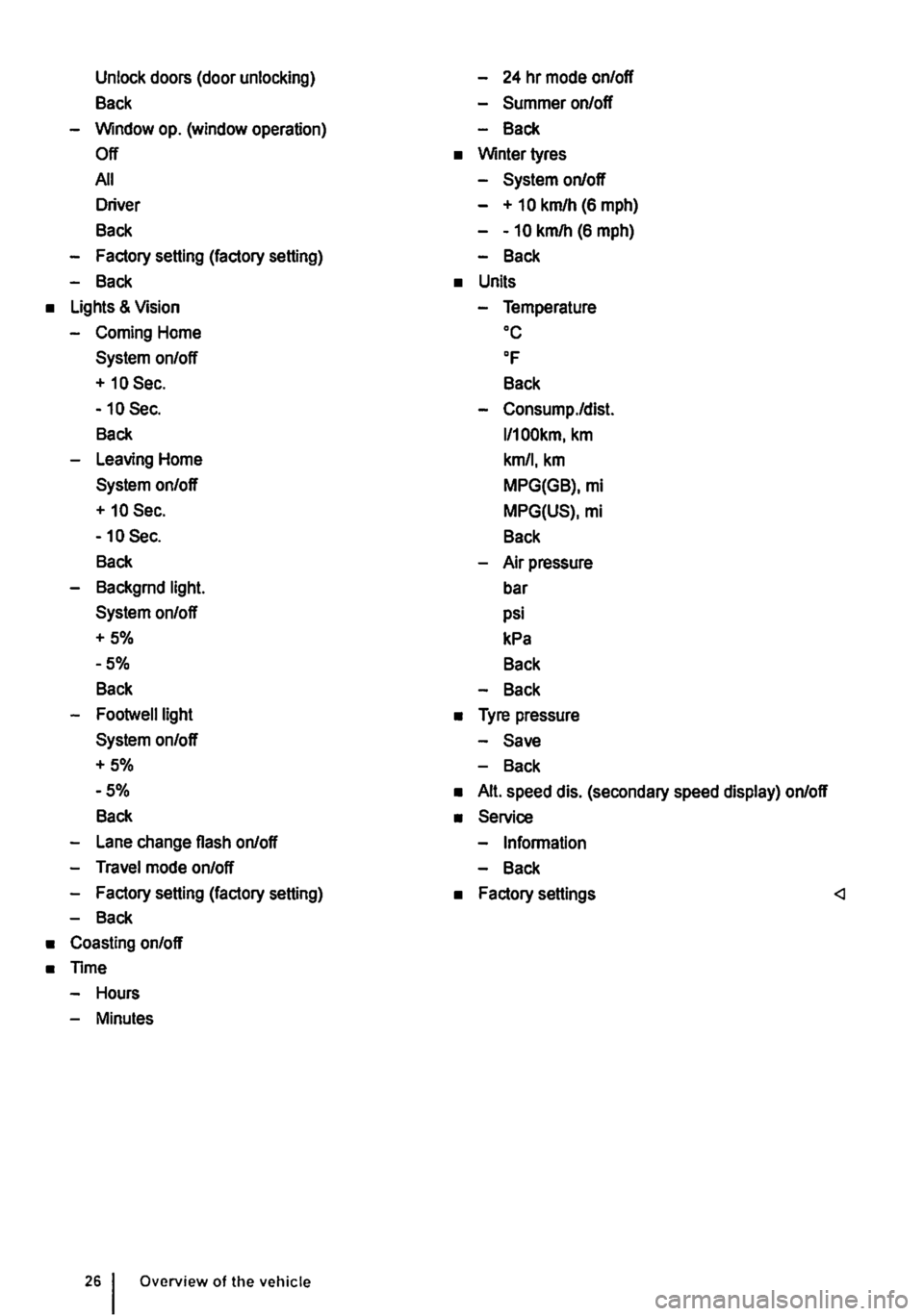
Unlock doors (door unlocking)
Back
-Window op. (window operation)
Off
All
Driver
Back
-Factory setting (factory setting)
-Back
• Lights & Vision
-Coming Home
System on/off
+ 10 Sec.
-10 Sec.
Back
-Leaving Home
System on/off
+ 10 Sec.
-10 Sec.
Back
-Backgrnd light.
System on/off
+5%
-5%
Back
-Footwelllight
System on/off
+5%
-5%
Back
-Lane change flash on/off
-Travel mode on/off
-Factory setting (factory setting)
-Back
• Coasting on/off
• Time
-Hours
-Minutes
Overview of the vehicle
-24 hr mode on/off
-Summer on/off
-Back
• Winter tyres
-System on/off
- + 10 km/h (6 mph)
--10 km/h (6 mph)
-Back
• Units
-Temperature oc
OF
Back
-Consump./dist.
l/100km, km
km/1, km
MPG(GB), mi
MPG(US), mi
Back
-Air pressure
bar
psi
kPa
Back
-Back
• Tyre pressure
-Save
-Back
• Alt. speed dis. (secondary speed display) on/off
• Service
-Information
-Back
• Factory settings
Page 30 of 486
Settings menu
rn First read and observe the introductory information and safety warnings & on page 24.
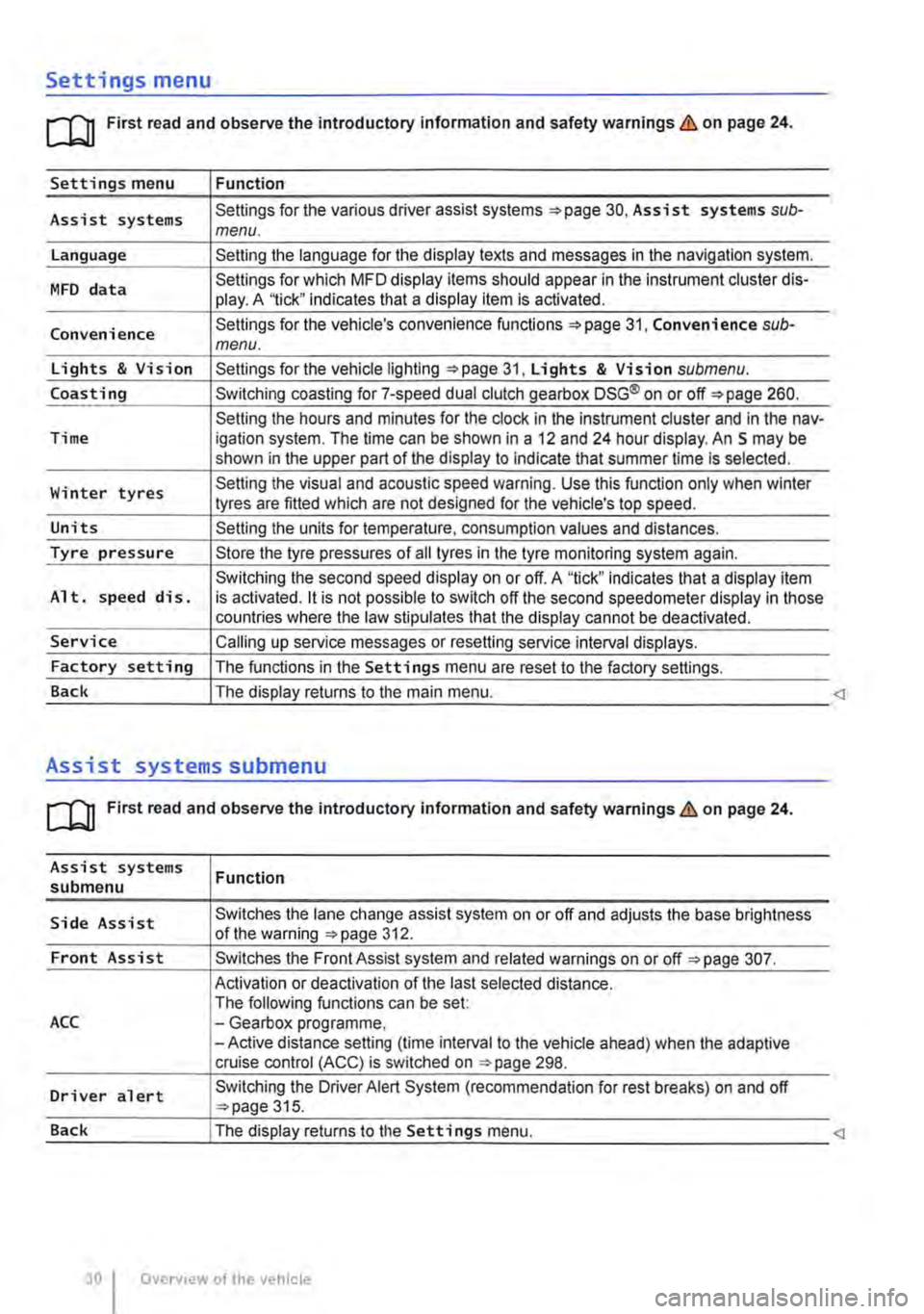
Settings menu Function
Assist systems Settings for the various driver assist systems =:.page 30, Assist systems sub-menu.
Language Setting the language for the display texts and messages in the navigation system.
MFD data Settings for which MFD display items should appear in the instrument cluster dis-play. A '1ick" indicates that a display item is activated.
Convenience Settings for the vehicle's convenience functions 31, Convenience sub-menu.
Lights & Vision Settings for the vehicle lighting =:.page 31, Lights & Vision submenu.
Coasting Switching coasting for 7-speed dual clutch gearbox DSG® on or off=:. page 260.
Setting the hours and minutes for the clock in the instrument cluster and in the nav-Time igation system. The time can be shown in a 12 and 24 hour display. An S may be shown in the upper part of the display to indicate that summer time Is selected.
Winter tyres Setting the visual and acoustic speed warning. Use this function only when winter tyres are fitted which are not designed for the vehicle's top speed.
Units Setting the units for temperature, consumption values and distances.
Tyre pressure Store the tyre pressures of all tyres in the tyre monitoring system again.
Switching the second speed display on or off. A "tick" indicates that a display item Alt. speed dis. is activated. it is not possible to switch off the second speedometer display in those countries where the law stipulates that the display cannot be deactivated.
Service Calling up service messages or resetting service interval displays.
Factory setting The functions in the Settings menu are reset to the factory settings.
Back The display returns to the main menu.
Assist systems submenu
rn First read and observe the introductory information and safety warnings & on page 24.
Assist systems submenu
Side Assist
Front Assist
ACC
Driver alert
Function
Switches the lane change assist system on or off and adjusts the base brightness of the warning =:.page 312.
Switches the Front Assist system and related warnings on or off =:.page 307.
Activation or deactivation of the last selected distance. The following functions can be set: -Gearbox programme, -Active distance setting (time interval to the vehicle ahead) when the adaptive cruise control (ACC) is switched on ::.page 298.
Switching the Driver Alert System (recommendation for rest breaks) on and off ::.page 315.
Page 31 of 486
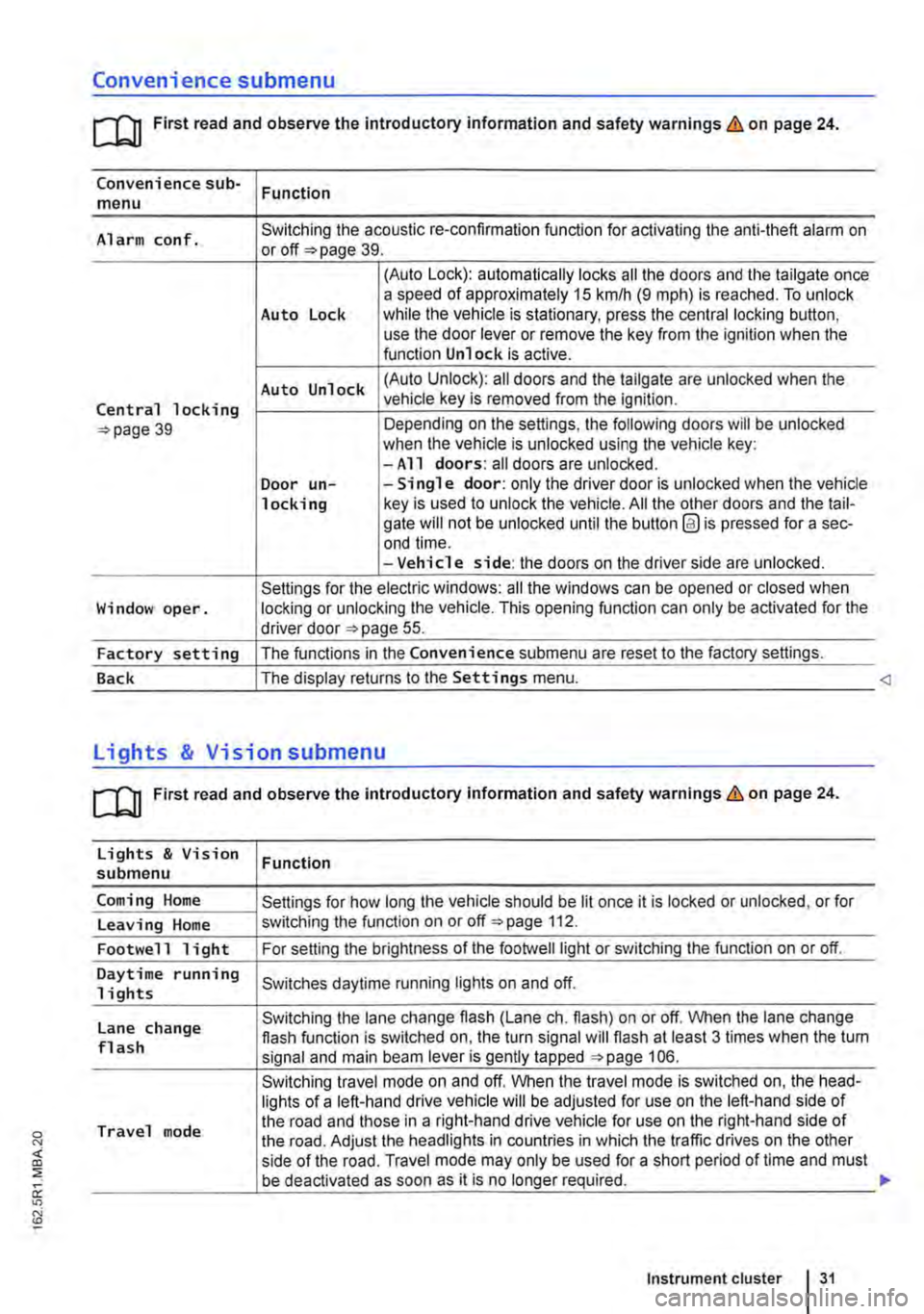
Convenience submenu
m First read and observe the introductory information and safety warnings & on page 24.
Convenience sub-menu Function
Alarm conf. Switching the acoustic re-confirmation function for activating the anti-theft alarm on or page 39.
(Auto Lock): automatically locks all the doors and the tailgate once a speed of approximately 15 km/h (9 m ph) is reached. To unlock Auto Lock while the vehicle is stationary, press the central locking button, use the door lever or remove the key from the ignition when the function Unlock is active.
Auto Unlock (Auto Unlock): all doors and the tailgate are unlocked when the
Central locking vehicle key is removed from the ignition.
39 Depending on the settings, the following doors will be unlocked when the vehicle is unlocked using the vehicle key: -All doors: all doors are unlocked. Door un--Single door: only the driver door is unlocked when the vehicle locking key is used to unlock the vehicle. All the other doors and the tail-gate will not be unlocked until the button @ is pressed for a sec-end time. -Vehicle side: the doors on the driver side are unlocked.
Settings for the electric windows: all the windows can be opened or closed when Window oper. locking or unlocking the vehicle. This opening function can only be activated for the driver door 55.
Factory setting The functions in the Convenience submenu are reset to the factory settings.
Back The display returns to the Settings menu.
[QJ First read and observe the introductory information and safety warnings & on page 24.
Lights & Vision Function submenu
Coming Home Settings for how long the vehicle should be lit once it is locked or unlocked, or for
Leaving Home switching the function on or off 112.
Footwell light For setting the brightness of the footwelllight or switching the function on or off.
Daytime running Switches daytime running lights on and off. 1 i ghts
Lane change Switching the lane change flash (Lane eh. flash) on or off. When the lane change flash function is switched on, the turn signal will flash at least 3 times when the tum flash signal and main beam lever is gently tapped 106.
Switching travel mode on and off. When the travel mode is switched on, the head-lights of a left-hand drive vehicle will be adjusted for use on the left-hand side of
Travel mode the road and those in a right-hand drive vehicle for use on the right-hand side of the road. Adjust the headlights in countries in which the traffic drives on the other side of the road. Travel mode may only be used for a short period of time and must be deactivated as soon as it is no longer required.
Instrument cluster 31
Page 36 of 486

Opening and closing
Vehicle key set
COl Introduction
This chapter contains information on the following subjects:
Vehicle key . . . . . . . . . . . . . . . . . . . . . . . . . . . . . 37 Indicator lamp in the remote control key . . . . . 38 Replacing the battery . . . . . . . . . . . . . 38 Synchronising the remote control key . . . . . . . 39
Additional Information and warnings:
• Settings in the Volkswagen information system 24
• Central locking system 39
• Starting and stopping the engine 257
• Consumer information 404
• Manual opening and closing 413
A DANGER .
Swallowing batteries with a diameter of 20 mm or other lithium batteries can result In severe or even fatal injuries within a very short period of time.
• Always keep the vehicle key, key ring with batteries, spare batteries, round cells and other batteries that are larger than 20 mm out of the reach of children.
• Call for medical help Immediately you sus-pect that someone has swallowed a battery.
36 Before tho journey
A WARNING
Careless or unsupervised use of the vehicle key can lead to accidents or injuries.
• Always take all vehicle keys with you ev-ery time you leave the vehicle. Children or third parties could lock the doors and tail-gate, start the engine or switch on the igni-tion and thus operate electrical equipment, such as the electric windows.
• Never leave children or people requiring assistance alone In the vehicle. They could become trapped In the vehicle in an emergen-cy and may not be able to get themselves to safety. For example, locked vehicles may be subjected to very high or very low tempera-tures, according to season. This can cause serious Injuries and Illness or fatalities, espe-cially for small children.
A WARNING
Improper use of the vehicle key could lead to the engine being switched off and the steer-Ing lock engaging, which would render the vehicle unsteerable.
• Never remove the vehicle key from the Ig-nition lock when the vehicle Is In motion.
• When folding out the key bit, ensure that lt Is folded out completely and engaged fully.
• Never attach heavy objects to the vehicle key. Attach only light objects, If at all, such as a key fob with up to five house keys. <
Page 37 of 486
Vehicle key
B D E
B7E:c2Ja
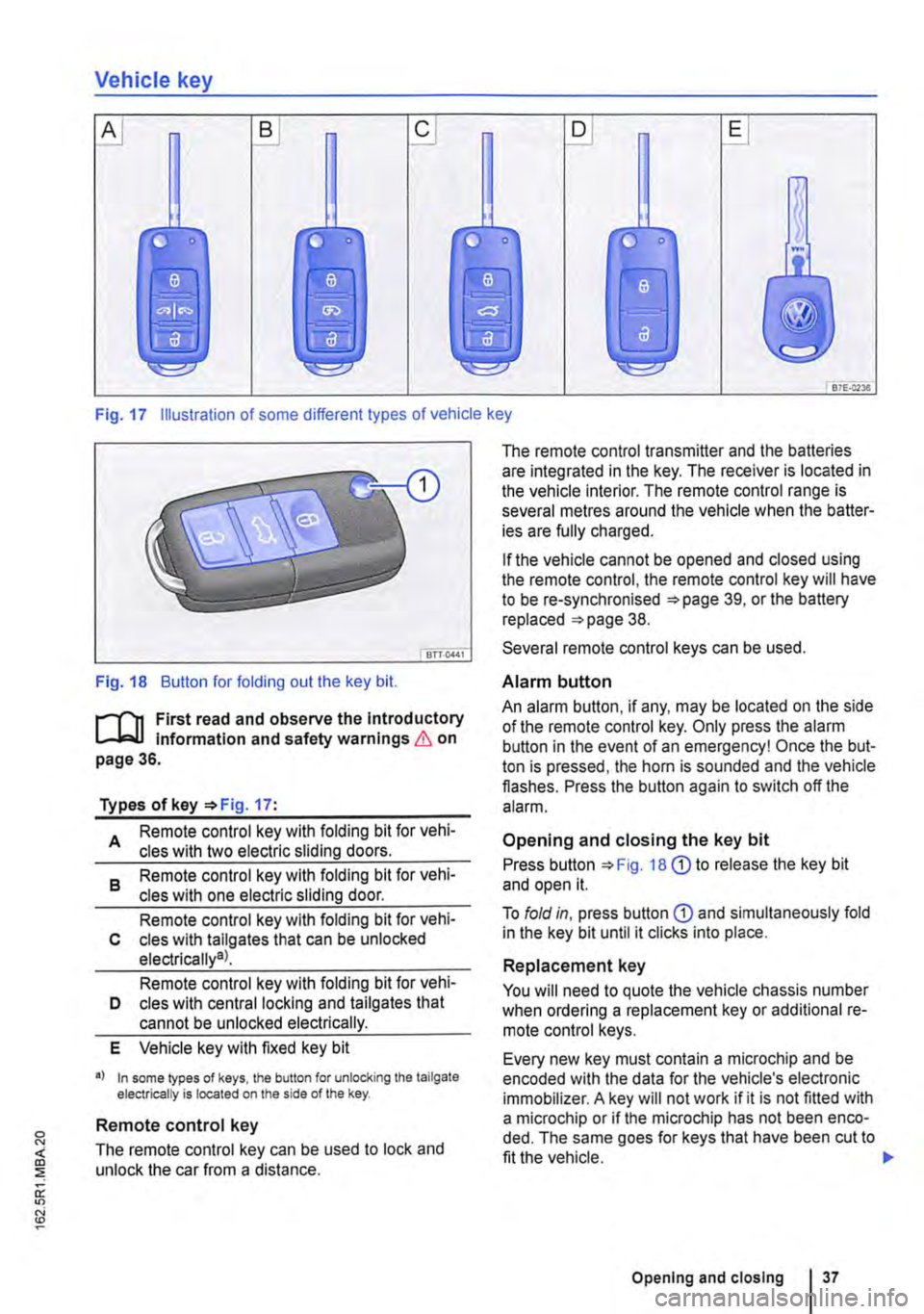
Fig. 17 Illustration of some different types of vehicle key
Fig. 18 Button for folding out the key bit.
r-('n First read and observe the Introductory L-J,..lJ Information and safety warnings & on page 36.
Types of key '*Fig. 17:
A Remote control key with folding bit for vehi-cles with two electric sliding doors.
8 Remote control key with folding bit for vehi-cles with one electric sliding door.
Remote control key with folding bit for vehi-c cles with tallgates that can be unlocked electrically9l.
Remote control key with folding bit for vehi-D cles with central locking and tailgates that cannot be unlocked electrically.
E Vehicle key with fixed key bit
•I In some lypes of keys, lhe button for unlocking the tailgate electrically is located on the side of the key.
Remote control key
The remote control key can be used to lock and unlock the car from a distance.
The remote control transmitter and the batteries are integrated in the key. The receiver is located in the vehicle interior. The remote control range is several metres around the vehicle when the batter-ies are fully charged.
If the vehicle cannot be opened and closed using the remote control, the remote control key will have to be re-synchronised '*page 39, or the battery replaced '*page 38.
Several remote control keys can be used.
Alarm button
An alarm button, if any, may be located on the side of the remote control key. Only press the alarm button in the event of an emergency! Once the but-ton is pressed, the horn is sounded and the vehicle flashes. Press the button again to switch off the alarm.
Opening and closing the key bit
Press button '*Fig. 18 G) to release the key bit and open it.
To fold in, press button G) and simultaneously fold in the key bit until it clicks into place.
Replacement key
You will need to quote the vehicle chassis number when ordering a replacement key or additional re-mote control keys.
Every new key must contain a microchip and be encoded with the data for the vehicle's electronic immobilizer. A key will not work if it is not fitted with a microchip or if the microchip has not been enco-ded. The same goes for keys that have been cut to fit the vehicle.
Opening and closing I 37
Page 38 of 486
New keys or replacement keys are available from Volkswagen Commercial Vehicle dealerships or from qualified workshops and authorised key serv-ices which are qualified to manufacture these vehi-cle keys.
New and replacement keys need to be synchron-ised before use =:-page 39.
CD
Every vehicle key contains electronic compo-nents. Protect the key from damage, moisture and excessive vibration.
m Press the buttons on the remote control key W only if the corresponding function is actually needed. Pressing a button when the function is not
required could lead to the vehicle being unlocked unintentionally or the alarm going off. This also ap-plies even when you are not within the effective range.
m The function of the remote control key can be W affected temporarily if there is more than one transmitter in the direct vicinity working on the same frequency (e.g. a mo-way radio or mobile telephone).
m Obstacles bemeen the remote control and W the vehicle, bad weather conditions and weak batteries can reduce the range of the remote con-trol.
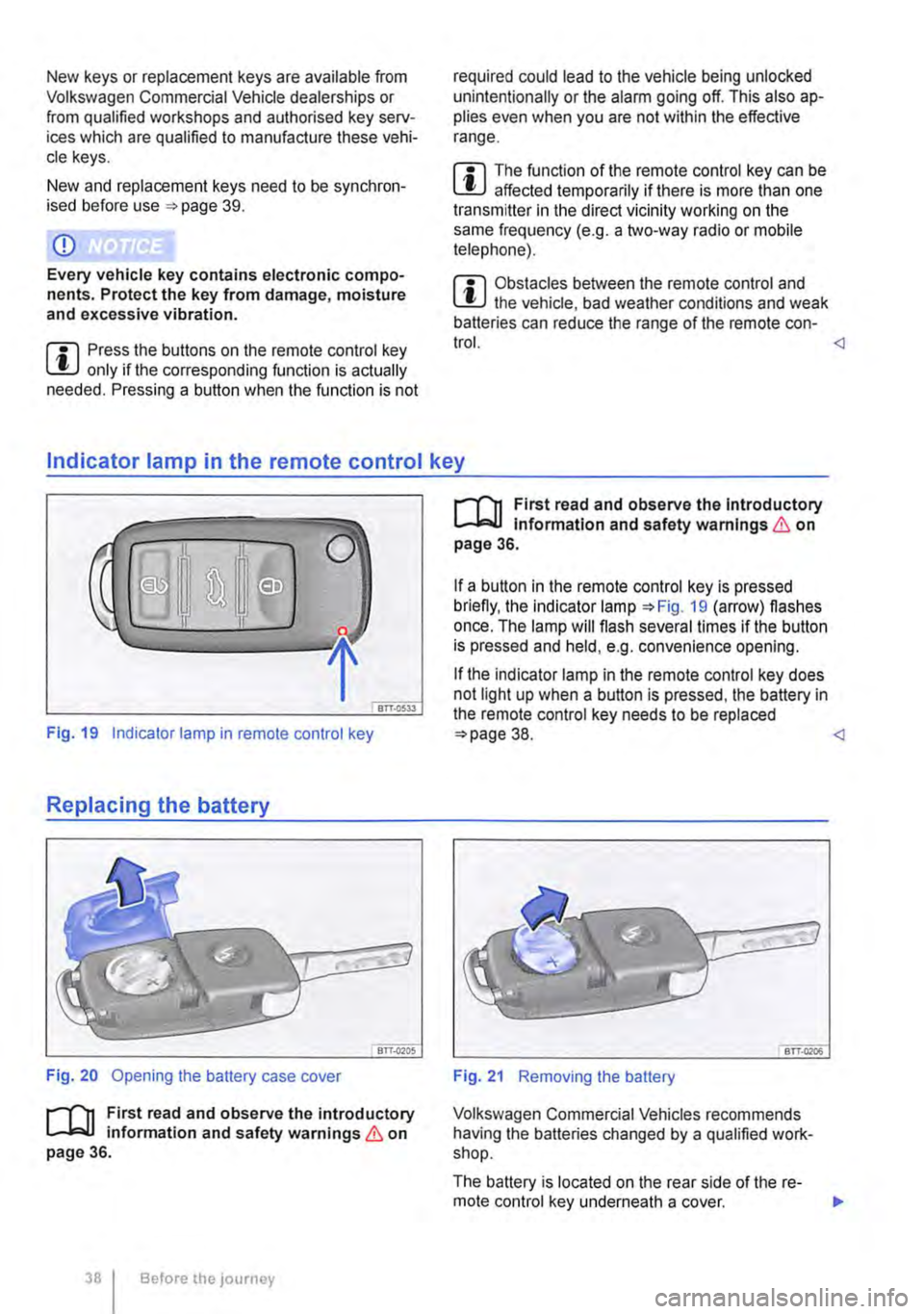
Fig. 19 Indicator lamp in remote control key
Replacing the battery
Fig. 20 Opening the battery case cover
r--('n First read and observe the introductory 1..-J=.U information and safety warnings & on page 36.
38 I Before the JOUrney
r--('n First read and observe the Introductory 1..-J=.U Information and safety warnings & on page 36.
If a button in the remote control key is pressed briefly, the indicator lamp =:-Fig. 19 (arrow) flashes once. The lamp will flash several times if the button is pressed and held, e.g. convenience opening.
If the indicator lamp in the remote control key does not light up when a button is pressed, the battery in the remote control key needs to be replaced =:>page 38.
Volkswagen Commercial Vehicles recommends having the batteries changed by a qualified work-shop.
The battery is located on the rear side of the re-mote control key underneath a cover. ..,.
Page 39 of 486
Replacing the battery
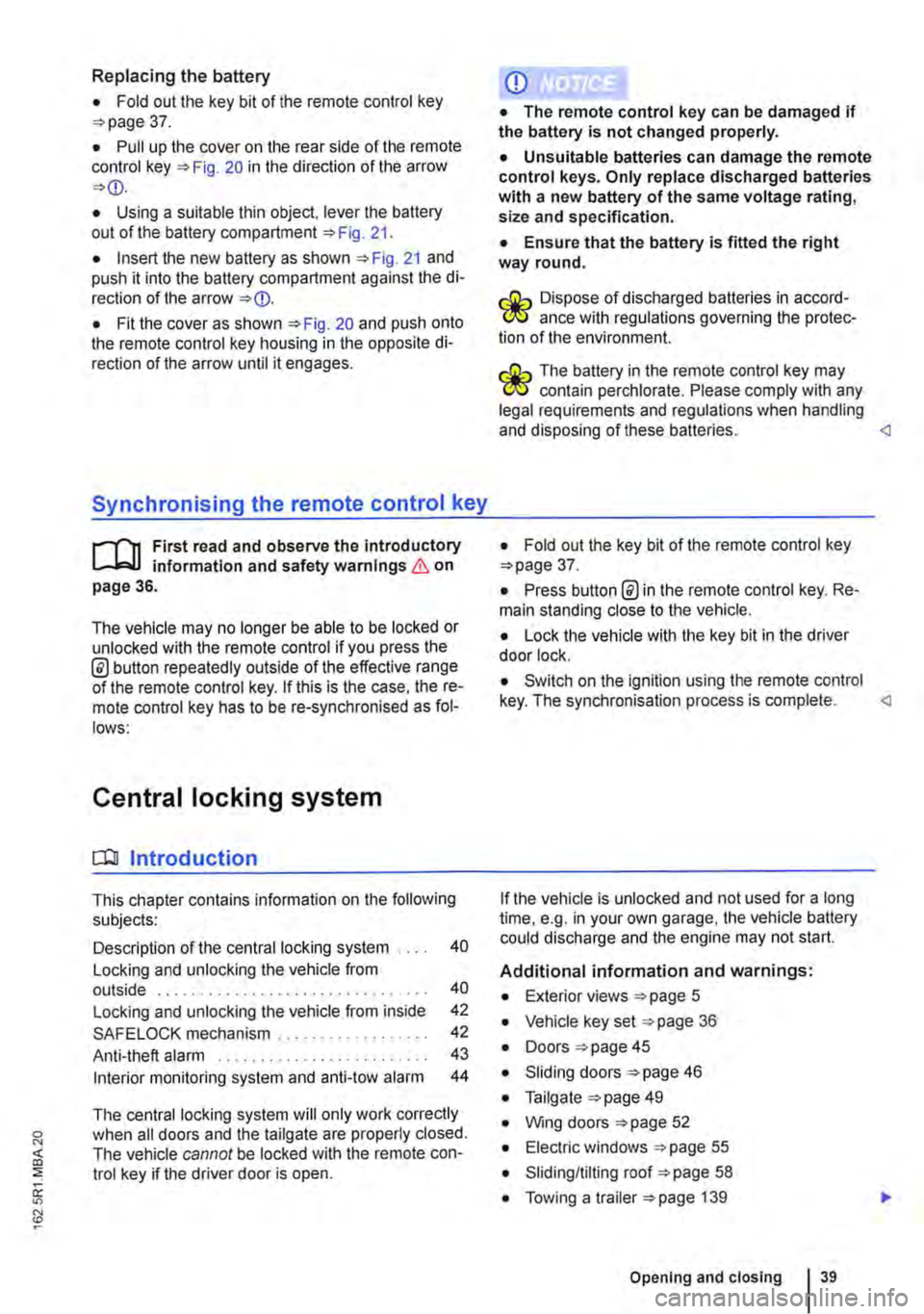
• Fold out the key bit of the remote control key =>page 37.
• Pull up the cover on the rear side of the remote control key =>Fig. 20 in the direction of the arrow =>
• Insert the new battery as shown =>Fig. 21 and push it into the battery compartment against the di-rection of the arrow =>
Synchronising the remote control key
,--m First read and observe the introductory L-.lo:.ll information and safety warnings & on page 36.
The vehicle may no longer be able to be locked or unlocked with the remote control if you press the @ button repeatedly outside of the effective range of the remote control key. If this is the case. the re-mote control key has to be re-synchronised as fol-lows:
Central locking system
CQ Introduction
This chapter contains information on the following subjects:
Description of the central locking system . . . . 40
Locking and unlocking the vehicle from outside . . . . . . . . . . . . . . . . . . . . . . . . . . . . . . . . 40
Locking and unlocking the vehicle from inside
SAFELOCK mechanism ................. .
Anti-theft alarm ........................ .
Interior monitoring system and anti-tow alarm
42
42
43
44
The central locking system will only work correctly when all doors and the tailgate are properly closed. The vehicle cannot be locked with the remote con-trol key if the driver door is open.
CD
• The remote control key can be damaged if the battery is not changed properly.
• Unsuitable batteries can damage the remote control keys. Only replace discharged batteries with a new battery of the same voltage rating, size and specification.
• Ensure that the battery Is fitted the right way round.
r:lib Dispose of discharged batteries in accord-W ance with regulations governing the protec-tion of the environment.
r:lib The battery in the remote control key may W contain perchlorate. Please comply with any legal requirements and regulations when handling and disposing of these batteries.
• Press button @in the remote control key. Re-main standing close to the vehicle.
• Lock the vehicle with the key bit in the driver door lock.
• Switch on the ignition using the remote control key. The synchronisation process is complete.
Additional information and warnings:
• Exterior views =>page 5
• Vehicle key set =>page 36
• Doors => page 45
• Sliding doors =>page 46
• Tailgate =>page 49
• Wing doors =>page 52
• Electric windows =>page 55
• Sliding/tilting roof =>page 58
• Towing a trailer =>page 139
Opening and closing 39
Page 40 of 486
• Cleaning and caring for the vehide exterior 380
• Manual opening and dosing 413
A WARNING
Improper use of the central locking system could lead to serious injury.
• The central locking system locks all doors. Locking the vehicle from the inside can prevent accidental opening of the doors and unauthorised persons from entering the vehicle. However, locked doors can delay as-sistance to passengers inside the vehicle in the event of an accident or emergency.
• Never leave children or people requiring assistance alone in the vehicle. All doors can be locked from the Inside using the central
6 WARNING (Continued)
locking button. This may mean that people lock themselves In the vehicle. People locked In the vehicle may be subjected to very high or very low temperatures.
• Temperatures Inside a locked vehicle may reach extremes of heat or cold, according to season. This can cause serious Injuries and Illness or fatalities, especially to small chil-dren.
• Never leave anyone Inside a locked vehi-cle. People In the vehicle could become trap-ped In an emergency and may not be able to get themselves to safety.
• Doors and the tailgate should therefore only be opened or closed when you are sure that nobody Is in their path.
Description of the central locking system
r"'f"n First read and observe the Introductory L-Jc.l.l Information and safety warnings & on page 39.
The central locking system enables you to lock and unlock all the doors and the tailgate or wing doors from one point.
• From outside the vehicle with the remote con-trol key.
• From inside the vehicle with the central locking button 42.
• Mechanically with the key in the driver door lock cylinder.
The doors and the tailgate can be locked or un-locked manually if the remote control key or central locking system fails. <1
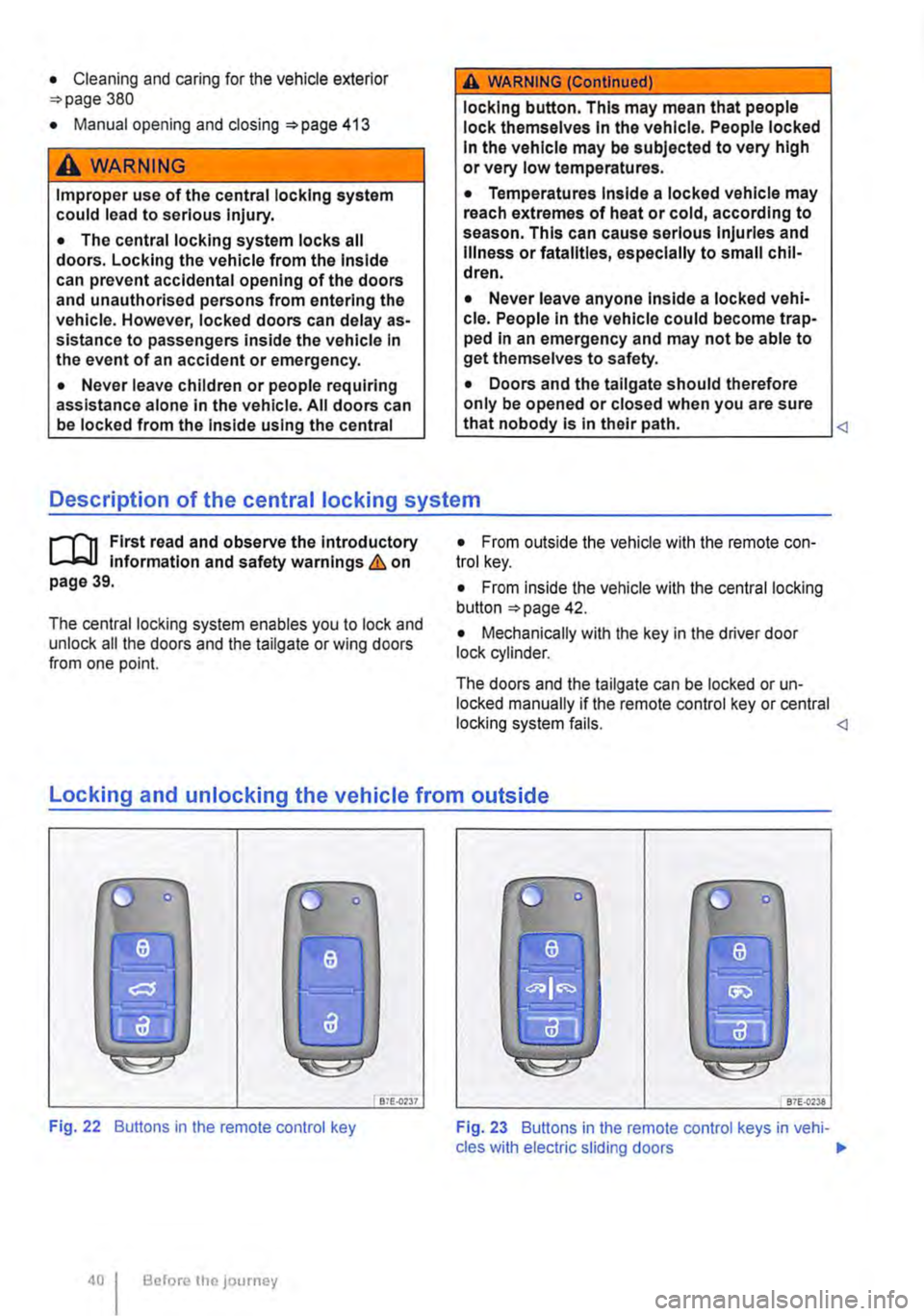
locking and unlocking the vehicle from outside
liJ
Fig. 22 Buttons in the remote control key
Before the JOurney
Bi£..0237 87E-{)'238
Fig. 23 Buttons in the remote control keys in vehi-cles with electric sliding doors .,.