gearbox VOLKSWAGEN TRANSPORTER 2015 Owner´s Manual
[x] Cancel search | Manufacturer: VOLKSWAGEN, Model Year: 2015, Model line: TRANSPORTER, Model: VOLKSWAGEN TRANSPORTER 2015Pages: 486, PDF Size: 72.17 MB
Page 283 of 486
A WARNING
Failure to observe illuminated warning lamps and text messages can lead to your vehicle breaking down in traffic, and can cause acci-dent and serious injury.
• Never ignore any illuminated warning lamps or text messages.
Start/stop system
Fig. 227 In the centre console: button for the start/stop system.
r--flt First read and observe the introductory l-J,::JJ information and safety warnings & on page 282.
When the start/stop mode is active, the
engine is switched off automatically
whenever the vehicle is stationary. When
required, the engine restarts automati-
cally.
The start/stop mode is activated automatically each time the ignition is switched on. The instru-ment cluster display will show information about the current status.
Always switch off the start/stop system manually when driving through water.
Start/stop mode on vehicles with a manual gearbox
• When the vehicle is stationary, disengage the gear and release the clutch pedal. The engine is stopped.
• Depress the clutch pedal to restart the engine.
A WARNING (Continued)
• Stop the vehicle as soon as possible and when safe to do so.
CD
Failure to observe illuminated indicator lamps and text messages can lead to your vehicle be-ing damaged.
• When the vehicle is stationary, press and hold the brake pedal. The engine is stopped.
• To restart the engine, remove your foot from the brake pedal or depress the accelerator in selector lever position P.
Important preconditions for automatic engine switch-off
• The driver is wearing their seat belt.
• All vehicle doors have been closed.
• The bonnet is closed.
• A minimum engine temperature has been reached and the internal engine conditions allow switch off.
• The vehicle has been moved since the engine was last switched off.
• The temperature set in the interior deviates too greatly from the ambient temperature.
• On vehicles with Climatronic: The temperature control is set to around +22oC (+ 72°F).
• The defrost function of the air conditioning sys-tem is not switched on.
• The charging state of the vehicle battery is suf-ficient.
• The temperature of the vehicle battery is not too low or too high.
• The vehicle is not on a steep incline.
• The steering is not turned greatly.
• Reverse gear is not engaged.
Conditions for an automatic restart
The engine can start automatically under the fol-lowing conditions: IIJ>
Driver assist systems 283
Page 284 of 486
• On vehicles with Climatronic: if the temperature inside the vehicle substantially increases or de-creases.
• When the vehicle starts rolling or brake support is required.
• If the voltage of the vehicle battery falls.
Conditions that necessitate a manual key start
The engine has to be started manually with the ve-hicle key in the following conditions:
• If the driver unfastens their seat belt.
• If a vehicle door is opened.
• If the bonnet is opened.
Switching the start/stop system on and off manually
• Press the @ button in the centre console 227.
• If the start/stop system has been deactivated, the indicator lamp in the button lights up.
The engine will start immediately if the vehicle Is In stop mode when the system is switched off man-ually with the @ button.
Hill Hold Assist
r--T'n First read and observe the Introductory L-I=JJ information and safety warnings & on page 282.
A WARNING
The brake servo and the power steering will not function If the engine Is switched off.
• Never allow the vehicle to roll if the engine is switched off.
• The start/stop system must be switched off if work Is to be carried out In the engine compartment.
CD
If the start/stop system Is used in very high outside temperatures over a long period, the vehicle battery can be damaged.
m In some cases. it will be necessary to restart L!J the engine manually with the vehicle key. Fol-low any corresponding messages on the instru-ment cluster display.
m At low speeds, the engine can be started L!J again if it has stalled by immediately pressing the clutch pedal.
holds the vehicle when pulling away on
an incline.
The Hill Hold Assist function is automatically activated if the following conditions are met
Points 1 to 3 must be fulfilled at the same time·
Manual gearbox DSG® dual clutch gearbox
1. On an incline, the stationary vehicle must be held in position with the footbrake until the vehicle starts moving.
2. The engine is running smoothly.
3. The driver door is closed.
4. Fully depress the clutch pedal and move the gear stick to the first gear position if you want to The driving mode R, D or S has been selected. drive forwards up a hill or to the R position if you want to reverse up a hill.
In order to start moving, remove your foot from To start moving, remove your foot from the brake the brake pedal, then simultaneously release the pedal and press the accelerator immediately. clutch pedal (the clutch engages) and press the The brake will gradually be released as the accelerator. The brake will gradually be re-vehicle pulls away. leased as the clutch Is engaged.
284 I While driving
Page 285 of 486
The Hill Hold Assist function will be deactivated immediately:
Manual gearbox I DSG® dual clutch gearbox
1. As soon as one of the conditions indicated on page 284, The Hill Hold Assist function is automati-cally activated if the following conditions are met is not fulfilled.
2. If the vehicle does not pull away within 2 seconds.
3. If the engine is not running smoothly or there is an engine fault.
4. If the engine is switched off or has stalled. I If the engine is switched off.
Hill Descent Assist
Fig. 228 In the centre console: button for switch-ing the Hill Descent Assist on and off.
l"'""'('n First read and observe the Introductory L-W.I Information and safety warnings & on page 282.
The Hill Descent Assist system supports
the driver when driving down a steep in-
cline by actively braking the vehicle.
The Hill Descent Assist reduces the engine speed and brakes actively so that the vehicle travels con-stantly at walking speed =>&.
The requirement for regulation is, among other things, that the ground allows enough grip. The Hill Descent Assist system cannot fulfil its function when driving down an icy or slippery slope.
Hill Descent Assist is regulating
• If the Hill Descent Assist is switched on using the button and the indicator lamp lights up.
• AND: the speed is less than 30 km/h (19 mph).
• AND: the gradient is at least 10%.
• AND: if the accelerator and brake are not de-pressed.
• AND: if the engine is running.
Regulation is stopped if the vehicle is accelerated or braked by the driver during regulation. The regu-lation restarts once the requirements are met again.
Hill Descent Assist does not regulate
• If the gradient is less than 10%.
• OR: The speed is greater than 30 km/h (19 mph).
• OR: If the driver brakes or accelerates.
A WARNING
Always be prepared to brake the vehicle. Ac-cidents and Injuries could occur if this is not ensured.
• The Hill Descent Assist system is only a support function and may not be able to brake the vehicle sufficiently In all situations when driving downhill.
• The vehicle may accelerate despite the Hill Descent Assist system.
• To switch the Hill Descent Assist on, press the @=>Fig. 228 button in the centre console at speeds under approximately 30 km/h (19 mph). The indicator in the instrument cluster dis-play lights up. The indicator lamp flashes when the Hill Descent Assist system is applying the brake.
r::l The Hill Descent Assist system also works if W you reverse down a slope.
Driver assist systems 285
Page 288 of 486
CD
• In some cases water and ice on the ultra-sound sensors could be registered as an ob-struction.
• Any equipment that has been retrofitted to the vehicle, e.g. bicycle carriers or number plate holders, can prevent the ParkPIIot from fu nctlonlng properly.
m Volkswagen Commercial Vehicles recom-L!J mends that drivers practise using the ParkPi-lot in a traffic-calmed area or car park to allow them to familiarise themselves with the system and its functions.
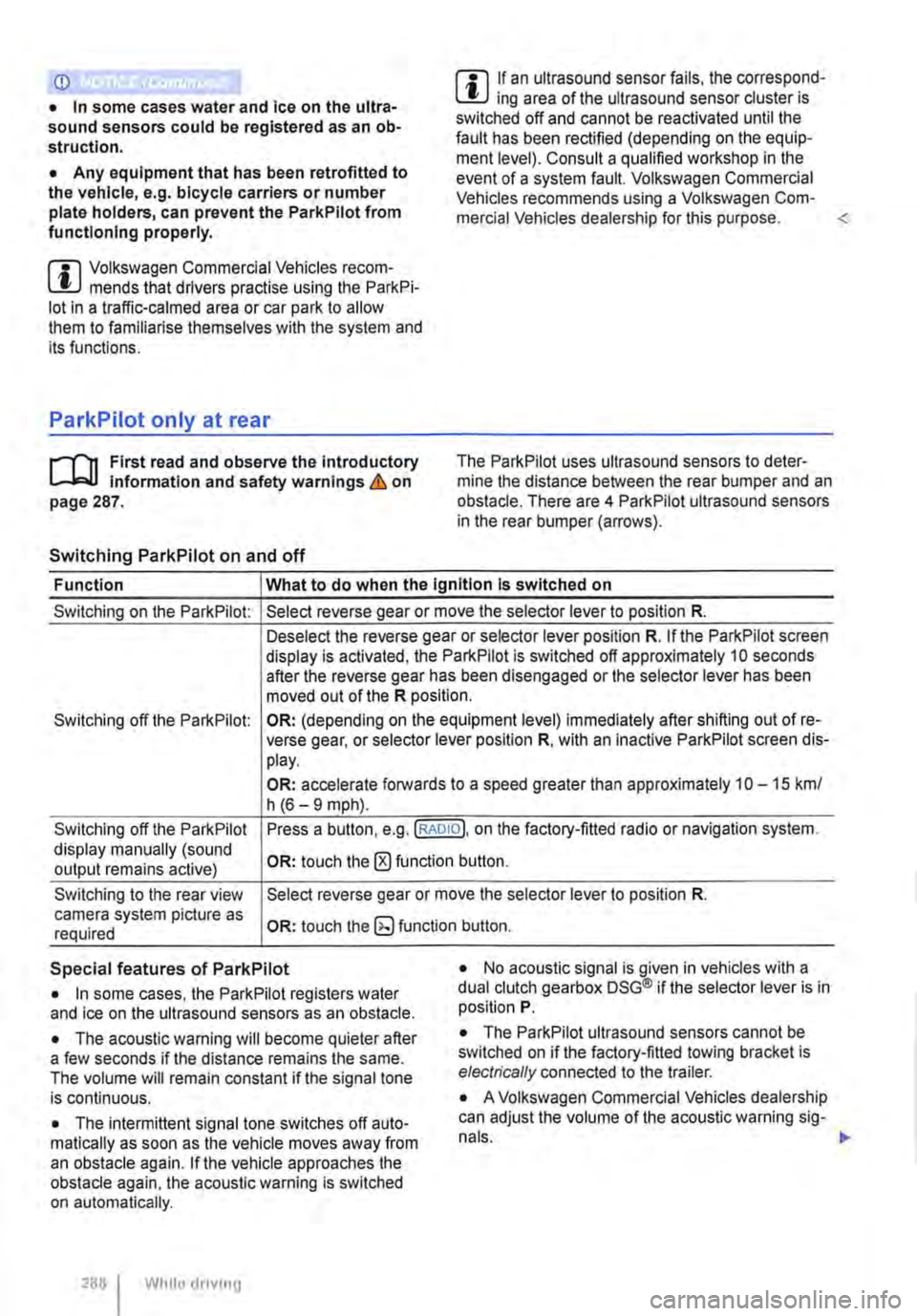
ParkPilot only at rear
,....-m First read and observe the introductory L-J.:.I.I Information and safety warnings & on page 287.
Switching ParkPilot on and off
m If an ultrasound sensor fails, the correspond-L!J ing area of the ultrasound sensor cluster is switched off and cannot be reactivated until the fault has been rectified (depending on the equip-ment level). Consult a qualified workshop in the event of a system fault. Volkswagen Commercial Vehicles recommends using a Volkswagen Com-mercial Vehicles dealership for this purpose.
Function What to do when the Ignition Is switched on
Switching on the ParkPilot:
Switching off the ParkPilot:
Switching off the ParkPilot display manually (sound output remains active)
Switching to the rear view camera system picture as required
Select reverse gear or move the selector lever to position R.
Deselect the reverse gear or selector lever position R. If the ParkPilot screen display is activated, the ParkPilot is switched off approximately 10 seconds after the reverse gear has been disengaged or the selector lever has been moved out of the R position.
OR: (depending on the equipment level) immediately after shifting out of re-verse gear, or selector lever position R, with an inactive ParkPilot screen dis-play.
OR: accelerate forwards to a speed greater than approximately 1 0-15 km/ h (6-9 mph).
Press a button, e.g.(RADIOl. on the factory-fitted radio or navigation system.
OR: touch the 0 function button.
Select reverse gear or move the selector lever to position R.
OR: touch the button.
Special features of ParkPilot • No acoustic signal is given in vehicles with a dual clutch gearbox DSG® if the selector lever is in position P. • In some cases, the ParkPilot registers water and ice on the ultrasound sensors as an obstacle.
• The acoustic warning will become quieter after a few seconds if the distance remains the same. The volume will remain constant if the signal tone is continuous.
• The intermittent signal tone switches off auto-matically as soon as the vehicle moves away from an obstacle again. If the vehicle approaches the obstacle again, the acoustic warning is switched on automatically.
288 I While driving
• The ParkPilot ultrasound sensors cannot be switched on if the factory-fitted towing bracket is electrically connected to the trailer.
• A Volkswagen Commercial Vehicles dealership can adjust the volume of the acoustic warning sig-
Page 290 of 486
Special features of ParkPilot
• In some cases, the ParkPilot registers water and ice on the ultrasound sensors as an obstacle.
• The acoustic warning will become quieter after a few seconds if the distance remains the same. The volume will remain constant if the signal tone is continuous.
• The intermittent signal tone switches off auto-matically as soon as the vehicle moves away from an obstacle again. If the vehicle approaches the obstade again, the acoustic warning is switched on automatically.
• No acoustic signal is given in vehicles with a dual clutch gearbox DSG® if the selector lever is in position P.
ParkPilot signal tones and displays
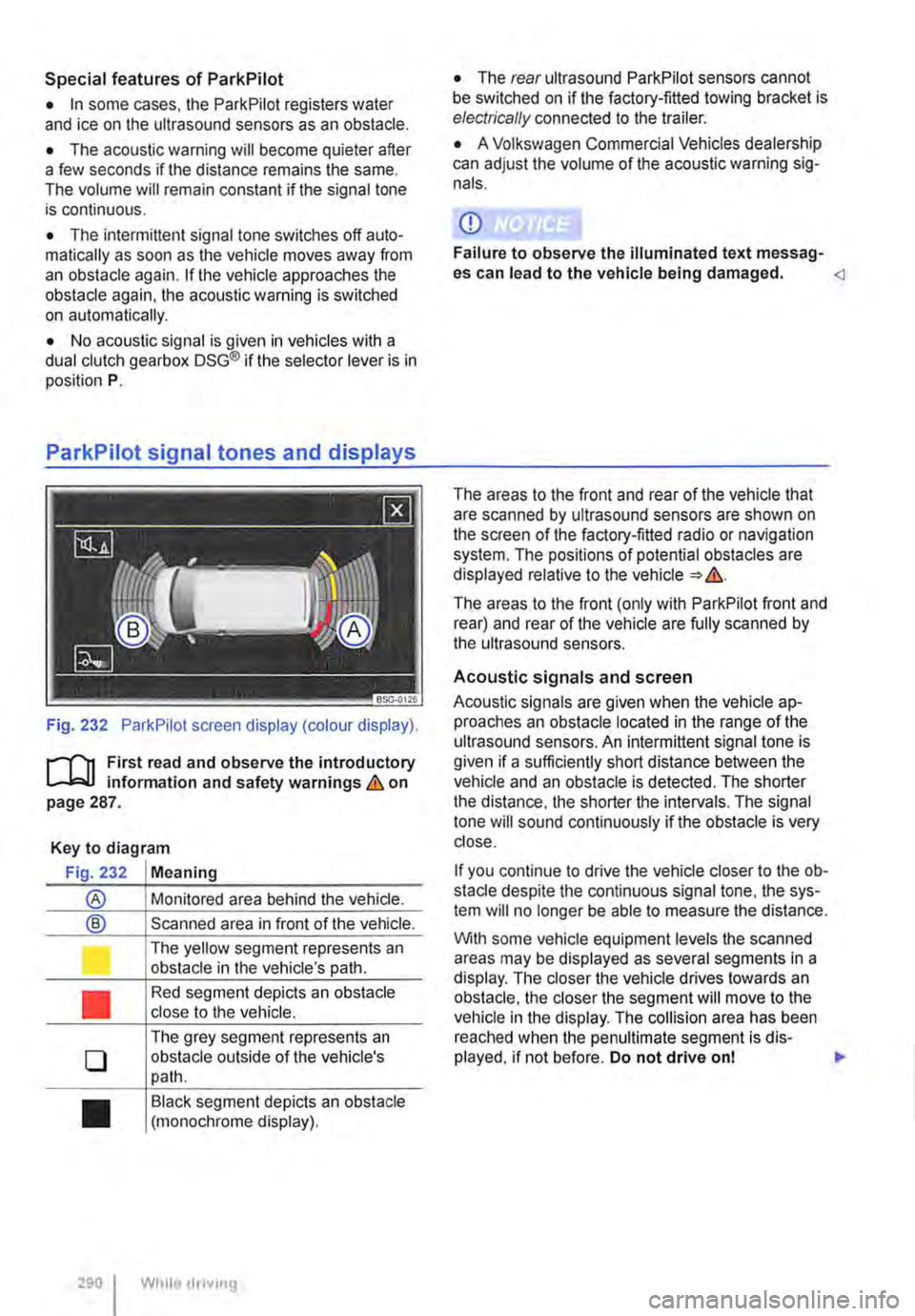
Fig. 232 ParkPilot screen display (colour display).
r--f"'n First read and observe the introductory L-.I=.U Information and safety warnings & on page 287.
Key to diagram
Fig. 232 Meaning
® Monitored area behind the vehide.
® Scanned area in front of the vehicle.
l J
•
0
•
290 I
The yellow segment represents an obstacle in the vehicle's path.
Red segment depicts an obstacle close to the vehicle.
The grey segment represents an obstacle outside of the vehicle's path.
Black segment depicts an obstacle (monochrome display).
While droving
• The rear ultrasound ParkPilot sensors cannot be switched on if the factory-fitted towing bracket is electrically connected to the trailer.
• A Volkswagen Commercial Vehicles dealership can adjust the volume of the acoustic warning sig-nals.
CD
Failure to observe the illuminated text messag-es can lead to the vehicle being damaged.
The areas to the front (only with ParkPilot front and rear) and rear of the vehicle are fully scanned by the ultrasound sensors.
Acoustic signals and screen
Acoustic signals are given when the vehicle ap-proaches an obstacle located in the range of the ultrasound sensors. An intermittent signal tone is given if a sufficiently short distance between the vehicle and an obstacle is detected. The shorter the distance, the shorter the intervals. The signal tone will sound continuously if the obstacle is very close.
If you continue to drive the vehide closer to the ob-sta de despite the continuous signal tone, the sys-tem will no longer be able to measure the distance.
With some vehicle equipment levels the scanned areas may be displayed as several segments in a display. The closer the vehicle drives lowards an obstacle, the closer the segment will move to the vehicle in the display. The collision area has been reached when the penultimate segment is dis-played, if not before. Do not drive onl .,..
Page 298 of 486
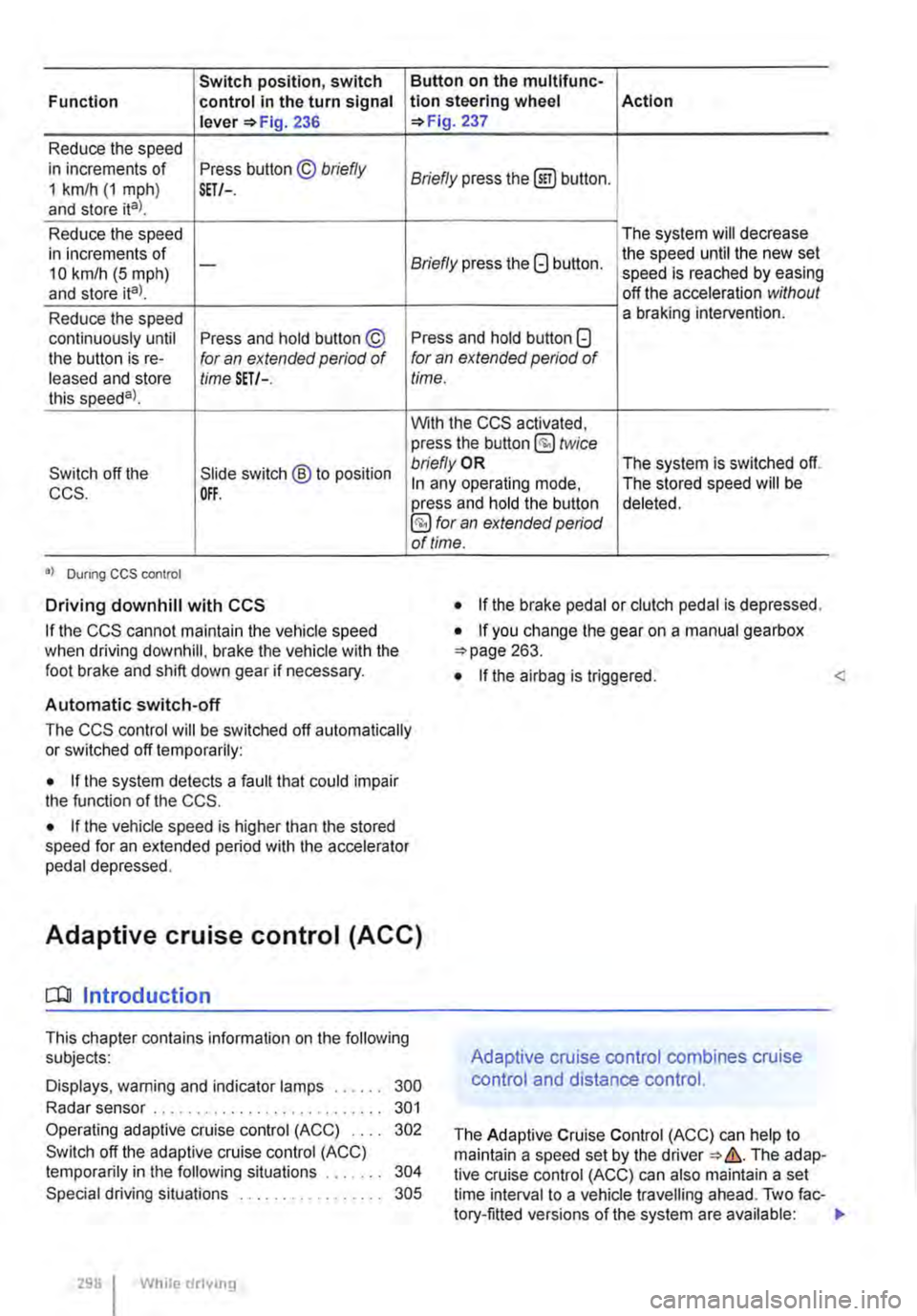
Switch position, switch Function control in the turn signal lever 236
Reduce the speed in increments of Press button © briefly 1 km/h (1 mph) and store ital. SET/-.
Reduce the speed in increments of 10 km/h (5 mph) -
and store ita).
Reduce the speed continuously until Press and hold button © the button is re-for an extended period of leased and store time SET/-. this speeda)_
Switch off the Slide switch ® to position CCS. OFF.
•I Dunng CCS control
Driving downhill with CCS
If the CCS cannot maintain the vehicle speed when driving downhill, brake the vehicle with the foot brake and shift down gear if necessary.
Automatic switch-off
Button on the multlfunc-tion steering wheel Action 237
Briefly press the (ili) button.
The system will decrease
Briefly press the G button. the speed until the new set speed is reached by easing off the acceleration without a braking intervention.
Press and hold button G for an extended period of time.
With the CCS activated, press the button @ twice bn'eflyOR The system is switched off. In any operating mode, The stored speed will be press and hold the button deleted. §) for an extended period of time.
• If the brake pedal or clutch pedal is depressed.
• If you change the gear on a manual gearbox 263.
• If the airbag is triggered. <
The CCS control will be switched off automatically or switched off temporarily:
• If the system detects a fault that could impair the function of the CCS.
• If the vehicle speed is higher than the stored speed for an extended period with the accelerator pedal depressed.
Adaptive cruise control (ACC)
dJ Introduction
This chapter contains information on the following subjects:
Displays, warning and indicator lamps . . . . . . 300
Radar sensor . . . . . . . . . . . . . . . . . . . . . . . . . . . 301
Operating adaptive cruise control (ACC) 302
Switch off the adaptive cruise control (ACC) temporarily in the following situations . . . . . 304
Special driving situations . . . . . . . . . . . . 305
298 I While drivmg
Adaptive cruise control combines cruise
control and distance control.
The Adaptive Cruise Control (ACC) can help to maintain a speed set by the The adap-tive cruise control (ACC) can also maintain a set time interval to a vehicle travelling ahead. Two fac-tory-fitted versions of the system are available: .,
Page 299 of 486
• System version 1 functions at speeds of 30-160 km/h (20 mph -100 mph).
• System version 2 functions at speeds of 30-210 km/h (20 m ph-130 m ph).
In vehicles with a dual clutch gearbox DSG®, the adaptive cruise control (ACC) can brake the vehi-cle until it comes to a complete standstill behind a vehicle in front that is stopping.
Driver prompt to take over control
There are system-specific limits on the adaptive cruise control (ACC) when driving. This means that the driver may have to control the speed and dis-tance between the vehicle and other vehicles in certain circumstances.
The driver is told to take control of the vehicle via a message on the instrument cluster display prompts a braking intervention, and a signal tone =<>page 300.
Additional information and warnings:
• Exterior views =<>page 5
• Volkswagen information system =<>page 24
• Cruise control system (CCS) =<>page 295
• Area monitoring system (Front Assist) =<>page 307
• Accessories, modifications, repairs and renewal of parts =<>page 394
A WARNING
The intelligent technology used in the adap-tive cruise control (ACC) cannot overcome the laws of physics, and functions only within the limits of the system. Careless or uninten-tional use of the adaptive cruise control (ACC) can cause accidents and lead to seri-ous injury. The system Is not a substitute for the full concentration of the driver.
• Adapt your speed and distance from the vehicles ahead to suit visibility, weather, road and traffic conditions.
• Do not use the adaptive cruise control (ACC) in poor visibility, on steep or winding roads, or on slippery road surfaces e.g. on snow, ice, wet roads, loose chippings or floo-ded roads.
A WARNING (Continued)
• Never use the adaptive cruise control (ACC) off-road or on unsurfaced roads. The adaptive cruise control (ACC) is designed for use on surfaced roads only.
• The adaptive cruise control (ACC) does not react to stationary obstacles, e.g. the tail end of a traffic jam, a vehicle that has broken down, or vehicles waiting at traffic lights.
• The adaptive cruise control (ACC) does not react to persons, animals or vehicles crossing or approaching in the same lane.
• If the adaptive cruise control (ACC) speed reduction is insufficient, you should brake the vehicle by depressing the foot brake.
• Brake the vehicle by depressing the brake if the vehicle rolls inadvertently on after the driver has been prompted to take control of the vehicle.
• If the instrument cluster display indicates that the driver should take control of the vehi-cle, you have to regulate the distance your-self.
• The driver must be prepared to take con-trol of the vehicle (by accelerating or braking) at all times.
CD
Switch off the adaptive cruise control (ACC) if you suspect that the radar sensor has been damaged. This can help to prevent secondary damage. Have the radar sensor realigned.
• Repair work on the radar sensor will require special knowledge and tools. Volkswagen rec-ommends using a Volkswagen dealership for this purpose.
m If the adaptive cruise control (ACC) does not L!J function as described in this chapter, do not use it, and have the system checked by a qualified workshop. Volkswagen recommends using a Voikswagen dealership for this purpose.
m The maximum vehicle speed when the adap-L!J live cruise control (ACC) is active is limited to either 160 km/h (1 00 m ph) or 210 km/h (130 m ph). depending on the system version.
m If the adaptive cruise control (ACC) is active, L!J unfamiliar noises may be heard during the automatic braking procedure. These are caused by the braking system.
Page 302 of 486
CD CD
• Remove snow with a brush, and remove Ice • Repair work on the radar sensor will require special knowledge and tools. Volkswagen rec-ommends using a Volkswagen dealership for this purpose.
preferably with a solvent-free de-leer spray.
SSG-0047
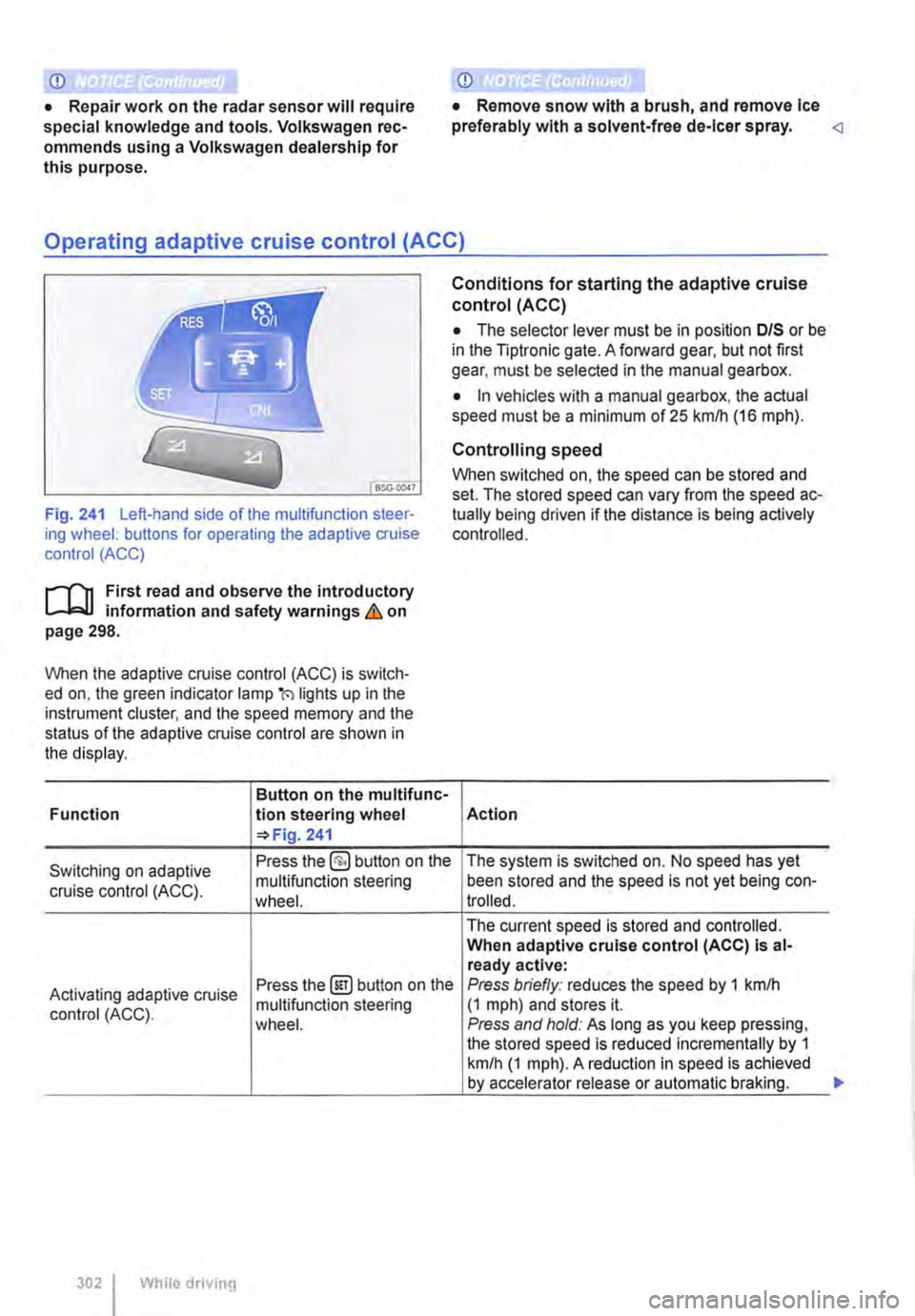
Fig. 241 Left-hand side of the multifunction steer-ing wheel: buttons for operating the adaptive cruise control (ACC)
1"1'11 First read and observe the introductory L-I=J.I information and safety warnings Lb. on page 298.
When the adaptive cruise control (ACC) is switch-ed on, the green indicator lamp(') lights up in the instrument cluster, and the speed memory and the status of the adaptive cruise control are shown in the display.
Button on the multifunc-Function lion steering wheel 241
Conditions for starting the adaptive cruise control (ACC)
• The selector lever must be in position D/S or be in the Tiptronic gate. A forward gear, but not first gear, must be selected in the manual gearbox.
• In vehicles with a manual gearbox, the actual speed must be a minimum of 25 kmlh (16 m ph).
Controlling speed
When switched on, the speed can be stored and set. The stored speed can vary from the speed ac-tually being driven if the distance is being actively controlled.
Action
Switching on adaptive Press the §) button on the The system is switched on. No speed has yet
cruise control (ACC). multifunction steering been stored and the speed is not yet being con-wheel. trolled.
The current speed is stored and controlled. When adaptive cruise control (ACC) Is al-ready active:
Activating adaptive cruise Press the@!) button on the Press briefly: reduces the speed by 1 kmlh
control (ACC). multifunction steering (1 mph) and stores it. wheel. Press and hold: As long as you keep pressing, the stored speed is reduced incrementally by 1 km/h (1 mph). A reduction in speed is achieved by accelerator release or automatic braking.
302 While driving
...
Page 304 of 486
When the highest level is reached, the distance re-turns to the lowest level when the button is press-ed again.
The distance level can also be set using the Q or Q buttons on the multifunction steering wheel im-mediately after the(!) button on the multifunction steering Fig. 241 has been pressed.
Select the Settings menu, Assist systems submenu, ACC to set the distance to be used when the ACC is switched on 24.
Setting the gearbox programme
The acceleration response can be influenced by the gearbox programme selected. The programme can be set Using the ACC option in the Assistant submenu in the Settings menu. The following gearbox programmes can be selected:
• Normal
• Sport
• Eco
The following conditions can prevent the adaptive cruise control (ACC) from reacting:
• If the accelerator is depressed.
• If no gear is selected.
• If the ESC is taking corrective action.
• If there is a fault in several brake lights on the vehicle or on a trailer with an electrical connection to the vehicle.
• If the vehicle is reversing.
• System version 1: if the vehicle is travelling faster than approximately 160 km/h (1 00 m ph).
• System version 2: if the vehicle is travelling faster than approximately 210 km/h (130 mph).
A WARNING
If you do not maintain the minimum distance to a vehicle In front and the difference In speed between the two vehicles is so great that the braking action of the adaptive cruise control (ACC) is insufficient, you are In dan-ger of colliding with the vehicle in front. You should reduce the vehicle speed immediately with the foot brake.
• The adaptive cruise control (ACC) may not be able to detect all driving situations cor-rectly.
• Leaving your foot on the accelerator means that the adaptive cruise control (ACC) will not brake automatically. This is because manual acceleration overrides the system.
• You should always be prepared to brake the vehicle yourself.
• Observe country-specific regulations re-garding the minimum distance.
m The set speed will be deleted if the ignition or L!.J the adaptive cruise control (ACC) is switched off.
m The adaptive cruise control (ACC) is auto-L!.J matically deactivated when the traction con-trol system (TCS) is deactivated.
m In vehicles with a start/stop system, the en-L!.J gine is switched off automatically during the stationary phase of adaptive cruise control (ACC) and is then restarted for moving off.
situations
1""111 First read and observe the introductory L-J,:.IJ Information and safety warnings & on page 298.
The adaptive cruise control (ACC) should be switched off in the following situations due to sys-tem limitations &:
304 I While driving
• When turning off roads, driving around round-abouts, narrow curves, joining motorways, exiting from motorways or driving through road works, to prevent the vehicle from unnecessarily accelerat-ing to the set speed in these situations
• When driving through a tunnel as this situation could impair the system function.
• On roads with more than one lane, if other vehi-cles are driving more slowly in the fast lane. The slower vehicles In the other lane would be overtak-en from the right side in this case.
• In heavy rain, snow or spray as vehicles travel-ling ahead cannot be monitored sufficiently or maybe cannot be monitored at all. .,.
Page 305 of 486
A WARNING
Failure to switch off the adaptive cruise con-trol (ACC) in the above-mentioned situations can cause accidents and result in serious in-juries.
Special driving situations
A WARNING (Continued)
• Always switch off the adaptive cruise con-trol (ACC) in critical driving situations.
m Failure to switch off the adaptive cruise con-L!:..J trot (ACC) in the above-mentioned situations can cause a violation of legal requirements.
( B>G.0028
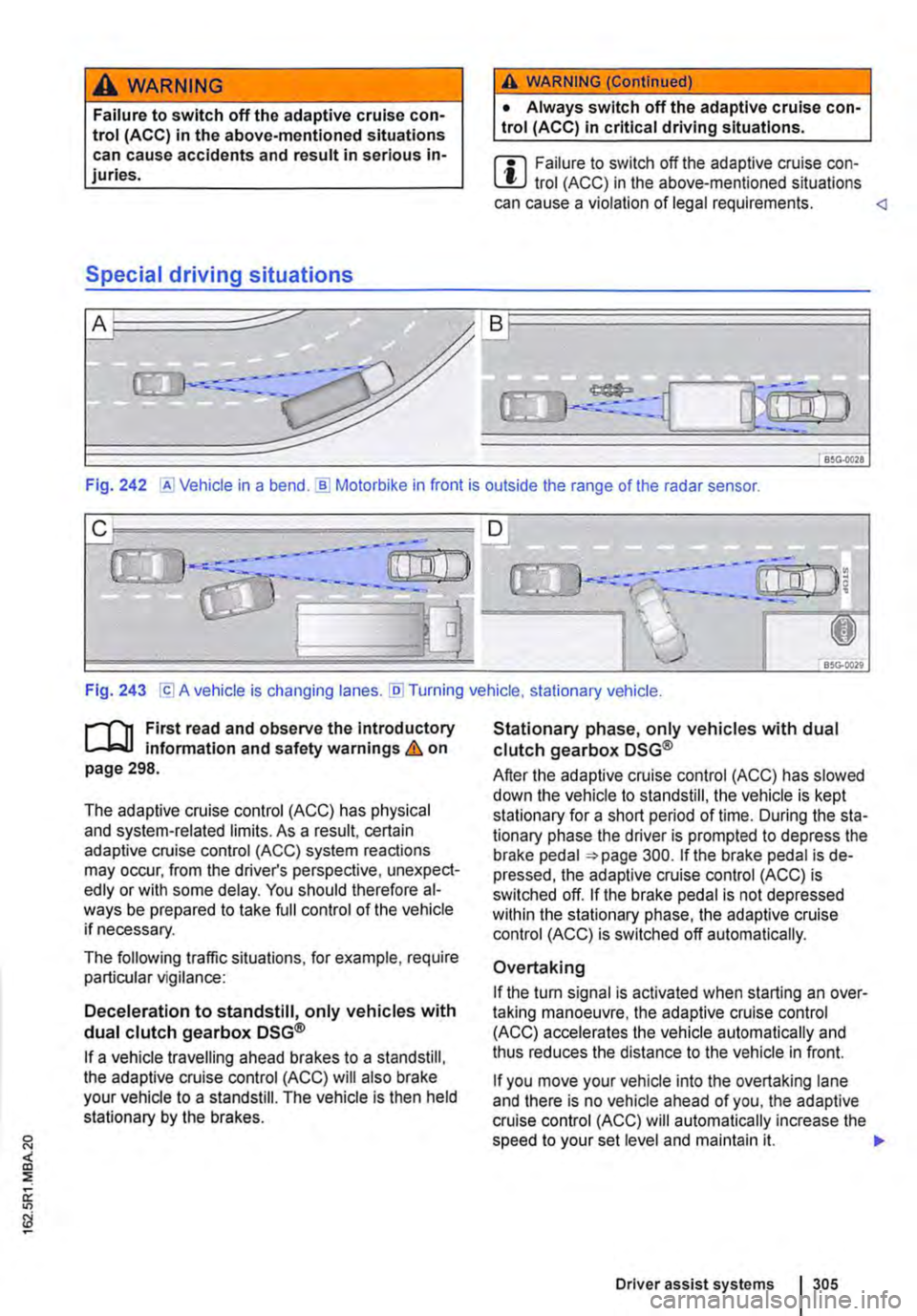
Fig. 242 @Vehicle in a bend.]) Motorbike in front is outside the range of the radar sensor.
Fig. 243 [Cl A vehicle is changing lanes. [li] Turning vehicle, stationary vehicle.
n"'n First read and observe the introductory L-J,:,.lJ information and safety warnings & on page 298.
The adaptive cruise control (ACC) has physical and system-related limits. As a result, certain adaptive cruise control (ACC) system reactions may occur, from the driver's perspective, unexpect-edly or with some delay. You should therefore al-ways be prepared to take full control of the vehicle if necessary.
The following traffic situations, for example, require particular vigilance:
Deceleration to standstill, only vehicles with dual clutch gearbox DSG®
If a vehicle travelling ahead brakes to a standstill, the adaptive cruise control (ACC) will also brake your vehicle to a standstill. The vehicle is then held stationary by the brakes.
Stationary phase, only vehicles with dual clutch gearbox DSG®
After the adaptive cruise control (ACC) has slowed down the vehicle to standstill, the vehicle is kept stationary for a short period of time. During the sta-tionary phase the driver is prompted to depress the brake pedal 300. If the brake pedal is de-pressed, the adaptive cruise control (ACC) is switched off. If the brake pedal is not depressed within the stationary phase, the adaptive cruise control (ACC) is switched off automatically.
Overtaking
If the tu m signal is activated when starting an over-taking manoeuvre, the adaptive cruise control (ACC) accelerates the vehicle automatically and thus reduces the distance to the vehicle in front.
If you move your vehicle into the overtaking lane and there is no vehicle ahead of you, the adaptive cruise control (ACC) will automatically increase the speed to your set level and maintain it. .,..
Driver assist systems I 305