brake VOLKSWAGEN TRANSPORTER 2018 Workshop Manual
[x] Cancel search | Manufacturer: VOLKSWAGEN, Model Year: 2018, Model line: TRANSPORTER, Model: VOLKSWAGEN TRANSPORTER 2018Pages: 486, PDF Size: 69.28 MB
Page 296 of 486
The cruise control system (CCS) is able to main-tain an individual set speed at forward speeds be-tween approx. 30 km/h (19 mph) and 180 km/h (112 mph).
The CCS slows the vehicle only by easing off the accelerator, not by actively braking. The CCS can-not maintain a constant speed when travelling downhill. The vehicle speed can Increase under its own weight. Shift down gear and brake the vehicle using the foot brake &.
Additional information and warnings:
• Changing gear 260
• Accessories, modifications, repairs and renewal of parts '*page 394
A WARNING
The use of the cruise control system (CCS) can lead to accidents and serious Injuries if traffic does not allow you to drive at a safe distance from the vehicle In front at a con-stant speed.
Indicator lamp
A WARNING (Continued)
• Never use the CCS In heavy traffic, with Insufficient distance from the vehicle ahead, on steep or winding roads, or on slippery road surfaces e.g. on snow, Ice, wet roads, loose chlpplngs or flooded roads.
• Never use the CCS when driving off-road or on unsurfaced roads.
• Adapt your speed and distance from the vehicles ahead to suit visibility, weather, road and traffic conditions.
• Always switch cruise control off after use to avoid unintentional operation.
• it Is dangerous to use a set speed that is too high for the prevailing road, traffic or weather conditions.
• The CCS cannot maintain a constant speed when travelling downhill. The vehicle speed can Increase under its own weight. Shift down a gear or brake the vehicle using the foot brake.
Lit up Possible cause
Cruise control system (CCS) is controlling the speed.
Several warning and indicator lamps will light up briefly as a functional check when the ignition is switched on. They will go out after a few seconds.
A WARNING
Failure to observe illuminated warning lamps and text messages can lead to your vehicle breaking down in traffic, and can cause acci-dent and serious injury.
• Never ignore any illuminated warning lamps or text messages.
296 I While drivrng
A WARNING (Continued)
• Stop the vehicle as soon as possible and when safe to do so.
CD
Failure to observe Illuminated Indicator lamps and text messages can lead to your vehicle be-Ing damaged.
Page 297 of 486
Using the cruise control system (CCS)
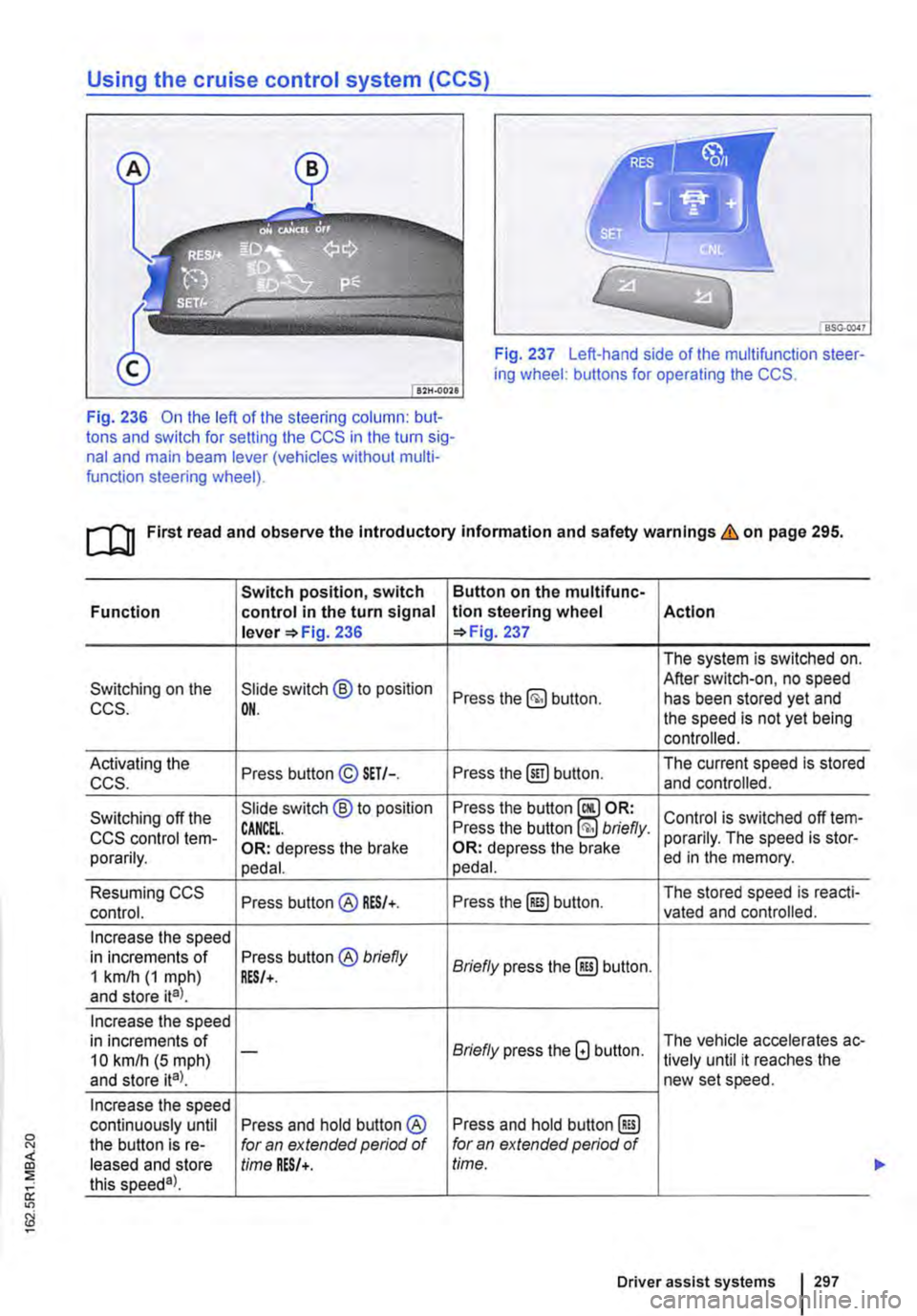
Fig. 237 Left-hand side of the multifunction steer-ing wheel: buttons for operating the CCS.
Fig. 236 On the left of the steering column: but-tons and switch for setting the CCS in the turn sig-nal and main beam lever (vehicles without multi-function steering wheel).
ro First read and observe the introductory information and safety warnings & on page 295.
Switch position, switch Button on the multifunc-Function control in the turn signal tlon steering wheel Action lever =>Fig. 236 =>Fig. 237
The system is switched on.
Switching on the Slide switch @ to position After switch-on, no speed Press the button. has been stored yet and CCS. OH. the speed is not yet being controlled.
Activating the Press button© SET/-. Press the@) button. The current speed is stored ccs. and controlled.
Switching off the Slide switch @ to position Press the button Control is switched off !em-CCS control !em-CANCEL. Press the button briefly. porarily. The speed is stor-porarily. OR: depress the brake OR: depress the brake ed in the memory. pedal. pedal.
Resuming CCS Press button@ RES/+. Press the@) button. The stored speed is reacti-control. vated and controlled.
Increase the speed in increments of Press button® briefly Briefly press the@) button. 1 km/h (1 mph) RES/+. and store ita).
Increase the speed in increments of Briefly press the G button. The vehicle accelerates ac-10 kmlh (5 mph) -lively until it reaches the and store ita). new set speed.
Increase the speed continuously until Press and hold button ® Press and hold button @) the button is re-for an extended period of for an extended period of leased and store time RES/+. time. this speeda).
Driver assist systems 297
...
Page 298 of 486
Switch position, switch Function control in the turn signal lever 236
Reduce the speed in increments of Press button © briefly 1 km/h (1 mph) and store ital. SET/-.
Reduce the speed in increments of 10 km/h (5 mph) -
and store ita).
Reduce the speed continuously until Press and hold button © the button is re-for an extended period of leased and store time SET/-. this speeda)_
Switch off the Slide switch ® to position CCS. OFF.
•I Dunng CCS control
Driving downhill with CCS
If the CCS cannot maintain the vehicle speed when driving downhill, brake the vehicle with the foot brake and shift down gear if necessary.
Automatic switch-off
Button on the multlfunc-tion steering wheel Action 237
Briefly press the (ili) button.
The system will decrease
Briefly press the G button. the speed until the new set speed is reached by easing off the acceleration without a braking intervention.
Press and hold button G for an extended period of time.
With the CCS activated, press the button @ twice bn'eflyOR The system is switched off. In any operating mode, The stored speed will be press and hold the button deleted. §) for an extended period of time.
• If the brake pedal or clutch pedal is depressed.
• If you change the gear on a manual gearbox 263.
• If the airbag is triggered. <
The CCS control will be switched off automatically or switched off temporarily:
• If the system detects a fault that could impair the function of the CCS.
• If the vehicle speed is higher than the stored speed for an extended period with the accelerator pedal depressed.
Adaptive cruise control (ACC)
dJ Introduction
This chapter contains information on the following subjects:
Displays, warning and indicator lamps . . . . . . 300
Radar sensor . . . . . . . . . . . . . . . . . . . . . . . . . . . 301
Operating adaptive cruise control (ACC) 302
Switch off the adaptive cruise control (ACC) temporarily in the following situations . . . . . 304
Special driving situations . . . . . . . . . . . . 305
298 I While drivmg
Adaptive cruise control combines cruise
control and distance control.
The Adaptive Cruise Control (ACC) can help to maintain a speed set by the The adap-tive cruise control (ACC) can also maintain a set time interval to a vehicle travelling ahead. Two fac-tory-fitted versions of the system are available: .,
Page 299 of 486
• System version 1 functions at speeds of 30-160 km/h (20 mph -100 mph).
• System version 2 functions at speeds of 30-210 km/h (20 m ph-130 m ph).
In vehicles with a dual clutch gearbox DSG®, the adaptive cruise control (ACC) can brake the vehi-cle until it comes to a complete standstill behind a vehicle in front that is stopping.
Driver prompt to take over control
There are system-specific limits on the adaptive cruise control (ACC) when driving. This means that the driver may have to control the speed and dis-tance between the vehicle and other vehicles in certain circumstances.
The driver is told to take control of the vehicle via a message on the instrument cluster display prompts a braking intervention, and a signal tone =<>page 300.
Additional information and warnings:
• Exterior views =<>page 5
• Volkswagen information system =<>page 24
• Cruise control system (CCS) =<>page 295
• Area monitoring system (Front Assist) =<>page 307
• Accessories, modifications, repairs and renewal of parts =<>page 394
A WARNING
The intelligent technology used in the adap-tive cruise control (ACC) cannot overcome the laws of physics, and functions only within the limits of the system. Careless or uninten-tional use of the adaptive cruise control (ACC) can cause accidents and lead to seri-ous injury. The system Is not a substitute for the full concentration of the driver.
• Adapt your speed and distance from the vehicles ahead to suit visibility, weather, road and traffic conditions.
• Do not use the adaptive cruise control (ACC) in poor visibility, on steep or winding roads, or on slippery road surfaces e.g. on snow, ice, wet roads, loose chippings or floo-ded roads.
A WARNING (Continued)
• Never use the adaptive cruise control (ACC) off-road or on unsurfaced roads. The adaptive cruise control (ACC) is designed for use on surfaced roads only.
• The adaptive cruise control (ACC) does not react to stationary obstacles, e.g. the tail end of a traffic jam, a vehicle that has broken down, or vehicles waiting at traffic lights.
• The adaptive cruise control (ACC) does not react to persons, animals or vehicles crossing or approaching in the same lane.
• If the adaptive cruise control (ACC) speed reduction is insufficient, you should brake the vehicle by depressing the foot brake.
• Brake the vehicle by depressing the brake if the vehicle rolls inadvertently on after the driver has been prompted to take control of the vehicle.
• If the instrument cluster display indicates that the driver should take control of the vehi-cle, you have to regulate the distance your-self.
• The driver must be prepared to take con-trol of the vehicle (by accelerating or braking) at all times.
CD
Switch off the adaptive cruise control (ACC) if you suspect that the radar sensor has been damaged. This can help to prevent secondary damage. Have the radar sensor realigned.
• Repair work on the radar sensor will require special knowledge and tools. Volkswagen rec-ommends using a Volkswagen dealership for this purpose.
m If the adaptive cruise control (ACC) does not L!J function as described in this chapter, do not use it, and have the system checked by a qualified workshop. Volkswagen recommends using a Voikswagen dealership for this purpose.
m The maximum vehicle speed when the adap-L!J live cruise control (ACC) is active is limited to either 160 km/h (1 00 m ph) or 210 km/h (130 m ph). depending on the system version.
m If the adaptive cruise control (ACC) is active, L!J unfamiliar noises may be heard during the automatic braking procedure. These are caused by the braking system.
Page 300 of 486
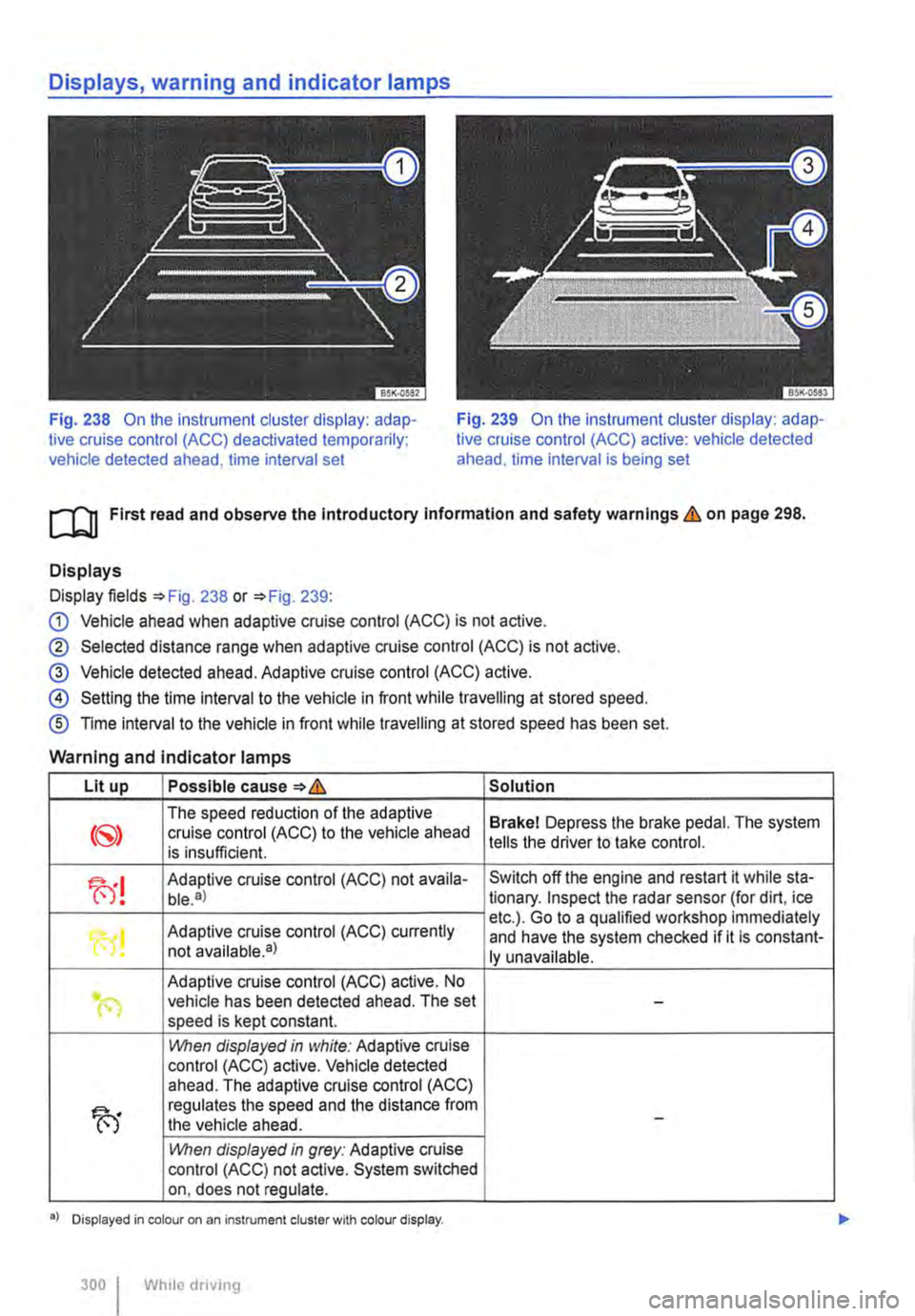
Fig. 238 On the instrument cluster display: adap-tive cruise control (ACC) deactivated temporarily; vehicle detected ahead, time interval set
Fig. 239 On the instrument cluster display: adap-tive cruise control (ACC) active: vehicle detected ahead. time interval is being set
ro First read and observe the Introductory Information and safety warnings & on page 298.
Displays
Display fields =>Fig. 238 or =>Fig. 239:
G) Vehicle ahead when adaptive cruise control (ACC) is not active.
® Selected distance range when adaptive cruise control (ACC) is not active.
@ Vehicle detected ahead. Adaptive cruise control (ACC) active.
@ Setting the time interval to the vehicle in front while travelling at stored speed.
® Time interval to the vehicle in front while travelling at stored speed has been set.
Warning and indicator lamps
Lit up Possible cause=>& Solution
The speed reduction of the adaptive Brakel Depress the brake pedal. The system cruise control (ACC) to the vehicle ahead is insufficient. tells the driver to take control.
fu! Adaptive cruise control (ACC) not availa-Switch off the engine and restart it while sta-ble.a) tionary. Inspect the radar sensor (for dirt, ice
Adaptive cruise control (ACC) currently etc.). Go to a qualified workshop immediately
"0! and have the system checked if it is constant-not available•) ly unavailable.
Adaptive cruise control (ACC) active. No .. (") vehicle has been detected ahead. The set -speed is kept constant.
1!\/hen displayed in white: Adaptive cruise control (ACC) active. Vehicle detected ahead. The adaptive cruise control (ACC)
fu
regulates the speed and the distance from the vehicle ahead. -
1!\/hen displayed in grey: Adaptive cruise control (ACC) not active. System switched on, does not regulate.
•> Displayed in colour on an instrument cluster with colour display.
300 I Whlio drivmg
Page 303 of 486
![VOLKSWAGEN TRANSPORTER 2018 Workshop Manual Button on the multifunc-
!Action Function tlon steering wheel 241
Briefly press the §] button on the multifunction steer-ing wheel.
Switching off adaptive OR: depress the brake
cruise control (ACC](/img/18/55780/w960_55780-302.png "VOLKSWAGEN TRANSPORTER 2018 Workshop Manual Button on the multifunc-
!Action Function tlon steering wheel 241
Briefly press the §] button on the multifunction steer-ing wheel.
Switching off adaptive OR: depress the brake
cruise control (ACC")
Button on the multifunc-
!Action Function tlon steering wheel 241
Briefly press the §] button on the multifunction steer-ing wheel.
Switching off adaptive OR: depress the brake
cruise control (ACC) tern-pedal. Control is switched off temporarily. The speed is
porarily. OR: depress the clutch for stored in the memory. longer than 30 seconds. OR: press the @Eg button on the multifunction steer-ing wheel.
The stored speed is reactivated and controlled. If no speed has yet been stored, the adaptive cruise control (ACC) adopts and regulates the current speed at which the vehicle is travelling.
Resuming adaptive cruise Press the @) button on the When adaptive cruise control (ACC) is at-multifunction steering ready active: control (ACC). wheel. Press briefly: increases the speed by 1 km/h (1 mph) and stores it. Press and hold: As long as you keep pressing, the stored speed is increased incrementally by 1 km/h (1 mph).
Accelerating (while adap-Press the 8 button on the Press briefly: increases the speed by 10 km/h (5 mph) and stores it. live cruise control (ACC) is multifunction steering Press and hold: As long as you keep pressing, active). wheel. the stored speed is increased incrementally by 10 km/h (5 mph).
Press briefly: reduces the speed by 10 kmlh
Decelerating (while adap-Press the G button on the (5 mph) and stores it.
live cruise control (ACC) is multifunction steering Press and hold: As long as you keep pressing, the stored speed is reduced incrementally by 10 active). wheel. km/h (5 mph}. A reduction in speed is achieved by accelerator release or automatic braking.
Press and hold the§] but-ton on the muMunction steering wheel. Briefly Switching off adaptive press the §] button on the The system is switched off. The stored speed cruise control (ACC). multifunction steering will be deleted. wheel if the adaptive cruise control (ACC) is temporari-ly switched off.
The mph figures given in brackets in the table re-late exclusively to instrument clusters with mile readings.
Setting the distance level
The speed-dependent distance from the vehicle travelling ahead can be set to one of 5 levels.
In wet road conditions, you should always set a larger distance than when driving in dry road con-ditions.
The following distances can be pre-setected:
• Very small
• Small
• Medium
• Large
• Very large
The distance level to the vehicle ahead is set using the(!) button on the multifunction steering wheel 241. The adaptive cruise control (ACC) dis-play appears when the button is pressed 300. To set the distance level, press the(!] button. .,..
Driver assist systems 303
Page 304 of 486
When the highest level is reached, the distance re-turns to the lowest level when the button is press-ed again.
The distance level can also be set using the Q or Q buttons on the multifunction steering wheel im-mediately after the(!) button on the multifunction steering Fig. 241 has been pressed.
Select the Settings menu, Assist systems submenu, ACC to set the distance to be used when the ACC is switched on 24.
Setting the gearbox programme
The acceleration response can be influenced by the gearbox programme selected. The programme can be set Using the ACC option in the Assistant submenu in the Settings menu. The following gearbox programmes can be selected:
• Normal
• Sport
• Eco
The following conditions can prevent the adaptive cruise control (ACC) from reacting:
• If the accelerator is depressed.
• If no gear is selected.
• If the ESC is taking corrective action.
• If there is a fault in several brake lights on the vehicle or on a trailer with an electrical connection to the vehicle.
• If the vehicle is reversing.
• System version 1: if the vehicle is travelling faster than approximately 160 km/h (1 00 m ph).
• System version 2: if the vehicle is travelling faster than approximately 210 km/h (130 mph).
A WARNING
If you do not maintain the minimum distance to a vehicle In front and the difference In speed between the two vehicles is so great that the braking action of the adaptive cruise control (ACC) is insufficient, you are In dan-ger of colliding with the vehicle in front. You should reduce the vehicle speed immediately with the foot brake.
• The adaptive cruise control (ACC) may not be able to detect all driving situations cor-rectly.
• Leaving your foot on the accelerator means that the adaptive cruise control (ACC) will not brake automatically. This is because manual acceleration overrides the system.
• You should always be prepared to brake the vehicle yourself.
• Observe country-specific regulations re-garding the minimum distance.
m The set speed will be deleted if the ignition or L!.J the adaptive cruise control (ACC) is switched off.
m The adaptive cruise control (ACC) is auto-L!.J matically deactivated when the traction con-trol system (TCS) is deactivated.
m In vehicles with a start/stop system, the en-L!.J gine is switched off automatically during the stationary phase of adaptive cruise control (ACC) and is then restarted for moving off.
situations
1""111 First read and observe the introductory L-J,:.IJ Information and safety warnings & on page 298.
The adaptive cruise control (ACC) should be switched off in the following situations due to sys-tem limitations &:
304 I While driving
• When turning off roads, driving around round-abouts, narrow curves, joining motorways, exiting from motorways or driving through road works, to prevent the vehicle from unnecessarily accelerat-ing to the set speed in these situations
• When driving through a tunnel as this situation could impair the system function.
• On roads with more than one lane, if other vehi-cles are driving more slowly in the fast lane. The slower vehicles In the other lane would be overtak-en from the right side in this case.
• In heavy rain, snow or spray as vehicles travel-ling ahead cannot be monitored sufficiently or maybe cannot be monitored at all. .,.
Page 305 of 486
A WARNING
Failure to switch off the adaptive cruise con-trol (ACC) in the above-mentioned situations can cause accidents and result in serious in-juries.
Special driving situations
A WARNING (Continued)
• Always switch off the adaptive cruise con-trol (ACC) in critical driving situations.
m Failure to switch off the adaptive cruise con-L!:..J trot (ACC) in the above-mentioned situations can cause a violation of legal requirements.
( B>G.0028
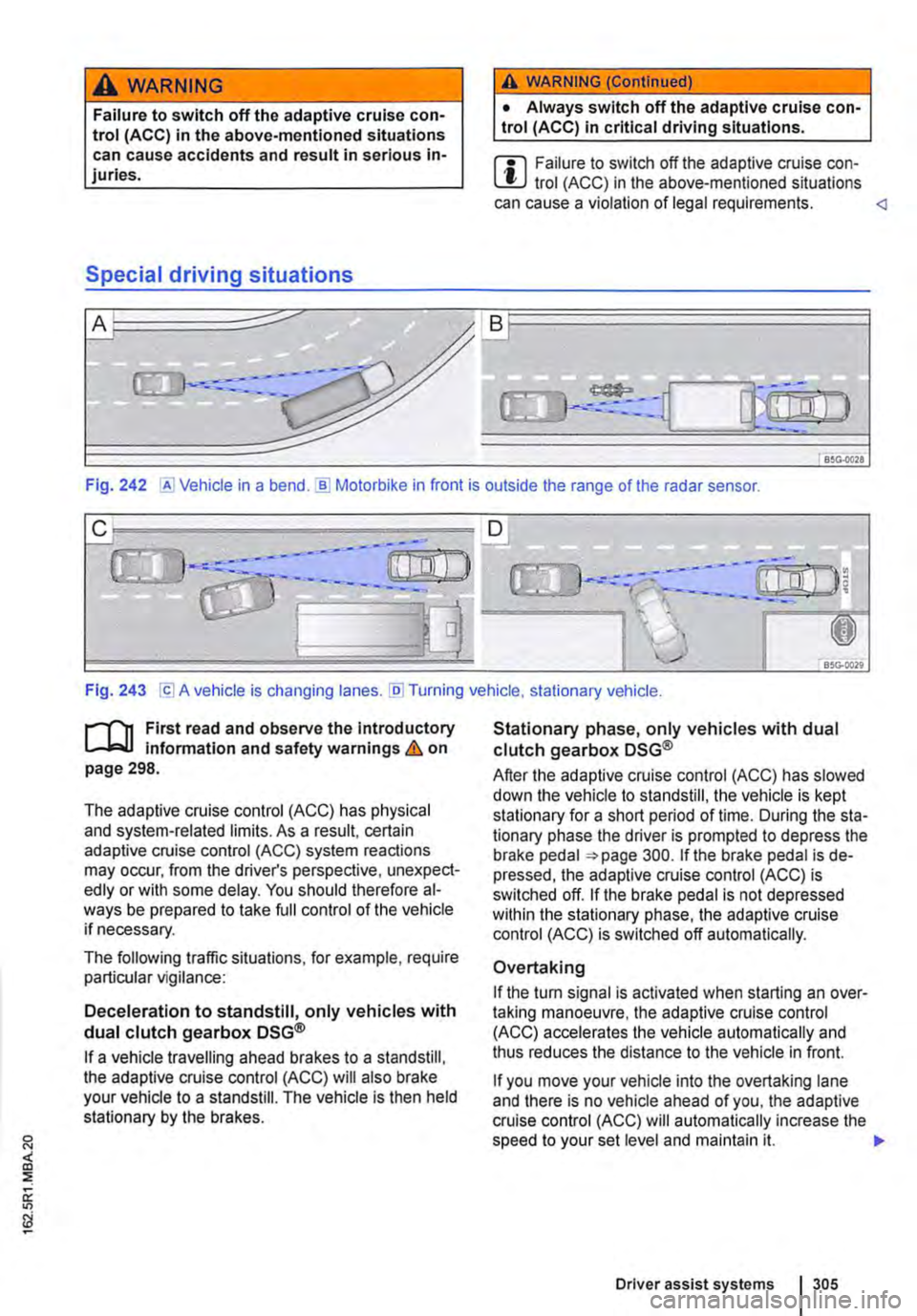
Fig. 242 @Vehicle in a bend.]) Motorbike in front is outside the range of the radar sensor.
Fig. 243 [Cl A vehicle is changing lanes. [li] Turning vehicle, stationary vehicle.
n"'n First read and observe the introductory L-J,:,.lJ information and safety warnings & on page 298.
The adaptive cruise control (ACC) has physical and system-related limits. As a result, certain adaptive cruise control (ACC) system reactions may occur, from the driver's perspective, unexpect-edly or with some delay. You should therefore al-ways be prepared to take full control of the vehicle if necessary.
The following traffic situations, for example, require particular vigilance:
Deceleration to standstill, only vehicles with dual clutch gearbox DSG®
If a vehicle travelling ahead brakes to a standstill, the adaptive cruise control (ACC) will also brake your vehicle to a standstill. The vehicle is then held stationary by the brakes.
Stationary phase, only vehicles with dual clutch gearbox DSG®
After the adaptive cruise control (ACC) has slowed down the vehicle to standstill, the vehicle is kept stationary for a short period of time. During the sta-tionary phase the driver is prompted to depress the brake pedal 300. If the brake pedal is de-pressed, the adaptive cruise control (ACC) is switched off. If the brake pedal is not depressed within the stationary phase, the adaptive cruise control (ACC) is switched off automatically.
Overtaking
If the tu m signal is activated when starting an over-taking manoeuvre, the adaptive cruise control (ACC) accelerates the vehicle automatically and thus reduces the distance to the vehicle in front.
If you move your vehicle into the overtaking lane and there is no vehicle ahead of you, the adaptive cruise control (ACC) will automatically increase the speed to your set level and maintain it. .,..
Driver assist systems I 305
Page 306 of 486
Acceleration can be stopped at any time by de-pressing the brake pedal or pressing the(@ or @ button on the multifunction steering wheel 302.
When driving through bends
While driving through bends, the radar sensor may sometimes lose the vehicle travelling ahead or may react to a vehicle in the next lane 242 !Al. In such situations, the vehicle might decelerate unnecessarily or not react to the vehicle in front. In this case the driver must override the adaptive cruise control (ACC) by depressing the accelerator, or interrupt the braking procedure by depressing the brake pedal or pressing or @ button on the multifunction steering wheel 302.
Driving in tunnels
The radar sensor function may be restricted in tun-nels. Switch off the adaptive cruise control (ACC) in tunnels.
Narrow vehicles and a zig-zag traffic situation
Narrow vehicles and vehicles travelling slightly to the left or right of your vehicle will only be recog-nised by the radar sensor once they have entered the radar range 242@ This applies in par-ticular to narrow vehicles such as motorbikes. If re-quired, brake the vehicle yourself.
Vehicles with special load or special equipment
Any load or accessories on other vehicles that pro-trude from the side, rear or over the roof of the ve-hicle may not be detected by the adaptive cruise control (ACC) .
Switch off the adaptive cruise control (ACC) when the vehicle ahead has special load or special equipment, or while overtaking vehicles of this kind. If required. brake the vehicle yourself.
When other vehicles change lanes
Vehicles that are very close when they move into your lane can only be detected by the radar sen-sors when they have moved into the sensor range. This means that the adaptive cruise control (ACC) may have a delayed reaction =>Fig. 243@]. If re-quired, brake the vehicle yourself.
Stationary vehicles
The adaptive cruise control (ACC) does not detect stationary objects during a journey, e.g. stationary traffic or a vehicle that has broken down.
306 I While driving
If a stationary vehicle is hidden behind a vehicle that has been detected by the adaptive cruise con-trol (ACC) and this vehicle turns off the road or changes lane, the adaptive cruise control (ACC) will not be able to react to the stationary vehicle 243 [Q]. If required, brake the vehicle your-self.
Oncoming vehicles and vehicles crossing your path
The adaptive cruise control (ACC) does not react to approaching vehicles or vehicles crossing your path.
Metal objects
Metal objects, such as tracks in the road or metal plates used in roadworks, can confuse the radar sensor and cause incorrect reactions from the adaptive cruise control (ACC) .
Possible radar sensor function impairments
The adaptive cruise control (ACC) will switch off temporarily if the radar sensor function is impaired, e.g. due to heavy rain, spray, snow, ice or mud. A corresponding message will appear on the instru-ment cluster display. Clean the radar sensors as required.
The adaptive cruise control (ACC) will automatical-ly be available again as soon as the radar sensors are no longer impaired. The message on the in-strument cluster display goes out, and the adaptive cruise control (ACC) can be reactivated.
Strong reflected radiation of the radar signal, e.g. in multi-storey car parks, can impair the function of the radar sensor.
Towing a trailer
The adaptive cruise control (ACC) operates with reduced dynamics when the vehicle is towing a trailer.
Overheated brakes
If the brakes overheat, e.g. following heavy braking or when driving down steep inclines for long peri-ods, the adaptive cruise control (ACC) may be de-activated temporarily. A corresponding message will appear on the instrument cluster display. lt is then not possible to activate the adaptive cruise control (ACC).
As soon as the temperature of the brakes has de-creased sufficiently, the adaptive cruise control (ACC) can be activated again. The message on the instrument cluster display goes out. If the mes-sage ACC not ava i 1 able does not go out for a long time, there is a fault. Go to a qualified work-shop. Volkswagen recommends using a Volkswa-gen dealership for this purpose.
Page 307 of 486
Area monitoring system (Front Assist)
COJ Introduction
This chapter contains information on the following subjects:
Displays . . . . . . . . . 308
Radar sensor . . 309
Front scan system (Front Assist) 309 Temporarily switch off the front scan system (Front Assist) in the following situations 310
City Emergency Brake function 311
System limits . . . . . . . . . . . . . . . . 312
The area monitoring system (Front As-
sist) can help to avoid rear-end colli-
sions.
Within the limits of the system, Front Assist can warn the driver about imminent collisions, prepare the vehicle for emergency braking in case of dan-ger, assist with braking, and initiate automatic braking.
Front Assist is not a substitute for the full con-centration of the driver.
Additional information and warnings:
• Exterior views 5
• Volkswagen information system 24
• Cruise control system (CCS) 295
• Adaptive cruise control (ACC) 298
• Accessories, modifications, repairs and renewal of parts 394
Distance warning
If the system detects danger from driving too close to the vehicle in front, within the speed range of approx. 60 km/h (37 mph) up to 210 km/h (130 mph), the system warns the driver by showing a corresponding message on the instrument clus-ter display 244 [ID.
The warning period varies according to the traffic situation and the driver's response.
Advance warning
If the system detects a danger of collision with the vehicle ahead, within the speed range of approx. 30 km/h (18 m ph) up to 210 km/h (130 mph), the system warns the driver by emitting a signal tone and showing a corresponding message on the in-strument cluster display 245.
The warning period varies according to the traffic situation and the driver's response. At the same time it prepares the vehicle for possible emergency
Urgent warning
If the driver fails to respond to the advance warn-ing, within a speed range of approx. 30 km/h (18 mph) to 210 km/h (130 mph), the system can initiate a quick jolt of the brake in order to draw the driver's attention to the increasing danger of a colli-sion. The warning period varies according to the traffic situation and the driver's response.
Automatic braking
If the driver does not react to the acute warning, within a speed range of approx. 4 km/h (2.5 mph) to 210 km/h (130 mph), the vehicle can brake auto-matically using brake pressure with gradually in-creasing intensity. By reducing speed during a pos-sible collision the system can help to minimise the consequences of an accident.
Brake assistance
If the system detects that the driver is not braking sufficiently when there is a risk of collision, the sys-tem can increase the braking force and thereby help to prevent a collision from speeds of approxi-mately 4 km/h (2.5 mph) to 210 km/h (130 mph). Brake assistance works only for as long as the brake pedal is pressed hard.
A WARNING
The Intelligent technology used in Front As-sist cannot overcome the laws of physics, and functions only within the limits of the system. The driver Is always responsible for braking in time. If Front Assist issues a warn-ing, immediately apply the foot brake to slow the vehicle down or avoid the obstacle, de-pending on the traffic situation.
• Adapt your speed and distance from the vehicles ahead to suit visibility, weather, road and traffic conditions.
• Front Assist cannot prevent accidents and serious injuries on Its own.
• Front Assist can issue unnecessary warn-Ings and carry out unwanted braking inter-ventions in certain complex driving situa-tions, e.g. at traffic Islands.
Driver assist systems 307