warning VOLKSWAGEN UP! 2017 Repair Manual
[x] Cancel search | Manufacturer: VOLKSWAGEN, Model Year: 2017, Model line: UP!, Model: VOLKSWAGEN UP! 2017Pages: 211, PDF Size: 4.17 MB
Page 84 of 211
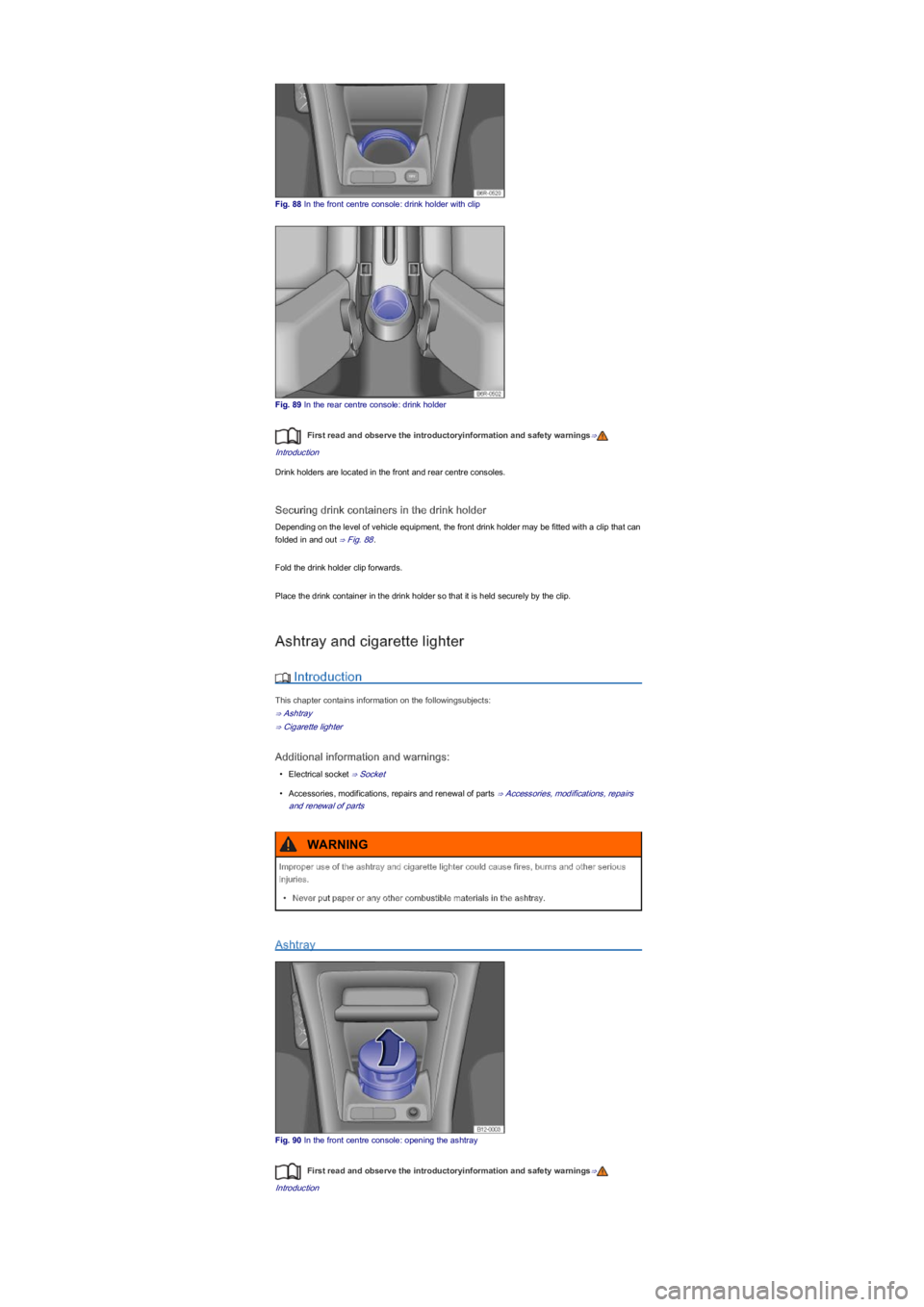
Fig. 88 In the front centre console: drink holder with clip
Fig. 89 In the rear centre console: drink holder
First read and observe the introductoryinformation and safety warnings⇒
Introduction
Drink holders are located in the front and rear centre consoles.
Securing drink containers in the drink holder
Depending on the level of vehicle equipment, the front drink holder may be fitted with a clip that can
folded in and out ⇒ Fig. 88.
Fold the drink holder clip forwards.
Place the drink container in the drink holder so that it is held securely by the clip.
Ashtray and cigarette lighter
Introduction
This chapter contains information on the followingsubjects:
⇒ Ashtray
⇒ Cigarette lighter
Additional information and warnings:
\f
Page 86 of 211

Do not leave the engine running when the vehicle is stationary.
Using electrical appliances with the engine switched off and the ignition switched on will
drain the battery.
Unshielded devices can cause interference with radio reception and vehicle electronics.
Interference with AM radio reception could occur if electrical devices are used in the vicinity
of the aerial.
Socket in the vehicle
Fig. 92 Front centre console: 12-volt socket in the stowage compartment
First read and observe the introductoryinformation and safety warnings⇒
Introduction
Maximum power rating
Electrical socketMaximum power rating
12-volt120 watts
The maximum power rating of the sockets may not be exceeded. The power rating of each device
is stated on its type plate.
If two or more devices are connected at the same time, ensure that the overall power consumption
of all connected electrical devices never exceeds 190 watts ⇒.
12-volt socket
The 12-volt socket is located in the ashtray in the front centre console ⇒ Fig. 92 and works only
when the ignition is switched on.
Using electrical appliances with the engine switched off and the ignition switched on will drain the
battery. Electrical consumers should therefore only be plugged into the sockets when the engine is
running.
To prevent damage due to voltage fluctuation, switch off any connected devices before switching
the ignition or engine on or off.
Improper use of the socket and electrical accessories can cause fires and other severe
injuries.
\f
Page 87 of 211
Starting the engine, changing gear and
parking
Starting and stopping the engine
Introduction
This chapter contains information on the followingsubjects:
⇒ Ignition lock
⇒ Starting the engine
⇒ Stopping the engine
⇒ Electronic immobilizer
Immobilizer display
If the vehicle key is not valid or there is a fault in the system, then may be displayed in the
instrument cluster. The engine cannot be started ⇒ Electronic immobilizer.
Push-starting or towing
For technical reasons, your vehicle must not be push-started or tow-started. Use jump leads to
start the engine instead.
Additional information and warnings:
\f
Page 88 of 211
Ignition lock
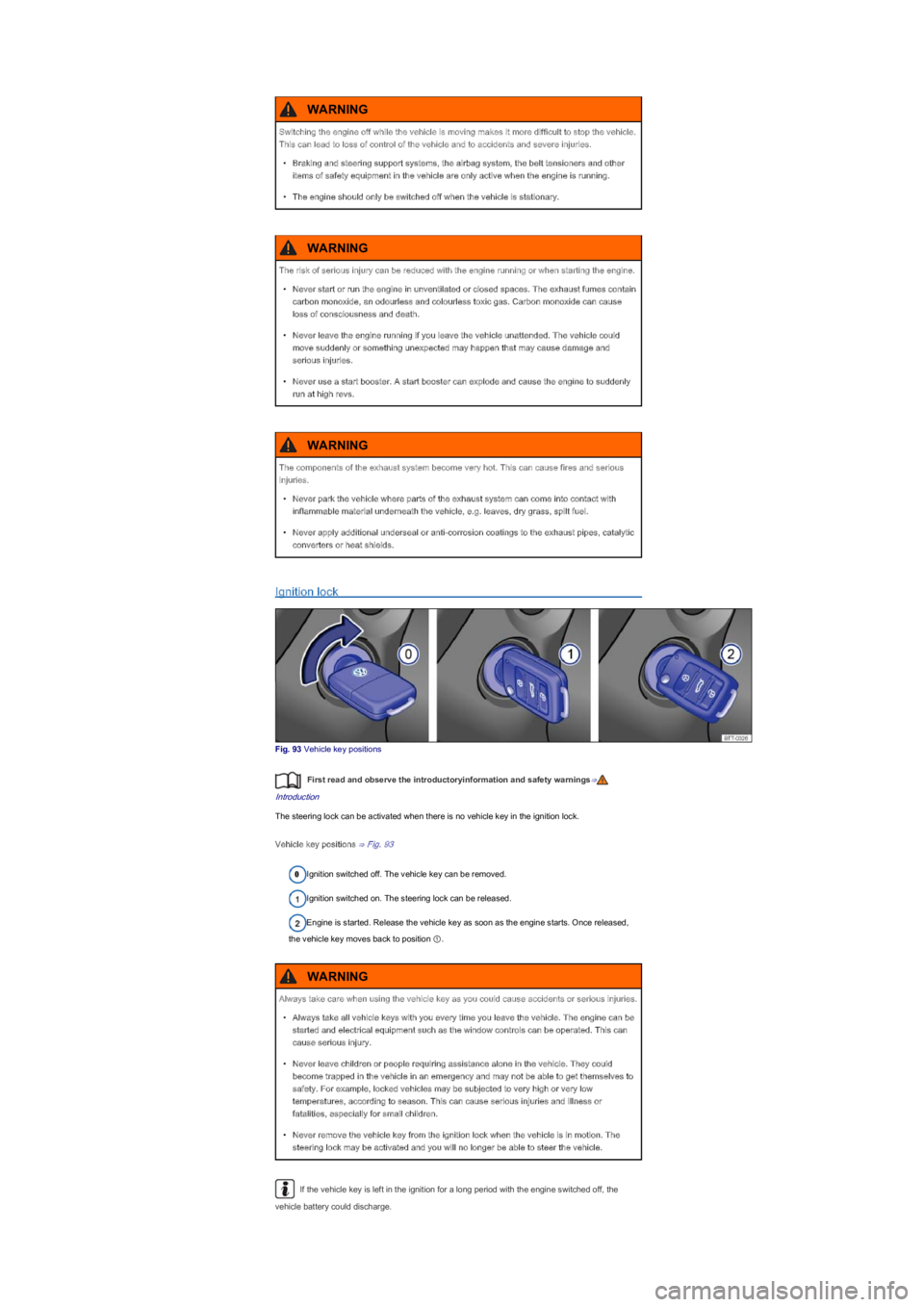
Fig. 93 Vehicle key positions
First read and observe the introductoryinformation and safety warnings⇒
Introduction
The steering lock can be activated when there is no vehicle key in the ignition lock.
Vehicle key positions ⇒ Fig. 93
Ignition switched off. The vehicle key can be removed.
Ignition switched on. The steering lock can be released.
Engine is started. Release the vehicle key as soon as the engine starts. Once released,
the vehicle key moves back to position ①.
If the vehicle key is left in the ignition for a long period with the engine switched off, the
vehicle battery could discharge.
Switching the engine off while the vehicle is moving makes it more difficult to stop the vehicle.
This can lead to loss of control of the vehicle and to accidents and severe injuries.
\f
Page 89 of 211

Starting the engine
First read and observe the introductoryinformation and safety warnings⇒
Introduction
The steps should only be carried out in the specified order.
Manual gearboxAutomated manual gearbox
1.Depress the brake pedal and hold it until
step 5 has been completed.Turn the vehicle key to position ⇒ Fig. 93①.
2.Fully depress the clutch pedal until the
engine has been started.
Depress the brake pedal and hold it until
step 5 has been completed.
3.Shift the gear stick to a neutral position.Place the selector lever in position N.
4.Turn the vehicle key in the ignition lock to position ⇒ Fig. 93② \f
Page 90 of 211
After the engine is switched off, the radiator fan in the engine compartment may run on for
some minutes, even if the ignition is switched off or the vehicle key has been removed. The radiator
fan will switch itself off automatically.
Electronic immobilizer
First read and observe the introductoryinformation and safety warnings⇒
Introduction
The immobilizer helps to prevent the engine from being started and driven with an unauthorised
vehicle key.
There is a chip in the key. It automatically deactivates the immobilizer when the vehicle key is
inserted into the ignition lock.
The electronic immobilizer is automatically activated when the vehicle key is removed from the
ignition lock.
The engine can only be started using a genuine Volkswagen vehicle key with the correct code.
Coded vehicle keys are available from a Volkswagen dealership ⇒ Vehicle key set.
If a non-authorised vehicle key has been used, the display in the instrument cluster will show
. The vehicle cannot be used if this occurs. Remove the non-authorised vehicle key from
the ignition lock and used an authorised vehicle key.
The vehicle cannot be operated properly if you do not have a genuine Volkswagen key.
Changing gear
Introduction
This chapter contains information on the followingsubjects:
⇒ Warning and indicator lamp
⇒ Pedals
⇒ Manual gearbox: selecting a gear
⇒ Automated manual gearbox: selecting a gear
⇒ Changing gear with Tiptronic
⇒ Driving with an automated manual gearbox
⇒ Fault in the automated manual gearbox
⇒ Gear-change indicator (manual gearboxyf
The following will occur if reverse gear is selected and the ignition is
switched on:
\f
Page 92 of 211
Several warning and indicator lamps will light up briefly as a functional check when the ignition is
switched on. They will switch off after a few seconds.
Pedals
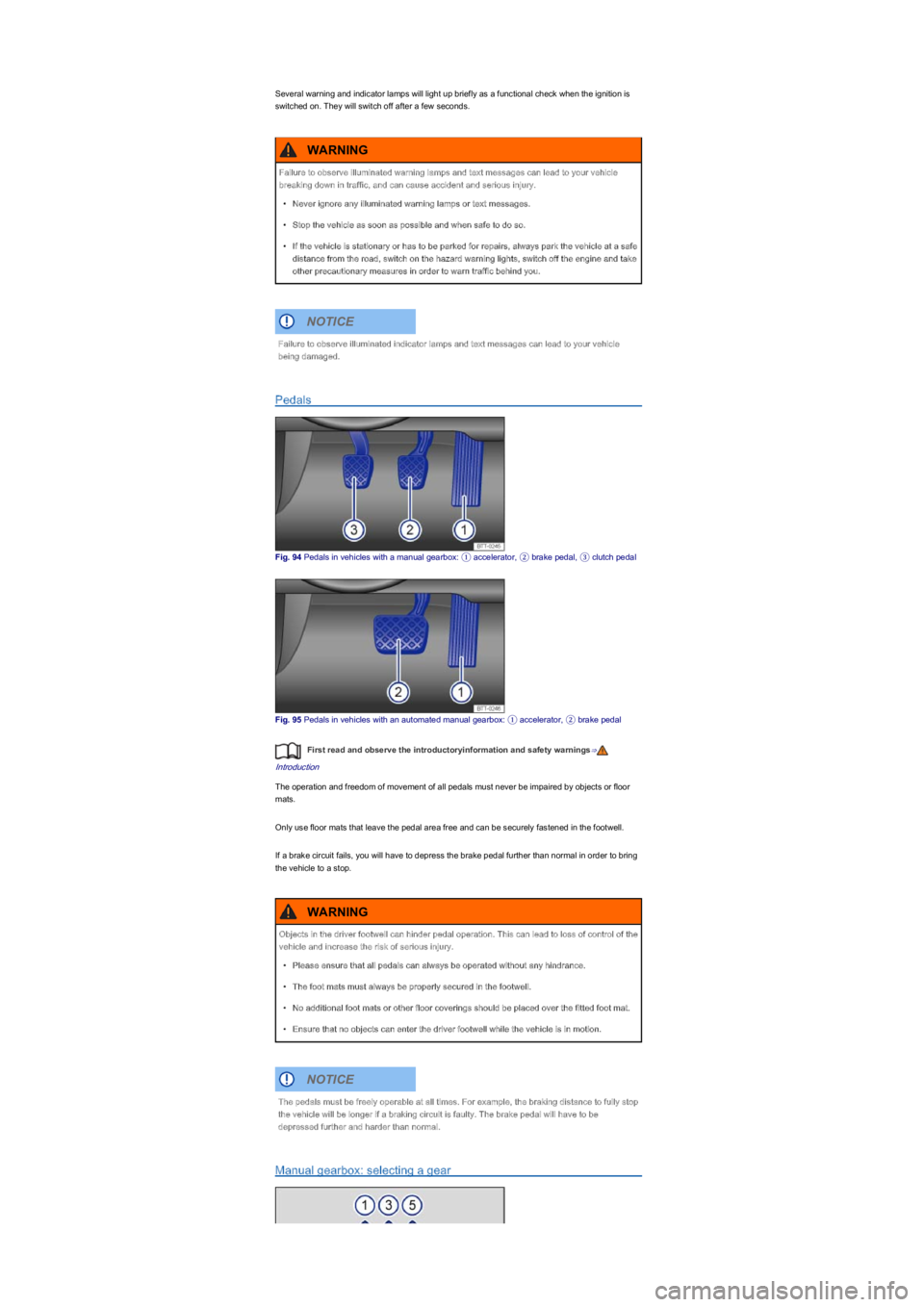
Fig. 94 Pedals in vehicles with a manual gearbox: ① accelerator, ② brake pedal, ③ clutch pedal
Fig. 95 Pedals in vehicles with an automated manual gearbox: ① accelerator, ② brake pedal
First read and observe the introductoryinformation and safety warnings⇒
Introduction
The operation and freedom of movement of all pedals must never be impaired by objects or floor
mats.
Only use floor mats that leave the pedal area free and can be securely fastened in the footwell.
If a brake circuit fails, you will have to depress the brake pedal further than normal in order to bring
the vehicle to a stop.
Manual gearbox: selecting a gear
Failure to observe illuminated warning lamps and text messages can lead to your vehicle
breaking down in traffic, and can cause accident and serious injury.
\f
Page 93 of 211
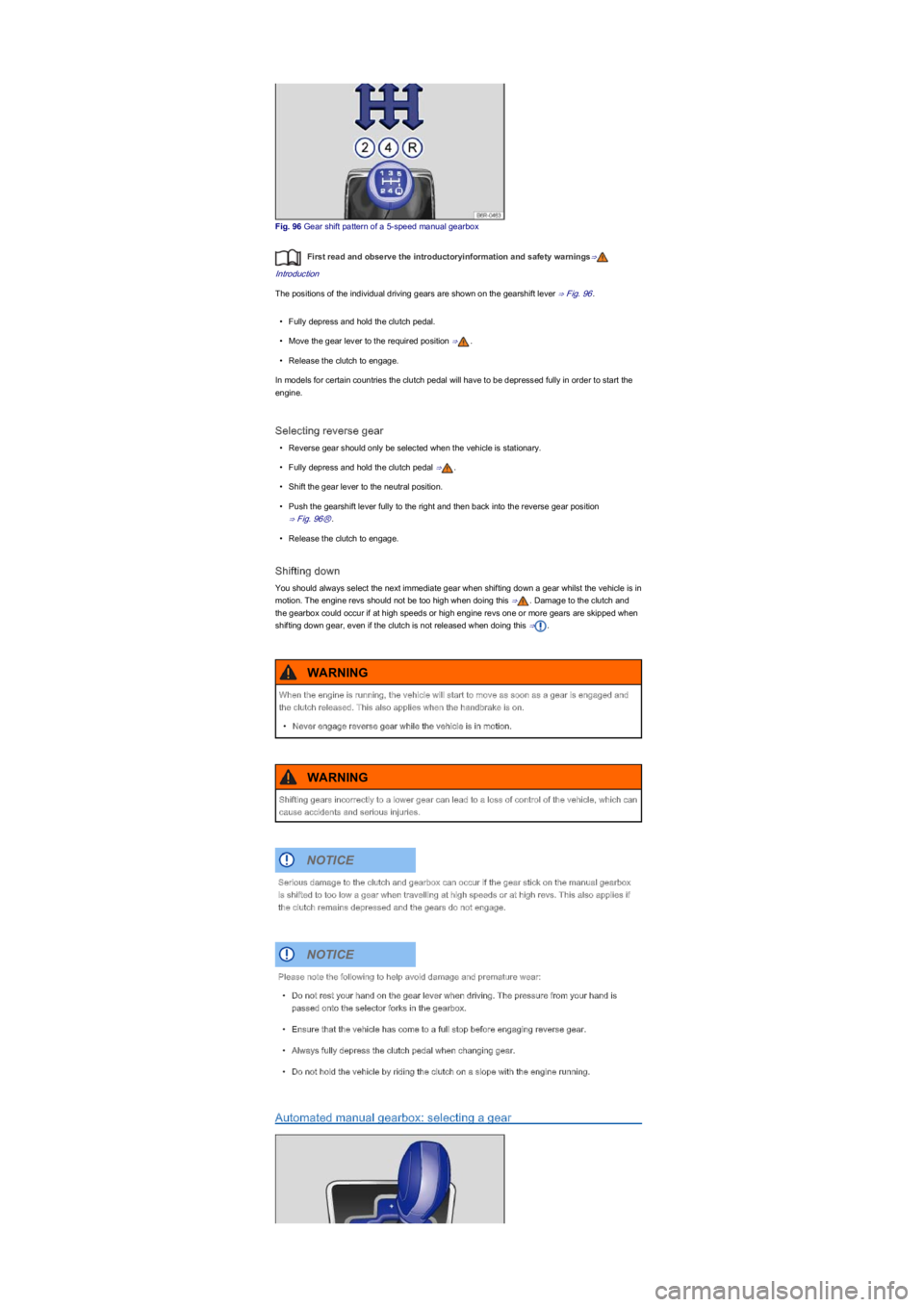
Fig. 96 Gear shift pattern of a 5-speed manual gearbox
First read and observe the introductoryinformation and safety warnings⇒
Introduction
The positions of the individual driving gears are shown on the gearshift lever ⇒ Fig. 96.
\f
Page 94 of 211
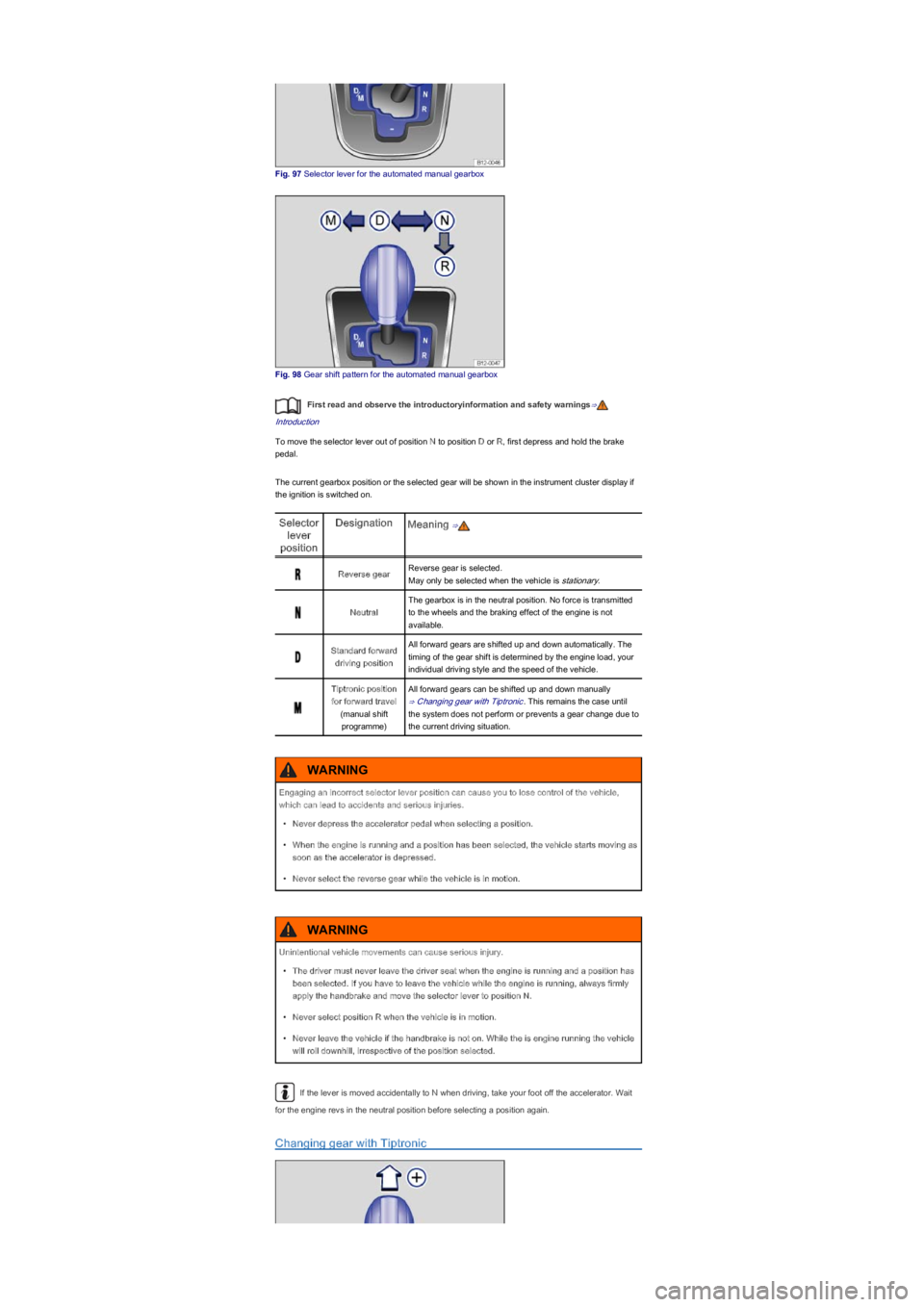
Fig. 97 Selector lever for the automated manual gearbox
Fig. 98 Gear shift pattern for the automated manual gearbox
First read and observe the introductoryinformation and safety warnings⇒
Introduction
To move the selector lever out of position N to position D or R, first depress and hold the brake
pedal.
The current gearbox position or the selected gear will be shown in the instrument cluster display if
the ignition is switched on.
Selector
lever
position
DesignationMeaning ⇒
Reverse gearReverse gear is selected.
May only be selected when the vehicle is stationary.
Neutral
The gearbox is in the neutral position. No force is transmitted
to the wheels and the braking effect of the engine is not
available.
Standard forward
driving position
All forward gears are shifted up and down automatically. The
timing of the gear shift is determined by the engine load, your
individual driving style and the speed of the vehicle.
Tiptronic position
for forward travel
(manual shift
programmeyf
All forward gears can be shifted up and down manually
⇒ Changing gear with Tiptronic. This remains the case until
the system does not perform or prevents a gear change due to
the current driving situation.
If the lever is moved accidentally to N when driving, take your foot off the accelerator. Wait
for the engine revs in the neutral position before selecting a position again.
Changing gear with Tiptronic
Engaging an incorrect selector lever position can cause you to lose control of the vehicle,
which can lead to accidents and serious injuries.
\f
Page 95 of 211
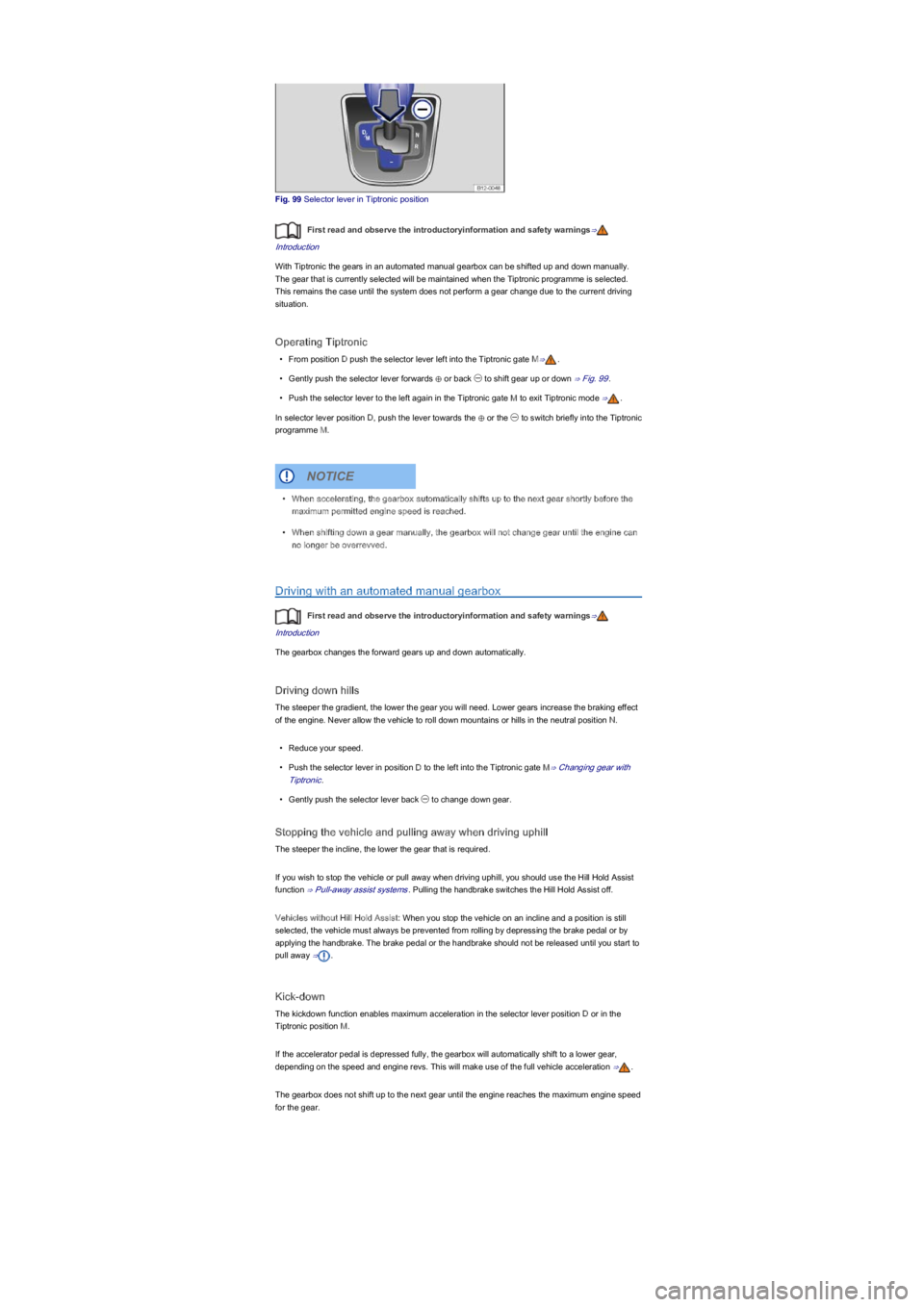
Fig. 99 Selector lever in Tiptronic position
First read and observe the introductoryinformation and safety warnings⇒
Introduction
With Tiptronic the gears in an automated manual gearbox can be shifted up and down manually.
The gear that is currently selected will be maintained when the Tiptronic programme is selected.
This remains the case until the system does not perform a gear change due to the current driving
situation.
Operating Tiptronic
\f