display VOLVO 850 1996 Owners Manual
[x] Cancel search | Manufacturer: VOLVO, Model Year: 1996, Model line: 850, Model: VOLVO 850 1996Pages: 265, PDF Size: 4.57 MB
Page 19 of 265

Resetting the clock
The digital clock can be reset by pressing one of the two buttons (A an\
d B) with a pointed objec")
1996 Volvo 850
pg. 1:11 Clock, Ambient temperature sensor (certain models)
Resetting the clock
The digital clock can be reset by pressing one of the two buttons (A an\
d B) with a pointed object such as
the tip of a pen.
h = hours
m = minutes
Maintain the pressure on the buttons for more than four seconds to chang\
e the time more quickly.
Ambient temperature sensor
This sensor indicates the temperature slightly above the road surface. A\
n amber warning lamp (C) lights
up when the temperature is in the range of 23 - 35° F (-5 - +2° C\
). Please note that this lamp does not
indicate a fault with your car.
At low speeds or when the car is not moving, the temperature readings ma\
y be slightly higher than the
actual ambient temperature due to the heat generated by the engine.
Display alternatives
If buttons A and B are pressed down simultaneously, it is possible to sh\
ift between four different display
alternatives, as follows:
Press 1st time: 12 hour clock and °F
Press 2nd time: 24 hour clock and °F
Press 3rd time: 12 hour clock and °C
Press 4th time: 24 hour clock and °C
NOTE: If your battery has been disconnected, the display will default to\
the 24 hour clock and degrees
centigrade.
file:///K|/ownersdocs/1996/1996_850/96850_111.htm (1 of 5)12/30/2006 9\
:58:59 AMClassic Cars & Cycles www.ClassicCycles.org
Page 20 of 265

Trip computer
The trip computer offers six functions which are presented in a single d\
isplay. The cursor indicates the
selected functio")
1996 Volvo 850
pg. 1:12 Trip computer (certain models)
Trip computer
The trip computer offers six functions which are presented in a single d\
isplay. The cursor indicates the
selected function. The trip computer's clock is shown permanently in the\
left-hand field. Refer to the
previous page for more detailed information regarding the clock function\
.
The following data is monitored by the computer:
l Average speed
l Current fuel consumption
l Average fuel consumption
l Ambient temperature
l Tripmeter
l Driving distance on current fuel reserve
Warning function
The trip computer is equipped with two warning functions:
l Low fuel level
l Low ambient temperature
If either of these situations occurs, the cursor is activated beside the\
function affected and in the case of
low ambient temperature, lamp A also lights up.*
The relevant value is shown in the display, regardless of the function s\
elected. In order to return to the
selected function, the control should be rotated one step in either dire\
ction and then back again.
NOTE: The low ambient temperature warning always has the highest priorit\
y on the display panel.
*
See page 1:14.
file:///K|/ownersdocs/1996/1996_850/96850_111.htm (2 of 5)12/30/2006 9\
:58:59 AMClassic Cars & Cycles www.ClassicCycles.org
Page 22 of 265

Continuous information on current fuel consumption, calculated once per \
second. When the car is not
moving, the display shows \"-")
1996 Volvo 850
Current fuel consumption mpg (Canada: L/100 km)
Continuous information on current fuel consumption, calculated once per \
second. When the car is not
moving, the display shows "---".
Average fuel consumption Ø mpg (Canada: L/100km)
Average fuel consumption since the function was last reset. When the ign\
ition is switched off, the
average fuel consumption figure is stored in memory until it is reset us\
ing the button on the trip
computer control. pg. 1:14 Trip computer (certain models)
Ambient temperature
Shows the ambient temperature just above the road surface while driving.\
When the temperature is in the
range 23-36° F(-5 - +2° C), the ambient temperature sensor activ\
ates and amber warning light. Please
note that this light does not indicate a fault with your car. At low spe\
eds or when the car is not moving,
the temperature readings may be slightly higher than the actual ambient \
temperature due to the heat
generated by the engine.
file:///K|/ownersdocs/1996/1996_850/96850_111.htm (4 of 5)12/30/2006 9\
:58:59 AMClassic Cars & Cycles www.ClassicCycles.org
Page 23 of 265

Shows the distance driven since the function was last reset. This value \
is stored in memory until it is
reset using the reset button on the trip")
1996 Volvo 850
Tripmeter in miles (Canada: km)
Shows the distance driven since the function was last reset. This value \
is stored in memory until it is
reset using the reset button on the trip computer control. The trip mete\
r displays 10 yard intervals
(Canada: 10 meters) until you have driven 1 mile (Canada: 1km), afte\
r which distance will be measured
in miles (km).
Driving distance on current fuel reserve mile 0 (Canada: km)
Shows the distance which can be driven on the fuel remaining in the tank\
, calculated on the basis of the
average fuel consumption and the amount of fuel remaining in the tank at\
the time of the reading. When
the quantity of fuel drops to below 1.8 US gals. (8liters), a warning \
light in the instrument panel comes
on and the cursor beside the "Driving Distance on Current Fuel Reserve" \
symbol is activated. This take
place regardless of the function currently selected. When the driving di\
stance on the current fuel reserve
is less than 5 miles (8 km), the display shows "---".
Contents | Top of Page
file:///K|/ownersdocs/1996/1996_850/96850_111.htm (5 of 5)12/30/2006 9\
:58:59 AMClassic Cars & Cycles www.ClassicCycles.org
Page 42 of 265
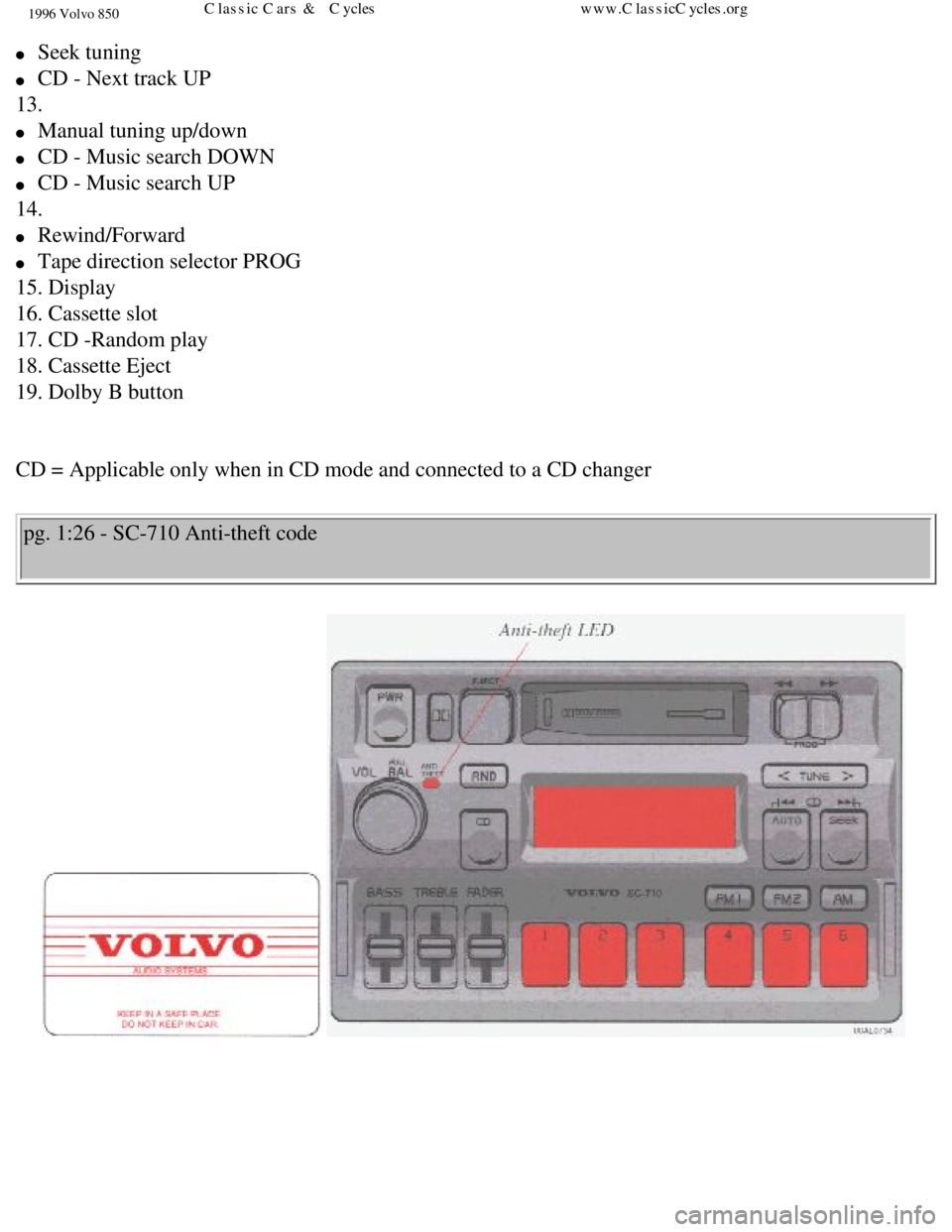
1996 Volvo 850
l Seek tuning
l CD - Next track UP
13.
l Manual tuning up/down
l CD - Music search DOWN
l CD - Music search UP
14.
l Rewind/Forward
l Tape direction selector PROG
15. Display
16. Cassette slot
17. CD -Random play
18. Cassette Eject
19. Dolby B button
CD = Applicable only when in CD mode and connected to a CD changer
pg. 1:26 - SC-710 Anti-theft code
file:///K|/ownersdocs/1996/1996_850/96850_125.htm (2 of 8)12/30/2006 9\
:59:06 AMClassic Cars & Cycles www.ClassicCycles.org
Page 43 of 265

1996 Volvo 850
Anti-theft code
The radio features anti-theft circuitry. If the set is removed from the \
vehicle or if the battery power is
disconnected, a special code must be entered to enable operation of the \
set. Refer to the radio code card
supplied with your vehicle or ask your retailer for the correct code . \
When the car is parked with the ignition key removed, the anti-theft LED\
will flash
To enter the code
After installation or when the set has been disconnected from power, the\
set displays "CODE" when it is
switched on. Enter the 4-digit code using the preset buttons. If the cor\
rect code is entered the set is ready
to use. If you enter an incorrect code you must enter the correct code a\
gain from the beginning.
Incorrect code
If an incorrect code has been entered "EEEE" is displayed. Enter the cor\
rect code.
After three unsuccessful coding attempts the set will lock and remain lo\
cked for two hours.
"OFF" is displayed. During this waiting period:
l The battery must be connected
l The ignition key must be turned to position I
l The unit must be turned on
Make sure the headlights are turned off to help prevent battery drain. \
Enter the code again once this time has elapsed.
pg. 1:27 Radio - SC-710
file:///K|/ownersdocs/1996/1996_850/96850_125.htm (3 of 8)12/30/2006 9\
:59:06 AMClassic Cars & Cycles www.ClassicCycles.org
Page 44 of 265

1996 Volvo 850
A - On/off switch
Push the button to switch on the radio.
B - Volume control
Turn the button clockwise to increase the volume. The volume control is \
electronic and has no end stop.
C - Waveband selector
The desired waveband is set by pressing one of the waveband selector but\
tons. The frequency and
waveband is shown on the display. NOTE: There are two FM wavebands and o\
ne AM waveband. This
makes it possible to store 2 x 6 FM stations and 6 AM stations in memory\
.
D - Setting frequency selection
The radio can be used in most parts of the world by changing the frequen\
cy selection intervals as
follows:
file:///K|/ownersdocs/1996/1996_850/96850_125.htm (4 of 8)12/30/2006 9\
:59:06 AMClassic Cars & Cycles www.ClassicCycles.org
Page 45 of 265

1996 Volvo 850
Depress and hold preset button 5 and turn the radio ON. "USA" will flash\
on the display. Each time
button 5 is pressed, the frequency selection will change from "USA" to "\
AUS", etc. When the correct
country name is displayed, wait 5 seconds and the radio will be ready fo\
r use.
E - Manual tuning
Press the left side of the tune button to tune to lower frequencies and \
the right side to tune to higher
frequencies. The tuned frequency is displayed.
ST will be displayed to indicate stereo FM reception. pg. 1:28 Radio - SC-710
A - Seek tuning
Press the SEEK button to seek for higher frequencies. The radio seeks th\
e next audible station and stops
there.
If you wish to continue the seek tuning, press the SEEK button again.
B - Preset programming
file:///K|/ownersdocs/1996/1996_850/96850_125.htm (5 of 8)12/30/2006 9\
:59:06 AMClassic Cars & Cycles www.ClassicCycles.org
Page 46 of 265
.
3.")
1996 Volvo 850
1. Tune to the desired frequency.
2. Depress and hold a preset button. The audio will cut out. Keep the bu\
tton depressed until the audio
comes on again (approx. 2 seconds).
3. The frequency is now stored on this preset button.
C - Preset buttons
To select a pre-programmed radio frequency, depress the preset button. T\
he set frequency will be
displayed. pg. 1:29 Radio - SC-710
A - Automatic programming (Auto seek)
This function automatically seeks and stores up to 8 strong AM or FM sta\
tions. This is especially useful
when travelling in areas where radio stations are unfamiliar.
1. Depress and hold the "auto-seek" button for at least 1 second (AUTO \
will be displayed ). A number of
strong stations (max. 8) on the chosen waveband are now automatically \
stored in the auto seek memory.
If there are no audible stations, "---" is displayed.
2. Press the "AUTO" button (for less than 1 second) to obtain another \
autostored station. A new
file:///K|/ownersdocs/1996/1996_850/96850_125.htm (6 of 8)12/30/2006 9\
:59:06 AMClassic Cars & Cycles www.ClassicCycles.org
Page 49 of 265
. When the
cassette is inserted, the rad")
1996 Volvo 850
pg. 1:31 Cassette deck
A - Cassette slot
The cassette is inserted with the open side to the right (side 1 or A o\
f the cassette upwards). When the
cassette is inserted, the radio is disengaged and the cassette will star\
t to play automatically. " TAPE
"
or " TAPE
" is displayed to indicate which side of the tape is being played. When\
one side of the tape
has been played, the unit will automatically play the other side (auto-\
reverse). The cassette can be
inserted or ejected even when the unit is switched off.
B - Reversing the tape (PROG)
Press the two buttons to play the other side of the tape.
The side of the tape being played will be displayed.
C - Fast winding
The tape is advanced with "
" and rewound with " ".
Fast winding can be stopped by pressing the opposite button.
file:///K|/ownersdocs/1996/1996_850/96850_131.htm (1 of 6)12/30/2006 9\
:59:08 AMClassic Cars & Cycles www.ClassicCycles.org