display VOLVO 850 1996 User Guide
[x] Cancel search | Manufacturer: VOLVO, Model Year: 1996, Model line: 850, Model: VOLVO 850 1996Pages: 265, PDF Size: 4.57 MB
Page 50 of 265

1996 Volvo 850
D - Dolby B button
Press this button when you use tapes recorded with the Dolby B noise red\
uction system. The Dolby
Symbol
will be indicated in the display.
pg. 1:32 Cassette deck
A - Cassette eject
If the button is pressed the tape will stop and the cassette will be eje\
cted. The radio will be automatically
engaged. The radio or CD will engage automatically (depending on which \
mode was activated before
the tape was played). pg. 1:33 CD - Remote (certain models)
file:///K|/ownersdocs/1996/1996_850/96850_131.htm (2 of 6)12/30/2006 9\
:59:08 AMClassic Cars & Cycles www.ClassicCycles.org
Page 51 of 265

1996 Volvo 850
A - CD mode selector
Press "CD" to actuate the CD mode. The disc/track last listened to will \
continue to play. If the CD-
changer cartridge * is empty, "---- will be displayed. If a selected dis\
c does not exist, the disc number
and "5---" will be displayed and the next disc will be automatically sel\
ected.
* The functions pertaining to the CD-changer are only applicable if the \
unit has been connected to the
Volvo CD-changer which is sold separately as an accessory, or on certain\
models, standard on the car.
B - Disc number selector
Depress one of the preset buttons (1-6) to select the disc number desi\
red. The selected disc number and
track number will be displayed.
C - Music search
Press the TUNE button to search within a track. While the button is depr\
essed the playing time for this
track will be displayed.
file:///K|/ownersdocs/1996/1996_850/96850_131.htm (3 of 6)12/30/2006 9\
:59:08 AMClassic Cars & Cycles www.ClassicCycles.org
Page 52 of 265
1996 Volvo 850
pg. 1:34 CD - Remote (certain models)
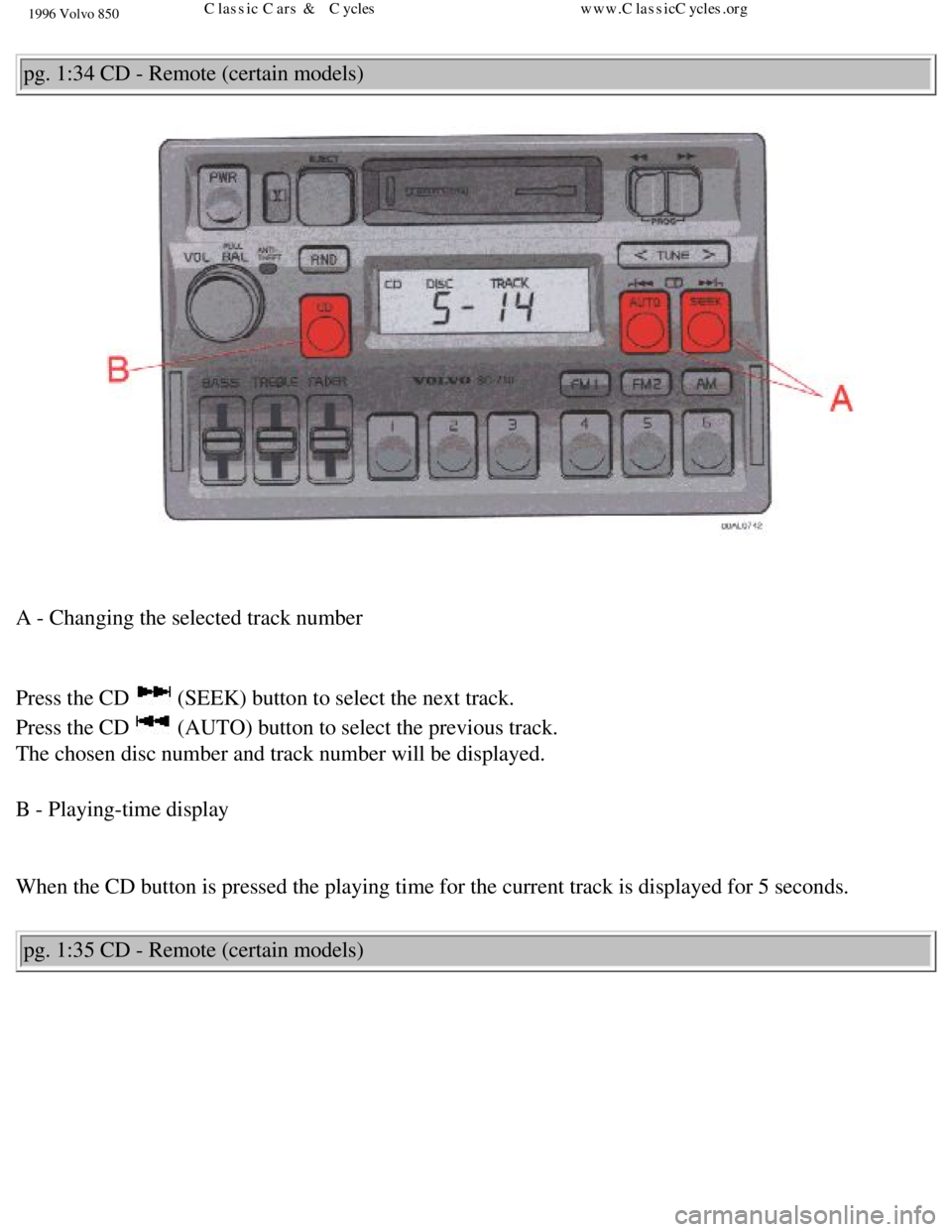
A - Changing the selected track number
Press the CD
(SEEK) button to select the next track.
Press the CD
(AUTO) button to select the previous track.
The chosen disc number and track number will be displayed.
B - Playing-time display
When the CD button is pressed the playing time for the current track is \
displayed for 5 seconds.
pg. 1:35 CD - Remote (certain models)
file:///K|/ownersdocs/1996/1996_850/96850_131.htm (4 of 6)12/30/2006 9\
:59:08 AMClassic Cars & Cycles www.ClassicCycles.org
Page 53 of 265
. A new disc will then be played in the s")
1996 Volvo 850
A - Random choice
Press "RND" to actuate the random mode. From a disc chosen at random, 4 \
tracks will be played (also
chosen at random). A new disc will then be played in the same way. "RND\
" will be displayed when this
function is engaged.
B - To re-enter the Radio mode
To re-enter Radio mode, push one of the waveband selector buttons. pg. 1:36 Technical specifications
SC-710
Output: 4 x 20 W (10% dist.)
Output impedance: 4 Ohms
System voltage: 12 Volts, negative ground
Fuse: 10 A
file:///K|/ownersdocs/1996/1996_850/96850_131.htm (5 of 6)12/30/2006 9\
:59:08 AMClassic Cars & Cycles www.ClassicCycles.org
Page 56 of 265
1996 Volvo 850
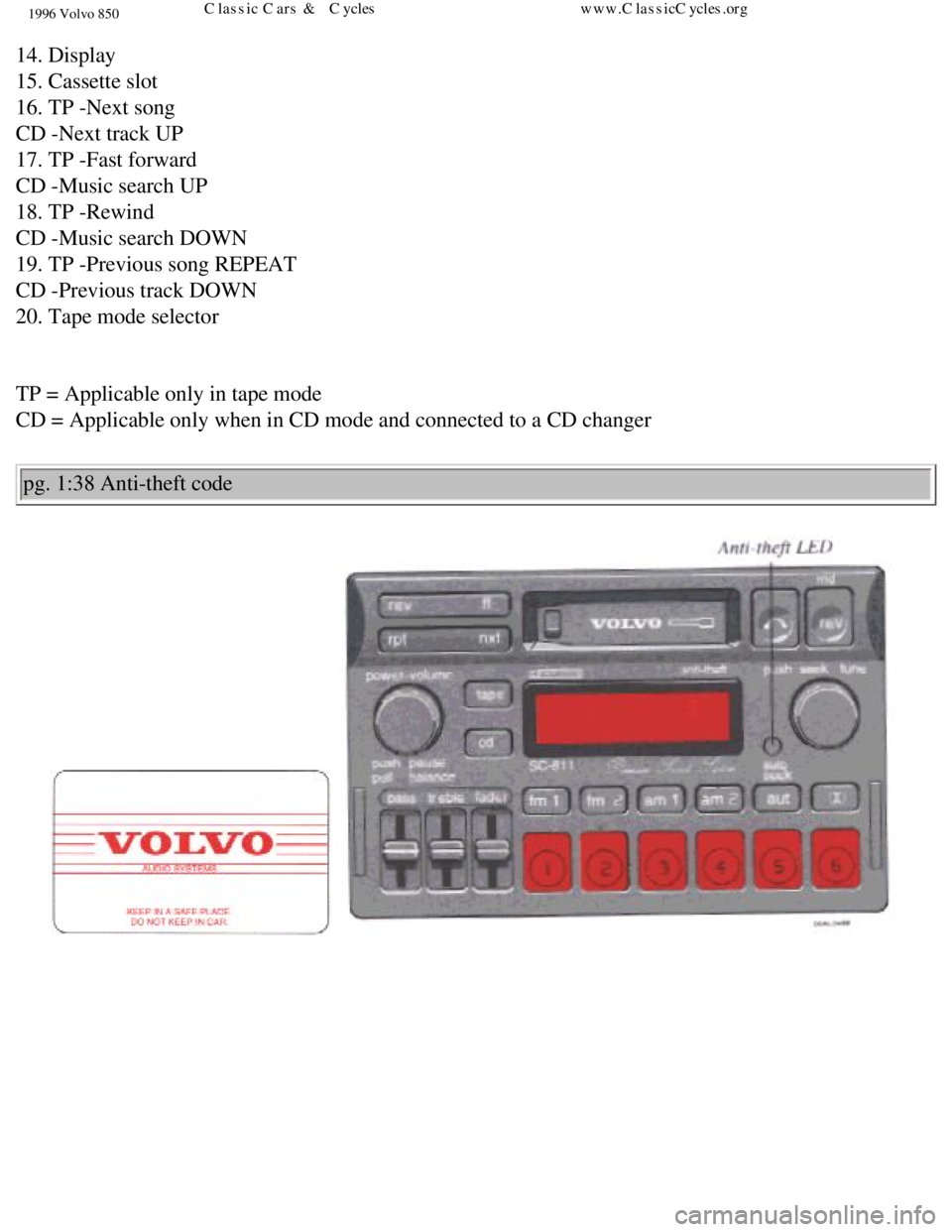
14. Display
15. Cassette slot
16. TP -Next song
CD -Next track UP
17. TP -Fast forward
CD -Music search UP
18. TP -Rewind
CD -Music search DOWN
19. TP -Previous song REPEAT
CD -Previous track DOWN
20. Tape mode selector
TP = Applicable only in tape mode
CD = Applicable only when in CD mode and connected to a CD changer pg. 1:38 Anti-theft code
file:///K|/ownersdocs/1996/1996_850/96850_137.htm (2 of 8)12/30/2006 9\
:59:10 AMClassic Cars & Cycles www.ClassicCycles.org
Page 57 of 265

1996 Volvo 850
Anti-theft code
The radio features anti-theft circuitry. If the set is removed from the \
vehicle or if the battery power is
disconnected, a special code must be entered to enable operation of the \
set. Refer to the radio code card
supplied with your vehicle or ask your retailer for the correct code . \
When the car is parked with the ignition key removed, the anti-theft LED\
will flash
To enter the code
After installation or when the set has been disconnected from power, the\
set displays "codE" when it is
switched on.
Enter the 4-digit code using the preset buttons. If the correct code is \
entered, "on" is displayed and the
set is ready to use.
If you enter an incorrect code you must enter the correct code again fro\
m the beginning.
Incorrect code
If an incorrect code has been entered "rPt" is displayed. Enter the corr\
ect code.
After three unsuccessful coding attempts the set will lock and remain lo\
cked for two hours.
" OFF " is displayed.
During this waiting period:
l the battery must be connected
l the ignition key must be turned to position I
file:///K|/ownersdocs/1996/1996_850/96850_137.htm (3 of 8)12/30/2006 9\
:59:10 AMClassic Cars & Cycles www.ClassicCycles.org
Page 58 of 265

1996 Volvo 850
l the unit must be turned on
Make sure the headlights are turned off to help prevent battery drain. \
Enter the code again once this time has elapsed.
pg. 1:39 Radio - SC-811
A - On/off switch and volume control
Turn the button clockwise to switch on and to increase the volume.
B - Waveband selector
The desired waveband is set by pressing one of the waveband selector but\
tons. The frequency and
waveband is shown on the display.
NOTE: There are two FM wavebands and two AM wavebands. This makes it pos\
sible to store 2 x 6 FM
stations and 2 x 6 AM stations in memory.
file:///K|/ownersdocs/1996/1996_850/96850_137.htm (4 of 8)12/30/2006 9\
:59:10 AMClassic Cars & Cycles www.ClassicCycles.org
Page 59 of 265

1996 Volvo 850
C - Setting frequency selection
The radio can be used in most parts of the world by changing the frequen\
cy selection intervals as
follows:
Depress and hold preset button 5 and turn the radio ON. "USA" will flash\
on the display. Each time
button 5 is pressed, the frequency selection will change from "USA" to "\
AUS", etc. When the correct
country name is displayed, wait 5 seconds and the radio will be ready fo\
r use.
When "USA" is chosen, the FM band will search for stations in 200 kHz in\
tervals and AM will search in
10 kHz intervals.
D - Manual tuning
Turn the knob counter-clockwise to tune to lower frequencies and clockwi\
se to tune to higher
frequencies. The tuned frequency is displayed. pg. 1:40 Radio-SC-811
A - Seek tuning
file:///K|/ownersdocs/1996/1996_850/96850_137.htm (5 of 8)12/30/2006 9\
:59:10 AMClassic Cars & Cycles www.ClassicCycles.org
Page 60 of 265

1996 Volvo 850
Push the tuning knob to seek for higher frequencies. The radio seeks the\
next audible station and stops
there. If you wish to continue the seek tuning, press the tuning knob ag\
ain.
B - Preset programming
1. Tune to the desired frequency.
2. Depress and hold a preset button. The audio will cut out. Keep the bu\
tton depressed until the audio
comes on again (approx. 2 seconds).
3. The frequency is now stored on this preset button.
C - Preset buttons
To select a pre-programmed radio frequency, depress the preset button. T\
he set frequency will be
displayed. pg. 1:41 Radio SC - 811
A - Automatic programming (Auto seek)
file:///K|/ownersdocs/1996/1996_850/96850_137.htm (6 of 8)12/30/2006 9\
:59:10 AMClassic Cars & Cycles www.ClassicCycles.org
Page 61 of 265

1996 Volvo 850
This function automatically seeks and stores up to 8 strong AM or FM sta\
tions. This is especially useful
when traveling in areas where radio stations are unfamiliar.
1. Depress and hold the "auto seek" button for at least 1 second. A numb\
er of strong stations (max. 8) on
the chosen waveband are now automatically stored in the auto seek memory\
. If there are no audible
stations, "no" is displayed.
2. Press the "auto seek" button (for less than 1 second) to obtain ano\
ther autostored station. A new
station will be selected each time the button is pressed.
B - Bass control
Adjust the bass by sliding the control up or down (up to increase, down\
to decrease). A "detent"
indicates "equalized" bass.
C - Treble control
Adjust the treble by sliding the control up or down (up to increase, do\
wn to decrease). A "detent"
indicates "equalized" treble. pg. 1:42 Radio SC-811
file:///K|/ownersdocs/1996/1996_850/96850_137.htm (7 of 8)12/30/2006 9\
:59:10 AMClassic Cars & Cycles www.ClassicCycles.org