clock VOLVO C30 2008 User Guide
[x] Cancel search | Manufacturer: VOLVO, Model Year: 2008, Model line: C30, Model: VOLVO C30 2008Pages: 234, PDF Size: 4.8 MB
Page 189 of 234
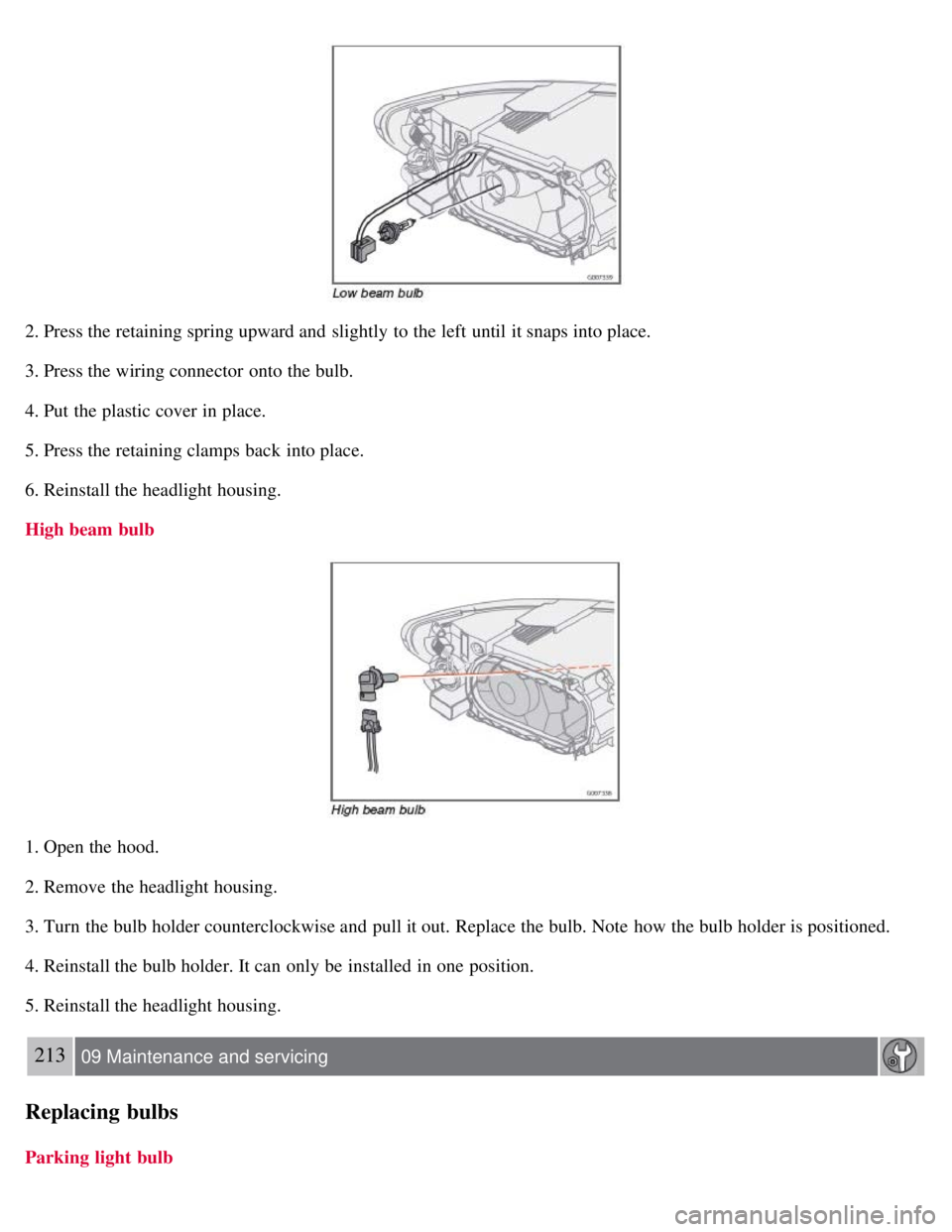
2. Press the retaining spring upward and slightly to the left until it snaps into place.
3. Press the wiring connector onto the bulb.
4. Put the plastic cover in place.
5. Press the retaining clamps back into place.
6. Reinstall the headlight housing.
High beam bulb
1. Open the hood.
2. Remove the headlight housing.
3. Turn the bulb holder counterclockwise and pull it out. Replace the bulb. Note how the bulb holder is positioned.
4. Reinstall the bulb holder. It can only be installed in one position.
5. Reinstall the headlight housing.
213 09 Maintenance and servicing
Replacing bulbs
Parking light bulb
Page 190 of 234
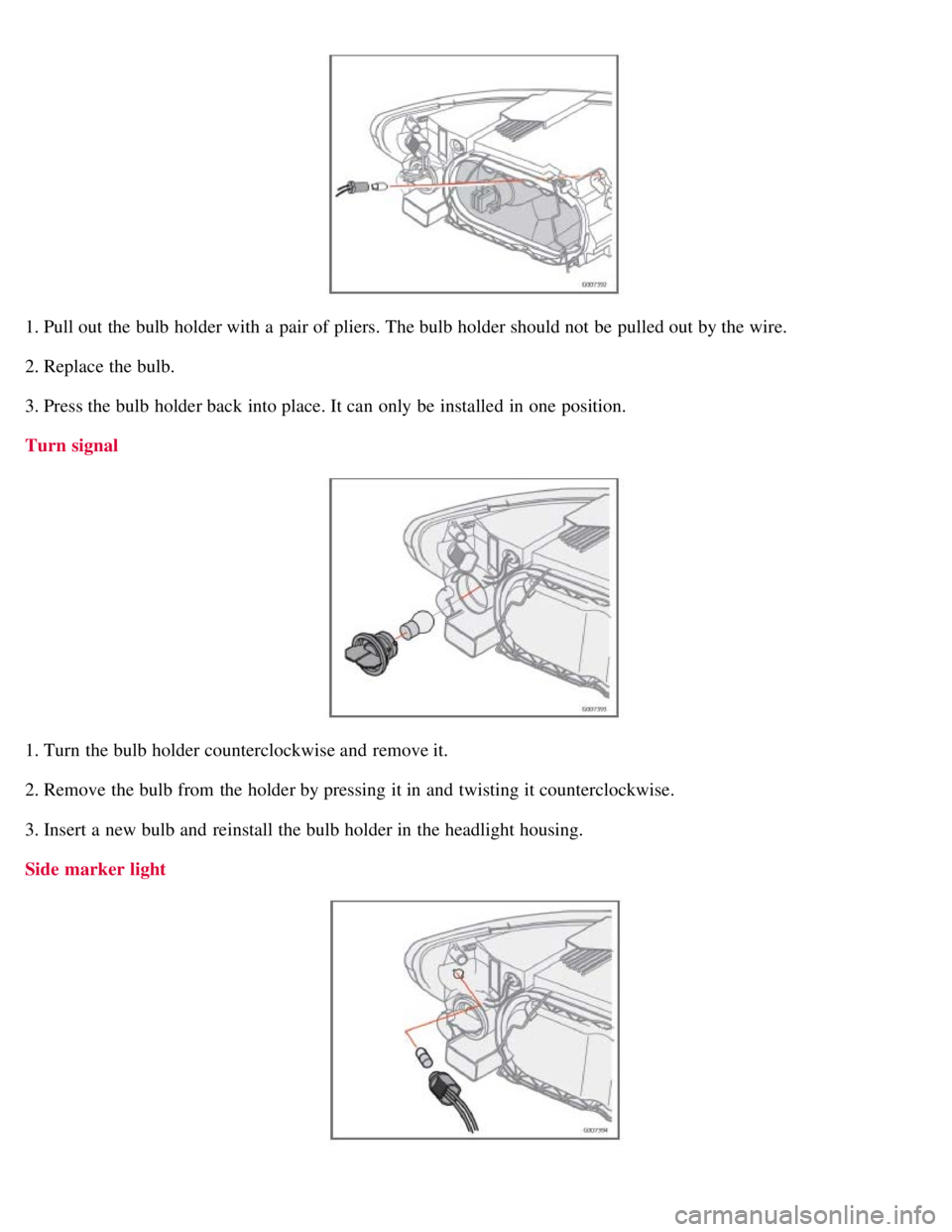
1. Pull out the bulb holder with a pair of pliers. The bulb holder should not be pulled out by the wire.
2. Replace the bulb.
3. Press the bulb holder back into place. It can only be installed in one position.
Turn signal
1. Turn the bulb holder counterclockwise and remove it.
2. Remove the bulb from the holder by pressing it in and twisting it counterclockwise.
3. Insert a new bulb and reinstall the bulb holder in the headlight housing.
Side marker light
Page 191 of 234
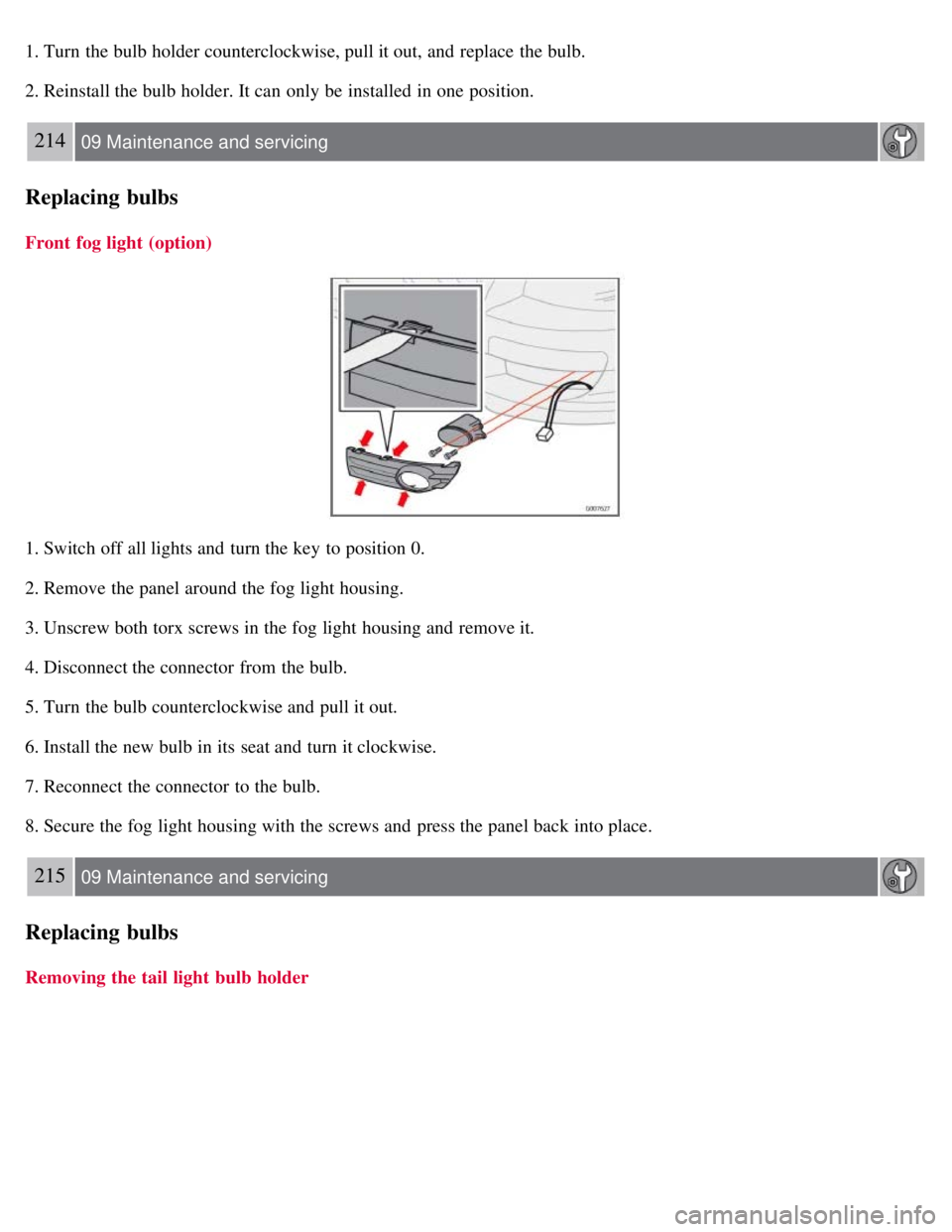
1. Turn the bulb holder counterclockwise, pull it out, and replace the bulb.
2. Reinstall the bulb holder. It can only be installed in one position.
214 09 Maintenance and servicing
Replacing bulbs
Front fog light (option)
1. Switch off all lights and turn the key to position 0.
2. Remove the panel around the fog light housing.
3. Unscrew both torx screws in the fog light housing and remove it.
4. Disconnect the connector from the bulb.
5. Turn the bulb counterclockwise and pull it out.
6. Install the new bulb in its seat and turn it clockwise.
7. Reconnect the connector to the bulb.
8. Secure the fog light housing with the screws and press the panel back into place.
215 09 Maintenance and servicing
Replacing bulbs
Removing the tail light bulb holder
Page 197 of 234
Fuses
Fuse box in the passenger compartment
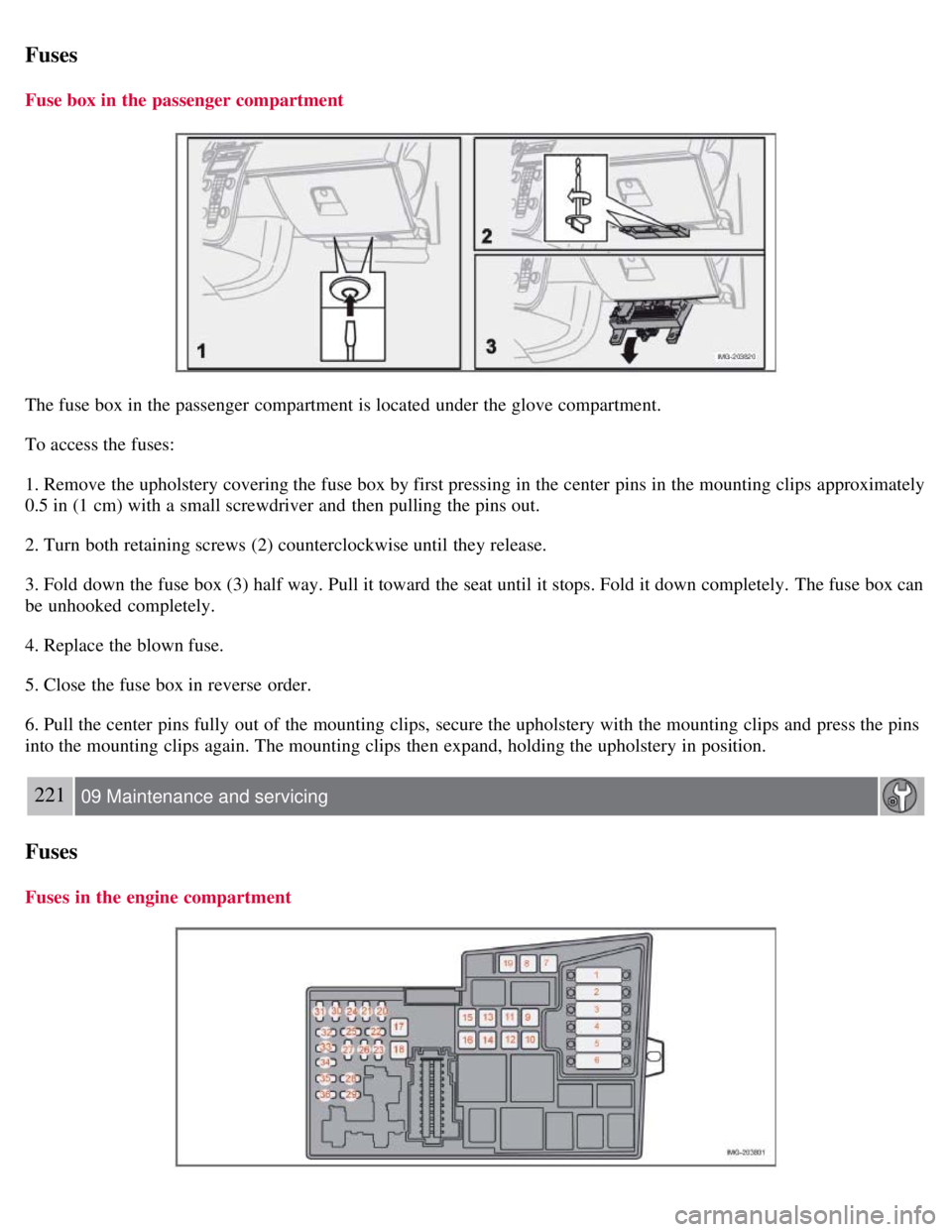
The fuse box in the passenger compartment is located under the glove compartment.
To access the fuses:
1. Remove the upholstery covering the fuse box by first pressing in the center pins in the mounting clips approximately
0.5 in (1 cm) with a small screwdriver and then pulling the pins out.
2. Turn both retaining screws (2) counterclockwise until they release.
3. Fold down the fuse box (3) half way. Pull it toward the seat until it stops. Fold it down completely. The fuse box can
be unhooked completely.
4. Replace the blown fuse.
5. Close the fuse box in reverse order.
6. Pull the center pins fully out of the mounting clips, secure the upholstery with the mounting clips and press the pins
into the mounting clips again. The mounting clips then expand, holding the upholstery in position.
221 09 Maintenance and servicing
Fuses
Fuses in the engine compartment
Page 203 of 234
An auxiliary device, such as an iPOD or a USB flash drive can be connected to the audio system via the connector in
the center console storage compartment.
A sound source must be chosen, depending on the device that has been connected:
1. Use MODE to select iPOD or USB. The text CONNECT DEVICE will be displayed.
2. Connect the device to the connector in the center console storage compartment (see the illustration).
The text LOADING will be displayed while the system indexes the files on the device. This may take a short time.
When indexing has been completed, track information will be displayed, and the desired track can then be selected.
Tracks can be selected in two ways:
Turn the Tuning knob (no. 4 in the illustration on page 228) clockwise or counterclockwise
Use the right or left arrow keys on the navigation control (no. 5 in the illustration on page 233) to select the desired
track. The arrow keys on the steering wheel keypad can also be used in the same way.
NOTE
The system supports playback of files in the most common versions of formats such as mp3, wma, and wav.
However, there may be versions of these formats that the system does not support.
USB flash drive
To simplify the use of a USB flash drive, it is advisable to only store music files on the drive. It will take considerably
longer for the system to index the files on the drive if it contains anything other than compatible music files.
MP3 player
Many mp3 players have a file indexing system that is not supported by the vehicle's audio system. In order to use an
mp3 player, the system must be set to USB Removable device/Mass Storage Device.
iPod
An iPod receives current and its battery is charged through the connecting cord. However, if the iPOD's battery is
completely drained, it should be recharged before the iPOD is connected to the audio system.
NOTE
When an iPOD is used as a sound source, the vehicle's audio system has a menu structure similar to the one in the
iPOD. See the iPOD's manual for detailed information.
For further information, refer to the accessory manual USB/iPOD Music Interface .
Sound settings
Optimal sound reproduction
The audio system is calibrated for optimal sound reproduction through the use of digital signal processing. This
calibration takes into account the speakers, amplifier, cabin
231 10 Audio
Audio functions
Page 215 of 234
NOTE
The TUNING dial (6) (turn clockwise to go to the next track/file, or counterclockwise to go to the previous
track/file) or the optional steering wheel keypad can also be used for this purpose.
Fast forward/back
Press and hold down the left or right arrows keys in the MENU NAVIGATION CONTROL (or the corresponding
keys on the optional steering wheel keypad) to search within a track/file or the whole disc. The search continues for as
long as the buttons are held down.
Random play
This function plays the tracks/files on a CD (or on all of the CDs if the vehicle is equipped with the optional CD
changer) in random order (shuffle).
241 10 Audio
CD player/CD changer (option)
Activating/deactivating the random function-CD player
If a normal CD is being played :
1. Press MENU followed by ENTER .
2. Select Random and press ENTER .
If a CD with audio files is being played :
1. Press MENU followed by ENTER .
2. Select RANDOM and press ENTER.
3. Select DISC or FOLDER and press ENTER .
Activating/deactivating the random function-CD changer
If a normal CD is being played :
1. Press MENU followed by ENTER .
2. Select RANDOM and press ENTER.
3. Select SINGLE DISC or ALL DISCS and press ENTER .
If a CD with audio files is being played :
1. Press MENU followed by ENTER .
2. Select RANDOM and press ENTER.
3. Select SINGLE DISC or FOLDER and press ENTER .
NOTE
CD changer only-you can only select the next random track/file on the current disc.
Press the EXIT button to stop random play. The random function is automatically deactivated when another disc is
selected.
Page 228 of 234
general information86, 87
manual functions89, 90
personal settings86
refrigerant86
Clock setting77
Coat hanger105
Cold weather precautions133
Collisions, driving after30
Compass72, 73
Convertible seats37, 38, 39
Coolant205
Courtesy lighting102
Crash mode30
Cruise control66
Cup holders106
D
Dimensions248
Disabling the passenger's side front airbag22, 23
Dome lighting102
Door mirrors74
Door open warning light55
Driving after a collision30
Driving through water133
Dynamic Stability Traction Control (DSTC)150, 151
E
Economical driving132
Electrical current, conserving134
Electronic Climate control92, 93, 94
Emergency Locking Retractor32
Emergency towing152
Emission inspection readiness200
Engine
specifications253
starting141
starting with keyless drive143
Engine compartment location of components202
Engine oil
checking203
specifications251
Environment7
Eyelets, load anchoring112
F
Federal Clean Air Act198
Floor mats cleaning192