wheel VOLVO C30 2008 User Guide
[x] Cancel search | Manufacturer: VOLVO, Model Year: 2008, Model line: C30, Model: VOLVO C30 2008Pages: 234, PDF Size: 4.8 MB
Page 55 of 234
Resetting
AVERAGE (average fuel consumption) and AVERAGE SPEED can be reset.
1. Select one of these functions.
2. Press RESET (C).
Holding RESET for at least five seconds resets both functions at the same time.
MILES TO EMPTY TANK
This function shows the approximate distance that can be driven on the fuel remaining in the tank. This calculation is
based on average fuel consumption during the last 20 miles (30 km) of driving and the amount of fuel remaining in the
tank when the reading was taken. When the driving distance on current fuel reserve is less than 12 miles (20 km), "----"
will be displayed in the information display.
AVERAGE
This value indicates fuel consumption since the last time the trip computer was reset (by pressing RESET, button C).
When the engine is switched off, information on fuel consumption is stored and remains in system memory until the
RESET (button C) is pressed again.
INSTANTANEOUS
This value indicates the current fuel consumption, based on readings taken once per second. When the vehicle is not
moving, "----" will be displayed.
AVERAGE SPEED
This value indicates average speed since the last time the trip computer was reset (by pressing RESET, button C). When
the engine is switched off, information on average
62 02 Instruments and controls
Trip computer (option)
speed is stored and remains in system memory until the RESET (button C) is pressed again.
ACTUAL SPEED (Canadian models only)
This function provides the driver with an instantaneous conversion of the car's current speed from km/h to m.p.h.
NOTE
Trip computer readings may vary slightly depending on the circumference of the tires on the car, tire inflation, or
driving style.
63 02 Instruments and controls
Right-side steering wheel lever
Windshield wipers
Page 56 of 234
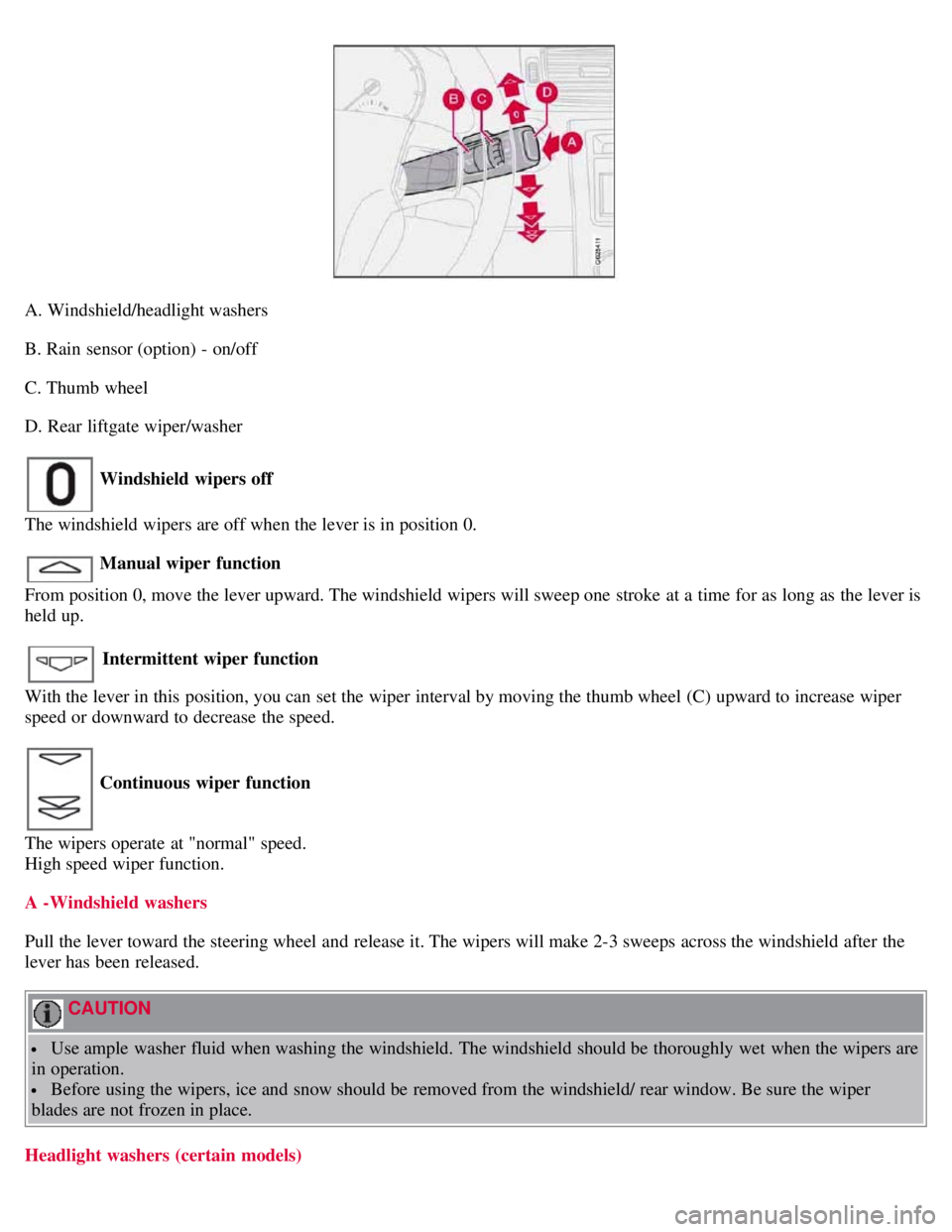
A. Windshield/headlight washers
B. Rain sensor (option) - on/off
C. Thumb wheel
D. Rear liftgate wiper/washer
Windshield wipers off
The windshield wipers are off when the lever is in position 0.
Manual wiper function
From position 0, move the lever upward. The windshield wipers will sweep one stroke at a time for as long as the lever is
held up.
Intermittent wiper function
With the lever in this position, you can set the wiper interval by moving the thumb wheel (C) upward to increase wiper
speed or downward to decrease the speed.
Continuous wiper function
The wipers operate at "normal" speed.
High speed wiper function.
A -Windshield washers
Pull the lever toward the steering wheel and release it. The wipers will make 2-3 sweeps across the windshield after the
lever has been released.
CAUTION
Use ample washer fluid when washing the windshield. The windshield should be thoroughly wet when the wipers are
in operation.
Before using the wipers, ice and snow should be removed from the windshield/ rear window. Be sure the wiper
blades are not frozen in place.
Headlight washers (certain models)
Page 57 of 234
When the lever has been pulled, high pressure jets mounted in the bumper will spray the headlights.
The following applies to conserve washer fluid (see page 58
for information on the light switch positions):
Low/high beam headlights on
The headlights will be washed the first time the windshield is washed. Thereafter, the headlights will only be washed once
for every five times the windshield is washed within a 10-minute period.
64 02 Instruments and controls
Right-side steering wheel lever
Parking lights on
Optional Bi -Xenon® headlights will be washed once for every five times the windshield is washed.
Normal halogen headlights will not be washed.
B - Rain sensor (option)
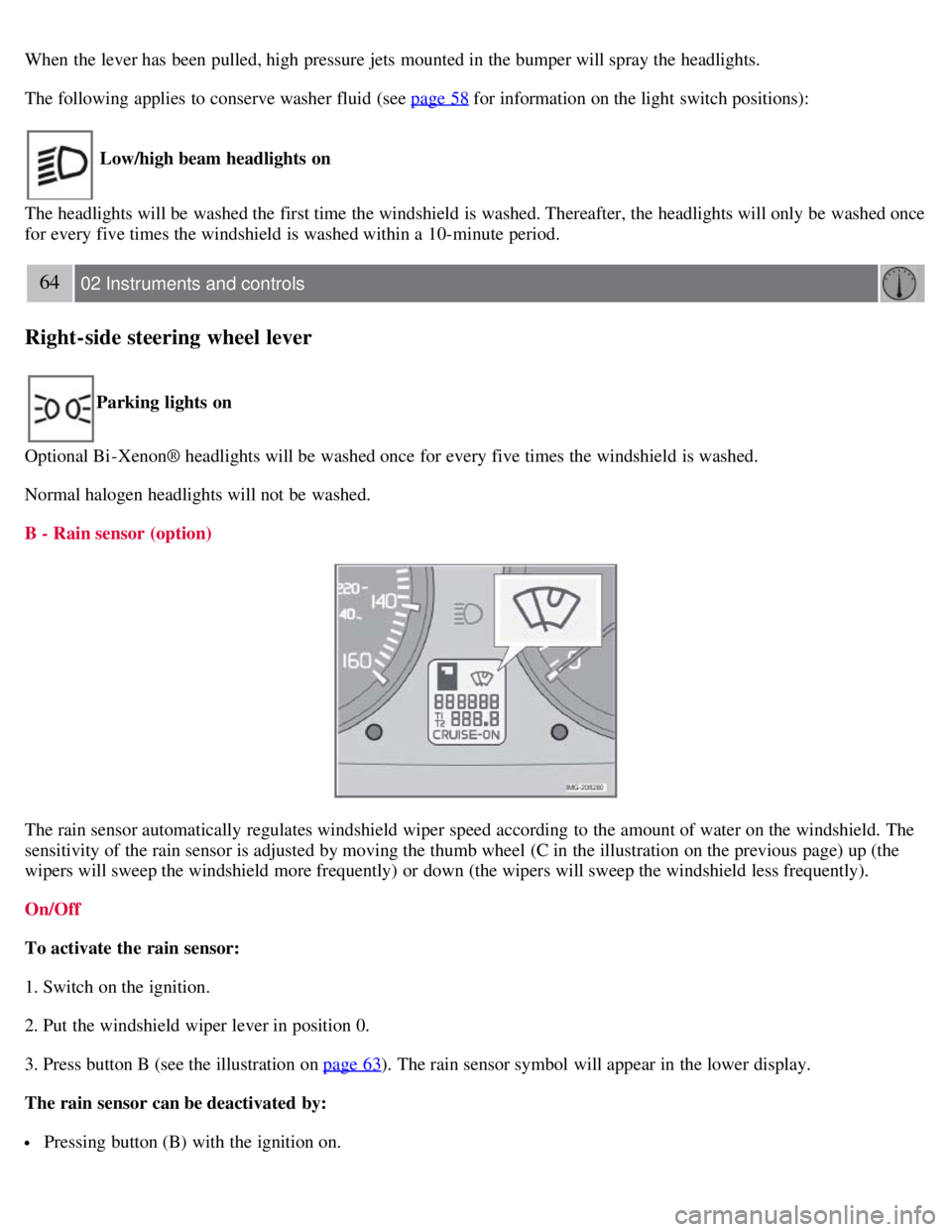
The rain sensor automatically regulates windshield wiper speed according to the amount of water on the windshield. The
sensitivity of the rain sensor is adjusted by moving the thumb wheel (C in the illustration on the previous page) up (the
wipers will sweep the windshield more frequently) or down (the wipers will sweep the windshield less frequently).
On/Off
To activate the rain sensor:
1. Switch on the ignition.
2. Put the windshield wiper lever in position 0.
3. Press button B (see the illustration on page 63
). The rain sensor symbol will appear in the lower display.
The rain sensor can be deactivated by:
Pressing button (B) with the ignition on.
Page 58 of 234
or
Moving the windshield wiper lever down. If the lever is moved up, the rain sensor function will remain activated
CAUTION
The rain sensor should be deactivated when washing the vehicle in an automatic car wash, etc. If the rain sensor
function is left on, the wipers will start inadvertently in the car wash and could be damaged.
The rain sensor is automatically deactivated:
When the key is removed from the ignition.
Five minutes after the ignition is switched off if the key is left in the ignition.
C - Thumb wheel
The thumb wheel is used to set the wiper interval when intermittent wiping is selected, or the sensitivity to the amount of
rain on the windshield when the rain sensor is selected. Move the wheel upward or downward to increase/decrease wiper
speed when the intermittent function is selected, or to increase/decrease the optional rain sensor's sensitivity when this
function is activated.
D - Rear liftgate wiper/washer
Press the lever forward to wipe and wash the liftgate window. The wiper will sweep the window several times after the
lever has been released.
The button at the end of the lever has three positions:
Intermittent wiping
Press in the upper section of the button.
Normal wiper speed
Press in the lower section of the button.
Neutral position
The wiper function is switched off.
65 02 Instruments and controls
Right-side steering wheel lever
Rear liftgate wiper and reverse gear
If the front wipers are on and the transmission is put into reverse gear, the liftgate wiper will be activated.
If the transmission is in reverse and the manual windshield wiper function is used (the lever is pushed upward), the
liftgate wiper will also be activated for as long the lever is held up.
If the liftgate wiper is already in normal wiping function, the normal wiping function will continue.
66 02 Instruments and controls
Cruise control (option)
Engaging the cruise control function
Page 59 of 234
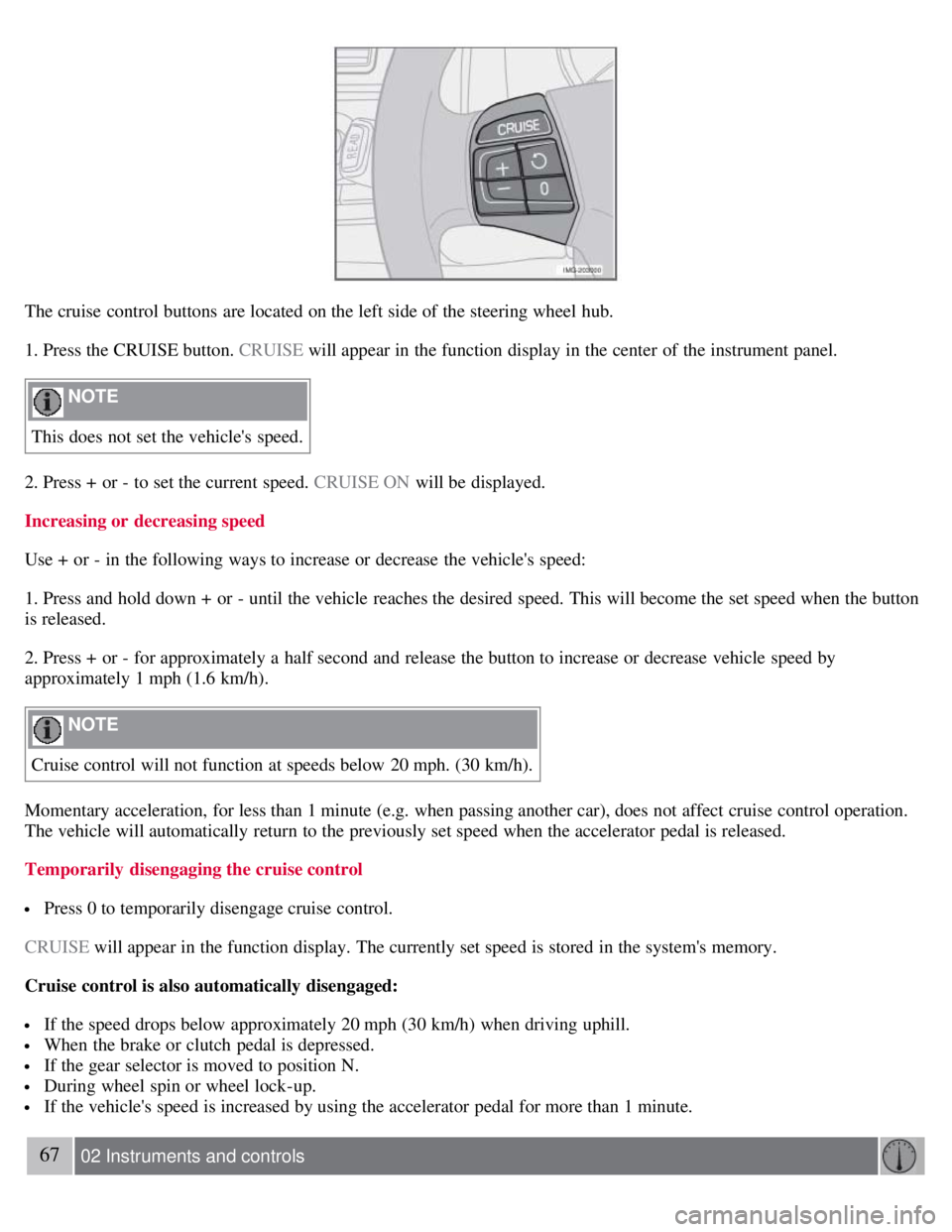
The cruise control buttons are located on the left side of the steering wheel hub.
1. Press the CRUISE button. CRUISE will appear in the function display in the center of the instrument panel.
NOTE
This does not set the vehicle's speed.
2. Press + or - to set the current speed. CRUISE ON will be displayed.
Increasing or decreasing speed
Use + or - in the following ways to increase or decrease the vehicle's speed:
1. Press and hold down + or - until the vehicle reaches the desired speed. This will become the set speed when the button
is released.
2. Press + or - for approximately a half second and release the button to increase or decrease vehicle speed by
approximately 1 mph (1.6 km/h).
NOTE
Cruise control will not function at speeds below 20 mph. (30 km/h).
Momentary acceleration, for less than 1 minute (e.g. when passing another car), does not affect cruise control operation.
The vehicle will automatically return to the previously set speed when the accelerator pedal is released.
Temporarily disengaging the cruise control
Press 0 to temporarily disengage cruise control.
CRUISE will appear in the function display. The currently set speed is stored in the system's memory.
Cruise control is also automatically disengaged:
If the speed drops below approximately 20 mph (30 km/h) when driving uphill.
When the brake or clutch pedal is depressed.
If the gear selector is moved to position N.
During wheel spin or wheel lock-up.
If the vehicle's speed is increased by using the accelerator pedal for more than 1 minute.
67 02 Instruments and controls
Page 60 of 234
Cruise control (option)
Returning to the set speed
Press the button to resume the previously set speed.
Disengaging cruise control
Cruise control can also be disengaged by:
Pressing the CRUISE button (CRUISE ON will no longer be shown in the function display).
Putting the gear selector in (N)eutral.
WARNING
Cruise control should not be used in heavy traffic or when driving on wet or slippery roads. Cruise control may not
maintain set speed on steep downgrades.
68 02 Instruments and controls
Steering wheel adjustment, Hazard warning flashers
Steering wheel adjustment
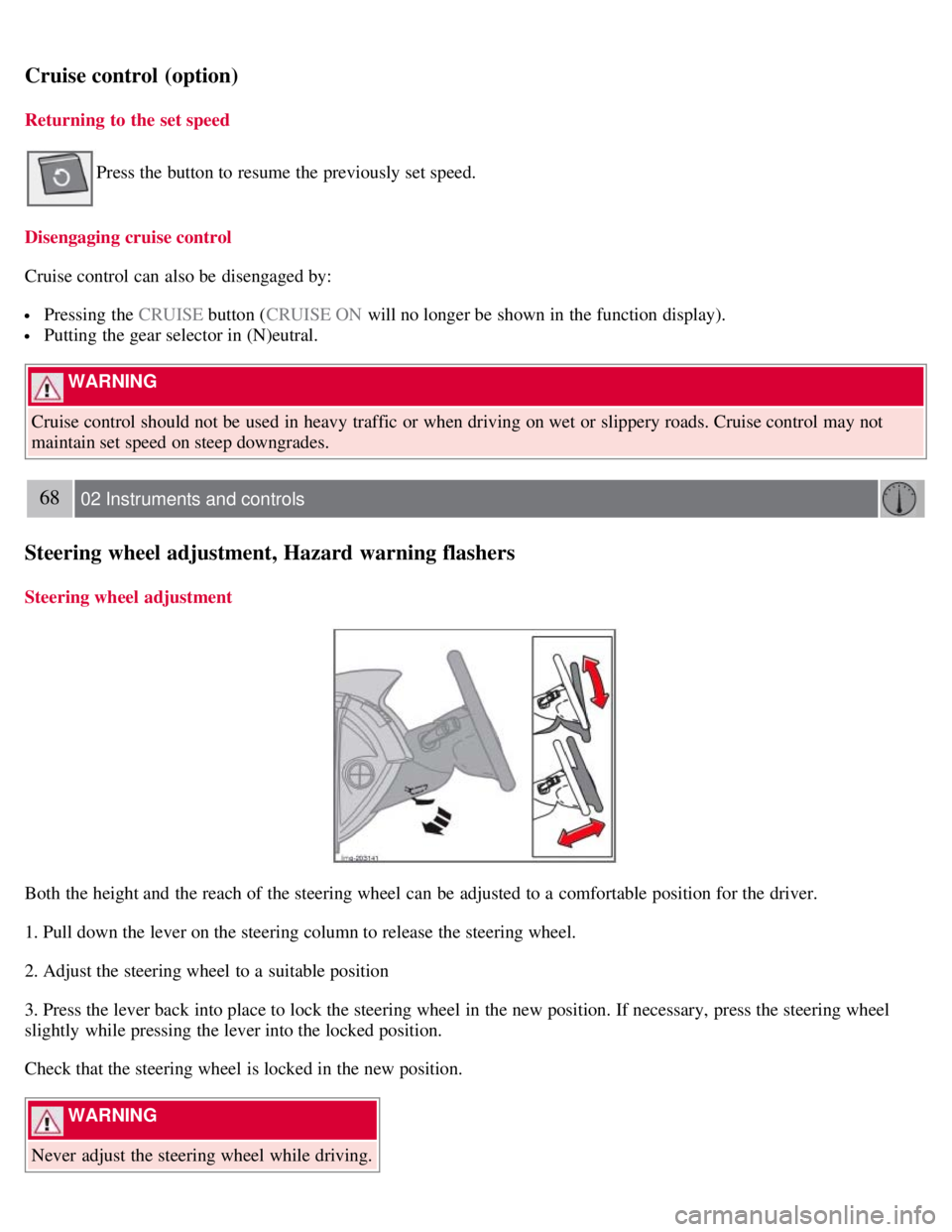
Both the height and the reach of the steering wheel can be adjusted to a comfortable position for the driver.
1. Pull down the lever on the steering column to release the steering wheel.
2. Adjust the steering wheel to a suitable position
3. Press the lever back into place to lock the steering wheel in the new position. If necessary, press the steering wheel
slightly while pressing the lever into the locked position.
Check that the steering wheel is locked in the new position.
WARNING
Never adjust the steering wheel while driving.
Page 62 of 234
3. Release the brake pedal and ensure that the vehicle is at a standstill.
4. If the vehicle rolls, the parking brake lever must be pulled more firmly.
5. When parking a vehicle always put the gear selector in first gear (for manual transmission) or P (for automatic
transmission).
Parking on a hill
If the vehicle is pointing uphill, turn the front wheels so that they point away from the curb.
If the vehicle is pointing downhill, turn the front wheels so that they point toward the curb.
Releasing the parking brake
1. Press firmly on the brake pedal.
2. Pull the lever up slightly, press the button at the end of the lever and lower the lever completely.
WARNING
Pull up the parking brake lever up firmly to its full extent.
70 02 Instruments and controls
12-volt sockets
12-volt socket (front seat)
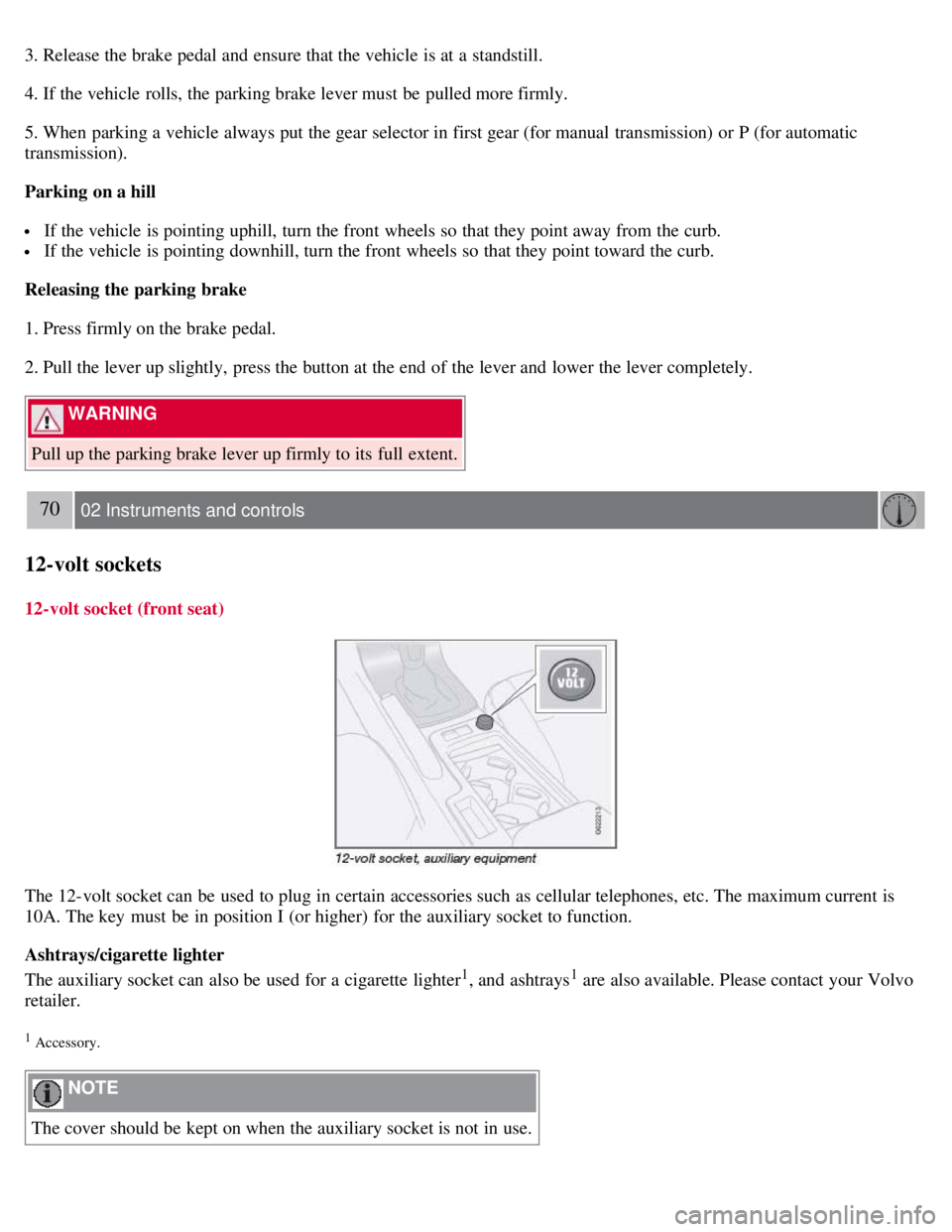
The 12-volt socket can be used to plug in certain accessories such as cellular telephones, etc. The maximum current is
10A. The key must be in position I (or higher) for the auxiliary socket to function.
Ashtrays/cigarette lighter
The auxiliary socket can also be used for a cigarette lighter
1, and ashtrays1 are also available. Please contact your Volvo
retailer.
1 Accessory.
NOTE
The cover should be kept on when the auxiliary socket is not in use.
Page 72 of 234
The ignition key must be in position I or higher (see page 139) before all side windows can be opened/closed using the
switches in the front doors.
1 This menu alternative also makes it possible to open all side windows by pressing and holding the Unlock button on the remote control for several
seconds.
Approach lighting
This alternative determines the length of time for which the car's lights will remain on when the Approach light button on
the central locking system's remote control is pressed. Intervals of 30/60/90 seconds may be selected. See page 78
for
more information.
Home safe lighting
This alternative determines the length of time for which the car's lights will remain on when the high beam lever on the
steering column is pulled toward the wheel with the ignition switched off. Intervals of 30/60/90 seconds may be selected.
See page 78
for information on using this function.
Information
VIN number:
The VIN (Vehicle Identification Number) is the car's unique identity number.
Number of Keys:
The number of keys registered for the vehicle is displayed here.
Climate functions
Blower speed in AUTO mode:
The blower speed can be set to AUTO mode in models equipped with ECC. Choose between "Low", "Normal" and
"High".
Timer for recirculation:
When the timer is active, the air recirculates in the vehicle for 3-12 minutes depending on the ambient temperature. Select
On/Off depending on whether the recirculation timer is to be active or not.
Keyless locking and unlocking (option as available)
The following alternatives can be selected for locking and unlocking the doors and rear liftgate:
All doors
All doors are locked or unlocked at the same time.
One front door
79 02 Instruments and controls
Personal settings
Either of the front doors can be unlocked separately1.
Reset to factory settings
Use this alternative to return to the default climate system settings.
Page 117 of 234
2 0 0 8
VOLVO C30
130 06 Starting and driving
General information 132
Fuel requirements136
Ignition switch/Steering wheel lock139
Starting the vehicle141
Starting the vehicle (keyless drive)143
Manual transmission, 6-speed144
Automatic transmission (option)145
Shiftlock override147
Brake system148
Dynamic Stability Traction Control150
Towing152
Jump starting154
Transporting loads155
Blind Spot Information System (BLIS)-option156
Park assist (Option/accessory)160
131 06 Starting and driving
132 06 Starting and driving
General information
Economical driving conserves natural resources
Better driving economy may be obtained by thinking ahead, avoiding rapid starts and stops and adjusting the speed of
your vehicle to immediate traffic conditions.
Observe the following rules:
Page 118 of 234
Bring the engine to normal operating temperature as soon as possible by driving with a light foot on the accelerator
pedal for the first few minutes of operation. A cold engine uses more fuel and is subject to increased wear.
Whenever possible, avoid using the vehicle for driving short distances. This does not allow the engine to reach
normal operating temperature.
Drive carefully and avoid rapid acceleration and hard braking.
Use the transmission's (D)rive position as often as possible and avoid using kickdown.
Do not exceed posted speed limits.
Avoid carrying unnecessary items (extra load) in the vehicle.
Maintain correct tire pressure. Check tire pressure regularly (when tires are cold).
Remove snow tires when threat of snow or ice has ended.
Note that roof racks, ski racks, etc., increase air resistance and also fuel consumption.
At highway driving speeds, fuel consumption will be lower with the air conditioning on and the windows closed
than with the air conditioning off and the windows open.
Using the onboard trip computer's fuel consumption modes can help you learn how to drive more economically.
Other factors that decrease gas mileage are:
Dirty air cleaner
Dirty engine oil and clogged oil filter
Dragging brakes
Incorrect front end alignment
Some of the above mentioned items and others are checked at the standard maintenance intervals.
WARNING
Driving with the rear liftgate open : Driving with the rear liftgate open could lead to poisonous exhaust gases
entering the passenger compartment. If the rear liftgate must be kept open for any reason, proceed as follows:
Close the windows
Set the ventilation system control to air flow to floor, windshield and side windows and the blower control to its
highest setting.
Weight distribution affects handling
At the specified curb weight your vehicle has a tendency to understeer, which means that the steering wheel has to be
turned more than might seem appropriate for the curvature of a bend. This ensures good stability and reduces the risk
of rear wheel skid. Remember that these properties can alter with the vehicle load. The heavier the load in the cargo
area, the less the tendency to understeer.
Handling, roadholding
Vehicle load, tire design and inflation pressure all affect vehicle handling. Therefore, check that the tires are inflated to
the recommended pressure according to the vehicle load. See the "Tire pressure" section. Loads should be distributed
so that capacity weight
133 06 Starting and driving
General information
or maximum permissible axle loads are not exceeded.
Driving through water