seats VOLVO C30 2008 Owner's Manual
[x] Cancel search | Manufacturer: VOLVO, Model Year: 2008, Model line: C30, Model: VOLVO C30 2008Pages: 234, PDF Size: 4.8 MB
Page 34 of 234
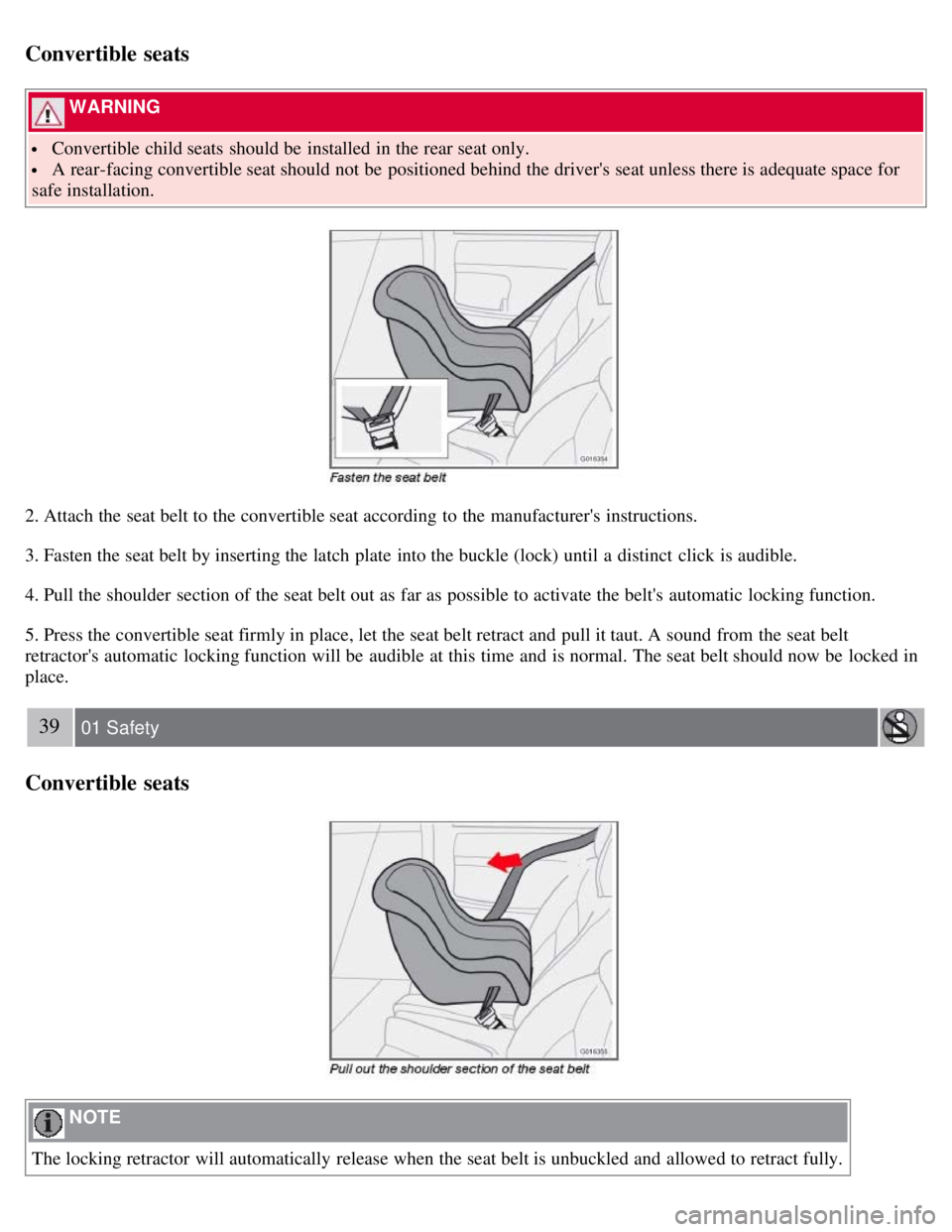
Convertible seats
WARNING
Convertible child seats should be installed in the rear seat only.
A rear-facing convertible seat should not be positioned behind the driver's seat unless there is adequate space for
safe installation.
2. Attach the seat belt to the convertible seat according to the manufacturer's instructions.
3. Fasten the seat belt by inserting the latch plate into the buckle (lock) until a distinct click is audible.
4. Pull the shoulder section of the seat belt out as far as possible to activate the belt's automatic locking function.
5. Press the convertible seat firmly in place, let the seat belt retract and pull it taut. A sound from the seat belt
retractor's automatic locking function will be audible at this time and is normal. The seat belt should now be locked in
place.
39 01 Safety
Convertible seats
NOTE
The locking retractor will automatically release when the seat belt is unbuckled and allowed to retract fully.
Page 35 of 234
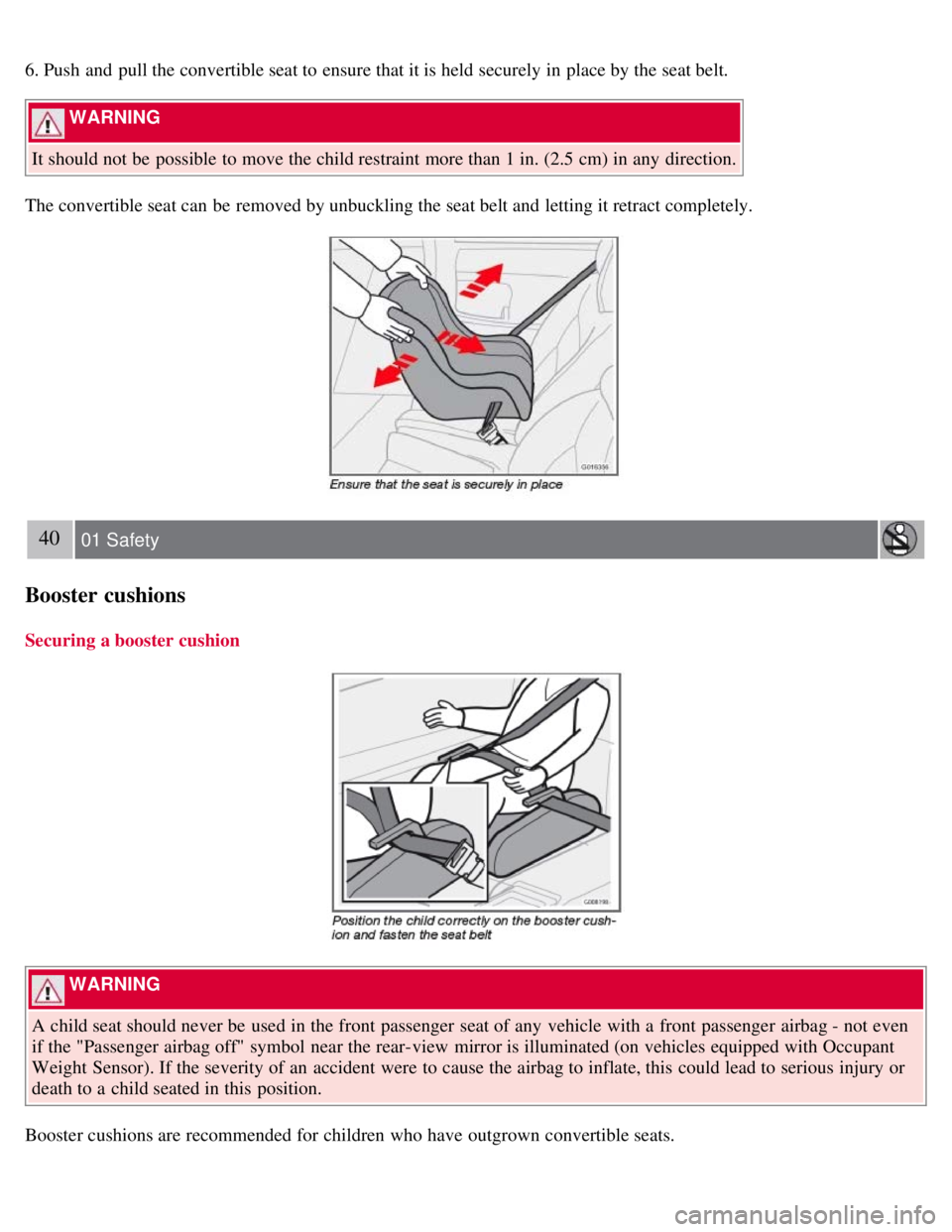
6. Push and pull the convertible seat to ensure that it is held securely in place by the seat belt.
WARNING
It should not be possible to move the child restraint more than 1 in. (2.5 cm) in any direction.
The convertible seat can be removed by unbuckling the seat belt and letting it retract completely.
40 01 Safety
Booster cushions
Securing a booster cushion
WARNING
A child seat should never be used in the front passenger seat of any vehicle with a front passenger airbag - not even
if the "Passenger airbag off" symbol near the rear-view mirror is illuminated (on vehicles equipped with Occupant
Weight Sensor). If the severity of an accident were to cause the airbag to inflate, this could lead to serious injury or
death to a child seated in this position.
Booster cushions are recommended for children who have outgrown convertible seats.
Page 36 of 234
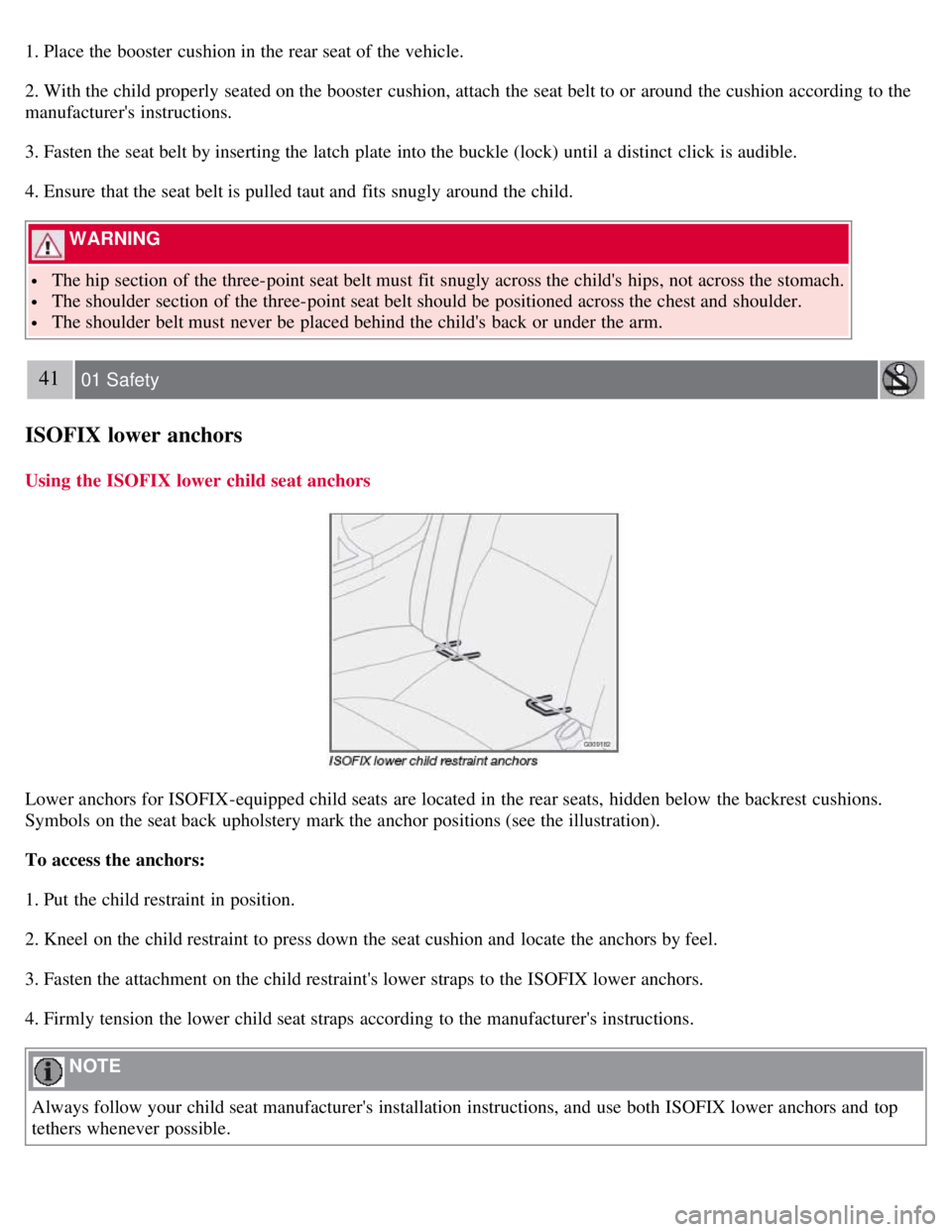
1. Place the booster cushion in the rear seat of the vehicle.
2. With the child properly seated on the booster cushion, attach the seat belt to or around the cushion according to the
manufacturer's instructions.
3. Fasten the seat belt by inserting the latch plate into the buckle (lock) until a distinct click is audible.
4. Ensure that the seat belt is pulled taut and fits snugly around the child.
WARNING
The hip section of the three-point seat belt must fit snugly across the child's hips, not across the stomach.
The shoulder section of the three-point seat belt should be positioned across the chest and shoulder.
The shoulder belt must never be placed behind the child's back or under the arm.
41 01 Safety
ISOFIX lower anchors
Using the ISOFIX lower child seat anchors
Lower anchors for ISOFIX-equipped child seats are located in the rear seats, hidden below the backrest cushions.
Symbols on the seat back upholstery mark the anchor positions (see the illustration).
To access the anchors:
1. Put the child restraint in position.
2. Kneel on the child restraint to press down the seat cushion and locate the anchors by feel.
3. Fasten the attachment on the child restraint's lower straps to the ISOFIX lower anchors.
4. Firmly tension the lower child seat straps according to the manufacturer's instructions.
NOTE
Always follow your child seat manufacturer's installation instructions, and use both ISOFIX lower anchors and top
tethers whenever possible.
Page 37 of 234
WARNING
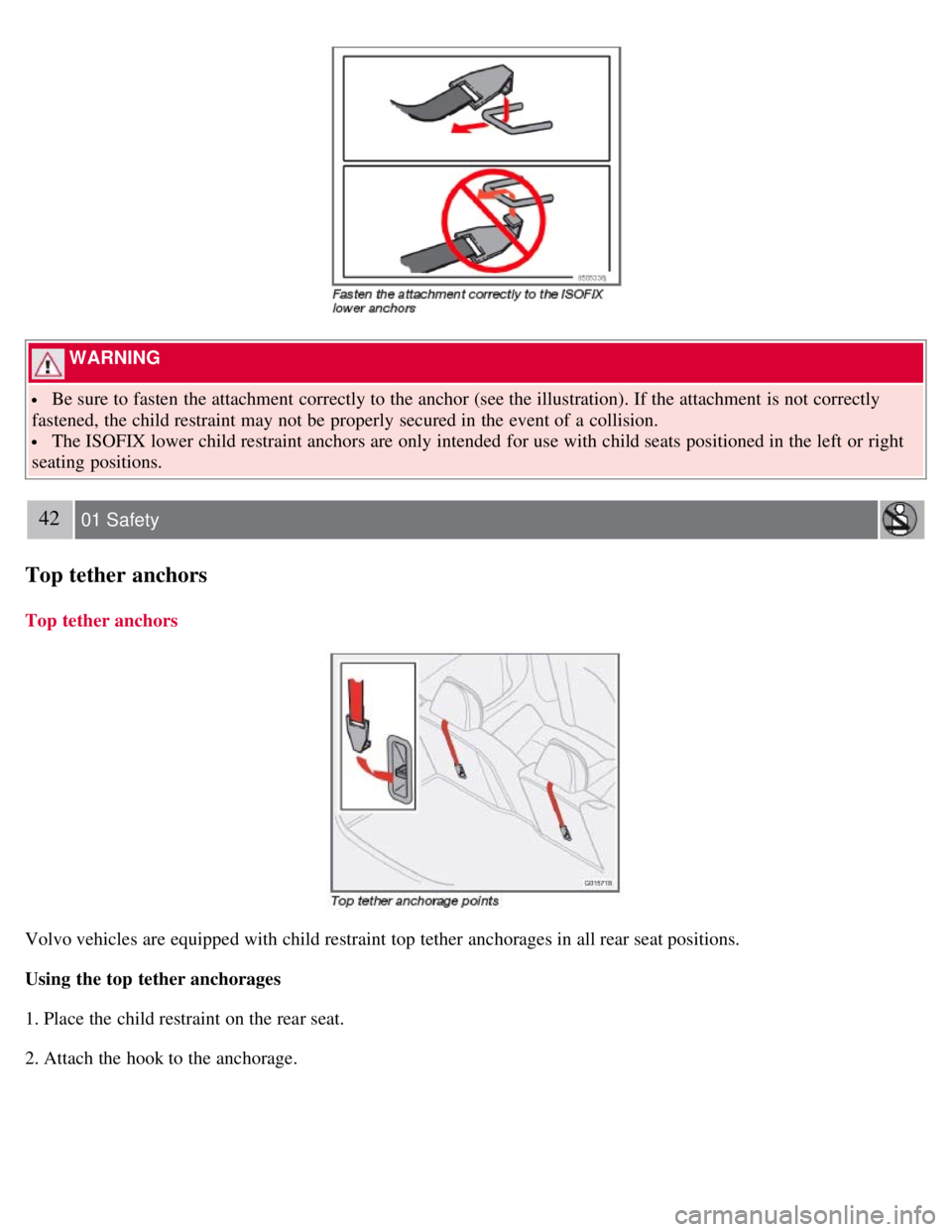
Be sure to fasten the attachment correctly to the anchor (see the illustration). If the attachment is not correctly
fastened, the child restraint may not be properly secured in the event of a collision.
The ISOFIX lower child restraint anchors are only intended for use with child seats positioned in the left or right
seating positions.
42 01 Safety
Top tether anchors
Top tether anchors
Volvo vehicles are equipped with child restraint top tether anchorages in all rear seat positions.
Using the top tether anchorages
1. Place the child restraint on the rear seat.
2. Attach the hook to the anchorage.
Page 47 of 234
stabilize the car. See page 150 for more detailed information.
5. Not in use
6. Fuel level warning light
When this light comes on, there are approximately 2.1 US gallons (8 liters) of fuel remaining in the tank.
54 02 Instruments and controls
Instrument and warning symbols
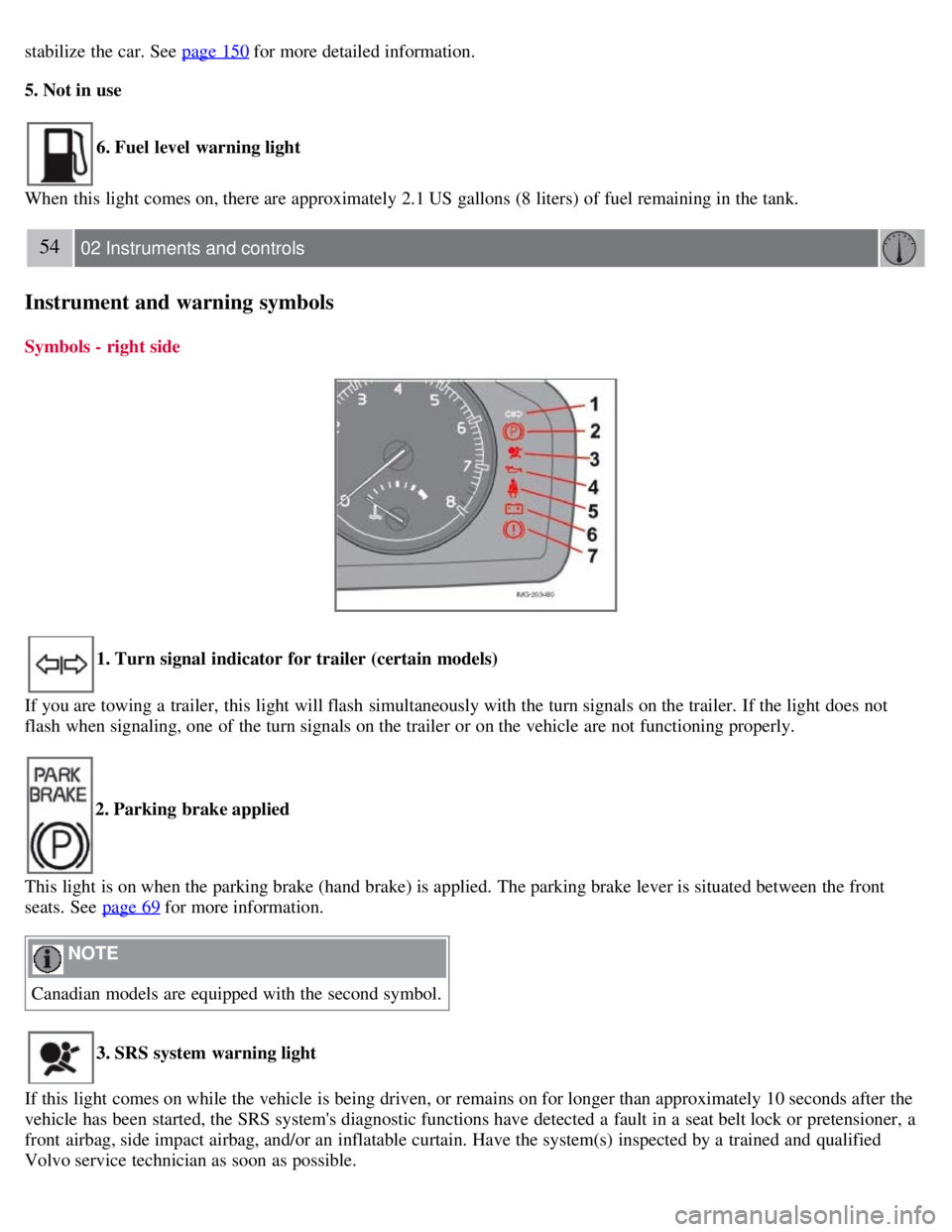
Symbols - right side
1. Turn signal indicator for trailer (certain models)
If you are towing a trailer, this light will flash simultaneously with the turn signals on the trailer. If the light does not
flash when signaling, one of the turn signals on the trailer or on the vehicle are not functioning properly.
2. Parking brake applied
This light is on when the parking brake (hand brake) is applied. The parking brake lever is situated between the front
seats. See page 69
for more information.
NOTE
Canadian models are equipped with the second symbol.
3. SRS system warning light
If this light comes on while the vehicle is being driven, or remains on for longer than approximately 10 seconds after the
vehicle has been started, the SRS system's diagnostic functions have detected a fault in a seat belt lock or pretensioner, a
front airbag, side impact airbag, and/or an inflatable curtain. Have the system(s) inspected by a trained and qualified
Volvo service technician as soon as possible.
Page 61 of 234
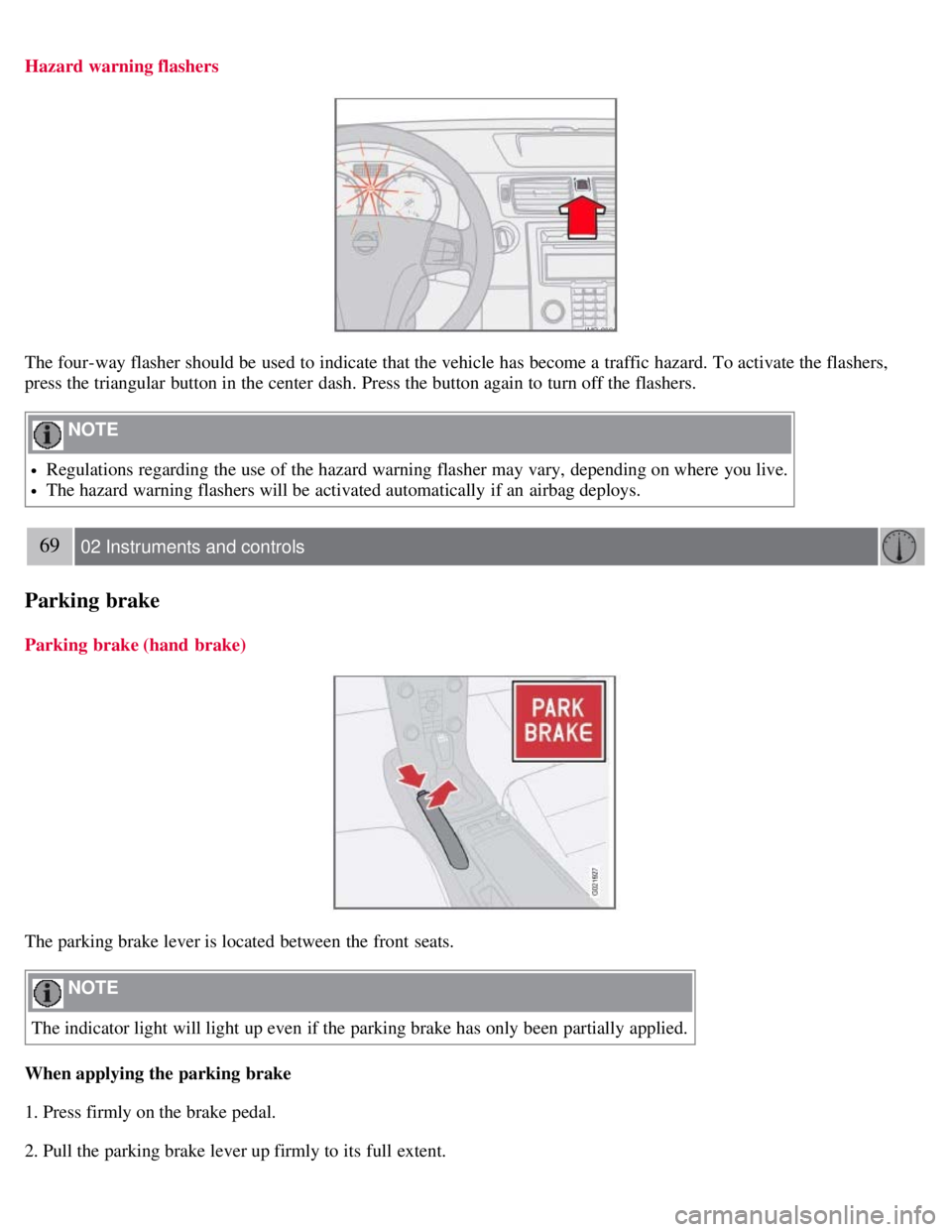
Hazard warning flashers
The four-way flasher should be used to indicate that the vehicle has become a traffic hazard. To activate the flashers,
press the triangular button in the center dash. Press the button again to turn off the flashers.
NOTE
Regulations regarding the use of the hazard warning flasher may vary, depending on where you live.
The hazard warning flashers will be activated automatically if an airbag deploys.
69 02 Instruments and controls
Parking brake
Parking brake (hand brake)
The parking brake lever is located between the front seats.
NOTE
The indicator light will light up even if the parking brake has only been partially applied.
When applying the parking brake
1. Press firmly on the brake pedal.
2. Pull the parking brake lever up firmly to its full extent.
Page 82 of 234
risk of condensation forming on the insides of the windows, especially in winter.
Timer
The timer function minimizes the risk of misting, or stale air when the recirculation function is selected. See page 78
for information on setting the recirculation timer. Recirculation is always disengaged when you select Defroster (3).
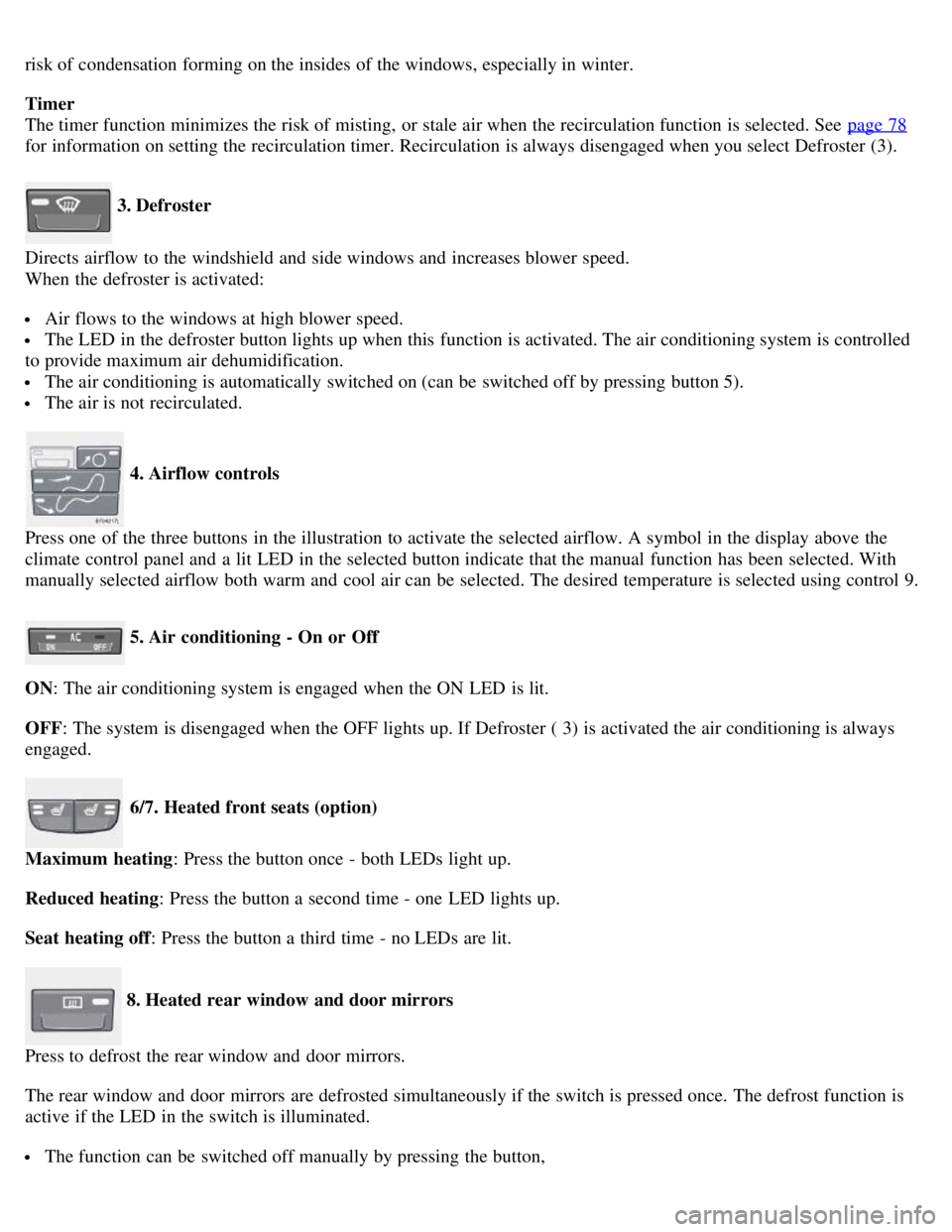
3. Defroster
Directs airflow to the windshield and side windows and increases blower speed.
When the defroster is activated:
Air flows to the windows at high blower speed.
The LED in the defroster button lights up when this function is activated. The air conditioning system is controlled
to provide maximum air dehumidification.
The air conditioning is automatically switched on (can be switched off by pressing button 5).
The air is not recirculated.
4. Airflow controls
Press one of the three buttons in the illustration to activate the selected airflow. A symbol in the display above the
climate control panel and a lit LED in the selected button indicate that the manual function has been selected. With
manually selected airflow both warm and cool air can be selected. The desired temperature is selected using control 9.
5. Air conditioning - On or Off
ON: The air conditioning system is engaged when the ON LED is lit.
OFF: The system is disengaged when the OFF lights up. If Defroster ( 3) is activated the air conditioning is always
engaged.
6/7. Heated front seats (option)
Maximum heating : Press the button once - both LEDs light up.
Reduced heating : Press the button a second time - one LED lights up.
Seat heating off : Press the button a third time - no LEDs are lit.
8. Heated rear window and door mirrors
Press to defrost the rear window and door mirrors.
The rear window and door mirrors are defrosted simultaneously if the switch is pressed once. The defrost function is
active if the LED in the switch is illuminated.
The function can be switched off manually by pressing the button,
Page 85 of 234
windows.
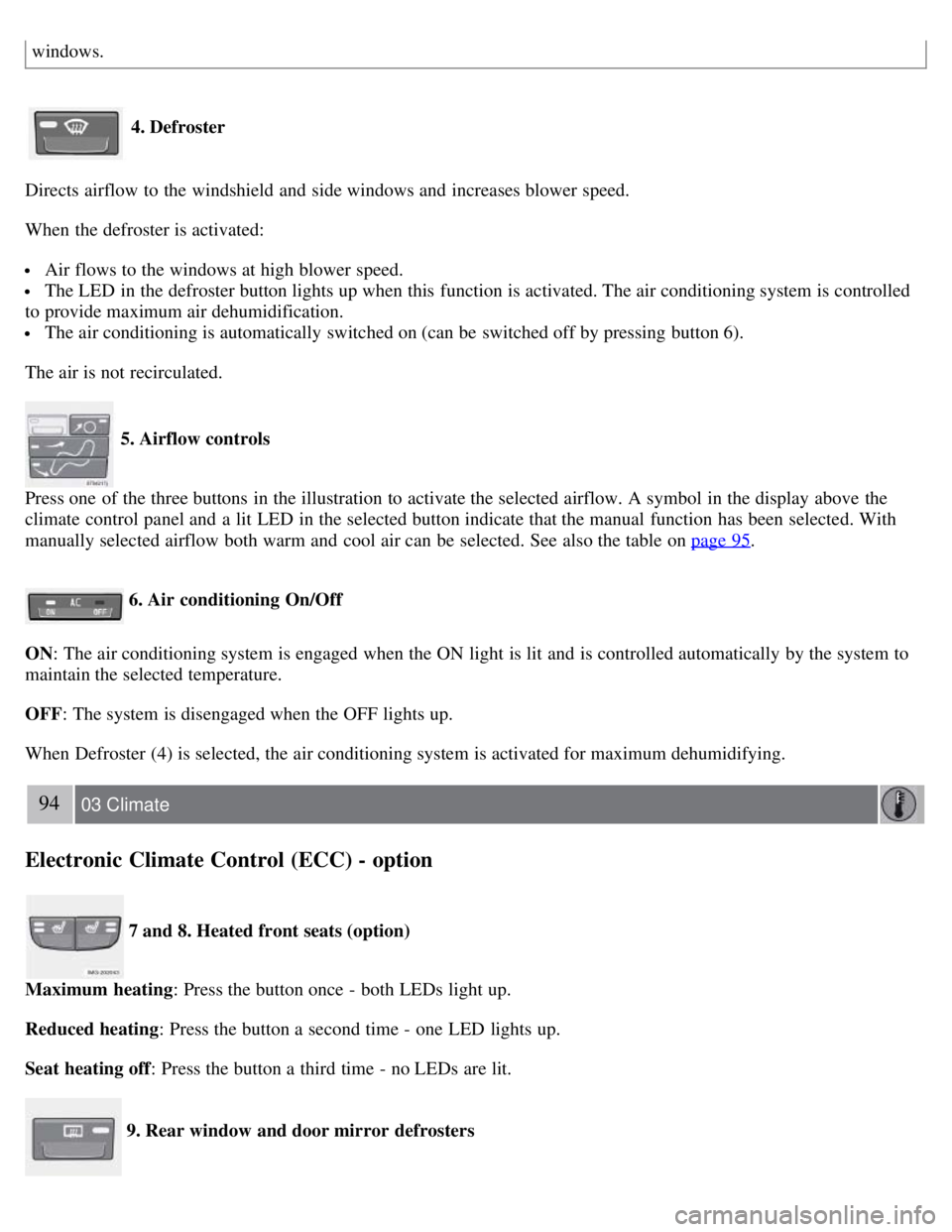
4. Defroster
Directs airflow to the windshield and side windows and increases blower speed.
When the defroster is activated:
Air flows to the windows at high blower speed.
The LED in the defroster button lights up when this function is activated. The air conditioning system is controlled
to provide maximum air dehumidification.
The air conditioning is automatically switched on (can be switched off by pressing button 6).
The air is not recirculated.
5. Airflow controls
Press one of the three buttons in the illustration to activate the selected airflow. A symbol in the display above the
climate control panel and a lit LED in the selected button indicate that the manual function has been selected. With
manually selected airflow both warm and cool air can be selected. See also the table on page 95
.
6. Air conditioning On/Off
ON: The air conditioning system is engaged when the ON light is lit and is controlled automatically by the system to
maintain the selected temperature.
OFF: The system is disengaged when the OFF lights up.
When Defroster (4) is selected, the air conditioning system is activated for maximum dehumidifying.
94 03 Climate
Electronic Climate Control (ECC) - option
7 and 8. Heated front seats (option)
Maximum heating : Press the button once - both LEDs light up.
Reduced heating : Press the button a second time - one LED lights up.
Seat heating off : Press the button a third time - no LEDs are lit.
9. Rear window and door mirror defrosters
Page 88 of 234
2 0 0 8
VOLVO C30
96 04 Interior
Front seats 98
Interior lighting102
Storage compartments104
Rear seat108
Cargo area110
97 04 Interior
98 04 Interior
Front seats
Manual seat adjustment
The passenger's seat can be manually adjusted in a number of ways to provide a comfortable driving and sitting
position.
1. Forward-rearward: Pull the lever up and slide the seat to the position of your choice.
Page 89 of 234
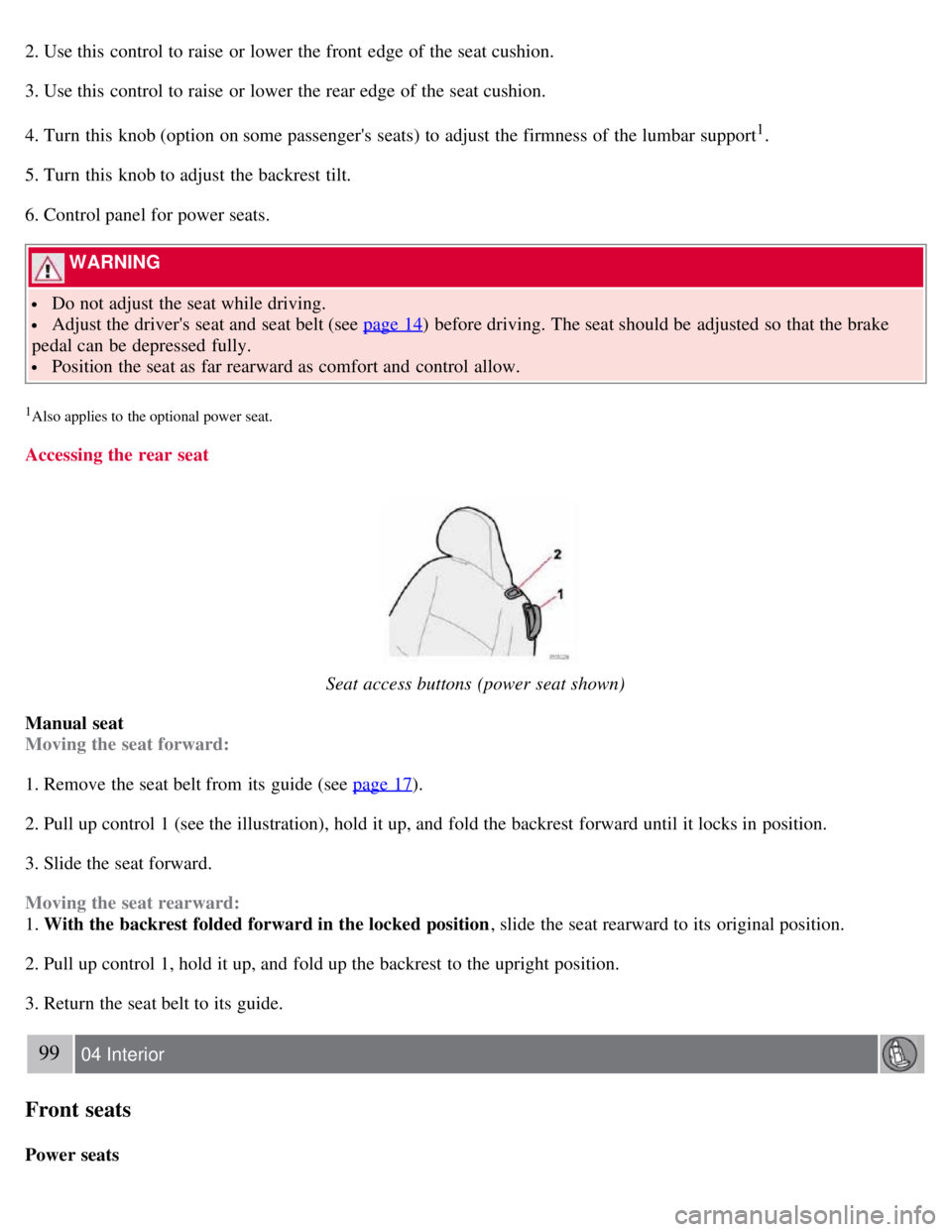
2. Use this control to raise or lower the front edge of the seat cushion.
3. Use this control to raise or lower the rear edge of the seat cushion.
4. Turn this knob (option on some passenger's seats) to adjust the firmness of the lumbar support
1.
5. Turn this knob to adjust the backrest tilt.
6. Control panel for power seats.
WARNING
Do not adjust the seat while driving.
Adjust the driver's seat and seat belt (see page 14) before driving. The seat should be adjusted so that the brake
pedal can be depressed fully.
Position the seat as far rearward as comfort and control allow.
1Also applies to the optional power seat.
Accessing the rear seat
Seat access buttons (power seat shown)
Manual seat
Moving the seat forward:
1. Remove the seat belt from its guide (see page 17
).
2. Pull up control 1 (see the illustration), hold it up, and fold the backrest forward until it locks in position.
3. Slide the seat forward.
Moving the seat rearward:
1. With the backrest folded forward in the locked position , slide the seat rearward to its original position.
2. Pull up control 1, hold it up, and fold up the backrest to the upright position.
3. Return the seat belt to its guide.
99 04 Interior
Front seats
Power seats