key VOLVO C30 2009 Owner´s Manual
[x] Cancel search | Manufacturer: VOLVO, Model Year: 2009, Model line: C30, Model: VOLVO C30 2009Pages: 274, PDF Size: 6.82 MB
Page 72 of 274
02 Instruments and controlsRight-side steering wheel lever
0272
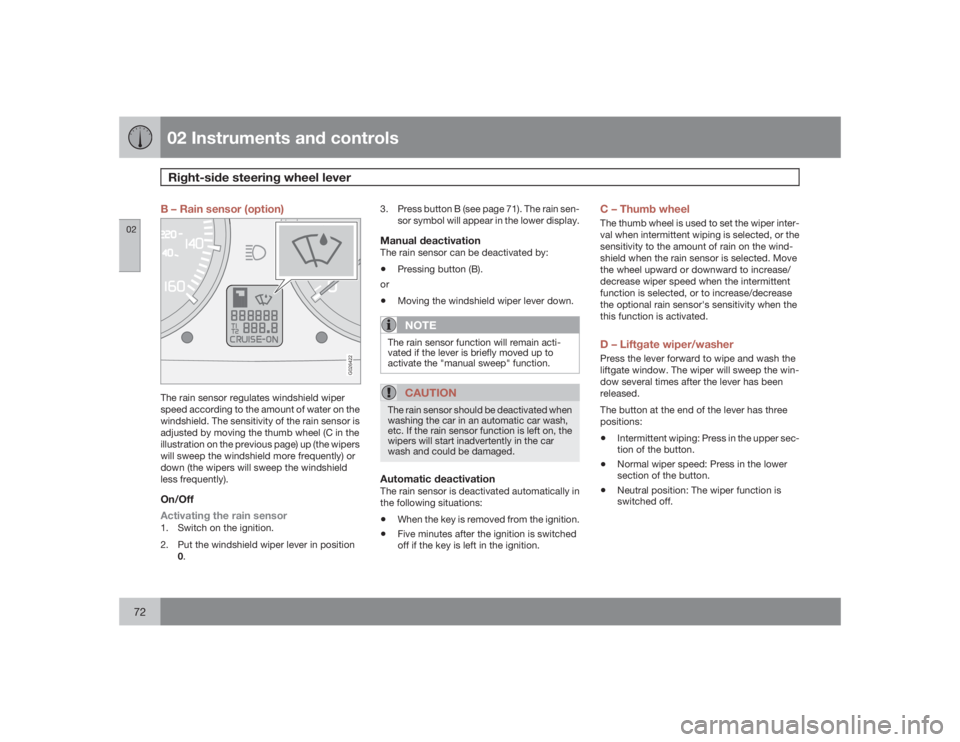
B – Rain sensor (option)
G026422
The rain sensor regulates windshield wiper
speed according to the amount of water on the
windshield. The sensitivity of the rain sensor is
adjusted by moving the thumb wheel (C in the
illustration on the previous page) up (the wipers
will sweep the windshield more frequently) or
down (the wipers will sweep the windshield
less frequently).On/Off
Activating the rain sensor1. Switch on the ignition.
2. Put the windshield wiper lever in position
0.3. Press button B (see page 71). The rain sen-
sor symbol will appear in the lower display.
Manual deactivationThe rain sensor can be deactivated by:•
Pressing button (B).
or
•
Moving the windshield wiper lever down.NOTE
The rain sensor function will remain acti-
vated if the lever is briefly moved up to
activate the "manual sweep" function.
CAUTION
The rain sensor should be deactivated when
washing the car in an automatic car wash,
etc. If the rain sensor function is left on, the
wipers will start inadvertently in the car
wash and could be damaged.Automatic deactivationThe rain sensor is deactivated automatically in
the following situations:•
When the key is removed from the ignition.
•
Five minutes after the ignition is switched
off if the key is left in the ignition.
C – Thumb wheelThe thumb wheel is used to set the wiper inter-
val when intermittent wiping is selected, or the
sensitivity to the amount of rain on the wind-
shield when the rain sensor is selected. Move
the wheel upward or downward to increase/
decrease wiper speed when the intermittent
function is selected, or to increase/decrease
the optional rain sensor's sensitivity when the
this function is activated.D – Liftgate wiper/washerPress the lever forward to wipe and wash the
liftgate window. The wiper will sweep the win-
dow several times after the lever has been
released.
The button at the end of the lever has three
positions:•
Intermittent wiping: Press in the upper sec-
tion of the button.
•
Normal wiper speed: Press in the lower
section of the button.
•
Neutral position: The wiper function is
switched off.
Page 76 of 274
02 Instruments and controlsPower windows
0276
Operation
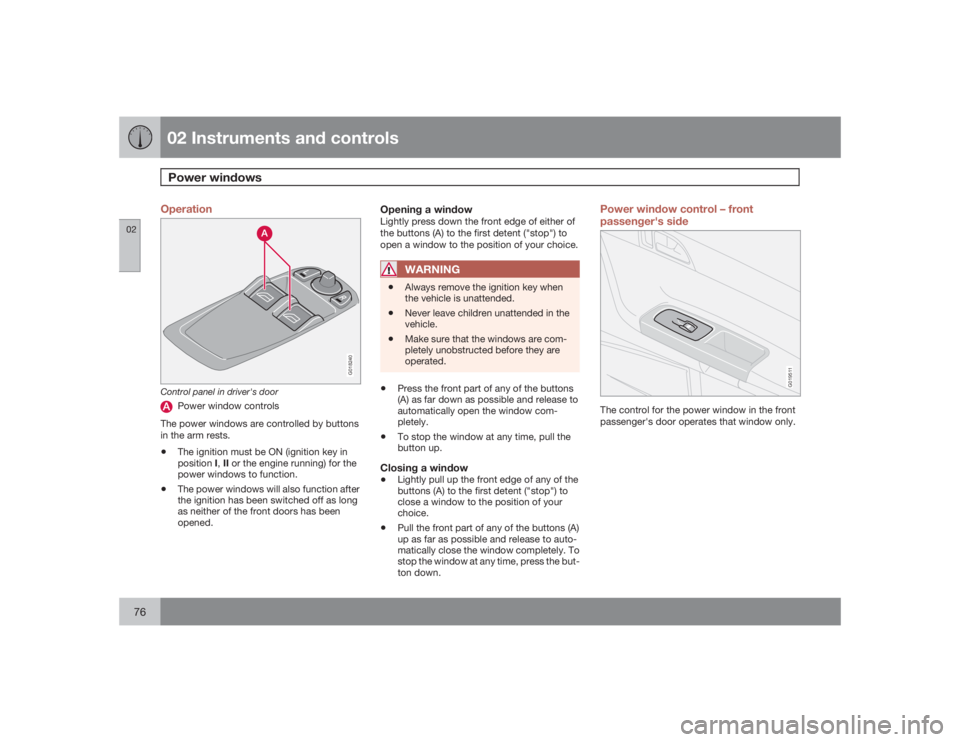
G018240
Control panel in driver's door
Power window controls
The power windows are controlled by buttons
in the arm rests.
•
The ignition must be ON (ignition key in
positionI,II or the engine running) for the
power windows to function.
•
The power windows will also function after
the ignition has been switched off as long
as neither of the front doors has been
opened.
Opening a windowLightly press down the front edge of either of
the buttons (A) to the first detent ("stop") to
open a window to the position of your choice.
WARNING
•
Always remove the ignition key when
the vehicle is unattended.
•
Never leave children unattended in the
vehicle.
•
Make sure that the windows are com-
pletely unobstructed before they are
operated.
•
Press the front part of any of the buttons
(A) as far down as possible and release to
automatically open the window com-
pletely.
•
To stop the window at any time, pull the
button up.
Closing a window•
Lightly pull up the front edge of any of the
buttons (A) to the first detent ("stop") to
close a window to the position of your
choice.
•
Pull the front part of any of the buttons (A)
up as far as possible and release to auto-
matically close the window completely. To
stop the window at any time, press the but-
ton down.
Power window control – front
passenger's side
G019511
The control for the power window in the front
passenger's door operates that window only.
Page 79 of 274

02 Instruments and controls
Mirrors
0279
Folding the mirrors in1.
Press down the L and R mirror control but-
tons on the driver's door at the same time.
2. Release them after approximately one sec-
ond. The mirrors automatically fold in to the
fully retracted position.Folding the mirrors outFold out the mirrors by pressing down the L
andR buttons at the same time. The mirrors
automatically fold out to the fully extended
position.Automatic foldingWhen the vehicle is locked/unlocked with the
remote control or with the optional keyless
drive system (see page 123), the power door
mirrors with automatically fold in or out.
NOTE
The door mirrors will not fold out automati-
cally when the vehicle is unlocked if they
were folded in using the buttons on the driv-
er's door control panel.This function can be activated/deactivated in
Personal settings (see page 82). In the menu
system, go to Car settings
Fold mirr. when
locking.
Return to "neutral" positionIf a mirror has been inadvertently moved (bum-
ped in a parking lot, etc.) from its original (neu-
tral) position, it must be moved back to this
position before automatic folding will function
again.
To so so:
1.
Fold in the mirrors by pressing the L and
R mirror control buttons on the driver's
door at the same time.
2.
Fold them out again by pressing the L and
R mirror control buttons.
This returns the mirrors to their original (neutral)
positions.Blind Spot Information System (BLIS) -
optionThe Blind Spot Information System (BLIS) is an
information system that indicates the presence
of another vehicle in the side-view mirror's
"blind area." See page 157 for detailed infor-
mation.
Page 80 of 274
02 Instruments and controlsPower moonroof (option)
0280
Operating the moonroof
G007503
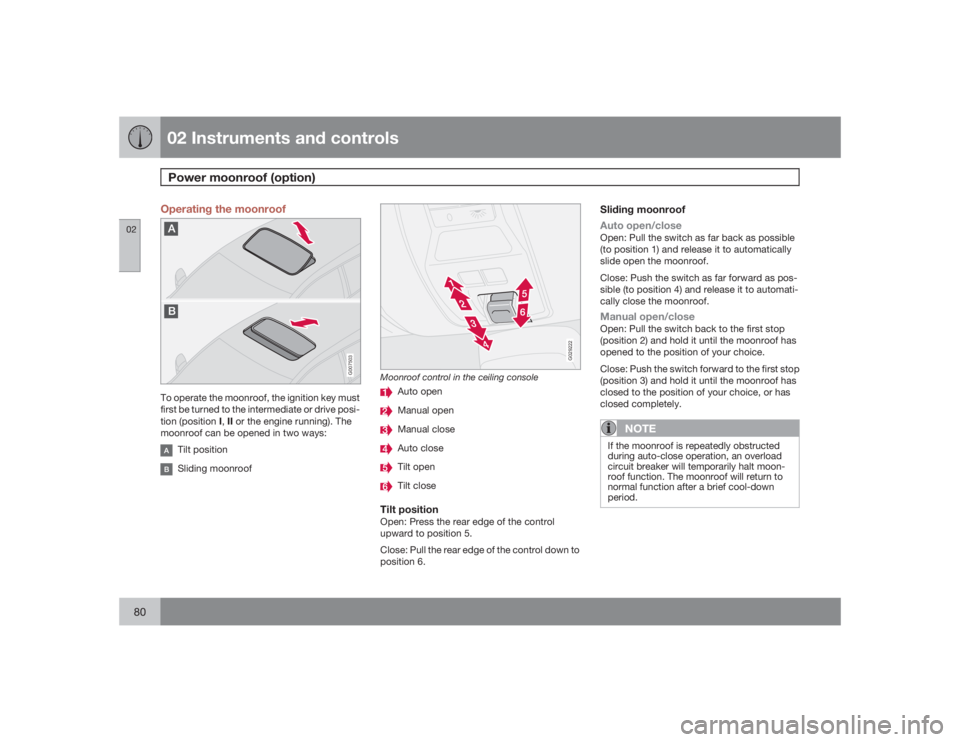
To operate the moonroof, the ignition key must
first be turned to the intermediate or drive posi-
tion (position I,II or the engine running). The
moonroof can be opened in two ways:
Tilt positionSliding moonroof
G029222
Moonroof control in the ceiling console
Auto openManual openManual closeAuto closeTilt openTilt close
Tilt positionOpen: Press the rear edge of the control
upward to position 5.
Close: Pull the rear edge of the control down to
position 6.
Sliding moonroof
Auto open/closeOpen: Pull the switch as far back as possible
(to position 1) and release it to automatically
slide open the moonroof.
Close: Push the switch as far forward as pos-
sible (to position 4) and release it to automati-
cally close the moonroof.Manual open/closeOpen: Pull the switch back to the first stop
(position 2) and hold it until the moonroof has
opened to the position of your choice.
Close: Push the switch forward to the first stop
(position 3) and hold it until the moonroof has
closed to the position of your choice, or has
closed completely.
NOTE
If the moonroof is repeatedly obstructed
during auto-close operation, an overload
circuit breaker will temporarily halt moon-
roof function. The moonroof will return to
normal function after a brief cool-down
period.
Page 82 of 274

02 Instruments and controlsPersonal settings
0282
Control panelAD
BC
E
G026307
DisplayMenu buttonExit buttonEnter buttonMenu navigation controlsPersonal settings can be made for some of the
car's functions, such as the central locking
system, climate control, and the audio system.
Please refer to page 231 for more information
on the audio functions that can be adjusted.
The settings are presented in the display (A).
To access the menu and adjust settings1.
PressMENU (B).
2.
Scroll to
Car Settings
using the menu nav-
igation control (E).
3.
PressENTER (D).
4. Select an alternative using the menu navi-
gation control (E).
5. Confirm your selection by pressing
ENTER.
To exit the menuPressEXIT (C).Available settingsClock adjustTo set the time:
1. Use the number keys or the up/down arrow
keys on the navigation control (E) to
change the hour or minute.2. Select hour(s) or minute(s) to be changed
with the left/right arrow keys.
3.
PressENTER to start the clock.
NOTE
If you are currently using the 12-hour time
setting, use the up/down arrow keys to
selectAM/PM after the minute-setting has
been adjusted.Lock confirmation lightWhen the car is locked/unlocked with the
remote control, the direction indicators can be
selected to flash to confirm the action. The
alternatives On/Off are available for both lock-
ing and unlocking.AutolockWhen the car starts to move, the doors and
liftgate can be locked automatically. The alter-
natives On/Off are available.
NOTE
Pulling the handle twice on a door unlocks
and opens that door.UnlockThere are two alternatives for unlocking:
Page 83 of 274
02 Instruments and controls
Personal settings
02``83
•
Global (All doors) – unlocks all doors and
the liftgate with one press on the remote
control.
•
Two Step (Two-stage unlocking) – This
alternative unlocks the driver's door with
one press on the remote control. A second
press unlocks the passenger's door and
the liftgate.
Automatically folding the door mirrorsThe setting makes it possible to automatically
fold the door mirrors in or out when the vehicle
is locked or unlocked. See page 78.Operating side windowsThe following alternative can be selected for
opening the door windows at the same time by
pressing and holding the Unlock switch in
either of the front doors (see page 127 for
additional information)
1
NOTE
The ignition key must be in position I or
higher (see page 141) before the door win-
dows can be opened using the switches in
the doors.•
Auto open all windows On/Off
Temporarily turning off the alarm
sensor(s)The alarm sensors can be temporarily turned
off (if, for example, a person or a pet remains
in the vehicle when the doors are locked from
outside with the remote control). There are two
alternatives:
Activate once
and
Ask on exit
,
see page 118 and 129 .
Approach lightingThis alternative determines the length of time
for which the car's lights will remain on when
the Approach light button on the central lock-
ing system's remote control is pressed. Inter-
vals of 30/60/90 seconds may be selected, see
teh section "Remote control functions" for
more information.Home safe lightingThis alternative determines the length of time
for which the car's lights will remain on when
the high beam lever on the steering column is
pulled toward the wheel with the ignition
switched off. Intervals of 30/60/90 seconds
may be selected, see page 65 for information
on using this function.
Information•
VIN number – The VIN (Vehicle Identifica-
tion Number) is the car's unique identity
number.
•
Number of Keys – the number of keys reg-
istered for the car is displayed here.
Climate functions•
Blower speed in AUTO mode – the blower
speed can be set to AUTO mode in models
equipped with ECC. Choose between
"Low", "Normal" and "High".
•
Timer for recirculation – when the timer is
active, the air recirculates in the car for 3–
12 minutes depending on the ambient tem-
perature. Select On/Off depending on
whether the recirculation timer is to be
active or not.
Keyless locking and unlocking (option as
available)The following alternatives can be selected for
locking and unlocking the doors and liftgate:•
All doors – all doors are locked or unlocked
at the same time.
•
Doors on the same side – front and rear
doors on the same side are unlocked
together.
1This menu alternative also makes it possible to open both door windows by pressing and holding the Unlock button on the remote control for several seconds.
Page 103 of 274
04 Interior
Front seats
04``103
Moving the seat rearward:
1.
With the backrest folded forward in the
locked position, slide the seat rearward
until it stops/locks in its original position.
2. Pull up handle 1, hold it up, and fold up the
backrest to the upright position.
3. Return the seat belt to its guide.Power seatMoving the seat forward:
1. Remove the seat belt from its guide (see
page 19).
2. Pull up handle 1, hold it up, and fold the
backrest forward until it locks in position.
3. Press and hold button 2 while the seat
moves forward.
Moving the seat rearward:
1.
With the backrest folded forward in the
locked position, press and hold down
button 2 until the seat has returned to its
original position.
2. Pull up handle 1, hold it up, and fold up the
backrest to the upright position.
3. Return the seat belt to its guide.The front passenger's seat belt should be in its
guide while the vehicle is being driven, even if
the seat is not occupied.
WARNING
After the seat has been returned to its orig-
inal position, be sure that the backrest is
securely locked in the upright position.Power seats (option)The power driver's seat can be adjusted:•
If the ignition key is in position I or II.
•
During a 10 minute period after the doors
have been unlocked if the door remains
open.
•
If the door is closed and the ignition key is
not yet in the ignition, or if the key is in
position0, the seat can be adjusted or dur-
ing a period of 40 seconds. The power
passenger's seat can only be adjusted if
the ignition key is in position I or II, or if the
engine is running.
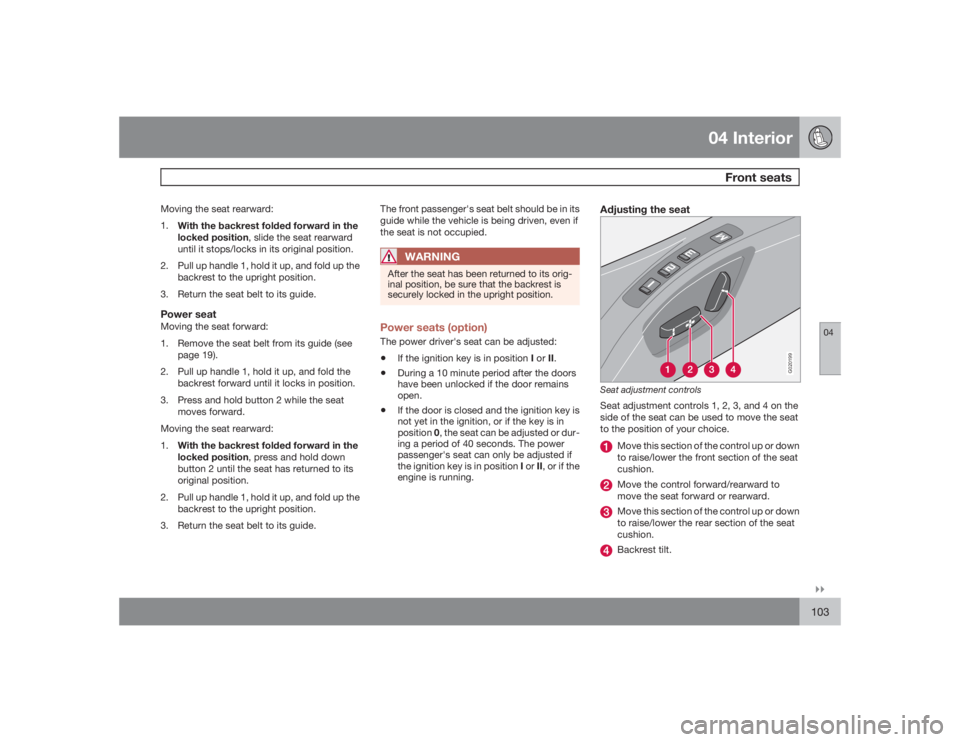
Adjusting the seat
G020199
Seat adjustment controlsSeat adjustment controls 1, 2, 3, and 4 on the
side of the seat can be used to move the seat
to the position of your choice.
Move this section of the control up or down
to raise/lower the front section of the seat
cushion.Move the control forward/rearward to
move the seat forward or rearward.Move this section of the control up or down
to raise/lower the rear section of the seat
cushion.Backrest tilt.
Page 104 of 274
04 InteriorFront seats
04104
NOTE
The power seats have an overload protector
that activates if a seat is blocked by any
object. If this occurs, switch off the ignition
(key in position 0) and wait for approxi-
mately 20 seconds before operating the
seat again.Emergency stopIf the seat inadvertently begins to move, press
any of the buttons to stop the seat.Programming the seat memory, driver's
seat only (option)
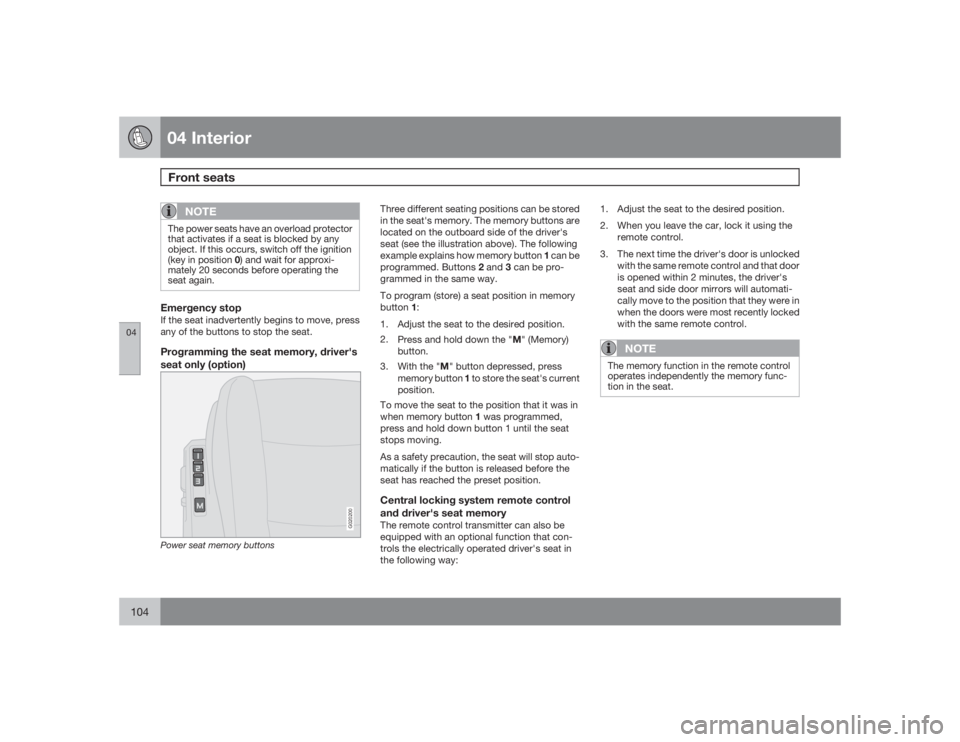
G020200
Power seat memory buttons
Three different seating positions can be stored
in the seat's memory. The memory buttons are
located on the outboard side of the driver's
seat (see the illustration above). The following
example explains how memory button 1 can be
programmed. Buttons 2 and 3 can be pro-
grammed in the same way.
To program (store) a seat position in memory
button1:
1. Adjust the seat to the desired position.
2.
Press and hold down the "M" (Memory)
button.
3.
With the "M" button depressed, press
memory button 1 to store the seat's current
position.
To move the seat to the position that it was in
when memory button 1 was programmed,
press and hold down button 1 until the seat
stops moving.
As a safety precaution, the seat will stop auto-
matically if the button is released before the
seat has reached the preset position.Central locking system remote control
and driver's seat memoryThe remote control transmitter can also be
equipped with an optional function that con-
trols the electrically operated driver's seat in
the following way:1. Adjust the seat to the desired position.
2. When you leave the car, lock it using the
remote control.
3. The next time the driver's door is unlocked
with the same remote control and that door
is opened within 2 minutes, the driver's
seat and side door mirrors will automati-
cally move to the position that they were in
when the doors were most recently locked
with the same remote control.
NOTE
The memory function in the remote control
operates independently the memory func-
tion in the seat.
Page 106 of 274
04 InteriorInterior lighting
04106
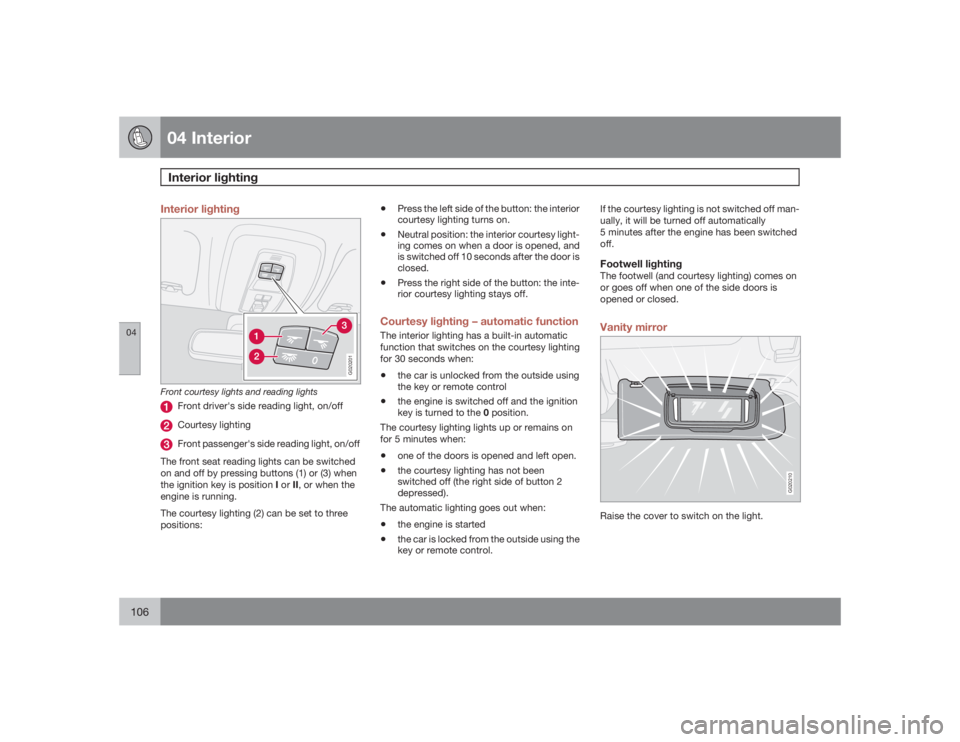
Interior lighting
G020201
Front courtesy lights and reading lights
Front driver's side reading light, on/offCourtesy lightingFront passenger's side reading light, on/off
The front seat reading lights can be switched
on and off by pressing buttons (1) or (3) when
the ignition key is position I or II, or when the
engine is running.
The courtesy lighting (2) can be set to three
positions:
•
Press the left side of the button: the interior
courtesy lighting turns on.
•
Neutral position: the interior courtesy light-
ing comes on when a door is opened, and
is switched off 10 seconds after the door is
closed.
•
Press the right side of the button: the inte-
rior courtesy lighting stays off.
Courtesy lighting – automatic functionThe interior lighting has a built-in automatic
function that switches on the courtesy lighting
for 30 seconds when:•
the car is unlocked from the outside using
the key or remote control
•
the engine is switched off and the ignition
key is turned to the 0 position.
The courtesy lighting lights up or remains on
for 5 minutes when:
•
one of the doors is opened and left open.
•
the courtesy lighting has not been
switched off (the right side of button 2
depressed).
The automatic lighting goes out when:
•
the engine is started
•
the car is locked from the outside using the
key or remote control.If the courtesy lighting is not switched off man-
ually, it will be turned off automatically
5 minutes after the engine has been switched
off.
Footwell lightingThe footwell (and courtesy lighting) comes on
or goes off when one of the side doors is
opened or closed.Vanity mirror
G020210
Raise the cover to switch on the light.
Page 108 of 274
04 InteriorStorage compartments
04108
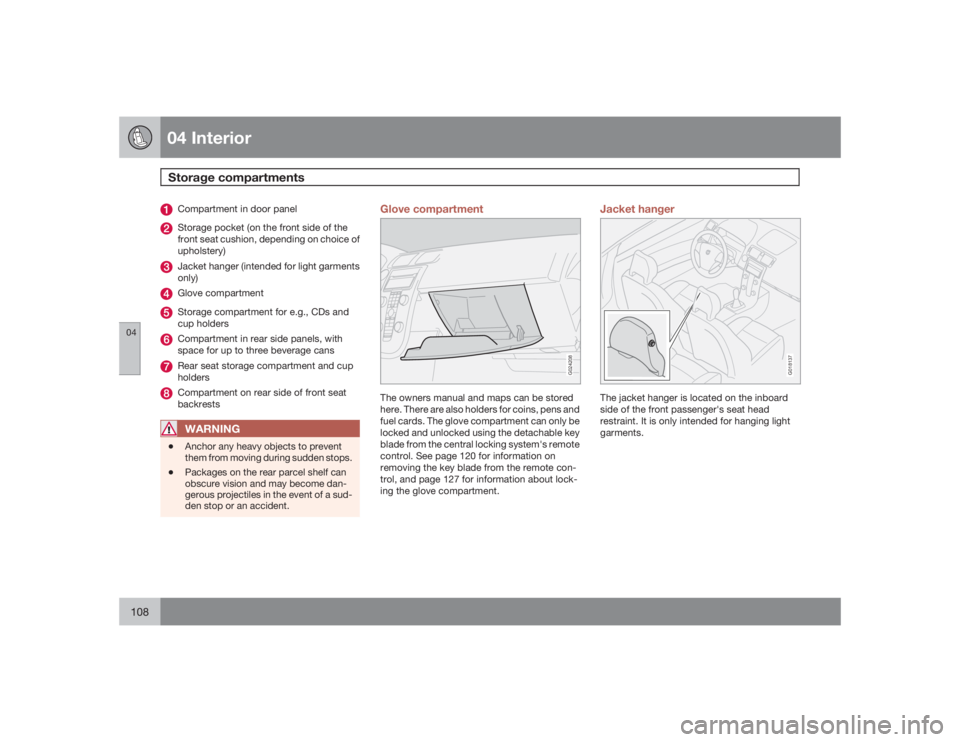
Compartment in door panelStorage pocket (on the front side of the
front seat cushion, depending on choice of
upholstery)Jacket hanger (intended for light garments
only)Glove compartmentStorage compartment for e.g., CDs and
cup holdersCompartment in rear side panels, with
space for up to three beverage cansRear seat storage compartment and cup
holdersCompartment on rear side of front seat
backrestsWARNING
•
Anchor any heavy objects to prevent
them from moving during sudden stops.
•
Packages on the rear parcel shelf can
obscure vision and may become dan-
gerous projectiles in the event of a sud-
den stop or an accident.
Glove compartment
G024208
The owners manual and maps can be stored
here. There are also holders for coins, pens and
fuel cards. The glove compartment can only be
locked and unlocked using the detachable key
blade from the central locking system's remote
control. See page 120 for information on
removing the key blade from the remote con-
trol, and page 127 for information about lock-
ing the glove compartment.
Jacket hanger
G018137
The jacket hanger is located on the inboard
side of the front passenger's seat head
restraint. It is only intended for hanging light
garments.