display VOLVO C30 2013 Owner´s Manual
[x] Cancel search | Manufacturer: VOLVO, Model Year: 2013, Model line: C30, Model: VOLVO C30 2013Pages: 300, PDF Size: 6.58 MB
Page 58 of 300
02 Instruments and controls
Indicator and warning symbols
02
56
Function check
The indicator and warning symbols1 light up
when you turn the ignition key or the optional
keyless drive start control to the driving posi-
tion (position II) before starting. This shows that
the symbols are functioning.
When the engine starts, all sym-
bols go out. If the engine is not
started within 5 seconds, all of the
symbols except the malfunction
indicator light (CHECK ENGINE)
and the oil pressure warning light
will go out. Certain symbols may
not have their functions illustrated, depending
on the car's equipment.
The PARK BRAKE symbol will not go out until
the parking brake has been released.
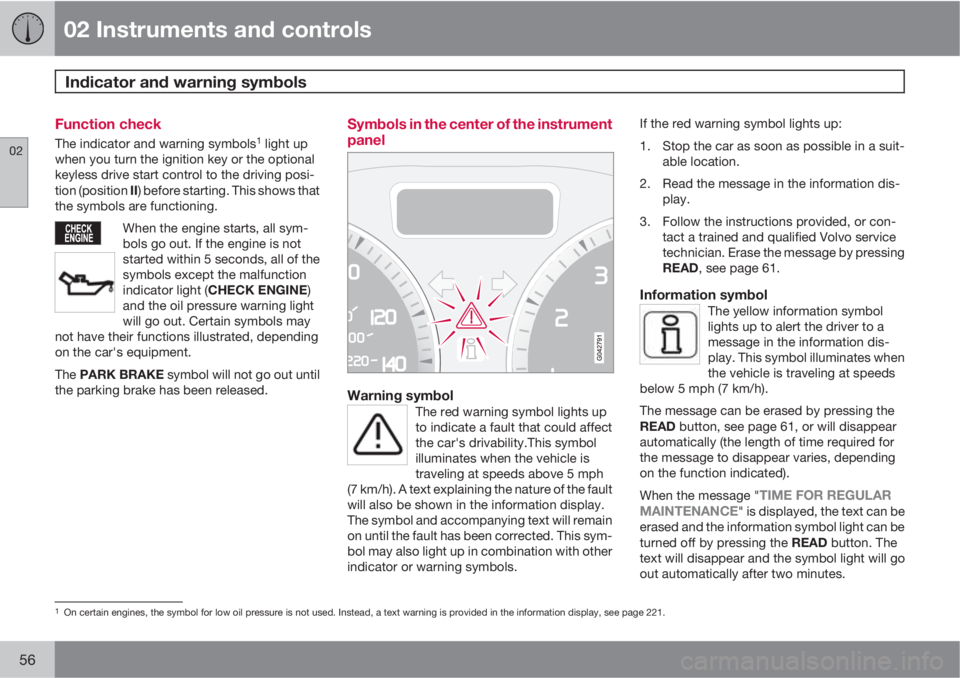
Symbols in the center of the instrument
panel
Warning symbolThe red warning symbol lights up
to indicate a fault that could affect
the car's drivability.This symbol
illuminates when the vehicle is
traveling at speeds above 5 mph
(7 km/h). A text explaining the nature of the fault
will also be shown in the information display.
The symbol and accompanying text will remain
on until the fault has been corrected. This sym-
bol may also light up in combination with other
indicator or warning symbols.
If the red warning symbol lights up:
1. Stop the car as soon as possible in a suit-
able location.
2. Read the message in the information dis-
play.
3. Follow the instructions provided, or con-
tact a trained and qualified Volvo service
technician. Erase the message by pressing
READ, see page 61.
Information symbolThe yellow information symbol
lights up to alert the driver to a
message in the information dis-
play. This symbol illuminates when
the vehicle is traveling at speeds
below 5 mph (7 km/h).
The message can be erased by pressing the
READ button, see page 61, or will disappear
automatically (the length of time required for
the message to disappear varies, depending
on the function indicated).
When the message "
TIME FOR REGULAR
MAINTENANCE" is displayed, the text can be
erased and the information symbol light can be
turned off by pressing the READ button. The
text will disappear and the symbol light will go
out automatically after two minutes.
1On certain engines, the symbol for low oil pressure is not used. Instead, a text warning is provided in the information display, see page 221.
Page 59 of 300
02 Instruments and controls
Indicator and warning symbols
02
57
This symbol may also light up in combination
with other indicator or warning symbols.
NOTE
The car can still be driven after the informa-
tion symbol has come on. The car can be
driven for 1–2 weeks after service-related
information has been displayed.
Page 61 of 300
02 Instruments and controls
Symbols – instrument panel
02
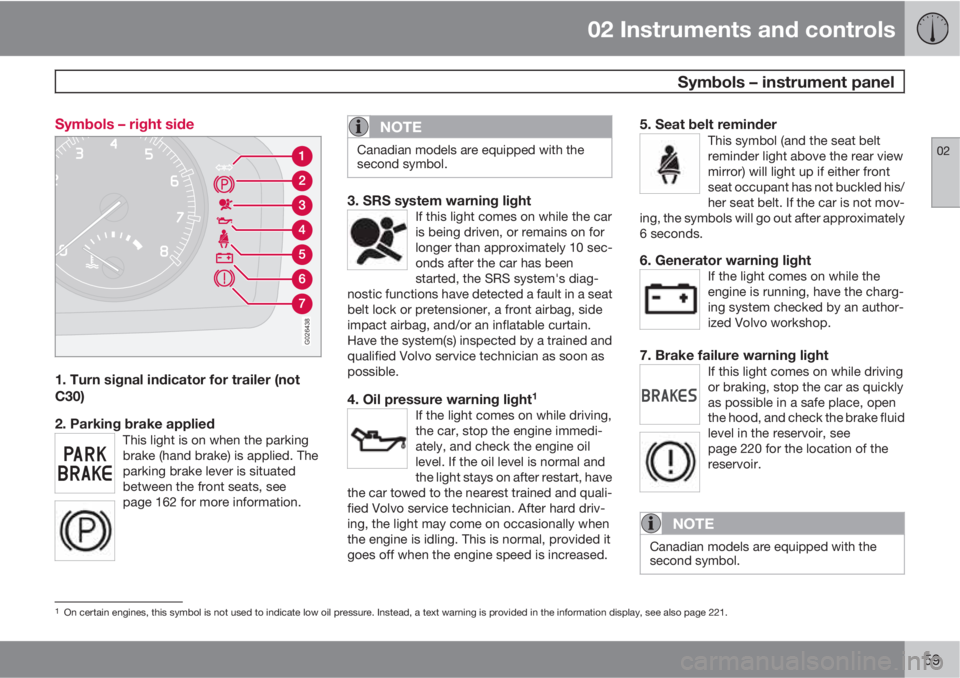
59 Symbols – right side
G026438
1. Turn signal indicator for trailer (not
C30)
2. Parking brake applied
This light is on when the parking
brake (hand brake) is applied. The
parking brake lever is situated
between the front seats, see
page 162 for more information.
NOTE
Canadian models are equipped with the
second symbol.
3. SRS system warning lightIf this light comes on while the car
is being driven, or remains on for
longer than approximately 10 sec-
onds after the car has been
started, the SRS system's diag-
nostic functions have detected a fault in a seat
belt lock or pretensioner, a front airbag, side
impact airbag, and/or an inflatable curtain.
Have the system(s) inspected by a trained and
qualified Volvo service technician as soon as
possible.
4. Oil pressure warning light1
If the light comes on while driving,
the car, stop the engine immedi-
ately, and check the engine oil
level. If the oil level is normal and
the light stays on after restart, have
the car towed to the nearest trained and quali-
fied Volvo service technician. After hard driv-
ing, the light may come on occasionally when
the engine is idling. This is normal, provided it
goes off when the engine speed is increased.
5. Seat belt reminderThis symbol (and the seat belt
reminder light above the rear view
mirror) will light up if either front
seat occupant has not buckled his/
her seat belt. If the car is not mov-
ing, the symbols will go out after approximately
6 seconds.
6. Generator warning lightIf the light comes on while the
engine is running, have the charg-
ing system checked by an author-
ized Volvo workshop.
7. Brake failure warning lightIf this light comes on while driving
or braking, stop the car as quickly
as possible in a safe place, open
the hood, and check the brake fluid
level in the reservoir, see
page 220 for the location of the
reservoir.
NOTE
Canadian models are equipped with the
second symbol.
1On certain engines, this symbol is not used to indicate low oil pressure. Instead, a text warning is provided in the information display, see also page 221.
Page 62 of 300
02 Instruments and controls
Symbols – instrument panel
02
60
WARNING
If the fluid level is below the MIN mark in the
reservoir or if a BRAKE FAILURE STOP
SAFELY message is displayed in the infor-
mation display: DO NOT DRIVE. Have the
car towed to a trained and qualified Volvo
service technician and have the brake sys-
tem inspected.
If the BRAKES and ABS warning lights come
on at the same time, this could indicate a fault
in the brake system.
In this case:
1. Stop the car in a suitable place and switch
off the engine.
2. Restart the engine.
3. If both warning lights go off, no further
action is required and the car can be
driven.
4. If both lights remain on after the engine has
been restarted, switch off the engine again
and check the brake fluid level, see
page 220 for the location of the reservoir.
Door open warning
The driver will be alerted if one of the doors, the
hood or the liftgate are open or ajar.
At low speedsIf the car is moving at a speed of
less than approximately 3 mph
(5 km/h), the Information symbol in
the instrument panel will light up
and a message will be shown in the
information display indicating which door(s),
etc is not completely closed.
At higher speedsIf the car is moving at a speed
above approximately 6 mph
(10 km/h), the Warning symbol in
the instrument panel will light up
and a message will be shown in the
information display indicating which door(s),
etc is not completely closed.
Hood and liftgateIf the hood and/or liftgate is not
completely closed, the Information
symbol in the instrument panel will
light up and a message will be dis-
played, regardless of the vehicle's
speed.
Page 63 of 300
02 Instruments and controls
Information display
02
61 Messages
G019617
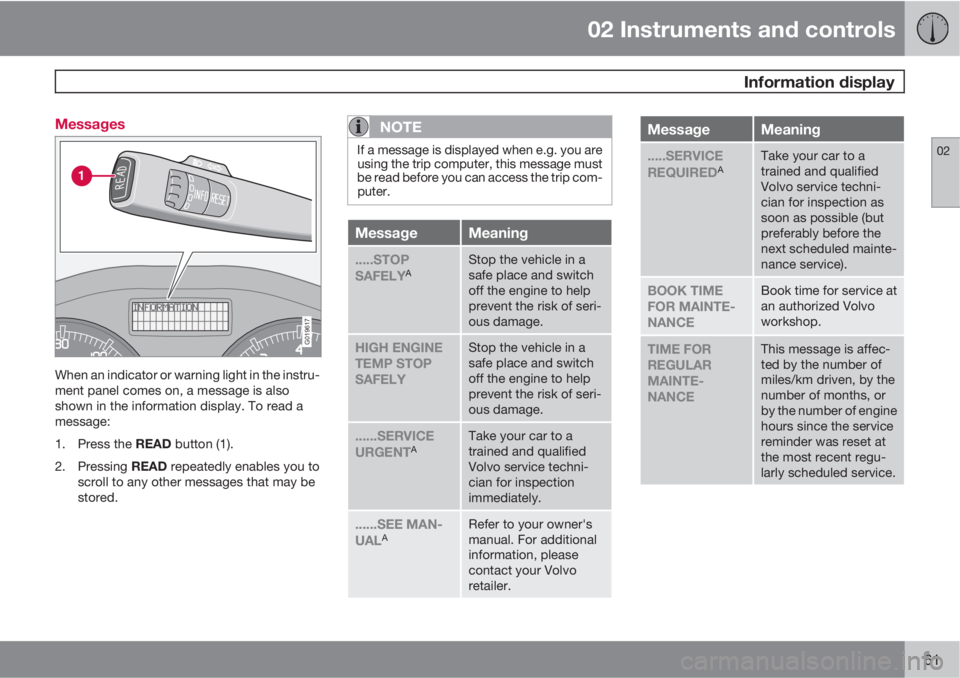
When an indicator or warning light in the instru-
ment panel comes on, a message is also
shown in the information display. To read a
message:
1.
Press the READ button (1).
2.
Pressing READ repeatedly enables you to
scroll to any other messages that may be
stored.
NOTE
If a message is displayed when e.g. you are
using the trip computer, this message must
be read before you can access the trip com-
puter.
MessageMeaning
.....STOP
SAFELYAStop the vehicle in a
safe place and switch
off the engine to help
prevent the risk of seri-
ous damage.
HIGH ENGINE
TEMP STOP
SAFELYStop the vehicle in a
safe place and switch
off the engine to help
prevent the risk of seri-
ous damage.
......SERVICE
URGENTATake your car to a
trained and qualified
Volvo service techni-
cian for inspection
immediately.
......SEE MAN-
UALARefer to your owner's
manual. For additional
information, please
contact your Volvo
retailer.
MessageMeaning
.....SERVICE
REQUIREDATake your car to a
trained and qualified
Volvo service techni-
cian for inspection as
soon as possible (but
preferably before the
next scheduled mainte-
nance service).
BOOK TIME
FOR MAINTE-
NANCEBook time for service at
an authorized Volvo
workshop.
TIME FOR
REGULAR
MAINTE-
NANCEThis message is affec-
ted by the number of
miles/km driven, by the
number of months, or
by the number of engine
hours since the service
reminder was reset at
the most recent regu-
larly scheduled service.
Page 64 of 300
02 Instruments and controls
Information display
02
62
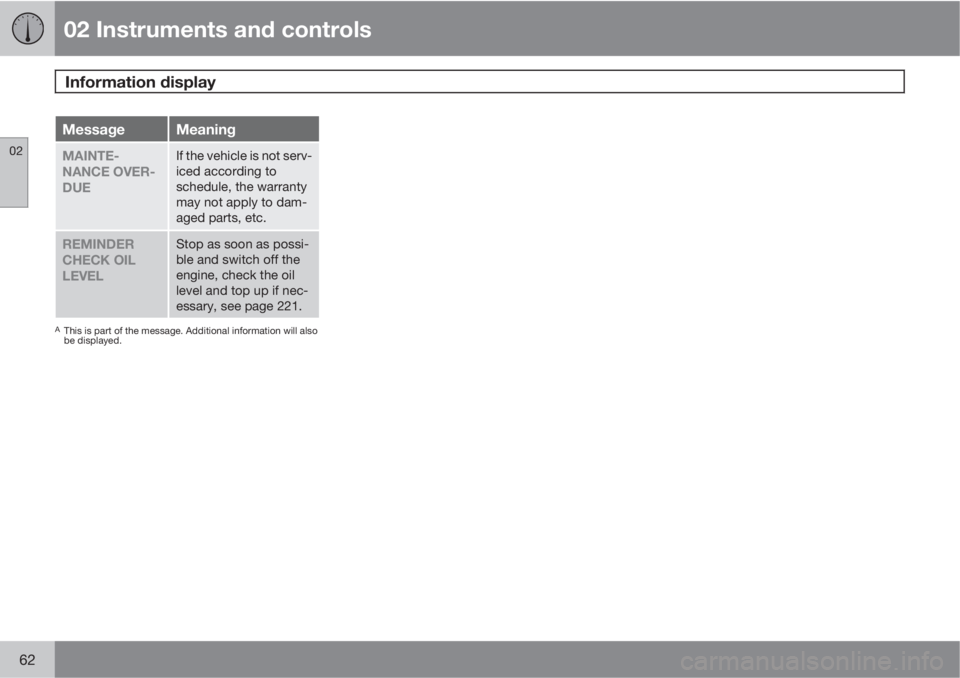
MessageMeaning
MAINTE-
NANCE OVER-
DUEIf the vehicle is not serv-
iced according to
schedule, the warranty
may not apply to dam-
aged parts, etc.
REMINDER
CHECK OIL
LEVELStop as soon as possi-
ble and switch off the
engine, check the oil
level and top up if nec-
essary, see page 221.
AThis is part of the message. Additional information will also
be displayed.
Page 67 of 300
02 Instruments and controls
Lighting panel
02
* Option/accessory, for more information, see Introduction.65
tion). The indicator light in the Active
Bending Light symbol will illuminate. The func-
tion can be deactivated by turning the lighting
switch counterclockwise to one of the other
lighting positions.
G020789
Headlight pattern with ABL deactivated (left) and
activated (right)
NOTE
•This function can only be activated in
twilight or dark conditions, and only
when the vehicle is in motion.
•If the indicator light flashes, this indi-
cates a fault in the ABL system. A text
message will also be displayed.
LED Daytime Running Lights (DRL)*
To help conserve fuel by reducing the use of
electrical current in the vehicle, DRL can be
used in daylight conditions instead of the low
beam headlights, which consume more elec-
trical current. The daytime running lights are
mounted in the front spoiler and use bright,
electricity-saving LEDs (light emitting diodes).
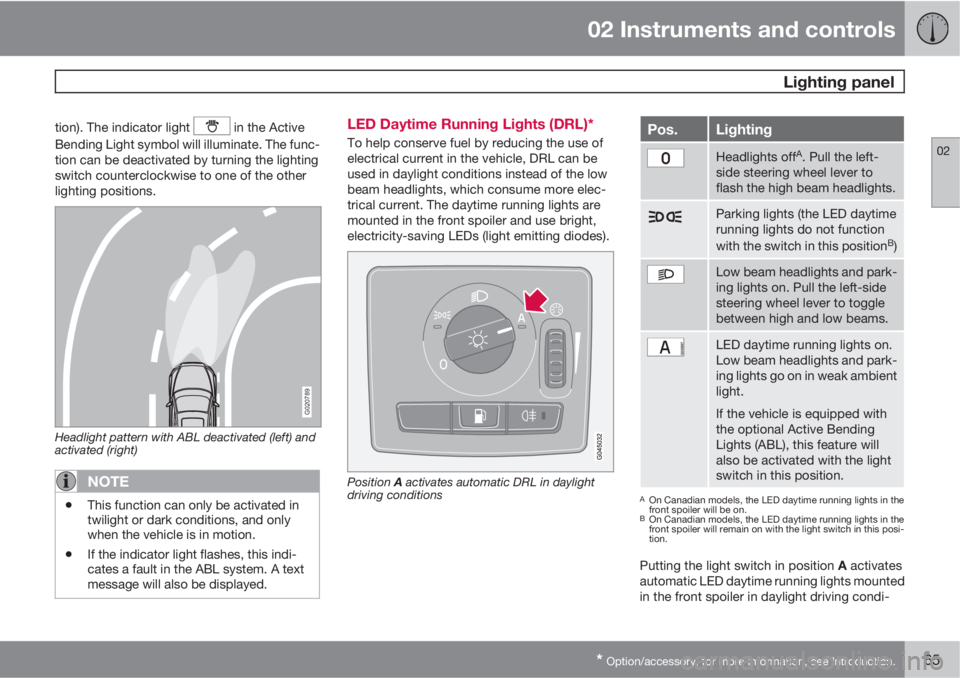
Position A activates automatic DRL in daylight
driving conditions
Pos.Lighting
Headlights offA. Pull the left-
side steering wheel lever to
flash the high beam headlights.
Parking lights (the LED daytime
running lights do not function
with the switch in this position
B)
Low beam headlights and park-
ing lights on. Pull the left-side
steering wheel lever to toggle
between high and low beams.
LED daytime running lights on.
Low beam headlights and park-
ing lights go on in weak ambient
light.
If the vehicle is equipped with
the optional Active Bending
Lights (ABL), this feature will
also be activated with the light
switch in this position.
AOn Canadian models, the LED daytime running lights in the
front spoiler will be on.
BOn Canadian models, the LED daytime running lights in the
front spoiler will remain on with the light switch in this posi-
tion.
Putting the light switch in position A activates
automatic LED daytime running lights mounted
in the front spoiler in daylight driving condi-
Page 72 of 300
02 Instruments and controls
Trip computer
02
70
G029052
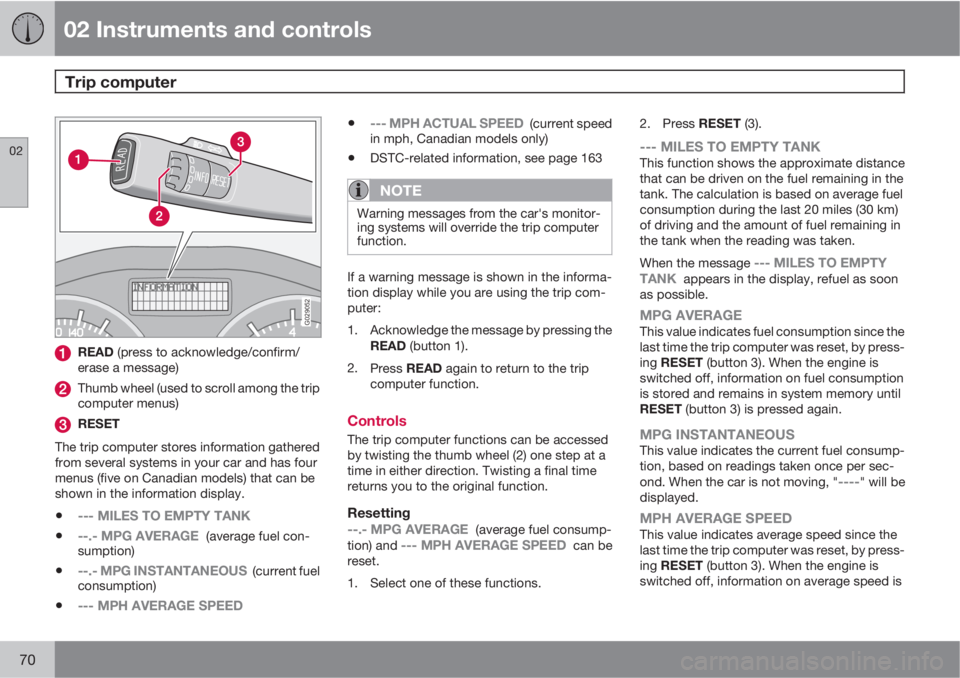
READ (press to acknowledge/confirm/
erase a message)
Thumb wheel (used to scroll among the trip
computer menus)
RESET
The trip computer stores information gathered
from several systems in your car and has four
menus (five on Canadian models) that can be
shown in the information display.
•--- MILES TO EMPTY TANK
•--.- MPG AVERAGE (average fuel con-
sumption)
•--.- MPG INSTANTANEOUS (current fuel
consumption)
•--- MPH AVERAGE SPEED
•--- MPH ACTUAL SPEED (current speed
in mph, Canadian models only)
•DSTC-related information, see page 163
NOTE
Warning messages from the car's monitor-
ing systems will override the trip computer
function.
If a warning message is shown in the informa-
tion display while you are using the trip com-
puter:
1. Acknowledge the message by pressing the
READ (button 1).
2.
Press READ again to return to the trip
computer function.
Controls
The trip computer functions can be accessed
by twisting the thumb wheel (2) one step at a
time in either direction. Twisting a final time
returns you to the original function.
Resetting
--.- MPG AVERAGE (average fuel consump-
tion) and --- MPH AVERAGE SPEED can be
reset.
1. Select one of these functions.2.
Press RESET (3).
--- MILES TO EMPTY TANKThis function shows the approximate distance
that can be driven on the fuel remaining in the
tank. The calculation is based on average fuel
consumption during the last 20 miles (30 km)
of driving and the amount of fuel remaining in
the tank when the reading was taken.
When the message
--- MILES TO EMPTY
TANK appears in the display, refuel as soon
as possible.
MPG AVERAGEThis value indicates fuel consumption since the
last time the trip computer was reset, by press-
ing RESET (button 3). When the engine is
switched off, information on fuel consumption
is stored and remains in system memory until
RESET (button 3) is pressed again.
MPG INSTANTANEOUSThis value indicates the current fuel consump-
tion, based on readings taken once per sec-
ond. When the car is not moving, "
----" will be
displayed.
MPH AVERAGE SPEEDThis value indicates average speed since the
last time the trip computer was reset, by press-
ing RESET (button 3). When the engine is
switched off, information on average speed is
Page 74 of 300
02 Instruments and controls
Cruise control*
02
72* Option/accessory, for more information, see Introduction.
Engaging the cruise control function
G020141
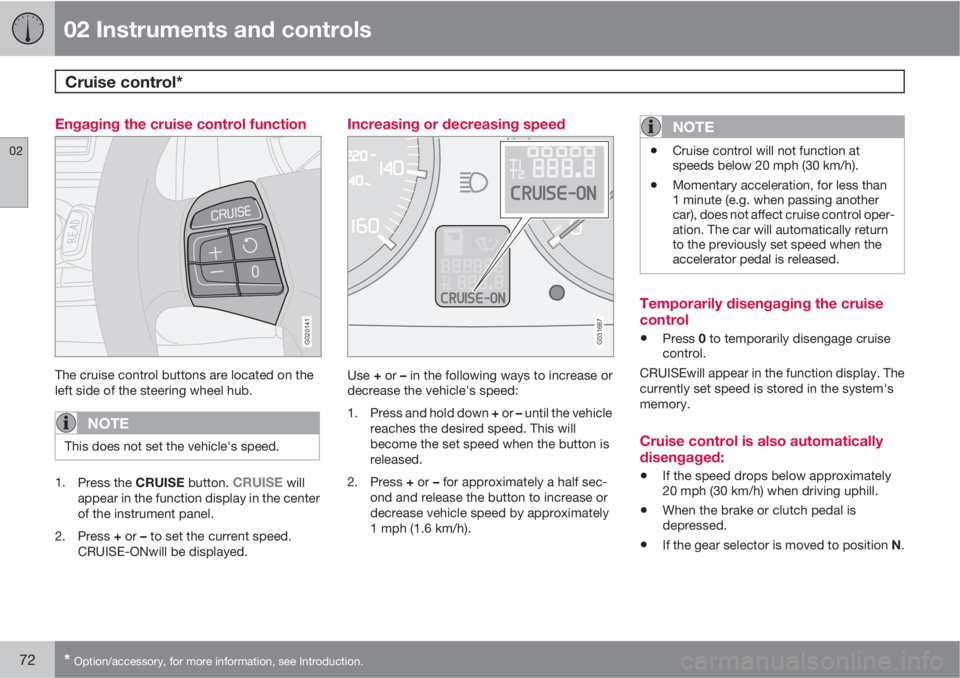
The cruise control buttons are located on the
left side of the steering wheel hub.
NOTE
This does not set the vehicle's speed.
1.
Press the CRUISE button. CRUISE will
appear in the function display in the center
of the instrument panel.
2.
Press + or – to set the current speed.
CRUISE-ONwill be displayed.
Increasing or decreasing speed
G031667
Use + or – in the following ways to increase or
decrease the vehicle's speed:
1.
Press and hold down + or – until the vehicle
reaches the desired speed. This will
become the set speed when the button is
released.
2.
Press + or – for approximately a half sec-
ond and release the button to increase or
decrease vehicle speed by approximately
1 mph (1.6 km/h).
NOTE
•Cruise control will not function at
speeds below 20 mph (30 km/h).
•Momentary acceleration, for less than
1 minute (e.g. when passing another
car), does not affect cruise control oper-
ation. The car will automatically return
to the previously set speed when the
accelerator pedal is released.
Temporarily disengaging the cruise
control
•Press 0 to temporarily disengage cruise
control.
CRUISEwill appear in the function display. The
currently set speed is stored in the system's
memory.
Cruise control is also automatically
disengaged:
•If the speed drops below approximately
20 mph (30 km/h) when driving uphill.
•When the brake or clutch pedal is
depressed.
•If the gear selector is moved to position N.
Page 75 of 300
02 Instruments and controls
Cruise control*
02
* Option/accessory, for more information, see Introduction.73
•During wheel spin or wheel lock-up.
•If the vehicle's speed is increased by using
the accelerator pedal for more than
1 minute.
Returning to the set speed
Press the button to resume the
previously set speed. CRUISE-
ON will be displayed.
Disengaging cruise control
Cruise control can also be disengaged by:
•Pressing the CRUISE button (CRUISE-
ON will no longer be shown in the function
display).
•Putting the gear selector in Neutral (N).
WARNING
Cruise control should not be used in heavy
traffic or when driving on wet or slippery
roads. Cruise control may not maintain the
set speed on steep downgrades.