warning light VOLVO C30 2013 Owner´s Manual
[x] Cancel search | Manufacturer: VOLVO, Model Year: 2013, Model line: C30, Model: VOLVO C30 2013Pages: 300, PDF Size: 6.58 MB
Page 58 of 300
02 Instruments and controls
Indicator and warning symbols
02
56
Function check
The indicator and warning symbols1 light up
when you turn the ignition key or the optional
keyless drive start control to the driving posi-
tion (position II) before starting. This shows that
the symbols are functioning.
When the engine starts, all sym-
bols go out. If the engine is not
started within 5 seconds, all of the
symbols except the malfunction
indicator light (CHECK ENGINE)
and the oil pressure warning light
will go out. Certain symbols may
not have their functions illustrated, depending
on the car's equipment.
The PARK BRAKE symbol will not go out until
the parking brake has been released.
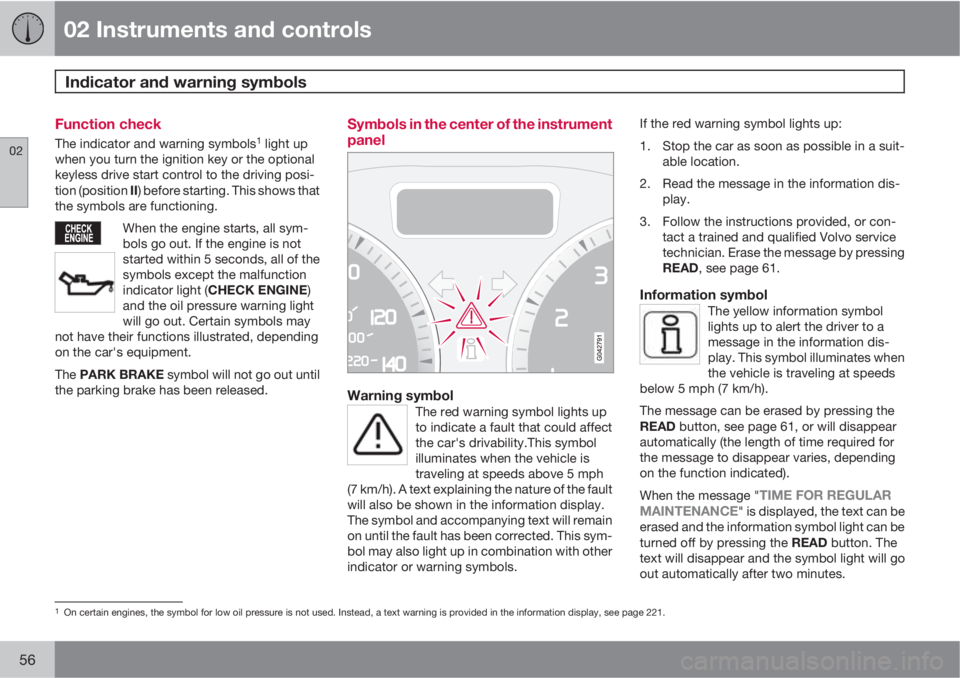
Symbols in the center of the instrument
panel
Warning symbolThe red warning symbol lights up
to indicate a fault that could affect
the car's drivability.This symbol
illuminates when the vehicle is
traveling at speeds above 5 mph
(7 km/h). A text explaining the nature of the fault
will also be shown in the information display.
The symbol and accompanying text will remain
on until the fault has been corrected. This sym-
bol may also light up in combination with other
indicator or warning symbols.
If the red warning symbol lights up:
1. Stop the car as soon as possible in a suit-
able location.
2. Read the message in the information dis-
play.
3. Follow the instructions provided, or con-
tact a trained and qualified Volvo service
technician. Erase the message by pressing
READ, see page 61.
Information symbolThe yellow information symbol
lights up to alert the driver to a
message in the information dis-
play. This symbol illuminates when
the vehicle is traveling at speeds
below 5 mph (7 km/h).
The message can be erased by pressing the
READ button, see page 61, or will disappear
automatically (the length of time required for
the message to disappear varies, depending
on the function indicated).
When the message "
TIME FOR REGULAR
MAINTENANCE" is displayed, the text can be
erased and the information symbol light can be
turned off by pressing the READ button. The
text will disappear and the symbol light will go
out automatically after two minutes.
1On certain engines, the symbol for low oil pressure is not used. Instead, a text warning is provided in the information display, see page 221.
Page 59 of 300
02 Instruments and controls
Indicator and warning symbols
02
57
This symbol may also light up in combination
with other indicator or warning symbols.
NOTE
The car can still be driven after the informa-
tion symbol has come on. The car can be
driven for 1–2 weeks after service-related
information has been displayed.
Page 60 of 300
02 Instruments and controls
Symbols – instrument panel
02
58
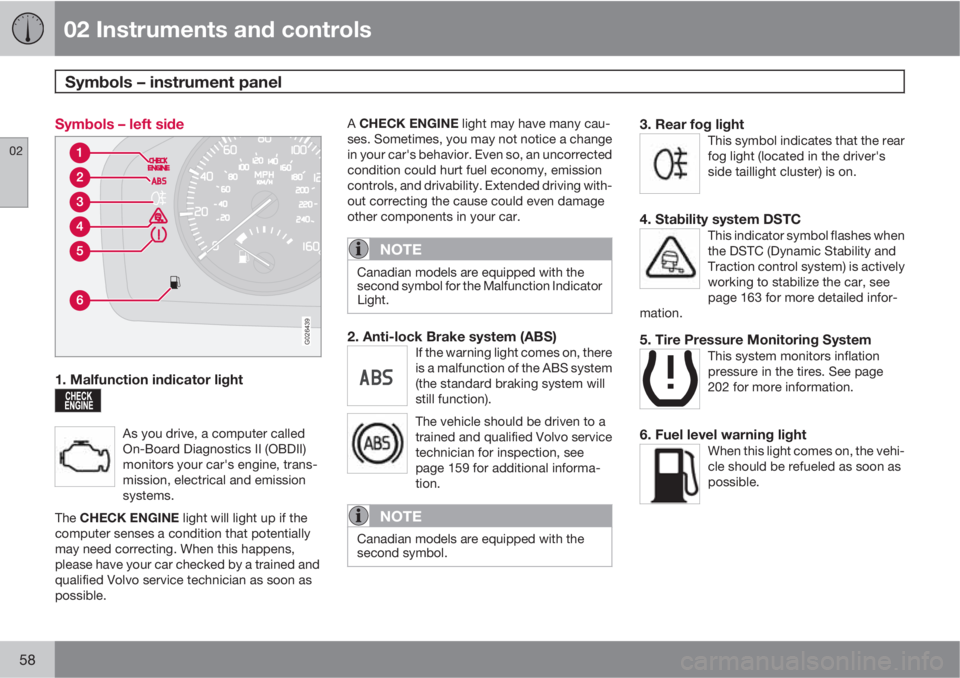
Symbols – left side
G026439
1. Malfunction indicator light
As you drive, a computer called
On-Board Diagnostics II (OBDII)
monitors your car's engine, trans-
mission, electrical and emission
systems.
The CHECK ENGINE light will light up if the
computer senses a condition that potentially
may need correcting. When this happens,
please have your car checked by a trained and
qualified Volvo service technician as soon as
possible.
A CHECK ENGINE light may have many cau-
ses. Sometimes, you may not notice a change
in your car's behavior. Even so, an uncorrected
condition could hurt fuel economy, emission
controls, and drivability. Extended driving with-
out correcting the cause could even damage
other components in your car.
NOTE
Canadian models are equipped with the
second symbol for the Malfunction Indicator
Light.
2. Anti-lock Brake system (ABS)If the warning light comes on, there
is a malfunction of the ABS system
(the standard braking system will
still function).
The vehicle should be driven to a
trained and qualified Volvo service
technician for inspection, see
page 159 for additional informa-
tion.
NOTE
Canadian models are equipped with the
second symbol.
3. Rear fog lightThis symbol indicates that the rear
fog light (located in the driver's
side taillight cluster) is on.
4. Stability system DSTCThis indicator symbol flashes when
the DSTC (Dynamic Stability and
Traction control system) is actively
working to stabilize the car, see
page 163 for more detailed infor-
mation.
5. Tire Pressure Monitoring SystemThis system monitors inflation
pressure in the tires. See page
202 for more information.
6. Fuel level warning lightWhen this light comes on, the vehi-
cle should be refueled as soon as
possible.
Page 61 of 300
02 Instruments and controls
Symbols – instrument panel
02
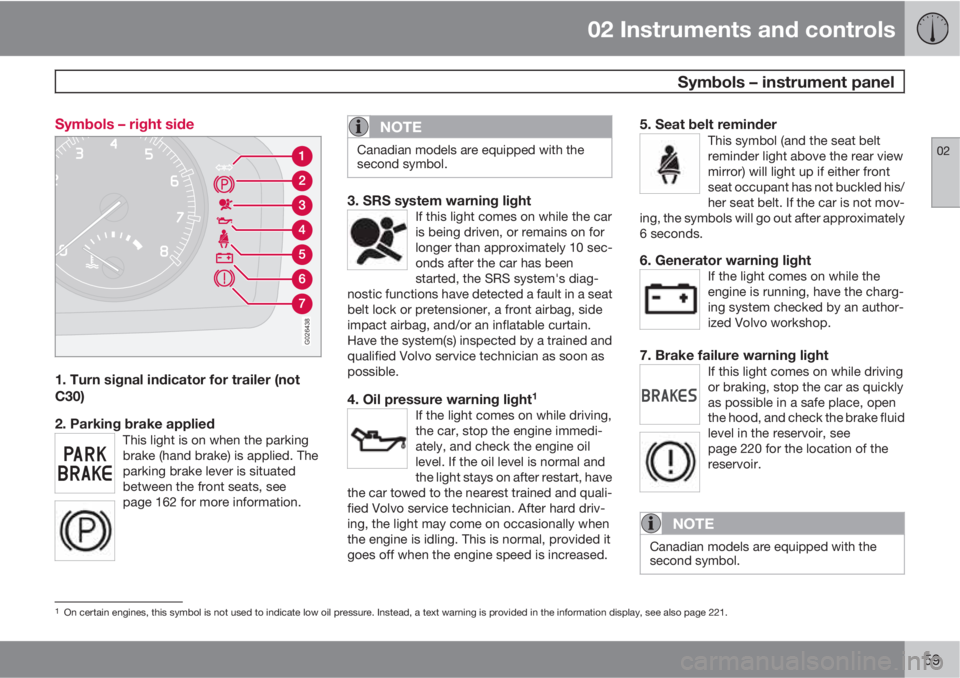
59 Symbols – right side
G026438
1. Turn signal indicator for trailer (not
C30)
2. Parking brake applied
This light is on when the parking
brake (hand brake) is applied. The
parking brake lever is situated
between the front seats, see
page 162 for more information.
NOTE
Canadian models are equipped with the
second symbol.
3. SRS system warning lightIf this light comes on while the car
is being driven, or remains on for
longer than approximately 10 sec-
onds after the car has been
started, the SRS system's diag-
nostic functions have detected a fault in a seat
belt lock or pretensioner, a front airbag, side
impact airbag, and/or an inflatable curtain.
Have the system(s) inspected by a trained and
qualified Volvo service technician as soon as
possible.
4. Oil pressure warning light1
If the light comes on while driving,
the car, stop the engine immedi-
ately, and check the engine oil
level. If the oil level is normal and
the light stays on after restart, have
the car towed to the nearest trained and quali-
fied Volvo service technician. After hard driv-
ing, the light may come on occasionally when
the engine is idling. This is normal, provided it
goes off when the engine speed is increased.
5. Seat belt reminderThis symbol (and the seat belt
reminder light above the rear view
mirror) will light up if either front
seat occupant has not buckled his/
her seat belt. If the car is not mov-
ing, the symbols will go out after approximately
6 seconds.
6. Generator warning lightIf the light comes on while the
engine is running, have the charg-
ing system checked by an author-
ized Volvo workshop.
7. Brake failure warning lightIf this light comes on while driving
or braking, stop the car as quickly
as possible in a safe place, open
the hood, and check the brake fluid
level in the reservoir, see
page 220 for the location of the
reservoir.
NOTE
Canadian models are equipped with the
second symbol.
1On certain engines, this symbol is not used to indicate low oil pressure. Instead, a text warning is provided in the information display, see also page 221.
Page 62 of 300
02 Instruments and controls
Symbols – instrument panel
02
60
WARNING
If the fluid level is below the MIN mark in the
reservoir or if a BRAKE FAILURE STOP
SAFELY message is displayed in the infor-
mation display: DO NOT DRIVE. Have the
car towed to a trained and qualified Volvo
service technician and have the brake sys-
tem inspected.
If the BRAKES and ABS warning lights come
on at the same time, this could indicate a fault
in the brake system.
In this case:
1. Stop the car in a suitable place and switch
off the engine.
2. Restart the engine.
3. If both warning lights go off, no further
action is required and the car can be
driven.
4. If both lights remain on after the engine has
been restarted, switch off the engine again
and check the brake fluid level, see
page 220 for the location of the reservoir.
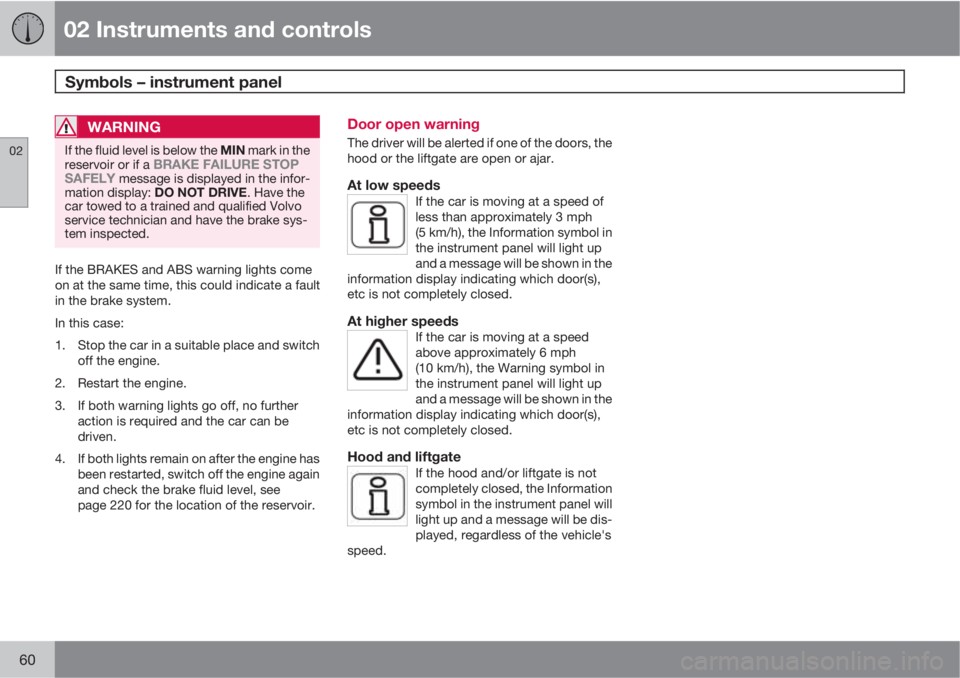
Door open warning
The driver will be alerted if one of the doors, the
hood or the liftgate are open or ajar.
At low speedsIf the car is moving at a speed of
less than approximately 3 mph
(5 km/h), the Information symbol in
the instrument panel will light up
and a message will be shown in the
information display indicating which door(s),
etc is not completely closed.
At higher speedsIf the car is moving at a speed
above approximately 6 mph
(10 km/h), the Warning symbol in
the instrument panel will light up
and a message will be shown in the
information display indicating which door(s),
etc is not completely closed.
Hood and liftgateIf the hood and/or liftgate is not
completely closed, the Information
symbol in the instrument panel will
light up and a message will be dis-
played, regardless of the vehicle's
speed.
Page 63 of 300
02 Instruments and controls
Information display
02
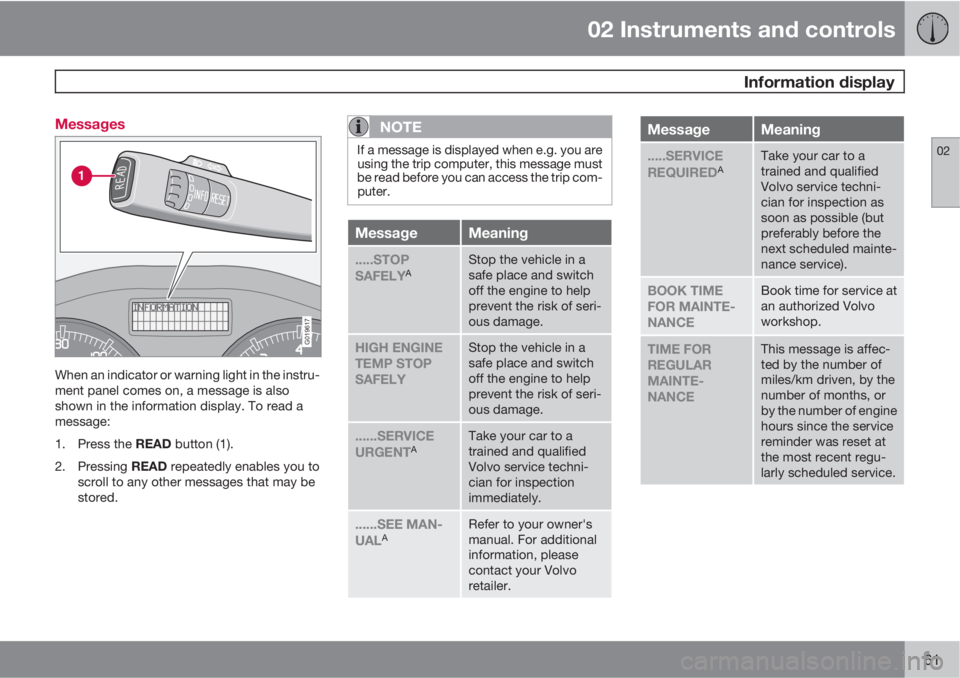
61 Messages
G019617
When an indicator or warning light in the instru-
ment panel comes on, a message is also
shown in the information display. To read a
message:
1.
Press the READ button (1).
2.
Pressing READ repeatedly enables you to
scroll to any other messages that may be
stored.
NOTE
If a message is displayed when e.g. you are
using the trip computer, this message must
be read before you can access the trip com-
puter.
MessageMeaning
.....STOP
SAFELYAStop the vehicle in a
safe place and switch
off the engine to help
prevent the risk of seri-
ous damage.
HIGH ENGINE
TEMP STOP
SAFELYStop the vehicle in a
safe place and switch
off the engine to help
prevent the risk of seri-
ous damage.
......SERVICE
URGENTATake your car to a
trained and qualified
Volvo service techni-
cian for inspection
immediately.
......SEE MAN-
UALARefer to your owner's
manual. For additional
information, please
contact your Volvo
retailer.
MessageMeaning
.....SERVICE
REQUIREDATake your car to a
trained and qualified
Volvo service techni-
cian for inspection as
soon as possible (but
preferably before the
next scheduled mainte-
nance service).
BOOK TIME
FOR MAINTE-
NANCEBook time for service at
an authorized Volvo
workshop.
TIME FOR
REGULAR
MAINTE-
NANCEThis message is affec-
ted by the number of
miles/km driven, by the
number of months, or
by the number of engine
hours since the service
reminder was reset at
the most recent regu-
larly scheduled service.
Page 68 of 300

02 Instruments and controls
Lighting panel
02
66* Option/accessory, for more information, see Introduction.
tions. A light sensor then monitors the ambient
lighting conditions and automatically switches
from LED DRL to the low beam headlights in
weaker ambient light (and will switch back to
DRL when the ambient light becomes brighter).
The LED DRLs will also switch off automatically
(and the low beams will switch on) if:
•The rear fog light is switched on
•The windshield wipers are switched on for
more than 10 seconds
WARNING
•DRL is a driving aid designed to help
conserve electrical current. This system
cannot always determine if the ambient
lighting conditions are sufficient for
switching from low beams to DRL (or
vice versa). It is always the driver's
responsibility to visually determine if the
low beam headlights should be used.
•As the driver, you have full responsibility
for operating the vehicle in a safe man-
ner.
Parking lights
The front and rear parking lights can be turned
on even when the ignition is switched off.
–Turn the light switch (1) to the parking light
position.
The license plate lights also illuminate when the
parking lights are switched on.
Brake lights
The brake lights come on automatically when
the brakes are applied.
Fog lights
Front fog lights*2
The front fog lights can be used in combination
with either the headlights or the parking lights.
1.
Turn the ignition key to position II.
2. Press button (3) to turn on the front fog
lights.
An indicator light in the button illuminates when
the front fog lights are on.
Rear fog lightsThe rear fog lights are located in both taillight
clusters.The rear fogs light will only function in combi-
nation with the high/low beam headlights or the
optional front fog lights.
1.
Turn the ignition key to position II.
2. Press button (5) to turn on the rear fog
lights.
An indicator light in the button illuminates when
the rear fog lights are on.
NOTE
The rear fog lights are considerably brighter
than the normal taillights and should be
used only when conditions such as fog, rain,
snow, smoke or dust reduce visibility for
other vehicles to less than 500 ft.
(150 meters).
Instrument panel lighting
The instrument panel lighting illuminates when
the ignition is in position II and the light
switch (1) is in either position
or .
2Not available on models equipped with the optional LED Daytime Running LIGHTS
Page 79 of 300
02 Instruments and controls
Steering wheel adjustment, Hazard warning flashers
02
77 Steering wheel adjustment
G027308
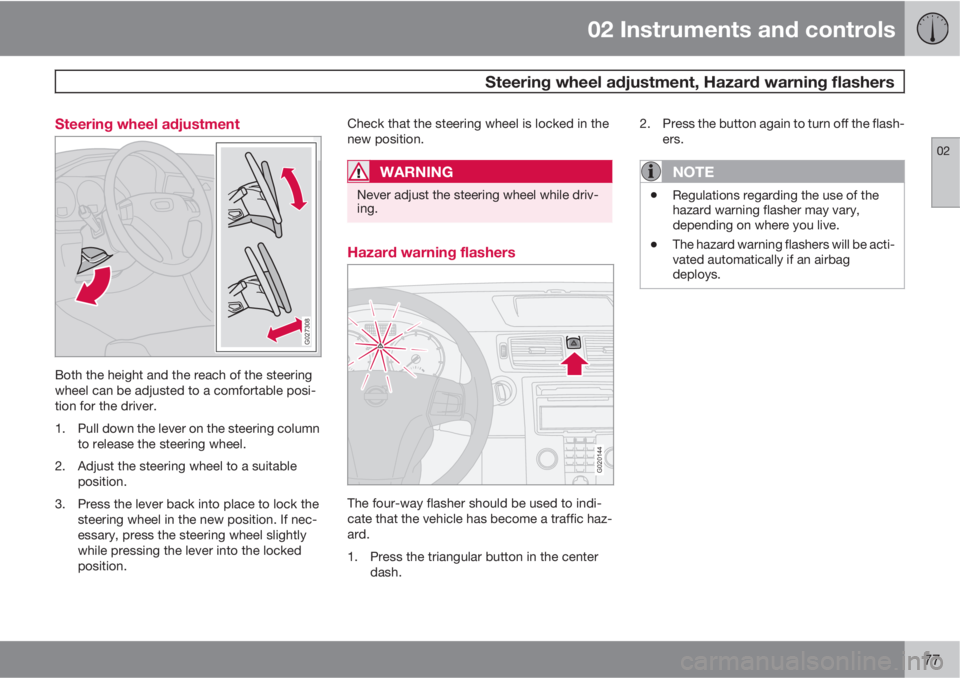
Both the height and the reach of the steering
wheel can be adjusted to a comfortable posi-
tion for the driver.
1. Pull down the lever on the steering column
to release the steering wheel.
2. Adjust the steering wheel to a suitable
position.
3. Press the lever back into place to lock the
steering wheel in the new position. If nec-
essary, press the steering wheel slightly
while pressing the lever into the locked
position.Check that the steering wheel is locked in the
new position.
WARNING
Never adjust the steering wheel while driv-
ing.
Hazard warning flashers
G020144
The four-way flasher should be used to indi-
cate that the vehicle has become a traffic haz-
ard.
1. Press the triangular button in the center
dash.2. Press the button again to turn off the flash-
ers.
NOTE
•Regulations regarding the use of the
hazard warning flasher may vary,
depending on where you live.
•The hazard warning flashers will be acti-
vated automatically if an airbag
deploys.
Page 80 of 300
02 Instruments and controls
Power windows
02
78
Operation
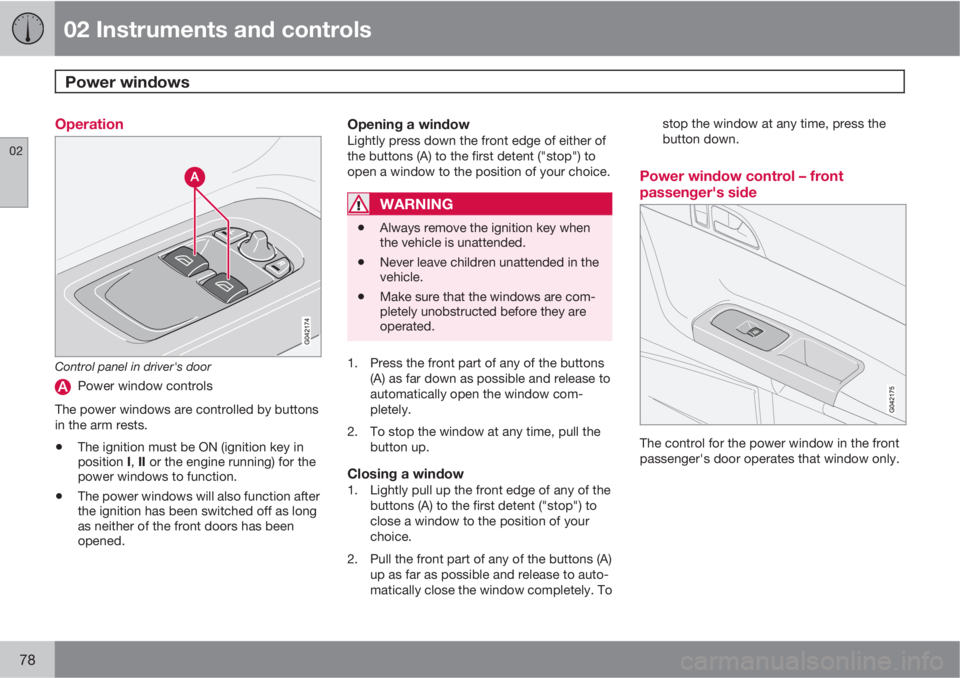
Control panel in driver's door
Power window controls
The power windows are controlled by buttons
in the arm rests.
•The ignition must be ON (ignition key in
position I, II or the engine running) for the
power windows to function.
•The power windows will also function after
the ignition has been switched off as long
as neither of the front doors has been
opened.
Opening a windowLightly press down the front edge of either of
the buttons (A) to the first detent ("stop") to
open a window to the position of your choice.
WARNING
•Always remove the ignition key when
the vehicle is unattended.
•Never leave children unattended in the
vehicle.
•Make sure that the windows are com-
pletely unobstructed before they are
operated.
1. Press the front part of any of the buttons
(A) as far down as possible and release to
automatically open the window com-
pletely.
2. To stop the window at any time, pull the
button up.
Closing a window1. Lightly pull up the front edge of any of the
buttons (A) to the first detent ("stop") to
close a window to the position of your
choice.
2. Pull the front part of any of the buttons (A)
up as far as possible and release to auto-
matically close the window completely. Tostop the window at any time, press the
button down.
Power window control – front
passenger's side
The control for the power window in the front
passenger's door operates that window only.
Page 82 of 300
02 Instruments and controls
Mirrors
02
80* Option/accessory, for more information, see Introduction.
G026409
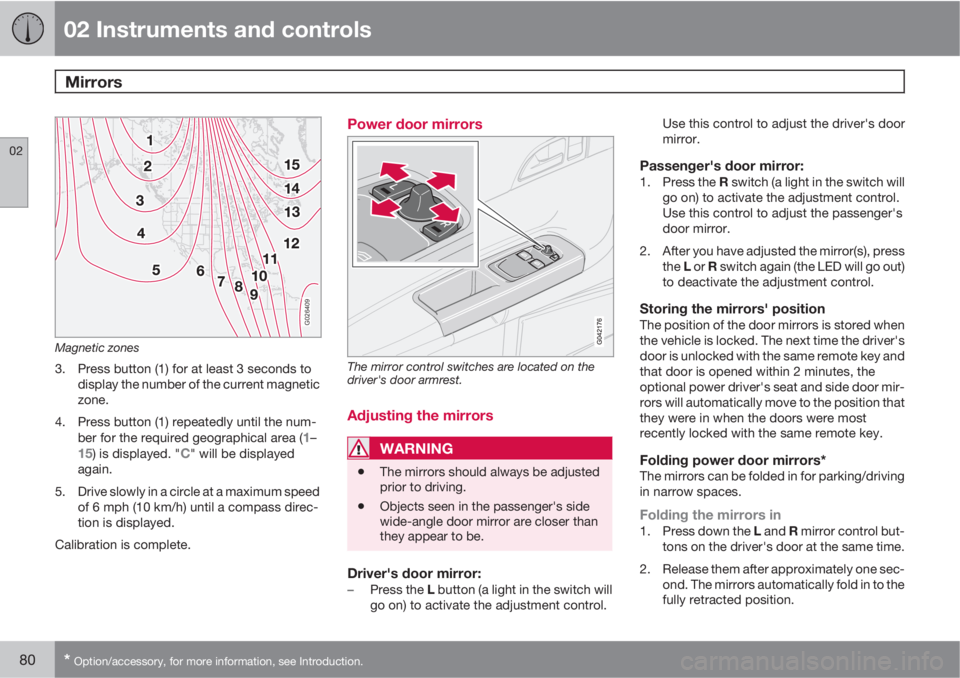
Magnetic zones
3. Press button (1) for at least 3 seconds to
display the number of the current magnetic
zone.
4. Press button (1) repeatedly until the num-
ber for the required geographical area (
1–15) is displayed. "C" will be displayed
again.
5. Drive slowly in a circle at a maximum speed
of 6 mph (10 km/h) until a compass direc-
tion is displayed.
Calibration is complete.
Power door mirrors
The mirror control switches are located on the
driver's door armrest.
Adjusting the mirrors
WARNING
•The mirrors should always be adjusted
prior to driving.
•Objects seen in the passenger's side
wide-angle door mirror are closer than
they appear to be.
Driver's door mirror:–
Press the L button (a light in the switch will
go on) to activate the adjustment control.Use this control to adjust the driver's door
mirror.
Passenger's door mirror:1.
Press the R switch (a light in the switch will
go on) to activate the adjustment control.
Use this control to adjust the passenger's
door mirror.
2. After you have adjusted the mirror(s), press
the L or R switch again (the LED will go out)
to deactivate the adjustment control.
Storing the mirrors' positionThe position of the door mirrors is stored when
the vehicle is locked. The next time the driver's
door is unlocked with the same remote key and
that door is opened within 2 minutes, the
optional power driver's seat and side door mir-
rors will automatically move to the position that
they were in when the doors were most
recently locked with the same remote key.
Folding power door mirrors*The mirrors can be folded in for parking/driving
in narrow spaces.
Folding the mirrors in1.
Press down the L and R mirror control but-
tons on the driver's door at the same time.
2. Release them after approximately one sec-
ond. The mirrors automatically fold in to the
fully retracted position.