audio VOLVO C30 2013 Owner´s Manual
[x] Cancel search | Manufacturer: VOLVO, Model Year: 2013, Model line: C30, Model: VOLVO C30 2013Pages: 300, PDF Size: 6.58 MB
Page 267 of 300
10 Audio
Bluetooth® hands-free connection
10
265
> The audio system will search for cell
phones that are in range. This search
takes approximately 30 seconds. Any
phones detected will be displayed with
their Bluetooth
® names. The hands-free
system’s Bluetooth® name will appear
in the cell phone’s display as My Volvo
Car.
4. Select one of the cell phones shown in the
audio system’s (center console) display.
5. Using the cell phone’s keypad, enter the
digits shown in the audio system’s display.
Alternative 2–using the cell phone’s menus
1. Activate the hands-free system by briefly
pressing the PHONE button in the center
console. If there is a cell phone connected,
disconnect it from the hands-free system.
2. Perform a search using the cell phone’s
Bluetooth
® function (consult the cell
phone’s owner’s manual if necessary).
3.
Select
My Volvo Car in the list of devices
shown in the cell phone’s display.
4. When prompted, enter the PIN code 1234
in the cell phone.
5.
Connect to
My Volvo Car from the cell
phone.The cell phone will be registered and will be
connected automatically to the audio system
while the text
Synchronizing is displayed. For
more information on synchronizing a cell
phone, see page 267.
When a connection has been established, the
symbol and the cell phone’s Bluetooth®
name will be displayed. The cell phone can
now be controlled from the audio system.
Making a call1.
Ensure that PHONE is shown at the top of
the center console display and that the
symbol is visible (by pressing briefly on
PHONE on the center console).
2. Dial the desired phone number or use the
phone book (see page 267).
3.
Press ENTER.
End the call by pressing EXIT.
Disconnecting the cell phoneThe cell phone is automatically disconnected
from the audio system if it is moved out of
range. For more information about connec-
tions, see page 264.
The cell phone can be manually disconnected
from the hands-free system by pressing
PHONE. The hands-free system is also deac-
tivated when the ignition is switched off (or ifthe driver’s door is opened on vehicles equip-
ped with the optional keyless drive).
When the cell phone is disconnected from the
hands-free system, a call in progress can be
continued using the cell phone’s own speaker
and microphone.
NOTE
Certain cell phones may require confirma-
tion from the phone’s keypad when a call is
transferred from hands-free to the cell
phone.
Handling calls
Incoming calls–
Press ENTER to answer a call, even if the
audio system is currently in e.g., CD or FM
mode.
–
Press EXIT to defer a call.
Automatic answerThis function means that incoming calls will be
answered automatically. Activate or deactivate
the function in the menu system under Phone
Menu…
Call options…Automatic
answer.
Page 268 of 300
10 Audio
Bluetooth® hands-free connection
10
266
Call settingsWhile a call is in progress, press MENU or
ENTER on the center console to access the
following functions:
•Mute microphone: mute the audio sys-
tem’s microphone.
•Transfer call to cell: transfer the call from
hands-free to the cell phone.
•Phone book: this feature enables you to
search for a stored telephone number.
NOTE
•On certain cell phones, the connection
is broken when the mute function is
used, which is normal. If this happens,
the hands-free system will prompt you
to reconnect.
•A new call cannot be initiated while
another call is in progress.
Sound settings
Call volumeCall volume can be adjusted while a call is in
progress using the buttons in the steering
wheel keypad.
Audio system volumeWhen PHONE is displayed, volume for the
audio system can be adjusted in the normal
way with the audio system's volume control. In
order to adjust volume during a phone call, the
audio system must be switched to one of the
other modes (FM, CD, etc).
Audio system sound can be automatically
muted when a phone call is received in
Phone Menu…
Phone settings…
Sounds and volume…Mute radio and
adjust the volume with the
/ keys on the
center console.
Ringing volume
Go to Phone Menu…Phone settings…
Sounds and volume…Ring volume and
adjust the volume with the
/ keys on the
center console.
Ringing tonesThe hands-free system’s integrated ringing
tones can be selected in Phone Menu…
Phone settings…Sounds and volume…
Ring signals…Ring signal 1, etc.
NOTE
The connected cell phone’s ring tone may
not be switched off when one of the hands-
free system's ringing tones is used.
If you prefer to use the connected cell phone’s
ring tone1, go to Phone Menu…Phone
settings…
Sounds and volume…Ring
signals…
Use cell phone signal
More information about registering
and connecting cell phones
A maximum of 5 cell phones can be registered
in the hands-free system. Registration only
needs to be done once for each phone. After
registration, the cell phones can then be found
in the list of registered phones. Only one cell
phone can be connected to hands-free at a
time. Phones can be unregistered in Phone
Menu…
Bluetooth…Remove phone
1Not supported by all cell phones.
Page 269 of 300
10 Audio
Bluetooth® hands-free connection
10
267
Automatic connectionWhen the hands-free system is active and the
most recently connected cell phone is within
range, it is detected automatically. When the
audio system searches for the most recently
connected phone, this phone’s name appears
in the display. To manually connect a different
cell phone, press EXIT.
Manual connectionTo connect a phone other than the one that
was most recently connected or to switch
between cell phones that are already regis-
tered in the hands-free system:
Put the audio system in telephone mode and
follow the instructions in the display or change
the connected cell by going into the menu sys-
tem under Phone Menu…
Bluetooth…
Connect phone or Change phone.
Phone book
In order to use the hands-free system’s phone
book (list of contacts), PHONE must be dis-
played at the top of the center console display
and the
symbol must be visible.
The audio system stores a copy of the phone
book of each registered cell phone. The phone
book is automatically copied each time a
phone is connected. This function can be acti-vated in Phone settings…
Synchronize
phone book. Searches for contacts are only
made in the phone book of the currently con-
nected cell phone.
NOTE
If a particular cell phone does not support
copying of the phone book, List is emptywill be displayed when copying has been
completed.
If the phone book contains information about
someone who is trying to call you, this infor-
mation will be shown in the display.
Searching for contactsThe easiest way to search for a contact in the
phone book is to press and hold any of the
buttons 2–9 in the center console (no. 3 in the
illustration on page 264. This starts a search
based on the first letter on the button that has
been pressed.
The phone book can also be accessed by
pressing the navigation buttons
/ on the
center console or by pressing
/ on the
steering wheel keypad. A search can also be
made in the phone book’s search menu in
Phone book…
Search:1. Enter the first letter of the contact’s name
and press ENTER or simply press ENTER.
2. Select the desired contact and press
ENTER to make a call to that person.
Voice controlIf the cell phone that is currently connected
allows calls to be made via voice commands,
this function can be used by pressing and hold-
ing ENTER.
Voice mail numberThe phone number to your voice mail can be
changed in the menu Phone settings…
Call options…Voice mail number. If no
number has been stored, this menu can be
accessed by a prolonged press on button 1.
Once a phone number has been stored, press
and hold 1 to dial this number.
Call listsLists of calls in a particular cell phone are cop-
ied to the hands-free system each time that
phone is connected. These lists are then upda-
ted while the phone is connected. Press
ENTER to show the most recently dialed num-
bers. Other call lists can be found under
Call
register….
Page 270 of 300
10 Audio
Bluetooth® hands-free connection
10
268
NOTE
Certain cell phones display the list of the
most recently dialed numbers in reverse
order.
Entering textText is entered by using the number buttons in
the center console. Press a button once to
enter the first letter on the button, twice to enter
the second letter, etc. Continue to press the
button to display other characters.
Press EXIT briefly to erase a character. Press
and hold EXIT to erase all of the characters that
have been entered. Use the
/ buttons on
the center console to navigate among the char-
acters.
Bluetooth® menus
1. Call register…
1.1. Last 10 missed calls
1.2. Last 10 received calls
1.3. Last 10 dialed calls
2. Phone book…
2.1. Search
2.2. Copy fr. cell phone3. Bluetooth…
3.1. Change phone
3.1.1. Add phone
3.1.2–4.
Added phones
2
3.2. Remove phone
3.3. Connect fr. cell phone
3.4. Car Bluetooth info
4. Call options…
4.1. Automatic answer
4.2. Voice mail number
5. Phone settings…
5.1. Sounds and volume…
5.1.1. Ring volume
5.1.2. Ring signals…
5.1.3. Mute radio
5.2. Synchronize phone book
2Max. 3 phones.
Page 271 of 300

10 Audio
10
269
Page 284 of 300
11 Specifications
Electrical system
11
282
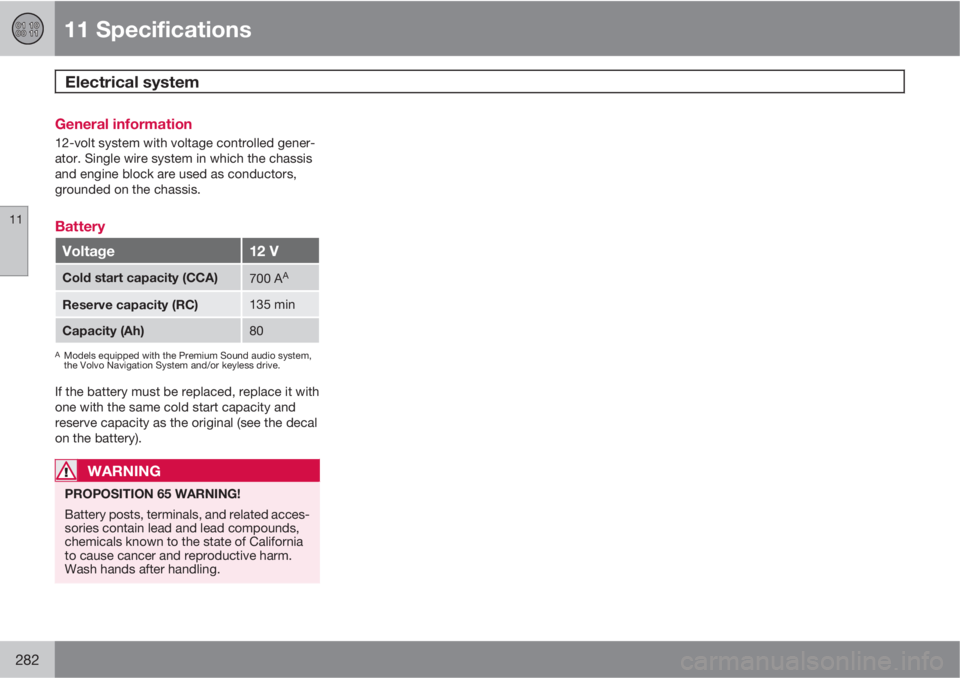
General information
12-volt system with voltage controlled gener-
ator. Single wire system in which the chassis
and engine block are used as conductors,
grounded on the chassis.
Battery
Voltage12 V
Cold start capacity (CCA)700 AA
Reserve capacity (RC)135 min
Capacity (Ah)80
AModels equipped with the Premium Sound audio system,
the Volvo Navigation System and/or keyless drive.
If the battery must be replaced, replace it with
one with the same cold start capacity and
reserve capacity as the original (see the decal
on the battery).
WARNING
PROPOSITION 65 WARNING!
Battery posts, terminals, and related acces-
sories contain lead and lead compounds,
chemicals known to the state of California
to cause cancer and reproductive harm.
Wash hands after handling.
Page 287 of 300

11 Specifications
Overview of information and warning symbols
11
* Option/accessory, for more information, see Introduction.285
SymbolDescriptionPage
Generator warn-
ing light59
Brake failure
warning light59
High beam indica-
tor54
Left turn signal54
Right turn signal54
Other information symbols
SymbolDescriptionPage
Rain sensor*75
Cruise control*72
Information symbols in the center
console display
SymbolDescriptionPage
G021216
Surround sound
(Premium Sound
only)250
HD radio254
Audio files260
CD folder260
Bluetooth-con-
nected cell phone264
BluetoothTM
hands-free
264
Information symbols in the ceiling
console
SymbolDescriptionPage
Seat belt reminder59
Occupant weight
sensor28
Page 290 of 300
12 Index
12
288
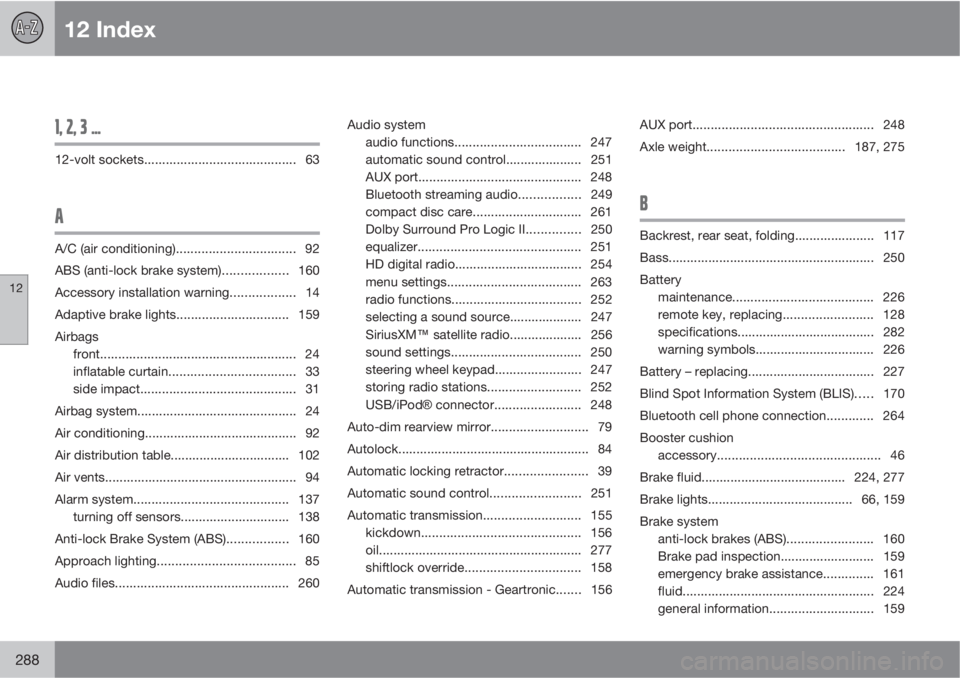
1, 2, 3 ...
12-volt sockets.......................................... 63
A
A/C (air conditioning)................................. 92
ABS (anti-lock brake system).................. 160
Accessory installation warning.................. 14
Adaptive brake lights............................... 159
Airbags
front...................................................... 24
inflatable curtain................................... 33
side impact........................................... 31
Airbag system............................................ 24
Air conditioning.......................................... 92
Air distribution table................................. 102
Air vents..................................................... 94
Alarm system........................................... 137
turning off sensors.............................. 138
Anti-lock Brake System (ABS)................. 160
Approach lighting...................................... 85
Audio files................................................ 260Audio system
audio functions................................... 247
automatic sound control..................... 251
AUX port............................................. 248
Bluetooth streaming audio................. 249
compact disc care.............................. 261
Dolby Surround Pro Logic II............... 250
equalizer............................................. 251
HD digital radio................................... 254
menu settings..................................... 263
radio functions.................................... 252
selecting a sound source.................... 247
SiriusXM
E satellite radio.................... 256
sound settings.................................... 250
steering wheel keypad........................ 247
storing radio stations.......................... 252
USB/iPodŸ connector........................ 248
Auto-dim rearview mirror........................... 79
Autolock..................................................... 84
Automatic locking retractor....................... 39
Automatic sound control.........................251
Automatic transmission........................... 155
kickdown............................................ 156
oil........................................................ 277
shiftlock override................................ 158
Automatic transmission - Geartronic....... 156AUX port.................................................. 248
Axle weight......................................187, 275
B
Backrest, rear seat, folding...................... 117
Bass......................................................... 250
Battery
maintenance....................................... 226
remote key, replacing......................... 128
specifications...................................... 282
warning symbols................................. 226
Battery – replacing................................... 227
Blind Spot Information System (BLIS)..... 170
Bluetooth cell phone connection............. 264
Booster cushion
accessory............................................. 46
Brake fluid........................................ 224, 277
Brake lights........................................ 66, 159
Brake system
anti-lock brakes (ABS)........................ 160
Brake pad inspection.......................... 159
emergency brake assistance.............. 161
fluid..................................................... 224
general information............................. 159
Page 292 of 300
12 Index
12
290
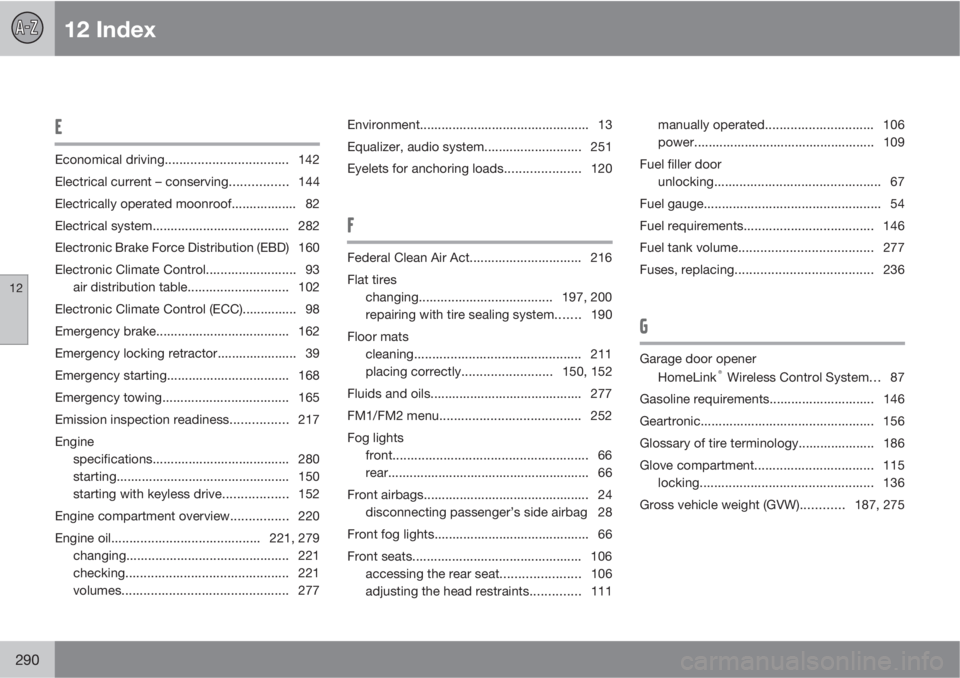
E
Economical driving.................................. 142
Electrical current – conserving................ 144
Electrically operated moonroof.................. 82
Electrical system...................................... 282
Electronic Brake Force Distribution (EBD) 160
Electronic Climate Control......................... 93
air distribution table............................ 102
Electronic Climate Control (ECC)............... 98
Emergency brake..................................... 162
Emergency locking retractor...................... 39
Emergency starting.................................. 168
Emergency towing................................... 165
Emission inspection readiness................ 217
Engine
specifications...................................... 280
starting................................................ 150
starting with keyless drive.................. 152
Engine compartment overview................220
Engine oil.........................................221, 279
changing............................................. 221
checking............................................. 221
volumes.............................................. 277Environment............................................... 13
Equalizer, audio system........................... 251
Eyelets for anchoring loads..................... 120
F
Federal Clean Air Act............................... 216
Flat tires
changing..................................... 197, 200
repairing with tire sealing system....... 190
Floor mats
cleaning.............................................. 211
placing correctly.........................150, 152
Fluids and oils.......................................... 277
FM1/FM2 menu....................................... 252
Fog lights
front...................................................... 66
rear........................................................ 66
Front airbags.............................................. 24
disconnecting passenger’s side airbag 28
Front fog lights........................................... 66
Front seats............................................... 106
accessing the rear seat...................... 106
adjusting the head restraints.............. 111manually operated.............................. 106
power.................................................. 109
Fuel filler door
unlocking.............................................. 67
Fuel gauge................................................. 54
Fuel requirements.................................... 146
Fuel tank volume.....................................277
Fuses, replacing......................................236
G
Garage door opener
HomeLink® Wireless Control System. . . 87
Gasoline requirements............................. 146
Geartronic................................................ 156
Glossary of tire terminology..................... 186
Glove compartment................................. 115
locking................................................ 136
Gross vehicle weight (GVW)............187, 275
Page 293 of 300
12 Index
12
291
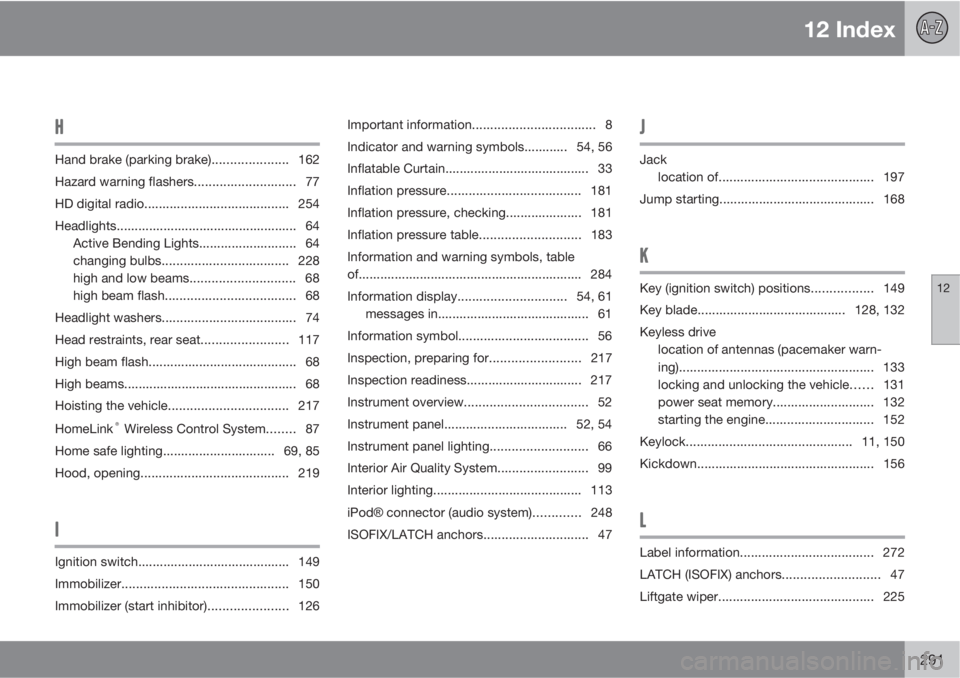
H
Hand brake (parking brake)..................... 162
Hazard warning flashers............................ 77
HD digital radio........................................ 254
Headlights.................................................. 64
Active Bending Lights........................... 64
changing bulbs................................... 228
high and low beams............................. 68
high beam flash.................................... 68
Headlight washers..................................... 74
Head restraints, rear seat........................117
High beam flash......................................... 68
High beams................................................ 68
Hoisting the vehicle.................................217
HomeLink
® Wireless Control System........ 87
Home safe lighting............................... 69, 85
Hood, opening......................................... 219
I
Ignition switch.......................................... 149
Immobilizer.............................................. 150
Immobilizer (start inhibitor)...................... 126Important information.................................. 8
Indicator and warning symbols............ 54, 56
Inflatable Curtain........................................ 33
Inflation pressure..................................... 181
Inflation pressure, checking..................... 181
Inflation pressure table............................183
Information and warning symbols, table
of.............................................................. 284
Information display..............................54, 61
messages in.......................................... 61
Information symbol.................................... 56
Inspection, preparing for......................... 217
Inspection readiness................................ 217
Instrument overview.................................. 52
Instrument panel.................................. 52, 54
Instrument panel lighting........................... 66
Interior Air Quality System......................... 99
Interior lighting......................................... 113
iPodŸ connector (audio system)............. 248
ISOFIX/LATCH anchors............................. 47
J
Jack
location of........................................... 197
Jump starting........................................... 168
K
Key (ignition switch) positions................. 149
Key blade.........................................128, 132
Keyless drive
location of antennas (pacemaker warn-
ing)...................................................... 133
locking and unlocking the vehicle...... 131
power seat memory............................ 132
starting the engine.............................. 152
Keylock.............................................. 11, 150
Kickdown.................................................156
L
Label information..................................... 272
LATCH (ISOFIX) anchors........................... 47
Liftgate wiper........................................... 225