window VOLVO C30 2013 Owner´s Manual
[x] Cancel search | Manufacturer: VOLVO, Model Year: 2013, Model line: C30, Model: VOLVO C30 2013Pages: 300, PDF Size: 6.58 MB
Page 4 of 300
Contents
2* Option/accessory, for more information, see Introduction.
00
00 Introduction
Important information................................. 8
Environment.............................................. 13
Important warnings................................... 14
01
01 Safety
Occupant safety........................................ 18
Seat belts.................................................. 20
Supplemental Restraint System............... 23
Occupant Weight Sensor (OWS).............. 28
Side impact protection airbags................. 31
Inflatable Curtain (IC)................................ 33
Whiplash Protection System..................... 35
Crash mode.............................................. 37
Child safety............................................... 38
Child restraint systems............................. 40
Infant seats............................................... 42
Convertible seats...................................... 44
Booster cushions...................................... 46
ISOFIX/LATCH lower anchors.................. 47
Top tether anchors.................................... 48
02
02 Instruments and controls
Instrument overview.................................. 52
Instrument panel....................................... 54
Indicator and warning symbols.................56
Symbols – instrument panel..................... 58
Information display................................... 61
12-volt sockets......................................... 63
Lighting panel........................................... 64
Left-side steering wheel lever................... 68
Trip computer........................................... 70
Cruise control*.......................................... 72
Right-side steering wheel lever................. 74
Steering wheel adjustment, Hazard warn-
ing flashers................................................ 77
Power windows......................................... 78
Mirrors....................................................... 79
Power moonroof*...................................... 82
Personal settings...................................... 84
HomeLink
® Wireless Control System*...... 87
Page 29 of 300
01 Safety
Supplemental Restraint System01
27
WARNING
•Children must never be allowed in the
front passenger's seat.
•Occupants in the front passenger's seat
must never sit on the edge of the seat,
sit leaning toward the instrument panel
or otherwise sit out of position.
•The occupant's back must be as upright
as comfort allows and be against the
seat back with the seat belt properly
fastened.
•Feet must be on the floor, e.g., not on
the dash, seat or out of the window.
WARNING
•No objects or accessory equipment,
e.g. dashboard covers, may be placed
on, attached to, or installed near the air
bag hatch (the area above the glove
compartment) or the area affected by
airbag deployment.
•There should be no loose articles, e.g.
coffee cups, on the floor, seat, or dash-
board area.
•Never try to open the airbag cover on
the steering wheel or the passenger's
side dashboard. This should only be
done by a trained and qualified Volvo
service technician.
•Failure to follow these instructions can
result in injury to the vehicle occupants.
Page 35 of 300
01 Safety
Inflatable Curtain (IC)01
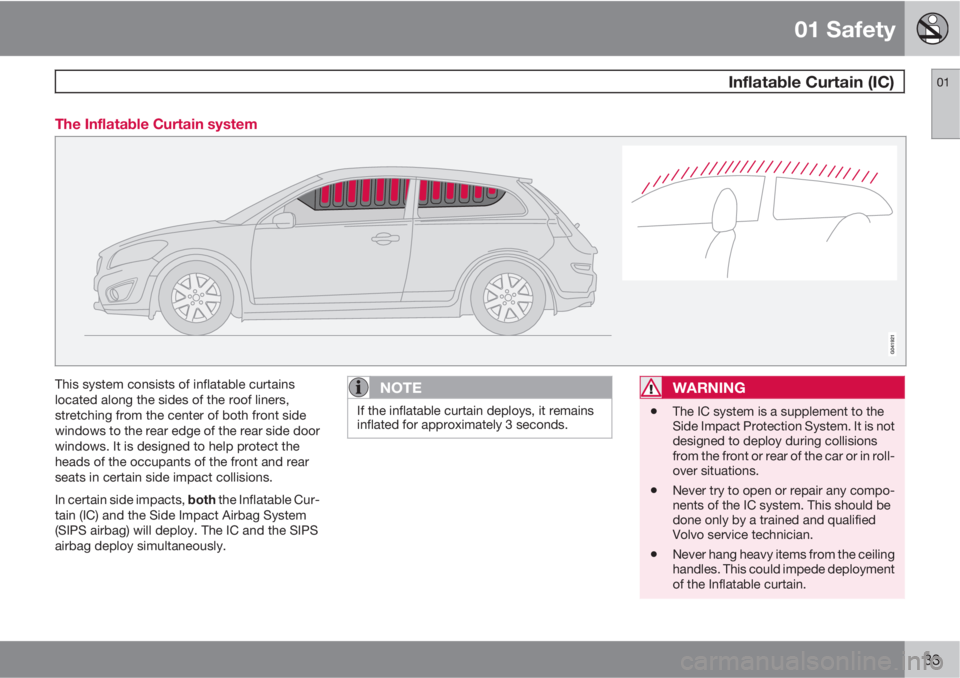
33 The Inflatable Curtain system
This system consists of inflatable curtains
located along the sides of the roof liners,
stretching from the center of both front side
windows to the rear edge of the rear side door
windows. It is designed to help protect the
heads of the occupants of the front and rear
seats in certain side impact collisions.
In certain side impacts, both the Inflatable Cur-
tain (IC) and the Side Impact Airbag System
(SIPS airbag) will deploy. The IC and the SIPS
airbag deploy simultaneously.NOTE
If the inflatable curtain deploys, it remains
inflated for approximately 3 seconds.
WARNING
•The IC system is a supplement to the
Side Impact Protection System. It is not
designed to deploy during collisions
from the front or rear of the car or in roll-
over situations.
•Never try to open or repair any compo-
nents of the IC system. This should be
done only by a trained and qualified
Volvo service technician.
•Never hang heavy items from the ceiling
handles. This could impede deployment
of the Inflatable curtain.
Page 52 of 300
50* Option/accessory, for more information, see Introduction.
Instrument overview................................................................................ 52
Instrument panel..................................................................................... 54
Indicator and warning symbols............................................................... 56
Symbols – instrument panel.................................................................... 58
Information display.................................................................................. 61
12-volt sockets....................................................................................... 63
Lighting panel.......................................................................................... 64
Left-side steering wheel lever................................................................. 68
Trip computer.......................................................................................... 70
Cruise control*........................................................................................ 72
Right-side steering wheel lever............................................................... 74
Steering wheel adjustment, Hazard warning flashers............................. 77
Power windows....................................................................................... 78
Mirrors..................................................................................................... 79
Power moonroof*.................................................................................... 82
Personal settings.................................................................................... 84
HomeLink
® Wireless Control System*.................................................... 87
Page 55 of 300

02 Instruments and controls
Instrument overview
02
* Option/accessory, for more information, see Introduction.53
Steering wheel adjustment
Hood opener
Controls in front doors
Left steering wheel lever
Lighting panel, fuel filler door opener
Door open handle and locking button
Climate system air vent
Side window air vent
Cruise control
Horn, airbag
Main instrument panel
Audio controls
Right steering wheel lever
Ignition switch
Moonroof control*
Not in use
Not is use
Courtesy lighting switch
Driver's side reading light
Passenger's side reading light
Seat belt reminder and Occupant
Weight Sensor indicator
Rear-view mirror
Display for climate control, personal
settings, and audio system
Audio system
Controls for personal settings and
audio system
Controls for climate system
Gear selector
Hazard warning flashers
Door open handle
Glove compartment
Parking brake
12-volt socket
Position for optional equipment
Position for optional equipment
Control panel in driver's door
Power windows
Door mirror button, driver's side
Door mirror adjustment control
Door mirror button, passenger's side
Page 56 of 300
02 Instruments and controls
Instrument panel
02
54
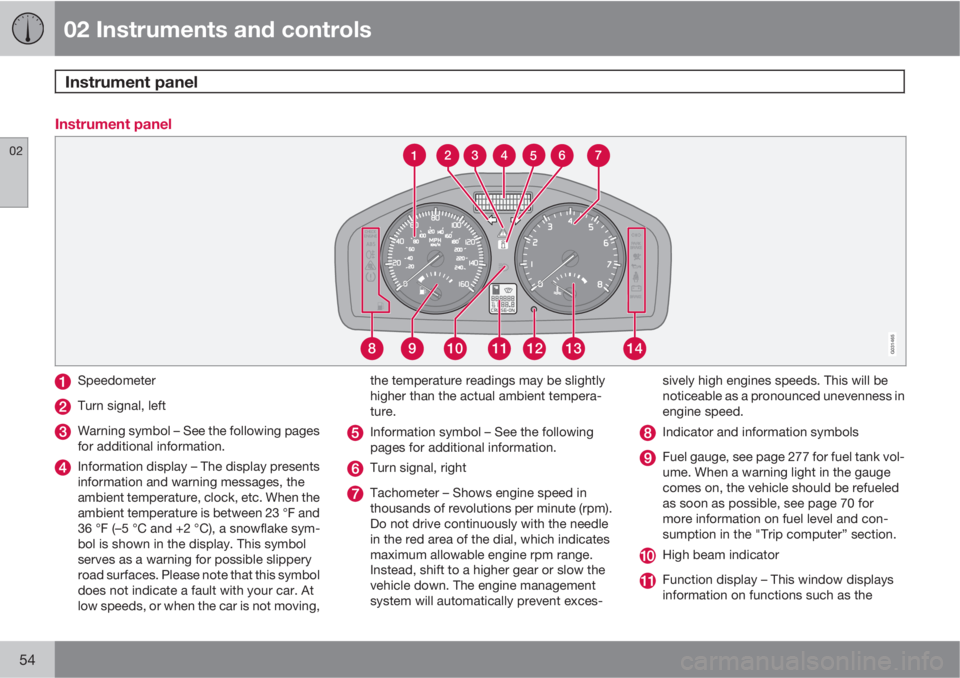
Instrument panel
891112131410G031465
4 3 2
567
1
Speedometer
Turn signal, left
Warning symbol – See the following pages
for additional information.
Information display – The display presents
information and warning messages, the
ambient temperature, clock, etc. When the
ambient temperature is between 23 °F and
36 °F (–5 °C and +2 °C), a snowflake sym-
bol is shown in the display. This symbol
serves as a warning for possible slippery
road surfaces. Please note that this symbol
does not indicate a fault with your car. At
low speeds, or when the car is not moving,the temperature readings may be slightly
higher than the actual ambient tempera-
ture.
Information symbol – See the following
pages for additional information.
Turn signal, right
Tachometer – Shows engine speed in
thousands of revolutions per minute (rpm).
Do not drive continuously with the needle
in the red area of the dial, which indicates
maximum allowable engine rpm range.
Instead, shift to a higher gear or slow the
vehicle down. The engine management
system will automatically prevent exces-sively high engines speeds. This will be
noticeable as a pronounced unevenness in
engine speed.
Indicator and information symbols
Fuel gauge, see page 277 for fuel tank vol-
ume. When a warning light in the gauge
comes on, the vehicle should be refueled
as soon as possible, see page 70 for
more information on fuel level and con-
sumption in the "Trip computer” section.
High beam indicator
Function display – This window displays
information on functions such as the
Page 76 of 300

02 Instruments and controls
Right-side steering wheel lever
02
74
Windshield wipers
Windshield/headlight washers
Rain sensor – on/off, see page 74
Thumb wheel
Liftgate wiper/washer
Windshield wipers offThe windshield wipers are off when
the lever is in position 0.
Manual wiper functionFrom position 0, move the lever
upward. The windshield wipers will
sweep one stroke at a time for as
long as the lever is held up.
Intermittent wiper functionWith the lever in this position, you
can set the wiper interval by mov-
ing the thumb wheel (C) upward to
increase wiper speed or down-
ward to decrease the speed.
Continuous wiper functionThe wipers operate at "normal"
speed.
High speed wiper function.
– Windshield washers
Pull the lever toward the steering wheel and
release it. The wipers will make 2–3 sweeps
across the windshield after the lever has been
released.
CAUTION
•Use ample washer fluid when washing
the windshield. The windshield should
be thoroughly wet when the wipers are
in operation.
•Before using the wipers, ice and snow
should be removed from the wind-
shield/rear window. Be sure the wiper
blades are not frozen in place.
Headlight washers (certain models)
When the lever has been pulled, high pressure
jets mounted in the bumper will spray the head-
lights.
The following applies to conserve washer fluid,
see page 64 for information on the light switch
positions:
Low/high beam headlights onThe headlights will be washed the first time the
windshield is washed. Thereafter, the head-
lights will only be washed once for every five
times the windshield is washed within a
10 minute period.
Parking lights onThe optional Active Bending Lights will be
washed once for every five times the wind-
shield is washed.
Page 77 of 300

02 Instruments and controls
Right-side steering wheel lever
02
* Option/accessory, for more information, see Introduction.75
Normal halogen headlights will not be washed.
When approx. 1 US quart (1 liter) of washer fluid
remains in the reservoir, the headlights will no
longer be washed. A text message will also be
displayed to remind the driver to fill the washer
fluid reservoir.
– Rain sensor*
G031469
The rain sensor regulates windshield wiper
speed according to the amount of water on the
windshield. The sensitivity of the rain sensor is
adjusted by moving the thumb wheel (C in the
illustration on the previous page) up (the wipers
will sweep the windshield more frequently) ordown (the wipers will sweep the windshield
less frequently).
On/Off
Activating the rain sensor
1. Switch on the ignition.
2. Put the windshield wiper lever in posi-
tion 0.
3. Press button B (see page 74). The rain sen-
sor symbol will appear in the lower display.
Manual deactivationThe rain sensor can be deactivated by:
Pressing button (B).
or
Moving the windshield wiper lever down.
NOTE
The rain sensor function will remain acti-
vated if the lever is briefly moved up to acti-
vate the "manual sweep" function.
CAUTION
The rain sensor should be deactivated when
washing the car in an automatic car wash,
etc. If the rain sensor function is left on, the
wipers will start inadvertently in the car
wash and could be damaged.
Automatic deactivationThe rain sensor is deactivated automatically in
the following situations:
•When the key is removed from the ignition.
•Five minutes after the ignition is switched
off if the key is left in the ignition.
– Thumb wheel
The thumb wheel is used to set the wiper inter-
val when intermittent wiping is selected, or the
sensitivity to the amount of rain on the wind-
shield when the rain sensor is selected. Move
the wheel upward or downward to increase/
decrease wiper speed when the intermittent
function is selected, or to increase/decrease
the optional rain sensor's sensitivity when the
this function is activated.
– Liftgate wiper/washer
Press the lever forward to wipe and wash the
liftgate window. The wiper will sweep the win-
dow several times after the lever has been
released.
The button at the end of the lever has three
positions:
Page 80 of 300
02 Instruments and controls
Power windows
02
78
Operation
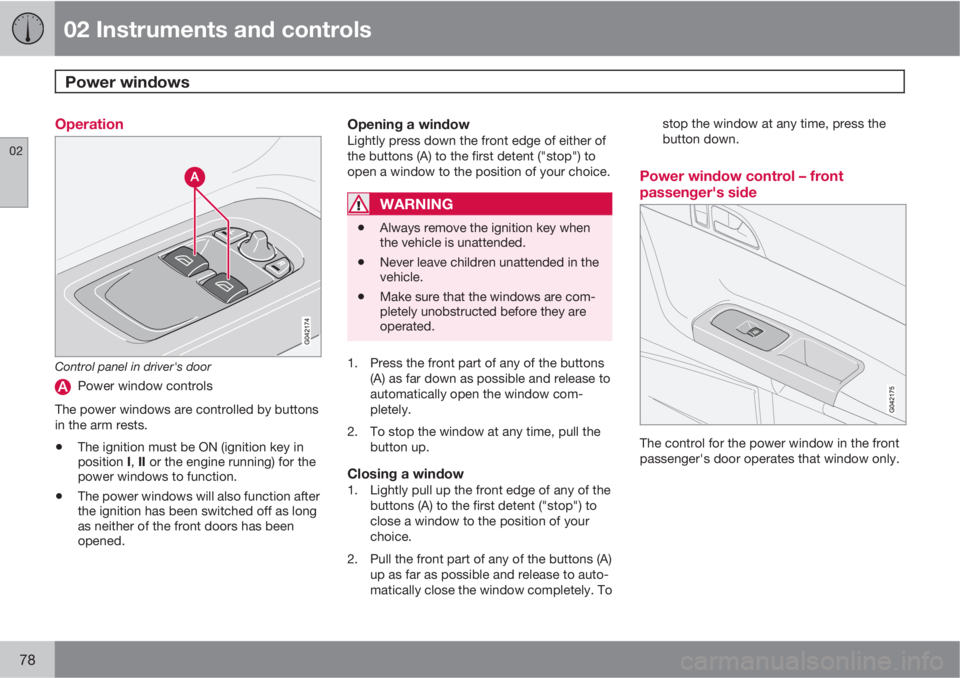
Control panel in driver's door
Power window controls
The power windows are controlled by buttons
in the arm rests.
•The ignition must be ON (ignition key in
position I, II or the engine running) for the
power windows to function.
•The power windows will also function after
the ignition has been switched off as long
as neither of the front doors has been
opened.
Opening a windowLightly press down the front edge of either of
the buttons (A) to the first detent ("stop") to
open a window to the position of your choice.
WARNING
•Always remove the ignition key when
the vehicle is unattended.
•Never leave children unattended in the
vehicle.
•Make sure that the windows are com-
pletely unobstructed before they are
operated.
1. Press the front part of any of the buttons
(A) as far down as possible and release to
automatically open the window com-
pletely.
2. To stop the window at any time, pull the
button up.
Closing a window1. Lightly pull up the front edge of any of the
buttons (A) to the first detent ("stop") to
close a window to the position of your
choice.
2. Pull the front part of any of the buttons (A)
up as far as possible and release to auto-
matically close the window completely. Tostop the window at any time, press the
button down.
Power window control – front
passenger's side
The control for the power window in the front
passenger's door operates that window only.
Page 87 of 300
02 Instruments and controls
Personal settings
02
* Option/accessory, for more information, see Introduction.85
•Global (All doors) – unlocks all doors and
the liftgate with one press on the remote
key.
•Two Step (Two-stage unlocking) – This
alternative unlocks the driver's door with
one press on the remote key. A second
press unlocks the passenger's door and
the liftgate.
Automatically folding the door mirrorsThe setting makes it possible to automatically
fold the door mirrors in or out when the vehicle
is locked or unlocked. See page 80.
Operating side windowsThe following alternative can be selected for
opening the door windows at the same time by
pressing and holding the Unlock switch in
either of the front doors (see page 135 for
additional information)
1
NOTE
The ignition key must be in position I or
higher (see page 149) before the door win-
dows can be opened using the switches in
the doors.
•Auto open all windows On/Off
Temporarily turning off the alarm
sensor(s)
The alarm sensors can be temporarily turned
off (if, for example, a person or a pet remains
in the vehicle when the doors are locked from
outside with the remote key). There are two
alternatives:
Activate once and Ask on exit,
see page 126 and 137.
Approach lightingThis alternative determines the length of time
for which the car's lights will remain on when
the Approach light button on the central lock-
ing system's remote key is pressed. Intervals
of 30/60/90 seconds may be selected, see the
section "Remote key functions" for more infor-
mation.
Home safe lightingThis alternative determines the length of time
for which the car's lights will remain on when
the high beam lever on the steering column is
pulled toward the wheel with the ignition
switched off. Intervals of 30/60/90 seconds
may be selected, see page 68 for information
on using this function.
Information
•VIN number – The VIN (Vehicle Identifica-
tion Number) is the car's unique identity
number.
•Number of Keys – the number of keys reg-
istered for the car is displayed here.
Climate functions
•Blower speed in AUTO mode – the blower
speed can be set to AUTO mode in models
equipped with ECC. Choose between
"Low", "Normal" and "High".
•Timer for recirculation – when the timer is
active, the air recirculates in the car for
3–12 minutes depending on the ambient
temperature. Select On/Off depending on
whether the recirculation timer is to be
active or not.
Keyless locking and unlocking*The following alternatives can be selected for
locking and unlocking the doors and liftgate:
•All doors – all doors are locked or unlocked
at the same time.
•Doors on the same side – front and rear
doors on the same side are unlocked
together.
1This menu alternative also makes it possible to open both door windows by pressing and holding the Unlock button on the remote key for several seconds.