lock VOLVO C70 2006 Manual PDF
[x] Cancel search | Manufacturer: VOLVO, Model Year: 2006, Model line: C70, Model: VOLVO C70 2006Pages: 182, PDF Size: 3.35 MB
Page 139 of 182

Opening the hood
To open the hood:
Pull the lever located under the left side of the dash to release the hood lock.
Lift the hood slightly.
Press up the release control located under the front edge of the hood (at the center) up to the right, and lift the hood.
WARNING!
Check that the hood locks engage properly when closed.
Engine compartment
1. Cooling system expansion tank
2. Power steering fluid reservoir
3. Dipstick - engine oil
4. Radiator
5. Cooling fan
6. Washer fluid reservoir
7. Engine oil filler cap
8. Brake/clutch fluid reservoir
9. Battery
10. Relay/fuse box
11. Air cleaner
WARNING!
The cooling fan may start or continue to operate (for up to 6 minutes) after the engine has been switched off.
ProCarManuals.com
Page 148 of 182
pg. 166 Maintenance and servicing
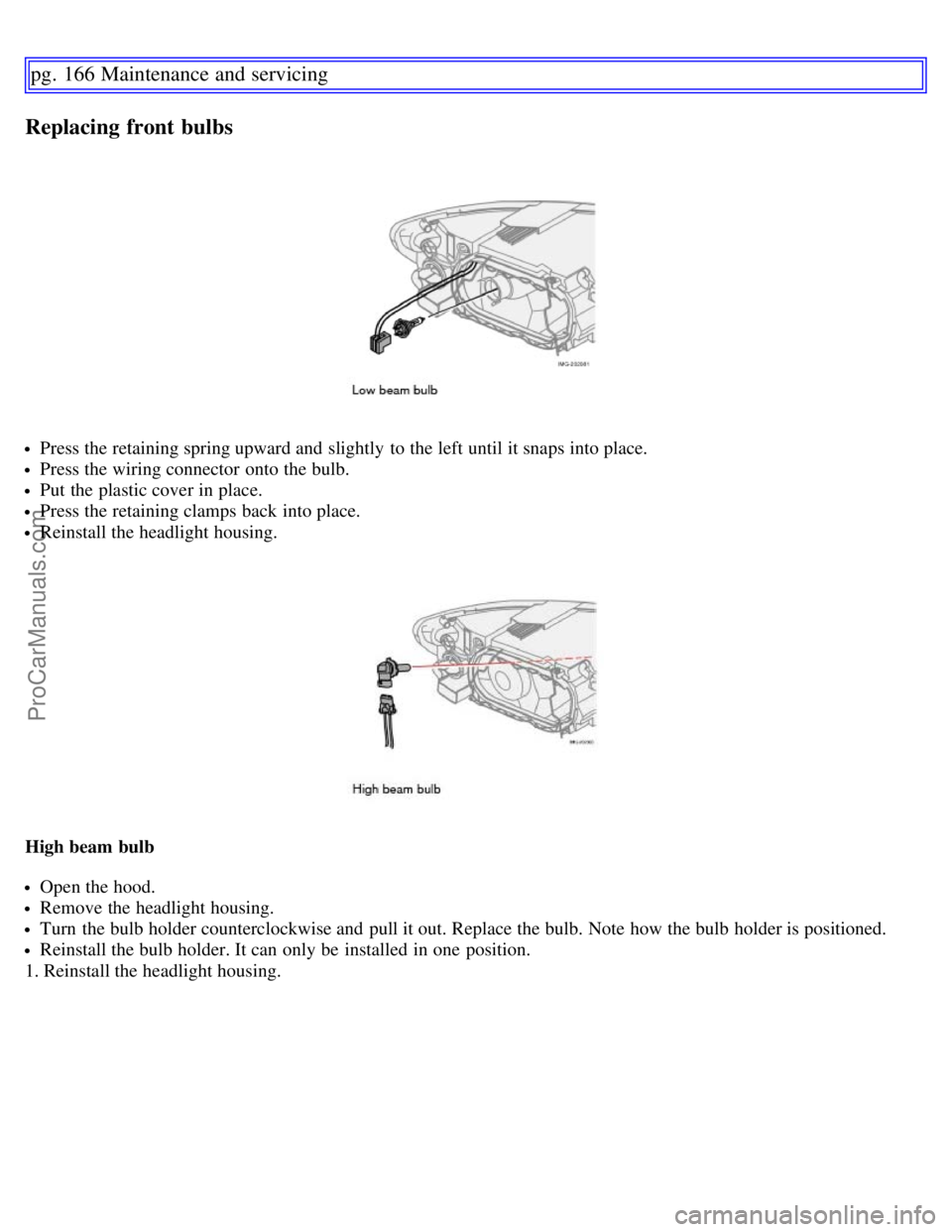
Replacing front bulbs
Press the retaining spring upward and slightly to the left until it snaps into place.
Press the wiring connector onto the bulb.
Put the plastic cover in place.
Press the retaining clamps back into place.
Reinstall the headlight housing.
High beam bulb
Open the hood.
Remove the headlight housing.
Turn the bulb holder counterclockwise and pull it out. Replace the bulb. Note how the bulb holder is positioned.
Reinstall the bulb holder. It can only be installed in one position.
1. Reinstall the headlight housing.
ProCarManuals.com
Page 149 of 182

Parking light bulb
Pull out the bulb holder with a pair of pliers. The bulb holder should not be pulled out by the wire.
Replace the bulb.
Press the bulb holder back into place. It can only be installed in one position.
pg. 167 Maintenance and servicing
Replacing front bulbs
Turn signal
Turn the bulb holder counterclockwise and remove it.
Remove the bulb from the holder by pressing it in and twisting it counterclockwise.
Insert a new bulb and reinstall the bulb holder in the headlight housing.
ProCarManuals.com
Page 150 of 182

Side marker light
Turn the bulb holder counterclockwise, pull it out, and replace the bulb.
Reinstall the bulb holder. It can only be installed in one position.
Front fog light (option)
Switch off all lights and turn the key to position 0.
Remove the panel around the fog light housing. Depress the tabs around the edges as shown in the illustration in the
right column.
Unscrew both torx screws in the fog light housing and remove it.
Disconnect the connector from the bulb.
Turn the bulb counterclockwise and pull it out.
Install the new bulb in its seat and turn it clockwise.
Reconnect the connector to the bulb.
Secure the fog light housing with the screws and press the panel back into place.
pg. 168 Maintenance and servicing
Replacing bulbs in the trunk
ProCarManuals.com
Page 152 of 182

Rear reading lights
Insert a screwdriver and turn it gently to detach the bulb housing.
Remove the defective bulb.
Install a new bulb.
Press the bulb housing back into place.
High-level brake light
These bulbs are of a special type. It is recommended that they be replaced by a trained and qualified Volvo service
technician.
pg. 169 Maintenance and servicing
Replacing interior bulbs
License plate lighting
Replacing the bulb
Switch off all lights and turn the key to position 0.
Remove the screw with a screw driver.
Detach the entire bulb housing and carefully pull it out. Turn the connector counterclockwise and pull out the bulb.
Replace the bulb.
Reinstall the connector and turn it clockwise.
Reinstall the entire bulb housing and screw it into place.
Footwell lighting
The footwell lighting is located under the dashboard on the driver's and passenger's sides. To replace a bulb:
ProCarManuals.com
Page 154 of 182

WARNING!
Never use fuses with higher amperage than those stated in the following tables. Doing so could overload the
vehicle's electrical system.
Fuse box in the engine compartment
The fuse box in the engine compartment has positions for 36 fuses.
Fuses 1-18 are relays/circuit breakers and should only be removed or replaced by a trained and qualified Volvo
service technician.
Fuses 19-36 may be changed at any time when necessary. Several extra fuses and a fuse removal tool to assist in
removing/replacing fuses can be found on the underside of the fuse box cover in the engine compartment.
pg. 171 Maintenance and servicing
Fuses
Fuses in the engine compartment
1. Coolant fan (radiator), 50A
2. Power steering, 80A
3. Feed to passenger compartment fuse box, 60A
4. Feed to passenger compartment fuse box, 60A
5. Not in use
6. Not in use
7. ABS pump, 30A
8. ABS valves, 20A
9. Engine control module (ECM), 30A
10. Climate system blower, 40A
11.Headlight washers, power retractable hard top, locking storage compartments, 20A
ProCarManuals.com
Page 155 of 182

12. Feed to heated rear window, 30A
13. Starter motor relay, 30A
14. Trailer connector, 40A
15. Power retractable hard top, 30A
16. Feed to audio system, 30A
17.Windshield wipers, 30A
18. Feed to passenger compartment fuse box, 40A
19. Not in use
20. Horn, 15A
21. Not in use
22. Subwoofer, 25A
23. Engine control module (ECM)/transmission control module (TCM), 10A
24. Not in use
25. Not in use
26. Ignition switch, 15A
27. A/C compressor 10A
28. Not in use
29. Front fog lights (option), 15A
30. Not in use
31. Not in use
32. Fuel injectors, 10A
33. Heated oxygen sensor, vacuum pump, 20A
34. Ignition coils, engine control module, climate unit pressure sensor, 10A
35. Engine sensor valves, A/C relay, 15A
36. Engine control module (ECM), throttle sensor, 10A
pg. 172 Maintenance and servicing
Fuses
Fuse box in the passenger compartment
The fuse box in the passenger compartment is located under the glove compartment.
To access the fuses:
1. Remove the upholstery covering the fuse box by first pressing in the center pins in the mounting clips approximately
0.5 in (1 cm) with a small screwdriver and then pulling the pins out.
2. Turn both retaining screws (2) counterclockwise until they release.
3. Fold down the fuse box (3) half way. Pull it toward the seat until it stops. Fold it down completely. The fuse box can
be unhooked completely.
4. Replace the blown fuse.
5. Close the fuse box in reverse order.
6. Pull the center pins fully out of the mounting clips, secure the upholstery with the mounting clips and press the pins
ProCarManuals.com
Page 156 of 182

into the mounting clips again. The mounting clips then expand, holding the upholstery in position.
pg. 173 Maintenance and servicing
Fuses
Fuses in the passenger compartment
37. Not in use
38. Not in use
39. Not in use
40. Not in use
41. Not in use
42. Not in use
43. Audio system, Volvo Navigation system (option),15A
44. Supplemental Restrain System (SRS), 10A
45. 12-volt socket in passenger compartment, 15A
46. Lighting - glove compartment, instrument panel, and footwells, 5A
47. Interior lighting, 5A
48. Windshield washers, 15A
49. Supplemental Restrain System (SRS), Occupant Weight Sensor (OWS), 10A
50. Not in use
51. Park assist (option), 10A
52. Transmission control module (TCM), 5A
53. ABS, power steering, Bi -Xenon headlights (option), 10A
54. Engine control module, turbo (ECM), 10A
55. Not in use
56. Alarm siren control module, 10A
57. On-board diagnostic socket, brake light switch,15A
58. Right high beam, auxiliary lights relay, 7.5A
59. Left high beam, 7.5A
60. Heated driver's seat (option), 15A
61. Heated passenger's seat (option), 15A
62. Not in use
63. Power window - rear passenger's side, 20A
64. Lock indicator lights i door panels, Volvo Navigation system (option), 5A
65. Audio system, 5A
66. Audio system control module (ICM), climate system, 10A
67. Not in use
68. Cruise control, 5A
69. Climate system, rain sensor (option), 5A
70. Not in use
71. Not in use
ProCarManuals.com
Page 157 of 182

72. Not in use
73. Front ceiling lighting, 5A
pg. 174 Maintenance and servicing
Fuses
74. Fuel pump relay, 15A
75. Not in use
76. Not in use
77. 12-volt socket in trunk, accessory control module (AEM), 15A
78. Not in use
79. Back-up lights, 5A
80. Not in use
81. Power window - rear driver's side, 20A
82. Power window and door lock - front passenger's side door, 25A
83. Power window and door lock - front driver's side door, 25A
84. Power passenger's seat (option), 25A
85. Power driver's seat, 25A
86. Interior lighting relay, trunk light, power seats, 5A
Contents | Top of Page
ProCarManuals.com
Page 165 of 182
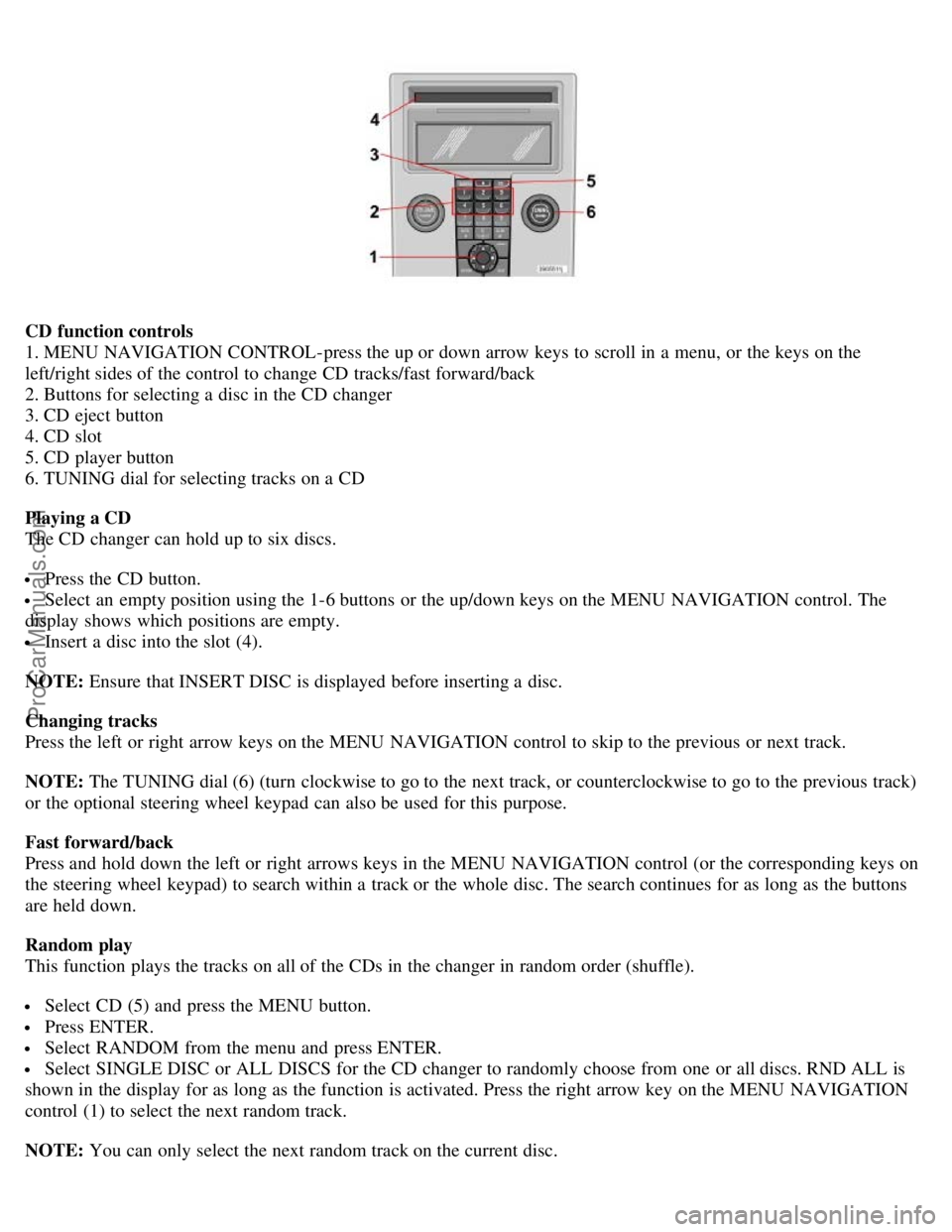
CD function controls
1. MENU NAVIGATION CONTROL-press the up or down arrow keys to scroll in a menu, or the keys on the
left/right sides of the control to change CD tracks/fast forward/back
2. Buttons for selecting a disc in the CD changer
3. CD eject button
4. CD slot
5. CD player button
6. TUNING dial for selecting tracks on a CD
Playing a CD
The CD changer can hold up to six discs.
Press the CD button.
Select an empty position using the 1-6 buttons or the up/down keys on the MENU NAVIGATION control. The
display shows which positions are empty.
Insert a disc into the slot (4).
NOTE: Ensure that INSERT DISC is displayed before inserting a disc.
Changing tracks
Press the left or right arrow keys on the MENU NAVIGATION control to skip to the previous or next track.
NOTE: The TUNING dial (6) (turn clockwise to go to the next track, or counterclockwise to go to the previous track)
or the optional steering wheel keypad can also be used for this purpose.
Fast forward/back
Press and hold down the left or right arrows keys in the MENU NAVIGATION control (or the corresponding keys on
the steering wheel keypad) to search within a track or the whole disc. The search continues for as long as the buttons
are held down.
Random play
This function plays the tracks on all of the CDs in the changer in random order (shuffle).
Select CD (5) and press the MENU button.
Press ENTER.
Select RANDOM from the menu and press ENTER.
Select SINGLE DISC or ALL DISCS for the CD changer to randomly choose from one or all discs. RND ALL is
shown in the display for as long as the function is activated. Press the right arrow key on the MENU NAVIGATION
control (1) to select the next random track.
NOTE: You can only select the next random track on the current disc.
ProCarManuals.com