key VOLVO C70 2008 User Guide
[x] Cancel search | Manufacturer: VOLVO, Model Year: 2008, Model line: C70, Model: VOLVO C70 2008Pages: 246, PDF Size: 5.14 MB
Page 56 of 246

B - Rain sensor (option)
The rain sensor automatically regulates windshield wiper speed according to the amount of water on the windshield.
The sensitivity of the rain sensor is adjusted by moving the thumb wheel (C in the illustration on the previous page) up
(the wipers will sweep the windshield more frequently) or down (the wipers will sweep the windshield less frequently).
On/Off
To activate the rain sensor:
1. Switch on the ignition.
2. Put the windshield wiper lever in position 0.
3. Press button B (see the illustration on the previous page). The rain sensor symbol will appear in the lower display.
The rain sensor can be deactivated by:
Pressing button (B) with the ignition on.
or
Moving the windshield wiper lever down. If the lever is moved up, the rain sensor function will remain activated
CAUTION
The rain sensor should be deactivated when washing the car in an automatic car wash, etc. If the rain sensor function
is left on, the wipers will start inadvertently in the car wash and could be damaged
The rain sensor is automatically deactivated:
When the key is removed from the ignition.
Five minutes after the ignition is switched off if the key is left in the ignition.
C - Thumb wheel
The thumb wheel is used to set the wiper interval when intermittent wiping is selected, or the sensitivity to the amount
of rain on the windshield when the rain sensor is selected. Move the wheel upward or downward to increase/decrease
wiper speed when the intermittent function is selected, or to increase/decrease the optional rain sensor's sensitivity
when the this function is activated
62 02 Instruments and controls
ProCarManuals.com
Page 61 of 246
10A. The key must be in position I (or higher) for the auxiliary socket to function.
Ashtrays/cigarette lighter
The auxiliary socket can also be used for a cigarette lighter
1, and ashtrays 1 are also available. Please contact your
Volvo retailer.
1 Accessory.
NOTE
The cover should be kept on when the auxiliary socket is not in use.
Auxiliary equipment
The buttons to the left of the 12-volt socket can be used for Volvo-installed optional or auxiliary equipment.
67 02 Instruments and controls
Power windows
Operation
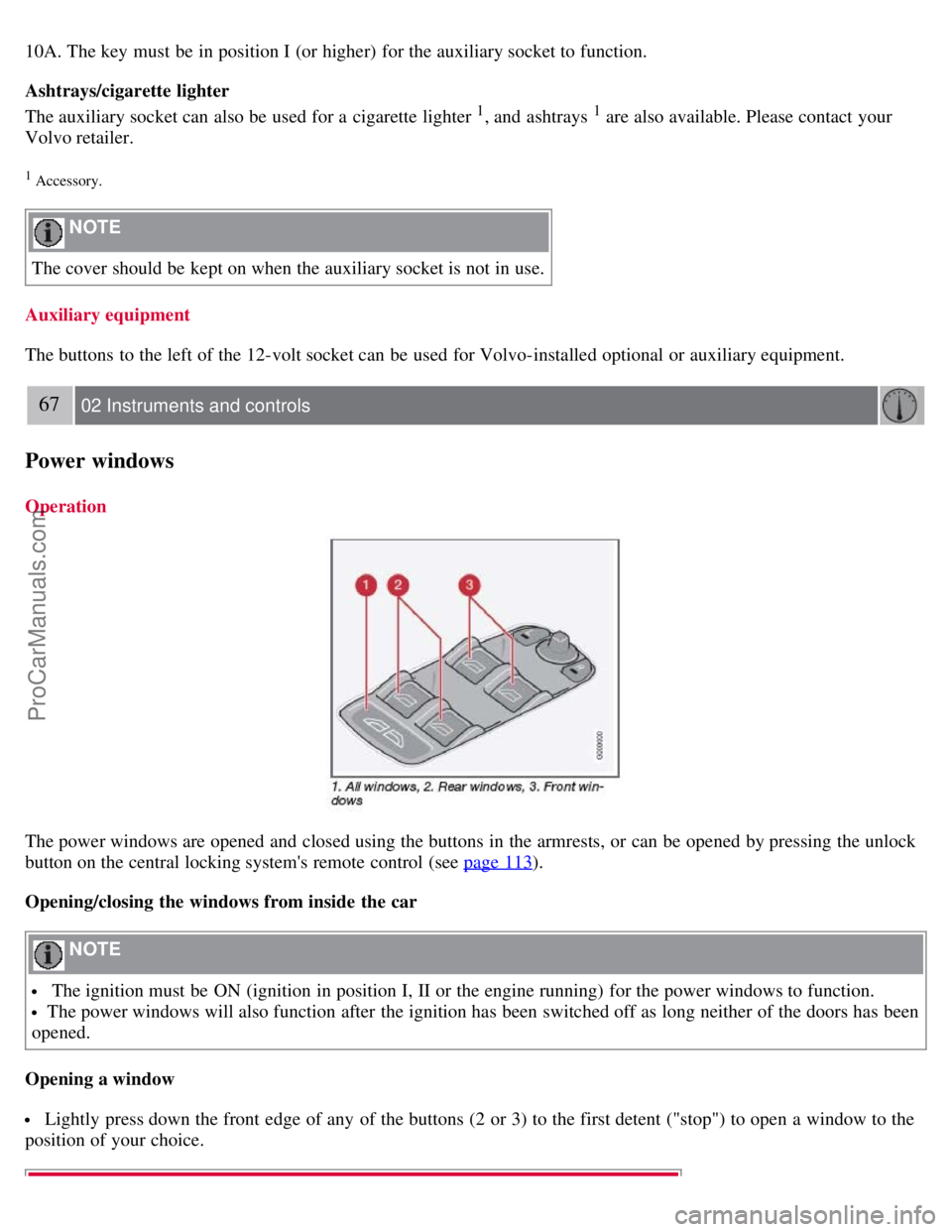
The power windows are opened and closed using the buttons in the armrests, or can be opened by pressing the unlock
button on the central locking system's remote control (see page 113
).
Opening/closing the windows from inside the car
NOTE
The ignition must be ON (ignition in position I, II or the engine running) for the power windows to function.
The power windows will also function after the ignition has been switched off as long neither of the doors has been
opened.
Opening a window
Lightly press down the front edge of any of the buttons (2 or 3) to the first detent ("stop") to open a window to the
position of your choice.
ProCarManuals.com
Page 62 of 246

WARNING
Always remove the ignition key when the vehicle is unattended.
Never leave children unattended in the vehicle.
Make sure that the windows are completely unobstructed before they are operated.
Press down the front part of one or both buttons 3 as far as possible and release to automatically open the front
window(s) completely.
To stop the window at any time, pull the button up.
NOTE
To reduce buffeting wind noise if the rear windows are opened, also open the front windows slightly.
Closing a window
Lightly pull up the front edge of any of the buttons (2 or 3) to the first detent ("stop") to close a window to the
position of your choice.
Pull up the front part of one or both buttons 3 as far as possible and release to automatically close the front
window(s) completely.
All windows
Button 1 can be used to open or close all of the windows at the same time.
Briefly press the right side of the button to automatically open all of the windows.
Press and hold down the left side of the button to close all of the windows.
68 02 Instruments and controls
Mirrors
Rearview mirror
Auto-dim function
An optional integrated sensor reacts to headlights from following traffic and automatically reduces glare.
Rearview mirror with compass (option)
ProCarManuals.com
Page 66 of 246
3. Press ENTER (D).
4. Select an alternative using the menu navigation control (E).
5. Confirm your selection by pressing ENTER.
To exit the menu:
Press EXIT (C).
Available settings
Clock adjust
To set the time:
1. Use the number keys or the up/down arrow keys on the navigation control (E) to change the hour or minute.
2. Select hour(s) or minute(s) to be changed with the left/right arrow keys.
3. Press ENTER to start the clock.
NOTE
If you are currently using the 12-hour time setting, use the up/down arrow keys to select AM/PM after the minute-
setting has been adjusted.
Lock confirmation light
When the car is locked/unlocked with the remote control, the direction indicators can be selected to flash to confirm
the action. The alternatives On/Off are available for both locking and unlocking.
72 02 Instruments and controls
Personal settings
Autolock
When the car starts to move, the doors and trunk can be locked automatically. The alternatives On/Off are available.
NOTE
Pulling the handle twice on a door unlocks and opens that door.
Unlock
There are two alternatives for unlocking:
Global (All doors)
Unlocks all doors and the trunk with one press on the remote control.
Two Step (Two-stage unlocking)
This alternative unlocks the driver's door with one press on the remote control. A second press unlocks the passenger's
door and the trunk.
ProCarManuals.com
Page 67 of 246
Operating side windows
The following alternative can be selected for opening all windows at the same time by pressing and holding the Unlock
button on the central locking system's remote control. See page 113
for more information.
Auto open all windows On/Off
Approach lighting
This alternative determines the length of time for which the car's lights will remain on when the Approach light button
on the central locking system's remote control is pressed. Intervals of 30/60/90 seconds may be selected. See page 113
for more information.
Home safe lighting
This alternative determines the length of time for which the car's lights will remain on when the high beam lever on the
steering column is pulled toward the wheel with the ignition switched off. Intervals of 30/60/90 seconds may be
selected. See page 57
for information on using this function.
Information
VIN number:
The VIN (Vehicle Identification Number) is the car's unique identity number.
Number of Keys:
The number of keys registered for the car is displayed here.
Climate functions
Blower speed in AUTO mode:
The blower speed can be set to AUTO mode in models equipped with ECC. Choose between "Low", "Normal" and
"High".
Timer for recirculation:
When the timer is active, the air recirculates in the car for 3-12 minutes depending on the ambient temperature. Select
On/Off depending on whether the recirculation timer is to be active or not.
Reset to factory settings
Use this alternative to return to the default climate system settings.
73 02 Instruments and controls
HomeLink® Universal Transceiver (option)
Introduction
ProCarManuals.com
Page 82 of 246
2. Pull up control 1, hold it up, and fold up the backrest to the upright position.
3. Return the seat belt to its guide.
Power seats
Easy entry is only intended to be used when the front seat in unoccupied.
Moving the seat forward:
1. Remove the seat belt from its guide (see page 15
).
2. Pull up control 1, hold it up, and fold the backrest forward until it locks in position.
3. Press and hold button 2 while the seat moves forward.
Moving the seat rearward:
1. With the backrest folded forward in the locked position , press and hold down button 2 until the seat has returned
to its original position.
2. Pull up control 1, hold it up, and fold up the backrest to the upright position.
3. Return the seat belt to its guide.
WARNING
After the seat has been returned to its original position, be sure that the backrest is securely locked in the upright
position.
92 04 Interior
Front seats
Power seats (option)
The power driver's seat can be adjusted:
If the ignition key is in position I or II.
During a 10 minute period after the doors have been unlocked if the door remains open.
If the door is closed and the ignition key is not yet in the ignition, or if the key is in position 0, the seat can be
ProCarManuals.com
Page 83 of 246

adjusted or during a period of 40 seconds. The power passenger's seat can only be adjusted if the ignition key is in
position I or II, or if the engine is running.
Adjusting the seat
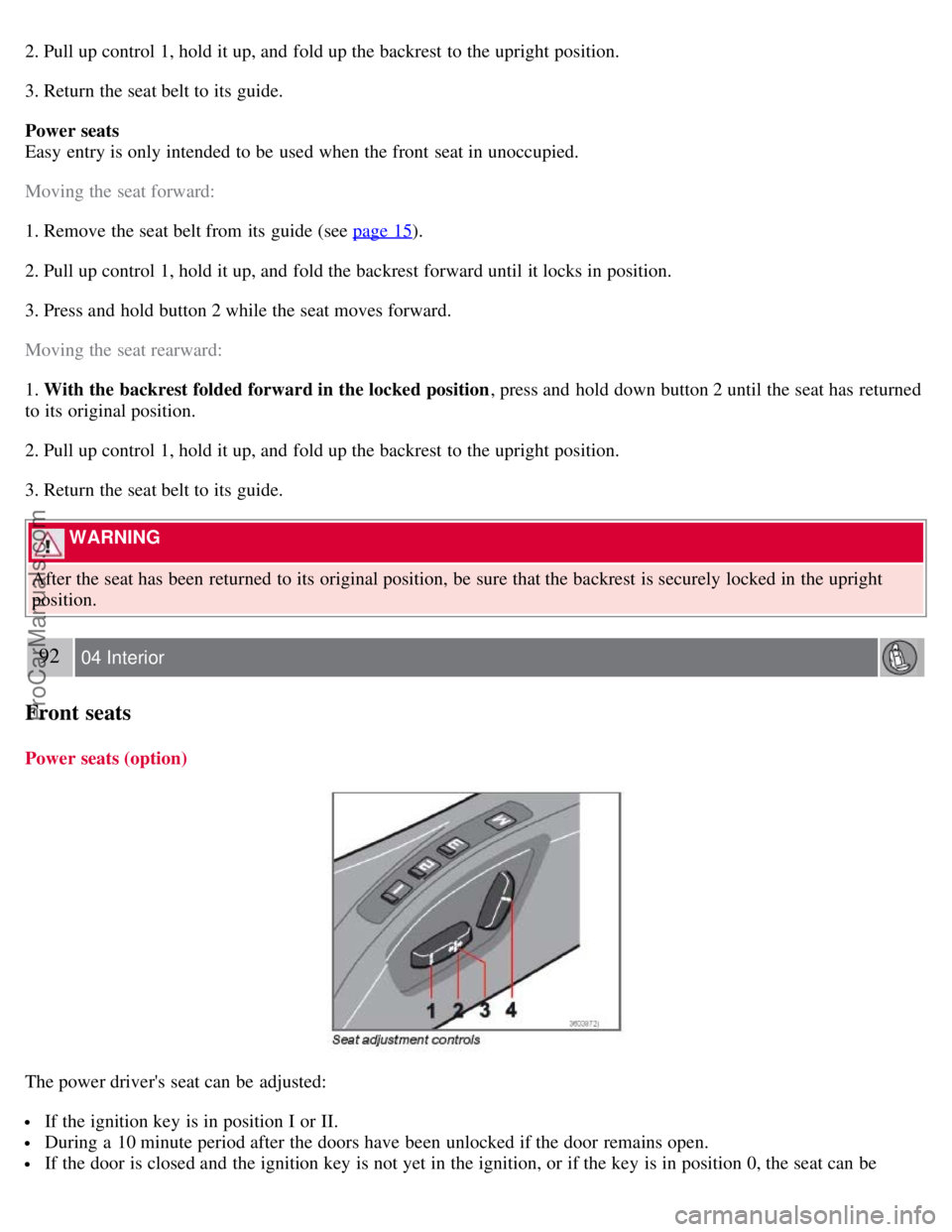
Seat adjustment controls 1, 2, 3, and 4 on the side of the seat can be used to move the seat to the position of your
choice.
1. Move this section of the control up or down to raise/lower the front section of the seat cushion.
2. Move the control forward/rearward to move the seat forward or rearward.
3. Move this section of the control up or down to raise/lower the rear section of the seat cushion.
4. Backrest tilt.
NOTE
The power seats have an overload protector that activates if a seat is blocked by any object. If this occurs, switch off
the ignition (key in position 0) and wait for approximately 20 seconds before operating the seat again.
Emergency stop
If the seat inadvertently begins to move, press any of the buttons to stop the seat.
Programming the seat memory, driver's seat only (option)
Three different seating positions (and the position of the door mirrors) can be stored in the seat's memory. The
memory buttons are located on the outboard side of the driver's seat (see the illustration).
The following example explains how memory button 1 can be programmed. Buttons 2 and 3 can be programmed in the
same way.
To program (store) a seat position in memory button 1:
1. Adjust the seat (and door mirrors) to the desired position (see the instructions under "Adjusting the seat").
93 04 Interior
Front seats
2. Press and hold down the "M" (Memory) button.
ProCarManuals.com
Page 85 of 246

There should be no objects on the power retractable hard top's cover.
Remove all snow, ice or loose objects from the power retractable hard top and trunk lid.
The top should be dry before it is lowered.
CAUTION
If the power retractable hard top is lowered while it is wet, water may drip into the passenger compartment or trunk
There should be at least 6.5 feet (2 meters) of free space from the ground (distance A in the illustration).
There should be at least 8 inches (20 cm) of free space behind the vehicle (distance B in the illustration in the center
column).
The ambient temperature should be above 14°F (-10°C).
The trunk divider (see page 95) must be closed.
The trunk must be closed.
The vehicle must be at a standstill and the brake pedal must be pressed.
Volvo also recommends the following:
The vehicle should be parked outdoors, on level ground.
Raising or lowering the power retractable hard top should preferably be done in one, continuous operation.
If the vehicle is parked outdoors, the engine should be idling to help avoid battery drain.
CAUTION
If the instructions on these pages are not followed, damage to the power retractable hard top's mechanism may occur.
WARNING
The power retractable hard top must not be obstructed in any way when it is being operated. Always have an
unobstructed view of the power retractable hard top when it is in motion. See also the decal on the trunk divider.
Anyone near the vehicle should be well clear of the power retractable hard top's moving parts before it is operated.
Children must never be allowed to play with the power retractable hard top control buttons.
Do not leave the power retractable hard top motionless longer than necessary while it is being operated
Do not leave the key in the ignition if there are children in the vehicle.
95 04 Interior
Power retractable hard top
Trunk divider
ProCarManuals.com
Page 87 of 246

When lowered, the power retractable hard top is concealed by a cover, see the illustration above.
CAUTION
Do not sit or place heavy objects on the power retractable hard top cover.
96 04 Interior
Power retractable hard top
Raising or lowering the power retractable hard top
1. Turn the ignition key to position II, or start the engine if the vehicle is parked outdoors.
2. Press the brake pedal.
3. Press and hold down the left button (1) to raise the power retractable hard top or the right button (2) to lower it.
Hold down the respective button until the top is completely raised or lowered. Release the button when an audible
signal sounds. The message ROOF OPEN or ROOF CLOSED will be displayed.
CAUTION
Please heed any messages that may appear in the information display while the top is in operation.
Any windows that are closed will be opened approximately 4 inches (10 cm) while the power retractable hard top
is in operation. The windows will be automatically re-closed when the top is completely raised or lowered.
WARNING
See the section "Before raising or lowering the power retractable hard top" on page 94 before operating the power
retractable hard top.
Never pull the release wire for the power retractable hard top's hydraulic system that is located under the rear seat
cushion. This wire is only intended for use by qualified service personnel. Pulling this wire could lead to:
High risk of being injured by the power retractable hard top mechanism.
Unexpected movement of the hard top, or the hard top or the trunk could inadvertently open.
The retractable hard top can be damaged.
Power retractable hard top-related text messages
ProCarManuals.com
Page 92 of 246
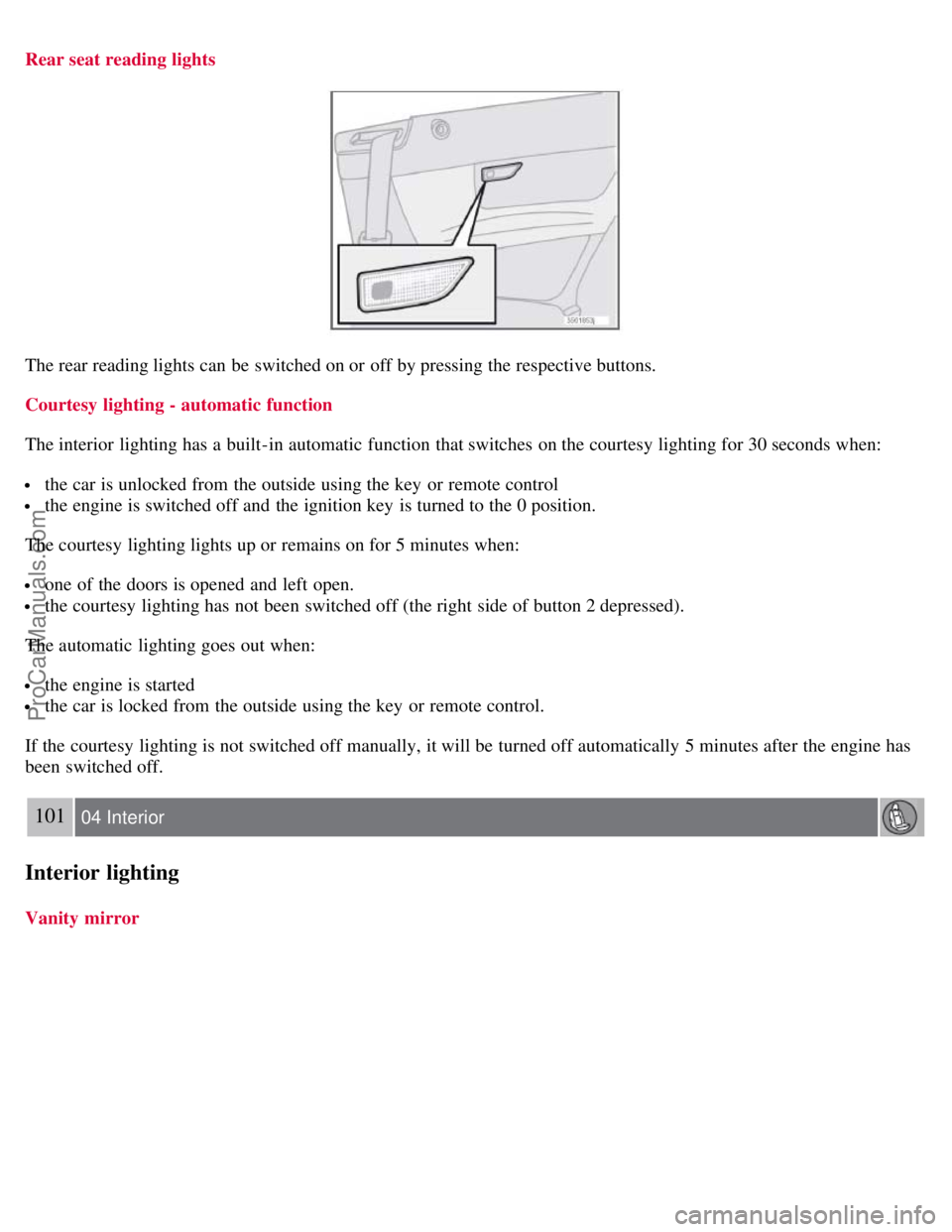
Rear seat reading lights
The rear reading lights can be switched on or off by pressing the respective buttons.
Courtesy lighting - automatic function
The interior lighting has a built-in automatic function that switches on the courtesy lighting for 30 seconds when:
the car is unlocked from the outside using the key or remote control
the engine is switched off and the ignition key is turned to the 0 position.
The courtesy lighting lights up or remains on for 5 minutes when:
one of the doors is opened and left open.
the courtesy lighting has not been switched off (the right side of button 2 depressed).
The automatic lighting goes out when:
the engine is started
the car is locked from the outside using the key or remote control.
If the courtesy lighting is not switched off manually, it will be turned off automatically 5 minutes after the engine has
been switched off.
101 04 Interior
Interior lighting
Vanity mirror
ProCarManuals.com