ECU VOLVO C70 2008 Owner's Manual
[x] Cancel search | Manufacturer: VOLVO, Model Year: 2008, Model line: C70, Model: VOLVO C70 2008Pages: 246, PDF Size: 5.14 MB
Page 165 of 246

183 07 Wheels and tires
Temporary spare
Temporary spare (option)
The spare tire in your car is called a "Temporary Spare".
Recommended tire pressure (see the placard on the B-pillar) should be maintained irrespective of which position on
the car the temporary spare tire is used on.
In the event of damage to this tire, a new one can be purchased from your Volvo retailer.
Location of the optional spare wheel and tools
The spare wheel is packed in a storage bag and is located under the panel in the floor of the trunk.
On cars with a spare wheel, the jack and lug wrench are secured in a foam plastic block placed in the center of the
wheel.
CAUTION
The car must not be driven with wheels of different dimensions or with a spare tire other than the one that came with
the car. The use of different size wheels can seriously damage your car's transmission.
The retaining straps securing the spare wheel is attached to two eyelets in the floor of the spare wheel's storage
compartment.
WARNING
Current legislation prohibits the use of the "Temporary Spare" tire other than as a temporary replacement for a
punctured tire. It must be replaced as soon as possible by a standard tire. Road holding and handling may be affected
with the "Temporary Spare" in use.
184 07 Wheels and tires
Changing a wheel
Changing a wheel
ProCarManuals.com
Page 171 of 246
Temporarily repairing a flat tire is done in two stages:
Stage 1: The hole is sealed by pumping sealing compound into the tire. The car is then driven a short distance to
distribute the sealing compound in the tire.
NOTE
Do not remove any foreign objects (nails, etc.) from the tire before using the sealing system.
NOTE
Stage 2: The tire's inflation pressure is checked and adjusted if necessary.
WARNING
Never leave the tire sealing system unattended when it is operating.
Keep the tire sealing system away from children.
Be sure the vehicle is parked safely off the road and away from moving traffic.
Apply the parking brake.
Stage 1: Sealing the hole
1. Open the cover on the tire sealing kit.
2. Peel off the speed limit sticker and affix it to the steering wheel hub where it will be clearly visible to the driver.
3. Ensure that the on/off switch is in position 0 (the 0 side of the switch should be pressed down).
4. Put on the gloves included in the tire sealing system.
5. Unscrew the orange cover over the bottle holder and unscrew the cap on the bottle of sealing compound.
NOTE
Do not break the seal on the bottle. This occurs automatically when the bottle is screwed into the holder.
6. Screw the bottle into the bottle holder.
WARNING
The bottle is equipped with a catch to keep it securely in place and help prevent sealing compound leakage. Once in
place, the bottle cannot be unscrewed. This must be done by a Volvo retailer.
7. Remove the valve cap from the tire's inflation valve and screw the tire sealing system's hose connector onto the
valve as tightly as possible by hand.
8. Connect the electrical wire to the nearest 12-volt socket in the vehicle.
190 07 Wheels and tires
Tire sealing system
ProCarManuals.com
Page 177 of 246

NOTE
When washing the car, remember to remove dirt from the drain holes in the doors and sills.
Exterior components
Volvo recommends the use of special cleaning products, available at your Volvo retailer, for cleaning colored plastic,
rubber, or ornamental components such as chromed strips on the exterior of your vehicle. The instructions for using
these products should be followed carefully. Solvents or stain removers should not be used.
CAUTION
Avoid waxing or polishing plastic or rubber components
Polishing chromed strips can wear away or damage the surface
Polishes containing abrasive substances should not be used
CAUTION
During high pressure washing, the spray mouthpiece must never be closer to the vehicle than 13" (30 cm). Do not
spray into the locks.
Dirt, snow, etc., on the headlights can reduce lighting capacity considerably. Clean the headlights regularly, for
example when refueling.
When washing or steam cleaning the engine, avoid spraying water or steam directly on the electrical components
or toward the rear side of the engine.
Chromed wheels : Clean chrome-plated wheels using the same detergents used for the body of the vehicle.
Aggressive wheel-cleaning agents can permanently stain chrome-plated wheels.
197 08 Car care
Washing and cleaning the vehicle
Automatic washing - simple and quick
We do NOT recommend washing your car in an automatic wash during the first six months (because the paint will not
have hardened sufficiently).
An automatic wash is a simple and quick way to clean your car, but it is worth remembering that it may not be as
thorough as when you yourself go over the car with sponge and water.
Keeping the underbody clean is most important, especially in the winter. Some automatic washers do not have
facilities for washing the underbody.
CAUTION
Before driving into an automatic car wash, turn off the optional rain sensor to avoid damaging the windshield
wipers.
Make sure that side view mirrors, auxiliary lamps, etc, are secure, and that any antenna(s) are retracted or removed.
Otherwise there is risk of the machine dislodging them.
WARNING
When the car is driven immediately after being washed, apply the brakes several times in order to remove any
ProCarManuals.com
Page 191 of 246
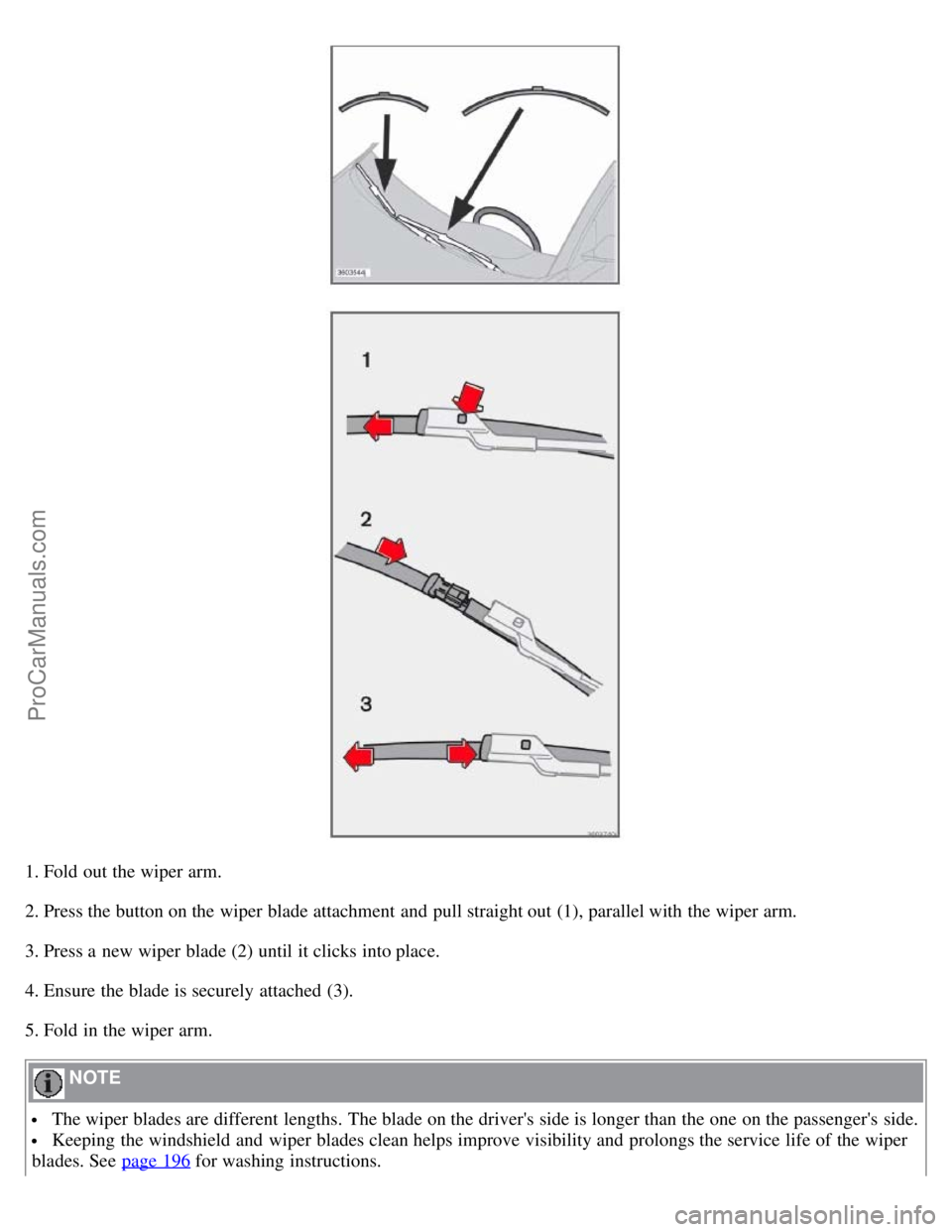
1. Fold out the wiper arm.
2. Press the button on the wiper blade attachment and pull straight out (1), parallel with the wiper arm.
3. Press a new wiper blade (2) until it clicks into place.
4. Ensure the blade is securely attached (3).
5. Fold in the wiper arm.
NOTE
The wiper blades are different lengths. The blade on the driver's side is longer than the one on the passenger's side.
Keeping the windshield and wiper blades clean helps improve visibility and prolongs the service life of the wiper
blades. See page 196
for washing instructions.
ProCarManuals.com
Page 192 of 246

214 09 Maintenance and servicing
Battery
Battery maintenance
Driving habits and conditions, climate, the number of starts, etc., all affect the service life and function of the battery.
In order for your battery to perform satisfactorily, keep the following in mind:
Check the fluid level in each cell in the battery every 24 months or every 15,0001 miles (24,000 km), whichever is
sooner. The fluid should be at the level shown in the illustrations above (A). Do not overfill.
1More frequently in warm climates.
Use a screw driver to open the caps or cover and a flashlight to inspect the level.
If necessary, add distilled water. The level should never be above the indicator (A).
The fluid level should be checked if the battery has been recharged.
After inspection, be sure the cap over each battery cell or the cover is securely in place.
Check that the battery cables are correctly connected and properly tightened.
Never disconnect the battery when the engine is running, or when the key is in the ignition. This could damage the
vehicle's electrical system.
The battery should be disconnected from the vehicle when a battery charger is used directly on the battery.
WARNING
ProCarManuals.com
Page 199 of 246

2. Remove the panel around the fog light housing.
3. Unscrew both torx screws in the fog light housing and remove it.
4. Disconnect the connector from the bulb.
5. Turn the bulb counterclockwise and pull it out.
6. Install the new bulb in its seat and turn it clockwise.
7. Reconnect the connector to the bulb.
220 09 Maintenance and servicing
Replacing bulbs
8. Secure the fog light housing with the screws and press the panel back into place.
Removing the taillight bulb holder
All bulbs in the taillight cluster can be replaced from the cargo area. To access the bulb holders:
1. Switch off all lights and turn the key to position 0.
2. Remove the covers in the left/right panels to access the bulb holders.
3. Disconnect the wiring connector from the affected bulb holder.
4. Press the catches together and pull out the bulb holder.
5. Replace the defective bulb.
6. Press the wiring connector back into position.
7. Press the bulb holder into place and reinstall the cover.
221 09 Maintenance and servicing
Replacing bulbs
ProCarManuals.com
Page 205 of 246

5. Close the fuse box in reverse order.
6. Pull the center pins fully out of the mounting clips, secure the upholstery with the mounting clips and press the pins
into the mounting clips again. The mounting clips then expand, holding the upholstery in position.
227 09 Maintenance and servicing
Fuses
Fuses in the engine compartment
1. Coolant fan (radiator)50A
2. Power steering 80A
3. Feed to passenger compartment fuse box 60A
4. Feed to passenger compartment fuse box 60A
5. Not in use
6. Not in use
7. ABS pump 30A
8. ABS 30A
9. Engine functions 30A
10. Climate system blower 40A
11. Headlight washers, power retractable hard top, locking storage compartments 20A
12. Feed to heated rear window 30A
13. Starter motor relay 30A
14. Trailer connector 40A
15. Power retractable hard top 30A
16. Feed to audio system 40A
17. Windshield wipers 30A
18. Feed to passenger compartment fuse box 40A
19. Not in use
20. Horn 15A
21. Not in use
22. Subwoofer 24A
ProCarManuals.com
Page 218 of 246

2. Press the MODE button repeatedly until Sirius 1 or 2 is displayed.
Activating Sirius radio
1. Tune to a satellite channel that has no audio, which means that the channel is unsubscribed and the text " CALL 888-
539-SIRIUS TO SUBSCRIBE " is displayed (see also "Selecting a channel" below).
2. Call Sirius at 1-888-539-SIRIUS (7474).
3. When asked for the Sirius ID number press AUTO to display this number. It is also possible to retrieve the Sirius ID
from the MENU.
4. " UPDATING SUBSCRIPTION " will be displayed while the subscription is being updated, after which the display
will return to the normal view.
SIRIUS ID
The SIRIUS ID is required when contacting the Sirius Call Center. It is used to activate your account and when making
any account transactions. The SIRIUS ID is sometimes referred to as the Electronic Serial Number (ESN).
Selecting a channel category
1. Select Sirius radio mode as described above.
2. Press ENTER .
3. Use the up/down arrow keys to scroll through the list of categories.
4. Press ENTER or the right arrow key to select a category.
5. Use the left or right arrow keys to select a channel in the currently chosen category.
6. Press ENTER to listen to a channel.
NOTE
The category "All" is default, which enables you to scroll through the entire list of available satellite channels.
The channel categories are automatically updated several times a year. This takes approximately two minutes and
will interrupt normal broadcasting. A message will be displayed while updating is in progress. Information on
channel or feature updates is available at www.sirius.com
.
Selecting a channel
There are three ways of tuning in a channel:
Using the left and right arrow keys
By turning the tuning control
Through direct channel entry
Direct channel entry
The Sirius satellite channels are numbered consecutively throughout all of the categories. To access a channel directly:
1. Press MENU and scroll to "Direct channel entry."
2. Use the numerical keypad to enter the channel's number.
242 10 Audio
ProCarManuals.com