park assist VOLVO C70 2008 Owners Manual
[x] Cancel search | Manufacturer: VOLVO, Model Year: 2008, Model line: C70, Model: VOLVO C70 2008Pages: 246, PDF Size: 5.14 MB
Page 3 of 246
3 Contents
03 Climate
General information80
Air vents81
Electronic Climate Control (ECC)82
Air distribution86
04 Interior
Front seats90
Power retractable hard top94
Interior lighting100
Storage compartments102
Trunk107
05 Locks and alarm
Remote control and key blade 112
Valet locking117
Keyless drive (option as
available)119
Locking and unlocking
123
Glove compartment and trunk124
Opening the trunk from the inside125
Alarm126
4 Contents
06 Starting and driving
General information132
Fuel requirements136
Ignition switch/Steering wheel
lock139
Starting the vehicle
140
Starting the car with keyless drive
(option)142
Manual transmission
143
Automatic transmission144
Shiftlock override146
Brake system147
Stability system149
Towing151
Jump starting154
Towing a trailer155
Detachable trailer hitch157
Transporting loads158
Blind Spot Information System
(BLIS)-option159
Park assist (Option/accessory)
163
07 Wheels and tires
General information168
Tire inflation170
Tire designations174
Glossary of tire terminology176
Vehicle loading177
Uniform tire quality gradings179
Snow chains, snow tires, studded
tires180
Wheel nuts
181
Tire rotation182
Temporary spare183
Changing a wheel184
Tire sealing system185
Tire Pressure Monitoring System
(TPMS)192
08 Car care
Washing and cleaning the vehicle
196
Paint touch up200
5 Contents
ProCarManuals.com
Page 7 of 246
driving experience. Improperly used, any of these could cause a distraction.
For all of these systems, we want to provide the following warning that reflects the strong Volvo concern for your
safety:
Never use these devices or any feature of your vehicle in a way that distracts you from the task of driving safely.
Distraction can lead to a serious accident. In addition to this general warning, we offer the following guidance
regarding specific newer features that may be found in your vehicle:
Never use a hand -held cellular telephone while driving. Some jurisdictions prohibit cellular telephone use by a
driver while the vehicle is moving.
If your car is equipped with a navigation system, set and make changes to your travel itinerary only with the vehicle
parked.
Never program your audio system while the vehicle is moving. Program radio presets with the vehicle parked, and
use your programmed presets to make radio use quicker and simpler.
Never use portable computers or personal digital assistants while the vehicle is moving.
A driver has a responsibility to do everything possible to ensure his or her own safety and the safety of passengers in
the vehicle and others sharing the roadway. Avoiding distractions is part of that responsibility.
9 Introduction
This page left intentionally blank.
Contents | Top of Page
ProCarManuals.com
Page 119 of 246

2 0 0 8
VOLVO C70
130 06 Starting and driving
General information 132
Fuel requirements136
Ignition switch/Steering wheel lock139
Starting the vehicle140
Starting the car with keyless drive (option)142
Manual transmission143
Automatic transmission144
Shiftlock override146
Brake system147
Stability system149
Towing151
Jump starting154
Towing a trailer155
Detachable trailer hitch157
Transporting loads158
Blind Spot Information System (BLIS)-option159
Park assist (Option/accessory)163
131 06 Starting and driving
132 06 Starting and driving
General information
Economical driving conserves natural resources
Better driving economy may be obtained by thinking ahead, avoiding rapid starts and stops and adjusting the speed of
your vehicle to immediate traffic conditions.
ProCarManuals.com
Page 136 of 246
EBD is an integrated part of the ABS system. EBD regulates the hydraulic pressure to the rear brakes to help provide
optimal braking capacity.
WARNING
If the BRAKE and ABS warning symbols light at the same time, there may be a problem in the brake system. If the
brake fluid level is normal in these circumstances, drive carefully to the nearest a trained and qualified Volvo service
technician to have the brake system checked.
Emergency Brake Assistance - EBA
EBA is designed to provide full brake effect immediately in the event of sudden, hard braking. The system is activated
by the speed with which the brake pedal is depressed.
When the EBA system is activated, the brake pedal will go down and pressure in the brake system immediately
increases to the maximum level. Maintain full pressure on the brake pedal in order to utilize the system completely.
EBA is automatically deactivated when the brake pedal is released.
NOTE
When the EBA system is activated, the brake pedal will go down and pressure in the brake system immediately
increases to the maximum level. You must maintain full pressure on the brake pedal in order to utilize the system
completely. There will be no braking effect if the pedal is released. EBA is automatically deactivated when the brake
pedal is released.
When the vehicle has been parked for some time, the brake pedal may sink more than usual when the engine is
started. This is normal and the pedal will return to its usual position when it is released.
149 06 Starting and driving
Stability system
Dynamic Stability Traction Control (DSTC)
The stability system consists of a number of functions designed help reduce wheel spin, counteract skidding, and to
generally help improve directional stability.
A pulsating sound will be audible when the system is actively operating and is normal.
Traction control - TC
This function is designed to help reduce wheel spin by transferring power from a drive wheel that begins to lose
traction to the wheel on the opposite side of the vehicle (on the same axle).
TC is most active at low speeds.
This is one of the stability system's permanent functions and cannot be switched off.
ProCarManuals.com
Page 148 of 246

Blind Spot Information System (BLIS)-option
Switching BLIS on and off
BLIS is automatically activated when the ignition is switched on. The indicator lights will provide confirmation by
flashing 3 times.
The system can be switched off by pressing the BLIS button in the center console. The indicator light in the button
goes out when the system is switched off, and a text message is displayed.
BLIS can be switched on again by pressing the button. The indicator light in the button will illuminate and a new
text message will be displayed. Press the READ button (see page 53
) to erase the message.
BLIS system messages
163 06 Starting and driving
Park assist (Option/accessory)
Introduction
ProCarManuals.com
Page 149 of 246
The park assist system is designed to assist you when driving into parking spaces, garages, etc. It utilizes four
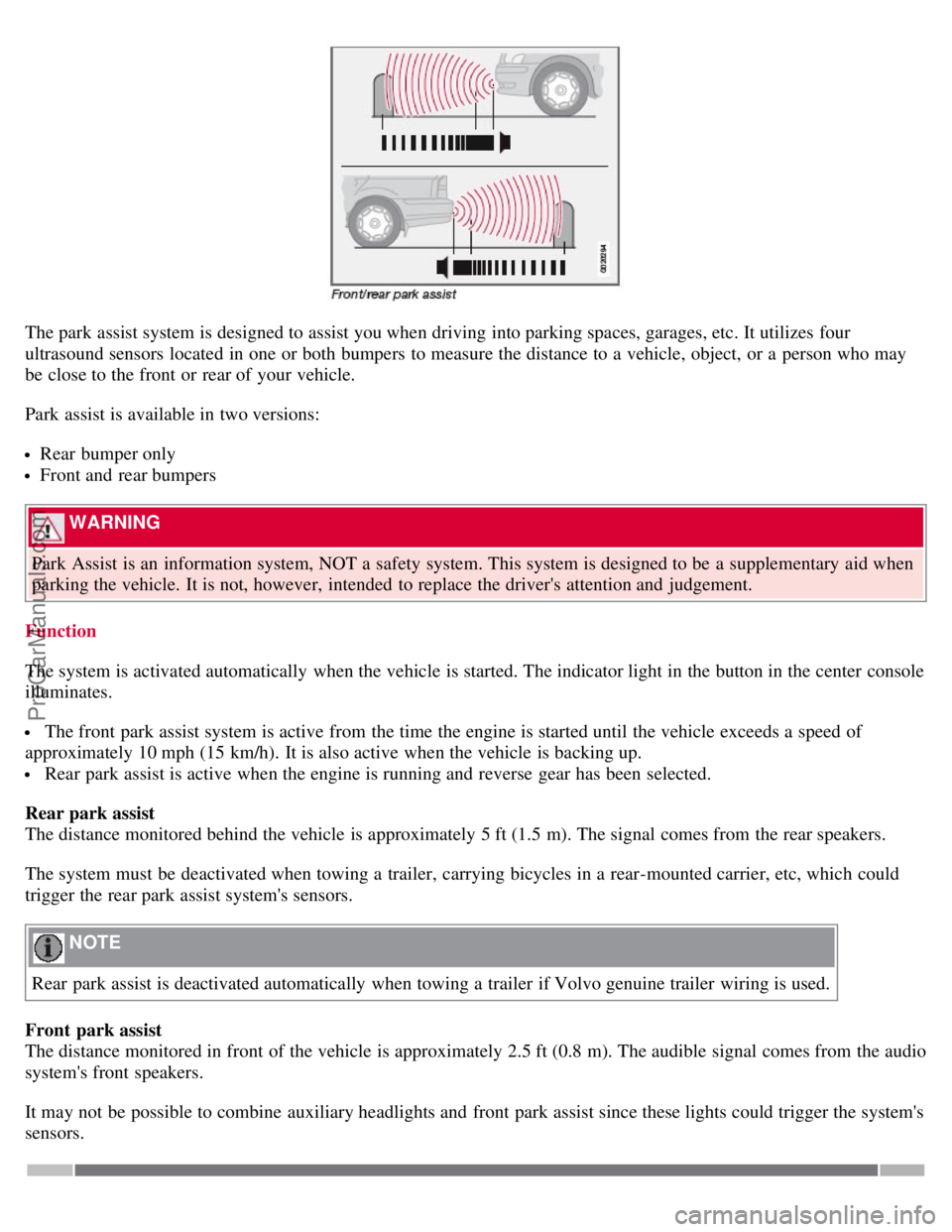
ultrasound sensors located in one or both bumpers to measure the distance to a vehicle, object, or a person who may
be close to the front or rear of your vehicle.
Park assist is available in two versions:
Rear bumper only
Front and rear bumpers
WARNING
Park Assist is an information system, NOT a safety system. This system is designed to be a supplementary aid when
parking the vehicle. It is not, however, intended to replace the driver's attention and judgement.
Function
The system is activated automatically when the vehicle is started. The indicator light in the button in the center console
illuminates.
The front park assist system is active from the time the engine is started until the vehicle exceeds a speed of
approximately 10 mph (15 km/h). It is also active when the vehicle is backing up.
Rear park assist is active when the engine is running and reverse gear has been selected.
Rear park assist
The distance monitored behind the vehicle is approximately 5 ft (1.5 m). The signal comes from the rear speakers.
The system must be deactivated when towing a trailer, carrying bicycles in a rear-mounted carrier, etc, which could
trigger the rear park assist system's sensors.
NOTE
Rear park assist is deactivated automatically when towing a trailer if Volvo genuine trailer wiring is used.
Front park assist
The distance monitored in front of the vehicle is approximately 2.5 ft (0.8 m). The audible signal comes from the audio
system's front speakers.
It may not be possible to combine auxiliary headlights and front park assist since these lights could trigger the system's
sensors.
ProCarManuals.com
Page 150 of 246

164 06 Starting and driving
Park assist (Option/accessory)
Activating/deactivating park assist
The system is activated automatically when the vehicle is started.
If the vehicle is equipped with both front and rear park assist, press the park assist button on the center console
(see the illustration) to temporarily turn off (deactivate) the systems. The indicator light in the button will go out when
the system has been switched off.
If the vehicle is equipped with rear park assist only, a message will be displayed when reverse gear is selected
showing if the system is on or off. Press EXIT to turn rear park assist off, or ENTER to turn the system on.
Park assist will be automatically reactivated the next time the engine is started, or if the button is pressed (the
indicator light in the button will illuminate).
NOTE
Front park assist is disengaged automatically when the parking brake is applied.
If the vehicle is equipped with front and rear park assist, both systems will be deactivated by pressing the button.
Audible signals from the park assist system
The Park Assist system uses an intermittent tone that pulses faster as you come close to an object, and becomes
constant when you are within approximately 1 ft (30 cm) of an object in front of or behind the vehicle. If the volume
of another source from the audio system is high, this will be automatically lowered.
If there are objects within this distance both behind and in front of the vehicle, the signal alternates between front and
rear speakers.
Faults in the system
If the information symbol illuminates and PARK ASSIST SERVICE REQUIRED is shown on the information
display, this indicates that the system is not functioning properly and has been disengaged. Consult a trained and
qualified Volvo service technician.
CAUTION
ProCarManuals.com
Page 151 of 246

In certain circumstances, the park assist system may give unexpected warning signals that can be caused by external
sound sources that use the same ultrasound frequencies as the system. This may include such things as the horns of
other vehicles, wet tires on asphalt, pneumatic brakes, motorcycle exhaust pipes, etc. This does not indicate a fault in
the system.
165 06 Starting and driving
Park assist (Option/accessory)
Cleaning the sensors
The sensors must be cleaned regularly to ensure that they work properly. Clean them with water and a suitable car
washing detergent.
Ice and snow covering the sensors may cause incorrect warning signals.
NOTE
If the sensors are obstructed by e.g., dirt, snow, or ice, this could result in false warning signals from the park assist
system.
Contents | Top of Page
ProCarManuals.com
Page 172 of 246

9. Start the vehicle's engine.
WARNING
The vehicle's engine should be running when the tire sealing system is used to avoid battery drain. Therefore, be sure
the vehicle is parked in a well ventilated place, or outdoors, before using the system.
10. Start the tire sealing system's compressor by pressing the on/off switch to position I .
WARNING
Never stand next to the tire being inflated when the compressor is in operation.
If cracks, bubbles, etc. form on the tire, switch off the compressor immediately.
If there is visible damage to the sidewall or the rim, the tire cannot be repaired. The vehicle should not be driven if
this occurs. Contact a towing service or Volvo On Call Roadside Assistance if applicable.
NOTE
The air pressure gauge will temporarily show an increase in pressure to approximately 88 psi (6 bar) while the
sealing compound is being pumped into the tire. The pressure should return to a normal level after approximately 30
seconds.
11. Within seven minutes, inflate the tire to between 22-44 psi (1.8-3.0 bar). Switch off the compressor briefly to get a
clear reading from the pressure gauge.
CAUTION
The compressor should not be used for more than 10 minutes at a time to avoid overheating.
WARNING
If the pressure remains below 22 psi (1.8 bar) after approximately seven minutes, turn off the compressor. In this
case, the hole is too large to be sealed and the vehicle should not be driven.
12. Switch off the compressor and disconnect the electrical wire from the 12-volt socket.
13. Unscrew the hose from the tire's inflation valve and reinstall the valve cap.
14. Immediately drive the vehicle for approximately 2 miles (3 km) at a maximum speed of 50 mph (80 km/h) to
distribute the sealing compound in the tire.
NOTE
Safely stow the tire sealing system in a convenient place as it will soon be used again to check the tire's inflation
pressure.
After use, the empty bottle of sealing compound cannot be removed from the bottle holder. Consult a Volvo
retailer to have the bottle removed and properly disposed of.
WARNING
If heavy vibrations, unsteady steering behavior, or noises should occur while driving, reduce speed and park the
ProCarManuals.com
Page 207 of 246

46. Lighting - glove compartment, instrument panel and footwells5A
47. Interior lighting5A
48. Windshield washers 15A
49. Supplemental Restrain System (SRS), Occupant Weight Sensor (OWS) 10A
50. Not in use
51. Fuel filter relay 10A
52. Transmission control module (TCM), ABS 5A
53. Power steering 10A
54. Park assist (option), Bi -Xenon® headlights (option) 10A
55. Not in use
56. Volvo Navigation System remote control (option), alarm siren control module 10A
230 09 Maintenance and servicing
Fuses
57. On-board diagnostic socket, brake light switch15A
58. Right high beam, auxiliary lights relay 7.5A
59. Left high beam 7.5A
60. Heated driver's seat (option) 15A
61. Heated passenger's seat (option) 15A
62. Not in use
63. Power window rear passenger's side 20A
64. Lock indicator lights door panels, Volvo Navigation system(option) 5A
65. Audio system 5A
66. Audio system control module (ICM), climate system 10A
67. Not in use
68. Cruise control 5A
69. Climate system, rain sensor (option), BLIS button (option) 5A
70. Not in use
71. Not in use
72. Not in use
73. Front ceiling lighting 5A
74. Fuel pump relay 15A
75. Not in use
76. Not in use
77. 12-volt socket in trunk, auxiliary equipment control module (AEM) 15A
78. Not in use
79. Back-up lights 5A
80. Not in use
81. Power window - rear driver's side 20A
82. Power window and door lock - front passenger's side door 25A
83. Power window and door lock - front driver's side door 25A
ProCarManuals.com