light VOLVO C70 CONVERTIBLE 2007 Owner´s Manual
[x] Cancel search | Manufacturer: VOLVO, Model Year: 2007, Model line: C70 CONVERTIBLE, Model: VOLVO C70 CONVERTIBLE 2007Pages: 276, PDF Size: 9.81 MB
Page 119 of 276

2007 Volvo C70
The rear reading lights can be switched on or off by pressing the respec\
tive buttons.
Courtesy lighting - automatic function
The interior lighting has a built-in automatic function that switches on\
the courtesy lighting for 30
seconds when:
l the car is unlocked from the outside using the key or remote control
l the engine is switched off and the ignition key is turned to the 0 posit\
ion.
The courtesy lighting lights up or remains on for 5 minutes when:
l one of the doors is opened and left open.
l the courtesy lighting has not been switched off (the right side of butt\
on 2 depressed).
The automatic lighting goes out when:
l the engine is started
l the car is locked from the outside using the key or remote control.
If the courtesy lighting is not switched off manually, it will be turned\
off automatically 5 minutes after the
engine has been switched off.
99 04 Interior
Interior lighting
Vanity mirror
Raise the cover to switch on the light.
file:///K|/delme/2007_C70/07c70_04.htm (18 of 27)12/22/2006 9:15:45 PM\
Page 120 of 276
2007 Volvo C70
100 04 Interior
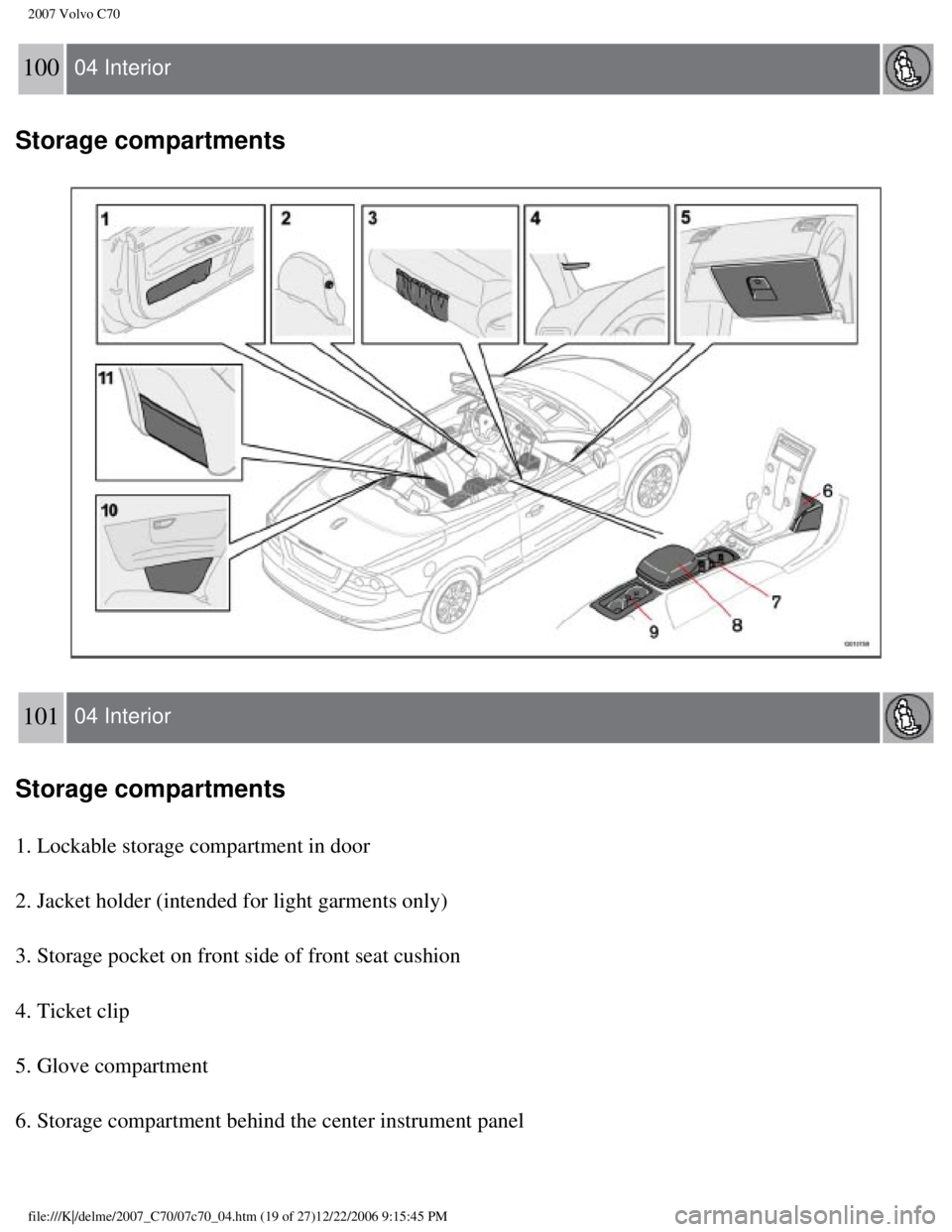
Storage compartments
101 04 Interior
Storage compartments
1. Lockable storage compartment in door
2. Jacket holder (intended for light garments only)
3. Storage pocket on front side of front seat cushion
4. Ticket clip
5. Glove compartment
6. Storage compartment behind the center instrument panel
file:///K|/delme/2007_C70/07c70_04.htm (19 of 27)12/22/2006 9:15:45 PM\
Page 124 of 276
.
1On certain models, this keyhole is located near the")
2007 Volvo C70
This storage compartment also contains a keyhole that is used to manuall\
y open the trunk with the key
blade
1 (see page 115).
1On certain models, this keyhole is located near the floor behind the dri\
ver's seat. See page 115 for detailed
information.
103 04 Interior
Storage compartments
Loading the trunk
Loading the trunk with the power retractable hard top down
When the power retractable hard top is down, it is folded in the trunk. \
Using the button shown in the
illustration above, the folded power retractable hard top can be moved u\
p or down slightly to facilitate
loading or unloading small objects.
NOTE
This movement is part of the normal power retractable hard top operation\
, which means that messages
pertaining to the power retractable hard top's operation (see
page 94) also apply to the this function.
WARNING
file:///K|/delme/2007_C70/07c70_04.htm (23 of 27)12/22/2006 9:15:45 PM\
Page 125 of 276

2007 Volvo C70
Anyone near the vehicle should be well clear of the power retractable ha\
rd top's moving parts before it
is operated.
CAUTION
l Any objects that impede the movement of the power retractable hard top m\
ay damage the top or its
mechanism.
l When the power retractable hard top has been raised for loading the trun\
k, or if its movement has
been interrupted by pressing the button twice, the trunk should not be c\
losed. Doing so can damage the
system or cause paint damage.
To raise the level of the folded power retractable hard top:
1. Open the trunk.
2. Press the button on the right side of the trunk opening.
NOTE
There may be a delay of several seconds before the folded power retracta\
ble hard top begins to move.
Movement of the top can be stopped by pressing the button again.
3. The folded power retractable hard top will raise slightly. If an audi\
ble signal sounds during this
operation, check the information display in the center instrument panel \
for messages.
4. Lift the trunk divider (see
page 93) to provide an opening into the trunk.
5. When the objects to be loaded have been placed in the trunk, press do\
wn the trunk divider.
6. Press the button to move the power retractable hard top downward. Mov\
ement of the top can be
stopped by pressing the button again.
7. Close the trunk.
NOTE
The trunk cannot be closed while the folded power retractable hard top i\
s in the upper
position.
file:///K|/delme/2007_C70/07c70_04.htm (24 of 27)12/22/2006 9:15:45 PM\
Page 128 of 276
. To do so, the\")
2007 Volvo C70
The center section of the rear seat backrest can be opened to create spa\
ce for carrying long, light objects
(max. length 6.5 ft/2 meters, max. weight 55 lbs/25 kg). To do so, the\
center section (cushion) of the rear
seat backrest must be removed, the tire repair kit (if the vehicle is s\
o equipped) must be removed and
stowed in the trunk, and the plastic hatch in the trunk must be opened.
Removing the center backrest cushion
Pull the strap at the upper edge of the cushion, pull it forward, and li\
ft it out.
Opening the plastic hatch
From the trunk, press the catches in the two holes in the hatch (A in t\
he illustration) toward each other to
release the hatch, and fold it down.
NOTE
If the vehicle is equipped with the optional ski bag, the bag's zipper m\
ust be opened from the
passenger's compartment in order to insert objects through the ski hatch\
.
Replacing the backrest cushion
Begin by guiding the lower section of the cushion into place. Then press\
the upper section of the cushion
into place.
NOTE
This cushion is locked in place when the vehicle is locked with the remo\
te control. See
page
112.
Securing long objects
Long objects should be secured with one of the rear seat belts.
l Wrap the belt once around the object and lock the belt in the retractor \
as usual.
If the vehicle is equipped with the optional ski bag, pass the seat belt\
through the bag's handle before
fastening the seat belt.
Contents | Top of Page
file:///K|/delme/2007_C70/07c70_04.htm (27 of 27)12/22/2006 9:15:45 PM\
Page 131 of 276

2007 Volvo C70
NOTE
The remote control will not lock or unlock the glove
compartment.
Double locking
If the car is locked with the remote control while the power retractable hard top is down, the double locking feature activates after
approximately 30 seconds. This means that the doors cannot be unlocked o\
r opened from inside the car.
NOTE
The double locking function can be temporarily disabled. See
page 118 for
instructions.
2. Unlock - Press the Unlock button on the remote once to unlock the driver's doo\
r. The turn signals will flash twice to confirm
unlocking.
After a short pause, press the Unlock button a second time within 10 sec\
onds to unlock the other doors and the trunk.
A long press (at least two seconds) opens all side windows.
NOTE
l The turn signals flash to confirm that the vehicle has been correctly lo\
cked/unlocked with the remote control. When locking the
vehicle, the turn signals will flash a confirmation only if all the door\
s are securely closed and locked. Flashing confirmation for
locking and unlocking may be customized in the vehicle's Personal settin\
gs menu. See
page 72 for more information.
l The two-step unlocking function can be changed so that one press of the \
Unlock button unlocks all of the doors and the trunk.
See Personal settings on
page 72 for more information.
l Automatic relocking: If the doors are unlocked, the locks will automatically reengage (re-\
lock) and the alarm will rearm after 2
minutes unless a door or the trunk has been opened.
l Automatic locking: When the car starts to move, the doors and trunk can be locked automat\
ically. This feature can be turned on
or off, see Personal settings on
page 72 for more information.
l Airbag deployment will automatically attempt to unlock the doors.
3. Approach lighting - As you approach the car:
Press the yellow button on the remote control to light the interior ligh\
ting, position/parking lamps, and license
110 05 Locks and alarm
Remote control and key blade
plate lighting and the lights in the door mirrors. These lights will swi\
tch off automatically after 30, 60 or 90 seconds. See the
Personal settings on
page 72 for information about adjusting the time setting.
4. Unlock trunk- Press the button once to disarm the alarm system and unlock only the t\
runk. After closing, the trunk will not
automatically relock. Press Lock to relock it and rearm the alarm.
NOTE
This function will unlock, but not pop open, the
trunk.
file:///K|/delme/2007_C70/07c70_05.htm (3 of 13)12/22/2006 9:15:47 PM
Page 132 of 276

2007 Volvo C70
5. Panic alarm: - This button can be used to attract attention during emergency situat\
ions.
To activate the panic alarm, press and hold the red button for at least \
3 seconds or press it twice within 3 seconds. The turn signals
and horn will be activated.
The panic alarm will stop automatically after 30 seconds.
To deactivate, wait approximately 5 seconds and press the red button aga\
in.
NOTE
This button will NOT unlock the
car.
Weak battery in the remote control
When the battery begins to lose its charge, the Information symbol in th\
e instrument panel (see page 49) lights up and REMOTE
BATTERY LOW VOLTAGE is shown in the information display.
Replacing the battery in the remote control
If the range of the transmitter is noticeably reduced, this indicates th\
at the battery (type CR 2032, 3V) is weak and should be
replaced. To replace the battery:
1. Remove the key blade.
111 05 Locks and alarm
Remote control and key blade
2. Place the remote control with the keypad downward. Remove the screw (\
1) using a small slotted screwdriver.
3. Remove the cover.
4. Note how the + and - sides of the battery are positioned on the insid\
e of the cover. The plus side of the new battery (marked on the
battery) must face downward.
CAUTION
file:///K|/delme/2007_C70/07c70_05.htm (4 of 13)12/22/2006 9:15:47 PM
Page 136 of 276

2007 Volvo C70
Lock indicator lights
An indicator light in each door will illuminate for approximately 5 minu\
tes after the car has been locked using the remote control.
If the car is locked from the inside while the ignition is on, the light\
will remain on until the car is unlocked or the ignition is
switched off.
NOTE
l The doors cannot be opened by pulling up the lock button.
l If both doors are closed when a lock button is pressed, the alarm will n\
ot be armed.
l Each door can also be locked manually using the lock button on that part\
icular door. This applies only if the car has not been
locked from the outside.
l The doors can also be unlocked (and the door opened) by pulling the ha\
ndle in the door twice.
115 05 Locks and alarm
Glove compartment and trunk
Locking the glove compartment
The glove compartment can only be locked and unlocked using the detachab\
le key blade on the remote control. See page 111 for
information on removing the key blade from the remote control.
1. Unlock the glove compartment by turning the key a quarter of a turn (\
90°) counterclockwise. The key slot is vertical when the
file:///K|/delme/2007_C70/07c70_05.htm (8 of 13)12/22/2006 9:15:47 PM
Page 139 of 276
:
l Indicator light off - the ala")
2007 Volvo C70
The alarm indicator light
The status of the alarm system is indicated by the indicator light on at\
the top of the dashboard (see illustration):
l Indicator light off - the alarm is not armed
l The indicator light flashes every two seconds - the alarm is armed
l The indicator light flashes rapidly before the ignition is switched on -\
the alarm has been triggered. The message "ALARM
TRIGGERED, CHECK CAR" will also be displayed.
118 05 Locks and alarm
Alarm
Fault in the alarm system
l If a fault has been detected in the alarm system, a message will be show\
n in the information display. Contact your Volvo retailer
to have the alarm system inspected and repaired if necessary.
Arming the alarm
Press the LOCK button on the remote control, or press the central lock b\
utton on one of the front doors with the door open. One long
flash of the turn signals will confirm that the alarm is armed.
Disarming the alarm
Press the UNLOCK button on the remote control or insert the key in the i\
gnition to disarm the alarm. Two short flashes from the
car's direction indicators confirm that the alarm has been deactivated a\
nd that all doors are unlocked.
Turning off (stopping) the alarm
If the alarm is sounding, it can be stopped by pressing the UNLOCK butto\
n on the remote control or by inserting the key in the
ignition switch. The driver's door must first be unlocked with the key b\
lade.
Audible/visual alarm signal
An audible alarm signal is given by a battery powered siren. The alarm c\
ycle lasts for 30 seconds.
NOTE
file:///K|/delme/2007_C70/07c70_05.htm (11 of 13)12/22/2006 9:15:47 PM\
Page 140 of 276

2007 Volvo C70
The visual alarm signal is given by flashing all turn signals and turnin\
g on the interior lighting for approximately 5
minutes.
Temporarily turning off the double locking function and alarm sensor(s)\
In certain situations it may be desirable to turn off the accessory incl\
ination and movement alarm sensors, and/or the double locking
function if, for example, you drive your vehicle onto a ferry where the \
rocking of the boat could trigger the alarm or if a pet is left in
the vehicle with the doors locked.
1. From position II or higher, turn the ignition key to 0 and remove it \
from the ignition switch.
2. Press the button (1). The LED in the button will remain on for one \
minute
119 05 Locks and alarm
Alarm
after the key has been removed from the ignition switch or until the car\
is locked.
NOTE
This will also disable the double locking function if the car is locked \
while the top is down. Double locking only functions with the
top down.
CAUTION
l The accessory sensors and double locking function (if the top is down)\
are automatically reconnected to the alarm system the
next time the vehicle is unlocked and then locked again.
l This function will not disarm the vehicle's standard alarm.
U.S.A. FCC ID: MAYDA 5823(3)
This device complies with part 15 of the FCC rules. Operation is subject\
to the following conditions: (1) This device may not
cause harmful interference, and (2) this device must accept any interf\
erence received, including interference that may cause
undesired operation.
file:///K|/delme/2007_C70/07c70_05.htm (12 of 13)12/22/2006 9:15:47 PM\