lights VOLVO S40 2008 Owner's Manual
[x] Cancel search | Manufacturer: VOLVO, Model Year: 2008, Model line: S40, Model: VOLVO S40 2008Pages: 239, PDF Size: 5.94 MB
Page 136 of 239
needed, depress the pedal occasionally when driving through rain, slush, etc. This will remove the water from the
brakes. Check that brake application feels normal. This should also be done after washing or starting in very damp or
cold weather.
Severe strain on the brake system
The brakes will be subject to severe strain when driving in mountains or hilly areas, or when towing a trailer. Vehicle
speed is usually slower, which means that the cooling of the brakes is less efficient than when driving on level roads.
To reduce the strain on the brakes, shift into a lower gear and let the engine help with the braking. Do not forget that if
you are towing a trailer, the brakes will be subjected to a greater than normal load.
Anti-lock brakes (ABS)
The Anti-lock Braking System (ABS) helps to improve vehicle control (stopping and steering) during severe braking
conditions by limiting brake lockup. When the system "senses" impending lockup, braking pressure is automatically
modulated in order to help prevent lockup that could lead to a skid.
The system performs a self -diagnostic test when the engine is started and when the vehicle first reaches a speed
of approximately 12 m.p.h. (20 km/h). The brake pedal will pulsate several times and a sound may be audible from
the ABS control module. This is normal.
148 06 Starting and driving
Brake system
For optimal ABS braking effect:
1. Press down on the brake pedal with full force. The pedal will pulsate.
2. Steer the vehicle in the direction of travel and keep the brake pedal depressed.
Electronic Brake Force Distribution (EBD)
EBD is an integrated part of the ABS system. EBD regulates the hydraulic pressure to the rear brakes to help provide
optimal braking capacity.
The switching of the ABS modulator will be audible and the brake pedal will pulsate during braking. Please be aware
that ABS does not increase the absolute braking potential of the vehicle. While control will be enhanced, ABS will not
shorten stopping distances on slippery surfaces.
If the warning lamp lights up there is a malfunction of the ABS system (the standard braking system will still function)
and the vehicle should be driven cautiously to a trained and qualified Volvo service technician for inspection.
WARNING
If the BRAKE and ABS warning symbols light at the same time, there may be a problem in the brake system. If the
brake fluid level is normal in these circumstances, drive carefully to the nearest trained and qualified Volvo service
technician to have the brake system checked.
Emergency Brake Assistance - EBA
EBA is designed to provide full brake effect immediately in the event of sudden, hard braking. The system is activated
by the speed with which the brake pedal is depressed.
When the EBA system is activated, the brake pedal will go down and pressure in the brake system immediately
increases to the maximum level. Maintain full pressure on the brake pedal in order to utilize the system completely.
ProCarManuals.com
Page 147 of 239
BLIS does not eliminate the need for you to visually confirm the conditions around you, and the need for you to
turn your head and shoulders to make sure that you can safely change lanes.
As the driver, you have full responsibility for changing lanes in a safe manner.
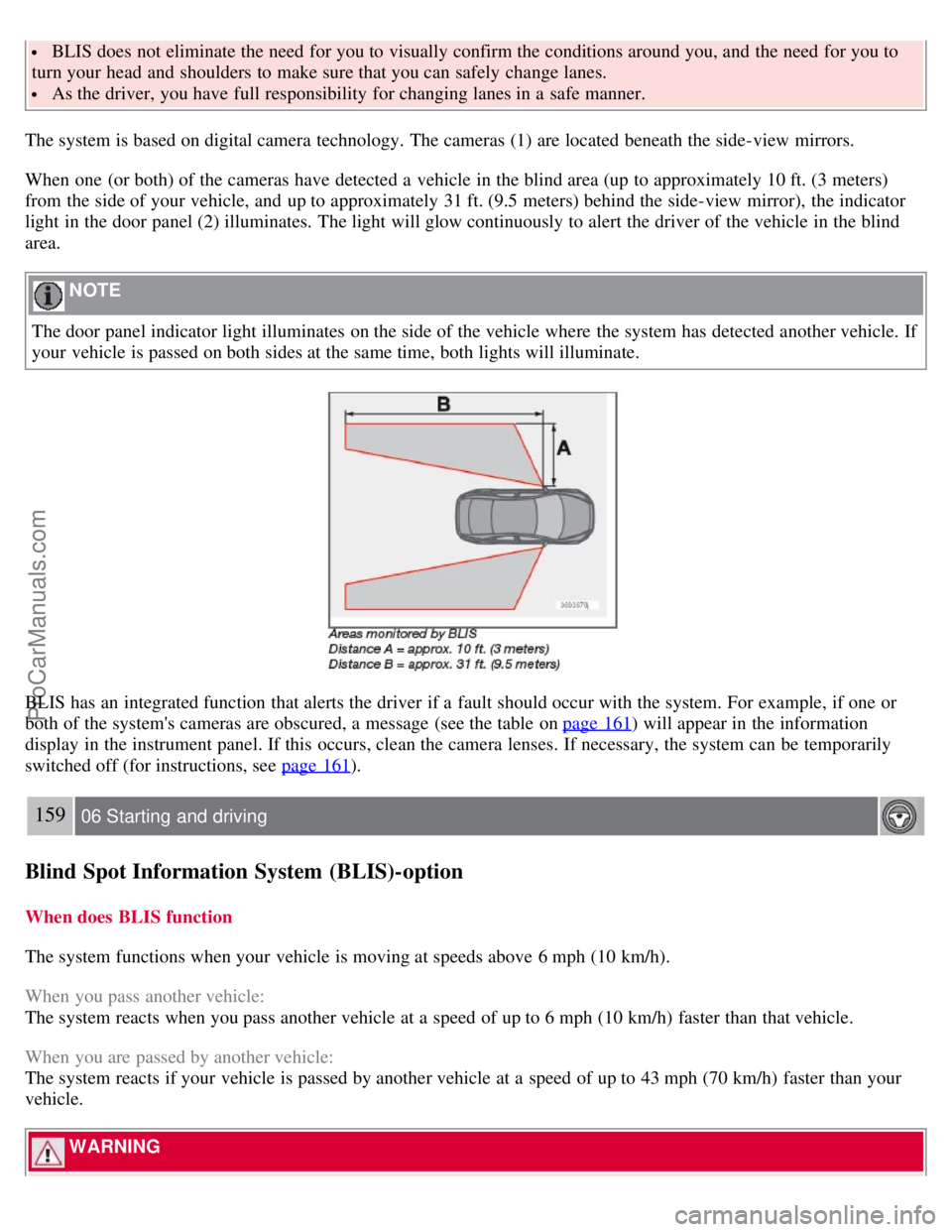
The system is based on digital camera technology. The cameras (1) are located beneath the side-view mirrors.
When one (or both) of the cameras have detected a vehicle in the blind area (up to approximately 10 ft. (3 meters)
from the side of your vehicle, and up to approximately 31 ft. (9.5 meters) behind the side-view mirror), the indicator
light in the door panel (2) illuminates. The light will glow continuously to alert the driver of the vehicle in the blind
area.
NOTE
The door panel indicator light illuminates on the side of the vehicle where the system has detected another vehicle. If
your vehicle is passed on both sides at the same time, both lights will illuminate.
BLIS has an integrated function that alerts the driver if a fault should occur with the system. For example, if one or
both of the system's cameras are obscured, a message (see the table on page 161
) will appear in the information
display in the instrument panel. If this occurs, clean the camera lenses. If necessary, the system can be temporarily
switched off (for instructions, see page 161
).
159 06 Starting and driving
Blind Spot Information System (BLIS)-option
When does BLIS function
The system functions when your vehicle is moving at speeds above 6 mph (10 km/h).
When you pass another vehicle:
The system reacts when you pass another vehicle at a speed of up to 6 mph (10 km/h) faster than that vehicle.
When you are passed by another vehicle:
The system reacts if your vehicle is passed by another vehicle at a speed of up to 43 mph (70 km/h) faster than your
vehicle.
WARNING
ProCarManuals.com
Page 148 of 239
BLIS does not function in sharp curves.
BLIS does not function when your vehicle is backing up.
If you are towing a wide trailer, this may prevent the BLIS cameras from detecting other vehicles in adjacent
lanes.
How BLIS functions in daylight and darkness
Daylight
BLIS reacts to the shape of surrounding vehicles. The system is designed to help detect motor vehicles such as cars,
trucks, buses, motorcycles, etc.
Darkness
BLIS reacts to the headlights of surrounding vehicles. In order to be detected by BLIS, a vehicle in the blind area
must have its headlights on. This means, for example, that the system will not detect a trailer without headlights that is
being towed behind a car or truck.
WARNING
BLIS does not react to cyclists or mopeds.
BLIS does not react to vehicles that are standing still.
The function of the BLIS cameras may be affected by intense light, or when driving at night in areas where there
are no external sources of light (e.g., street lights, other vehicles, etc.). In such cases, the system may react as if the
cameras were obscured.
In both of the above mentioned conditions, a message will appear in the information display.
When driving in such conditions, the system's function will be limited or it may be temporarily switched off. See
page 161
for instructions.
When the message is no longer displayed, BLIS will return to normal function.
The BLIS cameras have the same limitation as the human eye. In other words, their "vision is impaired" by
adverse weather conditions such as heavy snowfall, dense fog, etc.
160 06 Starting and driving
Blind Spot Information System (BLIS)-option
Limitations
In certain situations, the BLIS indicator light(s) may illuminate even when there are no other vehicles in the area
monitored by the system.
NOTE
If the BLIS indicator lights illuminate occasionally even when there are no other vehicles in the blind area, this does
not indicate a fault in the system.
In the event of a fault, Blind spot syst. service required will be displayed.
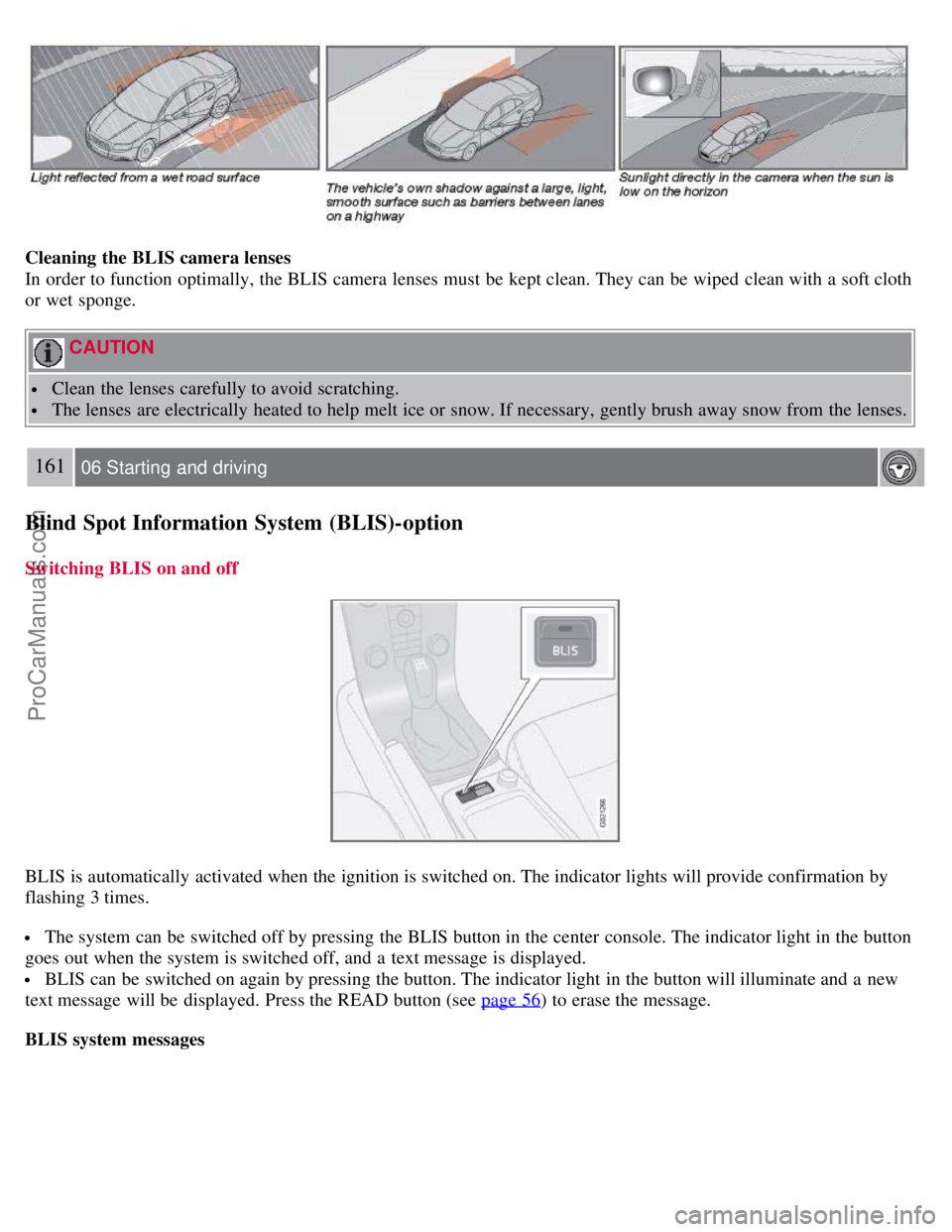
The following are several examples of situations in which the BLIS indicator light(s) may illuminate even when there
are no other vehicles in the area monitored by the system.
ProCarManuals.com
Page 149 of 239
Cleaning the BLIS camera lenses
In order to function optimally, the BLIS camera lenses must be kept clean. They can be wiped clean with a soft cloth
or wet sponge.
CAUTION
Clean the lenses carefully to avoid scratching.
The lenses are electrically heated to help melt ice or snow. If necessary, gently brush away snow from the lenses.
161 06 Starting and driving
Blind Spot Information System (BLIS)-option
Switching BLIS on and off
BLIS is automatically activated when the ignition is switched on. The indicator lights will provide confirmation by
flashing 3 times.
The system can be switched off by pressing the BLIS button in the center console. The indicator light in the button
goes out when the system is switched off, and a text message is displayed.
BLIS can be switched on again by pressing the button. The indicator light in the button will illuminate and a new
text message will be displayed. Press the READ button (see page 56
) to erase the message.
BLIS system messages
ProCarManuals.com
Page 151 of 239
The system is activated automatically when the vehicle is started. The indicator light in the button in the center console
illuminates.
The front park assist system is active from the time the engine is started until the vehicle exceeds a speed of
approximately 10 mph (15 km/h). It is also active when the vehicle is backing up.
Rear park assist is active when the engine is running and reverse gear has been selected.
Rear park assist
The distance monitored behind the vehicle is approximately 5 ft (1.5 m). The signal comes from the rear speakers.
The system must be deactivated when towing a trailer, carrying bicycles in a rear-mounted carrier, etc, which could
trigger the rear park assist system's sensors.
NOTE
Rear park assist is deactivated automatically when towing a trailer if Volvo genuine trailer wiring is used.
Front park assist
The distance monitored in front of the vehicle is approximately 2.5 ft (0.8 m). The audible signal comes from the audio
system's front speakers.
It may not be possible to combine auxiliary headlights and front park assist since these lights could trigger the system's
sensors.
163 06 Starting and driving
Park assist (option/accessory)
Activating/deactivating park assist
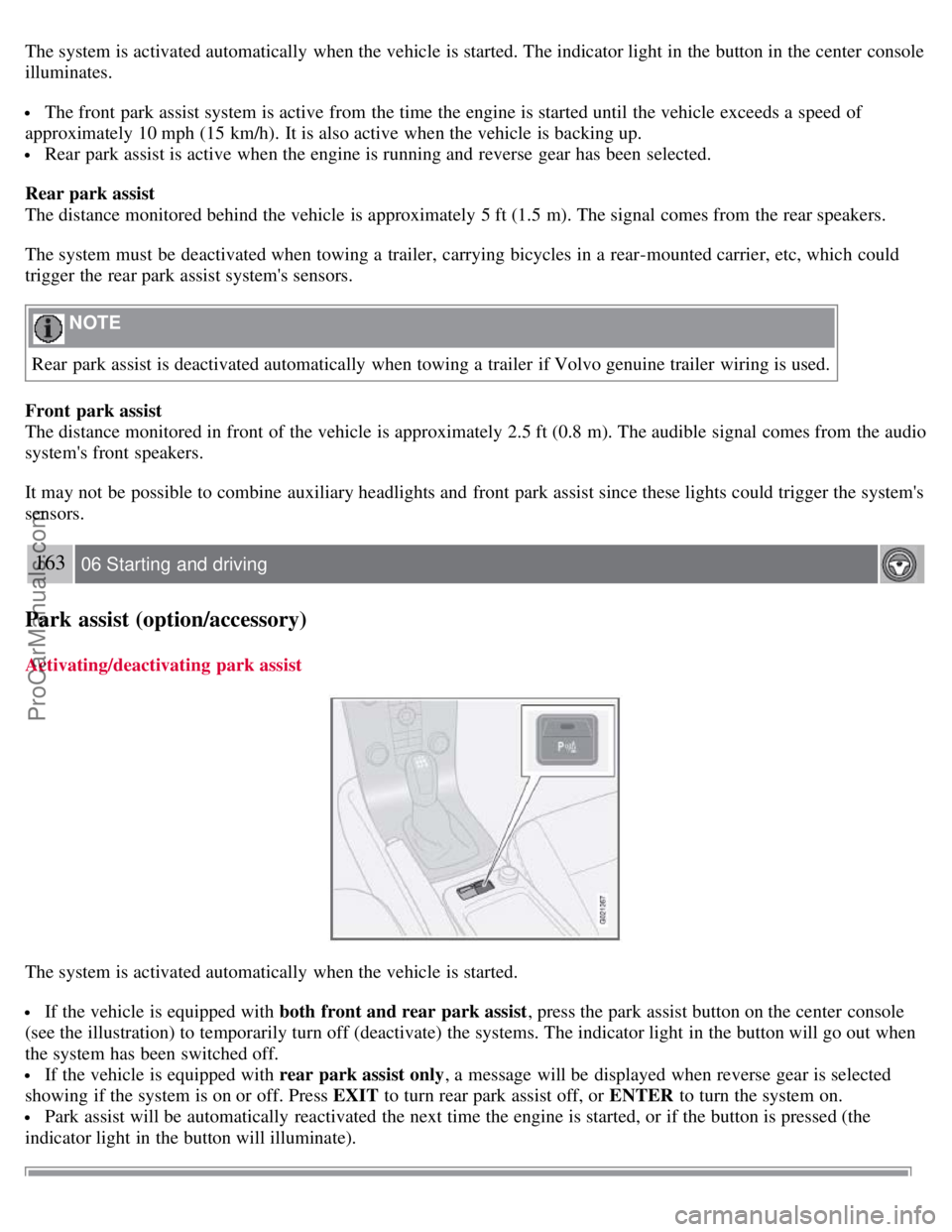
The system is activated automatically when the vehicle is started.
If the vehicle is equipped with both front and rear park assist , press the park assist button on the center console
(see the illustration) to temporarily turn off (deactivate) the systems. The indicator light in the button will go out when
the system has been switched off.
If the vehicle is equipped with rear park assist only , a message will be displayed when reverse gear is selected
showing if the system is on or off. Press EXIT to turn rear park assist off, or ENTER to turn the system on.
Park assist will be automatically reactivated the next time the engine is started, or if the button is pressed (the
indicator light in the button will illuminate).
ProCarManuals.com
Page 174 of 239
NOTE
When washing the car, remember to remove dirt from the drain holes in the doors and sills.
Exterior components
Volvo recommends the use of special cleaning products, available at your Volvo retailer, for cleaning colored plastic,
rubber, or ornamental components such as chromed strips on the exterior of your vehicle. The instructions for using
these products should be followed carefully.Solvents or stain removers should not be used.
CAUTION
Avoid waxing or polishing plastic or rubber components
Polishing chromed strips can wear away or damage the surface
Polishes containing abrasive substances should not be used
193 08 Car care
Washing and cleaning the car
NOTE
During high pressure washing, the spray mouthpiece must never be closer to the vehicle than 13" (30 cm). Do not
spray into the locks.
Dirt, snow, etc., on the headlights can reduce lighting capacity considerably. Clean the headlights regularly, for
example when refueling.
When washing or steam cleaning the engine, avoid spraying water or steam directly on the electrical components
or toward the rear side of the engine. Special moonroof cautions:
Always close the moonroof and sun shade before washing your vehicle.
Never use abrasive cleaning agents on the moonroof.
Never use wax on the rubber seals around the moonroof
Automatic washing - simple and quick
We do NOT recommend washing your car in an automatic wash during the first six months (because the paint will not
have hardened sufficiently). An automatic wash is a simple and quick way to clean your car, but it is worth
remembering that it may not be as thorough as when you yourself go over the car with sponge and water. Keeping the
underbody clean is most important, especially in the winter. Some automatic washers do not have facilities for washing
the underbody.
CAUTION
Before driving into an automatic car wash, turn off the optional rain sensor to avoid damaging the windshield
wipers.
Make sure that side view mirrors, auxiliary lamps, etc, are secure, and that any antenna(s) are retracted or
removed. Otherwise there is risk of the machine dislodging them.
Chromed wheels : Clean chrome-plated wheels using the same detergents used for the body of the vehicle.
Aggressive wheel-cleaning agents can permanently stain chrome-plated wheels.
WARNING
When the car is driven immediately after being washed, apply the brakes several times in order to remove any
ProCarManuals.com
Page 175 of 239
moisture from the brake linings.
Engine cleaning agents should not be used when the engine is warm. This constitutes a fire risk.
Exterior lighting
Condensation may form temporarily on the inside of the lenses of exterior lights such as headlights, fog lights, or
taillights. This is normal and the lights are designed to withstand moisture. Normally, condensation will dissipate after
the lights have been on for a short time.
Polishing and Waxing
Normally, polishing is not required during the first year after delivery, however, waxing may be beneficial.
Before applying polish or wax the vehicle must be washed and dried. Tar spots can be removed with kerosene or tar
remover. Difficult spots may require a fine rubbing compound.
After polishing use liquid or paste wax.
Several commercially available products contain both polish and wax.
Waxing alone does not substitute for polishing a dull surface.
A wide range of polymer-based waxes can be purchased today. These waxes are easy to use and produce a long-
lasting, high-gloss finish that protects the bodywork against oxidation, road dirt and fading.
194 08 Car care
Washing and cleaning the car
Do not polish or wax your vehicle in direct sunlight (the surface of the vehicle should not be warmer than 113° F
(45° C).
CAUTION
Volvo does not recommend the use of long-life or durable paint protection coatings, some of which may claim to
prevent pitting, fading, oxidation, etc. These coatings have not been tested by Volvo for compatibility with your
vehicle's clear coat. Some of them may cause the clear coat to soften, crack, or cloud. Damage caused by application
of paint protection coatings may not be covered under your vehicle's paint warranty.
Upholstery care
Fabric
Clean with soapy water or a detergent. For more difficult spots caused by oil, ice cream, shoe polish, grease, etc., use a
clothing/fabric stain remover. Consult your Volvo retailer.
Interior plastic components
Cleaning interior plastic components should be done with a cleaning agent specially designed for this purpose. Consult
your Volvo retailer.
Alcantera™ suede-like material
Suede -like upholstery can be cleaned with a soft cloth and mild soap solution.
Leather care
Volvo's leather upholstery is manufactured with a protectant to repel soiling. Over time, sunlight, grease and dirt can
break down the protection. Staining, cracking, scuffing, and fading can result.
Volvo offers an easy-to-use, non-greasy leather care kit formulated to clean and beautify your vehicle's leather, and to
renew the protective qualities of its finish. The cleaner removes dirt and oil buildup. The light cream protectant
restores a barrier against soil and sunlight.
ProCarManuals.com
Page 181 of 239
Each time the car is refueled:
Check the engine oil level
Clean the windshield, windshield wipers, headlights, and taillights
Monthly:
Check cold tire pressure in all tires. Inspect the tires for wear.
Check that engine coolant and other fluid levels are between the indicated "min" and "max" markings.
Clean interior glass surfaces with a glass cleaner and soft paper towels.
Wipe driver information displays with a soft cloth.
Visually inspect battery terminals for corrosion. Corrosion may indicate a loose terminal connector, or a battery near
the end of its useful service life. Consult a trained and qualified Volvo service technician for additional information.
As needed:
Wash the car, including the undercarriage, to reduce wear that can be caused by a buildup of dirt, and corrosion that
can be caused by salt residues.
Clean leaves and twigs from air intake vents at the base of the windshield, and from other places where they may
collect.
NOTE
Complete service information for qualified technicians is available online for purchase or subscription at
www.volvotechinfo.com
.
202 09 Maintenance and servicing
Maintaining your car
Emission inspection readiness
What is an Onboard Diagnostic System (OBD II)?
OBD II is part of your vehicle's computerized engine management system. It stores diagnostic information about your
vehicle's emission controls. It can light the Check Engine light (MIL) if it detects an emission control "fault." A "fault"
is a component or system that is not performing within an expected range. A fault may be permanent or temporary.
OBD II will store a message about any fault.
How Do States Use OBD II for Emission Inspections?
Many states connect a computer directly to a vehicle's OBD II system. The inspector can then read "faults." In some
states, this type of inspection has replaced the tailpipe emission test.
How Can My Vehicle Fail OBD II Emission Inspection ?
Your vehicle can fail OBD II emission inspection for any of the following reasons.
If your Check Engine (MIL) light is lit, your vehicle may fail inspection.
If your vehicle's Check Engine light was lit, but went out without any action on your part, OBD II will still have a
recorded fault. Your vehicle may pass or fail, depending on the inspection practices in your area.
If you had recent service that required disconnecting the battery, OBD II diagnostic information may be incomplete
and "not ready" for inspection. A vehicle that is not ready may fail inspection.
How Can I Prepare for My Next OBD II Emission Inspection ?
ProCarManuals.com
Page 191 of 239
4. Connect the positive cable.
5. Connect the ground cable.
6. Reinstall the cover over the battery.
NOTE
Used batteries should be properly disposed of at a recycling station or similar facility, or taken to your Volvo
retailer.
WARNING
Never expose the battery to open flame or electric spark.
Do not smoke near the battery.
Battery fluid contains sulfuric acid. Do not allow battery fluid to contact eyes, skin, fabrics or painted surfaces. If
contact occurs, flush the affected area immediately with water. Obtain medical help immediately if eyes are affected.
211 09 Maintenance and servicing
Replacing bulbs
Introduction
Before replacing bulbs in your vehicle, please keep the following points in mind:
NOTE
Never touch the glass of bulbs with your fingers. Grease and oils from your fingers vaporize in the heat and will
leave a deposit on the reflector, which will damage it.
The optional Bi -Xenon® headlight bulbs contain trace amounts of mercury. These bulbs should always be
disposed of by an authorized Volvo retailer.
Certain bulbs should only be replaced by a trained and qualified Volvo service technician:
- Courtesy (dome) lighting
- Reading lights
- Glove compartment lights
- Turn signals and courtesy lights in the side door mirrors
- High-mounted brake lights
- Bi -Xenon® headlights
- Brake lights
212 09 Maintenance and servicing
Replacing bulbs
Removing the headlight housing
ProCarManuals.com
Page 192 of 239
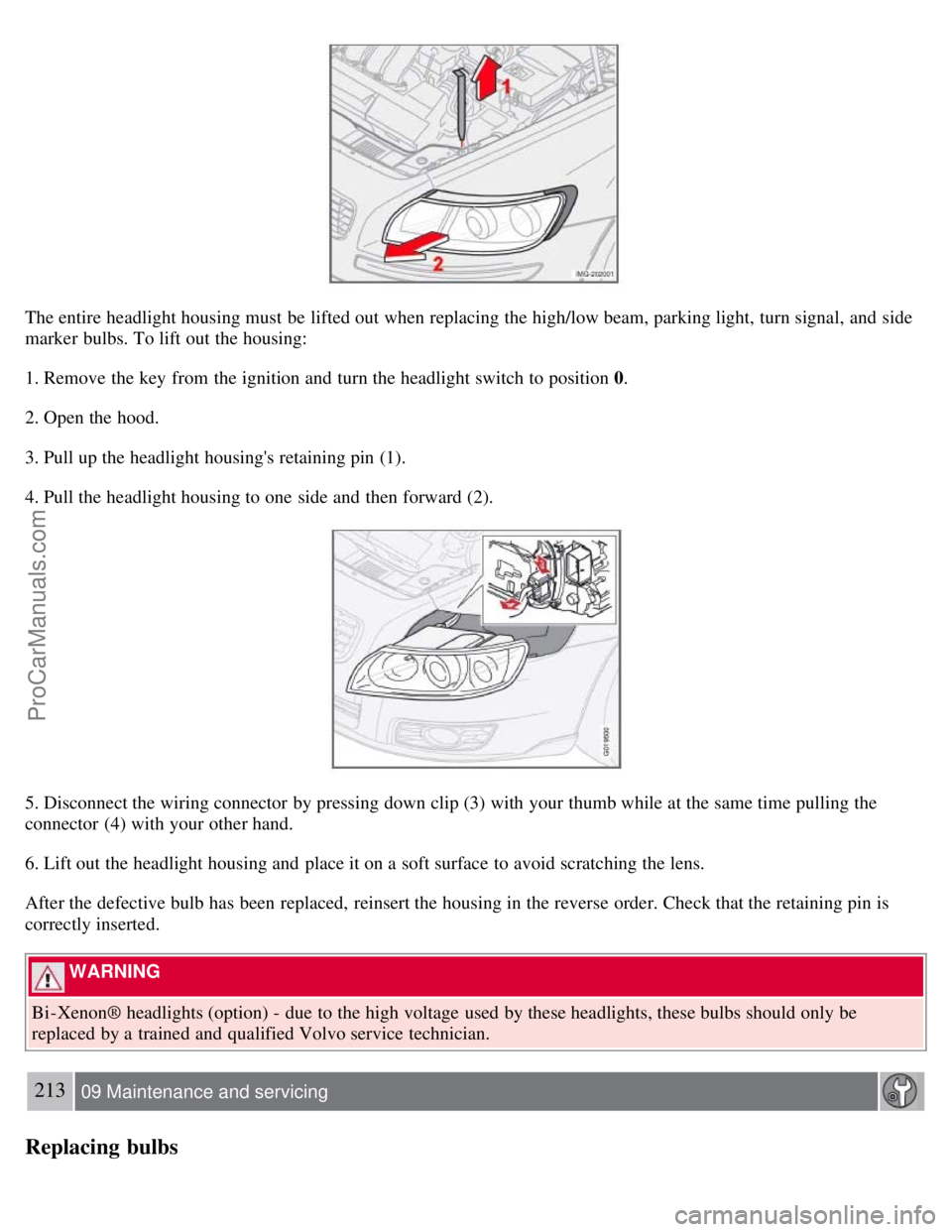
The entire headlight housing must be lifted out when replacing the high/low beam, parking light, turn signal, and side
marker bulbs. To lift out the housing:
1. Remove the key from the ignition and turn the headlight switch to position 0.
2. Open the hood.
3. Pull up the headlight housing's retaining pin (1).
4. Pull the headlight housing to one side and then forward (2).
5. Disconnect the wiring connector by pressing down clip (3) with your thumb while at the same time pulling the
connector (4) with your other hand.
6. Lift out the headlight housing and place it on a soft surface to avoid scratching the lens.
After the defective bulb has been replaced, reinsert the housing in the reverse order. Check that the retaining pin is
correctly inserted.
WARNING
Bi -Xenon® headlights (option) - due to the high voltage used by these headlights, these bulbs should only be
replaced by a trained and qualified Volvo service technician.
213 09 Maintenance and servicing
Replacing bulbs
ProCarManuals.com