seats VOLVO S40 2008 Owner's Guide
[x] Cancel search | Manufacturer: VOLVO, Model Year: 2008, Model line: S40, Model: VOLVO S40 2008Pages: 239, PDF Size: 5.94 MB
Page 90 of 239
99 04 Interior
Front seats
Power seats (option)
The power driver's seat can be adjusted:
If the ignition key is in position I or II.
During a 10 minute period after the doors have been unlocked if the door remains open.
If the door is closed and the ignition key is not yet in the ignition, or if the key is in position 0, the seat can be
adjusted or during a period of 40 seconds. The power passenger's seat can only be adjusted if the ignition key is in
position I or II, or if the engine is running.
Adjusting the seat
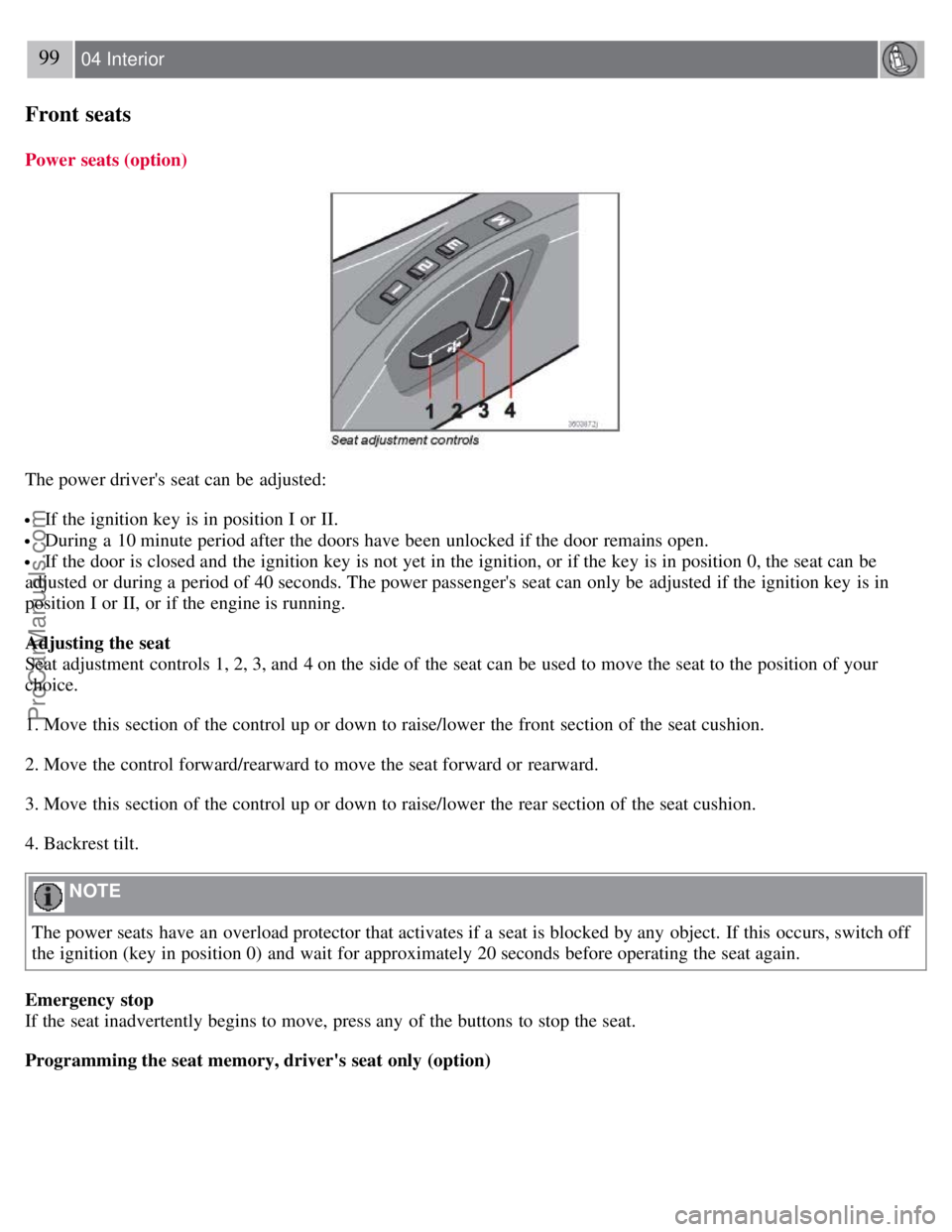
Seat adjustment controls 1, 2, 3, and 4 on the side of the seat can be used to move the seat to the position of your
choice.
1. Move this section of the control up or down to raise/lower the front section of the seat cushion.
2. Move the control forward/rearward to move the seat forward or rearward.
3. Move this section of the control up or down to raise/lower the rear section of the seat cushion.
4. Backrest tilt.
NOTE
The power seats have an overload protector that activates if a seat is blocked by any object. If this occurs, switch off
the ignition (key in position 0) and wait for approximately 20 seconds before operating the seat again.
Emergency stop
If the seat inadvertently begins to move, press any of the buttons to stop the seat.
Programming the seat memory, driver's seat only (option)
ProCarManuals.com
Page 91 of 239
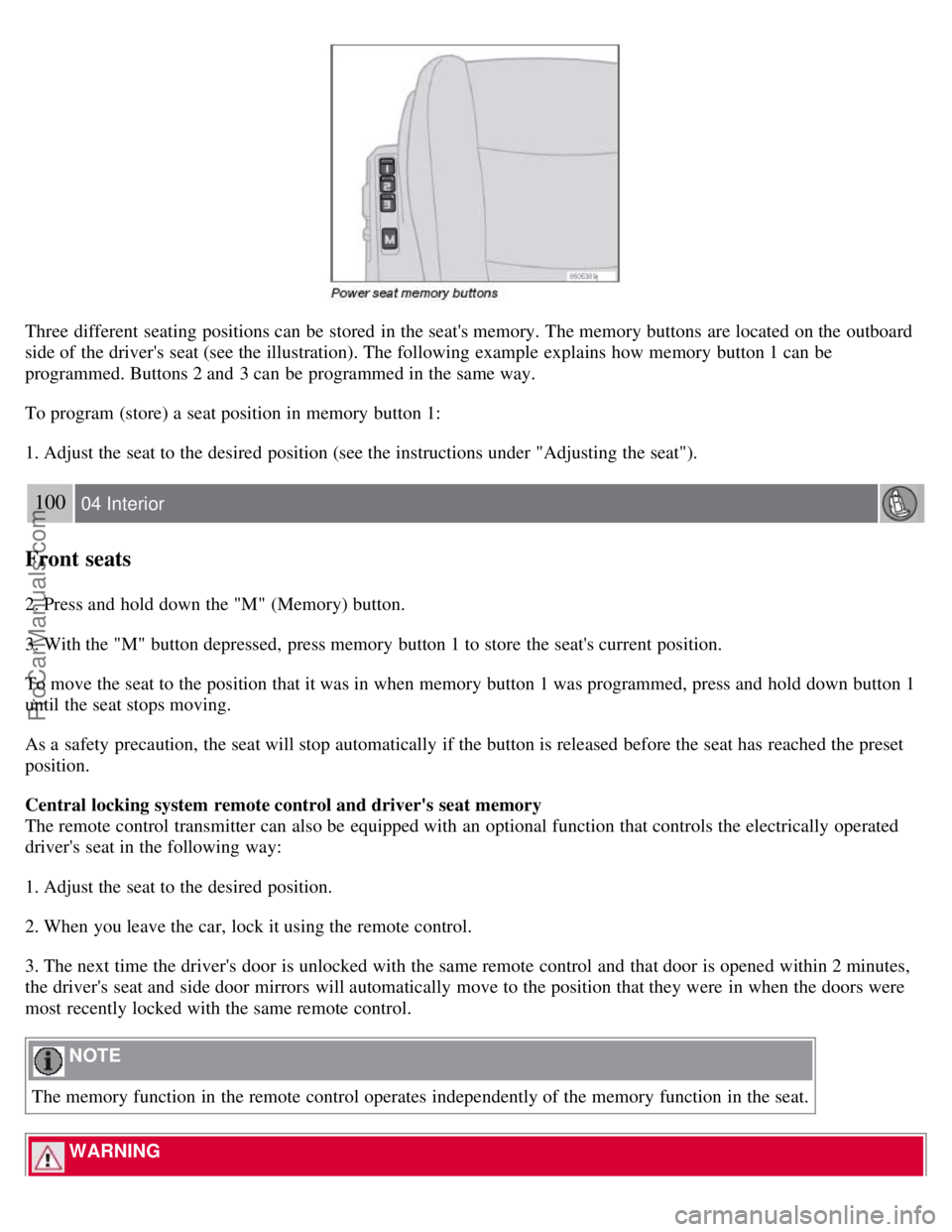
Three different seating positions can be stored in the seat's memory. The memory buttons are located on the outboard
side of the driver's seat (see the illustration). The following example explains how memory button 1 can be
programmed. Buttons 2 and 3 can be programmed in the same way.
To program (store) a seat position in memory button 1:
1. Adjust the seat to the desired position (see the instructions under "Adjusting the seat").
100 04 Interior
Front seats
2. Press and hold down the "M" (Memory) button.
3. With the "M" button depressed, press memory button 1 to store the seat's current position.
To move the seat to the position that it was in when memory button 1 was programmed, press and hold down button 1
until the seat stops moving.
As a safety precaution, the seat will stop automatically if the button is released before the seat has reached the preset
position.
Central locking system remote control and driver's seat memory
The remote control transmitter can also be equipped with an optional function that controls the electrically operated
driver's seat in the following way:
1. Adjust the seat to the desired position.
2. When you leave the car, lock it using the remote control.
3. The next time the driver's door is unlocked with the same remote control and that door is opened within 2 minutes,
the driver's seat and side door mirrors will automatically move to the position that they were in when the doors were
most recently locked with the same remote control.
NOTE
The memory function in the remote control operates independently of the memory function in the seat.
WARNING
ProCarManuals.com
Page 94 of 239
Raise the cover to switch on the light.
103 04 Interior
Storage compartments
104 04 Interior
Storage compartments
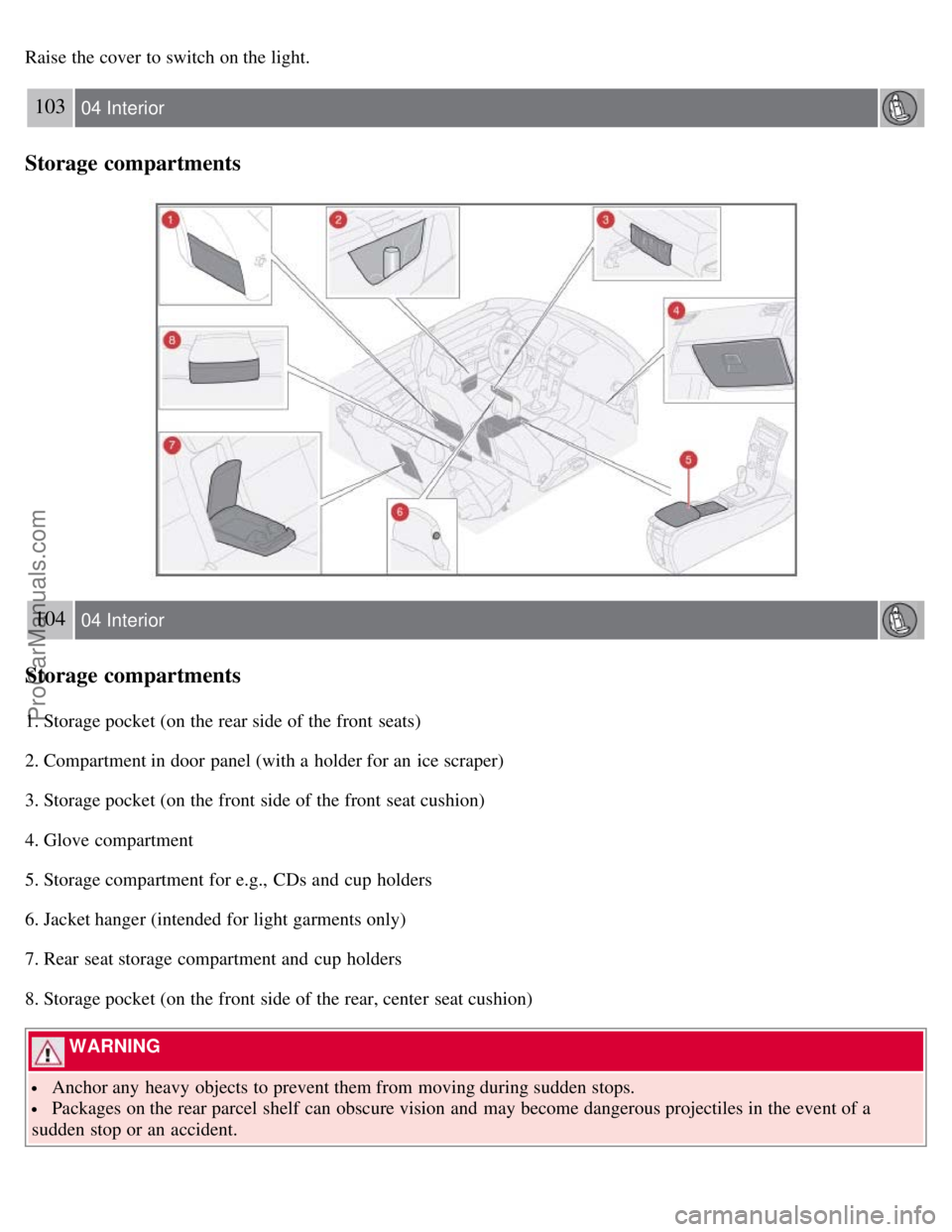
1. Storage pocket (on the rear side of the front seats)
2. Compartment in door panel (with a holder for an ice scraper)
3. Storage pocket (on the front side of the front seat cushion)
4. Glove compartment
5. Storage compartment for e.g., CDs and cup holders
6. Jacket hanger (intended for light garments only)
7. Rear seat storage compartment and cup holders
8. Storage pocket (on the front side of the rear, center seat cushion)
WARNING
Anchor any heavy objects to prevent them from moving during sudden stops.
Packages on the rear parcel shelf can obscure vision and may become dangerous projectiles in the event of a
sudden stop or an accident.
ProCarManuals.com
Page 99 of 239
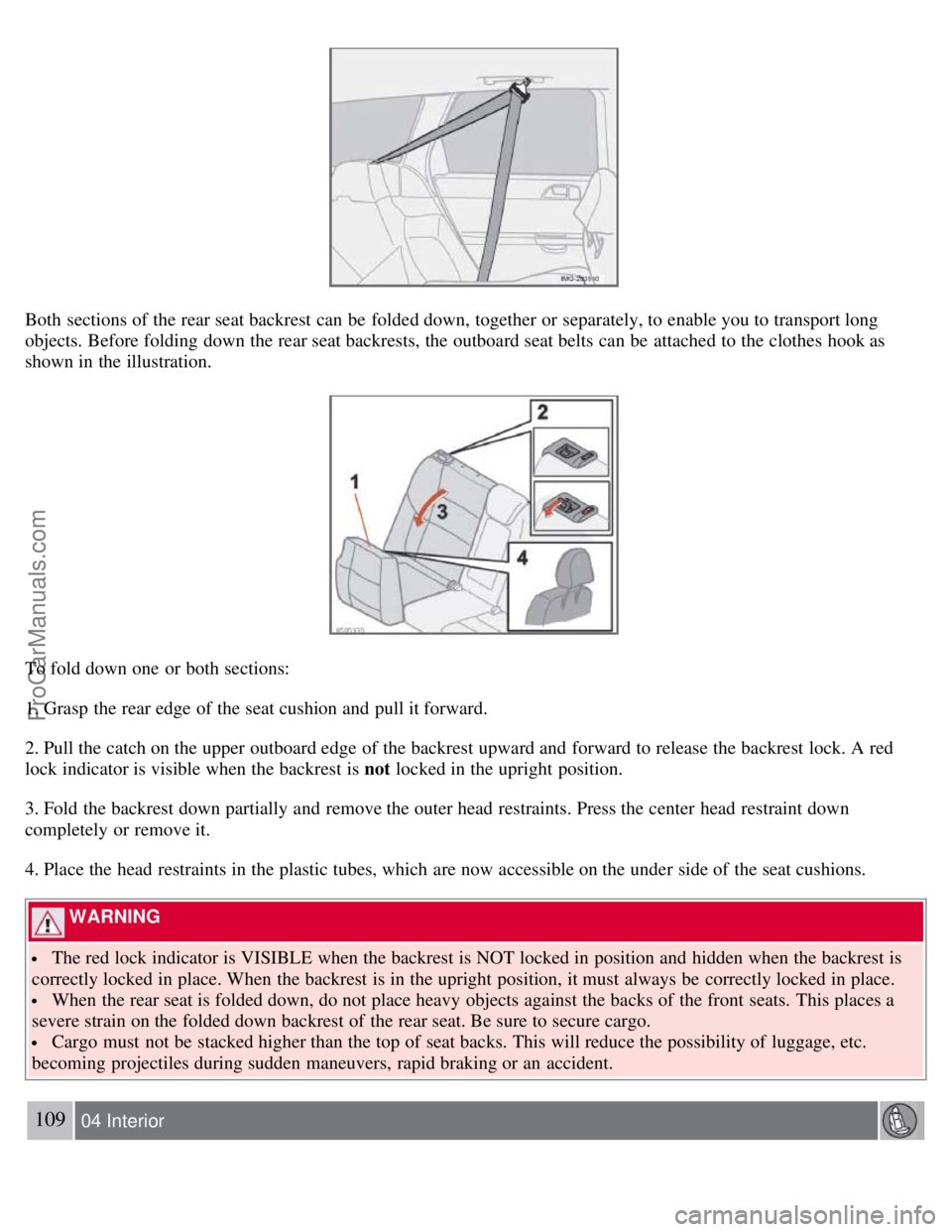
Both sections of the rear seat backrest can be folded down, together or separately, to enable you to transport long
objects. Before folding down the rear seat backrests, the outboard seat belts can be attached to the clothes hook as
shown in the illustration.
To fold down one or both sections:
1. Grasp the rear edge of the seat cushion and pull it forward.
2. Pull the catch on the upper outboard edge of the backrest upward and forward to release the backrest lock. A red
lock indicator is visible when the backrest is not locked in the upright position.
3. Fold the backrest down partially and remove the outer head restraints. Press the center head restraint down
completely or remove it.
4. Place the head restraints in the plastic tubes, which are now accessible on the under side of the seat cushions.
WARNING
The red lock indicator is VISIBLE when the backrest is NOT locked in position and hidden when the backrest is
correctly locked in place. When the backrest is in the upright position, it must always be correctly locked in place.
When the rear seat is folded down, do not place heavy objects against the backs of the front seats. This places a
severe strain on the folded down backrest of the rear seat. Be sure to secure cargo.
Cargo must not be stacked higher than the top of seat backs. This will reduce the possibility of luggage, etc.
becoming projectiles during sudden maneuvers, rapid braking or an accident.
109 04 Interior
ProCarManuals.com
Page 145 of 239
3. Align the hole in the ball holder with the one in the hitch assembly.
4. Slide the locking bolt through the hitch assembly/ball holder.
5. Insert the cotter pin in the hole at the end of the locking bolt.
Removing the ball holder
1. Remove the cotter pin from the locking bolt and slide the locking bolt out of the ball holder/hitch assembly.
2. Pull the ball holder out of the hitch assembly.
NOTE
A cover for the hitch assembly is also included in the kit.
157 06 Starting and driving
Transporting loads
Loading the car
Your vehicle's load-carrying capacity is affected by factors such as:
the number of passengers
tire inflation
the amount of optional or accessory equipment installed
the amount of cargo
See the chapter "Wheels and tires" for more detailed information.
Before loading the car, turn off the engine, and apply the parking brake when loading or unloading long objects. The
gear selector can be inadvertently knocked out of position by long cargo, causing the car to move.
Keep the following in mind when loading the vehicle:
Load the cargo in the cargo area against the rear seat backrest.
Load heavy cargo as low as possible.
Center wide loads.
Secure all cargo with restraining straps anchored to the load securing eyelets.
Cover sharp edges on the load.
Seats can be folded down and head restraints removed to extend the cargo compartment. See page 107.
WARNING
Remember that an object weighing 44 lbs (20 kg) produces a force of 2,200 lbs (1,000 kg) in a head-on collision
at 30 m.p.h. (50 km/h)!
When the rear backrest(s) are folded down, the vehicle should not be loaded to a level higher than 2 in. (5 cm)
below the upper edge of the rear side windows. Objects placed higher than this level could impede the function of
the Volvo Inflatable Curtain.
Load carriers (accessory)
ProCarManuals.com
Page 233 of 239
conserving electrical current130
maintenance209
replacement210
specifications256
Battery replacement, remote control114
Bi -Xenon® headlights59, 212, 214
Black box (Vehicle Event Data)200
Blind Spot Information System (BLIS)158 - 160
Booster cushion accessory40
Brake fluid207
Brake lights60
Bulbs
list of257
replacing211
C
Capacities, fluids252
Cargo area lighting, replacing218
Catalytic converter, three-way258
CD
changer241
changer menu (option)245
eject241
files with MP3 or WMA format242
menu245
pause242
player241
single player241
Central locking system, remote controls112
Changing oil205
Charge air cooler255
Child restraint anchors41, 42
Child restraints33
recalls and registration43
Child safety30
Child safety locks123
Clock setting77
Cold weather precautions129
Compact disc care243
Compass, rear view mirror (option)73
Convertible seats37
Coolant206
Courtesy lighting101
Crash mode29
Cup holders106
ProCarManuals.com
Page 234 of 239
D
Dimensions250
Disabling the passenger's side front airbag21
Display, instrument panel49
Door open warning55
Driving through water129
DSTC, stability system53
Dynamic Stability and Traction Control (DSTC)149
E
Economical driving128
Electrical current - conserving130
Electrical system256
Electronic Brake Force Distribution (EBD)148
Electronic Climate Control (ECC) - option92
Emergency brake lights60
Emission inspection readiness202
Engine oil
changing205
specifications253
Engine specifications255
Environment7
Equalizer, audio system233
F
Federal Clean Air Act200
Floor mats placing correctly137
FM1/FM2 menu245
Fog lights
front (option)60
rear53, 60
Front airbags18-19, 21
Front fog light, replacing216
Front seats, manual adjustment98
Front seats, power99
Fuel filler cap6
Fuel filler door6, 133
Fuel filler door, unlocking60
Fuel level warning light53
Fuel requirements132
Fuel system255
Fuses, replacing220
G
Gasoline131
Geartronic (manual shifting)141
General information86
ProCarManuals.com
Page 235 of 239
Generator254
Generator warning light54
Glossary of tire terminology174
Glove compartment104
locking123
H
Hazard warning flashers69
Head restraints, rear seat107
Headlight housing, removing212
Headlights Active Bi -Xenon®59
Headlights, high and low beams62
High beam bulb, replacing213
High beam flash62
High beam indicator50
Home safe lighting62, 78
HomeLink® Universal Transceiver80
Hood, opening203
I
Ignition switch135
Immobilizer (start inhibitor)112, 136
Indicator and warning symbols49, 53
Infant seats35
Inflatable Curtain25
Inflation pressure table
Canadian models173
US models172
Information display49
Information display, messages57
Information symbol49, 51
Inspection readiness202
Instrument overview46
Instrument panel49
Instrument panel lighting60
iPOD connector (audio system)232
ISOFIX/LATCH anchors41
J
Jack, positioning correctly184
Jacket hanger104
Jump starting153
K
Key blade115
Keyless drive
location of antennas (pacemaker warning)121
starting the vehicle with138
ProCarManuals.com
Page 237 of 239
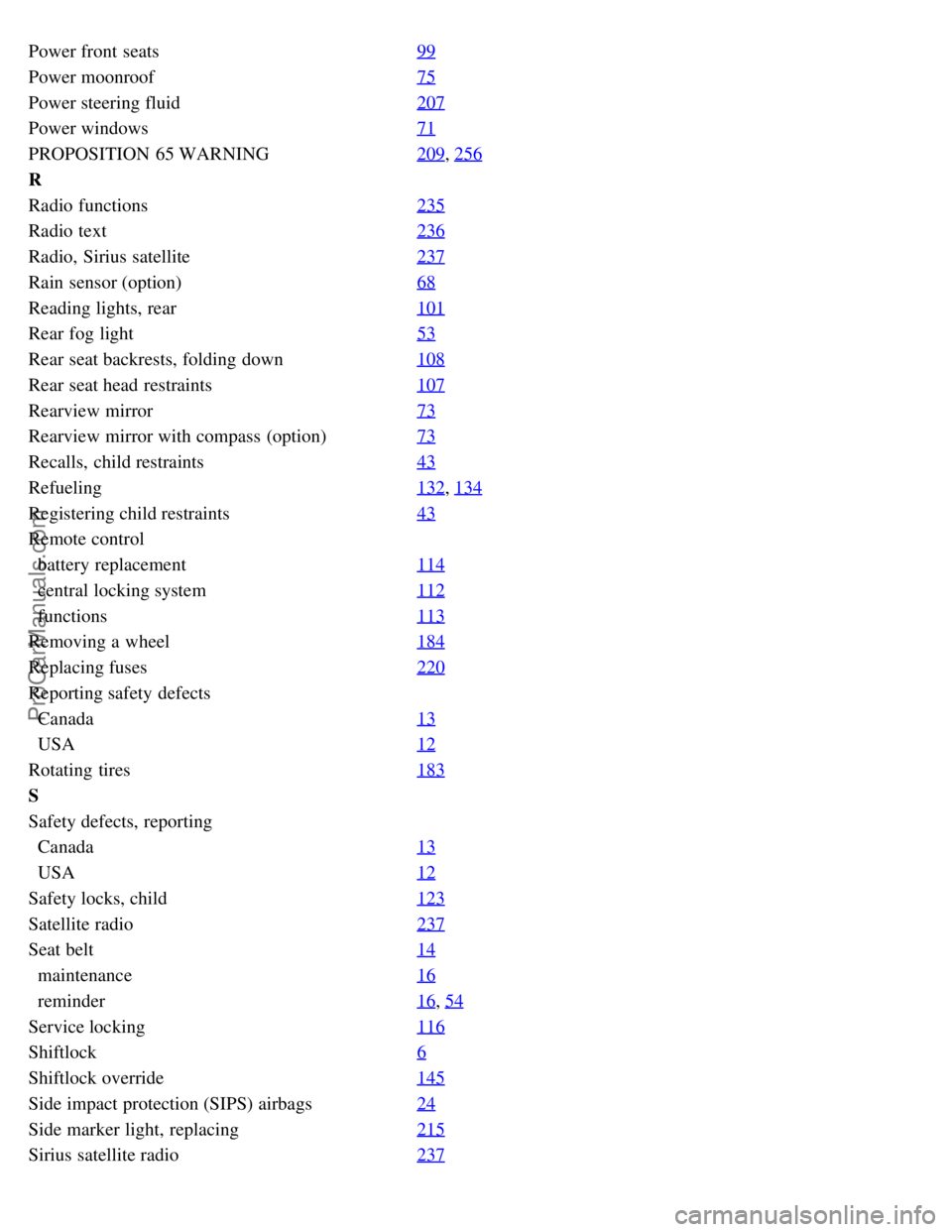
Power front seats99
Power moonroof75
Power steering fluid207
Power windows71
PROPOSITION 65 WARNING209, 256
R
Radio functions235
Radio text236
Radio, Sirius satellite237
Rain sensor (option)68
Reading lights, rear101
Rear fog light53
Rear seat backrests, folding down108
Rear seat head restraints107
Rearview mirror73
Rearview mirror with compass (option)73
Recalls, child restraints43
Refueling132, 134
Registering child restraints43
Remote control
battery replacement114
central locking system112
functions113
Removing a wheel184
Replacing fuses220
Reporting safety defects
Canada13
USA12
Rotating tires183
S
Safety defects, reporting
Canada13
USA12
Safety locks, child123
Satellite radio237
Seat belt14
maintenance16
reminder16, 54
Service locking116
Shiftlock6
Shiftlock override145
Side impact protection (SIPS) airbags24
Side marker light, replacing215
Sirius satellite radio237
ProCarManuals.com