display VOLVO S40 2008 Repair Manual
[x] Cancel search | Manufacturer: VOLVO, Model Year: 2008, Model line: S40, Model: VOLVO S40 2008Pages: 239, PDF Size: 5.94 MB
Page 218 of 239
241 10 Audio
CD player/CD changer (option)
CD function controls
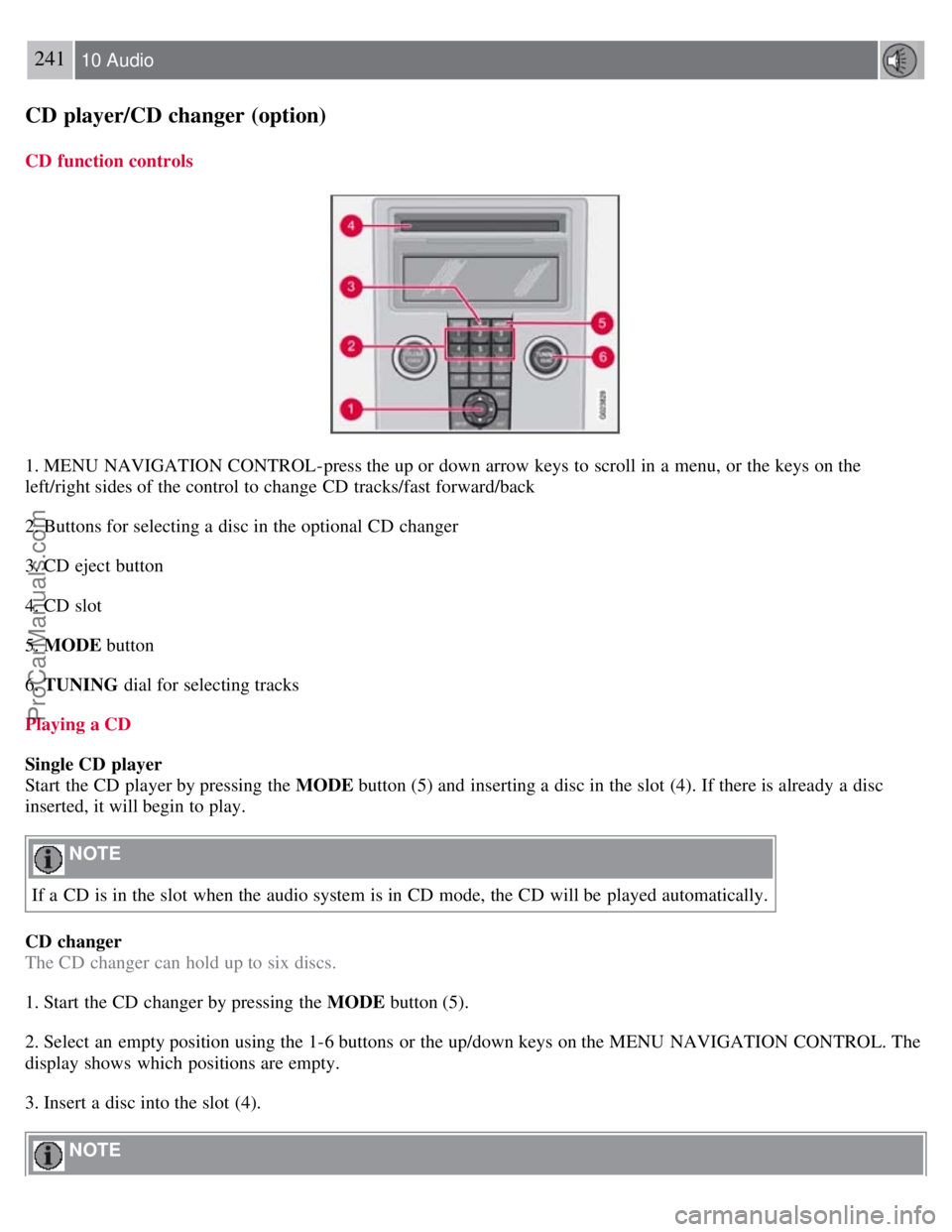
1. MENU NAVIGATION CONTROL-press the up or down arrow keys to scroll in a menu, or the keys on the
left/right sides of the control to change CD tracks/fast forward/back
2. Buttons for selecting a disc in the optional CD changer
3. CD eject button
4. CD slot
5. MODE button
6. TUNING dial for selecting tracks
Playing a CD
Single CD player
Start the CD player by pressing the MODE button (5) and inserting a disc in the slot (4). If there is already a disc
inserted, it will begin to play.
NOTE
If a CD is in the slot when the audio system is in CD mode, the CD will be played automatically.
CD changer
The CD changer can hold up to six discs.
1. Start the CD changer by pressing the MODE button (5).
2. Select an empty position using the 1-6 buttons or the up/down keys on the MENU NAVIGATION CONTROL. The
display shows which positions are empty.
3. Insert a disc into the slot (4).
NOTE
ProCarManuals.com
Page 219 of 239
Ensure that INSERT DISC is displayed before inserting a disc.
If a CD position in the changer containing a disc is selected, and the audio system is in CD mode when it is
switched on, the CD will play automatically.
CD eject
Eject from Single CD player
Press the eject button (3) to eject the disc.
Eject from CD changer
This function makes it possible to eject a single disc, or to eject all of the discs in the changer.
Press the eject button (3) briefly to eject the disc that is currently playing.
A longer press (more than two seconds) starts the process of ejecting all of the discs in the changer.
242 10 Audio
CD player/CD changer (option)
NOTE
The EJECT ALL function can only be used while the vehicle is at a standstill and will be cancelled if the vehicle
begins to move.
For reasons of traffic safety, the ejected CD must be removed within 12 seconds or it will be automatically drawn
back into the slot and the CD player will enter pause mode. Press the CD button to restart the disc.
CD Pause
When the audio system volume is turned off completely, the CD player will pause and will resume playing when the
volume is turned up again.
Audio files
In addition to playing normal music CDs, the CD player/changer can also play discs containing files in mp3 or wma
format.
NOTE
Certain discs that are copy protected cannot be read by the player.
When a disc with audio files is inserted in the player, the player scans the disc's folders before it begins playing the
files. The length of time that this takes depends on the quality of the disc.
Navigating the disc and playing tracks
If a disc with audio files is in the CD player, press ENTER to display a list of folders on the disc. Use the up and
down arrows in the navigation control (see the illustration on page 241
) to move among the folders on the disc. Audio
files have
the symbol and folders containing these files have the symbol. Press ENTER to play a selected
folder or a file.
When the music file has been played, the player will continue to play the rest of the files in the current folder. When
all of the files in the folder have been played, the player will automatically go to the next folder and play the files in it.
Press the left or right arrow key on the navigation control if the entire name of the current track does not fit in the
display.
ProCarManuals.com
Page 221 of 239
CD changer only-you can only select the next random track/file on the current disc.
Press the EXIT button to stop random play. The random function is automatically deactivated when another disc is
selected.
Disc text (CD changer only)
Certain CDs contain information about the disc, such as the titles of the tracks, etc. This information can be shown in
the display by activating the DISC TEXT function.
1. Press MENU . Select the menu for relevant sound source and press ENTER .
2. Select DISC TEXT in the menu and press ENTER .
3. If information is stored on the disc, it will now appear in the display.
To deactivate this function, select DISC TEXT in the menu and press ENTER.
Scan
This function plays the first 10 seconds of each track/file on the CD.
1. Press SCAN .
2. Press EXIT or SCAN to stop the scan function and listen to an entire track/file.
CD eject
Single CD player
Press the eject button (3) to eject the disc.
CD changer
This function makes it possible to eject a single disc, or to eject all of the discs in the changer.
Press the eject button (3) briefly to eject the disc that is currently playing.
A longer press (more than two seconds) starts the process of ejecting all of the discs in the changer.
NOTE
The Eject all function can only be used while the vehicle is at a standstill and will be cancelled if the vehicle
begins to move.
For reasons of traffic safety, the ejected CD must be removed within 12 seconds or it will be automatically drawn
back into the slot and the CD player will enter pause mode. Press the CD button to restart the disc.
Compact disc care
Keep the following in mind when playing/handling compact discs
Do not put tape or labels on the disc itself. They could become stuck in the player.
CDR discs can cause listening problems due to the quality of the disc or recording equipment used.
244 10 Audio
ProCarManuals.com
Page 234 of 239
D
Dimensions250
Disabling the passenger's side front airbag21
Display, instrument panel49
Door open warning55
Driving through water129
DSTC, stability system53
Dynamic Stability and Traction Control (DSTC)149
E
Economical driving128
Electrical current - conserving130
Electrical system256
Electronic Brake Force Distribution (EBD)148
Electronic Climate Control (ECC) - option92
Emergency brake lights60
Emission inspection readiness202
Engine oil
changing205
specifications253
Engine specifications255
Environment7
Equalizer, audio system233
F
Federal Clean Air Act200
Floor mats placing correctly137
FM1/FM2 menu245
Fog lights
front (option)60
rear53, 60
Front airbags18-19, 21
Front fog light, replacing216
Front seats, manual adjustment98
Front seats, power99
Fuel filler cap6
Fuel filler door6, 133
Fuel filler door, unlocking60
Fuel level warning light53
Fuel requirements132
Fuel system255
Fuses, replacing220
G
Gasoline131
Geartronic (manual shifting)141
General information86
ProCarManuals.com
Page 235 of 239
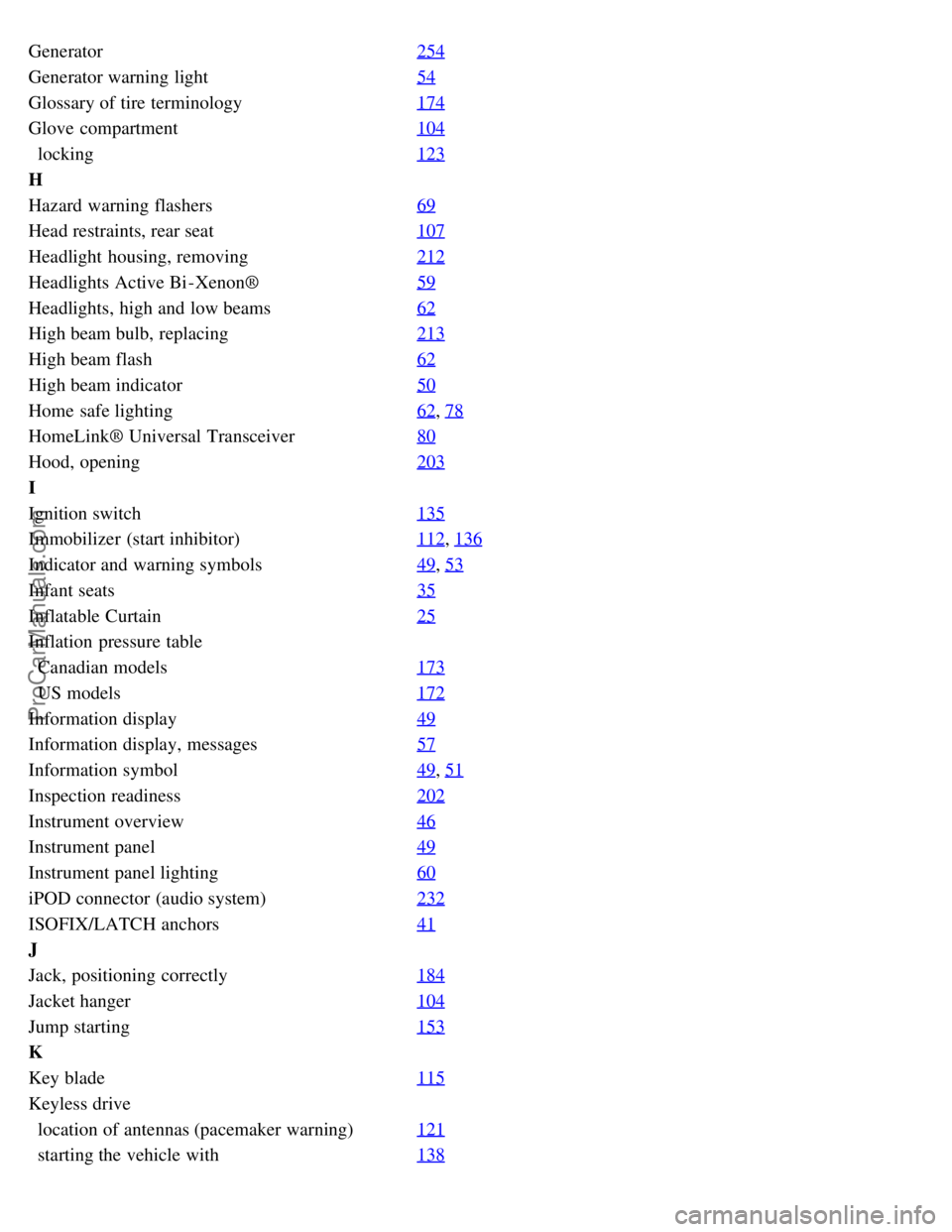
Generator254
Generator warning light54
Glossary of tire terminology174
Glove compartment104
locking123
H
Hazard warning flashers69
Head restraints, rear seat107
Headlight housing, removing212
Headlights Active Bi -Xenon®59
Headlights, high and low beams62
High beam bulb, replacing213
High beam flash62
High beam indicator50
Home safe lighting62, 78
HomeLink® Universal Transceiver80
Hood, opening203
I
Ignition switch135
Immobilizer (start inhibitor)112, 136
Indicator and warning symbols49, 53
Infant seats35
Inflatable Curtain25
Inflation pressure table
Canadian models173
US models172
Information display49
Information display, messages57
Information symbol49, 51
Inspection readiness202
Instrument overview46
Instrument panel49
Instrument panel lighting60
iPOD connector (audio system)232
ISOFIX/LATCH anchors41
J
Jack, positioning correctly184
Jacket hanger104
Jump starting153
K
Key blade115
Keyless drive
location of antennas (pacemaker warning)121
starting the vehicle with138
ProCarManuals.com