lights VOLVO S40 2009 Owner´s Manual
[x] Cancel search | Manufacturer: VOLVO, Model Year: 2009, Model line: S40, Model: VOLVO S40 2009Pages: 286, PDF Size: 7.08 MB
Page 84 of 286
02 Instruments and controlsPersonal settings
0284
•
Global (All doors) – unlocks all doors and
the trunk with one press on the remote
control.
•
Two Step (Two-stage unlocking) – This
alternative unlocks the driver's door with
one press on the remote control. A second
press unlocks the passenger's door and
the trunk
Automatically folding the door mirrorsThe setting makes it possible to automatically
fold the door mirrors in or out when the vehicle
is locked or unlocked. See page 79.Operating side windowsThe following alternative can be selected for
opening all side windows at the same time by
pressing and holding the Unlock switch in
either of the front doors (see page 127 for
additional information)
1
NOTE
The ignition key must be in position I or
higher (see page 143) before all side win-
dows can be opened using the switches in
the front doors.•
Auto open all windows On/Off
Temporarily turning off the alarm
sensor(s)The alarm sensors can be temporarily turned
off (if, for example, a person or a pet remains
in the vehicle when the doors are locked from
outside with the remote control). There are two
alternatives:
Activate once
and
Ask on exit
,
see page 118 and 130 .
Approach lightingThis alternative determines the length of time
for which the car's lights will remain on when
the Approach light button on the central lock-
ing system's remote control is pressed. Inter-
vals of 30/60/90 seconds may be selected, see
teh section "Remote control functions" for
more information.Home safe lightingThis alternative determines the length of time
for which the car's lights will remain on when
the high beam lever on the steering column is
pulled toward the wheel with the ignition
switched off. Intervals of 30/60/90 seconds
may be selected, see page 66 for information
on using this function.
Information•
VIN number – The VIN (Vehicle Identifica-
tion Number) is the car's unique identity
number.
•
Number of Keys – the number of keys reg-
istered for the car is displayed here.
Climate functions•
Blower speed in AUTO mode – the blower
speed can be set to AUTO mode in models
equipped with ECC. Choose between
"Low", "Normal" and "High".
•
Timer for recirculation – when the timer is
active, the air recirculates in the car for 3–
12 minutes depending on the ambient tem-
perature. Select On/Off depending on
whether the recirculation timer is to be
active or not.
Keyless locking and unlocking (option as
available)The following alternatives can be selected for
locking and unlocking the doors and trunk:•
All doors – all doors are locked or unlocked
at the same time.
•
Doors on the same side – front and rear
doors on the same side are unlocked
together.
1This menu alternative also makes it possible to open all side windows by pressing and holding the Unlock button on the remote control for several seconds.
Page 96 of 286
03 ClimateManual climate control
0396
TimerThe timer function minimizes the risk of mist-
ing, or stale air when the recirculation function
is selected, see page 83 for information on set-
ting the recirculation timer. Recirculation is
always disengaged when you select Defroster
(3).3. Defroster
Directs airflow to the wind-
shield and side windows and
increases blower speed.
When the defroster is activated:•
Air flows to the windows at high blower
speed.
•
The LED in the defroster button lights up
when this function is activated. The air con-
ditioning system is controlled to provide
maximum air dehumidification.
•
The air conditioning is automatically
switched on (can be switched off by press-
ing button 5).
4. Airflow controls
Press one of the three buttons
in the illustration to activate
the selected airflow. A symbol
in the display above the cli-
mate control panel and a lit
LED in the selected button
indicate that the manual func-
tion has been selected. With manually selected
airflow both warm and cool air can be selected.
The desired temperature is selected using con-
trol 9.
5. A/C – On or Off
ON: The air conditioning sys-
tem is engaged when the ON
light is lit.
OFF: The system is disen-
gaged when the OFF lights
up.
If Defroster (3) is activated the air conditioning
is always engaged.6/7. Heated front seats (option)
Maximum heating: Press the
button once – both LEDs light
up.
Reduced heating: Press the button a second
time – one LED lights up.
Seat heating off: Press the button a third time
– no LEDs are lit.8. Heated rear window and door mirrors
Press to defrost the rear win-
dow and door mirrors.
The rear window and door
mirrors are defrosted simulta-
neously if the switch is
pressed once. The defrost
function is active if the LED in the switch is illu-
minated.
•
The function can be switched off manually
by pressing the button,
•
The defrost function switches off automat-
ically after 12–20 minutes, depending on
the outside temperature.NOTE
On certain markets, the defrost function
may remain on longer than 20 minutes in
cold weather to help keep the rear window
free from ice or condensation.
Page 99 of 286
03 Climate
Electronic Climate Control (ECC) – option
03``99
3. Recirculation
This function can be used to
shut out exhaust fumes,
smoke, etc from the passen-
ger compartment. The air in
the passenger compartment
is then recirculated, i.e. no air
from outside the car is taken
into the car when this function is activated.
If the air in the car recirculates for too long,
there is a risk of condensation forming on the
insides of the windows, especially in winter.TimerThe timer function minimizes the risk of fogging
or stale air when the recirculation function is
selected, see page 83 for information on set-
ting the recirculation timer.
NOTE
Recirculation is always disengaged if the
defroster button is engaged to clear ice or
condensation from the side windows.
4. Defroster
Directs airflow to the wind-
shield and side windows and
increases blower speed.
When the defroster is acti-
vated:
•
Air flows to the windows at high blower
speed.
•
The LED in the defroster button lights up
when this function is activated. The air con-
ditioning system is controlled to provide
maximum air dehumidification.
•
The air conditioning is automatically
switched on (can be switched off by press-
ing button 6).
The air is not recirculated.
5. Airflow controls
Press one of the three buttons
in the illustration to activate
the selected airflow. A symbol
in the display above the cli-
mate control panel and a lit
LED in the selected button
indicate that the manual func-
tion has been selected. With manually selected
airflow both warm and cool air can be selected.
See also the table on page 99.
6. Air conditioning On/Off
ON: The air conditioning sys-
tem is engaged when the ON
light is lit and is controlled
automatically by the system
to maintain the selected tem-
perature.
OFF: The system is disengaged when the
OFF lights up
WhenOFF is selected and the OFF LED is lit,
the air conditioning system is deactivated.
Other functions are still controlled automati-
cally.
When Defroster (4) is selected, the air condi-
tioning system is activated for maximum dehu-
midifying.7 and 8. Heated front seats (option)
Maximum heating: Press the
button once – both LEDs light
up.
Reduced heating: Press the
button a second time – one
LED lights up.
Seat heating off: Press the button a third time
– no LEDs are lit.
Page 107 of 286
04 InteriorInterior lighting
04``107 Interior lighting
G020201
Front courtesy lights and reading lights
Front driver's side reading light, on/offCourtesy lightingFront passenger's side reading light, on/off
The front and rear reading lights can be acti-
vated when the ignition key is position I or II, or
when the engine is running. The front reading
lights are switched on and off by pressing but-
tons (1) or (3).
The courtesy lighting (2) can be set to three
positions:
•
Press the left side of the button: the interior
courtesy lighting turns on.
•
Neutral position: the interior courtesy light-
ing comes on when a door is opened, and
is switched off 10 seconds after the door is
closed.
•
Press the right side of the button: the inte-
rior courtesy lighting stays off.
Courtesy lighting – automatic functionThe interior lighting has a built-in automatic
function that switches on the courtesy lighting
for 30 seconds when:•
the car is unlocked from the outside using
the key or remote control
•
the engine is switched off and the ignition
key is turned to the 0 position.
The courtesy lighting lights up or remains on
for 5 minutes when:
•
one of the doors is opened and left open.
•
the courtesy lighting has not been
switched off (the right side of button 2
depressed).
The automatic lighting goes out when:
•
the engine is started
•
the car is locked from the outside using the
key or remote control.If the courtesy lighting is not switched off man-
ually, it will be turned off automatically
5 minutes after the engine has been switched
off.
Footwell lightingThe footwell (and courtesy lighting) comes on
or goes off when one of the side doors is
opened or closed.Rear reading lights
G020763
Rear reading lights (in ceiling)
Rear driver's side reading light, on/offRear passenger's side reading light, on/off
Page 108 of 286
04 InteriorInterior lighting
04108
The rear reading lights can be switched on or
off by pressing the respective buttons, and
function if the ignition key is in positions I,II, or
if the engine is running.
The courtesy lighting can be switched on or off
within 30 minutes after the engine has been
switched off, or after a door has been opened
or closed.
These lights switch off automatically 5 minutes
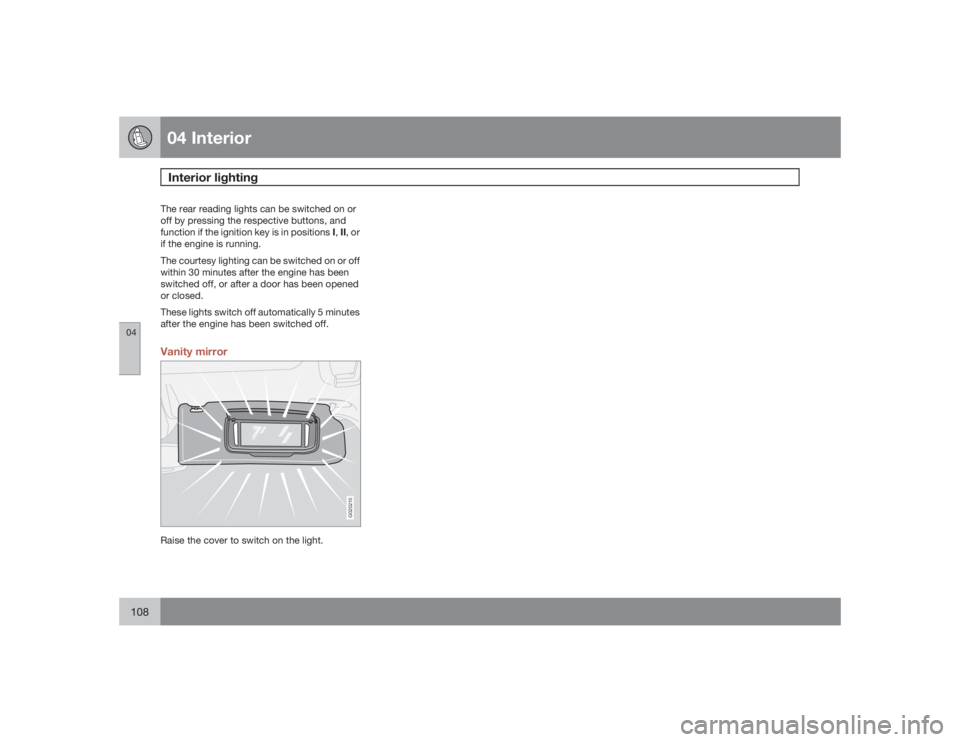
after the engine has been switched off.Vanity mirror
G020210
Raise the cover to switch on the light.
Page 119 of 286
05 Locks and alarm
Remote control and key blade
05``119
NOTE
The car can also be locked if a door is open
(does not apply to vehicles with the optional
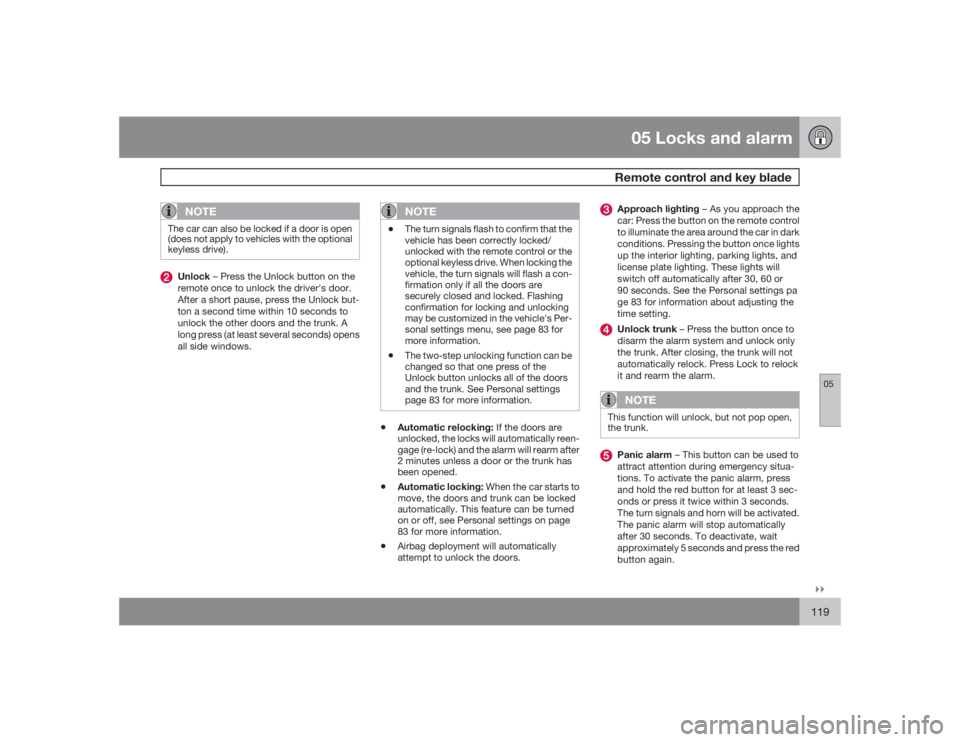
keyless drive).Unlock – Press the Unlock button on the
remote once to unlock the driver's door.
After a short pause, press the Unlock but-
ton a second time within 10 seconds to
unlock the other doors and the trunk. A
long press (at least several seconds) opens
all side windows.
NOTE
•
The turn signals flash to confirm that the
vehicle has been correctly locked/
unlocked with the remote control or the
optional keyless drive. When locking the
vehicle, the turn signals will flash a con-
firmation only if all the doors are
securely closed and locked. Flashing
confirmation for locking and unlocking
may be customized in the vehicle's Per-
sonal settings menu, see page 83 for
more information.
•
The two-step unlocking function can be
changed so that one press of the
Unlock button unlocks all of the doors
and the trunk. See Personal settings
page 83 for more information.
•
Automatic relocking: If the doors are
unlocked, the locks will automatically reen-
gage (re-lock) and the alarm will rearm after
2 minutes unless a door or the trunk has
been opened.
•
Automatic locking: When the car starts to
move, the doors and trunk can be locked
automatically. This feature can be turned
on or off, see Personal settings on page
83 for more information.
•
Airbag deployment will automatically
attempt to unlock the doors.
Approach lighting – As you approach the
car: Press the button on the remote control
to illuminate the area around the car in dark
conditions. Pressing the button once lights
up the interior lighting, parking lights, and
license plate lighting. These lights will
switch off automatically after 30, 60 or
90 seconds. See the Personal settings pa
ge 83 for information about adjusting the
time setting.Unlock trunk – Press the button once to
disarm the alarm system and unlock only
the trunk. After closing, the trunk will not
automatically relock. Press Lock to relock
it and rearm the alarm.NOTE
This function will unlock, but not pop open,
the trunk.Panic alarm – This button can be used to
attract attention during emergency situa-
tions. To activate the panic alarm, press
and hold the red button for at least 3 sec-
onds or press it twice within 3 seconds.
The turn signals and horn will be activated.
The panic alarm will stop automatically
after 30 seconds. To deactivate, wait
approximately 5 seconds and press the red
button again.
Page 120 of 286
05 Locks and alarmRemote control and key blade
05120
NOTE
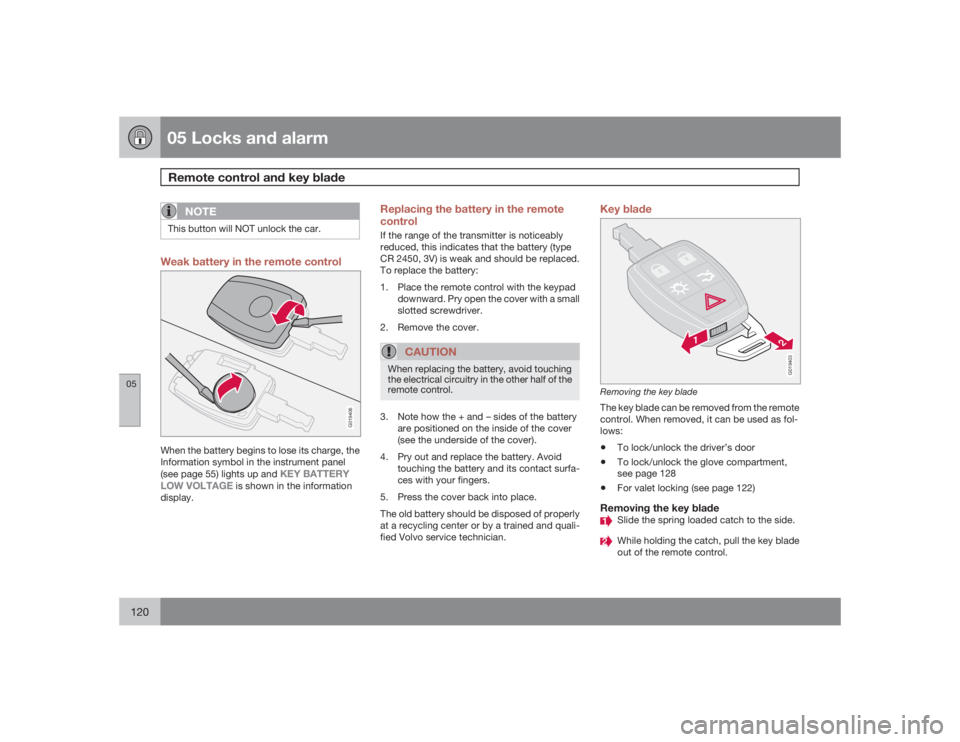
This button will NOT unlock the car.Weak battery in the remote control
G019406
When the battery begins to lose its charge, the
Information symbol in the instrument panel
(see page 55) lights up and
KEY BATTERY
LOW VOLTAGE
is shown in the information
display.
Replacing the battery in the remote
controlIf the range of the transmitter is noticeably
reduced, this indicates that the battery (type
CR 2450, 3V) is weak and should be replaced.
To replace the battery:
1. Place the remote control with the keypad
downward. Pry open the cover with a small
slotted screwdriver.
2. Remove the cover.
CAUTION
When replacing the battery, avoid touching
the electrical circuitry in the other half of the
remote control.3. Note how the + and – sides of the battery
are positioned on the inside of the cover
(see the underside of the cover).
4. Pry out and replace the battery. Avoid
touching the battery and its contact surfa-
ces with your fingers.
5. Press the cover back into place.
The old battery should be disposed of properly
at a recycling center or by a trained and quali-
fied Volvo service technician.
Key blade
G019403
Removing the key bladeThe key blade can be removed from the remote
control. When removed, it can be used as fol-
lows:•
To lock/unlock the driver’s door
•
To lock/unlock the glove compartment,
see page 128
•
For valet locking (see page 122)
Removing the key blade
Slide the spring loaded catch to the side.While holding the catch, pull the key blade
out of the remote control.
Page 139 of 286
06 Starting and driving
General information
06
139
•
Check state of the battery's charge.
•
Examine tires carefully (the spare tire as
well), and replace those that are worn.
Check tire pressures.
•
The brakes, front wheel alignment, and
steering gear should be checked by your
Volvo retailer only.
•
Check all lights, including high beams.
•
Reflective warning triangles are legally
required in some states/provinces.
•
Have a word with your Volvo retailer if you
intend to drive in countries where it may be
difficult to obtain the correct fuel.
•
Consider your destination. If you will be
driving through an area where snow or ice
are likely to occur, consider snow tires.
Page 143 of 286
06 Starting and driving
Ignition switch
06
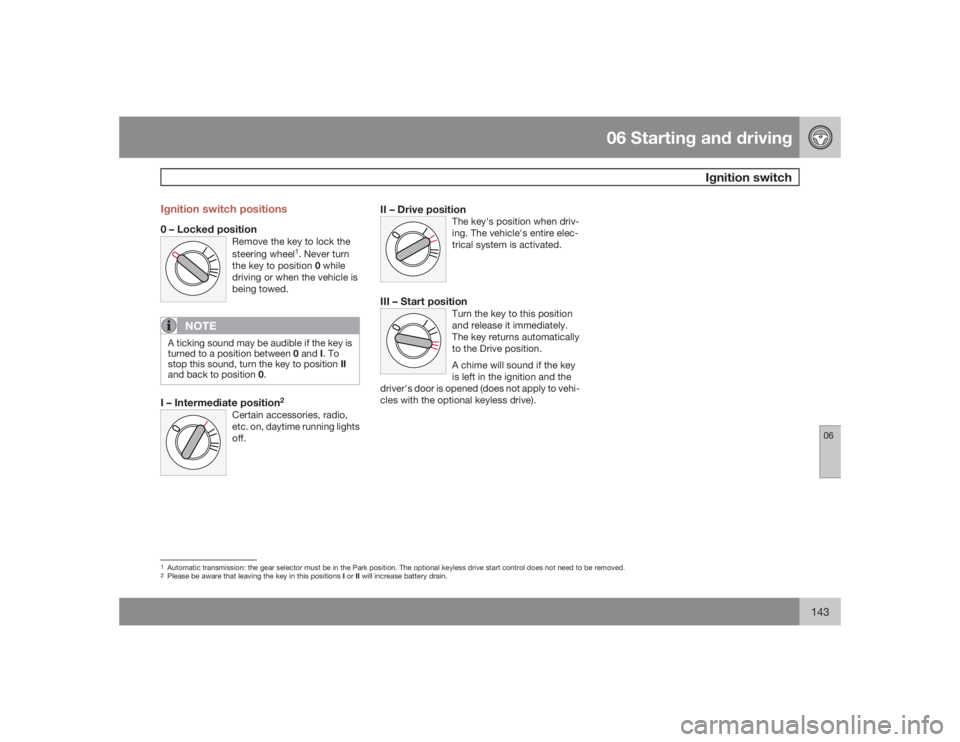
143 Ignition switch positions
0 – Locked position
Remove the key to lock the
steering wheel
1. Never turn
the key to position 0 while
driving or when the vehicle is
being towed.
NOTE
A ticking sound may be audible if the key is
turned to a position between 0 and I. To
stop this sound, turn the key to position II
and back to position 0.I – Intermediate position
2
Certain accessories, radio,
etc. on, daytime running lights
off.
II – Drive position
The key's position when driv-
ing. The vehicle's entire elec-
trical system is activated.
III – Start position
Turn the key to this position
and release it immediately.
The key returns automatically
to the Drive position.
A chime will sound if the key
is left in the ignition and the
driver's door is opened (does not apply to vehi-
cles with the optional keyless drive).
1Automatic transmission: the gear selector must be in the Park position. The optional keyless drive start control does not need to be removed.2Please be aware that leaving the key in this positions I or II will increase battery drain.
Page 154 of 286
06 Starting and drivingBrake system
06154
For optimal ABS braking effect:1. Press down on the brake pedal with full
force. The pedal will pulsate.
2. Steer the vehicle in the direction of travel
and keep the brake pedal depressed.Electronic Brake Force Distribution
(EBD)EBD is an integrated part of the ABS system.
EBD regulates the hydraulic pressure to the
rear brakes to help provide optimal braking
capacity.
The switching of the ABS modulator will be
audible and the brake pedal will pulsate during
braking. Please be aware that ABS does not
increase the absolute braking potential of the
vehicle. While control will be enhanced, ABS
will not shorten stopping distances on slippery
surfaces.
If the warning lamp lights up there is a mal-
function of the ABS system (the standard brak-
ing system will still function) and the vehicle
should be driven cautiously to a trained and
qualified Volvo service technicianfor inspec-
tion.
WARNING
If the BRAKES and ABS warning symbols
light at the same time, there may be a prob-
lem in the brake system. If the brake fluid
level is normal in these circumstances, drive
carefully to a trained and qualified Volvo
service technician to have the brake system
checked.Emergency Brake Assistance – EBAEBA is designed to provide full brake effect
immediately in the event of sudden, hard brak-
ing. The system is activated by the speed with
which the brake pedal is depressed.
When the EBA system is activated, the brake
pedal will go down and pressure in the brake
system immediately increases to the maximum
level. Maintain full pressure on the brake pedal
in order to utilize the system completely. EBA
is automatically deactivated when the brake
pedal is released.
NOTE
•
When the EBA system is activated, the
brake pedal will go down and pressure
in the brake system immediately increa-
ses to the maximum level. You must
maintain full pressure on the brake
pedal in order to utilize the system com-
pletely. There will be no braking effect if
the pedal is released. EBA is automati-
cally deactivated when the brake pedal
is released.
•
When the vehicle has been parked for
some time, the brake pedal may sink
more than usual when the engine is
started. This is normal and the pedal will
return to its usual position when it is
released.