CD player VOLVO S40 2009 Owner´s Manual
[x] Cancel search | Manufacturer: VOLVO, Model Year: 2009, Model line: S40, Model: VOLVO S40 2009Pages: 286, PDF Size: 7.08 MB
Page 7 of 286
Contents
7
09
09 Maintenance and servicingVolvo maintenance.................................. 210
Maintaining your car............................... 212
Hood.......................................................214
Engine compartment............................... 215
Engine oil................................................ 216
Fluids....................................................... 218
Wiper blades........................................... 220
Battery..................................................... 221
Replacing bulbs...................................... 223
Fuses....................................................... 230
10
10 AudioAudio functions....................................... 240
Radio functions....................................... 244
CD player/CD changer............................ 249
Audio menu............................................. 253
BluetoothŸ hands-free connection......... 254
11
11 SpecificationsLabel information.................................... 262
Dimensions and weights......................... 264
Fuel, oils, and fluids................................ 267
Engine oil................................................ 269
Engine specifications.............................. 270
Electrical system..................................... 272
Three-way catalytic converter................. 274
Volvo programs....................................... 275
Page 238 of 286
G020924
238
Audio functions..................................................................................... 240
Radio functions..................................................................................... 244
CD player/CD changer.......................................................................... 249
Audio menu........................................................................................... 253
BluetoothŸ hands-free connection....................................................... 254
Page 240 of 286
10 AudioAudio functions
10240
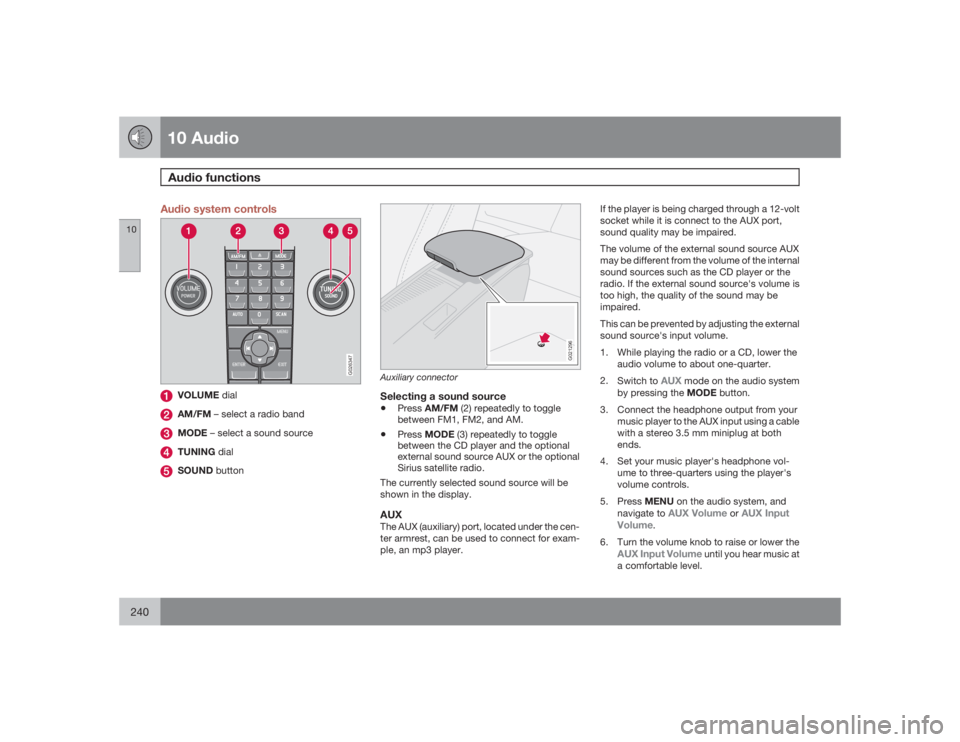
Audio system controls
G026347
VOLUME dialAM/FM – select a radio bandMODE – select a sound sourceTUNING dialSOUND button
G021296
Auxiliary connectorSelecting a sound source•
PressAM/FM (2) repeatedly to toggle
between FM1, FM2, and AM.
•
PressMODE (3) repeatedly to toggle
between the CD player and the optional
external sound source AUX or the optional
Sirius satellite radio.
The currently selected sound source will be
shown in the display.
AUXThe AUX (auxiliary) port, located under the cen-
ter armrest, can be used to connect for exam-
ple, an mp3 player.If the player is being charged through a 12-volt
socket while it is connect to the AUX port,
sound quality may be impaired.
The volume of the external sound source AUX
may be different from the volume of the internal
sound sources such as the CD player or the
radio. If the external sound source's volume is
too high, the quality of the sound may be
impaired.
This can be prevented by adjusting the external
sound source's input volume.
1. While playing the radio or a CD, lower the
audio volume to about one-quarter.
2.
Switch to
AUX
mode on the audio system
by pressing the MODE button.
3. Connect the headphone output from your
music player to the AUX input using a cable
with a stereo 3.5 mm miniplug at both
ends.
4. Set your music player's headphone vol-
ume to three-quarters using the player's
volume controls.
5.
PressMENU on the audio system, and
navigate to
AUX Volume
orAUX Input
Volume
.
6. Turn the volume knob to raise or lower the
AUX Input Volume
until you hear music at
a comfortable level.
Page 241 of 286
10 Audio
Audio functions
10``241
7. If there is distortion, lower your music play-
er's headphone volume until the distortion
goes away.
8. Finally, exit the menu and adjust the audio
volume to a comfortable level.VolumeUse the volume dial (1) or the buttons in the
steering wheel keypad to adjust the volume
level. The volume level is also adjusted auto-
matically according to the vehicle's speed, see
page 243 for more information on this func-
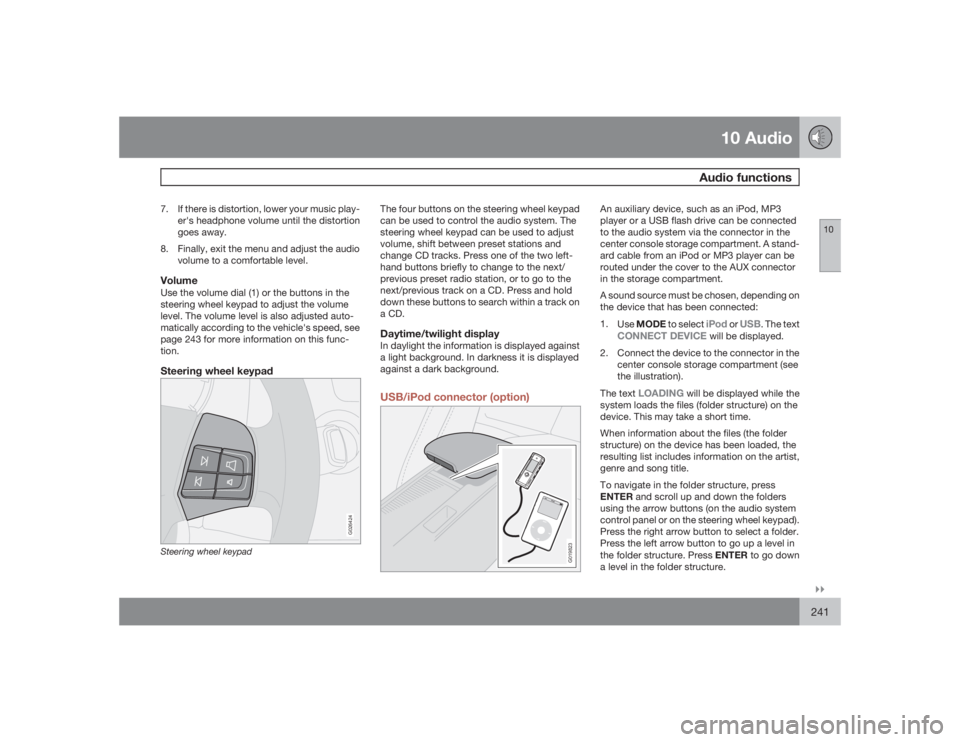
tion.Steering wheel keypad
G026424
Steering wheel keypad
The four buttons on the steering wheel keypad
can be used to control the audio system. The
steering wheel keypad can be used to adjust
volume, shift between preset stations and
change CD tracks. Press one of the two left-
hand buttons briefly to change to the next/
previous preset radio station, or to go to the
next/previous track on a CD. Press and hold
down these buttons to search within a track on
a CD.Daytime/twilight displayIn daylight the information is displayed against
a light background. In darkness it is displayed
against a dark background.USB/iPod connector (option)
G019823
An auxiliary device, such as an iPod, MP3
player or a USB flash drive can be connected
to the audio system via the connector in the
center console storage compartment. A stand-
ard cable from an iPod or MP3 player can be
routed under the cover to the AUX connector
in the storage compartment.
A sound source must be chosen, depending on
the device that has been connected:
1.
UseMODE to select
iPod
or
USB
. The text
CONNECT DEVICE
will be displayed.
2. Connect the device to the connector in the
center console storage compartment (see
the illustration).
The text
LOADING
will be displayed while the
system loads the files (folder structure) on the
device. This may take a short time.
When information about the files (the folder
structure) on the device has been loaded, the
resulting list includes information on the artist,
genre and song title.
To navigate in the folder structure, press
ENTER and scroll up and down the folders
using the arrow buttons (on the audio system
control panel or on the steering wheel keypad).
Press the right arrow button to select a folder.
Press the left arrow button to go up a level in
the folder structure. Press ENTER to go down
a level in the folder structure.
Page 242 of 286
10 AudioAudio functions
10242
Tracks can be selected in two ways:•
Turn the Tuning knob (no. 4 in the illustra-
tion on page 244) clockwise or counter-
clockwise
•
Use the right or left arrow keys on the nav-
igation control (no. 5 in the illustration on
page 244) to select the desired track. The
arrow keys on the steering wheel keypad
can also be used in the same way.NOTE
The system supports playback of files in the
most common versions of formats such as
mp3, wma, and wav. However, there may be
versions of these formats that the system
does not support.USB flash driveTo simplify the use of a USB flash drive, it is
advisable to only store music files on the drive.
It will take considerably longer for the system
to index the files on the drive if it contains any-
thing other than compatible music files.MP3 playerMany mp3 players have a file indexing system
that is not supported by the vehicle's audio
system. In order to use an mp3 player, the sys-
tem must be set to USB Removable device/
Mass Storage Device.
iPodAn iPod receives current and its battery is
charged through the connecting cord. How-
ever, if the iPod's battery is completely
drained, it should be recharged before the iPod
is connected to the audio system.
NOTE
When an iPOD is used as a sound source,
the vehicle's audio system has a menu
structure similar to the one in the iPOD. See
the iPOD's manual for detailed information.For further information, refer to the accessory
manual USB/iPod Music Interface.Sound settingsOptimal sound reproductionThe audio system is calibrated for optimal
sound reproduction through the use of digital
signal processing. This calibration takes into
account the speakers, amplifier, cabin acous-
tics, the seating position of the listener, etc., for
each combination of vehicle and audio system.
There is also dynamic calibration that takes
into account the setting of the volume control,
radio reception, and the vehicle's speed. The
sound settings described in this manual, such
as
BASS
,TREBLE
, and
EQUALIZER
are onlyintended to enable the user to adapt sound
reproduction to his/her personal preferences.
1.
PressSOUND (5). Press this button
repeatedly until you come to the setting
that you wish to change.
2.
Turn the TUNING dial (4) to make the
desired setting.
The following settings can be made:
BASS
–set the bass level
TREBLE
–set the treble level
BALANCE
–set the left/right sound balance
FADER
–set the front/rear sound balance
SUBWOOFER
(accessory)–set the level for
the subwoofer (bass speaker)
CENTER
–make settings for the center speaker
SURROUND
–make settings for surround
sound
Subwoofer (accessory)To switch the subwoofer on or off:
1.
PressMENU followed by ENTER.
2.
Select
AUDIO SETTINGS
and press
ENTER.
3.
Select
SUBWOOFER
and press ENTER.
Page 249 of 286
10 Audio
CD player/CD changer
10``249 CD function controls
G026367
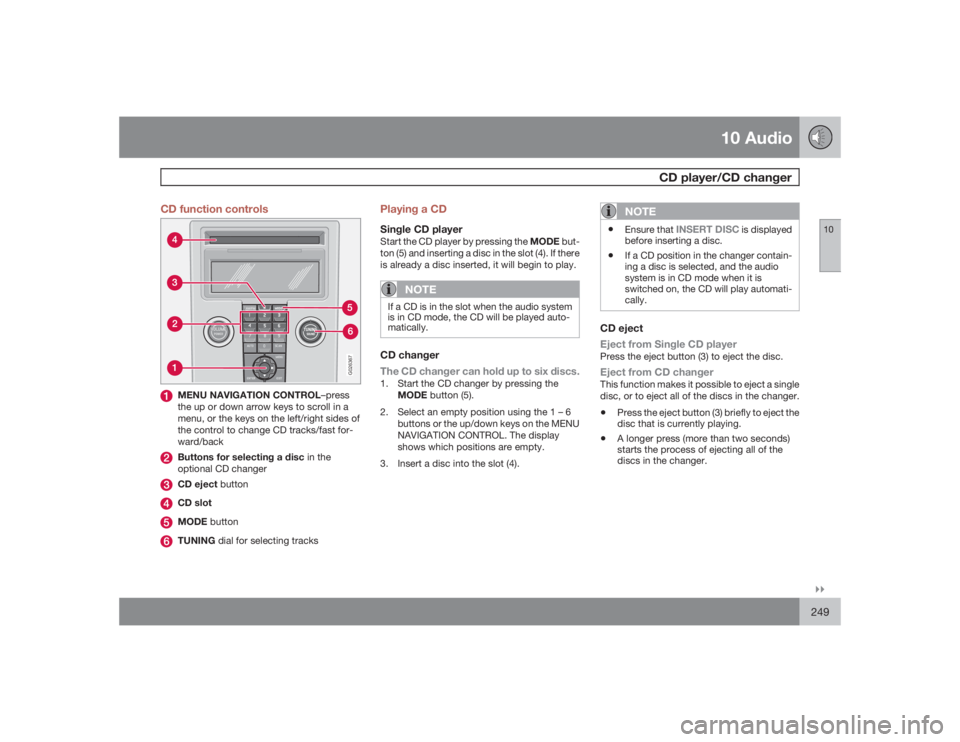
MENU NAVIGATION CONTROL–press
the up or down arrow keys to scroll in a
menu, or the keys on the left/right sides of
the control to change CD tracks/fast for-
ward/backButtons for selecting a disc in the
optional CD changerCD eject buttonCD slotMODE buttonTUNING dial for selecting tracks
Playing a CDSingle CD playerStart the CD player by pressing the MODE but-
ton (5) and inserting a disc in the slot (4). If there
is already a disc inserted, it will begin to play.
NOTE
If a CD is in the slot when the audio system
is in CD mode, the CD will be played auto-
matically.CD changer
The CD changer can hold up to six discs.1. Start the CD changer by pressing the
MODE button (5).
2. Select an empty position using the 1 – 6
buttons or the up/down keys on the MENU
NAVIGATION CONTROL. The display
shows which positions are empty.
3. Insert a disc into the slot (4).
NOTE
•
Ensure that
INSERT DISC
is displayed
before inserting a disc.
•
If a CD position in the changer contain-
ing a disc is selected, and the audio
system is in CD mode when it is
switched on, the CD will play automati-
cally.
CD eject
Eject from Single CD playerPress the eject button (3) to eject the disc.Eject from CD changerThis function makes it possible to eject a single
disc, or to eject all of the discs in the changer.•
Press the eject button (3) briefly to eject the
disc that is currently playing.
•
A longer press (more than two seconds)
starts the process of ejecting all of the
discs in the changer.
Page 250 of 286
10 AudioCD player/CD changer
10250
NOTE
•
The EJECT ALL function can only be
used while the vehicle is at a standstill
and will be cancelled if the vehicle
begins to move.
•
For reasons of traffic safety, the ejected
CD must be removed within 12 seconds
or it will be automatically drawn back
into the slot and the CD player will enter
pause mode. Press the CD button to
restart the disc.
CD PauseWhen the audio system volume is turned off
completely, the CD player will pause and will
resume playing when the volume is turned up
again.Audio filesIn addition to playing normal music CDs, the
CD player/changer can also play discs con-
taining files in mp3 or wma format.
NOTE
Certain discs that are copy protected can-
not be read by the player.When a disc with audio files is inserted in the
player, the player scans the disc's folders
before it begins playing the files. The length oftime that this takes depends on the quality of
the disc.
Navigating the disc and playing tracksIf a disc with audio files is in the CD player,
pressENTER to display a list of folders on the
disc.
Use the up and down arrows in the navigation
control (see the illustration on page 249) to
move among the folders on the disc. Audio files
have the
symbol and folders containing
these files have the
symbol. Press
ENTER to play a selected folder or a file.
When the music file has been played, the
player will continue to play the rest of the files
in the current folder. When all of the files in the
folder have been played, the player will auto-
matically go to the next folder and play the files
in it.
Press the left or right arrow key on the naviga-
tion control if the entire name of the current
track does not fit in the display.
Changing tracksBriefly press the left or right arrow keys on the
MENU NAVIGATION CONTROL to skip to the
previous or next track/file.
NOTE
TheTUNING dial (6) (turn clockwise to go to
the next track/file, or counterclockwise to
go to the previous track/file) or the steering
wheel keypad can also be used for this pur-
pose.Fast forward/backPress and hold down the left or right arrows
keys in the MENU NAVIGATION CONTROL (or
the corresponding keys on the optional steer-
ing wheel keypad) to search within a track/file
or the whole disc. The search continues for as
long as the buttons are held down.Random playThis function plays the tracks/files on a CD (or
on all of the CDs if the vehicle is equipped with
the optional CD changer) in random order
(shuffle).Activating/deactivating the random
function-CD player
If a normal CD is being played:1.
PressMENU followed by ENTER.
2.
Select Random and press ENTER.If a CD with audio files is being played:1.
PressMENU followed by ENTER.
2.
Select
Random
and press ENTER.
Page 251 of 286
10 Audio
CD player/CD changer
10``251
3.
Select
Disc
or
Folder
and press ENTER.
Activating/deactivating the random
function-CD changer
If a normal CD is being played:1.
PressMENU followed by ENTER.
2.
Select
Random
and press ENTER.
3.
Select
Single disc
or
All discs
and press
ENTER.
If a CD with audio files is being played:1.
PressMENU followed by ENTER.
2.
Select
Random
and press ENTER.
3.
Select
Single disc
or
Folder
and press
ENTER.
NOTE
CD changer only–you can only select the
next random track/file on the current disc.Press the EXIT button to stop random play.
The random function is automatically deacti-
vated when another disc is selected.Disc text (CD changer only)Certain CDs contain information about the
disc, such as the titles of the tracks, etc. This
information can be shown in the display by
activating the DISC TEXT function.1.
PressMENU. Select the menu for relevant
sound source and press ENTER.
2.
Select
Disc text
in the menu and press
ENTER.
> If information is stored on the disc, it will
now appear in the display.
To deactivate this function, select
Disc text
in
the menu and press ENTER.
ScanThis function plays the first 10 seconds of each
track/file on the CD.•
PressSCAN.
•
PressEXIT or SCAN to stop the scan func-
tion and listen to an entire track/file.
CD eject
Single CD playerPress the eject button (3) to eject the disc.CD changerThis function makes it possible to eject a single
disc, or to eject all of the discs in the changer.•
Press the eject button (3) briefly to eject the
disc that is currently playing.
•
A longer press (more than two seconds)
starts the process of ejecting all of the
discs in the changer.
NOTE
•
The Eject all function can only be used
while the vehicle is at a standstill and will
be cancelled if the vehicle begins to
move.
•
For reasons of traffic safety, the ejected
CD must be removed within 12 seconds
or it will be automatically drawn back
into the slot and the CD player will enter
pause mode. Press the CD button to
restart the disc.
Compact disc careKeep the following in mind when playing/han-
dling compact discs•
Do not put tape or labels on the disc itself.
They could become stuck in the player.
•
CDR discs can cause listening problems
due to the quality of the disc or recording
equipment used.
•
DualDisc: The audio side of a DualDisc
(combined CD/DVD) does not meet CD
specifications and may not play in your
audio system.
•
Keep the discs clean. Wipe them with a
soft, clean, lint-free cloth, working from the
center outward. If necessary, dampen the
cloth with a neutral soap solution. Dry thor-
oughly before using.
Page 252 of 286
10 AudioCD player/CD changer
10252
•
Never use cleaning spray or antistatic liq-
uid. Use only cleaners specifically made for
CDs.
•
Use discs of the correct size only (3.5"
discs should never be used).
•
Volvo does not recommend the use of
plastic outer rings on the disc.
•
Condensation may occur on discs/optical
components of the changer in cold winter
weather. The disc can be dried with a
clean, lint-free cloth. Optical components
in the CD changer may, however, take up
to one hour to dry off.
•
Never attempt to play a damaged CD.
•
When not in use, the discs should be
stored in their covers. Avoid storing discs
in excessive heat, direct sunlight or in
dusty locations.
Page 276 of 286
12 Index
12276
1, 2, 3 ...12-volt sockets.......................................... 62AA/C (air conditioning)................................. 92
ABS (anti-lock brake system).................. 153
Active Bi-Xenon headlights........................ 63
Airbags
front...................................................... 22
inflatable curtain................................... 30
side impact........................................... 29
Airbag system............................................ 22
Air conditioning.......................................... 92
Air distribution table................................. 101
Air vents..................................................... 94
Alarm system........................................... 130
turning off sensors.............................. 131
All Wheel Drive......................................... 152
Anti-lock Brake System (ABS)................. 153
Approach lighting....................................... 84
Audio files................................................ 250Audio system
audio functions................................... 240
automatic sound control..................... 243
AUX port............................................. 240
CD changer......................................... 249
CD player/changer.............................. 249
compact disc care.............................. 251
Dolby Surround Pro Logic II............... 243
equalizer............................................. 243
menu settings..................................... 253
radio functions.................................... 244
selecting a sound source.................... 240
Sirius satellite radio............................ 245
sound settings.................................... 242
steering wheel keypad........................ 241
storing radio stations.......................... 244
subwoofer...........................................242
USB/iPOD connector.......................... 241
Auto-dim rearview mirror........................... 78
Autolock..................................................... 83
Automatic locking retractor....................... 36
Automatic sound control.........................243
Automatic transmission........................... 149
kickdown............................................ 150
oil........................................................ 267
shiftlock override................................ 151
Automatic transmission - Geartronic....... 150AUX port.................................................. 240
Axle weight......................................183, 265
BBackrest, rear seat, folding...................... 113
Bass......................................................... 242
Battery
maintenance....................................... 221
remote control, replacing................... 120
specifications...................................... 272
warning symbols................................. 221
Battery – replacing................................... 221
Bi-Xenon headlights.................................. 63
Black Box (Vehicle Event Data)............... 210
Blind Spot Information System (BLIS)..... 164
Booster cushion
accessory............................................. 42
Brake fluid........................................ 219, 267
Brake lights................................................ 64
Brake system
anti-lock brakes (ABS)........................ 153
emergency brake assistance.............. 154